light AUDI S5 COUPE 2016 Workshop Manual
[x] Cancel search | Manufacturer: AUDI, Model Year: 2016, Model line: S5 COUPE, Model: AUDI S5 COUPE 2016Pages: 264, PDF Size: 66.92 MB
Page 90 of 264
Automatic transmission
Press the brake pedal and se lec t the desired se
lecto r lever positio n again. You can then continue
driving .
rm Transmission overheating: Please drive con
servatively .
The transm ission tempe rature has increased s ig
n ifi cant ly due to the spo rty dr ivin g manne r. Dr ive
i n a less sporty m anner until the temperature re
turns to the normal range and the indicator light
switches of.
rm Transmission malfunction: You can continue
driving
There is a system malfunct io n in the t rans mis
sion . Yo u may continue dr iving . Dr ive to your au
t hor ized Audi dea ler or qu alified rep air facilit y
soon to have t he malfunc tion cor rec ted .
rm Transmission malfunction: limited driving
functionality
There is a system malfunct io n in the transm is
sion . T he transmission is sw itchi ng to emergency
mode . This mode only shifts in to certai n gea rs o r
w ill no longer shift at all. The engine may s tall.
D rive to yo ur author ized Aud i dea le r o r q ualified
repair fac ility immediately to have the malfunc
tion corrected.
l'§J Iii Transmission malfunction: No reverse
You can continue driving
S tron ic tra nsmission: There is a system malfunc
tion in th e tra nsmission . The t ransmiss io n is
sw itching to emergency mode. This m ode only
shifts in to cer tain gears or will no longer sh ift at
al l. The eng ine may st all. You canno t engage the
reverse gear. Drive to your authorized A udi dealer
or qualified repair facility immediate ly to have
the ma lfunction co rrected.
rm Transmission malfunction: Stop vehicle and
shift to park .
Do not cont inue d riving. Select the P se lector lev
er pos ition and see yo ur author ized Aud i de aler
or qu alified rep air facility for assis tance .
(D Note
If the tra ns missi on switches to emergency
m ode, you s ho uld t ake the veh icle to a n au-
88
thorized Audi dea lership a s soon as possible
to have the condition corrected .
Selector lever emergency release
Applies to vehicles: with S tronic/tiptronic
I f the vehicle's power supply fail s, the sele ctor
lever con be released in on emergency.
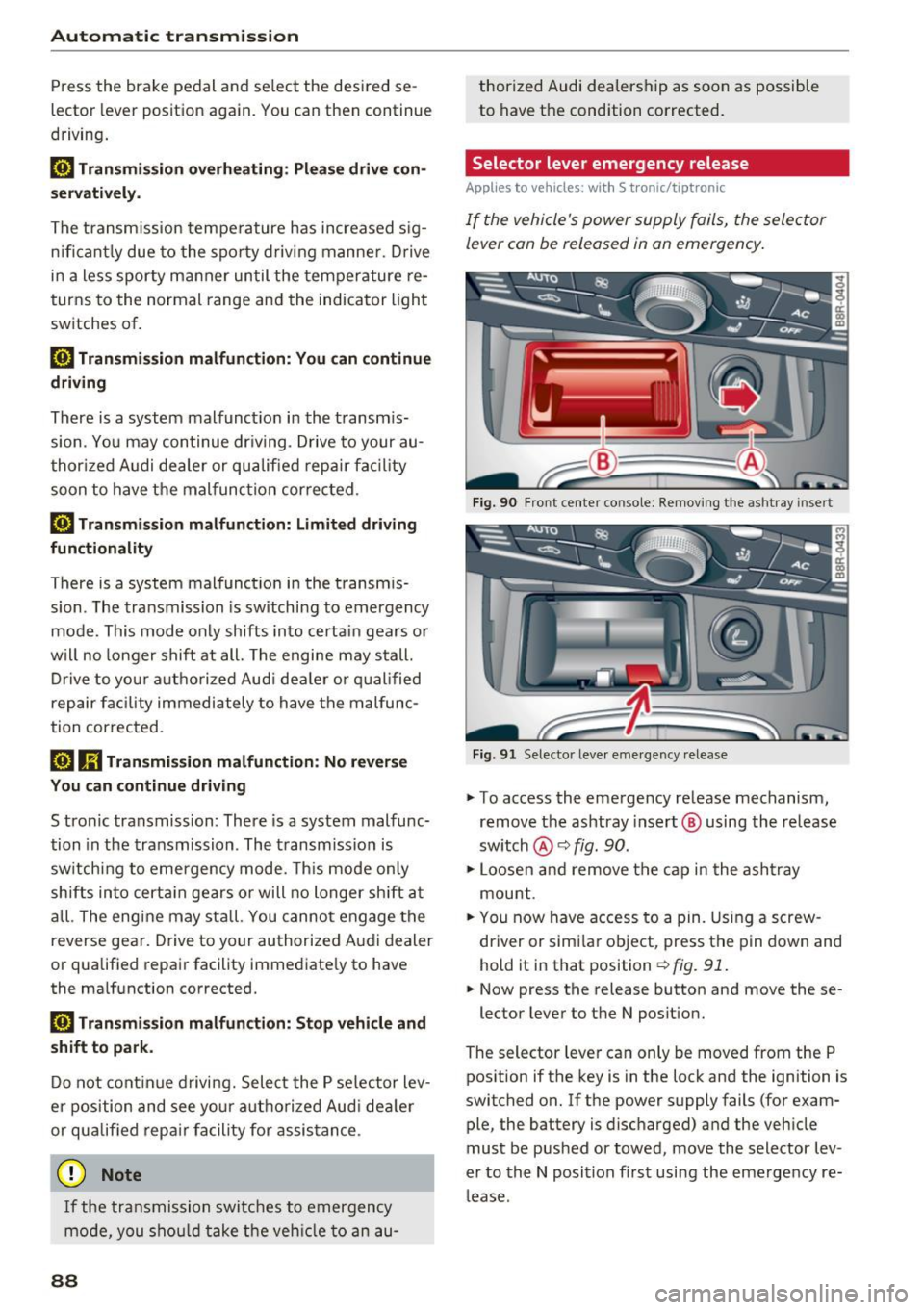
Fi g. 90 Fro nt ce nter co nso le: Re mov ing the as htr ay i nse rt
F ig . 91 Selector leve r em ergency release
"" To access the emergency re lease mechanism,
remov e the ashtray insert @ using th e release
sw itch @¢
fig. 90.
""Loosen and rem ove the ca p in t he a sh tra y
mou nt.
"" You now have access to a pin. Using a screw
driver or simi la r object, press t he p in down and
hold it in that position ¢
fig. 91.
"" Now press the release button and move these-
lector lever to the N posit ion.
The selector leve r ca n only be moved from the P
pos ition if the key is in the lock and the ignition is
switched on . If the power supply fails (for exam
ple, the battery is disc harged) and the veh icle
must be pushed or towed, move the selector lev
er to the N position fi rst usi ng the emergency re
l ease .
Page 94 of 264
Audi adaptive cruise control and braking guard
You can set any speed between 20 mph and 95
mph (30 and 150 km/h).
I ndicator lamps and messages in the instrument
cluster display inform you about the current sys
tem status and settings.
Switching Audi adaptive cruise control on
• Pull the lever toward you into position @
¢
fig. 96. ACC standby appears in the instru
ment cluster d isplay.
Setting the speed and activating regulation
• To set the current speed, press the !SETI button
¢ page 11, fig. 4. The set speed is shown in the
tachometer @ and is also shown briefly in the
display @¢
fig. 97.
Switching Audi adaptive cruise control off
• Push the lever away from you into position @
until it clicks into place . The message
ACC off
appears.
@ Indicator lights
II-Adaptive cruise control is switched on. No
vehicles are detected up ahead. The stored speed
is mainta ined .
• -A moving vehicle is detected up ahead . The
adapt ive cruise control system regulates the
speed and distance to the moving vehicle ahead
and accelerates/brakes automatically .
• -When automatic braking is not able to keep
enough d istance to a previously detected moving
vehicle up ahead, you must take control and
brake
c> page 94 , Request for driver interven
tion .
© Display
If adaptive cruise contro l is not shown in the dis
p lay, you can call it up with the
IRESETI button
c>page23.
Based on the symbo ls in the display, you can de
termine if the system is maintaining a distance to
the vehicle ahead and what that distance is .
No vehicle -No vehicle ahead was detected .
White vehicle -A vehicle ahead was detected.
92
Red vehicle -Prompt for the driver to take action
c>page 94.
Both arrows on the scale© indicate the distance
to the vehicle ahead. No arrow appears when the
vehicle is on an open road and there is no object
ahead. If an object is detected ahead, the arrow
moves on the scale .
The green zone on the scale shows the stored dis
tance . For information on changing the stored
distance, refer tor:!;>
page 93 . If the distance se
lected is too close or may soon become too close,
the arrows move into the red zone on the scale.
A WARNING
Improper use of the adaptive cruise control
can cause collisions, other accidents and seri
ous personal injuries.
- Press ing the
!SETI button when dr iving at
speeds below 20 mph (30 km/h), will auto
mat ica lly acce le rate the veh icle to 20 mph
(30 km/h), which is the minimum speed
that can be set.
(}) Tips
-If you switch the ign it ion or the adaptive
cruise control off, the set speed is erased
from the system memory.
- The electronic stabilization control (ESC)
and the anti-slip-regulation (ASR) are auto
matically turned on when the adaptive
cruise control is turned on . Both systems
cannot be turned off if the adaptive cruise
control is turned on.
Changing the speed
Applies to veh icles: wit h Aud i adapt ive c ru ise control
0
f
jJ
0
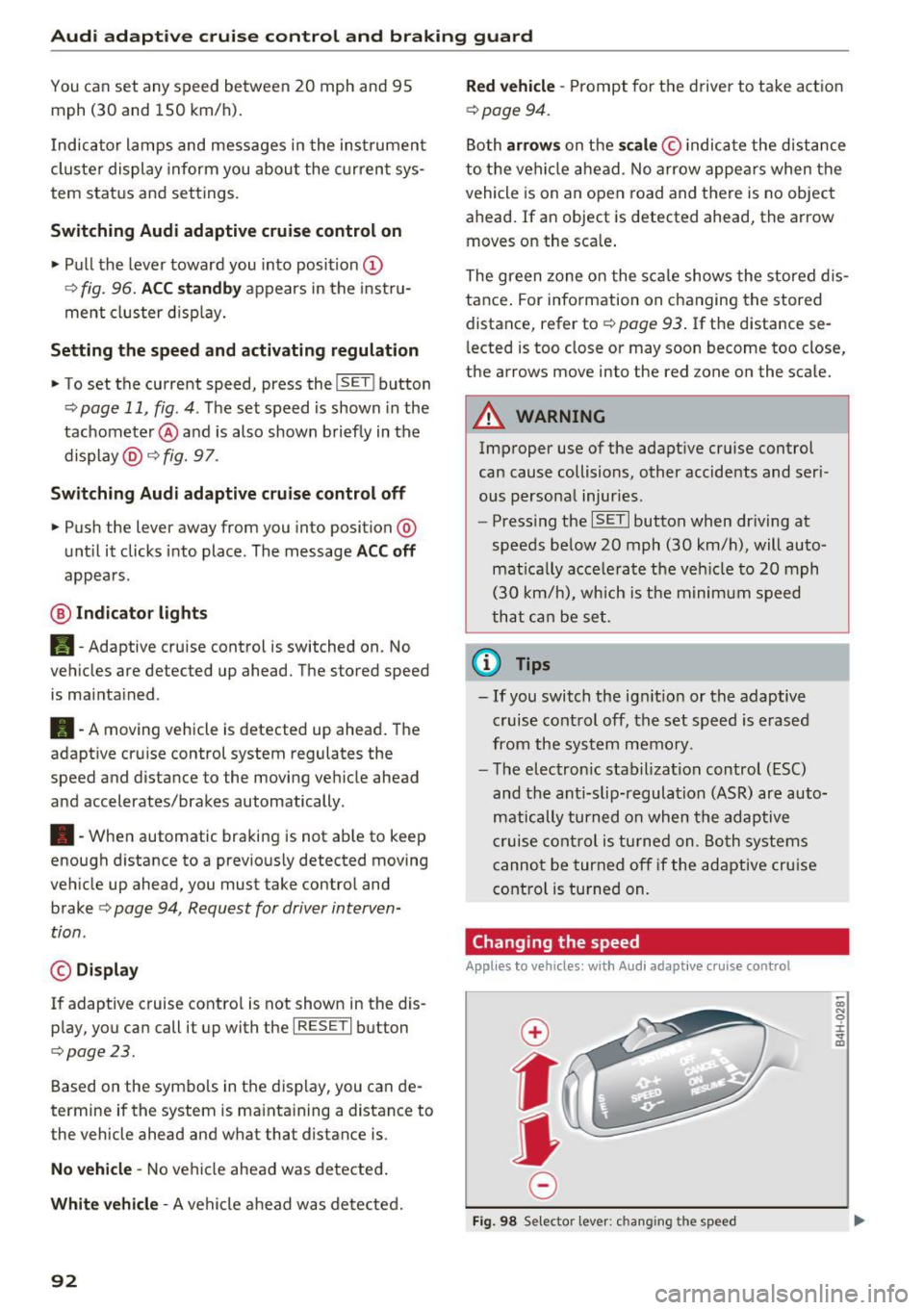
Fig. 98 Selector lever: c hang ing the speed
co N 0 :i: .., m
Page 96 of 264
Audi adaptive cruise control and braking guard
c:::::, ___ c:::::,_ Distance 3 : This setting corresponds
to a distance of 164 feet/SO mete rs when trave l
ing at 62 mph (100 km/h), or a time interval of 1.8 seconds .
c:::::, ____ c:::::, Distance 4 : This setting corresponds
to a distance of 210 feet/64 meters when trave l
ing at 62 mph (100 km/h), or a time interval of
2 .3 seconds .
_&. WARNING
Following ot her vehicles too closely increases
the risk of collisions and ser ious personal in
jury.
- Setting short distances to the traffic ahead
reduces the t ime and distance ava ilable to
br ing your vehicle to a safe sto p an d makes
i t eve n mo re necessary to pay close atten
t ion t o traffic.
- Always obey applicable traffic laws, use
g ood ju dgment, and select a safe f ollow ing
di st ance f or th e tra ffic, road and we athe r
c ondition s.
¢j) Tips
- Distance 3
is set au tomati cally e ach time
yo u sw itch th e ig nit io n o n.
- Y our sta ndard setti ngs a re a uto mat ica lly
stor ed and as signed to th e re m ote contro l
k ey be ing used .
Setting the driving program
Applies to vehicles: with Audi adaptive cruise control
Depending on t he se lec ted dr iv ing program and
d istance, dr iv ing behavior whe n accelerating wi ll
vary from dynamic to comfo rtable.
Setting the driving program for vehicles
without Audi drive select*
~ In the radio/ MM!*, selec t: !CARI function but
ton
> Adaptive c ru ise control > Driving prog. >
comfort , standard or dynamic . Or
~ Select : I CARI funct ion button > Car systems*
contro l butto n > Driver assist > Adaptive cruise
contro l> Driving program*
> Comfort, Stand
ard
o r Dynamic .
94
Setting the driving mode for vehicles with
Audi drive select*
Refer to ¢page 103 .
(D Tips
Your settings are automatically store d and as
signed to t he remote contro l key being used.
Request for driver intervention
Applies to vehicles: with Audi adaptive cruise control
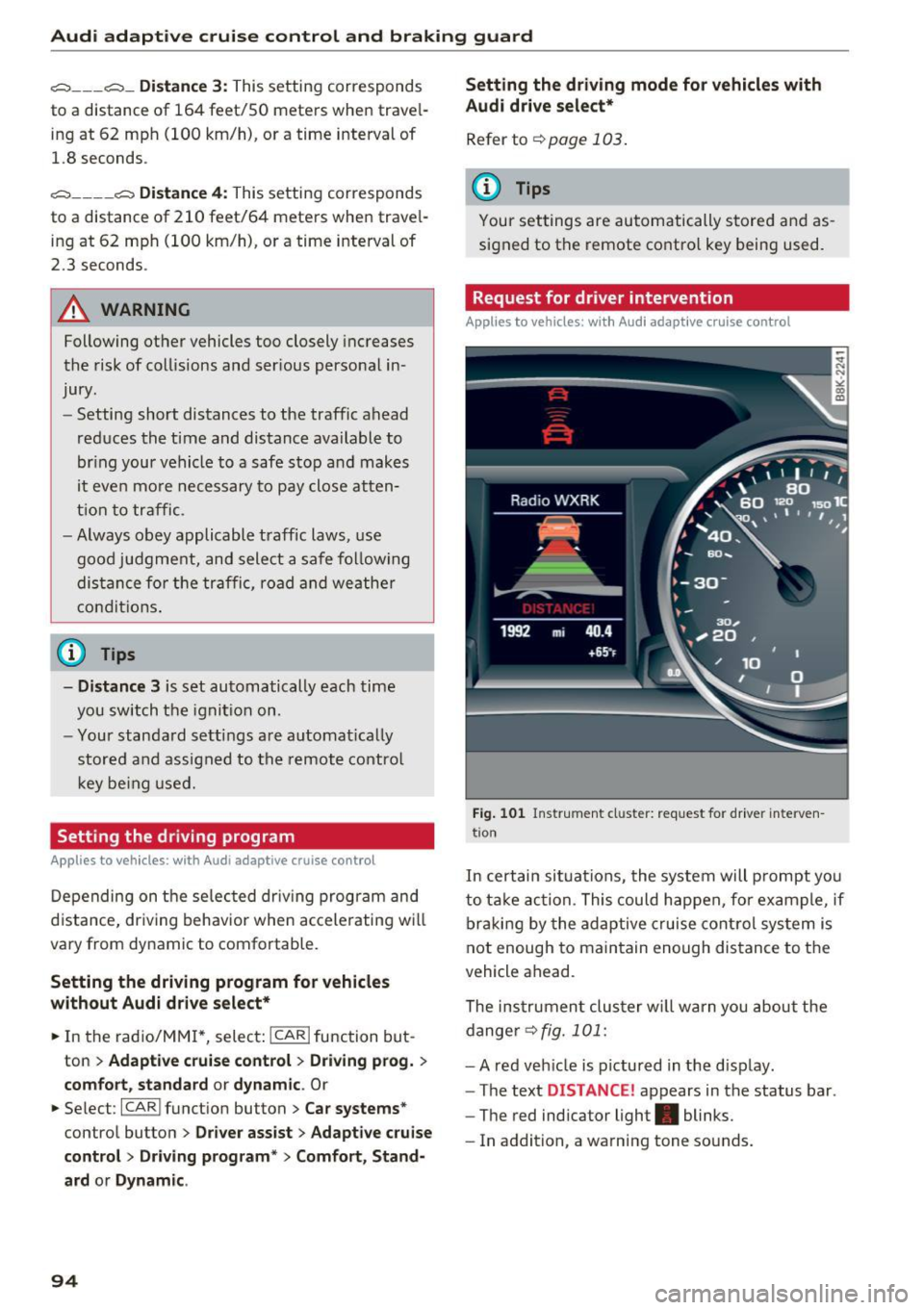
Fig. 101 In str um en t cl uster: req uest for dr ive r interve n
t io n
In cert ain sit uations, the system will p rompt yo u
to ta ke action. Thi s c ould hap pen, for ex ample, if
b rak in g by the adaptive cruise cont rol sys tem is
not enough to main tain enou gh dis tance to t he
vehicle ahead.
The ins trumen t clus ter w ill warn you about the
dange r
¢fig. 101:
- A red veh icle is pictured in the d isplay .
- The text
DISTANCE! appears in the status bar .
- The red indicator light . blinks.
- In addition, a wa rn in g tone so unds .
Page 97 of 264
Audi adaptive cruise control and braking guard
Audi braking guard
Description
Applies to vehicles: with Audi adaptive cruise co ntro l
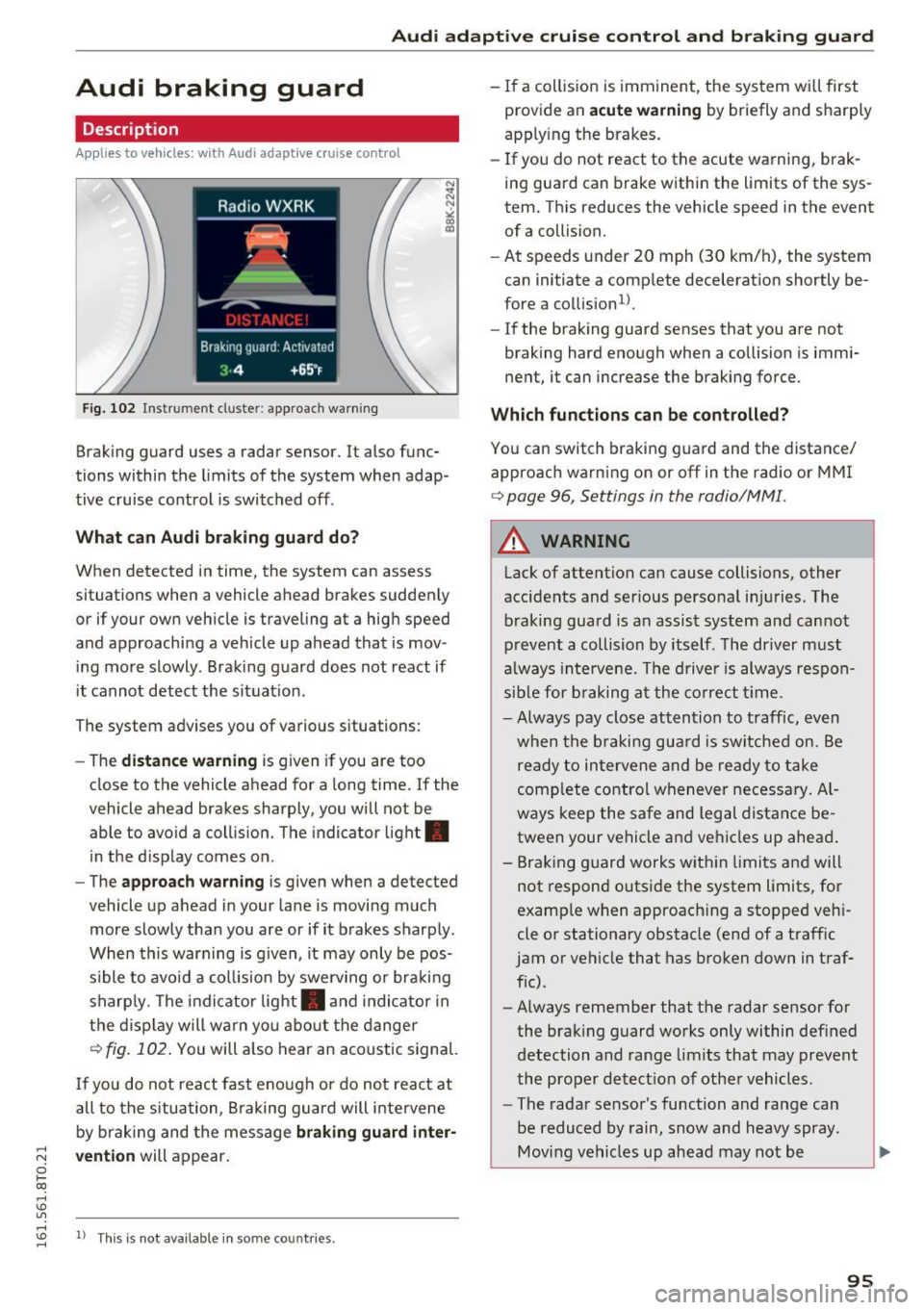
Fig. 102 Instrument cluste r: approach warning
Braking guard uses a radar sensor. It also func
tions within the limits of the system when adap
tive cruise control is switched off .
What can Audi braking guard do?
When detected in time, the system can assess
situations when a vehicle ahead brakes suddenly
or if your own vehicle is traveling at a high speed
and approaching a vehicle up ahead that is mov
ing more slowly . Braking guard does not react if
it cannot detect the situat ion.
The system advises you of various situations:
- The
distance warning is given if you are too
close to the vehicle ahead for a long time. If the
vehicle ahead brakes sharply, you will not be
able to avoid a collision. The indicator light .
in the display comes on.
- The
approach warning is given when a detected
vehicle up ahead in your lane is moving much
more slowly than you are or if it brakes sharply .
When this warning is g iven, it may only be pos
s ib le to avoid a collision by swerving or brak ing
sharply. The indicator light . and indicator in
the display will warn you about the danger
¢ fig. 102 . You will also hear an acoustic signal.
If you do not react fast enough or do not react at
all to the situation, Braking guard will intervene
by braking and the message
braking guard inter-
;::; vention
will appear.
0 l-ex)
rl I.Cl U'"I
rl
"' 1> Th
is is not availab le in some co untries. rl
-If a collision is imminent, the system wi ll first
provide an
acute warning by briefly and sharply
apply ing the brakes.
- If you do not react to the acute warning, brak
ing guard can brake within the limits of the sys
tem. This reduces the vehicle speed in the event of a collision.
- At speeds under 20 mph (30 km/h), the system
can initiate a comp lete decelerat ion shortly be
fore a collision
ll.
- If the braking guard senses that you are not
braking hard enough when a collision is immi
nent, it can increase the braking force .
Which functions can be controlled?
You can switch braking guard and the distance/
approach warn ing on or off in the radio or MMI
¢ page 96, Settings in the radio/MM! .
A WARNING
-
Lack of attention can cause collisions, other
accidents and ser ious personal in juries. The
braking guard is an assist system and cannot
prevent a collision by itself. The driver must
always intervene. The driver is always respon
sible for braking at the correct tim e.
- Always pay close attention to traffic, even
when the braking guard is switched on. Be
ready to intervene and be ready to take
comp lete control whenever necessary. Al
ways keep the safe and legal distance be
tween your vehicle and vehicles up ahead .
- Braking guard works within limits and will
not respond outside the system limits, for
examp le when approaching a stopped veh i
cle or stationary obstacle (end of a traff ic
jam or vehicle that has broken down in traf
fic).
- Always remember that the radar sensor for
the braking guard works only within def ined
detection and range limits that may prevent
the proper detect ion of other vehicles.
- The radar sensor's function and range can
be reduced by rain, snow and heavy spray.
Moving vehicles up ahead may not be
,.
95
Page 109 of 264
,-1 N
0 1-CX)
,-1 I.Cl U"I
,-1 I.Cl ......
The rear acoustic park assist system is integrated in the rear of the vehicle and the rear view cam
era is integrated in the rear lid~
page 108 .
.&_ WARNING
-
- The rear view camera has blind spots, in
which objects cannot be detected. Be espec ially careful to check for small ch ildren and
animals before back ing up. Small children
and animals wi ll not a lways be detected by
the sensors.
General Information
App lies to vehicles: with parking system (rear, with rear view
camera)
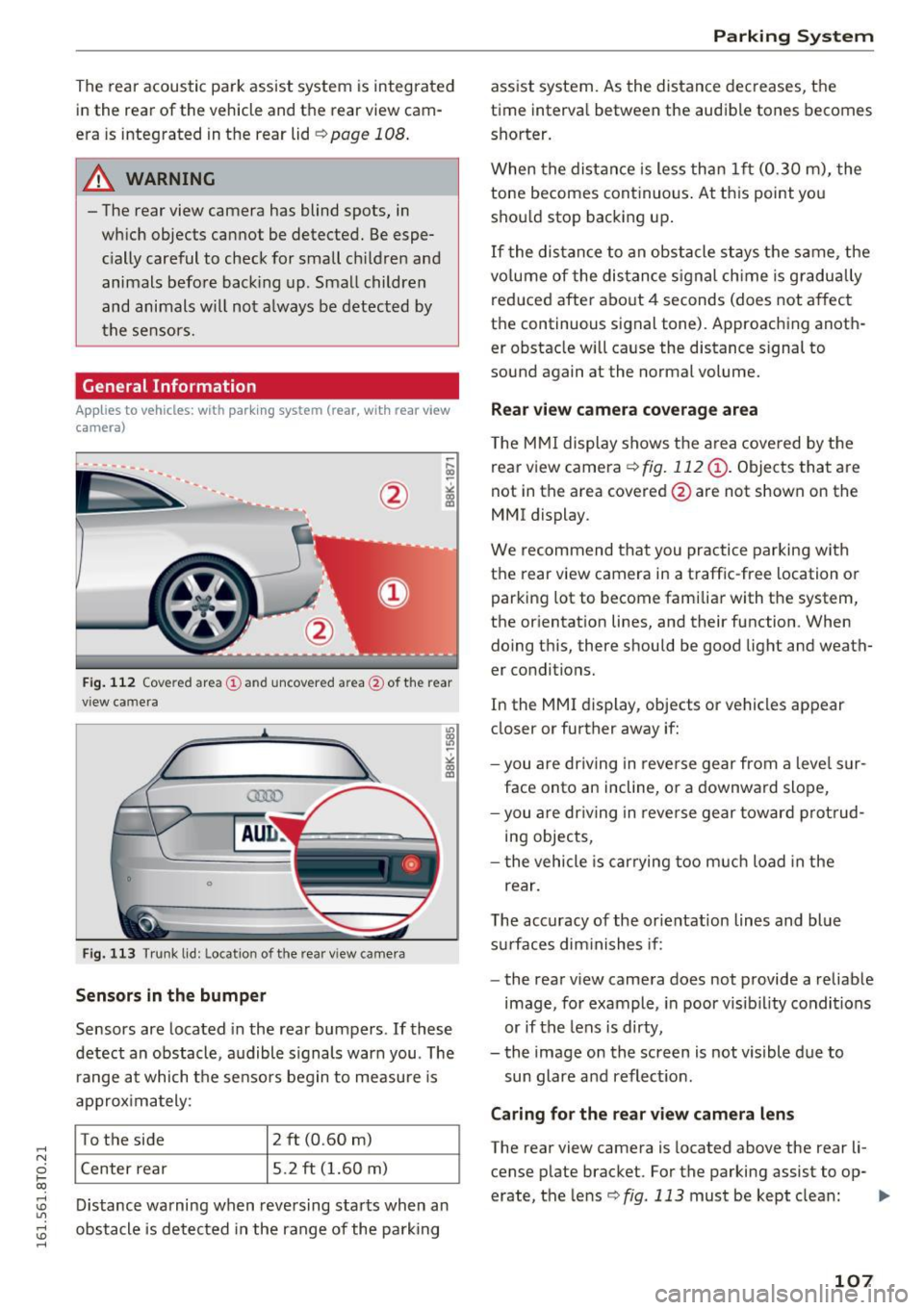
F ig . 112 Cove red area (D and uncovered area@of the rear
v iew camera
0
0
Fig. 113 T runk lid: Locat ion of the rear view came ra
Sensors in the bumper
Sensors are located in the rear bumpers . If these
detect an obstacle, audible s ignals war n you. The
r ange at which the se nsors begin to measure is
a pprox imately:
To the side 2 ft (0.60 m)
Center rear 5.2
ft (1.60 m)
D istance warning when reversing sta rts when an
obstacle is detected in the range of the parking
Parking S ystem
ass ist system. As the distance dec reases, the
time interva l between the audible tones becomes
shorter.
When the distan ce is less than 1 ft (0.30 m), the
tone becomes cont inuous . At th is point you
shou ld stop backing up .
If the distance to an obstacle stays the same, the
vo lume of the dis tance signal ch ime is gr adually
reduced after abo ut
4 seconds (does not affect
the continuous signal tone). Approaching anoth er obstacle w ill ca use the distance s ignal to
sound again at the normal volume.
Rear view camera co verag e ar ea
The M MI display shows the a rea cove red by the
rea r view camera ¢
fig. 112 @. Objects that are
not in the area covered @are not shown on the
MMI display.
We recommend that you practice parking with
the rear view camera in a traffic-free location o r
parking lot to become fami lia r with the system,
the or ientat ion lines, and their function . When
doing t his, there shou ld be good light and weath
er conditions.
In the MMI display, objects or vehicles appear
closer or further away if:
- you a re dr iv ing in reve rse gear from a leve l su r
face onto an incline, or a downward slope,
- you are dr iving in reve rse gear toward p ro tr ud
ing objects,
- t he vehicle is car rying too m uch load in the
rear.
T he accuracy of the orientat ion lines and bl ue
s ur faces dim inishes if:
- the rear v iew camera does not provide a reliab le
image, fo r example, in poor visib il ity condi tions
or if the lens is dirty,
- the image on the screen is not visible due to
sun glare and reflect ion .
Caring for the rear v iew camera len s
The rear view camera is located above the rear li
cense p late bracket. For the parking assist to op-
erate, the lens ¢
fig. 113 must be kept clean: liJJ>
107
Page 114 of 264
Driving sa fe ty
Driving safety
Basics
Safe driving habits
Please remember -safe ty first!
This chapter contains important information,
tips, instruct ions and warn ings that you need to
read and observe for your own safety, the safety
of your passengers and others. We have summar ized here what you need to know about safety
be lts, a irbags, child restra ints as well as child
safety. Your safety is for us
priority number 1 . Al
ways observe the i nfo rmation and wa rn ings in
this section - for your own safety as well as that
of your passengers.
The information i n this section applies to all
model versions of yo ur vehicle . Some of the fea
tures descr ibed in t his sections may be s tanda rd
equipment on some models, or may be optional
equipment on others . If you are not sure, ask
your authorized Audi dealer.
A WARNING
- Always make sure that you follow the in
structions and heed the WARNINGS in th is
Manual.
It is in your interest and in the in
te rest of your passengers .
- Always keep the comp lete Owner's Litera
ture in your A udi when you lend or sell your
vehicle so that this important information
will always be available to the d river and
passenge rs.
- Always keep the Owner 's literature handy so
t h at you ca n find it easily if you have ques
t ions.
Safety equipment
The safety features are part of the occupant re
straint system and work together to help reduce the risk of injury in a wide variety of occident si t
uations.
Your safety and the safety of your passenge rs
should not be left to chance. Advan ces i n tech
nology have made a var iety of features avai lab le
to help reduce t he risk of injury in an accident .
112
The following is a list of just a few of the sa fety
features in your Audi :
- sophis tica ted safety be lts fo r dr ive r and all pas-
senge r seat ing pos itions,
- belt fo rce limi ters for the front seats,
- be lt pretensione rs fo r the seats,
- head restraints for each seating position,
- front airbags,
- side airbags in the front seats,
- side curtain airbags,
- special LATCH anchorages fo r ch ild rest rai nts,
- adj ustab le steer ing column.
T hese ind iv idual safety features, can work to
gether as a system to help protect you and your
passengers i n a wide range of acc idents . These
features canno t wo rk as a system if they are not
always correc tly adj uste d and correct ly used.
Safety i s everybody' s responsibil ity!
Important things to do before driving
Safety is everybody 's job! Vehicle and occupant
safety always depends on the inform ed and care
ful driver .
For your safety and the safety of your passen
gers,
before dri ving always:
.. Make sure that a ll lights and signals are operat
ing correctly .
.. Make sure that the tire pressure is correct.
.. Make sure that all windows are clean and afford
good vis ibility to the outs ide .
.,. Secu re all luggage and othe r items carefully
~page 60.
.,. Mak e sure th at noth ing c an interfere wi th the
pedals .
.. Adjust front seat, head restraint and mirrors
correctly for your height.
.. Instruct rear seat passengers to adj ust the
head restraints according to their he ight.
.. Make sure to use the rig ht child restraint cor
rectly to protect children
c:> page 151, Child
safety .
.. Si t proper ly in yo ur seat a nd make sure t hat
your passenge rs do the same
~ page 54, Seats
and storage.
Page 115 of 264
..... N
0 1-CX)
rl I.Cl U"I
..... I.Cl ......
.. Fasten your safety be lt and wea r it properly. Al
so instruct your passengers to fasten their safe
ty belts properly ¢
page 121.
What impairs driving safety?
Safe driving is directly related to the condition of
the vehicle, the driver as well as the driver's abili
ty to concentrate on the road without being dis
tracted.
The driver is responsible for the safety of the ve
h icle and all of its occupants . If your ability to
drive is impaired, safety risks for everybody in the
veh icle increase and you also become a hazard to
eve ryone else on the road ¢,&. .Therefore :
.. Do not let yourself be distracted by passengers
or by using a cellular te lephone .
.. NEVER drive when your driv ing ability is im
paired (by medications, alcohol, drugs, etc .).
.. Observe a ll traffic laws, ru les of the road and
speed limits and plain common sense.
.. ALWAYS adjust you r speed to road, traffic and
weather cond itions.
.. Take frequent breaks on long trips. Do not drive
for more than two hours at a stretch .
.. Do NOT drive when you are tired, under pres
sure or when you are stressed.
A WARNING
Impaired dr iv ing safety increases the risk of
ser ious personal injury and death whenever a
vehicle is being used.
Dr iving safety
Correct passenger
seating positions
Proper seating position for the driver
The proper driver seating position is important
for safe, relaxed driving.
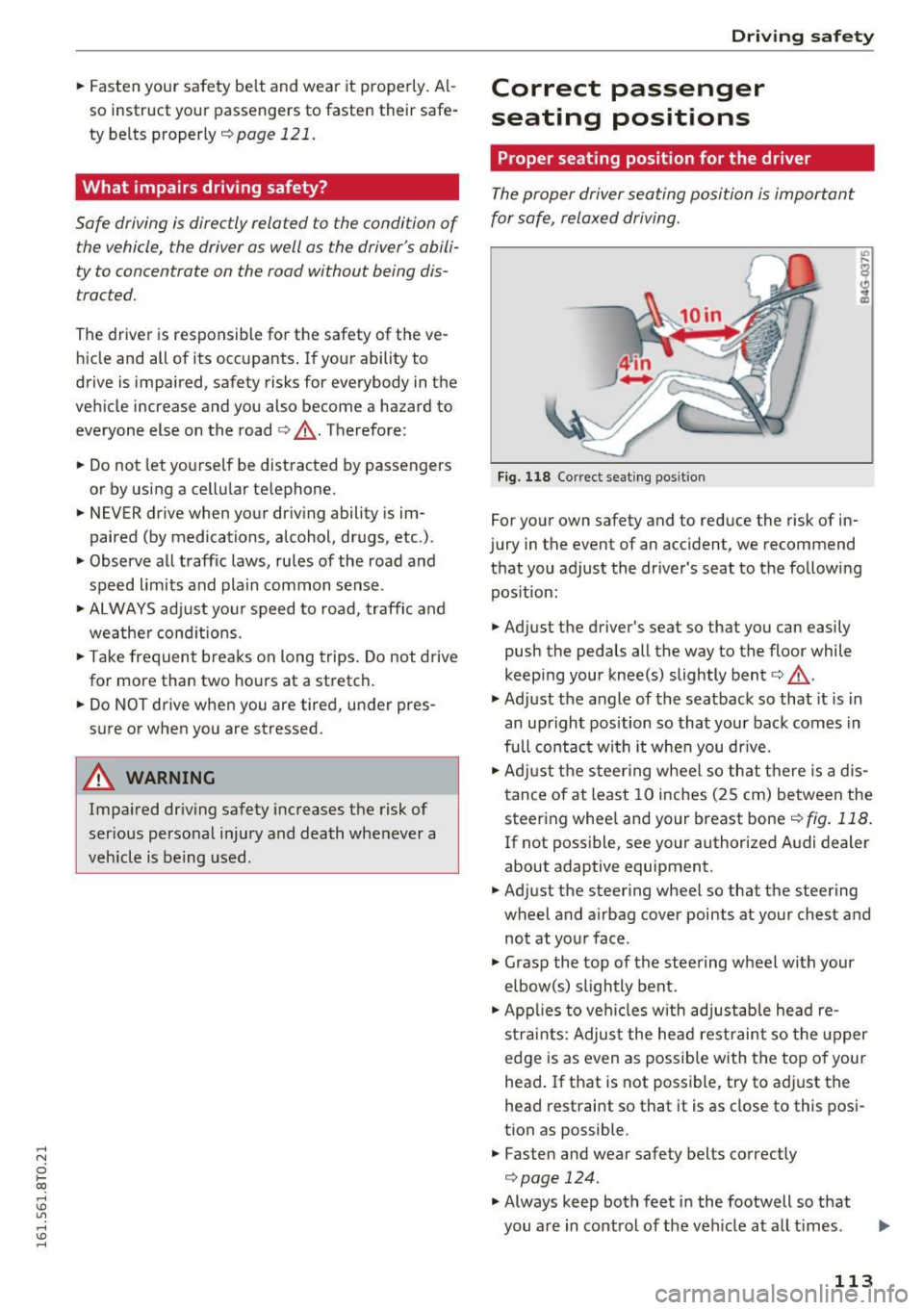
F ig. 118 Co rrect seating pos it ion
For your own safety and to reduce the risk of in
jury in the event of an accident, we recommend
that you adjust the driver 's seat to the following
pos ition:
.. Adjust the driver's seat so that you can easily
push the pedals all the way to the floor while
keep ing your knee(s) slightly bent¢,&. .
.,. Adjust the angle of the seatback so that it is in
an upright position so that your back comes in
full contac t wi th it when you dr ive.
.. Adj ust the steer ing wheel so that there is a d is
tance of at least 10 inches (25 cm) between the
steering whee l and your breast bone¢
fig. 118.
If not poss ible, see your author ized A udi dealer
about adaptive equipment .
.. Adjust the steering wheel so that the steering
wheel and airbag cover points at your chest and
not at your face .
.,. Grasp the top of the steering wheel with your
elbow(s) slightly bent .
.. App lies to veh icles w ith adjustable head re
s tra ints : Adjus t the head rest raint so the upper
edge is as even as possible with the top of your
head . If that is not possible, try to adjust the
head restraint so that it is as close to this posi
tion as possible .
.. Fasten and wear safety belts correctly
¢page 124.
.,. Always keep both feet in the footwell so that
you are in control of the veh icle at a ll times .
113
Page 123 of 264
.... N
0 I-co ....
General information
Always wear safety belts!
Wearing safety belts correctly saves lives!
This chapter explains why safety belts are neces
sary, how they work and how to adjust and wear
them correctly. "' Read all the information that follows and heed
all of the instructions and WARNINGS.
A WARNING
Not wearing safety belts or wearing them im
properly increases the risk of serious personal
injury and death.
- Safety belts are the single most effective
means available to reduce the risk of serious
injury and death in automobile accidents.
For your protection and that of your passen
gers, always correctly wear safety belts
when the vehicle is moving.
- Pregnant women, injured, o r physically im
paired persons must also use safety belts.
Like all vehicle occupants, they are more
likely to be seriously injured if they do not
wear safety belts. The best way to protect a
fetus is to protect the mother -throughout
the entire pregnancy.
Number of seats
Your Audi has a total of four seating positions:
two in the front and two in the rear. Each seating position has a safety belt.
A WARNING
Not wearing safety belts or wearing them im
properly increases the risk of serious personal
injury and death.
- Never strap more than one person, includ
ing small children, into any belt.
It is espe
cially dangerous to place a safety belt over a
child sitting on your lap.
- Never let more people ride in the vehicle
than there are safety belts available.
Safety belts
-Be sure everyone riding in the vehicle is
properly restrained with a separate safety
belt or child restraint.
Safety belt warning light
Your vehicle has a warning system for the driver
and (on USA models only) front seat passenger
to remind you about the importance of buckling
up .
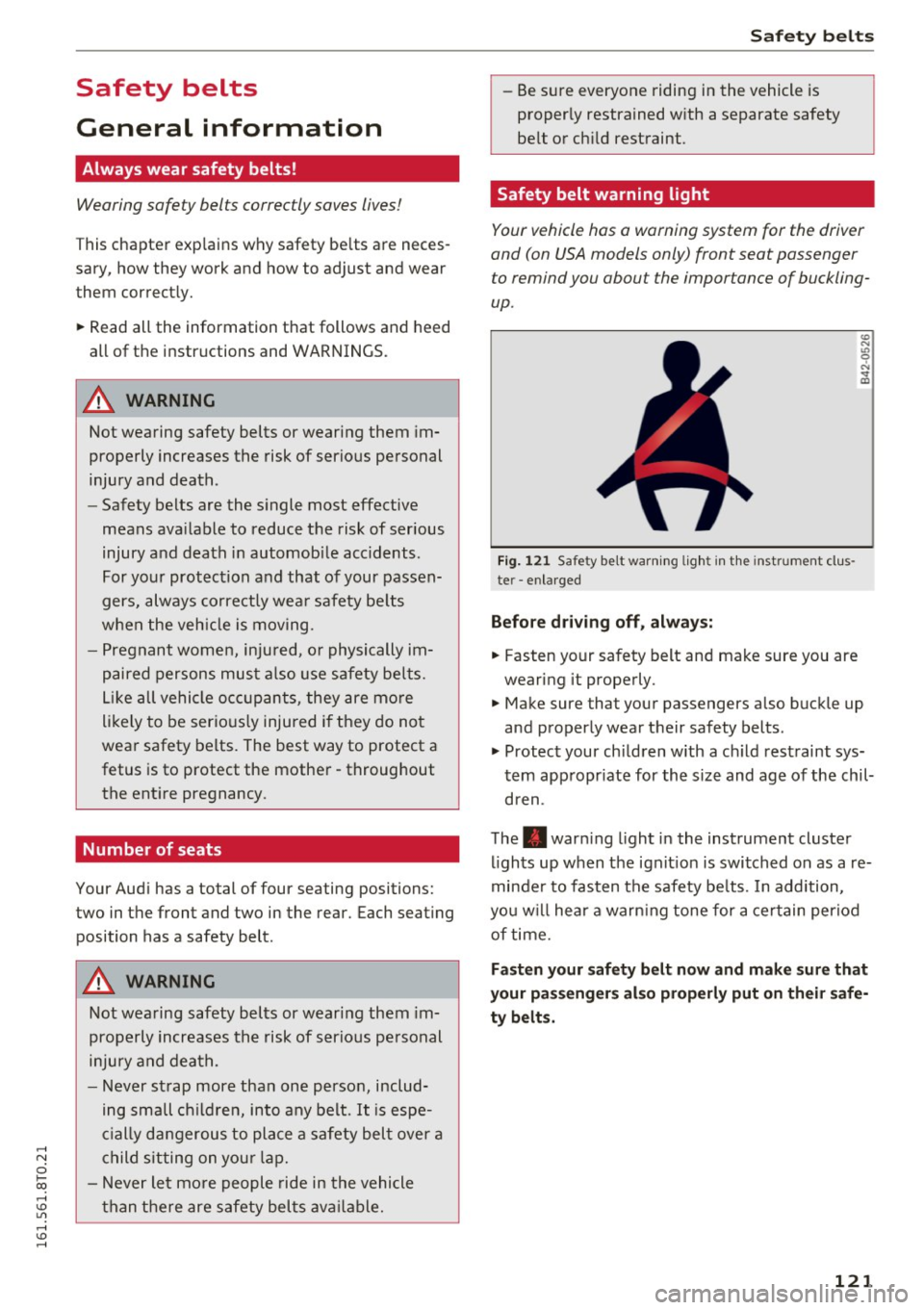
Fig. 121 Safety belt warning light in the instrument clus
te r -enlarged
Before driving off, always:
.. Fasten your safety belt and make sure you are
wearing it properly.
.,, N
"' 0 ..:, ., m
"' Make sure that your passengers also buckle up
and properly wear their safety belts.
"' Protect your children with a ch ild restraint sys
tem appropr iate for the size and age of the chil
dren .
The. warning light in the instrument cluster
lights up when the ignit ion is switched on as a re
minder to fasten the safety be lts. In addition,
you w ill hear a warn ing tone for a certain period
of time.
Fasten your safety belt now and make sure that
your passengers also properly put on their safe
ty belts.
121
Page 127 of 264
,-1 N
0 1-CX)
rl I.Cl U"I
,-1 I.Cl ......
Automatic safety belt r etractors
Every safety be lt is equ ipped wi th an automatic
be lt retractor on the shoulder belt. Th is feature
l ocks the belt when the belt is p ulled out fast,
during hard braking and in an accident. The belt
may also lock when you drive up or down a steep
h ill or through a sharp curve. During normal driv
ing the belt lets you move freely .
Safety be lt pret en sioner s
The safety belts are equipped with a belt preten
sioner that helps to tighten the safety belt and
remove slack when the pretensioner is activated.
The funct ion of the pretensioner is monitored by
a warning light
r::> page 19 .
Convertibl e loc king retract or
Every safety belt except the one on the driver
seat is equipped with a convertible locking retrac
tor that
must be used when the safety belt is
used to attach a child safety seat. Be sure to read
the important information about this feature
r::;, page 160.
& WARNING
Improperly posit ioned safety be lts ca n cause
ser ious injury in an accide nt
r::;, page 125,
Safe ty belt position.
- Safety belts offer optimum protection only
when the seatback is upr ight and belts are
prope rly pos itioned on the body.
- Never a ttac h the safety belt to the buckle
for ano ther sea t. Attaching the bel t to the
wrong buckle w ill red uce safety bel t effec
tiveness and can cause serious persona l in
jury .
- A passenger who is no t properly restrained
can be se riously injured by the safety be lt it
self when it
moves from the stronger parts
of the body into cr itical areas like the abdo
men .
- Always lock the convertible lock ing retractor
when you are secur ing a child safety seat in
the vehicle
r::> page 162.
Safet y bel ts
Safety belt position
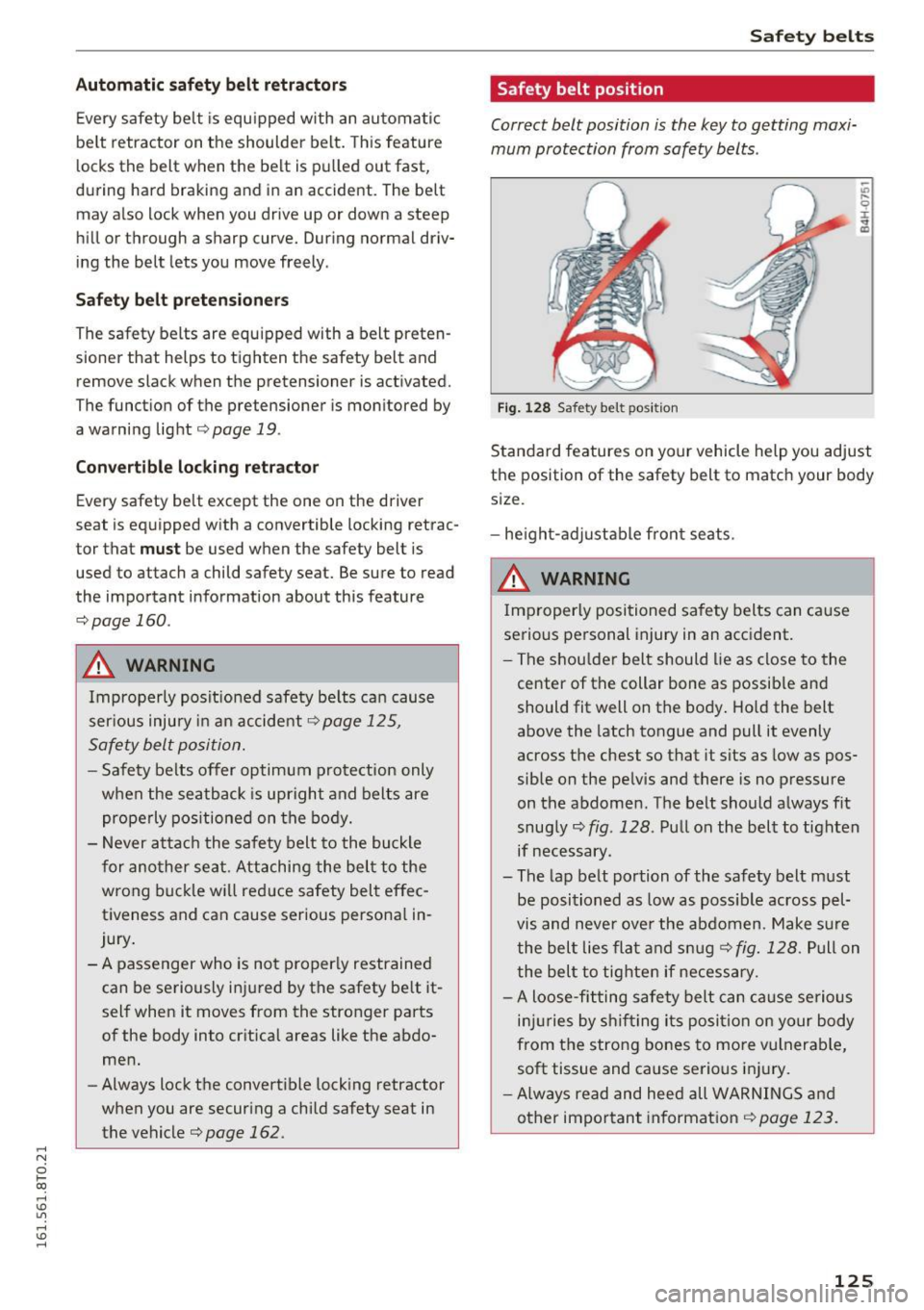
Correct belt position is the key to getting maxi
mum protection from safety belts .
Fig. 128 Safet y belt po sit ion
Standard features on yo ur vehicle help you adjust
the position of the safety belt to match your body
size.
- he ight-adj ustable fro nt seats.
& WARNING
Imp roper ly positioned safety belts can ca use
serious personal injury in an accident.
- The shou lder belt should lie as close to the
center of the collar bone as possib le and
should fit well on the body . Ho ld the belt
above the latch tongue and pull it evenly
across the chest so that it sits as low as pos
sible on the pelvis and there is no pressure
on the abdomen. The belt should a lways fit
snug ly
r::;, fig. 128 . Pull on the belt to tighten
if necessary.
- The lap belt portion of the safety belt must
be posi tioned as low as poss ible across pel
vis and neve r ove r the ab domen . Make s ure
the bel t lies fla t and sn ug
r::;,fig. 128. Pull on
the bel t to tig hte n if necessary.
- A loose-fitting safety belt can ca use serious
in jur ies by s hift ing its posi tion on your body
from the stro ng bones to more vulnerab le,
soft tissue and cause se rious i njury.
- Always read and hee d all WAR NINGS an d
other impor tant in format ion
r::;, page 123.
125
Page 133 of 264
.... N
0 I-co ....
an infant or a child in a rearward -facing seat .
The Advanced Airbag System i n your ve hicle has
been ce rtified to comply with the requi rements
of United States Federal Motor Vehicle Safety
Standard (FMVSS) 208, as well as Canada Motor
Veh icle Safety Standard (CMVSS) 208 as applica
b le at the time your veh icle was manufactured.
Accord ing to requ irements, the front Advanced
Airbag System o n the passenger s ide has been
cert ified for "suppression" for infants of about
12 month old and younger and fo r "low risk de
p loyment " for children aged 3 to 6 years o ld (as
defined in the standard).
The
PASSENGER AIR BAG OFF light in the instru
ment panel tells you when the front Advanced
A irbag on the passe nger side has been t urned off
by the ele ctronic con trol unit.
E ach t ime you tur n on the ignit ion, the
PASSEN
GER AIR BAG OFF
l ight will come on fo r a few
seconds and:
- wi ll stay on if the front passenger seat is not
occup ied,
- will stay on if there is a small c hild or child re
straint on the front passenger seat,
- will go off if the front passenger seat is occu
pied by an adult as reg istered by the weight
sensing mat¢
page 139, Monitoring the Ad
vanced Airbag System .
The PASSENGER AIR BAG OFF light comes on
when the control unit detects a total we ight on
the fro nt passenge r seat that requires the front
a ir bag to be tur ned off.
If the total weight on the front passenger seat is more than that of a typical 1 year -old child but
l ess t han the weight of a small adult, the front
a ir bag on the passenger side can deploy (the
PASSENGER AIR BAG OFF light does not come
on).
If t he PASSENGER AIR BAG OFF light does
not come on, the front airb ag on the passenge r
side has not been turned o ff by the e lectronic
control unit and can dep loy if the control unit
senses an impact that meets the condit ions stor
ed in its memory.
For example , the ai rbag may deploy if:
Airb ag sys tem
-a small ch ild that is heav ier than a typ ica l 1
year-o ld child is on the front passenger seat
(regardless of whether the child is in one of the
child safety seats listed
¢ page 153), or
- a child who has outgrown c hild restraints is on
the front passenger seat.
If t he front passenge r airbag is t urned off, the
PASSENGER AIR BAG OFF light comes on in the
inst rument cluste r and stays on.
T he front airbag on the p assenger s ide may
not
deploy (the PASSENGER AIR BAG OFF light does
not ill uminate and stay lit) even if a small adu lt
o r teenager, or a passenger who is not sitting up
rig ht w ith their back against a non-recl ined back
rest with the ir feet on the vehicle floor in front of
t h e seat is on the fron t passenger seat
¢ page 113, Proper seating position for the driv
er .
If the front passenger a irbag deploys, the Feder
al Standard requ ires the a irbag to meet the " low
risk" deployment criteria to reduce the r isk of in
jury through interaction w ith the airbag . "Low
risk" deployment occurs in th ose crashes that
t ak e place at lowe r decele rations as defined in
t h e e lectron ic co ntr ol unit¢
page 139, PASSEN
G ER A IR BAG O FF light.
Always re m embe r, a ch ild safety sea t or infant
ca rr ie r ins talled on the fro nt seat may be s truck
and knocked ou t of posit io n by the rapidly i nflat
ing passenge r's airbag in a fron tal coll is ion . The
airbag could great ly red uce the effectiveness of
t h e child restraint and even seriously in ju re the
child du ring inflation.
F or t his reason, an d beca use the back seat is the
safest p lace for children -when p roper ly restrain
ed according to their age and size -we strongly
recommend that children always sit in the back
seat ¢
page 151, Child safety .
A WARNING
-A child in a rearward-facing child safety seat
i nsta lled on the front passenger seat will be
se riously in jured and can be k illed if the front
a ir bag inflates -even with an A dva nced Airbag
S ys tem.
~
131