parking brake AUDI S6 2008 User Guide
[x] Cancel search | Manufacturer: AUDI, Model Year: 2008, Model line: S6, Model: AUDI S6 2008Pages: 390, PDF Size: 88.42 MB
Page 148 of 390
• ..__A_ d_a...: p:,..._ ti_v _ e_ C_ ru_ is_ e_ C_ o_n_ t_ r_ o _ l ___________________________________________ _
The ACC sensor is located in the area under the front license plate .
If there is a loss of opera tion d ue to heavy contam ination, this area
should cleaned to restore proper operation.
E PB activatio n
The text message EPB activation appears if emergency braking was
manual ly initia ted with the Electromechanica l Parking Brake (EPB).
The Adaptive Cruise Contro l is turned off. This is accompanied by a
wa rning tone .
ESP activa tio n
The tex t message ESP activat ion appears i f the Elec tronic Stabil iza
tion Program (ESP) has intervened. In this case the Adaptive Cruise
Contr ol is a utomat ical ly turned off . This is accompanied by a
warning tone.
Speed
The set speed in mph (Canada km/h) a lways appears when saving or
cha nging the speed in Adaptive c ruise control =>
page 137, "How is
the speed stored?" and=>
page 138, "Changing stored speed".
Speed range
The text message Speed r ange appears if the current speed is too
low
to set or to hold the requested speed .
When setting a desired speed, it must be at least 20 mph (30 km/h).
At speeds below 12 mph (20 km/h), the cruise control is turned off .
In speeds
over 95 mph (150 km/h), the system remains active and
resumes the speed of 95 mph (150 km/h) if the driver removes the
foot from the accelerator .
Selector lever position!
The text message Selector lever po sition! appears when the
selector lever is moved to position N. In this position, Adaptive
Cruise Control is not ava ilable .•
App lies to vehic les: w ith Ad apt ive Cruise Contro l
Driver intervention prompt
The driver intervention promp t calls on the driver to take
over the situation.
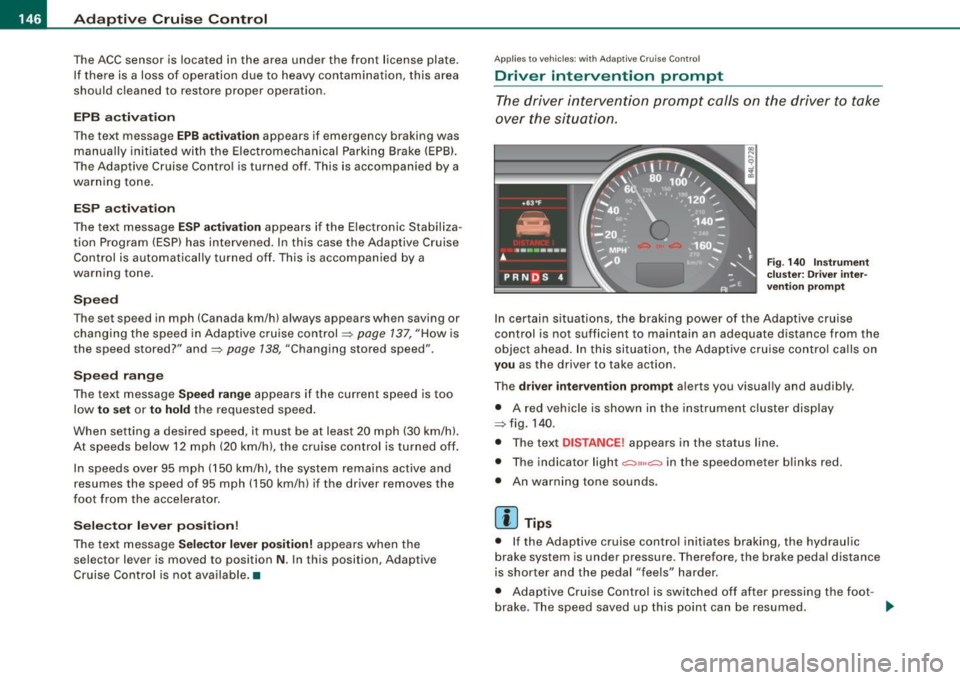
F ig . 140 I nstru ment
c lu ster: Dri ver int er
v ention prompt
In cer tain situati ons, the braking power of t he Adaptive cruise
control is not sufficient to maintain an adequate distance from the
object ahead. In this situation, the Adap tive cruise contro l ca lls on
you as the driver to take action.
The
driver intervent ion prompt a lerts you visual ly and audibly.
• A red vehicle is shown in the instrument c luster disp lay
=> fig. 1 40 .
• The tex t
DISTANCE! appears in the sta tus line.
• The indicator light
,;:::::,11 .. ,;:::::, in the speedometer b links red.
• An warning tone sounds .
[ i ] Tips
• I f the Adaptive cruise control initiates braking, the hydraul ic
brake system is under pressure. Therefore, the brake peda l distance
is shorter and the pedal "feels" harder.
• Adaptive Cruise C ontro l is switched off af ter pressing the foot -
brake. The speed
saved up this point can be resumed. _,,,
Page 155 of 390
Automatic transmi ssio n -
------------------'
Automatic transmission
tiptronic® (6-speed automatic
transmission)
Applies to vehicle s: wit h 6 -s p ee d a uto mati c tra nsm ission
General information
Your vehicle is equipped with an electron ically controlled 6 -speed
automatic transmission . Upshifting and downshifting takes place
automatically.
The transmission is also equipped with tiptronic ®. It allows the
driver to shif t gears
manually if desired=> page 157 . •
A pplies to vehi cle s: with 6-s p eed autom atic tra nsm iss ion
Driving the automatic transmission
St arting th e engin e
- The selector lever must be in Nor P.
Startin g off
- Press and hold the brake pedal.
Con tro ls and eq uip
ment
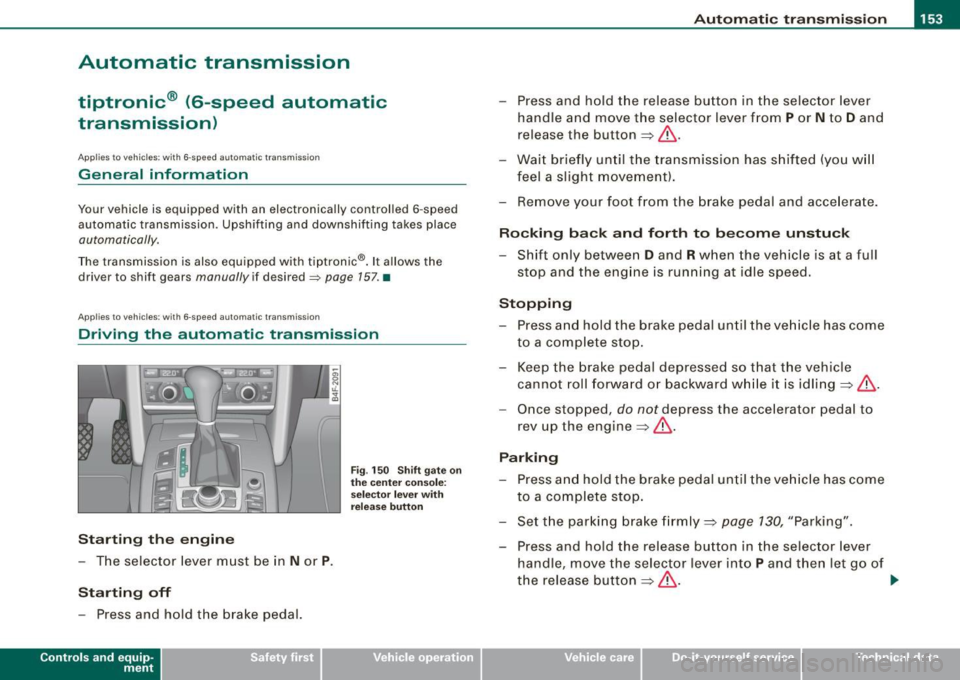
F ig . 150 Sh ift gate on
t h e ce nter co nso le:
selecto r lever with
re lease b utto n
- Press and hold the release button in the selector lever
hand le and move the selector lever from
P or N to D and
release the butto n
=> &.
- Wait briefly until the transmission has s hifted (you w ill
feel a sligh t movement).
- Remove your foot f rom the brake pedal and acce lerate .
Rocking ba ck and forth to b ecome unstu ck
- Shift only between D and R when the vehicle is at a full
stop and the eng ine is running at idle speed.
Stopp in g
- Press and hold the brake pedal un til t he ve hicle has come
to a complete stop.
- Keep the brake pedal depressed so that the vehicle cannot roll forward or backward whi le it is idling =>& .
- Once stopped, do not depress the accelerator pedal to
rev up t he engine =>& .
Parkin g
- Press and hold the brake pedal until the ve hicle has come
to a complete stop.
- Set t he parking brake firmly =>
page 130, "Parking".
- Press and hold the release button in the selector lever
handle, move the selector lever into
P and then let go of
the release button => & . .,,_
Vehicle care I I irechnical data
Page 156 of 390
....... __ A_u_ t_o _m_ a_ t_ ic_ t_ r_a _ n_ s_m _ i_s _s _i_o _n ________________________________________________ _
The selector lever must be in Nor P. If one of the driving positions
is engaged a safe ty switch will prevent the engine from bei ng
started . See also=:> page 125 .
Before you move the selector lever from the
P position, you must
a lways apply the brake peda l be fore and wh ile depress ing the
button in the hand le of the selector lever .
& WARNING
• Unintended vehicle movement can cause serious injury .
- When the selector lever is in a driving po sition , the vehicle
m ay creep , even at idle speed . Therefore do not release the
parking brake or foot brake until you are ready to move ,
be cause power i s tran smitted to the wheels as soon as a
driving position is engaged .
- Do not accelerate wh ile se le cting a driving position . At th is
t ime the engine must be at idle speed so that undue stre ss is
not pla ced on the clut che s in the tr ansmission .
- Remember : - even when stopped briefly with the automatic
tr ansmission in "D ", "S " or "R ", engine po wer i s bei ng tran s
mitted to the whe els. Y our vehicle could "c reep " forward or
ba ckward. When stopped , keep the brake pedal fully depre ssed
and u se the parking brake if nece ssary to keep the vehicle from
rolling .
• If the selector lever is unintentionally moved into N while you
are driving , take yo ur foot off the a ccelerator pedal and wait fo r
the engine to return to id le speed before selecting a driving posi
t ion .
• Never shift into "R " or "P " when the vehicle i s in motion .
• Never get out of the driver 's seat when the engine is runnin g.
• If you must get out of the veh icle, move the selector le ver
se curely into the P position and appl y the park ing brake firmly .
• If the engine must remain running , ne ver have any dr iving po si
tion engaged when che cking under the hood . Make sure the
s electo r le ver has securel y eng aged and i s lo cked in "P " with the
& WAR NING (continued )
parking brake firmly set=> page 289 , "Engine compartment ".
Otherwi se , any increase in engine speed may set the vehicle in
motion , even w ith the park ing bra ke applied . •
App lies to vehicles: with 6-speed automatic t ransmission
Selector lever positions
This sec tion describes the select or lever p ositions and
drivin g ra nges.
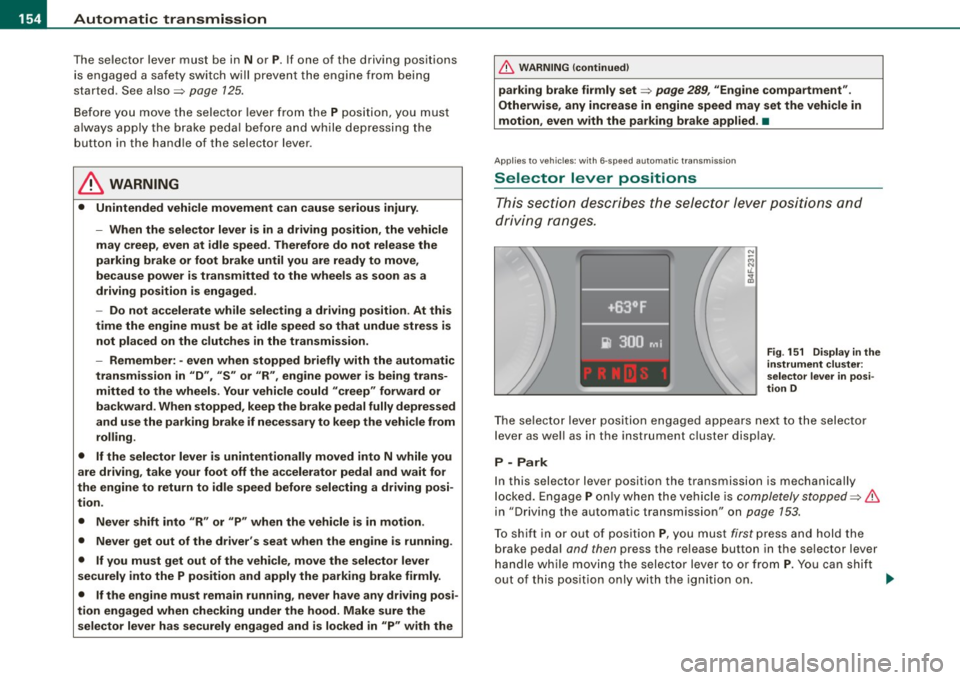
Fi g. 1 51 D isplay i n the
in strument clu ster :
s ele ctor lev er in po si
t ion D
T he se lec tor leve r posi tion engaged appea rs next to the selector
lever as we ll as in the instrument c luster disp lay .
P -Park
In this selector lever position the transmission is mechanically
l ocked. Engage
P on ly when the vehicle is completely stopped=> &
in "Driving the automatic transmission" on page 153.
To shift in or out of positio n
P, you must first press and hold the
brake peda l and then press the release button in the se lector lever
handle while moving the selector lever to or from
P . You can shif t
out o f this pos ition only with the ignition on.
~
Page 163 of 390
Automatic transmission 1111111 __________________________ ___;__:..;____;_ ______ _
& WARNING (continued )
-When the selector lever is in a driving position , the vehi cle
may creep , even at idle speed . Therefore do not release the
parking brake or foot brake until you are ready to move ,
because power is transmitted to the wheels as soon as a
driving position is engaged.
- Do not accelerate while selecting a driving position. At this
time the engine must be at idle speed so that undue stress is
not placed on the clutches in the transmission.
- Remember : - even when stopped briefly with the automatic
transmission in "D", "S" or "R" , engine power is being trans
mitted to the wheels . Your vehicle could "creep " forward or
backward . When stopped , keep the brake pedal fully depressed
and use the parking brake if necessary to keep the vehicle from
rolling .
- If the sele ctor lever is unintentionally moved into N while you
are driving , take your foot off the accelerator pedal and wait for
the engine to return to idle speed before selecting a driving
position .
- Never shift into "R " or "P " when the vehicle is in motion .
- Never get out of the driver's seat when the engine is running.
- If you must get out of the vehicle , move the selector lever
securely into the P position and apply the parking brake firmly .
- If the engine must remain running, never have any driving
position engaged when checking under the hood. Make sure
the selector lever has securely engaged and is locked in "P "
with the parking brake firmly set :::::, page 289, "Engine
compartment ". Otherwise , any increase in engine speed may
set the vehicle in motion , even with the parking brake
applied .•
Controls and equip
ment
Ap plies to vehic les : wit h m ultit ron ic® Conti nuous ly Va riable Transm ission (CVT)
Selector lever positions
This sec tion des cribes th e sele ctor lev er positi ons an d
dr iv ing ra ng es.
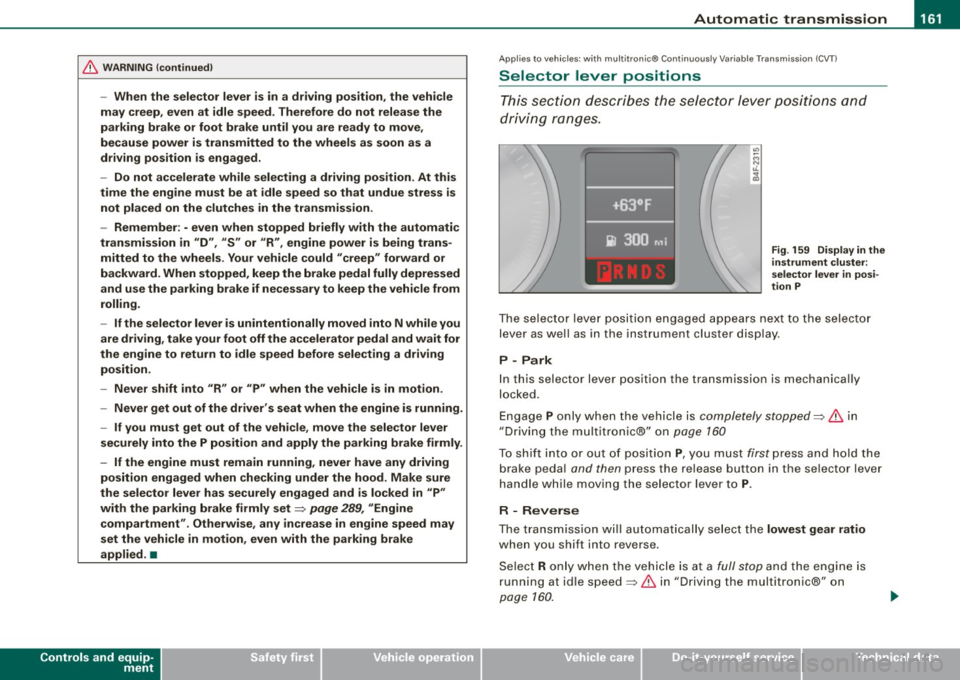
Fig . 159 Display in the
instrument clu ster:
se lector lever in posi ·
tion P
Th e se lecto r le ver p ositi on engag ed app ear s ne xt to th e selec tor
lev er as well as in the instrument cluste r disp lay .
P -Park
In this s electo r lever position the transmission is mechanica lly
lo cke d.
Eng age P on ly when t he veh ic le is completely stopped=> 11::::. in
" Dr ivin g th e multitroni c®" on page 160
T o s hift int o or out o f pos ition P , you m ust fi rs t p ress a nd h old the
brake peda l and then press the r elease button in th e se lector lever
h an dle whi le m oving the sele ctor l ev er to P .
R - Reverse
The tra nsm issio n w ill automat ica lly se lect the lowest gear ratio
when you sh ift into reverse .
S ele ct R only wh en th e ve hicle is at a
fu ll sto p and t he engine is
running at id le speed :::::, 11::::. in "Driving t he multitron ic®" on
page 1 60.
I • •
Page 188 of 390
• ..__H_ o_ m_ e_ L_in _ k_® ____________________________________________________ _
Homelink®
Universal remote control
Applies to vehicles: w ith Home Link® universal remote control
General information
The Homelink® feature can learn the up to three radio
frequency codes for most current transmitters used for
operating garage doors, estate gates, home or outdoor
lighting systems, and other devices.
You must first program the Homelink® transmitter before you can
use the system=>
page 186, "Programming the Homelink® trans
mitter".
In order to program the Homelink® transmitter for devices utilizing
rolling code, a second person on a ladder who can safely reach the
garage door opener motor is recommended. It is also necessary to
locate the "learn" button on your garage door opener motor. Refer
to the operating instructions for the opener, as the location and
color of this button may vary by manufacturer.
You can still use the original remote control for the device at any
time .
& WARNING
• Never use the Homelink"" transmitter with any garage door
opener that does have not the safety stop and reverse feature as
required by federal safety standards. This includes any garage
door opener model manufactured before April 1, 1982.
• A garage door opener which cannot detect an object, signaling
the door to stop and reverse does not meet current federal safety
standards . Using a garage door opener without these features
increases risk of serious injury or death .
& WARNING (continued)
• For safety reasons never release the parking brake or start the
engine while anyone is standing in front of the vehicle.
• A garage door or an estate gate may sometimes be set in
motion when the Homelink ® remote control is being
programmed . If the device is repeatedly activated, this can over
strain motor and damage its electrical components -an over
heated motor is a fire hazard!
• To avoid possible injuries or property damage, please always
make absolutely certain that no persons or objects are located in
the range of motion of any equipment being operated. •
Applies to vehicles: wit h Home link® universal remote contro l
Programming the Homelink ® transmitter
The transmitter is programmed in two phases. For rolling
code transmitters, a third phase is also necessary.
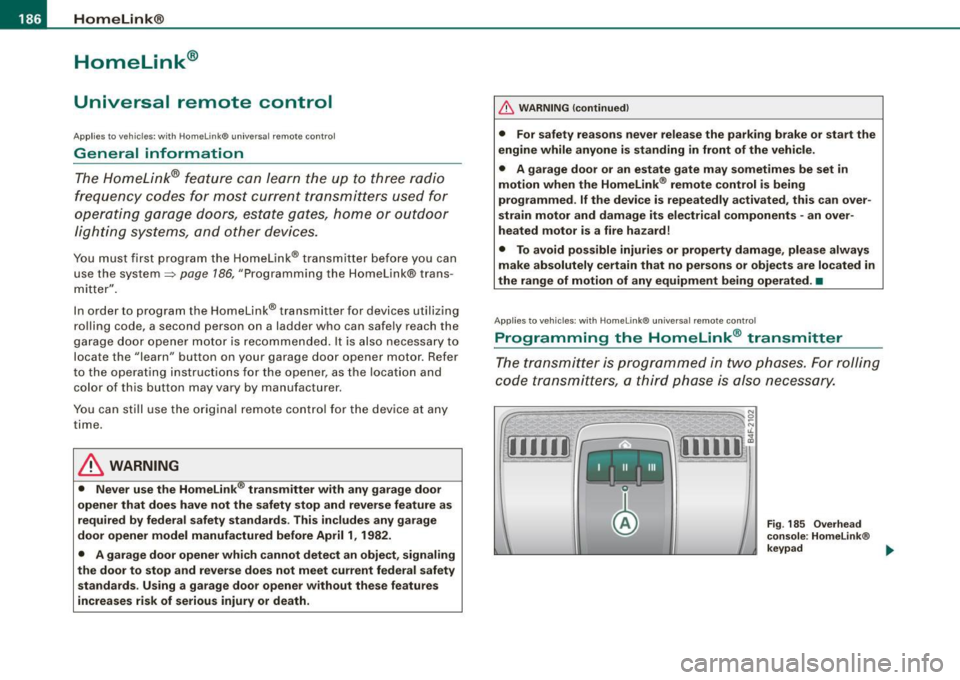
Fig . 185 Overhead
console: Homelink ®
keypad ...
Page 189 of 390
HomeLink®
------------------------------------
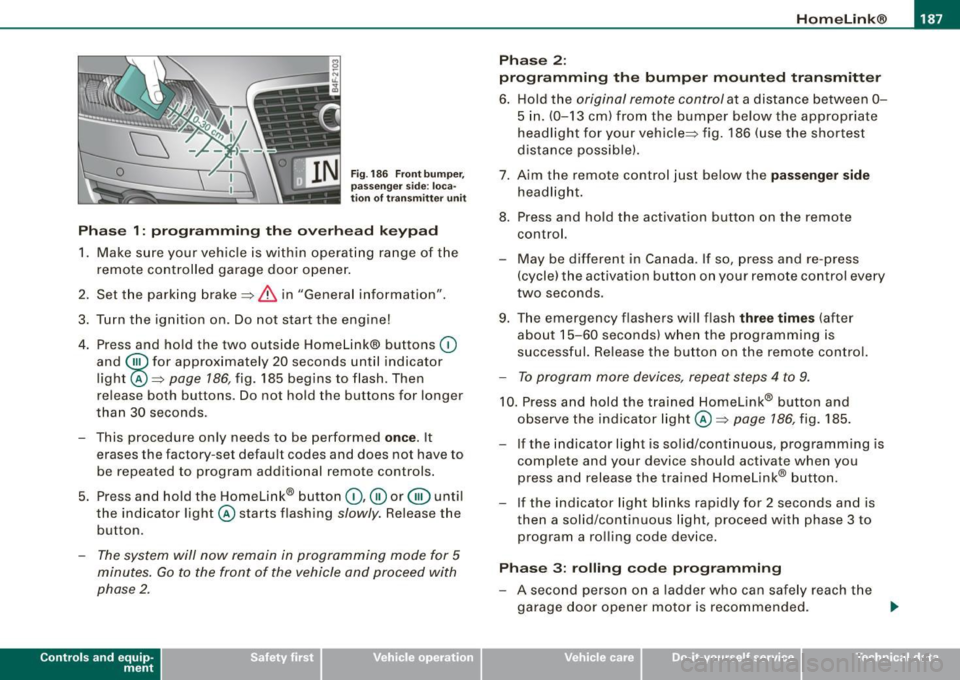
Fig. 186 Front bumper ,
passenger side: loca
tion of transmitter unit
Phase 1: programming the overhead keypad
1. Make sure your vehicle is within operating range of the
remote controlled garage door opener.
2. Set the parking brake::::>
& in "Genera l information".
3. Turn the ignition on. Do not start the engine!
4. Press and hold the two outside Homelink® buttons
(D
and @for approxim~tely 20 sec_onds until indicator
light ©::::>
page 186, fig. 185 begins to flash. Then
r elease both buttons. Do not hold the buttons for longer
than
30 seconds.
- This procedure only needs to be performed
once . It
erases the factory-set default codes and does not have to
be repeated to program additional remote controls.
5. Press and hold the Homelink® button
(D, ® or@ until
the indicator light © starts flashing
slowly. Release the
button .
-The system will now remain in programming mode for 5
minutes. Go to the front of the vehicle and proceed with
phase 2.
Contro ls and eq uip
ment
Phase 2:
programming the bumper mounted transmitter
6. Hold the original remote control at a distance between 0-
5 in. (0-13 cm) from the bumper below the appropriate
headlight for your vehicle::::> fig.
186 (use the shortest
distance possible).
7. Aim the remote control just below the
passenger side
headlight.
8. Press and hold the activation button on the remote control.
- May be different in Canada. If so, press and re-press
(cycle) the activation button on your remote control every
two seconds .
9. The emergency flashers will flash
three times (after
about
15-60 seconds) when the programming is
successful. Release the button on the remote control.
-To program more devices, repeat steps 4 to 9.
10. Press and hold the trained Homelink® b utton and
observe the indicator light© ::::>
page 186, fig. 185.
If the indicator ligh t is solid/continuous, programming is
complete and your device should activate when you press and release the trained Homelink® button.
- If the indicator light blinks rapidly for 2 seconds and is
th en a solid/continuous light, proceed with phase 3 to
program a rolling code device.
Phase 3: rolling code programming
-A second person on a ladder who can safely reach the
garage door opener motor is recommended. .,_
Vehicle care I I irechnical data
Page 265 of 390
& WARNING
Although the ABS is very effective, always remember that braking
capability is limited by tire traction. Always adjust your driving
speed according to the road and traffic conditions. Do not let the
extra safety afforded by the ABS tempt you into taking extra risks.
The ABS cannot overcome the laws of physics.
[ i] Tips
• If ABS is not functioning properly, a warning light will come on .
See
=> page 22.
• If a fault occurs in the ABS , the EDL is also not functioning. This
is indicated by the ABS warning light. •
Brake assistant
The brake assistant is designed to achieve the optimum
braking effect.
The brake assistant helps to increase the effective braking power
and thus to achieve a shorter stopping distance . If the driver
presses the brake pedal very quickly, the brake assistant automati
cally boosts the braking force to the maximum level, up to the point
where the anti-lock brake function (ABS) intervenes to stop the
wheels from locking. You should then keep the brake pedal pressed
until the vehicle has braked to the required speed. The brake assis
tant switches itself off as soon as you release the brake pedal.
The brake assistant will not be operative if there is a malfunction in
the ABS.
In vehicles with Adaptive Cruise Control* (ACC), the distance to the
vehicle ahead is continuously calculated using a radar sensor,
within the limits of the system=>
page 135. If the radar system
detects a short distance to the vehicle ahead, the brake system
exerts a small braking force to reduce the brake response time in
Controls and equip
ment Safety first Vehicle operation
Intelligent technology
case of braking. In this way, the brake application can be quickened
and
the stopping distance reduced.
& WARNING
Please remember that the accident risk always increases if you
drive too fast, especially in corners or on a slippery road, or if you
follow the vehicle ahead of you too closely. Increased risk of an accident cannot be compensated for even by the brake assistant,
so always maintain a safe speed.
n
Servotronic® -advanced power
steering system
The power steering systems uses the power of the
running engine to allow precise steering with little effort.
The advanced Servotronic ® power steering system senses the road
speed and electronically adjusts power assistance to provide
comfortable and safe steering response exactly matched to the
vehicle speed.
Power steering will not work if the engine is off. As a result, the
steering wheel will be hard to turn.
The power steering fluid level is checked during the scheduled
maintenance services.
0 Note
If there is an electronic malfunction, servotronic will still function
like a conventional power steering system, providing a constant
steering support force that is no longer proportionate to the vehicle
speed. This is most noticeable when turning the steering wheel at
low speeds (for example when parking), -more effort will be
required than usual.
II-
Vehicle care Do-it-yourself service Technical data
Page 276 of 390
___ T_ r _a_ il_e _r_ t_ o_ vv_ in__... g,_ __________________________________________________ _
Speed
The higher the speed, the more difficult it becomes for the driver to
control the rig. Do not drive at the maximum permissible speed. Reduce your speed even more if load, weather or wind conditions
are unfavorable -particularly when going downhi ll.
Reduce vehicle speed
im med ia tel y if the trailer shows the slightest
sign of swaying.
Do not try to s top the swayi ng by accelerating.
Observe speed limits. In some areas, speeds for vehicles towing
trai lers are lower than for regular vehicles .
Always apply brakes ear ly. When driving downhill, shift into a lower
gear to use the engine braking effect to slow the vehicle. Use of the
brakes a lone can cause them to overheat and fail.
C ool ant t emp era tur e
The coolant temperature gauge=> page 13 must be observed care
fully. If the needle moves close to the upper end of the scale, reduce
speed immed iately and/or turn off the air conditioner.
If the coolant temperature warning light in the instrument cluster
starts flashing
- F- , pull off the road, stop and let the engine idle for
about two minutes to prevent heat build-up.
& WARNING
A nyo ne n ot properly re str aine d in a moving vehi cle i s at a mu ch
g re ater ri sk in an accident . Never let any on e r ide in y our car who
is n ot pr operl y wea ring th e re stra ints pr ovided b y Audi . •
Trailer towing tips
Important to know
Your vehicle handles differently when towing a trailer because of
the additional weight and different weight distribution. Safety, performance and economy will greatly depend on how carefully you
l
oad your trailer and operate your r ig.
Before you actually tow your trailer, practice turning, stopping and
backing up in an area away from traffic . Keep practicing unti l you
have become comp letely familiar with the way your vehicle-trai ler
combination behaves and responds.
Back ing up is difficult and requires practice. Backing up with a
trailer generally requires steering action opposite to that when backing up your vehic le without a tra iler.
Ma intain a greater distance between your veh ic le and the one in
front of you . You will need more room to stop. To compensate for
the trai ler, you w ill need a larger than norma l turning radius.
When passing, remember that you cannot accelerate as fast as you nor mally wou ld because of the added load . Make su re you have
enough room to pass. After passing, allow plenty of room for your
trai ler befo re changing lanes again .
Avoid jerky starts, sharp turns or rapid lane changes.
[ i ] T ips
• Do not tow a trailer during the break -in period of your vehicle.
• I f you tow a trailer, your Audi may require more frequent main te
nance due to the extra load=>
page 366. •
Parking on a slope
Do not park on a slope with a trailer. If it cann ot be
avoi ded, do so only after d oing the followi ng:
When p arking :
-Apply the foot brake.
- Have someone p lace chocks under both the vehicle and
the trailer wheels. ._
Page 277 of 390
-Wit h chocks i n place, slowly release the brakes until the
wheel chocks absorb the load .
- Turn the wheels towards the curb.
- Apply the parking brake.
- Move the selector lever to
P.
Wh en r est arting aft er parking :
-Apply the foot brake.
- Start the engine.
- Move the selector lever to
D .
- Release the parking brake and slowly pull out and away
f rom the whee l chocks.
- Stop and have someone retrieve the wheel chocks .
[ i ) Tip s
If you move the selector lever of the automatic transmission to P
befor e applying th e parking brake and before blocking th e wheels ,
you may have to use more force later to move the lever out of the
P
position .
Controls and equip ment Safety first Vehicle operation
Tr
aile r t owing
Vehicle care Do-it-yourself service Technical data
Page 299 of 390
___________________________________________ C_ h:....:e :....: c:....: k..:..: i..:.. n :..::g ::.....:: a:..:.n ..:..: d=---.:. f..:..:il ..:..:li ..:..n :.:::g !--_!11
•
Closing the engine hood
- Pull the hood down until the pressure from the struts is
reduced .
- Let the hood
drop down and latch in place. Do not try to
push it shut;
it may fail to engage => &.
& WARNING
A hood that is not completely latched could fly up and block your
view while driving.
• When you close the engine hood, check it to make sure the
safety catch has properly engaged. The hood should be flush with
the surrounding vehicle body parts.
• If you notice while driving that the hood is not secured prop
erly, stop at once and close it. •
Working in the engine compartment
Be especially careful whenever you work in the engine
compartment.
Whenever you must perform any work in the engine compartment,
for example checking and filling different fluids, there is a risk of injury, burns and accidents. To prevent personal injury always
observe the following WARNINGS. The engine compartment of any
vehicle is a hazardous area
~ & .
& WARNING
To help avoid injury, before you check anything under the hood :
• Turn off the engine.
• Remove the ignition key.
• Apply the parking brake .
& WARNING (continued)
• Move selector lever to "P" (Park).
• Always let the engine cool down. Hot components will burn
skin on contact.
• To reduce the risk of being burned, never open the hood if you
see or hear steam or coolant escaping from the engine compart
ment. Wait until no steam or coolant can be seen or heard before
carefully opening the hood.
• Keep children away from the engine compartment .
• Never spill fluids on hot engine components. They can cause a
fire.
• Never touch the radiator fan. The auxiliary electric fan is
temperature controlled and can switch on suddenly.
• Never open the coolant reservoir cap when the engine is still
warm . The coolant system is pressurized and hot coolant could
spray out.
• Protect your face, hands and arm from steam or hot engine
coolant by placing a thick rag over the cap when you open the
coolant reservoir.
• If work on the fuel system or the electrical system is necessary :
- Always disconnect the battery.
- Never smoke or work near heaters or open flames . Fluids in
the engine compartment could start a fire.
- Keep an approved fire extinguisher immediately available.
• To avoid electrical shock and personal injury while the engine
is running or being started, never touch:
- Ignition cables
- Other components of the high voltage electronic ignition system.
• If you must perform a check or repair with the engine running: -First, fully apply the parking brake, move selector lever to "P"
(Park). .,
Vehicle care
I t •