warning AUDI S6 2008 Owner's Manual
[x] Cancel search | Manufacturer: AUDI, Model Year: 2008, Model line: S6, Model: AUDI S6 2008Pages: 390, PDF Size: 88.42 MB
Page 33 of 390
For example, if the transmission selector lever is not in the P posi
tion when the engine is turned off, the following message appears:
Please move selector lever to position P
The ignition key can only be removed with the selector in this posi
tion. This and other messages are brought up if a function cannot
be carried out.
Driver messages and red symbols
If a red symbol appears in the display, a driver message can be
shown by pressing the [
CHECK I button.
For example, the symbol for a problem with engine oil pressure~
appears in the display. If you then press the
I CHECK I button, the
following driver message appears in the display:
Switch off engine and check oil level
The driver message in the display goes out after about 5 seconds.
The driver message can be displayed again by briefly pressing the
I CHECK] button.
Driver messages and yellow symbols
If a yellow symbol appears in the display, a driver message is also
displayed automatically.
For example, the symbol appears in the display, indicating low
windshield washer fluid level. The following message also appears:
Please top up washer fluid
The driver message disappears after a few seconds. The driver
message can be displayed again by briefly pressing the [
CHECK I
button. •
Controls and equip
ment
Driver information display
Red symbols
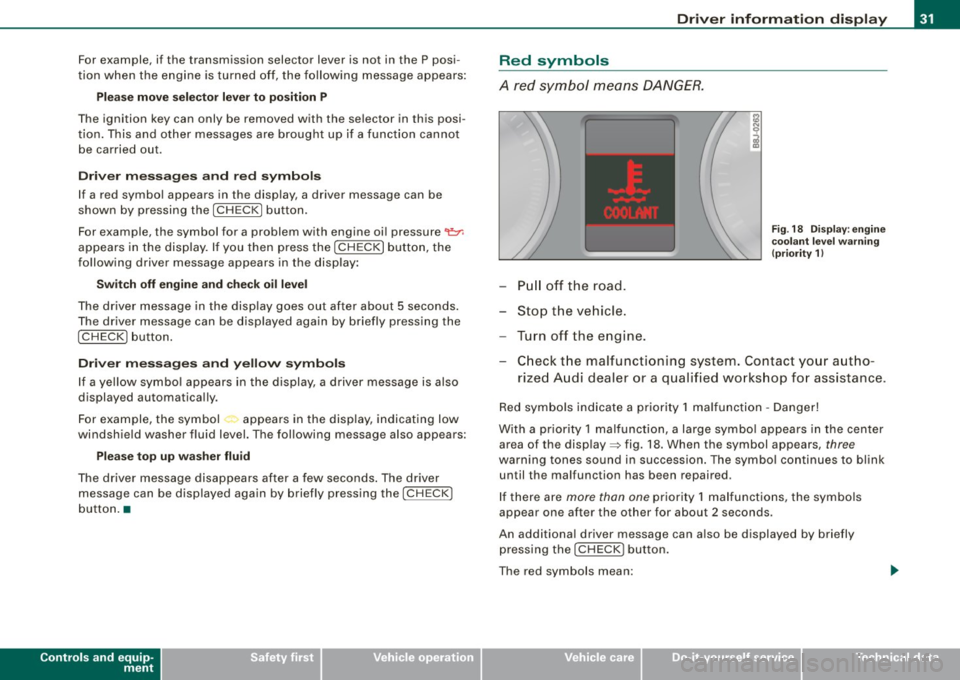
A red symbol means DANGER.
Pull off the road.
Stop the vehicle.
Turn off the engine.
Fig. 18 Display : engine
coolant level warning
(priority 1)
-Check the malfunctioning system. Contact your autho-
rized Audi dealer or a qualified workshop for assistance.
Red symbols indicate a priority 1 malfunction -Danger!
With a priority 1 malfunction, a large symbol appears in the center
area of the display=> fig. 18. When the symbol appears,
three
warning tones sound in succession. The symbol continues to blink
un til the malfunction has been repaired.
If there are
more than one priority 1 malfunctions, the symbols
appear one after the other for about 2 seconds.
An additional driver message can also be displayed by briefly
pressing the
IC HECK J button.
The red symbols mean:
I • •
Page 34 of 390
Driver information display
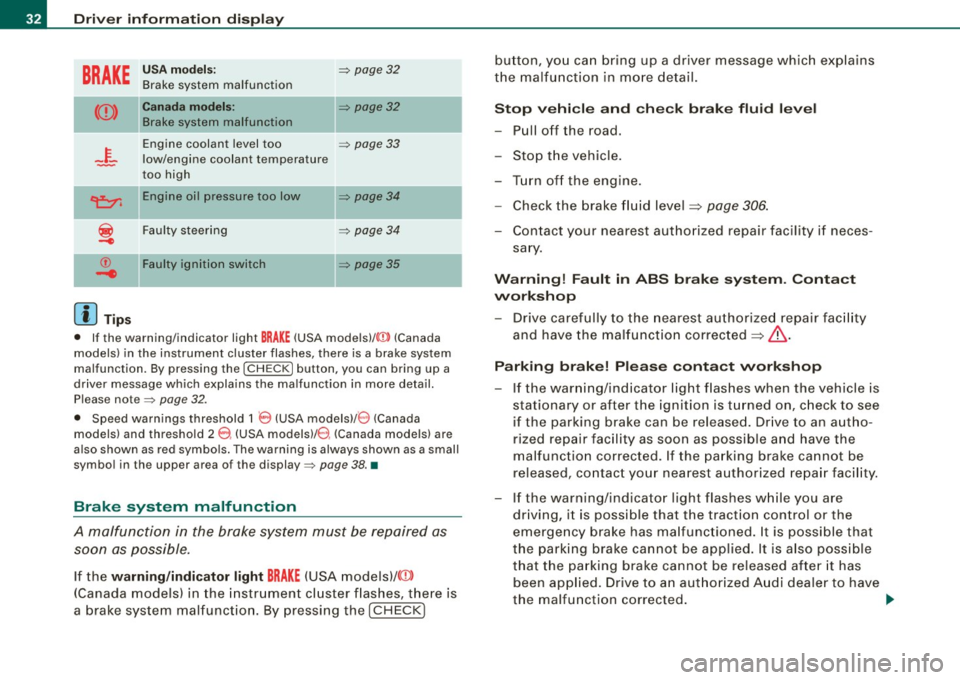
BRAKE
USA models: => page32
Brake system malfunction
Canada models: II => page32
Brake system malfunction
-~-
Engine coolant level too => page 33
low/engine coolant temperature
-too high
-
~ Engine oil pressure too low => page 34
i
Faulty steering => page 34
© Faulty ignition switch => page35
-4
[ i] Tips
• If the warning/indicator light BRAKE (USA models)/ ((j)) (Canada
models) in the instrument cluster flashes, there is a brake system
malfunction. By pressing the [
CHECK] button, you can bring up a
driver message which explains the malfunction in more detail.
Please note=> page 32 .
• Speed warnings threshold 1
0 (USA modelsl/ 8 (Canada
models) and threshold 2
e , (USA models)/ 0, (Canada models) are
also shown as red symbols. The warning is always shown as a small
symbol in the upper area of the display=> page 38. •
Brake system malfunction
A malfunction in the broke system must be repaired as
soon as possible.
If the warning/indicator light BRAKE (USA models)/ (©)
(Canada models) in the instrument cluster flashes, there is
a brake system malfunction. By pressing the [CHECK] button, you can bring up a driver message which explains
the malfunction in more detail.
Stop vehicle and check brake fluid level
-Pull off the road.
- Stop the vehicle.
- Turn off the engine.
- Check the brake fluid level
~ page 306.
-Contact your nearest authorized repair facility if neces-
sary.
Warning! Fault in ABS brake system. Contact
workshop
- Drive carefully to the nearest authorized repair facility
and have the malfunction corrected
~ & .
Parking brake! Please contact workshop
-If the warning/indicator light flashes when the vehicle is
stationary or after the ignition is turned on, check to see
if the parking brake can be released. Drive to an autho
rized repair facility as soon as possible and have the
malfunction corrected. If the parking brake cannot be
released, contact your nearest authorized repair facility.
- If the warning/indicator light flashes while you are
driving, it is possible that the traction control or the
emergency brake has malfunctioned. It is possible that
the parking brake cannot be applied. It is also possible
that the parking brake cannot be released after it has
been applied. Drive to an authorized Audi dealer to have
the malfunction corrected. .,.
Page 35 of 390
If the ABS system malfunctions, the ABS warning/indicator light illu
minates together with the brake system malfunction warning/indi
cator light~
&-
& WARNING
• Always observe the warnings in ~ page 289, "Engine compart
ment", before opening the hood and checking the brake fluid.
• Driving with low brake fluid is a safety hazard . Stop the car and
get professional assistance.
• USA models: If the
BRAKE warning light and the c~ warning
light come on together, the rear wheels could lock up first under
hard braking . Rear wheel lock-up can cause loss of vehicle control
and an accident. Have your vehicle repaired immediately by your
authorized Audi dealer or a qualified workshop. Drive slowly and
avoid sudden, hard brake applications.
• Canada models : If the brake warning light
«D> and the ABS
warning light come on together, the rear wheels could lock up
first under hard braking. Rear wheel lock-up can cause loss of
vehicle control and an accident. Have your vehicle repaired imme
diately by your authorized Audi dealer or a qualified workshop .
Drive slowly and avoid sudden, hard brake applications. •
Engine cooling system malfunction -L
A malfunction in the engine cooling system must be
repaired as soon as possible.
When the -t symbol in the display blinks, then either the
engine coolant
temperature is too high, or the coolant level
is too low. An additional driver message can also be
displayed by pressing the [ CHECK] button:
Switch off engine and check coolant level
-Pull off the road .
Controls and equip
ment
Driver information display
Stop the vehicle.
- Turn off the engine.
Check coolant level
=> page 304 .
Add coolant if necessary=> page 305.
Continue driving only after the engine coolant
warning/ind icator light goes out.
Contact your authorized Audi dealer for assistance if necessary.
If the engine coolant level is correct, then the radiator fan may be
the cause of the malfunction.
If the generator warning/indicator light should also illuminate
~ page 79, then the fan belt may be damaged.
& WARNING
• If your vehicle should break down for mechanical or other
reasons, park at a safe distance from moving traffic, turn off the
engine and turn on the hazard warning lights
~ page 73, "Emer
gency flasher
A".
• Never open the hood if you see or hear steam or coolant
escaping from the engine compartment -you risk being scalded.
Wait until you can no longer see or hear steam or coolant
escaping.
• The engine compartment of any vehicle is a dangerous area.
Before you perform any work in the engine compartment, turn of
the engine and allow it to cool. Follow the warning stickers
~ page 289, "Engine compartment" . .,_
I • •
Page 36 of 390
Driver information display
0 Note
Do not continue driving if the -F-symbo l illuminates . There is a
malfunction in the engine coo ling system -you could damage your
engine. •
Engine oil pressure malfunction ~
The red engine oil pressure warning symbol requires
immediate service or repair. Driving with a low -oil -pres
sure indication is likely to inflict severe damage to the
engine.
If the "l=7': symbol appears in the display and blinks, the oil
pressure is too low. An additional driver message can also
be displayed by pressing the [
CHECK] button:
Switch off engine and check oil level
Immediate actions
- Pull off the road .
- Stop the vehicle.
- Turn off the engine.
-Check the engine oil level with the dipstick:::::> page 301.
Dipstick readings checks too low
- Top off oil to the proper level :::::> page 302.
-Make sure that the oil pressure warning symbol "l=7':
appears no longer in the display before you start driving
again.
Dipstick reading checks OK
-If the oil pressure warning symbol "l=7': starts flashing
again even though the engine oil level checks OK on the
dipstick,
do not continue driving and do not let the
engine run in idle.
Instead, contact your authorized Audi
dealer for assistance.
[ i ] Tips
• The engine oil pressure symbol ~ is not an indicator for a low
engine oil level . Do not rely on it. Instead , check the oil level in your
engine at regular intervals, preferably each time you refuel, and
always before going on a long trip .
• The yellow oil level warning indication ... requires oil refill or
workshop service without delay. Do not wait until the red oil pres
sure warning
~ starts to flash before you respond to the low oil
level warning
= . By then, your engine may already have suffered
serious damage. •
Steering malfunction i
If there is a malfunction in the electronic steering column
lock, the steering cannot be unlocked.
If the ~ symbol in the display blinks, there is a malfunction
in the electronic steering column lock. An additional driver
message can also be displayed by pressing the
I CHECK]
button:
Do not drive vehicle: Steering defective
- Contact your nearest authorized repair facility.
- Do
not tow your vehicle.
Page 37 of 390
& WARNING
Your vehicle must not be towed in the event of a malfunction in the electronic steering column lock because it cannot be steered due
to the locked steering . If it is towed with the steering locked, there
is the risk of an accident. •
Ignition lock malfunction ~
A malfunction in the ignition lock must be repaired imme
diately.
If the .Pe symbol in the display blinks, there is a malfunction
in the electronic ignition lock. An additional driver message
can also be displayed by pressing the [ CHECK] button:
Ignition lock defective. Contact workshop!
-Do not turn the engine off.
- Drive immediately to an authorized Audi dealer to have
the malfunction corrected.
If there is a malfunction in the electronic ignition lock, the ignition
cannot be turned off. Drive immediately to an authorized Audi
dealer to have the cause of the malfunction corrected.
On vehicles wi th Advanced Key *, the engine should not be switched
off using the
I STOP I button because the engine cannot be started
again after the ignition is switched off .•
Controls and equip
ment
Driver information display
Yellow symbols
A yellow symbol means WARNING.
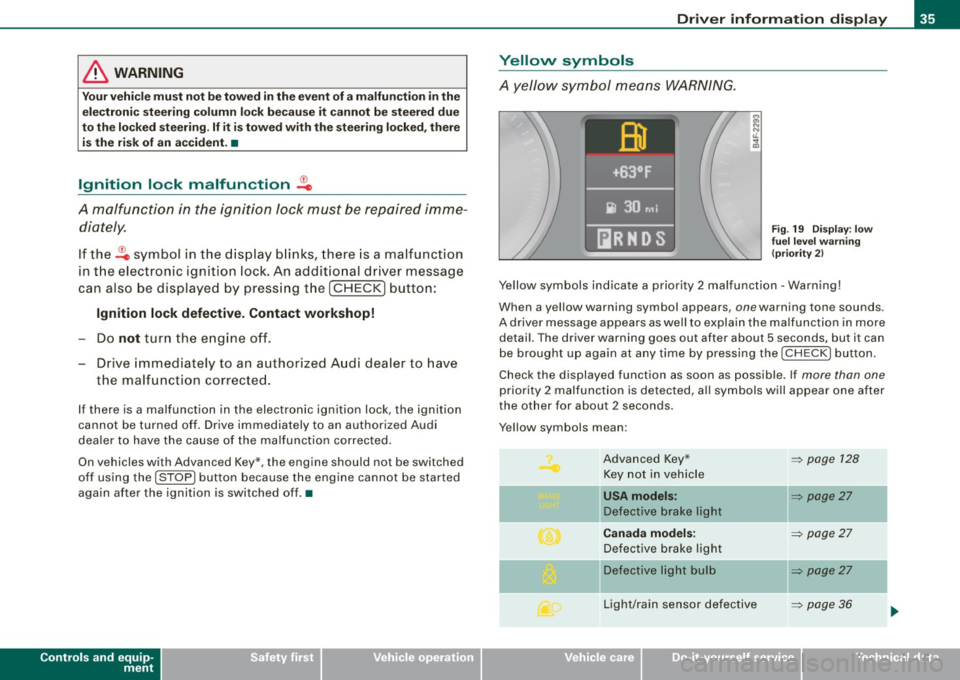
Fig. 19 Display: low
fuel level warning
(priority 2)
Yellow symbols indicate a priority 2 malfunction -Warning!
When a yellow warning symbol appears , one warn ing tone sounds.
A driver message appears as well to explain the malfunction in more
detail. The driver warning goes out after about 5 s econds, but it can
be brought up again at any time by pressing the I CHECK I button.
Check the displayed function as soon as possible . If more than one
priority 2 malfunction is detected, all symbols will appear one after
the other for about 2 seconds .
Y ellow symbols mean :
Advanced Key* Key not in vehicle
l[usA models:
Defective brake light
Canada models:
Defective brake light
]f Defective light bulb
Light/rain sensor defective
I • •
~ page 128
~ page27
-
~ page27
~ page27
-
~ page36
Page 40 of 390
Driver inf ormati on displ ay
Ignition lock malfunction ~
If the symbol in the display comes on, there is a malfunc -
tio n in the e lectronic ignition lock. An additional driver
message can be displayed by pressing the [ CHECK) button:
D efectiv e ignition sw itch
- Drive to an authorized service facility at your earliest
convenience to have the malfunction corrected. •
Windshield wipers faulty )
. Win dshield wi per malfun ction
When this symbol il luminates, it means that the e lectronics for
the windshield wipers are defective. Please go to an authorized dealership to have the windshield wiper system repaired. •
Speed warning system
Overview
The speed warning system helps you to keep your driv ing
speed below a set speed limit.
The speed warning system warns the driver if he exceeds a previ
ously stored maximum speed . A warn ing tone wi ll sound as soon as
the vehicle speed exceeds the set speed by about 6 miles per hour
(10 k m/h). At the same time, a warning symbol appears in the
display.
The speed warning system has
t w o w arning thre sh o ld s that func
tion independent ly of each other and that have somewhat diffe rent
purposes:
S pee d war ning 1
You can use speed warning 1 to set the maximum speed while you
are driving . This setting will remain in effect until you turn off the
ignition, assuming that you have not changed or reset the setting.
The speed warning symbol
8 (USA mode ls)/ 8 (Canada models) in
the warning 1 display appears when you exceed the maximum
speed. It goes out when the speed falls below the stored maximum
speed.
The speed war ning symbol wi ll also go out if the speed
exceeds the
stored maximum speed by more than about 25 mph (40 km/h) for at
least 10 seconds. The stored maximum speed is deleted.
Setting speed warning 1
=> page 39 .
S pee d w arning 2
Storing warning 2 is recommended if you always want to be
reminded of a certain speed, for example when you are traveling in
a country that has a general maximum speed limit, or if you do not
want to exceed a specified speed for winter tires.
The speed warning 2 symbo l,
6 (USA models)/ 8, (Canada models)
appears in the display when you exceed the stored speed limit.
Un like warning 1, i t wi ll not go out unti l the vehic le speed drops
below the stored speed limit.
Setting speed warning 2
=> page 39.
[ i ] Tip s
Even though your vehicle is equipped with a speed warning system,
you shou ld still watch the speedometer to make sure you are not
driving faster than the speed limit. •
Page 41 of 390
Speed warning 1: setting a speed limit
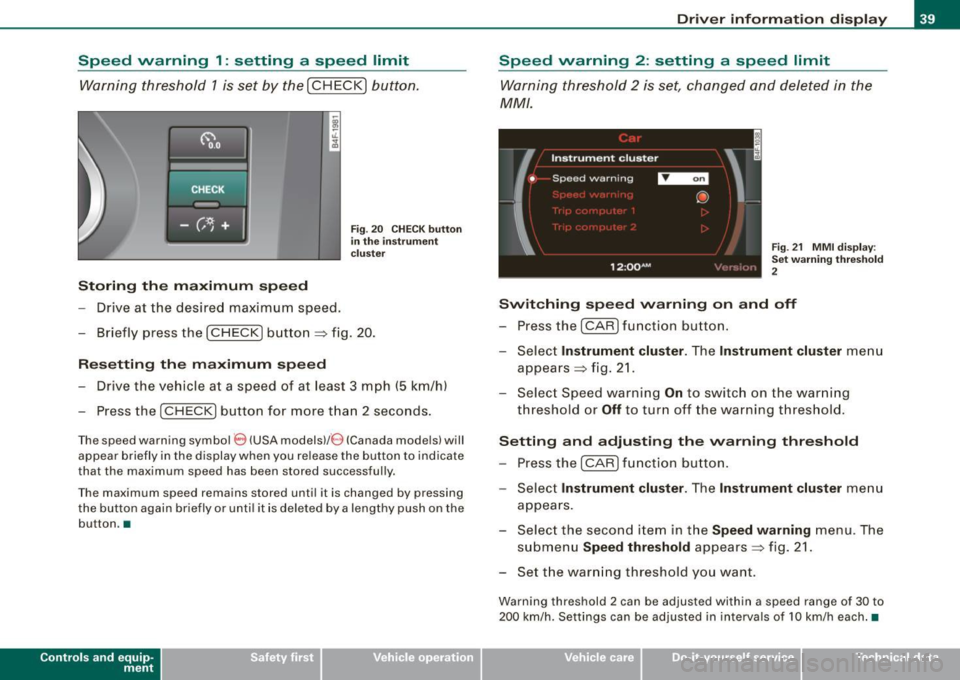
Warning threshold 1 is set by the ( CHECK) button.
Storing the m aximum spe ed
- Drive at the desired maximum speed .
Fig . 20 CHECK but ton
i n th e inst ru m ent
c luster
- Briefly press the (CHECK ] button => fig. 20.
R eset ting th e ma xim um spe ed
- Drive the vehicle a t a speed of at least 3 mph
(5 km/h)
- Press the
I CHECK] button for more tha n 2 seconds .
The speed warning symbol 8 (USA modelsl/ 0 (Canada mode ls) will
appear briefly in the display when you re lease the button to indicate
that the maximum speed has been stored successful ly.
The maximum speed remains stored until it is changed by pressing
the button again briefly or unti l it is deleted by a lengthy push on the
button. •
Contro ls and eq uip
ment
Dri ver inf orm atio n di spl ay
Speed warning 2 : setting a speed limit
Warning threshold 2 is set, changed and deleted in the
MM/ .
Fig. 21 MM I d isplay :
Se t w arni ng thr esho ld
2
Switching sp eed w arning on and off
- Press the (CAR] function button.
- Select
Instrument clu st er . The Instrument clu ster menu
appears => fig. 2 1.
- Select Speed warning
On to switch on the warning
threshold or
Off to turn off the warning threshold.
Setting and adjusting the warning thre shold
- Press the
I CAR I function button.
- Select
Instrument clu ster . The Instrument clu ste r menu
appears .
- Select the second item in the
Speed w arning menu . The
submenu
Speed th re shold appears=> fig. 21.
- Set the warn ing threshold you want .
Warning threshold 2 can be adjusted within a speed range of 30 to
200 km/h. Settings can be adjusted in intervals of 10 km/h each.•
Vehicle care I I Technical data
Page 44 of 390
![AUDI S6 2008 Owners Manual Driver information display
In addition, all the values in the single -trip or the total -trip memory
can be deleted simultaneously.
[ i ] Tips
All stored values will be lost if the](/img/6/57596/w960_57596-43.png "AUDI S6 2008 Owners Manual Driver information display
In addition, all the values in the single -trip or the total -trip memory
can be deleted simultaneously.
[ i ] Tips
All stored values will be lost if the")
Driver information display
In addition, all the values in the single -trip or the total -trip memory
can be deleted simultaneously.
[ i ] Tips
All stored values will be lost if the vehicle battery is disconnected. •
MMI settings
Basic settings for the trip computer can be made in the
MM/.
Fig. 25 MMI display :
Trip computer
Setting values to zero
-Press the I CAR I function button.
- Select
Instrument cluster.
-Select Trip computer 1 or Trip computer 2.
-Select Reset to delete all the values in the memory
~ fig. 25.
Displaying and hiding driver information
-Press the I CAR I function button.
- Select
Instrument cluster.
- Selec t Trip computer 1 or Trip computer 2.
-Select, for example, Fuel range On to turn on the display
or
Off to turn the display off.
All values in the single-trip or the total-trip memory can be reset to
zero simu ltaneously in the MMI. In addition you can determine what
driving information from the trip computer shou ld be shown in the
instrument cluster display . If one of the pieces of driver information
is turned
off, that driver in formation will not be shown in the display.
The information will continue to be calculated by the trip computer
and can be turned back
on at any time. •
Tire pressure monitoring system
General notes
As an added safety feature, your vehicle has been equipped with a
tire pressure monitoring system (TPMS) that illuminates a low tire
pressure telltale when one or more of your tires is significantly
under-inflated . The TPMS on ly provides a low tire pressure warning
and does not reinflate your tires .
Accordingly, when the low tire pressure telltale illumin ates, you
should stop and check your tires as soon as possible, and inflate
them to the proper pressure. Driving on a significantly under
inflated tire causes the tire to overheat and can lead to tire failure.
Under -inflation also reduces fuel efficiency and tire tread life, and
may affect the vehicle's handling and stopping ability .
0 Note
• Please note that the TPMS is not a substitute for proper tire
maintenance, and it is the driver's responsibility to maintain correct
tire pressure, even if under-inflation has not reached the level to
trigger illumination of the TPMS low tire pressure telltale. .,,_
Page 45 of 390
• Each tire, including the spare, should be checked monthly when
cold and inflated to the inflation pressure recommended by the
vehicle manufacturer on the vehicle placard or tire inflation pres sure label. (I f your vehicle has tires of a different size than the size
indicated on the vehicle placard or tire inflation pressure label, you
should determine the proper tire inflation pressure for those
tires.) •
TPMS malfunction indicator
Your vehicle has also been equipped with a TPMS malfunction indi
cator to indicate when the system is not operating properly . The
TPMS malfunction indicator is combined with the low t ire pressure
telltale. When the system detects a ma lfunction, the te lltale wi ll
flash for approximately one minute and then remain continuously il luminated . T his sequence will continue upon subsequent vehicle
starts up as long as the malfunction exists.
When the malfunction indicator is illuminated, the system may not be ab le to detect or signa l low tire pressure as intended.
TPMS ma lfunctions may occur for a variety of reasons, including the
installation of replacement or alternate tires or wheels on the
veh ic le that prevent the TPMS from functioning proper ly . Always
check the TPMS malfunction telltale after replacing one or more
tires or whee ls on your ve hicle to ensure t hat the replacement or
a lternate tires and wheels a llow the TPMS to continue to function
proper ly .•
Introduction
The tire pressure monitoring system monitors air pressure
in all four road wheels while the vehicle is moving .
As soon as the tire pressure monitoring system senses a significant
loss of air pressure in one or severa l tires, text messages and yellow
symbo ls appear in the instrument cluster display to a lert the driver .
Controls and equip
ment
Dr ive r informat ion di spl ay
The , J warning light in the instrument cluster comes on when the
t ire is significantly underinflated
~ page 20 .
The warning light I also i lluminates in the case of a system
malfunction.
Be aware that t ire pressure is also dependent on the temperature of
the tire . For every 18 °F (10 °C) increase in tire temperature, tire pres
sure increases by about 1 .5 psi (0 .1 bar). The tire warms up while the
vehicle is moving and tire pressure rises . So you should adjust tire
pressure on ly when they are
cold, when the tempera ture of the tires
is roughly the same as the ambient air temperature.
I n order to keep the tire pressure monitoring system properly cali
brated, tire pressure on all four tires should be checked at regular
intervals, adjusted if necessary and saved in the proper setting
(recommended pressure) ~
page 45.
The tire pressure is shown on the label located either on the driver's
s ide 8 -pi llar (visible when the door is open) or inside the fue l filler
flap .
& WARNING
• Wh en the tire pre ssure mon itor ing system warning light i s lit,
one or more of your tir es i s s ignifi cantly und er-inflated. You should
s to p and che ck your ti re s as s oon as possible , and infl ate them to
the proper pre ssure as indicated on the vehicle's tire pre ssure
l a bel ~
page 317 . Driving on a signifi cantly und er- inflated tire
c au se s the tire to ov erheat and can l ead to tir e fa ilure. Under-infla
tion als o i s lik ely to impair the ve hicle' s handling and st opping
a bility .
• Do not adju st tire pre ssure when t ire tempe rat ure is exces sive.
Thi s could lead to ser iou s tire d amage and ev en cau se the tire to
bur st, w ith the addition al d anger of an ac cid ent . .,,
I • •
Page 46 of 390
![AUDI S6 2008 Owners Manual Driver inf ormati on displ ay
<£> For th e sak e of th e environm ent
Driving w ith under -inflated tires reduces fuel efficiency and tire
tread life.
[ i ] Tip s
• Each tire, inc](/img/6/57596/w960_57596-45.png "AUDI S6 2008 Owners Manual Driver inf ormati on displ ay
<£> For th e sak e of th e environm ent
Driving w ith under -inflated tires reduces fuel efficiency and tire
tread life.
[ i ] Tip s
• Each tire, inc")
Driver inf ormati on displ ay
<£> For th e sak e of th e environm ent
Driving w ith under -inflated tires reduces fuel efficiency and tire
tread life.
[ i ] Tip s
• Each tire, incl udin g the sp are, should be checked monthly when
cold and set to the recommended inflation pressure as specified on
the tire pressure label=>
page 317.
• The factory supplied spare whee l is equipped with a sensor for
the tire pressure monitoring system. As long as the spare whee l it
not mounted, the tire pressure of this tire will not be monitored.
• The tire pressure monitoring system he lps the driver to keep an
eye on t ire pressures. But the driver stil l has the responsibility for
maintaining the correct tire pressure.
• Tire pressure must only be adjusted when the temperature of the
tires is about the same as ambient air temperature .
• When tires are replaced, the sensors and valves shou ld not be
detached or exchanged. Only the valve core needs to be rep laced
and, i f necessary, the valve and the wheel electronics replaced.
• If you should put different wheels and tires on your vehicle (e.g.
winter wheels and tires), you must be certain that the wheels and
tires are compatible with the tire p ressure monitoring system.
Otherwise the system w ill register a ma lfunction and a fault
message will be displayed . For more information, contact your Audi
dea ler.
• Adjust the tire pressure and store the pressure in the tire pres
sure monitor ing system to the load you are carry ing. •
Significant loss of air pressure ft)
The yellow symbol appears in the event of a significant
loss of air pressure .
0
"' 8
i
Fig . 26 Disp lay: ye llow
s y mbo l w ith m essage
If the warni ng l ight in the i nstrument cluster comes on
and t hen the ' ) symbol appears in the display~ fig. 26,
press ure in at least one t ire is too low.
Stop driv ing as soo n as possible without endangeri ng
yourself and other drivers o n the road .
- Inspect all tires.
- Change the tire if necessary~
page 338.
The' warning ligh t in the instrument cluster comes on when the
tire is significantly underinflated.
In addition, the tire symbol appears in the display together with
the message
Pl ease check tir e pr ess ure::::> fig. 26 .
After a few seconds, the message disappears again. If you would
like to show the message again, press the [ CH ECK] button. _.,,