lock AUDI S6 2008 Repair Manual
[x] Cancel search | Manufacturer: AUDI, Model Year: 2008, Model line: S6, Model: AUDI S6 2008Pages: 390, PDF Size: 88.42 MB
Page 157 of 390
Automatic transmission -
------------------'
R -Reverse
The transmission will automatically select the lowest gear ratio
when you shift into reverse .
Select
R only when the vehicle is at a full stop and the engine is
running at idle speed::::;,
& in "Driving the automat ic transmission"
on
page 153 .
Before you move the se lector lever to R , press both the button in the
handle of the selector leve r
and the brake pedal at the same time .
When the ignition is on , the backup lights i lluminate when the
selector lever is moved into
R.
N -Neutral
The transmission is in neutral in this position . Shift to this position
for standing with the brakes applied=>
page 155.
When the vehicle is stationary or at speeds below 3 mph (5 km/h),
you must always apply the footbrake befor e and while moving the
lever out of
N.
D -Normal position for driving forward
Position Dis for norma l city and highway driving. It ranges from zero
to top speed and all six gears shift au tomatically, depending on
engine load, driving speed and automatica lly selected shift
programs. The gear engaged is shown in the right of the display
::::;, page 154, fig. 151.
When the vehicle is stationary or at speeds below 3 mph (5 km/h),
you must always apply the foot brake before and while moving the
lever to
D out of N .
In certain circumstances i t may be advantageous to temporarily
switch to the manual shift program to manua lly se lect gear ratios to
match specific driving conditions::::;,
page 157.
S -Sport position
Se lect this position for spor tier performance . In this position, the
transmission will not upshift as soon, allowing the vehicle to use the
Con tro ls and eq uip
ment
increased power available at higher engine speeds to achieve live
lier acceleration.
When the vehicle is stationary or at speeds below 3 mph (5 km/h),
you must always apply the foot brake before and while moving the lever to
S out of N.
& WARNING
Read and follow all WARNINGS ::::;, & in "Driving the automatic
transmission" on
page 153 .
0 Note
Coasting downhill with the transmission in N and the engine not
running will result in damage to the automatic transmission and
possibly the catalytic converter. •
Applies to ve hic les: with 6-spee d autom atic trans mission
Automatic Shift Lock (ASL)
The Automatic Shift Lock safeguards you against acciden
tally shifting into a forward or the reverse gear and
causing the vehicle to move unintentionally.
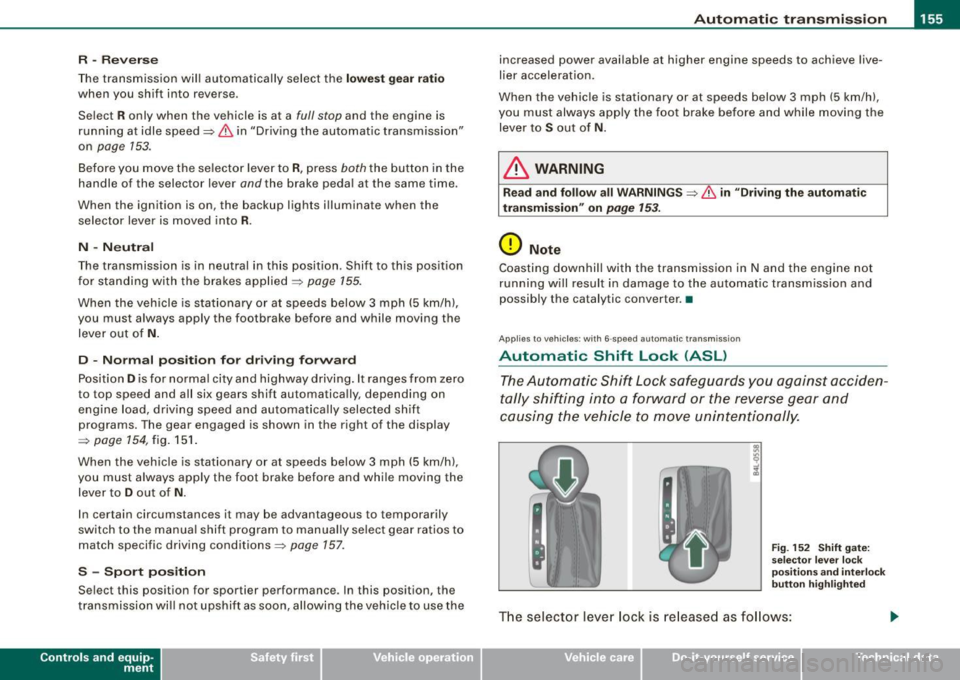
Fig. 152 Shift gate:
selec tor leve r loc k
positions and interlock
button highlight ed
The selector lever lock is released as follows:
Vehicle care I I irechnical data
Page 158 of 390
....... __ A_u_ t_o _m_ a_ t_ ic_ t_ r_a _ n_ s_m _ i_s _s _i_o _n ________________________________________________ _
-Tu rn t he igniti on on .
- Step on the brake peda l.
At the some time press and hold
the interlock button on t he side of the gear selector knob
~ page 155, fig. 152 with your thumb unt il you have
moved the selec to r l eve r to the desi red posi tion .
Automatic sele cto r lever lo ck
The selector lever is locked in the P and N positions when the igni
t ion is turned on . To move the lever from these positions the dr iver
must depress the brake pedal. As a reminder to the driver, the
following warning appears in the ins trument cluster disp lay when
the selector is in
P and N :
When stationary apply footbr ake while selecting ge ar
A time delay e lement prevents the se lector lever from lock ing when
it is moved through the
N position (going from R to Dl. The locking
e lement will lock the selector lever if the lever is lef t in
N (Neutra l)
for more than approximately 1 second, without the brake pedal
being pressed .
At speeds above about 3 mph (5 km/h) the Au tomat ic Shift Lock is
automatically deactivated in the
N position .
Interlo ck button
The lock button on the se lector lever prevents the lever from being
accidentally shifted into certain positions. Pressing this button
deactivates the selector lever lock. Depending on the direction of
the shift, the se lector lever locks at different positions . The positions
are highlighted in the illustration ~
page 155, fig. 152 .
Ignition key saf ety int erlo ck
The key cannot be removed from the ignition un less the selector
lever is in the
P park position . When the ignition key is removed , the
selector lever wil l be locked in the
P position. •
Applies to vehi cles : w it h 6- spee d au tomat ic t ra nsm issio n
Kick-down
The kick-down feature allows the vehicle to generate
maximu m acceler atio n.
When you press the accelerato r pedal beyond the resistance po int
that is reached at fu ll thrott le, the transmission will se lect a lower
gear rat io based o n vehicle speed and engine RPM . The engine RPM
wi ll be contro lled to produce max imum vehicle acceleration as long
as y ou co ntinue to press the accelera tor pedal beyo nd this resis
tance po int .
& WARNING
Be careful when u sing the kick-down feature on slippery roads .
Rapid acceleration may cause the veh icle to skid. •
Applies to vehicles : wi th 6-s pee d au to m ati c transmiss ion
Dynamic shift program (DSP)
The aut om atic tr a nsmission is ele ctr onically cont rolled.
T he transmission is self adapting and wi ll automati cally se lect the
b est shift program suited to the driving condi tions and drivi ng s tyle.
The transmission wil l se lect one of the
economy programs when
you drive at a steady speed or a gradually changing speed without heavy acceleration . This achieves optimum fuel efficiency, with ear ly
upshifting and delayed downshifting.
The trans missi on will au tomat ica lly select the
sporty shi ft prog rams
when you drive at higher speeds, or with heavy acce leration and
frequen tly cha nging speeds . Upshifts ar e delayed t o make full use
of engine power . Down shifting takes place at higher engine speeds
t han in the economy programs . _.,
Page 160 of 390
-L-_:A:....::..: u:;. t .:.o.::..:. m.:....:..: a:;. t.:. i;..: c :......: t.:r .:a :...n.: s;;:..:. m;_;_;_ is.::....:: s.:i o .::..:. n.:.... _______________________________________________ _
[ i J Tip s
• When you shift into the next lower gear, the tran smission will
downshift only when there is no possibi lity of over -revv ing the
engin e.
• When the kickdown comes on, th e transmission wil l shift down
to a lower gear, depending on vehicle and engine speeds.
• tiptronic® is inoperative when the transmission is in the fail -safe
mode .•
A pplies to vehi cles : w it h 6- speed automatic trans mission
St ee ring wh eel with tiptroni c®
The shift buttons on the steering wheel allow the driver to
shift gears manually.
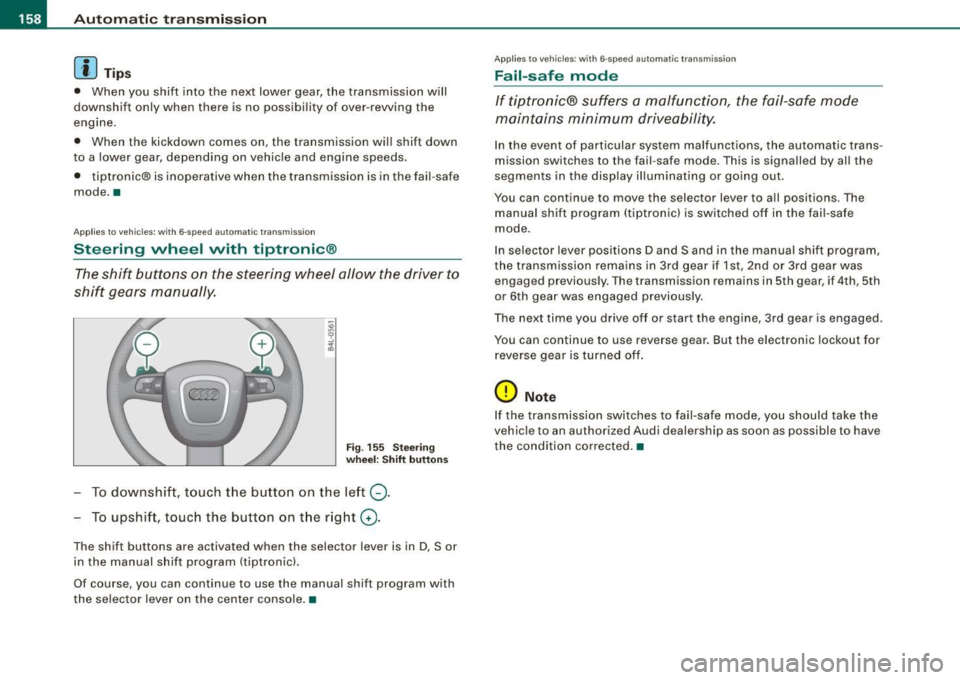
Fig . 155 Stee ring
whe el: Shift button s
To downshift, touch the button on the left Q.
To upshift, touc h the button on the r ight G) .
The shift buttons are act ivated when the selector lever is in D, Sor
in the manual shift program (tiptronic) .
Of course, you can continue to use the manual shift program with
the selec tor lever on the center console. •
App lies to veh ic les : w it h 6-speed au tomat ic tra n smission
Fail-saf e mode
If tiptronic® suffers a malfunction, the fail-safe mode
maintains minimum driveability.
In the event of particular system malfunctions, the au tomatic trans
mission switches to th e fail -safe mode. This is signalled by al l the
segments in the display illuminating or going out.
You can continue to move the selec to r lever to all positions . The
manual shift program (tiptronic l is switched off in the fai l- safe
mode .
In selector lever positions D and Sand in the manual shift program,
the transmission remains in 3rd gear if 1st, 2nd or 3rd gear was e ngag ed pr evious ly. The transmission remains in 5th gear, if 4 th , 5th
or 6th gear was engaged previous ly .
T he next time you drive off or sta rt the engine , 3rd gear is engaged .
You can continue to use reverse gear. But the electronic lockout for
reverse gea r is turned off.
(D Note
If the transmission switches to fail -safe mode , you should take the
v ehicle to an au thori zed Audi dealership as soon as possible to have
the condition corrected .•
Page 161 of 390
_________________________________________________ A_ u_t_ o_ m_ a_t _i _ c _ t _ra_ n_s_ m __ is_ s_ io_ n _ __.1!111
Ap plies to vehicle s: with 6-speed automat ic transmission
Emergency release for selector lever
If the vehicle's power supply fails, the selector lever can
be released in an emergency.
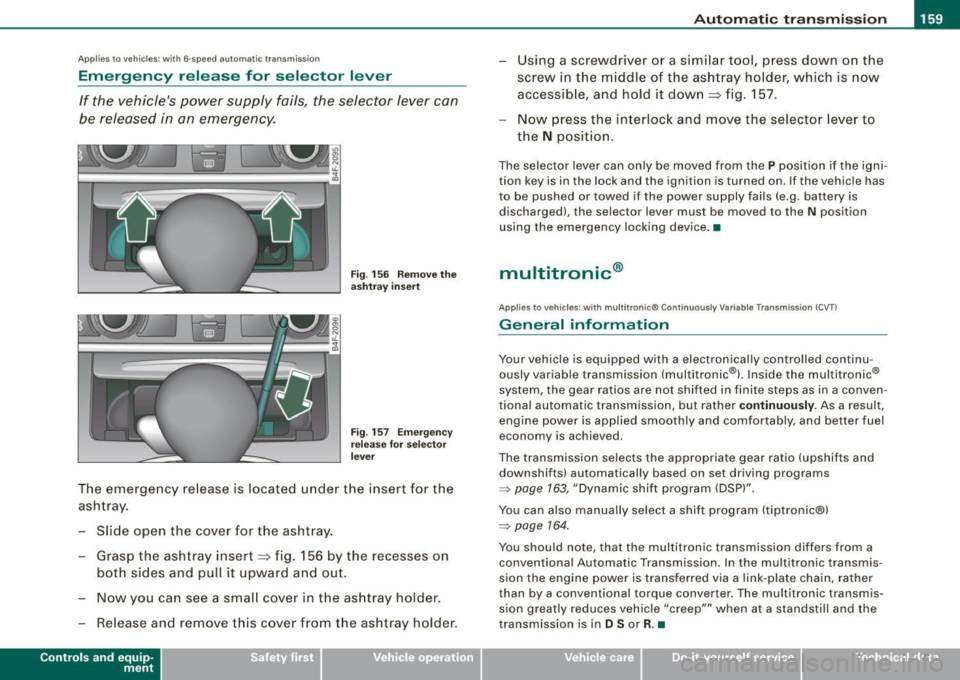
Fig . 156 Remove the
as htray i nsert
Fig . 157 Eme rge ncy
r elease fo r se lecto r
l ever
The emergency release is located under the insert for the
ashtray.
- Slide open the cover for the ashtray .
- Grasp the ashtray insert~ fig. 156 by the recesses on
both sides and pull it upward and out.
- Now you can see a sma ll cover in t he as htray holder.
- Release and remove this cover from the ashtray holder.
Con tro ls and eq uip
ment
Using a screwdriver or a similar tool, press down on the
screw in the m iddle of the ashtray holder, which is now
accessib le, and hold it down
~ fig. 157 .
Now press the interlock and move the selector lever to
the
N position.
The selector lever can only be moved from the P position if the igni
tion key is in the lock and the ignition is turned on. If the vehicle has
to be pushed or towed if the power supply fails (e.g. battery is discharged), the selector lever must be moved to the N position
using the emergency locking device .•
multitronic ®
Applies to veh icles: with multitronic® Continuously Variable Transm ission (CVT l
General information
Your vehicle is equipped with a electronically controlled continu
ously variable transmission (multitronic ®l. Inside the multitronic ®
system, the gear ratios are not shi fted in finite steps as in a conven
tional automatic transmission, but rather
co ntin uously. As a result,
engine power is applied smoothly and comfortably, and better fuel
economy is achieved.
The transmission selects the appropriate gear ratio (upshifts and
downshifts) automatically based on set driving programs
=> page 163, "Dynamic shift program (DSP)".
You can also manually select a shift program (tiptronic®)
=> page 164.
You should note, that the multitronic transmission differs from a conventiona l Automatic Transmission . In the multitronic transmis
sion the engine power is transferred via a link -plate chain, rather
than by a conventional torque converter. The multitronic transmis
sion greatly reduces vehicle "creep'"' when at a standsti ll and the
transmission is in
D Sor R. •
Vehicle care I I Technical data
Page 163 of 390
Automatic transmission 1111111 __________________________ ___;__:..;____;_ ______ _
& WARNING (continued )
-When the selector lever is in a driving position , the vehi cle
may creep , even at idle speed . Therefore do not release the
parking brake or foot brake until you are ready to move ,
because power is transmitted to the wheels as soon as a
driving position is engaged.
- Do not accelerate while selecting a driving position. At this
time the engine must be at idle speed so that undue stress is
not placed on the clutches in the transmission.
- Remember : - even when stopped briefly with the automatic
transmission in "D", "S" or "R" , engine power is being trans
mitted to the wheels . Your vehicle could "creep " forward or
backward . When stopped , keep the brake pedal fully depressed
and use the parking brake if necessary to keep the vehicle from
rolling .
- If the sele ctor lever is unintentionally moved into N while you
are driving , take your foot off the accelerator pedal and wait for
the engine to return to idle speed before selecting a driving
position .
- Never shift into "R " or "P " when the vehicle is in motion .
- Never get out of the driver's seat when the engine is running.
- If you must get out of the vehicle , move the selector lever
securely into the P position and apply the parking brake firmly .
- If the engine must remain running, never have any driving
position engaged when checking under the hood. Make sure
the selector lever has securely engaged and is locked in "P "
with the parking brake firmly set :::::, page 289, "Engine
compartment ". Otherwise , any increase in engine speed may
set the vehicle in motion , even with the parking brake
applied .•
Controls and equip
ment
Ap plies to vehic les : wit h m ultit ron ic® Conti nuous ly Va riable Transm ission (CVT)
Selector lever positions
This sec tion des cribes th e sele ctor lev er positi ons an d
dr iv ing ra ng es.
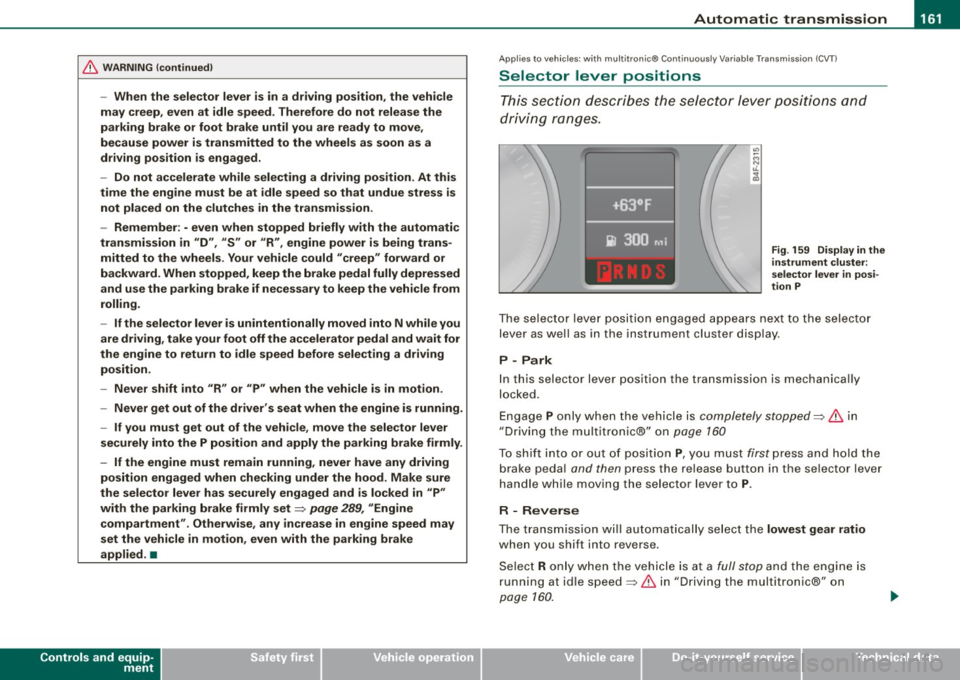
Fig . 159 Display in the
instrument clu ster:
se lector lever in posi ·
tion P
Th e se lecto r le ver p ositi on engag ed app ear s ne xt to th e selec tor
lev er as well as in the instrument cluste r disp lay .
P -Park
In this s electo r lever position the transmission is mechanica lly
lo cke d.
Eng age P on ly when t he veh ic le is completely stopped=> 11::::. in
" Dr ivin g th e multitroni c®" on page 160
T o s hift int o or out o f pos ition P , you m ust fi rs t p ress a nd h old the
brake peda l and then press the r elease button in th e se lector lever
h an dle whi le m oving the sele ctor l ev er to P .
R - Reverse
The tra nsm issio n w ill automat ica lly se lect the lowest gear ratio
when you sh ift into reverse .
S ele ct R only wh en th e ve hicle is at a
fu ll sto p and t he engine is
running at id le speed :::::, 11::::. in "Driving t he multitron ic®" on
page 1 60.
I • •
Page 164 of 390
• ..__A_ u_ t _o_ m_ a_ t_ i_ c _ t_r _a _n_ s_ m_ is_ s_i o _ n ________________________________________________ _
Before you move the selector lever to R, press both, the button in the
handle of the selector lever
and the brake pedal at the same time .
When the ignition is on, the backup lights illuminate when the
selector lever is moved into R.
N -N eutr al
Sh ift to this position for standing with brakes applied=> page 762.
When the vehicle is stationary or at speeds below 3 mph (5 km/h),
you must always apply the footbrake before and while moving the
lever out of
N .
Do not use N for coasting downhill.
D -Normal dr iving po sition f or forward
Depending on the load on the engine, vehicle speed and the
dynamic control program, the transm ission will select the
optimal
gear ratio.
In certain circumstances it may be advantageous to temporarily
switch to the manua l shift program to manually select gear ratios to
match specific driving conditions=>
page 164.
When the vehicle is s tationary or at speeds below 3 mph (5 km/h),
you must always apply the footbrake before and while moving the
lever to
D ou t of N.
S -Spor t p osition
Select this position for sportier performance. In this position, the
transmission wil l not upshift as soon, allowing the vehicle to use the
increased power avai lable at higher engine speeds to achieve live
lier acceleration.
When the vehicle is stationary or at speeds below 3 mph (5 km/h),
you must always apply the foot brake before and whi le moving the
lever to
S out of N .
& WARNING
Re ad a nd follo w all WARNIN GS=> & in "Dr iv ing th e multitr oni c®"
on
page 160 .
0 Note
Coasting downhill with the transm ission in N and the engine not
operating will result in damage to the automatic transmission and
possibly the catalytic converter. •
Applies to vehicles: with multitronic® Continuous ly Variable Transmission (CVT)
Automatic Shift Lock (ASL)
The Automatic Shift Lock safeguards you against acciden
tally shifting in to a forward or the reverse gear and
causing the vehicle to move unintentionally.
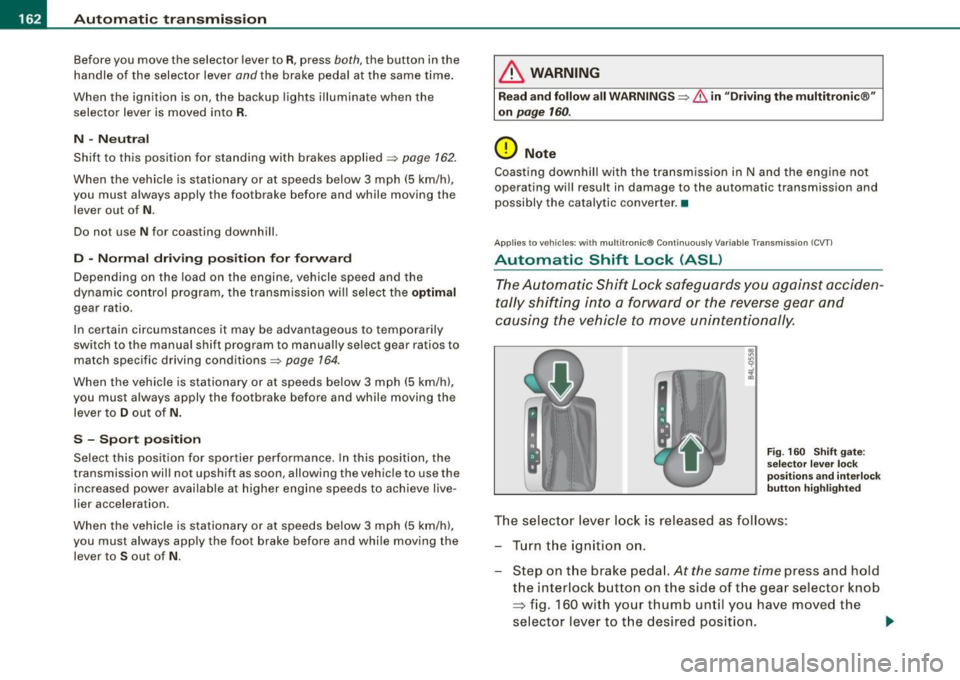
F ig . 160 Shift gate:
se lect or l ever loc k
pos it ions a nd int erl ock
butt on high lighted
The selector lever l ock is rel eased as f ollows :
T u rn the ignition on .
Step on the brake peda l.
At the same time press and hold
the interlock button on the side of the gear selector knob
=> fig. 160 with your thumb until you have moved the
selector lever to t he desired position.
~
Page 165 of 390
_________________________________________________ A_ u_ t_ o_ m_ a_t_ i_c _ t_ra _ n_s_ m __ is_s_ io_ n __ lllll
Autom ati c selec to r l eve r lock
The se lector lever is locked in the P and N positions when the igni
tion is turned on . To move the lever from these positions the driver
must depress the brake pedal. As a reminder to the driver, the
follow ing warning appears in the instrument cluster disp lay when
the selector is in
P and N :
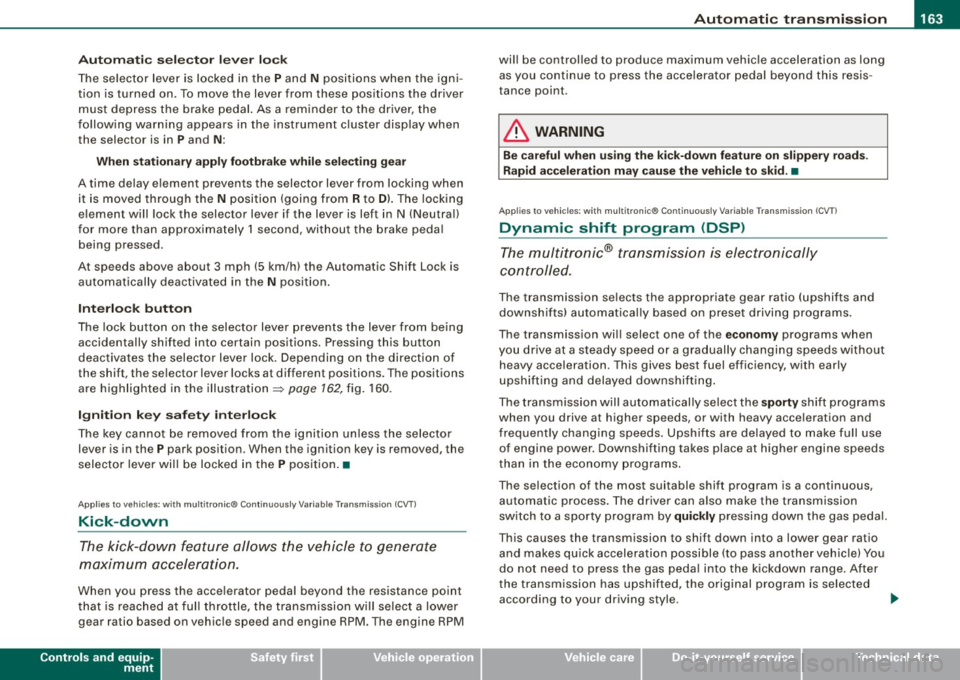
When stationary app ly footbrake while selecting gear
A time delay e lement prevents the selector lever from locking when
it is moved through the
N position (going from R to Dl. The locking
e lement will lock the selector lever if the lever is left in N (Neutral)
for more than approximately 1 second, without the brake peda l
being pressed.
At speeds above about 3 mph (5 km/h) the Automatic Shift Lock is automatically deactivated in the
N posi tion .
Interl ock button
The lock button on the selector lever prevents the lever from being
accidentally shifted into certain posit ions. Pressing this button
deactivates the selector leve r lock. Dependi ng on the direction of
the shift, the se lector lever locks at different positions . The positions
are highligh ted in the illus trati on =>
page 162, fig . 160.
Igniti on k ey saf ety in te rlo ck
The key canno t be removed from the ignition un less the selector
lever is in the
P park position . When the ignition key is removed, the
selector lever wil l be l ocked in the
P posi tion .•
Ap plies to veh ic les : w ith mu ltitro nic ® Cont inuous ly Va riab le Transm iss io n (CVT )
Kick-down
The kick- down feature allo ws the ve hic le to generate
maximum acceler ati on .
When you press the acce lerator pedal beyond the resistance point
t hat is reached at ful l th rottle, the transmission wi ll select a lower
gear ratio based on vehic le speed and engine RPM. The engine RPM
Controls and equip
ment
wi ll be control led to produce maximum vehic le acceleration as long
as yo u conti nue to press the acce lerato r pedal beyond this resis
tance point .
& WARNING
Be careful when us ing the ki ck-down feature on slippery roads .
Rapid acceleration may cau se the vehicle to skid . •
Ap plies to veh icles : wi th mu ltitro nic® C ontinuou sly Vari ab le Tra nsm iss ion (C VT)
Dynamic shift program (DSP)
The multitronic® tr ansmissi on is elect ro nic ally
controlled.
The transmission se lects the appropriate gear ratio (upshifts and
downsh ifts) automatical ly based on preset driving programs.
The transmission wil l select one of the
economy programs when
yo u drive at a steady speed or a gra dually changing speeds without
heavy acceleration . T his gives best fuel efficiency, with early
upshifting and delayed downshif ting .
The transmission will au tomat ically select the
s porty shift programs
when you drive at higher speeds, or with heavy acce leration and
freque ntly changing speeds . Upshifts are delayed to make full use
of engine power. Downshifting takes place at higher engine speeds
t han in t he economy programs .
The se lection of the most suitable shift program is a continuous,
automatic process . The driver can also make the transmission
sw itch to a spor ty progra m by
quickly pressing down the gas peda l.
This causes the transmission to shift down into a lower gear ratio and makes qu ick acceleration possible (to pass another vehic le) You
do not need to press the gas peda l into the kickdown range . After
the trans missi on has upshifte d, the o riginal p rogram is selected
according to your driving style . _.,
I • •
Page 167 of 390
_________________________________________________ A_ u_t_ o_ m_ a_t _i _ c _ t _ra_ n_s_ m __ is_ s_ io_ n _ __.1111
automatic downshifting is interrupted as soon as you apply throttle
again .
[ i J Ti ps
• When you shift into the next lower gear, the engine will down
shift only when there is no possibility of over-revving .
• When the kick-down comes on, the transmission will sh ift down
to a lower gear depending on vehicle and engine speeds.
• The tiptronic® is inoperative when the transmission is in the fail
safe mode .•
Ap plies to vehic les: with multit ron ic® Continuous ly Variable Transm ission (CVT)
Steering wheel with tiptronic ®
The shift buttons on the steering wheel allow the driver to
shift gears manually.
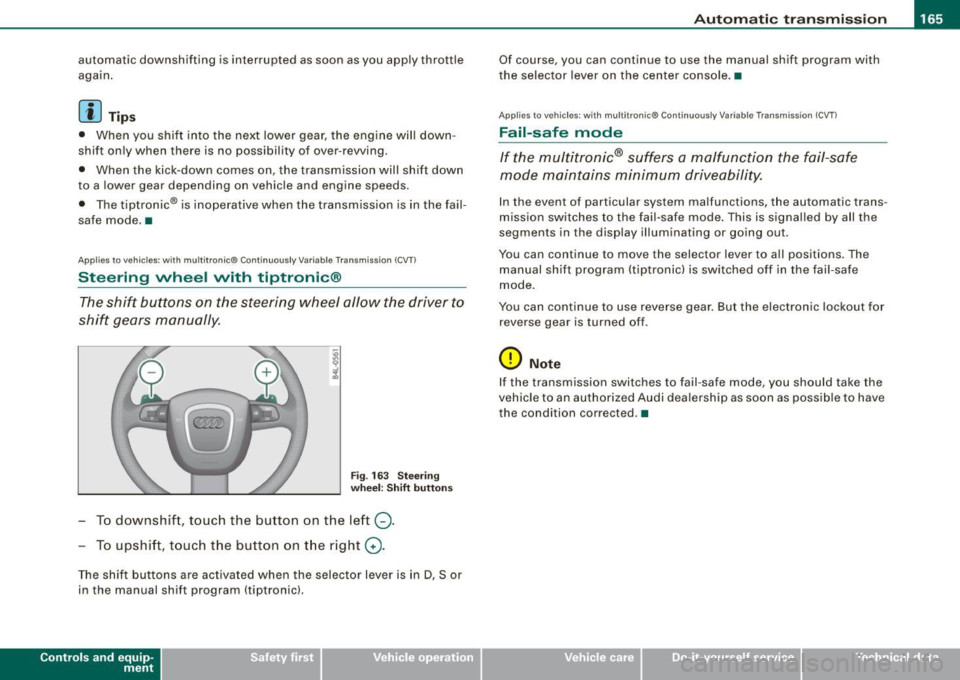
Fig . 163 S teering
w heel : S hift butt ons
- To downshift, touch the button on the left Q.
- To upshift, touch the button on t he right G) .
The shift buttons are activated when the selector lever is in D, Sor
in the manual shift program (tiptronic).
Contro ls and eq uip
ment
Of course, you can continue to use the manual shift program with
the selector lever on the center console. •
Applies to vehicles : with multitronic® Continuously Var iable Transm ission (CVT )
Fail -safe mode
If the multitronic® suffers a malfunction the fail-safe
mode maintains minimum driveability.
In the event of particular system malfunctions, the automatic trans
mission switches to the fail-safe mode . This is signal led by all the
segments in the display illuminating or going out.
You can continue to move the selector lever to all positions. The
manual shift program (tiptronic) is switched off in the fail-safe
mode.
You can continue to use reverse gear. But the electronic lockout for
reverse gear is turned off .
0 Note
If the transmission switches to fail-safe mode, you should take the
vehicle to an authorized Audi dea lership as soon as poss ib le to have
the condition corrected. •
Vehicle care I I irechnical data
Page 168 of 390
•L---=A....::...: u:;.. t:..: o:..::....: m.....;::. a..;:t :;..ic ~ t:..: r..;: a ..:..; n.....;::. s..:.m ;.;..:. is::.. s .::....:. io::....:. n;__ ____________________________________________ _
Applies to vehic les: with mul tit roni c® Cont inuous ly Variab le Transmission (CVTl
Emergency release for selector lever
If the vehicle's power supply fails, the selector lever can
be released in an emergency.
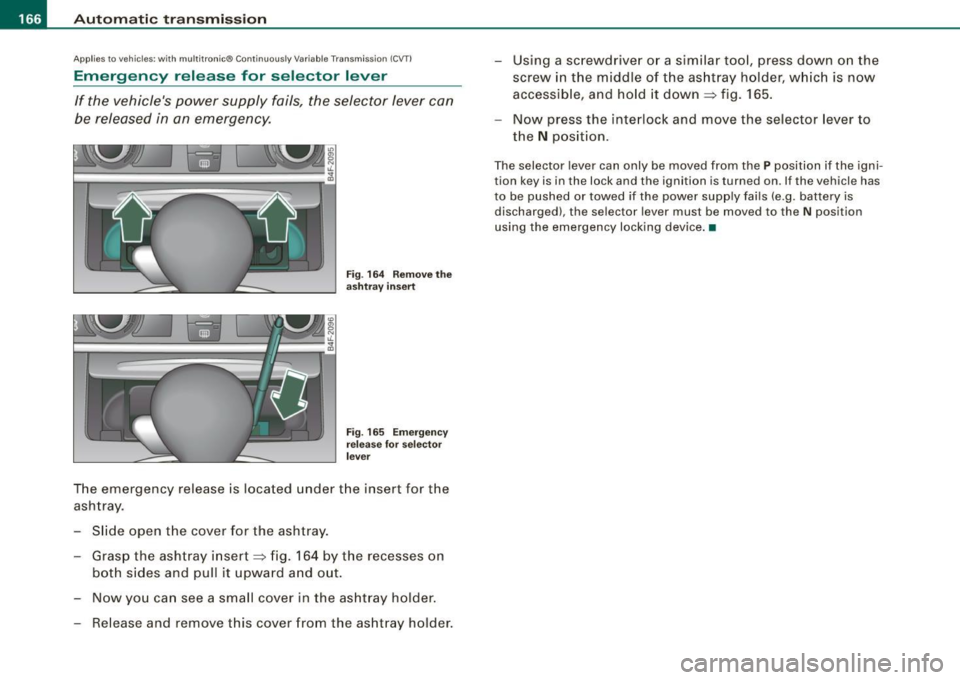
Fig. 164 Remove the
ashtray insert
Fig. 165 Emergency
release for selector
lever
The emergency release is located under the insert for the
ashtray.
- Slide open the cover for the ashtray.
- Grasp the ashtray insert~ fig. 164 by the recesses on
both sides and pull it upward and out.
- Now you can see a small cover in the ashtray holder.
- Release and remove this cover from the ashtray holder. -
Using a screwdriver or a similar tool, press down on the
screw in the middle of the ashtray holder, which is now
accessible, and hold it down
~ fig. 165.
- Now press the interlock and move the selector lever to
the
N position.
The selector lever can only be moved from the P position if the igni
tion key is in the lock and the ignition is turned on. If the vehicle has
to be pushed or towed if the power supply fails (e .g. battery is
discharged), the selector lever must be moved to the N position
using the emergency locking device. •
Page 196 of 390
___ D_ ri_v _i_n -=g=--- S_ a_ f _e___, ly'---------------------------------------------------
Proper occupant seating positi ·ons
Proper seating position for the driver
The proper driver seating position is important for safe,
relaxed driving.
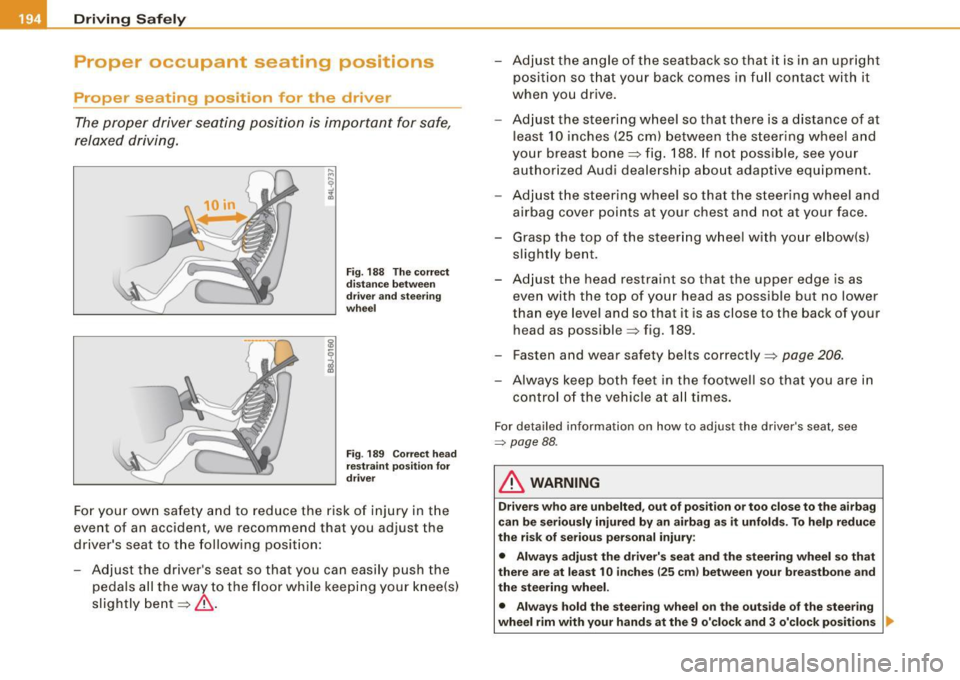
Fig. 188 The correct
distance between
driver and steering
wheel
Fig. 189 Correct head
restraint position for
driver
For your own safety and to reduce the risk of injury in the
event of an accident, we recommend that you adjust the
driver's seat to the following position:
- Adjust the driver's seat so that you can easily push the
pedals all the way to the floor while keeping your knee(s)
slightly bent=:>& . - Adjust the angle of the seatback so that it is in an upright
position so that your back comes in full contact with it
when you drive.
- Adjust the steering wheel so that there is a distance of at
least 10 inches (25 cm) between the steering wheel and
your breast bone=:> fig. 188. If not possible, see your
authorized Audi dealership about adaptive equipment.
- Adjust the steering wheel so that the steering wheel and
airbag cover points at your chest and not at your face.
- Grasp the top of the steering wheel with your elbow(s)
slightly bent.
- Adjust the head restraint so that the upper edge is as even with the top of your head as possible but no lower
than eye level and so that it is as close to the back of your
head as possible =:> fig . 189.
- Fasten and wear safety belts correctly=:>
page 206.
- Always keep both feet in the footwell so that you are in
control of the vehicle at all times.
For detailed information on how to adjust the driver's seat, see
=> page 88 .
& WARNING
Drivers who are unbelted, out of position or too close to the airbag
can be seriously injured by an airbag as it unfolds. To help reduce
the risk of serious personal injury:
• Always adjust the driver's seat and the steering wheel so that
there are at least 10 inches
125 cm) between your breastbone and
the steering wheel.
• Always hold the steering wheel on the outside of the steering
wheel rim with your hands at the 9 o'clock and 3 o'clock positions ..