light AUDI S6 2008 Manual Online
[x] Cancel search | Manufacturer: AUDI, Model Year: 2008, Model line: S6, Model: AUDI S6 2008Pages: 390, PDF Size: 88.42 MB
Page 159 of 390
_______________________________________________ A_ u_t _o _m_ a_ t_ i_ c _ t_r _ a _n _s_ m_ i_ s _ s_ i_ o _ n _ ___._
The selection of the most suitable shift program is a continuous,
automatic process. The driver can also make the transmission
switch to a sporty program by
quickly pressing down the gas pedal.
This causes the transmission to shift down to a lower gear to
achieve rapid acceleration, e.g. for quickly passing another vehicle.
You do not need to press the gas pedal into the kick -down range.
After the transmission has upshifted, the original program is
selected according to your driving style.
An additional shift program allows the automatic transmission to
select the proper gear for uphill and downhill gradients .
This keeps the transmission from shifting up and down unneces
sarily on hills. The transmission will shift down to a lower gear when
the driver presses the brake pedal on a downhill gradient. This
makes use of the braking effect of the engine without the need to
shift down manually .•
Ap plies to ve hic les: w ith 6- spee d automat ic t ransm is sion
Manual shift program
Using the manual shift program you can manually select
gears.
Con tro ls and eq uip
ment
Fig . 15 3 Ce nter
co nsole : shifting the
tiptronic® manually
~-1l I _, ,.
i ~YJ. 41 Of . .,,..,.
il 300mi Fig. 154 Display:
manual shift program,
selected gear high
lighted
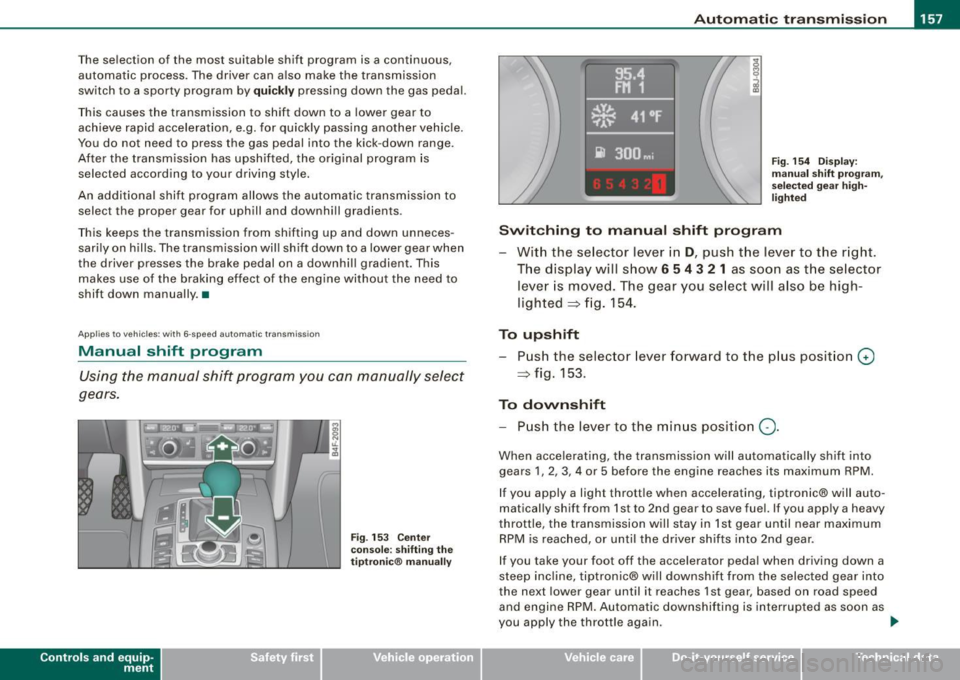
Switching to manual shift program
With the selector lever in D, push the lever to the right .
The display will show
6 5 4 3 2 1 as soon as the selector
lever is moved. The gear you select will also be high
lighted
=> fig. 154.
To upshift
Push the selector lever forward to the plus posit ion 0
=> fig. 153.
To downshift
-Push the lever to the min us position Q .
When accelerating, the transmission will automatica lly shift into
gears 1, 2, 3, 4 or 5 before the engine reaches its maximum RPM.
If you apply a light throttle when accelerating, tiptronic® will auto
matically shift from 1st to 2nd gear to save fuel. If you app ly a heavy
throttle, the transmission will stay in 1st gear until near maximum
RPM is reached, or until the driver shifts into 2nd gear .
If you take your foot off the a ccelerator peda l when driving down a
steep incline, tiptronic® wi ll downshift from the selected gear into
the next lower gear until it reaches 1st gear , based on road speed
and engine RPM. Automatic downshifting is interrupted as soon as
you apply the throttle again . .,_
Vehicle care I I irechnical data
Page 162 of 390
• ..__A_ u_ t_ o_ m_ a_t _i c_ t_ r_ a _ n_ s_m _ is_ s _ io_ n _____________________________________________ _
App lies to vehic le s : w ith mul tit ron ic ® Cont inuous ly Varia ble Transm ission ( CVTl
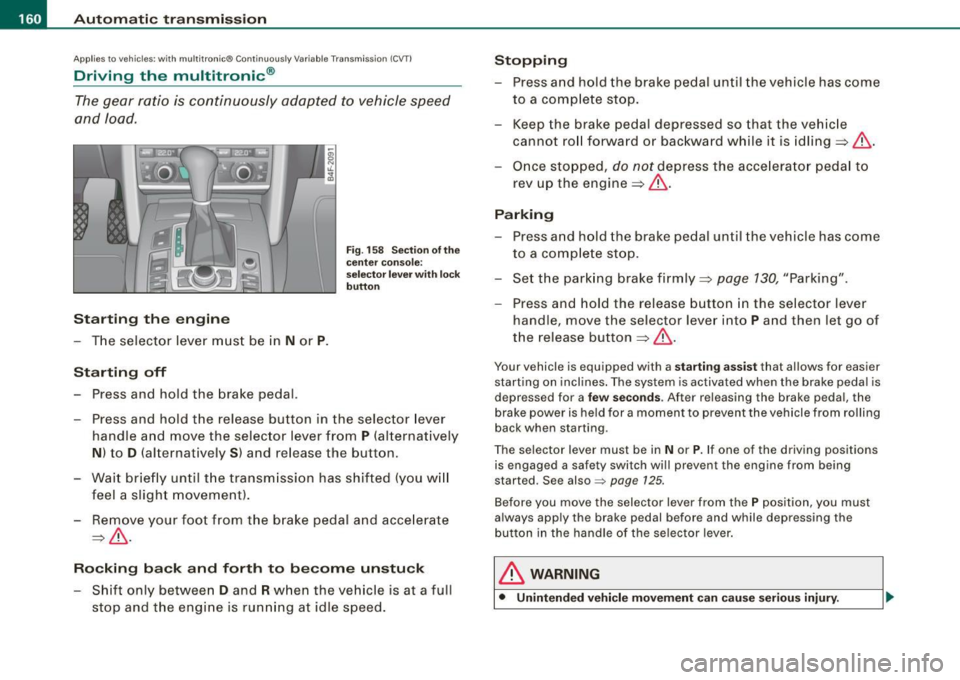
Driving the multitronic ®
The gear ratio is continuously adapted to vehicle speed
and load .
Starting th e engin e
- The selector lever must be in N or P.
Start in g off
- Press and hold the bra ke pedal.
F ig . 1 58 Sec tion o f the
c en ter conso le:
sele ctor leve r w ith l ock
b utt on
- Press and hold the release button in the selector lever
handle and move the selector lever from
P (alternatively
N ) to D (a lternatively S ) and release the button .
- Wait br ie fl y until t he transm iss ion has shifted (you w ill
feel a slight movement ).
- Remove your foot from the brake pedal and acce lerate
~ & -
Ro cking ba ck and forth to b ecom e un stu ck
- Shift only between D and R when the vehicle is at a full
stop and the engine is running at idle speed .
Stopping
-Press and hold the brake pedal until the vehicle has come
to a comp lete stop.
- Keep the brake pedal depressed so that the vehic le
cannot ro ll forward or backward while it is idling ~& .
Once stopped,
do not depress the acce lera to r pedal to
rev up the engine::::!>&.
Pa rking
- Press a nd hold the brake peda l until the vehicle has come
to a comp lete sto p.
- Set the park ing brake firmly ~
page 130, "Park ing".
- Press and hold the release button in the selector lever
handle , move the selecto r leve r into
P and then let go of
the release button
~ & .
Your vehicle is equipp ed with a sta rtin g assist that a llows for easier
starting on inclines . The sys tem is activated when the brake peda l is
d epr essed for a
few se co nd s. Aft er r eleasing the brak e peda l, the
brake power is held for a moment to prevent the vehicle from rolling
back when starting .
The se lector lever must be in
N or P. If one of the driving positions
is engaged a safety switch wi ll prevent the engine from being
started. Se e also =>
page 125.
Before you move the selector lever from the P position, you must
a lways apply the brake pedal before and while depr ess ing the
button in the handle of the selector lever .
& WARNING
• Unintended vehicl e movem ent can cau se seri ous injury.
Page 164 of 390
• ..__A_ u_ t _o_ m_ a_ t_ i_ c _ t_r _a _n_ s_ m_ is_ s_i o _ n ________________________________________________ _
Before you move the selector lever to R, press both, the button in the
handle of the selector lever
and the brake pedal at the same time .
When the ignition is on, the backup lights illuminate when the
selector lever is moved into R.
N -N eutr al
Sh ift to this position for standing with brakes applied=> page 762.
When the vehicle is stationary or at speeds below 3 mph (5 km/h),
you must always apply the footbrake before and while moving the
lever out of
N .
Do not use N for coasting downhill.
D -Normal dr iving po sition f or forward
Depending on the load on the engine, vehicle speed and the
dynamic control program, the transm ission will select the
optimal
gear ratio.
In certain circumstances it may be advantageous to temporarily
switch to the manua l shift program to manually select gear ratios to
match specific driving conditions=>
page 164.
When the vehicle is s tationary or at speeds below 3 mph (5 km/h),
you must always apply the footbrake before and while moving the
lever to
D ou t of N.
S -Spor t p osition
Select this position for sportier performance. In this position, the
transmission wil l not upshift as soon, allowing the vehicle to use the
increased power avai lable at higher engine speeds to achieve live
lier acceleration.
When the vehicle is stationary or at speeds below 3 mph (5 km/h),
you must always apply the foot brake before and whi le moving the
lever to
S out of N .
& WARNING
Re ad a nd follo w all WARNIN GS=> & in "Dr iv ing th e multitr oni c®"
on
page 160 .
0 Note
Coasting downhill with the transm ission in N and the engine not
operating will result in damage to the automatic transmission and
possibly the catalytic converter. •
Applies to vehicles: with multitronic® Continuous ly Variable Transmission (CVT)
Automatic Shift Lock (ASL)
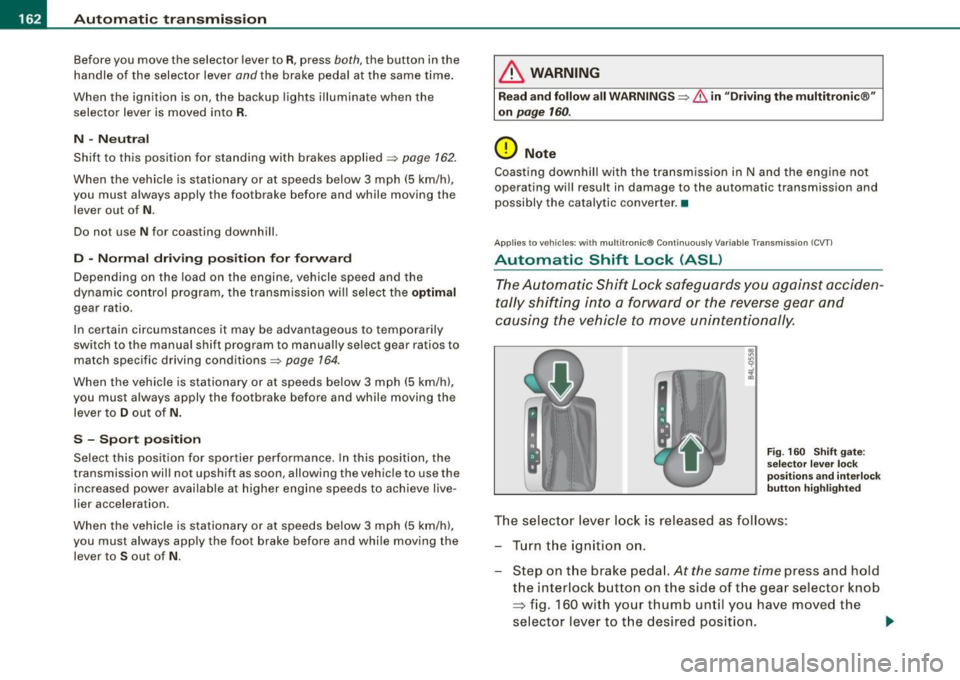
The Automatic Shift Lock safeguards you against acciden
tally shifting in to a forward or the reverse gear and
causing the vehicle to move unintentionally.
F ig . 160 Shift gate:
se lect or l ever loc k
pos it ions a nd int erl ock
butt on high lighted
The selector lever l ock is rel eased as f ollows :
T u rn the ignition on .
Step on the brake peda l.
At the same time press and hold
the interlock button on the side of the gear selector knob
=> fig. 160 with your thumb until you have moved the
selector lever to t he desired position.
~
Page 166 of 390
-L~A~u~t~o~m~a~t ::,:i c~t::!r.!:a~n~ s~m!.!!:i s~ s ~ io~n :..._ ____________________________________________ _
An additional shift program allows the automat ic t ransmission to
select the p roper gear for uphill and downhill gradients.
This prevents the transmission from shifting up and down unneces sari ly on hills. The transmission will shift down to a lower gear ratio
when the driver presses the brake pedal on a downhill gradient . This
makes use of the braking effect of the engine without the need to
shift down manually.
If you are driving in hills and mountains, the transmission will
continuously adjust the gear ratio to the road grade. If you press the
brake pedal when driving downhi ll, the transmission will down shift
automatically . This increases the braking effect of the engine .
If the cru ise control is on when you are traveling downh ill, the trans
mission will automatically select a lower gear ratio in order to main
tain the set vehic le speed . This wil l cause the engine speed to
increase. •
Applies to v ehicles: wit h mult it ro n ic® Co ntin uous ly V ariab le Tra nsm iss io n (CVT )
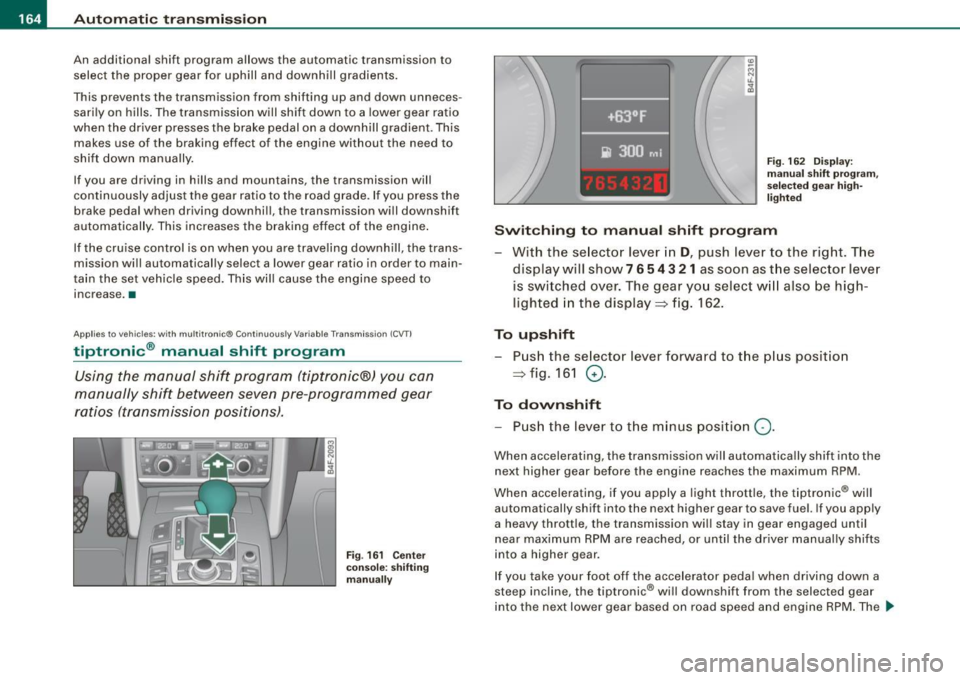
tiptronic ® manual shift program
Using the manual shif t program ( tiptronic® J you can
manually shift between seven pre-programmed gear
r at io s ( tra nsmission p ositi ons).
Fig . 16 1 Center
c onsole : shifting
m anu ally
(0
Fig . 16 2 Disp lay:
m anu al s hift pro gra m ,
se lecte d gear h igh
li gh ted
Switching to manual shift program
With the se lector lever in
D, push lever to the right. The
display will show 7
6 5 4 3 21 as soon as the selector lever
is switched over. The gear yo u select w ill also be high
ligh ted in the displ ay => fig. 162.
To upshift Push the se lector lever forward to the p lus position
=> fig. 161 0-
To downshift
- Pu sh th e lever t o the m inus posi tion
Q .
When accelerating, the transm ission will automa tically shif t into the
next higher gear before the engine reaches the maximum RPM .
When accelerating, if you apply a light throttle, the tiptronic® will
automatically shift into the next higher gear to save fuel. If you apply
a heavy thrott le, the transmission wi ll stay in gear engaged until
n ear maximum RP M are reached, or until the driver manually shifts
into a higher gear.
If you take your foot of f the accelerator peda l when driving down a
steep inc line, the tiptronic ® will downshift from the selected gear
into the next lower gear based on road speed a nd eng ine RPM . The _,,
Page 177 of 390
Audi Parking System -
----------------=----=------'
Applies to vehic les : w ith Au di Par kin g Sy stem (r ear) and rea r-v ie w came ra
Parking mode 2
"Parking mode 2" can be used as aid when (parallel)
parking on the side of the road , for example.
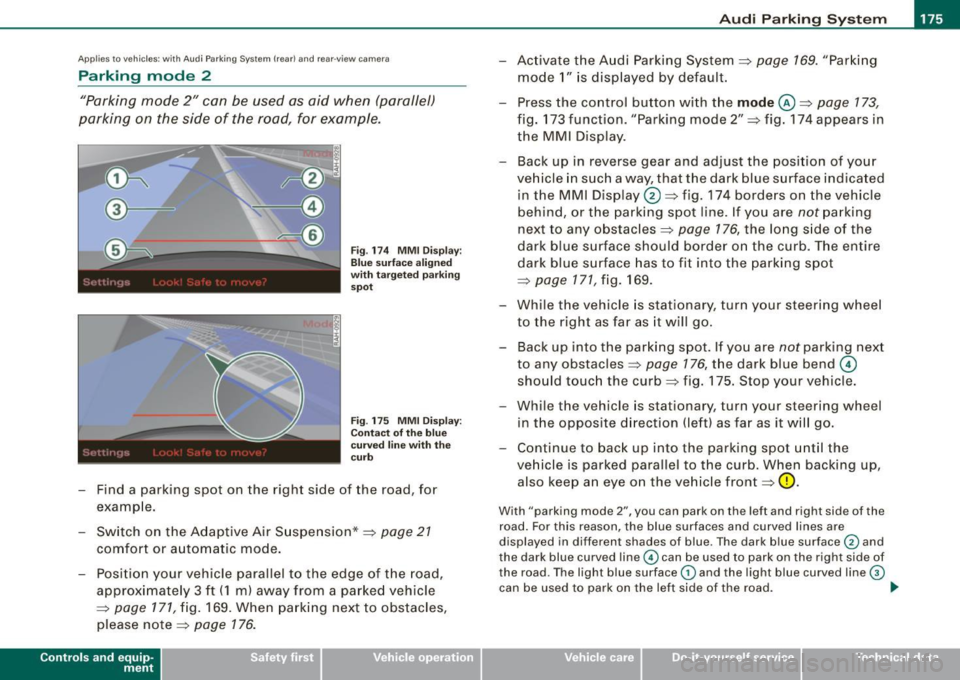
Fig . 174 MMI Display:
Blue surface aligned
with targeted parking
spot
Fig . 175 MMI Display:
Contact of the blue
curved line with the
curb
- Find a parking spot on the right side of the road, for
example .
- Switch on the Adaptive Air Suspension*=>
page 21
comfort or automatic mode.
- Position your vehicle parallel to the edge of the road,
approximately 3 ft (1 m) away from a parked vehicle
=>
page 171, fig. 169. When parking next to obstacles,
please note=>
page 176.
Contro ls and eq uip
ment
- Activate the Audi Parking System=> page 169. "Parking
mode 1" is displayed by default.
- Press the control button with the
mode @=> page 173,
fig. 173 funct ion . "Park ing mode 2" => fig. 174 appears in
the MMI D isplay.
- Back up in reverse gear and adjust the pos ition of your
vehicle in such a way, that the dark blue surface ind icated
in the MMI Display
0 => fig . 174 borders on the vehicle
be hind, or the parking spot line. If you are
not parking
next to any obstacles=>
page 176, the long side of the
dark blue surface should border on the curb. The ent ire
dark blue surface has to fit into the parking spot
=>
page 171 , fig. 169.
- While the vehicle is stationary, turn your steering wheel
to the right as far as it will go.
- Back up into the parking spot. If you are
not park ing next
to any obstac les =>
page 176, the dark blue bend ©
should touch the curb=> fig . 175. Stop your vehicle.
- Wh ile the vehicle is stat ionary, turn your steering whe el
i n the oppos ite direc tion (lef t) as far as it will go .
- Contin ue to back up into the park ing spot until the
vehicle is parked pa rallel to the curb. When backing up,
also keep an eye on the vehicle front=>
0.
With "parking mode 2 ", you can park on th e left a nd right sid e of the
road. Fo r this reason, the blue surfaces and curved l ines are
displ ayed in diffe ren t sh ades of blue . The dark blue surfa ce
0 and
the dark blue curved line© can be used to park on the right side of
t he road . The l igh t blue s urfa ce
G) and the light blue curved lin e G)
can be us ed to park on the left si de of the road . .,
Vehicle care I I irechnical data
Page 178 of 390
• .___A_ u_d_ i _P _a_ r_ k_ i_ n ..:g=-- S_ y=-- s_t _ e _m _____________________________________________ _
When the turn signal is switched on, only the necessary surfaces
and curves are shown. To change the side that is shown, simply
change the turn signal.
The displayed light blue® or dark blue © curved line identifies the
turn-around point when maneuvering to park. If the curved line
touches the curb, the steering wheel turn -around point has been
reached =>
page 175, fig. 175.
The distance from the rear bumper © to the red line@ is approxi
mately 1.3 ft (40 cm). Here, at the latest, you should stop backing up
=>
page 177.
& WARNING
Please note that objects not touching the ground can appear to be
further away than they really are (for example, the bumper of a parked vehicle, a trailer hitch, or the rear of a truck).
In this case,
you should not use the guide help lines to measure distance -
danger of accident!
0 Note
In the MMI Display, the direction of travel of the vehicle rear is repre
sented depending on the steering wheel angle. The vehicle front
swings out more than the vehicle rear .
[ i] Tips
• In order for the rear-view camera to function properly, the
camera lens=>
page 169, fig. 167 must be kept clean, and free of
snow and ice. Please follow the additional notes on=>
page 180.
• The positions of the orientation lines/ surfaces are displaced up
or down if the parking process is carried out with the rear-view
camera in Adaptive Air Suspension*=>
page 21 dynamic, off -road,
or lift mode. Therefore, the accuracy is reduced. •
Special parking situations
Applies to vehicles : with Audi Parkin g System (rea r) and rear-view camera
Parking next to obstacles
When parking next to an obstacle, enough distance must
left on the side.
=
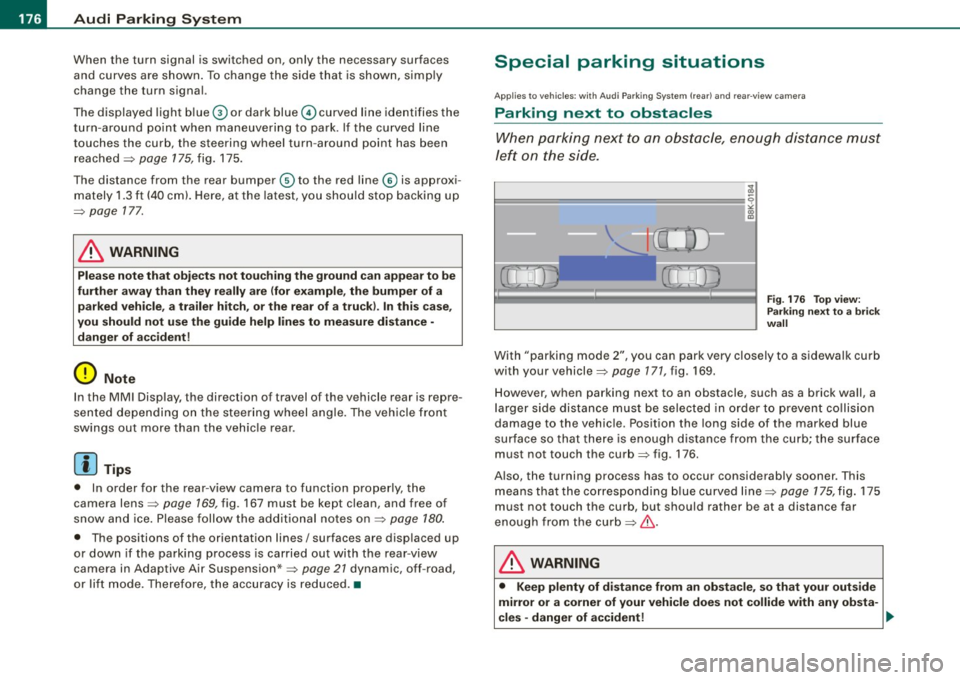
Fig. 176 Top view:
Parking next
to a brick
wall
With "parking mode 2", you can park very closely to a sidewalk curb
with your vehicle=>
page 171, fig. 169.
However, when parking next to an obstacle, such as a brick wall, a
larger side distance must be selected in order to prevent collision
damage to the vehicle. Position the long side of the marked blue
surface so that there is enough distance from the curb; the surface
must not touch the curb=> fig. 176 .
Also, the turning process has to occur considerably sooner. This means that the corresponding blue curved line=>
page 175, fig. 175
must not touch the curb, but should rather be at a distance far
enough from the curb=>&.
& WARNING
• Keep plenty of distance from an obstacle, so that your outside
mirror or a corner of your vehicle does not collide with any obsta-
cles -danger of accident! ..
Page 182 of 390
• .___A_ u_d_ i _P _a_ r_ k_ i_ n ..:g=-- S_ y=-- s_t _ e _m _____________________________________________ _
Applies to vehic les: with Audi Park ing System (rearl and rear-view camera
Rear-view camera tips
We recommend that you practice parking with t he rear -view camera
in a traff ic -free location, or parking lot, to become fami liar with the
system, the orientati on line s, a nd th eir functi on. When doi ng this,
there should be good light and weather conditions.
In the MMI Display, objects or vehicles ap pea r closer or further away
i f:
• you are driving in reverse gear from a level surface onto an
inc lin e, o r a downwa rd sl ope,
• you are driving in reverse gear toward protruding objects,
• the ve hicle is carrying too much load in the rear.
The accuracy of the orientation lines and blue surfaces diminishes if :
• the Adaptive Air Suspension* is defective, or th e dynamic, off
road, o r lift mode is swi tched on,
• the rear -view camera does not provide a reliable image, for
exam ple, in po or vi sibi lit y c ondi tio ns or if the lens is dirt y,
• the image on the screen is not visible due to sun g lare and reflec
t ion .
Caring for the rear-view camera lens:
• Dampen the lens with a household a lcoho l- based g lass c leaner,
and c lean th e lens wit h a dry cl oth.
• Remove snow with a hand brush.
• Remove ice, preferably with de -icing spray~
0.
& WARNING
• The rear-v iew camera does not replace the view to the rear and
the rear view mirrors .
• The rear-view camer a - because of technical limitat ions -does
not show the entire area behind the vehicle~
page 17 3, fig. 171.
& WARNING (continued )
Be especially careful to che ck for small children and animals
before backing up . Small children and animals will not alway s be
shown in the rear-view display .
• The Audi Parking System is not a sub stitute for being careful
and alert when back ing up . Be especially careful during parking
and similar maneuver s. Always watch where you are driving and
make su re that nothing is in the way .
• Do not allow yourself to be distracted from traffic by the rear
view camera pi ctures .
• When maneuvering or parking , do not only u se the MMI Display
for orientat ion . Certain obje cts - depending on the screen resolu
tion -may not, or not entirely, be displayed ; for example tr ailer
hitches , cha ins , narrow posts , or fences .
• Only use the rear -view camera for aid if it shows a good , clear
picture . The image may be obscured , for example , by the sun
shining into the lens, dirt on the lens, or as the result of a defect -
danger of accident!
• If the image i s hazy when the MMI Display is switched on or the
area behind the vehicle is not visible (for e xample , as the result of
a dirty or defective lens ), the rear -view camera must not be used
for aid in maneuver ing - danger of accident!
• The rear -view camera generates two -dimensional images . For
this reason , please note that recesses in the ground and
protruding parts on another vehicle , or protruding objects fixed to
the ground , will be more difficult or impossible to recognize on the
MMI Di splay, due to the missing spacial depth .
• If the position and the installation angle of the camera has
changed, for example , after a rear end collision , do not continue to
use the system for safety reasons . Have it checked by an autho
rized Audi dealer or qualified work shop .
• Only use the rear-v iew camera when the rear lid is fully closed .
Make sure that objects mounted on the rear are not obscuring the
camera v iew .
Page 185 of 390
____________________________________________ A_ d_a--' p=-- t_iv _e_ A_ ir_ S_u_ s-=- p_e _ n_ s _ io_ n __ lllll
Ap plies to vehicl es: wi th Adap tive Ai r Su sp ension
Chassis controls
Four different driving modes can be set by the driver.
The automatic contro l processes are speed -and time -dependent.
For example, it is not possib le to raise the suspension to the lift
mode above certain speeds.
L ev el a djustment
automatic
dynamic
aut om ati c Ground clearan
ce
about 4.7 - 4 .1 inches
(120 -105 mm)
about 4.7 inches (120 mm)
about 4.1 inches (105 mm)
a bo ut 5.3 inches ( 135 mm)
Se lect the automatic mode i f you p refer suspension and damping
settings emphasizing comfort .
• Low ering : When a speed of about 75 mph (120 km/h) is exceeded
for more than 30 seconds, the vehicle is automatically lowered by about 0.6 inch (15 mm) to the dynamic level which is more suitable
for highway speeds. Road holding is optimized as a result of the lower center of gravity and fuel consumption is reduced as a result
of reduced wind res istance.
• Rais ing : The vehicle is automatically raised again if the speed
falls below about 44 mph (70 km/h) for a period of 2 minutes . The
vehic le is raised immediate ly when speed falls below about 22 mph
(35 km/h).
s ta nd ard
Select the standard mode if you desire a suspension setting with a
special emphasis on comfort. In the standard mode there is
no
lowering of the suspension. Even a t high speeds, the vehicle stays
at the same level. Damping characteristics with a decided emphasis
on comfort are selected in this mode.
Controls and equip
ment d
y n ami c
Select the dynamic mode if you prefer a sporty suspension setting .
In this mode, the vehicle is lowered whi le it is still stationary and
spo rty damping characteristics are selected . The warn ing light
c.::i
in the instrument cluster will come on for a few seconds just to
remind you of the reduced ground clearance .
If y ou switch off the engine wh ile the ve hicle is in the dynamic mode
and then switch on the ignition once again, the
c.::i warning light
wi ll also come on again f or a few seconds as a reminder .
lift
Select the lift mode when you have to travel over poor sect ions of
road (e .g. trails). In the lift mode, the vehic le is raised by 0.6 inch (15
m m) compared to norma l leve l while it is stil l stationary and
damping characteristics are adjusted to emphasize comfort .
The lift mode can be activated only at speeds below 50 mp h (80
km/h) . When a speed of about 62 mph (100 km/h) is exceeded, the
system automatical ly leaves lift mode and the mode set previously
(standard, automat ic, dynam ic) is activated aga in. •
App lies to v ehic les : with Ada ptive Air Suspens io n
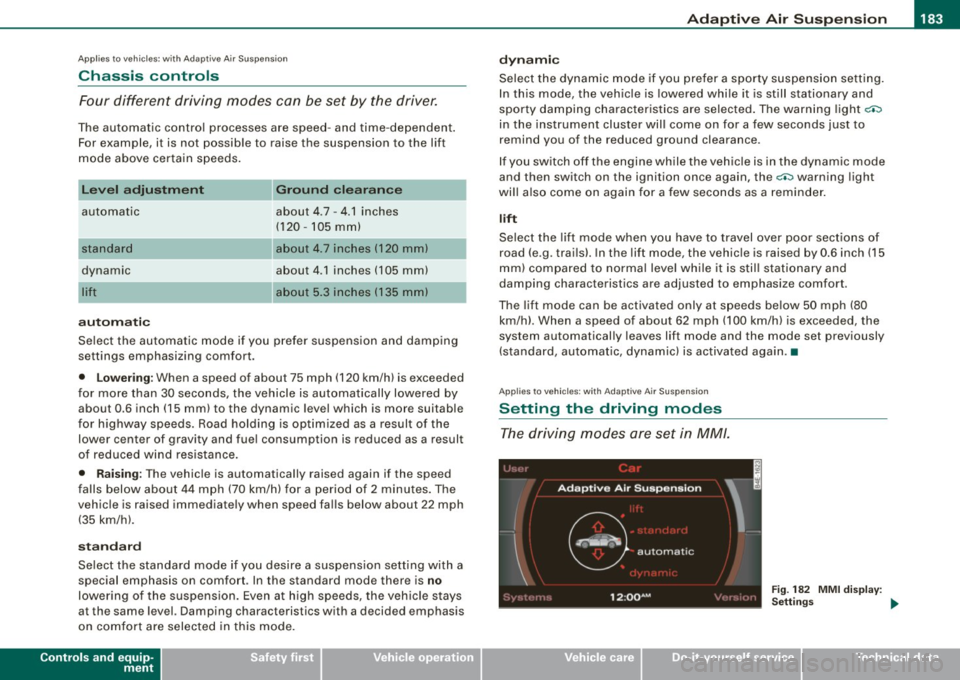
Setting the driving modes
The driving modes are set in MM/.
Fig . 18 2 MMI di splay:
Settin gs _,.
I • •
Page 188 of 390
• ..__H_ o_ m_ e_ L_in _ k_® ____________________________________________________ _
Homelink®
Universal remote control
Applies to vehicles: w ith Home Link® universal remote control
General information
The Homelink® feature can learn the up to three radio
frequency codes for most current transmitters used for
operating garage doors, estate gates, home or outdoor
lighting systems, and other devices.
You must first program the Homelink® transmitter before you can
use the system=>
page 186, "Programming the Homelink® trans
mitter".
In order to program the Homelink® transmitter for devices utilizing
rolling code, a second person on a ladder who can safely reach the
garage door opener motor is recommended. It is also necessary to
locate the "learn" button on your garage door opener motor. Refer
to the operating instructions for the opener, as the location and
color of this button may vary by manufacturer.
You can still use the original remote control for the device at any
time .
& WARNING
• Never use the Homelink"" transmitter with any garage door
opener that does have not the safety stop and reverse feature as
required by federal safety standards. This includes any garage
door opener model manufactured before April 1, 1982.
• A garage door opener which cannot detect an object, signaling
the door to stop and reverse does not meet current federal safety
standards . Using a garage door opener without these features
increases risk of serious injury or death .
& WARNING (continued)
• For safety reasons never release the parking brake or start the
engine while anyone is standing in front of the vehicle.
• A garage door or an estate gate may sometimes be set in
motion when the Homelink ® remote control is being
programmed . If the device is repeatedly activated, this can over
strain motor and damage its electrical components -an over
heated motor is a fire hazard!
• To avoid possible injuries or property damage, please always
make absolutely certain that no persons or objects are located in
the range of motion of any equipment being operated. •
Applies to vehicles: wit h Home link® universal remote contro l
Programming the Homelink ® transmitter
The transmitter is programmed in two phases. For rolling
code transmitters, a third phase is also necessary.
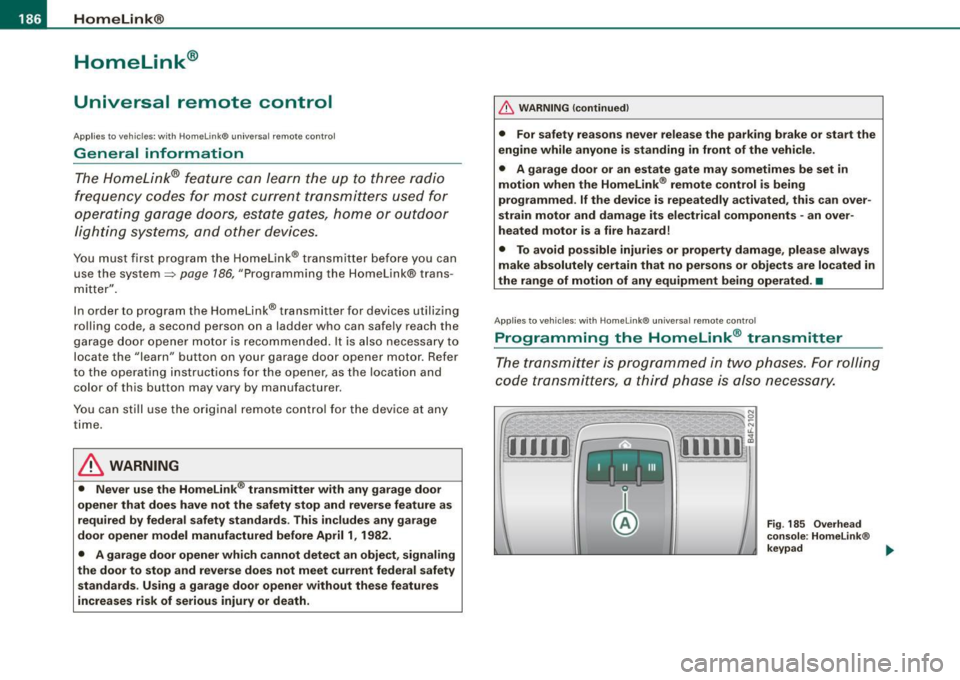
Fig . 185 Overhead
console: Homelink ®
keypad ...
Page 189 of 390
HomeLink®
------------------------------------
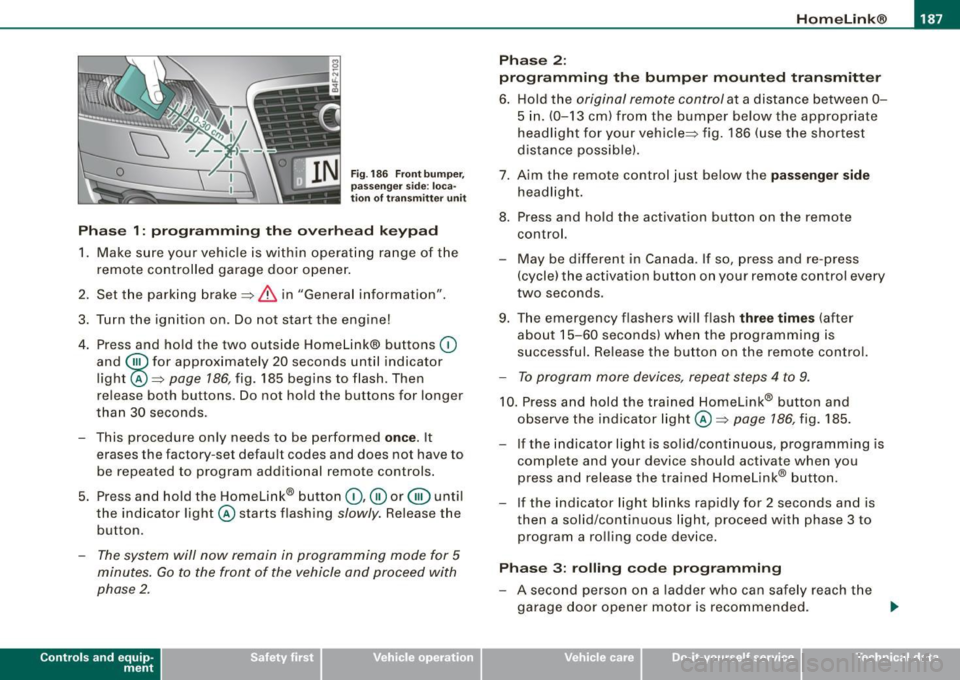
Fig. 186 Front bumper ,
passenger side: loca
tion of transmitter unit
Phase 1: programming the overhead keypad
1. Make sure your vehicle is within operating range of the
remote controlled garage door opener.
2. Set the parking brake::::>
& in "Genera l information".
3. Turn the ignition on. Do not start the engine!
4. Press and hold the two outside Homelink® buttons
(D
and @for approxim~tely 20 sec_onds until indicator
light ©::::>
page 186, fig. 185 begins to flash. Then
r elease both buttons. Do not hold the buttons for longer
than
30 seconds.
- This procedure only needs to be performed
once . It
erases the factory-set default codes and does not have to
be repeated to program additional remote controls.
5. Press and hold the Homelink® button
(D, ® or@ until
the indicator light © starts flashing
slowly. Release the
button .
-The system will now remain in programming mode for 5
minutes. Go to the front of the vehicle and proceed with
phase 2.
Contro ls and eq uip
ment
Phase 2:
programming the bumper mounted transmitter
6. Hold the original remote control at a distance between 0-
5 in. (0-13 cm) from the bumper below the appropriate
headlight for your vehicle::::> fig.
186 (use the shortest
distance possible).
7. Aim the remote control just below the
passenger side
headlight.
8. Press and hold the activation button on the remote control.
- May be different in Canada. If so, press and re-press
(cycle) the activation button on your remote control every
two seconds .
9. The emergency flashers will flash
three times (after
about
15-60 seconds) when the programming is
successful. Release the button on the remote control.
-To program more devices, repeat steps 4 to 9.
10. Press and hold the trained Homelink® b utton and
observe the indicator light© ::::>
page 186, fig. 185.
If the indicator ligh t is solid/continuous, programming is
complete and your device should activate when you press and release the trained Homelink® button.
- If the indicator light blinks rapidly for 2 seconds and is
th en a solid/continuous light, proceed with phase 3 to
program a rolling code device.
Phase 3: rolling code programming
-A second person on a ladder who can safely reach the
garage door opener motor is recommended. .,_
Vehicle care I I irechnical data