change wheel AUDI S6 2009 User Guide
[x] Cancel search | Manufacturer: AUDI, Model Year: 2009, Model line: S6, Model: AUDI S6 2009Pages: 398, PDF Size: 43 MB
Page 339 of 398
Tires and wheels -
----------------------
Tire pressure indicator appears
The tire pressure indicator in the instrument cluster
informs you if the tire pressure is too low or if there is a
sys tem malfunc tion.
en
~ 0 ..:, ;g
0 g 0 ..:, ;g
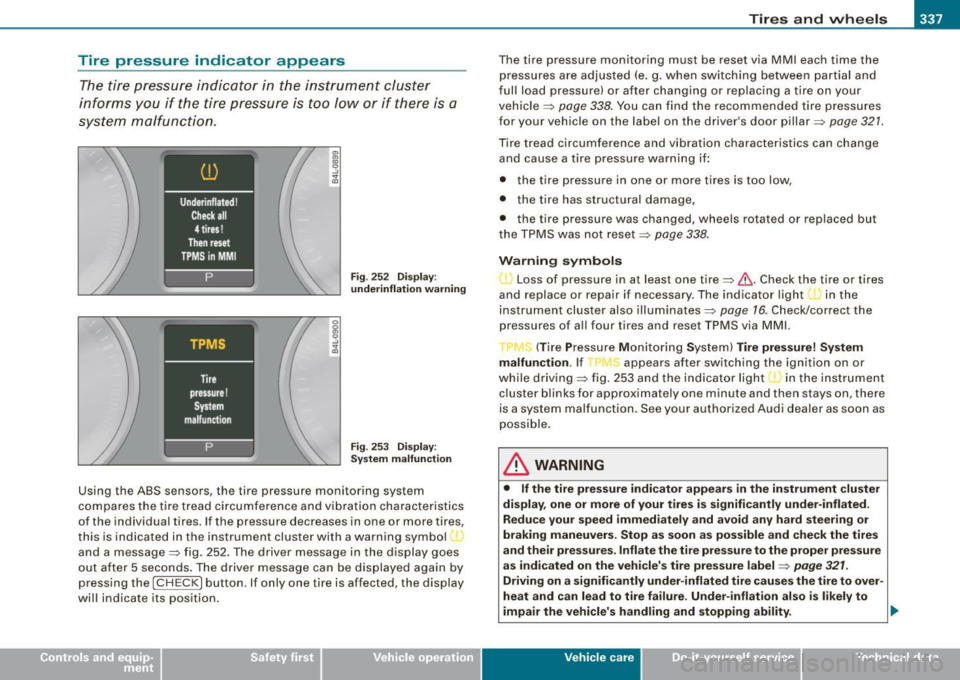
F ig . 25 2 Displa y:
underinflation warning
Fig . 253 Displ ay :
Sy stem malfunction
Using th e ABS sensors , th e t ire pr essur e monitoring system
c o m pares the tire tread ci rcu mference and vi bration character istics
of the individua l tires . If the pressure decreases in one or mor e tires,
th is is ind icated in the inst rumen t cl uster w ith a warning symbol,
and a message=> fig. 252. The driver message in the display goes
ou t af ter 5 sec onds. T he driver message can be dis pl ayed again by
pressing the [ CH ECK ] button. If only on e tire is affected, the display
will indicate its position . T
he tire pressure monitoring must be reset via MMI each time the
press ures are adjus ted (e .g . when swi tchi ng between par tial and
fu ll load pressu re) or after changing or replacing a tire on your
veh icle =>
page 338. You ca n find the recom mended tir e pres sures
for your vehicle on the label on the driver's door pillar=>
page 32 1.
Tire tread circumference and vibration characteristics can change
and cause a tire pressure war ning if:
• the tire pressu re in one or more t ires is too low,
• t he tire has st ructura l damage,
• the tire pressure was changed, wheels rotated or replaced but
t he TP MS was no t r eset =>
pag e 338 .
Warning symbols
• ~ Loss of pressur e in at le ast one tire=>&. Check the tire or tires
and replace or repair if necessary . T he indicator light in the
i nstrument cluster also illu mi nat es =>
page 16 . Che ck/cor rect th e
p ressures of al l four t ires and reset TPM S via MMI.
T (Ti re Pre ssure Mo nitorin g System)
Tire pressure! System
malfunction .
If appears after switch ing the ign it ion on or
w hi le drivi ng => fig . 253 an d the i ndica tor lig ht in th e in stru ment
c luster blinks for approximately one minute and the n stays on, there
i s a sy stem malfunction . See your authorized Au di d ealer as soon a s
possible .
& WARNING
• If the tire pressure indicator appears in the instrument cluster
display, one or more of your tires is significantly under -inflated.
Reduce your speed immediately and avoid any hard steer ing or
braking maneuvers. Stop as soon as possible and check the tires
and their pressures. Inflate the tire pressure to the proper pressure
as indicated on the vehicle's tire pressure label =>
page 321.
Driving on a significantly under-inflated tire causes the tire to over
heat and can lead to tire failure . Under- inflation also is l ikely to
impair the vehicle's handling and stopping ability .
~
Vehicle care I I irechnical data
Page 346 of 398
1111!1.___W_ h_ a_ t_ d_o_ l_ d_ o _ n_ o_w _ ? ____________________________________________ _
- Disengage and lower the floor panel before you close the
luggage compartment lid again.
Storing the replaced wheel
- Place the replaced wheel inside the spare wheel well in
the luggage compartment .
Tighten the knurled retaining screw clockwise to secure the wheel in place.
- Disengage and lower the floor panel before you close the
luggage compartment lid again.
& WARNING
Loose items in the passenger compartment can cause serious
personal injury during hard braking or in an accident .
• Never store the spare wheel or jack and tools in the passenger
compartment.
• Always store all jacking equipment, tools, and the spare wheel
in the luggage compartment.
• Tighten the knurled retaining screw for the spare wheel
securely.
[ i] Tips
Check the inflation pressure of the spare tire periodically to keep the
tire ready for use. •
Changing a wheel
Before changing a wheel
Observe the following precautions for your own and your
passenger's safety when changing a wheel.
- After you experience a tire failure, pull the car well away
from moving traffic and try to reach level ground before
you stop :::;. & .
- All passengers should leave the car and move to a safe
location (for instance, behind the guardrail) :::;,& .
- Engage the parking brake to prevent your vehicle from
rol ling unintentionally :::;.& .
- Move selector lever to position P :::;. & .
-If you are towing a trailer: unhitch the trailer from your
vehicle.
- Take the jack and the spare tire out of the luggage
compartment:::;.
page 342.
& WARNING
You or your passengers could be injured while changing a wheel if
you do not follow these safety precautions:
• If you have a flat tire, move a safe distance off the road. Turn off
the engine, turn the emergency flashers on and use other warning
devices to alert other motorists.
• Make sure that passengers wait
in a safe place away from the
vehicle and well away from the road and traffic.
• To help prevent the vehicle from moving suddenly and possibly
slipping off the jack, always fully set the parking brake and block
the wheel diagonally opposite the wheel being changed. When one ...
Page 347 of 398
_______________________________________________ W_ h_ a_t _ d_ o_ l _d _o_ n_ o _ w_ ? __ IIII
•
& WARNING (continued)
front wheel is lifted off the ground, placing the Automatic Trans
mission in "P" {Park) will
not prevent the vehicle from moving.
• Before you change a wheel , be sure the ground is level and firm.
If necessary, use a sturdy board under the jack.
• After installing the spare wheel, make sure that you replace the
flat tire/wheel in its storage area properly and tighten the knurled
retaining screw securely. •
Changing a vvheel
When you change a wheel, follow the sequence described
below step-by-step and in exactly that order.
1. Act ivate the vehicle jack mode (only vehicles with Adap
tive Air Suspension) ~
page 186.
2. Remove the decorative wheel cover*. For more details
see also ~
page 346, "Decorative wheel covers".
3. Loosen the
wheel bolts ~ page 346.
4. Locate the proper mounting point for the jack and align
the jack below that point~
page 347.
5. Lift the car with the jack~ page 347.
6. Remove the wheel with the flat tire and then install the
spare
~ page 348.
7. Tighten all wheel bolts lightly.
8.
Lower the vehicle with the jack.
9. Use the wheel bolt wrench and
firmly tighten all wheel
bolts
~ page 346.
10. Replace the decorative wheel cover*.
11. Deactivate the veh icle jack mode (only vehicles with
Adaptive Air Suspension)~
page 186.
& WARNING
Always read and follow all WARNINGS and information => & in
"Raising the vehicle" on
page 347 and => page 349. •
After changing a vvheel
A wheel change is not complete without the doing the
following.
- Store and secure the wheel you replaced in the spare
wheel well.
- Replace the tools and the jack in their proper location.
-Check the tire pressure on the spare wheel immediately
after mounting it.
- As soon as possible, have the
tightening torques on all
wheel bolts checked with a torque wrench. The correct
tightening torque is 90 ft lb (120 Nm).
- Have the flat tire
replaced as soon as possible.
[ i] Tips
• If you notice that the wheel bolts are corroded and difficult to
turn while changing a tire, they should be replaced before you check
the tightening torque.
• Drive at reduced speed until you have the tightening torques
checked. a
Do-it-yourself service
Page 349 of 398
_____________________________________________ W_ h_ a_t _d_ o_l _ d_o _ n_o_ w_ ? _ __._
& WARNING !continued)
• Do not loosen the wheel bolts more than one turn before you
raise the vehicle with the jack . - You risk an injury.
[ i J Tips
• Never use the hexagonal socket in the handle of the screwdriver
to loosen or tighten the wheel bolts .
• If a wheel bolt is very tight, you may find it easier to loosen by
carefully pushing down on the end of the wheel bolt wrench with
one foot only . As you do so, hold on to the car to keep your balance
and take care not to slip .•
Rais ing the vehicle
The vehicle must be lifted with the jock first before the
wheel con be removed.
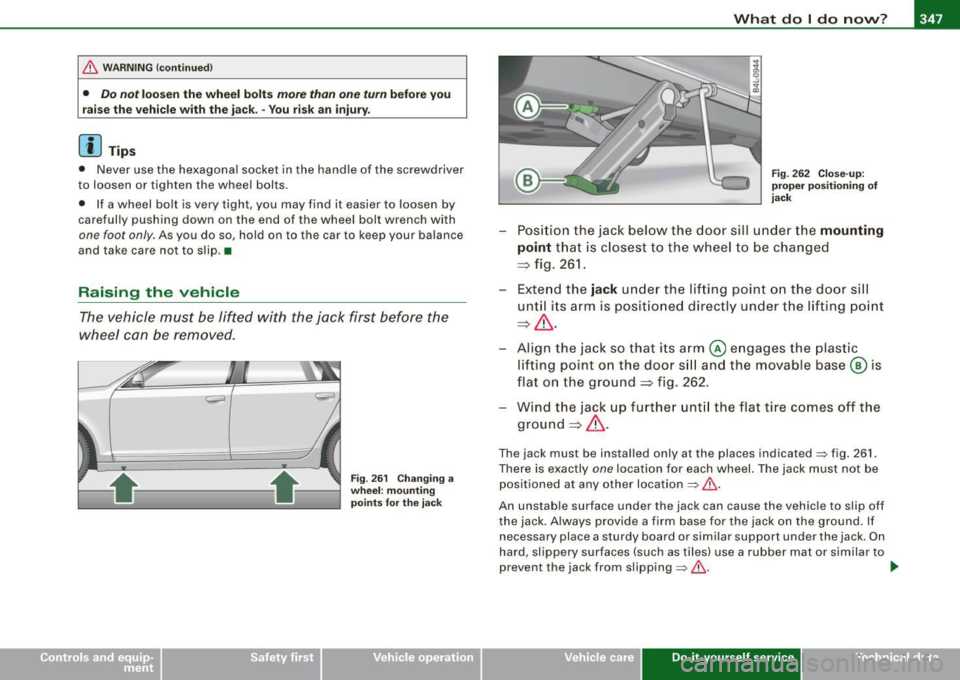
Fig. 261 Changing a
wheel: mounting
points for the jack Fig
. 262 Close-up:
proper positioning of
jack
- Position the jack below the door sill under the mounting
point
that is closest to the wheel to be changed
:::;, fig. 261 .
- Extend the
jack under the lifting point on the door sill
until its arm is positioned directly under the lifting point
:::;, & .
- Align t he jack so that its arm @ engages the plastic
lifting point on the door sill and the movable base@ is
flat on the ground :::;, fig. 262.
- Wind the jack up further until the flat tire comes off the
ground :::;,& .
The jack must be installed only at the places indicated=> fig. 261.
There is exactly
one locat ion for each wheel. The jack must not be
positioned at any other location
=> & .
An unstable surface under the jack can cause the vehicle to slip off
the jack . Always provide a firm base for the jack on the ground. If
necessary place a sturdy board or similar support under the jack. On
hard, slippery surfaces (such as tiles) use a rubber mat or similar to
prevent the jack from slipping=> &. .,_
Vehicle care Do-it-yourself service Technical data
Page 351 of 398
_______________________________________________ W_ h_ a_t _ d_ o_ l _d _o_ n_ o _ w_ ? __ ffllll
•
- Screw the th readed end of the a lignment pin from the
tool k it hand-tight into the em pty bolt hole~ page 348,
fig. 264 .
- Then remove the other w heel bolts as described above.
- Take off the wheel leaving the al ignment pin in the bolt
hole.
Putting on the spar e wheel
- Lift the spare whee l and carefully slide it over t he align
ment pin to g uide it in place .
- Use the hexagonal socket in the screw drive r ha ndle t o
screw in a nd tighten a ll w heel bol ts slightly .
- Remove the alignment p in and insert and tighten the
remaini ng wheel bol t slightly like the rest.
- Turn the jack hand le counter -clockwise to lower the
ve hicle until the jack is fully released .
- Use the wheel bolt wrench to tighten all wheel bolts
firmly ~ page 346 . Tighten them crosswise, from one
bolt to the (approximately) opposite one, to keep the
wheel centered .
[ i J Tip s
Never use the hexagonal socke t in the hand le of the screwdriver to
loosen or tighten the wheel bolts .
• Pull the reversible blade from the screwdriver before you use the
hexagonal socket in the hand le to turn the wheel bo lts .
• When mounting tires with
unidire ctional tre ad de sign make sure
t he tread pattern is po inted the right way~
page 349.
• T he wh ee l bolts should b e clean and easy to turn . Check for dirt
and corrosion on the mating surfaces of both the wheel and the hub
. Remove all dirt from these surfaces before remounting the
wheel. •
Tires with unidirectional tread design
Tires with unidirectional tread design must be mounted
with their tread pa ttern pointed in the right dire ction .
Using a spare tire with a tread patte rn intended f or use
in a s pec ific direc tio n
When using a spare tire with a t read pattern intended for use in a
specific direction, please note the following :
• The direction of rotation is marked by an arrow on the side of the
tire .
• I f the spare tire has to be insta lled in the incorrect direction, use
the spare t ire only temporarily since the tire will not be ab le to
achieve its optimum performance characteristics wi th regard to
aquaplaning , noise and wear.
• We recommend that you pay particular attention to this fact
dur ing wet weather and that you ad just your speed to match road
conditions .
• Replace the flat tire with a new one and have it installed on your
vehicle as soon as p ossible to res tore the handling advantages of a
unidirectional tire. •
Notes on wheel changing
Please read the information~ page 329, "New tires and replacing
tires and whee ls" if you are going to use a spare tire which is
different from the tires on your vehic le.
Aft er you change a tire :
• Check the tire pre ssure on the spare im mediat ely a fter in stalla -
tion . _,,,
Do-it -yourself service
Page 355 of 398
Fuses and bul bs -_____________ -----=----.;....:..::.:....:.::;______J
No. Equipm ent
29 Not used
30 Not used
31 Back-up light switch, transmission, engine
components
Intelligent power mo dule driver (footwell l ight
32 and front headlights, horn, wiper system, elec
trically adjusta ble steering wheel)
33 Intelligent power modu le driver
(lights left-side)
---,--
34
35
36
37
38
39
I nte lligent power module driver
(lights right-side)
Not used
Headlight washer system
E lectronic Stabilization Program (ESP)
Wip er system
Door control module left -side
Horn
41 Heater fan
42 Control module electronic ignition lock/electri
cally adjustable steering wheel
43 Rear windsh iel d wiper (Avant)
44 Power window opener (left-side) Amps
15
30
25
25
30 25
30
15
25
40
30
15
35
-
•
Fuse Location , Instrument Panel right
Fig. 2 68 F use pan el
la yo ut
Some of the equipment items listed are optional or on ly available on
certain model configu rations.
Note that the following table is ac curate at the time of g oing to
press and is subject t o change . In the eve nt of d iscrepan cies , th e
l a b el on t he in side of the cover alw ay s take s prec eden ce.
The power seats are protected by cir cuit breaker s, which automati
ca lly reset after a few seconds a fter the ove rload has been reme
died.
No . Equipment Amps
Fu se holder (bla ck )
1 Control module Convenience key 15
2
Cigarette lighter front 20
3
Tire pressure moni tor ing system 5
4 E lectrica l outlet front (center conso le) 20
5
Intelligent power module passenger 15 (glove box lock)
6 Door control module right -side 15
Sunroof 20
Vehicle care Do-it-yourself service irechnical data
Page 376 of 398
___ C_ o_n_ s_ u_m _ e_ r_ ln_ f_o _r_m _ a_ t_ i_o _n ______________________________________________ _
& WARN ING (continued )
• The engine compartment of any motor vehicle is a potentially
hazardous area . Never rea ch into the area around or to uch the
radiator fan . It is temperature controlled and can sw itch on
suddenly -even when the engine is off and the ignition key has
been removed . The radiator fan switches on automatically when
the coolant reaches a certain temperature and will continue to run until the coolant tempe rature drops .
• Always remove the ignition key before anyone gets under the
vehi cle .
• Always support your vehicle with safety stands if it is neces
sary to work underneath the vehicle . The jack suppl ied with the
vehicle is not adequate for this purpose and could collap se
causing serious personal injury .
• If you must work underneath the vehicle with the wheels on
the ground, always make sure the veh icle is on level ground , that
the wheels are always securely blocked and that the engine
cannot be sta rted .
• Always make sure the tr ansmission selector lever (automatic
transmission) is in "P" (Park position ) and the p ark brake is firmly
applied.
W For the sake of the environment
• Cha ng ing the e ngin e sett ings will a dverse ly aff ect em iss ion
levels. This is detrimenta l to the environment and increases fuel
co nsump tion .
• Always observe environmenta l regu lations when disposing of
o ld eng ine oil, u sed bra ke flu id, d irty eng ine coo la nt, spent batter ies
or worn out tires.
• Undeployed airbag modul es and pretensioners might be classi
fied as Perchlorate Material -specia l handling may apply, see
www .d tsc.ca .gov/ hazardouswaste/pe rc h lora te . W hen t he vehicle or
parts of the restraint s ystem including airbag modules safety be lts
with pre tensio ners are sc ra p pe d, a ll ap pl ica ble laws and reg ula- tions must be observed. Your authorized Audi dea
ler is familiar with
t hese requi reme nts and we reco mmend th at you h ave your dealer
perform th is serv ice for you. •
Additional accessories,
modifications and parts replacement
Additional accessories and parts
replacement
A lways consult an author ized Audi dea ler before
pur chasin g access orie s.
Y our vehicle incorporates the latest safety design featu res ensuring
a hi gh standa rd of active a nd passive sa fety .
T his saf ety could be com promised by non -approved changes to th e
vehic le . Fo r thi s reason, i f parts have to be replaced, p lease obse rve
th e fo llow ing po ints wh en insta lling add it io na l acc essories:
Approved Audi accessories and genuine Audi parts are avai lable
from autho rized Audi dea lers .
T hese dealers also have the necessary faci lities, tools and trained
spec ia lists to ins tal l the part s and accessorie s prope rly.
& WARNING
Using the wrong spare parts or using non -approved accessories
can cause serious personal injury.
• Use only accessorie s expressly approved by Audi and genuine
Audi spare parts
• These parts and accessories have been specially designed to
be used on your vehicle .
• Never install accessories such as telephone cradles or
beverage holders on airbag covers or within the airbag deploy-
Page 384 of 398
ll'IJ Alphabetical index
---=------------------------------------------------
Warning/indicator lights . .... . ... .. 22
Worn brake pads symbol . . . . . . . . . . . 35
B reak -in period . . . . . . . . . . . . . . . . . . . . . 271
Brake pads .. ...... .... ... ...... . 272
Tires .. .... ... .... .... ... .... ... 271
Bu lbs ..... ..... .... .... .... ....... 355
Bumper
cover
Caution when parking near a parking bar- rier or curb ...... ... .... .... ... 122
C
Ca lifornia Proposition 65 Warning ... .. 302
Battery specific . . . . . . . . . . . . . . . . . . 314
Capacities ....... ... .... .... ....... 369
Car care ....... ...... .... ... .... ... 282
Interior ......................... 289
Plastic and vinyl ...... ...... . .. .. 286
Weathers trips ...... ... .. ...... .. 287
Care of exterior .... ...... ... .... .... 282
Cargo area
See Loading the luggage compartment ..
201
Cargo net ..... ... .... .... ..... ...... 90
Catalytic converter . . . . . . . . . . . . . . . . . . 272
CD changer . . . . . . . . . . . . . . . . . . . . . . . . . 99
Centra l locking
Emergency locking .. ...... .. . .... . 50
Certification . . . . . . . . . . . . . . . . . . . . . . . 375
Changing a flat tire ...... .... .... ... 344
Changing a wheel . ... .... .... ....... 344
Changing engine oi l .. .... .... ...... . 306 Chassis
Undercoa ting . .... .... ...... ..... 288
See also Adaptive A ir Suspension .. . 184
CHECK button . . . . . . . . . . . . . . . . . . . . . . . 15
Check ing
Engine coolant level . ...... ....... 308
Checking tire pressure ....... ........ 323
Child restraints
Danger of using child restraints in the
front seat .... .... .... .... .... .. 217
What types of chi ld restraint anchors are
available? .... .... .... .... .... .. 251
Where can I get add itional informat ion
about chi ld restraints? ... .. .. .... 252
Child safety ...... ..... .. .... .. . 238, 243
Additional information . ........... 257
Booster seats . ... ... ....... ...... 246
Convertible chi ld safety seats .... .. 244
Convertible locking retractor . ...... 248
Guidance fixtures for lower anchorages
254
Important safety instructions for using chi ld safety seats .. . ......... ... 241
Important things to know when driving
with children ....... .... ... .. ... 238
Infant seats ... ... .... .... .... ... 243
Installing a child restraint using the
LATCH system . . . . . . . . . . . . . . . . . . 256
Lower anchorages ........ ... .... . 253
Mounting and releasing the anchorage hook .. ...... ........ .......... 257
Older children and safety belts ... .. 247
Saf ety bel ts and ol dler children ... .. 247
Teth er anchors .... .... ....... ... 257 Tether
strap ... .... .... ....... .. . 258
Which restraint sys tem should my older
chi ld wear? .......... .. .. .... .. 247
Child safety lock
rear doors (power) . .... .... .... ... . 51
Child safety seats .... .... .... .... ... 243
Conver tible locking re tractor .... ... 248
Danger of using child restraints in the
front seat ..................... . 217
How do I properly install a child safety
sea t in my vehicle? ...... ....... . 241
Installing .. .. .. .... ... .. .. .... ... 248
LATCH system . .... .... ... .... ... 256
Safety instructions .... .... .... ... 241
Cigarette lighter ........... .... ...... 97
Cleaning Alcantara (synthetic suede) .... ... . 292
Engine compartm ent ... ... .... ... 293
Fabrics and fabric cov erings ... .... 289
Ins trumen t panel .... ... ..... ... .. 290
Inte rio r ...... ....... ....... .. .. . 289
Leather ............. ....... .. ... 291
MMI display .. .. .. .... .... ...... . 289
MM I terminal . .... .... ... ... .. ... 289
Plastic and viny l ... .... .... .... ... 286
P lastic parts .... .. .... .... ....... 290
Safety belts . . . . . . . . . . . . . . . . . . . . . 293
Trim strips .. ...... .... ....... .. . 285
trim strips ...... ....... ...... .... 286
Cleaning and protection .......... ... 282
Climate control .. ... ...... ...... .... 102
Synchroni zing . .... ... ... ........ 104
Warm and cold ... .... ...... ... .. 102