ad blue AUDI S6 2009 Owners Manual
[x] Cancel search | Manufacturer: AUDI, Model Year: 2009, Model line: S6, Model: AUDI S6 2009Pages: 398, PDF Size: 43 MB
Page 176 of 398
_____ A_ u_d _ i_ P_ a_r _k _in _ g=- S--=- y_s _t _e _m ____________________________________________ _
"Parking mode 1" appears by default in the MMI Display if the rear
v iew came ra is activate d=>
page 171 . You can switch to " parki ng
mode
2" by pressing the control button with the mode @
=> page 175, fig. 180 function . By repeatedly p ressing the control
button with the
mode function, you can switch back and forth
between "parking mode
1 " and "pa rking mode 2".
Orientation lines and marked surfa ces
Orientati on l ines and col ored ma rke d surfaces( => page 175, fig . 179
or => page 177, fig. 181) a re projected into the rear -view ca mer a
pictu res, subject to the two diffe rent par king modes . These orienta
tion lines and surfaces offer aid when parking or maneuvering. The
orientation lines and su rfaces refer to the height of a leve l driving
sur face.
When the indicated orientation lines and indicated blue surfaces
sup erimpos e veh ic le s or o bjects, a t the lates t, t he respectiv e
d istance to the vehicles or objects has become too short
=>
p age 179 .
If the tr unk lid is open, the o rien tat io n lin es and marked su rfaces are
not displayed .
& WARNING
• The rear-view camera has blind spots , in which objects cannot
be detected . Be especially careful to check for small children and
animals before backing up . Small children and animals will not
always be detected by the sensors.
• The Audi Parking System is not a substitute for being careful
and alert when backing up . Be especially careful during parking
and similar maneuvers . Always watch where you are driving and
make sure that nothing is in the way.
• Remember that low obstacles which have already been
signaled may pass below the system 's sensing zone when the
vehicle is backing up . The fact that the signal stops does not mean
that you have cleared the obstacle . When the signal stops , impact
is imminent . Objects such as trailer hit ches, chains , narrow posts
& WARNING (continued )
or fences covered by a thin layer of paint may not always be
detected by the sy stem. They can still damage your vehicle
without warning .
• Always make sure that the volume and frequency of the chime s
is adjusted so that you can easily hear the acoustic distance signal
even if the radio is playing , the air -conditioner blower is on High or
there is a high level of outside noise .
- Check the settings whenever someone else has driven the
vehicle before you .
• Improper reliance on the Audi Parking System can cause colli
sions and serious personal injury .
- Never rely only on parking assi st w hen changing backing up .
- Always check rear view mirrors to make sure it is safe to back
up .
[ i ] Tips
• B efore parking with the rear -view camera, the Adaptive Air
Su spensi on* co mfort or automatic mode must be switched on
=>
page 20.
• The rea r-v iew ca mera pic ture is avai la bl e as soon as the M MI
Display or the MMI is sw itched on, or the start -up phase is
completed.
• I n order for the rear-view camera to function proper ly, the
c a m era len s=>
page 171 , fig. 17 4 mu st be kept clea n, a nd free of
snow and ice. P lease follow the additional notes on=>
page 182.
• The came ra c overage a ngle changes when the trunk lid is open .
T herefore, the rear-view camera picture is d isplayed without orien
t a tion lin es an d w ith out blue surfaces .•
Page 177 of 398
Audi Parking System -
----------------=----=------'
Applies to vehicles: with Audi Parking System (r ear) and rea r-v iew came ra
Rear -view camera coverage area
®
Fig . 177 Top view:
Rear-view camera
coverage area
Fig . 178 Side view :
Covered area 0 and
uncovered area
0 of
the rear-view camera
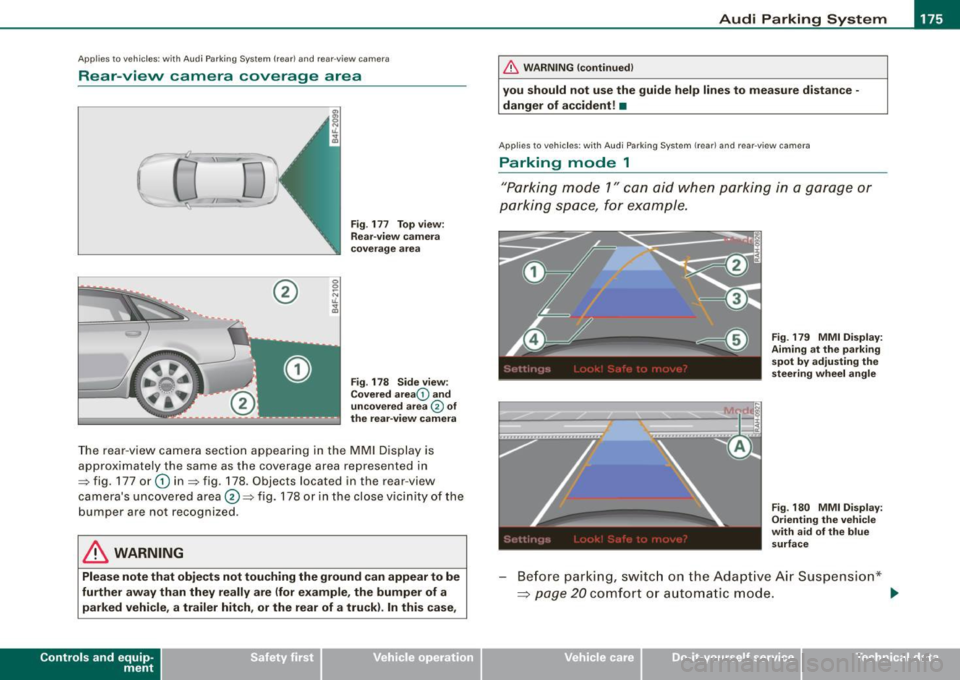
The rear-view camera section appearing in the MMI Display is
approximately the same as the coverage area represented in
=> fig. 177 or
G) in=> fig . 178. Objects located in the rear-view
camera's uncovered area@=> fig . 178 or in the close vicinity of the
bumper are not recognized.
& WARNING
Please note that objects not touching the ground can appear to be
further away than they really are (for example, the bumper of a
parked vehicle, a trailer hitch , or the rear of a truck) . In this case,
Contro ls and eq uip
ment
& WARNING !continued)
you should not use the guide help lines to measure distance -
danger of accident! •
Applies to veh ic les : w ith Aud i Park in g Sys tem (re ar) and rear-view camera
Parking mode 1
"Parking mode 1" can aid when parking in a garage or
parking space, for example .
M I ij
~------------------:
Fig. 179 MMI Display:
Aiming at the parking
spot by adjusting the
steering wheel angle
Fig . 180 MMI Display:
Orienting the vehicle
with aid of the blue
surface
Before parking, switch on the Adaptive Air Suspension*
~ page 20 comfort or automatic mode. .,,_
Vehicle care I I irechnical data
Page 178 of 398
-L-___:.A...:.:; u..:d .:.: i..: P;___;:; a.:..r .:.:k .:.:in .:.. g~ S.::..!. y..:s ..:t ..:e .:..m .:..:.... ___________________________________________ _
-Activate the A udi Parking System~ page 171. "Parki ng
mode 1"
~ page 175, fig . 179 is d isplayed by default .
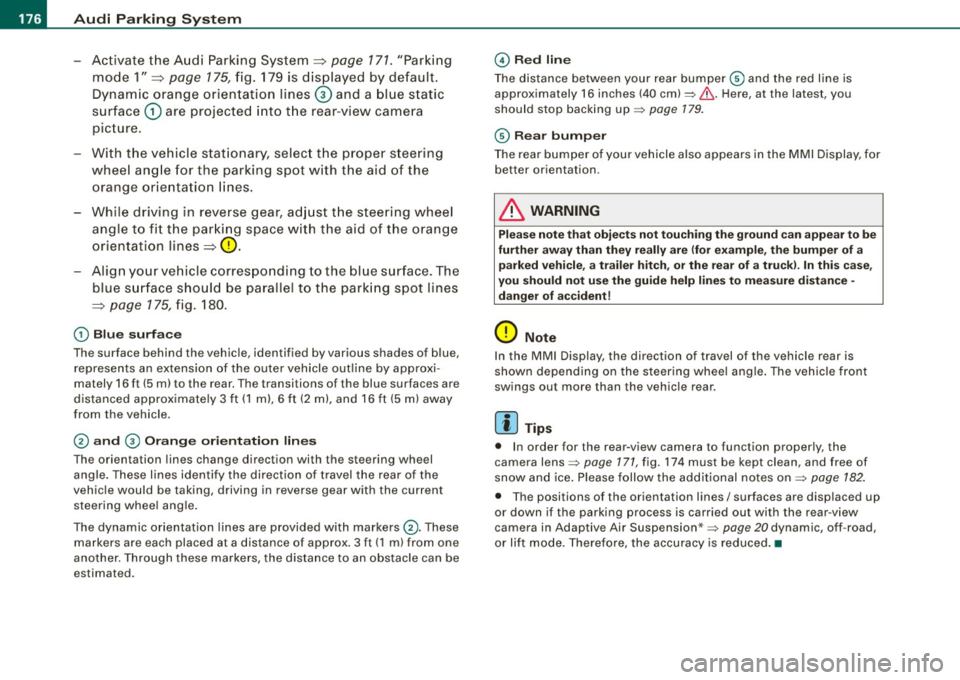
Dynamic orange orien tation lines
G) and a blue s tat ic
surface
G) are projected into the rear -view camera
picture.
With the vehicle stat ionary, selec t the proper steering
wheel ang le for the parking spot with the aid of the
orange or ie ntation lines.
- While driving in reverse gear, ad just t he steering wheel
angle to fi t the parki ng space with the aid of the orange
orientation lines~
0.
- Align your vehicle corresponding to the blue surface. The
blue s urface should be parallel to the park ing spot lines
~ page 175, fig . 180.
G) Blu e surface
The surface behind the vehic le, identified by various shades of b lue,
represents an extension of the outer vehicle out line by approxi
mately 16 ft (5 ml to the rear. The transitions of the blue surfaces are
distanced approximate ly 3 ft ( 1 ml, 6
ft (2 m), and 16 ft (5 m) away
from the vehicle.
© a nd 0 Orang e orie nta ti on lin es
The orientation lines change direction with the steering wheel
ang le . These lines identify the direction of travel the rear of the
vehic le would be taking, driving in reverse gear with the current
steer ing whee l ang le .
The dynamic orientation lines are provided with markers©-These
markers are each placed at a distance of approx. 3 ft ( 1 m) from one
another. Through these markers, the distance to an obstacle can be
estimated .
©Redli ne
The distance between your rear bumper® and the red line is
approximately 16 inches (40 cm):::::,&. Here, at the latest, you
should stop backing up:::::,
page 179.
® Rear bum per
The rear bumper of your vehicle also appears in the MMI Display, for
better orientation.
& WARNING
Ple ase n ote t hat obje cts n ot tou ch ing th e ground can ap pear to be
fu rther away th an th ey re ally ar e (for example , the bumper of a
p arked vehi cle , a trai ler hit ch, o r th e rea r of a tr uck). In this case,
yo u shou ld not u se th e gu ide h elp lin es to mea sur e di stan ce -
d anger of accident !
0 Note
In the MMI Display, the direction of travel of the vehicle rear is
shown depending on the steering whee l ang le . The vehicle front
swings out more than the vehic le rear.
[ i ] T ip s
• In order for the rear-v iew camera to function proper ly, the
camera lens:::::,
page 171, fig. 174 must be kept clean, and free of
snow and ice. P lease follow the add itional notes on :::::,
page 182.
• The positions of the orientation lines/ surfaces are disp laced up
or down if the parking process is carried out with the rear -view
camera in Adaptive Air Suspension*:::::,
page 20 dynamic, off -road,
or lift mode. Therefore, the accuracy is reduced. •
Page 179 of 398
_____________________________________________ A_u_ d_ i _P _a_ r_ k_ i_n -=g a..- S-=y'--- s_ t_ e_ m __ ....J_
Ap plies to vehic les : w ith Au di Par kin g Sy stem (r ear) and rea r-v ie w came ra
Parking mode 2
"Parking mode 2" can be used as aid when (parallel)
parking on the side of the road , for example.
Fig . 181 MMI Display:
Blue surface aligned
with targeted parking
spot
Fig . 182 MMI Display:
Contact of the blue
curved line with the
curb
- Find a parking spot on the right side of the road, for
example .
- Switch on the Adaptive Air Suspension*=>
page 20
comfort or automatic mode.
- Position your vehicle parallel to the edge of the road,
approximately 3 ft (1 m) away from a parked vehicle
=>
page 173, fig. 176. When parking next to obstacles,
please note=>
page 178.
Contro ls and eq uip
ment
- Activate the Audi Parking System => page 171. "Parking
mode 1" is displayed by default.
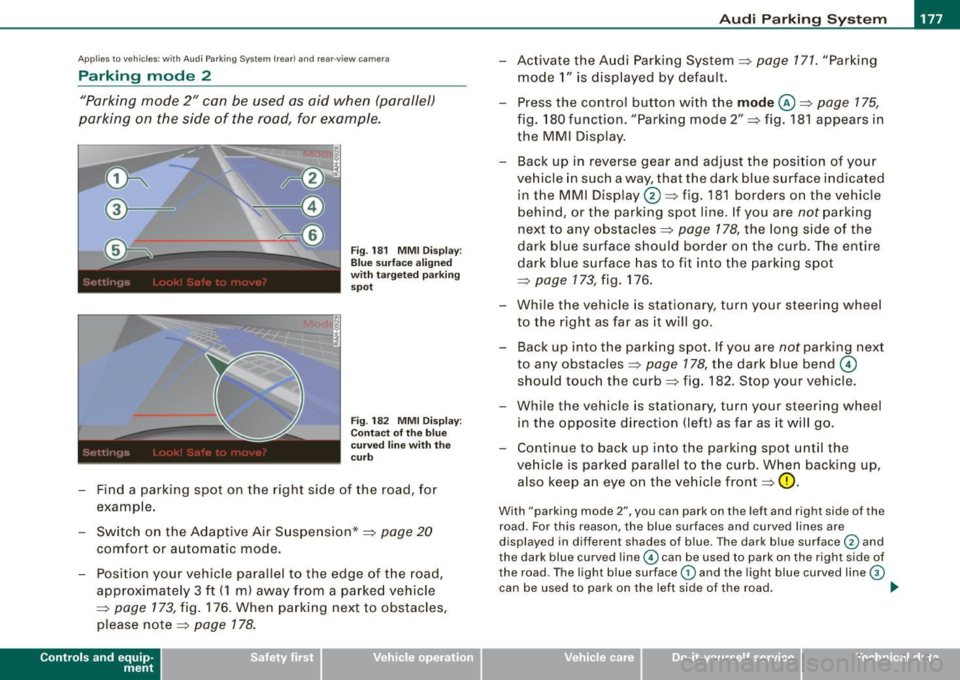
- Press the control button with the
mode @=> page 175,
fig. 180 funct ion . "Park ing mode 2" => fig. 181 appears in
the MMI D isplay.
- Back up in reverse gear and adjust the pos ition of your
vehicle in such a way, that the dark blue surface ind icated
in the MMI Display
0 => fig . 181 borders on the vehicle
be hind, or the parking spot line. If you are
not parking
next to any obstacles=>
page 178, the long side of the
dark blue surface should border on the curb. The ent ire
dark blue surface has to fit into the parking spot
=>
page 173 , fig. 176.
- While the vehicle is stationary, turn your steering wheel
to the right as far as it will go.
- Back up into the parking spot. If you are
not park ing next
to any obstac les =>
page 178, the dark blue bend ©
should touch the curb=> fig . 182. Stop your vehicle.
- Wh ile the vehicle is stat ionary, turn your steering whe el
i n the oppos ite direc tion (lef t) as far as it will go .
- Contin ue to back up into the park ing spot until the
vehicle is parked pa rallel to the curb. When backing up,
also keep an eye on the vehicle front=>
0.
With "parking mode 2 ", you can park on th e left a nd right sid e of the
road. Fo r this reason, the blue surfaces and curved l ines are
displ ayed in diffe ren t sh ades of blue . The dark blue surfa ce
0 and
the dark blue curved line© can be used to park on the right side of
t he road . The l igh t blue s urfa ce
G) and the light blue curved lin e G)
can be us ed to park on the left si de of the road . .,
Vehicle care I I irechnical data
Page 180 of 398
• .___A_ u_d_ i _P _a_ r_ k_ i_ n ..:g=-- S_ y=-- s_t _ e _m _____________________________________________ _
When the turn signal is switched on, only the necessary surfaces
and curves are shown. To change the side that is shown, simply
change the turn signal.
The displayed light blue® or dark blue © curved line identifies the
turn-around point when maneuvering to park. If the curved line
touches the curb, the steering wheel turn -around point has been
reached =>
page 177, fig. 182.
The distance from the rear bumper © to the red line@ is approxi
mately
1.3 ft (40 cm). Here, at the latest, you should stop backing up
=>
page 179.
& WARNING
Please note that objects not touching the ground can appear to be
further away than they really are (for example, the bumper of a parked vehicle, a trailer hitch, or the rear of a truck).
In this case,
you should not use the guide help lines to measure distance -
danger of accident!
0 Note
In the MMI Display, the direction of travel of the vehicle rear is repre
sented depending on the steering wheel angle. The vehicle front
swings out more than the vehicle rear .
[ i] Tips
• In order for the rear-view camera to function properly, the
camera lens=>
page 171, fig. 174 must be kept clean, and free of
snow and ice. Please follow the additional notes on=>
page 182.
• The positions of the orientation lines/ surfaces are displaced up
or down if the parking process is carried out with the rear-view
camera in Adaptive Air Suspension*=>
page 20 dynamic, off -road,
or lift mode. Therefore, the accuracy is reduced. •
Special parking situations
Applies to vehicles : with Audi Parkin g System (rea r) and rear-view camera
Parking next to obstacles
When parking next to an obstacle, enough distance must
left on the side.
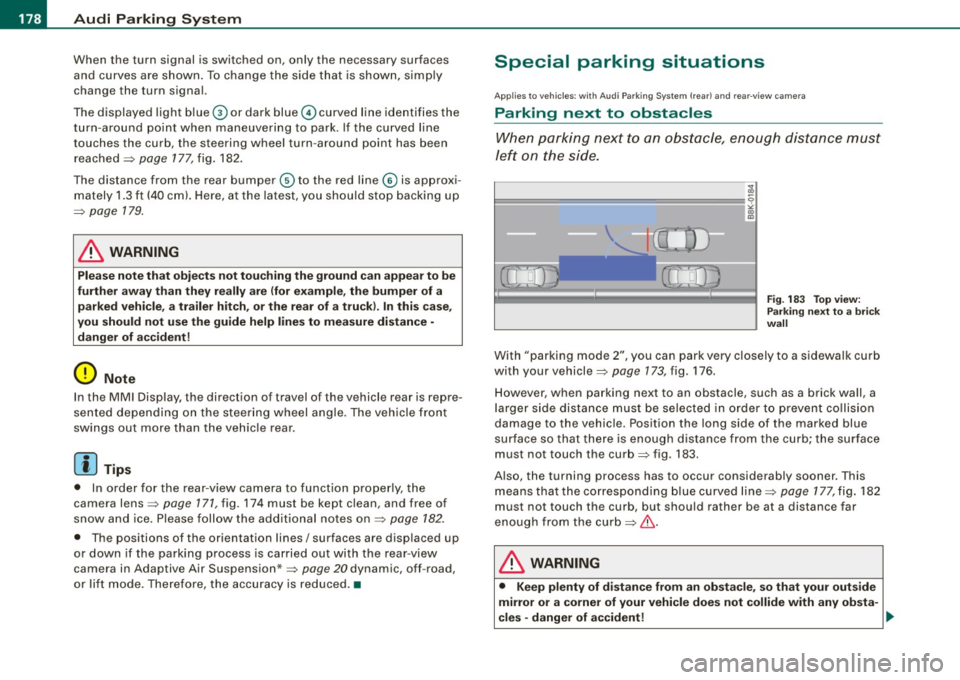
=
Fig. 183 Top view:
Parking next
to a brick
wall
With "parking mode 2", you can park very closely to a sidewalk curb
with your vehicle=>
page 173, fig. 176.
However, when parking next to an obstacle, such as a brick wall, a
larger side distance must be selected in order to prevent collision
damage to the vehicle. Position the long side of the marked blue
surface so that there is enough distance from the curb; the surface
must not touch the curb=> fig.
183 .
Also, the turning process has to occur considerably sooner. This
means that the corresponding blue curved line=>
page 177, fig. 182
must not touch the curb, but should rather be at a distance far
enough from the curb=>&.
& WARNING
• Keep plenty of distance from an obstacle, so that your outside
mirror or a corner of your vehicle does not collide with any obsta-
cles -danger of accident! ..
Page 184 of 398
• .___A_ u_d_ i _P _a_ r_ k_ i_ n ..:g=-- S_ y=-- s_t _ e _m _____________________________________________ _
Applies to vehic les: with Audi Park ing System (rearl and rear-view camera
Rear-view camera tips
We recommend that you practice parking with t he rear -view camera
in a traff ic -free location, or parking lot, to become fami liar with the
system, the orientati on line s, a nd th eir functi on. When doi ng this,
there should be good light and weather conditions.
In the MMI Display, objects or vehicles ap pea r closer or further away
i f:
• you are driving in reverse gear from a level surface onto an
inc lin e, o r a downwa rd sl ope,
• you are driving in reverse gear toward protruding objects,
• the ve hicle is carrying too much load in the rear.
The accuracy of the orientation lines and blue surfaces diminishes if :
• the Adaptive Air Suspension* is defective, or th e dynamic, off
road, o r lift mode is swi tched on,
• the rear -view camera does not provide a reliable image, for
exam ple, in po or vi sibi lit y c ondi tio ns or if the lens is dirt y,
• the image on the screen is not visible due to sun g lare and reflec
t ion .
Caring for the rear-view camera lens:
• Dampen the lens with a household a lcoho l- based g lass c leaner,
and c lean th e lens wit h a dry cl oth.
• Remove snow with a hand brush.
• Remove ice, preferably with de -icing spray~
0.
& WARNING
• The rear-v iew camera does not replace the view to the rear and
the rear view mirrors .
• The rear-view camer a - because of technical limitat ions -does
not show the entire area behind the vehicle~
page 175 , fig. 178.
& WARNING (continued )
Be especially careful to che ck for small children and animals
before backing up . Small children and animals will not alway s be
shown in the rear-view display .
• The Audi Parking System is not a sub stitute for being careful
and alert when back ing up . Be especially careful during parking
and similar maneuver s. Always watch where you are driving and
make su re that nothing is in the way .
• Do not allow yourself to be distracted from traffic by the rear
view camera pi ctures .
• When maneuvering or parking , do not only u se the MMI Display
for orientat ion . Certain obje cts - depending on the screen resolu
tion -may not, or not entirely, be displayed ; for example tr ailer
hitches , cha ins , narrow posts , or fences .
• Only use the rear -view camera for aid if it shows a good , clear
picture . The image may be obscured , for example , by the sun
shining into the lens, dirt on the lens, or as the result of a defect -
danger of accident!
• If the image i s hazy when the MMI Display is switched on or the
area behind the vehicle is not visible (for e xample , as the result of
a dirty or defective lens ), the rear -view camera must not be used
for aid in maneuver ing - danger of accident!
• The rear -view camera generates two -dimensional images . For
this reason , please note that recesses in the ground and
protruding parts on another vehicle , or protruding objects fixed to
the ground , will be more difficult or impossible to recognize on the
MMI Di splay, due to the missing spacial depth .
• If the position and the installation angle of the camera has
changed, for example , after a rear end collision , do not continue to
use the system for safety reasons . Have it checked by an autho
rized Audi dealer or qualified work shop .
• Only use the rear-v iew camera when the rear lid is fully closed .
Make sure that objects mounted on the rear are not obscuring the
camera v iew .