light AUDI S6 2010 Owners Manual
[x] Cancel search | Manufacturer: AUDI, Model Year: 2010, Model line: S6, Model: AUDI S6 2010Pages: 368, PDF Size: 86.82 MB
Page 155 of 368

Automatic transmiss ion Ill _______________ ____.
Applies to vehicles : with multitronic® Continuously Variab le Transm ission (CVT)
Driving the multitronic ®
The gear ratio is continuously adapted to vehicle speed
and load.
Starting th e engin e
- The selector lever must be in Nor P.
Sta rting off
- Press and hold the brake pedal.
Fig. 146 Sec tion of
t he cente r co nso le :
selector leve r wit h loc k
but ton
- Press and hold the release button in the selector lever
handle and move the selector lever from
P (alternatively
N ) to D (alternatively S) and release the button .
- Wait briefly until the transmission has shifted (you will feel a slight movement).
- Remove your foot from the brake pedal and accelerate
=> & .
Rocking back and fo rth to become unstuck
- Shift only between D and R when the vehicle is at a full
stop and the engine is running at idle speed.
Con tro ls a nd e quip
m en t Vehicle OP-eration
Stopping
- Press and hold the brake pedal until the vehicle has come
to a complete stop.
- Keep the brake pedal depressed so that the vehicle cannot
roll forward or backward while it is idling
=> & .
- Once stopped,
do not depress the accelerator pedal to rev
up the engine=> &.
Parking
- Press and hold the brake pedal until the vehicle has come
to a complete stop .
- Set the parking brake firmly=>
page 114, "Parking".
- Press and hold the release button in the selector lever handle, move the selector lever into
P and then let go of
the release button=>& .
Your vehicle is equipped with a st ar ting ass ist that allows for easier
sta rting on inclines. The system is activa ted when the brake peda l is
depressed for a
few se con ds. After releasing the brake pedal, the
brake power is he ld for a moment to prevent the vehicle from rolling
back when starting .
The selector lever must be in Nor
P. If one of the driving positions is
engaged a safety switch will prevent the engine from be ing started .
See also=>
page 109.
Before you move the selector lever from the P position, you must
always apply the brake pedal before and while depressing the button
in the handle of the selecto r lever .
& WARNING
• Uninte nded vehi cle mov em en t ca n cau se se rious injury.
Vehicle care Do-it-yourselt service iTechnical data
Page 157 of 368

Automatic transmission Ill
----------------
Before you move the selector lever to R, press both, the button in the
hand le of the se lector lever
and the brake pedal at the same time.
When the ignition is on, the backup lights illuminate when the
selector lever is moved into
R.
N -Neutral
Shift to this position for standing with brakes applied=> page 155.
When the vehicle is stat ionary o r at speeds below 3 mph (5 km/h),
you must always apply the footbrake before and wh ile moving the
lever out of
N.
Do not use N for coasting downhill.
D -Normal driving position for forward
Depending on the load on the engine, vehicle speed and the dynamic
control program, the transmission will se lect the
optimal gear ratio.
In certa in circumstances it may be advantageous to temporarily
switch to the manual shift program to manually select gear ratios to
match specific driving conditions=>
page 157.
When the vehicle is stationary or at speeds below 3 mph (5 km/h),
you must always apply the footbrake before and while moving the
lever to
D out of N .
S -Sport position
Select this position for sportier performance. In this position, the
transmission will not upshift as soon, allowing the veh icle to use the
increased power available at higher engine speeds to achieve livelier
acceleration.
When the vehicle is stat ionary or at speeds below 3 mph (5 km/h),
you must always app ly the foot brake before and whi le moving the
lever to
S out of N.
& WARNING
Read and follow all WARNINGS=> & in "Driving the multi
tronic ®" on
page 153.
Controls and equip
ment Safety first
0 Note
Coasting downhill
with the transmission in N and the engine not
operating will result in damage to the automatic transmission and
poss ibly the catalytic converter.•
Applies to veh icles: w ith mult itronic ® Continuously Va riable T ransmiss ion (C VT)
Automatic Shift Lock (ASL)
The Automatic Shift Lock safeguards you against acci
dentally shifting into a forward or the reverse gear and
causing the vehicle to move unintentionally.
Fig. 148 Shift gate:
selector lever lock posi
tions and inter lock
button highlighted
The selector lever lock is released as follows:
- Turn the ignition on.
- Step on the brake pedal.
At the some time press and hold
the interlock button on the side of the gear se lector knob
=> fig. 148 with your thumb until you have moved the
selector lever to the desired position .
Automatic selector lever lock
The selecto r lever is locked in th e P and N positions when the ignition
is turned on. To move the lever from these pos itions the driver must
depress the brake pedal. As a reminder to the driver, the following .,_
Vehicle care Technical data
Page 158 of 368
1111....__A_ u_ t_o _m_ a_ t_ic _ t_ r_ a_ n_s _m_ i _s_ s_ i_ o_ n ____________________________________________ _
warning appears in the instrument cluster display when the selector
is in
P and N:
When stationary apply footbrake while selecting gear
A time delay element prevents the selector lever from locking when
it is moved through the
N position (going from R to D). The locking
element will lock the selector lever if the lever is left in N (Neutral) for
more than approximately 1 second, without the brake pedal be ing
pressed .
At speeds above about 3 mph (5 km/h) the Automatic Shift Lock is
automatically deactivated in the
N position.
Interlock button
The lock button on the selector lever prevents the lever from being
accidentally shifted into certain positions. Pressing this button deac
tivates the selector lever lock. Depending on the direction of the
shift, the selector lever locks at different positions. The positions are
high light ed in the illustrat ion~
page 155 , fig. 148.
Ignition key safety interlock
The key cannot be removed from the ignition unless the selector lever
is in the
P park position. When the ignition key is removed, the
selector lever w ill be locked in the
P pos it ion .•
Ap plies to v ehicles : w ith mult itronic ® Contin uously Var iable Transm issio n (C VT)
Kick-down
The kick-down feature allows the vehicle to generate
maximum acceleration.
When you press the accelerator pedal beyond the resistance point
that is reached at full throttle, the transmission will select a lower
gear ratio based on vehicle speed and engine RPM . The engine RPM
w ill be contro lled to produce maximum vehicle acceleration as long
as you continue to press the accelerato r pedal beyond th is resistance
point .
& WARNING
Be careful when using the kick-down feature on slippery roads.
Rapid acceleration may cause the vehicle to skid. •
Applies to veh icl es: w it h mul tit ro nic® Con tin uous ly Va ria bl e Tran smis s io n ( CVT)
Dynamic shift program (DSP)
The multitronic ® transmission is electronically
controlled .
The transmission selects the appropriate gear ratio (upshifts and
downshifts) automatically based on preset d riving programs.
The transmission will select one of the
economy programs when you
drive at a steady speed or a gradua lly changing speeds without heavy
acceleration . Th is gives best fuel eff iciency, with early upshifting and
delayed downshifting.
Th e transmission will automatically select the
sporty shift programs
when you dr ive at higher speeds, or w ith heavy acceleration and
frequently changing speeds. Upshifts are delayed to make full use of
engine power . Downshifting takes place at higher engine speeds than
in the economy programs.
Th e selection of the most suitab le shift program is a continuous,
automatic process. The driver can a lso make the transmission switch
to a sporty program by
quickly pressing down the gas pedal.
This causes the transmiss ion to shift down into a lower gear ratio and
makes quick acceleration possible (to pass another vehicle) You do
not need to press the gas pedal into the kickdown range. After the
transmission has upshifted, the original program is selected
according to your driving style.
An additional shift prog ram allows the automatic t ransmission to
select the proper gear for uph ill and downh ill grad ients.
This prevents the transmiss ion from shifting up and down unneces
sari ly on hills. The transmission will shift down to a lower gear ratio _,,,
Page 159 of 368

______________________________________________ A_ u_ t_ o_ m_ a_ t_ ic_ t_r _a _n_ s_m _ i_s _s_ i_o _n _ ___.ftlll
when the driver presses the brake pedal on a downhill gradient . This
makes use of the braking effect of the engine w ithout the need to
shift down manually .
If you are driving in hills and mounta ins, the transmission will contin
uously adjust the gear ratio to the road grade. If you press the brake
pedal when driving downhill, the transmission will downshift auto
matically. This increases the brak ing effect of the engine.
If the cruise control is on when you are traveling downhill, the trans
mission will automatica lly select a lower gear ratio in order to main
tain the set vehicle speed. Th is will cause the engine speed to
increase. •
Applies to vehi cles : wit h mul tit ro nic ® Co nt in uous ly Variabl e Tra ns missi on (CVT )
tiptronic ® manual shift program
Using the manual shi~ program (tiptronic®) you can
manually shift between seven pre-programmed gear
ratios (transmission positions) .
Contro ls a nd e quip
m en t
Fig . 149 Center
console : shifting
manually
Vehicle OP-eration
I I
I
1
Dl
1 Radio 95.4 .
FM.
*•41°F
300mi
M4
Fig. 150 Display:
man ual shift program,
selected gear
Switching to manual shift program
- Push the selector lever to the right from D. As soon as the
transmission has switched over, the selected gear appears
in the display ~ fig . 150.
To upshift
- Push the selector lever forward to the plus position
~ fig . 149
0 -
To downshift
- Push the lev er to the minus position Q.
When accelerating, the transmission will automatically shift into the
next higher gear before the engine reaches the maximum RPM .
When accelerating, if you apply a light throttle, the tiptronic ® will
automatically shift into the next higher gear to save fuel. If you apply
a heavy throttle, the transmiss ion wi ll stay in gear engaged until near
maximum RPM are reached, or until the driver manually shifts into a
higher gear.
If you take your foot off the accelerator pedal when driv ing down a
steep incline, the tiptronic ® will downshift from the selected gear
into the next lower gear based on road speed and engine RPM. The
automatic downshifting is interrupted as soon as you apply throttle
again.
Vehicle care Do-it-yourselt service iTechnical data
Page 163 of 368

______________________________________________________ P_a _ r_ k_ a_ s_s _i _ s _t __ _
Sensor s in the bumper (C anada mo del s)
Sensors are located in the rear bumpers. If these detect an obstacle,
audib le and visual signals warn you. The range at which the sensors
beg in to measure is approximately:
T o the side
2 ft (0.60 m)
Center rear 5.2 ft (1.60 m)
Distance warning when reversing starts when an obstacle is detected
in the range of the parking ass ist system. As the d istance decreases,
the time interval between the audib le tones becomes shorter .
When the distance is less than 1ft
(0.30 m), the tone becomes
continuous. At this point you should stop backing up.
If the dis tance to an obstacle stays the same, the volume of the
distance signal chime is gradually reduced after about
4 seconds
(does not affect the continuous signal tone) . Approach ing another
obstacle w ill cause the distance signal to sound again at the normal
vol ume.
Rear view camera co verage area
The MM I display shows the area covered by the rea r view camera
=>
page 160, fig. 156 G) . Objects that are not in the area covered@
are not shown on the MMI display .
We recommend that you practice parking w ith the rear v iew camera
in a traffic-free location or parking lot to become fam iliar with the
system, the or ientat ion lines, and their function . When doing this,
there should be good light and weather cond itions.
In the MM I disp lay, objects or vehicles appea r closer or further away
if:
• you are dr iv ing in reverse gear from a level surface onto an incline,
or a downward slope,
• you are driving in reverse gear toward protruding objects,
• the vehicle is carrying too much load in the rear.
T he accuracy of the orientation lines and blue surfaces dimin ishes if :
Controls and equip
ment Safety first
•
the rear view camera does not provide a re liable image, fo r
ex am ple, in poor visib ility condi tions or if the lens is dirty,
• the image on the screen is not visible due to sun glare and reflec
t ion.
Caring for the rear view camera lens
T he rear view camera is located above the rear license plate b racket.
For the parking ass ist to operate, the lens=>
page 160, fig. 157 must
be kept clean:
• Dampen the lens with a household alcohol-based glass cleaner,
and clean the lens with a d ry cloth => 0 .
• Remove snow with a hand brush and ice preferab ly w ith a de- icing
spray =>0.
& WARNING
• The parking aid cannot repla ce th e driv er' s attention . The
dri ver alon e is respons ibl e for parking and sim ilar dri ving maneu •
vers .
• Sensors ha ve blind sp ots in which obje cts cannot be detected .
Pay special attention to small children and animals be cau se the
sen so rs cannot alwa ys detect them .
• Always ke ep your e yes on the v ehicle 's surr ounding s, u sing th e
rear view mi rro r as well.
• Do not allow yours elf t o be distracted from traffic by the rear
v iew camera pictures.
• If th e position and the in stallation angle of the camera has
changed , for e xample, after a rear end collision , do n ot continue
to use the s ystem for safety r eason s. Have it checked b y a qualified
dealer ship .
0 Note
• Low obstacles already signaled by a warning can disappear from
the system's detection ra nge as they a re approached and will not
~
Vehicle care Technical data
Page 169 of 368
__________________________________________ A _d_ a __,_ p_t_ i_v _e _ A_i_ r _ S_ u_s __,_p _ e_ n_s _ i_ o _n _ __.fflll
A pplie s to veh icles : with Ad aptive Air Su spen sion
Chassis controls
Four different driving modes can be set by the driver.
The automatic control processes are speed- and time-dependent. For
example, it is not possible to raise the suspension to the lift mode
above certain speeds.
Level adjustment
Automatic
Comfort
Dynam ic
Lift
Automatic Ground clearance
about 4
. 7 -4.1 inches
(120 -105 mm)
about 4. 7 inches (120 mm)
about 4.1 inches (105 mm)
about 5.3 inches (135 mm)
Select the automatic mode if you prefer suspens ion and damping
sett ings emphasizing comfort .
• Lowering : When a speed of about 75 mph (120 km/h) is exceeded
for more than 30 seconds, the vehicle is automatically lowered by
about 0 .6 inch (15 mm) to the dynamic level which is more suitable
for highway speeds. Road holding is optimized as a result of the lower
center of gravity and fuel consumption is reduced as a result of
reduced wind resistance.
• Raising: The vehicle is automatically raised again if the speed falls
below about 44 mph (70 km/h) for a period of 2 minutes. The veh icle
is raised immediately when speed falls below about 22 mph (35
km/h).
Comfort
Select the comfort mode if you desire a suspension setting with a
special emphasis on comfort. In the standard mode there is
no
lowering of the suspension. Even at high speeds, the vehicle stays at
the same level. Damping characteristics with a decided emphasis on
comfort are se lected in this mode .
Contro ls a nd e quip
m en t Vehicle
OP-eration
Dynamic
Select the dynamic mode if you prefer a sporty suspension setting . In
this mode, the vehicle is lowered while it is st ill stationary and sporty
damping characteristics are se lected. The wa rning light
cw in the
instrument cluster will come on for a few seconds just to remind you
of the reduced ground clearance.
If you switch off the engine wh ile the vehicle is in the dynamic mode
and then switch on the ignition once again, the
cw warning light will
also come on again for a few seconds as a reminder.
Lift
Select the lift mode when you have to travel over poor sections of
road (e.g. trails) . In the lift mode, the vehicle is raised by 0.6 inch (15
mm) compared to normal level w hile it is still stationary and damping
characteristics are adjusted to emphasize comfort.
Th e lift mode can be activated only at speeds below 50 mph (80
km/h) . When a speed of about 62 mph (100 km/h) is exceeded, the
system automatically leaves lift mode and the mode set previously
(standard, automatic, dynamic) is activated again.•
App lies to veh icles: w ith Adaptive Air Suspens ion
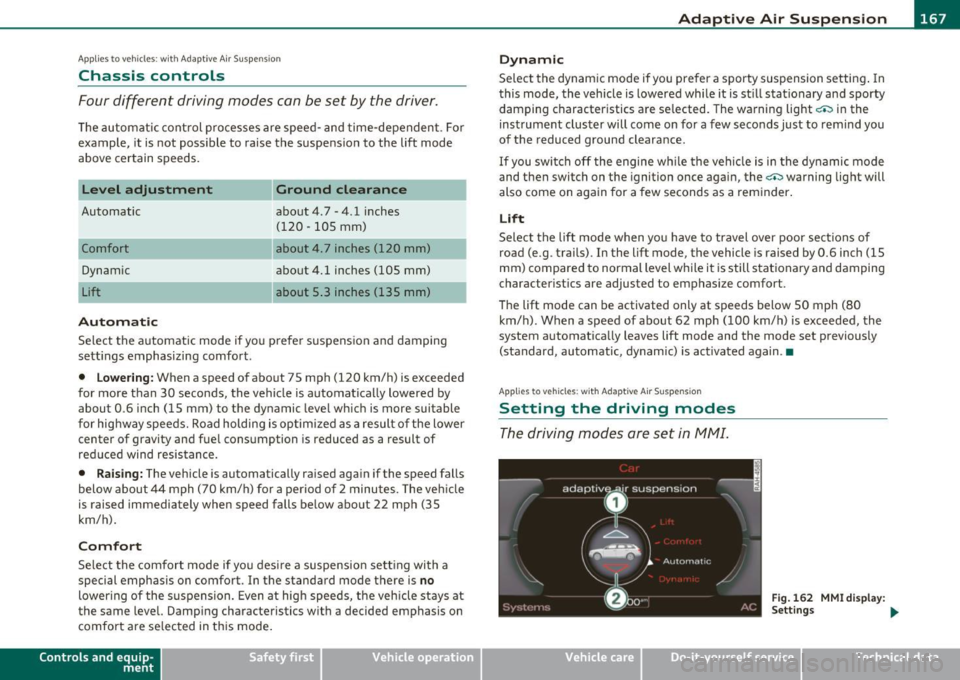
Setting the driving modes
The driving modes are set in fv1fv1I.
Fig. 162 MMI display :
Settings ...
Vehicle care Do-it-yourselt service iTechnical data
Page 171 of 368
___________________________________________________ H_o_ m_ e_L_ i_ n _ k_ ® __ _
Homelink ®
Universal remote control
Applies to veh icles: w ith Hom eli nk ® universal remote control
General information
The Homelink ® feature can learn the up to three radio
frequency codes for most current transmitters used for
operating garage doors, estate gates, home or outdoor
lighting systems, and other devices.
You must first program the Homelink ® transm itter before you can
use the system=>
page 170, "Programming the Home link® trans
mitter".
I n order to program the Homelink ® transmitter for devices utilizing
rolling code, a second person on a ladder who can safe ly reach the
garage door opener motor is recommended. It is also necessary to
locate the "learn" button on your garage door opener motor. Refer to
the operating instructions for the opener, as the location and color of
this button may vary by manufacturer.
You can still use the original remote control for the device at any
time.
& WARNING
• Never use the Homelink'"' transmitter with any garage door
opener that does have not the safety stop and reverse feature as
required by federal safety standards. This includes any garage
door opener model manufactured before Aprill, 1982.
• A garage door opener which cannot detect an object, signaling
the door to stop and reverse does not meet current federal safety
standards. Using a garage door opener without these features
increases risk of serious injury or death.
Controls and equip
ment Safety first
& WARNING
(continued)
• For safety reasons never release the parking brake or start the
engine while anyone is standing in front of the vehicle.
• A garage door or an estate gate may sometimes be set in
motion when the Homelink ® remote control is being
programmed. If the device is repeatedly activated, this can over
strain motor and damage its electrical components -an over
heated motor is a fire hazard!
• To avoid possible injuries or property damage, please always
make absolutely certain that no persons or objects are located in
the range of motion of any equipment being operated.
rn Tips
• If you would like more informat ion on Homelink ®, where to
purchase the Homelink ® compatible products, or would like to
purchase the Homelink ® Home Lighting Package, please call toll
free: 1-800-355-3515.
• For Declaration of Compliance to United States FCC and Industry
Canada regulations=>
page 347 . •
Vehicle care Technical data
Page 172 of 368
ffl..__H_ o_m_ e_ L_ i _n_ k_ ® _______________________________________________ _
Applies to veh icles : w ith Homelin k® un iversa l remote control
Programming the Homel ink ® transmitter
The transmitter is programmed in two phases . For rolling
code transmitters, a third phase is also necessary .
illUl~~ . l
~-1 II I Ill
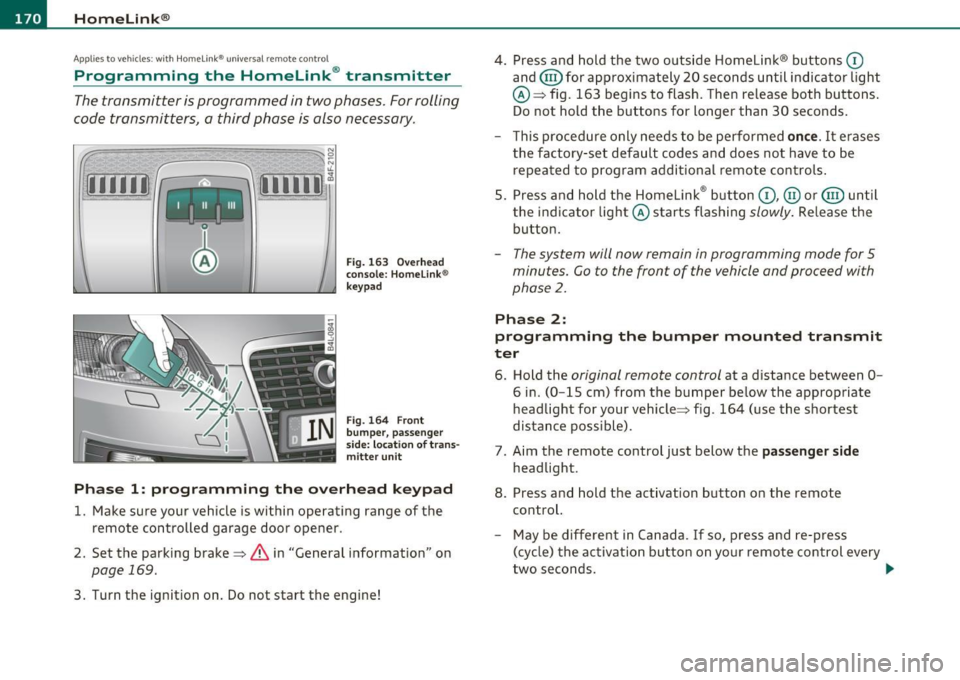
Fig. 163 Over head
conso le: Homelink ®
keypad
Fig. 164 F ront
bumper, passenger
s ide: loc ation of trans
mitter unit
Phase 1: progr amming th e overhead k eypad
1. Make sure your vehicle is within operating range of the
remote controlled garage door opener .
2. Set the parking brake~
& in "General information " on
page 169.
3. Turn the ignition on . Do not start the engine! 4
. Press and hold the two outside Homelink ® buttons
(D
and (@)for approximately 20 seconds until indicator l ight
@ ~ fig. 163 begins to flash . Then release both buttons .
Do not hold the buttons for longer than 30 seconds .
- This procedure only needs to be performed
on ce . It erases
the factory-set default codes and does not have to be repeated to program additional remote controls .
5. Press and hold the Homelink ® button
(D , @ or@ until
the indicator light © starts flashing
slowly . Release the
button .
-The system will now rema in in programming mode for 5
minutes.
Co to the front of the vehicle and proceed with
phase
2 .
Phase 2:
programming the bumper mounted tr ansmit
ter
6 . Hold the original r emote control at a distance between 0-
6 in. (0 -15 cm) from the bumper below the appropriate
headlight for your vehicle~ fig . 164 (use the shortest
distance possible) .
7 . Aim the remote control just below the
pa ss e nger sid e
headlight .
8. Press and hold the activation button on the remote control.
- May be d ifferent in Canada . If so, press and re-press
(cycle) the activation button on your remote control every
two seconds. .-,,
Page 173 of 368
HomeLink® -_______________ __.
9. The emergency flashers will flash three times (after about
15-60 seconds) when the programming is successful.
Release the button on the remote control.
-To program more devices, repeat steps 4 to 9.
10. Press and hold the trained Homelink ® button and
observe the indicator light©~
page 170, fig. 163.
- If the indicator light is solid/continuous, programming is
complete and your device should activate when you press
and release the trained Homelink ® button.
- If the indicator light blinks rapidly for 2 seconds and is then a solid/continuous light, proceed with phase 3 to program a rolling code device.
Phase 3: rolling code programming
- A second person on a ladder who can safely reach the
garage door opener motor is recommended.
11 . Locate the "learn" button on the garage door opener
motor (refer to the operating instructions for the opener,
as the location of this button may vary by manufacturer) .
12. Press and release the learn button on the garage door
opener motor.
-Note: once the button is pressed, there are 30 seconds in
which to initiate the next step.
13. On the Homelink® keypad inside the vehicle, firmly press
and hold the Homelink® button previously programmed
in phases 1 and 2 for two seconds and release. Repeat this
sequence
twice .
Contro ls a nd e quip
m en t Vehicle
OP-eration
-Some vehicles may require the press/hold/release
sequence up to three times to complete the training
process.
- Homelink ® should now activate your rolling code
equipped device.
If the 5 minute time limit is exceeded, the emergency flashers will
flash one time
to indicate that the process has been terminated. In
this case, repeat steps 4 through 9.
If the emergency flashers do not flash three times (after about 15 -
60 seconds), programming was not successful. In this case, repeat
steps 4 through 9.
Remote control units for garage door openers in Canada are set to
stop transmitt ing radio frequency signals after two seconds. This
time may not be sufficient for the Home link® system to learn the
radio frequency signal. Perform all other steps as described above.•
Applies to veh icles: with Hom elin k® un iversa l rem ote cont rol
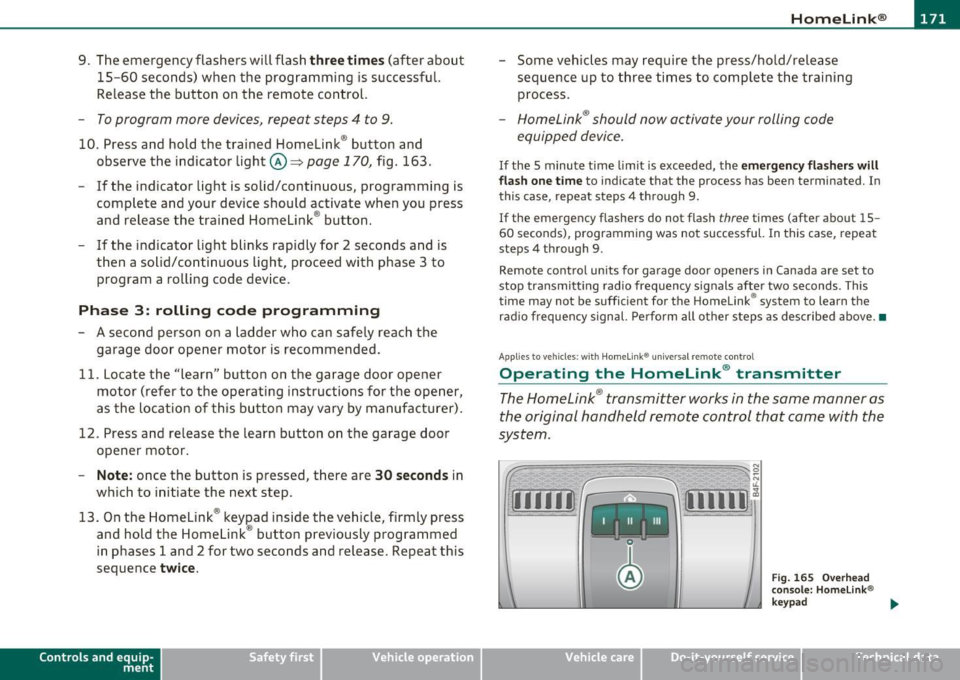
Operating the Homelink ® transmitter
The HomeLink ® transmitter works in the same manner as
the original hand held remote control that came with the
system.
~ ;;;;;~~~~ ~=;==~~~ ;;;;:;;;~,~!:
{I I I I I~ i 111111 1,A
Fig. 1 65 Overhead
conso le: Homelink®
keypad
Vehicle care Do-it-yourselt service iTechnical data
Page 174 of 368
-HomeLin k® •m ___________________ _
-Press th e ap pro priate programmed button G) , @ or@
to activate the desired remote control function ::::>
& in
"Genera l informat io n" on
page 169. •
Applies to ve hicles : w ith Hom eli nk® univer sa l rem ote c ont rol
Reprogramming a single button
A Homelink ® button can be reprogrammed individually
without affecting the other button allocations.
Programming the ov erh ead keypad
- Press the appropriate Homelink ® button until the indi-
cator light begins flashing slowly .
Programming the bumper mounted transmit
ter
1. Hold the original remote control at a distance between 0 -
5 in . (0-13 cm) from the bumper below the appropriate
headlight for your vehicle (use the shortest distance
possible).
2. Aim the remote control just below the
pas senger side
headlight .
3 . Press and hold the ac tivation button on the remote
control.
4 . The emergency flashers will flash
three times (after about
15 -60 seconds) when the programm ing is successful.
N ow release the b utton on the remote control.
- If the device utilizes a rolling code , please follow phase 3
of =>
page 170 , "Programming the Homelink ® trans
mitter" for rolling code programming.
This pr ocedur e will caus e th e ex is ting pr ogramming on th e
Homelink ® button to be era sed !•
Ap plies to veh icles: w ith Ho meli nk® un ive rsa l rem ote c ont rol
Erasing the programming of the
Homelink ® tr ansmitter
When you erase the programming, the programming on
all three of the transmitter channels with be lost!
- Perform steps 1 to 4 as described on::::> page 170, "Phase
1 : programming the overhead keypad".
When completed , the Homel ink ® system will be in the programm ing
mode and is then ready to learn the codes for remote controlled
devices .
[I) Tips
• Programmed buttons cannot be erased individually.
• For security reasons you are advised to erase the programming of
the Homelink ® system before you sell your veh icle .•