airbag AUDI S6 2010 Owners Manual
[x] Cancel search | Manufacturer: AUDI, Model Year: 2010, Model line: S6, Model: AUDI S6 2010Pages: 368, PDF Size: 86.82 MB
Page 4 of 368
Table of contents
Table of contents
Vehicle literature ..... .
About this Owner's Manual .......... ....... .. .
Controls and
equipment .............. .
Instruments and controls ... .
General illustration ........... .
Instruments and
warning/indicator Lights ..... . Instruments ... ... .......... .
Warning/indicator ligh ts ..... . .
Driver information display ... .
Introduction ...... ......... . .
On-Board Diagno stic sy ste m
(OBD) . ..... ....... .......... .
Auto Ch eck Control ........... .
Speed warning system ........ .
Tr ip computer ............ ... .
Opening and closing ......... . Keys ............ ............ .
Power locking system ........ .
Rear lid .... ..... ............ .
Child safety Lock ............. .
Convenience key ............. .
Anti-theft alarm sys tem ...... .
Power windows .............. .
Sliding/tilting power sunroof .. .
Clear vision .. .... ............ .
L ights ... .. ........ ......... .
Interior ligh ts ... ... .. ....... .
4
5
6
7
7
8
8
12
19
19
23
24
32
34
37
3 7
41
46
47
47
49
so
53
58
58
63 Vi
sion .................... .. .
Wiper and washer system Mirrors ... ............... ... .
Digital compass ............. .
Seats and storage ........ ... .
General recommendations .... .
Power seat . ................. .
S eat m emory ............... . .
Rear sea ts ... ... .. .......... .
Head res train ts ........... ... .
Armrest .. .. ................ .
Luggage compar tm en t ..... .. .
Roof ra ck . .... .... .......... .
Cupholder .................. .
Ashtray .. ................... .
Cigarette Lighter/socket ...... .
S torag e ................ .. .. .
Warm and cold .... .......... .
Cl imate control ....... ... .... .
Ba sic se tt ings ............... .
On the road ... .... .......... .
S tee ring .................... .
Igni tion lock and ignition swi tch
Start ing and stopp ing the engine
Start ing and stopping the engine
with Convenience key ......... .
E lectromechanical parking brake
Cru ise control ............... .
Adaptive Cruise Control ..... . Speed and distance con trol
sys tem .............. ....... .
Dr iver information ........... .
Syst em Limitations ........... .
Audi Lane assist ........... .. .
Lane ass ist .... .. ............ . 64
66
69
73
75
75
76
79
80
81
82
83
87
89
91
92
93
96
96
104
106
106
108
109
110
113
116
119
119
12 7
131
134
134 Audi side assist ...............
137
Lane Change Assistant ......... 137
No tes ....... .... ............. 144
Automatic transmission 146
tiptronic ® (6-sp eed au toma tic
tr ansmission) . . . . . . . . . . . . . . . . . 146
multitronic ® ............ ...... 152
Park assist . . . . . . . . . . . . . . . . . . . . 160
Park ing system (rear, with rear
view camera) . . . . . . . . . . . . . . . . . 160
Adaptive Air Suspension .. ... . 166
Adaptive Air Su spens ion and
Damping . . . . . . . . . . . . . . . . . . . . . 166
Homelink ® ............. ... ... 169
Univ ersal r emot e control 169
Safety first ............ ... 174
Driving Safely .. ............... 174
G eneral n otes ......... ........ 174
Proper occupant seating
po sition s . . . . . . . . . . . . . . . . . . . . . 176
Pedal area . . . . . . . . . . . . . . . . . . . . 180
S towing Luggage .............. 181
Report ing Safety Defects . . . . . . . 183
Safety belts . . . . . . . . . . . . . . . . . . . 185
General no tes . . . . . . . . . . . . . . . . . 185
Why safety belts? ............ . 186
Safe ty b elts . . . . . . . . . . . . . . . . . . . 189
Safety bel t pre ten sioner s . . . . . . . 193
Airbag system ................ 195
Im portan t thing s to kn ow ...... 195
F ront airbags .............. ... 199
Page 5 of 368
Table of contents
Monitoring the Advanced Airbag Vehicle care .............. 258 Emergency towing with
System ...................... 206 commercial tow truck ........ .
Side airbags ... ......... ...... 211
Cleaning and protection ...... 258 Lift
ing vehicle ............... . 334
336
Side curtain airbags . . . . . . . . . . . . 214
Child Safety .. .. .......... ..... 217
Important things to know . . . . . . 217
Child safety seats . . . . . . . . . . . . . 222
Installing a child safety seat .. .. 227
LATCH Lower anchorages and
tethers for children . . . . . . . . . . . . 230
Additional Information 237
Vehicle operation ...... 240
Intelligent technology ........ 240
Notice abou t data recorded by
vehicle control modules . . . . . . . . 240
E lectronic Stabilization Program
(ESP) ........................ 240
Braking ...................... 243
Servo tronic® -advanced power
steering system . . . . . . . . . . . . . . . 245
Driving with your quattro® . . . . . . 246
Energy management ........... 247
Driving and environment ...... 249
The first 1,000 miles (1,500 km)
and afterwards . . . . . . . . . . . . . . . 249
Avoid damaging the veh icle . . . . . 250
Driving through water on roads . 250
Catalytic converter . . . . . . . . . . . . 250
Operate your vehicle economically
and minimize pollution ......... 251
Trailer towing ................. 254
Driving with a trailer . . . . . . . . . . . 254
T railer towing tips . . . . . . . . . . . . . 256
Controls and equip
ment Safety first
General informa
tion . . . . . . . . . . . 258
Care of exterior . . . . . . . . . . . . . . . 258
Care of interior . . . . . . . . . . . . . . . 265
Fuel supply and filling your fuel
tank ..........................
271
Gasoline . . . . . . . . . . . . . . . . . . . . . 271
Fuel tank . . . . . . . . . . . . . . . . . . . . . 272
Checking and filling . . . . . . . . . . . 276
Technical data
General information
Explanation of technical data .. .
Vehicle ident ification ......... .
Weights ................... . .
Dimensions ............... .. . 338
338
338
338
339
339
Engine hood . . . . . . . . . . . . . . . . . . 276
Data . . . . . . . . . . . . . . . . . . . . . . . . . . 341
Engine oil . . . . . . . . . . . . . . . . . . . . 279 300 hp, 3.0 liter, 6-cylinder
Engine cooling system . . . . . . . . . 284
Brake fluid . . . . . . . . . . . . . . . . . . . 287
Ba ttery . . . . . . . . . . . . . . . . . . . . . . 288
Windshield/headlight washer container . . . . . . . . . . . . . . . . . . . . 292
Tires and wheels . . . . . . . . . . . . . . 293 engine ......................
.
265 hp, 3.2 liter , 6-cylinder
engine ......... ..... ........ .
350 hp, a-cylinder engine ..... .
Consumer Information ...... .
Warranty coverages .......... . 341
342
343
344
344
T ires ........................ 293 Operating your vehicle outside the
T ire pressure monitoring system 312
Do-it-yourself service . 316
What do I do now? ........... 316
Trunk escape handle ........... 316
Jack, tools and spare wheel ..... 316
Changing a wheel . . . . . . . . . . . . . 318
Fuses and bulbs . . . . . . . . . . . . . . 325
F u ses ........... ............. 325 U.S.A
. or Canada ............. .
Audi Service Repair Manuals and
Literature ................... .
Maintenance ................ .
Additional accessories, modifications and parts replacement ............... . .
Declaration of Compliance,
T elecommunications and
Electronic Systems .......... . .
Bulbs ........................ 329
Alphabetical index ....
Emergency situations ......... 331
General . . . . . . . . . . . . . . . . . . . . . . 331
Starting by pushing or towing 331
Starting with jumper cables .... 331
Use of jumper cables . . . . . . . . . . 332
Vehicle operation Vehicle care Do-it-yourself service
344
344
344
346
347
350
Technical data
Page 9 of 368
Instruments and controls
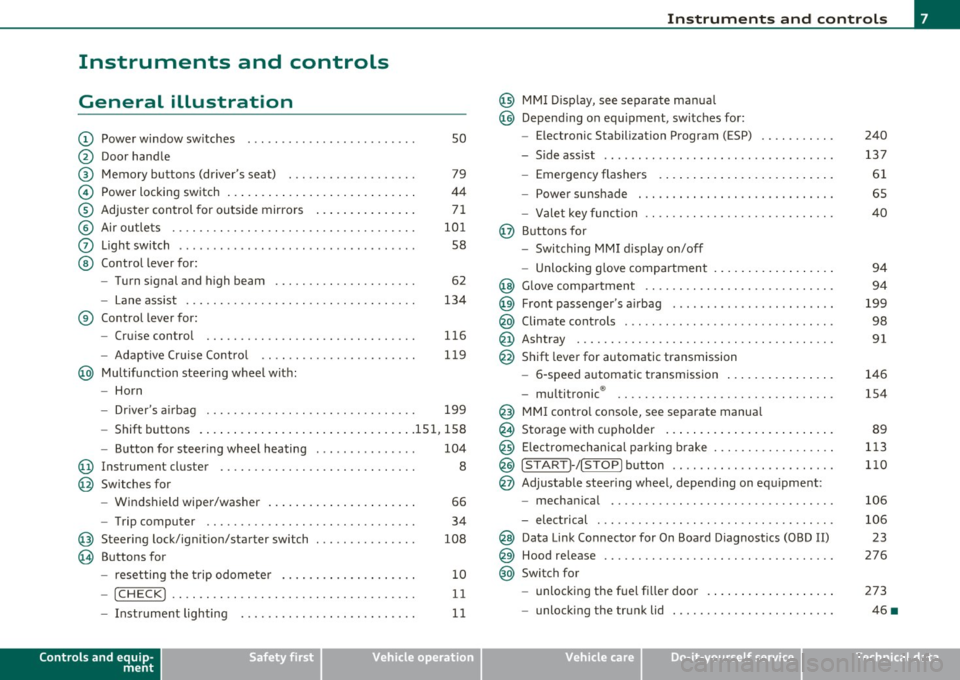
General illustration
(D Power window switches . . . . . . . . . . . . . . . . . . . . . . . . . 50
@ Door handle
@ Memory buttons (driver's seat) . . . . . . . . . . . . . . . . . . . 79
© Power locking switch . . . . . . . . . . . . . . . . . . . . . . . . . . . . 44
® Adjuster control for outside mirrors . . . . . . . . . . . . . . . 71
© Air outlets . . . . . . . . . . . . . . . . . . . . . . . . . . . . . . . . . . . . 101
0 Light switch . . . . . . . . . . . . . . . . . . . . . . . . . . . . . . . . . . . 58
@ Control lever for:
- Turn signal and high beam . . . . . . . . . . . . . . . . . . . . . 62
- Lane assist . . . . . . . . . . . . . . . . . . . . . . . . . . . . . . . . . . 134
® Control lever for:
- Cruise control . . . . . . . . . . . . . . . . . . . . . . . . . . . . . . . 116
- Adaptive Cruise Control . . . . . . . . . . . . . . . . . . . . . . . 119
@ Multifunction steering wheel with:
- Horn
- Driver 's airbag . . . . . . . . . . . . . . . . . . . . . . . . . . . . . . . 199
- Shift buttons ...... .. .. .... ........ .......... 151, 158
- Button for steering wheel heating . . . . . . . . . . . . . . . 104
@ Instrument cluster . . . . . . . . . . . . . . . . . . . . . . . . . . . . . 8
@ Switches for
- Windshield wiper/washer . . . . . . . . . . . . . . . . . . . . . . 66
- Trip computer ............... .. .. .. .. ....... .
@ Steering lock/ignition/starter switch ... .. ......... .
@ Buttons for
- resetting the trip odometer .......... .. .. .. ... .
- !CHECK] .... .... .. .... .. .... ............... .
-Instrument lighting . ....... .... .. .. .... .. .. . .
Controls and equip
ment Safety first
34
108
10
11
11
Instruments and controls
@ MMI Display, see separate manua l
@ Depending on equipment, switches for:
- Electronic Stabili zation Program (ESP)
- Side assist .. ... . .... .. .. .. .. .. .... .. .. .. ... .
- Emergency flashers .. .... .. .. .. ............. .
- Power sunshade . ... ... .. .. .. .. .... .. .. ... .. .
- Valet key function .. .. .. .. .... ....... ...... .. .
@ Buttons for
- Switching MMI display on/off
- Unlocking glove compartment
@ Glove compartment ...... .. .. .. .... .. ......... .
@ Front passenger 's airbag ............... ... .. .. . .
@ Climate controls ... .. .. .. .. .. .... .......... ... .
@ Ashtray .............. .. .... .. .. .. .. .... ..... .
@ Shift lever for automatic transmission
- 6-speed automatic transmission ....... .. ... ... .
- multitronic ® ....................... .. .... .. .
@ MMI contro l console, see separate manua l
@ Storage with cupholder ... .. ... .............. .. .
@) Electromechanical parking brake .............. .. . .
@ ISTAR T]-/ISTOP] button ........ .. ... .......... .
@ Adjustable steering wheel, depending on equipment :
- mechanical ............. .. .. .. ............. .
- electrical . ... ... .. .. .. .. .. .. .. .. .. ....... .. .
@ Data Link Connector for On Board Diagnostics (OBD II)
@ Hood release .......... .. .... .. .. .. .. ......... .
@ Switch for
unlocking the fuel fi ller door .............. .... .
- unlocking the trunk lid . .. ........ .. ... .. .. .. . .
Vehicle care
240
137
61
65
40
94
94
199
98
91
146
154
89
113
110
106
106 23
276
273
46 •
Technical data
Page 14 of 368
Instruments and warning /indicator lights
- Press the"+" button to increase the brightness during the
hours of darkness.
- Press the"-" button to decrease the brightness during the
hours of dark ness.
A light sensor in the instrument cluster contro ls the illumination for
the instrument cluster, the center console and the displays. In a
br ight env ironment, using the buttons to change the br ightness has
no effect .
[ i ] Tips
The illumination for the instrument cluster lights up whenever you
switch on the ig nition with the vehicle head lights off. As the daylight
fades, the instrument cluster illum inat ion likewise d ims automati
cally and w ill go out completely when the outside light is very low.
Th is feature is meant to remind you to sw itch on the headlights when
outside light conditions become poor. •
Warning/indicator lights
Overview
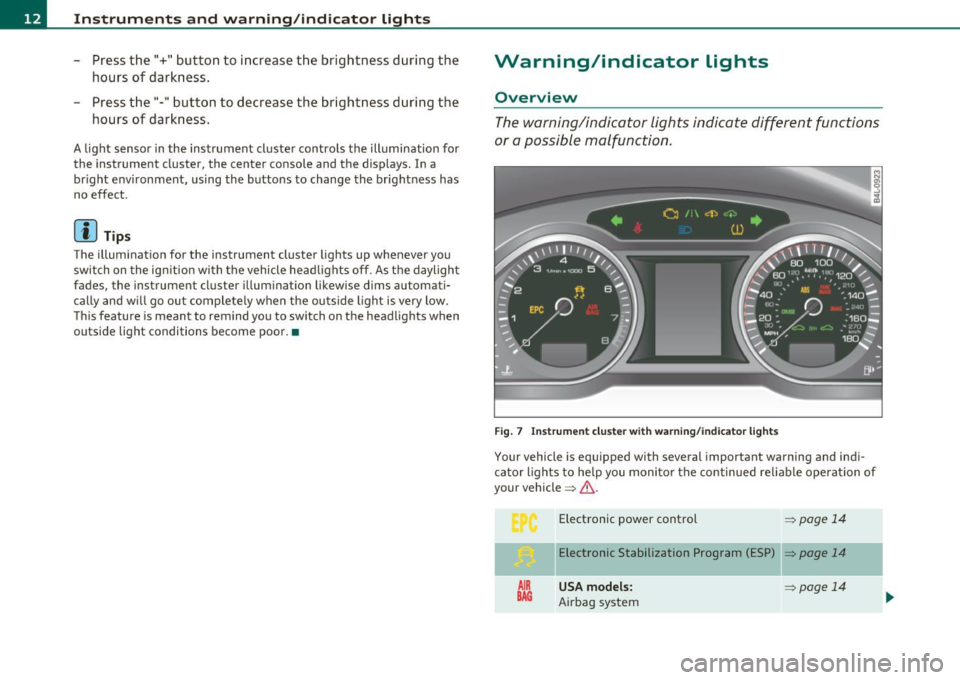
The warning/indicator lights indicate different functions
or a possible malfunction .
Fig . 7 Instr um ent cluste r w ith warn in g/ indicato r lig hts
Your vehicle is equipped with several important warning and ind i
ca tor lights to he lp you moni to r the continued re liable operat ion of
your vehicle =>& .
AIR
BAG
Electronic power control => page 14
Elect ronic Stabilization Program (ESP) => page 14
USA models: ~page 14
Airbag system
Page 15 of 368

.o. Canada model s: ,;:;..{/
Airbag system
Tire pressure monitoring system*
-
¢ L eft turn signal
Malfunct ion Indicator Lamp (MIL)
/: L ane assist (system is ready)
Lane assist (system is not ready)
~
Safety belt
Adapt ive A ir Suspe nsio n*
-
~ Adaptive Air Suspension"
D H igh beam
--
Q Right turn signal
CRUISE USA models:
Cruise contro l a ct ivated
At:i Canada models:
Cruise control activated
USA models:
Ant i-lock brake system (ABS) defective
Canada models :
Anti-lock brake system (ABS) defective
PARK USA models: BRAKE Elect romechan ica l parking b rake
Controls and equip
ment Safety first
=>page
14
=> page 15
=>page 15
=> page 15
=> page 15
=> page 15
=>page 15
-
=> page 16
-
=> page 16
=> page 16
-
=> page 15
=> page 16
=> page 16
=> page 17
=>page 17
=> page 17
Instruments and warning /indicator lights
(® ) Canada models: => page 17
E lectromechanical parking bra ke
BRAKE
USA model s: => page 18
Brake ma lf u nct ion
-- -
Canada models: => page 18
B rake malfunction
Vehicles with the Adaptive Cru ise Control* have the following addi
ti onal check lamps:
Open road
i;:;::::::, 1111 i;:;::::::, D ri vi n g i n traffic
i;:;::::::, 1111 i;:;::::::, Request for driver to
assume con trol
& WARNING
=> page 12 7
=> page 127
=> page 127
• Failure to heed warning light s and other important vehicle
information may result in serious personal injury or vehicle
damage.
• Whenever stalled or stopped for repair, move the vehicle a safe
distan ce off the road, st op the engine, and turn on the emergency
flasher =>
page 61.
• The engine compartment of any motor vehicle i s a potentially
hazardous area . Befo re you check anyth ing in the engine compart
ment, stop the engine and let it cool down. Always exercise
extreme caution when working under the hood=>
page 269,
"Engine compartment". .,.
Vehicle care Technical data
Page 16 of 368
![AUDI S6 2010 Owners Manual Instruments and warning /indicator lights
(I] Tip s
Many fun ct ions a re mon itored by the Auto-Check system=> page 24.
Malfunctions or faults will be identified either with a red](/img/6/57594/w960_57594-15.png "AUDI S6 2010 Owners Manual Instruments and warning /indicator lights
(I] Tip s
Many fun ct ions a re mon itored by the Auto-Check system=> page 24.
Malfunctions or faults will be identified either with a red")
Instruments and warning /indicator lights
(I] Tip s
Many fun ct ions a re mon itored by the Auto-Check system=> page 24.
Malfunctions or faults will be identified either with a red symbol
(pr iority
1-Dange r!) or w ith a ye llow symbo l (prio rity 2 -Warn ing). •
Electronic power control C
This warning/indicator light monitors the electronic
power control.
The warn ing/indicator light (Electro nic Power Control) illumi-
nates when you turn on the ignition as a function check .
(I] Tips
If this warning/indicator light illuminates while you are driving, then
there is a malfunct io n in the engine electron ics . Have the ma lfunct io n
corrected as soon as possib le by your authori zed Audi dealer or qual
ified repair fac ility. •
Electronic stabilization program (ESP) ,,. ..
This warning/indicator light monitors the electronic
stabilization program.
T he warn ing/indicator lig ht has the follow ing funct ions:
• It blinks while you are driving when the ESP is working.
• It illumina tes when you sw itch on the ignition fo r approximately 2
seconds as a function check .
• It illuminates whe n there is a malfunction in the ESP .
• It illuminates when ESP or ASR (Ant i-Slip Regula tion) is deacti
vated .
• It ill umina tes if t he re is a malfunction in the A BS, s ince the ESP is
part of the ABS system. If the battery terminals were disconnected and re-connected, the
vehicle was jump st arted o r th e bat tery is very weak, t he ESP se nsor
system goes through a learning process for the first few yards. The
warning/indicator light illuminates. The war ning/indicator light goes
out as soo n as the learning process is complete .
If the ESP warning/indicator light ill uminates and stays on after yo u
have sta rted t he engine, t his may mean that the co ntrol system has
temporarily switched off the ESP . If this is case , you can react ivate
t he ESP by tu rning the igni tion off and t hen o n ag ain . The
warning/indica tor light should go out to show that the system is fully
functional again.
For more information about the ESP=>
page 240. •
Airbag system
~i (USA models) l!.!r (Canada models)
This warning/indica tor ligh t monitors the airbag and the
pretensioner systems.
The G>! (USA models)/ !.!r (Canada mode ls) warn ing light illuminates
fo r a few seconds ea ch time yo u sw itch on the ignitio n.
If the
G>! (USA models)/ !.!r (Canada mode ls) warn ing light does not go
out, or if it illuminates while you are driving, or if it starts to blink,
then there is a malfunction somewhere in the system . If the light
does not illuminate when yo u switch on the ignition, this a lso means
there is a malfunction.
& WARNING
If you have a malfunction in th e airbag syst em, contact your
authorized Audi deale r immediately . Otherwi se the airbag or the
belt pr eten sion er may not work properly in an accid ent .•
Page 44 of 368
Opening and closing
without a key using the locking button. Each door has a prox imity
sensor and a locking button.
Automatic locking
The automatic locking feature locks all the vehicle doors and the rear
lid when you drive faster than 9 mph (15 km/h). This function can be
turned on and off in the MMI
Central locking Menu=> page 44.
You can unlock the vehicle from the inside by:
• removing the key from the ignition switch (the vehicle will auto
matically unlock itself) or
• pressing the unlock part of the power lock switch
€.J:l or
pulling the door handle (twice to open the rear doors).
& WARNING
• When you lock your vehicle from outside, nobody -especially
children -should remain inside the vehicle. Remember, when you
lock the vehicle from the outside the windows cannot be opened
from the inside.
• When you leave the vehicle, always remove the ignition key
and take it with you . This will prevent passengers (children, for
example) from accidentally being locked in the vehicle should
they accidentally press the power locking switch in the front
doors.
• Do not leave children inside the vehicle unsupervised . In an
emergency it would be impossible to open the doors from the
outside without the key.
[ i ] Tips
• In the event of a crash with airbag deployment all locked doors
wi ll be automatically unlocked to give access to the vehicle occupants
from the outside .
• If the power locking system should malfunction , you can lock each
door individually using the vehicle key=>
page 45.
• If the power locking system should fail, you can still open the fuel
tank flap in an emergency =>
page 275.
• You are well advised not to keep valuables inside an unattended
vehicle, v isib le or not. Even a properly locked vehicle cannot provide
the security of a safe .•
Unlocking and Locking the vehicle with the
remote cont rol
How the remote control works.
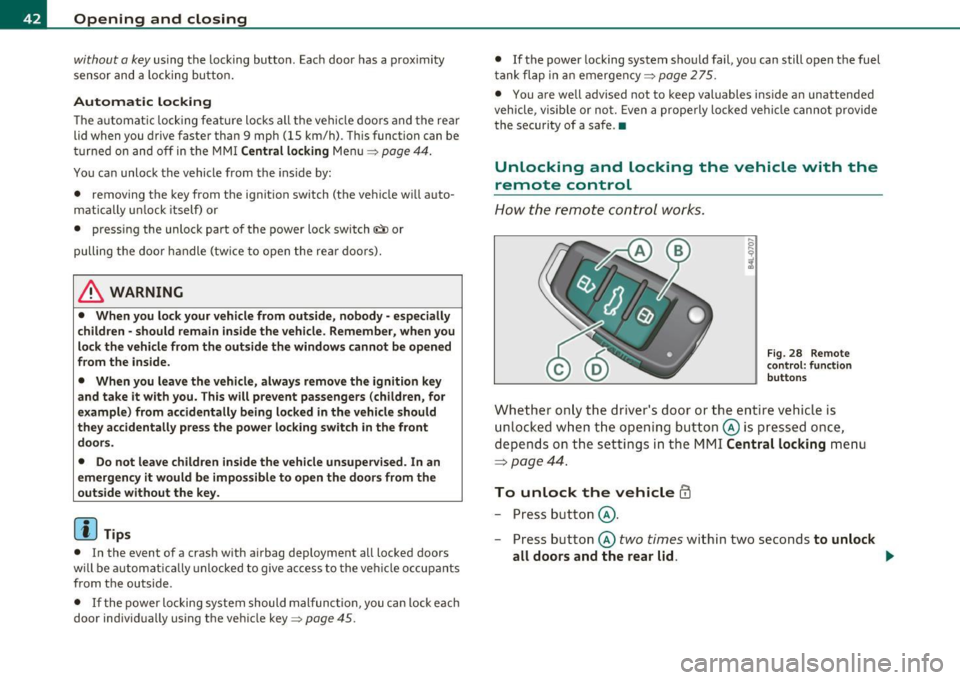
Fig. 28 Remote
control: function
buttons
Whether only the driver's door or the entire vehicle is
unlocked when the opening button @is pressed once,
depends on the settings in the MMI
Central locking menu
=:> page 44.
To unlock the vehicle ffi
-Press button @.
- Press button @
two times within two seconds to unlock
all doors and the rear lid. ..,,
Page 47 of 368

How to unlock each door separately using the
door handle (front doors)
- Pull the handle to open t he door .
How to unlock each door separately using the
door handle (rear doors)
- Pull the door handle once to release the loc k.
- Pull t he handl e
twice to open th e door.
You will find a power locking sw itch in ea ch door. You c an lock and
unlock the vehicle using the switches in the dr iver's or passenger's
door =>
page 44, fig. 30. Yo u can only lock the vehicle using the
switches in the rear doors =>
page 44, fig. 31. If you lock the vehicle
using t he
power locking switch , please note the following :
• You can not op en the doors or the rea r lid from the
outside
(increased secur ity, for example when you are sto pped at a red light).
• The d iodes in the power lock ing switches illuminate whe n all the
doors and the rear lid are closed and loc ked .
• All d iodes turn dark as soon as one of the doors has bee n
unlocked .
• You can unlock and open the doors from the inside by pulling on
t he doo r handle .
• If the driver's door is opened (after you have locked the vehicle
from the inside using the power locking switch), the door will rema in
unlocked to preve nt you from locking yourself out of your vehicle .
After you close t he door, you have to lo ck the drive r's door ag ain.
• If you have a crash and the airbag is activated, the doors automat
i c ally unlo ck.
& WARNING
• If you use the power locking switch with the doors closed,
remember th at all the vehicle doo rs will lock.
Con tro ls a nd e quip
m en t Vehicle
OP-eration
Opening and closing
& WARNI NG (continued )
• Locking doors from the inside can help p revent inadvertent
door opening during an accident and can also prevent unwanted
entry from the outside. Locked doo rs can, however , delay assis
tance to vehicle occupants and hold up rescue efforts from the outside in an accident or other emergency .•
Emergency Locking
If the central locking system fails (power sup ply), each
d oor has to be locked separately .
5 0 N tL ;g
Fig. 32 E mergen cy
l o ck ing o f the front
p ass eng er's door
An e mergency lock ing mechan is m is i nte gra ted i n the edg e of
th e pass enge r's door a nd in the rear doo rs ( on ly v isibl e wh en
t h e door is open) .
- Turn the cover with t he ignit ion key and then ti lt the cover
downward=> fig. 32.
- Insert the key into the inner slot and tur n it to the right
( r ight-side doors) or the left (left-side door) as far as it can
g o.
After you close the door, you w ill no longer be ab le to open it from the
o uts ide. _.,
Vehicle care Do-it-yourselt service iTechnical data
Page 64 of 368
Clear vision
-Press the switch /4. => page 61, fig. SO to turn the emer-
gency flashers on or off.
When the emergency flasher is on, all four turn signals blink at the
same time. The turn signal indicator lights¢¢ in the instrument
cluster, as well as the light in the emergency flasher switch~ blink
likewise.
The emergency flashers will turn on automatically if you are in an accident where the airbag has deployed.
(I) Tips
You should turn on the emergency flashers when:
• you are the last vehicle standing in a traffic jam so that any other
vehicles coming can see you, or when
• your vehicle has broken down or you are in an emergency situa
tion, or when
• your vehicle is being towed by a tow truck or if you are towing
another vehicle behind you .•
Turn signal ¢ c> and high beam ~D lever
The lever on the left side of the steering column is used to
operate the turn signals and the high beam as well as the
headlight flasher .
i
'
-to
"' -w
"' cc
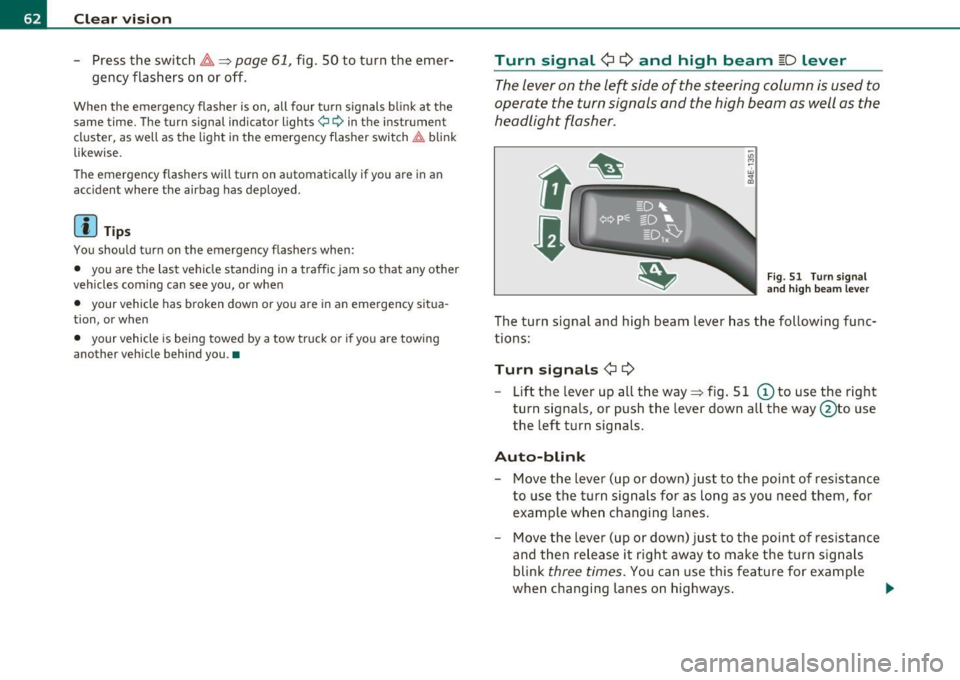
Fig. 51 Turn signal
and high beam lever
The turn signal and high beam lever has the following func
tions:
Turn signals ¢ Q
- Lift the lever up all the way=> fig. S 1 © to use the right
turn signals, or push the lever down all the way@to use
the left turn signals.
Auto-blink
-Move the lever (up or down) just to the point of resistance
to use the turn signals for as long as you need them, for
example when changing lanes.
- Move the lever (up or down) just to the point of resistance
and then release it right away to make the turn signals
blink
three times . You can use this feature for example
when changing lanes on highways.
~
Page 77 of 368

Seats and storage
General recommendations
Why is your seat adjustment so important?
The safety belts and the airbag system can only provide
maximum protection if the front seats are correctly
adju sted.
Th ere a re various ways of adjusting t he front seats to provide safe and
comfortable support for the driver and the front passenger . Ad just
your seat properly so that :
• you can easily and quickly reach a ll the switc hes and contro ls in the
ins trumen t pa nel
• your body is properly supported thus reducing phys ica l stress and
fatigue
• the safety be lts and airbag system can offer maximum protection
=>
page 195 .
In the following sections, you w ill see exact ly how you can best ad just
your sea ts .
Th ere are special regulations a nd instr uctions for install ing a child
safety seat on the front passenger's sea t. Always follow the informa
tion regarding child safety p rovided in=>
page 217, "Child Safety ".
& WARNING
Incorrect seating posit ion of the dri ver and all other passengers
can result in seriou s personal injury.
• Always keep your feet on the floor when the vehicle is in
motion -never put your feet on top of the instrument panel, out
of the window o r on top of the seat cush ion. This applies especially
to the passengers.
If your seating po sition is incorrect, you
increase the ri sk of injury in the case of sudden braking or an acci-
Controls and equip
ment Safety first
Seats and storage
& WARNING
(con tinu ed)
dent . If the airbag inflates and the seating position is incorrect ,
this could result in per sonal injury or even death .
• It is important for both the dri ver and front passenger to keep
a distan ce of at least 10 inche s (25 cm) between themselves and
the steering wheel and /or instrument panel. If you 're sitting any
closer than this , the airbag system cannot protect you properly. In
addition, the front seats and head restraints must be adjusted to
your body height so that they can give you maximum protection .
• Always try to keep as much distance as possible between your
self and the steering wheel or instrument panel.
• Do not adjust the driver's or front passenger 's seat while the
vehicle is moving. You r seat may move unexpectedly , causing
sudden loss of vehicle control and personal injury . If you adjust
your seat while the vehicle is moving , you are out of position. •
Driver's seat
The correct seat position is important for saf e and
re lax ed driving.
W e recomme nd that you a djust the drive r's sea t in the
f ollowing man ner :
- Ad just the seat in fore and aft direction so that you can
easily pus h the pedals to the floor w hile keeping your
knees slightly bent=>
& in "Why is yo ur seat a djus tme nt
so importa nt?" .
- Adjust the seatback so that when yo u sit with yo ur back
agai nst t he seatback , you can st ill grasp t he top of the
steering w heel. ..,
Vehicle care Technical data