buttons AUDI S6 2010 Owners Manual
[x] Cancel search | Manufacturer: AUDI, Model Year: 2010, Model line: S6, Model: AUDI S6 2010Pages: 368, PDF Size: 86.82 MB
Page 9 of 368
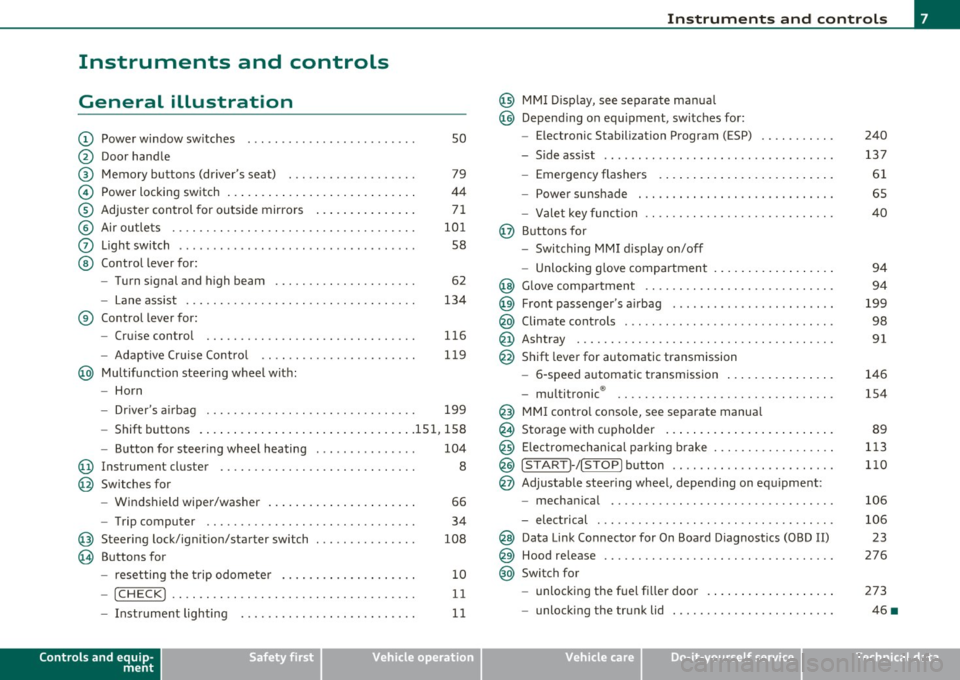
Instruments and controls
General illustration
(D Power window switches . . . . . . . . . . . . . . . . . . . . . . . . . 50
@ Door handle
@ Memory buttons (driver's seat) . . . . . . . . . . . . . . . . . . . 79
© Power locking switch . . . . . . . . . . . . . . . . . . . . . . . . . . . . 44
® Adjuster control for outside mirrors . . . . . . . . . . . . . . . 71
© Air outlets . . . . . . . . . . . . . . . . . . . . . . . . . . . . . . . . . . . . 101
0 Light switch . . . . . . . . . . . . . . . . . . . . . . . . . . . . . . . . . . . 58
@ Control lever for:
- Turn signal and high beam . . . . . . . . . . . . . . . . . . . . . 62
- Lane assist . . . . . . . . . . . . . . . . . . . . . . . . . . . . . . . . . . 134
® Control lever for:
- Cruise control . . . . . . . . . . . . . . . . . . . . . . . . . . . . . . . 116
- Adaptive Cruise Control . . . . . . . . . . . . . . . . . . . . . . . 119
@ Multifunction steering wheel with:
- Horn
- Driver 's airbag . . . . . . . . . . . . . . . . . . . . . . . . . . . . . . . 199
- Shift buttons ...... .. .. .... ........ .......... 151, 158
- Button for steering wheel heating . . . . . . . . . . . . . . . 104
@ Instrument cluster . . . . . . . . . . . . . . . . . . . . . . . . . . . . . 8
@ Switches for
- Windshield wiper/washer . . . . . . . . . . . . . . . . . . . . . . 66
- Trip computer ............... .. .. .. .. ....... .
@ Steering lock/ignition/starter switch ... .. ......... .
@ Buttons for
- resetting the trip odometer .......... .. .. .. ... .
- !CHECK] .... .... .. .... .. .... ............... .
-Instrument lighting . ....... .... .. .. .... .. .. . .
Controls and equip
ment Safety first
34
108
10
11
11
Instruments and controls
@ MMI Display, see separate manua l
@ Depending on equipment, switches for:
- Electronic Stabili zation Program (ESP)
- Side assist .. ... . .... .. .. .. .. .. .... .. .. .. ... .
- Emergency flashers .. .... .. .. .. ............. .
- Power sunshade . ... ... .. .. .. .. .... .. .. ... .. .
- Valet key function .. .. .. .. .... ....... ...... .. .
@ Buttons for
- Switching MMI display on/off
- Unlocking glove compartment
@ Glove compartment ...... .. .. .. .... .. ......... .
@ Front passenger 's airbag ............... ... .. .. . .
@ Climate controls ... .. .. .. .. .. .... .......... ... .
@ Ashtray .............. .. .... .. .. .. .. .... ..... .
@ Shift lever for automatic transmission
- 6-speed automatic transmission ....... .. ... ... .
- multitronic ® ....................... .. .... .. .
@ MMI contro l console, see separate manua l
@ Storage with cupholder ... .. ... .............. .. .
@) Electromechanical parking brake .............. .. . .
@ ISTAR T]-/ISTOP] button ........ .. ... .......... .
@ Adjustable steering wheel, depending on equipment :
- mechanical ............. .. .. .. ............. .
- electrical . ... ... .. .. .. .. .. .. .. .. .. ....... .. .
@ Data Link Connector for On Board Diagnostics (OBD II)
@ Hood release .......... .. .... .. .. .. .. ......... .
@ Switch for
unlocking the fuel fi ller door .............. .... .
- unlocking the trunk lid . .. ........ .. ... .. .. .. . .
Vehicle care
240
137
61
65
40
94
94
199
98
91
146
154
89
113
110
106
106 23
276
273
46 •
Technical data
Page 14 of 368
Instruments and warning /indicator lights
- Press the"+" button to increase the brightness during the
hours of darkness.
- Press the"-" button to decrease the brightness during the
hours of dark ness.
A light sensor in the instrument cluster contro ls the illumination for
the instrument cluster, the center console and the displays. In a
br ight env ironment, using the buttons to change the br ightness has
no effect .
[ i ] Tips
The illumination for the instrument cluster lights up whenever you
switch on the ig nition with the vehicle head lights off. As the daylight
fades, the instrument cluster illum inat ion likewise d ims automati
cally and w ill go out completely when the outside light is very low.
Th is feature is meant to remind you to sw itch on the headlights when
outside light conditions become poor. •
Warning/indicator lights
Overview
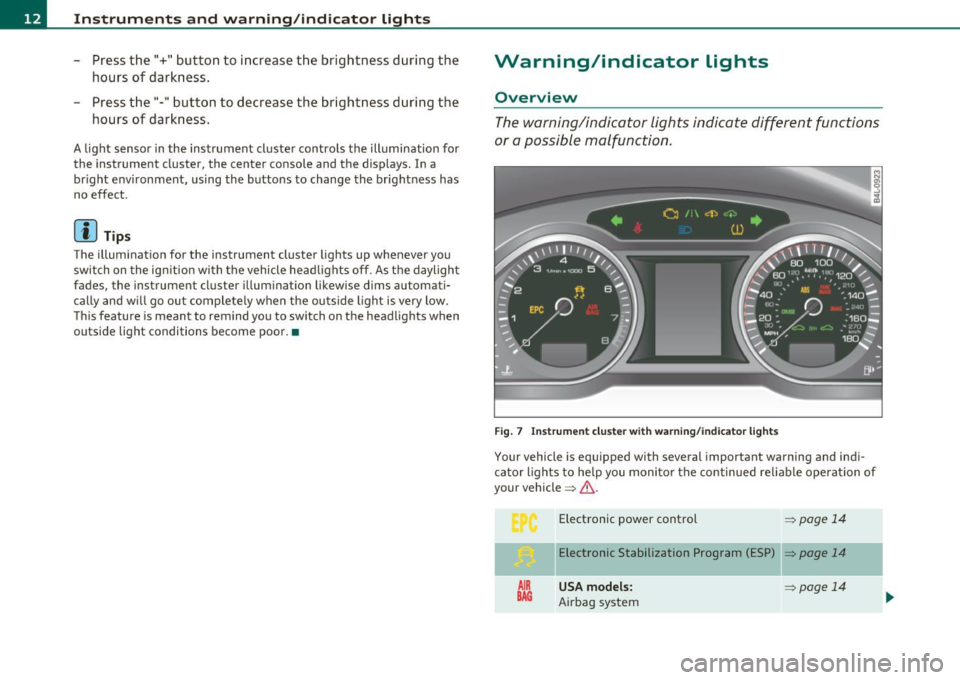
The warning/indicator lights indicate different functions
or a possible malfunction .
Fig . 7 Instr um ent cluste r w ith warn in g/ indicato r lig hts
Your vehicle is equipped with several important warning and ind i
ca tor lights to he lp you moni to r the continued re liable operat ion of
your vehicle =>& .
AIR
BAG
Electronic power control => page 14
Elect ronic Stabilization Program (ESP) => page 14
USA models: ~page 14
Airbag system
Page 39 of 368

Opening and closing
Keys
Key set
Fig. 23 Key set
© Ma ster key with remote control
You can centrally lock a nd u nlock your ve hicle and start the eng ine
with the master key with remote contro l.
@Valet key
The va let key only fi ts the lock in the d river's door and the ig nition
lock . If you have to leave the key with somebody e lse, you are well
advised to turn over the vale t key only .
Be aware tha t the rear lid a nd g love compartment can be opened
from inside the vehicle using the re lease buttons. It is therefore best
t o activa te the vale t key function to preven t una uth o rized access to
the glove compartment and the luggage compartment when
someone else h as charge of your vehicle::::>
page 40.
© Emergency key
The emergency key is only for tempo rary use if the vehicle key should
be lost or misplaced =>
&.
Controls and equip
ment Safety first
Opening and closing
Key replacement
If you lose a key, contact your a
uthorized A udi dea ler immediately to
have t he
lost key d isab led. Be sure to bring all you r keys wi th yo u.
Registered keys
You can chec k to f ind out how many keys have been reg iste red to yo ur
vehicle . Therefore, w hen b uy ing a used vehicle, make sure to get all
of the remote keys be long to it .
Calling up the registered keys=>
page 11.
Da ta in the master key
During driving, serv ice and ma intenance- relevant data is continu
o u sly sto red on yo ur maste r key. Your Aud i serv ice adviser c an re ad
out this data and tell you about the work your vehicle needs. This a lso
applies to vehicles wi th Co nvenience key *.
& WARNING
• Do not leave your vehicle unattended with the key in the igni
tion lock. Entry by unauthorized persons could endange r you or
re sult in theft or dam age the vehicle. Alway s lock all doors and
take the key.
• Do not leave children unattended in the vehicle, especially with
access to vehicle keys. Unguarded access to the keys p rovides chil
dr en the opportunity to start the engine and /or activate vehicle
systems such as the power windows etc . Unsupervised operation
of any vehicle system by children can result
in serious injury.
[ i ] Tips
• If you open t he dr iver 's door wi th the key left in the ignit ion lo ck,
a ch ime will sound . This is your reminde r to remove the key and lock
the doo r.
IJ),,,
Vehicle care Technical data
Page 42 of 368
Open ing and closing
- Place the cover w ith the new battery on the key base and
press both parts together.
c£> For the s ake of the environment
Dispose of dead batteries proper ly so as not to po llute the envi ron
me nt.
00 Tips
The replacement battery must be the same specification as the
orig inal. •
Electronic immobilizer
The immobilizer helps to prevent unauthorized use of
your vehicle.
A compu ter chip inside you r key au tomatically deactivates the e lec
tron ic immob ilizer when you insert the key in the ignition lock, or on
vehicles with Convenience key*, when the key is inside the vehicle.
When you remove the key from the ign ition lock, or on veh icles with
Conven ience key, when you remove the key from the vehicle, the elec
tron ic immobil izer is a utomat ica lly activated once again.
& WARNING
A lw ays ta ke the k ey with you when you l ea ve the vehicle . Th e key
c an di sa rm the e lect roni c engine immobilizer and pe rmit an u nau
tho riz ed p erso n t o start the eng ine a nd enable operati on of the
ve hicle sys tems su ch as p owe r w indo w or powe r su nroof* l eading
to serious perso nal injur y.
00 Tips
• The immobilizer prevents una uthorized use of the vehicle . The
vehicle cannot be started if an unauthorized key is used . The vehicle may not start if another rad
io device such as a key for another vehicle
or a transponde r is located on the key r ing.
• For Declaration of Compliance to United States FCC and Industry
Canada regulations =>
page 347. •
Valet key function
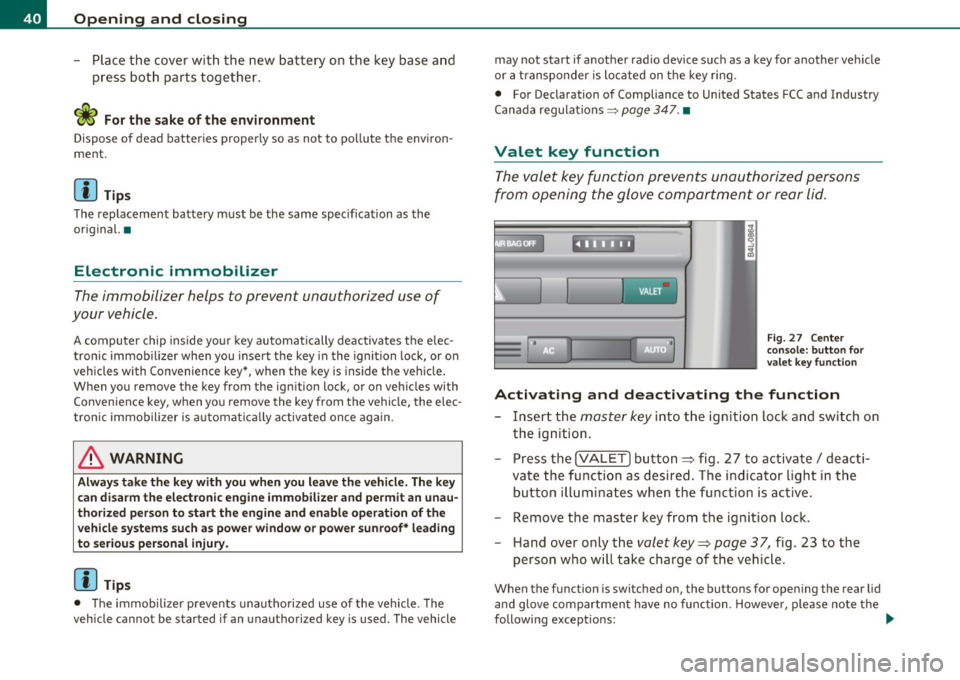
The valet key function prevents unauthorized persons
from opening the glove compartment or rear lid.
Fi g. 27 Ce nter
co n sole: but ton for
valet key functio n
Activating and deactivating th e function
- Insert the master key into the ignition lock and switch on
the ignition.
- Press the
!VALET] bu tton ~ fig . 27 to activate/ deacti
va te the func tion as desired . The indicator light in the
butto n illuminates when the function is active.
- Remove the master key from the ignition lock.
- Hand over only the
valet key~ page 37, fig . 23 to the
person who will take charge of the vehicle .
When the function is switched on, the buttons for opening the rear lid
and glove compartment have no function. However, p lease no te the
following except ions: ._
Page 44 of 368
Opening and closing
without a key using the locking button. Each door has a prox imity
sensor and a locking button.
Automatic locking
The automatic locking feature locks all the vehicle doors and the rear
lid when you drive faster than 9 mph (15 km/h). This function can be
turned on and off in the MMI
Central locking Menu=> page 44.
You can unlock the vehicle from the inside by:
• removing the key from the ignition switch (the vehicle will auto
matically unlock itself) or
• pressing the unlock part of the power lock switch
€.J:l or
pulling the door handle (twice to open the rear doors).
& WARNING
• When you lock your vehicle from outside, nobody -especially
children -should remain inside the vehicle. Remember, when you
lock the vehicle from the outside the windows cannot be opened
from the inside.
• When you leave the vehicle, always remove the ignition key
and take it with you . This will prevent passengers (children, for
example) from accidentally being locked in the vehicle should
they accidentally press the power locking switch in the front
doors.
• Do not leave children inside the vehicle unsupervised . In an
emergency it would be impossible to open the doors from the
outside without the key.
[ i ] Tips
• In the event of a crash with airbag deployment all locked doors
wi ll be automatically unlocked to give access to the vehicle occupants
from the outside .
• If the power locking system should malfunction , you can lock each
door individually using the vehicle key=>
page 45.
• If the power locking system should fail, you can still open the fuel
tank flap in an emergency =>
page 275.
• You are well advised not to keep valuables inside an unattended
vehicle, v isib le or not. Even a properly locked vehicle cannot provide
the security of a safe .•
Unlocking and Locking the vehicle with the
remote cont rol
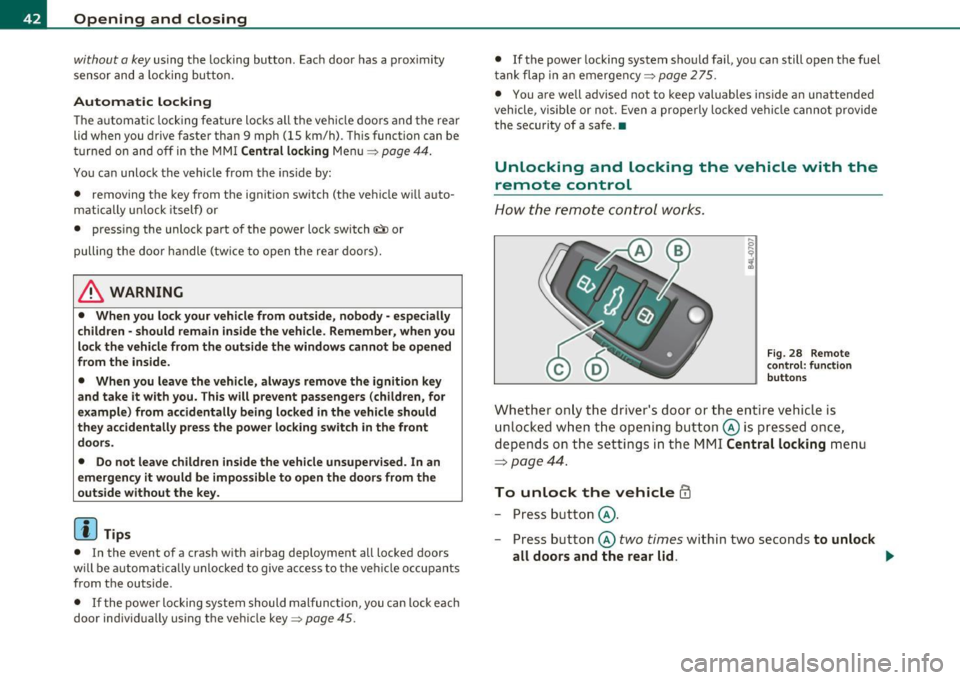
How the remote control works.
Fig. 28 Remote
control: function
buttons
Whether only the driver's door or the entire vehicle is
unlocked when the opening button @is pressed once,
depends on the settings in the MMI
Central locking menu
=:> page 44.
To unlock the vehicle ffi
-Press button @.
- Press button @
two times within two seconds to unlock
all doors and the rear lid. ..,,
Page 49 of 368

• If the central locking system fails (power supply), you can also
open the rear lid using the trunk escape handle from the inside
=>
page 316. •
Child safety lock
Power child safety lock for the rear doors t
The power child safety lock prevents the rear doors from
being opened from the inside.
Fig. 35 Section from
driver's door: controls
The rear doors are equipped with a power child safety lock. It
is operated with the two safety buttons(!) in the driver's door
~ fig. 35.
- Press the left and/or right safety button to disable the
rear power window(s) and prevent the respective rear door
from being opened from the inside. The LED in the button
will light up when the child safety lock is turned
on.
- Press the illuminated button again to turn the child safety
features
off.
When the child safety lock is activated, the interior door opening
lever is inope rative; the door can only be opened from the outside. In
Contro ls a nd e quip
m en t Vehicle
OP-eration
Opening and closing
addition, the window regulator for that door is also inoperative when
the child safety lock is activated.
[ i] Tips
• In order to activate the child safety lock on the left and the right
side, you have to press the two safety buttons in succession.
• Make certain that the check light comes on in the corresponding
safety switch when the child safety lock is activated. •
Convenience key
Applies to veh icles: w ith Con ven ience key
Description
Access and vehicle operation based on: Master key
remains in driver's pocket.
Th e Convenience key vehicle authorization system allows keyless
unlocking, locking and starting of the vehicle . You only have to carry
the master key on your person.
It makes nod ifference whether the master key is in your jacket pocket
or in your brief case. As soon as you approach your vehicle, the Conve
nience key recognizes the request for access , checks for authorization
and enables the following functions:
• Unlocking the vehicle=>
page 48.
• Locking the vehicle=> page 49.
• Switching on ignition and starting the engine by pressing the
[START ) button; the master key does not have to be in the ignition
switch =>
page 110.
& WARNING
• When you lock your vehicle from outside, nobody -especially
children -should remain inside the vehicle. Remember, when you .,_
Vehicle care Do-it-yourselt service iTechnical data
Page 81 of 368

Seat memory
Applies to veh icles: with seat memory
Driver's seat memory
The seat adjustment settings for two drivers can be
stored using the memory buttons in the driver's door.
-...... SET 1 2 ,,..,
Fig. 68 Driver's door:
Seat memory
In addition to the setting for the driver's seat, the settings for the
steering column* and both exterior mirrors can be stored.
Storing and r ecalling setting s
Using the memory buttons 1 and 2, you can store and recall the
settings for two different drivers~ fig . 68 .
T he current settings are also automatically stored on the remote
control key being used when the vehicle is locked. When the vehicle is
unlocked, the settings stored on the remo te contro l key being used
are automatically recalled. This function has to be activated in the
MMI
~ page 80, " Activating remote cont rol key memo ry" .
Tur ning seat m em ory o n and off
If the [ ON/OFF I switch is depressed , the seat memo ry is inoperative .
The word
OFF next to the [ ON/OFF ) switch illuminates.
All the stored settings are retained. We recommend using the
I ON/OFF ) switch and deact ivat ing the seat memory if the vehicle is
Controls and equip
ment Safety first
S
eats and storage
only going to be used temporarily by a driver whose settings are not
going to be stored .•
App lies to veh icles : w it h seat memo ry
Storing and recalling a seat position
Before you can store or recall your seat position, the
[ON/OFF) button must be engaged (down) .
Storing settings
-Adjust the driver 's seat => page 76.
- Adjust the steering column*=>
page 107.
-Adjust both outside mirrors=> page 71. In the ti lt-down
position, the passenger mirror can be adjusted to the
preferred position and saved in the seat memory.
- Press the
[SETI button and hold it down. At the same
time, press one of the memory buttons for at least one
second .
- Release the buttons. The settings are now stored under the corresponding memo ry bu tton.
Recalling settings
- Driver's door open -press the des ired memory button.
- Driver's door closed - press the corresponding memory
button unt il the stored position is reached .
Su ccessfu l storage is confirmed audib ly and by the light in the [SET )
button illuminat ing .
When the vehicle is
locked , the current settings are stored and
assigned to the remote control key. But the settings sto red on
memory buttons 1 and 2 are not deleted. They can be recalled at any ..,
Vehicle care Technical data
Page 101 of 368
![AUDI S6 2010 Owners Manual Automatic mod e [AUTO j
The automatic mode is the standard setting for all
seasons .
- Select temperature between 60 °F (+16 °C) and 84 °F
(+28 °().
- Press the [AUTO] button.
A](/img/6/57594/w960_57594-100.png "AUDI S6 2010 Owners Manual Automatic mod e [AUTO j
The automatic mode is the standard setting for all
seasons .
- Select temperature between 60 °F (+16 °C) and 84 °F
(+28 °().
- Press the [AUTO] button.
A")
Automatic mod e [AUTO j
The automatic mode is the standard setting for all
seasons .
- Select temperature between 60 °F (+16 °C) and 84 °F
(+28 °().
- Press the [AUTO] button.
Automatic operation ensures constant temperatures in the interior
and dehumidifies the air inside the vehicle. Air temperature, vol ume
and distribution are controlled automatically to reach or maintain the
desired interior temperature as quickly as possib le . Fl uctuations in
exterior temperature and the effects of temperature from the pos i
tion of the sun are compensated for automatically.
T his operating mode works only in the adjustable temperature range,
from 60
°F ( + 16 °() to 84 °F (+28 °(). If a temperature below 60 °F
(+ 16 °() is selected , LO appea rs in the display. At tempe rat ures above
84
°F (+28 °(), H I is displayed. A t both extreme set tings, climate
control runs continuously at max imum cool ing or heat ing power.
There is no temperature regulation .•
Turning on and off [ ON/OFF]
Turning the air conditioning on
Press the [ON/OFF] button, or
- Press the
[AUTO] button.
Turning the air conditioning off
- Press the [ ON/OFF] button to switch the air conditioning
off and to block the air supply from the outside.
The air conditioner turns back on when you press the t e m pe rat ure
re gulat or
or one of the buttons.
Controls and equip
ment Safety first
W
arm and cold
(I] Tip s
With the ignition turned off, you can activate the residua l heat func
tion by pressing the [ ON/OFF) button. The residual heat from the
coo lant can be used to heat the vehicle interio r. •
Swi tching air cooling on /off [AC]
Switching off the compressor which operates the air
cooling system saves fuel.
- To switch the air cooling system on/off, press the [AC]
button.
When the air cooling system is switched on, the diode in the button
is lit and the heating and ventilation are regulated automat ically .
Please note that the interior temperature cannot be lower than the
outs ide temperature when the air cooling system is switched off. The
blower does not cool or dehumidify the air in the interior. It is there
fore possible that the windows mist up. •
Setting the temperature
Separate temperatures can be selected for the driver's
and front passenger's side.
Rotate the regulator to the left to reduce the tempera
ture, or to the right to increase the temperature .
The selected temperature appears on the climate control disp lay. The
temperature setting will also appear for a few seconds in the MMI
display. •
Vehicle care Technical data
Page 153 of 368
![AUDI S6 2010 Owners Manual Automatic transmission -_______________ ____.
(]] Tips
• When you shift into the next lower gea r, the tra nsmission w ill
downs hift o nly when there is no possibi lity of ov er](/img/6/57594/w960_57594-152.png "AUDI S6 2010 Owners Manual Automatic transmission -_______________ ____.
(]] Tips
• When you shift into the next lower gea r, the tra nsmission w ill
downs hift o nly when there is no possibi lity of ov er")
Automatic transmission -_______________ ____.
(]] Tips
• When you shift into the next lower gea r, the tra nsmission w ill
downs hift o nly when there is no possibi lity of ov er-revving the
eng ine.
• When the kickdown comes on, the transmission will s hift down to
a lower gear, depending on vehicle a nd e ng ine speeds.
• tiptronic ® is inoperative when the transm ission is in the fai l-safe
mode .•
Ap plies to veh icl es: wit h 6-spee d auto matic t ransmiss io n
Steering wheel with tiptronic ®
The shift buttons on the steering wheel allo w the driver to
shift gears manually.
Fi g. 143 Stee ring
wheel : Sh ift butt ons
- To downs hif t, touch the bu tton on the le ft 0-
- To upshift , touc h the button on the right G) .
The sh ift buttons are activated when the sel ector lever is in D, Sor in
t he m anual shift pr ogram (ti ptroni c).
Of course, you can cont inue to use the manual sh ift program with the
sele ctor lever o n the cente r console. •
Contro ls a nd e quip
m en t Vehicle
OP-eration
Applies to vehicles : w ith 6 -s p eed a utomatic transm ission
Automatic transmission malfunction 0
I n the event of a sys tem malfu nction, the automatic transm issio n
switches to emergency ope ra tion mode .
Gearbox malfunction: you can continue driving
Yo u ca n cont inue to dr ive the vehicle. See an a uth o rized Audi dealer
or other qualified workshop at the next opportunity .
Gearbox malfunction: you can continue driving (limited
fun ct ionality )
There is a ser ious system malfunction:
• T he progr am shif ts only int o c ertain gea rs.
• T he engine may sta ll.
• It is not poss ible to restart the engine if it has bee n sw itched off .
• C ontinuing to d rive cou ld resu lt in subsequent d amage.
0 Note
If the transmission switc hes to fa il-s afe mo de, you sho uld take the
veh icle to an autho rized Audi dealers hip as soon as poss ible to have
the con dition corrected .•
Vehicle care Do-it-yourselt service iTechnical data
Page 160 of 368
llffl..__A_ u_ t_ o_ m_ a_ t _ ic_ t_r_a _ n_ s_m _ i_ s _s_ i_ o _ n _____________________________________________ _
(I) Tips
• When you sh ift into t he next lower gea r, the engine will downshift
only when there is no possibility of over-revving.
• When the kick-down comes on, the transm ission will shift down to
a lower gear depending on vehicle and engine speeds.
• The tiptron ic ® is inoperative when the transm ission is in the fail
safe mode .•
Applies to vehic les : w ith multitronic ® Continuously Variable Transm ission (CVT)
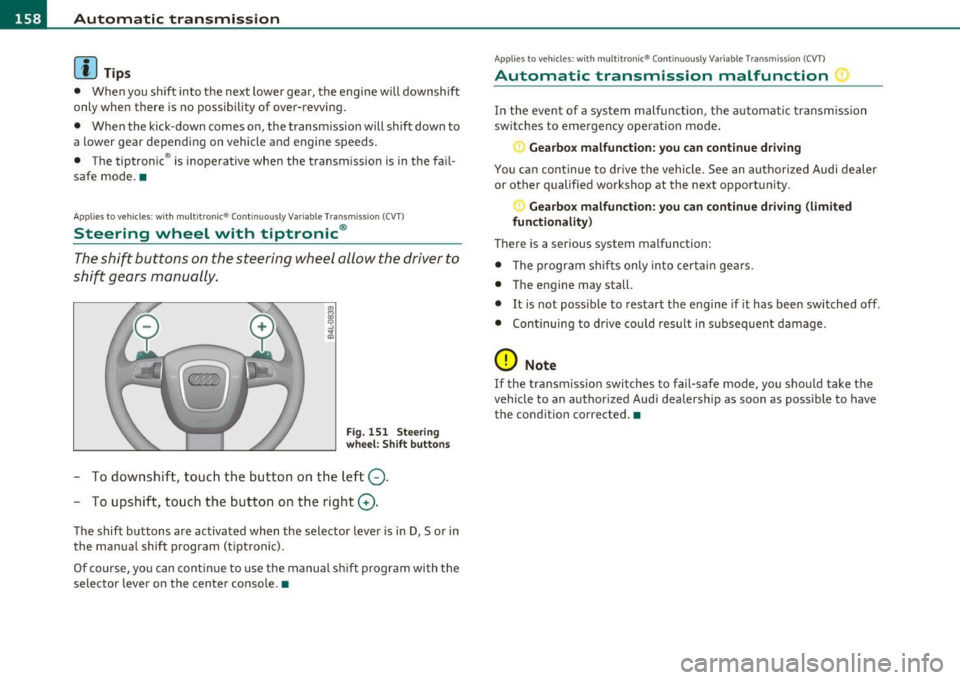
Steering wheel with tiptronic ®
The shift buttons on the steering wheel allow the driver to
shift gears manually.
F ig. 15 1 Ste eri ng
whe el: Shift butt ons
- To downshift, touc h the bu tton on t he l eft Q .
- To upshift, touch the button on t he right G).
The shift buttons a re activated when the selector lever is in D, Sor in
the manua l shift program (tiptronic).
Of co urse, yo u can cont in ue to use t he manual sh ift p rogr am with t he
selector lever on the center console .•
Applies to veh icles: w ith multitron ic® Conti nuously Variable Transmission (CVT)
Automatic transmission malfunction :)
In the event of a system malfunction, the automat ic tra nsm iss ion
switches to emergency operation mode.
Ge arbox malfunction: you can continue driving
You ca n con tinue to dr ive the vehicle. See an autho rized Audi dealer
or other qualified workshop at the next opportunity.
Gearbox malfunction : you can c ontinue dr iving (limited
functionality)
There is a serious system malfunction:
• T he program sh if ts only into certa in ge ars.
• T he engine may sta ll.
• It is not poss ible to restart the engine if it has been switched off.
• Con tinuing to d rive cou ld res ult in subseq uen t damage.
0 Note
If the transmission switches to fail-safe mode, you sho uld take t he
vehicle to an authorized Aud i dealership as soon as poss ible to have
the cond ition corrected .•