warning light AUDI S6 2011 Owner's Manual
[x] Cancel search | Manufacturer: AUDI, Model Year: 2011, Model line: S6, Model: AUDI S6 2011Pages: 370, PDF Size: 87.15 MB
Page 34 of 370
Driver information display
Applies to veh icles : w ith eng ine s peed limitat ion
Engine speed limitation .?i
11'1 Do not exceed max. engine speed of XXXX rpm
The -symbol illuminates when there is an engine control malfunc
tion. The indicator light in the instrument cluster also illuminates.
The engine speed is limited to the speed displayed in the driver infor
mation system. Keep in mind that the engine speed will not exceed
the value d isp layed in the drive r informat ion system, for example
when downshifting.
Please go to an authorized Audi dealer or other qualified workshop to
have the malfunction repaired.•
Applies to vehicles: wi th Adap tive Light
Adaptive Light defective
adaptive light defective • r
When this symbol illuminates, it means that Adaptive Light is
defective. Go to an authorized dealership to have the headlights or
the control unit for the Adaptive Light repaired. •
Ignition lock malfunction ..e
If the symbol in the display comes on, there is a malfunc-
t ion in the electronic ignition lock. An additional driver
message can be displayed by pressing the [CHECK] button:
Defective ignition switch
-Drive to an aut horized service facility at your earliest
convenience to have the malfunction corrected.•
Windshield wipers faulty , . .>
.... Windshield wiper malfunction
When this symbol . illuminates, it means that the electronics for
the windshield wipers are defective . Please go to an authorized deal
ership to have the windshield wiper system repaired. •
Speed warning system
Overview
The speed warning system helps you to keep your driving
speed below a set speed limit.
Th e speed warning system warns the driver if he exceeds a previously
stored maximum speed. A warning tone will sound as soon as the
vehicle speed exceeds the set speed by about 3 mph (3 km/h). At the
same time, a warning symbol appears in the display.
The speed warning system has
two warning thresholds that function
independently of each other and that have somewhat different
purposes :
Speed warning 1
You can use speed warning 1 to set the maximum speed while you are
driving. This setting w ill remain in effect until you turn off the igni
tion, assum ing that you have not changed or reset the setting .
Th e speed warning symbo l
'8 (USA models)/ 8 (Canada mode ls) in
the warning 1 display appears when you exceed the maximum speed.
It goes out when the speed falls be low the stored maximum speed.
Th e speed warning symbol will also go out if the speed
exceeds the
stored maximum speed by more than about 25 mph (40 km/h) for at
least 10 seconds. The stored maximum speed is deleted.
Sett ing speed warn ing 1
=> page 33. ~
Page 42 of 370
Open ing and closing
- Place the cover w ith th e new battery on the key base and
press both parts together.
c£> For the s ake of the environment
Dispose of dead batteries proper ly so as not to po llute the envi ron
me nt.
00 Tips
The replacement battery must be the same specification as the
orig inal. •
Electronic immobilizer
The immobilizer helps to prevent unauthorized use of
your vehicle.
A compu ter chip inside you r key au tomatically deactivates the e lec
tron ic immob ilizer when you insert the key in the ignition lock, or on
vehicles with Convenience key*, when the key is inside the vehicle.
When you remove the key from the ign ition lock, or on veh icles with
Conven ience key, when you remove the key from the vehicle, the elec
tron ic immobil izer is a utomat ica lly activated once again.
& WARNING
A lway s ta ke the ke y w ith you when you l eav e the vehicle . Th e key
can di sa rm the e lect roni c engine immobilizer and pe rmit an un au
thori zed p erso n t o start the eng ine a nd enable operation of the
v ehi cle sy stems su ch a s pow er w indo w or p ow er sunroof* l eading
to seriou s per sonal injur y.
00 Tips
• The veh icle cannot be started if an unauthori zed key is used. The
vehicle may not start if another radio device su ch as a key for another
vehicle o r a transponder is located on the key ring .
• For Declaration of Compliance to United S tat es FCC and Industry
Canada regulations =>
page 349. •
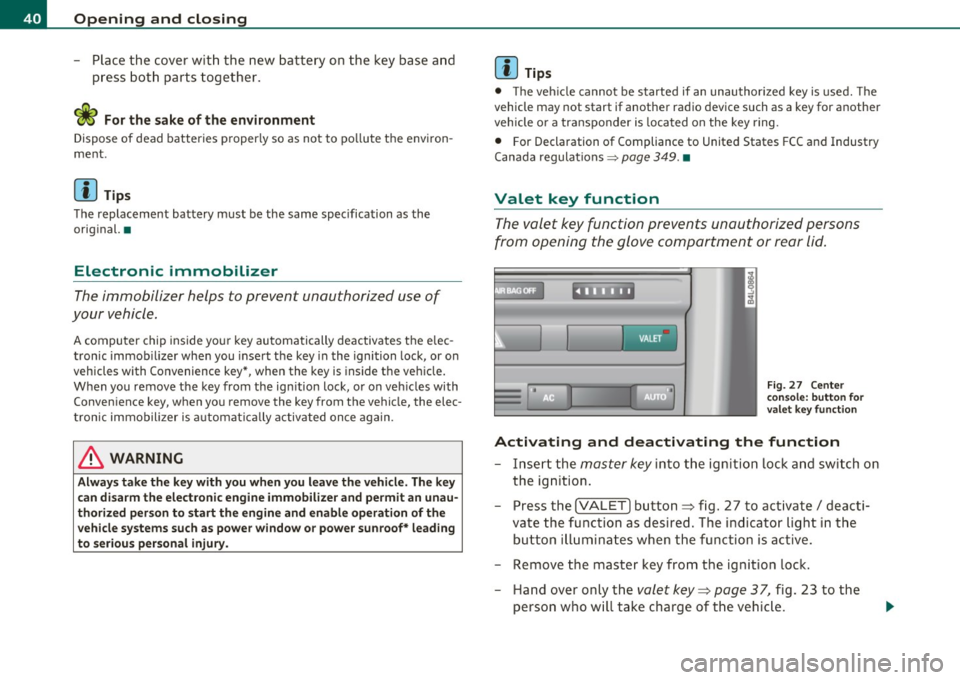
Valet key function
The valet key function prevents unauthorized persons
from opening the glove compartment or rear lid.
,~ • F ig. 27 Ce nter
co nsole: button for
valet key functio n
Activating and deactivating th e function
- Insert the master key into the igni tion lock and switch on
the ignition.
- Press the
!VALET] button ~ fig. 27 to activate/ deacti
vate the function as desired. The in dicator light in the
button il luminates whe n the funct ion is ac tive.
- Remove the master key from the ignition lock. - Hand over only the
valet key~ page 37, fig. 23 to the
person who will take charge of the vehicle .
Page 47 of 370

How to unlock each door separately using the
door handle (front doors)
- Pull the handle to open t he door .
How to unlock each door separately using the
door handle (rear doors)
- Pull the door handle once to release the loc k.
- Pull t he handl e
twice to open th e door.
You will find a power locking sw itch in ea ch door. You c an lock and
unlock the vehicle using the switches in the dr iver's or passenger's
door =>
page 44, fig. 30. Yo u can only lock the vehicle using the
switches in the rear doors =>
page 44, fig. 31. If you lock the vehicle
using t he
power locking switch , please note the following :
• You can not op en the doors or the rea r lid from the
outside
(increased secur ity, for example when you are sto pped at a red light).
• The d iodes in the power lock ing switches illuminate whe n all the
doors and the rear lid are closed and loc ked .
• All d iodes turn dark as soon as one of the doors has bee n
unlocked .
• You can unlock and open the doors from the inside by pulling on
t he doo r handle .
• If the driver's door is opened (after you have locked the vehicle
from the inside using the power locking switch), the door will rema in
unlocked to preve nt you from locking yourself out of your vehicle .
After you close t he door, you have to lo ck the drive r's door ag ain.
• If you have a crash and the airbag is activated, the doors automat
i c ally unlo ck.
& WARNING
• If you use the power locking switch with the doors closed,
remember th at all the vehicle doo rs will lock.
Con tro ls a nd e quip
m en t Vehicle
OP-eration
Opening and closing
& WARNI NG (continued )
• Locking doors from the inside can help p revent inadvertent
door opening during an accident and can also prevent unwanted
entry from the outside. Locked doo rs can, however , delay assis
tance to vehicle occupants and hold up rescue efforts from the outside in an accident or other emergency .•
Emergency Locking
If the central locking system fails (power sup ply), each
d oor has to be locked separately .
5 0 N tL ;g
Fig. 32 E mergen cy
l o ck ing o f the front
p ass eng er's door
An e mergency lock ing mechan is m is i nte gra ted i n the edg e of
th e pass enge r's door a nd in the rear doo rs ( on ly v isibl e wh en
t h e door is open) .
- Turn the cover with t he ignit ion key and then ti lt the cover
downward=> fig. 32.
- Insert the key into the inner slot and tur n it to the right
( r ight-side doors) or the left (left-side door) as far as it can
g o.
After you close the door, you w ill no longer be ab le to open it from the
o uts ide. _.,
Vehicle care Do-it-yourselt service iTechnical data
Page 49 of 370

• If the central locking system fails (power supply), you can also
open the rear lid using the trunk escape handle from the inside
~page318. a
Child safety lock
Power child safety lock for the rear doors t
The power child safety lock prevents the rear doors from
being opened from the inside.
Fig. 35 Section from
driver's door: controls
The rear doors are equipped with a power child safety lock. It
is operated with the two safety buttons(!) in the driver's door
~ fig. 35.
- Press the left and/or right safety button to disable the
rear power window(s) and prevent the respective rear door
from being opened from the inside. The LED in the button
will light up when the child safety lock is turned
on.
- Press the illuminated button again to turn the child safety
features
off.
When the child safety lock is activated, the interior door opening
lever is inope rative; the door can only be opened from the outside. In
Contro ls a nd e quip
m en t Vehicle
OP-eration
Opening and closing
addition, the window regulator for that door is also inoperative when
the child safety lock is activated.
[ i] Tips
• In order to activate the child safety lock on the left and the right
side, you have to press the two safety buttons in succession.
• Make certain that the check light comes on in the corresponding
safety switch when the child safety lock is activated. •
Convenience key
Ap plies to v ehicles: w ith Con ven ience key
Description
Access and vehicle operation based on: Master key
remains in driver's pocket.
Th e Convenience key vehicle authorization system allows keyless
unlocking, locking and starting of the vehicle . You only have to carry
the master key on your person.
It makes nod ifference whether the master key is in your jacket pocket
or in your brief case. As soon as you approach your vehicle, the Conve
nience key recognizes the request for access , checks for authorization
and enables the following functions:
• Unlocking the vehicle~
page 48.
• Locking the vehicle~ page 49.
• Switching on ignition and starting the engine by pressing the
[START ) button; the master key does not have to be in the ignition
switch ~
page 110.
& WARNING
• When you lock your vehicle from outside, nobody -especially
children -should remain inside the vehicle. Remember, when you .,_
Vehicle care Do-it-yourselt service iTechnical data
Page 53 of 370

Safety switch
® Safety swi tch for rea r window operat ion .
& WARNING
• Do not leav e children unattended in the vehicle, especially with
access to vehicle keys. Unsupervised use of the keys can result in
starting of the engine and u se of veh icle systems su ch a s power
windows, etc. which could result in se rious injury .
• Remember -you can still open or close the power window s for
about ten minutes a fter the ignition is switched off. Only when
either of the front doors are opened are the power windows
switched off.
• Be careful when closing the window s. Check to see that no one
is in the way, o r serious injury could result !
• Alway s remove the ignition key whenever you leave your
vehicle.
• If you lo ck your v ehicle from the outside, no one, e specially
children, should remain in the vehicle.
• Do not stick anything on the windows or the windshield that
may interfere with the dr iver's field of vi sion.
[ i ] Tips
In ad dition to the switches in the d river's doo r there is a separate
switch in each door for the powe r window in that door~
page 52,
fig.39. •
Switches in the driver 's door
T he driver can operate all wind ows.
If the res pective sw itch is pushe d or pulled t he window will
o pen or c los e. Th e powe r window swi tches have a
two-posi
tion function:
Controls and equip
ment Safety first
Opening and closing
Opening the windows
- Push the switch to the first stop and h old i t th ere until the
window has lowered to the desired posi tion .
- Push the switch br iefly to t he
second stop : the window
will automatica lly open a ll the way .
Closing the windows
- Pull the swi tch up to the first stop a n d ho ld it t her e u ntil
the window h as r is e n to t he desir ed posit ion.
- P ull the swi tch qu ickly to th e
second position: the window
w ill automatica lly cl os e a ll th e way ~
& in "Co ntro ls" on
page SO.
Activating/deactivating rear windows
- Press the le ft Cf) sw itch ~ page 50, fi g. 38 to deactivate
o nly the wi ndow reg ulator in the left door. The in dicator
light in the switch illumi nates .
- Press t he r ight
Cf) switc h~ page 50, fig . 38 to deactivate
only the w indow regulator in the right door. The ind icator
lig ht in t he switch illumi nates .
- Press the
[fl switch agai n to reactivate the wi ndow regu-
lator. T he ind icator lig ht in the switch goes out .
This function can a lso deact ivate d. Press both(!) switches ® in
s u ccession.
• If
only the left(!) switch was pressed, only the window regu lator
s w itch in the
left rear door is de acti vated. In a ddi tion , the door i s
locked.
• If
only the right(!) switch wa s pressed, only the window regu lator
switch in the
right rear door is deact ivated. In addition, the door is
locked.
~
Vehicle care Technical data
Page 55 of 370

-Turn and hold the k ey in the lock posit ion®~ page 52,
fig. 40 until t he windows and th e power roof * are
comple tely closed .
Opening windows
-Inse rt the key into the lock o f th e driver's door.
Turn and hold the key in t he open posit ion @.
The a utomat ic close/open fu nction will cease if the key is returned to
i t s or iginal pos it io n.
& WARNING
• Be careful when closing the windows . Check to see that no one
is in the way, or serious injury could re sult!
• Always read and heed WARNING=>
& in "General des cription "
on
page 41 . •
Reactivating the system after battery
disconnection
If the vehicle battery is disco nnected and t hen reconnected ,
the automatic closing and opening function will not work
u nti l it is reactivated. To reactivate th is featu re, perform the
fo llowing steps:
Reactivating close /open feature
- Pull and hol d th e power w indow sw itc h until t he window is
comp letely closed .
- Release the switch.
- Pull the swi tch again for one second. The automat ic
closi ng/opening is now reactivated. •
Contro ls a nd e quip
m en t Vehicle
OP-eration
Opening and closing
Sliding/tilting power sunroof
Applies to veh icles: with slid ing/t ilting powe r sunroof
How the power sunroof works
Fig . 41 Section of th e
h eadliner : su nroo f
s wit ch pos itio ns
The roof will slide open or ti lt up at the rear as required. When the
ignition is on, yo u can slide the roof open or close it to the des ired
position by turning the rotary control sw itch located overhead next to
the inte rior light. The roof is tilted open o r closed by p ressing or
pulling the control switch at posit ion ®=>fig. 41.
You can s till close or open the sunroof for up to ten minutes after you
have switched off the ignition with the key remaining in the ignition
lock. If either door is opened, powe red operation of the sun roo f will
be deact ivated.
Solar protection with sliding glass sun roof*
The sliding glass sun roof is equipped with an ad justable sunshade to
reduce the effects of strong sunlight. The so lar protection can be
moved at the recessed hand le to open and close it. To p revent the
vehicle interior f rom heat ing up, you should close the solar protection
when you park yo ur vehicle in the s un .
When the roof is
slid open , the sunshade is opened automat ica lly.
Whe n the roof is closed, the sunshade can be closed man ua lly. .,
Vehicle care Do-it-yourselt service iTechnical data
Page 56 of 370
Opening and closing
When the roof is tilted open, the closed sunshade is also raised at the
rear edge . But it can still be slid open or closed.
0 Note
You should always closed the sliding/tilting sunroof when you leave
your vehicle . Sudden rain can drench the interior equipment and
damag e the electronic convenienc e features in your v ehicle .
[ i ] Tips
If you park your vehicle in the sun , we recommend that you close the
sunshade*. •
Applies to vehicles : with slid ing/t il t ing po wer sunroof
Sliding/tilting the power sunroof open
Sliding the power sunroof open to the comfort position
keeps wind noise to a minimum .
Sliding the roof open to the comfort position
- Turn the rotary switch to position (D ~ page 53, fig. 41
(detent can be felt) . The roof is slid open only to a comfort
position with low wind noise .
Sliding the roof open all the way
-Turn the rotary switch to position@. Airflow over the fully
opened sunroof may cause increased wind noise .
Tilting the roof open
-Turn the rotary switch to position @.
- In position @, briefly
press the control to tilt the roof up
completely. -
To tilt the roof open to any intermediate position
press
and hold the switch until the roof reaches the desired
position.
In positio n@ , the switch jumps back to pos it ion © again as soon as
the swit ch is released.
When the glass roof opens, the s un visor, which is designed to ward
off strong sunlight, opens a long w ith it . The v isor can be closed
manually when the sunroof is closed.
[I) Tips
• Be aware that the sunroof may actually be open when the sun visor
is closed. Chec k and make sure that the sunroof is shut when park ing
the car or if it suddenly st art s raining.
• If the sunroof is not fully closed but you have pressed and held the
switch for the tilt pos ition, the sunroof will not tilt. •
App lies to veh icles: w ith sli ding/ tilting power sunroof
Closing the power sunroof
Sliding the roof shut
-Turn the rotary switch to position @~ page 53,
fig. 41 ~& -
Tilting the roof shut
- Briefly pull the rotary switch to close the roof .
- To tilt the roof down to any intermediate position
pull and
hold
the switch until the roof reaches the desired position.
& WARNING
Improper use of the power sunroof can cause serious personal
injury.
Page 60 of 370
Clear vision
Clear vision
Lights
Switching the headlights on and off ·"ti-·
In the "AUTO" position, a light sensor automatically
switches the head- and taillights on and off in response to light condi tions.
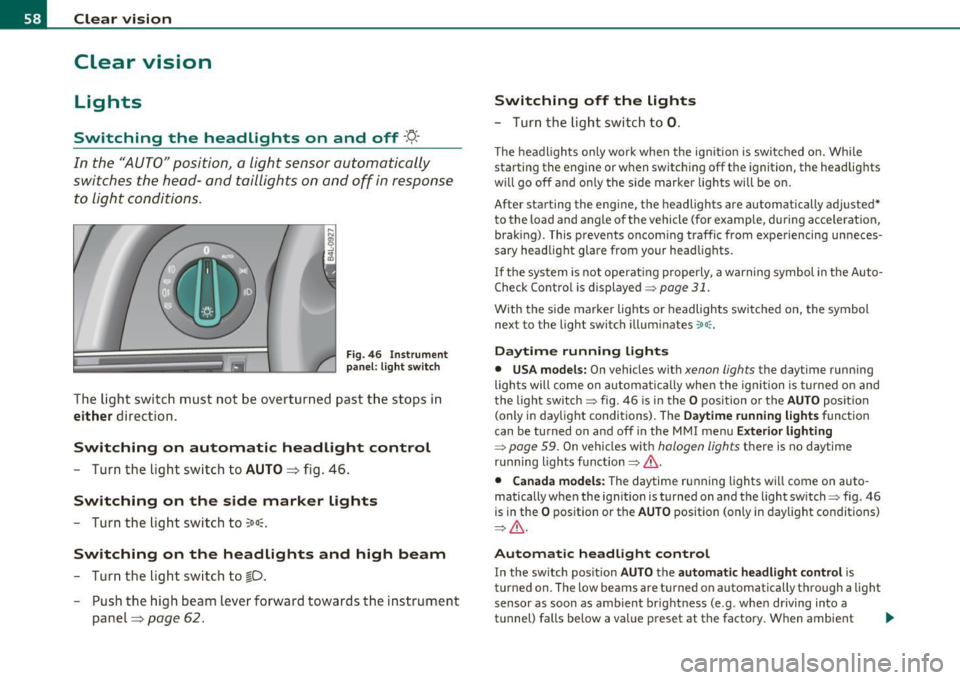
Fi g. 46 In strument
p an el: li gh t swit ch
The ligh t switc h must not be overtur ned past t he stops in
either d irection.
Switching on automatic headlight control
- Turn the lig ht sw itch to AUTO => fig. 46 .
Switching on the side marker lights
-Turn the lig ht swi tch to ~oo~.
Switching on the headlights and high beam
- Tur n the lig ht sw itch to ~D.
- Push the high beam leve r forward tow ards the in strument
panel=>
page 62 .
Switching off the lights
- Tu rn th e lig ht swi tch to 0.
T he headlights on ly work when the ignitio n is switc hed on. Whi le
starting the engine or w hen switching off t he ignition, the headlig hts
w ill go off and o nly the s ide marke r lights will be o n.
After starting the eng ine, the headlights are automatically adjusted*
to the load and angle o f th e vehicle (for example, during acce lerat ion,
brak ing) . This prevents oncom ing traff ic from experiencing unneces
sary headlight glare from your head lig hts.
If the system is not operat ing p roperly, a warning symbol in the Auto
Check Control is displayed=>
page 31.
With the side marker lights o r headlights switc hed on, the symbol
next to the light switch illum inates
':o oc .
Daytime running lights
• USA models: On vehicles w ith xenon lights the dayt ime runn ing
lights will come on automat ica lly when the ignition is turned o n and
the light switch=> fig. 46 is i n the
O position or the AUTO position
(only i n day light conditions) . The
D aytime running light s function
can be turned on and off in the MMI menu
Exterior lighting
=> page 59. On vehicles wit h halogen lights there is no daytime
r u nning lights fu nctio n=>
& -
• Canada models: The daytime ru nning lights wi ll come o n auto
matically w hen the ignit io n is t urned on and t he light switch=> fig. 46
is in the
O p osition or the AUTO position (on ly in day light co nditions)
=> & -
Automatic headlight control
In the switch pos ition AUTO the automatic headlight control is
t u rned on. The low beams are t urned on automatically t hrough a light
sensor as soon as ambient br ight ness (e .g . when dr iving into a
t u nnel) falls below a val ue p reset at the factory . When ambient .,.
Page 61 of 370
brightness increases again, the low beams are turned off again auto
matically =>& .
In the
AUTO position the low beams are switched off automatically
when the ignition is turned off.
Light Sensor Malfunction
In the event of a light sensor ma lfunct ion, the driver is notified in the
instrument cluster display:
Automatic headlights/automatic wipers defective
For safety reasons the low beams are turned on permanently with t he
switch in
AUTO. However, you can continue to turn the lights on and
off using the light switch. Have the light sensor checked as soon as
possible at a dealership.
& WARNING
• Never use daytime running lights to see where you are going.
They are not bright enough and will not let you see far enough
ahead for safety, especially at dusk or when it is dark. Always
switch on the low beams at dusk or when it is dark.
• Automatic headlights are only intended to assist the driver .
They do not relieve the driver of his responsibility to check the
headlights and to turn them on manually according to the current
light and visibility conditions. For example, fog and rain cannot be
detected by the light sensors. So always switch on the headlights
under these weather conditions and when driving in the dark
io.
• Crashes can happen when you cannot see the road ahead and
when you cannot be seen by other motorists.
- Always turn on the headlights so that you can see ahead and
so that others can see your car from the back.
[ i ) Tips
• With the switch in AUTO front fog lights and rea r fog ligh ts cannot
be turned on in addition .
Controls and equip
ment Safety first
Clear vision
•
The light sensor for headlight control is located in the rear view
mirror mount. Do not apply any stickers to the winds hield in this area
to prevent malfunctions or failures .
• If you remove the ignition from the ignitio n lock w hile the head
lights are still on, a buzzer will sound as long as the dr iver's door is
open to remind you to turn off the lights.
• Always observe the specific loca l regulations for your area as to
when to use your lights .•
Adjusting exterior lighting
The functions are set in the MMI.
-Select: Function button [CAR]> Systems* > Exterior
lighting .
Coming home
The Coming home function ensures tha t after turning off the igni
tion and opening the driver's door
the vehicle per iphery is illum i
nated in the dark. In addition, the front fog lights, the tail lights and
the license plate light are turned on. On-time can be set for a per iod
from O (off) to 60 seconds .
Leaving home
The Leaving home function ensu res that when unlocking the vehicle
per iphery is illuminated in the dark. In addition, the front fog lights,
the tail lights and the license plate light are turned on. This function
can be turned on and off .
Daytime running lights
USA models: On vehicles with xenon lights the daytime running
lights can be turned on or off using this function . On vehicles with
halogen lights there is no daytime running lights function .
Canada models: The function cannot be turned off. It is activated
automatically each time the ignition is tur ned on. This menu item is
shown "greyed out". •
Vehicle care Technical data
Page 69 of 370
Rain sensor
The rain sensor operates on ly in the interval wiper position . When it
starts to rain, the interval wiper mode is activated automat ically .
I f the windshield wiper lever is in the interval wipe position with the
ign ition switched off, the rain sensor is not activated until vehicle
speed is above 4 mph (6 km/h) .
To reduce the sensitivity of the rain sensor, the switch @ must be
moved down . To increase the sensit ivity of the rain sensor, the switch
must be moved up.
The higher the sensitiv ity sett ing, the sooner the windsh ield wipers
react to mo isture on the windshie ld. Increased sensitivity is signa led
by the windshield w ipers making a single pass over the windshie ld.
T he rain sensor wiper intervals depend on the sensitivity setting as
we ll as vehicle speed. During brief stops, wiper motion will adjust in
relation to the amount of rain on the windshield .
& WARNING
• Wiper blades are crucial for safe driving! Only when they are in
good condition are they able to clear the windows properly to
provide uncompromised visibility. Worn or damaged wiper blades
are a safety hazard =>
page 68, "Replacing windshield wiper
blades"!
• The rain sensor is only designed to assist and support the
driver. It remains entirely the driver 's responsibility to monitor
outside weather conditions and to manually activate the wipers as
soon as rain or drizzle reduces visibility through the windshield.
• The windshield must not be treated with water-repellent
materials. They can increase glare under poor visibility conditions
such as wetness, darkness, or when the sun is low on the horizon.
In addition, they can cause the w indshield wipers to chatter.
0 Note
In freez ing or near freezing conditions:
Controls and equip
ment Safety first
Clear vision
•
Always check that the wiper blades are not frozen to the glass
before you turn the wipers on. Loosen a wiper blade which is frozen in
place before operat ing the w ipers to prevent damage to the wiper
blade or the wiper motor.
• Do not use the wipers to clear a frosted window . Us ing the wipers
as a convenient ice scraper will destroy the wiper blades.
• Before you take your vehicle to an automatic car wash, make sure
you have the windshield wipe r system switched off (lever in position
0), otherw ise the windshield wiper system could get damaged in the
car wash if it shou ld suddenly come on.
(I] Tips
• Worn or dirty windshield wiper blades cause smearing which can
affect the operation of the rain sensor . Check the condit ion of your
windshield wiper b lades regularly.
• The rain sensor is part of the interval wiping system . Turn ing off
the ignition will a lso deactivate the rain sensor. To reactivate the
sensor, switch off the interval wip ing function, then switch it back on
again.
• The w indshield wipers are switched off when the ignition is turned
off . Activate the windsh ie ld wipers after the ignition is switched back
on by mov ing the w indshield wiper lever to any pos it ion.
• Make sure the washer fl uid reservoir in the engine compar tment is
topped off before going on a long trip . Look up::::>
page 294 for
checking and filling the washer conta iner. •
App lies to ve hicle s: with headli ght was h er syste m
Headlight washer system
The headlight washer system cleans the headlights.
- Operate the windshield wiper/washer system~ page 66,
fig. 57 ®with the headlights turned on by holding the
lever for longer than one second. _,,,,
Vehicle care Technical data