lock AUDI S6 2012 Owner's Guide
[x] Cancel search | Manufacturer: AUDI, Model Year: 2012, Model line: S6, Model: AUDI S6 2012Pages: 298, PDF Size: 74.43 MB
Page 72 of 298
70 On the road
steering column will continue moving as
l ong as you are pressing the switch.
There must be at least 10 inches (25 cm) be
tween your chest and the center of the steer
ing whee l.
If you cannot sit more than 10 in
ches (25 cm) from the steering whee l, see if
adaptive equipment is available to help you reach the pedals and increase the distance
from the steer ing wheel.
For detai led information on how to adjust the
driver's seat, see
<::> page 51 .
In vehicles with the memory f unction* , the
steering column settings are stored together
with the seat position.
A WARNING
Improper use of steering wheel adjust
ment and improper seating position can
cause se rious personal injury.
- Adjust the steer ing whee l column on ly
when the vehicle is not moving to pre
vent loss of veh icle control.
-
- Adjust the driver's seat or steering wheel
so that the re is a min imum of 10 inches
(25 cm) between your chest and the
steering wheel ¢
page 124, fig. 131. If
you can not maintain this min imum dis
tan ce, the airbag system cannot protect
yo u properly.
- If phys ica l limitations prevent you from
sitting 10 in ches (25 cm) o r more from
the steering wheel, check with yo ur au
tho rized Aud i dealer to see if adaptive
equipment is availab le .
- If the steering wheel is aligned with you r
face, the supp lemental driver's airbag
cannot provide as much protect ion in an
acc ident. A lways make sure that the
steering wheel is aligned with your
chest.
- Always hold the steering wheel with your
hands at the 9 o'clock and 3 o'clock posi
t ions to reduce the risk of pe rsonal injury
if the d river 's airbag deploys.
- Never hold the steering whee l at the 12
o'clock posit ion or w ith your hands i nside the steering wheel rim or on the steering
wheel hub. Hold
ing the steer ing wheel
the wrong way can cause serious injuries
to the hands, arms and head if the driv
er 's airbag deploys.
Easy entry feature
Applies to vehicles: with electrically adjustable steering
wheel
The easy entry feature makes it easier to en
ter and exit the vehicle by automatically ad
justing the steering wheel.
.. Select in the MM I: ICARlfunction button>
Car system s control button > Vehicle set
ting s
> Seats > D rive r's seat > Easy entry >
On .
When the easy ent ry feature is turned on, the
steering wheel moves up to the park position
when you switch
off the ignition. After you en
ter the veh icle, the steering wheel moves to
the stored position as soon as you sw itch on
the ignit ion.
Starting and stopping
the engine
Starting the engine
This button switches on the ignition and
starts the engine.
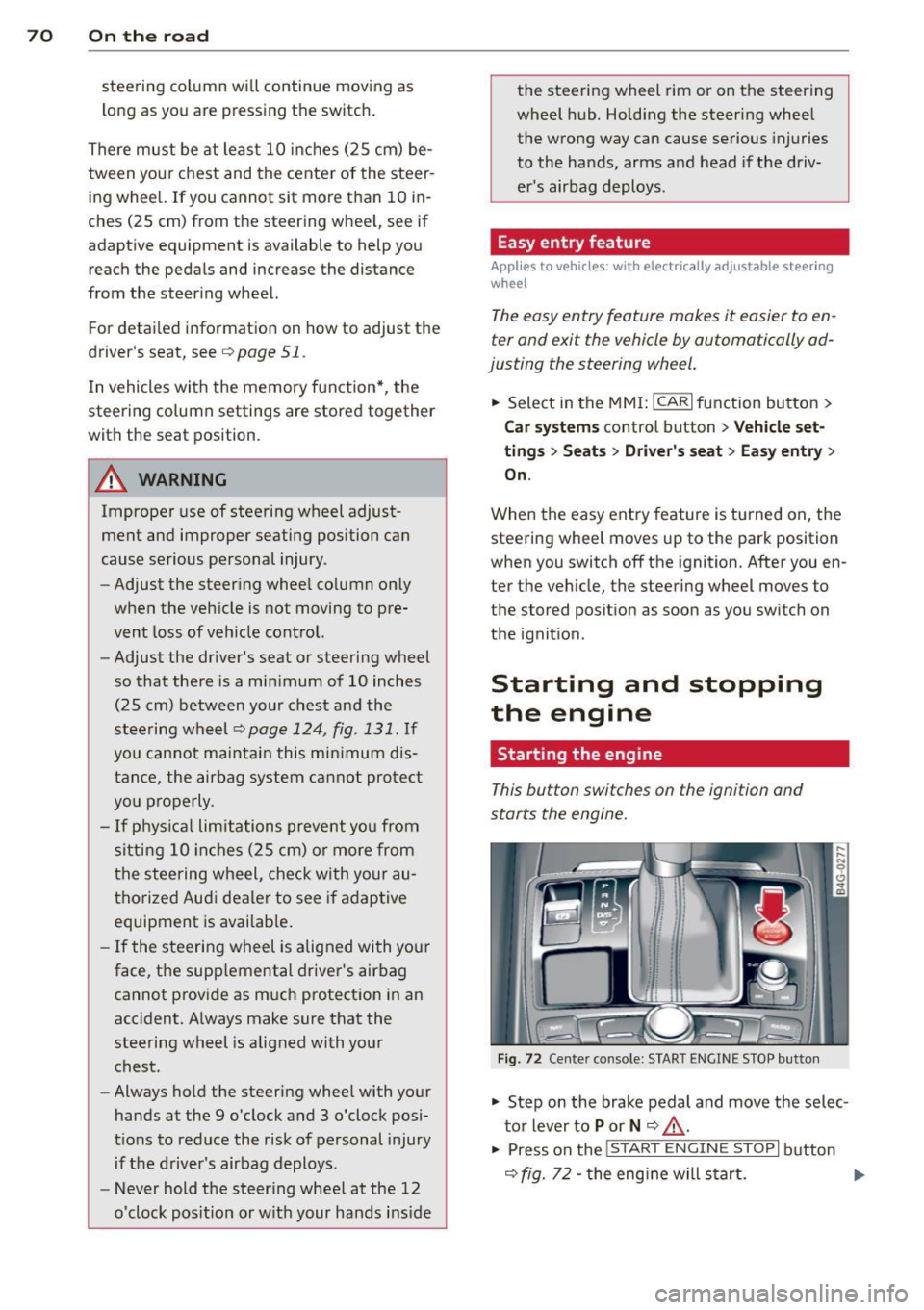
Fig . 72 Center console: S TART ENGINE S TOP butto n
"' Step on the brake pedal and move the selec
tor lever to
P or N <::> .&_ .
"' Press on the ~ ,s_T_A_R_T_E_N_G_I_N_E_S _T_ O_P~I button
<::> fig. 72 -the engine will start. ..,.
Page 73 of 298
By pressing the I START ENGINE STOPI button
without depressing the brake peda l, the igni
tion is on and switched
off by pressing it
again.
After a cold engine is started, the re may be a
brief period of increased noise because oil
pressure must first bui ld up in the hydraulic
va lve adjusters. This is normal and not a cause
for concern.
If the engine should not start immediately,
the starting process is automatically stopped
after a short time. Repeat starting procedure.
Driv er m essag e in th e in strument clu ste r
disp lay
Pr ess br ak e p ed al to start engin e
This message appears if you press the
I START ENGINE STOP ! button to start the en
g ine and do not depress the brake peda l. The
engine can on ly be started if the brake pedal
is depressed.
!!I C o nv enience ke y: I s ke y not in th e vehi
cle ?
This message appea rs a long with the !!I sym
bol if the maste r key is removed from the ve
hicle with the engine r unning . It is intended
to remind you (e .g . when changing drivers)
not to continue the journey witho ut the mas
ter key.
I f the master key is no longer in the vehicle,
you cannot sw itch on the ignition after stop
ping the engine and yo u also cannot start the
engine again. Moreover, you cannot lock the
veh icle from the outside with the key.
Shift to P , other wis e vehicle c an roll away.
Doo rs do not lock if le ver i s not in P.
This message appears for sa fety reasons
a long with an audib le warning tone if the
P
selector lever position is not engaged when
stopping the eng ine with the
I STAR T ENGINE STOP ! button. Select the P se
lector lever posit ion. Otherwise the veh icle
could roll and it can not be locked .
On th e ro ad 71
Ke y not r ecogni sed . Hold bac k of ke y again st
ma rked area. See owne r's manual.
If the indica tor l ight turns on and this mes
sage appears, there is a malf unct ion
¢ page 72.
Steering lock
The steering locks when you turn the engine
off using the I START ENGINE STOP ! button
and open the d river's doo r. T he locked steer
i ng helps p revent vehicle theft.
& WARNING ~
- Never allow the engine to run in confined
spaces -danger of asphyxiation .
- Never turn
off the engine un til the vehi
cle has come to a complete stop .
- The brake booster and power steering
only work when the eng ine is r unning . If
the engine is
off, you have to use more
force when steering or braking. Because
you cannot steer and brake as you usual ly would, this cou ld lead to crashes and
serious injuries.
(CT) Note
- Avo id h igh engine rpm, full thrott le and
heavy engine loads until the engine has
reached operating temperature -other
w ise you risk engine damage .
- The engine cannot be started by pushing
or towing the vehicle.
- If the engine has been under heavy load
for an extended per iod, heat builds up in
the engine compa rtment afte r the e n
gine is switched
off -there is a risk of
damaging the engine. Allow the engine
to run at idle fo r about 2 minutes before
switching it
off.
(D Tips
- If you open the d river 's doo r with the ig
nition on, a buz ze r sounds and the mes
sage
Ignition i s on appears in the instr u
ment cl uste r display . Sw itch the ignition
off . Ill-
Page 76 of 298

74 On the road
Parking
Various rules apply to prevent the parked ve
hicle from rolling away accidentally.
P a rking
.. Stop the vehicle with the foot brake .
.. Pu ll the switch <®l to apply the park ing
brake.
.. Se lect the
P se lector lever position
~ page 101.
• Turn the eng ine off ~.&.
In addition on incline s and grade s
.. Turn the steering wheel so that your vehicle
will roll against the curb in case it should
start to move .
A WARNING
-When you leave your veh icle - even if on
ly b rief ly - always take the ignition key
with you. This app lies par ticu la rly when
children remain in the veh icle . Otherw ise
the ch ildren could start the engine, re
lease the parking brake or ope rate e lec
trical equipment (e.g. power windows) .
There is the risk of an accident .
- When the vehicle is locked, no one - par
t icu larly not ch ildren should remain in
the vehicle. Locked doors make it more
difficult for emergency workers to get in
to the vehicle -putt ing lives at risk .
Starting from rest
The starting assis t function ensures tha t the
parking brake is released automatically upon
starting .
Stopping and appl ying park ing br ake
.. Pull the switch(®) to apply the parking
brake.
Starting and automatically releasing the par king brake
.. When you start to drive as usua l, the park
ing brake is automatically re leased and your
vehicle begins to move. When stopping at a traffic signal or stopping
in city t raffic, the parking brake can be ap
plied . T he vehicle does not have to be he ld
with the footbrake . The parking brake elimi
nates the tendency to creep w ith a dr ive range
engaged . As soon as you d rive off as usual,
the pa rking brake is released automat ically
and the vehicle starts to move .
Starting on slopes
When starting on inclines, the starting assist
prevents the vehicle from u nintent ionally roll
ing back . The braking force of the parking
brake is not released until suff ic ient driving
force has been built up at the wheels .
(D Tips
For safety reasons, the parking brake is re
leased automatically o nly when the d riv
er's safety belt is engaged in the buckle.
Starting off with a trailer
To prevent rolling back unintentionally on an
incline, do the following:
.. Keep the sw itch <®l pulled and depress the
accelerator. The parking brake stays applied
and prevents the vehicle from roll ing back
ward .
.. You can release the switch
<®l once you are
sure that you are developing enoug h for
ward momentum at the whee ls as you de
press the acce lerator .
Depend ing on the we ight of the rig (vehi cle
and t railer) and the severity of the incline, yo u
may ro ll backwards as yo u start . You can pre
vent rolling backwards by holding the parking
brake switch <®l pulled out and accelerating -
just as you wou ld when starting on a hill with
a conventiona l hand brake.
Page 77 of 298

Emergency braking
In the event that the conventional brake system fails or locks .
11-In an emergency, pull the switch(®) and
conti nue to pull it to slow your vehicle down
with the parking brake .
11-As soon as you release the sw itch (®) or ac-
celerate, the braki ng p rocess stops.
If you pull the sw itch
(®) and hold it above a
speed of about 5 mph (8 km/h), the emergen
cy braking function is in itiated. The vehicle is
b ra ked at a ll four wheels by activating the hy
d raul ic br ake system. The b ra ke performance
i s sim ilar to making an emergency stop~.&. .
I n o rder not to activate the emergency brak
i ng by m ista ke, an audible warning tone (bu z
z er) sounds when the switch<®> is p ulled. As
soon as the switch(®) is released, or the accel
erator pedal is dep ressed, emergency braking
stops .
.&_ WARNING
Emergency braking shou ld only be used in
an eme rgency, when the normal foot brake
has failed or the brake pedal is obstructed.
Using t he parking brake to perform emer
gency braking will slow you r vehicle down
as if you had made a fu ll brake applicat ion.
The laws of phy sic s ca nnot be s uspended
eve n w ith ESP and its associated compo
nents (ABS, ASR, ED L) . In co rners and
when road or weather conditions are bad,
a full brake application can cause the vehi
cle to skid or the rear end to b reak away -
r isking an accident.
Speed warning system
Introduction
The speed warning system helps you to stay
under a specified maximum speed.
The speed warning system warns you if you
are exceed ing the max imum speed that you
h ave set . You will hea r a warn ing tone when
your speed exceeds the stored va lue by ap-
On th e ro ad 75
proximately 3 mph ( 3 km/h) . An indicator
light . (USA
models) ;a (Canada mode ls) in
the instr ument cluster d isp lay also turns on at
the same time. The indicator light./.
turns off when the speed decreases be low the
stored maximum speed .
Setting a t hreshold is recommended if you
would like to be rem inded w hen you reach a
certain maxim um speed . S ituations where you
may wa nt to do so include driv ing in a country
with a general speed limit o r if the re is a
specified maximum speed for w inte r tires .
(D Tips
Even though your vehicle is eq uipped w ith
a speed warn ing system, you sho uld still
watch the speedometer to ma ke sure you
a re not dr iv ing faster t han the speed limi t.
Setting the threshold
You can set, change and delete the threshold
in the MMI.
11-Select: I CAR! function button > Car systems
control butto n > Driver assist > Speed warn
ing .
You can set any threshold between 20 mph
(30 km/h) and 150 mph (240 km/h). Sett ings
can eac h be ad justed in increments of 5 mph
(10 km/h).
Page 89 of 298
Audi side assist Lane Change Assistant
Description
App lies to vehicles: with si de assist
The side assist helps you when changing
lanes .
H AUDI I
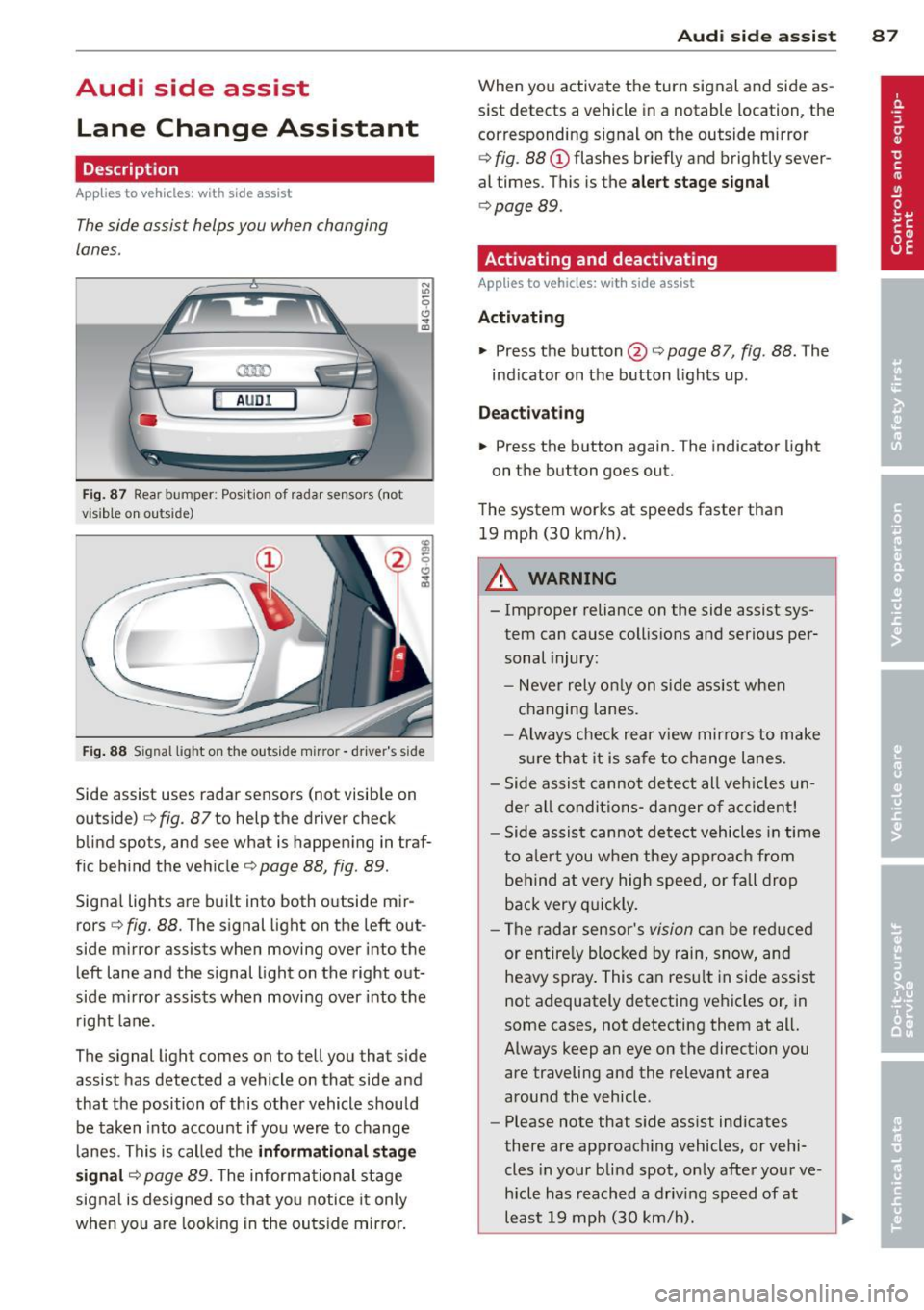
Fig. 87 Rear bumper : Pos ition of rada r sen sors (not
v isib le on outs ide)
Fig . 88 S ig n al l ight on the outside m irro r - drive r's side
Side assist uses radar sensors (not visib le on
outside)
c::> fig. 87 to help the driver check
blind spots, and see what is happening in traf
f ic beh ind the veh icle
c::> page 88, fig. 89 .
Signal lights are built into both outside mir
rors <=>
fig. 88. The signal light on the left out
side mirror assists when moving over into the left lane and the signal light on the right out
side m irror assists when moving over into the
right lane .
The signal light comes on to tell you that side
assist has detected a vehicle on that side and
that the position of this other vehicle should be taken into account if yo u were to change
lanes. This is called the
informati onal stag e
s ignal
c::> page 89. The informational stage
signal is designed so that you notice it only
when yo u are look ing in the outside mirro r.
Aud i side assist 8 7
When you activate the turn signal and side as
sist detects a vehicle in a notable location, the
corresponding signal on the outside mirror
c::> fig . 88 (D flashes br iefly and brightly sever
al times . This is the
aler t stage signal
c::> page 89 .
Activating and deactivating
Applies to vehicles: wit h side assist
Activating
.., Press the button @c::> page 87, fig. 88 . The
ind icator on the button lights up .
Dea ctivating
.., Press the button again. The indicator light
on the button goes out.
The system works at speeds faster than 19 mph (30 km/h).
A WARNING
-
- Improper reliance on the side assist sys-
tem can cause collisio ns and serious per
sonal injury:
- Never rely on ly on s ide assist whe n
changing lanes.
- Always check rear view mir rors to make
sure that it is safe to change lanes.
- Side assist cannot detect all veh icles un
de r al l conditions- danger of accident!
- Side assist cannot detect vehicles in time
to a le rt you when they approa ch from
behind a t very high speed, or fall drop
back very q uickly.
- The radar sensor's
vision can be red uced
or entire ly blocked by rain, snow, and
heavy spray . This can resu lt in side assis t
not adequately detecting vehicles or, in
some cases, not detecting them at all.
Always keep an eye on the direction you are traveling and the relevant area
around the vehicle .
- Please note that s ide assist indicates
there are approac hing vehicles, or vehi
cles in your blind spot, on ly afte r you r ve
hicle has reach ed a driv ing speed of at
least 19 mph (30 km/h).
~
Page 90 of 298
88 Audi side a ssis t
- Side assist signal does not work around
t ight corners (turning radius less than
328 feet or 100 m).
- Side assist is no rep lacement for the driv
er's full attent ion. The dr iver alone is re
sponsible for lane changes and similar dr iv ing maneuvers . Always keep an eye
on the di rection yo u are traveling and the
relevant area around the vehicle.
(D Note
- To ensure that you do not adversely af
fect side assist, do not block the area on
the rear bumper whe re the radar sensors
are located with foreign objects (such as
stickers o r bicy cle racks).
- Make sure that the signa l light on the
outside m irror is not blo cked by st ickers
or other items.
@ Tips
- Side assist a utomat ica lly deactivates if it
detects that the radar sensors a re
blocked E} page 93. The ind icator light
on the bu tton goes out.
- The area on the bumper where the radar
sensors are located must consis tently re
main free of snow, ice, and heavy soiling
so that side assist can function properly .
Fo llow the additional notes on
c> page 93.
-Additional tinting on the front side win
dows can make it harder to see and cor
rectly understand the signa l light on the
outside mirror.
- For Declarat ion of Compliance to United
States FCC and Industry Canada regula
tions
c> page 281.
Sensor detection area
Applies to veh icles: w ith side assist
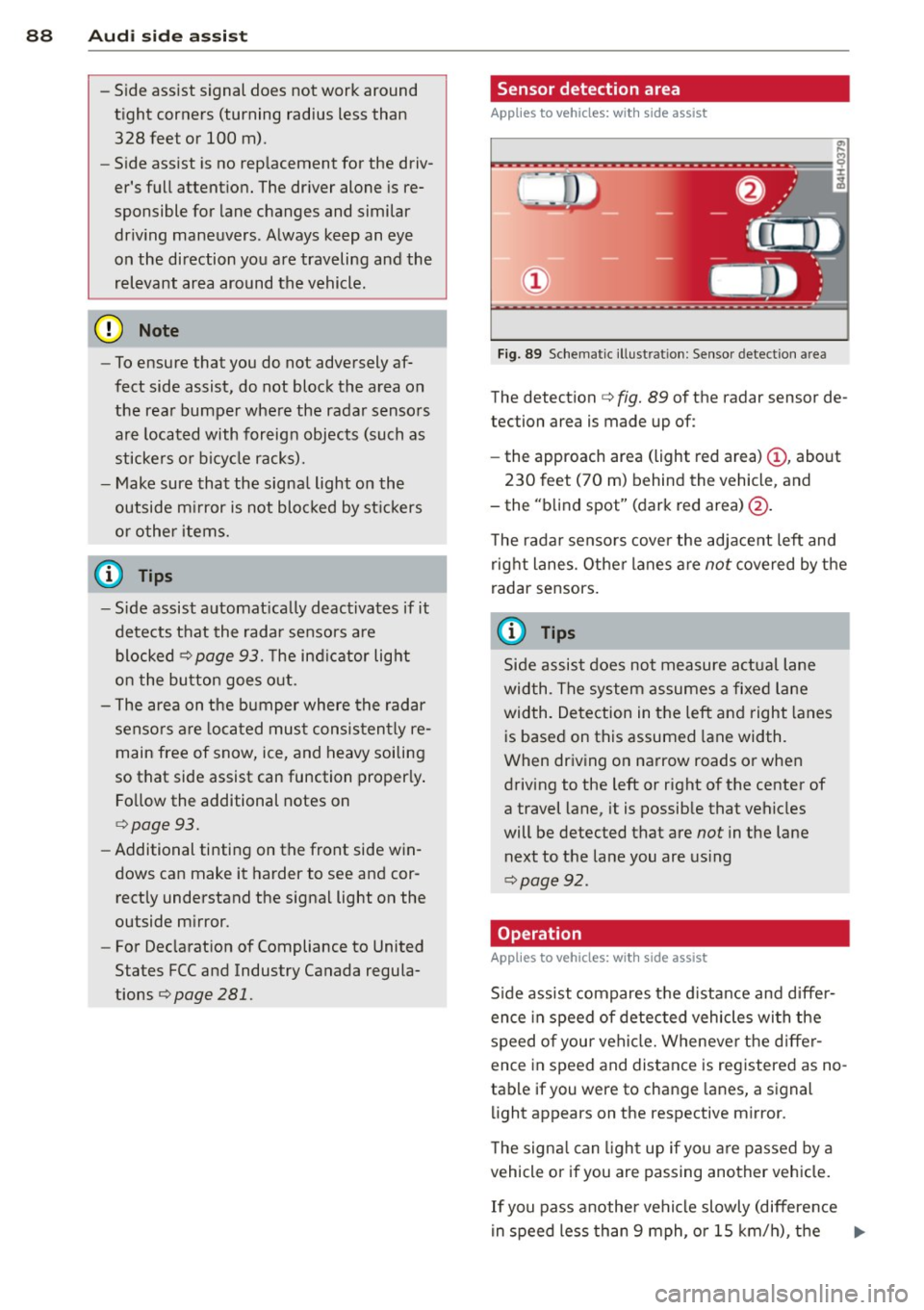
F ig. 89 Schemat ic ill ust rat ion : Sensor detect ion a rea
The detection c> fig. 89 of the radar sensor de
tection area is made up of:
- the approach area (light red area)
(D , about
230 feet (70 m) behind the vehicle, and
- the "b lind spot" (dark red area)@.
T he rada r sensors cover the adjace nt left and
right lanes. Other lanes a re
not covered by the
radar sensors.
(0 Tips
Side assist does not measure a ctual lane
wid th. The system assumes a fixe d lane
width. Detection in the left and right lanes
is based on this assumed lane width .
When driv ing on narrow roads or when
driving to the left or right of the center of
a travel lane, it is possible that vehicles
will be detected that are
not in the lane
next to the lane you are us ing
c> page 92.
Operation
Applies to veh icles: w ith s ide assist
S ide assist compares t he d istance and diffe r
ence in speed of detected vehicles wi th the
speed of your vehi cle. Wheneve r the d iffe r
ence in speed and distance is registered as no
tab le if you were to change lanes, a signal
li ght appears on the respective mirror.
T he signa l can ligh t up if yo u are passed by a
vehicle or if you are passing another vehicle.
If you pass another vehi cle slowly (difference
in speed less than 9 mph, o r 15 km/h), the ..,.
Page 95 of 298
right of your travel lane, depending on wheth
er you driv e in the center of your lane or closer
to the edge .
I f yo u drive in narrow lanes, s ide ass ist's de
tection area may a lso include other lanes -es
pecia lly if you tend to drive on the edge of
your lane¢
fig. 95. Under these condit ions,
ve hicles can also be detected that are two
lanes away, and side assist then could sw itch
between the informat ional and warn ing stage
sig nals .
When driving in very w ide lanes, vehicles in
the adjacent lane may not be detected be
cause they are not inside the detection area .
Notes
Messages in instrument cluster display
Applies to vehicles: with side assist
If side assist turns off automatically, the indi
cator light on the button wi ll go out and you
will see a message in the instrument cl uster
d isplay:
Aud i side a ssist : not availab le. s en sors
blocked
T he side assist sensors are built into the rear
bumper on the left and right (not visible on
the outside) ¢
page 87, fig. 87. To ensure that
you do not adversely affect the way side assist functions, foreign objects (such as stickers o r
b icycle racks) shou ld not be attached to the
a rea on the rear bumper where the sensors
a re loca ted.
If side ass ist func tions a re ad
versely affected, yo u will see this message in
the instrument cluster display. Remove any
thing that may be blocking the sensors .
If no vehicle is detected for a longer period of
time while driving, side assis t will a lso switch
off a utomatica lly.
Audi side as sist currently not available
If there is a tempora ry problem (such as the
veh icle's battery charge being low), s ide ass ist
cannot be activated tempo rarily.
Audi side a ssis t 93
Audi side assist: system fault
Have the system checked by an author ized Au
di dealer or qualified workshop .
Audi side assist: not available when
to wing
T he radar sensor's view is limited when tow
ing a trai ler . F or vehicles with a facto ry instal
led towing hitch or a trailer hitch that was in
stalled later according to factory specifica
tions, side assist is automatically deactivated
a s soon as the electrical connection to the
trailer 's electrical socket is made, and this sta
tus message appears in the instrument clus
ter display . Deactivation cannot be guaran
teed when using a ret rofitted towing hitch
that was
not installed acco rd ing to facto ry
spe cifica tions.
Safety tips
Applies to vehicles: with side assist
T he side assist detection may be limited when
driving around narrow street corners, on hi lly
streets, and under poor weather conditions.
It is possible that the radar sensors may a lso
detect other objects, s uch as high or stag
gered guardrails .
S ide assist does not measure act ual lane
width. The system assumes a fixed lane width.
Detection in the left and right lanes is based
on this ass umed lane width . When driving on
narrow roads or when driving to the left or
right of the center of a travel lane, it is poss i
ble that vehicles will be detected that are
not
in the lane next to the lane you are using .
A WARNING
-Improper reliance on the side assist sys
tem can cause coll is ions and serio us pe r
sonal injury:
- Never rely on ly on side assist when
changing lanes .
- Always check rear view mirrors to make
sure that it is safe to change lanes.
- Side assist cannot detect all vehicles un-
der all conditions- danger of accident!
~
Page 96 of 298

94 Audi side ass is t
- Side assist cannot detect vehicles in time
to alert you when they approach from
behind at very high speed, or fall drop
back very quickly .
- The radar sensor 's
vision can be reduced
or entirely blocked by rain, snow, and heavy spray . Th is can result in side assist
not adequately detecting vehicles or, in
some cases, not detecting them at a ll.
Always keep an eye on the d irection you
are t raveling and the relevant area
around the vehicle .
- Please note that side assis t indicates
there are approaching vehi cles, o r vehi
cles in your blind spot, only after your ve
hicle has reached a driving speed of at
least 19 mph (30 km/h).
- Side assist signal does not work around
tight corners (turning radius less than
328 feet, or 100 m) .
- Side assist is no rep lacement for the driv
er's f ull attent ion . The dr iver alone is re
sponsible for lane changes and similar
dr iving maneuvers. A lways keep an eye
on the direction you are traveling and the
relevant area around the vehicle.
(D Note
To ensure that side assist is not adve rsely
affected, you should not block the area on
the rear bumper where the radar sensors
are located with fo reign objects (such as
w ith stickers or bicycle racks) .
(D Tips
If the positions of the radar sensors have
been changed as a result of a rear end-col
lision, fo r instance, have side assist
checked by a n author ized Audi dealer for
safety reasons.
Page 104 of 298
102 Autom atic Tran smi ssi on
-When the selector lever is in a driving
position, the veh icle may creep, even at
id le speed. Therefore do not release
the park ing brake or foot brake until
you are ready to move, because power
is transmitted to the wheels as soon as
a driving posit ion is engaged.
- Do not accelerate while selecting a
driving position. At this time the en
g ine must be at idle speed so that un
d ue stress is no t placed on the clutches
in the t ransmission.
- Remembe r: Even when stopped briefly
with the automatic transmission in D/S
or R, engine power is being transmit
ted to the whee ls. Yo ur vehicle could
"creep" forward or backward . When
stopped, keep the brake peda l fully de
pressed and use the parking brake if
necessary to keep the vehicle from roll
ing .
-If the selector lever is unintentionally
moved into N wh ile you are driving, take
yo ur foot off the accele rator pedal and
wa it for the engine to return to idle
speed befo re selec ting a drivi ng position.
- Never shift into R or P when the veh icle is
in mo tion.
- Never get out of the dr iver's seat when
the engine is runn ing.
- If you must get out of the vehicle, move
the se lector lever securely into the P po
si ti on a nd apply the park ing brake fi rm ly.
- If the eng ine must remain running, never
have any driv ing pos ition engaged when
chec king under the hood. Make sure the
selector lever has securely engaged and
is locked in P with the parking brake
firmly set¢
page 214, Engine comport
ment .
Otherwise, any increase in engine
speed may set the vehicle in mot ion,
even with the parking brake applied.
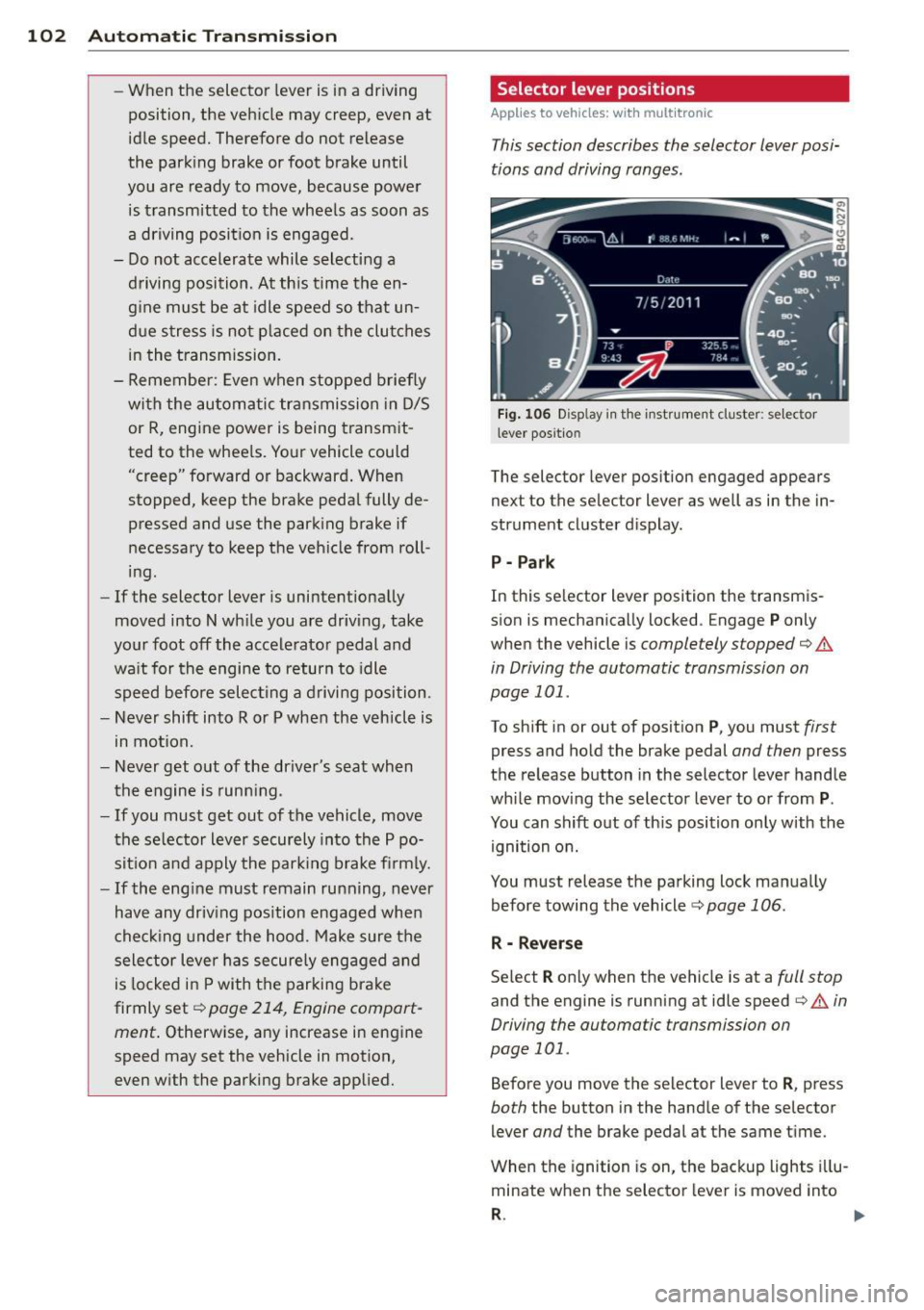
Selector lever positions
Applies to vehicles: wit h mult itronic
This section describes the selector lever posi
tions and driving ranges.
F ig . 106 Display in th e inst rument cluster: se lector
l ever positio n
The selector lever position engaged appears
next to the selector lever as well as in the in
strument cluster d isplay.
P - Par k
In this se lector lever position the transm is
sion is mechanically locked . Engage
P only
when the vehicle is
completely stopped¢.&
in Driving the automatic transmission on
page 101 .
To shift in or out of posit ion P , you must first
press and hold the brake pedal and then press
the re lease button in the selector lever handle
whi le moving the selector lever to o r from
P .
You can shift out of th is position only with the
ignition on.
You must release the parking lock manually before towing the vehicle ¢
page 106.
R - Reverse
Se lect R only when the vehicle is at a full stop
and the engine is running at idle speed¢.& in
Driving the automatic transmission on
page 101.
Before you move the selector lever to R , press
both the button in the hand le of the se lector
lever
and the brake pedal at the same t ime.
When the ignition is on, the backup lights i llu
minate when the selector lever is moved into
R . 1111-
Page 105 of 298

N -N eutr al
The transmission is in neutra l in this position .
Shift to this posit ion for standing with the
brakes applied
¢ &. in Driving the automatic
transmission on page 101.
When the veh icle is stationary or at speeds
be low 3 mph (5 km/h) , you must always apply
the footbrake before and while moving the
lever out of
N.
D /S -Normal position for dr iving forward
I n the D /S position, the transmission can be
operated e ither in the normal D mode or in
the S sport mode. To select the 5 sport mode,
pu ll the se lector lever back briefly . Pulling the
l ever back again will select the normal D
mode. The instrument cluster display shows
the selected driving mode.
In the
no rmal mode D , the transmission auto
matica lly selects the best gear ratio. It de
pends on engine load, veh icle speed and the
dynamic control program (DRP).
Select the
s port mode S for sporty driving .
The vehicle makes full use of the engine's
power. S hifting is more noticeable when accel
erating.
When the veh icle is stationary or at speeds
be low 3 mph (5 km/h), you must always apply
the foot brake before and while moving the lever to
D /S out of N .
In certain circumstances it may be advanta
geous to temporarily switch to the manual
shift program to manually select gear ratios
to match specif ic driving conditions
¢ page 105.
A WARNING
Read and follow alt WARNI NGS ¢ A in
Driving the automatic transmission on
page 101.
(D Note
-
Coast ing downh ill with the transmission in
N and the engine not runn ing will result in
Automatic Tra nsmi ssi on 10 3
damage to the automatic transmission
and possib ly the cata lytic converter.
Automatic Shift Lock (ASL)
Applies to veh icles: w ith mult itronic
The Automatic Shift Lock safeguards you
against accidentally shifting into a forward or
the reverse gear and causing the vehicle to
move unintentionally.
0, N 0 0
0
a1i
) ( )
Fi g. 107 Shi ft ga te: selector leve r lock pos it ions and
i n te rlock bu tton highligh ted
The selector lever lock is re leased as follows:
.. Tu rn the igni tion on.
.. Step on the brake pedal.
At the same time
press and hold the inte rlock bu tton on the
side of the gear selector knob
Q fig. 107
with your thumb until yo u have moved the
selector lever to the desired posit ion .
Automatic selector leve r lock
The selector lever is locked in the P and N po
s itions when the ig nition is tu rned on. To
move t he lever from these positions the driver
must depress the brake peda l. As a reminder
to the driver, the following warning appears in
the instrument cluster display when the selec
tor is in
P and N :
When stationar y apply footbrake while se
lecting gear
A time delay element p reven ts the selector
lever from locking when it is moved through
the
N position (going from R to 0 /5 ). The
locking element wi ll lock the se lector lever if
the lever is left in N (Neutral) for more than approximately 1 second, w ithout the brake
pedal being pressed .