ignition AUDI S6 2016 User Guide
[x] Cancel search | Manufacturer: AUDI, Model Year: 2016, Model line: S6, Model: AUDI S6 2016Pages: 294, PDF Size: 73.88 MB
Page 32 of 294
Opening and closing
Opening and closing
Keys
Key set
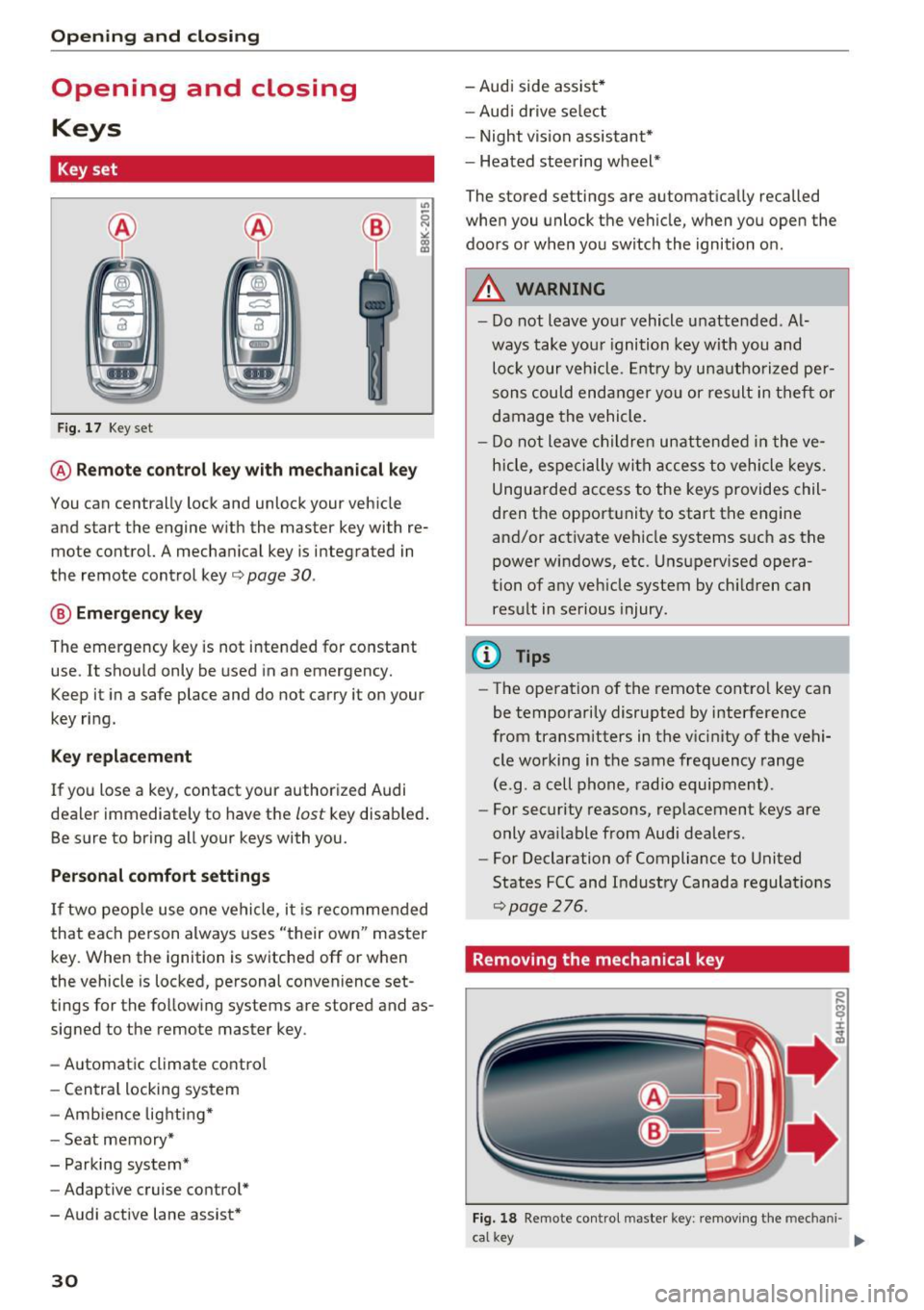
Fig. 17 Key set
@ Remote control key with mechanical key
You can centrally lock and unlock your vehicle
and start the engine w ith the master key with re
mote control. A mechanical key is integrated in
the remote control key¢
page 30.
@ Emergency key
The emergency key is not intended for constant
use. It shou ld only be used in an emergency.
Keep it in a safe place and do not carry it on your
key ring.
Key replacement
If you lose a key , contact your authorized Audi
dealer immediately to have the
lost key disab led .
Be sure to bring all your keys with you.
Personal comfort settings
If two people use one vehicle, it is recommended
that each person always uses "their own" master
key. When the ignition is switched off or when
the vehicle is locked, personal convenience set
tings for the following systems are stored and as
signed to the remote master key .
- Automatic climate contro l
- Central locking system
- Amb ience lighting*
- Seat memory*
- Parking system*
- Adaptive cruise control*
- Audi active lane assist*
30
-Audi side assist*
- Audi drive select
- Night vision assistant*
- Heated steering wheel*
The stored settings are automatically recalled
when you unlock the vehicle, when you open the
doors or when you switch the ignition on.
A WARNING
-
-Do not leave your vehicle unattended. Al
ways take your ignition key with you and
loc k your vehicle . Entr y by unautho rized per
sons could endanger yo u or result in theft or
damage the vehicle.
- Do not leave children unattended in the ve
hicle, especially with access to vehicle keys.
Unguarded access to the keys provides chil
dren the opport unity to start the engine
and/or activate vehicle systems s uch as the
power windows, etc. Unsupervised opera
tion of any vehicle system by ch ildren can
result in serious injury .
(D Tips
-The operation of the remote control key can
be temporarily disrupted by interference
from transmitters in the v icinity of the vehi
cle working in the same frequency range
(e.g . a cell phone, radio equipment).
- For security reasons, replacement keys are
only ava ilable from Audi dealers .
- For Declaration of Compliance to United
States FCC and Industry Canada regulations
~page 276.
Removing the mechanical key
Fig. 18 Remote contro l maste r key : removing the mecha ni-
ca l key .,..
Page 34 of 294
Opening and closing
-Remote master key¢ page 33,
-Door handles with convenience key*
¢page 34,
- Lock cylinder at the driver's door¢ page 35,
or
- Power locking switch inside¢
page 35.
Selective unlocking
When you lock the vehicle, the power locking sys
tem will lock the doors and the rear lid . When
unlocking, you can set in the MMI whether only
the driver's door or the entire vehicle should be unlocked
¢ page 33.
Automatic locking
The automatic locking feature locks all the vehi
cle doors and the rear lid when you drive faster
than 9 mph (15 km/h) .
The car is unlocked again, when the opening
function in the power locking system switch or at
one of the door levers is actuated.
Anti-theft alarm warning system
If the anti-theft alarm warning system detects a break-in into the vehicle, acoustic and visual
warning signals are triggered.
The anti-theft warning system is activated auto matically when you lock the vehicle. It is deacti
vated when unlocking using the remote key, with
the mechanical key, and when you switch the ig nition on.
The alarm also turns off when the alarm cycle has
expired.
Turn signals
When you unlock the vehicle , the turn signals
flash twice. When you lock the vehicle the turn
signals flash once. If they do not flash, one of the
doors, the rear lid or the hood is not locked.
Unintentionally locking yourself out
In the following cases there safeguards to pre
vent you locking your remote master key in the
vehicle:
- The vehicle does not lock with the central lock
ing switch ¢
page 35 if the driver's door is
open.
32
- On vehicles with convenience key*, if the most
recently used master key is in the luggage com
partment, the rear lid is automatically unlocked
again after it is closed .
Do not lock your vehicle with the
remote master
key or convenience key*
until all doors and the
rear lid are closed. In this way you avoid locking
yourself out accidentally.
Power side door closer*
The vehicle doors are equipped with a power side door closer. When closing a door, you only have
to let it fall lightly into the latch. The door will
then automatically close by itself¢&..
A WARNING
-
-When you lock your vehicle from outside,
nobody - especially children - should remain
inside the vehicle . Remember , when you
lock the vehicle from the outside the win
dows cannot be opened from the inside.
- When you leave the vehicle, always take the ignition key with you. This will prevent pas
sengers (children, for example) from acci
dentally being locked in the vehicle should
they accidentally press the power locking
switch in the doors.
- Do not leave children inside the vehicle un
supervised. In an emergency it would be im
possible to open the doors from the outside
without the key.
- Applies to vehicles with power side door
closer*:
- When closing a door, make sure nothing
can interfere with the door. This could
cause serious personal injury .
- You can stop the door from closing at any
time by pulling on the inside or outside
door handle.
(D Tips
- In the event of a crash with airbag deploy
ment all locked doors will be automatically
unlocked to give access to the vehicle occu
pants from the outside.
Page 40 of 294
Opening and clo sin g
_& WARNING
Read and follow all WARNINGS¢ page 31,
General description.
- After closing the rear lid, always pull up on
it to make sure that it is properly closed.
Otherwise it could open suddenly when the
vehicle is mov ing.
- To help prevent poisonous exhaust gas from
being drawn into the veh icle, always keep
the rear lid closed while driving. Never
transport objects larger than those which fit
comple tely into the luggage area, because
then the rear lid cannot be fully closed.
- Never leave yo ur vehicle unattended espe
c ially w ith the rea r lid left open. A child
could crawl into the car through the luggage
compartment and pull the lid shut, becom
ing trapped and unable to get out. To re
duce the r isk of personal injury, never let
children play in or around your vehicle. Al
ways keep the rear lid as well as the vehicle doo rs closed when not in use.
- Never close the rear lid inattentively or with
out checking first. Although the closing
force of the rear lid is lim ited, you can still
seriously injure yourse lf or others.
-Always ensure that no one is within range of the rear lid when it is moving, in particular
close to the h inges and the upper and lowe r
edges -fingers or han ds can be pinched.
- Never try to interfere w ith the rear lid or
help it when it is being opened or closed a u
tomat ica lly.
(D Tips
- The setti ngs i n the Infota inment system de
termine if the l uggage compartment lid can
be opened using t he handle
Q page 33.
-When the vehicle is locked, the luggage
compartmen t lid can be unlocked separately
by p ressing the b utton
l= I on the remote
contro l key. W hen the luggage compart
ment lid is closed aga in, it locks a utomati
ca lly.
- You can close the luggage compartment lid
us ing the maste r key (veh icles with conven -
38
ience key*) up to a distance of approximate
ly 9
ft (3 m).
- Th e luggage compartment lid can be oper
ated by hand if the vehicle battery is low . It
is necessa ry to use more force w hen doing
this. Move the lid s low ly to reduce the
amount of force needed.
Luggage compartment with movement
activated opening
Applies to vehicles : wit h convenience key and sensor -control
led luggage comp artm en t lid
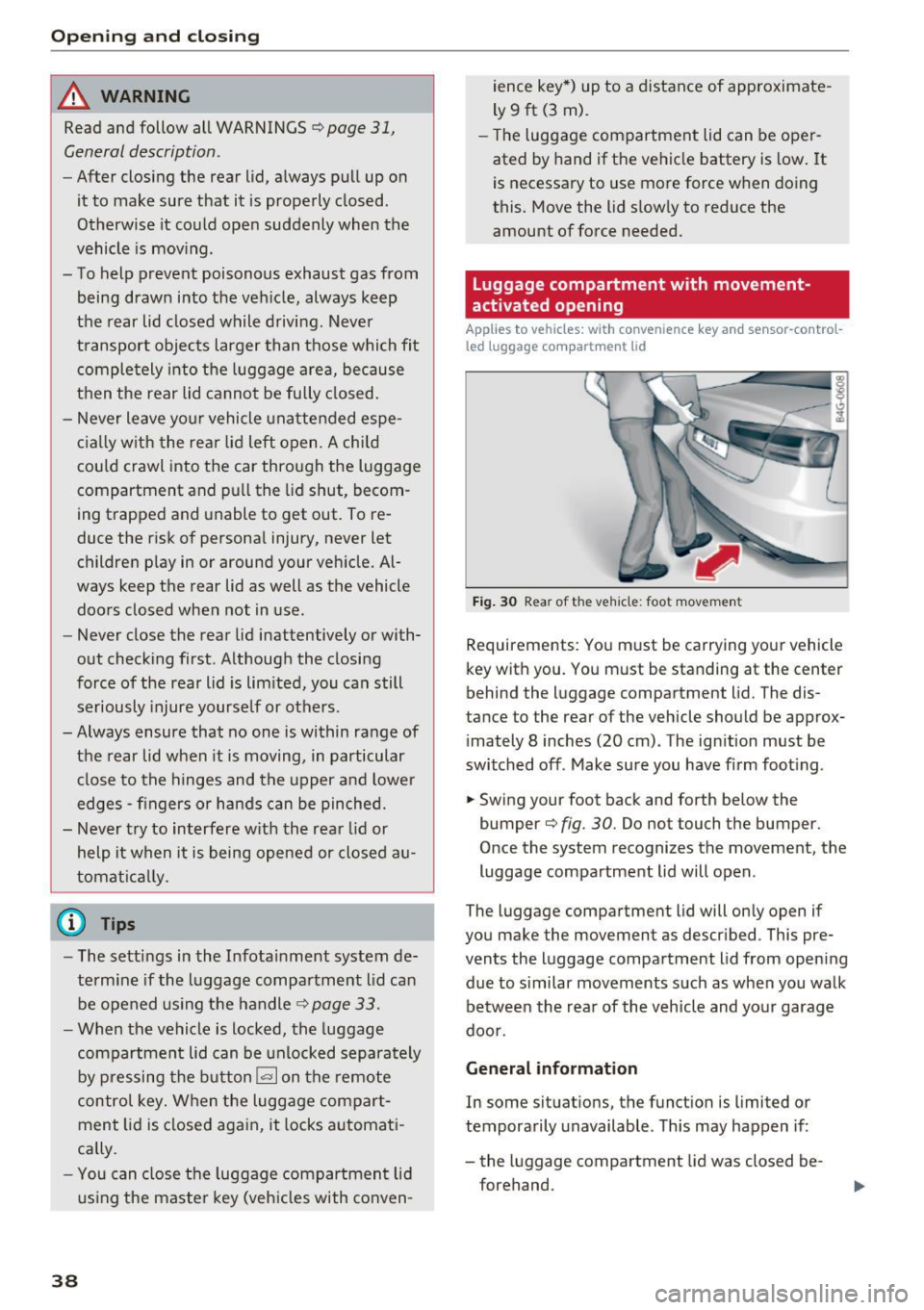
F ig . 30 Rear of the vehicle: foot movemen t
Requirements: You m ust be carrying your vehicle
key with you . You must be standing at the center
behind the luggage compartment lid. The dis
tance to the rear of the vehicle should be approx
i mately 8 inches (20 cm) . The ignition must be
switched off . Make sure you have firm foot ing .
.. Swing your foot back and forth below the
bumper¢
fig. 30. Do not touch the bumper.
O nce the system recognizes the movement, the
luggage compartment lid will open .
The luggage compartment lid will only open if
you make the movement as descr ibed . This pre
vents the luggage compartment lid from opening
due to s imilar movements such as when you walk
be tween the rea r of the v eh icle and yo ur garage
doo r.
General information
In some situat ions, the funct ion is limited or
temporarily unavailable . Th is may happen if :
- the luggage compartment lid was closed be
forehand.
Page 42 of 294
Opening and closing
Power Windows
Controls
The driver can control all power windows.
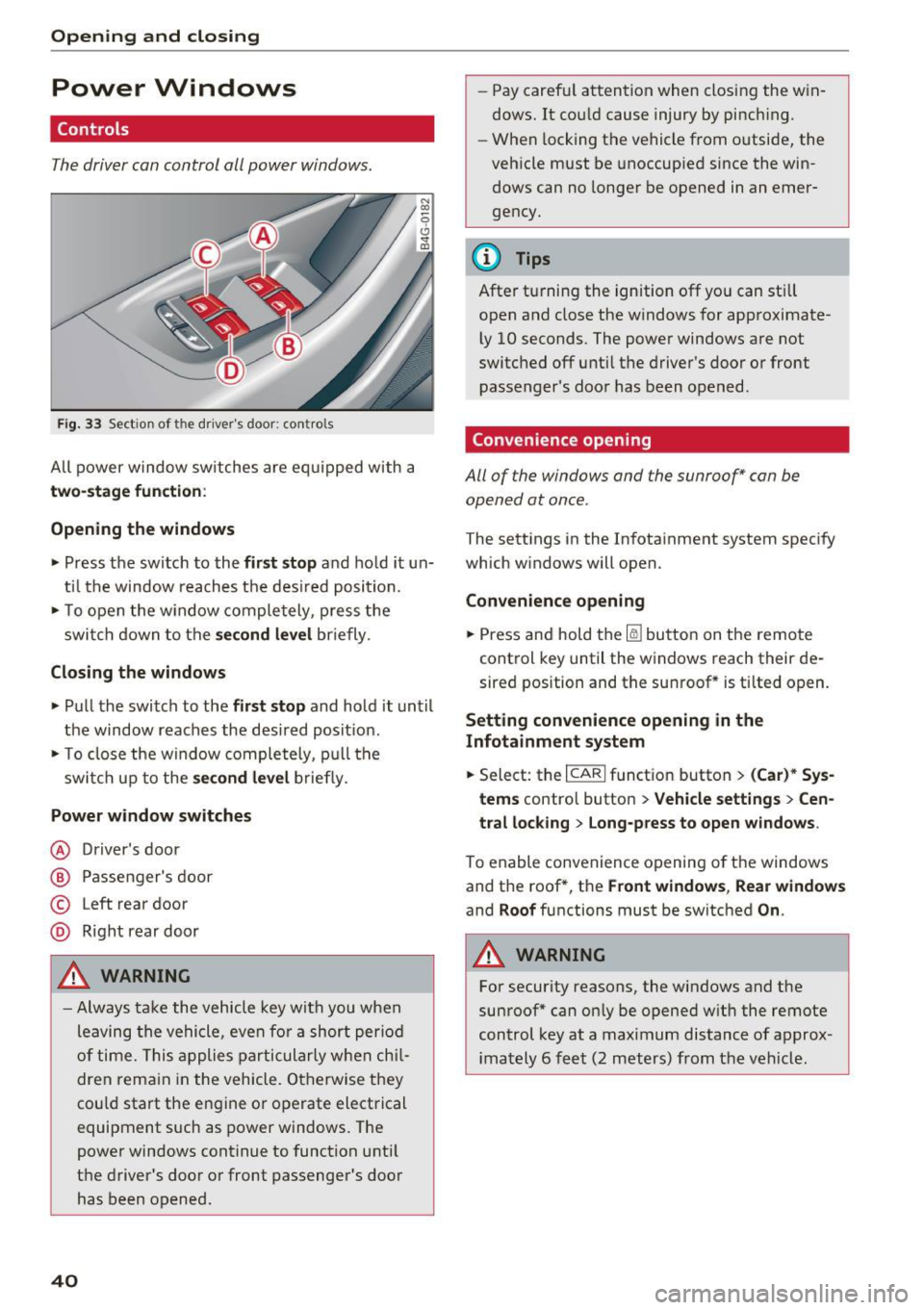
Fig. 33 Section of the driver's door: controls
All power window switches are equipped with a
two-stage function :
Opening the windows
• Press the switch to the first stop and hold it un
til the window reaches the desired position.
• To open the w indow completely, press the
switch down to the
second level briefly.
Closing the windows
• Pull the switch to the first stop and hold it until
the window reaches the desired posit ion.
• To close the window completely, pull the
switch up to the
second level briefly.
Power window switches
@ Driver 's door
@ Passenger's door
© Left rear door
@ Right rear door
A WARNING
-Always take the vehicle key with you when
leaving the vehicle, even for a short period
of time. This applies particularly when chil
dren remain in the vehicle. Otherwise they
could start the engine or operate electrical
equipment such as power windows. The
power windows continue to function until
the driver's door or front passenger's door
has been opened .
40
"
-Pay carefu l attention when closing the win
dows. It could cause injury by pinch ing.
- When locking the vehicle from o utside, the
vehicle must be unoccupied since the win
dows can no longer be opened in an emer
gency.
{!) Tips
After turning the ignition off you can still
open and close the windows for approximate
ly 10 seconds . The power windows are not
switched off until the driver's door or front
passenger's door has been opened .
Convenience opening
All of the windows and the sunroof* can be
opened at once .
The settings in the Infotainment system specify
which windows will open.
Convenience opening
• Press and hold the~ button on the remote
control key until the windows reach their de
sired position and the sunroof * is tilted open.
Setting convenience opening in the
Infotainment system
• Select: the I CARI funct ion button > (Car)* Sys
tems
contro l button > Vehicle settings > Cen
tral locking
> Long-press to open windows.
To enable convenience opening of the windows
and the roof *, the
Front windows, Rear windows
and Roof functions must be switched On .
A WARNING
-
For security reasons, the windows and the
sunroof* can only be opened with the remote
control key at a maximum distance of approx
imately 6 feet (2 meters) from the vehicle.
Page 43 of 294
.... N
0 CJ '
Correcting power window malfunctions
After disconnecting the vehicle battery, the one
touch up and down feature must be activated
again .
.,. Pull the powe r window switch until the window
is completely ra ised.
.,. Release the switch and pull it aga in for at least
one second.
Valet parking
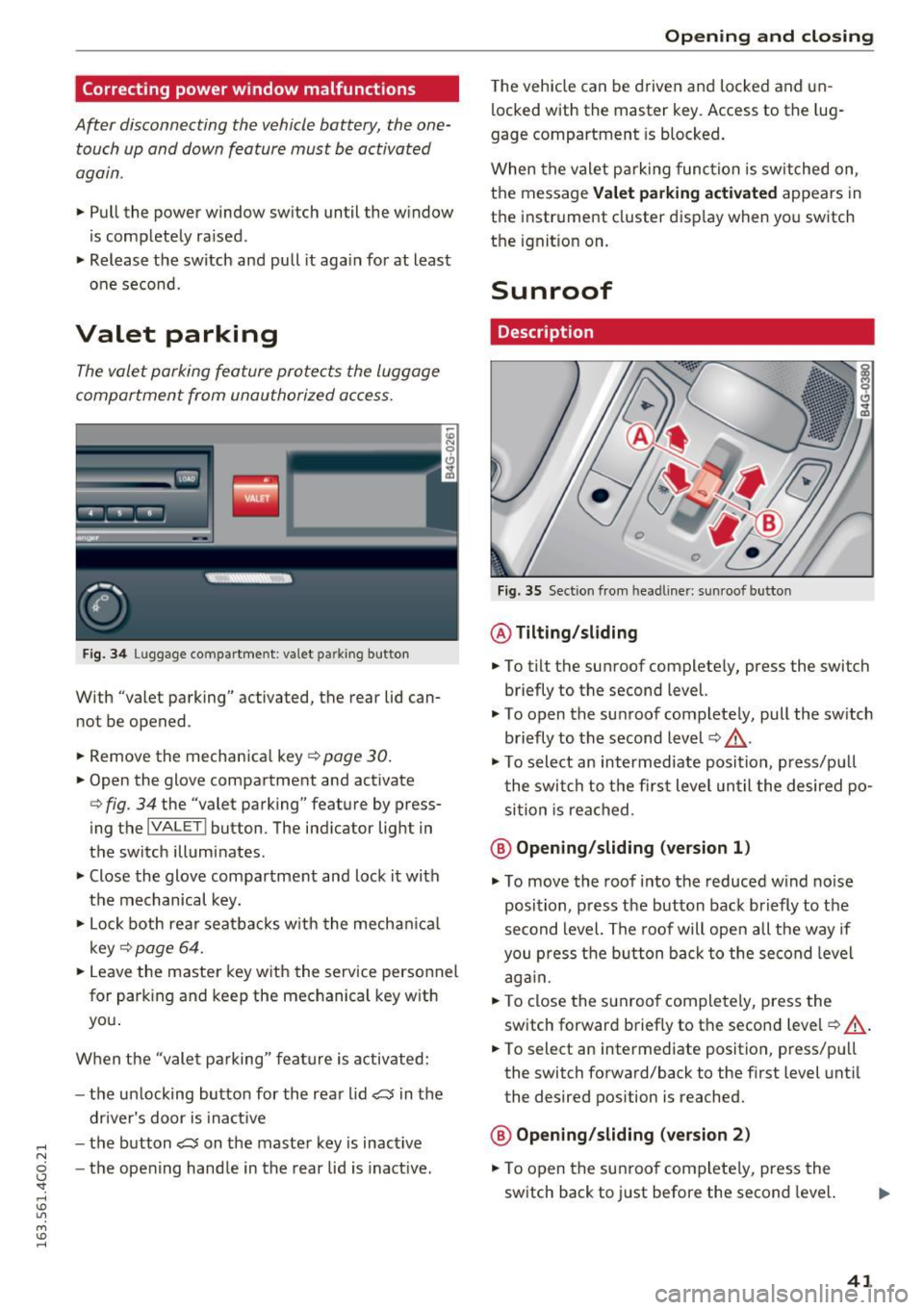
The valet parking feature protects the luggage
compartment from unauthorized access .
Fig. 34 Lu gg age comp artment : v a let parkin g button
W ith "valet parking" activated, the rea r lid can
no t be opened .
.,. Remove the mechanical key
Q page 30.
.,. Open the glove compartment and activate
Q fig . 34 the "valet parking" feature by press
ing the
I VA LETI button . The indicator light in
the switch illuminates .
.,. Close the glove compartment and lock it with
the mechanical key.
.,. Lock both rear seatbacks w ith the mechanical
key
Q page 64 .
.,. Leave the master key with the service personnel
for park ing and keep the mechanical key with
you .
When the "valet parking" feature is activated:
- the un locking button for the rear lid
~ in the
driver's door is inact ive
- the button~ on the master key is inactive
- the opening handle in the rear lid is inactive.
Opening and closing
The vehicle can be driven and locked and un
locked with the master key. Access to the lug
gage compartment is blocked.
When the valet parking function is switched on ,
the message
Valet parking activated appears in
the instrument cluster display when you switch
the ignition on .
Sunroof
Description
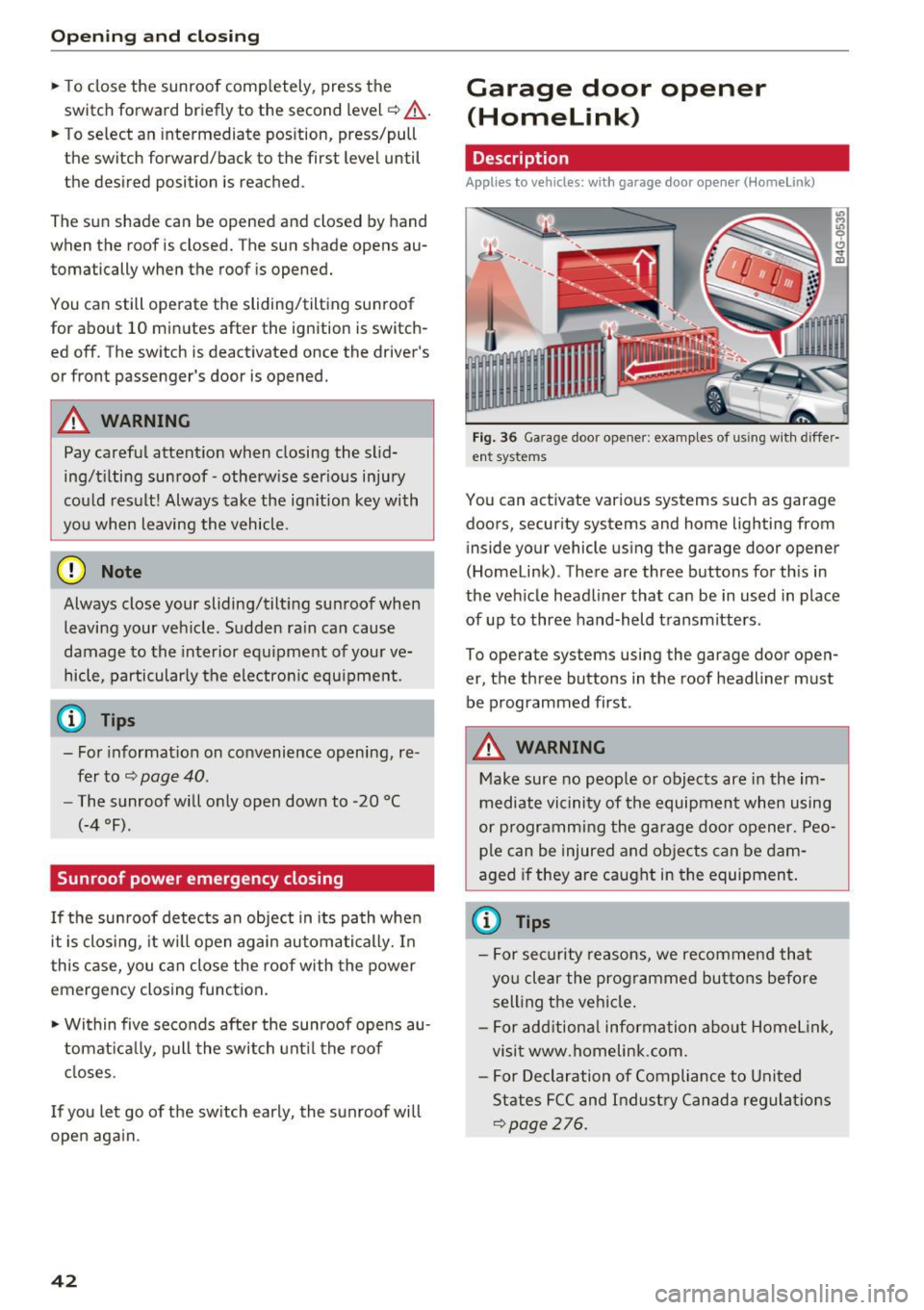
Fig. 35 Section from hea dline r: sun roo f b utton
@ Tilting /sliding
.,. To tilt the sunroof completely, press the switch
briefly to the second level.
"' To open the sunroof completely, pull the sw itch
briefly to the second level¢,&. .
.. To select an intermediate position , press/pu ll
the switch to the first level until the desired po
sition is reached .
@ Opening /sliding (version 1)
"'To move the roof into the reduced wind noise
position, press the button back briefly to the
second level. The roof will open all the way if
you press the button back to the second level
again.
.,. To close the sunroof completely, press the
switch forward briefly to the second level
Q ,&..
.. To select an intermediate position, press/pull
the switch forward/back to the first level until
the desired position is reached.
@ Opening/sliding (version 2)
.,. To open the sunroof complete ly, press the
switch back to just before the second level.
41
Page 44 of 294
Opening and clo sin g
~ To close the sunroof comp letely, press the
switch forward briefly to the second level
c::> ,&. .
~ To select an intermediate pos ition, press/pull
the switch forward/back to the first level until
the desired position is reached .
The sun shade can be opened and closed by hand
when the roof is closed. The sun shade opens au
tomatically when the roof is opened.
You can still operate the sliding/tilt ing sunroof
for about 10 minutes after the ignition is switch
ed off. The switch is deactivated once the driver's
or front passenger 's door is opened.
A WARNING
Pay careful attent ion when closing the slid
ing/t ilting sunroof -otherw ise ser ious injury
cou ld result! Always take the ign ition key with
you when leaving the vehicle .
@ Note
Always close your sliding/tilting sunroof when
leaving your veh icle. Sudden ra in can cause
damage to the interior equ ipment of your ve
hicle, particularly the electron ic equ ipment.
@ Tips
- For informat ion on convenience opening, re
fer tor:::.>
page 40.
-The sunroof will only open down to -20 °C
(-4 °F) .
Sunroof power emergency closing
-
If the sunroof detects an object in its path whe n
it is clos ing, it w ill open again automatically. In
this case, you can close the roof with the power
emergency closing function .
~ Within five seconds afte r the sunroof opens au
tomat ica lly, pull the switch unt il the roof
closes.
I f you let go of the sw itch early, the sunroof will
open aga in.
42
Garage door opener
(Homelink)
Description
App lies to vehicles : wit h garage door o pener (Horne Link)
Fig. 36 Ga rage door opener: examples of using w ith differ·
ent syste ms
You can act ivate various systems such as garage
doors, security systems and home lighting from inside your vehicle using the garage door opener
(Homelink) . There are three buttons for th is in
the veh icle headliner that can be in used in place
of up to three hand-held transmitters .
To operate systems using the garage door open
er, the three buttons in the roof headliner must be programmed first .
A WARNING
Make sure no people or objects are in the im
mediate vicinity of the equipment when using
or p rogramming the garage door opener. Peo
ple can be injured and objects can be dam
aged if they are caught in the equipment .
(D Tips
-For security reasons, we recommend that
you clear the prog rammed buttons before
sell ing the vehicle .
- For add itiona l information about Homel ink,
visit www.homelink .com .
- For Declaration of Compliance to United
States FCC and Indust ry Canada regulat ions
<::.>page 276.
Page 45 of 294
.... N
0 CJ '
Programming buttons
Applies to vehicles: with garage door opener (Homelink}
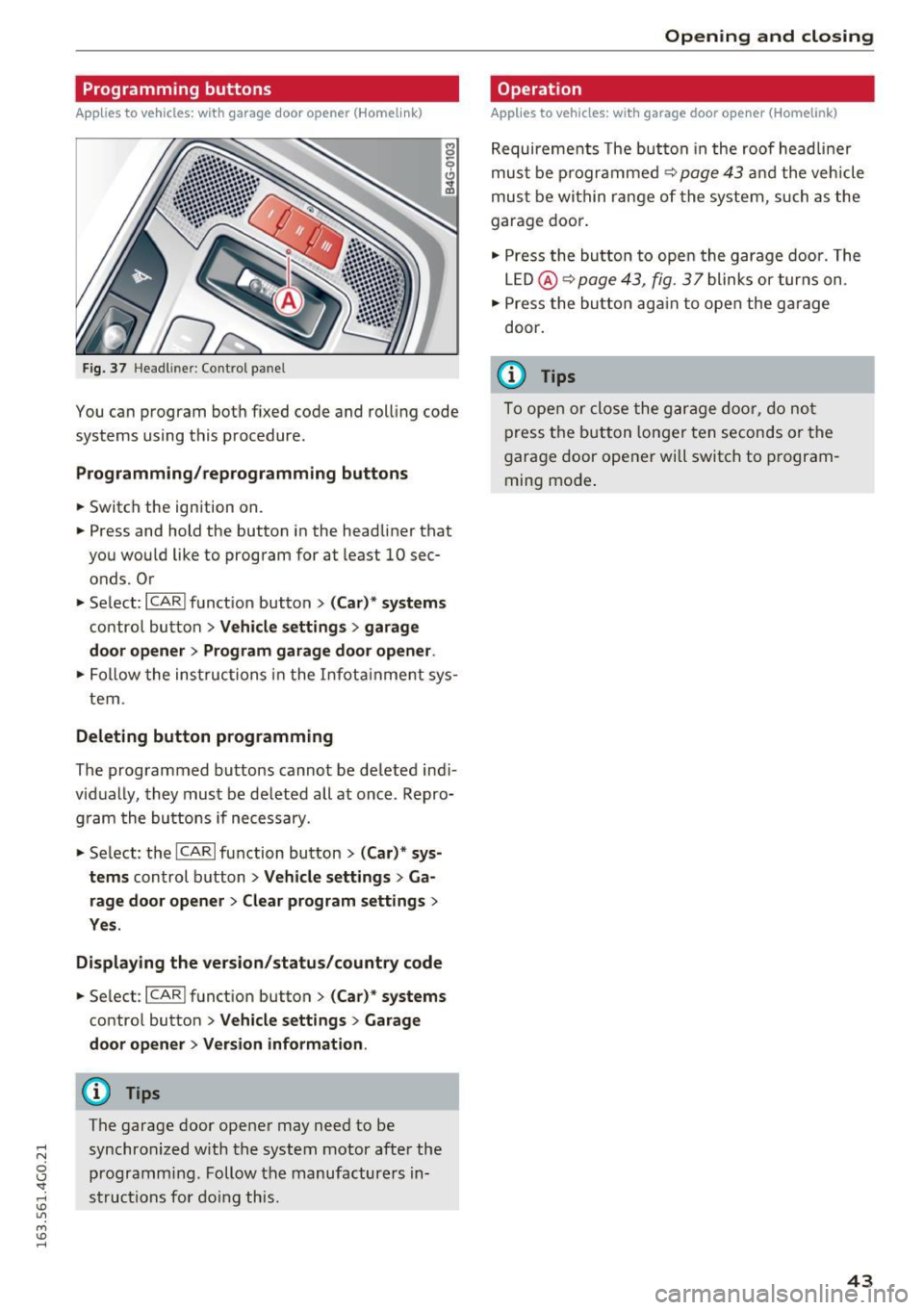
Fig. 37 He adl in er: Co ntro l p an el
You can program bot h fixed code and rol ling code
systems using this procedure .
Programming /reprogramming button s
• Switch the ignition on .
.. Press and hold the button in the head liner that
you wou ld like to program for at least 10 sec
onds. Or
• Se lect:
~ I C~ A~ R~ I fu nct ion but ton > (Car) * system s
contro l button > Vehicle setting s > garage
door opener > Program garage door opener .
.. Fol low the ins truc tions in the I nfota inme nt sys
tem .
Deleting button programming
The programmed bu ttons cannot be de leted ind i
v id ually, they must be de leted a ll at once . Repro
g ram the bu ttons if necessary .
.. Se lect: the
ICARI fu nction button > (Car) * sys
tems
control b utton > Vehicle settings > Ga
rage door opener
> Clear program settings >
Yes .
Displaying the version /status/country code
.. Se lec t: I CAR I funct ion button > (Car) * systems
co ntro l butto n > Vehicle settings > Garage
door opener > Version information .
(D Tips
The garage door opene r may need to be
synchronized w ith the-system motor after the
programm ing . Follow the manufacture rs in
st ruc tions for do ing th is .
Open ing and closing
Operation
Applies to vehicles: with garage door opener (Homelink)
Requireme nts The bu tton in the roof head lin e r
mus t be p rogramme d
~ page 43 and the veh icle
mus t be wi thin ran ge of the system, such as the
garage doo r.
• Press the bu tton to ope n the garage door. The
L E D @ ~
page 43, fig. 3 7 blink s or tur ns on .
• Press the bu tton ag ai n to open the g arage
door.
@ Tips
To ope n or close the g arage do or, do not
p ress t he b utton lon ger ten seconds or t he
g arage door opener wi ll switch to p rogram
ming mo de.
43
Page 46 of 294
Lights and Vision
Lights and Vision
Exterior lighting
Switching the lights on and off
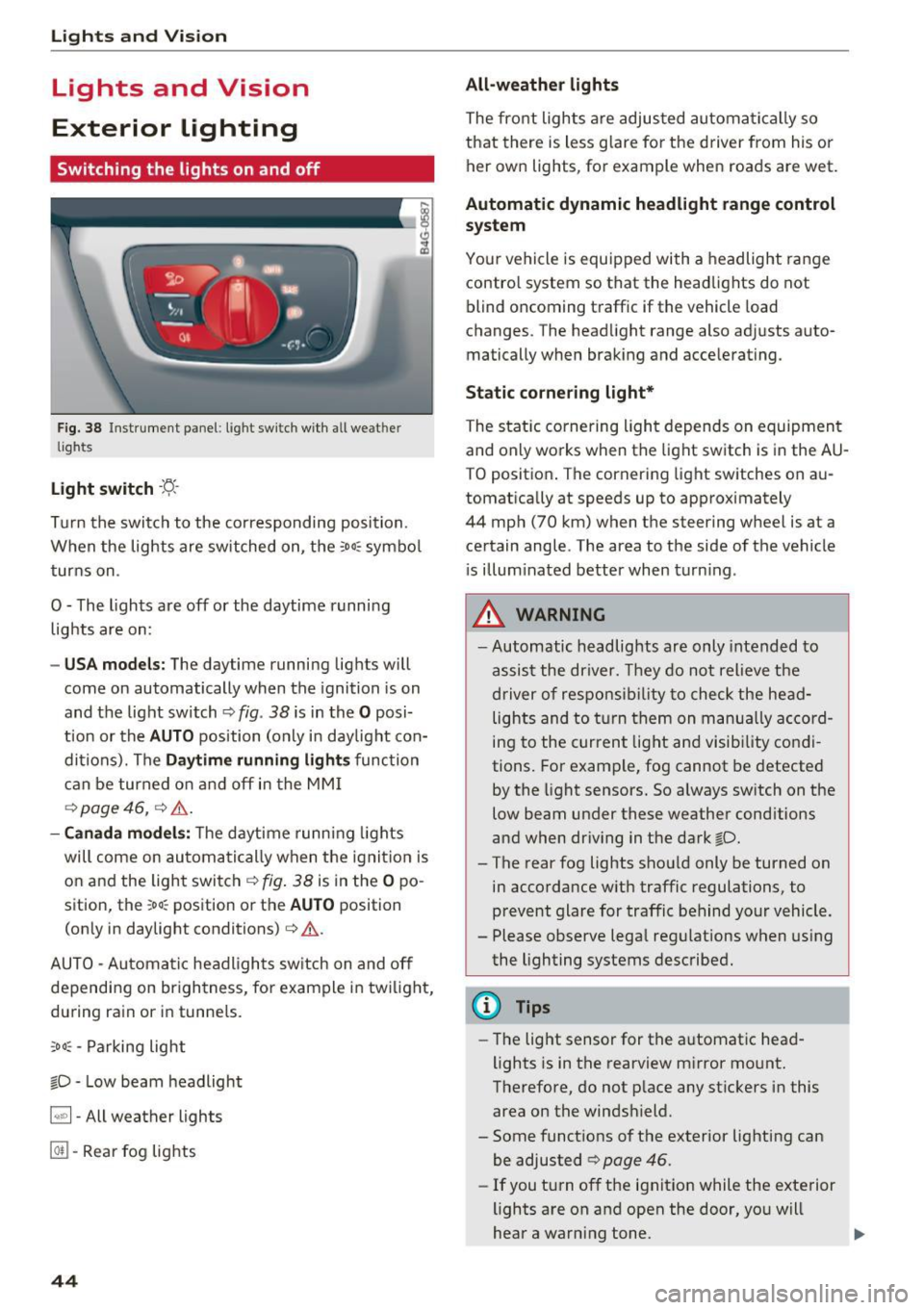
Fig. 38 Instrument panel : lig ht sw it c h with all we ath er
li gh ts
Light switch ·t:/.. ·
Tu rn the switch to the corresponding posi tion .
When the lights are sw itched on, the
:o o:c symbo l
turns on .
O - The lights are off or the daytime running lights are on :
-USA mode ls: The daytime running lig hts will
come on automatically when the ignition is on
and the light switch¢
fig. 38 is in the O posi
t ion or the
AUTO position (only in day light con
ditions). The
D aytime running light s function
can be turned o n and off in the MM I
¢ page 46, ¢ &.
- Canada mo del s: T he d aytime runn ing lights
will come on automati cally when the ignit io n is
on and the ligh t swi tch ¢
fig. 38 is in the O po
sition, the
; oo :c position or th e AUTO position
(on ly in daylight conditions) ¢
&.
AUTO - Automatic hea dlights sw itch on and off
depending on br igh tness, for example i n tw ilig ht,
du ring rain or in tunne ls.
;oo :c -Parking light
io -Low beam headlight
~ - All weather lights
@TI -Rear fog lights
44
All-weather lights
The front lights a re adjusted au toma tically so
that there is less g lare fo r the d river from his o r
her ow n lights , fo r example when roads are wet .
Automatic dynamic headlight range control
system
Your vehicle is equ ipped with a headlight range
contro l system so tha t the head lights do not
blind oncoming t raff ic if the vehicle load
changes. The head light range also adjusts auto
matically when brak ing and acce lerating .
Static cornering light*
The static co rnering light depends on equipmen t
and only wo rks when the light sw itch is in the AU
T O positio n. The corn ering light switches on au
tomatically at speeds up to app roximately
44 mph (70 km) when the steer ing wheel is at a
ce rtain angle. The area to the side of the vehicle
i s illum inated better when t urn ing .
,&. WARNING
-Automatic headlights are only intended to
assis t the driver. They do not relieve t he
driver of respons ibility to check the he ad
lights and to t urn them on manu ally a ccord
ing to the current light and visibility co ndi
tions. For exam ple, fog cannot be detected
by the light sensors. So always sw itch on the
low beam under these weather cond itions
and when dr iv ing in the dark
io.
-The rear fog lights shou ld only be turned on
in acco rdance with traffic regulations, to
p revent glare for traffic behind your vehicle .
- Please observe lega l reg ulations when using
the lighting systems described .
@ Tips
-Th e light sensor for the a utomat ic head
lights is in the rearview m irror mo unt.
Therefore, do not p lace any st ickers in this
area on the winds hield.
- Some funct ions of t he exterior lighting can
be adjusted ¢ page
46 .
-If you t urn of f the ignit ion while the e xte rior
lights are on a nd open the door, yo u will
hear a warning tone .
Page 47 of 294
.... N
0 CJ '
-In cool or damp weather, the inside of the
headlights, turn signals and tai l lights can
fog over due to the temperature difference
between the inside and outside. They will
clear short ly after switching them on. This
does not affect the service life of the light
i ng.
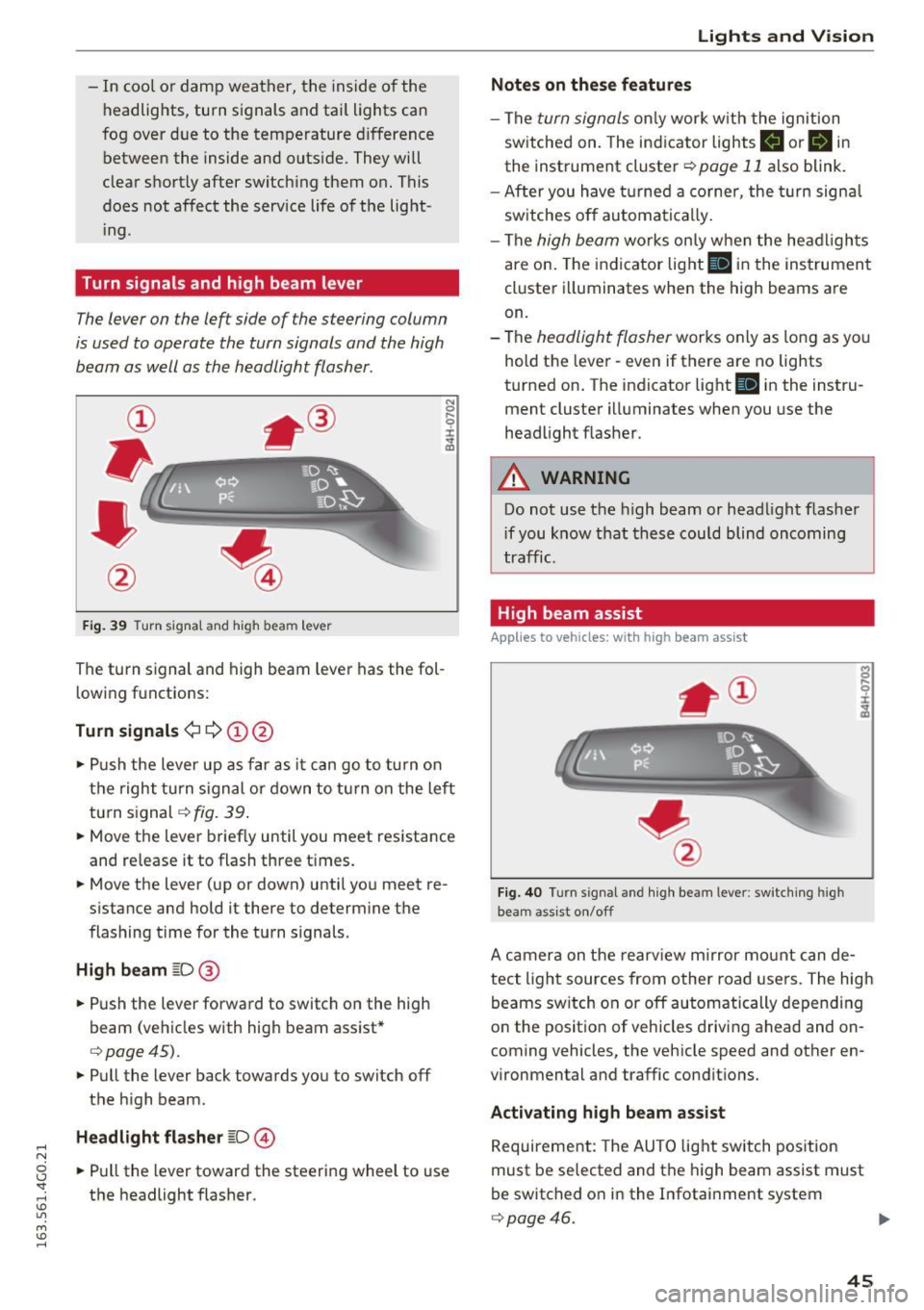
Turn signals and high beam lever
The lever on the left side of the steering column
is used to operate the turn signals and the high
beam as well as the headlight flasher.
F ig . 39 Turn signal and high beam lever
The turn s ignal and high beam lever has the fol
lowing fu nctions:
Turn signals¢¢ (!)@
N
0
..... 0
~ IJl
• Push the lever up as far as it can go to turn on
the right turn s ignal or down to turn on the left
turn signal¢
fig. 39 .
• Move the lever brief ly until you meet resistance
and re lease it to flash three times.
• Move the lever (up or down) until you meet re
s istan ce and hold it there to determine the
flashing time for the turn signals.
High beam ~D@
• Push the lever forward to switch on the high
beam (vehicles with high beam assist*
¢ page45).
• Pull the lever back towards you to switch off
the high beam .
Headlight flasher ~D@
• Pull the lever toward the steering wheel to use
the headlight flasher .
Lights and V ision
Notes on these features
-The turn signals only work w ith the ignition
sw itched on. The indicator lights
B or B in
the instrument cluster¢ page 11 also blink.
- After you have turned a corner , the turn signa l
switches off automatically.
- The
high beam works on ly when the headlights
are on. The indicator light
II in the instrument
cluster illuminates when the high beams are
on.
- The
headlight flasher works only as long as yo u
hold the lever -even if there are no lights
turned on. The indicator light
Iii in the instru
ment cluster illuminates when you use the
headlight flasher .
A WARNING
-Do not use the high beam or headlight flasher
i f you know that these could blind oncoming
traffic.
High beam assist
Applies to veh icles: w ith high beam assist
Fig. 40 Turn signal and high beam lever: switching high
beam assist on/off
A camera on the rearview mirror mount can de
tect light sources from other road users. The high
beams switch on or off automatically depending
on the posit ion of vehicles driving ahead and on
coming vehicles, the vehicle speed and other en
vironmental and traffic conditions.
Activating high beam assist
Requirement: The AUTO light switch position
must be selected and the high beam assist must
be switched o n in the Infotainment system
¢page 46.
45
Page 49 of 294
.... N
0 CJ '
The leaving home function illuminates the area
outside the vehicle when you un lock the vehicle.
To turn the function on, select
Lights when un
locking car> On.
The coming home and leaving home functions
only operate when it is dark and the light switch
is in the
AUTO position.
Emergency flasher
The emergency flasher makes other motorists
aware that you or your vehicle are in an emer
gency situation.
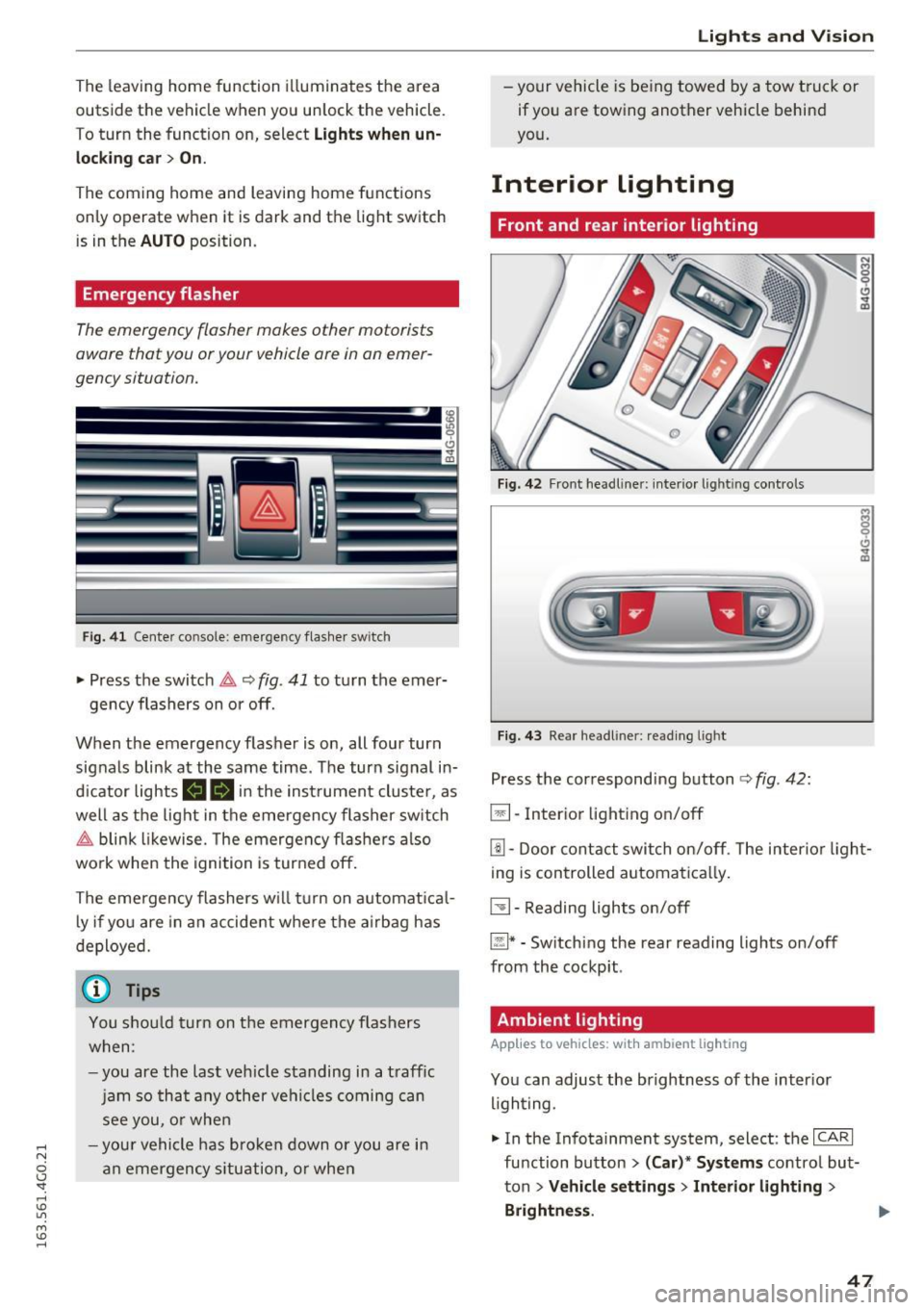
Fi g. 41 Cente r console: emergency flasher swit ch
• Press the switch &,. ~ fig. 41 to turn the emer-
gency flashers on or off.
When the emergency flasher is on, all four turn
signals blink at the same time. The turn signal in
d icator lights
(4B in the inst rument cluste r, as
well as the light in the emergency flasher switch
&,. blink likewise. The emergency flashers also
work when the ignition is turned off.
The emergency flashers w ill turn on automatical
l y if you are in an accident where the airbag has
deployed.
(0) Tips
You shou ld turn on th e emergency flashers
when:
-you are the last veh icle standing in a traff ic
jam so that any other vehicles coming can
see you, or when
- you r vehicle has broken down or you are in
an emergency situation, or when
Lights and V ision
-your vehicle is being towed by a tow truck or
if you are towing another vehicle behind
you.
Interior lighting
Front and rear interior lighting
Fig. 42 Front headl iner : in terio r light ing con trols
Fig. 43 Rea r headl iner : read ing light
Press the correspond ing button ¢ fig. 42:
El-Inter ior lighting on/off
[!] -Door contact switch on/off. The interior light
ing is controlled automatica lly.
~- Reading lights on/off
~* -Sw itch ing the rear reading lights on/off
from the cockpit .
Ambient lighting
Applies to vehicles: with ambient ligh ting
You can adjust the brightness of the inter ior
lighting.
• In the Infotainment system, select: the
ICARI
function button > (Car)'" Systems control but
ton
> Vehicle settings> Interior lighting >
Brightness . .,.
47