ignition AUDI S6 2016 Owner's Manual
[x] Cancel search | Manufacturer: AUDI, Model Year: 2016, Model line: S6, Model: AUDI S6 2016Pages: 294, PDF Size: 73.88 MB
Page 50 of 294
Lights and Vision
.. To increase or reduce the brightness, turn the
knob and press it.
The interior lighting turns on when you switch
the headlights on while the ignition is on .
(i)} Tips
The setting is a utomat ica lly stored and as
signed to the remo te control key th at is in
use.
Instrument illumination
The brightness of the illumination for the instru
ments, display and head-up display* con be ad
justed .
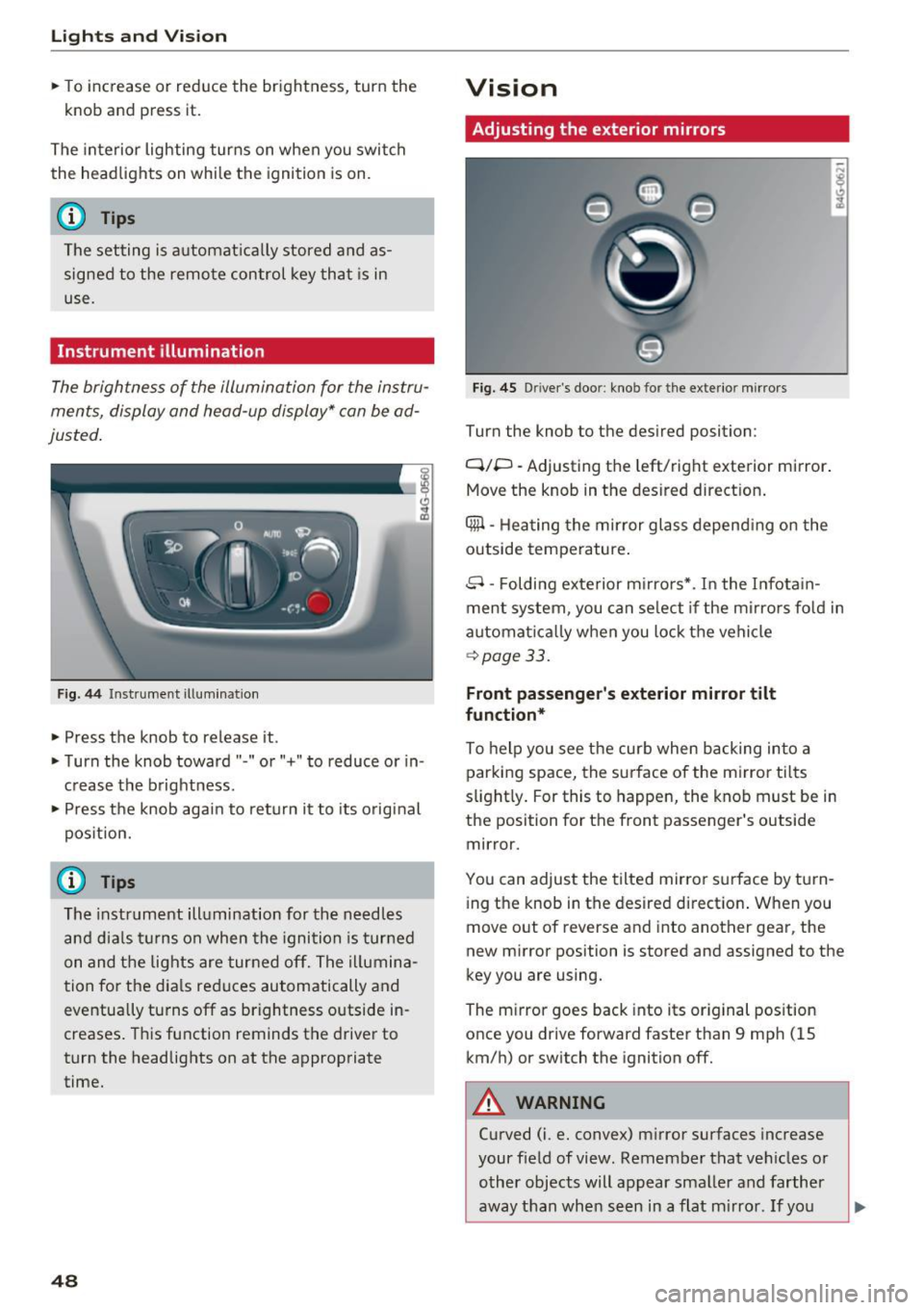
Fig . 44 Inst rument illuminat ion
.. Press the knob to release it.
.. Turn the knob toward" -" o r"+" to reduce or in
c rease the brightness .
" Press th e knob again to re turn it to its original
pos ition.
(D Tips
The instr um ent ill umination for th e need les
a n d dia ls tur ns on when the igni tio n is tur ned
on and t he lights are turned off. The i llumina
t ion for t he dia ls reduces automatically and
eventua lly tu rns off as brightness outside in
creases . T hi s function reminds the drive r to
turn the headlights on at the appropriate
time.
48
Vision
Adjusting the exterior mirrors
Fig. 45 Driver's door: kno b for the ex terio r mirrors
Turn the knob to the desired position :
Q/P -Adjusting the left/right exterior mirror.
Move the knob in the des ired dir ect ion .
Qill -Hea ting the mirror glass depend ing on the
outside temperature .
8 -Folding exterior m irro rs*. I n the I nfota in
ment system , you can se lect if the m irro rs fo ld in
automat ica lly when you lock the vehicle
~ page 33.
Front passenger 's exterior mirror tilt
function*
To help you see the curb when backing into a
par king space, the surface of the m irror tilts
s light ly . For this to happen, the knob must be in
the position for the front passenger's outside
mirror.
You can adjust the tilted mirror s urface by tu rn
i ng the knob in the desired directio n. When you
move out of reverse and i nto anot her gea r, the
new m irror position is stored and assigned to the
key you are using.
The m irror goes back into its or ig inal pos ition
once you drive forward faster than 9 mp h (15
km/h) or switch the ignition off.
A WARNING
Curved (i .e. convex) m irror surfaces increase
your f ield of view. Remember that ve hicles or
o ther objects will appear sma ller and farther
away than when s een in a flat m irro r. If yo u
Page 53 of 294
.... N
0 CJ '
Windshield wipers
Switching the windshield wipers on
Fig. SO Windshield wiper lever
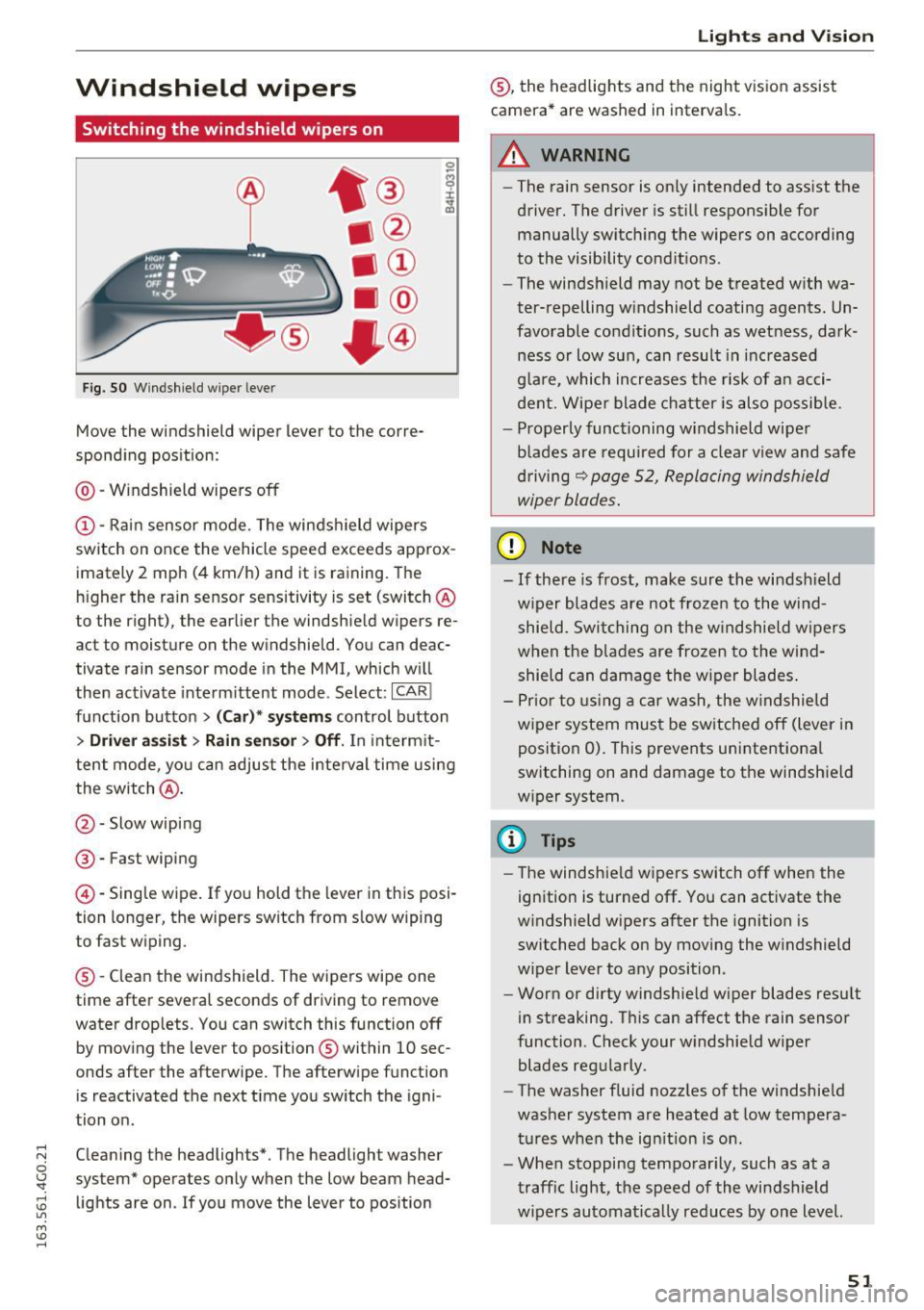
Move the windshield wiper lever to the corre
spond ing pos ition:
@ -Windshield wipers off
@-Rai n sensor mo de. The windshield wipe rs
switch on once the vehicle speed exceeds approx
imately 2 mph (4 km/h) and it is raining. The
h igher the ra in sensor sensitivity is set (switch @
to the r ight), the earlier the windshield wipers re
act to moisture on the windshield. You can deac
tivate rain sensor mode in the MMI, which w ill
then activate interm ittent mode . Select :
ICAR!
fu nction butto n > (Car )* sys tems control button
> Driver a ssis t > Rain sen sor > Off . In inte rm it
te nt mode, yo u can adjust the interval time usi ng
the switch @.
@-Slow wiping
®-Fast wiping
@-Single wipe . If you hold the leve r in this posi
tion longer, the wipers switch from s low wiping
to fast wiping .
® -Clean the windshield. The wipers wipe one
time afte r severa l seconds of driving to remove
water drop lets. You can switch this function off
by mov ing the lever to position ® within 10 sec
onds after the afterwipe. T he afterwipe function
is reactivated the next t ime you sw itch the igni
tion o n.
C leaning the headlights *. The headlight washe r
system" operates on ly when the low beam head
lights are on . If you move the lever to position
Lights and V ision
® , the headlights and the night v is ion assist
camera * are washed in interva ls.
.&_ WARNING
-
- The rain sensor is on ly intended to ass ist the
driver . The driver is sti ll respons ible for
manually switch ing the wipers on according
to the visibility cond it io ns.
- The windsh ield may not be t reated w ith wa
ter-repelling w indshield coating agents . Un
favorable condit ions, such as wet ness, dark
ness o r low sun, can result in inc reased
g la re, which increases the risk of an acci
dent. Wipe r blade chatter is also possible .
- Properly func tioning windshield wipe r
b lades are requi red for a clea r view and safe
dr iving
r:¢> page 52, Repla cing windshield
wiper blades .
(D Note
-If there is frost, make sure the wi ndshield
w iper blades are not froze n to the wi nd
shield. Swi tching on the w indshie ld w ipers
when the b la d es are frozen to the win d
shield can damage the w iper blades .
- P rior to using a c ar wash, the w indshield
w iper system mus t be sw itched off (lever i n
position 0). This prevents unintentiona l
switching on and damage to the windsh ield
w iper system .
CI) Tips
-The windshie ld wipers switch off when the
ign ition is turned off. You can activate the
w indshield wipers a fter the ignition is
switched back on by moving the w indshield
w iper lever to any position.
- Worn or dirty windshie ld w iper blades res ult
in streaking. T his can affect the rain sensor
function. Check your w indshield w iper
blades reg ularly .
- The washer f luid nozz les of the w indshie ld
was her system are heated at low tempera
tur es whe n the ign it ion is on .
- Whe n stopping temporar ily, such as at a
t raffic light, the speed of the wi ndshield
w ipers au tomatically reduces by one level.
51
Page 54 of 294
Lights and Vi sion
Cleaning w indshield wiper blades
Clean the wiper blades when you see wiper
s treaks. Use a soft cloth and a glass cleaner .
... Place the w indshield wiper arms in the service
pos ition
c::> page 52 .
... Fo ld the windshield wipe r arms away from the
winds hield.
A WARNING
Dirty windshield wiper blades can impair vi
sion, which increases the risk of an accident.
Replacing windshield wipe r blades
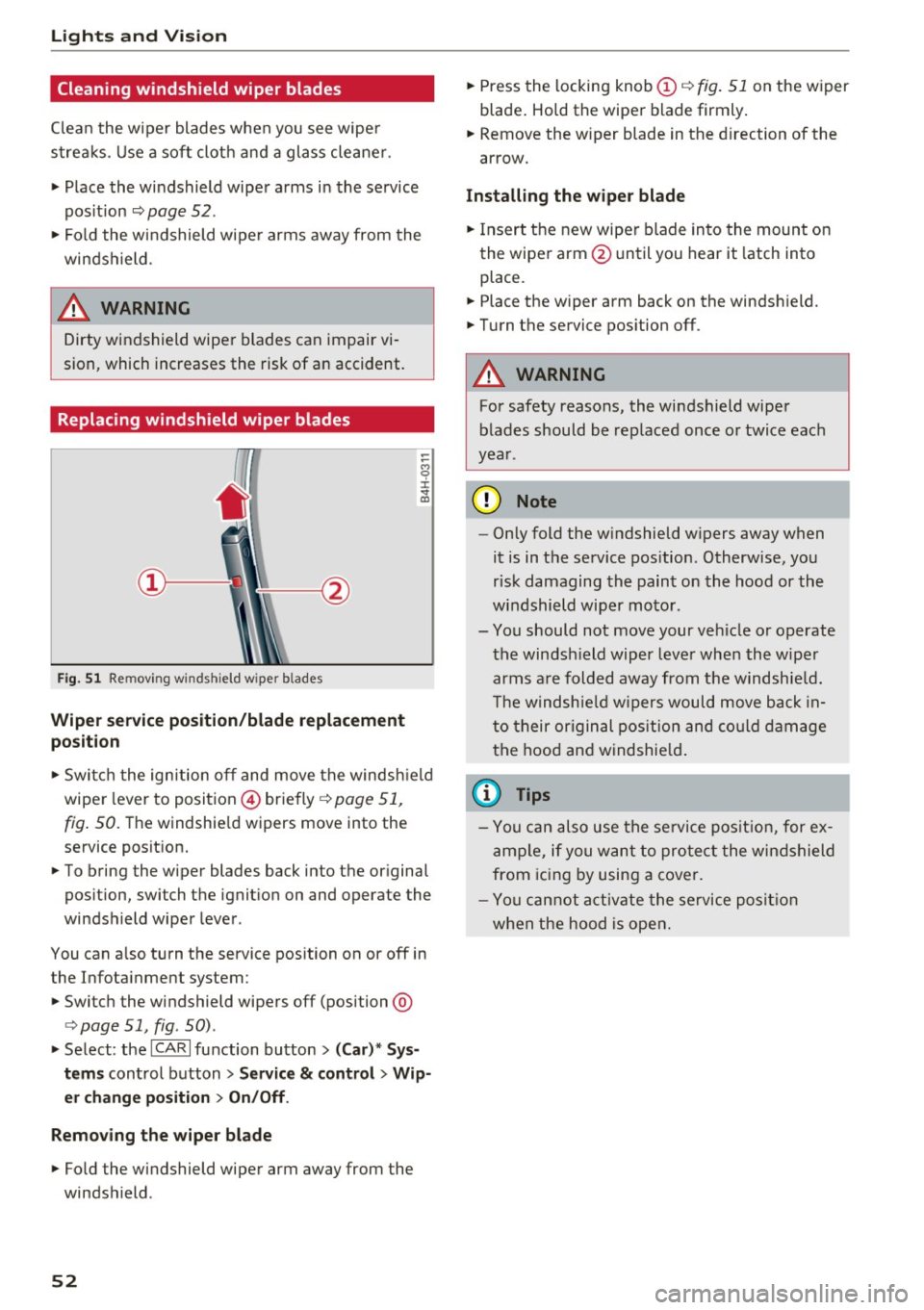
Fig. 51 Remov ing w indshi eld wiper b lades
Wiper service position/blade replacement
posit ion
:= M 0 ±
" CD
... Switch the ignition off and move the windsh ield
wiper lever to position @) briefly
c::> page 51,
fig. 50. Th e windshie ld wipers move into the
service position.
... To bring the wiper blades back into the original
position, switch the ignition on and operate the
windshield wiper lever.
You can also turn the service position on or off in
the Infotainment system:
... Switch the windshield wipers off (position @
¢ page 51, fig. 50) .
... Select: the
ICA RI function button> (Car)* Sys
tems
control button > Service & control > Wip
er change position
> On/Off .
Removing the wiper blade
... Fo ld the windshield wiper arm away from the
windshield .
52
... Press the locking knob (D c::> fig. 51 on the wiper
blade . Hold the wiper blade firmly.
... Remove the wiper blade in the direction of the
arrow .
Installing the wiper blade
... Insert the new wiper blade into the mount on
the wiper arm @until you hear it latch into
place .
... Place the wiper arm back on the windshield.
... Turn the service position off.
A WARNING
-
For safety reasons, the windshield wiper
blades should be replaced once or twice each
year .
(D Note
-Only fold the w indshield w ipers away when
it is in the service position. Otherwise, you
risk damaging the paint on the hood or the
windshield wiper motor.
- You should not move your veh icle or operate
the windsh ield wiper lever when the wiper
arms are folded away from the w indshie ld.
Th e windshie ld wipers would move back in
to their original position and could damage
the hood and windshield .
{i) Tips
- You can also use the service position, for ex
ample, if you want to protect the windshield
from icing by using a cover.
- You cannot activate the service position
when the hood is open.
Page 56 of 294
Sea ts and stor age
Front passenger 's seat
Always move the front passenger seat into the
rearmost position .
To avoid contact wi th the a irbag wh ile it is de
ploying, do not sit any closer to the instrument
panel than necessary and always wear the three
point safety belt prov ided adjusted correctly. We
recommend that yo u adj ust the passenger 's seat
i n t he following ma nner:
.. Bring the backrest up to an (almost) upright
pos ition .
Do not ride w ith the seat recl ined .
.. Fo r adjustable head restraints: adjust the head
restra int so the uppe r edge is as even as poss i
ble wi th the top of your head. If that is not pos
sible, try to adjust the head restra int so that it
is as close to this position as possib le
c:::, page 56. Move the head restraint so that it
is as close to the back of the head as possible.
.. Place your feet on the floor in front of the pas
senger's seat .
Front seats
Controls
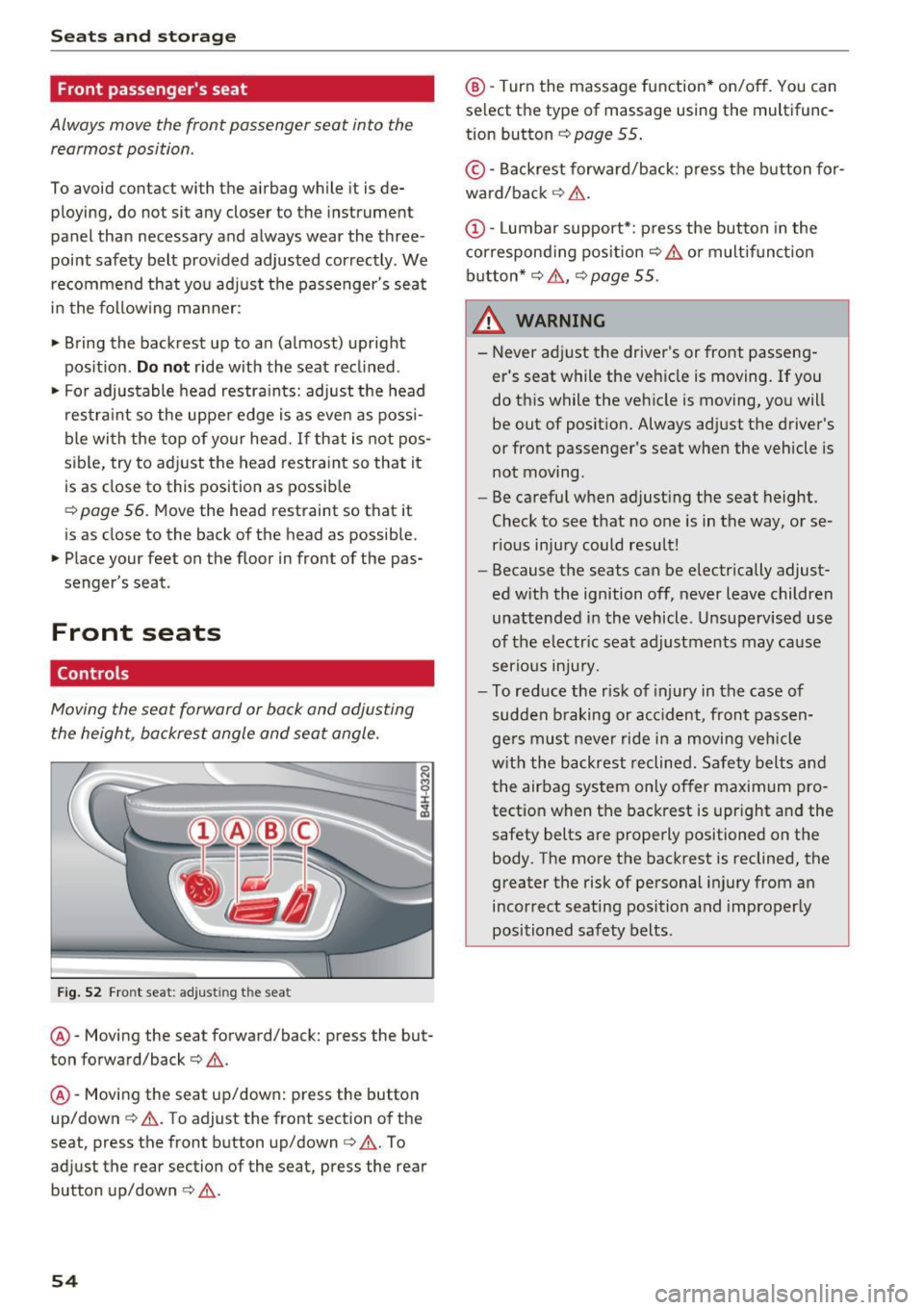
Moving the seat forward or back and adjusting
the height, backrest angle and seat angle.
Fi g. 52 Front seat: adj ust ing the seat
@ -Moving the seat forward/back: press the but
ton fo rward/back
c:::> .&. .
@ -Moving the seat up/down: press the button
up/down
c:::> & . T o adjust the front section of the
seat , press the front button up/down<=>& . To
ad just the rear section of the seat, press the rear
button up/down <=>.&. .
54
@ -Turn the massage function* on/off . You can
select the type of massage using the multifunc
tion button
c:::> page 55 .
©-Backrest forward/back : press the b utton fo r
ward/back ¢ & .
(D-Lumbar support* : press the but ton in the
cor respond ing pos it ion ¢
& or mult ifunct ion
button*
c:::> .&. , ¢page 55.
& WARNING
-Never ad just the driver's or front passeng
er 's seat while the veh icle is moving . If you
do this while the veh icle is moving, yo u will
be out of position. Always adjust the driver 's
or front passenger's seat when the vehicle is
not moving .
- Be carefu l when adjust ing the seat height .
Check to see that no one is in the way, or se
r ious injury could result!
- Because the seats can be electrically adjust
ed w ith the ignition off, never leave children
unattended i n the vehicle . Unsupervised use
of the e lectr ic sea t adjustments may cause
serious inju ry.
- To reduce the r isk of injury in the case of
sudden b raking or acc ident, front passen
ge rs must neve r ride in a moving veh icle
w it h the backrest reclined. Safety belts and
t he air bag system only offer maximum pro
tect ion when the bac krest is upr ight and the
safety belts are properly positioned on the
body. The more the backrest is reclined, the
greater the risk of pe rsonal injury from an
incorrect seating position and improper ly
positioned safety belts .
-
Page 57 of 294
.... N
0 CJ '
Multifunction button
Applies to vehicles: with memory function
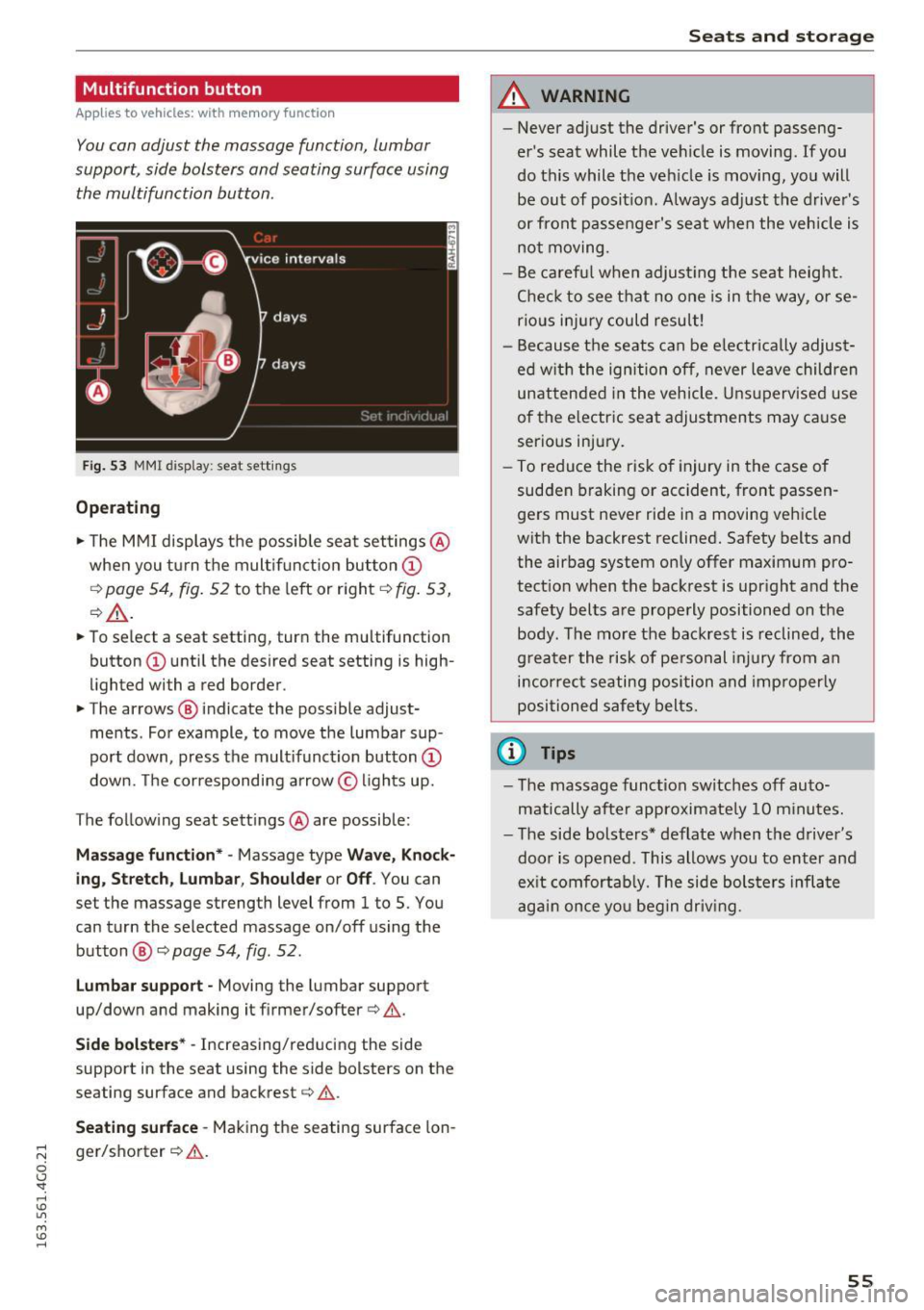
You con adjust the massage function, lumbar
support, side bolsters and seating surface using the multifunction button .
Fig. 53 MMI display: seat settings
Operating
.,. The MMI displays the possible seat settings @
when you turn the multifunction button(!)
qpoge 54, fig. 52 to the left or right qfig. 53,
¢_&. .
.,. To select a seat setting , turn the multifunction
button (!) until the desired seat setting is high
lighted with a red border .
.,. The arrows @ indicate the possible adjust
ments . For example, to move the lumbar sup
port down, press the multifunction button(!)
down. The corresponding arrow © lights up.
T he following seat settings @are possible :
Massage function* -Massage type Wave, Knock
ing, Stretch, Lumbar, Shoulder or Off.
You can
set the massage strength level from 1 to 5 . You
can turn the selected massage on/off using the
button @¢
page 54, fig . 52.
Lumbar support -Moving the lumbar support
up/down and making it firmer/softer ¢& .
Side bolsters* -Increasing/reducing the side
support in the seat using the side bolsters on the
seating surface and backrest¢& .
Seating surface -Making the seating surface lon
ger/shorter ¢&. .
Seats and storage
A WARNING
--
-Never adjust the driver's or front passeng
er's seat while the vehicle is moving. If you
do this while the vehicle is moving, you will be out of position. Always adjust the driver's
or front passenger's seat when the vehicle is
not moving.
- Be careful when adjusting the seat height.
Check to see that no one is in the way, or se
rious injury could result!
- Because the seats can be electrically adjust
ed with the ignition off, never leave children
unattended in the vehicle . Unsupervised use
of the electric seat adjustments may cause
serious injury.
- To reduce the risk of injury in the case of
sudden braking or accident, front passen
gers must never ride in a moving vehicle
with the backrest reclined. Safety belts and the airbag system only offer maximum pro
tection when the backrest is upright and the safety belts are properly positioned on the
body. The more the backrest is reclined, the
greater the risk of personal injury from an
incorrect seating position and improperly
positioned safety belts .
(0 Tips
- The massage function switches off auto
matically after approximately 10 minutes.
- The side bolsters* deflate when the driver's
door is opened . This allows you to enter and
exit comfortably. The side bolsters inflate
again once you begin driving.
55
Page 60 of 294
Seats and storage
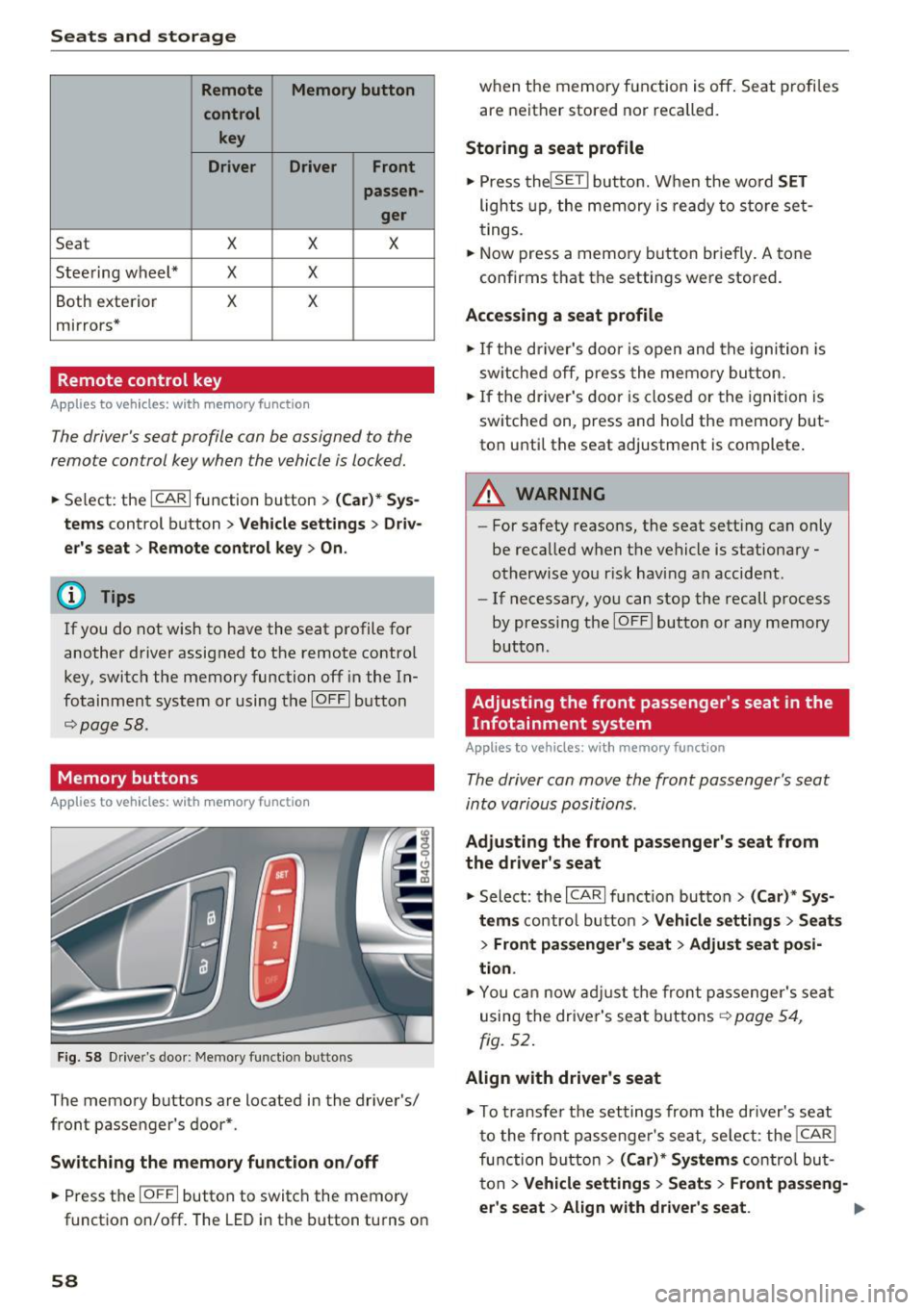
Remote Memory button
control key
Driver Driver
Front
passen-
ger
Seat X X X
Steering wheel* X
X
Both exterior X X
mirrors*
Remote control key
Applies to vehicles: w ith memory function
The driver 's seat profile con be assigned to the
remo te control key when the vehicle is locked.
• Se lect : the ICARI function button > (Car)* Sys
tems
control button > Vehicle settings > Driv
er's seat
> Remote control key > On.
(D Tips
If you do not wish to have the seat profile for
another driver assigned to the remote contro l
key, switch the memory function off in the In
fotainment system or using the IOFFI button
r::::;,poge 58.
Memory buttons
Applies to vehicles: with memory function
F ig. 58 Drive r's door : Me mory funct io n button s
The memory buttons are located in the driver's/
front passenger 's door*.
Switching the memory function on/off
• Press the IO FFI button to switch the memory
functio n on/off. The
LED in the button turns on
58 when the memory function is off
. Seat profiles
are neither stored nor recalled.
Storing a seat profile
• Press thelSE TI button. When the word SET
lights up, the memory is ready to store set
tings .
• Now press a memo ry button briefly.
A tone
confirms that th e settings were stor ed.
Accessing a seat profile
• If the driver's door is open and the ignition is
sw itched off, press the memory button.
• If the driver's door is closed or the ignition is
switched on, press and hold the memory but
ton until the seat adjustment is complete .
A WARNING
-For safety reasons, the seat sett ing can only
be recalled when the vehicle is stationary -
otherwise you r isk having an accident .
- If necessary, you can stop the recall process
by press ing the IOF FI butto n or any memory
button .
Adjusting the front passenger's seat in the
Infotainment system
Applies to vehicles: with memory function
The driver con move the front passenger's seat
into various positions .
Adjusting the front passenger's seat from
the driver's seat
• Select: the I CARI function button > (Car)* Sys
tems
control button > Vehicle settings > Seats
> Front passenger's seat > Adjust seat posi
tion .
• You can now adjust the front passenger's seat
using the driver's seat buttons
r:::;, page 54,
fig. 52.
Align with driver's seat
""To transfer the settings from the dr iver's seat
to the front passenge r's seat, se lect : the
I CAR I
function button
> (Car)* Systems contro l but
ton
> Vehicle settings > Seats > Front passeng-
er 's seat
> Align with driver 's seat . .,.
Page 71 of 294
mode switches off. The temperature shou ld be
set to approximate ly 72 °F (22 °C).
The
IAU TOI button switches the defroster off.
IQiD REAR I Switching the rea r window defo gger
on /off
The rear window heate r o nl y operates when the
engine is running. It sw itches off automatical ly
afte r a few minutes, depend ing on the outs ide
temperature.
To prevent the rear w indow heater from switch
ing off automatically , press and ho ld the
llliil R EAR I
button fo r more than 2 seconds . T his remains
stored until the ignition is switched off.
~ Ad justing seat h eating *
Pressing the button switches the seat heating on
at the highest setting (level 3) . The L EDs ind icate
the temperature level. To reduce the tempera
ture, press the button aga in. To switch the seat
heating off, p ress the button repeated ly until the
LED turns off.
Afte r 10 minutes, the seat heating automatically
switches from level 3 to level 2.
Air vents
You can open or close the center and rear vents in
the cockpit and the vents in the rear center con
sole using the r idged thumbwhee ls . T he levers
adj ust the d irection of the airflow from the ven ts.
Warm and c old
A WARNING
- You shou ld not use the recircu lation mode
for an extended period since no fres h air is
drawn in. With the a ir-conditioning switch
ed off, the windows can fog up, which in
creases the risk of an accident.
- Individuals w ith reduced sensit ivity to pa in
or temperature could develop b urns when
using the seat heat ing funct ion. To red uce
the risk of i njury, these individu als sho uld
not use seat heating.
(!;) Note
To avoid damage to the heating elements in
the seats, do not knee l on the seats o r place
heavy loads on a small area of the sea t.
Basic settings
Applies to vehicles: with three-zo ne climate control
The climate control system basic settings are ac
cessed in the Infotainment system.
~ Select : the I CAR I functio n button > (Car) * Sy s-
tem s
contro l button > A C.
Auxiliary he ater*
In veh icles with diesel engines, the auxiliary
heater helps to warm the vehicle interior more
quickly . T he auxiliary heater is controlled auto
matically in the
Auto setting .
69
Page 73 of 294
At both of these settings, the climate control sys
tem runs continuously at maximum cooling or heating power. T here is no temperature regula
tion .
Adjusting the blower~
You can adjust the volume of air generated by the
b lower to your preference. To have the blower
r e gulated automatica lly, press the
IAUTO I but
ton .
~ Adjusting air distribution
You can manually select the vents where the air
will flow. To have the air distribution regu lated
automatically , p ress the
IAU TO ! button.
~ Adjusting seat heating*/seat ventilation*
Pressing the button switches the seat heating/
seat ventilat ion on at the highest setting (leve l
3). The LEDs indicate the temperature level. To
r educe the temperature, press the button again .
To switch the seat heating/seat venti lation off,
press the button repeatedly until the LED turns
off.
Afte r 10 minutes, the seat heating automatically
switches from level 3 to level 2.
l
or cleared of condensation as quickly as possible.
The maximum amount of air flows mainly from
the vents below the windshield. Recirculation
mode switches off . The temperature shou ld be
set to approximate ly 22
° C.
The IAU TOI button sw itches the defroster off.
IQ:il REAR I Switching the rear window defogger
on/off
The rear window heate r o nl y operates when the
engine is running. It sw itches off automatically
after a few minutes, depending on the outs ide
temperature.
To prevent the rear w indow heater from switch
ing off automatically, press and hold the
lljjjl REAR I
button for more than 2 seconds. This remains
stored until the ignition is switched off.
Warm and cold
I SYNC ! Synchronization
When synchronization is switched on, the set
tings for the driver's s ide are applied to the front
passenger's side (except for seat heating/ventila
tion *). The s ettings in the rear are also synchron
i z ed. Synchronization switches off if the settings
are adjusted on the front passenger's side or in
the rear.
You can synchronize the settings in a row by
pressing and holding a control. For example, to
apply the settings for the front passenge r's side
to the driver's side, press and hold the control on
the front passenger's s ide . The same applies to
the rear.
Residual heat*
With the ign ition turned off, you can activate the
residual heat function by pressing the~ button
<=> fig. 75. The residual heat from the coolant is
used to heat the veh icle inter ior . The residual
heat function sw itches off automat ica lly after
about 30 minutes.
Air vents
You can open or close the center and rear vents in
the cockpit and the vents in the rear center con
sole and door pillars using the ridged thumb
whee ls. Th e levers adjust the direction of the air
flow from the vents.
_&. WARNING
-You should not use the recirculation mode
for an extended period since no fresh air is
drawn in. With the air-conditioning switch
ed off, the windows can fog up, which in
creases the risk of an accident.
- Individuals with reduced sensitivity to pain
or temperature could develop burns when
using the seat heat ing funct ion. To reduce
the risk of injury, these individuals should
not use seat heating .
(D Note
To avoid damage to the heating elements in
the seats, do not kneel on the seats or place
heavy loads on a small area of the seat.
71
Page 76 of 294
Driving
There must be at least 10 inches (25 cm) be
tween your chest and the center of the steering
wheel. If you cannot sit more than 10 inches (25
cm) from the steer ing wheel, see if adaptive
equipment is available to help you reach the ped
als and increase the distance from the steering
wheel.
For detai led information on how to adjust the
driver's seat, see
¢ page 54 .
In vehicles with the memory function*, the steer
ing column sett ings are stored together with the
seat position.
A WARNING
Improper use of steer ing whee l adjustment
and improper seating position can cause ser i
ous pe rsonal injury.
- Adjust the steering wheel column only when
the vehicle is not moving to prevent loss of
vehicle control.
- Adjust the driver's seat or steering wheel so
that there is a minimum of 10 inches (25
cm) between your chest and the steer ing
wheel
r::.> page 126, fig. 143. If you cannot
mainta in this min imum distance, the airbag
system cannot protect you properly.
- If phys ica l limitations prevent you from sit
t ing 10 inches (25 cm) or more from the
steering wheel , check with your authorized
Audi dealer to see if adaptive equ ipment is
available.
- If the steering wheel is aligned with your
face, the supp lemental driver's airbag can
not provide as m uch protection in an acci
dent. Always make sure that the steering
wheel is aligned w ith your chest.
- Always hold the steer ing whee l with your
hands at the 9 o'clock and 3 o'clock posi
tions to reduce the risk of personal injury if
the driver's airbag deploys .
- Never hold the steer ing wheel at the 12
o'clock posit ion or w ith your hands inside
the steering wheel rim or on the steering
wheel hub . Holding the steer ing whee l the
wrong way can cause ser ious injuries to the
hands, arms and head if the driver's airbag
deploys.
74
-
Easy seat entry
Applies to vehicles: with power steering wheel adjustment
Easy seat entry makes it easier to enter and exit
the vehicle by adjusting the steering column au
tomatically .
.,. In the Infotainment system, selec t: the ICARI
function button > (Car )* Systems control but
ton
> Vehicle settings > Seats > Driver's seat>
Easy seat entry> On.
When easy seat entry is switched on, the steer ing
column goes back up into the park position when
the ignit ion is switched off . After enter ing the ve
hicle, the steering col umn returns to t he sto red
pos ition once the ign it ion is swi tched on.
Starting and stopping
the engine
Starting the engine
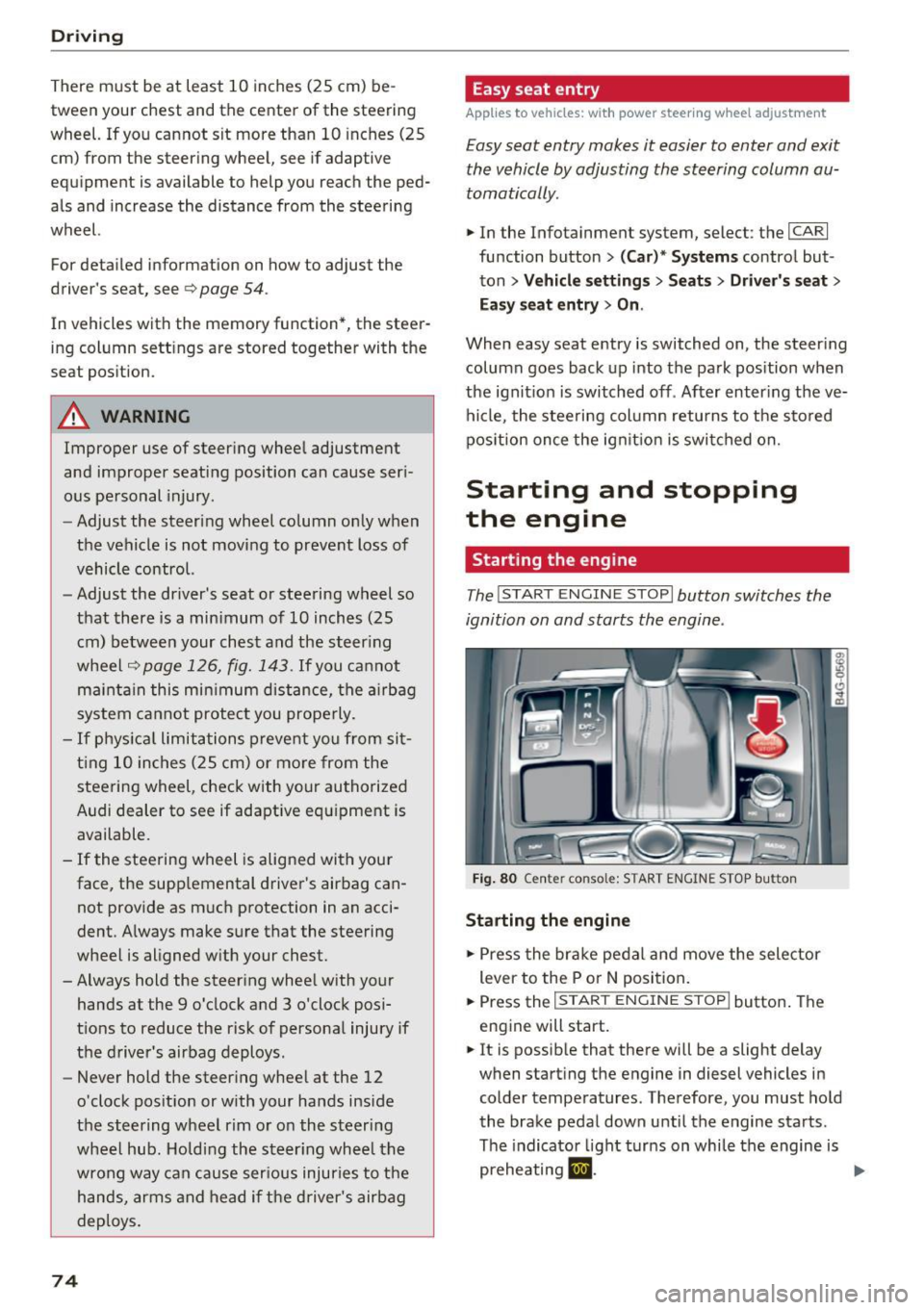
The I START ENGINE STOP I button switches the
ignition on and starts the engine .
Fig. 80 Cente r conso le: S TART ENGINE STOP b utt on
Starting the engine
.,. Press the brake pedal and move the selector
lever to the P or
N position.
... Press the
!STAR T ENGINE ST OP ! button. The
engine will start.
.,. It is possible that there will be a slight delay
when starting the engine in diesel vehicles in colder temperatures . Therefore, you must hold
the brake pedal down until the engine starts.
The indicator light turns on while the engine is
preheating
1,1 . ..,.
Page 77 of 294
Switching the ignition on/off
If you would like to switch the ignition on with
out starting the engine, follow these steps:
.,. Press the
I STAR T ENGINE STOPI button with·
out pressing the brake pedal.
.,. To switch the ignition off, press the button
again. The needle in the tachometer moves into
the
OFF position.
The prewarming runs automatically in diesel
vehicles when the ignition is switched on.
Equipment that uses a lot of electricity is switch
ed off temporarily when you start the engine.
If the engine should not start immediately, the
starting process is automatically stopped after a
short time. Repeat starting procedure .
Start-Stop-System*
Note the information in c> page 79, Start-Stop
System.
A WARNING
- Never allow the engine to run in confined
spaces, because this increases the risk of as
phyxiation.
- Never turn off the engine before the vehicle
has come to a complete stop.
- The brake booster and power steering no
longer function when you stop the engine.
You must use more force when braking or
steering. Because you cannot brake and
steer as you usually would, this could lead
to accidents and serious injuries. These
functions are still active if the Start-Stop
System* has stopped the engine.
(D Note
Avoid high engine speed, full throttle, and
heavy engine load as long as the engine has
not reached operating temperature yet. You
could damage the engine.
@ For the sake of the environment
Do not let the engine run while parked to
warm up. Begin driving immediately. This re
duces unnecessary emissions.
-
Driving
{!) Tips
- After starting a cold engine, there may be a
brief period of increased noise because the
oil pressure must first build up in the hy
draulic valve adjusters. This is normal and
not a cause for concern .
- If you leave the vehicle with the ignition
switched on, the ignition will switch off af
ter a certain amount of time. Make sure that electrical equipment such as the exterior
lights are switched off.
Stopping the engine
.,. Bring your vehicle to a complete stop.
.,. Move the selector lever to the P or N position.
.. Press the
!START ENGINE STOP ! button
r:!>poge 74, fig. 80.
Steering lock
The steering locks when you turn the engine off
using the
I START ENGINE STOPI button and
open the driver's door. The locked steering helps
prevent vehicle theft.
Emergency off
If necessary, the engine can be switched off with
the selector lever in the R or D/S position. The
engine stops if you press and hold the
!START ENGINE STOP ! button at speeds below
6 mph (10 km/h) and press the brake pedal.
A WARNING
-Never turn off the engine until the vehicle
has come to a complete stop.
- The brake booster and power steering only
work when the engine is running.
If the en
gine is off, you have to use more force when
steering or braking. Because you cannot
steer and brake as you usually would, this
could lead to crashes and serious injuries.
- For safety reasons, you should always park
your vehicle with the selector lever in P.
Otherwise, the vehicle could inadvertently
roll away.
-
75