warning AUDI S6 2016 Owner's Manual
[x] Cancel search | Manufacturer: AUDI, Model Year: 2016, Model line: S6, Model: AUDI S6 2016Pages: 294, PDF Size: 73.88 MB
Page 33 of 294
.... N
0 CJ '
.. Press the release button@ c::> fig. 18.
.. Pull the mechanical key @ out of the master
key.
Using the mechanical key , you can:
- lock and unlock the storage compartment on
the passenger's s ide
c::> page 61.
- lock and unlock the vehicle manually
Qpage 35.
-lock the front and rear passenger doors me
chanically
c::> page 36.
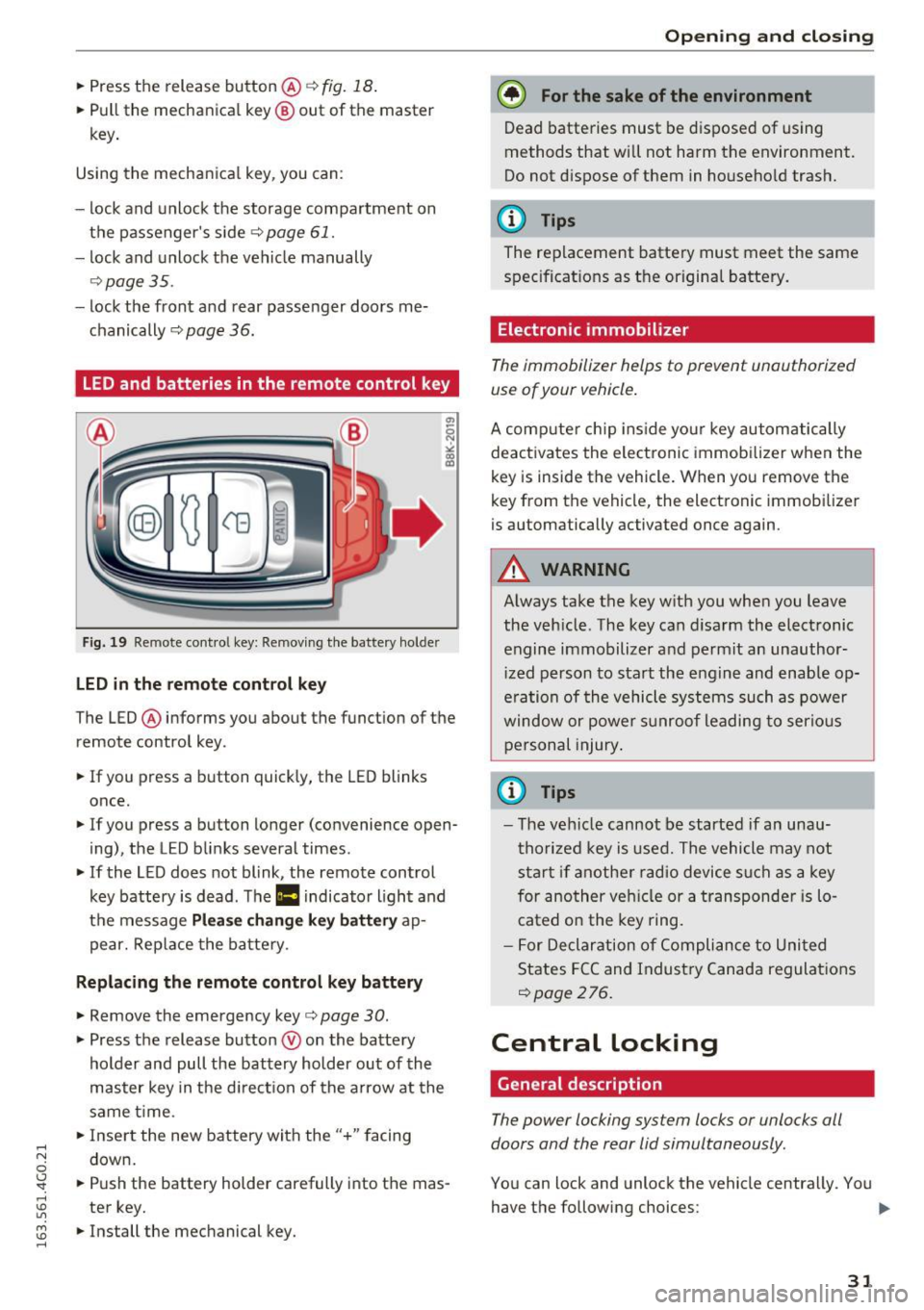
LED and batteries in the remote control key
Fig. 19 Re mote cont ro l key: Removing the battery holde r
LED in the remote control key
The LED ® informs you about the function of the
remote control key .
.. If you press a button quickly, the LED blinks
once.
.. If you press a button longer (convenience open
ing) , the LED blinks several times .
.. If the LED does not blink, the remote control
key battery is dead . The
Ill indicator light and
the message
Plea se change key battery ap
pear. Replace the battery .
Replacing the remote control key battery
.. Remove the emergency key c::> page 30 .
.,. Press the release button ® on the battery
holder and pull the battery holder out of the
master key in the direction of the arrow at the
same time.
.. Insert the new battery with the
"+ " facing
down.
.. Push the battery holder carefully into the mas
ter key.
.. Install the mechanical key.
Open ing and closing
@) For the sake of the environment
Dead batteries must be disposed of using
methods that will not harm the environment.
Do not d ispose of them in household trash.
@ Tips
The replacement battery must meet the same
specifications as the origina l battery.
Electronic immobilizer
The immobilizer helps to prevent unauthorized
use of your vehicle .
A computer chip ins ide your key automatically
deactivates the electronic immobilizer when the
key is inside the vehicle. When you remove the
key from the vehicle, the electronic immobilizer
is automatically activated once again.
A WARNING
-Always take the key with you when you leave
the vehicle. The key can disarm the electronic
engine immobilizer and permit an unauthor
iz ed person to start the engine and enable op
e rat ion of the vehicle systems such as power
window or power s unroof leading to serious
personal injury .
@ Tips
-The vehicle cannot be started if an unau
thorized key is used. The vehicle may not
start if another radio device such as a key
for another vehicle or a transponder is lo
cated on the key ring.
- For Declaration of Compliance to United
States FCC and Industry Canada regulations
Qpage 276 .
Central Locking
General description
The power locking system locks or unlocks all
doors and the rear lid simultaneously.
You can lock and unlock the vehicle centrally. You have the following choices:
111>
31
Page 34 of 294
Opening and closing
-Remote master key¢ page 33,
-Door handles with convenience key*
¢page 34,
- Lock cylinder at the driver's door¢ page 35,
or
- Power locking switch inside¢
page 35.
Selective unlocking
When you lock the vehicle, the power locking sys
tem will lock the doors and the rear lid . When
unlocking, you can set in the MMI whether only
the driver's door or the entire vehicle should be unlocked
¢ page 33.
Automatic locking
The automatic locking feature locks all the vehi
cle doors and the rear lid when you drive faster
than 9 mph (15 km/h) .
The car is unlocked again, when the opening
function in the power locking system switch or at
one of the door levers is actuated.
Anti-theft alarm warning system
If the anti-theft alarm warning system detects a break-in into the vehicle, acoustic and visual
warning signals are triggered.
The anti-theft warning system is activated auto matically when you lock the vehicle. It is deacti
vated when unlocking using the remote key, with
the mechanical key, and when you switch the ig nition on.
The alarm also turns off when the alarm cycle has
expired.
Turn signals
When you unlock the vehicle , the turn signals
flash twice. When you lock the vehicle the turn
signals flash once. If they do not flash, one of the
doors, the rear lid or the hood is not locked.
Unintentionally locking yourself out
In the following cases there safeguards to pre
vent you locking your remote master key in the
vehicle:
- The vehicle does not lock with the central lock
ing switch ¢
page 35 if the driver's door is
open.
32
- On vehicles with convenience key*, if the most
recently used master key is in the luggage com
partment, the rear lid is automatically unlocked
again after it is closed .
Do not lock your vehicle with the
remote master
key or convenience key*
until all doors and the
rear lid are closed. In this way you avoid locking
yourself out accidentally.
Power side door closer*
The vehicle doors are equipped with a power side door closer. When closing a door, you only have
to let it fall lightly into the latch. The door will
then automatically close by itself¢&..
A WARNING
-
-When you lock your vehicle from outside,
nobody - especially children - should remain
inside the vehicle . Remember , when you
lock the vehicle from the outside the win
dows cannot be opened from the inside.
- When you leave the vehicle, always take the ignition key with you. This will prevent pas
sengers (children, for example) from acci
dentally being locked in the vehicle should
they accidentally press the power locking
switch in the doors.
- Do not leave children inside the vehicle un
supervised. In an emergency it would be im
possible to open the doors from the outside
without the key.
- Applies to vehicles with power side door
closer*:
- When closing a door, make sure nothing
can interfere with the door. This could
cause serious personal injury .
- You can stop the door from closing at any
time by pulling on the inside or outside
door handle.
(D Tips
- In the event of a crash with airbag deploy
ment all locked doors will be automatically
unlocked to give access to the vehicle occu
pants from the outside.
Page 35 of 294
.... N
0 CJ '
-If the power locking system should mal
function, you can lock the driver's door
using the mechanical key¢
page 36.
-If the power locking system should fail, you
can still open the fuel tank flap in an emer
gency
c!;> page 212.
- You are well advised not to keep valuables
inside an unattended vehicle, visible or not.
Even a properly locked vehicle cannot pro
vide the security of a safe.
- If the LED in the upper edge of the driver's
door panel comes on for about 30 seconds
after the vehicle is locked, there is a mal
function in the power locking or the anti
theft warning system. Have the malfunction
corrected by an authorized Audi dealership
or qualified repair facility.
Setting central locking
In the Infotainment system, you can set which
doors the central locking system will unlock.
... Select: the I CA R I function button > (Car)* Sys
tems
control button > Vehicle settings > Cen
tral locking* .
Door unlocking -
You can decide if All doors or
only the
Driver should unlock. The luggage com
partment lid also unlocks when
All is selected. If
you select Driver in a vehicle with a convenience
key*, only the door whose handle you pull will un
lock.
If you select Driver, all the doors and luggage
compartment lid will unlock if you press the
l@J
button on the remote control master key twice.
Disable tailgate handle -If you select On, the
luggage compartment lid handle is locked. In
this case the luggage compartment lid can be
opened with the
l= I button on the master key or
with the
l =I button* in the driver's door. In
vehicles with a convenience key*, you can still
open the luggage compartment lid using the
handle if an authorized master key is near the
proximity sensor* .
Fold mirrors when locking* -If you select On ,
the exterior rearview mirrors fold in automatical
ly when you press the[@] button on the remote
Opening and closing
control master key or touch the sensor* in the
handle.
Tone when locking -if you select On, a tone will
sound when you lock the vehicle.
Locking and unlocking the vehicle with the
remote control
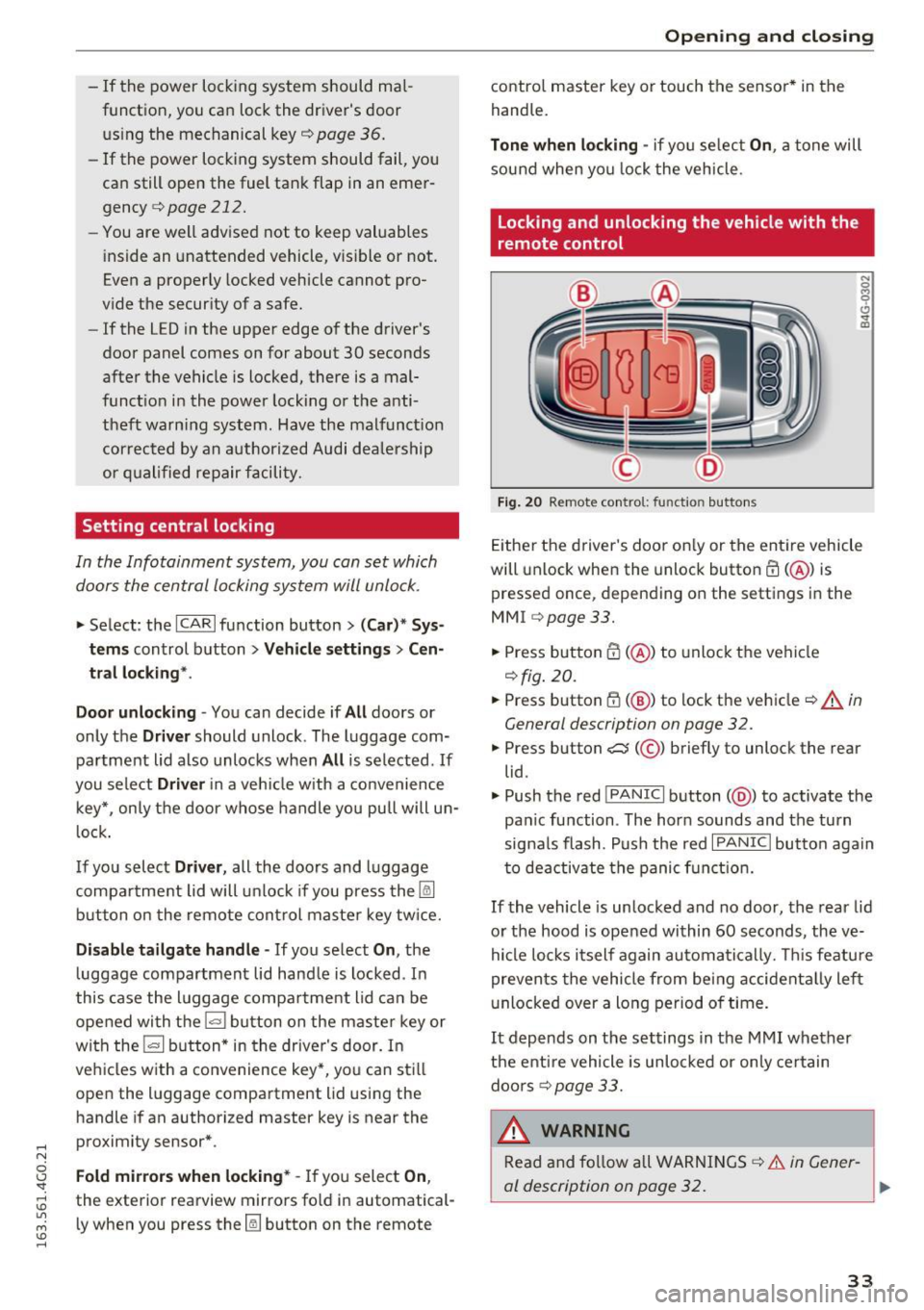
Fig. 20 Remote control: function buttons
N
0 ...,
9 C)
"' m
Either the driver's door only or the entire vehicle
will unlock when the unlock button
m (@ ) is
pressed once, depending on the settings in the
MMI c> page 33 .
1> Press button m (@ ) to unlock the vehicle
c> fig. 20 .
... Press button lil (@ ) to lock the vehicle c!;> .&. in
General description on page 32.
... Press button C:$ (@ ) briefly to unlock the rear
lid.
... Push the red
!PANIC I button( @) to activate the
panic function . The horn sounds and the turn
signals flash. Push the red
I PANIC I button again
to deactivate the panic function.
If the vehicle is unlocked and no door, the rear lid
or the hood is opened within 60 seconds, the ve
hicle locks itself again automatically. This feature
prevents the vehicle from being accidentally left
unlocked over a long period of time.
It depends on the settings in the MMI whether
the entire vehicle is unlocked or only certain
doors
c!,> page 33.
_& WARNING ~
Read and follow all WARNINGS¢&. in Gener-
al description on page 32. ..,.
33
Page 36 of 294
Opening and closin g
(D Tips
- In order to make sure the locking function is
working, you shou ld always keep your eye
on the vehicle to make sure it is properly l ocked.
- Do not use the remote contro l if you are in
side the car, otherwise you may uninten
tionally lock the veh icle, and then you would
set off the anti-theft alarm when you try to
start the engine or open a door. In case this
happens anyhow, push the unlock button
ITJ.
- The vehicle can only be locked when these
l ector lever is in the P posit ion .
- Use the panic funct ion only if you are in an
emergency s ituation.
Locking and unlocking with convenience
key
A ppl ies to veh icles: w ith conve nien ce key
The doors and the rear lid can be unlocked and
locked without operating the master key.
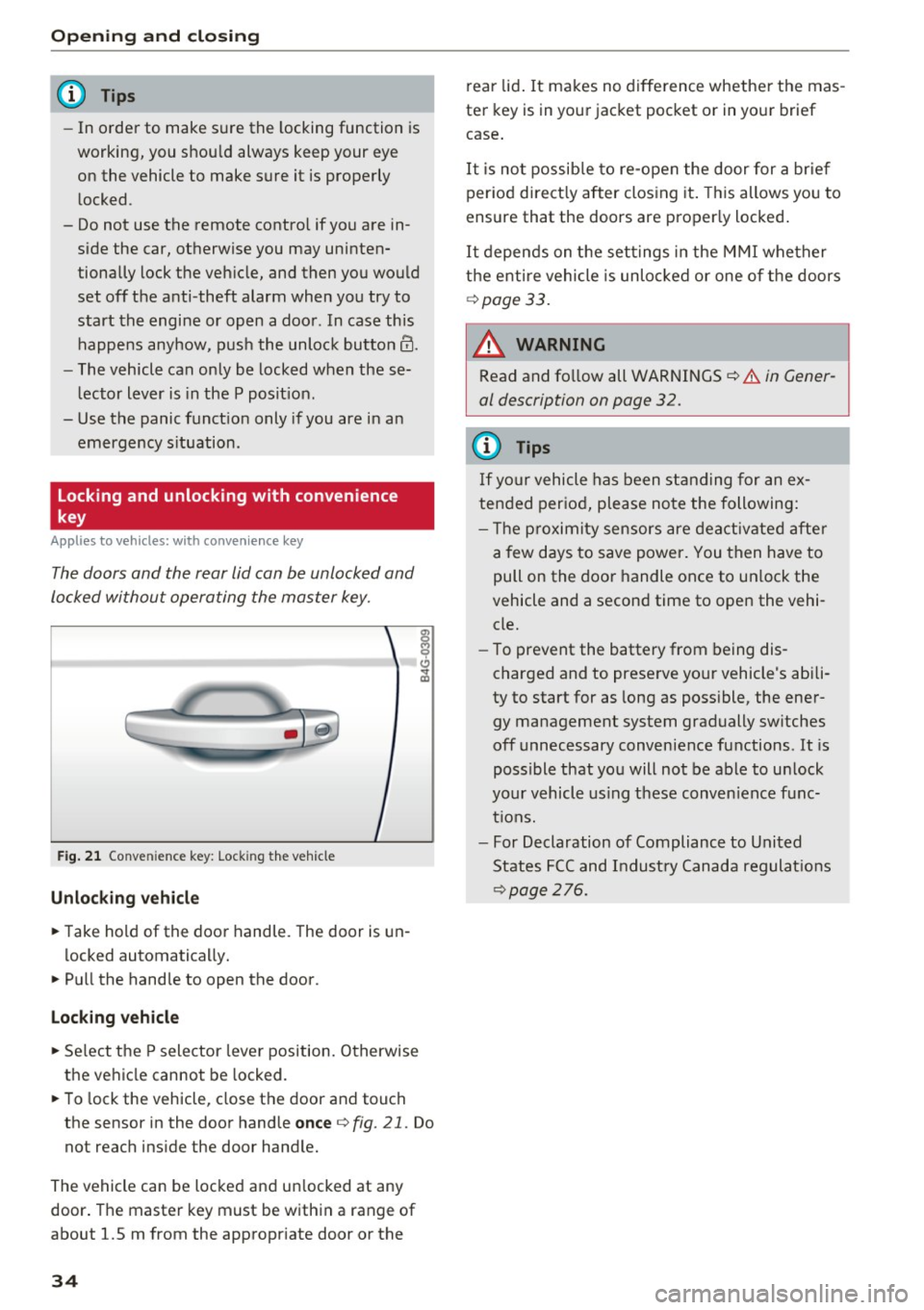
F ig . 2 1 Conven ie n ce key: Lock ing the vehicle
Unlocking vehicle
.. Take hold of the door handle. The door is un -
l ocked automatically .
.,. Pull the hand le to open the door.
Loc king vehicle
.,. Se lect the P selector leve r position. Otherwise
the vehicle cannot be locked .
.. To lock the vehicle, close the door and touch
the sensor in the door handle
once q fig. 21 . Do
not reach ins ide the door handle.
The vehicle can be locked and un locked at any
door . The master key must be w ith in a range of
about 1.5 m from the appropriate door or the
34
rear lid . It makes no diffe rence whether the mas
ter key is in your jacket pocket or in yo ur brief
case .
It is no t possib le to re-open the door for a br ief
per iod direct ly after clos ing it . T his allows you to
ensure that the doors are proper ly locked .
It depends on t he set tings in the M MI whether
the enti re vehicle is unlo cked or one of the doors
¢ page 33.
_& WARNING
Read and fo llow all WARNINGS¢
& in Gener
al description on page 32.
@ Tips
If yo ur vehicle has been s tanding for an ex
tended period, please note the following:
- T he p roximity sensors are deactiv ated after
a few d ays to save power. You then have to
pull on the door handle once to un lock the
vehicle and a second time to open the vehi
cle.
- To prevent the battery from being dis
charged and to prese rve your vehicle's abili
ty to start for as long as poss ible, the ene r
gy management system gradually sw itches
off unnecessary convenience functions . It is
possible that yo u will not be able to un lock
yo ur vehicle using t hese conven ience f unc
t ions.
- For Declaration of Compliance to United
States FCC and Indust ry Canada regulat io ns
¢page
276.
Page 37 of 294
.... N
0 CJ '
Operating locks with the key
In the event of a failure of the power locking system, the driver's door can be locked and un
locked at the lock cylinder.
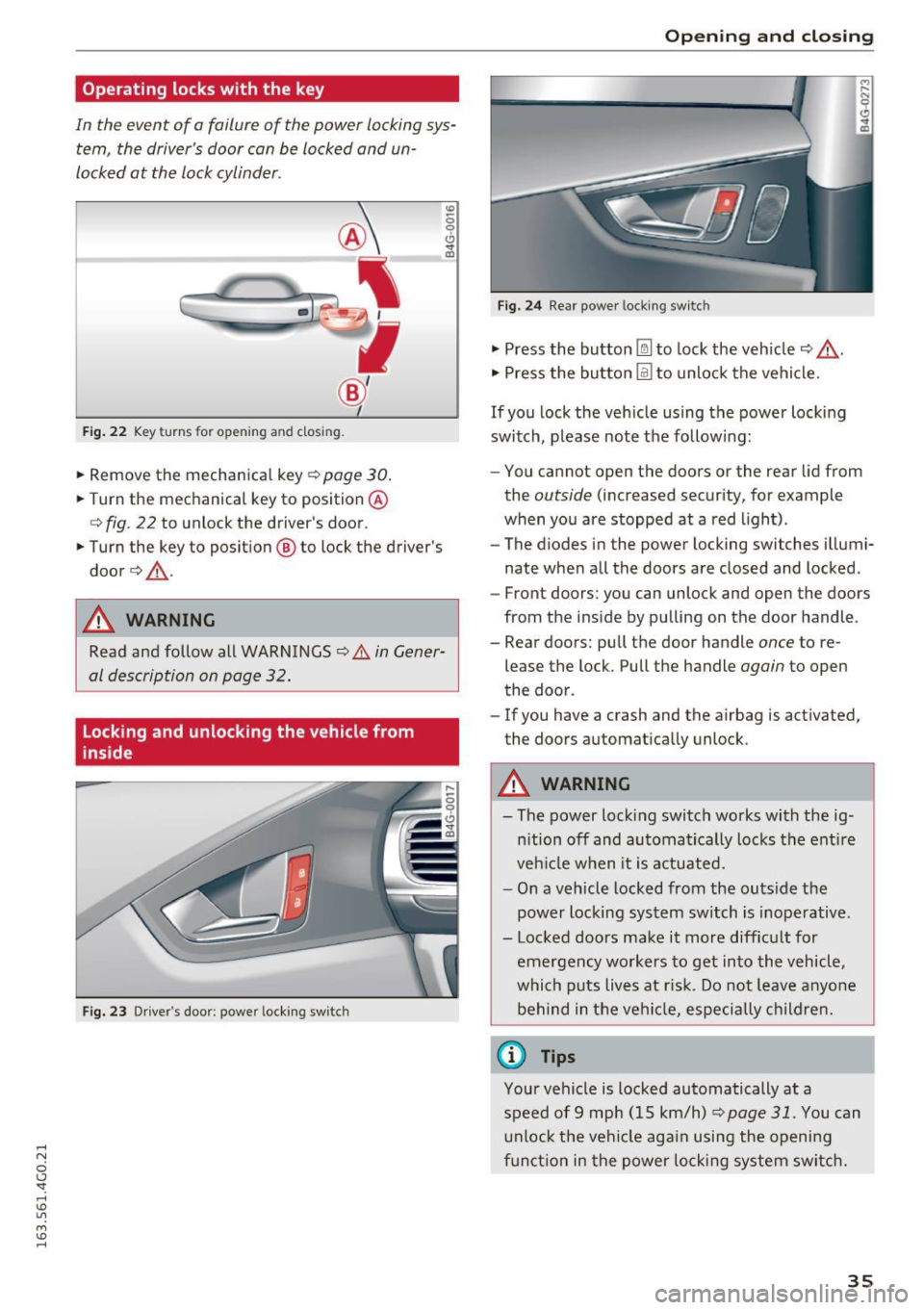
• p.
Fig . 22 Key turns fo r open ing a nd clos ing.
• Remove the mechanica l key c::> page 30.
• Turn the mechanical key to position @
<=>fig . 22 to unlock the driver's door .
• Turn the key to position ® to lock the driver's
door
c::> & -
A WARNING
co
0 9 (!)
" ID
Read and follow all WARNINGS c::> .&. in Gener
al description on page 32.
Locking and unlocking the vehicle from
inside
Fig. 23 Driver's doo r: powe r locking sw itc h
Open ing and closing
Fig. 24 Rear powe r lock ing switc h
• Press the button @l to lock the vehicle c::> ,&.
• Press the button @I to unlock the vehicle.
If you lock the veh icle using the power locking
switch, p lease note the follow ing:
- You cannot open the doors or the rear lid from
the
outside (increased security, for example
when you are stopped at a red light).
- The diodes in the power locking switches illumi
nate when all the doors are closed and locked .
- Front doors: you can unlock and open the doors
from the ins ide by pulling on the door handle.
- Rear doors: pull the door handle
once to re
lease the lock. Pull the handle
again to open
the door .
- If you have a crash and the airbag is activated,
the doors automatically unlock .
A WARNING
-- The power locking switch works with the ig-
nition off and automatically locks the entire
veh icle when it is actuated.
- On a vehicle locked from the outs ide the
power locking system switch is inoperative.
- Locked doors make it more difficult for emergency workers to get into the vehicle,
which puts lives at ris k . Do not leave anyone
behind in the vehi cle, especially children.
(0 Tips
Your vehicle is locked automatically at a
speed of 9 mph (15 km/h)
~ page 31. You can
unlock the vehicle aga in usi ng the opening
function in the power locking system switch.
35
Page 38 of 294
Opening and clo sin g
Emergency locking
Each door must be locked separately if the pow
er locking system fails.
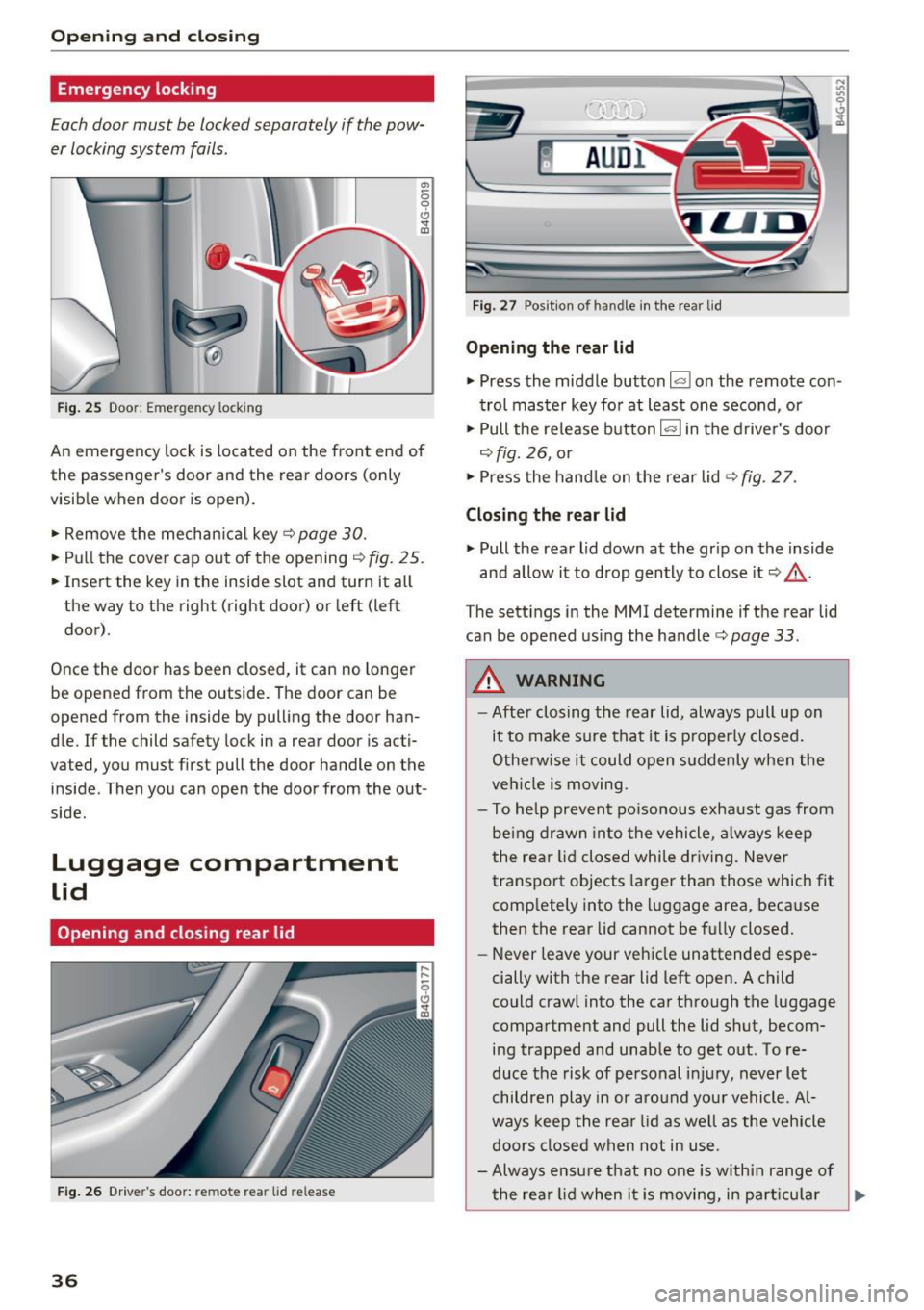
Fig . 25 Door: Emergency lock ing
.,,
0 9 Cl
the passenger's door and the rear doors (only
visib le when door is open).
.. Remove the mechan ica l key¢
page 30.
.. Pull the cover cap out of the opening¢ fig. 25.
.. Insert the key in the inside slot and turn it a ll
the way to the right (right door) or left (left
door).
Once the door has been closed, it can no longer
be opened from the outside. The door can be
opened from the inside by pulling the door han
d le. If the child safety tock in a rear door is acti
vated, you must first pull the door handle on the
inside . Then you can open the door from the out
side.
Luggage compartment
Lid
Opening and closing rear lid
F ig . 26 Dr ive r's door: re m ote rea r lid re lease
36
F ig. 27 Posit ion of hand le in the rear lid
Opening the rear lid
.. Press the middle button lasl on the remote con
trol master key for at least one second, or
.. Pull the release button
las l in the drive r's door
¢ fig. 26, or
.. Press the hand le on the rear lid ¢
fig. 2 7.
Closing the rear lid
.. Pull the rear lid down at the gr ip on the inside
and allow it to drop gently to close it ¢ &. -
The sett ings in the MMI determine if the rear lid
can be opened us ing the handle ¢
page 33.
A WARNING
-After closing the rear lid, always pull up on
it to make sure that it is p roperly closed.
Otherwise it could open suddenly when the
veh icle is moving.
- To help prevent po isonous exhaust gas from
be ing drawn into the vehicle , always keep
the rear lid closed while driving . Never
transpo rt objects la rger than those which fit
comp letely into the luggage area, because
then the rear lid cannot be fully closed.
- Never leave your vehicle unattended espe
cially with the rear lid left open. A child
could crawl into the car through the luggage
compartment and pull the lid shut, becom ing trapped and unable to get out. To re
duce the risk of personal i njury, never let
children play in or around your vehicle . Al
ways keep the rea r lid as we ll as the vehicle
doors closed when not in use.
- Always ensure that no one is within range of
the rea r lid when i t is moving, in part icu lar
II>-
Page 40 of 294
Opening and clo sin g
_& WARNING
Read and follow all WARNINGS¢ page 31,
General description.
- After closing the rear lid, always pull up on
it to make sure that it is properly closed.
Otherwise it could open suddenly when the
vehicle is mov ing.
- To help prevent poisonous exhaust gas from
being drawn into the veh icle, always keep
the rear lid closed while driving. Never
transport objects larger than those which fit
comple tely into the luggage area, because
then the rear lid cannot be fully closed.
- Never leave yo ur vehicle unattended espe
c ially w ith the rea r lid left open. A child
could crawl into the car through the luggage
compartment and pull the lid shut, becom
ing trapped and unable to get out. To re
duce the r isk of personal injury, never let
children play in or around your vehicle. Al
ways keep the rear lid as well as the vehicle doo rs closed when not in use.
- Never close the rear lid inattentively or with
out checking first. Although the closing
force of the rear lid is lim ited, you can still
seriously injure yourse lf or others.
-Always ensure that no one is within range of the rear lid when it is moving, in particular
close to the h inges and the upper and lowe r
edges -fingers or han ds can be pinched.
- Never try to interfere w ith the rear lid or
help it when it is being opened or closed a u
tomat ica lly.
(D Tips
- The setti ngs i n the Infota inment system de
termine if the l uggage compartment lid can
be opened using t he handle
Q page 33.
-When the vehicle is locked, the luggage
compartmen t lid can be unlocked separately
by p ressing the b utton
l= I on the remote
contro l key. W hen the luggage compart
ment lid is closed aga in, it locks a utomati
ca lly.
- You can close the luggage compartment lid
us ing the maste r key (veh icles with conven -
38
ience key*) up to a distance of approximate
ly 9
ft (3 m).
- Th e luggage compartment lid can be oper
ated by hand if the vehicle battery is low . It
is necessa ry to use more force w hen doing
this. Move the lid s low ly to reduce the
amount of force needed.
Luggage compartment with movement
activated opening
Applies to vehicles : wit h convenience key and sensor -control
led luggage comp artm en t lid
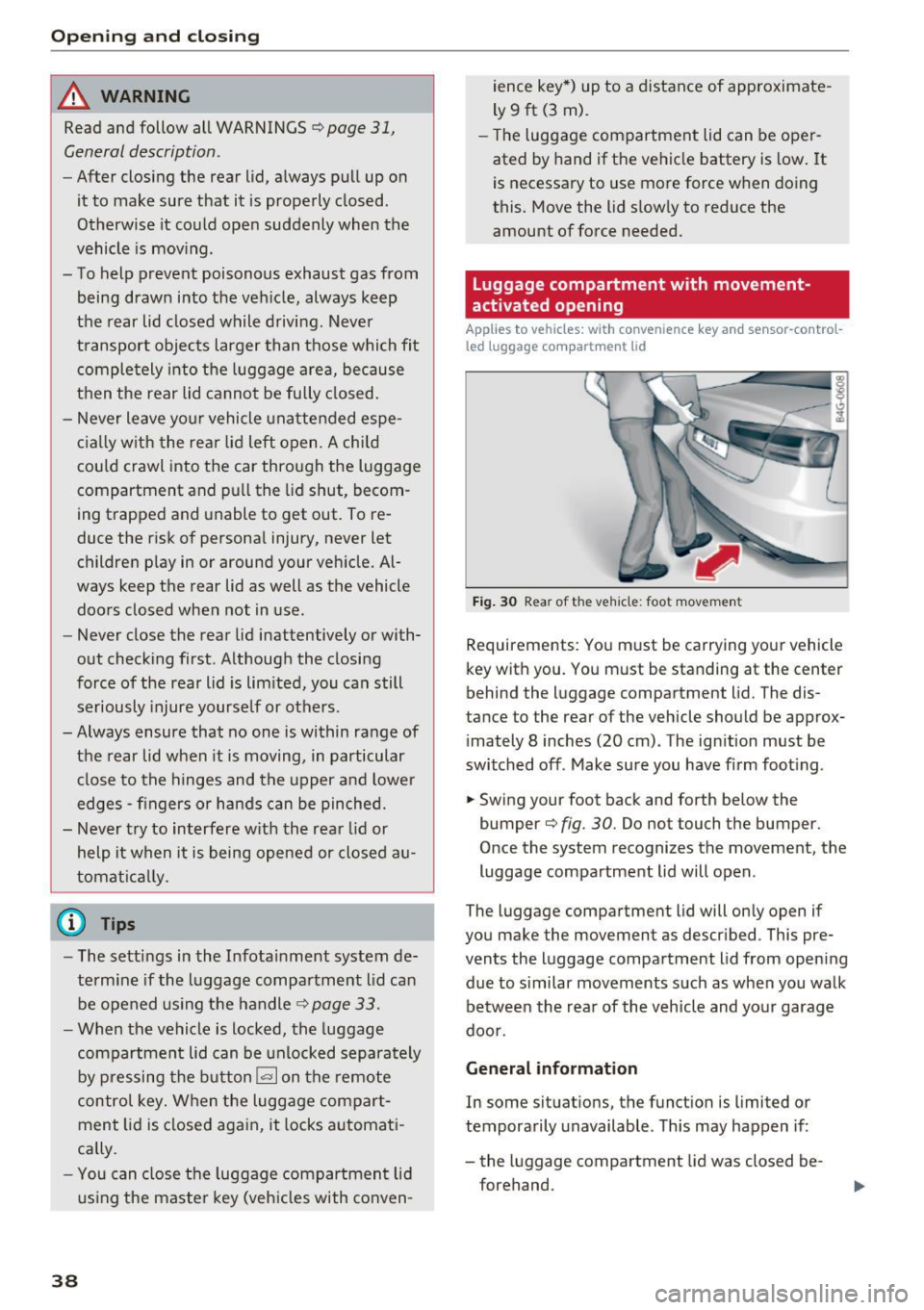
F ig . 30 Rear of the vehicle: foot movemen t
Requirements: You m ust be carrying your vehicle
key with you . You must be standing at the center
behind the luggage compartment lid. The dis
tance to the rear of the vehicle should be approx
i mately 8 inches (20 cm) . The ignition must be
switched off . Make sure you have firm foot ing .
.. Swing your foot back and forth below the
bumper¢
fig. 30. Do not touch the bumper.
O nce the system recognizes the movement, the
luggage compartment lid will open .
The luggage compartment lid will only open if
you make the movement as descr ibed . This pre
vents the luggage compartment lid from opening
due to s imilar movements such as when you walk
be tween the rea r of the v eh icle and yo ur garage
doo r.
General information
In some situat ions, the funct ion is limited or
temporarily unavailable . Th is may happen if :
- the luggage compartment lid was closed be
forehand.
Page 41 of 294
.... N
0 CJ '
- you park close to a hedge and the branches move back and forth under the vehicle for a
long period of time.
- yo u clean yo ur vehicle, for example with a pres
sure washer or in a car wash.
- there is heavy rain.
- the bumper is very dirty, for example afte r driv-
ing on salt-covered roads.
- there is interfe rence to the radio signal from
the veh icle key, s uch as from cell phones or re
mote controls.
Luggage compartment lid emergency
release
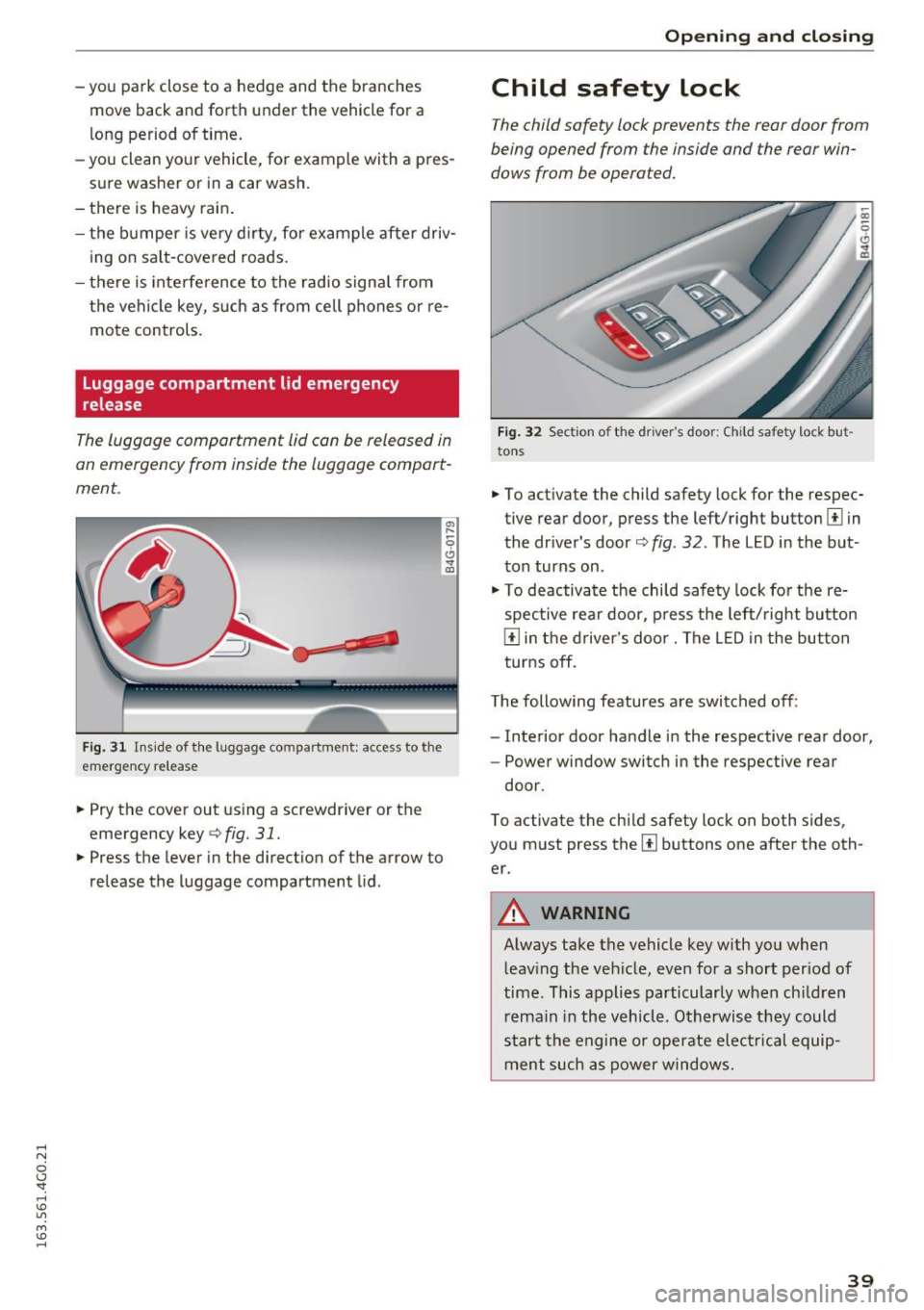
The luggage compartment lid can be released in
an emergency from inside the luggage compart
ment.
F ig. 31 Ins ide of the luggage compartme nt: access to the
emergency re lease
"' Pry the cover out using a screwdriver or the
emergency key
¢ fig. 31.
"'Press the lever in the direction of the arrow to
release the luggage compartment lid.
Open ing and closing
Child safety lock
The child safety lock prevents the rear door from
being opened from the inside and the rear win
dows from be operated.
Fig. 32 Sectio n of the driver's door: Ch ild sa fety lock but
to ns
• To activate the child safety lock for the respec
tive rear door, press the left/right button
1±1 in
the dr iver's door¢
fig. 32 . The LED in the but
ton turns on .
"' To deactivate the child safety lock fo r the re
spective rear door, press the left/right button
1±1 in the driver's door. The LE D in the button
turns off.
The following features a re switched off:
- Interior door handle in the respective rear door,
- Power window switch in the respective rear
door.
T o activate the chi ld safety lock on both sides,
you must press the
[ii buttons one after the oth
er.
A WARNING
-Always take the vehicle key with you when leaving the vehicle, even for a short period of
time. This applies particularly when ch ildren
remain in the vehicle. Otherwise they could
start the engine or operate electrical equip
ment such as power windows .
39
Page 42 of 294
Opening and closing
Power Windows
Controls
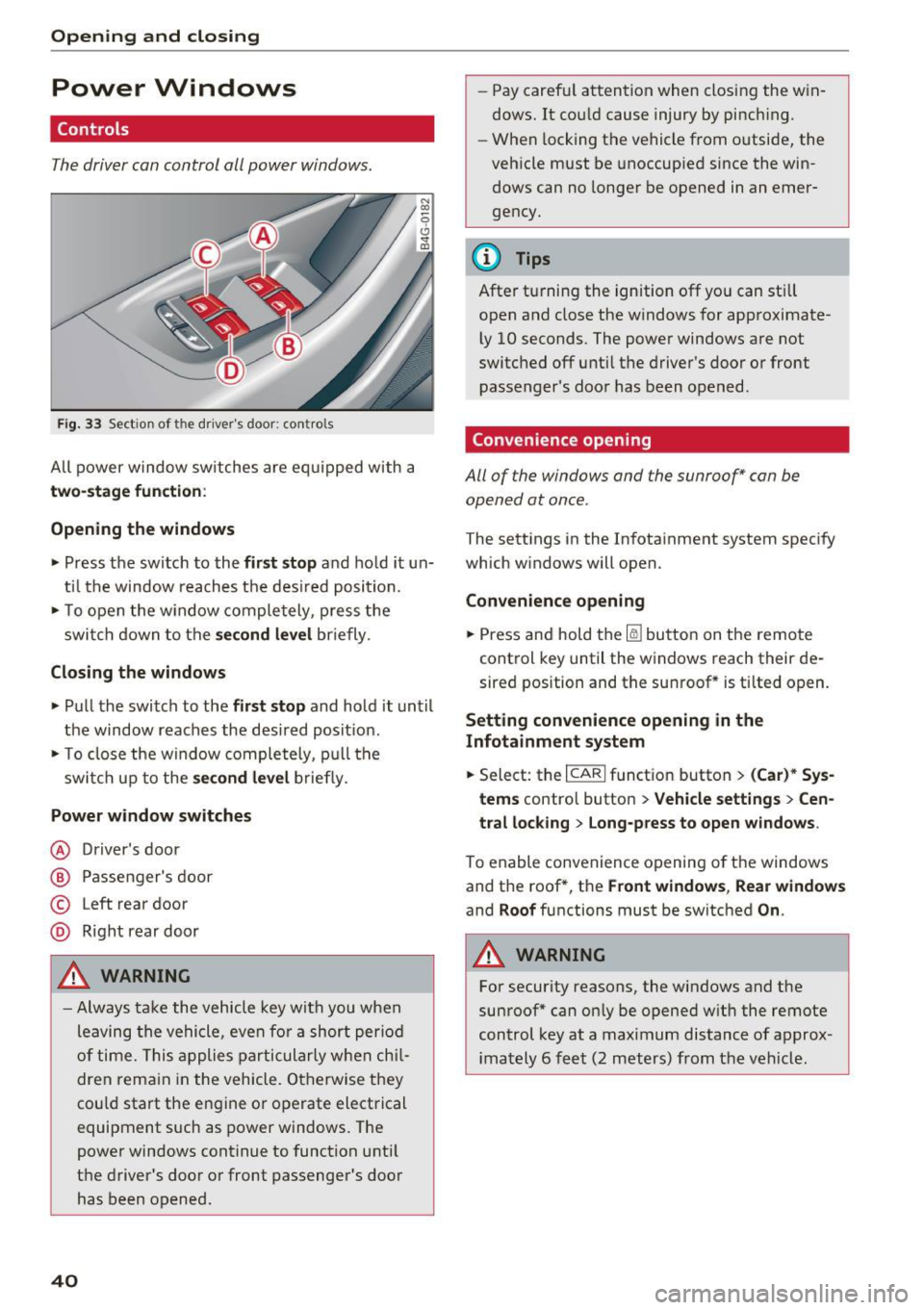
The driver can control all power windows.
Fig. 33 Section of the driver's door: controls
All power window switches are equipped with a
two-stage function :
Opening the windows
• Press the switch to the first stop and hold it un
til the window reaches the desired position.
• To open the w indow completely, press the
switch down to the
second level briefly.
Closing the windows
• Pull the switch to the first stop and hold it until
the window reaches the desired posit ion.
• To close the window completely, pull the
switch up to the
second level briefly.
Power window switches
@ Driver 's door
@ Passenger's door
© Left rear door
@ Right rear door
A WARNING
-Always take the vehicle key with you when
leaving the vehicle, even for a short period
of time. This applies particularly when chil
dren remain in the vehicle. Otherwise they
could start the engine or operate electrical
equipment such as power windows. The
power windows continue to function until
the driver's door or front passenger's door
has been opened .
40
"
-Pay carefu l attention when closing the win
dows. It could cause injury by pinch ing.
- When locking the vehicle from o utside, the
vehicle must be unoccupied since the win
dows can no longer be opened in an emer
gency.
{!) Tips
After turning the ignition off you can still
open and close the windows for approximate
ly 10 seconds . The power windows are not
switched off until the driver's door or front
passenger's door has been opened .
Convenience opening
All of the windows and the sunroof* can be
opened at once .
The settings in the Infotainment system specify
which windows will open.
Convenience opening
• Press and hold the~ button on the remote
control key until the windows reach their de
sired position and the sunroof * is tilted open.
Setting convenience opening in the
Infotainment system
• Select: the I CARI funct ion button > (Car)* Sys
tems
contro l button > Vehicle settings > Cen
tral locking
> Long-press to open windows.
To enable convenience opening of the windows
and the roof *, the
Front windows, Rear windows
and Roof functions must be switched On .
A WARNING
-
For security reasons, the windows and the
sunroof* can only be opened with the remote
control key at a maximum distance of approx
imately 6 feet (2 meters) from the vehicle.
Page 44 of 294
Opening and clo sin g
~ To close the sunroof comp letely, press the
switch forward briefly to the second level
c::> ,&. .
~ To select an intermediate pos ition, press/pull
the switch forward/back to the first level until
the desired position is reached .
The sun shade can be opened and closed by hand
when the roof is closed. The sun shade opens au
tomatically when the roof is opened.
You can still operate the sliding/tilt ing sunroof
for about 10 minutes after the ignition is switch
ed off. The switch is deactivated once the driver's
or front passenger 's door is opened.
A WARNING
Pay careful attent ion when closing the slid
ing/t ilting sunroof -otherw ise ser ious injury
cou ld result! Always take the ign ition key with
you when leaving the vehicle .
@ Note
Always close your sliding/tilting sunroof when
leaving your veh icle. Sudden ra in can cause
damage to the interior equ ipment of your ve
hicle, particularly the electron ic equ ipment.
@ Tips
- For informat ion on convenience opening, re
fer tor:::.>
page 40.
-The sunroof will only open down to -20 °C
(-4 °F) .
Sunroof power emergency closing
-
If the sunroof detects an object in its path whe n
it is clos ing, it w ill open again automatically. In
this case, you can close the roof with the power
emergency closing function .
~ Within five seconds afte r the sunroof opens au
tomat ica lly, pull the switch unt il the roof
closes.
I f you let go of the sw itch early, the sunroof will
open aga in.
42
Garage door opener
(Homelink)
Description
App lies to vehicles : wit h garage door o pener (Horne Link)
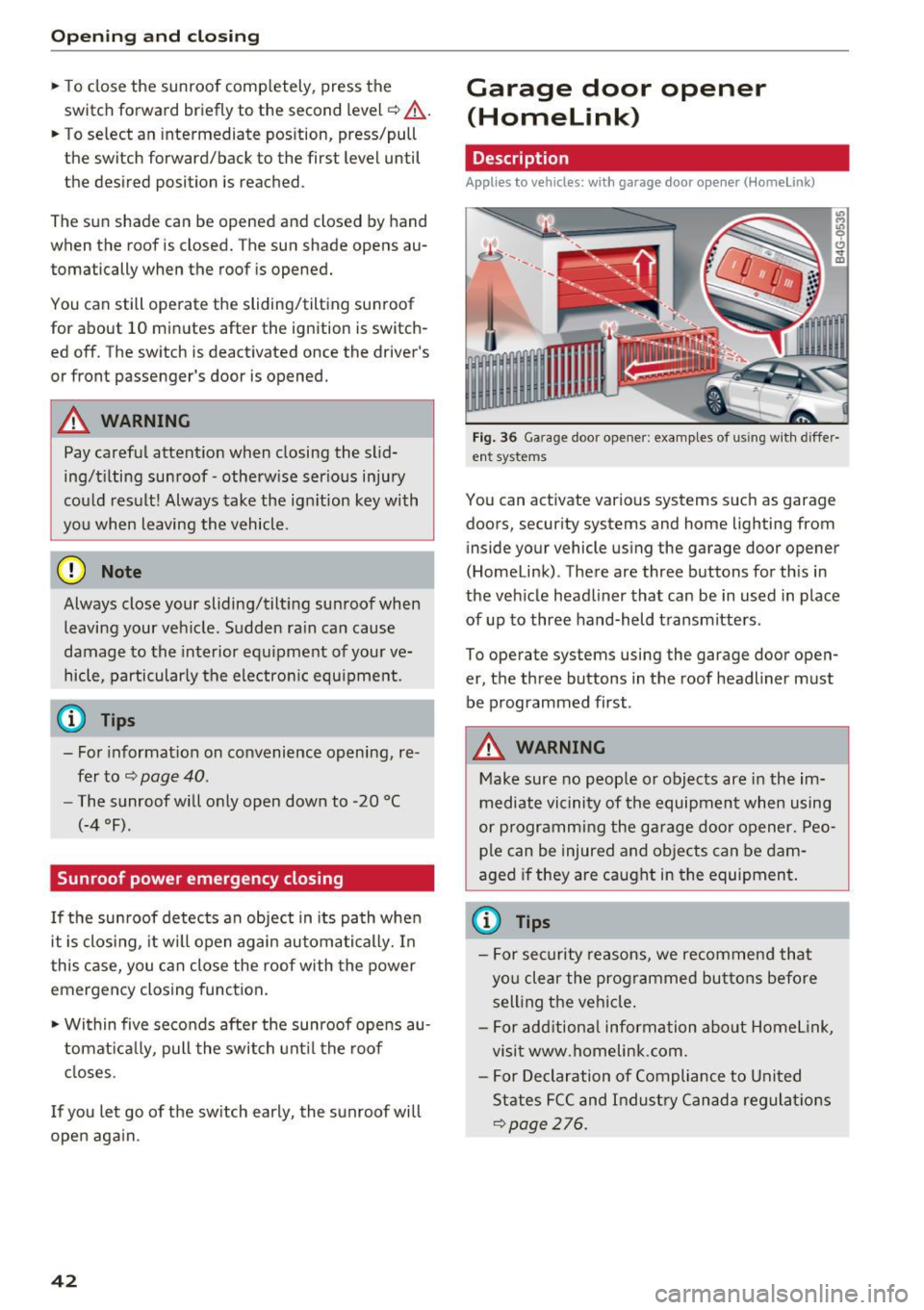
Fig. 36 Ga rage door opener: examples of using w ith differ·
ent syste ms
You can act ivate various systems such as garage
doors, security systems and home lighting from inside your vehicle using the garage door opener
(Homelink) . There are three buttons for th is in
the veh icle headliner that can be in used in place
of up to three hand-held transmitters .
To operate systems using the garage door open
er, the three buttons in the roof headliner must be programmed first .
A WARNING
Make sure no people or objects are in the im
mediate vicinity of the equipment when using
or p rogramming the garage door opener. Peo
ple can be injured and objects can be dam
aged if they are caught in the equipment .
(D Tips
-For security reasons, we recommend that
you clear the prog rammed buttons before
sell ing the vehicle .
- For add itiona l information about Homel ink,
visit www.homelink .com .
- For Declaration of Compliance to United
States FCC and Indust ry Canada regulat ions
<::.>page 276.