engine AUDI S7 2016 Owner's Manual
[x] Cancel search | Manufacturer: AUDI, Model Year: 2016, Model line: S7, Model: AUDI S7 2016Pages: 294, PDF Size: 73.82 MB
Page 41 of 294
M N <( I.J "". rl I.O
"' N I.O rl
Child safety lock
The child safety lock prevents the rear door from
being opened from the inside and the rear win
dows from be operated.
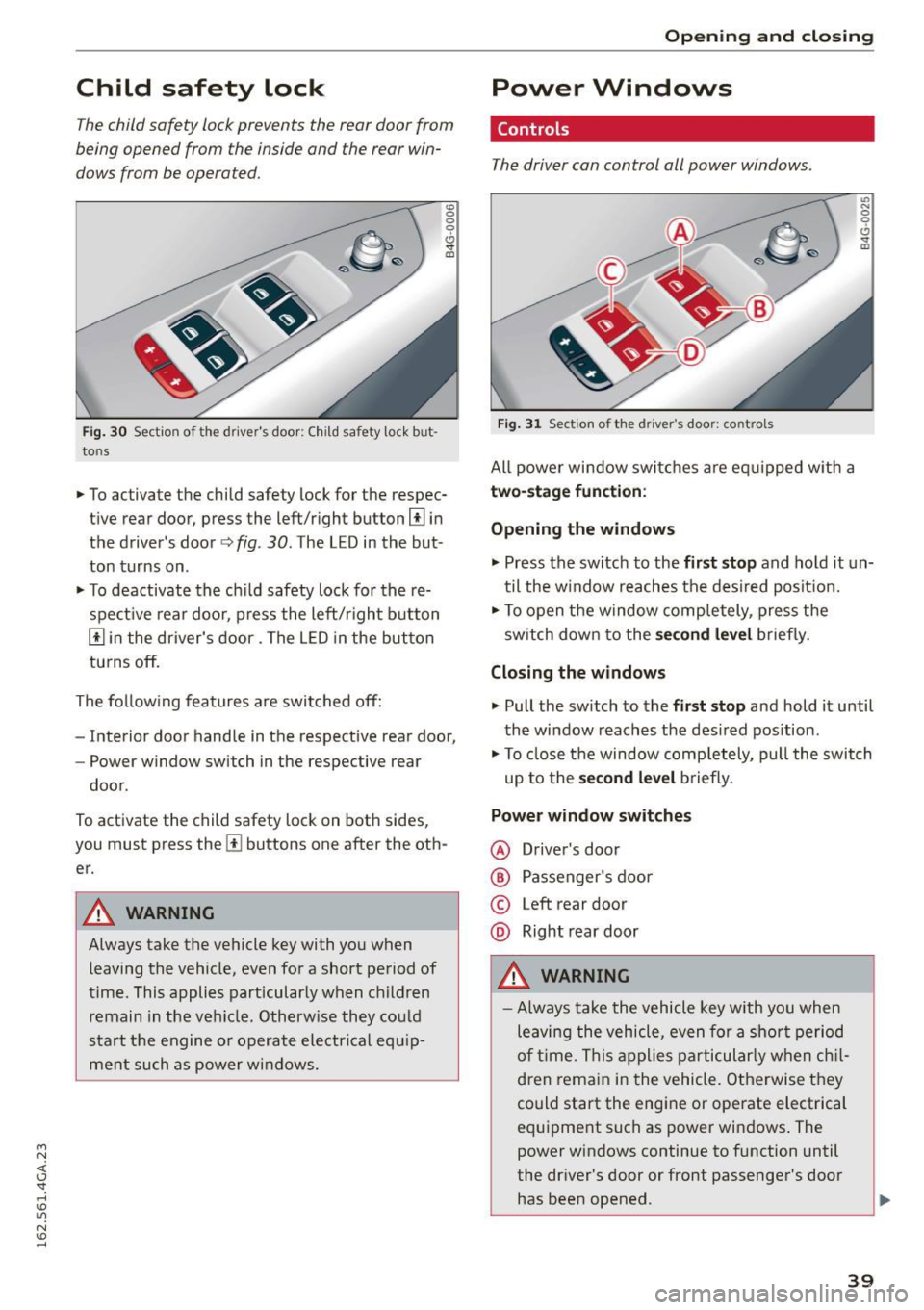
Fi g. 30 Section of the driver 's door: Child safety lock but
tons
"' 0
0
0
0 ,,. !II
• To activate the child safety lock for the respec
tive rear door, press the left/right button
[!l in
the driver's door¢
fig. 30 . The LED in the but
ton turns on.
• To deactivate the ch ild safety lock for the re
spect ive rear doo r, press the left/r ight button
[!] in the driver's door. The L ED in the but ton
turns off.
The fo llow ing features are switched off:
- Interior door handle in the respective rear door,
- Power w indow switch in the respective rear
door.
To activate the child safety lock on both sides,
you must press the
[!l buttons one after the oth
er.
A WARNING
Always take the vehicle key with you when leaving the vehicle, even for a short period of
time . This applies particularly when ch ildren
remain in the veh icle. Otherw ise they cou ld
start the engine or operate ele ctrical equ ip
ment such as power windows.
Open ing and clo sing
Power Windows
Controls
The driver can control all power windows.
Fig. 31 Sect ion of the driver's door: controls
All power window swi tches a re eq uipped w ith a
two- stage function :
Opening the windows
U') N
0
0
<.!, ., m
• Press the switch to the fir st stop and hold it un
til the w indow reaches the desi red posit ion.
• To open the window comp letely, press the
sw itch down to the
s econd level brief ly.
Closing the windows
.,. Pull the sw itch to the fi rst stop and hold it until
the window reaches the des ired pos ition.
• To close the window comp letely, pull the switch
up to the
sec ond lev el b riefly.
Power window switches
@ Driver's door
® Passenger's door
© Left rear door
@ Right rear door
A WARNING
-- Always take the vehicle key with you when
leaving the vehicle, even for a shor t period
of t ime. This applies particularly when ch il
dren remain in the vehicle. Otherwise they
could start the engine or operate electrical
equipment such as power windows . The
power windows continue to f unction until
the dr iver's door or front passenger's door
has been opened.
-
39
Page 70 of 294
Warm and cold
Warm and cold
Climate control system
Description
Applies to veh icles: w ith three -zone cl imate cont ro l or fo ur
zo ne automat ic climate co ntrol
The climate control system warms, cools and
adds humidity to the a ir in the veh icle interior . It
is the most effect ive when the windows a nd sun
roof* are closed . If the temperature inside the
pa rked vehicle becomes ve ry wa rm, opening the
w indow briefly will speed up the coo lin g p rocess.
In all heating mode functions except
defrost, the
b lowe r only sw itches to a highe r speed once the
engine coolant has reached a cer tain tempera
t ure.
Condensation from the cooling system can dr ip
and form a puddl e of water unde r the veh icle .
T his is normal and does no t mean there is a leak .
Pollutant filter
The pollutant filter removes pollutants s uc h as
dust and pol len from the a ir .
The air pollutants filter must be changed at the
interva ls specified in your Warranty
& Mainte
nance booklet, so that the a ir cond it io ne r can
p roperly work.
I f you drive your vehicle in an area with h igh air
pollut ion, the filter may need to be changed
more frequently than spec ified in you r Audi War
ranty
& Maintenance booklet . If i n doubt , ask
your author ized Audi Se rv ice Advisor for advice .
Key coded setting s
Three-zone climate control: T he b lowe r setting
a nd a ir dist ribution are stored automatically and
assigned to the remote contro l key that is i n use.
Four -zone automatic climate con trol: Th e cli
ma te con tro l sett ings a re a utomat ic all y stored
and assigned to the remote con trol key that is in
use.
68
A WARNING
-
Reduced visibility is dangerous and can cause
accide nts .
- For safe driving it is very important that a ll
w indows be free o f ice, snow and condensa
tion .
- Comp letely fam iliarize yourse lf wit h the
prope r use and f unction of the heat ing and
ve ntilation system and espec ially how to de
fog and defrost t he windows .
- Never use the winds hield wiper/washer sys
tem in free zing weathe r until you have
wa rmed t he w indshie ld fi rst, using the heat
ing a nd venti lation system. The washer sol u
tio n m ay free ze on t he windsh ie ld and re
duce visibility.
W Note
- I f you s uspect that the air conditioner has
bee n damage d, sw itch the syste m off to
a void furthe r dam age and have it inspec ted
by a q ualified dea lership .
- Repairs to the Audi air conditioner re quire
speci al techn ic al know ledge and spec ia l
tools . Con ta ct an au thori zed A udi dea ler for
assistance .
@ For the sake of the environment
By reducing the amou nt of f uel you use, you
a lso reduce the amo unt of poll utants emitted
i nto the a ir.
@ Tips
- Keep the air i nta ke s lo ts (i n front o f the
windshield) free from ice, snow and debris
in o rder to maintain the proper function of
the climate contro l system.
- Th e energy manageme nt system may switch
t h e seat heating * or r ear w indow defroster
off temporarily. These systems are availab le
again as soon as t he energy balance has
been restored.
- Air escapes t hrough vents under the rear
w indow. When plac ing items of cloth ing on
t h e luggage compartment cove r, ensure
t h at the openi ngs are not covered.
Page 72 of 294
Warm and cold
mode switches off. The temperat ure shou ld be
set to approximately 72 ° F (22 °C).
The
IAU TOI button switches the defroster off.
I® REAR I Switching the rear window defogger
on /off
The rear w indow heater only operates when the
engine is r unning.
It sw itches off automatically
after a few m in utes, depending on the outs ide
temperature.
To prevent the rear w indow heater from switch
ing
off a utomat ica lly, press and hold the!@ R EAR I
but ton fo r more than 2 seconds. This rema ins
stored until the ignition is switched
off.
Q:I Adjusting seat h eating *
Pressing the button switches the seat heating on
at the highes t setting (level 3) . T he LEDs indicate
the tempe rature leve l. To red uce the tempe ra
ture, press the button again. To switch the seat
heating
off , press the button repeatedly until the
LED turns
off .
Afte r 10 minutes , the seat heat ing a utomat ica lly
sw itches from level 3 to leve l 2 .
Air vent s
You can open or close the center and rear vents in
the cockpit and the vents in the rear center con
sole using the r idged thumbwhee ls. The levers
adj ust the d irect ion of the a irf low from the vents.
70
A WARNING
-
- You should not use the recirculation mode
for an extended period since no fresh air is
drawn in . With the a ir-conditioning sw itched
off, the windows can fog up, which increases
the r isk of a n accident.
- Individuals w ith reduced sensitivity to pain
or temperatu re could develop burns when
using the seat heat ing f unct ion. To reduce
the r isk of inj ury, these indiv iduals should
not use seat heating.
(D Note
To avoid damage to the heat ing e lements in
the seats, do not kneel on the sea ts or place
h eavy loads on a sma ll area o f the seat .
Basic settings
Applies to vehicles: wit h three-zone climate control
The climate control system basic settings are ac
cessed in the Infotainment system.
~ Select: the I CARI funct ion button > ( Car )* S ys-
t e m s
control button > AC.
Au xilia ry heater*
In vehicles with diesel engines, the auxiliary heat
er helps to warm the vehicle interior more quick
ly. The aux iliary heater is controlled automatical
l y in the
A ut o setting .
Page 77 of 294
M N <( I.J "". rl I.O
"' N I.O rl
There must be at least 10 inches (25 cm) be
tween your chest and the center of the steering
wheel.
If you cannot sit more than 10 inches (25
cm) from the steering wheel, see if adaptive
equipment is available to help you reach the ped
als and increase the distance from the steering
wheel.
For detailed information on how to adjust the
driver's seat, see
r:::>page 53.
In vehicles with the memory function*, the steer
ing column settings are stored together with the
seat position.
A WARNING
Improper use of steering wheel adjustment
and improper seating position can cause seri
ous personal injury.
- Adjust the steer ing wheel column only when
the vehicle is not mov ing to prevent loss of
vehicle control.
- Adjust the driver's seat or steering wheel so
that there is a minimum of 10 inches (25
cm) between yo ur chest and the steering
wheel
r:::>page 127, fig. 144. If you cannot
mainta in this min imum d istance, the a irbag
system cannot protect you properly .
- If phys ica l limitations prevent you from sit
ti ng 10 inches (25 cm) or more from the
steering wheel, check with your authorized
Audi dealer to see if adaptive eq uipment is
available.
- If the steering wheel is aligned wi th your
face, the supp lemental driver's airbag can
not provide as much protection in an acci
dent. Always make sure that the steering
wheel is aligned w ith your chest.
- Always hold the steering wheel with your hands at the 9 o'clock and 3 o'clock posi
t ions to reduce the r isk of personal injury if
the driver 's airbag deploys.
- Never hold the steer ing wheel at the 12
o'clock posit ion or w ith your hands inside
the steering wheel rim or on the steering
wheel hub. Holding th e steering wheel the
wrong way can cause se rious injuries to the
hands, arms and head if the driver's a irbag
dep loys .
Drivi ng
Easy seat entry
Applies to vehicles: with power steering wheel adjustment
Easy seat entry makes it easier to enter and exit
the vehicle by adjusting the steering column au
tomatically.
.. In the Infotainment system, select: the ICARI
function button > ( Car) * Systems control but
ton
> V ehicle sett ings > Se ats> Driver 's se at>
Ea sy se at entry > On .
When easy seat entry is sw itched on, the steering
column goes back up into the park pos ition when
the ignit ion is switched off . After entering the ve
hicle, the steeri ng column returns to the stored
pos ition once the ig nit ion is switched on.
Starting and stopping
the engine
Starting the engine
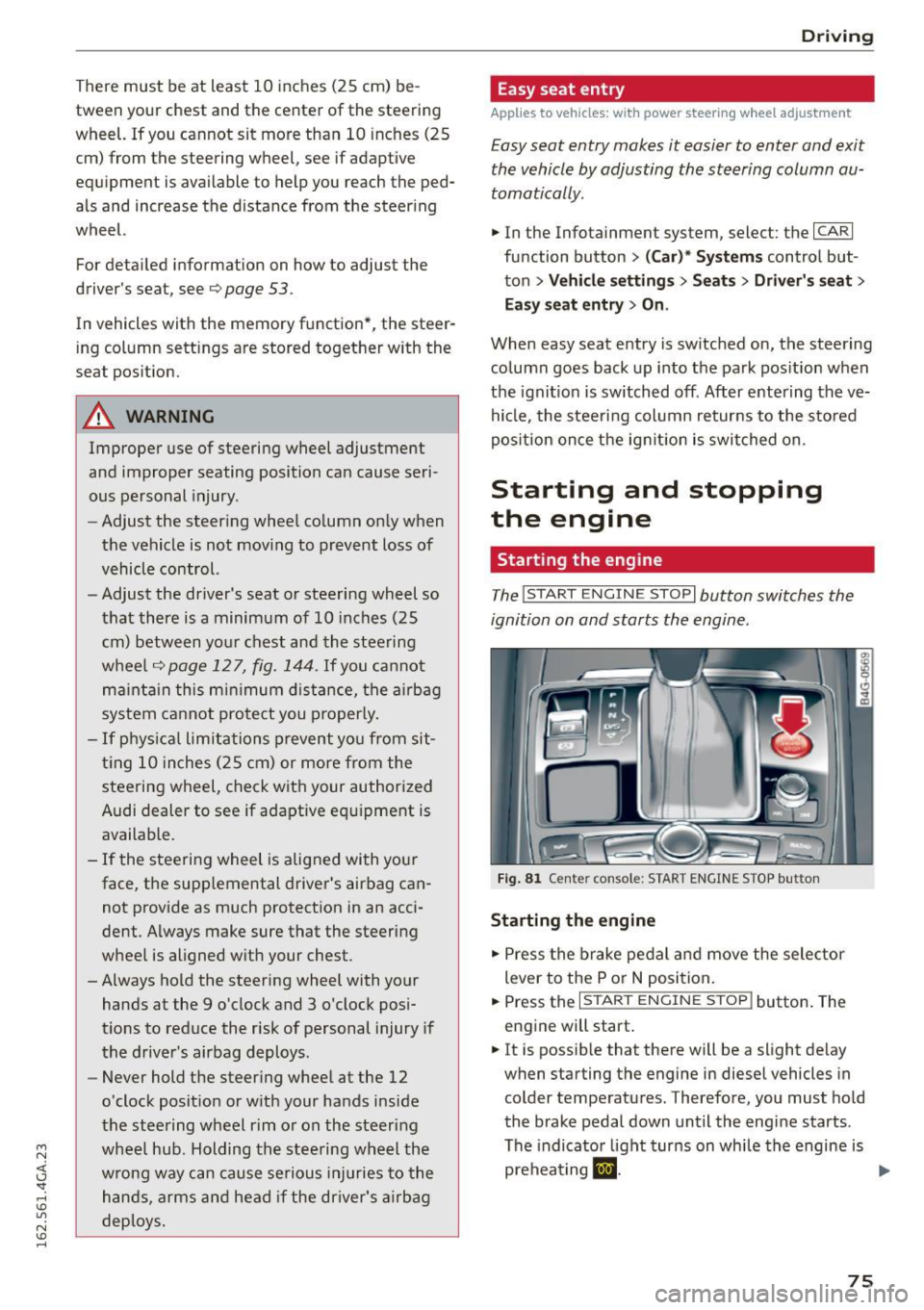
The I STAR T ENGIN E ST OPI button switches the
ignition on and starts the engine .
Fig . 8 1 Center console: START ENGINE STOP button
Sta rting the engine
.. Press the brake pedal a nd move the selector
lever to the P o r
N position.
.. Press the
I START ENGINE STOP j button . The
eng ine will start .
.. It is possib le that there will be a slight delay
when starting the engine in diesel vehicles in
colder temperatu res. Therefore, you must hold
the brake pedal down unt il the engi ne starts .
The indicator light turns on whi le the engine is
preheating
m . ...
75
Page 78 of 294

Driving
Sw it c h ing th e ig nit ion on /off
If you wou ld like to switch the ignition on with
out starting the engine, fo llow these steps :
"' Press the
!START E NGIN E STOPI button with-
out pressing the brake pedal.
"'T o sw itch the ignition off, press the button
again. The needle in the tachomete r moves into
the
O FF pos ition.
The prewarm ing runs automati cally in diese l
vehicles when the ignition is switched on .
Equipment that uses a lot of electricity is switch
ed off temporar ily when you start the engine.
If the engine should not start immediately, the
starting process is automat ically stopped after a
short time . Repeat starting procedure .
Start-Stop-System *
Note the information inc:> page 80, S tar t-S top
Sys tem.
A WARNING
- Never allow the engine to ru n in confined
spaces, because this inc reases the r isk of as
phyx iat ion.
- Never t urn off the engine before the veh icle
has come to a comp lete stop .
- The brake booster and power steer ing no
longer function whe n you stop the engine.
You must use more fo rce when bra king or
stee ring. Be cause you cannot b rake and
steer as you us ually wou ld, this could lead
to accidents and se rious i njuries. These
functions are still active if the Start-Stop
System* has stopped the engine.
([) Note
Avoid high engine speed, fu ll th rottle , and
heavy eng ine load as lon g as the engine has
not reached operating temperature yet. You
co uld damage the engi ne .
@ For the sake of the environment
Do not let the engine r un while parked to
warm up. Beg in driving immed iately . This re
duces u nnecessary emissions .
76
-
(D Tips
-After starting a cold engine, there may be a
br ief per iod of increased noise because the
oil pressure must first bui ld up in the hy
draulic valve adjusters. This is normal and
not a cause for concern .
- If you leave the veh icle with the ignition
switched on, the ign ition w ill switch off af
ter a certain amount of time . Make sure that
electrical equipment such as the exterior
l ights a re switched off.
Stopping the engine
"' Br ing your vehi cle to a complete stop.
"' Move the se lector lever to the P o r N posit ion .
"' Press the
I STA RT ENGINE STOP ! button
c:> page 75, fig . 81 .
Steering lock
The steering locks when yo u tur n the eng ine off
us ing the
I S TAR T ENGINE ST OP I button and open
the driver's doo r. The locked steering helps pre
vent vehicle theft.
Emergency off
If necessary, the engine can be switc hed off with
the se lecto r lever in the R or D/S posit ion. The en
gine stops if yo u press and hold the
I S TAR T ENGINE ST OP I button at speeds below
6 mph (10 km/h) and press the brake peda l.
A WARNING
-Never turn off the engine until the vehicle
has come to a complete stop.
- The brake booster and power steering only
work when the engine is running . If the en
gine is off , you have to use more force when
steering or braking. Because you cannot
steer and brake as you usually wou ld, this
could lead to crashes and serio us in ju ries.
- For safety reasons, you should always pa rk
your veh icle with the selector lever in P. Oth
erw ise, the vehicle could inadve rtently ro ll
away.
Page 79 of 294

M N <( I.J "". rl I.O
"' N I.O rl
-After the engine has been switched off , the
radiator fan can cont in ue to run for up to 10
minutes - even with the ign ition sw itched
off . It can a lso switch on again after some
t i me if t he coolant tern pera ture rises as the
result of a heat bu ildup or if the engine is
ho t and the engi ne compa rtmen t is addi
ti onal ly he ate d by the su n's ra ys.
(D Note
Do not stop the engine imme diate ly afte r
ha rd or extend ed dr iving . K eep the engi ne
r u nning for app roximately two m inutes to
p reven t exces sive heat build-up.
Messages
Turn off ignition before leaving car
This message appea rs and a war ning tone sounds
if you open the d river's doo r whe n the ignition is
switche d on .
Press brake ped al to start engine
This message appears if you do not press the
brake peda l when starting the engine.
Ill Is key in the vehicle?
This indi ca tor light tur ns on and t his message ap
pears i f the ignit ion key was removed from the
ve hicl e when the e ngine was ru nning . If the igni
tion key is no longer in the vehicle, you cannot
switch on the ignit ion or start the engine once
you stop it. You also cannot lock the veh icle from
the outside.
Shift to P , otherwise vehicle can roll away.
Doors do not lock if lev er is not in P.
This message appears for sa fe ty reasons if the
tra nsmission is not i n the P position when you
switch the ignition off . Move the selector lever to
the P pos ition . Otherwise the vehicle is not pro
tected from roll ing and it cannot be locked.
DJ Key is not recognized . Hold back of key
again st ma rked a rea. See owner's manual
If the i ndic ator lig ht turns on and th is mess age
appears, there is a malfunction ~
page 77.
Driv ing
Turn off ignition before leaving car. Battery is
di scha rging
T his dr iver message appears if the drive r's door is
o pened wh ile the ign ition is switched on. Always
switch off the ignition if you are leav ing t he veh i
cle . Refer to
¢ page 81.
Shift to P and turn off ignition b efore leaving
car , otherwise vehicle can roll away
This message appears if the drive r's door is
opened wh ile the ign ition is switched on and the
sele ctor lever is not in the P position . Move the
se lector lever in to the P posi tion a nd switch the
i gnition off when you exit the vehicle . Otherwise
t h e vehicle co uld ro ll. Refer to ¢
page 81.
Starting the engine when there is a
malfunction
It may not be possible to start the engine under
certain circumstances, for example if the battery
in the vehicle key is drained , if interference is af
fected the key or if there
is a system malfunc
tion .
Fig . 8 2 Ce nte r c onsol e/master key : s tar ting t he e ngin e
w hen t here is a ma lf un ctio n
Requirement: The message Key is not recog
nized. Hold back of key against marked are a.
Se e owner 's manual
is displayed and the DJ indi
c ator lig ht tu rns on.
.. Hold the master key i n the location indicated as
shown in the illustration
f>l) ¢ fig . 82 .
.. Press the brake pedal ¢ A. in Starting the en
gine on page
76.
.. Press the
~ IS_ T_A_ R_T _E_N_G-IN_E_S_ T_O_P ~I bu tton. The
eng ine will start .
77
Page 80 of 294
Driving
"' Drive to an authorized Audi dealer or author
i z ed Audi Service Facility immediately to have
the malfunction corrected .
@ Tips
You can view the message again by pressing
the
I START ENGINE ST OPI button .
Electromechanical
parking brake
Operation
The electromechanical parking brake replaces
the hand brake.
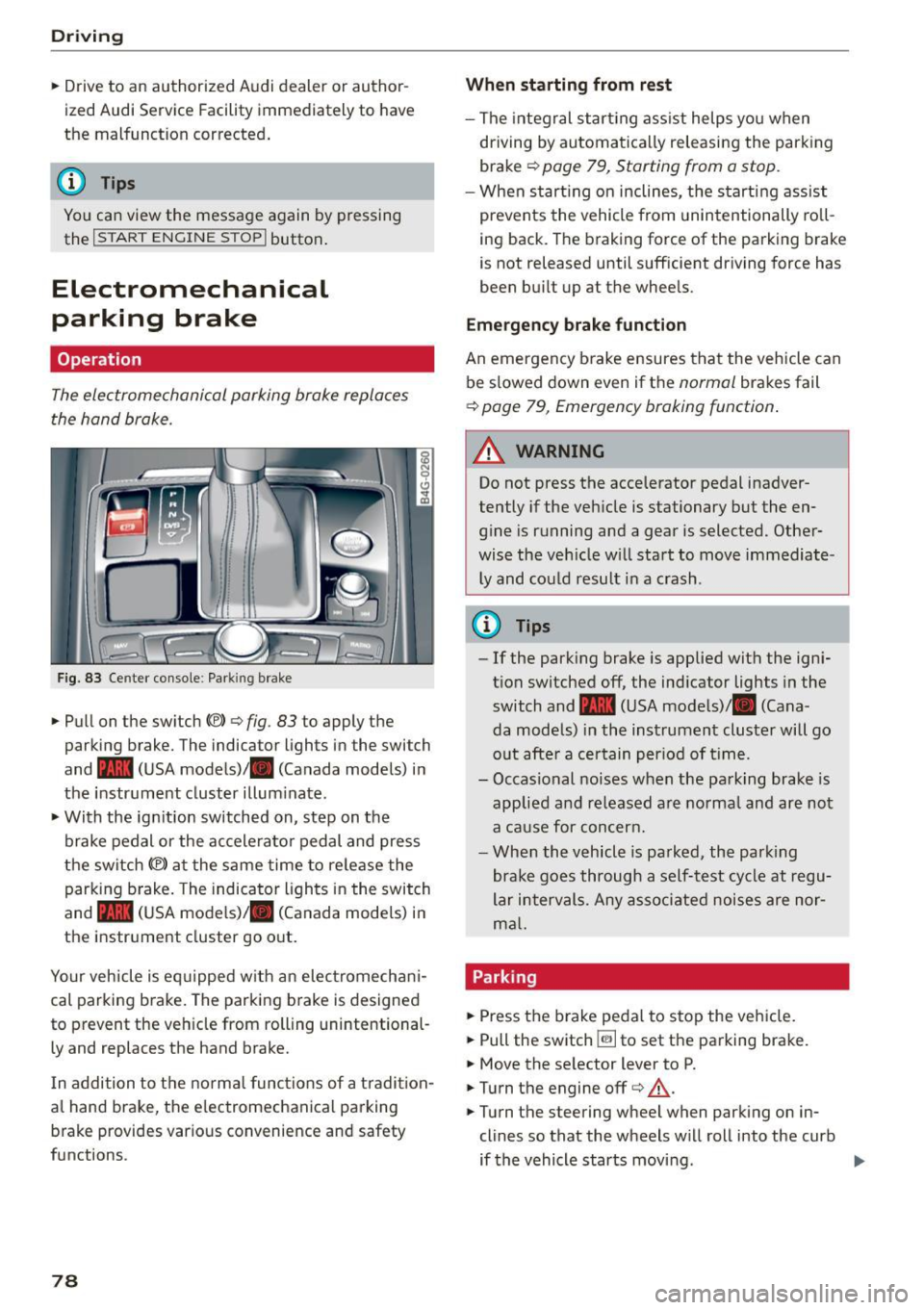
Fig. 83 Ce nter co nso le : Park ing brake
• Pull on the switch{®) ¢ fig. 83 to apply the
parking brake. The indica tor lights in the swi tch
and - (USA mode ls)/ . (Canada models) i n
the instr ument cluster illum inate .
• With the ig nition switched on, step on the
brake pedal or the ac celera to r pedal and press
the switch {®) at the same time to re lease the
parking b rake . The indicator ligh ts in the switch
and - (USA mode ls)/ . (Canada models) i n
the inst rument cluster go o ut.
Your veh icle is eq uipped w ith an elec tromechan i
cal parking b rake. The parking b rake is designed
to prevent the veh icle from rolling unintentional
ly and replaces the hand brake.
I n addition to t he normal func tions of a tradi tion
al hand brake, the e lectromechanica l parking
b rake provides var ious convenience and safety
functions.
78
When starting from rest
- The integral star ting ass ist helps you when
dr iving by automa tica lly releasing the park ing
brake ¢
page 79, Starting from a stop .
-When st art ing on inclines, the s tart ing assist
prevents the vehicle from unintentionally ro ll
i ng back. The braking force of the parking brake
is not released until sufficient dr iving force has
been bu ilt up at the whee ls .
Emergency brake function
An emergency b rake ensures tha t the vehicle can
be s lowed down even if the
normal brakes fail
¢ page 79, Emergency braking function .
_&. WARNING
-
Do not press the accelerator pedal inadver
tently if the veh icle is stationary but the en
g in e is running and a gear is selected. Other
wise the ve hicle w ill sta rt to move immediate
ly and could result i n a crash .
@ Tips
-If the park ing brake is applied with the ign i
t ion switched off, the ind icator lights in the
switch and -(USA mode ls)/ . (Cana
da models) in the instrument cluster will go
o ut afte r a ce rtain per iod of t ime.
- Occasional noises when the pa rking brake- is
applied a nd re leased a re norma l and are not
a ca use for concer n.
- Whe n the v ehicle is pa rked, the par king
brake goes through a self -test cycle at r egu
lar i nterval s. Any asso ciated noises are nor
m al.
Parking
• Press the brake peda l to stop the ve hicle.
"' Pull the switch ~ to set the pa rking brake.
• Move the se lector lever to P.
• Turn the engine off¢&_ .
• Turn the steering wheel when parking on in
clines so that the wheels w ill roll into the curb
if the vehicle starts movi ng .
Page 81 of 294
M N <( (.J
'SI: ,...., \!) ..,.,
N \!) ,....,
A WARNING ,~
- Always take the vehicle key with you when
leaving the vehicle, eve n for a short period
of time. Th is applies partic ula rly whe n chil
dren remain in the vehicle. Otherw ise chi l
dren co uld start the engine, re lease the
p arki ng brake or oper ate elec trical eq uip
ment such as power windows, which in
creases the r is k of an accident .
- No one sho uld remain in the vehicle when i t
is locked, especia lly children . Locked doors
make it more difficult for emergency wo rk
ers to get into the vehicle, which puts lives
at risk.
Starting from a stop
The start assist function ensures that the park
ing broke is released automatically upon start
ing .
Stopping and setting the parking brake
,.. Pu ll the swi tch~ to se t the p ark ing b rake.
Starting and automatically releasing the
parking brake
-
,.. When you press the ac cele ra to r pedal, the park
ing brake is au tom atically re lease d and you r ve
hicle begins to move.
The par kin g b rake can be set if yo u must stop the
ve hicl e at a stop light or in traffic. The vehicle
does not h ave to be he ld wit h t he brake pedal.
The parking b rake elim inates the tendency to
creep when a se lector lever position is engaged.
The parking brake re leases automatically and the
vehicle beg ins to move as soon as you press the
accelerator peda l as usual.
Starting on slopes
When starting on in clin es, the hill start assist
p revents the vehicle from uni ntentiona lly ro lling
back. The braking force o f the parking brake is
not released until sufficient driving force has
been built up at the whee ls .
Dri ving
{!) Tips
Fo r safety reasons, the pa rking bra ke is re
l eased automatically only when the d river 's
safety be lt is engaged in the b uckle.
Starting to drive with a trailer
To prevent rolling bock unintentionally on on in
cline, do the following:
,.. Keep the sw itch pulled ~ and p ress the acce l
erator peda l. The parking brake stays applied
and prevents the vehicle from roll ing backward .
,.. You can re lease the switch
[21 once you are s ure
that you are transferring enough drivi ng force
to the wheels by pressing the accele rato r pedal.
Depend ing on the we ight of the rig (vehicle and
trailer) and the severity of the incline, you may
ro ll backwards as you start.
Emergency braking function
This is used if the conventional broke system
fails or locks up.
,.. To brake your ve hicle in an eme rgency, pull the
[21 switc h and hold it p ulled.
,.. As soon as you release the
[21 switch or acce ler-
ate, the b rak ing stops.
If you pu ll the switch «el) and hold it above a
speed of about 5 mph (8 km/h), the emergency
braking fu nction is i nitiated. The vehicle is braked
at all four whee ls by activati ng the hydrau lic
brake system. The brake perfo rmance is s imi lar
to maki ng an emergency stop~.&. .
In order not to act ivate the emergency braking by
mistake, an aud ib le warn ing tone (buzze r)
sounds when the~ switch is pulled . As soon as
the~ switch is released, or the acce le rator pedal
is depressed, eme rgency b raking stops .
A WARNING
Emergency br aking should only be used in an
emergen cy, when t he norma l brake ped al has
failed or the bra ke peda l is obstructed . Us ing
the parking brake to perfo rm emergency brak-
-
ing will slow yo ur vehicle down as if you had ~
79
Page 82 of 294
Driving
made a full brake application . ESC and the as·
soc iated components (ABS, ASR, EDL) cannot
overcome the laws of physics. In corners and
when road or weather conditions a re bad, a
full b rake app lication can cause the vehicle to
skid or the rea r end to break away, wh ich in·
c reases the risk of an acc ident.
Start-Stop-System
Description
Applies to vehicles: with Sta rt-Stop-System
The Start-Stop-System can he lp increase fue l
economy and red uce CO2 emissions.
I n Start -Stop mode, the eng ine shuts
off auto
matica lly w hen the vehicle is stopped, such as at
a traffic light. The ign ition remains sw itched on
during this stop phase . The engine w ill restart
automatically when needed .
The Start-Stop-System is automatically activated
each time you switch on the ignition.
Basic requirements for Start -Stop mode
- T he driver's door is closed.
- T he driver' seat be lt is lat ched .
- The hood is closed .
- The vehicle must have been dr iven faster than
2.5 mph (4 km/h) s ince the last stop.
- A trai ler is not hitched to the vehicle .
(D Note
Always switch the Start-Stop-System off when
driving through water <=>
page 80.
@ Tips
The engine stops shortly before the vehicle
comes to a stop
1>. The fu ll function of the
brake booster and the power steering is sti ll
available.
l l de pend ing on eng in e
80
Stopping/starting the engine
Applies to vehicles: with Start-Stop-System
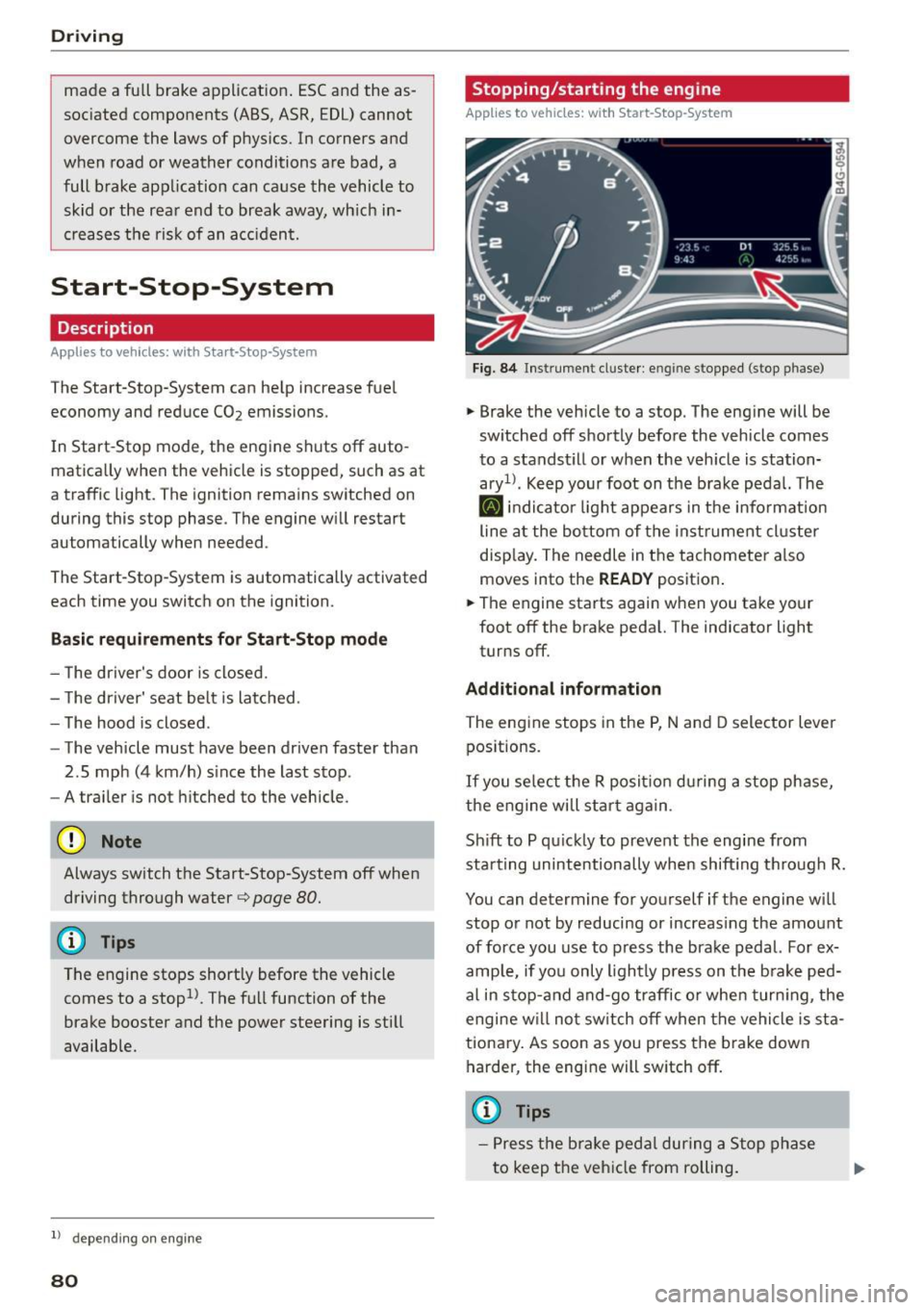
Fi g. 8 4 Instrument cl uste r: en gin e stopped (stop phase)
.,. Brake the vehicle to a stop. The eng ine will be
sw itched
off shortly before the vehicle comes
to a standst ill or when the veh icle is station
ary 1>. Keep your foot on the b rake peda l. The
[I] indi cato r light appears in the info rmat ion
line a t the bottom of the inst rument cl uster
disp lay. The needle in the tachometer a lso
moves into the READY positio n.
.,. The engine starts again when you take your
foot
off the brake peda l. The indicator light
turns
off.
Additional information
The engine stops in the P, N and D selector lever
pos itions.
If you se lect the R posit io n du ring a stop phase,
the e ngine will star t aga in .
Sh ift to P qu ickly to prevent the engine from
starting unintentionally when shift ing th rough R.
You can determine for yourself if the engine will
stop or not by reducing or increas ing the amount
of force you use to p ress the brake pedal. For ex
ample, if yo u only lightly press on t he b rake ped
al in s top-and and-go traffic o r when tur ning, the
engine w ill no t sw itch
off when the vehi cle is sta
tiona ry . As soon as you press the b rake down
harder, the eng ine will sw itch
off.
(D Tips
- Press the bra ke peda l during a S top phase
to keep the vehi cle from rolling.
Page 83 of 294
M N <( I.J "". rl 1.0
"' N 1.0 rl
-The ignition will turn off if you press the
I START ENGINE STOP I button during a stop
phase . The needle in the tachometer
moves
into the OFF position.
General information
Applies to vehi cles: with Start-Stop-System
The standard Start-Stop mode con be canceled
for different system-related reasons.
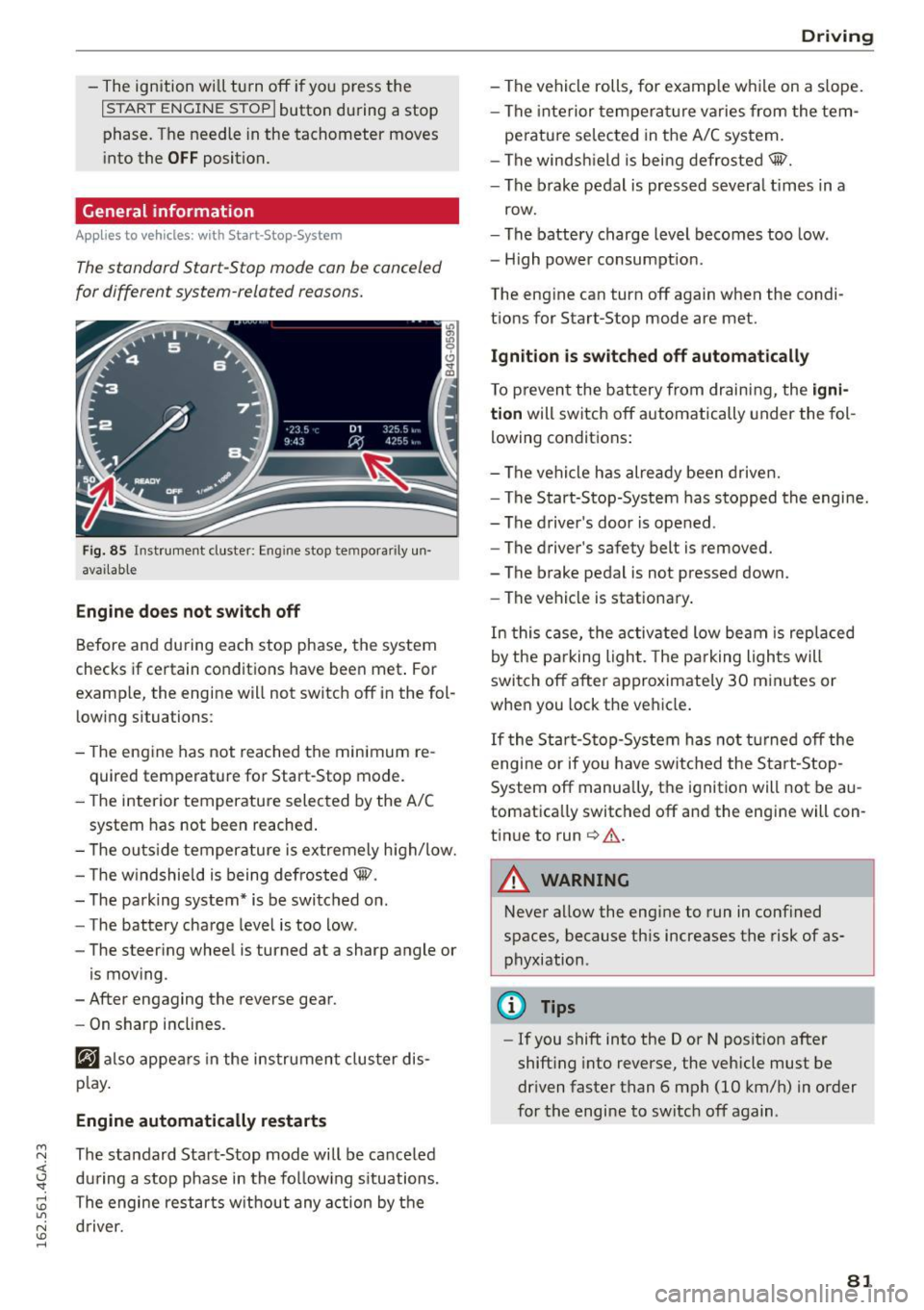
Fig. 85 Instrument cluster: Eng ine stop tempora rily un
avai lable
Engine does not switch off
Before and during each stop phase, the system
checks if certain conditions have been met . For
examp le, the engine will not switch off in the fol
lowing situations:
- The engine has not reached the minimum re
quired temperature for Start-Stop mode.
- The interior temperature selected by the A/C
system has not been reached.
- The outside temperature is extremely high/low.
- The windshield is being defrosted@.
- The parking system* is be switched on .
- The battery charge level is too low .
- The steering wheel is turned at a sharp angle or
is moving .
- After engaging the reverse gear.
- On sharp inclines.
@J also appears in the instrument cluster dis
play.
Engine automatically restarts
The standard Start-Stop mode will be canceled
during a stop phase in the following situations .
The engine restarts without any action by the driver.
Driving
- The vehicle rolls, for examp le while on a s lope.
- The interior temperature varies from the tem-
perature selected in the A/C system.
- The windshield is being defrosted@.
- The brake pedal is pressed severa l times in a
row.
- The battery charge level becomes too low.
- High power consumption.
The engine can turn off again when the condi tions for Start-Stop mode are met.
Ignition is switched off automatically
To prevent the battery from draining, the igni
tion
will switch off automatically under the fol
lowing conditions:
- The vehicle has already been driven.
- The Start-Stop-System has stopped the engine.
- The driver's door is opened .
- The driver's safety belt is removed.
- The brake pedal is not pressed down.
- The vehicle is stationary.
In this case, the activated low beam is replaced
by the parking light. The parking lights will
switch off after approximately 30 minutes or
when you lock the vehicle.
If the Start-Stop-System has not turned off the
engine or if you have switched the Start-Stop
System off manually, the ignition will not be au
tomatically switched off and the engine will con
tinue to run
c> .&. .
A WARNING
--Never allow the engine to run in confined
spaces, because this increases the risk of as
phyxiation .
@ Tips
-If you shift into the D or N position after
shifting into reverse, the vehicle must be
driven faster than 6 mph (10 km/h) in order
for the engine to switch off again .
81