engine AUDI S7 2016 Owner's Guide
[x] Cancel search | Manufacturer: AUDI, Model Year: 2016, Model line: S7, Model: AUDI S7 2016Pages: 294, PDF Size: 73.82 MB
Page 84 of 294

Driving
Switching the Start-Stop-System on/off
manually
Applies to veh icles: with Sta rt-Stop-System
If you do not wish to use the system, you can
switch it off manually.
F ig . 86 Ce nter con so le: Start -Stop-Syste m button
• To switch the Start-Stop-System off/on manual
ly, press the
1 0• •1 button . The L ED in the button
turns on when t he system is switched off .
(D Tips
If you switch the system off d uring a stop
phase, the engine will start again automati
cally.
Messages in the instrument cluster display
Applies to vehicles: with Start -Stop-System
Start-stop system dea ctivated: Please restart
engine manually
This message appea rs when specific conditions
are no t me t d uring a stop phase and the Sta rt
Stop-System will
not be able to resta rt the en
gine. The engine must be started with the
I S TAR T ENGINE STOP I button.
Start-stop system: System fault! Currently
unavailable
There is a ma lf u nct ion in the Star t-Stop -System .
Drive the veh icle to an authorized repair fac ility
for servic ing as soon as possib le to correct the
malfunct ion.
82
Speed warning system
Introduction
The speed warning system helps you to stay un
der a specified maximum speed .
The speed warning system warns you if you are
exceeding the maximum speed that you have set .
You w ill hear a warning tone when your speed ex
ceeds the sto red val ue by app rox imately 3 mph
(3 km/h) . An indicator light . (USA mode ls)/ .
(Ca nada models) in the ins trumen t cluste r dis
play a lso turns o n at the same time. The ind ic a tor
li ght .,. turns off w hen the speed decrea ses
below the stored maximum speed.
Set ting a t hreshol d is recom mended if you would
lik e to be rem inded when you re ach a cert ain
maximum speed . Si tua tions where you may want
to do so include drivin g in a country w ith a gene r
a l speed limit or if there is a specified max imum
speed for winter tires.
(D Tips
Eve n though your vehicle is eq uipped w ith a
speed warning system, you should still watch
the speedometer to make sure yo u are not
drivi ng faster than the speed lim it.
Setting the threshold
You con set , change and delete the warning
threshold in the Infotainment system.
• Select: the ICAR I function button > (Car)* Sy s
tems
control b utton > Driver ass istance >
Speed warning .
You can set any threshold betwee n 20 mph
(30 km/h) and 150 mph (240 km/h) . Settings
can each be adjusted in increments of 6 mph
(10 km/h) .
Page 85 of 294
M N <( \,J
"". rl I.O
"' N I.O rl
Cruise control system
Switching on
Applies to vehicles: with cr uise contro l system
The cruise control system makes it possible to
drive a constant speed that is 30 km/h or higher.
0
f
®t
0
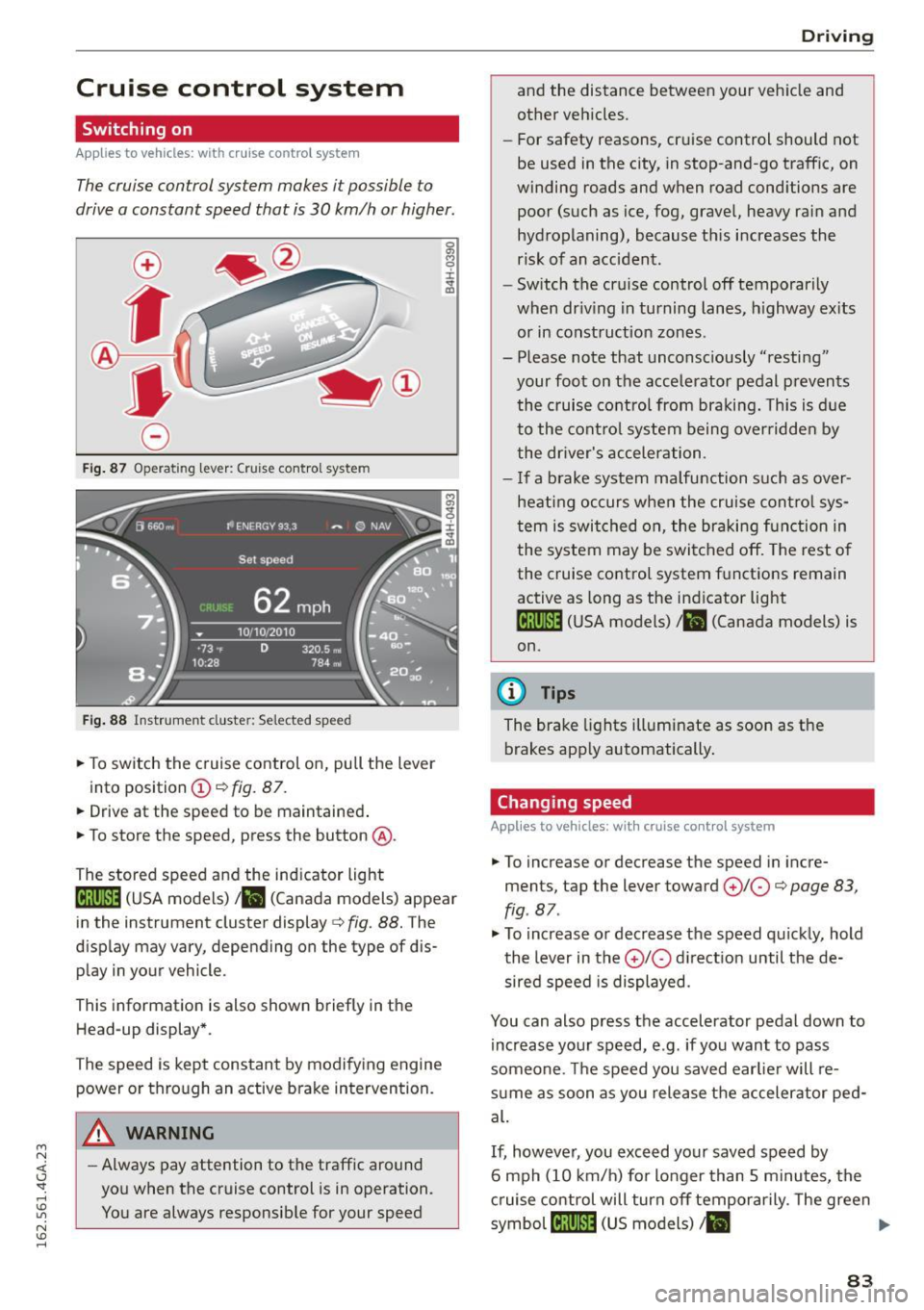
Fig. 87 Operating lever: Cruise control system
Fig. 88 Instrument cluster: Selected speed
.,. To switch the c ruise control on, pull the lever
into position
(D c:> fig. 87 .
.,. Drive at the speed to be maintained .
.,. To store the speed, press the button @.
The stored speed and the indicator light
lij;(l )~i~ (USA models) ,ii (Canada models) appear
in the instrument cluster display
c:> fig. 88. The
display may vary, depending on the type of dis
play in your vehicle.
This informat ion is also shown briefly in the
Head-up display*.
The speed is kept constant by modifying engine power or through an active brake intervention.
A WARNING
- Always pay attention to the traffic around
you when the cruise control is in operation.
You are always responsib le for your speed
-
Dr ivi ng
and the distance between your vehicle and
other vehicles.
- For safety reasons, cruise control should not
be used in the city, in stop-and-go traffic, on
winding roads and when road cond itions are
poor (such as ice, fog, gravel, heavy rain and
hydroplaning), because this increases the
risk of an accident.
- Switch the cruise control off temporarily
when dr iv ing in turning lanes, h ighway ex its
or in construction zones.
- Please note that unconsciously "resting" your foot on the accele rator pedal p revents
the cruise control from braki ng. This is d ue
to the contro l system being over ridden by
the dr iver's acceler ation.
- I f a brake system malfunction such as over
hea ting occurs when the cruise cont ro l sys
tem is swit ched on, the braking f unction in
the system may be switched off. The rest o f
the cruise co ntrol system f unctions remain
active as long as the indicator light
1ff;(i )~i~ (USA models) ,ii (Canada models) is
on.
{!) Tips
The brake lights illuminate as soon as the
brakes app ly automatically .
Changing speed
Applies to vehicles: wit h cruise co ntro l system
.,. To increase or decrease th e speed in incre
ments, tap the lever toward
(£)10 c:> page 83,
fig . 87 .
.,. To increase or decrease the speed quic kly, hold
the lever in the
0 10 d irect ion until the de
sired speed is displayed.
You can also press the accelerator pedal down to increase yo ur speed, e.g. if you want to pass
someone. The speed you saved earlie r will re
s u me as soon as you release the accelerator ped
al.
If, however, you exceed your saved speed by
6 mph (10 km/h) for longer than 5 m inutes, the
c ruise control will turn off temporarily. The green
symbol
cij;(l)~i~ (US models) I ii
83
Page 103 of 294
M N <( (.J
'SI: ,...., \!) ..,.,
N \!) ,....,
Audi drive select Driving settings
Introduction
Drive select makes it possible to experience dif
ferent types of vehicle settings in one vehicle.
The driver can select
Comfort, Auto and Dynamic
modes in the Infotainment system to switch be
tween a sporty and a comfortable driving mode.
In the
Individual mode, the settings can be ad
justed to your personal preferences. This makes it possible to combine settings such as a sporty en
g ine tun ing with light steering.
_&. WARNING
Improper use of the Audi drive select can
cause collisions, other acc idents and serious
personal injury.
Description
-
The follow ing systems are affected by drive se
lect:
Engine and transmission
Depending on the mode, the eng ine and the
transmission respond quicker or in a more bal
anced manner to acce lerator pedal movements.
I n the sporty dynamic mode, the transmission
shifts at higher RPMs.
Air suspension*
The adaptive air suspension/adaptive air suspen
sion sport*
(Air suspension in the MMI) is an
e lectronically controlled a ir suspension and
damping system. They are adjusted depending on
the selected driving mode, the driver's steering,
b raking and acce leration input and the road sur
face, vehicle speed and load. A sporty setting is generally used in vehicles with adaptive air sus
pension sport*.
The vehicle clearance varies depending on these lected mode and the speed.
The highway setting is activated automatically
when you drive above 75 mph (120 km/h) for
more than 30 seconds in the
Auto or Dynamic
Audi drive select
mode. The ground clearance is increased auto
matically if the speed drops below 44 mph (70
km/h) for more than 120 seconds.
Steering
T he steering adapts in terms of steer ing effort
and steering ratios . Indirect steering that moves
easily, like the steering in comfort mode, is best
suited to long drives on a highway. In contrast,
dynamic mode provides sporty, direct steering.
T he following applies to vehicles with dynamic
steering*: the steering ratio changes based on ve
hicle speed in order to maintain optimum steer
ing effort for the driver at all times. This sets the
steering to be less sensitive at higher speeds in
order to provide improved vehicle control. At re
duced speeds, however, steering is more direct in
order to keep the steering effort as minimal as
poss ible when the driver is maneuvering the vehi
cle. At low and average speeds, dynamic steer ing
additionally provides more responsive steering
performance.
Sport differential*
As a component of the all wheel dr ive system
(quattro)
¢ page 192, the Sport differential* dis
tributes the driving power to the rear axle de
pending on the sit uation. The distribution of
power varies depending on the selected mode,
from balanced (comfort) to agile (dynamic) . The
goal is a high level of agility and ability to accel
erate on curves. The vehicle is very responsive to
steering.
Curve light*
T he curve light adapts to driving on curves. The
pivoting action and the lighting are also adapted
to the mode.
Adaptive cruise control*
T he behav ior when accelerating can be adjusted
from comfortable to sporty, depending on the
drive select mode. Adaptive cruise control a lso
responds to the driving behavior of the vehicle
ahead in a more conservative or sporty manner. ..,_
101
Page 104 of 294

Audi dri ve se lect
Engine soun d*
The sound of the engine is adapted to the select
ed mode and ranges from subtle to sporty.
(D Note
-Make sure there is enough clearance above
and below the veh icle when parking. The
height of the vehicle can change once it is
parked due to temperature fluctuations,
changes to the load conditions and changes
to the driving modes, which can affect clear
ance.
- When transporting the vehicle on a car car
rier, train, ship or by other means, only tie
the vehicle down at the running surface of
the tires, which is the outer c ircumference .
Securing the vehicle at the axle compo
nents, suspension struts or towing eyes is
not permitted because the pressure in the
a ir s uspension struts can change dur ing
transport. The vehicle may not be secured
sufficient ly if this happens .
- If yo u are goi ng to tow a t railer, yo u m ust
activate the trai ler operation mode
¢ page 201.
(D Tips
-In some models, the maximum vehicle
speed can on ly be reached in the
Auto and
D ynami c modes.
- Se lecting the
D ynamic mode results in spor
ty shifting characte ristics . The S gear posi
tion engages automatically.
- In vehicles with spo rt differential*, the
Dy·
na mic
mode is deactivated when towing a
trai ler.
- In vehicles that have dynamic steering*, op
erating noise is heard when starting or stop -
Adjusting the Individual mode
ping the engine. This does not indica te a
problem .
Selecting the driving mode
You can choose between comfort, auto, dynamic
and individual.
Fig . 109 Infota inment : drive select
.. To select the mode, se lect the following in the
Infotainment system:
I CAR I function button >
Comfort , Auto , D yn amic or Indi vidu al.
You can change the driv ing mode when the vehi
cle is stationary or whi le driving . If traffic per
mits, after changing modes, briefly take your
foot off the accelerator pedal so that the recently
selected mode is also activated for the engine.
Comfort -provides a comfort-o riented vehicle
setup and is s uited for long drives o n highways.
Auto -provides an overall comfortable ye t dy
nam ic dr iv ing feel and is suited for eve ry day use.
D ynami c· gives the driver a sporty driving feel
and is suited to a sporty driv ing style .
Individual ·¢ page 102.
A WARNING
Pay attent ion to traffic when operating the
drive select to reduce the risk of an accident .
You con adjust the vehicle settings to your personal preferences .
.. Se lect: the ICARI function button> Set individ
ual
control button. Once you select the menu,
102
you will automatically drive in the In di vid ua l
mode.
Page 105 of 294

M N <( (.J
'SI: ,...., \!) 1.1'1
N \!) ,....,
After you have closed the settings, you are auto
matica lly driving in the
Individual driving mode.
Systems Comfort
Engine/Transmission
balanced
air suspension* comfortable
Steering comfortable
Audi drive select
The equipment in your vehicle will determine
which settings you can adjust . The following ta
ble g ives an overview of the characteristics.
Auto Dynamic
balanced sporty
ba lanced sporty
ba lanced sporty
Dynamic
steering* comfortable/indirect ba lanced/direct sporty/direct
Sport differential* balanced
Adaptive cruise control* comfortable
Engine sound* subtle
a) Subtle in the se lector lever position D and sporty in S.
(D Tips
Your Ind ividual mode settings are automat i
cally stored and assigned to the remote con
trol key being used.
Raising/lowering the
vehicle
A ppl ies to vehicles: with a daptive air s uspensio n
Raising the vehicle
You can ra ise your veh icle temporarily, for exam
p le to drive over a tall curb.
.,. Select the following in the Infota inment sys
tem: the
ICARI function button > Raise control
button .
.,. Wait for the arrows in the Infotainment system
display to stop blinking and the vehicle to reach
its fina l position.
Lowering the vehicle
.,. To lower the vehicle, select the follow ing in the
Infotainment system: the
! CARI function button
> Lower control button .
.,. Wait for the arrows in the Infotainment system
display to stop blinking and the vehicle to lower
completely .
(D Note
-Remember that your veh icle is not suitable
for driving offroad even when it is raised.
There is not enough ground clearance . ag
ile sporty
ba lanc ed sporty
subtle/sportyal sporty
- If the vehicle is raised, it wi ll lower auto
matically when driving 62 mph (100 km/h)
or faster.
Driver messages
App lies to vehicles: wit h adaptive a ir suspens ion
Air suspension : Vehicle is too high. Controlling
level. ..
Air suspension: Vehicle is too low. Controlling
level. ..
The driver message switches off when the level
control process is complete .
103
Page 109 of 294
M N <( I.J "". rl I.O
"' N I.O rl
Automatic transmission S tronic, tiptronic
Introduction
The automat ic transm iss ion is controlled elec
tronically. The transmission upshifts or down
shifts automatically depending on which drive
program is selected.
When a
moderate driving style is used, the
transmission selects the most econom ical driving
mode. The transmiss ion upshifts at a lower RPM
and downshifts at a higher RPM to improve fuel
efficiency.
The transmission switches to a sporty mode after a kick-down or when the driver uses a
sporty driv
ing style
cha racterized by quick accelerator pedal
movements, heavy acceleration, frequent
changes in speed and traveling at the maximum
speed.
If desired, the driver can also select the gears
manually (tiptronic mode) ¢ page 111.
Various automat ic tr ansm issions may be instal
led, depending on the model:
S tronic transmission
The S tronic is a dual -clutch transmission . Power
is transferred using two clutches that work inde
pendently from one another. They replace the
torque converter used in conventional automat ic
transmissions and a llow the vehicle to accelerate
without a noticeable interruption in traction.
tiptronic transmission
In the tiptronic transmission, power is transfer
r ed by a torque converter.
Automatic transmission
Selector lever positions
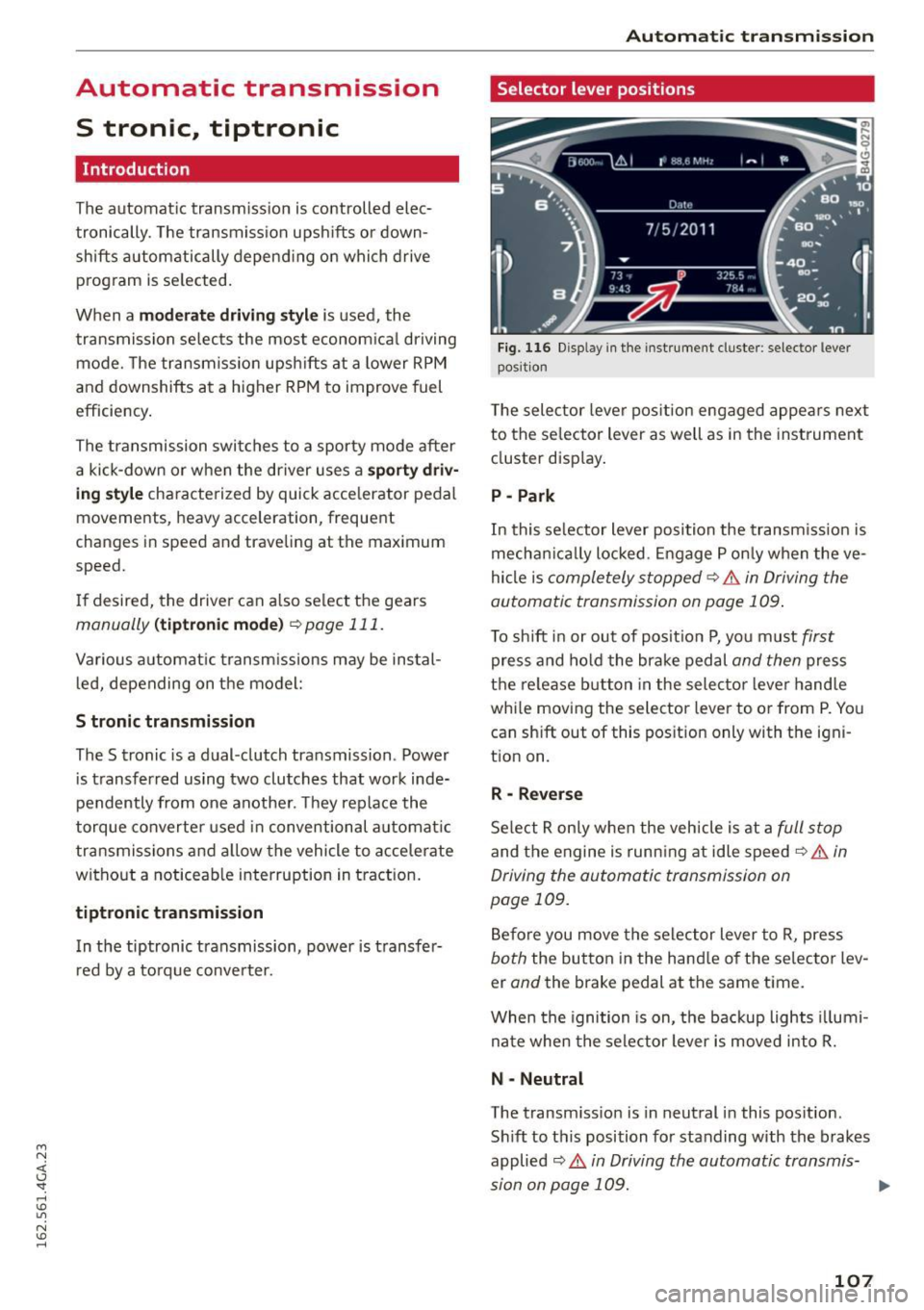
Fig. 116 Disp lay in the instrument cluste r: selector lever
posit ion
T he selec tor lever pos ition engaged appea rs next
to the se lector lever as well as in the instrument
cluster display.
P -Park
In this selector lever position the transmission is
mechanica lly locked . Engage P only when the ve
hicle is
completely stopped¢.& in Driving the
automatic transmission on page 109.
To shift in or out of posit ion P, you must first
press and hold the brake pedal and then press
the release button in the selector lever hand le
whi le moving the selector lever to or from P. You
can sh ift out of this position only with the igni
tion on.
R -Reverse
Select R only when the vehicle is at a full stop
and the engine is running at idle speed¢ .& in
Driving the automatic transmission on
page 109.
Before you move the selector lever to R, press
both the button in the hand le of the selector lev
er
and the brake pedal at the same time.
When the ignition is on, the backup lights illumi
nate when the selector lever is moved into R.
N -Neutral
The transm iss io n is in neutral in this pos ition.
Sh ift to this position for standing with the brakes
applied
¢ .& in Driving the automatic transmis-
sion on page 109. .,.
107
Page 110 of 294
Automatic transmission
When the vehicle is stationary or at speeds below
1 mph (2 km/h), you must always apply the foot
brake before and while moving the lever out of N.
DIS -Normal position for driving forward
In the D/S position, the transmission can be oper
ated either in the normal mode Dor in the sport
mode S . To select the sport mode S, pull these
lector lever back brief ly. Pulling the lever back
again will se lect the normal mode D . The inst ru
ment cluster display shows the selected driving
mode.
In the
normal mode D , the transmission auto
matically selects the suitable gear ratio . It de
pends on engine load, vehicle speed and driving
style.
Select the
sport mode S for sporty driving. The
vehicle makes full use of the engine 's power .
Shifting may become noticeable when accelerat
ing.
When the vehicle is stationary or at speeds below 1 mph (2 km/h), you must a lways apply the foot
brake before and while moving the lever to D/S
out of N.
A WARNING
Read and follow all WARNINGS¢.&. in Driv
ing the automatic transmission on
page 109.
(D Note
Coast ing downh ill with the transmission in N
and the engine not running will result in dam
age to the automatic transmission and possi
bly the catalytic converter.
@ Tips
- Audi drive select: you can adjust the sporty
sh ift characte ristics in the
Dynamic driv ing
mode .Sw ill appear in the instrument clus
ter display instead of D.
-If you accidentally select N while driving,
take you r foot off the accelerator pedal im
mediately and wait for the engine to slow
down to idle before selecting D/S.
108
-If there is a power fai lure, the selector lever
wi ll not move out of the P position. The
emergency release can be used if this hap
pens
¢ page 113.
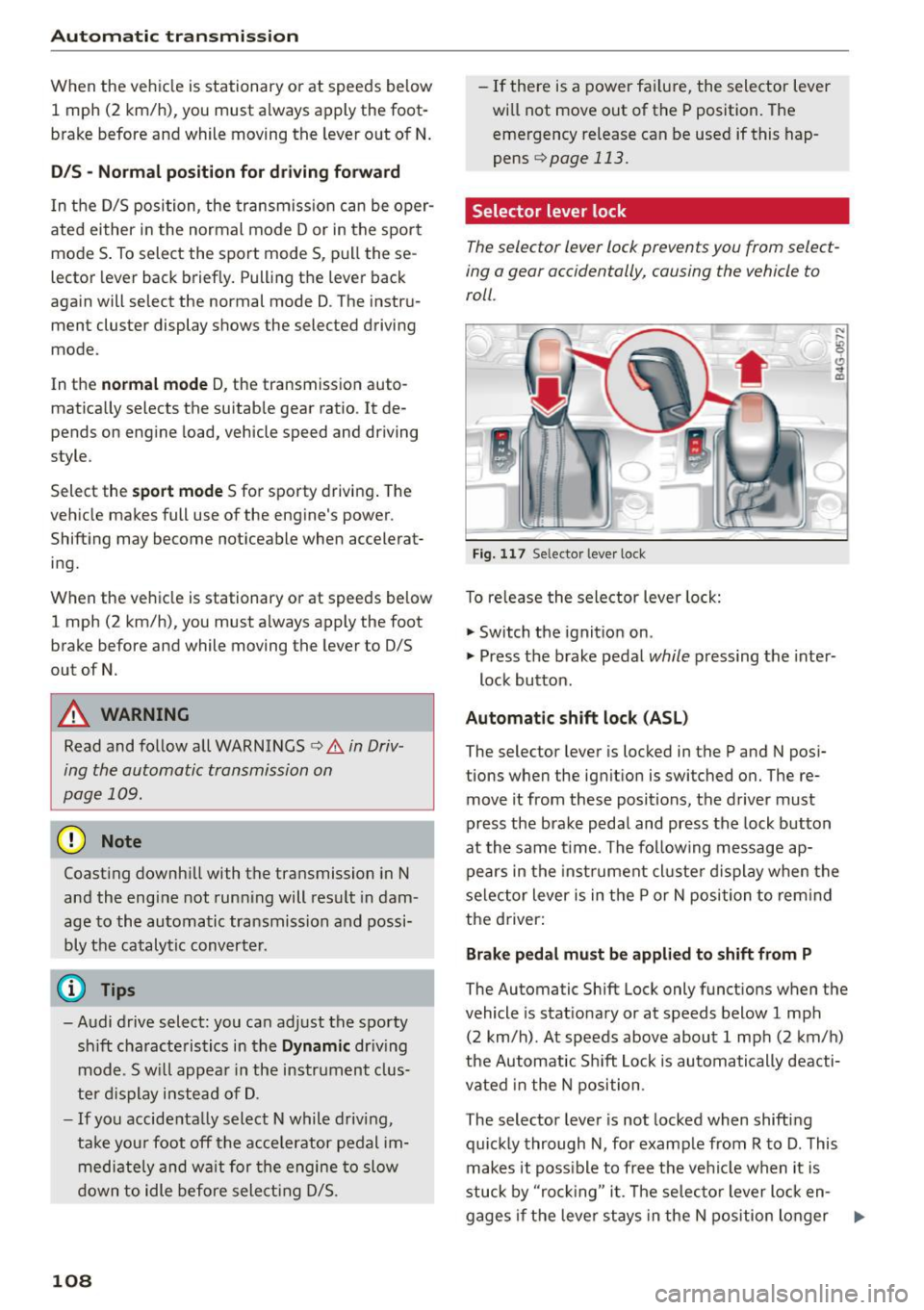
Selector lever lock
The selector lever lock prevents you from select
ing a gear accidentally, causing the vehicle to
roll .
Fig. 117 Selector lever lock
T o re lease the selector lever lock:
"' Switch the ignition on .
)
"' Press the brake pedal while pressing the inter-
lock button.
Automatic shift lock (ASL)
The selector lever is locked in the P and N posi
tions when the ignition is switched on. The re
move it from these positions, the driver must
press the brake pedal and press the lock button
at the same time. The following message ap
pears in the instr ument cluste r display when the
selector lever is in the P or N position to rem ind
the driver:
Brake pedal must be applied to shift from P
The Automatic Shift Lock only functions when the
vehicle is stat ionary or at speeds below 1 mph
(2 km/h) . At speeds above about 1 mph (2 km/h)
the Automatic Sh ift Lock is automatically deacti
vated in the N position .
The selector lever is not locked when shifting
quickly through N, for example from R to D. This
makes it poss ible to free the vehicle when it is
stuck by "ro ckin g" it. The selector lever lock en-
gages if the leve r stays in the N position longer ..,.
Page 111 of 294
M N <( (.J
'SI: ,...., \!) 1.1'1
N \!) ,....,
than 2 seconds when the brake pedal is not
pressed.
Lock button
The lock button in the selector lever handle pre
vents yo u from moving the se lector lever unin
tentionally while in some se lector lever positions .
The positions that require the lock button to be
pressed are marked in color in the illustration
¢fig. 117 .
Driving the automatic transmission
Starting the engine
.. The selector lever must be in P or N.
Starting off
.. Press and hold the brake pedal.
.. Press and ho ld the release button in the selec
tor lever handle, select the desired selector lev
er position such as D/S and release the button .
.. Wait briefly until the transmission has shifted
(you will feel a slight movement).
.. Remove your foot from the brake pedal and ac
celerate .
Stopping temporarily
.. Keep the vehicle stationary using the braking
pedal, for example at traffic lights.
.. Do not press the accelerator pedal when doing
th is.
.. To prevent the veh icle from rolling when you
start driving, set the parking brake when stop
ping on steep inclines¢,& .
.. Th e parking brake will re lease automatically
and the vehicle will start moving once you press
the accelerator peda l.
Stopping/parking
If the selector lever is not in the P position when
you open the driver 's door, the veh icle could roll.
The message
Transmi ssion : Car may roll! Shift
to park!
appears.
.. Press and ho ld the brake pedal unt il the vehicle
has come to a complete stop.
.. Apply the parking brake¢
page 78, Parking.
.. Select the P selector lever position ¢ ,&.
Automatic transmission
Stopping on an incline
.. Always press the brake pedal to hold the vehi
cle in place and prevent it from "ro lling back"
c::> ,& . Do not try to prevent the vehicle from
"rolling back" when a gear is engaged by in
creasing the engine speed ¢(D .
Starting on an incline
.. Activa te the parking brake.
.. With the driving gear selected, press the acce l
erator pedal carefu lly. The parking brake will re
lease automatica lly if your seat belt is fastened.
Under certain circumstances, such as driving in
the mountains, it may be useful to switch tempo
rarily to the manual shift program in order to ad
just the gears to the dr iv ing condit ions by hand
Q ,&. .
On s lopes, activate the parking brake first and
then move the selector lever to the P position.
This prevents too much stress from being placed
on the locking mechanism.
A WARNING
- The vehicle can also roll when the engine is
stopped.
- Unintended vehicle movement can cause se
rious injury .
- Never leave your vehicle with the engine
running while in gear. If you must leave your
vehicle when the engine is running, activate
the park ing brake and move the selector lev
er to P.
- Power is still transmitted to the wheels
when the engine is running at idle. To pre
vent the vehicle from "creep ing", you must
keep yo ur foot on the brake when the engine
is running and the se lector lever is in D/S or
R or "tiptronic" mode is selected.
- Do not press the accelerator pedal when
changing the se lector lever position while
the vehicle is stationary and the engine is
running .
- Never shift into R or P while driving.
- Before driving down a steep slope, reduce
your speed and shift into a lower gear with
"ti ptronic".
109
Page 112 of 294
Automatic transmission
-Do not ride the brakes or press the brake
pedal too often or too long when driving
down a hill. Constant braking causes the
brakes to overheat and substantially re
duces braking performance, increases brak
ing distance or causes complete failure of
the brake system .
- To prevent the vehicle from rolling back
when stopping on inclines, always hold it in
place with the brake pedal or parking brake.
- Never hold the vehicle on an incline with a
slipping clutch. The clutch opens automati
cally when it becomes too hot from the
overload . An indicator lamp
mJ illuminates
and a driver message appears¢
page 112
when the clutch is overloaded.
-If the engine must remain running, never
have any driving position engaged when
checking under the hood. Make sure these
lector lever has securely engaged and is
locked in P with the parking brake set
¢page 218. Otherwise, any increase in en
gine speed may set the vehicle in motion,
even with the parking brake applied.
@ Note
- When stopping on an incline, do not try to
hold the vehicle in place by pressing the ac
celerator pedal while a driving gear is se lected . This can cause the transmission to
overheat and can damage it . Activate the
parking brake or press the brake pedal to
prevent the vehicle from rolling.
- Allowing the vehicle to roll when the engine
is stopped and the selector lever is in N will
damage the transmission because it is not
lubricated under those circumstances.
@ Tips
For safety reasons, the parking brake is re
leased automatically only when the driver's
safety belt is engaged in the buckle.
110
· Hill descent control
Hill descent control assists the driver when driv
ing down hills .
Hill descent control is activated when the selec
tor lever is in the D or S posi tion and you press
the brake pedal. The transmission automatically selects a gear that is suitable for the incline . Hill
descent control tries to maintain the speed ach
ieved at the time of braking, within physical and
technical limitations. If may still be necessary to
adjust the speed with the brake pedal.
Hill descent control switches off once the hill lev
els out or you press the accelerator pedal.
On vehicles with a cruise control system*
¢
page 83, hill descent control is also activated
when the speed is set.
A WARNING
Hill descent control cannot overcome physical
limitations, so it may not be able to maintain
a constant speed under all conditions. Always be ready to apply the brakes.
Page 113 of 294
M N <( I.J "". rl I.O
"' N I.O rl
Manual shift program
Using the manual shift program you can man
ually select gears.
)
Fig. 118 Center console: shift ing t he g ears manually
Fig. 119 Stee ring whee l: Shi ft paddles•
Gear selection with selector lever
The tiptronic mode can be selected either with
the vehicle stationary or on the move.
• Push the selector lever to the right from D/S.
An M appears in the instrument cluster display
as soon as the transm ission has shifted.
• To upshift, push the selector lever forward to
the plus position
0 ~ fig. 118 .
• To downshift, push the lever to the minus posi-
tion
0 .
Gear selection with shift paddles*
The shift padd les are activated when the selector
lever is in D/S or the tiptronic manual shift pro
gram.
• To upshift , touch the shift paddle on the right
(v¢fig.119 .
• To downshift, touch the shift paddle on the left
0 .
The transmission automatically shifts up or down
before critical engine speed is reached.
Automatic transmission
The transmission only allows manual shifting
when the engine speed is within the permitted
range .
(D Tips
-When you shift into the next lower gear, the
transmission wi ll downshift on ly when there
is no possibility of over-revving the engine.
- When the kick-down comes on, the trans
mission wi ll shift down to a lower gear, de
pending on vehicle and engine speeds.
- Tiptronic is inoperative when the transmis
sion is in the fail-safe mode.
Kick -down
Kick-down enables maximum acceleration.
When you press the accelerator pedal down be
yond the resistance point, the automatic trans
mission downshifts into a lower gear, depending
on vehicle speed and engine RPM. It shifts up in
to the next higher gear once the maximum speci
fied engine RPM is reached.
A WARNING
-Please note that the whee ls could spin on
slick or slippery roads when kick-down is ac
tive .
Launch control program
Appl ies to vehicles: with S tronic
-
The launch control program provides the best
possible accelera tion when s tarting from a s top.
Requirement: The engine must be at operating
temperature and the steering wheel must not be
turned.
• Deactivate the Start-Stop-System* ¢
page 82.
The LED in the lCA.l .. l button turns on .
• With the engine running, press the
~ l~ -0-F F~ ! but
ton briefly¢
page 189 . The II indicator light
turns on and the message
Stabilization control
(ESC): Off. Warning! Reduced stability
ap
pears in the instrument cluster display .
• Pull the selector lever back out of the D/S posi
tion briefly to select the S position or select the .,.
111