warning lights AUDI S7 2016 Owner's Guide
[x] Cancel search | Manufacturer: AUDI, Model Year: 2016, Model line: S7, Model: AUDI S7 2016Pages: 294, PDF Size: 73.82 MB
Page 106 of 294

Night visio n ass is t
Night vision assist
Night vision assist with
pedestrian and wild
animal highlighting
Description
A pp lies to veh icles : w ith night v isio n ass ist
The night vision assist can detect, highlight and,
if necessary, warn about pedestrians and large
wild animals.
Night vision assistant with pedestr ian and wild
animal detection assists you in darkness by using
an infrared camera to monitor the area in front of
your vehicle, within the limits of the system.
It
can display objects up to approximately
1000 feet (300 meters) away. The heat image de
tected by the camera is shown in the instrument
cluster display. Warm areas appear lighter and
cold areas appear darker.
Highlighting detected pedestrians and wild
animals
A pplies to veh icles: w ith night v isio n ass ist
F ig. 110 Instrument cluster: Yellow pedestr ian highl ight
i ng
Fig. 111 I n st rument cluster: symbol when infrared image
i s not visib le
104
Within the limits o f the system, night vision as
sistant can detect pedestrians and wild animals
that are within the detect ion range between ap
proximately 32 feet (10 meters) and 295 feet
(90 meters) in front of the vehicle. When it is
dark outside and the headlights are switched on,
detected pedestrians and w ild an imals are
marked in yellow ¢
fig. 110 within the limits of
the system ¢
page 105 . Wild animal detection is
not act ive in bu ilt-up areas . The system only de
tects large wild anima ls such as deer.
@ Tips
I f another display such as navigation rep laces
the image from the night v is ion assist the~ .. ,
symbol appears in a tab
r::!>fig . 111. You can
access night vision assist using the buttons in
the m ultifunction steering wheel¢
page 24 .
Pedestrian and wild animal warning
Applies to vehicles: wit h night vision assist
Fig . 112 Instrument cl uster: @Pedest rian warn ing ,®
w ild animal warning
Fig. 113 Instrument cl uste r: @ Pedestr ian warn ing/ @
wild an ima l warn ing , when the image from th e n ight vis ion
assist is not selected in t he instrument cluster display
Iii-
Page 107 of 294
M N <( I.J "". rl I.O
"' N I.O rl
Disp lay in th e in st rum ent clu ste r/head-up
di splay *
If there are pedestrians or wild animals in an area
in front of your vehicle that is classified as criti
cal, the system will direct your attention to this:
- Pedestrians or wi ld animals are highlighted in
red and the corresponding symbol. or.
turns on
¢fig. 112.
-There is also a tone.
The area classified as cr itical is based on the vehi
cle speed and the steering w heel angle. Pedes
tr ian and wild animal warning encourages you to
pay more attention.
I f the nigh t vision assist image is replaced by an
o ther d isp lay (such as the on-board computer),
the red ind icator light . or. will appear if
there is a pedestrian or wild animal warning
¢ fig . 113.
If the head- up display* is sw itched on and the
n ight vision assist content is activated, . or.
will appear in the head-up display*.
Ma rking light*
To direct the driver's attention to a pedestr ian,
the headlights can flash on the pedestr ian th ree
times in a row when the re is a pedes trian warn
ing .
This happens at speeds above approximate ly
35 mph (60 km/h) when you are traveling ou t
side of we ll-lit areas and when flashing the head
lights will not create glare for a vehicle detected
in the oncoming lane. The marker light* is con
trolled by the high beam assist* ¢
page 44, High
beam assist.
The marking light is not used for wi ld animals .
Nig ht v is io n as sist
General information
App lies to vehicles : wit h night vision assist
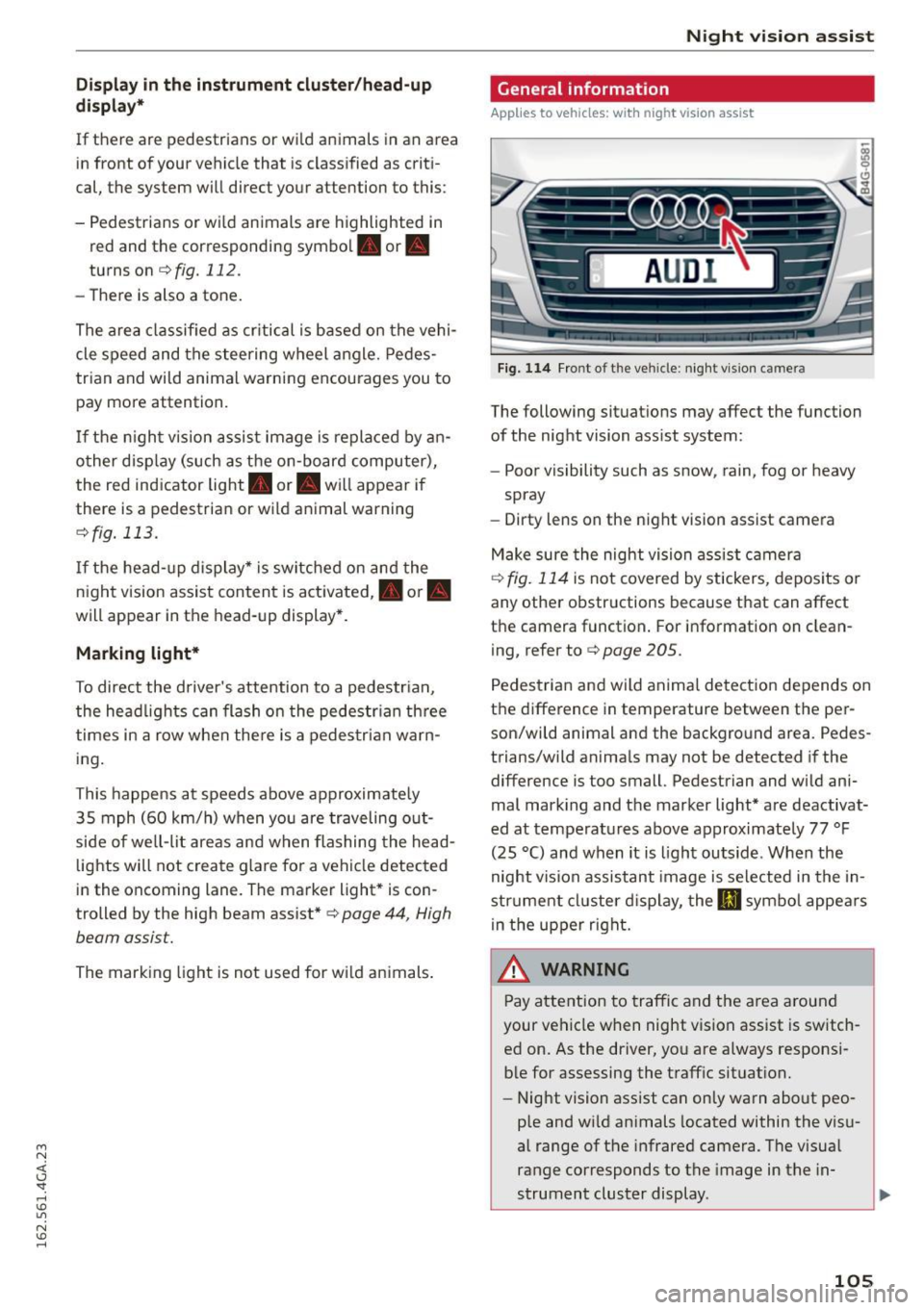
Fig. 114 Fro nt of the veh icle: night vi sion camera
The following situat ions may affect the function
of the night vision assist system:
- Poor visibility such as snow , rain, fog or heavy
spray
- Dirty lens on the night vision assist camera
Make sure the night vision ass ist camera
¢
fig. 114 is not covered by stickers, depos its or
any other obstructions because that can affect
the camera function . For information on clean
ing, refer to¢
page 205.
Pedestria n and wild anima l detect ion depends on
the difference in temperature between the per son/wild animal and the background area. Pedes
trians/wild anima ls may not be detected if the
difference is too small. Pedestrian and wild ani
mal mark ing and the marker light* are deactivat
ed at temperatures above approximately 77 °F
(25 °C) and when it is light outside . When the
night vision assistant image is selected in the in
str ument cl uster d isplay, the
Ill symbo l appears
i n the upper right.
A WARNING
Pay attention to traffic and the area a round
your vehicle when night vision assist is sw itch
ed on. As the driver, yo u are a lways responsi
ble for assessing the traffic situat ion.
- Night vision assist can only warn about peo
ple and wi ld animals located within the visu
al range of the infrared camera. The visual
range corresponds to the image in the in
strument cluster display .
-
105
Page 108 of 294

Night visio n ass is t
- Night vision assist may not detect people or
wild animals and mark them if
- they are not in an upright position, for ex
ample if they are sitt ing or ly in g down
and/or
- the silhouette in the display appears in
comp lete or interrupted, for example be
cause the person is pa rtially covere d by a
veh icle or an animal by tall grass. This
could increase the risk of an accident.
- Never try to swerve around an imals if do ing
so wi ll endanger you or other road users, be
cause this increases the risk of an acc ident.
- E ven though the system eva lu ates the
shape and hea t given off by all detec ted ob
j ects, there are lim its to the system . There
may be false warnings .
- F or technica l reasons, the image pauses in
sp lit second interva ls.
Switching on/off
Applies to veh icles: w ith night vision assist
F ig. 11 5 Area arou nd t he ligh t switc h: n ig ht vis ion assist
butto n
Requirement : Switc h the ignition on and turn the
light switch to the
AUTO posit ion or .
.,. Press the~ button ¢
fig. 115. The heat image
from the night v is ion camera appears in the in
strument cluster d isplay .
.,. Press the~ button again to sw itch night vision
ass ist off .
If cond it ions are br ight enough, night v ision as
sist can be sw itched on without mov ing the light
switch to the
AUTO position . Pedestrian and w ild
106
anima l highl ighting and wa rnings are only active
whe n it is dark outside and the headlights are
switched on .
Adjusting the contrast
Applies to vehicles: with night vision assist
.,. Select: the I CARI function button > (Car )* Sy s
tem s
control button > Driver ass istan ce >
Night vi sion ass ist contrast .
When the night vis ion assist is switched on and
the image is v is ible in the instrument cluster dis
play, you can adjust the contrast in the image
from
Min to Ma x.
Driver messages
Applies to vehicles: with night vision assist
Night vision a ssis t: Sy stem fault
The system cannot guarantee cor rect function
and is switched off . See an authorized Audi dealer
or a uthorized Audi Service Facility for ass istance.
Night vis ion a ssist: Currentl y una vailable
The system cannot gua rantee cor rect function
temporar ily and is switched off .
Night vision a ssis t: Only available at night with
lights tu rned on
Night vision assist only works when it is da rk out
s ide and the headlights a re on.
Night vi sion a ssi st: Ped estrian marking current
l y unavailab le
The pedestrian and wild animal h ighlighting was
switched off by the system.
Page 111 of 294
M N <( (.J
'SI: ,...., \!) 1.1'1
N \!) ,....,
than 2 seconds when the brake pedal is not
pressed.
Lock button
The lock button in the selector lever handle pre
vents yo u from moving the se lector lever unin
tentionally while in some se lector lever positions .
The positions that require the lock button to be
pressed are marked in color in the illustration
¢fig. 117 .
Driving the automatic transmission
Starting the engine
.. The selector lever must be in P or N.
Starting off
.. Press and hold the brake pedal.
.. Press and ho ld the release button in the selec
tor lever handle, select the desired selector lev
er position such as D/S and release the button .
.. Wait briefly until the transmission has shifted
(you will feel a slight movement).
.. Remove your foot from the brake pedal and ac
celerate .
Stopping temporarily
.. Keep the vehicle stationary using the braking
pedal, for example at traffic lights.
.. Do not press the accelerator pedal when doing
th is.
.. To prevent the veh icle from rolling when you
start driving, set the parking brake when stop
ping on steep inclines¢,& .
.. Th e parking brake will re lease automatically
and the vehicle will start moving once you press
the accelerator peda l.
Stopping/parking
If the selector lever is not in the P position when
you open the driver 's door, the veh icle could roll.
The message
Transmi ssion : Car may roll! Shift
to park!
appears.
.. Press and ho ld the brake pedal unt il the vehicle
has come to a complete stop.
.. Apply the parking brake¢
page 78, Parking.
.. Select the P selector lever position ¢ ,&.
Automatic transmission
Stopping on an incline
.. Always press the brake pedal to hold the vehi
cle in place and prevent it from "ro lling back"
c::> ,& . Do not try to prevent the vehicle from
"rolling back" when a gear is engaged by in
creasing the engine speed ¢(D .
Starting on an incline
.. Activa te the parking brake.
.. With the driving gear selected, press the acce l
erator pedal carefu lly. The parking brake will re
lease automatica lly if your seat belt is fastened.
Under certain circumstances, such as driving in
the mountains, it may be useful to switch tempo
rarily to the manual shift program in order to ad
just the gears to the dr iv ing condit ions by hand
Q ,&. .
On s lopes, activate the parking brake first and
then move the selector lever to the P position.
This prevents too much stress from being placed
on the locking mechanism.
A WARNING
- The vehicle can also roll when the engine is
stopped.
- Unintended vehicle movement can cause se
rious injury .
- Never leave your vehicle with the engine
running while in gear. If you must leave your
vehicle when the engine is running, activate
the park ing brake and move the selector lev
er to P.
- Power is still transmitted to the wheels
when the engine is running at idle. To pre
vent the vehicle from "creep ing", you must
keep yo ur foot on the brake when the engine
is running and the se lector lever is in D/S or
R or "tiptronic" mode is selected.
- Do not press the accelerator pedal when
changing the se lector lever position while
the vehicle is stationary and the engine is
running .
- Never shift into R or P while driving.
- Before driving down a steep slope, reduce
your speed and shift into a lower gear with
"ti ptronic".
109
Page 128 of 294
Driving safety
Driving safety
Basics
Safe driving habits
Please remember -safety first!
This chapter contains important information,
tips, instructions and warnings that you need to
read and observe for your own safety, the safety
of your passengers and others. We have summar ized here what you need to know about safety
belts, airbags, child restraints as well as child
safety. Your safety is for us
priority number 1. Al
ways observe the information and warnings in
this section - for your own safety as well as that
of your passengers .
The information in this section applies to all
model versions of your vehicle . Some of the fea
tures described in this sections may be standard
equipment on some models, or may be optional
equipment on others. If you are not sure, ask
your authorized Audi dealer.
A WARNING
- Always make sure that you follow the in
structions and heed the WARNINGS in this
Manual.
It is in your interest and in the in
terest of your passengers.
- Always keep the complete Owner's Litera
ture in your Audi when you lend or sell your
vehicle so that this important information
will always be available to the driver and
passengers.
-
- Always keep the Owner's literature handy so
that you can find it easily if you have ques
tions .
Safety equipment
The safety features are part of the occupant re
straint system and work together to help reduce
the risk of injury in a wide variety of occident sit
uations.
Your safety and the safety of your passengers
should not be left to chance. Advances in tech
nology have made a variety of features available
to help reduce the risk of injury in an accident.
126
The following is a list of just a few of the safety
features in your Audi:
-sophisticated safety belts for driver and all pas-
senger seating positions,
- safety belt pretensioners,
- safety belt force limiters for the front seats,
- safety belt height adjustment systems for the
front seats,
- front airbags,
- knee airbags for the front seats*
- side airbags in the front seats and outer rear
seats*,
- side curtain airbags with ejection mitigation
features,
- special LATCH anchorages for child restraints,
- head restraints for each seating position,
- adjustable steering column.
These individual safety features, can work to gether as a system to help protect you and your
passengers in a wide range of accidents . These
features cannot work as a system if they are not
always correctly adjusted and correctly used.
Safety is everybody's responsibility!
Important things to do before driving
Safety is everybody's job! Vehicle and occupant
safety always depends on the informed and care
ful driver.
For your safety and the safety of your passen
gers,
before driving always:
... Make sure that all lights and signals are operat
ing correctly.
... Make sure that the tire pressure is correct.
... Make sure that all windows are clean and afford
good visibility to the outs ide .
... Secure all luggage and other items carefully
~ page 63, ~page 60.
... Make sure that nothing can interfere with the
pedals .
... Adjust front seat, head restraint and mirrors
correctly for your height .
... Instruct passengers to adjust the head re
straints according to their height.
Page 195 of 294
M N <( I.J "". rl I.O
"' N I.O rl
Offroad vehicle?
Your Aud i is not an off road vehicle -there is not
enough ground clea rance . For this reason, avo id
difficu lt terrain .
A WARNING
-Also, in vehicles with all whee l dr ive, adapt
your dr iving style to the current road and
traffic conditions. Do not let the increased
safety provided tempt you into taking risks, because t his increases the risk of an acci
dent .
- The brak ing ability of yo ur vehicle is lim ited
to the traction of the wheels . In this way, it
is not different from a two wh eel drive veh i
cl e. Do not be tempted to ac celerate to a
high speed when t he ro ad is s lippery th is in
cr eases the r is k of an accident .
- Note t hat on wet streets, t he front w heels
c an "hyd rop lane" if d riving at speeds that
are too high. Unli ke front whee l drive
vehicles, the engi ne does not rev higher sud
den ly when the vehicle begins hydrop laning.
For this reaso n, pay attent ion to the r oad
condit ions regardless of your speed to re
duce t he risk of an accident .
Rear spoiler
The extendable rear spoiler increases driving sta
bility.
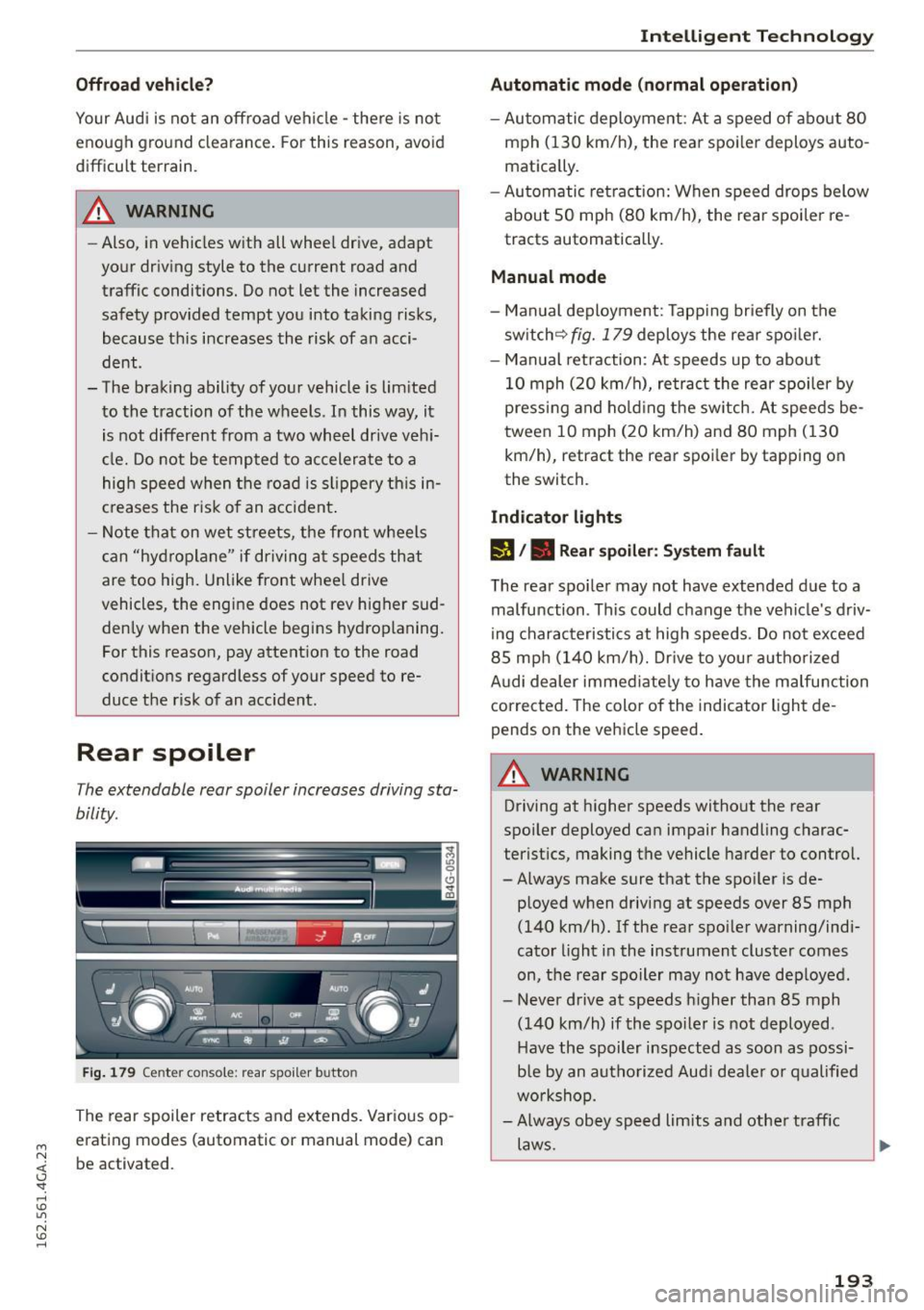
Fi g. 179 Cente r con sole : re ar s poil e r b utto n
The rear spoiler retrac ts and extends. Var ious op
erat ing modes (automatic or manual mode) can
be activated .
Intelligent Technology
Automatic mode (normal operation)
-Au tomatic deployment : At a s peed of about 80
mph (130 km/h) , the rear spo ile r deploys auto
matically .
- Au tomatic retra ction: When speed drops below
abou t SO mph (80 km/h), the rea r spoi ler re
tracts automatically.
Manual mode
- Man ual deployment: Tapp ing br iefly on the
sw itch ~
fig. 179 deploys the rea r spo ile r.
- Manual retraction : At speeds up to about
10 mph ( 20 km/h), re tract the rear spoiler by
pressi ng and hold ing t he sw itch. At speeds be
tween 10 mph (20 km/h) and 80 mph ( 130
km/h), retract the rear spoi ler by tapping on
the switch.
Indicator lights
rJ /. Rear spoiler : S ys tem fault
The rea r spoi le r may not have exte nded due to a
malfunction . Th is could change the vehicle's driv
i ng charac teristics at high speeds . Do not exceed
8 5 mp h (140 km/h). Dr ive to you r authorized
A udi dealer immed iate ly to have the malfu nction
corrected. The color of the indicator light de
pends on the vehicle speed .
A WARNING
-
Driving at higher speeds witho ut the rear
spoi ler deployed ca n impair handling charac
terist ics, making the vehicle harder to control.
- Always make sure that the spo iler is de-
p loyed w hen d riving at speeds over 85 mph
(140 km/h). If the rea r spo ile r warning/ind i
cato r light i n the instrument cluster comes
on, the rear spoile r may not have deploye d.
- Never drive at speeds h igher than 85 mph
(140 km/h) if the spo iler is not deployed.
Have the spoiler i nspected as soon as possi
b le by an au tho riz e d Aud i deale r o r q ualified
w orkshop.
- Always obey speed li mits and othe r traff ic
laws.
193
Page 201 of 294
M N <( (.J
'SI: ,...., \!) 1.1'1
N \!) ,....,
Reducing unnecessary idling
Even when your car is just idling it burns up fuel.
~ Shut the engine off when you are not driving
the vehicle.
~ Do not warm up the vehicle by letting the en-
gine run at idle .
The idling phase is automatically reduced for
veh icles with the Start-Stop-System . It is effi
cient to switch off the engine in vehicles without
the Start-Stop-System when stopped at railroad
crossings and long red lights. Turning the engine
off for just 30-40 seconds saves more fuel than is
burned by starting the engine again.
It takes a long time for the engine to warm up
fully when it is running at idle . However, wear
and noxious emissions are especially high when
the engine is warm ing up. So you shou ld drive
away as soon as you start the engine and avoid
running at high rpms while the engine is still
warming up .
(D Note
Do not leave engine idling unattended after
starting. If warning lights should come on to
indicate improper operation, they would go
unheeded. Extended idling a lso produces
heat, wh ich could resu lt in overheating or oth
er damage to the vehicle or other property.
Regular maintenance
A badly tuned engine unnecessarily wastes a lot of fuel.
~ Have your vehicle serviced at regular intervals.
By having your vehicle regularly serviced by an
Aud i dea ler helps to ensure that it runs properly
and economica lly. The condition of your vehicle
not only affects its safety and ability to hold its
value, it a lso affects fuel consumption .
Check your oil each time you fill your tank.
The amount of oil used is related to engine load
and speed.
Driving and the environment
It is normal for the oil consumption of a new en
gine to reach its lowest value after a certain mile
age has been driven.
You must drive your veh icle about 3,000 miles
(5,000 kilometers) before you can properly as
sess oil consumption .
T h is also applies to fuel consumption and engine
o ut put .
CD Note
- Have your vehicle maintained properly and
in accordance with the service recommenda
tions in your Warranty
& Maintenance book
let . Lack of proper maintenance as well as
improper use of the vehicle will impair the
function of the em ission contro l system and
cou ld lead to damage.
- Do not alter or remove any component of
the Emission Control System unless ap
proved by the manufacturer.
- Do not alter or remove any device, such as
heat shields, sw itches, ignition wires,
valves, which are designed to protect your
vehicle's Emission Control System and other important vehicle components .
Fewer short trips
Fuel consumption will always be relatively high
on short trips .
~ Try to avoid dr iv ing short distances w ith a co ld
eng ine .
The engine and cata lytic converter have to reach
their optimal operating temperature to reduce
fuel consumpt ion and nox ious em issions effec
t ively.
Just after starting, a co ld engine in a mid-size car
only achieves a fuel economy of 6-8 mi les per
gallon (30-40 l/100 km) . After about a half a
mile, fuel economy climbs to 12 mpg (20 l/100
km). After about
2.5 miles (4 km), the eng ine is
at its proper operating temperature and fuel
economy has reached a norma l level. So you can
see that you should avoid short trips whenever
poss ible. .,.
199
Page 203 of 294
M N <( (.J
'SI: ,...., \!) ..,.,
N \!) ,....,
Trailer mode Driving with a trailer
General information
Your Audi was designed primarily for passenger
transportation .
If you plan to tow a trailer, p lease remember that
the additional load will affect durability, econo
my and performance.
Trailer towing not only places more stress on the
vehicle, it also calls for more concentration from
the driver.
For this reason, always follow the operating and
driving instructions provided and use common
sense.
(D Note
If you are going to tow a trai ler, you must ac
tivate the trailer operat ion mode
c::> page 201, Operating instructions.
Technical requirements
Trailer hitch
Use a weight-carrying hitch conforming to the
gross trailer weight. The hitch must be suitable
for your vehicle and trailer and must be mounted
securely on the vehicle's chassis at a
technically
sound
location. Use only a trailer hitch with a re
movable ball mount. Always check with the trail
e r hitch manufacturer to make sure that you are
using the correct hitch.
Do not use a bumper hitch.
The hitch must be installed in such a way that it
does not interfere with the impact-absorbing
bumper system. No modifications should be
made to the vehicle exhaust and brake systems.
From time to time, check that all hitch mounting
bolts remain securely fastened .
When you are not towing a trailer,
remove the
trailer hitch ball mount. This prevents the hitch
from causing damage should your vehicle be
struck from behind
c::> &, .
Trailer mode
Trailer brakes
If your trailer is equipped with a brak ing system,
check to be sure that it conforms to all regula
tions.
T he trailer hydraulic brake system must not be di
rect ly connected to the vehicle's hydraulic b rake
system.
Safety chains
Always use safety chains between your veh icle
and the tra iler.
Trailer lights
Trailer lights must meet all regulations. Be sure
to check with your Aud i dealer for correct wiring,
switches and relays.
Mirrors
If you are unable to see the traffic behind you us
ing the regular outside mirrors, then you
must in
stall extended mirrors. It is important that you
always have clear vision to the rear .
A WARNING
--
After removing the trailer hitch, do not store
i t in your vehicle. In case of sudden braking,
the hitch could fly forward and injure you or
your passengers.
Operating instructions
Maximum trailer weight
A trailer for your vehicle is limited to a typical
class 1 or class 2 trailer.
Trailer load distribution
Be sure the load in the trailer is held securely in
place to prevent it from sh ifting forward, back
ward or sideways.
Never allow a passenger to ride in a trailer c::> &.
in Driving instructions on page 203 .
Engine cooling system
Towing a trailer makes the engine work harder. It
is important that the cooling system's perform
ance is up to the additional load. Make sure that
the cooling system has enough fluid . .,..
201
Page 205 of 294

M N <( (.J
'SI: ,...., \!) 1.1'1
N \!) ,....,
braking effect to slow the vehicle. Use of the
brakes alone can cause them to overheat and fail.
Air suspension*
When driving with a trailer, activate the trailer
mode of the air suspension. Switch the air sus
pension trailer mode on when you are towing a
trailer. This will limit the regulation by the air
suspension while driving. Select in the MMI:
ICARI function button > (Car)* systems control
button>
Vehicle settings> Air susp.: towing>
On.
Coolant temperature
The coolant temperature gauge c::> page 10 must
be observed carefully. The coolant temperature
can increase if you drive on long inclines in a low
gear at high engine speeds . Reduce your speed
immediately if the LEDs in the top part of the dis
play turn on .
For more information about indicator lights, re
fer to.
c::> page 15.
A WARNING
Anyone not properly restrained in a moving
vehicle is at a much greater risk in an acci
dent . Never let anyone ride in your car who is
not properly wearing the restraints provided
by Audi.
Trailer mode notes
Important to know
-
Your vehicle handles differently when towing a trailer because of the additional weight and dif
ferent weight distribution . Safety, performance
and economy will greatly depend on how careful
ly you load your trailer and operate your rig.
Before you actually tow your trailer, practice
turning, stopping and backing up in an area away
from traffic . Keep practicing until you have be
come completely familiar with the way your vehi
cle-trailer combination behaves and responds.
Backing up is difficult and requires practice. Back
ing up with a trailer generally requires steering
Trailer mode
action opposite to that when backing up your ve
hicle without a trailer.
Maintain a greater distance between your vehicle
and the one in front of you . You will need more
room to stop. To compensate for the trailer, you
will need a larger than normal turning radius.
When passing, remember that you cannot accel
erate as fast as you normally would because of
the added load. Make sure you have enough room
to pass. After passing, allow plenty of room for
your trailer before changing lanes again.
Avoid jerky starts, sharp turns or rapid lane
changes.
(D Tips
- Do not tow a trailer during the break-in peri
od of your vehicle.
- If you tow a trailer, your Audi may require
more frequent maintenance due to the ex
tra load
c::> page 2 7 4.
Parking on a slope
Do not park on a slope with a trailer. If it cannot
be avoided, do so only after doing the following:
When parking:
" Apply the foot brake.
" Have someone place chocks under both the ve
hicle and the trailer wheels.
"With chocks in place, slowly release the brakes
until the wheel chocks absorb the load.
"Turn the wheels towards the curb.
... Apply the parking brake.
"Select the P selector lever position.
When restarting after parking:
"Apply the foot brake.
"Start the engine.
"Select the D/S selector lever position.
"Release the parking brake and slowly pull out
and away from the wheel chocks.
"Stop and have someone retrieve the wheel
chocks .
203
Page 210 of 294
Care and cleaning
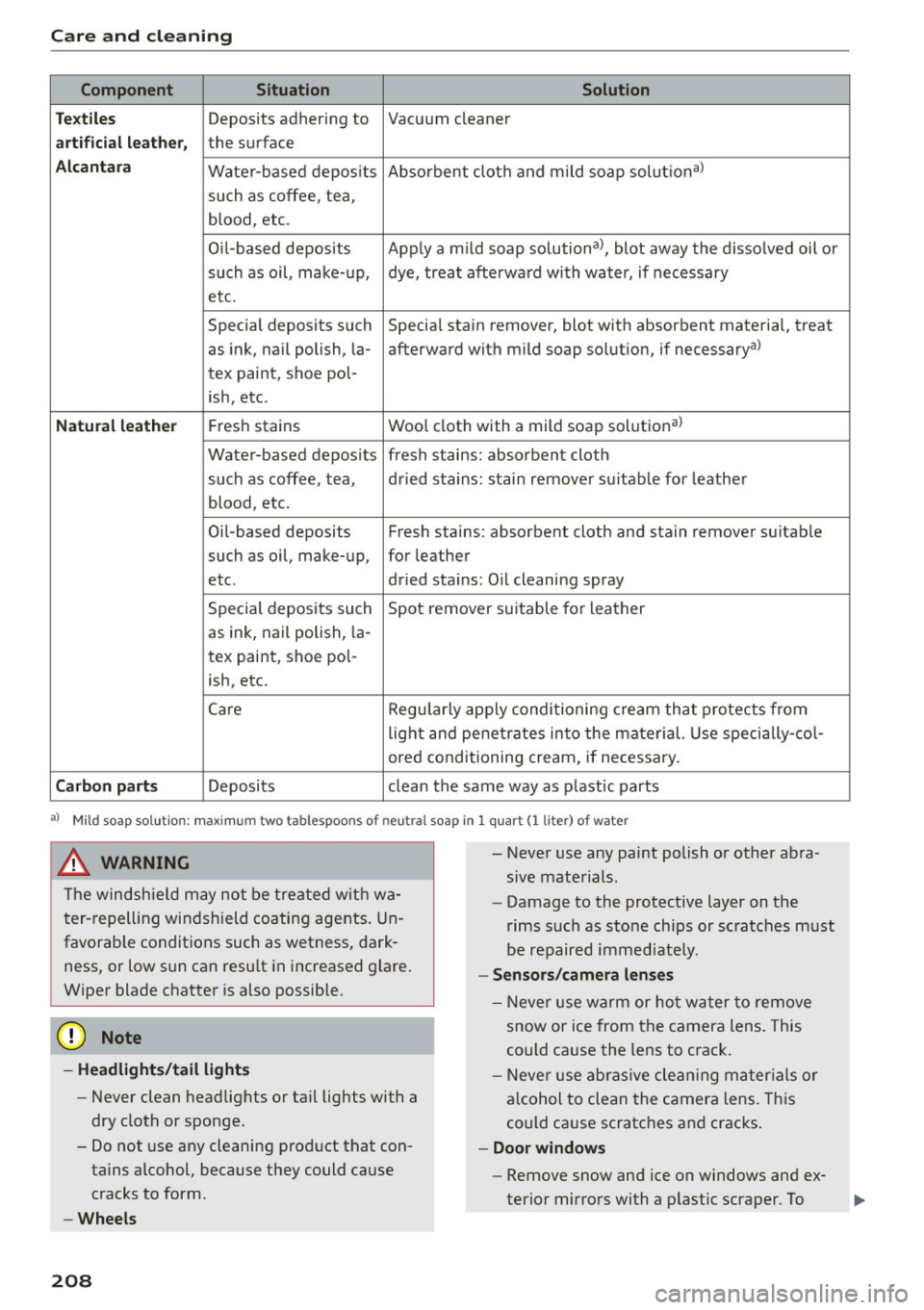
Component S ituation Solution
Te xtiles
Deposits adhering to Vacuum cleaner
arti ficial leath er, the surface
Alca ntara Wate r-based depos its Absorben
t cloth and mild soap solutional
such as coffee, tea,
blood, etc.
Oil-based deposits Apply am ild soap solutional, blot away the disso lved oil or
such as oil, make-up, dye, treat afterwa rd with water, if necessary
etc.
Special deposits such Special stain remover, blot w ith absorbent materia l, treat
as ink, na il polish, la- afterward with mild soap so lution, if necessaryal
tex paint, shoe pol-
ish, etc.
Natural leather Fres h stains Wool cloth with a mild soap solut ional
Wate r-based depos its fresh stains: absorbent clot h
such as coffee, tea, d ried stains: stain remover suitable for leathe r
blood, etc.
Oil-based deposits Fresh stains: absorbent cloth and stain remover suitab le
such as oil, make- up, for leather
etc. dried stains: Oil cleaning spray
Special deposits such Spot remover sui table for leather
as ink, nai l polish, la -
tex paint, shoe pol-
ish, etc.
Care Regularly app ly condi tioning cream that protects from
lig ht and penet rates in to the mate rial. Use specially -col -
ored conditioning cream, if necessary.
Carbon part s Deposits clean the same way as plastic parts
al Mild soap sol ution: maxim um two tablespoons of neutral soap in 1 quar t (1 liter ) of water
_& WARNING
The windshie ld may not be tre ate d wit h wa
t er- repelling win dsh ield co ating agents. Un
favorab le conditions such as wetness, dark
ness, or low s un can resu lt in increased glare.
Wiper blade chatter is also possible.
(D Note
- Headlights/tail light s
-Never clean headlights or ta il lights with a
dry cloth or sponge.
- Do not use any cleaning prod uct that con
tains alcohol, because they could cause cracks to form.
- Wheels
208
-
- Never use any paint polish or other abra
sive mate rials.
- Damage to the protective layer on the
rims such as sto ne chips or sc ratches must
be repaired immediately.
- Sensors /camera lenses
- N eve r use warm or ho t w at er to remove
snow or ice from the camera lens . This
could ca use the lens to crack.
- N eve r use abras ive cle an ing m ateria ls or
a lcohol to clea n the camera lens. This
could ca use scratches and cracks .
-Doo r windows
- Remove snow and ice on windows and ex-
terio r mirro rs with a p lastic scraper. To