warning lights AUDI S7 2016 User Guide
[x] Cancel search | Manufacturer: AUDI, Model Year: 2016, Model line: S7, Model: AUDI S7 2016Pages: 294, PDF Size: 73.82 MB
Page 21 of 294

M N <( (.J
'SI: ,...., \!) 1.1'1
N \!) ,....,
ABS/(@)) Anti-lock braking system (ABS )
This warning/indicator light monitors the ABS
and the electronic differential lock (EDL) .
The warning/indicator light
,n:) (USA models) /
ill (Canada models) will come on for a few sec
onds when the ignition is switched on. The light
will go out after an automatic check sequence is
completed.
There is a malfunction in the ABS when:
-The warning/indicator light does not illuminate
when you switch the ign it ion on.
- The warning/indicator light does not go out af
ter a few seconds.
- The warning/indicator light illuminates while driving .
The ESC indicator light also illuminates if there is
a ma lfunction in the ABS . The message
Stabiliza
tion control (ESC/ABS): Fault! See owner's man
ual
also appears in the instrument cluster display
and a warning tone sounds.
The brake system will still respond even with
out the assistance of the ABS system. See your
authorized Audi dealer as soon as possible to re
store full braking performance.
For more infor
mat ion regarding the ABS ¢page 188.
Malfunction in the brake system
If the brake warning light¢ page 14 and the ABS
warn ing illuminate together there may be a mal
function in the ABS, and there may also be a mal
function in the brake system itself¢,& .
The ABS
will not work and you will notice a change in
braking response and performance.
In the event of a malfunct ion in the brake sys
tem
the warning/indicator light 1111 (USA mod
els)/. (Canada models) in the instrument clus
ter flashes ¢ page 14 .
Malfunction in the electronic differential
lock (EDL)
The ED L works together with the ABS . The ABS
warn ing light will come on if there is a malfunc
tion in the EDL system
c::> page 188 . See your au
thorized Audi dealer as soon as possible.
Instruments and indicator lights
A WARNING
-If the ,n:) (USA mode ls)/ ill (Canada mod
els) warn ing light does not go out, or if it
comes on while dr iv ing, the ABS system is
not working prope rly . The vehicle can then
be stopped only with the standard brakes
(without ABS) . You will not have the protec
tion ABS provides. Contact your Audi dealer
as soon as possible .
- USA models: If the
1111 warning light, the
G1 warning light and the ,n:) warning light
come on together, the rear wheels could
lock up first under hard braking . Rear wheel
lock-up can cause loss of vehicle control and
an accident. Have your vehicle repaired im
mediately by your author ized Audi dealer or
a qualified workshop . Dr ive slowly and avoid
sudden, hard brake applications .
- Canada models: If the brake warning light
• • the
DJ warning light and the ABS warn
ing light
ill come on together, the rear
wheels could lock up first under hard brak
ing. Rear wheel lock-up can cause loss o f ve
hicle control and an accident . Have your ve
hicle repaired immediately by your author
ized Audi dealer or a qualified workshop.
Drive s low ly and avoid sudden, hard brake
applications.
{0) Worn brake pads
EiJ Brake pads!
-
If the warning light i lluminates, immed iate ly
contact your authorized Audi dealer or qualified
workshop to have all brake pads inspected. On
USA models the warning light
EiJ comes on to
gether w ith the warning light
1111 . Both sets of
brake pads on an axle must always be replaced at
the same time .
A WARNING
Driving with bad b rakes can cause a collision
and serious personal injury .
-
19
Page 22 of 294

Instruments and indicator lights
-If the warning light EiJ and the warning
light
11111 ) with the message Brake pads!
comes on in the instrument cluster display,
immediately contact your authorized Audi
dealer or qualified workshop to have all
brake pads checked or replaced if necessary.
EPC Electronic power control
Applies to vehicles: w ith gaso line engine
This warning/indicator ligh t monitors the elec
tronic power control .
The (m warning/indicator light (Electronic Powe r
Control) illuminates when you switch the ignition
on as a function check.
{!) Tips
If this warning/indicator light illuminates
while you are driving, then there is a malfunc
tion in the engine electronics. Have the mal
function corrected as soon as possible by your
authorized Audi dealer or qualified repair fa
cility.
W Glow plug system
App lies to vehicles: with diesel engine
The control light illuminates when the glow plug
system is active.
If the El indicator light illuminates, the glow
plug system is active . You should start the engine
immediate ly after the indicator light switches off.
The indicator light only illuminates for approxi
mately 1 second if the engine is warm or if the
outside temperature is above 46 QF (8 QC).
@ Tips
-If the glow plug indicator light illuminates
while driving, there is an engine control
malfunction. The engine should be checked
immediately.
- If the indicator light does not illuminate at
all when switching the ignition on, there may be a malfunction in the glow plug sys
tem. The engine should be checked.
l) - : USA mo dels onl y
20
o Malfunction Indicator Lamp (MIL)
The Malfunction Indicator Lamp (MIL) is part of
the On-Board Diagnostic (OBD II) system. The symbol
('4 lights up when the ignition is switch
ed on and will turn off after the engine has start
ed and has settled at a constant idle speed . This
indicates that the MIL is working properly.
The warning light illuminates when there is a
malfunction in the engine electronic system.
Contact your authorized Audi dealer and have the
malfunction corrected.
An improperly closed fuel filler cap may also
cause the MIL light to illuminate
¢ page 212.
For more information ¢ page 28.
~ Diesel particulate filter
Applies to vehicles: with diese l engine and diesel particulate
filter
II Particulate filter: System fault See owner's
manual
The diesel particulate fil ter requires regenera
tion . To support the filter's self -cleaning func
tion:
Drive for approximately 15 minutes with these
lector lever in the S position at a minimum speed
of 37 mph (60 km/h) and an engine speed of ap
proximately 2,000 RPM . The temperature in
crease that will result from this can burn off the
soot in the filter . T he symbol will switch off when
the cleaning is successful.
If the indicator light does
not turn off, drive im
mediate ly to an authorized Audi dealer or author
ized Audi Serv ice Facility to have the malfunction
corrected.
_&, WARNING
Always adapt your speed to the current
weather, road and traffic conditions . You
should never disobey traffic laws in order to
follow driving recommendations.
Page 24 of 294
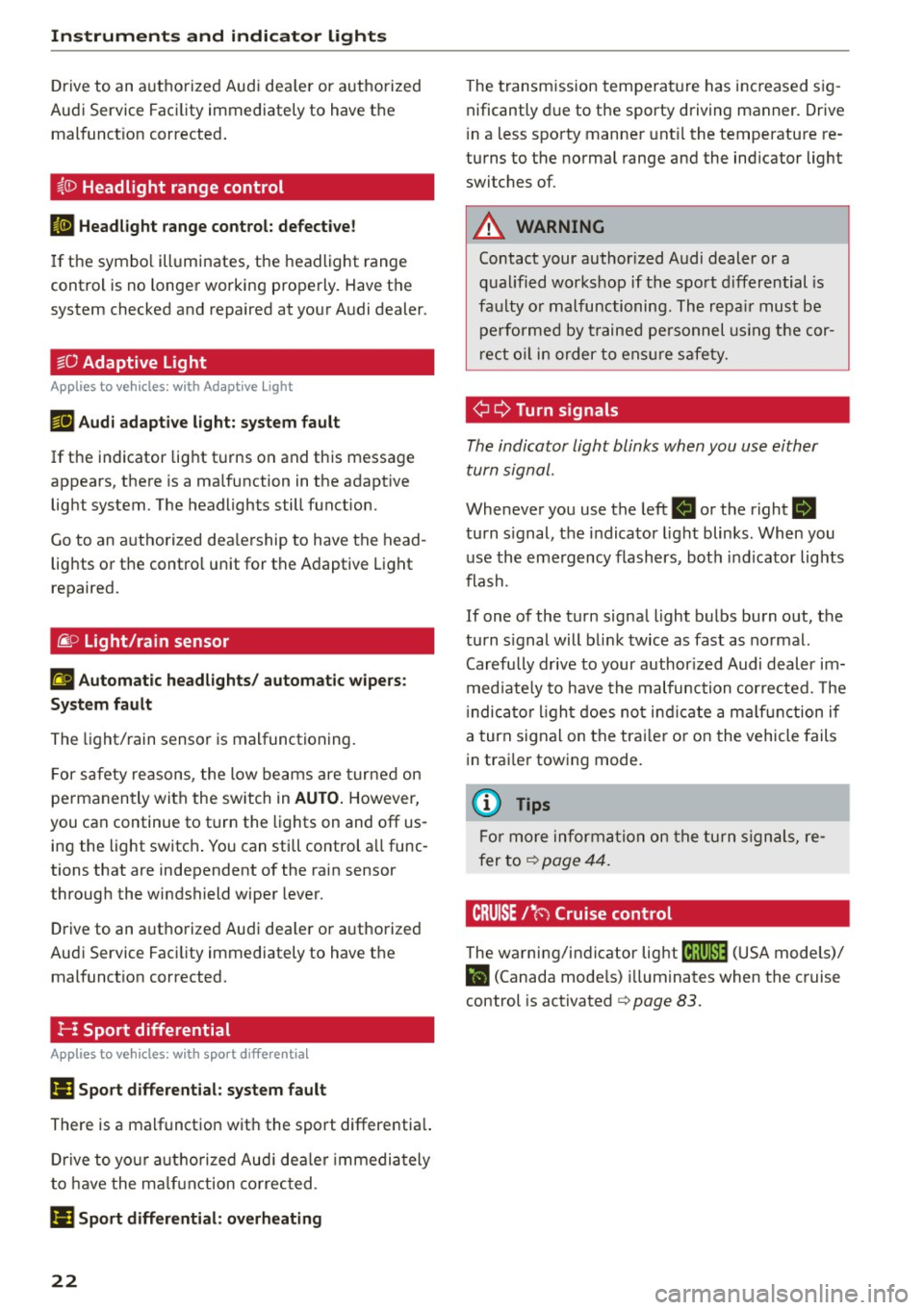
Instruments and indicator lights
Drive to an authorized Aud i dea ler or authorized
Audi Service Faci lity immediately to have the
malfunct ion corrected .
~(D Headlight range control
El Headlight range co ntrol: defe cti ve !
If the symbo l illuminates, the headlight range
control is no longer working properly. Have the
system checked and repaired at your A udi dealer .
1aO Adaptive Light
Applies to veh icles: with Adapt ive Light
mi Aud i adapti ve light: system fault
If the indicator lig ht t urns on and this message
appears, there is a malfunction in the adaptive
light system . The headlights still f unction.
Go to an a uthorized dea le rship to have the head
lights or the control unit for the Adaptive Light
repaired.
~ o Light/rain sensor
El Automatic headlights / automat ic wipe rs:
System fault
The light/rain sensor is malfunctioning.
F or safety reasons , the low beams are turned on
permanen tly with the switch in
AUTO. However,
you can continue to turn the lights on and off us
ing the light switch . You can still control a ll func
tions that are independent of the rain sensor
t hrough the windshield wiper lever.
D rive to an a uthorized Audi dea ler or a uthorized
Aud i Service Faci lity immediately to have the
malfunct ion corrected.
!-- : Sport differential
Applies to veh icles: w ith sport different ia l
II) Sport di fferential : system fault
There is a malfunction with the sport differentia l.
Drive to your aut ho rized Aud i dea le r i mmedia tely
to have the ma lfunction co rrec ted .
II) Sport differential: overheating
22
The transm ission temperat ure has increased s ig
nificantly d ue to the sporty driving manner. Drive
i n a less sporty manner unt il the temperature re
turns to the normal range and the indicator light
switches of.
A WARNING
-
Contact your author ized Audi dealer or a
qualified workshop if the spo rt differential is
fa ulty o r malfunctioning . The repa ir must be
performed by trained pe rsonnel using the cor
rect o il in order to ens ure s afety.
¢ ¢Turn signals
The indicator light blinks when you use either
turn signal.
Wheneve r you use the left B or the right B
turn s ignal, the indicator light blinks . When you
use the eme rgency flashers, bot h indicator lights
flash.
If one of the turn signa l light bulbs burn out, the
turn s ignal will bli nk twice as fast as normal.
Carefully dr ive to your author ized Audi dealer im
med iate ly to have the malfunction cor rected. The
i ndica tor l igh t does not ind icate a ma lf u nction if
a turn signal on the tra iler or on the vehicle fails
i n tra iler towing mode.
(D Tips
Fo r more informa tion on the turn s ign als , re
fer to<=>
page 44.
CRUISE 1• 0 Cruise control
The warning/indicator lig ht (ij;(l)~14 (USA mode ls)/
l'I (Canada mode ls) illuminates when the cruise
control is activated <=>
page 83.
Page 25 of 294
M N <( I.J "". rl I.O
"' N I.O rl
Driver information
system
Overview
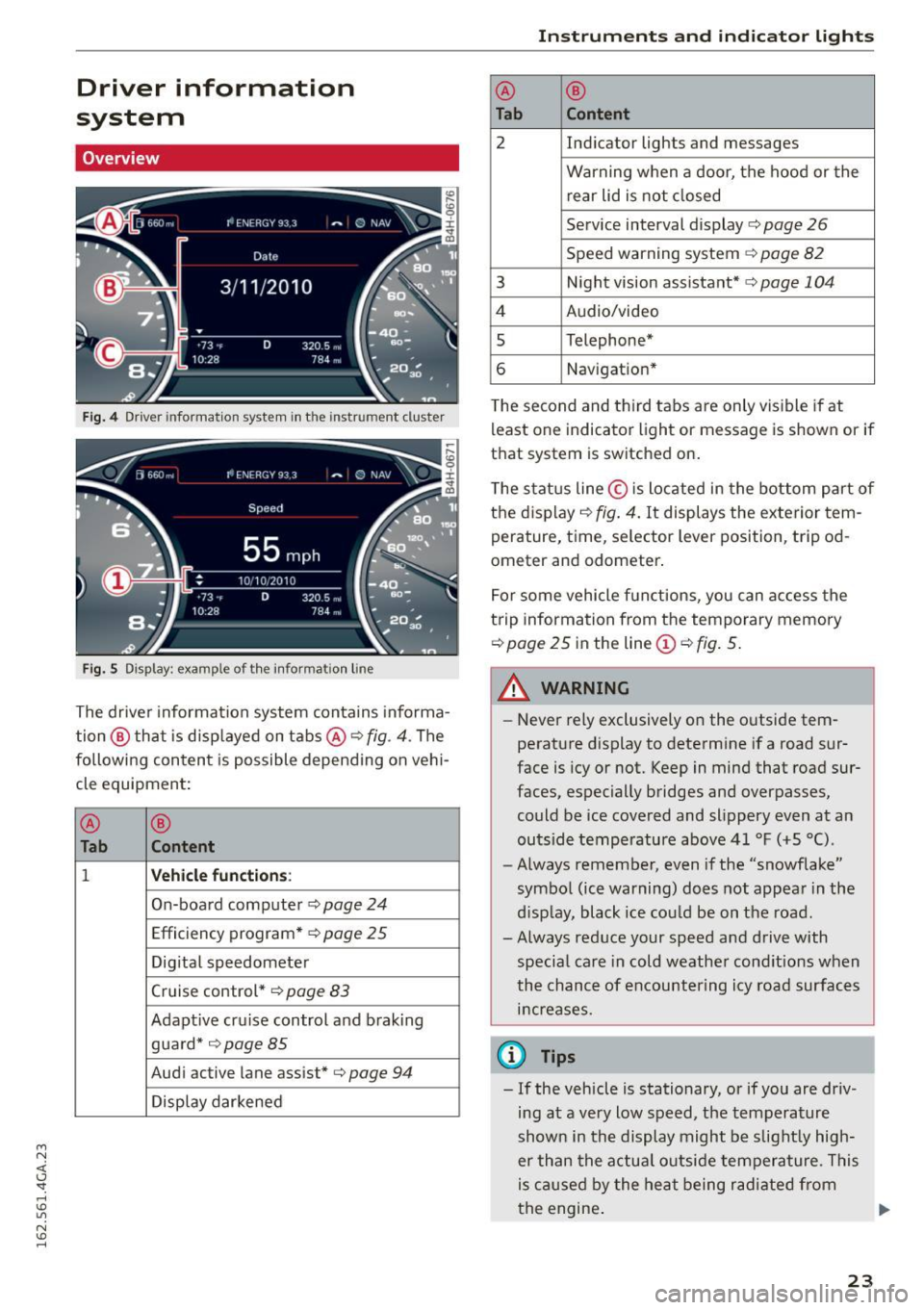
Fig. 4 Driver information system in th e instr ument cluster
Fig. 5 Display: example of the informat ion line
The driver information system conta ins informa
tion @ that is disp layed on tabs@¢
fig. 4 . The
following content is possible depending on vehi
cle equipment:
@
®
Tab C o ntent
1 Veh icle functions:
On-board computer ¢ page 24
Efficiency program* ¢ page 25
Digital speedometer
Cruise control *¢
page 83
Adapt ive cruise control and braking
guard*
¢ page85
Audi active lane assist*¢ page 94
Display darkened Ins
trument s and indi cator ligh ts
@
®
Tab Content
2 Ind icator lights and messages
Warning when a door, the hood or the rear lid is not closed
Service interval display¢
page 26
Speed warning system ¢ page 82
3 Night vision assistant* ¢page 104
4 Audio/video
s Telephone*
6 Navigat ion*
T he second and third tabs are only visible if at
least one indicator light or message is shown or if
that system is switched on.
The status line© is located in the bottom part of
the display ¢
fig. 4. It displays the exterior tem
perature, time, selector lever position, tripod
ometer and odometer .
For some vehicle functions, you can access the
trip information from the temporary memory
¢ page 25 in the line(!)¢ fig. 5.
_& WARNING
-
-Never rely exclusively on the outside tem
perature display to determine if a road sur
face is icy or not. Keep in mind that road sur
faces, especially bridges and overpasses,
could be ice covered and slippery even at an
outside temperatu re above 4 1 °F (+S
0
().
- Always remember, even if the "snowflake"
symbol (ice warning) does not appear in the
d isp lay, black ice cou ld be on the road.
- Always reduce your speed and drive with
specia l care in cold weather cond itions when
the chance of encountering icy road surfaces
i n creases.
(0 Tips
- If the vehicle is stationary, or if you are driv
ing at a very low speed, the temperature
shown in the display might be slight ly high
er than the actual outside temperature. This
is caused by the heat being radi ated from
the engine . .,..
23
Page 29 of 294
M N <( I.J "". rl I.O
"' N I.O rl
-Inspection or oil change reminder: After a cer
tain distance driven, a message appears in the
instrument cluster display each time the igni
tion is switched on or off
c> fig. 13. The remain
ing distance or time is displayed briefly .
-Inspection or oil change due : If your vehicle is
due for an inspection or oil change or both, a
message appears br iefly in the instrument clus
ter display when switching the ignition on or
off:
Inspection due! or Oil change due! or Oil
change and inspection due! .
Checking service intervals
You can check the remaining distance or time un
til the next oil change or next inspection n the
Car menu. To do th is, select: the ICAR !function
button
> (Car) * Systems control button > Service
& control
> Servi ce intervals .
Resetting the indicator
Your authorized Audi dealer or authorized Audi
Service Facility will reset the service interval dis
play after performing service .
If you have changed the oil yourself, you must re
set the oil change interval.
To reset the indicator, select: the ICARI fu nct ion
button
> (Car)* System control button > Service
& control > Service intervals. Turn the control
knob downward to
Reset oil change interval and
press the control knob.
(D Note
- Only reset the oil change indicator if the o il
was changed.
- Fo llowing the service intervals is critical to
maintain ing the service life and value of
your vehicle, especially the engine. Even if
the mileage on the vehicle is low, do not ex
ceed the time for the next service.
- Calculating the time to the next oil change
i s interrupted when the vehicle battery is
disconnected. If the vehicle is not driven for
a long period of time, check the mainte
nance schedule so that you can follow the
maintenance interva ls.
Instruments and indicator lights
Head-up display
Applies to vehicles: wit h Head-up disp lay
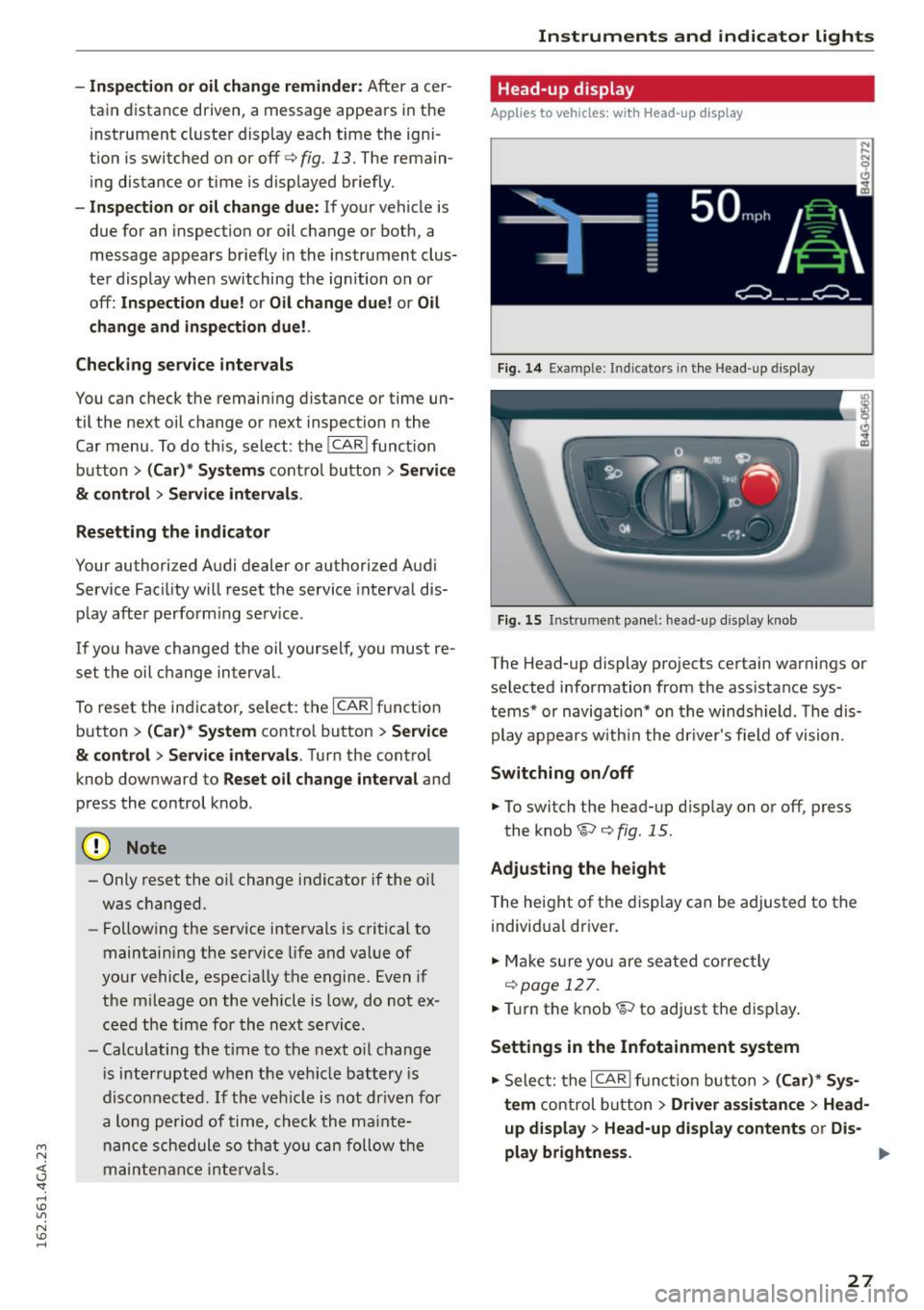
Fig. 14 Examp le : Indicato rs i n th e Head -up dis play
Fig . 15 Instrument panel: head-up display knob
The Head-up display projects certain warnings or
selected information from the assistance sys
tems* or navigation* on the windsh ield . T he dis
play appears w ith in the dr iver's field of vision.
Switching on/off
... To switch the head-up d isplay on or off, press
the knob~
c> fig. 15.
Adjusting the height
The height of the display can be adjusted to the
individual driver.
... Make sur e you are seated correctly
r=!)page 127 .
... Tur n the knob~ to adjust the disp lay .
Settings in the Infotainment system
... Sele ct: the I CARI function button > (Car)* Sys
tem
control button > Driver assistance > Head
up display > Head-up display contents or Dis-
play brightness. ..,
27
Page 30 of 294
Instruments and indicato r Lights
Display content
In the Infotainment system, yo u can specify
which information should be displayed : For ex
ample , this can include navigation information*,
Adapt ive cruise control * or night vision assist *.
The display of certain information and some of
the red indicator lights cannot be hidden in the
Infotainment system.
Display brightness
You can adjust the display brightness in the Info
tainment system. The display brightness decreas
es automatically as th e amount of light decreas
es. The basic level of brightness is adjusted with
the instrument illum ination ¢
page 47.
(D Note
To prevent scratches on the gla ss covering the
Head-up display, do not place any objects in
the projection opening.
@ Tips
-Sunglasses with polar izat ion filters and un
favorable lighting conditions can affect the
display.
- An optimum display depends on the seat
position and the height adjustment of the
head-up display.
- A specia l windshield is needed for the head
up display function.
- For informat ion on cleaning, refer to
Q ta
ble on page
207.
On Board Diagnostic
System (OBD}
Malfunction Indicator Lamp (MIL)
The Malfunction Indicator Lamp (MIL) ¢..ifl in the
instrument cluster is part of the On-Board Diag
nostic (OBD II) system.
The warning/indicator light illuminates when the
ignit ion is switched on and goes out after the en
gine starts and the idle has stabilized. This indi
cates that the MIL is working properly.
If the light does not go out after the engine is
started, or illuminates while you are dr iving, a
28
malfunction may exist in the engine system. If
the light illum inates , the catalytic converter
could be damaged.
Continue driving
with reduced power (avoiding
sustained high speeds and/or rapid accelerations)
and have the condition corrected. Contact your
authorized Aud i dea ler.
If the ligh t illuminates, the electronic speed lim
iter may also be ma lfunctioning . For more infor
mation ¢
page 29, Electronic speed limiter.
An improperly closed fuel filler cap may also
cause the MIL light to illuminate
Q page 212.
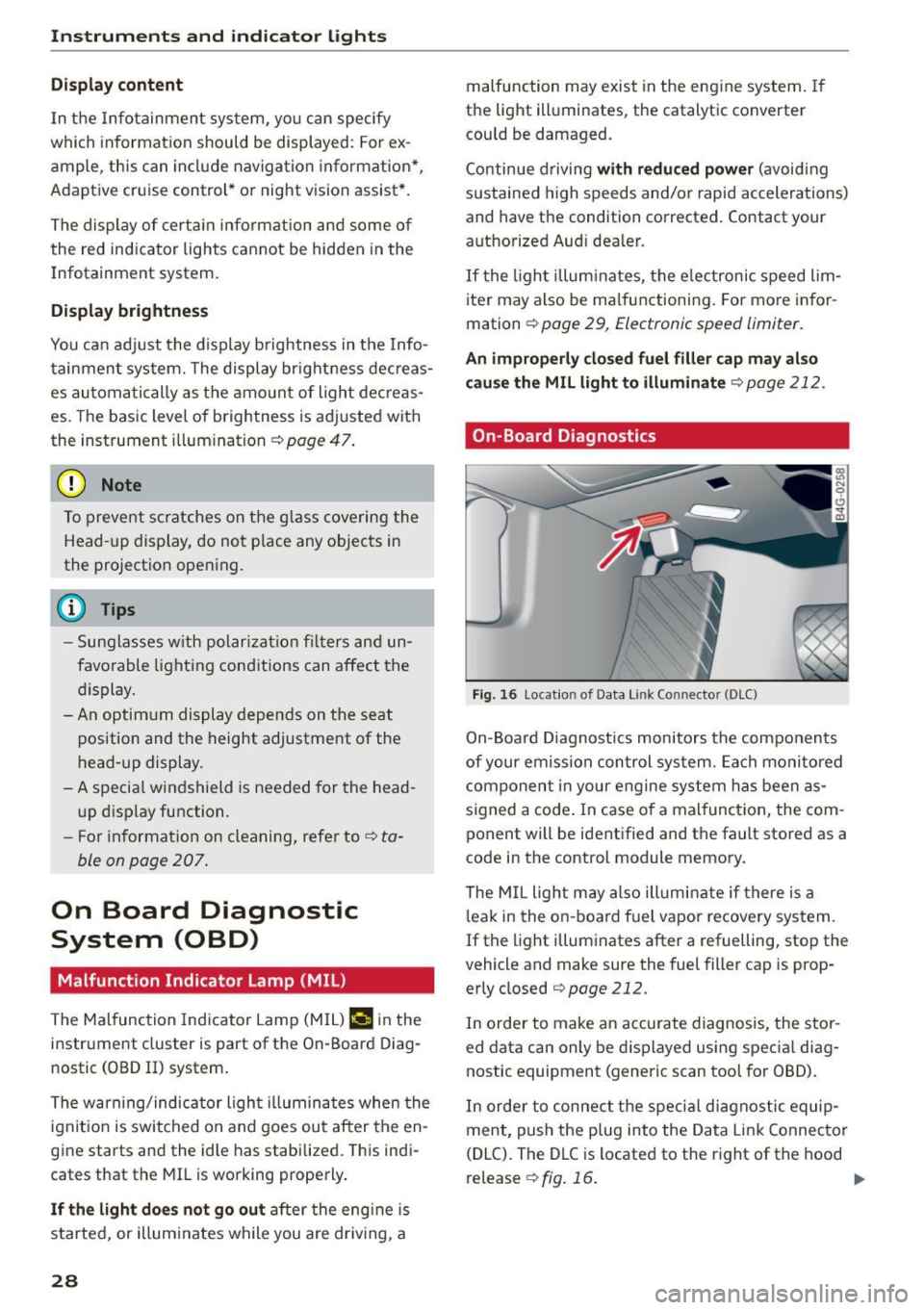
On-Board Diagnostics
Fig. 16 Locat io n of Data Link Co nnector (DLC)
On-Board Diagnostics monitors the components
of your emission control system. Each monitored
component in your engine system has been as
signed a code . In case o f a malfunct ion, the com
ponent will be identified and the fault stored as a
code in the control module memory .
The MIL light may also ill uminate if there is a
leak in the on-board f uel vapor recove ry system.
If the light illuminates after a refuelling, stop the
vehicle and make sure the fuel filler cap is prop
erly closed
c:> page 212.
In order to make an accurate diagnosis, the stor
ed data can only be displayed using special diag
nostic equipment (generic scan tool for 080).
In order to connect the specia l diagnostic equip
ment, push the plug into the Data Link Connector
(DLC). The DLC is located to the right of the hood
release ¢
fig. 16. ..,.
Page 31 of 294

M N <( (.J
'SI: ,...., \!) 1.1'1
N \!) ,....,
Your authorized Audi dealer or a qualified service
station can interpret the code and perform the
necessary repair.
A WARNING
Do not use the diagnostic connector for per
sonal use. Incorrect usage can cause malfunc tions, wh ich can increase the risk of a colli
sion!
-
Electronic speed limiter
Your veh icle may be factory equipped with tires
that are rated for a maximum speed of 130 mph
(210 km/h). This is less than the maximum speed
of your vehicle. To reduce the risk of sudden tire
failure and loss of contro l if the vehicle is operat
ed at excessive speeds, your vehicle also has an
e lectronic speed limiter. The electronic speed
limiter prevents your vehicle from going faster
tha n the tire speed rating. For more information
c>page240.
If the engine control unit receives fau lty vehicle
road speed signals, the Malfunction Indicator
Lamp (MIL)
¢4 will illumina te. If this occurs,
contact the nearest authorized Aud i dealer for as
sistance.
S models
Your vehicle's top speed is e lectronically limited
to 155 mph (250 km/h).
If the engine control unit receives faulty vehicle
roadspeed s ignals, the Malfunction Indicator
Lamp (MIL)
¢4 will illuminate . If this occurs,
contact the nearest authorized Audi dealer for as
sistance.
A WARNING
Always observe the posted speed limits and adjust your speed to suit prevailing road, traf
fic and weather conditions. Never drive your
vehicle faster than the maximum speed rating
of the tires installed.
-
Instruments and indicator lights
29
Page 45 of 294
Lights and Vision
Exterior Lighting
Switching the lights on and off
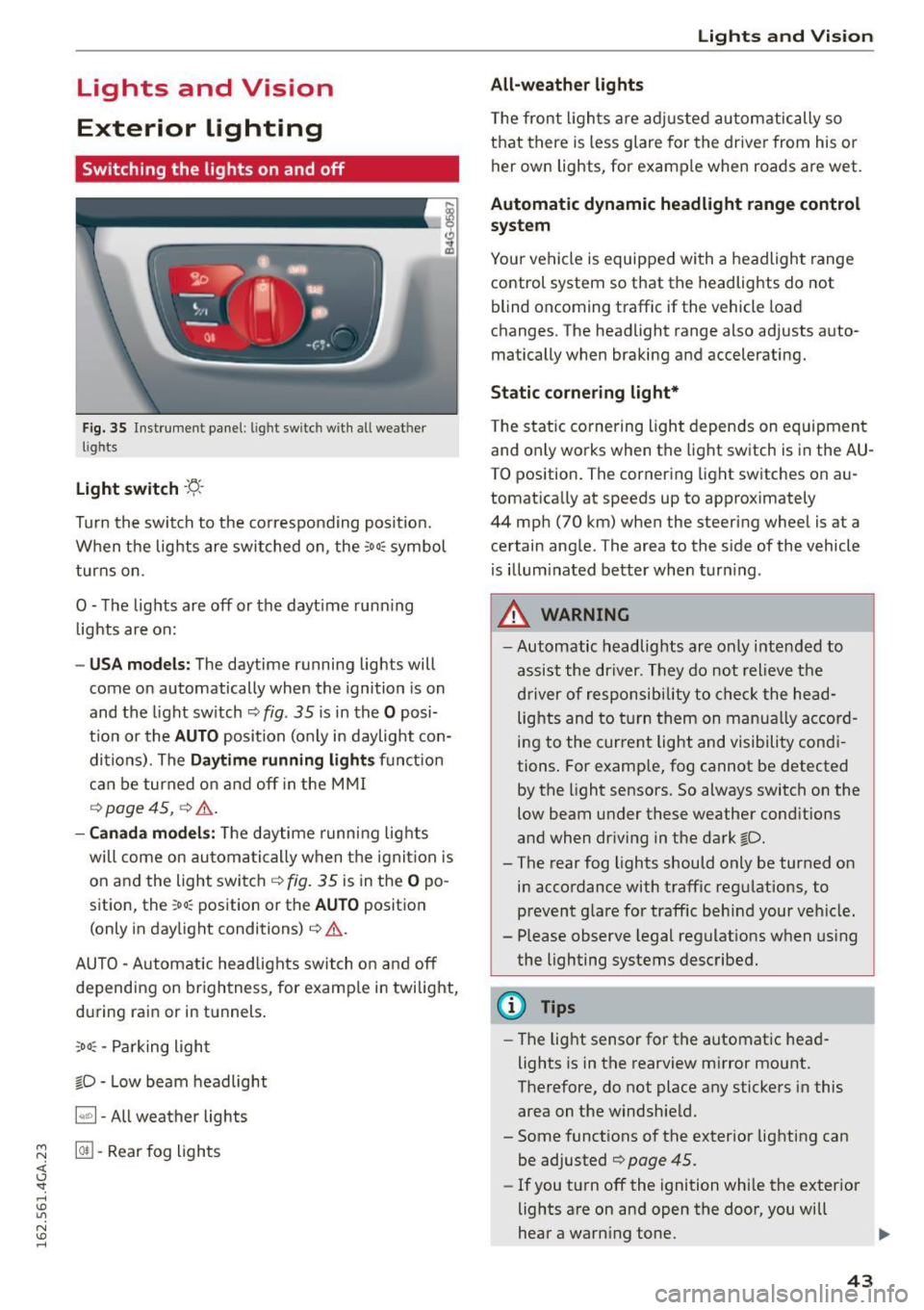
Fig. 35 Instrument panel: l ig ht switc h with all weat her
l ig hts
Light switch -f/
Turn the switch to the co rresponding posit ion.
When the lights are switched on, the
:oo: symbol
turns on .
O -The lights are off or the dayt ime running
lights are on:
-USA models: The daytime running lights will
come on automatically when the ignition is on
and the light switch <=.>
fig. 35 is in the O posi
t ion or the
AUTO position (only in daylight con
di tions) . The
Daytime running light s function
can be turned on and off in the MMI
<=.> page 45, 9 ,&. .
-Canada models: The daytime running lights
will come on automatically when the ignit ion is
on and the light switch
<=.> fig. 35 is in the O po
sition, the
: oo: position or the AUTO position
(only in daylight conditions)<=.>,&. .
AUTO -Automatic headlights switch on and off
depending on brightness, for examp le in twilight,
during rain or in tunnels .
:,oo : -Parking light
fD • Low beam headlight
~ -All weather lights
~ @II -Rear fog lights
<( I.J "". rl I.O
"' N I.O rl
Lights and Vision
All-weather lights
The front lights are adjusted automatically so
that there is less glare for the driver from his or
her own lights, for example when roads are wet.
Automatic dynamic headlight range control
system
Your vehicle is equipped with a headlight range
control system so that the headlights do not
blind oncoming traffic if the vehicle load
changes. The headlight range also adjusts auto
matically when braking and accelerating.
Static cornering light*
The static cornering light depends on equipment
and only works when the light switch is in the AU·
TO position. The cornering light switches on au
tomatically at speeds up to approximately
44 mph (70 km) when the steering wheel is at a
certain angle . The area to the side of the vehicle
is illum inated better when turning.
A WARNING
-Automatic headlights are only intended to
assist the driver. They do not relieve the
driver of responsibility to check the head
lights and to turn them on manually accord
ing to the current light and visibility condi
tions . For example, fog cannot be detected
by the light sensors. So always switch on the
low beam under these weather conditions
and when driving in the dark fD.
- The rear fog lights should only be turned on
in accordance with traffic regulations, to
prevent g lare for traffic behind your vehicle.
- Please observe legal regulations when using
the lighting systems described.
(D Tips
- The light sensor for the automatic head
lights is in the rearview mirror mount.
Therefore, do not place any stickers in this
area on the windshield.
- Some functions of the exterior lighting can
be adjusted
<=.> page 45 .
-If you turn off the ignition while the exterior
lights are on and open the door, you will
hear a warning tone. .,.
43
Page 46 of 294
Lights and Vi sion
- In cool or damp weather, the ins ide of the
headlights, turn signals and tail lights can
fog over due to the temperat ure difference
between the inside and outs ide. They w ill
clear shortly after switching them on. This
does not affect the service li fe of the light
i ng.
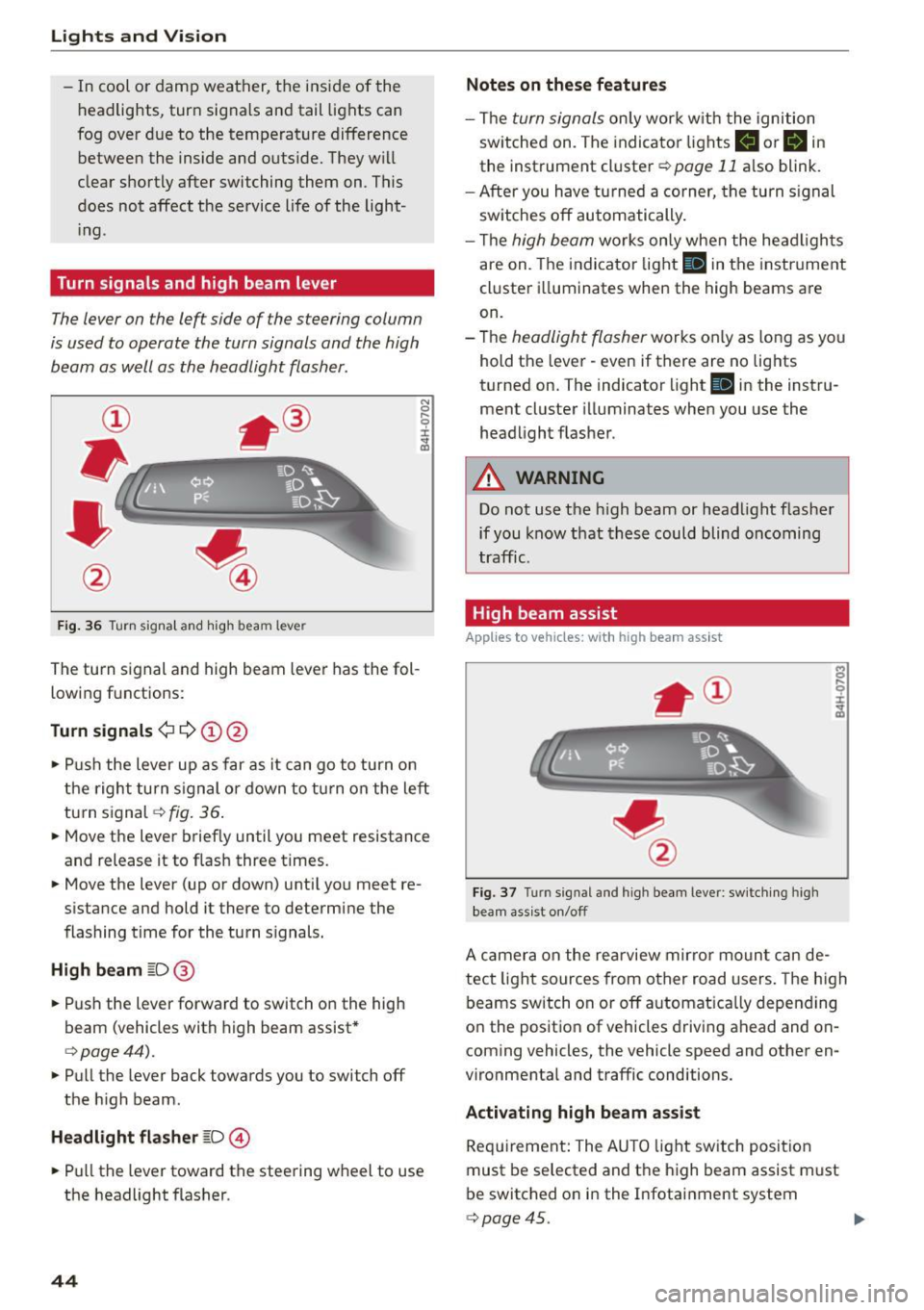
Turn signals and high beam lev er
The lever on the left side of the steering column
is used to operate the turn signals and the high
beam as well as the headlight flasher.
F ig . 36 Tu rn signa l and hig h beam lever
The turn s ignal and high beam leve r has the fol
lowing f unctions:
Turn signals ¢¢@@
N
0 ,.._ 0 ±
~
• Pu sh the lever up as far as it can go t o turn on
t he righ t turn s ignal or down to tu rn on the left
tu rn s ignal
c:> fig. 36 .
• Move the lever brief ly until you meet resistance
and release it to flas h three times.
• Move the lever (up or down) unti l you meet re
s istance and hold it there to determine the
flashing time for the tu rn s ignals.
High beam ~D @
• Push the lever forward to switch on the high
beam (vehicles with h igh beam assist *
c:>page44).
• Pull the lever back towards you to switch off
the h igh beam.
Headlight flasher ~D ©
• Pull the lever toward the steering wheel to use
the headlight f lasher.
44
Notes on these features
- The turn signals on ly work w it h the ignition
sw itche d on. The indicato r lights
II or Bin
the instrument cl uster c:> page 11 also blink.
- After you have tu rned a corner, the turn s ignal
sw itches off automatically .
- Th e
high beam works on ly when the he ad ligh ts
are on. The indi cator light
II in the instr ume nt
cl uste r ill uminates when the high beams a re
on.
- The
headligh t flasher works o nly as long as yo u
hold t he leve r - even if there are no lig hts
turned on. The indicator light
II in the instru
ment cluster i lluminates when you use the
headlight f lasher .
A WARNING
Do not use the high beam or head light flasher
if you know that th ese could blind oncoming
traffic .
High beam assist
Applies to veh icles: with high beam assist
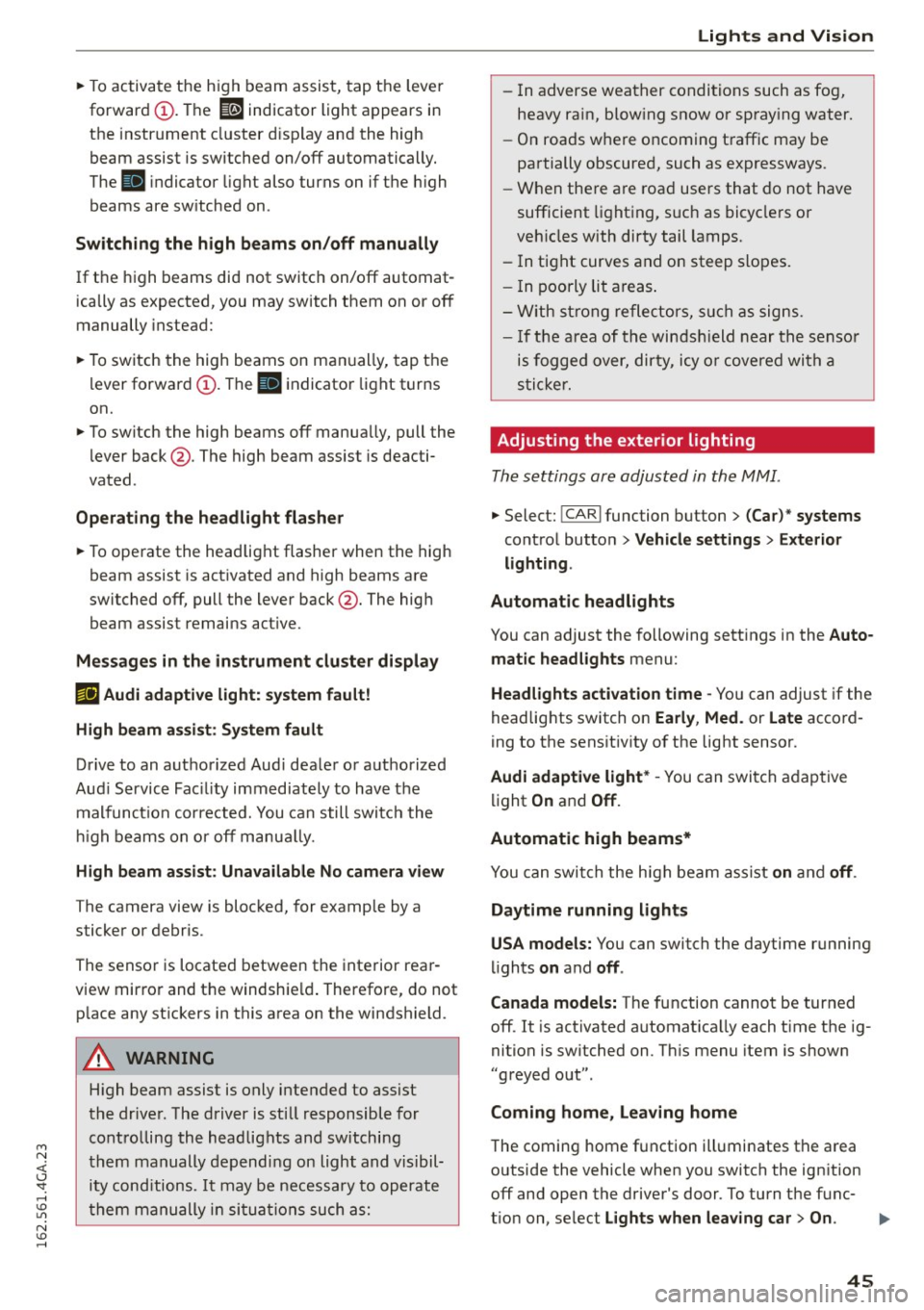
Fig . 3 7 Turn signal and high beam lever: sw itc hing high
bea m ass ist o n/off
A camer a on the rea rview mirror moun t ca n de
tec t light sources from other road users . The high
beams switch on or off a utomat ica lly depen ding
o n the position of vehicles driving ahead and on
coming vehicles, the vehicle speed and othe r en
vironme nta l and traffic conditions.
Activating high beam assist
Req uirement: The AU TO light sw itch posit ion
must be selected and t he h igh beam assist m ust
be switched o n in the I nfotai nment system
c:> page45.
Page 47 of 294
M N <( (.J
'SI: ,...., \!) ..,.,
N \!) ,....,
~ To activate the h igh beam assist, tap the lever
forward
(D . The ID indicator light appears in
the instrument cluster disp lay and the high
beam assist is switched on/off automatically.
The
El indicator ligh t also turns on if the high
beams are switched on .
Switching the high beam s on/off manually
If the high beams did not switch on/off automat
ically as expected, you may switch them on or off
manually instead:
~ T o switch the high beams on man ually, tap the
lever forward
(D. The El indica tor light turns
on.
~ To switch the high beams off manua lly, pull the
lever back@. The high beam assist is deacti
vated.
Operating the headlight flasher
~ To operate the headlight flasher when the high
beam assist is activated and high beams are
switched off, pull the lever back@. The high
beam assist remains act ive.
Messages in the instrument cluster display
r!IJ Audi adaptive light: system fault!
High beam assist: System fault
Drive to an authorized Aud i dealer or authorized
Aud i Service Fac ility immediately to have the
malfunct ion corrected. You can still switch the
hi gh beams on or off manually.
High beam assist : Unavailable No camera view
The camera view is blocked, for example by a
sticker or debr is.
The sensor is located between the interior rear
view mirror and the windshie ld. Therefore, do not
p lace any st ickers in this area on the windshield.
A WARNING
-
High beam assist is only intended to assist
the driver. The driver is still responsible for
controlling the headlights and switching
them manually depending on light and visibil
i t y cond itions. It may be necessary to operate
them manually in situations such as:
Lights and Vision
-In adverse weather conditions such as fog,
heavy ra in, blow ing snow or spray ing water.
- On roads where oncoming traffic may be
partially obscured, such as expressways.
- When there a re road users that do not have
sufficient lighting, such as bicyclers or
veh icles with dirty tail lamps.
- In tight curves and on steep slopes.
- I n poorly lit areas.
- With strong reflectors, such as signs.
-If the area of the windsh ield near the sensor
is fogged over, dirty, icy or covered with a
sticker.
Adjusting the exterior lighting
The settings are adjusted in the MMI.
~ Select: !CARI function button> (Car)* systems
control button > Vehicle settings > Exterior
lighting .
Automatic headlights
You can adjust the following sett ings in the Auto
matic headlights
menu:
Headlights activation time -You can adjust if the
headlights switch on
Early , Med. or Late accord
ing to the sensit ivity of the light sensor.
Audi adaptive light* -You can switch adaptive
light
On and Off.
Automatic high beams*
You can switch the high beam assist on and off.
Daytime running lights
USA models:
You can switch the daytime running
lights
on and off .
Canada models:
The function cannot be turned
off. It is activated automat ica lly each t ime the ig
nition is switched on. Th is menu item is show n
"greyed out".
Coming home, Leaving home
The coming home function illuminates the area
outside the vehicle when you switch the ignition off and open the driver's door. To turn the func-
t ion on, select
Lights when leaving car > On . ..,.
45