turn signal AUDI S8 2008 User Guide
[x] Cancel search | Manufacturer: AUDI, Model Year: 2008, Model line: S8, Model: AUDI S8 2008Pages: 404, PDF Size: 52.7 MB
Page 147 of 404
_____________________________________________ A_ d..:.a..! p..:. t
_ i_ v _ e.;__ C.,...._ ru.;__ is..:. e.;__ C.::..: o..:.n..:.. t:.:. r..: o ..:. I_--..J_
This information is always displayed. Display area © is therefore
called the
primary di sp la y .
© S upple men tary displ ay
In display area @ information from the navigation system and the
trip computer is disp layed in addition to information about Adaptive
Cruise Control.
You can select among the different information by repeated brief taps on the RESET button on the windshield wiper
lever => page 39,
"Operation ".
Particularly on your first trips with Adaptive Cruise Control, the
s uppl em en ta ry di spla y should be turned on.
@ Message
The information in area © is not displayed permanently. Informa
tion is displayed on ly if you change the time interval , if there is a
malfunction or if the Adaptive Cruise Control is turned off. •
Applies to vehicles : with Ada ptive C ruise Cont rol
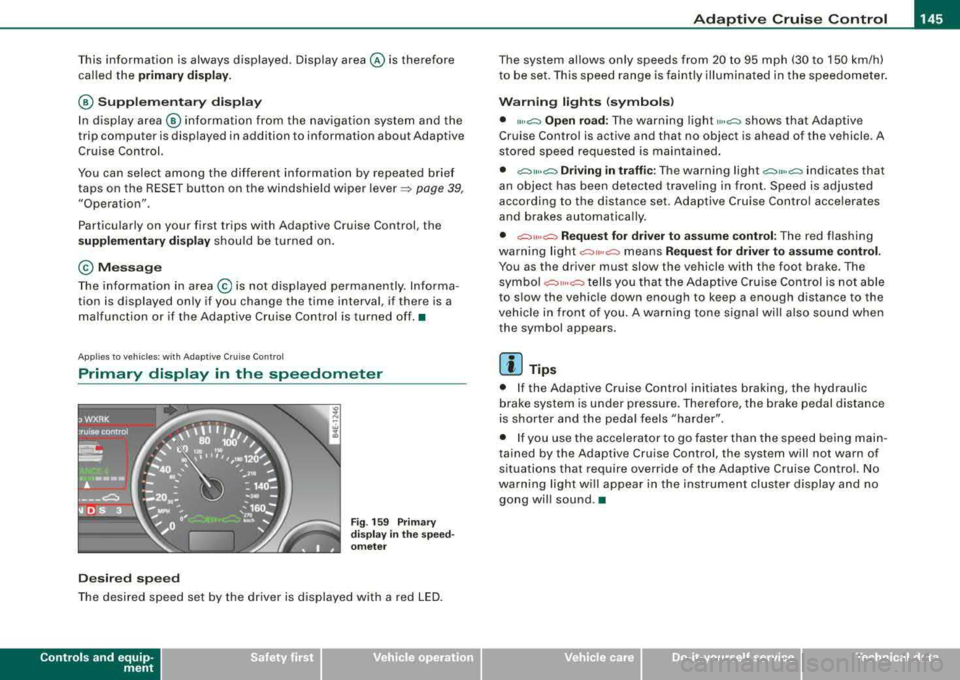
Primary display in the speedometer
De sire d sp eed
Fig . 159 Prim ary
di spl ay
in the s pee d
o m ete r
The desired speed set by the driver is displayed with a red LED.
Contro ls a nd eq uip
ment
The system al lows only speeds from 20 to 95 mph (30 to 150 km/h)
to be set. This speed range is faintly illuminated in the speedometer.
W arn ing lights (symbols )
• ""c:::, Open road: The warning light ,,.,c:::, shows that Adaptive
Cruise Control is active and that no object is ahead of the vehicle . A
stored speed requested is maintained .
• c::::,11 .. c:::, Driving i n tr aff ic: The warning light c:::,11«c:::, indicates that
an object has been detected travel ing in front . Speed is adjus ted
according to the distance set. Adaptive Cruise Control accelerates
and brakes automatica lly.
• c:::,,, ,,c:::, Re quest f or driver t o assume control : The red flashing
warning light
c::::,11 .. c:::, means Reque st for driver to assume control .
You as the driver must slow the vehicle with the foot brake . The
symbo l
c::::,11,,c:::, tells you that the Adaptive Cruise Control is not able
to s low the vehic le down enough to keep a enough distance to the
vehicle in front o f you . A warning tone signal wi ll also sound when
the symbol appears.
[ i ] Tip s
• If the Adaptive Cruise Control initiates braking, the hydraulic
brake system is under pressure. Therefore, the brake pedal distance
is shorter and the peda l feels "harder" .
• I f you use the accelerator to go faster than the speed being main
tained by the Adaptive Cruise Control, the system will not warn of
situations that require override of the Adaptive Cruise Control. No
warning light will appear in the instrument cluster display and no gong wil l sound .•
Vehicle care I I irechnical data
Page 153 of 404
Audi lane assist -_____________________ __.
Audi lane assist
Lane assist
Applies to vehicles: with lane assist
Description
Lane assist helps you keep your vehicle in your lane.
Lane assist uses a camera to detect lane boundary lines. If the
system detects that your vehicle is about to leave a lane boundary
line, the steering wheel
vibrates to alert the driver. If lane assist
detects boundary lines on both sides of the vehicle's lane, the
system enters active standby mode, which is indicated by the green
indicator light/: on the instrument cluster.
If the system is in active standby mode and the turn signal is acti
vated before driving over the boundary line, the warning does not
occur since the system allows for intentional lane changes.
The system is designed for driving on freeways and expanded high
ways and thus works only at speeds of 40 mph (65 km/h) or more.
& WARNING
• Lane assist will not keep your vehicle in your lane. The system
only warns the driver when the vehicle is leaving the lane. The
driver is always responsible for keeping the vehicle in the lane.
• The camera is not able to detect all lane boundary lines and in
some cases might also detect lane structures or objects as
boundary lines. This can lead to incorrect warnings or warnings
that fail to go off at all.
• The camera's visibility can be impaired by vehicles ahead of
you, for instance, or by rain, snow, heavy spray or light shining into
the camera lens. This can cause lane assist to fail to detect
boundary lines. •
Contro ls a nd eq uip
ment
Applies to vehicles: with lane assist
Activating and deactivating
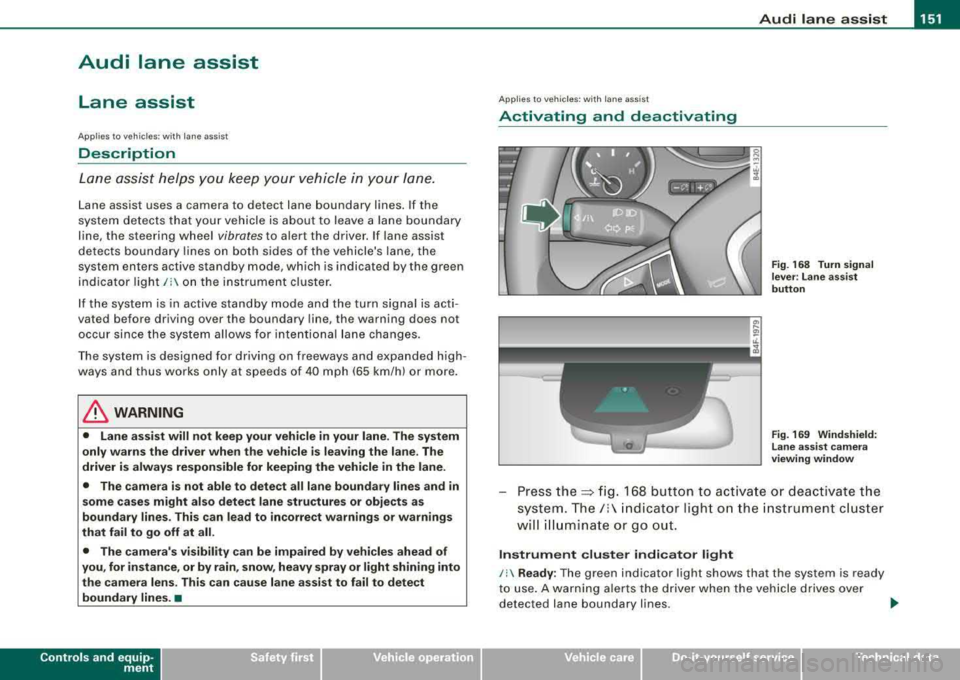
Fig. 168 Turn signal
lever : Lane assist
button
Fig . 169 Windshield:
Lane assist camera
viewing window
Press the:::> fig. 168 button to activate or deactivate the
system.
The/: indicator light on the instrument cluster
will illuminate or go out.
Instrument cluster indicator light
/: Ready : The green indicator light shows that the system is ready
to use. A warning alerts the driver when the vehicle drives over
detected lane boundary lines.
.,.
Vehicle care I I irechnical data
Page 156 of 404
___ A_ u_d_ i _s _id _ e_ a_ s_ s_ is_t __________________________________________________ _
Audi side assist
Lane Change Assistant
Applies to vehicles: with side assist
Description
The side assist helps you when changing lanes.
I Audi AS J
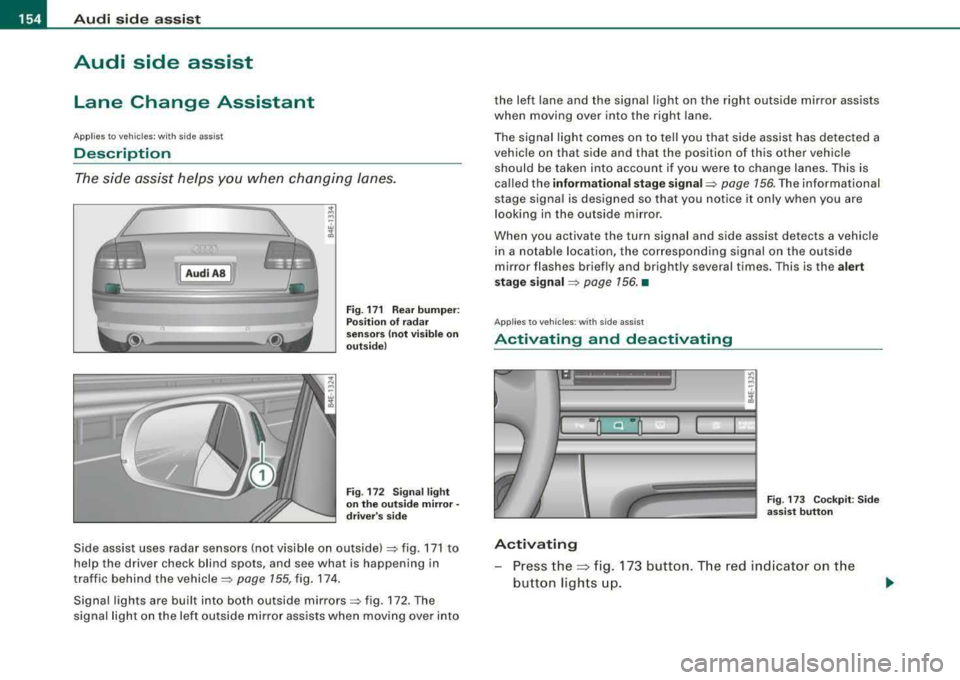
Fig. 171 Rear bumper:
Position of radar
sensors (not visible on
outside)
Fig . 172 Signal light
on the outside mirror·
driver's side
Side assist uses radar sensors (not visible on outside) => fig. 171 to
help the driver check blind spots, and see what is happening in
traffic behind the
vehicle => page 155, fig. 174.
Signal lights are built into both outside
mirrors=> fig. 172. The
signal light on the left outside mi rror assists when moving over into the left lane and the signal light on the right outside mirror assists
when moving over into the right lane.
The signal light comes on to tell you that side assist has detected a
vehicle on that side and that the position of this other vehicle
should be taken into account if you were to change lanes. This is
called the
informational stage signal=> page 156. The informational
stage signal is designed so that you notice it only when you are
looking in the outside mirror.
When you activate the turn signal and side assist detects a vehicle
in a notable location, the corresponding signal on the outside
mirror flashes briefly and brightly several times. This is the
alert
stage signal
=> page 156. •
Applies to veh icles : with side assist
Activating and deactivating
-
Activating
Fig . 173 Cockpit : Side
assist button
- Press the~ fig. 173 button. The red indica tor on the
button lights up.
Page 157 of 404
Audi side assist -
----------------
Dea ctivating
Press the button again . The indicator l ight on the butto n
goes out .
The system can assist when driving on highways and secondary
roads . The system works only at speeds faster than 37 mph (60
km/h).
& WARNING
• Improper reliance o n the side assist s ystem can cause colli
s ions and seriou s pers onal injury:
- Ne ver rel y only on side a ssis t w hen ch anging l anes .
- Always che ck re ar view mirror s to make sur e that it i s safe to
c hange lane s.
• Side assi st cannot dete ct all vehicle s under all condition s
danger of accident!
• Side a ssist cannot detect vehicles in time to alert you when
they app roach from behind at very high speed , or fall drop b ack
very quickly.
• The radar sen sor's
vi sion ca n be redu ced or entirel y blo cked b y
rain , snow , and heavy spray . Thi s can result in side a ssis t not
a dequately dete cting veh icles or , in some cases , not detect ing
them at all . Always keep an eye on the direction you are traveling
and the relevant ar ea around th e vehi cle .
• Please note that side a ssis t indicate s th ere are approaching
vehi cle s, or vehi cle s in your bl ind spot , onl y after your vehicle has
reached a driving speed of at lea st 37 mph (60 km /h).
• Side as sist sign al doe s not work around t ight corner s (turning
radiu s less than 218 yard s, or 200
ml.
• Side a ssist is no repla cement for the driver's full attention . The
driver alone i s re spon sible for lane ch anges and similar driving
maneuver s. Always k eep an eye on the d ire ction you are tr aveling
and the relevant area around the vehi cle .
Controls and equip ment
0 Note
• To ensure that you do not adverse ly affect s ide assist, do not
b lock the area on the rear bumper where the radar sensors are
located with foreign objects (suc h as stickers or bicycle racks).
• Make su re that the signal light on the outside mirror is not
b locked by stickers or other items.
[ i ] Tip s
• Side ass ist automatically deactivates if it detects that the radar
sensors are
blocked => page 167. The indicator light on the button
goes out.
• The area on the bumper where the radar sensors are located
must consistently re main free of snow, ice, and heavy so iling so that
side assist can function properly. Follow the additiona l notes on
=> page 761.
• Additiona l tinting on the front side windows can make it harder
to see and correct ly understand the s ignal light on the outside
mirror. •
Applies to veh ic les: with side ass ist
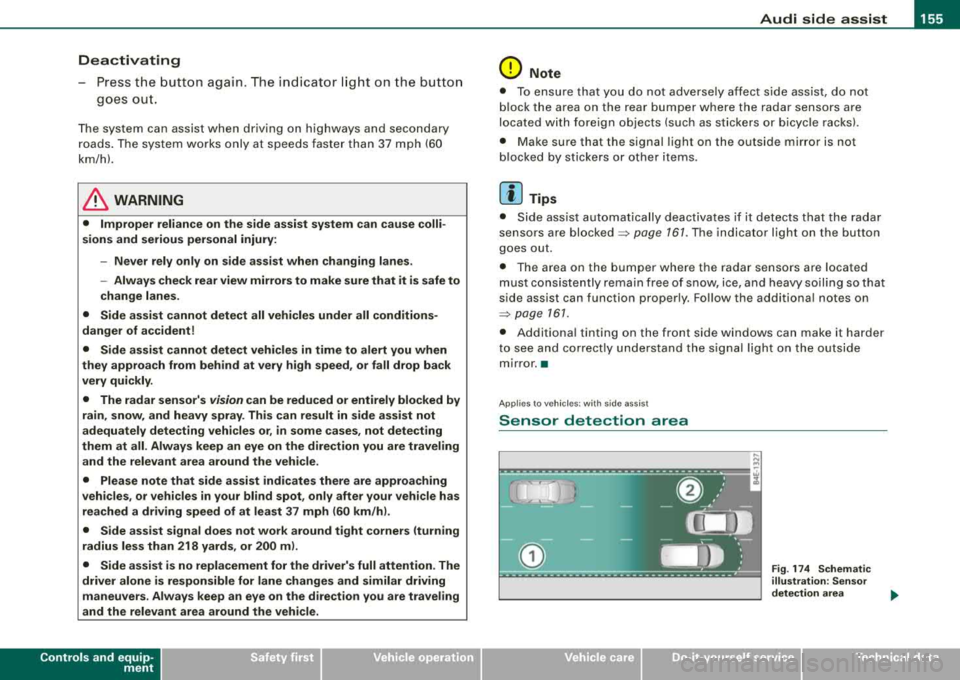
Sensor detection area
Fig . 17 4 Schem atic
illu stratio n: Senso r
det ection ar ea
.,.
Page 158 of 404
___ A_ u_ d_ i_s _i_d _e_ a_ s_ s
_ is_ t __________________________________________________ _
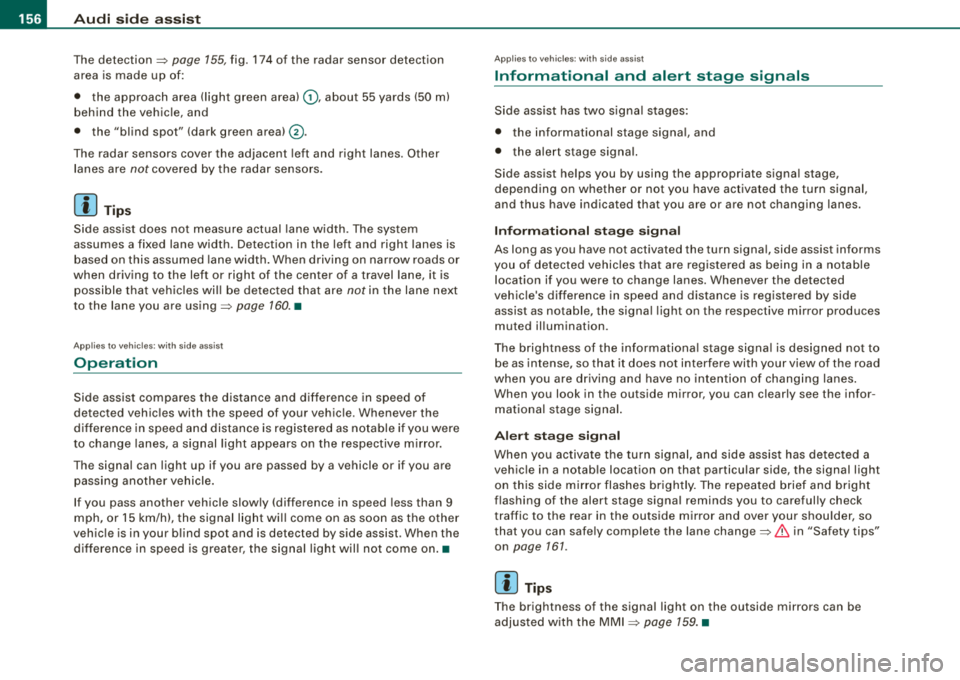
The detection ~ page 155, fig. 174 of the radar sensor detection
area is made up of:
• the approach area (light green area)
G), about 55 yards (50 m)
behind the vehic le, and
• the "blind spot" (dark green
areal@.
The radar sensors cover the adjacent left and right lanes. Other
lanes are
not covered by the radar sensors.
[ i] Tips
S ide ass ist does not measure actual lane width. The system
assumes a fixed lane width. Detection in the left and right lanes is
based on this assumed lane width . When driving on narrow roads or
when driving to the left or right of the center of a travel lane, it is
possible that vehicles wi ll be detected that are
not in the lane next
to the lane you are
using~ page 160 . •
Applies to vehicles: with side assist
Operation
Side assist compares the distance and difference in speed of
detected vehicles with the speed of your vehicle . Whenever the
difference in speed and distance is registered as notable if you were
to change lanes, a signal light appears on the respective m irror.
The signal can light up if you are passed by a vehicle or if you are
passing another vehicle.
If you pass another vehicle slowly (difference in speed less than 9
mph, or
15 km/h), the signal light will come on as soon as the other
vehic le is in your b lind spot and is detected by side assist . When the
difference in speed is greater, the signal light wil l not come on.•
Applies to vehi cles: with side assist
Informational and alert stage signals
Side assist has two signa l stages:
• the informational stage signal, and
• th e alert stage signal.
Side assist helps you by using the appropriate signa l stage,
depending on whether or not you have activated the turn signal,
and thus have indicated that you are or are not changing lanes.
Informational stage signal
As long as you have not activated the turn signa l, side assist informs
you of detected vehicles that are registered as being in a notable
location if you were to change lanes. Whenever the detected
vehic le 's difference in speed and distance is registered by side
assist as notable, the signa l light on the respective mirror produces
muted il lumination .
The brightness of the informationa l stage signa l is designed not to
be as intense, so that it does not interfere with your view of the road
when you are driving and have no intention of changing lanes.
When you look in the outside mirror, you can clearly see the infor
mational stage signal.
Alert stage signal
When you ac tiva te the turn signal, and side assis t has detected a
vehic le in a notable location on that particular side, the signal light
on this side mirror flashes brightly. The repeated brief and bright
flashing of the alert stage signal reminds you to careful ly check
traffic to the rear in the outside mirror and over your shou lder, so
that you can safe ly complete the lane
change~ & in "Safety tips"
on page
161.
[ i] Tips
The brightness of the signal light on the outside mirrors can be
adjusted with the MMI
~ page 159. •
Page 159 of 404
_________________________________________________ A_ u_ d_ i _s _i_
d _e _ a_s_ s_ i_ s _t _ __._
Ap plies to vehicle s: with side assist
Driving situation: Fast approaching vehicles
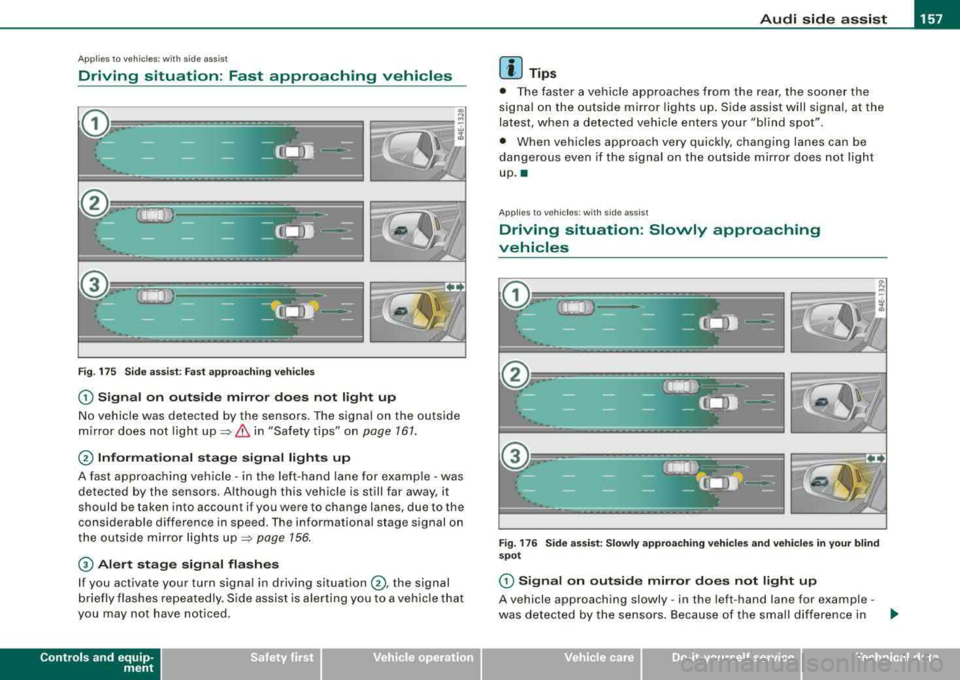
Fig. 175 S ide ass ist: Fast a ppro achi ng ve hicles
G) S ig nal on outside mirror do es not l ight up
No vehicle was detected by the sensors. The signal on the outside
m irror does not ligh t
up ~ & in "Safety tips" on page 161.
@ Informational stag e s ignal lights up
A fast approaching vehicle -in the left-hand lane for example -was
detected by the sensors. Although this vehic le is still far away, it
should be taken into account if you were to change lanes, due to the
considerable difference in speed. The informational stage signal on
the outside mirror lights
up ~ page 156 .
© Alert stage signal flashe s
If you activate your turn signal in driving situation @, the signal
b riefly flashes repeatedly. S ide assist is alerting you to a vehicle that
you may not have not iced .
Contro ls a nd eq uip
ment
[ i ] Tips
• The faster a vehicle approaches from the rear, the soone r the
signal on the outside mirror lights up. Side assist will signal, at the
latest, when a detected vehicle enters your "bl ind spot".
• When vehicles approach very quickly, changing lanes can be
dangerous even if the signa l on the outside mirror does not light
up .•
Ap plies to veh ic les: with side ass ist
Driving situation : Slowly approaching
vehicles
F ig . 1 76 Side a ssist: Slowly a pproa ching v ehi cle s and v ehi cle s in y our b li nd
spot
G) Signa l on out side mirror doe s not light up
A vehicle approaching s lowly -in the left-hand lane for example -
was detected by the sensors . Because of the small differe nce in .._
Vehicle care I I irechnical data
Page 160 of 404
___ A_ u_d_ i _s _id _ e_ a_ s_ s_ is_t __________________________________________________ _
speed and the considerable distance from your vehicle, the signal
on the outside mirror will not light
up::::> & in "Safety tips" on
page 161 .
0 Informational stage signal lights up
The distance between your vehicle and that of the slowly
approaching vehicle has narrowed. The informational stage signal
on the outside mirror lights up .
As soon as the difference in speed and distance is registered as
notable if you were to change lanes , a signal on the mirror lights up.
Side assist will signal at the latest when a detected vehicle enters
your "blind spot".
© Alert stage signal flashes
If you activate your turn signal in driving situation 0 , the signal
light briefly flashes repeatedly. Side assist is alerting you of a
vehicle that you may not have noticed .
[ i J Tips
• The faster a vehicle approaches from the rear, the sooner the
signal on the outside mirror lights up . Side assist will signal , at the
latest, when a detected vehicle enters your "blind spot".
• When vehicles approach very quickly, changing lanes can be
dangerous even if the signal on the outside mirror does not light
up.•
App lies to vehi cles : wi th side assist
Driving situation: Vehicles dropping back
slowly
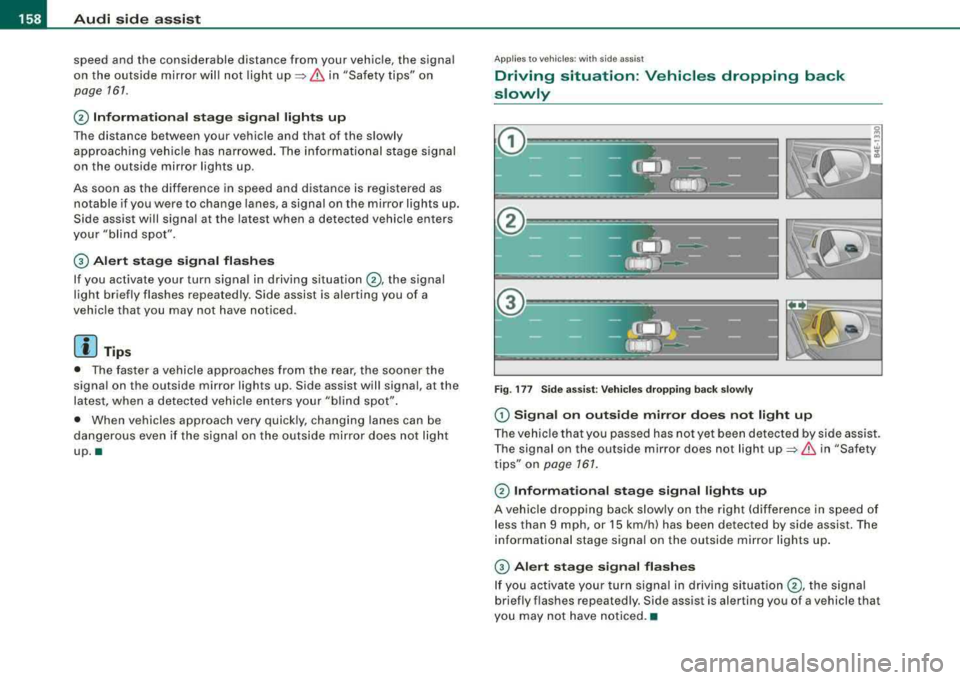
Fig. 177 Side assist: Vehicles dropping back slowly
(D Signal on outside mirror does not light up
The vehicle that you passed has not yet been detected by side assist.
The signal on the outside mirror does not light
up::::> & in "Safety
tips" on
page 161.
0 Informational stage signal lights up
A vehicle dropping back slowly on the right (difference in speed of
less than 9 mph, or 15 km/h) has been detected by side assist. The
informational stage signal on the outside mirror lights up.
© Alert stage signal flashes
If you activate your turn signal in driving situation 0, the signal
briefly flashes repeatedly. Side assist is alerting you of a vehicle tha t
you may not have noticed. •
Page 161 of 404
___________________________________________________ A_u_ d_i_ s_ id_e_ a_ s_s _i_s _t _ __.ffllll
Ap plies to vehi cles: w ith side ass is t
Driving situation: Vehicles dropping back
quickly
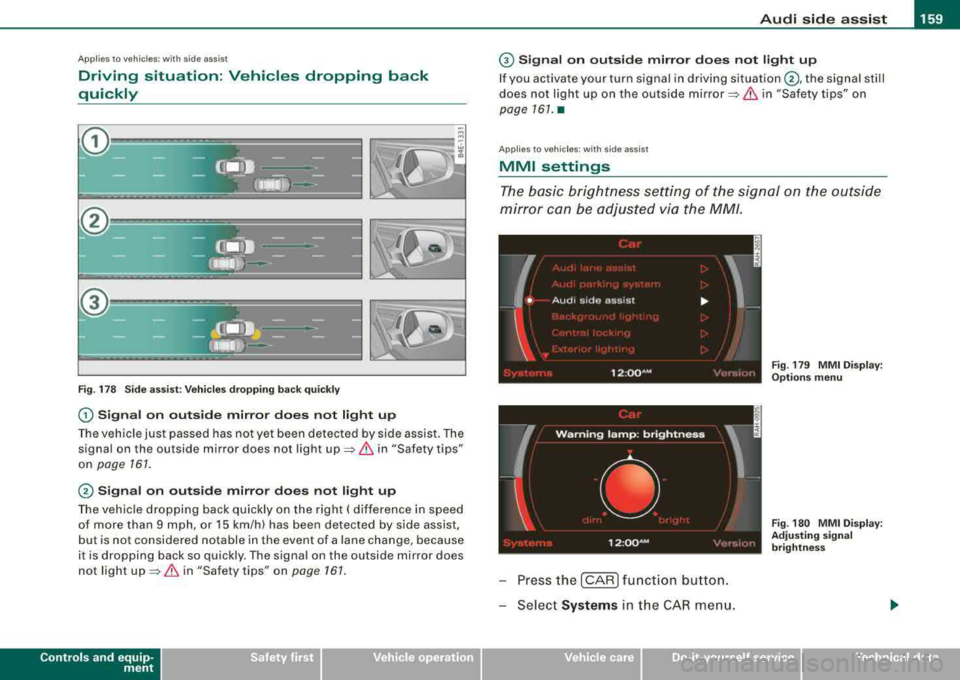
Fig . 178 Side assist: Vehicles dropping back quickly
0 Signal on outside mirror does not light up
The vehicle just passed has not yet been detected by side assist. The
signal on the ou tside mirror does not light
up => & in "Safety tips"
on
page 161 .
@ Signal on outside mirror does not light up
The vehicle dropping back quickly on the right ( difference in speed
of more than 9 mph , or 15 km/h) has been detected by side assis t,
but is not considered notable in the event of a lane change, because
it is dropping back so quick ly . The signal on the outside mirror does
not light
up => & in "Safety tips " on page 161.
Controls and equip
ment
G) Signal on outside mirror does not light up
If you activate your turn signal in driving situation @, the signal still
does not ligh t up on the outside
mirror=> & in "Safety tips" on
page 161. •
Applies to veh ic les: w it h side ass ist
MMI settings
The basic brightness setting of the signal on the outside
mirror can be adjusted via the MM/.
I
W arn in g lam p: brightn ess
' •
12 :oo~M • <: ''·,.I,,
Press the [CAR ] function button.
Select
Systems i n the CAR menu.
Vehicle care I I
-
Fig . 179 MMI Display :
Options menu
Fig . 180 MMI Display :
Adjusting signal
brightness
irechnical data
Page 162 of 404
___ A_ u_ d_ i_s _i_d _e_ a_ s_ s
_ is_ t __________________________________________________ _
-Select Audi sid e ass is t.
-Select W arning l amp : brightn ess.
-Rotate the control knob to adjust the displayed bright -
ness of the signal l ight on the outside mirrors
=> page 159, fig. 180 .
Th e brightn ess o f th e signal light for both th e informational and
a lert stages is automatica lly adj usted to ambient light conditions. In
addition, you can adjust the
basic brightness separately, via the
brightness function
=> page 159, f ig. 180.
While mak ing the adjustment , the new br ig htness setting is
displayed briefly. The brightn ess disp layed is that of the informa
tiona l stage s ignal. The alert stage signal brightness is linked to the
in formational stag e signal brightness .
The infor mationa l stage signal br ightness should be adjusted so
that you notice the signa l illumination when you look in the outside
m irror, but not when you look forward through the windsh ield.
In very dark or light surround ings , the automat ic brightness setting
adjusts signal light brightness to maximum or minimum intensity ,
as needed . In circumstances such as these, you may not not ice any
change in the brightness on the outside m irror wh en adjusting the
basic brightness .
You may not notice the change until ligh ting conditions are normal
aga in .
[ i ] Tip s
• Side assist is not active wh en the basic brightness is adjusted .
The signal l ight comes on briefly to help you make the adjustment.
• Your settings are automatically s tored and assigned to the
remote contro l key being used. •
App lies to ve hicles: w ith s ide assis t
General information
Side assist has lim its and cannot detect vehicles under all road and
weather conditions. Please remember system limit ations and never
rely on the system, especia lly when:
• driving through
curves=> page 160,
• l anes are of different widths => page 160. •
Applies to ve hicles : w ith sid e as sist
When driving through curves
Side assist cannot detect vehic les in curves with a turning radius of
l ess than
218 yards (200 m) .
When driving through a curve , it is poss ib le that side assist may
register a vehicl e two lanes over, and the signal on the outside
m irror w ill light up .•
A pplies to vehicle s: w ith sid e ass is t
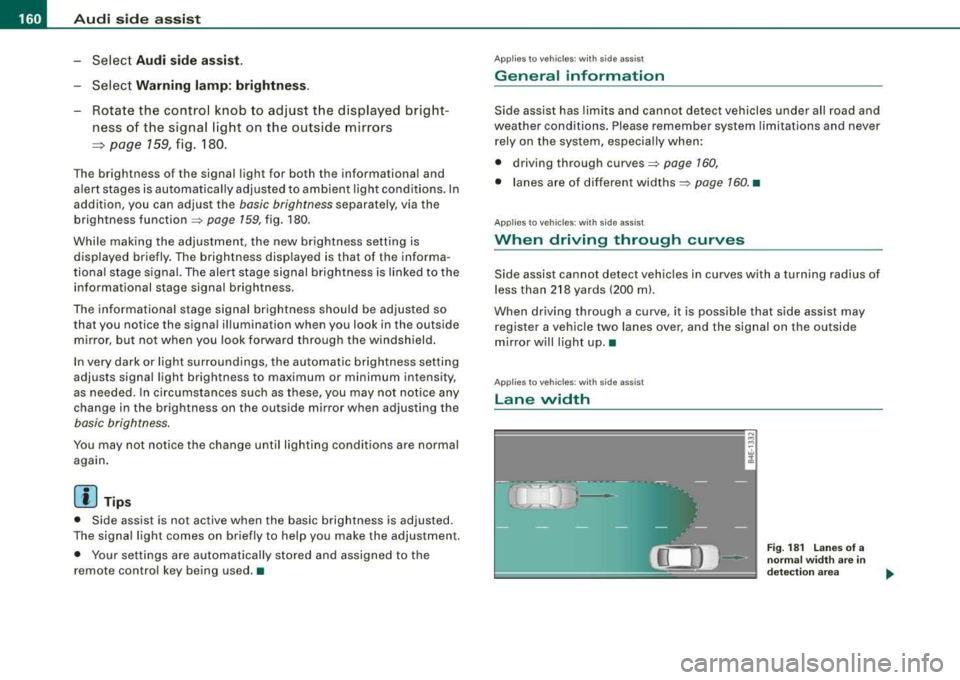
Lane width
w cl,
Fig . 18 1 L an es of a
norma l widt h are i n
d etec tion area
Page 164 of 404
___ A_ u_ d_ i_s _i_d _e_ a_ s_ s
_ is_ t __________________________________________________ _
&, WARNING (continued )
-Never rely only on side assist when changing lanes .
- Always check rear view mirrors to make sure that it is safe to
change lanes .
• Side a ssist cannot detect all vehicle s under all conditions
danger of a cc ident!
• Side assist cannot detect vehicles in time to alert you when
they approach from behind at very high speed, or fall drop back
very quickly.
• The radar sensor 's
vi sion can be reduced or entirely blocked by
rain , snow , and heavy spray . This can result in side as sist not
adequately detecting vehicles or , in some cases , not dete cting
them at all . Always keep an eye on the direction you are traveling
and the relevant area around the vehicle .
• Please note that side assist indicates there are approaching
vehicles , or vehicles in your blind spot , only after your vehicle has
reached a driving speed of at lea st 37 mph (60 km /h).
• Side assist signal does not work around tight corners (turning
radius less than 218 yards , or 200
ml.
• Side a ssist is no replacement for the driver's full attention . The
driver alone is responsible for lane changes and similar driving
maneuvers. Always keep an eye on the direction you are traveling
and the relevant area around the vehicle .
0 Note
To ensure that s ide assist is not adv ers ely affected, you should not
b lock the area on the rea r bumper where the radar sensors are
located with for eign objects (such as wit h stickers or b icycle rac ks).
[ i ] Tips
If th e pos it ions of the rada r se nsors have bee n changed as a resu lt
of a rear end -collision, for instance, have side as sist checked by an
autho rized Aud i dea ler fo r sa fety reaso ns.•
A pplies to veh icles : w ith side ass is t
Declaration of compliance
Th e Audi side assist system is based o n radar sensors which operate
i n o ne of t wo fr eque ncy ban ds a t 24 GH z. In so me countr ies only one
of both bands is a llowed . D epending on the country in which you
are dr iving, the A ud i s ide ass is t syste m may not be legal ly act ivated
unless the frequency band permitted has been set by an authorized
A ud i dea ler . O pera tion in th e US a nd Cana da is o nly perm itte d on
the 240 75 MHz to 24 175 M Hz frequenc y band. The correct frequency
b and was se t by A udi or an a utho rized Aud i deale r in the coun try
where your ve hicle was originally purchased and may have been
rese t if the ve hicle was ope ra ted outside the US o r Canada . Cha nge s
or modi fications not expressl y approved b y Aud i can void the us er's
authority to operate the Audi side assist system .
T his dev ice co m plies wi th Pa rt 15 of th e FCC Rules. Operat ion is
subject to the fo llowing two condit ions :
• this device may not cause ha rm ful in te rfe re nc e, a nd
• this device must accept any interference received, inc luding
i nter fere nce t hat m ay ca use un des ired ope ration .•