turn signal AUDI S8 2008 Owner's Manual
[x] Cancel search | Manufacturer: AUDI, Model Year: 2008, Model line: S8, Model: AUDI S8 2008Pages: 404, PDF Size: 52.7 MB
Page 170 of 404
___ A_ u_ t_ o_ m_ a_ t_ i_c _ t_r _
a _n _ s_ m_ is_ s_ io_ n _______________________________________________ _
Applies to vehicles: with tipt ronic-steeri ng wheel
Steering wheel vvith tiptronic ®
The shift buttons on the steering wheel allow the driver to
shif t gears manually .
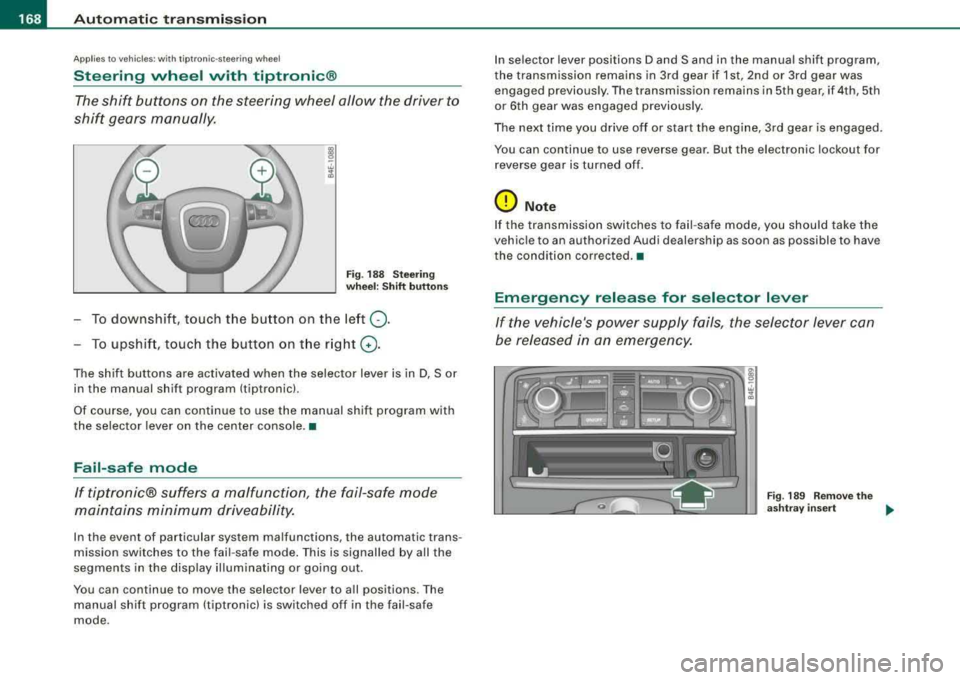
Fig . 18 8 S te ering
w heel : Shift button s
To downshift, touch the button on the left 0-
To upshif t, touc h the button on t he r ight G) .
The shift buttons are activated when the selector lever is in D, Sor
in the manual shift program (tiptronic).
Of course, you can continue to use the manual shift program with
the selector lever on the center console. •
Fail-safe mode
If tiptronic® suffers a ma/function, the fail-safe mode
maint ains minimum driveability.
In the event of particular system malfunctions, the automatic trans
mission switches to the fail -safe mode . This is signalled by all the
segments in the disp lay il lum inating or going out .
You can continue to move the selector lever to a ll positions. The
manual shift program (tiptronic) is switched off in the fail-safe
mode . I
n selector lever positions D and Sand in the manual shift program,
the transmission remains in 3rd gear if 1st, 2nd or 3rd gear was engaged previous ly. The transmission rema ins in 5th gear, if 4th, 5th
or 6th gear was engaged previous ly .
The next time you drive o ff or start the engine, 3rd gear is engaged .
You can continue to use reverse gear . But the electronic lockout for
r everse gear is turne d of f.
0 Note
If the transmission switches to fail -safe mode, you should ta ke the
vehic le to an authori zed Audi dealership as soon as possible to have
the condition co rrected. •
Emergency release for selector lever
If the vehicle's power supply fails , the selector lever can
be released in an emergency.
Fig . 18 9 R emo ve the
a sh tray insert
..
Page 173 of 404

Advan ce d Parkin g Sy ste m Ill
-------------~--
-Press the sw it c h P111! in t he cen ter console =:> page 170,
fig. 192 to activate the Aud i pa rking system manually.
Activation of the acoustic park ing system is confirmed by
a brief acknowledgement sound. The indicator light in
the switc h lights up.
De activation
-If yo u drive forwa rds faster t han approx. 6 mph (1 0 km/h},
or
-if you switc h the ignition off, the entire acoustic parking
assist is automatically deactivated, or
-you can press the switch P111A. in the center console
=:> page 170, fig. 192 to deact ivate the Audi parking
system. The indicator light in the switch goes out.
You have to turn on the acoustic parking assist manuall y if you wish
to park the vehicle forwards or if you wish to approach an obstacle
forwards and want a distance warning .
The range at whic h the sensors start to measure is about:
Front
Rear
W arn in g tone s side
cen ter
side
cen ter 3
ft
(0 .90 ml
4f t
(1 .20 ml
2 ft (0.60 ml
Dis tance wa rn ing is given by chimes which are generated by a
signal generator . The volume and the pitch of the chimes can be
adjusted in the MM I
=> page 180.
Mute
I n t he case of vehic les with automatic transmission, an acoustic
distance warning is discontinued when the transmission selector
Controls and equip ment lever is moved to the P position
. However, the system remains
active . As soon as the selector lever is moved fro m the
P pos it ion
and the vehicle approaches an obstacle, the acoustic distance
warning resumes.
Dr iving fo rw ard /b ac kw ard
Dista nce warn ing w hen driving fo rward/ backward is based on
detection of an obstac le in the range of the parking assist. As the
distance decreases, t he time interval betwee n the aud ible t ones
becomes shorter.
When the distance is less than approx .
1 ft (0.30 m), the tone
becomes cont inuous. At th is po int you shou ld stop backing up or
driving forward .
I f the distance to an obstacle re m ains the same, the vo lume of the
distance warning is gradua lly reduced after about
4 seconds (does
not app ly to the zone for the continuous tone). If you start to
approach the detected obstacle again, the distance warning will
sound at the norma l volume again.
P arking
When you se lect another gear when park ing (e .g . reverse/forwa rd),
the warning tones are temporarily suppressed, but the visua l
display remains on the MMI display . If you start approaching a
detected obstac le again, the distance warning wi ll sound at the
normal volume again .
Vi su a l displa y
The segments on t he MMI d isp lay indicate a change in the distance
between the vehicle and an obstacle . The number of segments
displayed depends on the obstac les in front of or behind the
vehic le. The c loser the vehic le comes to the obstacle, the closer t he
segments approach the
vehic le => page 170, fig. 193. When the
seg ment before last is d isplaye d, the ve hicle has reac hed the coll i
sion zone. At this point you should stop backing up or driving
f orward
=> & . ~
Page 179 of 404
__________________________________________ A_ d_v _a_ n_ c_e _d _ P_a_ r_ k_ i_n -=g ;.._ S...:y'-- s_ t_ e_ m __ ......
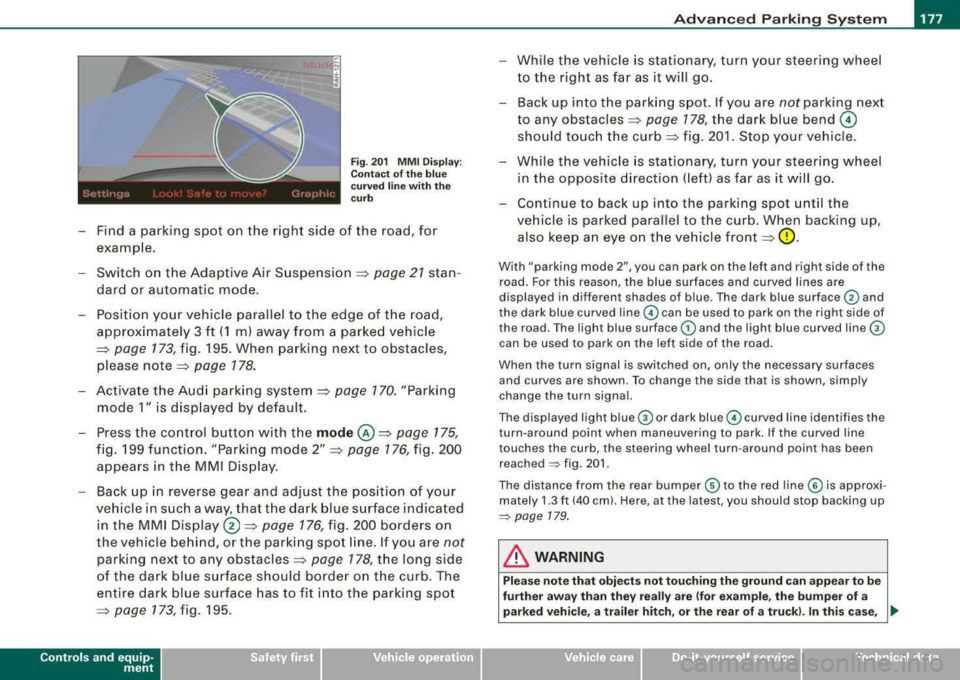
Fig . 201 MMI Display:
Contact of the blue
curved line with the
curb
- Find a parking spot on the right side of the road, for
example .
- Switch on the Adaptive Air Suspension =>
page 21 stan
dard or automatic mode.
- Position your vehicle parallel to the edge of the road,
approximately 3 ft (1 ml away from a parked vehicle
=> page 173 , fig. 195. When parking next to obstacles,
please
note => page 178.
- Activate the Audi parking system => page 170. "Parking
mode 1" is displayed by default.
- Press the control button with the
mode @=> page 175,
fig. 199 function. "Parking mode 2" => page 176, fig. 200
appears in the MMI Display.
- Back up in reverse gear and adjust the position of your
vehicle in such a way, that the dark blue surface indicated in the MMI
Display ®=> page 176, fig. 200 borders on
the vehicle behind, or the parking spot line. If you are
not
parking next to any obstacles => page 178, the long side
of the dark blue surface should border on the curb. The
entire dark blue surface has to fit into the parking spot
=> page 773,fig.195 .
Controls a nd eq uip
ment
While the vehicle is stationary, turn your steering wheel
to the right as far as it will go.
- Back up into the parking spot. If you are
not parking next
to any
obstacles => page 178, the dark blue bend ©
should touch the curb=> fig. 201. Stop your vehicle.
- While the vehicle is stationary, turn your steering wheel
in the opposite direction (left) as far as it will go.
- Continue to back up into the parking spot until the
vehicle is parked parallel to the curb. When backing up, also keep an eye on the vehicle
front => 0.
With "parking mode 2", you can park on the left and right side of the
road. For this reason, the blue surfaces and curved lines are
displayed in different shades of blue . The dark blue surface
G) and
the dark blue curved
line © can be used to park on the right side of
the road . The light blue surface
G) and the light blue curved line ©
can be used to park on the left side of the road.
When the turn signal is switched on, only the necessary surfaces
and curves are shown. To change the side that is shown, simply
change the turn signal.
The displayed light
blue © or dark blue© curved line identifies the
turn -around point when maneuvering to park. If the curved line
touches the curb, the steering wheel turn-around point has been reached
~ fig. 201 .
The distance from the rear bumper © to the red line© is approxi
mately
1.3 ft (40 cm). Here, at the latest, you should stop backing up
~ page 179.
in. WARNING
Please note that objects not touching the ground can appear to be
further away than they really are (for example, the bumper of a
parked vehicle, a trailer hitch, or the rear of a truck). In this case,
..,_
Vehicle care I I irechnical data
Page 183 of 404
___________________________________________ A_ d_ v_ a_n _ c_ e_ d_ P_a _ r_ k_ i_n --=g=-- S_ y=--- s_t _
e _m _ ___._
The volume and frequency settings are automatically stored and
assigned to the remote master key.
& WARNING
Always make sure that the volume and frequency of the chimes is
adjusted so that you can easily hear the acoustic distance signal
even if the radio is playing, the air -conditioner blower is on High or
there is a high level of outside noise . Check the settings whenever
someone else has driven the vehicle before you. •
Applies to vehic les: with Advanced Parking System with rear view camera
Adjusting the chimes -option 2
The menu for adjusting signal sounds can also be called
up via the control button with the "settings" function.
Controls a nd eq uip
ment
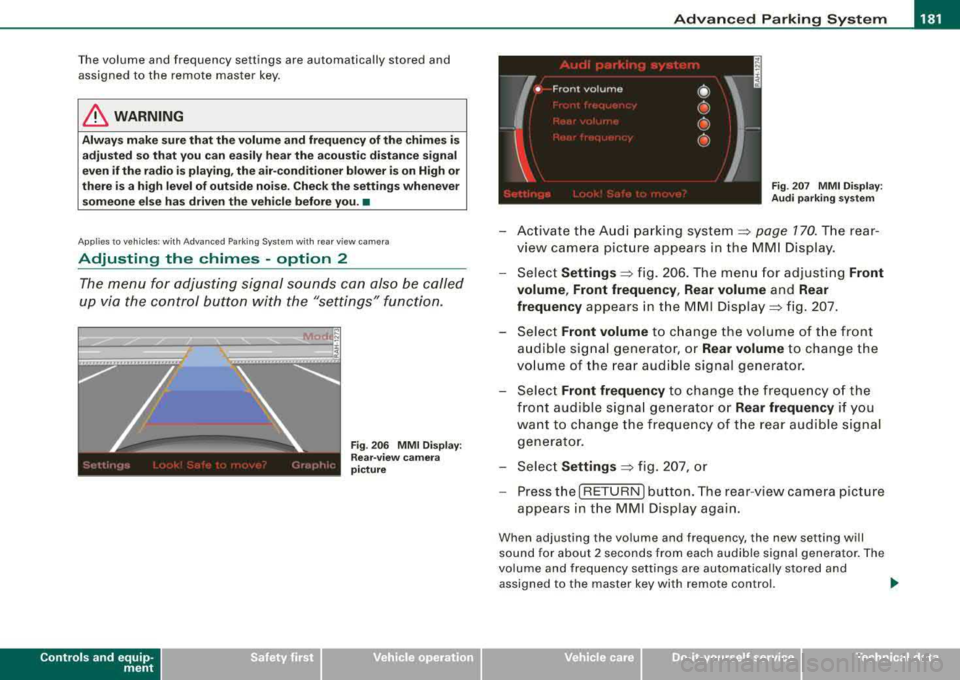
Fig . 206 MMI Display:
Rear-view camera
picture Fig
. 207 MMI Display:
Audi parking system
-Activate the Audi parking system~ page 770. The rear
view camera picture appears in the MMI Display.
-Select Settings ~ fig. 206. The menu for adjusting Front
volume , Front frequency , Rear volume
and Rear
frequency
appears in the MMI Display => fig. 207.
Select
Front volume to change the volume of the front
audible signal generator, or
Rear volume to change the
volume of the rear audible signal generator.
-Select Front frequency to change the frequency of the
front audible signal generator or
Rear frequency if you
want to change the frequency of the rear audible signal
generator.
-Select Settings ~ fig. 207, or
-Press the [ RETURN I button. The rear-view camera picture
appears in the MMI Display again.
When adjusting the volume and frequency, the new setting will
sound for about 2 seconds from each audible signal generator. The
volume and frequency settings are automatically stored and
assigned to the master key with remote control.
~
Vehicle care I I irechnical data
Page 271 of 404
____________________________________________ ln_t_ e_ l_ li _,..g "- e_ n
_ t_t_e _ c_ h_ n_o _l_o _....g ,_,y'-_IJIII
T he direction in which the driver wishes to travel is determined with
t he aid of the steering angle and vehicle speed and is con tinua lly
compared with the actual behavior of the vehicle. If the two do not
match, for example, when the vehic le starts hydrop laning on a wet
road, ESP will automatically brake the appropriate whee l to correct
the prob lem.
The vehicle is then stabi lized by the forces act ing on the whee l
during braking. If the vehicle is
oversteering (rear tends to skid out
of the turn), the brakes are mainly app lied on the whee l that is on
the outside of the curve. In the case of a vehicle that is
understeering
(tendency to s lide out of the curve), t he brakes are applied a t the
rear wheel that is on the inside of the curve. An acoustic signal indi
cates when ESP brake app lication cuts in
=> & .
The system operates across t he entire speed range in comb inat ion
with the ABS system
=> page 272 . If the Anti -Lock Brake System
(ABS) malfunctions, the ESP wi ll be out of act ion as well.
Ac tivation
When you turn on the eng ine, ESP will automatically be activated
and wil l perform a self -test.
The system can be activated or deactivated by pressing the but ton
=> page 268, fig. 254 . The warning light comes on when the system
is switched off
=> page 18.
Normally, the ESP s hould always be on, however, it may be advanta
geous to turn off the system in certain special cases when some
degree of wheel spin is des ired such as:
• when driving with snow chains
• whe n driving in deep snow or on a loose surface (to allow the
whee ls to dig in to reach firm ground)
• whe n trying to
"rock" the vehicle free whe n it has become stuck.
T he system should be reactivated once you are no longer in such
situations .
Both the ABS and EDS systems are still functioning even if the ESP
is switched off .
Controls and equip
ment Safety first Vehicle operation
& WARNING
The Ele
ctron ic Stabiliz ation Pr ogram i s ne verthele ss subje ct to the
laws of phy sic s. It is p articularl y important to pay attention to this
fa ct on wet and slipper y ro ad s. It i s therefore important th at you
alway s adapt your dr iving to the condit ion of the road and traffic
c ondition s. Do not allo w the in crea sed safety pro vided by the Ele c
tronic Stabilization Program system to lull you into a ccepting
a ddition al safety ri sk s.
•
Electronic differential lock (EDL)
The elec tronic d ifferen tial lock moni tors the rotation al
s p eed of the drive wheels.
G en era l not es
The elect ronic d ifferential lock (EDU helps the ca r to start mov ing,
accelerate and c limb a grad ient on surfaces providing poor or
a lmost no grip . Without EDL, this would be difficult, if not impos
s ib le.
How the syst em works
The EDL operates automatical ly. It monitors the rotationa l speed of
t he drive wheels on an ax le with the he lp of the ABS senso rs
=> page 272. If a not iceable difference in rotational speed between
the drive wheels on one axle is detected (e.g. on slippery ground
on
one side),
the spinning w heel is bra ked, thereby transferring power
to the other drive wheel or wheels (a ll -whee l drive) . This is done up
t o a speed of ab out 60 mph (100 km/h). N oises from the brake
system signal that wheel spin is being control led .
Dri ving off
When driving off, always be sure to keep road conditions in mind as
you accelerate. I f one drive wheel spins because it is on a sur face
with less grip, gradual ly increase the pressure on the accelerator
pedal unt il the car star ts to move . The whee l less able to t ra nsfer
power spins.
.,,
Vehicle care Do-it-yourself service Technical data
Page 395 of 404
_____________________________________________ .:..A ..:; l~ p :.:h.:.. a== b:.:e :.: t:.:.ic == a.:..l .:.. in :..:.:: d:.::e :.: x::..... _IIIII
Location ...... .... .... .... .... .. 258
Mounting and releasing the anchorage hook .......................... 262
Leather ............................ 296
Cleaning ........................ 297
Level adjustment
See Adaptive Air Suspension ....... 185
Lifting jack ... .... .... ... .. .... ..... 354
Lifting points .... ........ .... .... ... 369
Lifting vehicle ... ... .... ........... . 369
Light sensor defective ................ 36
Lights ........ .... .... .... .......... 69
Coming home ..................... 70
Daytime running lights ... .... .... .. 70
Emergency flashers ................ 73
Exterior lights ..... ....... ........ . 70
Front fog lights ...... .... ...... ... 71
Headlights .. ... ... .. .... .... .... . 69
High beam ... .... .... ..... .. .. 69, 73
H igh beam warning/indicator light ... 19
Leav ing home .. ...... .... ...... ... 70
Rear fog lights .................... 71
Side marker lights ................. 69
Turn signals .. .... .... .... .... .... 73
Xenon headlights ....... ... .. .... .. 69
Lo ading the luggage compartment . ... 205
Load ing the roof rack .... ....... .... . 104
Locking Pow er lock ing switch .... .... .... .. 53
Rear lid/trunk lid ...... ............ 55
Remote control .... .... .... .... ... 51
Using the key ..................... 52
Lower anchorage locator button ....... 258
Controls and equip
ment Safety first
Lower
universal anchorage bars (Canada) ..
258
Lower universal anchorages (Canada) .. 258
Luggage Stowing .................. ....... 205
Luggage compartment
Cargo net .. ...... .... .... .... ... 101
DVD p layer for navigation system . .. 112
Side Compartment ............... 112
Side compartment ................ 113
Ski sack ......................... 102
Tie -down eyelets .. ........ ....... 100
See also Loading the luggage
compartment ...... .... ... .. .... 205
L umbar support .... ....... .... .... ... 90
M
Maintenance .......... .... .... .... . 380
Malfunction Indicator Lamp (MIU .... 20, 27
Massage function .... ........ ....... . 89
Master key ...... .... ......... ...... . 48
Mi leage
Average .......................... 38
Ins tantaneous ... ...... .... ... .. .. 38
Mirrors Automatic anti-g lare adjustment . .... 83
Automatic dimming for the outside mirrors .... ....... .... .... ... .. . 84
In terior mirror .... .... .... ....... . 83
Outside mirrors ................... 84
Recalling position of outside mirrors . 94
Storing position of outside mirrors .. . 94 Monitoring the Advanced Airbag System
229
N
Natural leather .... .... ... .. .... .... . 296
New tires and whee ls . .... .... .... ... 336
NHTSA Contacting ...................... 207
Number of seats ...... ... .. .... .... . 209
0
Occupant seat ing positions .. ... .. .... 200
Octane rating ...... .... .... .... .... . 301
Odometer ..... ...... .... ... .... ..... 14
Oil
See Engine oil .. ... .... ....... .... 309
Older children and safety belts .... .... 252
On -Board Diagnostic System (OBD)
Data Link Connector (DLC) ........ .. 28
Electron ic speed limiter . ...... ..... 28
Ma lfunction Indicator Lamp (MIU .... 27
Open door or rear lid warn ing ..... ..... 26
Opening Power sunroof .................... 66
Operate your vehicle economically and mini -
mize pol lution .... ... .... .... ... 279
Outside air pollution How to prevent from entering the vehicle
121
Outside mirrors .. .. .. .... ...... .... .. 84
Outside temperature display ........... 25
Vehicle operation Vehicle care Do-it-yourself service Technical data
Page 399 of 404
______________________________________________ A_ l_,_ p _h_ a_ b_e _t_ic _ a_l _in _ d_e _ x __ lll
T
Tachometer . .... .... .... ... .... .... . 13
Technical modifications ...... ...... .. 383
T emperature
Climate controls ...... .... ..... .. . 117
Setting for the driver's and front passen-
ger's side ... ...... .... ... .... .. 117
Tether strap ........................ 263
Securing the upper tether strap 264
The first 1,000 miles (1,500 km) and
afterwards .. .... .... ... .... .... 277
Tie -down eyelets ... .. .... ...... . 100, 207
Tips for the environment
Saving fuel ... .... .... ... .... .... 104
Using the air conditioner only when necessary ... .... ....... .... .... 123
ti ptron ic® . . . . . . . . . . . . . . . . . . . . . . . . . . 163
Automatic Shift Lock (ASU ... .... .. 165
Driving .. .. .. .... .... ........... 163
Dynamic shift program . ...... ... .. 166
Fail -safe mode ... .... .... ...... .. 168
Kick -down ..... ...... .... ... .... . 166
Manual shift program ........ .... . 167
Se lector lever . .... .... ... .... .... 164
Tire pressure .. ... .. .... .... ...... .. 331
Tire pressure monitoring system ... .... 41
Displaying tire pressures . .... .... .. 43
Initialize wheels ... .... ... .... .... . 45
Learning process .................. 44
Loss of air pressure ............. 20, 42
Malfunctions .... .... .... .... .... . 45
Sensors ....... .. .... .... ...... .. 338
Controls and equip ment Safety first Stor
ing tire pressures ....... .... ... 44 Towing
Tires and wheels .. .... .... .... ... 338 Tow truck procedures .... .... .... . 366
Valves ..... .. .... .... .... .... ... 338
Towing hitch
Tire service life ........ .... ... .. .... 335
Audi parking system .............. 180
Tires ........ .... ... .... .... .... ... 324 Towing loop ..... .... .... ... .... .... 367
Replacing .. ...... .... ...... ... .. 338 front .... ... .. .... .... ...... ... .. 367
Service life . ........ .... ... .. .... 335 rear ............................ 368
speed rating letter code .. ... .. .... 338
Trailer towing . .... ... .... ...... ... .. 282
Tire manufacturing date ...... .... . 338
Operating instructions . ...... ... .. 283
Tire specifications ................ 337
Technical requirements ... .... 282, 283
Tread depth ........ ....... ...... 335
Trailer towing tips ................ 284
Uniform tire quality grading .... .... 340
Train
Winter tires ... .... .... .... .... ... 341
Transporting your vehicle .. .... .... 369
Tires and ve hicle load limits . ...... ... 333
Transmission
Tires and wheels
See Automatic transmission .. ...... 163
Checking tire pressure .... .... .... 331
Transport Canada . .... ... ........ ... 208
Cold tire inflation pressure .. .... ... 328
Dimensions ...................... 336 Transporting your vehicle
.... .... ... . 369
Tread Wear Indicator (TWI) ....... .... . 335
Genera l notes .................... 324
G lossary of tire and loading termino logy
325
New tires and whee ls .. .... .... ... 336
Replacing .... .... .... .... .... ... 337
Snow chains ........ .... ... .. .... 342 Trip computer
Fuel consumption .... .... .... .... . 38
Mi leage ... ........... .... .... .... 38
Sing le-trip memory .. ........ .... .. 39
Total-trip memory .. ...... ..... .. .. 39
Tire pressure monitoring system .... 338
Tires and vehicle load limits .. ...... 333
Wheel bolts .. ....... ...... .... ... 343 Trip
odometer ..... .. .... ....... ... .. 14
What does it mean when dEF appears in the trip odometer disp lay? ......... 14
Winter tires ......... ...... .... ... 341 Trunk
Tires/Wheels
See Rear lid ... .... .... ... .... .... . 55
Low aspect ratio tires . .... ........ 343 Trunk
escape handle .. .... ... .... .... 348
Tools ... .... .... ... .... .... .... .... 350 Turn signals
... .. .... .... .... ...... .. 73
Torn or frayed safety be lts .. .... .... .. 212 Warning/indicator
lights .. ........ .. 19
Touch-up paint . .... ... .... .... .... . 292
Vehicle operation Vehicle care Do-it-yourself service Technical data
Page 400 of 404
-Alphabetical index
---=------------------------------------------------
u
Undercoating 294
Unfastening safety belts ...... ...... . 215
Un idirect iona l tires ....... ....... .... 324
Uniform tire quality grading
Un locking 340
Power locking switch . . . . . . . . . . . . . . 53
Rear lid/trunk lid ...... .... ...... .. 55
Remote control ................... 51
Using the key .. .... ....... .... .... 52
V
Vanity mirror
front ... .. .... .... .... ... .... .... 77
rea r . . . . . . . . . . . . . . . . . . . . . . . . . . . . . 79
Vehic le elec trical system ...... ...... .. 18
Vehic le identification label ........ ... 374
Vehicle Identification Number (VI N) .... 374
Vehicle jack .... ... .. .... .... ... 349, 354
Vehicle literature ... .. .. ..... .. .... ... 5 Brake system
.... . .. .. .... ... .... . 22 Wheel bolts
Cruise control ..... .... ... .... .... 21 Torque ... .... .... .... ... .... ... 343
Electromechanica l parking brake .... 22 Wheels ............................ 324
Electronic power control .. .... .... . 18 Cast alloy ....................... 293
Electronic stabilization program (ESP) 18 Checking tire pressure ............ 331
Fog lights .. ...... .... ...... ... .. . 19 Cold tire inflation pressure ...... .. 328
Generator . . . . . . . . . . . . . . . . . . . . . . . . 18
High beam . . . . . . . . . . . . . . . . . . . . . . . 19
Instrument cluster . . . . . . . . . . . . . . . . . 12
Ma lfunction Indicator Lamp (MIU . ... 20
Rear fog light s ........ ........ .... 19
Safety belt .... .... .... .... .... ... 20
Tir e pressure monitoring system .... 20
Turn signals ... .... .... .... .... ... 19
Warranty coverages ...... .... .... ... 380
Washer reservoir .. ... .... .... .... ... 323
Washing ...... .... ..... ............ 288
Automatic car wash ...... .... .... 289
by hand .. .... ... .... .... .... ... 289
with a power washer ... .. .. ....... 290
Washing the vehicle ..... ...... .... .. 288
Waxing ....... ... .... .... .... .... .. 291 Genera
l notes ....... ... .... .... .. 324
Glossary of tire and loading terminology .
325
New tires and wheels .. ........... 336
Tires and vehicle load limits ....... 333
When must a safety belt be replaced? .. 212
When must the airbag system be inspected?
229
When should I ad just the tire pressures?
332
When should I check the tire pressures? 332
Where can I find the tire pressures for my
car? ... .. .... .... .... ..... .. ... 331
Why safety belts? ...... ... ... ... 209, 21
o
Windows
Cleaning ........................ 292
Vehic le transpo rt .... .... .... ...... . 369 Wear indicator .... .... ... .... .... ... 335 Convenience open
feature ...... .... 64
Defogging ....... ........ ....... 120
Vehic le-care products ... .... .... .... 288 Weatherstrips ... ....... ...... .... .. 293
Venti lated seats .. .... .... ... .... ... 118 Weights
..... .... .... .... .... ... ... 375
w
Warning/indicator lights ... .. .... .... . 16
Adaptive Air Suspension ....... . 20, 21
Adaptive Cruise Control .. .. .. .... . 145
Airbag system . . . . . . . . . . . . . . . . . . . . 19
Anti-lock brake system (ABS) . . . . . . . . 21 What happens
if you wear your safety belt too
loose? ... .... .... .... .... .... .. 214
What happens to unbelted occupants? . 211
What impairs driving safety? ..... ..... 199
What should I do after changing a wheel?
332
What should I do after replacing wheels?
332 Defrosting
.... .... .... ... .... ... 120
Rapid defrosting/defogging .... .... 122
Windshield defogger/defroster .. ...... 123
Windshield washer fluid Low level ...... ............... .... 35
Windshield wipers Installing new wiper blades . .... .... 82
In termittent wiping .... ... . .... .. .. 80
One -tap wiping ........ .... .... ... 80