climate control AUDI S8 2008 Owners Manual
[x] Cancel search | Manufacturer: AUDI, Model Year: 2008, Model line: S8, Model: AUDI S8 2008Pages: 404, PDF Size: 52.7 MB
Page 4 of 404
Table of contents
Table of contents
Vehicle literature ........ .
About this Owner's Manual ..................... .
Controls and
equipment .. ... ... ..... ... . .
Inst rumen ts and contr ols ..... .
Genera l ill ustration ............. .
Instruments and
warning/indica tor lig hts ....... .
Instruments ................... .
Warning/indicator lights ........ .
Driver informa tio n d isplay ..... .
Introduction ................... .
On-Board Diagnostic system
(080)
Auto Check Control ............ .
Speed war ning system ... ...... .
Trip computer ..... ............ .
Tire pressure monitoring system ..
Opening and closing .......... .
Keys ............ ... .. ... · · · · · · ·
Power locking system .......... .
Rear lid/Trunk lid .......... ..... .
Ch ild safety loc k .... ... .... .... . 5 Advanced Key
................ .
Anti-theft a larm system ..... ... .
Powe r w indows ... ... ... ... .. .
S lid ing/ti lt ing power sunroof ... .
6 Clear vision ... .... .. ... .. ..... .
9
11
1 1
1 2
12
1 6
2 4
2 4
27
28
36
38
40
47
47
49
55 58 Lights
..................... ... .
Interior lights ... ...... .. .. .. .. .
V is ion ........... ........... .. .
W iper and washer system ... ... .
Mirrors .. .. ... ......... ..... .. .
Seats and storage ......... ... .
Genera l recommendat ions ..... .
Powe r seat . ... ... ......... ... .
Head restraints .............. . .
Arm rest ..................... .
Seat memory ... ... ...... ..... .
Rear sea ts . ... ... ... ... ... .. .. .
Ind ividua l rear seats ........ ... .
Luggage compartment ........ .
Roof rack ........ ... .... .... .. .
Cup holder .................... .
As htray . ... ... ... ......... ... .
Cigarette lighter/socket ........ .
Long center console ........... .
Storage .... ...... ............ .
Warm and cold ............... .
Climate controls .............. .
W indshield defogg ing /defrosting .
Rear clim ate controls ..... ..... .
Basic settings ......... ... ... .. .
On the road ... ... . .. ... .. ... .. .
Stee ring .... ... ... ............ .
Ignition lock and ignition sw itch .
Starting and stopping the engine 59
Starting and stopping the engine
61 using t he Advanced Key . . . . . . . . . 131
62 Electromechanical parking brake . 134
65 Cru ise control . . . . . . . . . . . . . . . . . . 137
69
A dapt ive Cruise Control . . . . . . . . 139
69 Speed and distance control system 139
7 4 Driver informat ion . . . . . . . . . . . . . . 144
77 Specia l driving si tua tions . . . . . . . . 14 9
80
Audi lane assist . . . . . . . . . . . . . . . . 151
83 Lane assist . . . . . . . . . . . . . . . . . . . . 151
86
A udi side assist . . . . . . . . . . . . . . . . 15 4
86
87
91
93
9 4
96
97
100
103
105
106
107
108
109
1 14
11 4
123
125
126
128
128
129
130 Lane Change Assistant ........
. .
No tes ........ ...... ........ .. .
Automatic transmission ...... . .
tiptron ic® (6-speed automatic
transm ission) ................. .
Advanced Parking System .... .
Advanced Parking System with rear
v iew camera .................. .
Specia l parking situations ...... .
Towing hitch .. ....... ......... .
Settings in the MM I ..... ...... . .
Safety t ips .............. ...... .
Adaptive A ir Suspension ...... .
Adaptive Air Suspension and
Damping ..... .. .............. .
Homelink® ................... . .
Universa l remo te control ....... . 154
161
163
163
170
170
178
180
180
183
185
185
191
191
Page 13 of 404
Instruments and controls
General illustration
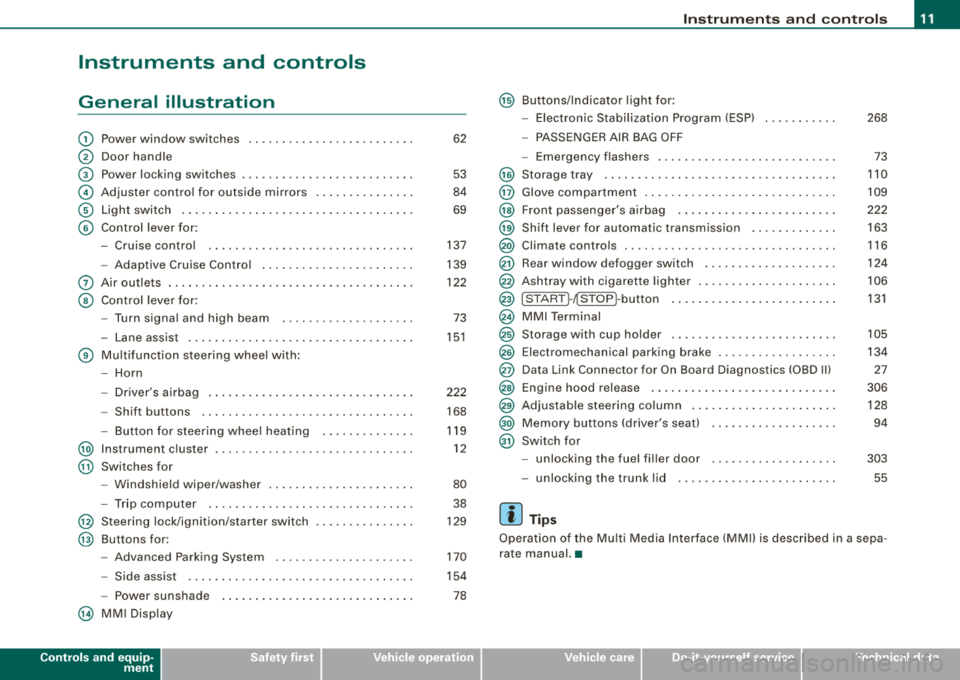
G) Power window switches ........................ .
@ Door handle
G) Power locking switches ..... .. .... .... .... ...... .
© Adjuster contro l for ou tside mirrors ...... .... .... .
© Light switch .. ...... .... ... .... .... .... ..... .. .
© Contro l lever for:
- Cruise control .... .... ...... ....... ...... ... .
- Adaptive C ru ise Contro l .... .... .... .... .... .. .
0 Air outlets ... .. .... .... .... .... ... .... .... .... .
@ Contro l lever for:
- Turn signal and high beam ....... ... .. .... ... .
- La ne assist .. ...... ... .... .... .... ... .... ... .
© Multi function steering wheel with :
- Horn
- Driver's a irbag .. ...... ... .... .... .... .... ... .
- Shift buttons ............................... .
Button for steer ing whee l heating ........ ... .. .
@ Instrument c luster .. ... .... .... ....... .... .... . .
@ Switches for
- Windshield wiper/washer ............... ...... .
- Trip computer .... ....... .... .... .... .... ... .
@ Steering lock/ignit ion/starter switch
@ Buttons for:
- Advanced Parking System .. .... .... .... .... .. .
- Side assist ................................. .
- Po wer sunshade
@ MM I Disp lay
Controls and equip
ment
62
53
84
69
137
139
122
73
15 1
222
168
119 12
80 38
129
170
154
78
Ins trum ents and controls
@ Buttons/Indicator l ight for :
- Electronic Stabilization Program (ESP) 268
- PASSE NGER AIR BAG OFF
- Emergency flashers . . . . . . . . . . . . . . . . . . . . . . . . . . . 73
@ Storage tray . . . . . . . . . . . . . . . . . . . . . . . . . . . . . . . . . . . 110
@ Glove compartment . . . . . . . . . . . . . . . . . . . . . . . . . . . . . 109
@ Front passe nger's airbag . . . . . . . . . . . . . . . . . . . . . . . . 222
@ Shift lever for automatic transmission . . . . . . . . . . . . . 163
@ Climate controls . . . . . . . . . . . . . . . . . . . . . . . . . . . . . . . . 116
@ Rear window defogger switch . . . . . . . . . . . . . . . . . . . . 124
@ Ashtray with cigarette lighter . . . . . . . . . . . . . . . . . . . . . 106
@ ISTAR T~~ STOP ~butto n . . . . . . . . . . . . . . . . . . . . . . . . . 131
@ MMI Terminal
@ Storage with cup holder . . . . . . . . . . . . . . . . . . . . . . . . . 105
@ Electromechanical parking brake . . . . . . . . . . . . . . . . . . 134
@ Data Link Connector for On Board Diagnostics (OBD Ill 27
@ Engine hood release . . . . . . . . . . . . . . . . . . . . . . . . . . . . 306
@ Adjustable s teering co lumn . . . . . . . . . . . . . . . . . . . . . . 128
@ Me mory buttons (driver's seat) . . . . . . . . . . . . . . . . . . . 94
@ Switch for
- unlocking the fuel fil ler door
- unlocking t he tr unk l id
[ i ] Tips
303
55
Operation of the Mu lt i M edia In terface (MMI) is described in a sepa
rate manual. •
Page 50 of 404
Opening and clo sing
Master key vvith remote control
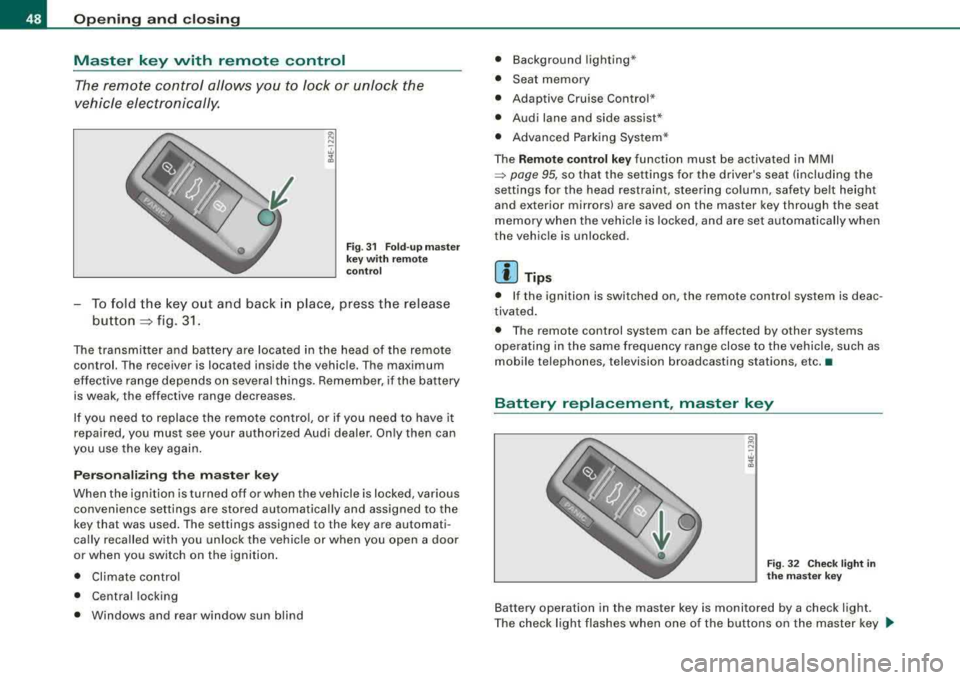
The remote control allows y ou to l ock or unlock the
vehicle electronically.
F ig . 31 Fo ld -u p m aster
key wit h re mote
c ontr ol
-To fold the key out and back i n place, press the release
button
::::, fig. 3 1.
The transmitter and battery are located in the head of the remote
control. The r eceiver is locat ed ins ide th e vehicle . Th e maximum
ef fective range depends on several th ings. Remember, if the battery
is weak, the effective range decreases.
If you need to replace the remote contro l, or if you need to have it
repaired, you must see your authorized Audi dealer. On ly then can
you use the key again .
P erson aliz ing the ma ste r ke y
When the ignition is turned off or when the vehicle is locked, various convenience set tings are stored automatical ly and assigned to the
key that was used . The settings assigned to the key are automati
cally recalled with you unloc k the vehicle or when you open a door
or when you switch on the igni tion .
• Climate contro l
• Ce ntral locking
• Windows and rear window sun blind •
Background lighting *
• Seat memory
• Adaptive Cruise Contro l*
• Audi lane and side assist *
• Advanced Parking Syste m*
The
Remo te co ntrol ke y function must be activated in MMI
~ page 95, so that the settings fo r the driver's seat (including the
settings for the head restraint, steering column , safety be lt height
and exterior mirrors) are saved on the master key through the seat
memory when the vehicle is locked, and are set automatically when
the vehic le is unlock ed.
[ i ] Tip s
• If the ignition is switched on, the remote control system is deac
tivated .
• The remote control system can be affected by other systems
opera ting in the same frequency range close to the vehicle, such as
mobile tel ephones, television broadcasting stations, etc. •
Battery replacement, master key
g N
-. w 1l.
Fig . 3 2 Che ck light in
th e m as ter key
Battery operation in the master key is monitored by a check light .
The check light flashes when one o f the buttons on the master key
~
Page 61 of 404
for the power sun blinds* in the side windows . In addition to this,
t he rear climate contro l* is set to the
PA SS IV E mode. This means
that the climate controls in the front adjust the heating and venti la
tion in the rear of the
ve hicle => page 125.
[ i ] Tips
• I n order to activate the child safety lock on the left and the right
s ide, you have to press the two safety buttons in succession.
• Make certa in that the indica tor light in the corresponding safety
button illuminates when the child safety lock is activated .•
Advanced Key
A pplies to vehicles : with Advance d Key
Description
Opening your vehicle and starting the engine with the key
still in your pocket.
T he Advanced Key features is a keyless system which gives you the
possibility to lock and unlock your vehic le, as wel l as to start the
engine without having to use your key.
It does not matter if you have your key in your jacket pocket or in
your briefcase. As soon as you get within a certain distance to the
vehic le, t he system senses that your are approaching, it makes a
quick check to see if you are "authorized" and then it does the
following:
• unlocks the
veh ic le => page 60 .
• locks the vehicle => page 60.
• switches on the ignition and starts the engine when you press
t he [ START] button. You do not have to insert your key into the ign i
tion
lock=> page 131.
Controls and equip ment
Openin g and clo sing
& WARNING
• When you lock your vehi cle from out side , nobod y -espe cially
c hildren - should remain in side the vehicle. Remembe r, when you
lock the vehi cle from the out side the windo ws cannot be opened
from the in side.
• Wh en yo u le ave the vehi cle , al ways remove the ignition ke y and
t ak e it with you. Thi s will prevent pa ssenger s (children , for
e x ample ) from accident ally bein g locked in th e vehicle should the y
accid entally pre ss the powe r lo cking swit ch in the door s.
• Do not l eav e children in side the vehi cle un super vis ed . In an
emerg ency it would be impo ssible to open the doors from the
out side without the key .
[ i ] Tip s
• For the Advanced Key to properly work, you must a lways have
your vehicle key with you .
• The vehic le will lock or un lock the doors only if an authorized key
comes within 5 ft (1 .5 meters) from one of the vehic le doors or the
rear lid .
• You can st ill lock or unlock your vehic le using the remote control
key buttons, however the se lector lever must in the P position .•
Page 65 of 404
• The driver can lower or raise the power side blinds * in the side
windows by using switches
© and @ . •
Switches in the driver's door
The driver can operate all windows.
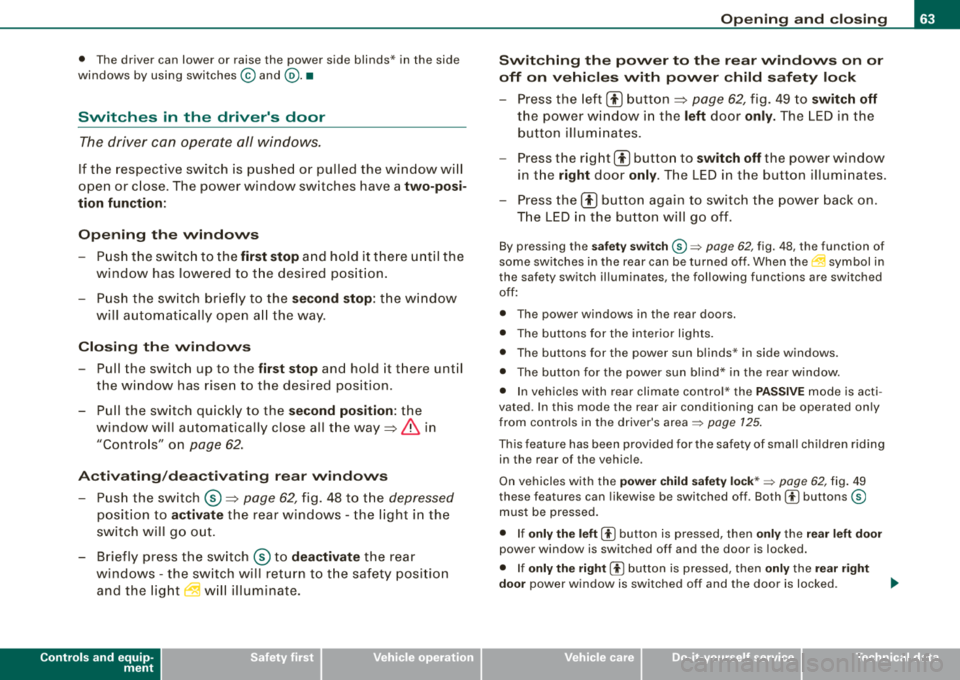
If the respective switch is pus hed or pulled the window will
open or c lose. The power window switches have a
two-po si
tion fun ction :
Opening th e windows
- Pu sh the switch to the first stop and hold it the re until the
window has lowered to t he desired pos ition.
- Push the sw itch briefly to the
s e cond stop : the wi ndow
will aut omatical ly open a ll the way .
Closing th e windows
- Pull the switch up to the first stop and hold it t here until
the window has risen to the desired position.
- Pu ll the switch quick ly to the
se cond position: the
window will automatica lly close all the
way => & in
"Contro ls" on
page 62.
A cti vating /dea ctivating r ear windows
- Pus h the switch © => page 62, fig . 48 t o th e depressed
pos it ion to a ctivate the rear windows - the light i n the
sw itch wi ll go out .
- Brie fly press the switch © to
deactivate the rear
windows -the swi tch will return t o th e safety posi tion
and the
l ig ht ~ w ill illuminate.
Controls and equip
ment
Openin g and clo sing
Switching th e pow er t o th e re ar wind ows on or
off on v ehi cle s with pow er child s afe ty lo ck
- Press the left 00 button=> page 62, fig. 49 to swit ch off
the power window in the le ft door only. The LED in the
button illum inates .
- Press the right
00 button to switch off the power window
in t he
right door only. The LED in the button illum inates.
- Press the
00 button again to switch the power back on .
The LED in the button will go off.
By pressing the sa fet y swi tc h ® => page 62, fig. 48, the function of
some sw itches in the rear can be turned off . When
the ~ symbol in
the safety switch illuminates, the following functions are switched
off:
• The power windows in the rear doors.
• The buttons for t he interior lights.
• The buttons for the power sun b linds* in side windows .
• The button for the power sun bl ind* in the rear w indow.
• I n vehic les with rear climate contro l* the PASSIVE mode is acti
vated . In this mode the rear air conditioning can be operated only
from contro ls in the driver's
area => page 125 .
This feature has been provided for the safety of smal l ch ildren rid ing
in the rear of the vehic le.
On vehicles wit h the
powe r child saf ety lo ck* => page 62, fig. 49
these features can likewise be switched off . Both
CI) buttons ®
must be pressed.
• If
only the left CI) button is pressed, then only the re ar left door
power window is switched off and the door is locked.
• If
only th e right CI) button is pressed, then only the rear right
door
power window is switched off and the door is locked.
Page 116 of 404
___ w_ a
_ r_m _ a_ n_d_ c_ o_ ld __________________________________________________ _
Warm and cold
Climate controls
Description
The air conditioner is fully automatic and is designed to
maintain a comfortable and uniform climate inside the
vehicle.
We recommend the following settings:
- Set the temperature to 75 °F (+23 °C).
- Press the !AUTO
I button.
With this setting, you attain maximum comfort in the least amount
of time. Change this setting, as desired, to meet your personal needs.
The climate controls are a combination of heating, ventilation and cooling systems, which automatically reduce humidity and cool the
air inside your vehicle.
The air temperature, air flow and air distribution are automatically
regulated to achieve and maintain the desired passenger compart
ment temperature as quickly as possible.
The system automatically compensates for changes in outside
temperature and for the intensity of the sunlight entering the
vehicle. We recommend you use the
Automatic mode=> page 117
for year -round comfort.
Please note the following:
Turn on the air conditioner to reduce humidity in the vehicle. This also prevents the windows from fogging up.
When the outside temperature is high and the air is very humid ,
condensation from the evaporator may drip under the vehicle. This
is normal and does not indicate a leak. If the outside temperature is
low, the fan normally only switches to
a higher speed once the engine coolant has warmed up sufficiently.
The air conditioner temporarily switches off when you drive off from
a standstill using full throttle to save engine power.
The compressor also switches off if the coolant temperature is too high, so that the engine can be adequately cooled under extreme
loads.
Air pollutants filter
The air pollutants filter (a combined particle filter and activated
charcoal filter) reduces or prevents outside air pollution (dust, or pollen) from entering the vehicle.
The air pollutants filter must be changed at the intervals specified
in your Warranty
& Maintenance booklet, so that the air conditioner
can properly work.
If you drive your vehicle in an area with high air pollution, the filter
may need to be changed more frequently than specified in your
Audi Warranty
& Maintenance booklet. If in doubt, ask your autho
rized Audi Service Advisor for advice.
Key coded settings
The air conditioner settings selected are automatically stored and
assigned to the key being used. When the vehicle is started, the air
conditioner automatically selects the settings assigned to that key.
This way every driver will maintain his/her own personal settings
and does not have to reset them manually.
If a different driver uses your key and changes the air conditioner
settings, the latest adjustments will erase and replace the settings
you have stored.
Energy management
To prevent the battery from being discharged and to restore the
balance of energy, components which require large amounts of
Page 117 of 404
Warm and cold -
----------------
energy are temporarily cut back or switched off~ page 274 .
Heating sys tems in par ticular require a great dea l of energy. If yo u
not ice, for example, that the seat *, w indshield * or rear w indow
hea ting is no t heat ing, they have bee n t em por arily c ut b ack or
switched off by
energy management . These systems are availabl e
aga in as soon as the ene rgy ba lance has bee n restor ed.
& WARNING
Reduced visibility is dangerous and can cause accidents .
• For safe driving it is very important that all windows be free of
ice , snow and condensation.
• Completely familiarize yourself with the proper use and func
tion of the heating and ventilation system and especially how to defog and defrost the windows .
• Never use the windshield wiper /washer system in freezing
weather until you have warmed the windshield first , using the
heating and ventilation system. The washer solution may freeze
on the windshield and reduce visibility .
0 Note
• If you suspect that the air conditioner has been damaged, turn
on ECO N and con tac t an autho riz e d Aud i dea le r t o hav e th e sys te m
inspected .
• Re pairs t o the A udi air co nd it io ner req uire s pecia l tec hni cal
know ledge and special tools . Contact an authorized Audi dealer for
assista nce.
[ i ] Tips
• Kee p th e air in ta ke s lots (in fron t of the w inds hield) free from i ce,
snow and debris in order to maintain the proper function of the
cl im ate c ontro l sy ste m.
Controls and equip
ment
• Air escapes through vents under the rear window . When p lacing
ite ms of c lothing on the luggage c ompartme nt cover, e nsu re th at
the openings are not covered .
• Climate c ont ro l wor ks mo st effectively if the windows and t he
power roof are c losed . However, if the interior of a parked vehicle is
e xt re mely ho t fro m the sun's rays , briefly open ing the windows ca n
speed up the cooling process .•
Page 119 of 404
![AUDI S8 2008 Owners Manual Warm and cold -
----------------
Turning on and off [ ON/OFF]
Turning th e air conditioning on
- Press [ON/OF F], or
- Press [AUTO].
Turning th e air conditioning off
- Press [ ON/OF](/img/6/57619/w960_57619-118.png "AUDI S8 2008 Owners Manual Warm and cold -
----------------
Turning on and off [ ON/OFF]
Turning th e air conditioning on
- Press [ON/OF F], or
- Press [AUTO].
Turning th e air conditioning off
- Press [ ON/OF")
Warm and cold -
----------------
Turning on and off [ ON/OFF]
Turning th e air conditioning on
- Press [ON/OF F], or
- Press [AUTO].
Turning th e air conditioning off
- Press [ ON/OF F] to tu rn the air conditioner off and block
outside air f rom entering the vehicle .
The air conditioner turns back on if you press one of the control
buttons or the contro l knob .
[ i] Tip s
Resi du al h eat: With the ignition turned off, you can activate the
residual heat funct ion by press ing the [ ON/OFF] button. The
residual heat from the coo lant can be used to heat the vehic le inte
rior . The residua l heat function is turned off automat ical ly after 30
minutes. •
Automatic mode [AU TO]
The aut omatic mode is the standar d setting for all
seasons.
Turning on AUTO
- Select temperature between 60 °F
(+ 16 °C) and 84 °F
(+28 °C).
- Press
[AUTO]~ page 116, fig. 129.
Automatic operation ensures constant temperatures in the interior
and dehumidifies the air inside the vehicle . Air temperature, vo lume
and distr ibut ion are contro lled automat ical ly to reach or main tain
Controls and equip
ment
the desired interior temperature as quickly as possib le. F luctuations
in exterior temperature and the effects of temperature from the
position of the sun are compensated for automatica lly.
This operating mode works only in the adjustable temperature range, from 60 °F
!+ 16 °Cl to 84 °F ( +28 °Cl. If a temperature below
60 ° F (+ 16 °C) is selected,
LO appears in the disp lay. At temperatures
above 84 °F (+28 °C),
HI is displayed . At both extreme settings,
climate control runs continuous ly at maximum cooling or heating
power . There is no temperature regulation .•
Setting the temperature
Separate temperatures can be selected for the driver's
and fr ont passenger's side.
6
fl
I . 6S rF.
,,
-\,.,/
'I
.· I
3
iii
3
:'*.
I
Fig . 13 0 MMI di spl ay:
Sett ing t he temp era
t ur e
- Rot ate the cont ro l knob to the left to reduce the temper
ature, or to the right t o increase t he tempera ture .
[ i ] Tips
• When you press the control knob for choos ing the temperature,
the temperature you choose wi ll a lso appear in the MMI display
~ fig. 130 .
• Synchronizi ng clim ate con trol: By pressing and ho lding the
control knob on the driver's side, t he temperature setting on the
Page 120 of 404
___ w_ a_ rm __ a_ n_ d_ c_ o_ ld __________________________________________________ _
driver's s ide can be sw it c hed to the passenger's side, and v ice versa.
In the case of vehic les with rear air conditioning *, the selected
temperature setting is also applied to the outer rear sea ts. The new
temperature is shown in the display .•
Ap plie s to veh ic les: w ith e le ct ric a lly he ated seat s
Heated seats ~
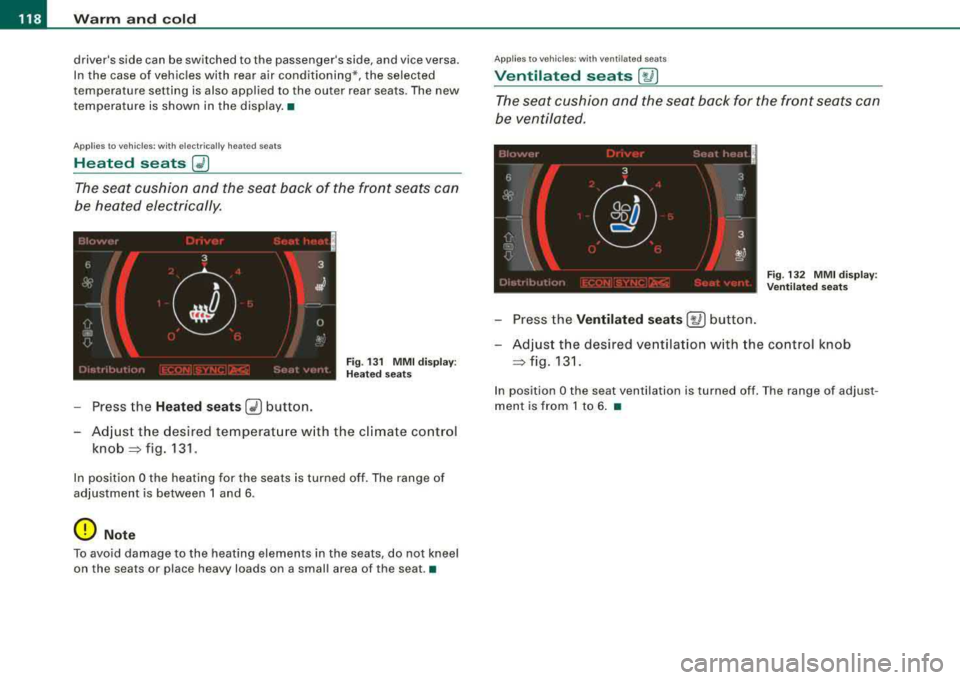
The seat cushion and the seat back of the front seats can
be heated electrically.
F ig . 13 1 M MI disp lay:
H eated s eats
- Press the Heated seats G2) button.
- Adjust the desired temperat ure w ith the climate control
knob =:> fig. 131 .
In position O the heating for the seats is turned off . The range of
adjustment is between 1 and 6 .
0 Note
To avoid damage to the heating elements in the seats , do not kneel
on the seats or place h eavy loads on a small area of th e se at .•
App lies to veh ic les : wit h venti lated seats
Ventilated seats [~ I
The seat cushion and the seat back for the front seats can
be ventilated .
Fig. 132 MM I d isplay :
Ve nti lated sea ts
- Press the Ventilated se ats [~ ] button.
- Adjust the des ired ventilation w ith the control knob
=:> fig . 131.
In position O the seat ven tilation is turned off . T he range of adjus t
ment is from 1 to 6 . •
Page 122 of 404
___ w_ a_ rm __ a_ n_ d_ c_ o_ ld __________________________________________________ _
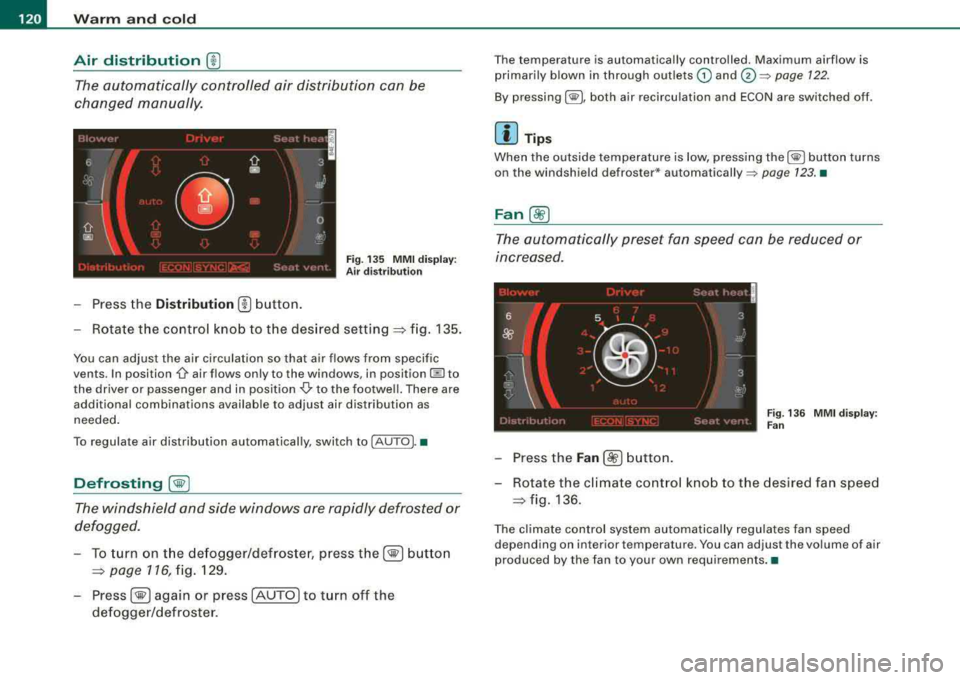
Air distribution ®
The automatically controlled air distribution can be
changed manually.
F ig. 135 MM I d isp lay:
Air distribution
- Press the Distr ibution (!) button.
- Rotate the control knob to the desired
setting:::::, f ig . 135 .
You can adjust the air circulation so that air flows from specific
vents. In position
O air flows only to the windows, in position @to
t he driver or passenger and in position
-0,, to the footwell . There are
additional combinations available to adjust air distribution as needed .
To regulate air distribution automatical ly, switch to !AUTO). •
Defrosting [@]
The windshield and side windows are rapidly defrosted or
defogged.
- To turn on t he de fogger/defroster, press th e[®] b utto n
=:> page 116, fig. 129.
-Press[®] again or press [AUTO] to turn off the
defogger/defroster.
T he temperature is automatically controlled . Maximum airflow is
primarily blown in through outlets
G) and (v =:, page 122.
By pressing[@), both air recirculation and ECON are switched off.
[ i ] Tip s
When the outside temperature is low, press ing the[@ ] button turns
on the windshield defroster*
automatically =:> page 123. •
Fan ~
The automatically preset fan speed can be reduced or
increased.
Fi g. 13 6 M MI d isplay:
F an
- Press the Fan [8!?] button .
- Rot ate the climate cont rol kno b to the desired fan speed
=> fig . 136.
The climate control system automatically regulates fan speed
depending on interior temperature. You can adjust the volume of air
produced by the fan to your own requirements. •