trunk AUDI S8 2008 Owners Manual
[x] Cancel search | Manufacturer: AUDI, Model Year: 2008, Model line: S8, Model: AUDI S8 2008Pages: 404, PDF Size: 52.7 MB
Page 4 of 404
Table of contents
Table of contents
Vehicle literature ........ .
About this Owner's Manual ..................... .
Controls and
equipment .. ... ... ..... ... . .
Inst rumen ts and contr ols ..... .
Genera l ill ustration ............. .
Instruments and
warning/indica tor lig hts ....... .
Instruments ................... .
Warning/indicator lights ........ .
Driver informa tio n d isplay ..... .
Introduction ................... .
On-Board Diagnostic system
(080)
Auto Check Control ............ .
Speed war ning system ... ...... .
Trip computer ..... ............ .
Tire pressure monitoring system ..
Opening and closing .......... .
Keys ............ ... .. ... · · · · · · ·
Power locking system .......... .
Rear lid/Trunk lid .......... ..... .
Ch ild safety loc k .... ... .... .... . 5 Advanced Key
................ .
Anti-theft a larm system ..... ... .
Powe r w indows ... ... ... ... .. .
S lid ing/ti lt ing power sunroof ... .
6 Clear vision ... .... .. ... .. ..... .
9
11
1 1
1 2
12
1 6
2 4
2 4
27
28
36
38
40
47
47
49
55 58 Lights
..................... ... .
Interior lights ... ...... .. .. .. .. .
V is ion ........... ........... .. .
W iper and washer system ... ... .
Mirrors .. .. ... ......... ..... .. .
Seats and storage ......... ... .
Genera l recommendat ions ..... .
Powe r seat . ... ... ......... ... .
Head restraints .............. . .
Arm rest ..................... .
Seat memory ... ... ...... ..... .
Rear sea ts . ... ... ... ... ... .. .. .
Ind ividua l rear seats ........ ... .
Luggage compartment ........ .
Roof rack ........ ... .... .... .. .
Cup holder .................... .
As htray . ... ... ... ......... ... .
Cigarette lighter/socket ........ .
Long center console ........... .
Storage .... ...... ............ .
Warm and cold ............... .
Climate controls .............. .
W indshield defogg ing /defrosting .
Rear clim ate controls ..... ..... .
Basic settings ......... ... ... .. .
On the road ... ... . .. ... .. ... .. .
Stee ring .... ... ... ............ .
Ignition lock and ignition sw itch .
Starting and stopping the engine 59
Starting and stopping the engine
61 using t he Advanced Key . . . . . . . . . 131
62 Electromechanical parking brake . 134
65 Cru ise control . . . . . . . . . . . . . . . . . . 137
69
A dapt ive Cruise Control . . . . . . . . 139
69 Speed and distance control system 139
7 4 Driver informat ion . . . . . . . . . . . . . . 144
77 Specia l driving si tua tions . . . . . . . . 14 9
80
Audi lane assist . . . . . . . . . . . . . . . . 151
83 Lane assist . . . . . . . . . . . . . . . . . . . . 151
86
A udi side assist . . . . . . . . . . . . . . . . 15 4
86
87
91
93
9 4
96
97
100
103
105
106
107
108
109
1 14
11 4
123
125
126
128
128
129
130 Lane Change Assistant ........
. .
No tes ........ ...... ........ .. .
Automatic transmission ...... . .
tiptron ic® (6-speed automatic
transm ission) ................. .
Advanced Parking System .... .
Advanced Parking System with rear
v iew camera .................. .
Specia l parking situations ...... .
Towing hitch .. ....... ......... .
Settings in the MM I ..... ...... . .
Safety t ips .............. ...... .
Adaptive A ir Suspension ...... .
Adaptive Air Suspension and
Damping ..... .. .............. .
Homelink® ................... . .
Universa l remo te control ....... . 154
161
163
163
170
170
178
180
180
183
185
185
191
191
Page 6 of 404
Table of contents
Do-it-yourself service ... 347
What do I do now? . . . . . . . . . . . . . 348
Trunk escape handle . . . . . . . . . . . . 348
Emergency warning triang le . . . . . 348
Jack, tools and spare wheel . . . . . . 349
Changing a wheel . . . . . . . . . . . . . . 351
Fuses and bulbs . . . . . . . . . . . . . . . . 358
Fuses . . . . . . . . . . . . . . . . . . . • . . . . . . 358
Bu lbs . . . . . . . . . . . . . . . . . . . . . . . . . . 362
Em ergency s ituat ions . . . . . . . . . . 36 4
Gener al . . . . . . . . . . . . . . . . . . . . . . . . 364
Sta rting by pushing or towing . . . . 364
Start ing with jumper cab les . . . . . . 364
Use of jumper cab les . . . . . . . . . . . . 365
Em erge ncy towing with commercia l
t ow truck . . . . . . . . . . . . . . . . . . . . . . 366
Lifting vehicle . . . . . . . . . . . . . . . . . . 369
Technical data
General information
373
37 4
Expla nation of technical data . . . . 374
Vehic le ident ificat ion . . . . . . . . . . . . 374 Displaying Vehic
le Identifica tion
Number in MMI . . . . . . . . . . . . . . . . 375
Weights . . . . . . . . . . . . . . . . . . . . . . . 375
Dim ensio ns . . . . . . . . . . . . . . . . . . . . 376
Data . . . . . . . . . . . . . . . . . . . . . . . . . . . 3 78
350 hp, 8 -cylinder engine, with all
whee l dr ive . . . . . . . . . . . . . . . . . . . . 378
450 hp, 12-cylinder engine , wi th all
whee l drive, long wheel base . . . . 379
Consumer Information . . . . . . . . . 380
Warran ty coverages . . . . . . . . . . . . 380
Operating you r veh icle outs ide the
U.S.A. or Canada . . . . . . . . . . . . . . . 380
Audi Serv ice Repair Manuals and
Literature . . . . . . . . . . . . . . . . . . . . . . 380
Maintenance . . . . . . . . . . . . . . . . . . 380
Ad ditional accessor ies,
mod ificat ions and parts
rep lacement . . . . . . . . . . . . . . . . . . . 382
Alphabetical index . . . . . . 385
Page 28 of 404
Driver information display
The current speed appears on the display. The speed is displayed in
1 mph (US model) or 1 km/h (Canadian model) increments.
You can switch the display from miles to kilometers and vice versa
via the MMI.
•
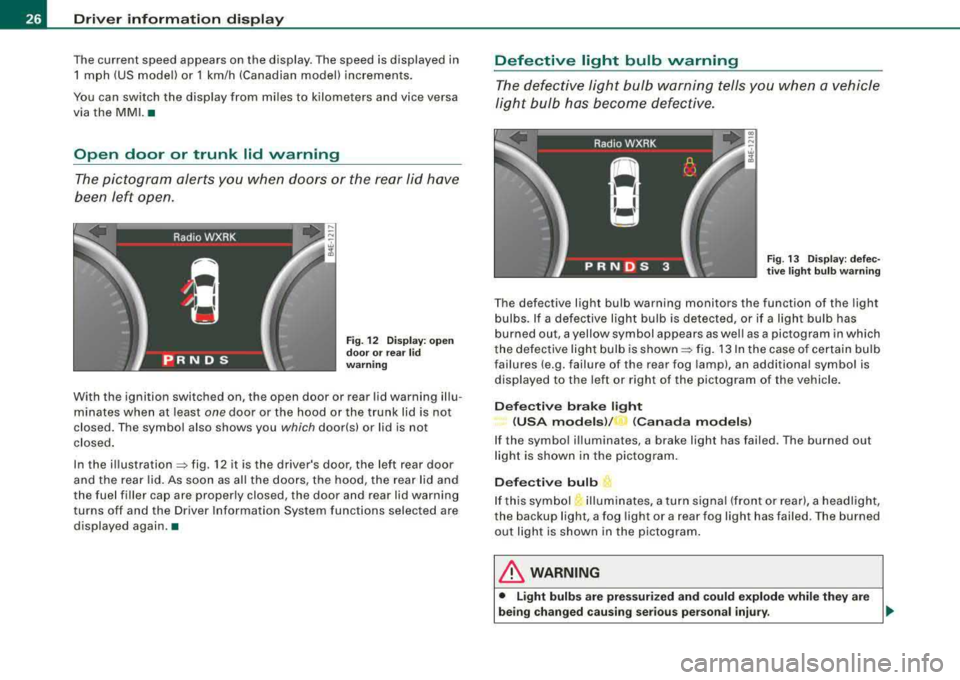
Open door or trunk lid warning
The pictogram alerts you when doors or the rear lid have
been left open.
Fig. 12 Display: open
door or rear lid
warning
With the ignition switched on, the open door or rear lid warning illu
minates when at least
one door or the hood or the trunk lid is not
closed. The symbol also shows you
which door!s) or lid is not
closed .
In the
illustration=:> fig. 12 it is the driver's door, the left rear door
and the rear lid. As soon as al l the doors, the hood, the rear lid and
the fuel filler cap are properly closed, the door and rear lid warning
turns off and the Driver Information System functions selected are
displayed again .•
Defective light bulb warning
The defective light bulb warning tells you when a vehicle
light bulb has become defective.
Fig. 13 Display: defec
tive light bulb warning
The defective light bulb warning monitors the function of the light
bulbs. If a defective light bulb is detected, or if a light bulb has
burned out, a yellow symbol appears as well as a pictogram in which
the defective light bulb is
shown =:> fig. 13 In the case of certain bulb
failures (e.g. failure of the rear fog lamp), an additional symbol is
displayed to the left or right of the pictogram of the vehicle.
Defective brake light
(USA models )/
_, (Canada models)
If the symbol illuminates, a brake light has failed. The burned out
light is shown in the pictogram.
Defective bulb
If this symbol illuminates, a turn signa l (front or rear), a headlight,
the backup light, a fog light or a rear fog light has failed . T he burned
out light is shown in the pictogram.
& WARNING
• Light bulbs are pressurized and could explode while they are
being changed causing serious personal injury.
.,_
Page 55 of 404
-Activate the doors (on) that should be unlocked together
with the driver's side door.
In the Central locking menu you can set which doors you want to
have unlock using the remote control key or the Advanced Key *. For
examp le, if you switch the item passenger's door
off, the
passenger 's door is no longer included in the central locking
system, and will not be unlocked by pressing the unlock button on
the master key remote control.
There is also a
side selective unlocking option available that can be
set to fit your needs. You can continue to unlock all the doors and
the rear lid as before . Press the opening button on the master key
twice .
Automatic Locking (Auto lock) can also be switched on and off.
[ i] Tips
When locking, all doors and the trunk lid are locked automatical ly. •
Ap plies to veh icle s: w ith power sid e door closer
Doors with power side door closer
The vehicle doors are equ ipped with a power door closer. When you
want to close an open door, gent ly push on the door. The door will
automatically close by itself .
& WARNING
When closing a door , make sure nothing can interfere with the
door . This could cause serious personal injury .
• You can stop the door from closing at any time by pulling on the
inside or outside door handle .•
Contro ls a nd eq uip
ment
Opening and closing
Locking and unlocking the vehicle from inside
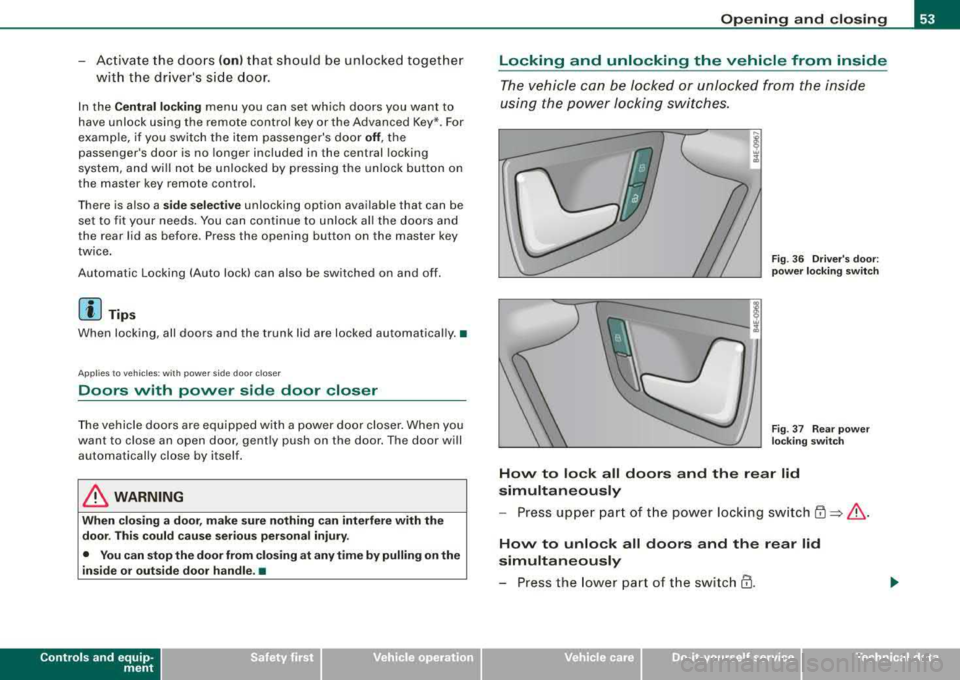
The vehicle can be locked or unlocked from the inside
using the power locking switches.
Fig . 36 Driver's door:
power locking switch
Fig. 37 Rear power
locking switch
How to lock all doors and the rear lid
simultaneously
- Press upper part of the power locking switch
~ ~ &.
How to unlock all doors and the rear lid
simultaneously
-Press the lower part of the switch @.
Vehicle care I I irechnical data
Page 57 of 404
Rear lid/Trunk lid
Opening and closing rear lid
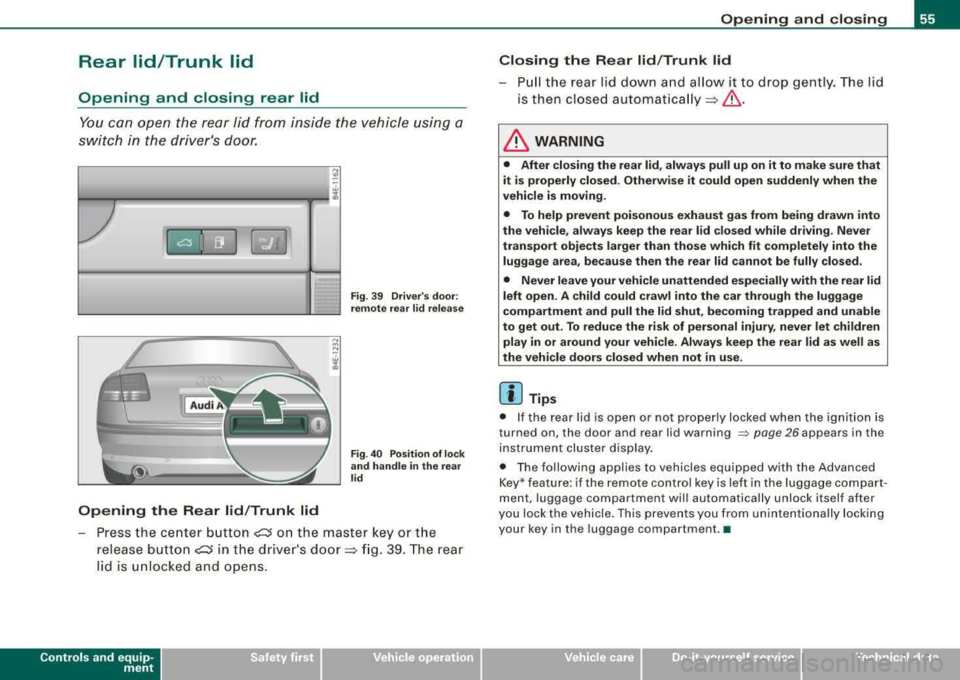
You can ope n the rea r lid f rom in side th e vehicle us ing a
sw itch in t he dr iv er's door.
Opening the Rear lid /Trunk lid
Fig . 39 Driver's door :
remote rea r lid relea se
Fig . 40 Position of l ock
and handle in the rear
lid
P ress t he ce nter button CJ on t he ma ster key or the
r e lease butt on
CJ in the driver 's doo r=> fig. 39 . T he rea r
li d is unl ocked a nd opens.
Contro ls a nd eq uip
ment
Opening and closing
Closing the Rear lid /Trunk lid
-Pull t he rear lid do wn a nd al lo w it to d rop gen tly. The li d
is then clos ed
automat ica lly=> &.
& WARNING
• After closing the rear lid , always pull up on it to make sure that
it is properly closed. Otherwise it could open suddenly when the
vehicle is moving .
• To help prevent poisonous exhaust gas from being drawn into
the vehicle , always keep the rear lid closed while driving . Never
transport objects larger than those which fit completely into the
luggage area, because then the rear lid cannot be fully closed .
• Never leave your vehicle unattended especially with the rear lid
left open . A child could c rawl into the car through the luggage
compartment and pull the lid shut, becoming trapped and unable
to get out . To reduce the risk of personal injury , never let children
play in or around your vehicle. Always keep the rear lid as well as
the vehicle doors closed when not in use.
[ i ] Tips
• If t he rear lid is ope n or not prop erly locked when the ig nition is
turned on, the door and rear lid warning
=> page 26 appears in the
instr ument clus ter d isp lay.
• The fol lowing appl ies to vehicles equipped with the Advanced
Key* featu re: if the r emote co ntro l key is le ft in the lu g ga ge compart
ment, luggage compartment will automatically unlock itself after
y ou loc k the vehicle . This pre vents you fr om u ninten tiona lly l ock ing
you r key in the luggage compartment. •
Vehicle care I I irechnical data
Page 58 of 404
Opening and closing
Opening and closing rear lid manually
If the central locking system fails (power supply), you can
also open the rear lid using the mechanical key.
@ ®
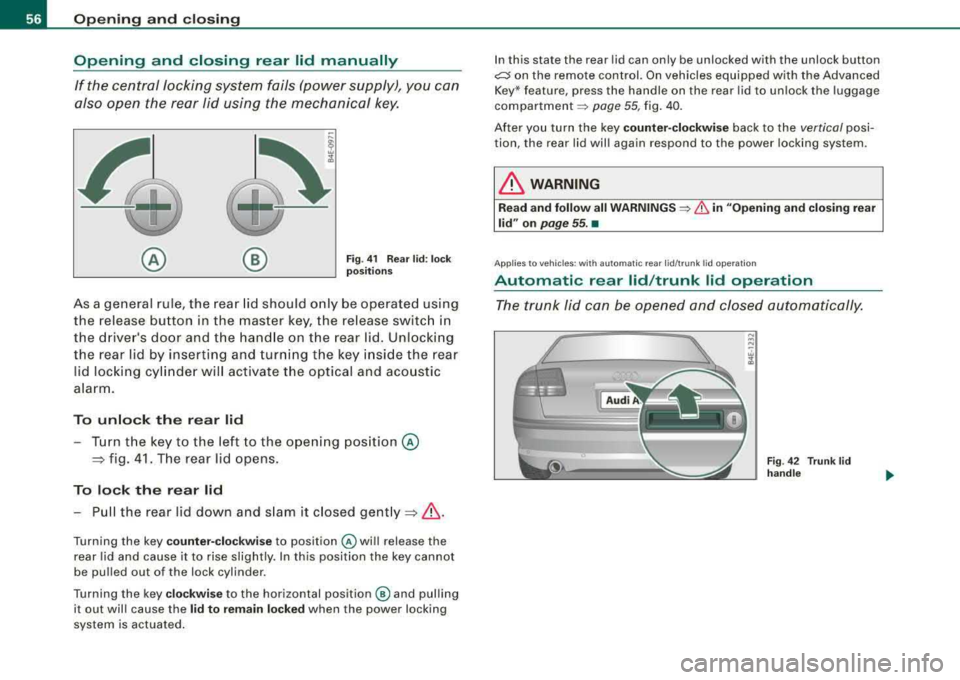
Fig. 41 Rear lid : lock
positions
As a general rule, the rear lid should only be operated using
the release button in the master key, the release switch in
the drive r's door and the handle on the rear lid. Unlocking
the rear lid by inserting and turning the key inside the rear
l id locking cylinder will activate the optical and acoustic
alarm.
To unlock the rear lid
- Turn the key to the left to the opening position @
=> fig. 41. The rear lid opens.
To lock the rear lid
-Pull the rear lid down and slam it closed gently =>& .
Turning the key counter-clockwise to position @ will release the
rear lid and cause it to rise slightly. In this position the key cannot
be pulled out of the lock cylinder.
Turning the key
clockwise to the horizontal position @ and pulling
it out will cause the
lid to remain locked when the power locking
system is actuated. I
n this state the rear lid can only be unlocked with the unlock button
~ on the remote control. On vehicles equipped with the Advanced
Key * feature, press the handle on the rear lid to unlock the luggage
compartment ~ page 55, fig. 40.
After you turn the key
counter-clockwise back to the vertical posi
tion, the rear lid will again respond to the power locking system.
& WARNING
Read and follow all WARNINGS ~ & in "Opening and closing rear
lid" on
page 55. •
App lies to veh icles : with au to m at ic rear lid/ tr unk lid operatio n
Automatic rear lid /trunk lid operation
The trunk lid can be opened and closed automatically.
Fig . 42 Trunk lid
handle
Page 59 of 404
Opening rear lid/trunk lid
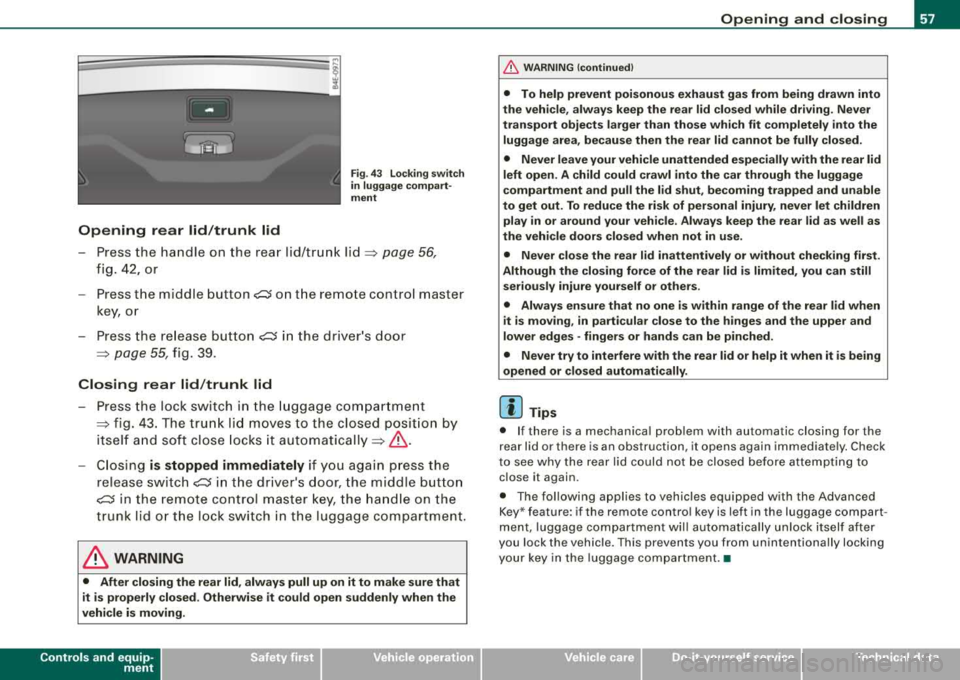
Fig . 4 3 Locking switch
in luggage comp art
ment
- P ress the han dle o n the rea r lid/tr unk lid ~ page 56,
fig. 42, or
- Press the midd le
bu tton~ o n th e remo te cont ro l m aster
ke y, o r
- Press the re lease b utton ~ in th e driver 's door
~ page 55, fig. 39 .
Closing rear lid /trunk lid
- Pre ss th e lock swit c h in the luggage compartmen t
~ fig . 43. The t runk lid mov es to the clos ed pos itio n by
i t s elf an d so ft close l ocks i t
aut om aticall y~ &.
-Closi ng is stopped immediately if yo u agai n press the
r elea se
sw itch~ in th e drive r's d oor, th e m iddle butt on
~ in t he remote c ont rol maste r key, t he handl e on t he
tr un k li d o r the lock sw itc h in the luggag e compar tme nt.
& WARNING
• After closing the rear lid, always pull up on it to make sure that
it is properly closed . Otherwise it could open suddenly when the
vehicle is moving .
Controls and equip ment
Opening and closing
&, WARNING (continued )
• To help prevent poisonous exhaust gas from being drawn into
the vehicle, always keep the rear lid closed while driving. Never
transport objects larger than those which fit completely into the
luggage area, because then the rear lid cannot be fully closed .
• Never leave your vehicle unattended especially with the rear lid
left open. A child could crawl into the car through the luggage
compartment and pull the lid shut , becoming trapped and unable
to get out . To reduce the risk of personal injury , never let children
play in or around your vehicle . Always keep the rear lid as well as
the vehicle doors closed when not in use.
• Never close the rear
lid inattentively or without checking first .
Although the closing force of the rear lid is limited , you can still
seriously injure yourself or others .
• Always ensure that no one is within range of the rear lid when
it
is moving, in particular close to the hinges and the upper and
lower edges -fingers or hands can be pinched.
• Never try to interfere with the rear lid or help it when it is being
opened or closed automatically.
[ i ] Tips
• I f there is a m ech anica l p rob lem with auto matic closin g for the
rear lid or there is an obstruction, it opens again immediate ly . Chec k
to se e w hy the rea r li d c ould not be closed be fore a ttemptin g to
c lose it again.
• T he fol lowin g appl ies to v ehicles equ ipp ed w it h th e Advanced
K ey * feature : if the remote contro l key is left in the luggage compart
men t, luggage c om partme nt will aut om ati ca lly un lock it self afte r
you lock the vehicle . This prevents you from unintentiona lly locking
you r ke y in the luggag e co mp artme nt. •
Page 111 of 404
![AUDI S8 2008 Owners Manual ________________________________________________ S_ e_ a_t _
s _a_ n_d _ s_t _o _ r_ a_ g~ e __ fflll
0 Note
To avoid damaging the socket, only use plugs that fit properly.
[ i] Tips
Wh](/img/6/57619/w960_57619-110.png "AUDI S8 2008 Owners Manual ________________________________________________ S_ e_ a_t _
s _a_ n_d _ s_t _o _ r_ a_ g~ e __ fflll
0 Note
To avoid damaging the socket, only use plugs that fit properly.
[ i] Tips
Wh")
________________________________________________ S_ e_ a_t _
s _a_ n_d _ s_t _o _ r_ a_ g~ e __ fflll
0 Note
To avoid damaging the socket, only use plugs that fit properly.
[ i] Tips
When the engine is off and accessories are still plugged in and are
on, the vehicle battery can still be drained. •
Storage
General overview
There are numerous places to store items in your vehicle.
Glove compartment
Storage compartment
Pockets in the front seats*
Compartments in the door trim panels
Compartments in the rear doors*
Coat hooks => page 109
=> page 110
=> page 110
=> page 111
=> page 111
Left side storage compartment in the => page 112
trunk
--Right side storage compartment in the => page 113
trunk
Emergency warning triangle
=> page 348
& WARNING
• Always remove objects from the instrument panel. Any items
not stored could slide around inside the vehicle while driving or
Controls and equip ment
&, WARNING (continued)
when accelerating or when applying the brakes or when driving
around a corner.
• When you are driving make sure that anything you may have
placed in the center console or other storage locations cannot fall
out into the footwells. In case of sudden braking you would not be
able to brake or accelerate.
• Any articles of clothing that you have hung up must not inter
fere with the driver's view. The coat hooks are designed only for
lightweight clothing . Never hang any clothing with hard, pointed
or heavy objects in the pockets on the coat hooks. During sudden
braking or in an accident -especially if the airbag is deployed -
these objects could injure any passengers inside the vehicle. •
Glove compartment
Your Owner's Literature and the media player are stored
in the lockable glove compartment.
t------.-,.---------. l
i
Fig. 117 Glove
compartment
Page 175 of 404
Advanced Parking Sy ste m -
----------------=---=------'
• Keep the sensors in the rear bumper and the rear -view camera
lens clean and free of snow and ice, so that the Audi parking system
can work properly . P lease follow the additional notes on
~ page 183 . •
Applies to ve hicle s: with Ad vanced Par king Sys tem wit h rea r vi ew c am era
Rear-view camera (Rear View)
The rear-vie w camera picture, appearing in the MM!
Dis pla y, shows the are a behind the vehicle.
-'
Ll --
.
-
. -
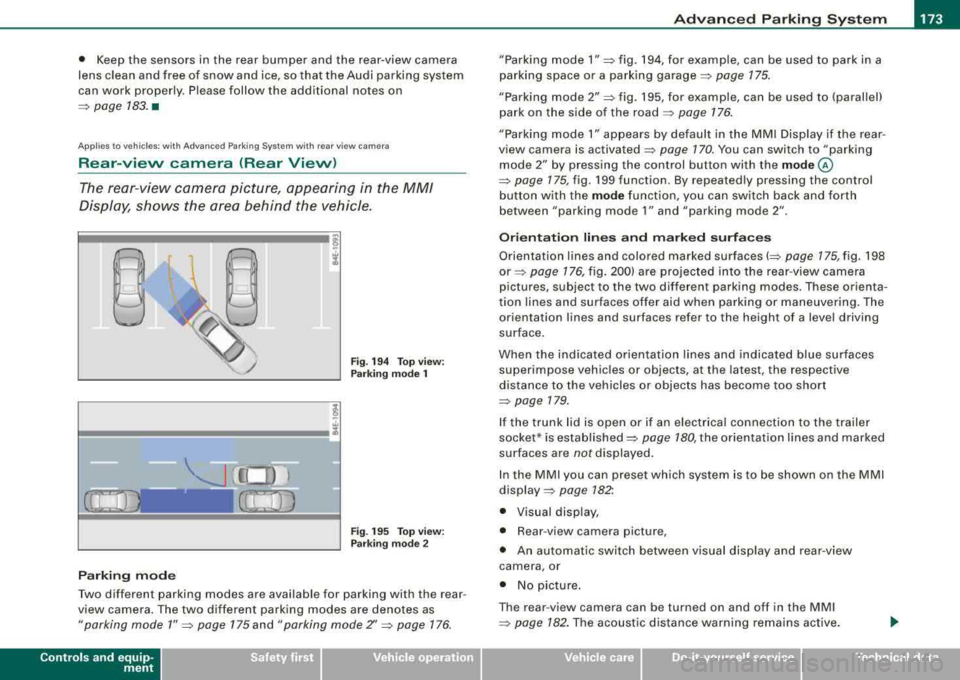
Fig . 194 T op view :
Park ing mode 1
Fi g. 19 5 Top v iew:
P ark ing mode 2
Parki ng mode
Two different parking modes are available for parking with the rear
view camera . The two different park ing modes are denotes as
" parking mode 1 " ~ page 175 and "parking mode Z' ~ page 176.
Controls a nd eq uip
ment
" Parking mode 1" => fig. 194, for examp le, can be used to park in a
parking space or a par king garage ::::>
page 175.
"Parking mode 2" => fig. 195, for examp le , can be used to (parallel)
park on the side of the road
~ page 176.
"Parking mode 1" a ppears by defau lt in the MMI Display if the rear
view camera is activated
=> page 170 . You can switch to "parking
mode
2" b y pressing the control button with the mode @
=> page 175, fig. 199 function . By repeated ly pressing the control
button w ith the
mode function, you can sw itch bac k and forth
between "par king mode
1" and "parking mode 2" .
Orientation lines and marked surfaces
Orientation lines and colored marked surfaces(::::> page 175, fig . 198
or => page 176, fig . 200) are projec ted into the rear -v iew came ra
pictures , subject to the two different parking modes . These orienta
t ion lines and surfaces offer aid when parking o r maneuvering. The
orientation lines and surfaces refer to the height of a leve l driving
surface .
When the indicated orientation lin es and indicated blue surfaces
superimpose vehicles or objects, at the latest , the respective
distance to the vehicles or objects has become too short
=>
page 179.
I f the trunk lid is open or if an e lectrica l connection to the trailer
socket* is established::::>
page 180, the orientation li nes and marked
surfaces are
not displayed.
I n the MMI y ou ca n preset which system is to be shown on the MMI
display => page 182".
• Visual di sp lay,
• Rear -view camera picture,
• An au tomatic switch between v isual disp lay an d rear -view
c amera , or
• No picture .
The rear -view camera can be turned on and off in the MMI
=>
pag e 182 . The acoust ic d istance wa rni ng remains active.
Vehicle care I I irechnical data
Page 176 of 404

___ A_ d_v _a_ n_ c_e _ d_ P_ a
_ r_k _in -= g'-- S...,_y _s_ t_ e_ m ___________________________________________ _
& WARNING
• The rear-view camera has blind spots , in whi ch objects cannot
be detected. Be especially careful to check for small children and
an imals before ba ck ing up . Small children and animals will not
always be detected by the sensors.
• The Audi parking system is not a substitute for being careful
and alert when backing up. Be especially careful during parking
and similar maneu vers . Always watch where you are driving and
make sure that nothing is in the way .
• Remember that low obsta cles which have already been
signaled may pass below the system's sensing zone when the
vehicle is ba cking up . The fact that the signal stops does not mean
that you have cleared the obstacle . When the signal stops , impact
is imminent . Objects such as trailer hit ches , chains , narrow posts
or fences covered by a thin layer of paint may not always be
detected by the system. They can still damage your vehicle
without warning .
• Always make sure that the volume and frequency of the chimes
is adjusted so that you can easily hear the acoustic distance signal
even if the radio is playing, the air -conditioner blower is on High or
there is a high level of outside noise .
- Check the settings whenever someone else has driven the
vehicle before you.
• Improper reliance on the Audi parking system can cause colli
sions and serious personal injury .
- Never rely only on parking assist when chang ing backing up .
- Always check rear view mirrors to make sure it is safe to back
up .
[ i J Tips
• Before parking with the rear -view camera, the Adaptive Air
S us pe nsi on sta ndard or automatic mo de mus t be switch ed on
=> page 27.
• T he rear -view camera pictur e is avai lable as soon as the MMI
Display or the M MI is sw itche d on, o r the start -up pha se is
completed.
• In order fo r th e re ar-v iew camera to func tion prop erly, the
camera
lens=> page 170, fig. 191 must be kept clean, and free of
sn ow a nd i ce. Please follo w the ad ditio nal no tes
on => page 783 .
• T he camera coverage angle changes when the trunk lid is open.
Theref ore, the r ear-view camera picture is d isplaye d w ithout ori en
tation lines and without blue surfaces.
• Observe an d follow t he no tes on towing mo de
on => pag e 180. •
App lies to veh icles : w ith Advanced Parking System with rear view came ra
Rear-view camera coverage area
0
.. - --
®
F ig . 196 Top vi ew :
Re ar- vie w ca mera
coverage a rea
F ig . 197 Side vi ew:
Covered ar ea
G) and
uncover ed area
0 of
the rear-v iew camera
~