light AUDI S8 2009 Owners Manual
[x] Cancel search | Manufacturer: AUDI, Model Year: 2009, Model line: S8, Model: AUDI S8 2009Pages: 408, PDF Size: 91.63 MB
Page 327 of 408
Checking and filling -
---------------------=----"=---------
Windshield/headlight washer
container
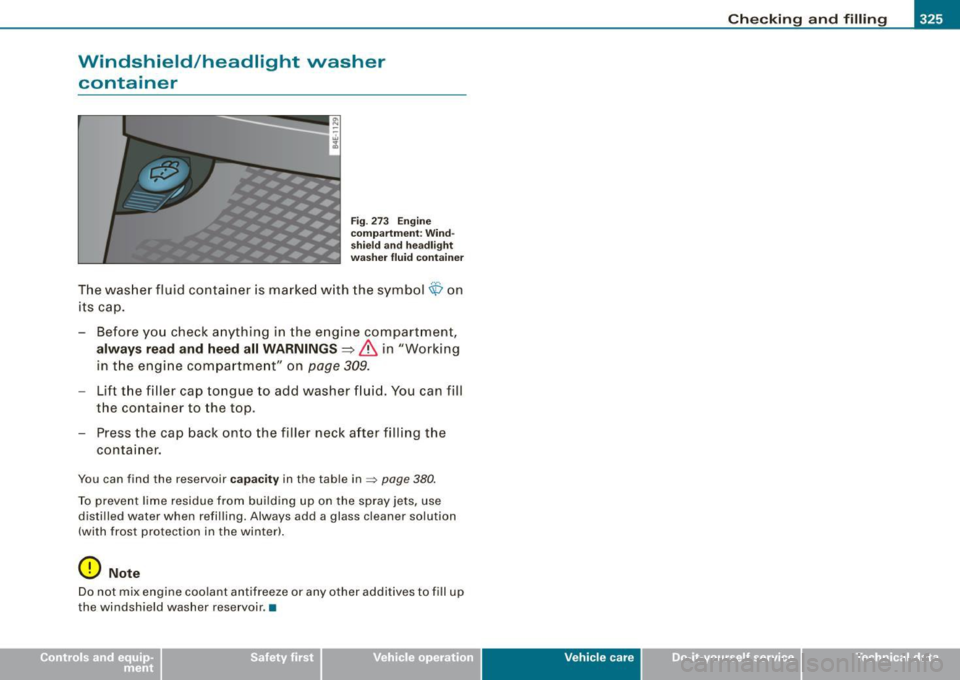
F ig . 273 Engine
co mpartm ent : Wind
s hiel d and headl ig ht
wa sher fluid container
The was her fluid container is marke d w ith the symbol <$ on
its cap.
- Before you check anything in the e ngine compartment,
always read and heed all WARNINGS=>
& in "Working
in t he engi ne com partme nt" on
page 309.
- Lift the filler cap tongue to add washer f luid. You can fill
the container to the top .
- Press the cap back onto the filler neck after filling the
container .
You can find the reservoir ca paci ty in the table in=> page 380.
To prevent lime residue from building up on the spray jets, use
distilled water when refilling. Always add a glass cleaner solution
(with frost protection in the winter!.
0 Note
Do n ot m ix engine coo lant antifreeze or any other addi tives to fill up
the windshield washer reservoir .•
Vehic le care I I irechnical data
Page 333 of 408
Tires and wheels -________________ w-.
•
pressure label lists the recommended cold tire inflation pressures
for the vehicle at its maximum capacity weight and tires that were
on your vehicle at the time it was manufactured.
If you wish to improve comfort when operating the vehicle at
normal load (up to 3 occupants), you can adjust tire pressures to
those specified for normal vehicle load. Before operating the vehicle
at maximum load , you must increase the tire pressures to those
specified for maximum vehicle load
=> &.
Bear in mind that the tire pressure monitoring system* can only
monitor the tire pressures you have stored. The system does not
recognize the load condition of your vehicle .
The effec tiveness of the tire pressure mon itoring system* will be
impaired if you store normal load pressures but then operate the
vehicle at its maximum load=>&. See the
illustration=>
page 330, fig. 274 for the location of the label
either o n driver's side 8-pillar or inside the fuel filler flap (color of
the actual label and exact location on the vehicle will vary slight ly).
Note that the following tab le is accurate at the time of going to
press and is subject to change. In the event of discrepancies, the t ire
pressure label (On USA vehicles, the tire pressure label is located on
the driver's side 8-pillar. On Canada vehicles, the tire pressure label
is located either on the driver 's side 8-pillar or inside the fuel fil ler
flap) always takes precedence.
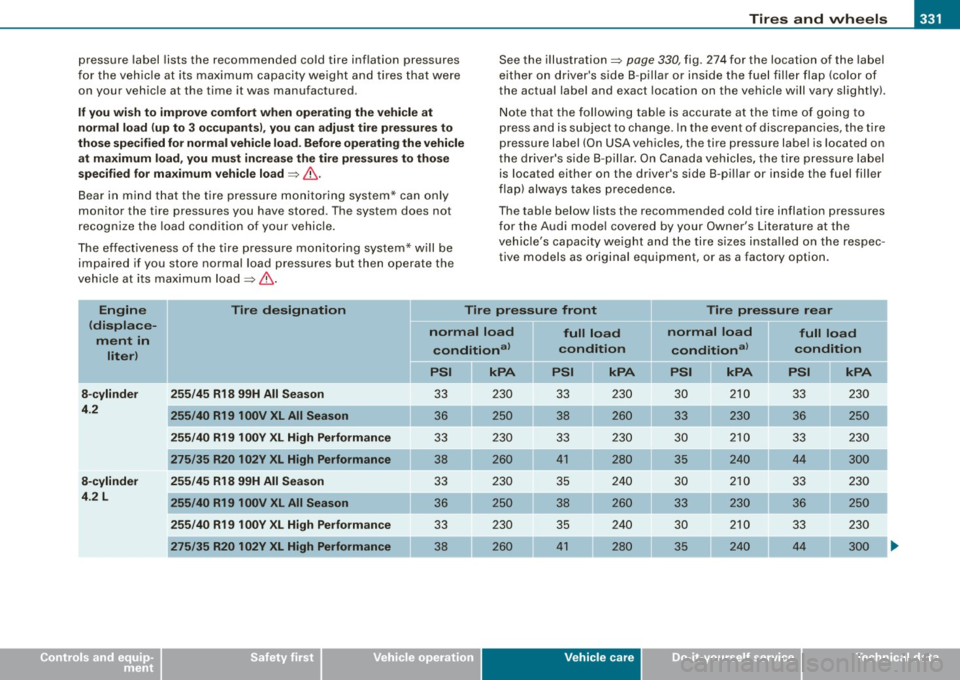
The table below lists the recommended cold tire inflation pressures
for the Audi mode l covered by your Owner's Literature at the
vehicle's capacity weight and the tire sizes installed on the respec
tive models as original equipment, or as a factory option.
Engine
(displace
ment in
liter) Tire designation
Tire pressure front Tire pressure rear
8-cylinder
4.2
8-cylinder
4 .2 L 255/45 R18 99H All Season
255/40 R19100V
XL All Season
255/40 R19
1 00Y XL High Performance
275/35 R20 102Y XL High Performance
255/45 R18 99H All Season
255/40 R19 100V XL All Season
255/40 R19 1 00Y XL High Performance
275/35 R20 102Y XL High Performance
normal load conditional
kPA
33 230
36 250
33 230
38 260 33 230
36 250
33 230
38 260
full load
condit ion
PSI
33 230
38 260
33 230
41 280
35 240
38 260
35 240
41 280
Vehicle care
normal load full load
conditional condition
kPA PSI kPA
30
210
33 230
33 230 36 250
30 210 33 230
35 240
44 300
30 210 33 230
33 230 36 250
30 210
33 230
35 240 44 300
I t •
Page 356 of 408
1111 What do I do now? ..._ __________________________________________ _
& WARNING (continued )
front wheel is lifted off the ground , placing the Automatic Trans
mission in "P" (Park) will
not prevent the vehicle from moving.
• Before you change a wheel, be sure the ground is level and firm.
If necessary , use a sturdy board under the jack.
• After installing the spare wheel, make sure that you replace the
flat tire/wheel in its storage area properly and tighten the knurled
retaining screw securely.
[ i J Tips
Before changing the wheel, you must activate the jacking mode, so
that the automatic controls for the Adaptive Air Suspension do not
make it more difficult to lift the vehicle with the jack =>
page 791. •
Changing a wheel
When you change a wheel, follow the sequence described
below step-by-step and in exactly that order.
1. Activate the vehicle jacking mode~ page 191.
2. Remove the decorative wheel cover*. For more details
see also
~ page 355, "Decorative wheel covers" or
~ page 355, "Wheels with wheel bolt caps" .
3. Loosen the
wheel bolts ~ page 356.
4. Locate the proper mounting point for the jack and align
the jack below that point~
page 356.
5. Lift the car with the jack~ page 356.
6. Remove the wheel with the flat tire and then install the
spare
~ page 358 .
7. Tighten all wheel bolts lightly. 8.
Lower the vehicle with the
jack.
9. Use the wheel bolt wrench and
firmly tighten all wheel
bolts
~ page 356.
10. Replace the decorative wheel cover*.
11. Deactivate the vehicle jacking mode~ page 191.
& WARNING
Always read and follow all WARNINGS and information :::::> 6 in
" Raising the vehicle" on
page 356 and => page 359. •
After changing a vvheel
A wheel change is not complete without the doing the
following.
- Store and secure the wheel you replaced in the spare
wheel well.
- Replace the tools and the jack in their proper location.
- Check the
tire pressure on the spare wheel immediately
after mounting it.
- As soon as possible , have the
tightening torques on all
wheel bolts checked with a torque wrench. The correct tightening torque is 90 ft lb (120 Nm) .
- Have the flat tire
replaced as soon as possible.
[ i J Tips
• If you notice that the wheel bolts are corroded and difficult to
turn while changing a tire, they should be replaced before you check
the tightening torque. .,_
Page 360 of 408

IIIIIL--____:W:...:....:. h.:..: a::.. t:....: d.:..:o:....:. l...: d::.. o ..:.... n:..:..:: o...:w ...:...;. ? ____________________________________________ _
Taking the wheel off/installing the spare
Follow these instructions step-by-step for changing the
wheel
Fig . 291 Changing a
wheel: using the
screwdriver handle
!with the blade
removed) to turn the
bolts
Fig . 292 Changing a
wheel: alignment pin
inside the top hole
After you have loosened all wheel bolts and raised the
vehicle off the ground, remove and replace the wheel as
follows:
Removing the wheel
-Use the hexagonal socket in the screwdriver handle to
completely remove the topmost wheel bolt and set it
aside on a
clean surface => fig. 291. -
Screw the threaded end of the
alignment pin from the
tool kit hand-tight into the empty bolt hole=> fig. 292.
- Then remove the other wheel bolts as described above .
- Take off the wheel leaving the alignment pin in the bolt
hole.
Putting on the spare wheel
- Lift the spare wheel and carefully slide it over the align
ment pin to guide it in place.
- Use the hexagonal socket in the screwdriver handle to
screw in and tighten all wheel bolts
slightly.
- Remove the alignment pin and insert and tighten the
remaining wheel bolt slightly like the rest.
Turn the jack handle counter-clockwise to lower the
vehicle until the jack is fully released.
- Use the wheel bolt wrench to tighten all wheel bolts
firmly=>
page 356. Tighten them crosswise, from one
bolt to the (approximately) opposite one, to keep the
wheel centered.
[ i ] Tips
Never use the hexagonal socket in the handle of the screwdriver to
loosen or tighten the wheel bolts.
• Pull the reversible blade from the screwdriver before you use the
hexagonal socket in the handle to turn the wheel bolts.
• When mounting tires with
unidirectional tread design make sure
the tread pattern is pointed the right way=>
page 359.
• The wheel bolts should be clean and easy to turn. Check for dirt
and corrosion on the mating surfaces of both the wheel and the .,,_
Page 363 of 408
_________________________________________________ F_ u_ s_ e_s _ a_n _d_ b_ u _ lb_ s _ __._
[ i J Tip s
You are wel l advised to keep a supply of spare fuses in your vehic le.
Fuses with the proper ampere ratings are available at your Audi
dealer. •
Fuse Location , Instrument Panel left
F ig. 295 Fuse pan el
l ayout
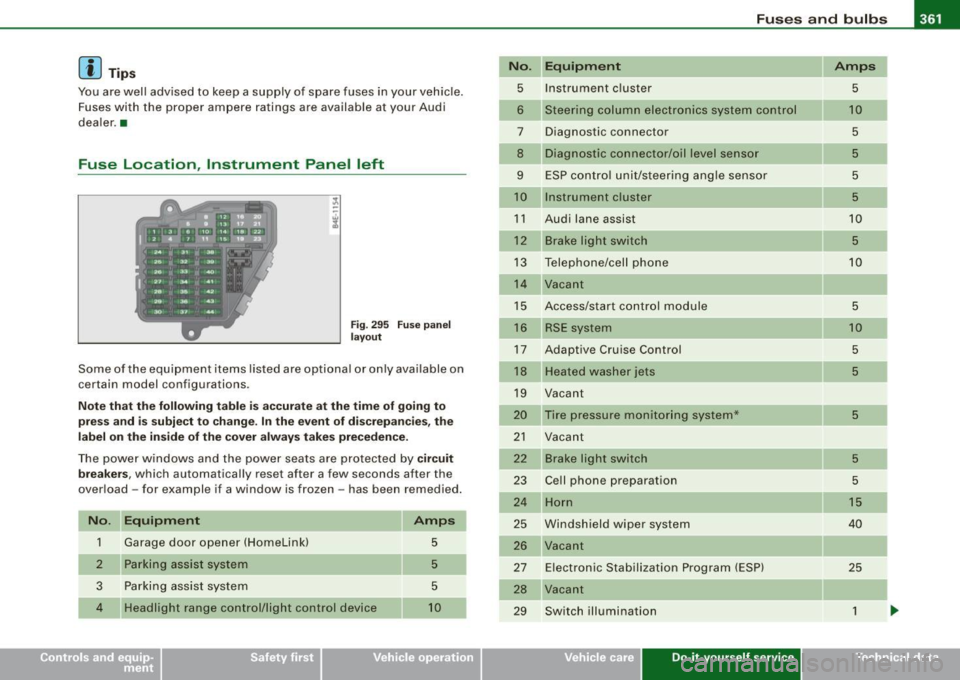
Some of the equipment items listed are optiona l or only available on
certain model configurations.
No te t hat th e fo llow ing t able is acc urate a t the time o f goin g to
p re ss an d is s ubject to c hang e. In the e vent of di screpancies, the
lab el on the insi de of th e cover alwa ys ta kes prece dence .
The power windows and the power seats are protected by cir cui t
bre akers,
which automatically reset after a few seconds after the
over load -for example if a window is frozen -has been remedied .
N o. Equipm ent
1 Garage door opener (HomeLinkl 5
Parking assist system 5
3
Parking assist system 5
4
Headlight range control/light control device 10
No .
5
6
7
8
9
10
11
12
13
14
15
16
17
18
19
20
21
22
23
24
25
26
27
28
29
Equipm ent Amps
Instrument c luster
5
Steering column electronics system control 1 0
Diagnostic connector 5
Diagnostic connector/oil level sensor 5
ESP contro l unit/steering angle sensor 5
Instrument cluster 5
Audi lane assist 10
Brake light switch 5
Telephone/cell phone 10
Vacant
Access/start control module
5
RSE system 10
Adaptive Cruise Control 5
Heate d washer jets 5
Vacant
Tire pressure monitoring system*
5
Vacant
Brake light switch
5
Ce ll phone preparation 5
Horn 1 5
Windshield wiper system 40
Vacant
E lectronic Stabilization Program (ESP)
25
Vacant
Switch illumination
1
Vehicle care Do-it-yourself service irechnical data
Page 364 of 408
11111...__F_ u_ s_ e_s _ a_n _ d_ b_ u_lb _ s _______________________________________________ _
No. Equipm ent
30 Vacant
31 On board power supply, light control (right
headlight)
32 Vacant
33 Left rear footwell heater
35 Vacant
36
37
38
39
40 Audi side assis
t
Cooler
On board po wer supply, light cont rol (left head
light)
Door contro l unit, driver 's side
Power ste ering column adjus tment
41 Door contro l unit, rear left
42 Access/start control module
43 Adaptive Light, left
--44 Adaptive Light, right
Amps
30
25
5
15
30
7.5
25
7.5
25
10
10 •
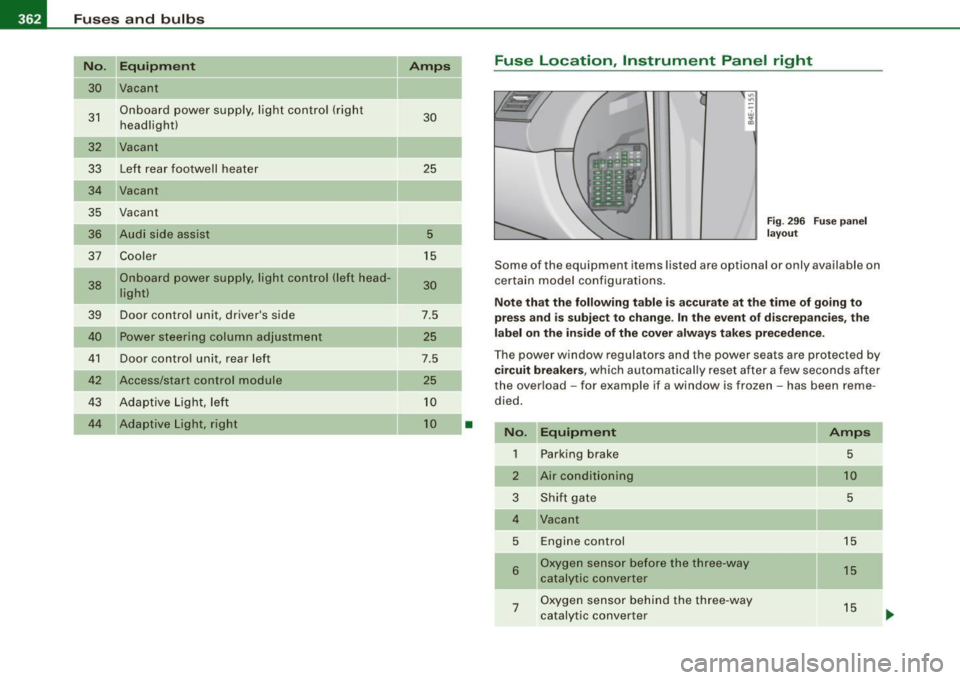
Fuse Location , Instrument Panel right
Fig . 296 F use pa nel
l ay ou t
Some of the equipment items listed are optional or only available on
certain model configura tions.
Note that the following t able is accurate at th e tim e of go ing to
pr es s an d is subje ct to change . In the eve nt of di screp ancies, th e
l a bel on the in side of the cov er a lways ta k es prece dence .
The power window regulators and the power seats are protected by
cir cuit br eak ers, which automatically reset after a few seconds after
the over load - for example if a window is frozen - has been reme
died .
No. Equipm ent
1 Parking brake
2
3
5
6
7
Air conditioning
Shi ft gate
Engine control
Oxygen sensor before the three-way
catalytic converter
Oxygen sensor behind the three-way
catalytic converter
Amp s
5
10
5
15
15
15
-
Page 365 of 408
_________________________________________________ F_ u_ s_ e_s _ a_n _d_ b_ u _ lb_ s _ __.11111
No. II Equipment
8 Engine control, auxiliary water pump
9
10
11
12
13
Climate control front /rear, dash panel buttons
Suspension leve l control system
(Adaptive Air Suspension)
Light and rain sensor
Display-/control unit
Roof electronics control unit
CD/DVD drive
15 Energy managemen t
16 Vacant
17 Radiator fan electronics
18 Airbag front passenger recognition
(weight sensor)
19 Vacant
20 Heated/ventilated seats
21 Engine control module
22 Vacant
23 Parking brake (switch)
24 Vehicle electrical system
25
26
27
Automatic transmission Air conditioning water valves water pump, rear climate control
Sunroof
28 Engine control module
29 Fuel injectors
30 Ignition coils Amps
10
5
10
5
5
10
5
5
5
5
5
5
5
10
15
10
20
5
15
30 No. Equipment
31 Fuel pump, right/fuel pump electronics
32 Automatic transmission
33 Right rear footwell heater
34 Heated/ventilated seats, rear
35 Heated/ventilated seats, front
36 Cigarette l ighter, front
37 Cigarette lighte r, rear/socket, rear
38 Auxiliary cooler fan
39 Door control unit, front right
40 Brake booster
41 Door control unit, rear right
42 Vacant
43 Headlight washer system
44 Air conditioning heater fan Amps
20/40
5
25
20
20
20
20/25 20
7.5
15
7.5
30
30
•
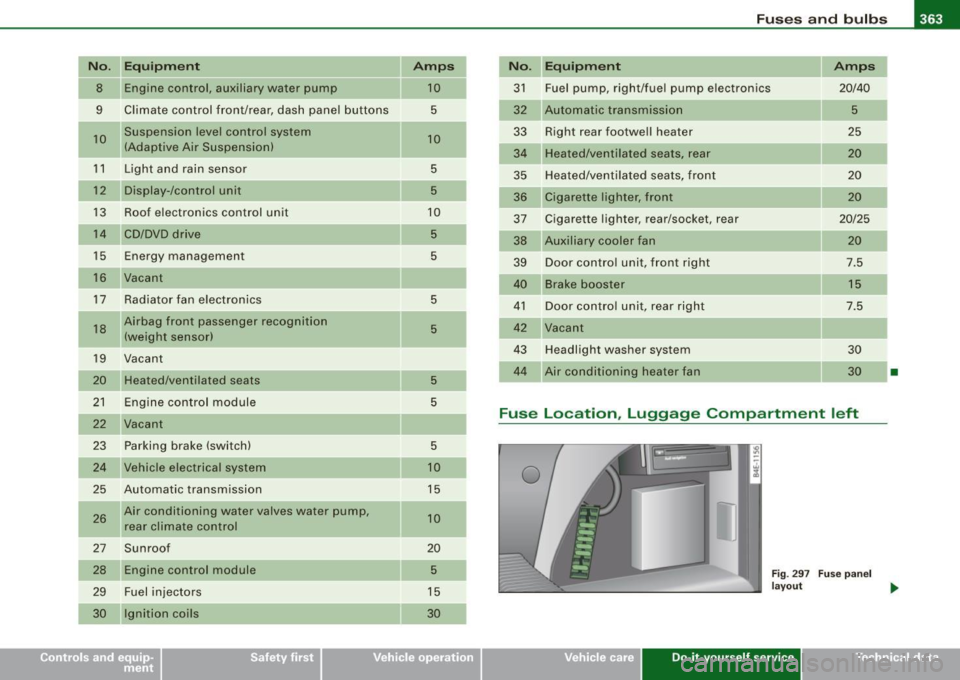
Fuse Location , Luggage Compa rtment left
0
Fig . 297 Fuse panel
layout _.
Vehicle care Do-it-yourself service irechnical data
Page 366 of 408
111'1...__F_ u_ s_ e_s _ a_n _ d_ b_ u_lb _ s _______________________________________________ _
No. Equipment Amps
1 Vacant
2 Vacant
3 Vacant
4 Vacant
5 Digital sound system control module 30
6 Navigation 5
7
TV Tuner 10
8 Rear -view camera 5
9 Communications box 5
10 Subwoofer in rear window shelf (BOSE)/ 15/30 Amplifier (Bang & Olufsen)
--
1 1 Socket 20
12 Vacant
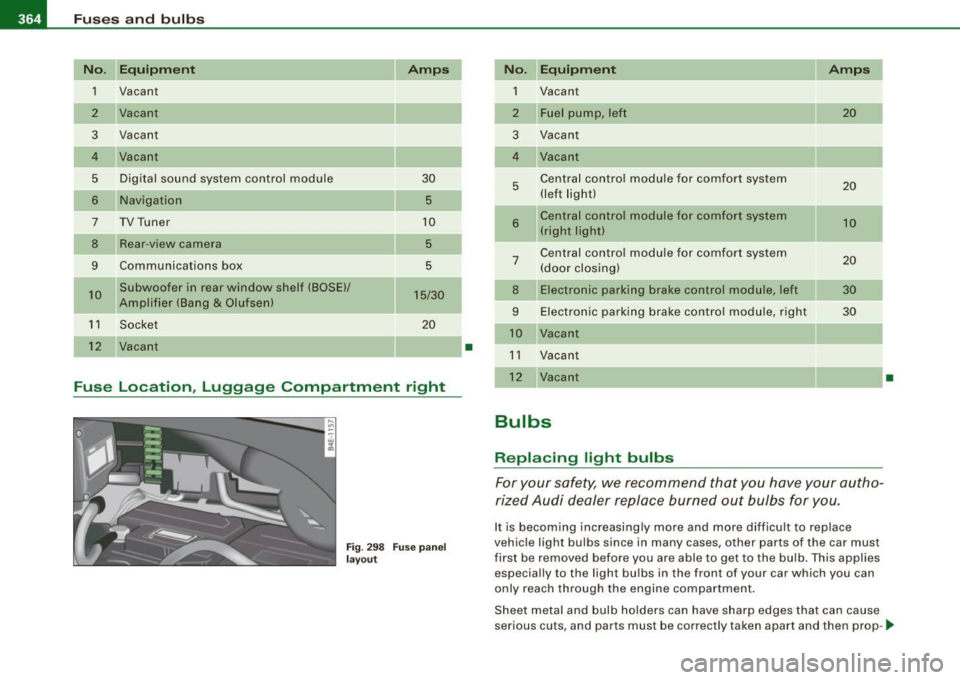
Fuse Location, Luggage Compartment right
Fig. 298 Fuse panel
layout
I
•
No. Equipment Amps
1 Vacant
2 Fuel pump, left 20
3 Vacant
4 Vacant
5 Central control module for comfort system 20 (left light)
-
6 Central control module for comfort system 10 (right light)
Central control module for comfort system
7 (door closing) 20
8 Electronic parking brake control module, left 30
9 Electronic parking brake control module, right 30
10 Vacant
11 Vacant
12 Vacant
Bulbs
Replacing light bulbs
For your safety, we recommend that you have your autho
rized Audi dealer replace burned out bulbs for you.
It is becoming increasingly more and more difficult to replace
vehicle light bulbs since in many cases, other parts of the car must
first be removed before you are able to get to the bulb. This applies
especially to the light bulbs in the front of your car which you can
only reach through the engine compartment.
•
Sheet metal and bulb holders can have sharp edges that can cause
serious cuts, and parts must be correctly taken apart and then prop-.,
Page 367 of 408
_________________________________________________ F_ u_ s_ e_s _ a_n _ d_ b_ u_lb _ s __ llll
•
erl y put back to g eth er to help pr eve nt brea kage of parts and long
te rm dam age fro m water that can enter h ous ing s th at h ave not
been properly resealed.
F or y our safety , we reco mmend that you have your autho rized A udi
dea ler rep lace any b ulbs for you, s ince you r deale r has the proper
tools, the correct bu lbs and the expertise.
Gas discharge lamps (Xenon lights):
D ue to the hi gh e lectrical voltage, have the bu lbs replaced by a qual
ified techn ic ian. Headlights wi th Xenon light can be ide ntifie d by the
h igh voltage s tic ke r.
& WARNING
Contact with high-voltage components of the ele ctri cal system
and improper replacement of gas discharge (Xenon) headlight
bulbs can cause ser ious personal injury and death .
• Xenon bulbs are pressurized and can explode when being
changed .
• Changing Xenon lamps requires the special training, instruc
tions and equipment .
• Only an authorized Audi dealer or other qualified workshop
should change the bulbs in gas discharge lamps .
& WARNING
There are parts with sharp edges on the openings and on the bulb
holders that can cause serious cuts.
• If you are uncertain about what to do, have the work performed
by an authorized Audi dealer or other qualified workshop. Serious
personal injury may result from improperly performed work.
[ i ] Tips
• I f you must replace the light bulbs yourse lf , always remember
tha t the e ngi ne compartmen t of an y ve hic le i s a hazardous area to work in. Always read and heed al
l WARNINGS=>
page 301, " E ngine
c om partm ent" =>& .
• I t is best to ask your authorized Audi dealer whenever you need
to ch ang e a bul b.•
Do-it -yourself service
Page 368 of 408
1111.___E_ m _ e _r-==g :...e_ n_ c...:y _ s_ i_t _u _a _t_ i_o _n_ s _______________________________________________ _
Emergency situations
General
This section is intended for trained emergency crews and personnel
who have the necessary tools and equipment to perform these
operations. •
Starting by pushing or towing
0 Note
Your ve hicle is equipped wit h an auto matic trans mis sion. C onse
quent ly, the engine cannot be started by pushing or tow ing .•
Starting with jumper cables
If n ece ssar y, the eng in e c an b e star ted by conne cting it to
the battery of anoth er veh icle .
If th e engine shou ld fai l to start because of a discharged or weak
ba ttery , the bat te ry can be connected t o the ba ttery of
another
vehic le, using a pair of jumper cables to start the engine.
Jumper cables
Use
only jumper cabl es o f sufficient ly la rgecross section to carry the
st arte r current safe ly . R efer to th e manu fac tur er's speci fica tions.
Us e on ly jumper cables w ith
i n sulated te rminal clamps w hic h are
d istinct ly marked:
plus (+l cable in m ost cas es c olore d red
minus (-l cable in most cases co lored black .
& WARNING
Batteries contain electricity , acid , and gas . Any of these can cause
very serious or fatal injury. Follow the instructions below for safe
handling of your vehicle 's battery .
• Always shield your eyes and avoid leaning over the battery
whenever possible .
• A discharged battery can freeze at temperatures just below
32 °F (0 °C l. Before connecting a jumper cable , you must thaw the
frozen battery completely , otherwise it could explode.
• Do not allow battery a cid to contact eyes or skin . Flush any
contacted area with water immediately.
• Improper use of a booster battery to start a vehicle may cause
an explosion.
• Vehicle batteries generate e xplosive gases . Keep sparks, flame
and lighted cigarettes away from batteries.
• Do not try to jump start any vehicle with a low ac id level in the
battery.
• The voltage of the booster battery must also have a 12-Volt
rating . The capacity (Ahl of the booster battery should not be
lower than that of the discharged battery . Use of batteries of
different voltage or substantially different "Ah " rating may cause
an e xplosion and personal injury .
• Never charge a frozen battery. Gas trapped in the ice may cause
an explosion .
• Never charge or use a battery that has been frozen . The battery
case may have be weakened.
• Use of batteries of different voltage or substantially different
capacity (Ah ) rating may cause an explosion and injury . The
capacity (Ahl of the booster battery should not be lower than that
of the discharged battery . .,_