cruise control AUDI S8 2009 User Guide
[x] Cancel search | Manufacturer: AUDI, Model Year: 2009, Model line: S8, Model: AUDI S8 2009Pages: 408, PDF Size: 91.63 MB
Page 143 of 408
_____________________________________________ A_ d_a ...: p_ t_ i_ v _e_ C_ ru_ is_ e_ C_ o_n _ t_ r_o _ l _ __._
Vehicles moving in you r direction can be detected up to a dis tance
of about 140 yards (130 meters) bu t the Adaptive Cruise Control
cannot detect vehicles that are stopped or sta lled, obs tacles that do
not move or narrow vehic les like motorcyc les and bicycles .
Open road
When the road is c lear, Adap tive Cruise Con trol works like cruise
control. It maintains a constant target speed specified by the driver .
Driving in traffic
If a slow er vehicle driving ahead is detected, the Adaptive Cruis e
Contr ol dece lerates (within the limits of the system) ::::,
page 150 to
its spe ed and after adjusting, tries to maintain the set distance from
t he veh ic le ahead. The vehicle may temporar ily d rive slower tha n
the set speed while adjusting ::::,
& in "Description" on page 139.
If the vehicle in front accele rates, Adaptive Cruise Control also accel
erates up to the speed that you have set.
Situations requiring driver intervention
I n some situations you w ill have to use the foot brake and slow the
veh icle down in order to keep a sa fe distance from vehicle in front
of you or to avoid a rear -end collision. In this situation, a symbol
appears and a warning tone sounds::::,
page 146.
Passing another vehicle
If you move int o the pa ssing lane and no vehicle is detecte d ahead,
Adaptive Cruise Contro l accelerates to the speed you have set and
maintains it .
Overriding ACC
You can increase your speed a t any time by stepping on the acceler
ator pedal. After you re lease the accelerator pedal, the system
adjusts back down to the speed you previously set .
Contro ls and eq uip
ment
& WARNING
• Never rely on the distan ce control feature of ACC alone to
prevent rear -end collisions. Always be prepared to brake and take
evasive action to avoid colli sio ns and other accident situation s.
• Never allow the closing speed between you and other vehicle s
to be so high that the Adaptive Cruise Control may not be able to
slow your vehicle safely . If clo sing speed i s too high , you must
apply the brakes yourself to reduce the risk of a rear -end cra sh .
[ i ] Tips
Please note that the amount of acceleration the Adaptive Cruise
C o ntro l use s depends on the Distance setting selected . DISTA NCE 1
gives you acceleratio n that is dynamic a nd sporty. D IS TA NCE 4, on
the other hand, gives more moderate acceleration . For more infor
mation about the ti me inte rvals ::::,
page 144, "How is the distance
set?". •
Applies to veh ic les : wi th Ad aptive Cr uise Co ntro l
Switching the system on and off
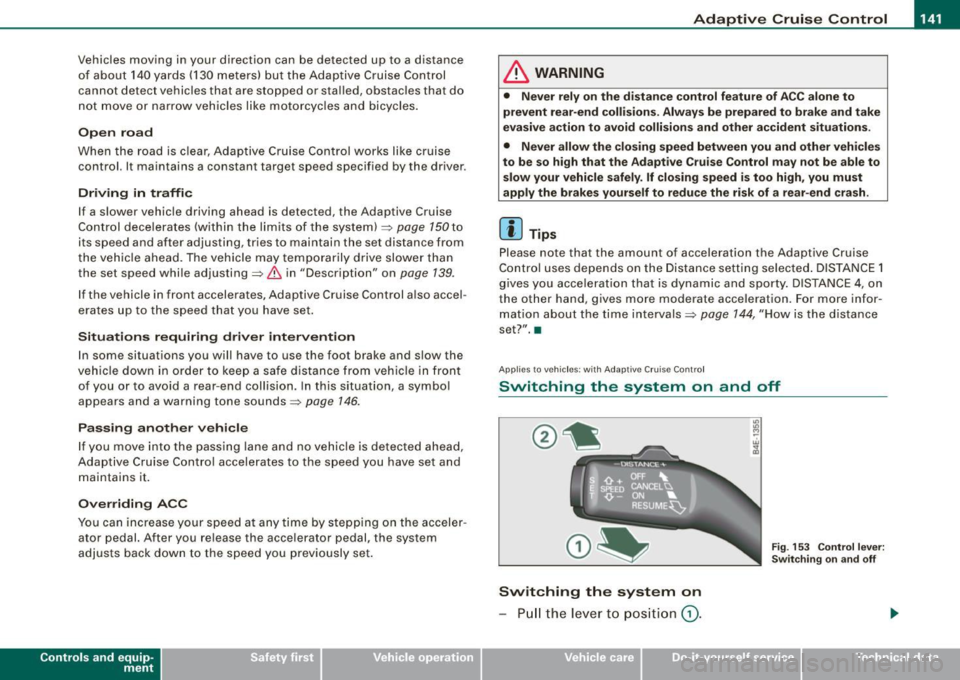
Switching the system on
- Pull the le ver t o positi on G) .
Vehicle care I I
Fig . 15 3 Contr ol le ver:
Sw itch ing on an d off
irechnical data
Page 144 of 408
• ..__A_ d_a...: p:,..._ ti_v _ e_ C_ ru_ is_ e_ C_ o_n_ t_ r_ o _ l ___________________________________________ _
Switching the system off
-Press the lever to position @(latched). •
Applies to veh icles: with Adapt ive Cruise Cont rol
Hovv is the speed stored ?
'° "' M
Fig. 154 Control lever:
Storing speed
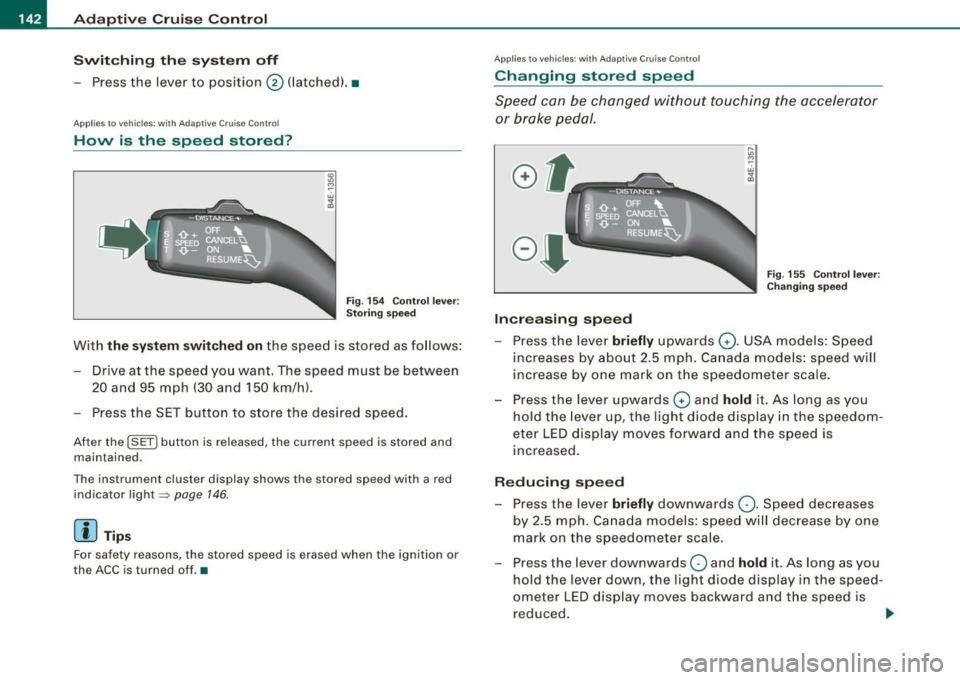
With the system switched on the speed is stored as follows:
- Drive at the speed you want. The speed must be between 20 and 95 mph (30 and 150 km/h).
- Press the SET button to store the desired speed.
After the (SETI button is released, the current speed is stored and
maintained.
The instrument cluster display shows the stored speed with a red
indicator light~
page 146.
[ i ] Tips
For safety reasons, the stored speed is erased when the ignition or
the ACC is turned off.•
App lies to vehic les: w it h Adapt ive Cruise Contro l
Changing stored speed
Speed can be changed without touching the accelerator
or brake pedal.
Increasing speed
....
"' M ~ w .,
"'
Fig . 155 Control lever:
Changing speed
- Press the lever briefly upwards Q. USA models: Speed
increases by about 2.5 mph. Canada models: speed will
increase by one mark on the speedometer scale.
- Press the lever upwards
Q and hold it. As long as you
hold the lever up, the light diode display in the speedom
eter LED display moves forward and the speed is
increased.
Reducing speed
- Press the lever briefly downwards Q. Speed decreases
by 2.5 mph. Canada models: speed will decrease by one
mark on the speedometer scale.
- Press the lever downwards
O and hold it. As long as you
hold the lever down, the light diode display in the speed
ometer LED display moves backward and the speed is reduced. ._
Page 145 of 408
_____________________________________________ A_ d_a ...: p_ t_ i_ v _e_ C_ ru_ is_e_ C_ o_n _ t_ r_o _ l _ __.11111
After releasing the control switch, the system regulates the speed to
the value just set.
& WARNING
Improper use of the Adaptive Cruise Control features and inatten
tion can lead to an accident causing serious personal injury.
• It is dangerous to use the "RESUME" feature when the previ
ously set speed is too high for existing road, traffic or weather
conditions.
• Always read and heed the information and WARNINGS =>
& in
"Description" on
page 139.
[ i] Tips
You can increase your speed at any time by stepping on the acceler
ator pedal. After you release the accelerator pedal, the system auto
matically adjusts back down to the speed you previously set . A new
desired speed can be stored at any time by pressing the [SET)
button =>
page 142, fig. 154. •
Contro ls and eq uip
ment
A pp lies to veh icles: w it h A dapt ive Crui se Contro l
Turning Adaptive Cruise Control off
temporarily
In some situations it makes sense to turn Adaptive Cruise
Control off temporarily.
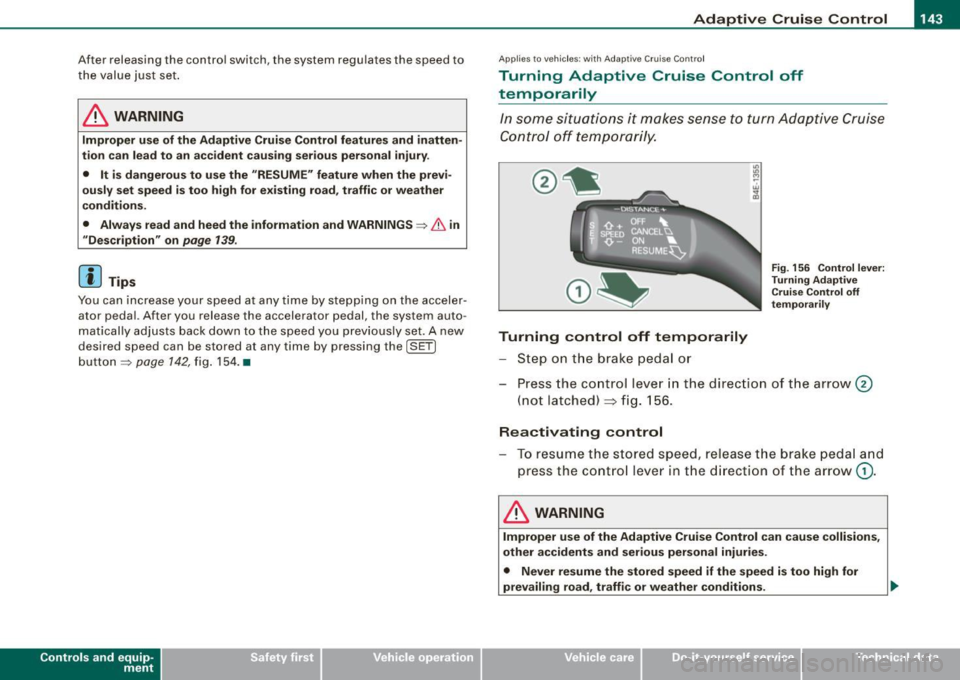
Turning control off temporarily
Step on the brake pedal or
Fig. 156 Control lever:
Turning Adaptive
Cruise Control off
temporarily
Press the control lever in the direct ion of the arrow 0
(not latched) => fig. 156.
Reactivating control
To resume the stored speed, release the brake pedal and
press the control lever in the direction of the arrow
G) .
& WARNING
Improper use of the Adaptive Cruise Control can cause collisions,
other accidents and serious personal injuries.
• Never resume the stored speed if the speed is too high for
prevailing road, traffic or weather conditions. ..
Vehicle care I I irechnical data
Page 147 of 408
_____________________________________________ A_ d_a ...: pc.. t _i_ v _e_ C_ ru_ is_ e_ C_ o_n_ t_ r_ o _ l __ llll
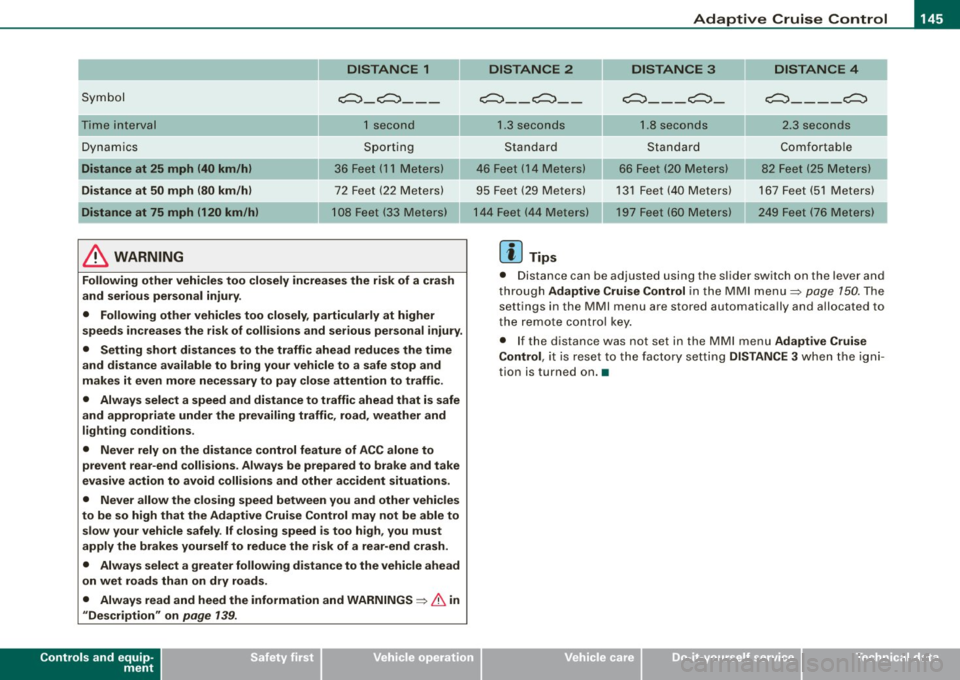
DISTANCE 1
Symbol c:::, _ c:::,_ --
Time interval 1 second
Dynamics Sporting
Distance at 25 mph (40 km/h) 36 Feet (11 Meters)
Distance at
50 mph (80 km/h) 72 Feet (22 Meters)
Distance at 75 mph (120 km/h) 108 Feet (33 Meters)
& WARNING
Following other vehicles too closely increases the risk of a crash
and serious personal injury .
• Following other vehicles too closely, particularly at higher
speeds increases the risk of collisions and serious personal injury .
• Setting short distances to the traffic ahead reduces the time
and distance available to bring your vehicle to a safe stop and
makes it even more necessary to pay close attention to traffic.
• Always select a speed and distance to traffic ahead that is safe
and appropriate under the prevailing traffic, road, weather and
lighting conditions.
• Never rely on the distance control feature of ACC alone to
prevent rear-end collisions. Always be prepared to brake and take
evasive action to avoid collisions and other accident situations.
• Never allow the closing speed between you and other vehicles
to be so high that the Adaptive Cruise Control may not be able to slow your vehicle safely .
If closing speed is too high, you must
apply the brakes yourself to reduce the risk of a rear-end crash.
• Always select a greater following distance to the vehicle ahead
on wet roads than on dry roads.
• Always read and heed the information and
WARNINGS ~ & in
"Description" on page 139.
Controls and equip
ment
DISTANCE 2 DISTANCE 3 DISTANCE 4
~ __ c:::, __ c:::,
___ c:::,_
c:::, ____ c:::,
1.3 seconds 1.8 seconds 2.3 seconds
Standard Standard Comfortable
46 Feet ( 14 Meters)
66 Feet (20 Meters) 82 Feet (25
Meters)
95 Feet (29 Meters) 131 Feet (40 Meters) 167 Feet (51 Meters)
197 Feet (60 Meters) 249 Feet (76 Meters)
[ i] Tips
• Distance can be adjusted using the slider switch on the lever and
through Adaptive Cruise Control in the MMI menu~ page
150. The
settings in the MMI menu are stored automatically and allocated to
the remote control key.
• If the distance was not set in the MMI menu Adaptive Cruise
Control , it is reset to the factory setting DISTANCE 3 when the igni
tion is turned on. •
I • •
Page 148 of 408

-Adaptive Crui se Control .._ _ ______,:,...._ _________________________________________ _
Driver information
App lies to veh icles: with Adapt ive Cruise Cont ro l
Displays in the instrument cluster
Depending on the driving situation, driver information is
displayed in the instrument cluster.
@ Primary display in the speedometer.
Fig. 158 Ove rv iew
instrument clu ste r
@ Supplementary display in the instrument c luster.
© Message in the instrument cluster display.
@ Prim ary display
Important information concerning vehic le operation with Adaptive
Cruise Control is shown in disp lay area @. T he desired speed yo u
set is highlighted in the speedometer and the warning lights show
whether adjustments are being made fo r an object ahead .
This information is always disp layed. Display area @is therefore
called the
primary display.
@ Supplementary disp lay
In display area@ infor mation fro m the navigation sys te m and the
trip computer is displayed in addition to information about Adaptive
Cruise Control. You can select among
the different information by repeated brief
t aps on the RESET b utto n on the w indshield wiper lever ~
page 40,
"Operation" .
P articularly on your first trips with Adaptive Cruise Control, the
supplementary display should be turned on.
@ Message
The information in area © is not d isp layed permanently. Informa
tion is displayed on ly if you change the time interva l, if there is a
malfunction or if the Adaptive Cruise Contro l is turned off. •
Applies to veh icles : w ith Adaptive Cruise Contro l
Primary display in the speedometer
Desir ed sp eed
Fig . 159 Primary
d is play in th e speed
omete r
The desired speed set by the driver is disp layed wi th a red LED .
The system al lows only speeds from 20 to 95 mph (30 to 150 km/h)
to be se t. This s peed range is fain tly i lluminated in the spee dometer.
Warning lights (symbols )
• ""c:::, Open road : Th e war ning lig ht ""c:::, sh ows that ACC is active
and that no moving vehicle has been detected with in range of the
ra dar senso r up ahead in yo ur l ane of travel. The se t speed is main -
tained. .,
Page 149 of 408
_____________________________________________ A_ d_a ...: p_ t_ i_ v _e_ C_ ru_ is_ e_ C_ o_n _ t_ r_o _ l _ __._
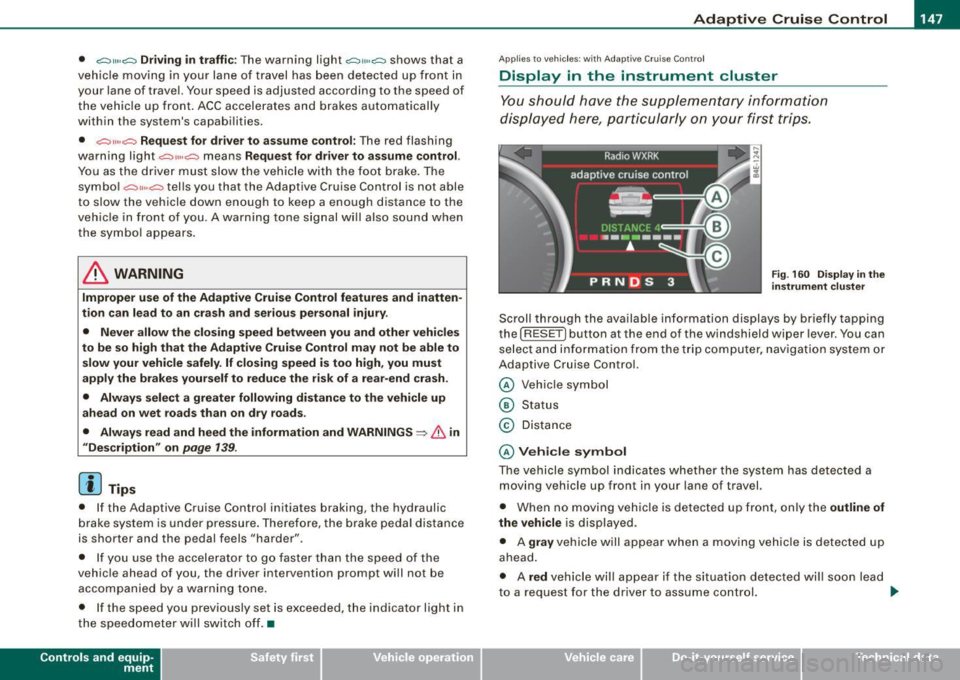
• "°" ""° D riv ing in traffi c: The warning light "°"""° shows that a
vehic le moving in your lane of travel has been de tected up front in
your lane of travel. Your speed is adjusted according to the speed of
the vehicle up front. ACC accelerates and brakes automatical ly
within the system's capabilities.
• "°" ""°
Reque st f or driver to a ssume control: The red flashing
warning light
G'.'.::> 1,.,<:Q means R equ est fo r d riv er to assume control.
You as the driver must slow the vehicle with the foot brake. The
symbo l "°""G'.'.::l tells you that the Adaptive Cruise Control is not able
to slow the vehicle down enough to keep a enough distance to the
vehicle in front of you . A warning tone signal wi ll also sound when
the symbol appears .
& WARNING
Improper use of the Adaptive Cruis e Control f eatures and inatten
ti on c an lead to an cra sh a nd s erio us per sonal injury .
• Never allo w the c losing speed between you and other v ehicles
to be so high t hat th e Adap tive Cru is e Control ma y not be abl e to
slow your vehi cle safel y. If closing speed i s too high , you must
apply the brake s yourself to r ed uc e the ri sk of a r ear-end cra sh .
• Alway s sele ct a greater follow ing di stance to th e vehi cle up
a he ad on w et ro ad s th an on dr y roa ds.
• Alway s read and he ed the inf ormation and WARNINGS~
& in
" De scription " on
pag e 139 .
[ i J Tips
• If the Adaptive Cruise Control initiates braking, the hydraulic
brake system is under pressure . Therefore, the brake peda l distance
is shorter and the pedal feels "harder".
• If you use the accelerator to go faster than the speed of the
vehicle ahead of you, the driver intervention prompt wi ll not be
accompanied by a warning tone.
• If the speed you previously set is exceeded, the indicator light in
the speedometer wi ll switch o ff.•
Con tro ls and eq uip
ment
Ap plies to vehi cle s: wi th Ad apt ive Crui se Co ntro l
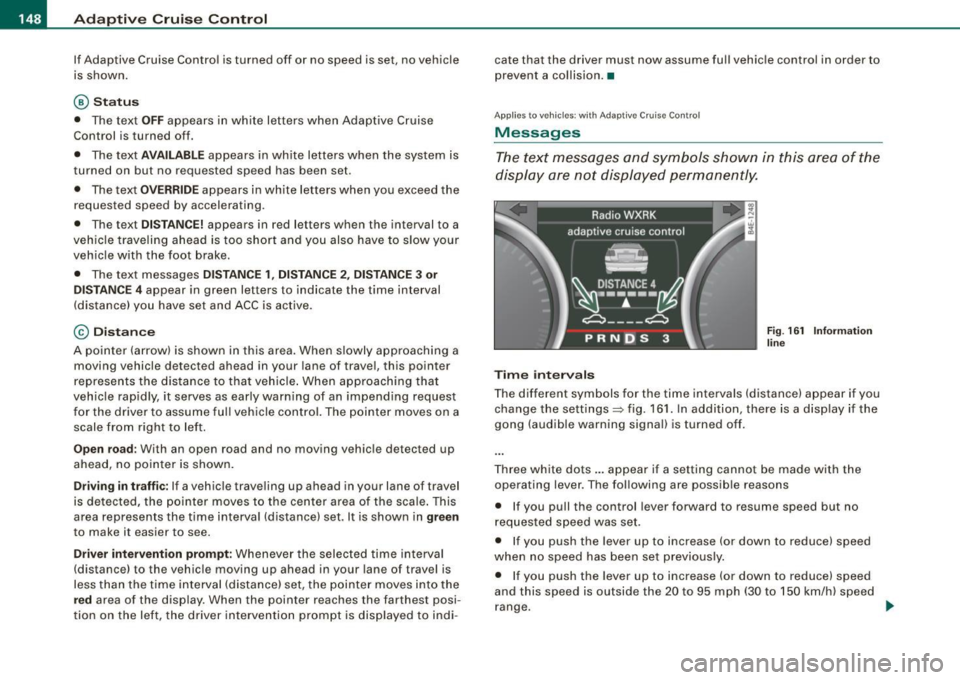
Display in the instrument cluster
You should hove the supplementary information
displayed here, p articularly on your first trips.
Fig. 160 D ispla y in th e
i n strum ent cl uste r
Scroll th rough the available information displays by briefly tapping
the ( RESET] button at the end of the windshield wiper lever . You can
se lect and information from the trip computer, naviga tion syste m or
Adaptive Cruise Control.
@ Veh icle symbol
@ Status
© Distance
@ V ehi cle sym bol
The vehicle symbol indicates whether the system has detected a
moving vehicle up front in your lane of travel.
• When no moving vehic le is detected up front, on ly the
outline of
the vehicle
is displayed.
• A
gra y vehicle will appear when a moving vehic le is detected up
ahead.
• A
red vehicle will appear i f the situation detected will soon lead
to a request for the driver to assume control. .,,_
Vehicle care I I irechnical data
Page 150 of 408
• ..__A_ d_a...: p:,..._ ti_v _ e_ C_ ru_ is_ e_ C_ o_n_ t_ r_ o _ l ___________________________________________ _
If Adaptive Cruise Control is turned off or no speed is set, no vehicle
is shown.
@ Status
• The text OFF appears in white letters when Adaptive Cruise
Control is turned off.
• The text
AVAILABLE appears in white letters when the system is
turned on but no requested speed has been set.
• The text
OVERRIDE appears in white letters when you exceed the
requested speed by accelerating.
• The text
DISTANCE! appears in red letters when the interval to a
vehic le traveling ahead is too short and you also have to slow your
vehicle with the foot brake.
• The text messages
DISTANCE 1, DISTANCE 2, DISTANCE 3 or
DISTANCE 4
appear in green letters to indicate the time interval
(distance) you have set and ACC is active.
© Distance
A pointer (arrow) is shown in this area. When slowly approaching a
moving vehicle detected ahead in your lane of travel, this pointer
represents the distance to that vehicle . When approaching that
vehicle rapidly, it serves as early warning of an impending request
for the driver to assume ful l vehicle control. The pointer moves on a
scale from right to left.
Open road: With an open road and no moving vehicle detected up
ahead, no pointer is shown.
Driving in traffic: If a vehicle traveling up ahead in your lane of travel
is detected, the pointer moves to the center area of the scale. This
area represents the time interval (distance) set. It is shown in
green
to make it easier to see.
Driver intervention prompt: Whenever the selected time interval
(distance) to the vehicle moving up ahead in your lane of travel is
less than the time interval (distance) set, the pointer moves into the
red area of the display. When the pointer reaches the farthest posi
tion on the left, the driver intervention prompt is disp layed to indi -cate that the driver must now assume full vehicle control in order to
prevent
a collision. •
Applies to vehicles : with Adapt ive Cru ise Contro l
Messages
The text messages and symbols shown in this area of the
display are not displayed permanently.
Time intervals
Fig. 161 Information
line
The different symbols for the time intervals (distance) appear if you
change the settings=> fig. 161. In addition, there is a disp lay if the
gong (audible warning signal) is turned off.
Three white dots ... appear if a setting cannot be made with the
operating lever. The following are possible reasons
• If you pull the control lever forward to resume speed but no
requested speed was set.
• If you push the lever up to increase (or down to reduce) speed
when no speed has been set previously.
• If you push the lever up to increase (or down to reduce) speed
and this speed is outside the 20 to 95 mph (30 to 150 km/h) speed
range. .,
Page 151 of 408
_____________________________________________ A_ d_a ...: pc.. t _i_ v _e_ C_ ru_ is_ e_ C_ o_n_ t_ r_ o _ l __ fflJI
A CC no t avai la bl e
The text message ACC n ot av aila bl e appears, for examp le, if the
temperature of the brakes is excessive. Adaptive Cruise Contro l is
temporari ly not available . A warning tone sounds as a reminder.
A CC no t avai lable!
The text message ACC not avai la ble! appears in the event of a
malfunction. Adaptive Cruise Control is turned off. A warning tone
sounds as a rem inder. Have the system inspected by a qua lified
dea lership.
A CC sen sor bloc ked
The text message AC C se nsor b lo cked appears when the ACC
System does not detect any objects over an extended time period .
For the time being, the distance to vehicles up ahead is not being
controlled. The ACC system is not switched off, so increased a lert
ness is required. The following may be reasons for the text message
ACC sensor blocked:
• The ACC sensor is d irty. The ACC system is not reacting, or is not
reacting correctly, to vehicles trave ling ahead .
• It is possible that you are dr iving on a road with very light traffic
without anything at the side of the road (e.g. guard rai ls, traffic
s igns, trees) . As soon as a vehicle is detected by the system aga in,
it returns to its control range and the text message disappears .
The ACC sensor is located in the area under the front license plate .
If there is a loss of operation due to heavy contamination, this area
should cleaned to restore proper operation.
A CC se nso r blo cked !
The text message ACC sen sor blocked! appears when the ACC
System can no longer accurately detect vehic les moving up ahead
in your lane of travel. Adapt ive Cruise Cont rol is tu rned off . A
warning tone a lso sounds as a reminder.
T o decide whether it is necessary to switch off the ACC (ACC sensor
b locked!) o r if it is on ly a temporary condition (ACC sensor blocked),
Controls and equip
ment
the system will also takes into consideration the outside tempera
t ure and/or the windshield wiper operation.
The ACC sensor is dirty or blocked (e.g. leaves, snow).
The ACC sensor is located in the area under the front license plate .
I f the ACC sensor is d irty or blocked, clean the area to restore system
operation .
EPB acti vation
The text message EPB a cti vation appears if emergency braking was
initiated with the Electromechan ical Parking Brake (EPB) . Adaptive
Cruise Control is turned off. A gong sounds as a reminder.
ESP activ at ion
The text message E S P activ ation appears if the Electronic Stabiliza
tion Program (ESP) has intervened to take control in a critica l driving
situation. In this case Adaptive Cruise Control is automatically
turned o ff. A gong sounds as a reminder .
Speed r ange
The text message Sp eed r ange appea rs if the current speed is too
low
to set or to hold the requested speed.
When se tting a desired speed, it must be a t leas t 20 m ph (30 km/h).
At speeds below 17 mph (25 km/h), the cruise control is turned off.
Shift le ver po sition!
The text message Shift lever po sition! appears when the shift se lect
leve r is m oved to position
N. In this position, Adaptive Cruise
Control is not avai lable .•
I • •
Page 152 of 408
• .___A_ d_a_ p:- t_iv _ e_ C_ r_u _is _ e_C_ o_ n_ t_ r_ o_ l --------------------------------------------
Ap plies to vehi cles : wi th Ad aptive Cruise Co nt rol
Settings in MMI
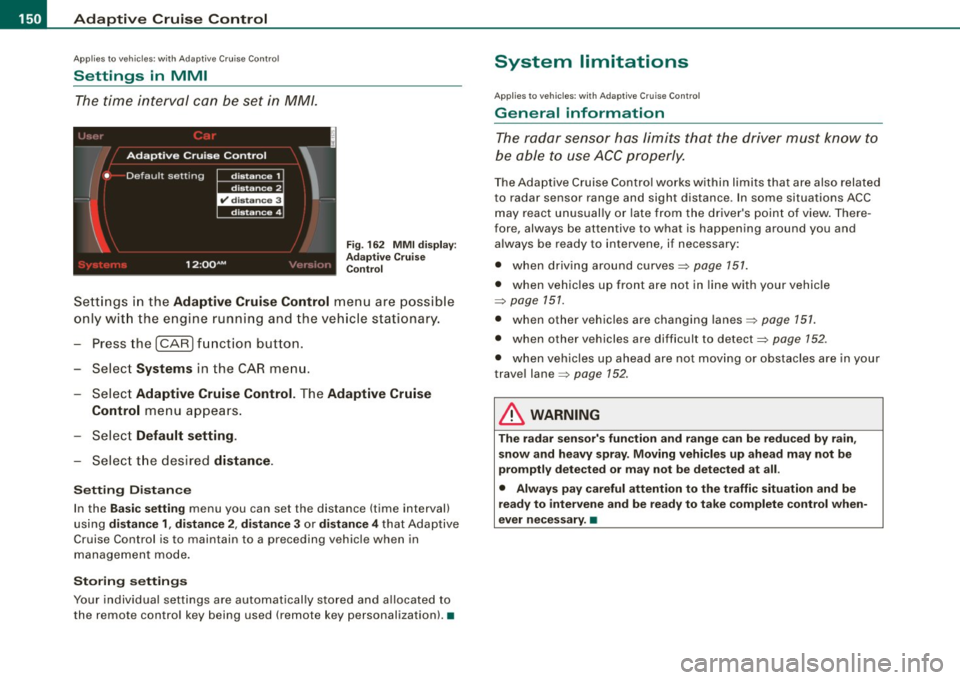
The time interval can be set in MM/.
Fig. 162 MMI display :
Adaptive Cruise
Control
Settings in the Adaptive Cruise Control menu are possible
only with the engine running and the vehicle stationary.
- Press the
I CAR) function button.
- Select
Systems in the CAR menu.
Select
Adaptive Cruise Control. The Adaptive Cruise
Control
menu appears.
Select
Default setting.
- Select the desired distance.
Setting Distance
In the Basic setting menu you can set the distance (time interval)
using
distance 1, distance 2 , distance 3 or distance 4 that Adaptive
Cruise Control is to maintain to a preceding vehicle when in
management mode.
Storing settings
Your individual settings are automatically stored and allocated to
the remote control key being used (remote key personalization). •
System limitations
Applies to vehicles : with Ada ptive C rui se C ont rol
General information
The radar sensor has limits that the driver must know to
be able to use ACC properly.
The Adaptive Cruise Control works within limits that are also related
to radar sensor range and sight distance . In some situations ACC
may react unusually or late from the driver's point of view. There
fore, always be attentive to what is happening around you and
always be ready to intervene, if necessary:
• when driving around curves=>
page 151.
• when vehicles up front are not in line with your vehicle
=>
page 151.
• when other vehicles are changing lanes=> page 151.
• when other vehicles are difficult to detect=> page 152.
• when vehicles up ahead are not moving or obstacles are in your
travel lane=>
page 152.
& WARNING
The radar sensor's function and range can be reduced by rain,
snow and heavy spray. Moving vehicles up ahead may not be
promptly detected or may not be detected at all.
• Always pay careful attention to the traffic situation and be
ready to intervene and be ready to take complete control when
ever necessary. •
Page 153 of 408
Adaptive Crui se Control -
---------------=-------'
Applies to vehicles: with Adaptive Cru ise Co nt rol
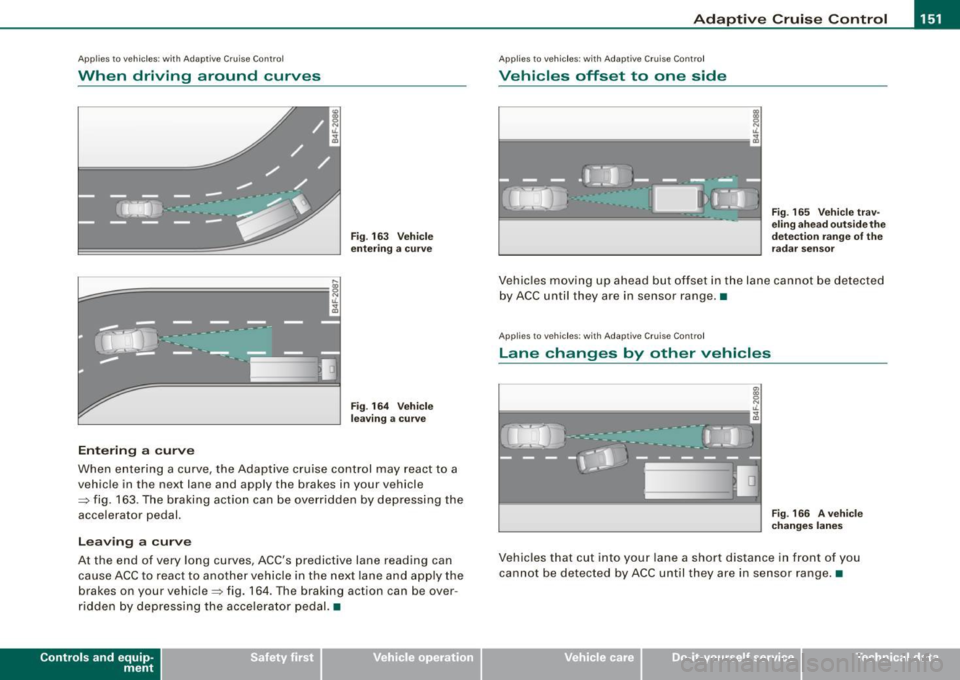
When driving around curves
k;;;:;::;;;;~==========; ~
o5
J
Entering a curve
Fig . 1 63 V eh ic le
enterin g a c urve
F ig . 164 Vehicle
l ea ving a curv e
When entering a curve, the Adaptive cruise control may react to a
vehicle in the next lane and apply the brakes in your vehicle
=> fig . 163 . The braking action can be overridden by depressing the
accelerator pedal.
L e avi ng a cu rve
At the end of very long curves, ACC 's predictive lane reading can
cause ACC to react to a nother vehicle in the next lane and app ly the
brakes on your vehicle=> fig. 164 . T he braking action can be over
ridden by depressing the accelera tor pedal. •
Contro ls and eq uip
ment
Ap plies to veh icles: with Adapt ive Crui se Contro l
Vehicles offset to one side
Fig . 165 V ehi cle tra v
e ling ahe ad outsid e th e
d etec tion r ange of the
ra dar se nsor
Vehic les moving up ahead but offset in the lane cannot be detected
by ACC until they are in sensor range. •
Applies to veh ic les: with Adaptive Cruise Co nt ro l
Lane changes by other vehicles
Fig . 166 A veh ic le
c han ges la ne s
Vehicles that cut into your lane a short distance in front of you
cannot be detected by ACC until they are in sensor range. •
Vehicle care I I irechnical data