door lock AUDI S8 2009 Owner's Manual
[x] Cancel search | Manufacturer: AUDI, Model Year: 2009, Model line: S8, Model: AUDI S8 2009Pages: 408, PDF Size: 91.63 MB
Page 67 of 408
React ivating clo se/ open f eature
- Pull and hold the power window switch until the window
is complete ly closed.
- Re lease the switch.
- Pull the switch again for one second. The automatic
clos ing/opening is now reactivate d.•
Sliding/tilting power sunroof
How the power sunroof works
ffi
UUNU ~ 1-=llllf ~llfl
0 @ 0 F ig . 53 Sec tio n o f the
hea dlin er: s unroof
sw itch pos ition s
The roof will slide open or tilt up at the rear as required. When the
ignition is on, you can slide the roof open or c lose it to the desired
position by turning the rotary control switch located overhead next
to the interior light. The roof is tilted open or closed by pressing or
pul ling the control switch at position®~ fig. 53.
You can still close or open the sunroof for up to ten minutes after
you have switched off the ignition with the key remaining in the igni tion lock. If either door is opened, powered operation of the sunroof
will be deactivated .
Contro ls and eq uip
ment
Op ening and clo sing
S ol ar r oof *
The solar cells in the roof provide energy to operate the ventilation system for the c limate control. It is activated automatically after the
veh ic le is parked. Depending on solar i rradiation , the interior
temperature of the vehicle is lowered in the summer, in the winter
the interior is dehumidified.
So la r pr otec tion with slidi ng glass su n roof
The slid ing glass sun roof is equ ipped with an adjustable sunshade
to reduce the effects of strong sunl ight . The so lar protection can be
moved at the recessed handle to open and close it. To prevent the
vehic le interior from heating up, you should close the solar protec
tion when you park your vehicle in the sun.
When the roof is
slid open , the sunshade is opened automatically.
When the roof is closed, the sunshade can be closed manually.
When the roof is
t ilted open , the closed sunshade is also raised at
the rear edge. But it can still be slid open or closed.
0 Note
You should always closed the sliding/tilting sunroof when you leave
your vehicle. Sudden rain can drench the interior equipment and
damage the electronic convenience features in your vehicle .
[ i ] Tips
If you park your vehicle in the sun, we recommend that you close
the sunshade .•
Sliding /tilting the power sunroof open
Tilting the roof open
- Turn the rotary sw itch to posit ion @ .
Vehicle care I I irechnical data
Page 68 of 408
Opening and closing
-In position @, briefly press the control to tilt the roof up
completely.
- To tilt the roof open to any intermediate position press
and hold the switch until the roof reaches the desired
position.
Sliding the roof open
- Turn the switch to position (D to open the roof all the
way.
- Turn the switch to any other position to open the roof to
any intermediate position.
When the glass roof opens, the sun visor, which is designed to ward
off strong sunlight, opens along with it. The visor can be closed
manually when the sunroof is closed.
[ i J Tips
• Be aware that the sunroof may actually be open when the sun
visor is closed. Check and make sure that the sunroof is shut when
parking the car or if it suddenly starts raining.
• If the sunroof is not fully closed but you have pressed and held
the switch for the tilt position, the sunroof will not tilt. •
Closing the power sunroof
Sliding the roof shut
- Turn the rotary switch to position®=> page 65, fig. 53
=> & .
Tilting the roof shut
-Briefly pull the rotary switch to close the roof. -
To tilt the roof down to any intermediate position pull and
hold the switch until the roof reaches the desired posi
tion.
& WARNING
Improper use of the power sunroof can cause serious personal
injury.
• Be careful when closing the power sunroof. Not paying atten
tion could cause you or others to be trapped and injured as the
roof closes.
• Always take the key with you when you leave the vehicle to
prevent injuries caused by the roof closing.
• Never leave children or persons requiring assistance alone in
the vehicle, especially when they could access the vehicle keys. Unsupervised use of the keys can result in the engine being
started or use of vehicle systems such as the power windows, etc.
which could result in serious injury. The doors could be locked
with the remote key, delaying help in an emergency.
• The power sunroof will continue to operate until the ignition
key has been removed and one of the front doors has been
opened. •
Power emergency closing
The sunroof can still be closed electrically if for some
reason the overload protection function becomes acti
vated.
The power sunroof is equipped with an overload protection
feature. If, under normal conditions, the power sunroof will
not close, you can close it using this feature.
- Turn the rotary switch to position ®=>page 65, fig. 53 . .,_
Page 69 of 408
- Now pull the switch and hold it in this position until the
power sunroof closes completely.
& WARNING
Improper use of the power sunroof can cause serious personal
injury.
• Be careful when closing the power sunroof. Not paying atten
tion could cause you or others to be trapped and injured as the
roof closes.
• Always take the key with you when you leave the vehicle to
prevent injuries caused by the roof closing
• Never leave children or persons requiring assistance alone in
the vehicle, especially when they could access the vehicle keys. Unsupervised use of the keys can result in the engine being
started or use of vehicle systems such as the power windows, etc.
which could result in serious injury. The doors could be locked
with the remote key, delaying help in an emergency.
• The power sunroof will continue to operate until the ignition
key has been removed and one of the front doors has been
opened. •
Con tro ls and eq uip
ment
Opening and closing
Emergency closing by hand
The sunroof can be closed by hand in case of a power
failure.
Removing the cover
Fig . 54 Section from
headliner: Where to
place the screwdriver
Fig . 55 Section from
headliner: Crank for
emergency operation
Insert the flat side of the screwdriver (found in the
vehicle tool kit) at the rear edge of the lens as indicated
by the -arrows- :::;, fig. 54.
Carefully pry the clear lens cover open and remove it. .,...
Vehicle care I I irechnical data
Page 72 of 408
Clear vision
control is activated. The high beam function must first be switched
on in the MMI
=> page 70 .
Light Se nsor M alfu nction
In the event of a ligh t sensor mal funct ion, the driver is notified in the
instrument cluster display:
~ Autom atic headlights /aut om atic wipers defe ctive
For safety reasons the low beams are turned on permanently wit h
the switch in
AUTO . However, you can continue to turn the lights on
and off using the light switch . Have the light sensor checked as soon
as possible at a dealership.
& WARNING
• Never use d aytime running lights to see where you are going .
The y are not bright enough and will not let you see f ar enoug h
ahead for s afet y, espe cially at du sk or when it is dark. Alw ays
switch on the low beams at du sk or when i t is dark .
• Autom ati c he adli ght s are onl y intended to as sist the dr iver .
The y do not relie ve the d riv er of his re spon sib ility to che ck the
he adlights and to turn them on manuall y according to t he current
ligh t and vi sibility conditions . For example , fog and ra in cannot be
dete cted by the light sen sor s. S o alw ays switch on the he adlights
under these weather con dition s and when dr iving in the dark
gD .
• Cras hes ca n happen when you c annot s ee the ro ad ahe ad and
when you cannot be seen by other motor ists .
- Alw ays turn on the headlight s so that you can see ahe ad and
s o that others can se e your c ar from th e ba ck.
[ i J Tips
• With the switch in AUTO front fog lights and rear fog lights
cannot be turned on in addition. • I
f you remove the ignition from the ignition lock while the head
l ights are s till on, a bu zzer w ill sound as long as the driver's door is
open to remind you to turn off the l ights .
• Always observe the specific local regulations for your area as to
when to use your lights. •
Adjusting exterior lighting
The functions are set in the MM/.
Press the I CAR] function button.
- Select
Systems in the CA R menu.
Fig. 57 MM I dis pla y:
E xt eri or ligh ting
- Sele ct Exterior lighting. The menu Exterior lighting
appears => fig . 57.
C oming h ome
The Coming home function ensures that after tu rni ng off the igni
tion and open ing the driv er's d oor
the vehicle periphery is illum i
nated in the dark . In addition, the front fog lights, the tail lights and
the license plate light are turned on . On -ti me can be set fo r a per iod
from
O (off) to 60 seconds. ~
Page 77 of 408
- Press the (D button to turn on the interior lights. If you
press the button a second time, the interior lights in the
rear are also turned on.
Reading lights ~
- Press the switch to turn the right or left reading light on
or off=>
page 74, fig. 64.
With the door contact circuit, 00 the interior lights turn on as soon
as you unlock the vehicle or open the doors. The interior lights are
also turned on when the ignition key is removed. The light goes out
about 2 minutes after the doors are closed. When the vehicle is
locked or when the ignition is turned on , the interior lights are
turned off.
When a door is open, the interior lights are turned off after about 10
minutes to prevent draining the battery .
[ i) Tips
The interior lights can be dimmed by holding the (D switch pressed
down. If the interior lights in the rear were turned on by pressing the
switch twice, the rear interior lights are also dimmed .•
Con tro ls and eq uip
ment
Clear vision
Rear Interior Lights
The rear interior lights also contain reading lights for
rear-seat passengers.
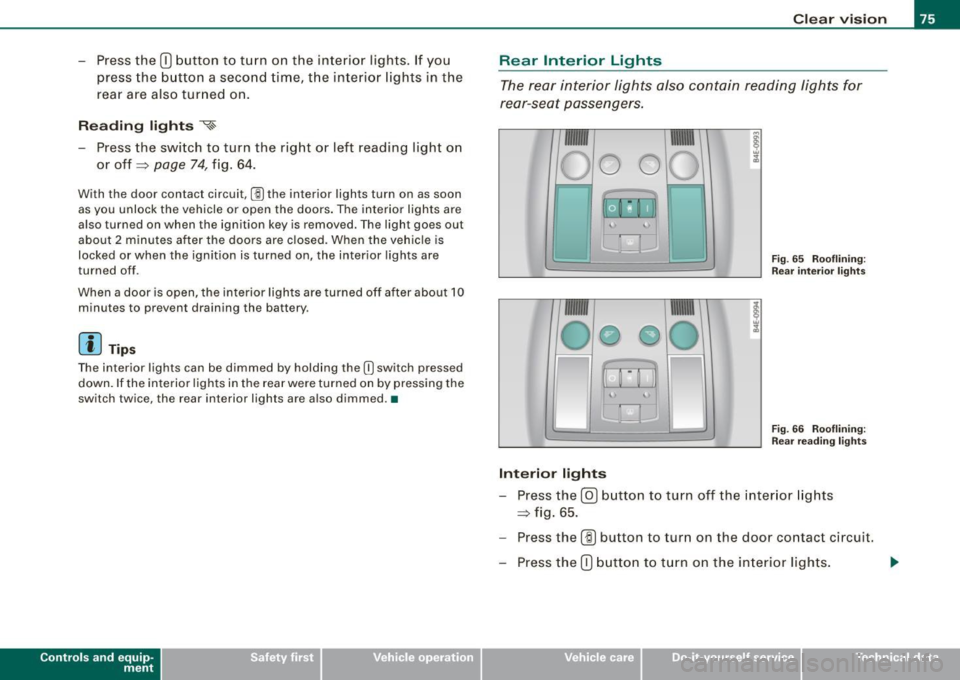
Fig . 65 Rooflining:
Rear interior lights
4
Fig. 66 Rooflining:
Rear reading lights
Interior lights
- Press the@) button to turn off the interior lights
=> fig. 65.
- Press the
(ID button to turn on the door contact circuit.
- Press the
(D button to turn on the interior lights.
Vehicle care I I irechnical data
Page 78 of 408
Clear vision
Reading lights
~
- Press one of the switches to turn the right or left reading
l ight on or off~
page 75, fig. 66.
With the door contact circuit, (ID the interior lights turn on as soon
as you unlock the vehicle or open the doors. The interior lights are
also turned on when the ignition key is removed . The light goes out
about 2 minutes after the doors are closed. When the vehicle is
locked or when the ignition is turned on, the interior lights are
turned off.
When a door is open, the interior lights are turned off after about 10
minutes to prevent draining the battery .
[ i J Tips
• By pressing the safety switch ©~ page 61, fig. 48 , the function
of some switches in the rear can be turned off. If the symbol in
the safety switch illuminates, the window regulators in the rear
doors, the switches for the interior lights and the switch for the elec
tric sun shade* are inoperative .
• The interior lights can be dimmed by holding the
(I] switch
pressed dow n.•
A pp lies to veh ic les : w ith back groun d lig ht in g
Background lighting
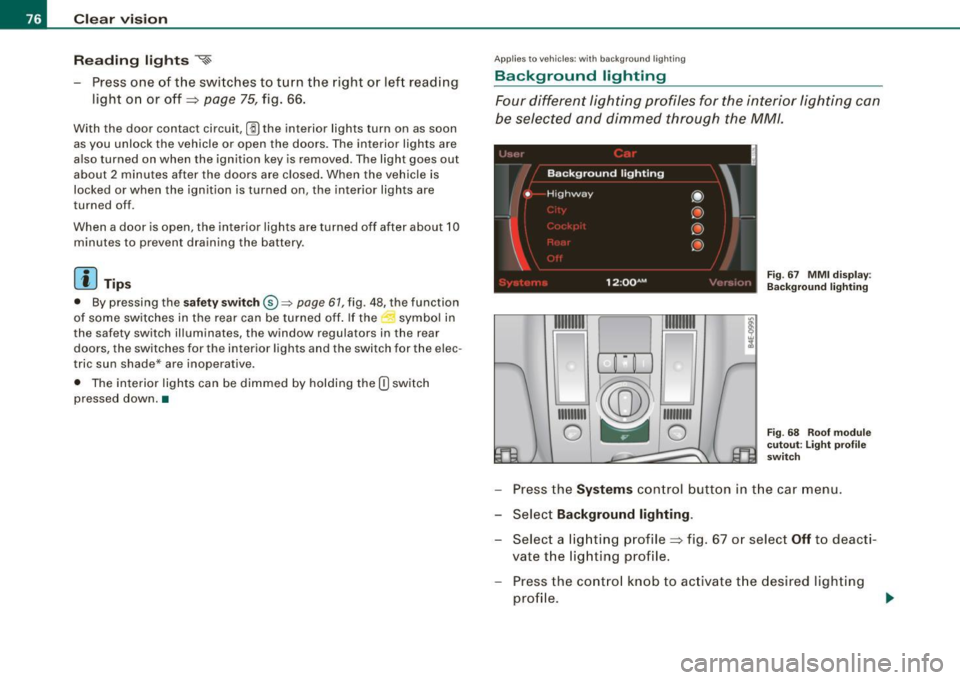
Four different lighting profiles for the interior lighting can
be selected and dimmed through the MM/ .
1t® ~i=-=
1111111
1
~ 111 111111
0 -- 0
Fig. 67 MMI display :
Background lighting
Fig. 68 Roof module
cutout: Light profile
switch
- Press the Systems control button in the car menu.
- Select
Background lighting .
-Select a lighting profile~ fig . 67 or select Off to deacti-
vate the lighting profile.
- Press the control knob to activate the desired lighting
profile .
Page 79 of 408
- Rotate the control knob clockwise to increase the bright
ness, and
- Rotate the control knob
counterclockwise to reduce the
brightness.
When the vehicle is unlocked, the standard lighting turns on auto
matically and dims after approx. 2 minutes, and when the ignition is
turned on it switches off immediate ly.
A background lighting profile can be switched on manually using
the light profile switch ~
page 76, fig. 68. This wi ll turn off automat
ica lly after 30 minutes when the ignition is off. To reactivate, press
the lighting profile switch.
Lighting profiles that were selected while driving remain active
during the course of travel.
The following lighting profiles can be adjusted and
dimmed in the MMI:
Highway City
Driver's side footwel l X
Passenger's side foot -
X X
well
Rear footwell X X
X X X
Rear door trim panel X X X X
Front interior lighting
X X
Rear interior lighting
X X
[ i ] Tips
Lighting profiles are stored on the remote control key being used. •
Contro ls and eq uip
ment
Clear vision
Vision
Sun visors
Using the sun visors makes driving safer.
j !
J_~---~~::Jli
WAAN!NO ..
~(S) :;.......= ~ -=.:
=-....:=-..: (D- ·, - ~~ ,.. __ ., .. _ ~-
-----·-.., _____ ---
-J,
L--------.=.:.t.-:::Jti
W,\RNINO ATTENTION
-- -- -
_____ .., ..
--·--·· ------··----
_____ .., __ ,... ____ .., ___ ... _
---------
___ .., .. ____ _
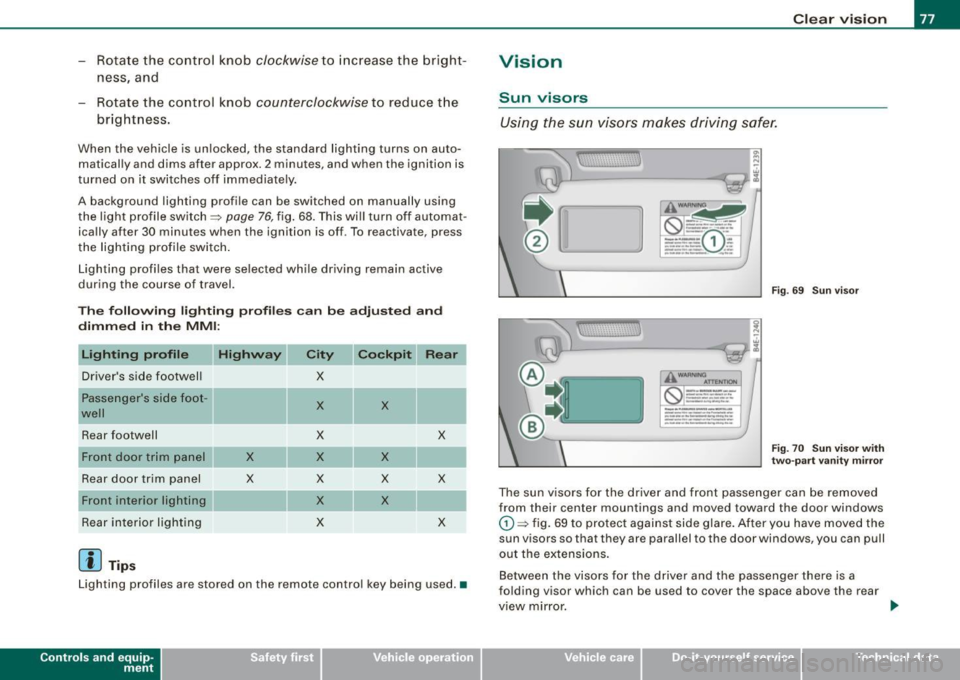
Fig . 69 Sun visor
Fig . 70 Sun visor with
two-part vanity mirror
The sun visors for the driver and front passenger can be removed
from their center mountings and moved toward the door windows
G) ~ fig. 69 to protect against side glare. After you have moved the
sun visors so that they are parallel to the door windows, you can pull
out the extensions.
Between the visors for the driver and the passenger there is a
folding visor which can be used to cover the space above the rear
view mirror.
Vehicle care I I Technical data
Page 96 of 408
Seats and storage
Seat memory
Driver's seat memory
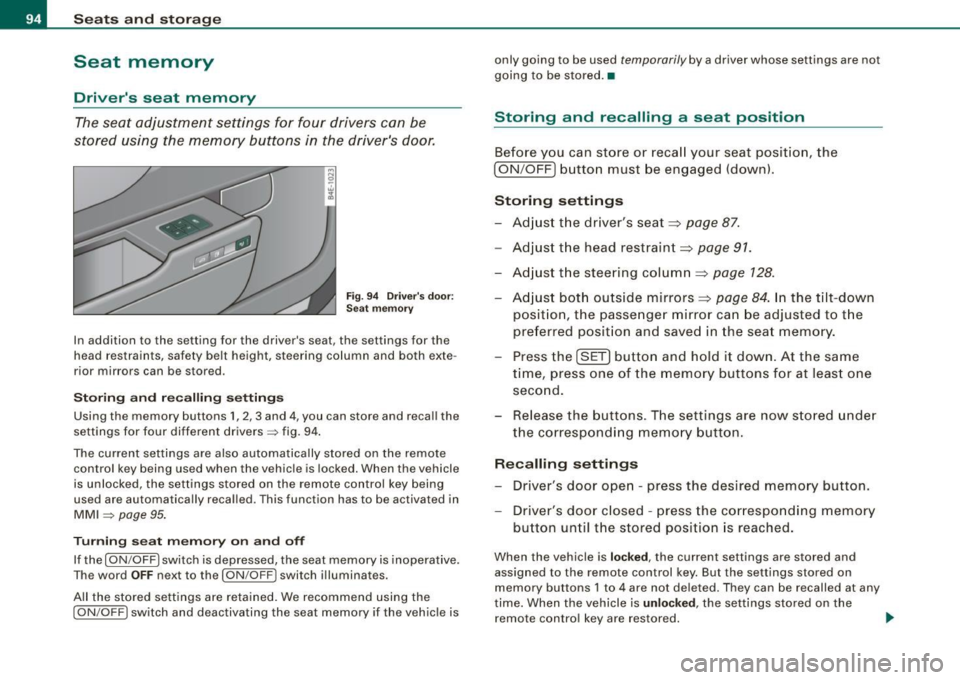
The seat adjustment settings for four drivers can be
stored using the memory buttons in the driver's door .
Fig. 94 Driver's door:
Seat memory
In addition to the setting for the driver's seat, the settings for the
head restraints, safety belt height, steering column and both exte
rior mirrors can be stored .
Storing and recalling settings
Using the memory buttons 1, 2 , 3 and 4, you can store and recall the
settings for four different drivers=> fig. 94.
The current settings are also automatically stored on the remote control key being used when the vehicle is locked. When th e vehicle
is unlocked, the settings stored on the remote control key being
used are automatically recalled . Th is function has to be activated in
MMI => page 95.
Turning seat memory on and off
If the [ ON /OFF I switch is depressed, the seat memory is inoperative.
The word
OFF next to the [ON /OFF ! switch illuminates.
All the stored settings are retained. We recommend using the
[ ON /OFF! switch and deactivating the seat memory if the vehicle is only going to be used
temporar
ily by a driver whose settings are not
going to be stored. •
Storing and recalling a seat position
Before you can store or recall your seat position, the
[ ON /OFF] button must be engaged (down) .
Storing settings
- Adjust the driver's seat=>
page 87.
-Adjust the head restraint=> page 91.
-Adjust the steering column=> page 128.
-Adjust both outside mirrors=> page 84. In the tilt-down
position, the passenger mirror can be adjusted to the
preferred position and saved in the seat memory.
- Press the [SET] button and hold it down. At the same
time, press one of the memory buttons for at least one
second.
- Release the buttons. The settings are now stored under
the corresponding memory button.
Recalling settings
- Driver's door open - press the desired memory button .
- Driver's door closed - press the corresponding memory
button until the stored position is reached.
When the vehicle is locked, the current settings are stored and
assigned to the remote control key. But the settings stored on
memory buttons 1 to 4 are not deleted. They can be recalled at any
time. When the vehicle is
unlocked , the settings stored on the
remote control key are restored. .,_
Page 97 of 408
If your vehicle is driven by other persons using your remote control
key, you should save your individual seat position on one of the
memory buttons . You can recall your settings again simply and
conveniently by pressing the corresponding memory button. When
the vehicle is locked, these settings are automatically re-assigned to the remote control key and stored.
& WARNING
• For safety reasons, the seat setting can only be recalled when
the vehicle is stationary -otherwise you risk having an accident.
• In an emergency, the recall operation can be stopped by
pressing the
I ON /OFF ) button or by briefly pressing any given
memory button. •
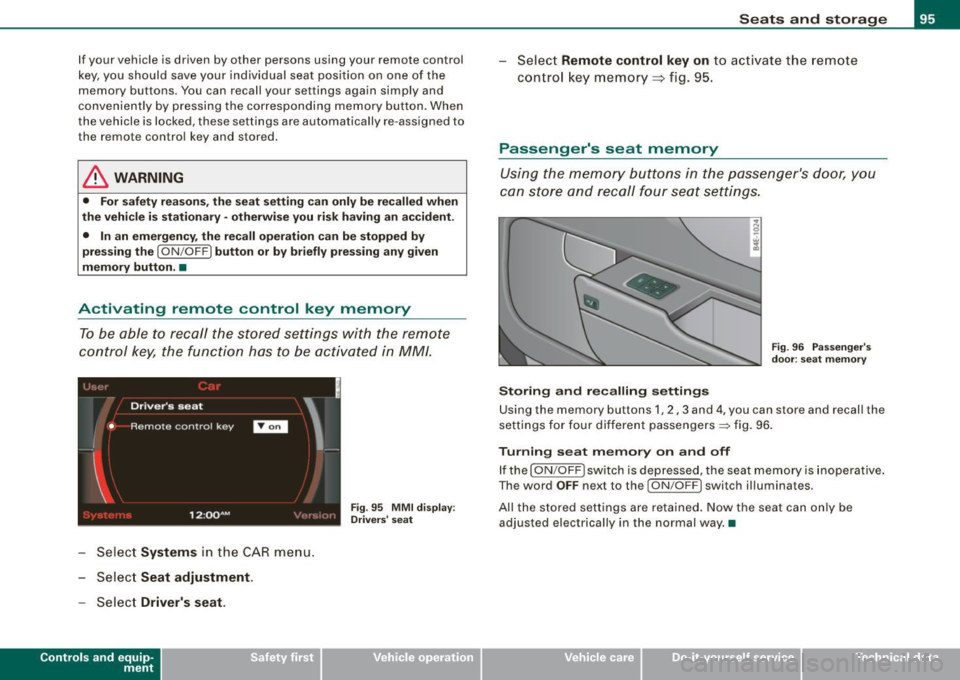
Activating remote control key memory
To be able to recall the stored settings with the remote
control key, the function has to be activated in
MM! .
:~d '
Driver's seat
'
• Remote contro l key
I
1 2 :QQ AM
- Select Systems in the CAR menu.
Select Seat adjustment .
- Select Driver's seat.
Controls and eq uip
ment
I
Fig . 95 MMI display : ,, Drivers' seat
Seats and storage
Select Remote control key on to activate the remote
control key memory ::::;,
fig. 95.
Passenger's seat memory
Using the memory buttons in the passenger's door, you
can store and recall four seat settings.
Storing and recalling settings
Fig. 96 Passenger's
door : seat memory
Using the memory buttons 1, 2 , 3 and 4, you can store and recall the
settings for four different passengers=:> fig. 96.
Turning seat memory on and off
If the [ ON /OFF ) switch is depressed, the seat memory is inoperative.
The word
OFF next to the I ON /OFF ) switch illuminates .
All the stored settings are retained. Now the seat can only be adjusted electrically in the normal way. •
Vehicle care I I irechnical data
Page 111 of 408
![AUDI S8 2009 Owners Manual ________________________________________________ S_ e_ a _ t_ s _a_ n_d _ s_t _o _ r_ a...: g==-- e __ llffllJI
0 Note
To avoid damaging the socket, only use plugs that fit properly.
[ i]](/img/6/57618/w960_57618-110.png "AUDI S8 2009 Owners Manual ________________________________________________ S_ e_ a _ t_ s _a_ n_d _ s_t _o _ r_ a...: g==-- e __ llffllJI
0 Note
To avoid damaging the socket, only use plugs that fit properly.
[ i]")
________________________________________________ S_ e_ a _ t_ s _a_ n_d _ s_t _o _ r_ a...: g==-- e __ llffllJI
0 Note
To avoid damaging the socket, only use plugs that fit properly.
[ i] Tips
When the engine is off and accessories are still plugged in and are
on, the vehicle battery can still be drained. •
Storage
General overview
There are numerous places to store items in your vehicle.
Glove compartment
Storage compartment
Pockets in the front seats*
Compartments in the door trim panels
Compartments in the rear doors* :::::,
page 109
=:> page 11 O
=:> page 110
=:> page 111
Left side storage compartment in the :::::, page 112
trunk
- -Right side storage compartment in the :::::, page 113
trunk
Emergency warning triangle
Umbrella holder
& WARNING
=:> page 350
• Always remove objects from the instrument panel. Any items
not stored could slide around inside the vehicle while driving or
Controls and equip
ment
& WARNING (continued)
when accelerating or when applying the brakes or when driving
around a corner.
• When you are driving make sure that anything you may have
placed in the center console or other storage locations cannot fall
out into the footwells. In case of sudden braking you would not be
able to brake or accelerate.
• Any articles of clothing that you have hung up must not inter
fere with the driver's view. The coat hooks are designed only for lightweight clothing . Never hang any clothing with hard, pointed
or heavy objects in the pockets on the coat hooks. During sudden
braking or in an accident -especially if the airbag is deployed -
these objects could injure any passengers inside the vehicle. •
Glove compartment
Your Owner's Literature and the media player are stored
in the lockable glove compartment.
t--------------. l
i
I • •
Fig. 117 Glove
compartment