mirror AUDI S8 2009 Owner's Manual
[x] Cancel search | Manufacturer: AUDI, Model Year: 2009, Model line: S8, Model: AUDI S8 2009Pages: 408, PDF Size: 91.63 MB
Page 177 of 408
Advanced Parking Syst em -
---------------=--=--
The image in the visua l display can be switched off on the MMI
display ::::> page
185. The acoustic distance warning remains active.
If you press a function button on the MMI termina l, the visual
display disappears . Manually switching the parking assist on again
via the
p ,y 1 switch shows the visual image on the MM I display aga in.
Further information regarding the MMI terminal is included in the
MMI user's manual.
R ear-view camera (rear view )
The rear-view camera picture::::> page 178, fig. 200 appears on the
MM I display as a mirror image. The rear -view camera picture has
orientation lines and marked s urfaces projected into it as an aid to
the parking process ::::> page
176. The red line in the picture
::::> pag e
176, fig. 196 or ::::, page 176, fig. 197 indicates th e collis ion
area . You shou ld stop backing up, preferably before you reach this
point ::::>
&.
If your vehicle is close to an obstacle, the visual distance display
a lso appears in the picture from the rear -view camera . This superim
posed display is intended to help d isplay the relevan t critica l vehicle
area.
I f the visual d isplay is shown on the MMI display and you press the
control button with the Rear view function::::> page
173, fig. 195, the
pictu re from the rear -v iew came ra is displayed.
If the picture from the rear -view camera is s hown a nd you press the
control button w ith the Graphic function ::::, page
178, fig. 200, the
visual display is shown.
T he picture from the rear -view camera can be switched off on the
M MI display ::::, page
185 . The acoustic distance warn ing re mains
active.
I f you press a function button on the MMI te rmina l, the rear-view
camera p icture disappea rs. The rear -v iew came ra picture reappears
the next time you park. But the picture from the rear -view camera
can also be shown aga in on the MM I display by ma nually sw itch ing
off and on with the
P •1A switch . Further information regarding the
MMI terminal is i ncluded in the MM I user's ma nual.
Controls and equip
ment
& WARNING
• Sensor s have dead spaces in which obje cts cannot be
detected. Be e spe cially careful to check for small children and
an imals before ba cking up . Small children and animals will not
always be detected by the sensors.
• The Audi parking system is not a substitute for being careful
and alert when backing up. Be e spe cially careful during parking
and similar maneuvers . Always watch where you are dri ving and
make sure that nothing is in the way.
• Remember that low ob sta cles which have already been
s ignaled may pass below the system' s sen sing zone when the
v ehi cle is ba cking up . The fa ct that the signal stops doe s not mean
that you have cleared the obstacle . When the signal stops , impact
is imminent . Obje cts su ch as trailer hit che s, chain s, narrow posts
or fences covered by a thin l ayer of paint may not always be
detected by the sy stem. They can still damage your vehicle
without warning .
• Alway s make sure that the volume and frequency of the chime s
is adjusted so that you can eas ily hear the acoustic distance signal
even if the radio is playing , the air -conditioner blower is on High or
there is a high level of out side noise .
- Check the setting s whenever someone else has dri ven the
vehicle before you.
• Improper relian ce on the Aud i parking sy stem can cau se colli
sions and serious per sonal injury .
- Never rely only on parking assi st when ba cking up .
- Always check rear view mirrors to make sure it is safe to back
up .
[ i ] Tips
• The rear -view camera picture is available as soon as the MMI
Disp lay or the MMI is swi tch ed o n, or the start -up phase is
completed.
I • •
Page 179 of 408
__________________________________________ A_ d_v _a_ n ___ c...;.e ...;.d _ P_a_ r_ k_ i_n ..::g :::..- S~y~ s::.. t::.. e::.. m:..:...:.._...J_
& WARNING
• The rear -view camera has blind spots , in whi ch objects cannot
be detected . Be especially careful to check for small children and
animals before ba cking up . S mall children and animals will not
always be detected by the sensors .
• The Audi pa rking system is not a substitute for being careful
and alert when backing up. Be especially careful during parking
and similar maneuvers . Always watch where you are driving and
make sure that nothing is in the way.
• Remember that low obstacles which have already been
signaled may pass below the system's sensing zone when the
vehicle is backing up . The fact that the signal stops does not mean
that you have cleared the obstacle . When the signal stops , impact
is imminent . Objects such as trailer hitches , chains , narrow posts
or fences covered by a thin layer of paint may not always be
detected by the system. They can still damage your vehicle
without warning .
• Always make sure that the volume and frequency of the chimes
is adjusted so that you can easily hear the acoustic distance signal
even if the radio is playing , the air -conditioner blower is on High or
there is a high level of outs ide noise .
- Check the settings whenever someone else has driven the
vehicle before you.
• Improper reliance on the Audi parking system can cause colli
sions and serious personal injury .
- Never rely only on parking assist when changing backing up .
- Always check rear view mirrors to make sure it is safe to back
up .
[ i ) Tips
• B efore park ing with the rear -vi ew ca mera , the Adaptive Air
S uspe nsi on s tand ard or automatic m ode mus t be switc h ed on
=>
pa ge 21 .
Con tro ls and eq uip
ment • T
he rear -view camera picture is avai lable as soon as the MMI
Di spl ay or the M MI is swi tch ed on, or the sta rt-up p hase is
completed.
• In order for th e rear-view ca mera to func tion pr operly, the
camera lens=>
page 173, fig . 193 must be k ept clean, and free of
sno w an d ice . Please follo w t he ad dit io nal no tes on=>
pag e 186.
• T he came ra cove rag e angle chang es when the trunk lid is op en.
There fore , th e rear-vi ew came ra picture is dis play ed wit hout o rien
ta tion lines and withou t blue surfaces .
• O bserve a nd follow th e notes o n to wi ng m ode on =>
page 183 . •
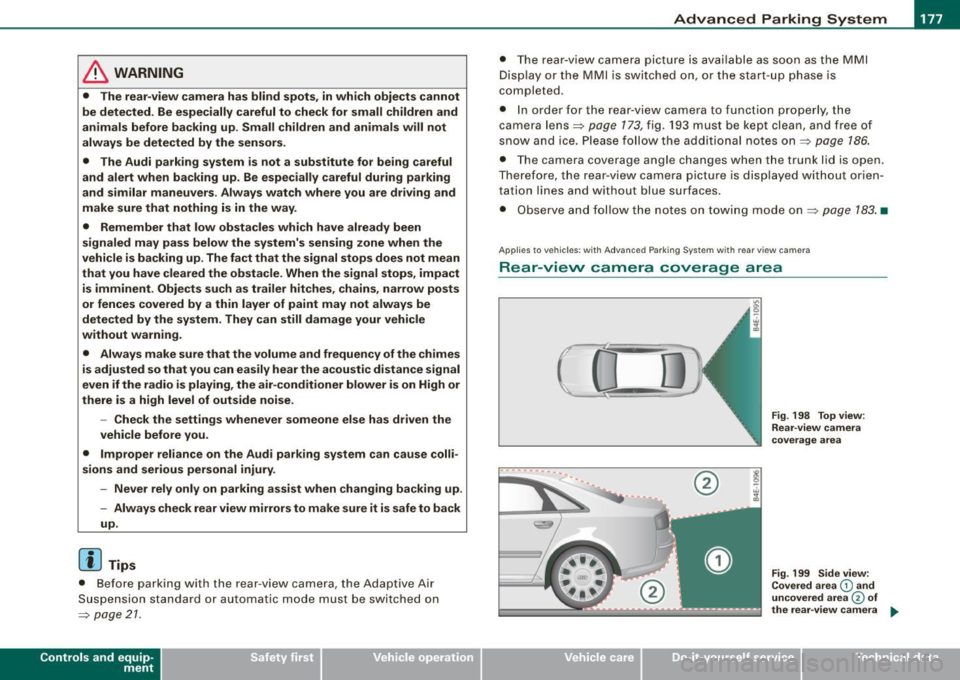
A pplie s to veh ic les : w it h Adva nce d Park in g Sy ste m w it h re ar view c amera
Rear -view camera coverage area
0
-- ·---.... __ --
Vehicle care I I
®
Fig . 198 Top view :
Re ar-v iew came ra
coverage area
Fig . 199 Side view:
Covered area
G) and
uncovered a rea
© of
the rea r-view camera ...
irechnical data
Page 183 of 408
____________________________________________ A_d_ v_ a_n_ c_ e_d _ P_a_ r_ k_ i_ n ..::g==-- S_ y=- s_t _e _m __ ffllll
& WA RNIN G (continu ed )
you should not u se the guide help line s to mea sur e dist ance -
danger of accid ent !
0 Note
In the MMI Display, the direct ion of travel of the vehicle rear is repre
sented depending on the steering wheel angle. The vehic le front
swings out more than the vehic le rear.
[ i ] Tips
• I n order for the rear -view camera to function properly, the
camera lens=>
page 173, fig. 193 must be kept clean, and free of
snow and ice . P lease follow the additional notes on=>
page 186 .
• The positions of the orientation lines/ surfaces are disp laced up
or down if the parking process is carried ou t with the rear -view
camera in Adaptive Air Suspension=>
page 21 dynamic or lift mode .
Therefore, the accuracy is reduced .•
Controls and equip
ment
Special parking situations
Ap plies to vehicles: with Advance d Pa rk ing Sys tem w ith rear view came ra
Parking next to obstacles
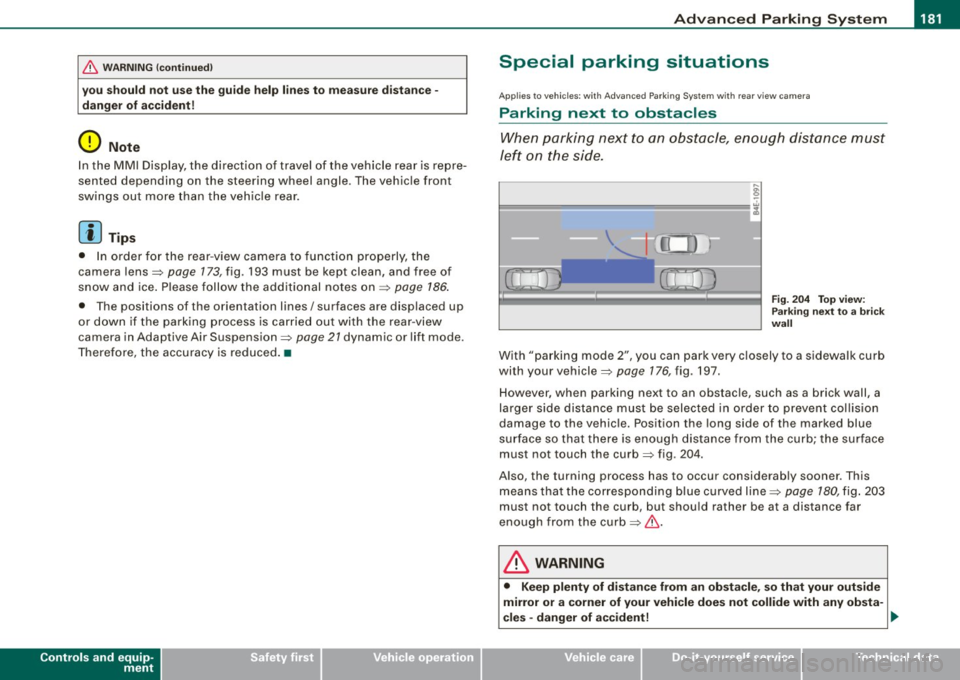
When parking next to an obstacle, enough distance must
left on the side.
Fig. 2 04 To p view:
P ark in g next t o a brick
w all
With "parking mode 2", you can park very c losely to a sidewalk curb
with your vehicle=>
page 176, fig. 197.
However, when parking next to an obstacle, such as a brick wall, a
larger side distance must be selected in o rder to prevent collision
damage to the vehicle. Position the long side of the marked blue
s u rface so that there is enoug h distance from the curb; the surface
must not touch the curb=> fig.
204.
Also, the turning process has to occur considerab ly sooner . This
means that the corresponding blue curved line=>
page 180, fig. 203
must not touch the curb, but shou ld rather be at a distance far
enough from the curb=>& .
& WARNING
• Keep plenty of di sta nce from an ob stacle , so that your out side
mirror or a corner of your vehi cle does not collide with any ob sta-
cle s -danger of a ccident!
~
I • •
Page 184 of 408
• ..__A_ d_v _ a_ n_c _e _ d_ P_ a_r _k _in ---== g'-- S...:y _ s_ t_ e_ m ___________________________________________ _
& WARNING (continued )
• The Audi parking system is not a substitute for being careful
and alert when backing up. Be especially careful during parking
and similar maneuvers . Always watch where you are driving and
make sure that nothing is in the way.
• When maneuvering or parking, do not only use the MMI Display
for orientation . Certain objects • depending on the screen resolu
tion -may not , or not entirely , be displayed ; for example trailer
hitches , chains , narrow posts , or fence s.
• Improper reliance on the Audi parking system can cause colli
sions and serious personal injury.
- Never rely only on parking assist when changing backing up .
- Always check rear view mirrors to make sure it is safe to ba ck
up. •
Applies to veh icles : wit h Ad vanced Pa rk ing System w ith rea r view c ame ra
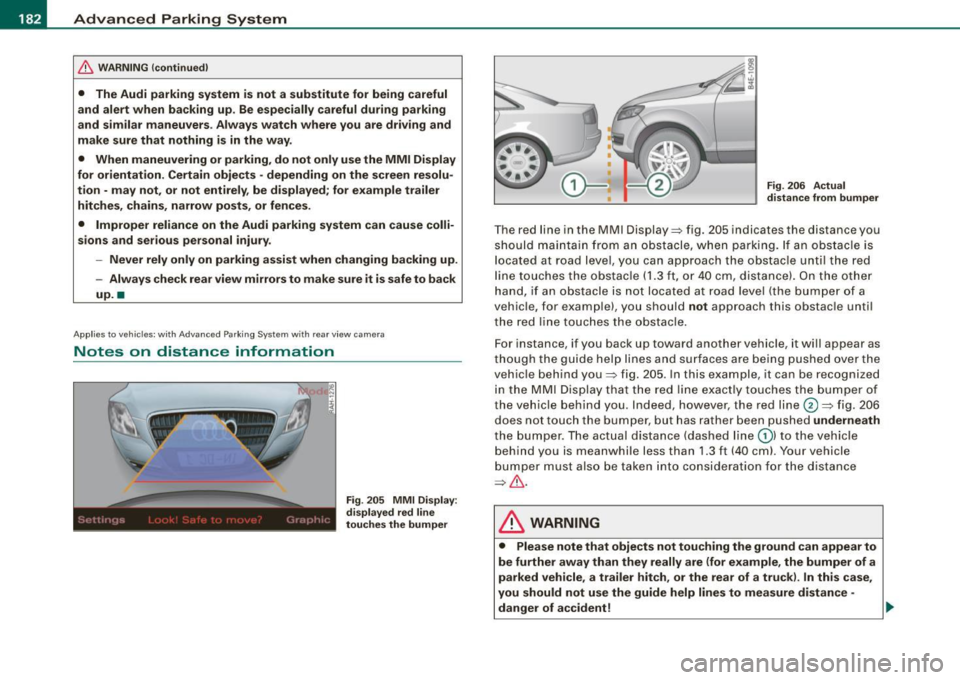
Notes on distance information
Fig . 205 MMI Displ ay:
di splayed red l ine
touche s the bumpe r F
ig . 206 Actu al
distan ce from bumpe r
The red line in the MMI Display~ fig. 205 indicates the distance you
should maintain from an obstacle, when parking. If an obs tac le is
l ocated at road l eve l, you can approach the obstacle unti l the red
l ine to uche s the obstac le ( 1.3
ft, or 4 0 cm , distance). On the o the r
h a n d, if an obstacle is no t locat ed a t road level (the bu mpe r of a
vehic le, for examp le), you should not approach this obstac le unti l
t h e red line touc hes the obstacle.
F or instance, if you back u p toward another vehicle, it will a ppear as
thou gh the gui de help line s and s urface s are be ing pushed over the
vehic le behind you~ fig. 205 . In this example, it can be reco gnized
in the M MI Display that t he re d l in e exac tly touc hes the bum per o f
th e ve hicle behind you . Ind eed, however, the red line@~ fig. 206
does not touch the bumper, b ut has rather been pushed underneath
t h e b umpe r. T h e actual d istance (dashed line G) l to the vehicle
behind you is meanwhile less than 1.3 ft ( 40 cm). Your vehicle
bu mper must als o be taken into co nsiderat ion for the d istance
~&. .
& WARNING
• Please note that objects not touch ing the ground can appear to
be further away than they really are (for example , the bumper of a
parked vehicle , a trailer hitch, or the rear of a truck) . In this case ,
you should not use the guide help lines to measure distance -
danger of accident ! .,_
Page 185 of 408
____________________________________________ A_d_ v_ a_n_ c_ e_d _ P_a_ r_ k_ i_ n ..::g==-- S_ y=- s_t _e _m __ lllll
& WARNING (continued)
• Maintain plenty of distance from an obstacle, so that your
outside mirror or a corner of your vehicle does not collide with any
obstacles -danger of accident!
• The Audi parking system is not a substitute for being careful
and alert when backing up. Be especially careful during parking
and similar maneuvers. Always watch where you are driving and
make sure that nothing is in the way.
• When maneuvering or parking , do not only use the MMI Display
for orientation. Certain objects -depending on the screen resolu
tion -may not, or not entirely, be displayed; for example trailer
hitches , chains, narrow posts, or fences . •
Appl ies to vehicles: with Advanced Park ing System with rear view came ra a nd a trailer hitch
i nsta lle d acco rding to fac tory s pecif ications
Towing hitch
For vehicles with a trailer hitch installed according to factory speci
fications, the rear acoustic parking sensors are not activated when
the vehicle is put in reverse gear while an electrical connection to
the trailer socket* is established. No distance alert occurs in the rear
~ page 173. The rear-view camera picture~ page 176 is displayed
wi thou t orienta tion lines and without blu e surfaces .•
Controls and equip
ment
Settings in the MMI
A pplies to v ehicles: with Advanc ed Park ing System w ith rear view camera
Adjusting the chimes -option 1
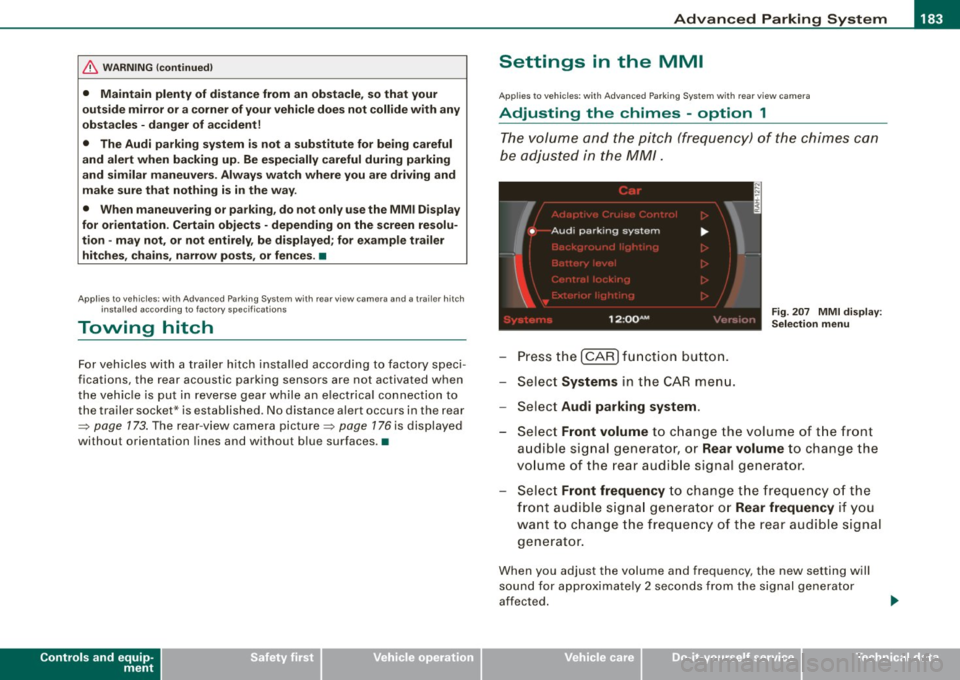
The volume and the pitch (frequency) of the chimes can
be adjusted in the MM/.
Press the [CAR] function button.
Select
Systems in the CAR menu.
- Select
Audi parking system .
Fig. 207 MMI display :
Selection menu
- Select Front volume to change the volume of the front
audible signal generator, or
Rear volume to change the
volume of the rear audible signal generator.
Select
Front frequency to change the frequency of the
front audible signal generator or
Rear frequency if you
want to change the frequency of the rear audible signal
generator.
When you adjust the volume and frequency, the new setting will
sound for approximately 2 seconds from the signal generator
affected.
I • •
Page 188 of 408
• .___A_ d_v_ a_ n_c_ e_ d_ P _a_r_k _i_ n -=g ,_ S-=y"- s_ t_ e_ m __________________________________________ _
"Off" sett ing
If you have set the off function, both the rear -view camera and the
visual display will be deac tiva ted . The acous tic pa rking assist
remains active .
[ i J Tip s
If you change the sett ings in the MM I, the new settings do not
become active unti l the parking assist is switched on aga in. •
Safety tips
Applie s to ve hic le s: wit h Advance d Par king Sy ste m wit h re ar vie w ca me ra
Acoustic parking system error message
If you hear a continuous tone for several seconds while the front
and back parking assist with visual display is activated and the LED
in the switch
P wA flashes when you engage the reverse gear , there is
a malfunction in the acoustic parking assist .
This system error is immediately output after: • Every manual activation via the switch
P wA ~ pag e 173,
• Reverse gear is engaged for the first time during an ign ition
cycle, or
• An error is detected during operation.
[ i J Tips
If the system reports an error, have an Audi dea ler or an authorized
dea le rship corr ect this system error. •
Applies to vehicles: w it h A dvanced Par king S ystem w it h rea r view ca mera
Rear-view camera tips
We recommend that you practice park ing with the rear -view camera
in a traffic -free location , or parking lot , to become familiar with the
system, the orientation lines, and their function . When doing this,
there should be good light and weather conditions .
I n the MM I Display, objects or vehicles appea r c loser or further away
if :
• you are driving in reverse g ear from a level surface onto an
incline, or a downward slope,
• you are driv ing in reverse gear toward protruding objects,
• the vehic le is carrying too much load in the rear.
T he accuracy of the orientation lines and b lue surfaces diminishes
if :
• the Adaptive Air Suspension is defective, or the dynamic or lift
mode is switched on,
• the rear -view camera does not provide a reliable image, for
example, in poor visibility condit ions or if the lens is d irty,
• the image on the screen is not visible due to sun glare and reflec
tion .
Car ing for the rear- vie w c amera l en s:
• Damp en the lens with a hous ehold a lcohol -based glass cleaner,
and c lean the lens w ith a dry cloth.
• Remove snow with a hand brush.
• Remove ice , preferably with de -icing spray~
0.
ln. WARNING
• The rear-view ca m era doe s not replace the view to the rear and
the rear view mirror s.
• The rea r-view camer a - be cause of t echni cal limit ation s - does
not show the ent ire area behind the vehicle
~ page 17 7, fig. 199. ~
Page 203 of 408
__________________________________________________ D _r_iv _ in_ g~ S_ a_f _e _l_ y __ llll
Important things to do before driving
Safety is everybody's job! Vehicle and occupant safety
always depends on the informed and careful driver.
For your safety and the safety of your passengers, before
driving always:
-Make sure that all lights and signals are operat ing
correctly.
- Make sure that the tire pressure is correct.
- Make sure that all windows are clean and afford good
visibility to the outside.
- Secure all luggage and other items carefully~
page 109.
-Make sure that noth ing can interfere w ith the pedals.
- Adjust front seat, head restraint and mirrors correctly for your height .
- Instruct passengers to adjust the head restraints
according to their height.
- Make sure to use the right ch ild restraint correctly to
protect children ~
page 245, "Child Safety ".
- Sit properly in your seat and make sure that your passen
gers do the same~
page 86, "General recommenda
tions".
- Fasten your safety belt and wear it p roperly. Also instruct
your passengers to fasten the ir safety belts properly
~ page 217. •
Controls and equip
ment Safety first
Vehicle operation
What impairs driving safety?
Safe driving is directly related to the condition of the
vehicle, the driver as well as the driver's ability to concen
trate on the road without being distracted.
The driver is responsible for the safety of the vehicle and all
of its occupants. If your ability to drive is impaired, safety
risks for everybody in the vehicle increase and you also
become a hazard to everyone else on the road ~& .There
fore:
Do not let yourself be distracted by passengers or by
using a cellular telephone .
NEVER drive when your driving ability is impaired (by
medications, alcohol, drugs, etc.).
- Observe all traffic laws, rules of the road and speed limits
and plain common sense .
- ALWAYS adjust your speed to road, traffic and weather
conditions.
- Take frequent breaks on long trips. Do not drive for more
than two hours at a stretch.
- Do NOT drive when you are tired, under pressure or when
you are stressed .
& WARNING
Impaired driving safety increases the risk of serious personal
injury and death whenever a vehicle is being used. •
Vehicle care Do-it-yourself service Technical data
Page 286 of 408

___ T_ r _a_ il_e _r_ t_ o_ vv_ in__... g,_ __________________________________________________ _
Trailer towing
Driving with a trailer
General information
Your Audi was designed primarily for passenger transpor
tation.
If you plan to tow a trailer, please remember that the additional load
wi ll affect durability, economy and performance.
Trai ler towing not on ly p laces more stress on the vehicle, it a lso ca lls
for more concentration from the driver.
For this reason, always fol low the operating and driving instructions
provided and use common sense.
0 Note
If you are going to tow a trai ler, you must activate the trailer opera
tion mode =>
page 192, "Towing a Trailer".
Technical requirements
Tra iler hitch
Use a weight-carrying hitch conforming to the gross trailer weight .
The hitch must be suitable for your vehicle and trailer and must be
mounted secure ly on the ve hicle's chass is at a
technically sound
location. Use only a trailer hitch with a removable ball mount.
Always check with the trai ler hitch manufacturer to make sure that
you are using the correct hitch .
Do not use a bump er hit ch.
The hitch must be installed in such a way tha t it does not interfere
with the impact-absorbing bumper system. No modifications should be made to the vehic le exhaust and brake systems. From time to time, check that all hitch mounting bolts remain securely
fastened.
When you are no
t towing a trailer, remove the traile r hitch ball
mount. This prevents the hitch from causing damage shou ld your
vehic le be struck from behind=>& .
Traile r br akes
If your trailer is equipped with a braking system, check to be sure
that it conforms to al l regu lations .
The trai ler hydraulic brake system must no t be direct ly connected to
the vehicle's hydraulic brake system.
S afet y c hains
Always use safety chains between your vehicle and the trailer.
Trailer light s
Trailer lights must meet all regulations. Be sure to check with your
Audi dealer for correc t wiring, swi tches and relays .
Mirrors
If you are unable to see the traf fic behind you using the regu lar
outside mirrors, then you
must install extended mirrors. It is impor
tant that you
always have c lear vision to the rear.
& WARNING
After rem oving the tr aile r hitch , do not store it in your vehi cle. In
ca se of sudde n braking , the hit ch co uld fl y for ward and injure you
or your p asseng ers. a
Page 296 of 408
-~_C_ l_ e _a _n_ in_g=- a _n_d__, p,__ ro_ t_e _c_ t_ i_o _n _____________________________________________ _
Plastic and vinyl
Plastic needs special care.
Use a clean, damp cloth or sponge to remove dust and light surface
dirt. For other soil, use a lukewarm all -purpose cleaning solution or
a mild saddle soap for vinyl trim. Remove water spots and traces of
soap with a clean, damp cloth or sponge . Use a clean, soft cloth to
rub dry .
Grease, tar or oil stains can be removed with a clean cloth or sponge
soaked with all-purpose cleaner or with a solvent designed espe
cially to clean vinyl.
Occasionally apply a colorless vinyl or leather preservative to retain
the material's luster and pliability.
& WARNING
Always read and heed all WARNINGS and other information
~ page290. •
Aluminum trim
Use only neutral-pH products to remove spots and deposits from
aluminum surfaces. Chrome care products and alkaline cleaners
will attack aluminum surfaces and can damage them over time.
& WARNING
Always read and heed all WARNINGS and other information
~ page290 .•
Touch-up paint
Minor paint damages should be touched up immediately.
-Use either a touch -up paint stick or spray paint to cover
minor scratches and nicks.
Your Audi dealer has touch-up paint for minor scratches and stone
chips . Scratches should be touched up soon after they occur to
prevent corrosion.
If a spot starts to rust, however, a simple touch-up job will not be
enough. The affected surface must be sanded smooth and coated
with an anti-rust primer before the painted finish can be restored.
The number for the original vehicle paint can be found on the
vehicle identification label~
page 376 .
& WARNING
Always read and heed all WARNINGS and other information
~ page290.•
Windows
Clear vision to all sides.
Clean all windows regularly to remove road film and car
wash wax buildup.
- Remove snow from windows using a brush.
- Use a plastic ice scraper to remove ice from windows and
mirrors.
- Remove other residue on the windows with a spray-on
glass cleaner.
- Wipe the windows dry with a clean piece of cloth or
kitchen paper towel.
Page 297 of 408
_____________________________________________ C_ l_ e _a_ n_ in_ g_a _ n_d_ p_ r_ o_ t _e_ c_t _io _ n __ _
•
The best way to remove snow from windows and mirrors is to use a
brush . Use a non -abrasive
pla stic ice scraper -better still, a spray
deicer -to remove
ice from w indows and mirrors .
Oil, grease or silicone residue can be removed with
glas s cleaner or
silicone remover . However, wax residue requires the use of a
specially formulated solvent. Please contact your Audi dealer for
advice on safe products for wax remova l.
Windows should also be c leaned on the inside at regular interva ls .
Never dry windows with the same chamois that you use to dry
painted surfaces . Wax residue on the chamois can impa ir v ision
through the windows.
& WARNING
• Alway s read and heed all WARNINGS and other information
=> page 2 90.
• The wind shield mu st not be treated with water -repellent mat e
rial s. They c an in crease glare u nder poor visibilit y condition s such
as wetne ss , darkne ss , or when t he sun is low on the horizon. In
a ddition , they can cau se the win d sh ield wiper s to chatter .
0 Note
• Never use warm or hot water to remove snow and ice from
windows and mirrors . Th is cou ld cause the glass to crack.
• To prevent damage to the wires of the rear defogger, do not p lace
any adhesive stickers on the inside of the rear window over the
wires.
• To he lp prevent dirt from scratching the window, always scrape
in a forward direction -pushing the scraper away from you -never
back and forth. •
Weatherstrips
Complete car care includes the we atherstrips as well .
Apply a suitable rubbe r con ditioner to the weatherstr ips
from t ime to t ime.
To be able sea l properly, the weatherstrips around the hood, doors,
rear lid, etc . must remain pliable. Spray the weatherstrips with sili
cone or coat them with ta lcum powder or glycer ine to retain the
flexibility of the rubber and to protect them against freezing in the
winte r.
& WARNING
Alway s read and heed all WARNING S and other information
=> page 290.
[ i ] Tip s
Keep si licone sprays off the windshield to avoid wiper smear in
rain .•
Cast (light) alloy wheels
Cast (light) alloy wheels require special care.
- Wash the wheels w ith a sponge or hose b rush every
other week.
For de ep cle aning afterwards, use only a dedicat ed
acid
free cast al loy whee l c leaner.
R ub a coat of
liquid wax onto the rims ever y thr ee mon th .
Be sure t o reach and t reat a ll pa rts of t he r im.
To preserve the decorative appearance of the cast al loy wheels,
some special care is necessary . In addition to road dirt and salt,
Vehicle care I t •