turn signal AUDI S8 2010 User Guide
[x] Cancel search | Manufacturer: AUDI, Model Year: 2010, Model line: S8, Model: AUDI S8 2010Pages: 384, PDF Size: 90.95 MB
Page 144 of 384
lll'L_!_A~u~d~i~l!:!a~n~e '...:a~s~s:!:is~t ~--------------------------------------------
Aud i Lane assist
Lane assist
Applies to veh icles : w ith lane assist
Description
Lane assist helps you keep your vehicle in your lane.
Lane assist uses a camera to detect lane boundary lines. If the system
detects that your vehicle is about to leave a lane boundary line, the
steering wheel
vibrates to alert the driver. If lane assist detects
boundary lines on both sides o f the veh icle's lane, the system enters
act ive standby mode, which is indicated by t he gree n indicator light
/: on the instrument cluster .
If the system is in active standby mode and the turn signal is acti
vated before driving over the boundary line , the warning does not
occur sinc e th e system allows for in tention al lane changes.
The system is designed for driving on freeways and expanded high
ways and th us works only at speeds of 40 mph (65 km/h) or more.
& WARNING
• Lane assist will not keep your vehicle in your lane. The system
only warns the driver when the vehicle is leaving the lane. The
driver is always responsible for keeping the vehicle in the lane.
• The camera is not able to detect all lane boundary lines and in
some cases might also detect lane structures or objects as
boundary lines. This can lead to incorrect warnings or warnings
that fail to go off at all.
• The camera's visibility can be impaired by vehicles ahead of
you, for instance, or by rain, snow, heavy spray or light shining
into the camera lens. This can cause lane assist to fail to detect
boundary lines. •
Applies to veh icles: wit h lane assist
Activating and deactivating
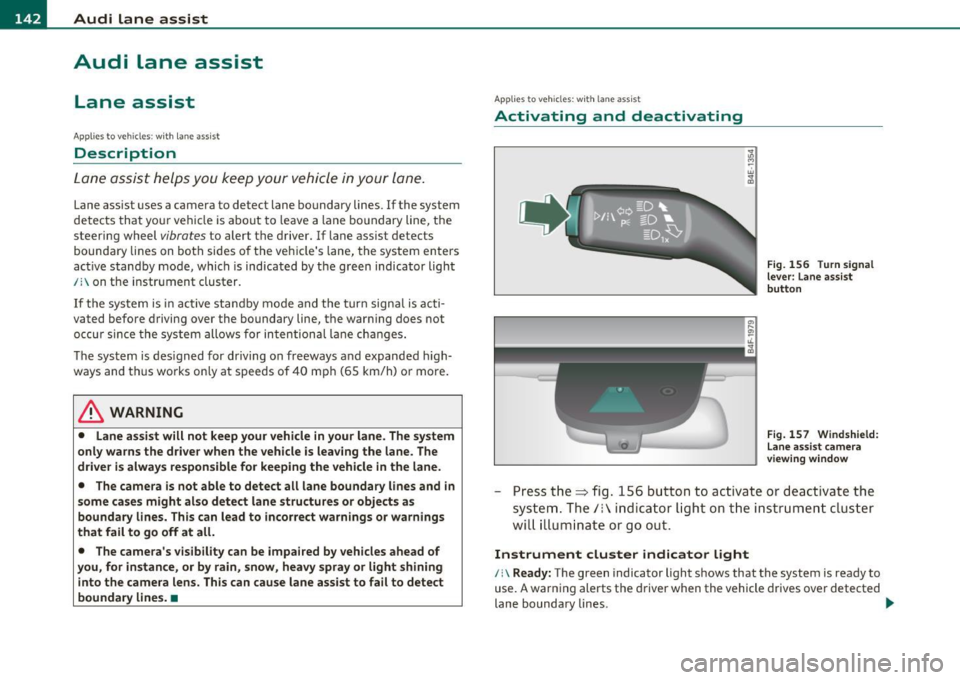
Fig. 156 Turn signal
lever: Lane assist
button
Fig. 157 Windshield:
Lane assist camera
viewing window
-Press the=> fig . 156 button to act ivate or deactivate the
system. The/: ind icator light o n the instrument cluster
will illumi nate or go out.
Instrument cluster indicator light
/:\Ready: The green indicator light shows that the system is ready to
use. A warning alerts the driver when the vehicle drives over detected
lane boundary lines . -.,
Page 147 of 384

_________________________________________________ A_ u _ d_ i_ s_ id_ e_ a _ s_s _ i_s _t _ __.fflll
Audi side assist
Lane Change Assistant
Applies to veh icles : with s ide ass ist
Descr iption
The side assist helps you when changing lanes.
l Audi AS J
Fig. 158 Rear
bumper: Position of
radar sensors (not
visible on outside)
Fig. 159 Signal light
on the outside mirror·
driver's side
Side ass ist uses radar sensors (not visible on outside)~ fig. 158 to
help the driver check blind spots, and see what is happening in traffic
behind the vehicle~
page 146, fig. 161.
Signal lights are built into both outside mirrors~ fig. 159. The signal
light on the left outs ide mirror assists when moving over into the left
Contro ls a nd e quip
m en t Vehicle
OP-eration
lane and the signal light on the right outside mirror assists when
moving over into the right lane.
Th e signal light comes on to tell you that side assist has detected a
vehicle on that side and that the position of this other vehicle should be taken into account if you were to change lanes. This is called the
informational stage signal~ page 147. The informational stage
signal is designed so that you notice it only when you are looking in
the outside mirror .
When you activate the turn s ignal and side assist detects a vehicle in
a notab le location, the corresponding signal on the outside mirror
flashes briefly and brightly several times. This is the
alert stage
signal ~
page 147. •
App lie s to ve hicle s: with sid e ass ist
Activating and deactivating
Activating
Fig. 160 Cockpit : Side
assist button
- Press the button~ fig. 160. The indicator on the button
lights up. ..,
Vehicle care Do-it-yourselt service iTechnical data
Page 148 of 384
lffll.___A_ u_ d_i_ s_ id_ e_ a_s _s_ i_ s _t _________________________________________________ _
Deactivating
- Press the button again . T he indicator light o n the b utton
goes out.
The system works at speeds faster tha n 19 mph (30 km/h) .
& WARNING
• Imp roper reliance on the side assist system can cause collisions
and seriou s per sonal injury:
- Never rely only on s ide ass ist when changing lanes.
- Alway s che ck rear view mirror s to m ake sure that it i s safe to
change lanes.
• Side a ssist cannot detect all vehicles under all condition s
danger of accident!
• Side a ssi st cannot detect vehicle s in time to alert you when
they approach from beh ind at very high speed, or fall drop back
very quickly .
• The radar sen sor's
v is ion can be reduced or entirely blocked by
rain , snow, and heavy spray . This can result in side as sis t not
adequately detecting vehicle s or , in some cases, not detecting
them at a ll. Alway s keep an eye on the dir ection you are traveling
and the rele vant area around the vehicle.
• Please note that side assist indicates there are approaching
vehicles , or vehicles in you r blind spot, only after you r vehicle has
reached a driving speed of at lea st 19 mph (30 km/h).
• Side assist signal doe s not work around t ight corners (turning
radius less than 328 feet or 100 m ).
• Side assist is no replacement for the driver 's full attention . The
driver alone is respon sible for lane change s and s imilar driving
maneuvers. Always keep an eye on the direction you are traveling
and the relevant area around the vehicle.
0 Note
• T o ensure that you do not adversely affe ct s ide as sist , do not block
the area on the rear b umper where the radar sensors are located with
fo reign objects (such as st ic kers or b icycle ra cks).
• Make s ure that the signal light on the o utside mi rror is not
bloc ked by stic ke rs or othe r items.
[I) Tips
• Side ass ist automatica lly deac tivates if it detects that the radar
sensors are blocked=>
page 152. The indicator light on the button
goes out.
• Th e area on the bumper w he re the radar sensors are located must
c ons istent ly rema in free of snow, i ce, a nd he avy soiling so that s ide
assist can function properly. Follow the add itiona l notes on
=>page 1 5 2.
• Add it iona l tinting on t he front side windows can ma ke it harder to
see and correctly u nders tand the s ig nal light on the outs ide mirro r.
• For Decla ration of Compliance to United States FCC and Industry
Canada regulations=>
page 364. •
Applies to vehicl es : w it h side ass ist
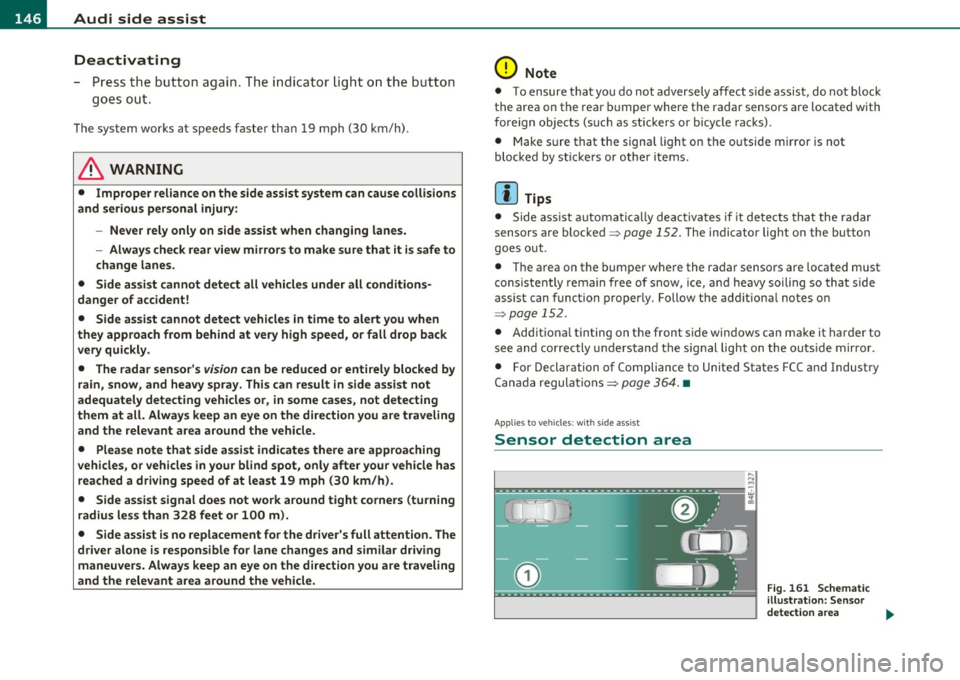
Sensor detection area
, D i
Fig. 161 S chem ati c
illustrat io n : S ensor
detection are a
~
Page 149 of 384

_________________________________________________ A_ u_d _ i_ s_i d_ e_ a_s _s_ i_s _t __ l!'II
The detection~ page 146, fig. 161 of the radar sensor detection
area is made up of :
• the approach area (light green area)
(D, about 230 feet (70 m)
behind the vehicle, and
• the "blind spot" (dark green area)@.
The radar sensors cover the adjacent left and right lanes. Other lanes are
not cove red by the radar sensors.
rn Tip s
Side assist does not measure act ual lane width. The system assumes
a fixed lane w idth. Detection in the left and right lanes is based on
this assumed lane w idth. When driving on narrow roads or when
driving to the left or right of the center of a travel lane, it is possible
that vehicles will be detected that are
not in the lane next to the lane
you are using~
page 151. •
Applie s to ve hicl es: w ith s id e a ssist
Operation
Side assist compares the distance and difference in speed of detected
vehicles with the speed of your vehicle . Whenever the difference in
speed and distance is registered as notab le if you were to change
lanes, a signa l light appears on the respect ive m irror .
The signa l can light up if you are passed by a vehicle or if you are
passing another vehicle.
If you pass another vehicle slowly (d ifference in speed less than 9
mph, or 15 km/h) , the signa l light will come on as soon as the other
vehicle is in your blind spot and is detected by side ass ist . When the
difference in speed is greater, the signal light wi ll not come on. •
Controls and equip
ment Safety first
A
pp lies to ve hicles : w ith side assist
Informational and alert stage signals
S ide assis t has two signa l st ages:
• the informational stage signal, and
• t he ale rt stage signal.
S ide assist helps you by using the appropr iate s ignal stage,
depending on whether or not you have activated the turn signal, and
thus have indicated that you are or are not changing lanes .
Informat ional stage signal
As long as you have not activated the turn signal, side assist informs
you of detected vehicles that are registered as being in a notable loca
tion if you were to change lanes . Wheneve r the detected vehicle 's
difference in speed and distance is registered by side assist as
notable, the signal l ight on the respective m irror produces muted
illumination .
Th e br ightness of the info rmationa l stage signal is designed no t to be
as intense, so that it does not interfere w ith your v iew of the road
when you are driving and have no in tention of chang ing lanes. When
you look in the outside mirror, you can clearly see the informat ional
stage signal.
Alert stage signal
Whe n you act ivate the tu rn s ignal, a nd side assist has de tected a
vehicle in a notable location on that particular side, the signal light on
this side mirro r flashes b rightly. The repeated brief and bright
flash ing of the alert stage signal reminds you to carefully check
traffic to the rear in the outside mirror and over your shoulder, so t hat
you can safely complete the lane change~
& in "Safety tips" on
page 152.
rn Tips
The brightness of the signa l light on the outside mirrors can be
adjusted with the MMI
~ page 150. •
Vehicle care Technical data
Page 150 of 384
ffl..__A_ u_ d_ i_ s_ i_ d_ e _ a_ s_s _i_s _t _________________________________________________ _
Applie s to vehi cles : w ith si de assist
Driving situation: Fast approaching
vehicles
l!l
~----- "'
i
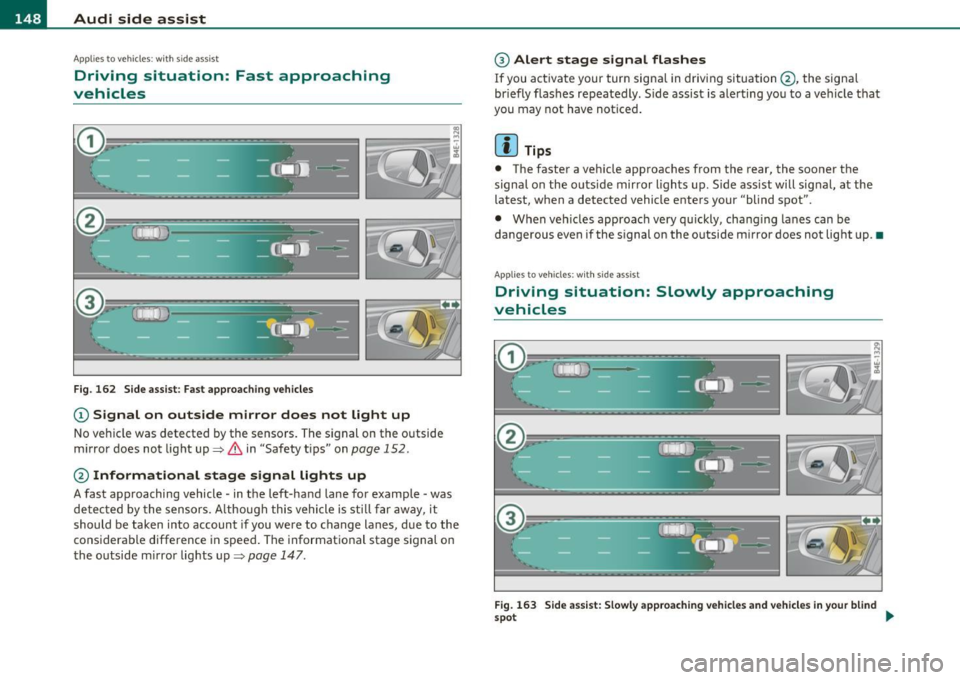
Fig. 162 Side assist: Fast approaching vehicles
(D Signal on outside mirror does not light up
No veh icle was detected by the sensors. The signal on the outside
mirror does not light up~
& in "Safety tips" on page 152.
@ Informational stage signal lights up
A fast approaching vehicle· in the left-hand lane for example· was
detected by the sensors. A lthough this vehicle is stil l far away, it
should be taken into account if you were to change lanes, due to the
considerable difference in speed. The informational stage signal on
the outside m irror lights up~
page 147.
@ Alert stage signal flashes
If you activate your turn signal in driving situation@, the signal
br iefly flashes repeatedly . Side assist is alerting you to a veh icle that
you may not have noticed.
[I] Tips
• The faster a vehicle approaches from the rear, the sooner the
signa l on the outs ide mirror lights up. S ide assist will signal, at the
latest, when a detected vehicle enters your "blind spot".
• When vehicles approach very qu ickly, chang ing lanes can be
dangerous even if the s ignal on the outside m irror does not light up. •
Applies to vehicles : w ith si de assist
Driving situation: Slowly approaching
vehicles
Fig. 163 Side assist: Slowly approach ing vehicles and vehicles in your blind
spo t ..
Page 152 of 384

.,L.....:.A::::::: U:.:d::..:.. i .:::S :..:.id ::.: e:...:: a:.:S :: S:.: i:.: S :..:t :._ ______________________________________________ _
Applie s to vehi cles : w ith si de assist
Driving situation: Vehicles dropping back
quickly
Fig. 165 Side assist: Vehicles dropping back quickly
(D Signal on outside mirror does not light up
The vehicle just passed has not yet been detected by side assist. The
signal on the outside mirror does not light up~
& in "Safety tips" on
page 152.
@ Signal on outside mirror does not light up
The vehicle dropping back quickly on the right ( difference in speed of
more tha n 9 mph, or 15 km/h) has been detected by side assist, but
is not cons idered notable in the event of a lane change, because it is
dropping back so qu ickly . The signal on the outside m irror does not
light up~
& in "Safety tips" on page 152 .
@ Signal on outside mirror does not light up
If you activate your turn signal in driving situation @, the signal still
does not light up on the outside mirror~ &, in "Safety tips" o n
page 152. •
Applies to vehicles : w it h si de ass ist
MMI settings
The basic brightness setting of the signal on the outside
mirror can be adjusted via the MMI.
Select: Function button [CAR]> Systems > Audi side assist >
Warning lamp: brightness.
- Rotate the control knob to adjust the displayed brightness
of the signal light on the outside mirrors.
The brightness of the signa l light for both the informational and alert
stages is automatically adjusted to ambient light conditions. In addi
t ion, you can adjust the
basic brightness separately, via the bright
ness function.
Whi le making the adjustment, the new brightness setting is
disp layed briefly . The brightness displayed is that of the informa
tional stage signal. The alert stage signal brightness is linked to the
informationa l stage signal brightness.
The inform ational stage signa l brightness should be adjusted so that
you notice the signal illumination when you look in the outside
mirror, but not when you look forward through the windshield.
In very dark or light surroundings, the automatic brightness setting
adjusts signa l light brightness to maximum or minimum intensity, as
needed. In circumstances such as these, you may not notice any
change in the brightness on the outs ide mirror when adjust ing the
basic brightness.
You may not not ice the change until lighting conditions are normal
again.
Page 153 of 384
![AUDI S8 2010 User Guide Audi side assist -_______________ ____.
(]] Tips
• Side assist is not active when the basic brightness is adjusted. The
signal light comes on br iefly to help you make the adju](/img/6/57617/w960_57617-152.png "AUDI S8 2010 User Guide Audi side assist -_______________ ____.
(]] Tips
• Side assist is not active when the basic brightness is adjusted. The
signal light comes on br iefly to help you make the adju")
Audi side assist -_______________ ____.
(]] Tips
• Side assist is not active when the basic brightness is adjusted. The
signal light comes on br iefly to help you make the adjustment.
• Your settings are automat ically stored and assigned to the remote
control key being used .•
A ppli es to ve hicles : w it h s ide ass ist
General information
Side assist has limits and cannot detect vehicles under all road and
weather conditions . Please remember system limitations and n ever
re ly on the system, especially when :
• driving through curves=>
page 151,
• lanes are of different widths=> page 151. •
Ap plies to vehicles: w ith sid e assist
When driving through curves
Side assist cannot detect vehicles in curves with a turning radius of
less than 328 feet (100 m).
When driving through a curve, it is possible that side assist may
register a vehicle two lanes over, and the signal on the outside mirror
will light up.•
Con tro ls a nd e quip
m en t Vehicle
OP-eration
Applies to vehicles : with side assist
Lane width
Fig. 166 Lanes of a
n orma l width are in
detection area
Fig . 167 Narrow
lanes: Side assist may
detect vehicles two
lanes away
Side assist's detection area is designed to cover lanes of standard
w idth to the left and rig ht of your travel lane, depending on whether
you drive in the center of your lane or closer to the edge.
If you drive in narrow lanes, side assist's detectio n area may also
include other lanes -especially if you tend to drive on t he edge of your
lane => fig. 167. Under these conditions, vehicl es can also be
detected that are two lanes away, and side assist then could switch
between the informationa l and warning stage signals .
When driving in very wide lanes, vehicles in the adjacent lane may not
be detected because they are not inside the detection area .•
Vehicle care Do-it-yourselt service iTechnical data
Page 154 of 384

-Audi side assist •m ___________________ _
Notes
Applies to vehicles: w it h side ass ist
Messages in instrument cluster display
If side assist turns off automatically, the indicator light on the button
w ill go out and you w ill see a message in the instrument cluster
display:
Audi s ide ass ist not available: sensors possibly blocked
T he side ass ist senso rs a re bu ilt into the rear bumpe r on the left and
r ight (not v is ible on the outside)=>
page 145, fig. 158 . To ensu re
that yo u do not adversely affect the way side assist functions, foreign
objects (such as st ickers or bicycle racks) should not be attached to
the area on t he rear bumper whe re the sensors are located. If side
ass ist f unctions are adve rsely affec ted, you will see this mes sage in
the instrument cluster d isp lay. Remove anyth ing that may be
blo ckin g the sensors .
If no vehicle is detected for a longer period of t ime w hile driving, side
assist w ill also sw itch
off automatica lly .
Audi s ide ass ist currently not available
If the re is a tempo rary p ro blem (such as the vehicle 's ba tte ry c har ge
being low), s ide assist ca nnot be act ivated temporar ily .
Audi side a ssist: system fault
Have the system checked by an authori zed Audi dealer or qualified
work sho p.•
Ap plies to ve hicles : w it h sid e ass ist
Safety tips
The s ide assist detection may be limited when driving aro und narrow
s tr eet corners, on hilly st ree ts, an d un der poo r wea ther condit ions. It is possib
le that the radar sensors may also detect other objects,
s uch a s high or s taggere d guardrails.
Side assis t does not measure ac tual lane wid th . The system assumes
a fixed la ne w idth . Detection in the left and rig ht lanes is based on
th is assu m ed lane w id th . W hen drivi ng on nar row ro ads or w hen
driving to the left or r ight of the cente r of a t ravel lane, it is possib le
th at vehicles will be de te ct ed tha t are
no t in the la ne next to t he lane
you are us ing.
& WARNING
• Improper reliance on the side assist system can cause collisions
and serious personal injury:
-Never rely only on s ide assist when changing lanes.
- Always check rear view mirrors to make sure that it is safe to
change lanes.
• Side assist cannot detect all vehicles under all conditions
danger of accident!
• Side assist cannot detect vehicles in time to alert you when
they approach from behind at very high speed , or fall drop back
very quickly .
• The radar sensor's
vision can be reduced or entirely blocked by
rain, snow, and heavy spray. This can result in side assist not
adequately detecting vehicles or, in some cases , not detecting
them at all . Always keep an eye on the direction you are traveling
and the relevant area around the vehicle .
• Please note that side assist indicates there are approaching
vehicles , or vehicles in your blind spot , only after your vehicle has
reached a driving speed of at least 19 mph (30 km/h) .
• Side assist signal does not work around tight corners (turning
radius less than 328 feet, or 100 m) .
• Side assist is no replacement for the driver's full attention . The
driv er alone is responsible for lane changes and similar driving
maneuvers . Always keep an eye on the direction you are traveling
and the relevant area around the vehicle .
~
Page 161 of 384

______________________________________________ A_ u_ t_ o_ m_ a_ t_ ic_ t_r _a _n_ s_m _ i_s _s_ i_o _n _ ___._
Appli es to ve hic les : wi th tip tro nic -st ee rin g w he el
Steering wheel with tiptronic ®
The shift buttons on the steering wheel allow the driver to
shift gears manually.
Fig. 173 Steering
wheel: S hift buttons
-To downshift, touch the button on the left 0-
- To upshift, touch the button on the right G).
The shift b uttons are activated when the selector lever is in D, Sor in
the manual shi ft program (tiptronic) .
Of course, you can continue to use the manual shift program with the
selector lever on the center console .•
Fail-safe mode
If tiptronic® suffers a malfunction, the foil-safe mode
maintains minimum driveobility .
In the event of particular system malfunctions, the automatic trans
mission switches to the fail-safe mode. This is signalled by all the
segments in the display illuminating or going out.
You can continue to move the selector lever to all positions . The
man ual shift prog ram (tiptronic) is switched off in the fail-safe mode.
Con tro ls a nd e quip
m en t Vehicle
OP-eration
In selector lever positions D and Sand in the manual shift program,
the t ransm ission remains in 3rd gea r if 1st, 2nd or 3rd gear was
engaged previously. The transm ission remains in 5th gear, if 4th, 5th
or 6th gear was engaged previously.
T he next time you dr ive off or start the engine, 3rd gear is engaged.
You can cont inue to use reverse gear . But the electronic lockout for
reve rse gear is turned off.
0 Note
If the transmission switches to fail -safe mode, you should take the
vehicle to an authorized Audi dealership as soon as possible to have
the cond ition corrected .•
Emergency release for selecto r Lever
If the vehicle's power supply foils, the selector lever con
be released in on emergency .
Fig. 174 Remo ve the
as htray inse rt
~
Vehicle care Do-it-yourselt service iTechnical data
Page 164 of 384

IIII.___A_ d_v_ a_ n _ c_e _d _ P_ a_ rk_ in--= g'-S -=- y_s_t_ e_ m _________________________________________ _
- Press the switch P1JJ! in the center console=:, page 161,
fig. 177 to activate the Audi parking system manually.
Activation of the acoustic parking system is confirmed by
a brief acknowledgement sound. The indicator light in the
switch lights up.
Deactivation
- If you drive forwards faster than approx. 6 mph (10 km/h), or
- if you switch the ignition off, the entire acoustic parking
assist is automatically deactivated, or
- you can press the switch
Pw! in the center console
=:, page 161, fig. 177 to deactivate the Audi parking
system. The indicator light in the switch goes out.
You have to turn on the acoustic parking assist manually if you wish
to park the vehicle forwards or if you wish to approach an obstacle
forwards and want a distance warning.
The range at which the sensors start to measure is
about :
Front
Rear
Warning tones
side
center
side
center 3 ft (0.90 m)
4 ft (1.20 m)
2 ft (0.60 m)
5.2 ft (1.60 m)
Distance warning is given by chimes which are generated by a signal
generator . The volume and the pitch of the chimes can be adjusted in
the MMI =>
page 171.
Mute
In the case of vehicles with automatic transmission, an acoustic
distance warning is discontinued when the transmission selector lever is moved to the P position
. However, the system remains active.
As soon as the selector lever is moved from the
P position and the
vehicle approaches an obstacle, the acoustic distance warning
resumes.
Driving forward/backward
Distance warning when driving forward/backward is based on detec
tion of an obstacle in the range of the parking assist . As the distance
decreases, the time interval between the audible tones becomes
shorter.
When the distance is less than approx. 1 ft (0.30 m), the tone
becomes continuous. At this point you should stop backing up or
driving forward .
If the distance to an obstacle remains the same, the volume of the
distance warning is gradually reduced after about
4 seconds (does
not apply to the zone for the continuous tone). If you start to
approach the detected obstacle again, the distance warning will
sound at the normal volume again.
Parking
When you select another gear when parking (e.g. reverse/forward),
the warning tones are temporarily suppressed, but the visual display
remains on the MMI display. If you start approaching a detected
obstacle again, the distance warning will sound at the normal volume
again.
Visual display
The segments on the MMI display indicate a change in the distance
between the vehicle and an obstacle . The number of segments
displayed depends on the obstacles in front of or behind the vehicle.
The closer the vehicle comes to the obstacle, the closer the segments
approach the vehicle=>
page 161, fig. 178. When the segment
before last is displayed, the vehicle has reached the collision zone. At
this point you should stop backing up or driving forward=>& .
The image in the visual display can be switched off on the MMI display
=>
page 173 . The acoustic distance warning remains active. .,,