ECO mode AUDI S8 2010 Owner's Manual
[x] Cancel search | Manufacturer: AUDI, Model Year: 2010, Model line: S8, Model: AUDI S8 2010Pages: 384, PDF Size: 90.95 MB
Page 125 of 384

On the road -
----------------
Electromechanical parking brake
Operation
The electromechanical parking brake replaces the hand
brake.
Fig. 135 Center
console: Parking brake
- Pull the switch to apply the parking brake~ fig. 135. The
indicator light in the switch will come on.
- Step on the brake pedal or the accelerator pedal and press
the switch at the same time to release the parking brake.
The indicator light in the switch will go out.
Your vehicle is equipped with an electromechanical parking brake
which replaces the handbrake. The parking brake is designed to
prevent the vehicle from rolling unintentionally.
In addition to the normal functions of a traditional hand brake, the
electromechanical parking brake provides various convenience and
safety functions.
Emergency brake
An emergency brake ensures that the vehicle can be slowed even if
the normal brakes fail~ page 125, "Emergency braking".
Controls and equip
ment Safety first
Indicator lights
•
If the parking brake is applied with the ignition turned on, the
indicator light in the instrument cluster (U.S. models:=.., Canadian
models: ©) and in the switch
«el) will come on.
• If the parking brake is applied with the ignition turned off, the
indicator light in the instrument cluster (U.S. models:=., Canadian
models: ©) and in the switch
«fl) will come on for about 30 seconds
and then go out.
& WARNING
If the vehicle is stationary and the transmission is engaged with
the engine running, the engine should not be speeded up (e.g.
manually from under the hood). Otherwise the vehicle will start to
move -you run the risk of an accident.
0 Note
If the warning/indicator light (U.S . models: BRAKE, Canadian models:
«I» ) flashes in the instrument cluster, there is a brake system
malfunction . By pressing the [CHECK! button, you can bring up a
driver message which explains the malfunction in more detail. If the
message
Parking brake ! Please contact workshop appears, there is
a parking brake malfunction which you should have repaired immedi
ately by an authorized dealership~ page 28.
[ i] Tips
• You can apply the parking brake at any time -even with the igni
tion turned off . The ignition must be turned on in order to release the
parking brake.
• Occasional noises when the parking brake is applied and released
are normal and are not a cause for concern.
• The parking brake goes through a self-test cycle at regular inter
vals -when the vehicle is parked. Any associated noises are normal. •
Vehicle care Technical data
Page 166 of 384

IIII.___A_ d_v_ a_ n _ c_e _d _ P_ a_ rk_ in--= g'-S -=- y_s_t_ e_ m _________________________________________ _
• Keep the sensors in the rear bumper and the rear-view camera lens
clean and free of snow and ice, so that the Aud i parking system can
work properly. Please follow the additional notes on=> page 173 . •
A pplie s to v eh icle s: w ith Adva nce d Park ing Sys tem with rear vie w c amera
Rear-view camera (Rear View)
The rear-view camera picture, appearing in the MMI
Display, shows the area behind the vehicle.
"-.J l
-
Fig. 179 Top view:
Parking mode 1
Fig . 180 Top view:
Parking mode 2
Parking mode
Two different parking modes are available for parking with the rear
view camera. The two different parking modes are denotes as
"parking mode 1" => page 166 and "parking mode 2" => page 167. "Parking mode
l" => fig . 179, for example, can be used to park in a
parking space or a parking garage=> page 166.
" Parking mode
2" => fig . 180, for example , can be used to (parallel)
park on the side of the road=> page 167.
" Parking mode l" appears by default in the MMI Display if the rear
view camera is activated=> page 161. You can switch to "parking
mode
2" by pressing the control button with the mode©
=> page 166, fig. 184 function. By repeatedly pressing the control
button with the
mode function, you can switch back and forth
between "park ing model" and "parking mode
2" .
Orientation lines and marked surfaces
Orientation lines and colored marked surfaces(:::::> page 166, fig. 183
or=> page 167, fig. 185) are projected into the rear-view camera
pictures, subject to the two different parking modes. These orienta
tion lines and surfaces offer aid when parking or maneuvering. The
orientat ion lines and surfaces refer to the height of a level driving
surface .
When the indicated or ientation lines and indicated blue surfaces
super impose veh icles or objects, at the latest, the respective distance
to the vehicles o r objects has become too short => page 170.
I f the trunk lid is open or if an electrical connection to the trailer
socket* is established => page 171, the orientation lines and marked
surfaces are not displayed .
I n the MMI you can preset which system is to be shown on the MMI
display => page 173:
• Visual d isplay,
• Rear-v iew camera picture,
• An automatic switch between visual display and rear-view camera,
or
• No picture.
Th e rear-view camera can be turned on and off in the MMI
=> page 173. The acoustic distance warning remains active.
Page 168 of 384

llffl..__A_ d _ v_a_ n_ c_e _d _ P_ a_ r_ k_ i _n_ g:- S_,,_ y_s _t _e _m ________________________________________ _
The rear-view camera section appearing in the MMI Display is approx
imately the same as the coverage area represented in=>
page 165,
fig. 181 or© in=> page 165, fig. 182. Objects located in the rear
view camera's uncovered area@=>
page 165, fig. 182 or in the close
vicinity of the bumper are not recognized .
& WARNING
Please note that objects not touching the ground can appear to be
further away than they really are (for example, the bumper of a
parked vehicle, a trailer hitch, or the rear of a truck). In this case,
you should not use the guide help lines to measure distance -
danger of accident! •
Applies to veh ic les : w ith Advan ced Parking System with rear v iew camera
Parking mode 1
"Parking mode 1" can aid when parking in a garage or
parking space, for example.
Fig. 183 MMI Display:
Aiming at the parking
spot by adjusting the
steering wheel angle Fig. 184 MMI Display:
Orienting the vehicle
with aid of the blue
surface
- Before parking , switch on the Adaptive Air Suspension
=> page 18 standard or automatic mode .
- Activate the Audi parking system=>
page 161. "Parking
mode 1"
=;, fig. 183 is displayed by default. Dynamic
orange orientation lines ® and a blue static surface ©
are projected into the rear-view camera picture.
- With the vehicle stationary, select the proper steering
wheel angle for the parking spot with the aid of the orange orientation lines.
- While driving in reverse gear, adjust the steering wheel
angle to fit the parking space with the aid of the orange
orientation lines =>
0.
- Align your vehicle corresponding to the blue surface. The
blue surface should be parallel to the parking spot lines
=> fig.
184.
© Blue surface
The surface behind the vehicle, identified by various shades of blue,
represents an extens ion of th e outer vehicle outline by approximately
16
ft (5 m) to the rear . The transitions of the blue surfa ces are
distanced approximately 3
ft (1 m), 6 ft (2 m), and 16 ft (5 m) away
from the vehicle. .,
Page 176 of 384

IIII.___A_ d_v_ a_ n _ c_e _d _ P_ a_ rk_ in--= g'-S -=- y_s_t_ e_ m _________________________________________ _
switch PwA flashes when you engage the reverse gear, there is a
ma lf u nct ion in the acous tic p arking ass ist.
T hi s system error is immediately output after:
• Every manua l activat ion via the switch
P '".li => page 161,
• Reverse gear is engaged for the first time duri ng an ignition cycle,
or
• An error is detected during operation .
(I] Tips
If the system reports an error, have an Audi dealer o r an authorized
dea lership correct this system error .•
A pplies to veh icles : wit h Adva nced Park in g S ystem with rear view c amera
Rear-view camera tips
We recommend that you practice parking w ith the rear-v iew camera
in a traffic -free location, o r parking lot, to become familiar with the
system, the or ient atio n lines , and the ir fun ct ion. W hen do ing t his,
there should be good light and weather cond itions.
In the MM I Display, objec ts or vehicles appe ar close r or f urther aw ay
if:
• you are driving in reverse gear from a level surface onto an incline,
or a downwa rd slope,
• you are driv ing in reverse gear towar d prot ruding objects,
• the vehicle is carry ing too much load in the rear .
T he accuracy of the orientatio n lines and blue su rfaces diminishes if :
• t he Ad aptive Air S uspension is defective, o r th e dynamic o r lift
mode is switched on,
• the rear-v iew camera does not provide a reliable image, for
example, in poor visib ility conditions or if the lens is dirty, •
the image on the screen is not v is ib le due to sun glare and reflec
tion .
Caring for the rear-view camera lens:
• Dampen the lens with a household alcoho l-based glass cleaner,
a nd clean the lens wi th
a d ry cl oth.
• Remove snow w ith a hand br ush .
• Remove ice, preferab ly with de-icing spray=>
0 .
& WARNING
• The rea r-view camera does not replace the view to the rear and
the rear view mirror s.
• The rear-view camera -because of technical limitations -does
not show the entire area behind the vehicle=> page
165, fig. 182.
Be especially careful to check for small children and animals
before ba cking up . Small children and animals will not always be
shown in the r ear-view display.
• The Audi parking sys tem is not a sub stitute for being careful
and alert when backing up. Be especially careful during park ing
and similar maneuvers . Always watch where you are driving and
make sure that nothing is in the way.
• Do not allow your self to be distracted from traffi c by the rear
view camera pictures.
• When maneuvering or parking, do not only u se the MMI
Display for orientat ion. Certa in objects -depending on the sc reen
resolution -may not, or not entirely, be di splayed ; for example
trailer hitches , chains, na rrow posts, or fences.
• Only use the rear-view camera for aid if it shows a good, clear
picture. The image may be obscured , for e xample, by the sun
shining into the len s, dirt on the len s, or a s the re sult of a defect -
danger of accident!
• If the imag e is hazy when the MMI Display is swit ched on or the
area behind the vehicle is not vis ible (for example , as the result of .,_
Page 177 of 384

Advanced Parking System -
---------------=---:.--
& WARNING (co ntinued )
a dirty or defective lens) , the rear-view camera must not be used
for aid
in maneuvering -danger of a ccident!
• The rear-view camera generates two -dimensional images. For
this reason, plea se note that recesses in the ground and
p rotruding parts on anothe r vehicle , or protruding objects fi xed to
the ground , will be more difficult or impo ssible to recognize on
the MMI Display, due to the m issing spacial depth.
• If the position and the installation angle of the camera has
changed, for example, after a rear end coll ision, do not continue
to us e the system for safety reason s. Have it che cked by an autho
r ized Audi dealer or qual ified workshop.
• Only use the rear-view camera when the rear lid is fully closed .
M ake sure that objects mounted on the rear are not obscu ring the
c amera view.
• Remove ice , preferably with de -icing spray.
0 Note
• N ever use warm or hot water to remove snow or ice from the rear
view came ra lens -d anger of cra ck fo rmat ion on the le ns!
• When cleaning the lens, never use care prod ucts with an abrasive
effect.
[I) Tips
Th e positions of the or ie ntat io n lines/ s urfa ces a re displaced up o r
down if the par king p rocess is carried out with the rear-view came ra
in Adap tive Air Susp en sion~
page 18 dynam ic or lift mode. There
fore, the accuracy is reduced. •
Controls and equip
ment Safety first
Vehicle care Technical data
Page 179 of 384
____________________________________________ A_ d_a_ p ,_ t_iv _ e_ A _ i_ r _ S_ u_s_, p __ e_n _ s_ i _o_ n __ ffllll
Chassis Controls
Four different driving modes can be set by the driver .
The automatic control processes are speed- and time-dependent . For
example, it is not poss ible to raise the suspension to the lift mode
above certain speeds .
When a speed of about 75 mph (120 km/h) is exceeded for more than 30 seconds, the vehicle is automatically lowered approximately 1
inch (25 mm) to a level suitable for highway speeds, except in the
standard mode . Road ho ldi ng is opt imized as a result of the lowe r
center of gravity and fue l consumption is reduced as a result of
reduced wind resistance.
Level adjustment
lift
automatic
dynamic
automatic Ground clearance
about 5. 7 inches (145 mm)
about
4. 7 inches (120 mm)
about 4. 7 inches (120 mm)
about 3.9 inches (100 mm)
Select the automatic mode if you prefer a suspension setting empha
sizing comfort. Damping characteristics emphasizing comfort are
selected in this mode .
• Lowering : When a speed of about 75 mph (120 km/h) is exceeded
for more than 30 seconds, the vehicle is automatically lowered by about 1 inch (25 mm).
• Raising: The vehicle is automatically ra ised aga in if the speed falls
below about 44 mph (70 km/h) for a period of 120 seconds. The
vehicle is ra ised immediately when speed falls below about 22 mph
(35 km/h).
dynamic
Select the sport mode if you prefer a sporty suspension setting . In
this mode, the vehicle is lowered wh ile it is st ill stationary and sporty
Controls and equip
ment Safety first
damping characteristics are selected
. The warning light c.::> in the
instrument cluster will come on for a few seconds just to remind you
of the reduced ground clearance.
If you switch off the engine whi le the vehicle is in the dynamic mode
and then switch on the ignition once aga in, the
c.::> warning light will
also come on again for a few seconds.
• Lowering : When a speed of about 75 mph (120 km/h) is exceeded
for more than 30 seconds, the vehicle is automatically lowered by an
additional 0.2 in (5 mm) .
• Raising: The vehicle is automatically raised again if the speed falls
below about 44 mph (70 km/h) for a period of 120 seconds. The
vehicle is ra ised immediately when speed falls below about 22 mph
(35 km/h).
standard
Select the standard mode if you desire a suspension sett ing with a
special emphasis on comfort . In the standard mode there is
no
lower ing of the s uspens ion. Even at high speeds, the vehicle stays at
the same level. Damping characteristics with a decided emphasis on
comfort are selected in this mode.
lift
Select the lift mode when you have to travel over poor sections of
road (e .g . trails) . In the lift mode, the vehicle is raised by 1 inch (25
mm) compared to normal level while it is still stationary and damping
characterist ics are adjusted to emphasize comfort .
The lift mode can be activated only at speeds below 50 mph (80 km/h). When a speed of about 62 mph (100 km/h) is exceeded, the
system automatica lly leaves lift mode and the mode set previously
(standard, automatic, dynamic) is activated again .•
Vehicle care Technical data
Page 180 of 384
lffll.___A_ d_ a_,_ p_t _i_ v _e _ A_i_ r_ S_ u_ s ... p,_ e_n_ s_ io_ n __________________________________________ _
Applies to vehicl es: w ith Adaptive Air Sus pension -Sport
Sport Chassis Controls
Four different driving modes can be set by the driver .
The automatic control processes are speed- and time-dependent. For
example, it is not poss ible to raise the suspension to the lift mode
above certain speeds.
When a speed of about 75 mph (120 km/h) is exceeded for more than
30 seconds, the vehicle is automatically lowered approximately 0.2
inch (5 mm) to a level suitable for highway speeds, except in the stan
dard mode .
Level adjustment
lift
standard
automatic
automatic Ground clearance
about 4.9
inches (125 mm)
about 3.9 inches (100 mm)
about 3 .9 inches (100 mm)
about 3.9 inches (100 mm)
Select the automatic mode if you prefer a sporty suspension setting.
Sporty damping characteristics are selected in this mode.
• Lowering : When a speed of about 75 mph (120 km/h) is exceeded
for more than 30 seconds, the vehicle is automatically lowered by
about 0.2 inch (5 mm).
• Raising: The vehicle is automatically raised again if the speed falls
below about 44 mph (70 km/h) for a period of 120 seconds. The
vehicle is ra ised immediately when speed falls below about 22 mph
(35 km/h).
dynamic
Select the dynamic mode if you prefer a firm suspension setting and
damping characteristics.
• Lowering: When a speed of about 75 mph (120 km/h) is exceeded
for more than 30 seconds, the vehicle is automatically lowered by an
additional 0.2 in (5 mm) .
• Raising : The vehicle is automatically raised aga in if the speed falls
below about 44 mph (70 km/h) for a period of 120 seconds . T he
vehicle is raised immediately when speed falls below about 22 mph
(35 km/h).
standard
Select the standard mode if you want a comfortable suspension
sett ing. In the standard mode there is
no lowering of the suspension.
Even at high speeds, the vehicle stays at the same level. Comfortable
but firm damping characteristics are selected in this mode.
lift
Select the lift mode when yo u have to travel over poor sections of
road (e .g. trails). In the lift mode, the vehicle is raised by 1 inch (25
mm) compared to normal level and the setting goes to sporty
damping character istics .
The lift mode can be activated only at speeds below SO mph (80
km/h) . When a speed of about 62 mph (100 km/h) is exceeded, the
system automatically leaves lift mode and the mode set previously
(standard, automatic, dynamic) is activated again.•
Page 183 of 384

_____________________________________________________ H_ o_m_ e_ L_i_n _k_ ®_ • __ _
Homelink ®
Universal remote control
Applies to veh icles: w ith Hom eli nk ® universal remote control
General information
The Homelink ® feature can learn up to three radio
frequency codes for most current transmitters used for
operating garage doors, estate gates, home or outdoor
lighting systems, and other devices.
You must first program the Homelink ® transm itter before you can
use the system=>
page 182, "Programming the Home link® trans
mitter".
I n order to program the Homelink ® transmitter for devices utilizing
rolling code, a second person on a ladder who can safe ly reach the
garage door opener motor is recommended. It is also necessary to
locate the "learn" button on your garage door opener motor. Refer to
the operating instructions for the opener, as the location and color of
this button may vary by manufacturer.
You can still use the original remote control for the device at any
time.
& WARNING
• Never use the Homelink'"' transmitter with any garage door
opener that does have not the safety stop and reverse feature as
required by federal safety standards. This includes any garage
door opener model manufactured before Aprill, 1982.
• A garage door opener which cannot detect an object, signaling
the door to stop and reverse does not meet current federal safety
standards. Using a garage door opener without these features
increases risk of serious injury or death.
Controls and equip
ment Safety first
& WARNING
(continued)
• For safety reasons never release the parking brake or start the
engine while anyone is standing in front of the vehicle.
• A garage door or an estate gate may sometimes be set in
motion when the Homelink ® remote control is being
programmed. If the device is repeatedly activated, this can over
strain motor and damage its electrical components -an over
heated motor is a fire hazard!
• To avoid possible injuries or property damage, please always
make absolutely certain that no persons or objects are located in
the range of motion of any equipment being operated.
rn Tips
• If you would like more information on Homelink ®, where to
purchase the Homelink ® compatible products, or would like to
purchase the Homelink ® Home Lighting Package, please call toll
free: 1-800-355-3515.
• For Declaration of Compliance to United States FCC and Industry
Canada regulations=>
page 364 . •
Vehicle care Technical data
Page 184 of 384
.,..__H_ o_m_ e_ L_ i _n_ k_ ® _______________________________________________ _
Applies to veh icles : w ith Homelin k® un iversa l remote control
Programming the Homel ink ® transmitter
The transmitter is programmed in two phases . For rolling
code transmitters, a third phase is also necessary .
i--------------~
I----~---------.---- "' :;
N
"' M ~ w
~
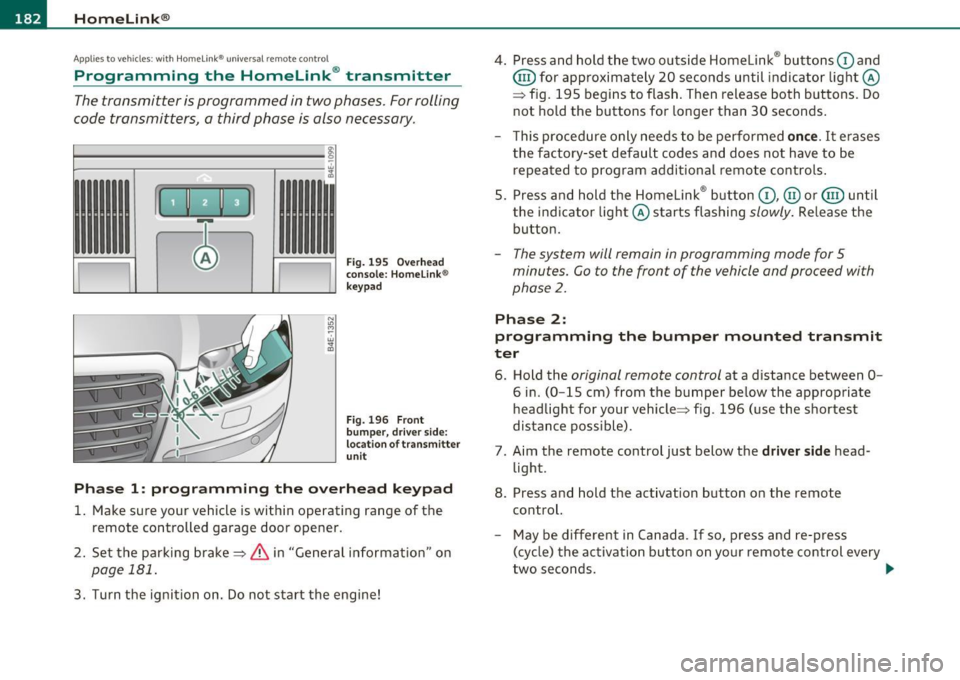
Fig. 195 Overhead
conso le: Homelink ®
keypad
F ig . 196 F ront
bumpe r, driver side:
location of transmitter
u n it
Phas e 1: programming the o verhead k eyp ad
1. Make sure your vehicle is within operating range of the
remote controlled garage door opener.
2 . Set the parking brake=>
& in "General information " on
page 181.
3. Turn the ignition on. Do not start the engine! 4
. Press and hold the two outside Homelink ® buttons
G) and
@ for approximately 20 seconds until indicator light@
=> fig.
195 begins to flash . Then release both buttons . Do
not hold the buttons for longer than 30 seconds .
- This procedure only needs to be performed
once. It erases
the factory-set default codes and does not have to be repeated to program additional remote controls .
5. Press and hold the Homelink ® button
G) , @ or@ until
the indicator light@ starts flashing
slowly . Release the
button .
-The system will remain in programming mode for 5
minutes. Co to the front of the vehicle and proceed with
phase
2 .
Phase 2:
programming the bumper mounted tr ansmit
ter
6 . Hold the original r emote control at a distance between 0-
6 in. (0 -15 cm) from the bumper below the appropriate
headlight for your vehicle=> fig .
196 (use the shortest
distance possible) .
7 . Aim the remote control just below the
driver side head
light .
8. Press and hold the activation button on the remote control.
- May be different in Canada . If so, press and re-press
(cycle) the activation button on your remote control every
two seconds. .-,,
Page 186 of 384
1111....__H_ o_ m __ e_L_ i_n _k_ ®_ • _________________________________________________ _
-Press th e ap pro priate programmed button G) , @ or@
to activate the desired remote control function ::::>
& in
"Genera l informat io n" on
page 181. •
Applies to ve hicles : w ith Hom eli nk® univer sa l rem ote c ont rol
Reprogramming a single button
A Homelink ® button can be reprogrammed individually
without affecting the other button allocations.
Programming the ov erh ead keypad
- Press the appropriate Homelink ® button until the indi-
cator light begins flashing slowly .
Programming the bumper mounted transmit
ter
1. Hold the original remote control at a distance between 0 -
5 in . (0-13 cm) from the bumper below the appropriate
headlight for your vehicle (use the shortest distance
possible).
2. Aim the remote control just below the
driver side head
light .
3 . Press and hold the ac tivation button on the remote
control.
4 . The emergency flashers will flash
three times (after about
15 -60 seconds) when the programm ing is successful.
N ow release the b utton on the remote control.
- If the device utilizes a rolling code , please follow phase 3
of =>
page 182 , "Programming the Homelink ® trans
mitter" for rolling code programming.
This pro cedur e will caus e th e ex is ting pr ogramming on th e
Homelink ® button to be era sed !•
Ap plies to veh icles: w ith Ho meli nk® un ive rsa l rem ote c ont rol
Erasing the programming of the
Homelink ® tr ansmitter
When you erase the programming, the programming on
all three of the transmitter channels with be lost!
- Perform steps 1 to 4 as described on ::::> page 182, "Phase
1 : programming the overhead keypad".
When completed , the Homel ink ® system will be in the programm ing
mode and is then ready to learn the codes for remote controlled
devices .
[I) Tips
• Programmed buttons cannot be erased individually.
• For security reasons you are advised to erase the programming of
the Homelink ® system before you sell your veh icle .•