remote control AUDI S8 2010 Owner's Manual
[x] Cancel search | Manufacturer: AUDI, Model Year: 2010, Model line: S8, Model: AUDI S8 2010Pages: 384, PDF Size: 90.95 MB
Page 153 of 384
![AUDI S8 2010 Owners Manual Audi side assist -_______________ ____.
(]] Tips
• Side assist is not active when the basic brightness is adjusted. The
signal light comes on br iefly to help you make the adju](/img/6/57617/w960_57617-152.png "AUDI S8 2010 Owners Manual Audi side assist -_______________ ____.
(]] Tips
• Side assist is not active when the basic brightness is adjusted. The
signal light comes on br iefly to help you make the adju")
Audi side assist -_______________ ____.
(]] Tips
• Side assist is not active when the basic brightness is adjusted. The
signal light comes on br iefly to help you make the adjustment.
• Your settings are automat ically stored and assigned to the remote
control key being used .•
A ppli es to ve hicles : w it h s ide ass ist
General information
Side assist has limits and cannot detect vehicles under all road and
weather conditions . Please remember system limitations and n ever
re ly on the system, especially when :
• driving through curves=>
page 151,
• lanes are of different widths=> page 151. •
Ap plies to vehicles: w ith sid e assist
When driving through curves
Side assist cannot detect vehicles in curves with a turning radius of
less than 328 feet (100 m).
When driving through a curve, it is possible that side assist may
register a vehicle two lanes over, and the signal on the outside mirror
will light up.•
Con tro ls a nd e quip
m en t Vehicle
OP-eration
Applies to vehicles : with side assist
Lane width
Fig. 166 Lanes of a
n orma l width are in
detection area
Fig . 167 Narrow
lanes: Side assist may
detect vehicles two
lanes away
Side assist's detection area is designed to cover lanes of standard
w idth to the left and rig ht of your travel lane, depending on whether
you drive in the center of your lane or closer to the edge.
If you drive in narrow lanes, side assist's detectio n area may also
include other lanes -especially if you tend to drive on t he edge of your
lane => fig. 167. Under these conditions, vehicl es can also be
detected that are two lanes away, and side assist then could switch
between the informationa l and warning stage signals .
When driving in very wide lanes, vehicles in the adjacent lane may not
be detected because they are not inside the detection area .•
Vehicle care Do-it-yourselt service iTechnical data
Page 174 of 384

Ill Advanced Parking System ..__ __ ..___,,__ ___________ _
The volume and frequency settings are automatically stored and
as signed to the remote maste r key.
& WARNING
Alway s make sure that the volume and frequency of the chimes is
adjusted so that you can eas ily hear the acou stic di stance signal
even if the radio is playing , the air -condition er blower i s on High
or there is a high l ev el of outs ide no ise. Check the settings when
ever someone el se has driven the vehicle before you .•
Ap plies to veh icle s: wit h Adva nced Park in g S ystem wit h rear v iew came ra
Adjusting the chimes -option 2
The menu for adjus ting signal sounds can also be call ed
up via the control button with the "settings" function .
Fig. 191 MMI Displa y:
Re ar-vi ew cam era
pi ctu re Fig.
192 MMI D is pl ay:
Audi pa rking sy ste m
- Activate the Audi pa rki ng sys tem ~ page 161. The rear
view camera pict ure appears in the MMI Display.
- Select
Settings ~ fig. 191. The menu for adjusting Front
volume, Front frequency , Rear volume
and Rear
frequency
appears in the MMI Disp lay ~ fig . 192 .
- Select
Front volume to change the vo lume of the front
aud ible signal generator, or
Rear volume to c hange t he
vo lu m e of the rear aud ible sig nal ge nerator .
- Sel ect
Front frequency to c han ge th e frequ ency of th e
fro nt a udi ble signal generator or
Rear frequency if you
want to ch ange t he frequency of t he rear aud ible signal
generator .
- Sele ct
Settings ~ fig . 1 92, or
- Press the [
RETURN I button . The r ear-view came ra picture
ap pea rs in the MMI Display again .
When adjusting the volume a nd frequency, the new sett ing will
sound for about 2 seconds from each a udibl e signal ge nerator. The
volume and frequency settings a re au tomat ically s to red and a ssigne d
to the master key with remote control. _..
Page 183 of 384

_____________________________________________________ H_ o_m_ e_ L_i_n _k_ ®_ • __ _
Homelink ®
Universal remote control
Applies to veh icles: w ith Hom eli nk ® universal remote control
General information
The Homelink ® feature can learn up to three radio
frequency codes for most current transmitters used for
operating garage doors, estate gates, home or outdoor
lighting systems, and other devices.
You must first program the Homelink ® transm itter before you can
use the system=>
page 182, "Programming the Home link® trans
mitter".
I n order to program the Homelink ® transmitter for devices utilizing
rolling code, a second person on a ladder who can safe ly reach the
garage door opener motor is recommended. It is also necessary to
locate the "learn" button on your garage door opener motor. Refer to
the operating instructions for the opener, as the location and color of
this button may vary by manufacturer.
You can still use the original remote control for the device at any
time.
& WARNING
• Never use the Homelink'"' transmitter with any garage door
opener that does have not the safety stop and reverse feature as
required by federal safety standards. This includes any garage
door opener model manufactured before Aprill, 1982.
• A garage door opener which cannot detect an object, signaling
the door to stop and reverse does not meet current federal safety
standards. Using a garage door opener without these features
increases risk of serious injury or death.
Controls and equip
ment Safety first
& WARNING
(continued)
• For safety reasons never release the parking brake or start the
engine while anyone is standing in front of the vehicle.
• A garage door or an estate gate may sometimes be set in
motion when the Homelink ® remote control is being
programmed. If the device is repeatedly activated, this can over
strain motor and damage its electrical components -an over
heated motor is a fire hazard!
• To avoid possible injuries or property damage, please always
make absolutely certain that no persons or objects are located in
the range of motion of any equipment being operated.
rn Tips
• If you would like more information on Homelink ®, where to
purchase the Homelink ® compatible products, or would like to
purchase the Homelink ® Home Lighting Package, please call toll
free: 1-800-355-3515.
• For Declaration of Compliance to United States FCC and Industry
Canada regulations=>
page 364 . •
Vehicle care Technical data
Page 184 of 384
.,..__H_ o_m_ e_ L_ i _n_ k_ ® _______________________________________________ _
Applies to veh icles : w ith Homelin k® un iversa l remote control
Programming the Homel ink ® transmitter
The transmitter is programmed in two phases . For rolling
code transmitters, a third phase is also necessary .
i--------------~
I----~---------.---- "' :;
N
"' M ~ w
~
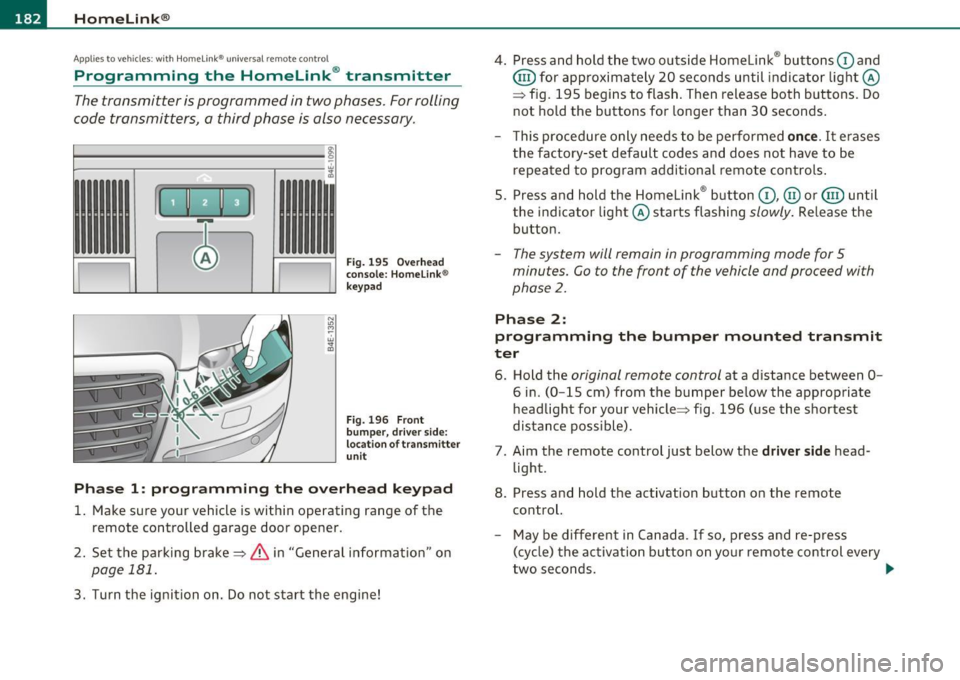
Fig. 195 Overhead
conso le: Homelink ®
keypad
F ig . 196 F ront
bumpe r, driver side:
location of transmitter
u n it
Phas e 1: programming the o verhead k eyp ad
1. Make sure your vehicle is within operating range of the
remote controlled garage door opener.
2 . Set the parking brake=>
& in "General information " on
page 181.
3. Turn the ignition on. Do not start the engine! 4
. Press and hold the two outside Homelink ® buttons
G) and
@ for approximately 20 seconds until indicator light@
=> fig.
195 begins to flash . Then release both buttons . Do
not hold the buttons for longer than 30 seconds .
- This procedure only needs to be performed
once. It erases
the factory-set default codes and does not have to be repeated to program additional remote controls .
5. Press and hold the Homelink ® button
G) , @ or@ until
the indicator light@ starts flashing
slowly . Release the
button .
-The system will remain in programming mode for 5
minutes. Co to the front of the vehicle and proceed with
phase
2 .
Phase 2:
programming the bumper mounted tr ansmit
ter
6 . Hold the original r emote control at a distance between 0-
6 in. (0 -15 cm) from the bumper below the appropriate
headlight for your vehicle=> fig .
196 (use the shortest
distance possible) .
7 . Aim the remote control just below the
driver side head
light .
8. Press and hold the activation button on the remote control.
- May be different in Canada . If so, press and re-press
(cycle) the activation button on your remote control every
two seconds. .-,,
Page 185 of 384

___________________________________________________ H_o_ m_ e_L_ i_ n _ k_ ® __ _
9. The emergency flashers will flash thr ee tim es (after about
15-60 seconds) when the programming is successful.
Release the button on the remote control.
- To program more devices, repeat steps 4 to 9.
10. Press and hold the trained Homelink ® button and
observe the indicator light©=>
page 182, fig. 195.
- If the indicator light is solid/continuous, programming is
complete and your device should activate when you press
and release the trained Homelink ® button.
- If the indicator light blinks rapidly for 2 seconds and is
then a solid/continuous light, proceed with phase 3 to
program a rolling code device.
Ph ase 3: rolling cod e progr amming
- A second person on a ladder who can safely reach the
garage door opener motor is recommended.
11. Locate the "learn" button on the garage door opener
motor (refer to the operating instructions for the opener,
as the location of this button may vary by manufacturer) .
12 . Press and release the learn button on the garage door
opener motor.
- Note : once the button is pressed, there are 30 s econd s in
which to initiate the next step.
13. On the Homelink ® keypad inside the vehicle, firmly press
and hold the Homelink ® button previously programmed
in phases 1 and 2 for two seconds and release. Repeat this
sequence
tw ice.
Controls and equip
ment Safety first
-
Some vehicles may require the press/hold/release
sequence up to three times to complete the training
process.
- Homelink ® should now activate your rolling code
equipped device.
If the 5 minute time limit is exceeded, the e m erge ncy flas hers w ill
fl ash o ne tim e
to indicate that the process has been terminated. In
this case, repeat steps 4 through 9.
If the emergency flashers do not flash
three times (after about 15 -
60 seconds), programming was not successful. In this case , repeat
steps 4 through 9.
Remote control units for garage door openers in Canada are set to
stop transmitt ing radio frequency signals after two seconds. This
time may not be sufficient for the Home link® system to learn the
rad io frequency signal. Pe rform all other steps as described above. •
Applies to vehicles: with Hom elink® universal remote control
Operating the Homelink ® transmitter
The Homelink ® transmitter works in the same manner as
the original hand held remote control that came with the
system.
w ;f,
Vehicle care
Fig. 197 Ove rhead
conso le: Homeli nk®
k ey pad
Technical data
Page 186 of 384
1111....__H_ o_ m __ e_L_ i_n _k_ ®_ • _________________________________________________ _
-Press th e ap pro priate programmed button G) , @ or@
to activate the desired remote control function ::::>
& in
"Genera l informat io n" on
page 181. •
Applies to ve hicles : w ith Hom eli nk® univer sa l rem ote c ont rol
Reprogramming a single button
A Homelink ® button can be reprogrammed individually
without affecting the other button allocations.
Programming the ov erh ead keypad
- Press the appropriate Homelink ® button until the indi-
cator light begins flashing slowly .
Programming the bumper mounted transmit
ter
1. Hold the original remote control at a distance between 0 -
5 in . (0-13 cm) from the bumper below the appropriate
headlight for your vehicle (use the shortest distance
possible).
2. Aim the remote control just below the
driver side head
light .
3 . Press and hold the ac tivation button on the remote
control.
4 . The emergency flashers will flash
three times (after about
15 -60 seconds) when the programm ing is successful.
N ow release the b utton on the remote control.
- If the device utilizes a rolling code , please follow phase 3
of =>
page 182 , "Programming the Homelink ® trans
mitter" for rolling code programming.
This pro cedur e will caus e th e ex is ting pr ogramming on th e
Homelink ® button to be era sed !•
Ap plies to veh icles: w ith Ho meli nk® un ive rsa l rem ote c ont rol
Erasing the programming of the
Homelink ® tr ansmitter
When you erase the programming, the programming on
all three of the transmitter channels with be lost!
- Perform steps 1 to 4 as described on ::::> page 182, "Phase
1 : programming the overhead keypad".
When completed , the Homel ink ® system will be in the programm ing
mode and is then ready to learn the codes for remote controlled
devices .
[I) Tips
• Programmed buttons cannot be erased individually.
• For security reasons you are advised to erase the programming of
the Homelink ® system before you sell your veh icle .•
Page 261 of 384

_________________________________________ I_ n_ t_ e_ ll_,igent technology ,__E~-
vidual components. It regulates consumption, so that more electrical
ene rgy is not being used than is being generated and ensures an
optimal state of charge for the battery.
[I] Tips
• But even energy management cannot negate the limits of physics.
Consider that the power and life of a battery are limited.
• If starting ability is threatened, you are informed by a warning
~ page 259, "Driver notification in the instrument cluster display" .•
What you should know
The highest priority is given to maintaining starting capa
bility.
Th e battery is severely taxed in short-distance driving, in city tra ffic
and during the cold time of year. Abundant electrical energy is
required, bu t on ly a little is generated .
It is also critical if the engine
is not running and electrical components are turned on. In this
instance energy is being consumed but none is being generated.
It is in prec isely these situations that you will notice energy manage
ment actively regulating the distribution of energy.
Vehicle stands for an extended period
If you do not drive your vehicle over a period of several days or weeks,
electrical components are gradually cut back or switched off. This
reduces energy consumption and maintains starting capability over a
longer period.
Be aware that when you unlock your vehicle, some of the convenience
functions may not operate, such as the Convenience key, the remote
control or the power seat adjustment. The convenience functions will
be available aga in when you turn on the ignition and start the eng ine.
Controls and equip
ment Safety first Vehicle operation
With the
engine turned off
If you listen to the radio, for example, with the engine turned off or
use other MMI functions, the battery is being discharged .
If starting capab ility is jeopardized due to energy consumption, the
following warning appears in the MMI display:
Please start engine, otherwise system will switch off in 3
minutes.
The warning indicates that the system will be turned off automati
cally after 3 minutes. If you wish to continue using the functions, you
have to start the engine.
With the engine running
Although electrical energy is generated when the vehicle is being
driven, the battery can become discharged . This happens mostly
when little energy is being generated and a great dea l consumed and
the battery's state of charge is not optimal.
T o bring the energy balance back into equilibrium, consumers which
require especially large amounts of energy are temporarily cut back
or switched off. Heating systems in particular require a great deal of
energy . If you notice, for example, that the heated seats* or the
heated rear window are not heating, they have been temporarily cut
back or switched off . These systems w ill be ava ilable again as soon as
the energy balance has been restored.
You will also notice that engine idle speed has been increased
slightly. This is normal and not a cause for concern . By increasing
engine idle speed the additional energy required is generated and the
battery is charged. •
Driver notification in the instrument
cluster display
If the battery's state of charge is not in the optimal range, this driver
no tifi cation appears in the instrument cluster display:
Low battery charge: battery will be charged while driving ~
Vehicle care Do-it-yourself service Technical data
Page 303 of 384

_____________________________________________ C_h _ e_ c_ k_in --= g'-- a_n _d_ f_i _ll _i_n -=g ::;__ ____.fflll
a service facility . The electrolyte level should also be checked each
time the battery is charged =>
page 303.
Have the batte ry checked when you take your vehicle in for serv ice .
You are well advised to rep lace a battery that is older than 5 years.
With certa in types of a irbag deployment, the ba ttery is disconnected
from the vehicle electrical system for safety reasons=>
& in "Repair,
care and disposal of the airbags" on
page 220.
Di sconne cting th e bat tery t ermina ls
Some vehicle f unct ions (power window regulators, fo r example) are
lost if the battery termina ls are disconnected . These functions have
to be re learned after the battery termina ls are connected aga in. To
prevent this, t he battery should only be disconnected from the
vehicle e lectr ica l system when absol ute ly necessary for repairs.
Vehicles not driven for long periods
If you do no t dr ive your veh icle over a period of severa l days or weeks,
electrical components are gradually cut back or switched off. Th is
red uces e nergy consumption and main tains sta rt ing capabili ty ove r a
longer period=>
page 258.
Be aware that when you unlock your vehicle, some of the convenience
functions may not operate, such as the Convenience key*, the remote
control or the power seat adjustment. The convenience functions will
be availab le aga in whe n you tur n on th e ignition and start the eng ine.
Winter operation
Dur ing the winter months, battery capac ity tends to decrease as
temperatures drop. This is because more power is also consumed
while starting, and the headlights, rear w indow defogger, etc., a re
used more often.
Avoid unnecessa ry power consum ption, part ic ula rly i n city traffic o r
when traveling only short distances. Let your authorized Audi dealer check the capacity of the vehicle battery before w inter sets in
=>
page 303 . A well charged battery will not only prevent start ing
prob lems when the wea ther is cold, but will also las t longe r.
Vehicle OP-eration
(I) Tips
If your vehicle is left standing fo r seve ral weeks at extremely low
temperatures, the vehicle battery should be removed and stored
w here it will not free ze. This will preven t it from being damaged and
having to be replaced. •
Working on the battery
Be especially careful when working on or near the
battery.
Vehicle care
Fi g. 2 49 Lugga ge
co mp artme nt: Righ t·
s ide stor age co mpar t·
me nt
Fig. 25 0 Lug gage
comp art me nt: Batt ery ~
Do-it-yourselt service iTechnical data
Page 367 of 384

______________________________________________ C _o_ n _ s_u_ m_ e_r_ I_n _f_ o_ r_m _ a_t_ i_ o _ n __ _
• Cell phone package
• Electronic immobilizer
• Homelink ® universal remote control
• Remote control key
• Tir e pressure monitoring system*
FCC Part 15.19
This device complies with part 15 of the FCC Rules. Operation is
subject to the following two conditions:
(1) This device may not cause harmful interference, and
(2) this device must accept any interfe rence rece ived , including inter
ference that may cause undesired operation.
FCC Part 15.21
CAUTION:
Changes or modifications not expressly approved by the party
respons ible for compliance could void the user's authority to operate
the equipment.
RSS-Gen Issue 1
Operation is subject to the following two conditions:
(1) this device may not cause interference, and
(2) this device must accept any interference, including interference
that may cause undesired operation of the device .•
Safety first Do-it,yourself service Technical data
Page 371 of 384
___________________________________________ A_ l::.. p _h _a_ b_ e_t _ic _a_ l_ in_ d _ e_x __ _
Fan .. .. ... .... ..... ... .. .. .. .. . 109
Heated seats, front .............. . 107
in the rear ................... .... 114
Key coded setting .... .. .. ....... . 103
Rea r clim ate cont rols .......... .. . 1 14
Re ar se at oper ati on ...... .. .... .. . 11 6
Recircu lation mode (automati c) ..... 115
Recommended sett ings . .. ... .. .. . 103
Residua l heat .. ... .. .. .. .. .. .. .. . 106
Sett ing the temperature . .. ... .. .. . 106
SETUP ....... ...... .. .... .. .... . 115
So lar b lower fan/so la r r oo f .. .... .. . 112
So lar operation .. ............. ... 116
Switching on and off .......... .. .. 106
Synchron izat ion .. .. .............. 116
Us ing cli mate control economically .. 112
Winds hield defogge r/defroster .. .. . 1 12
Clock ... ................. .. .... .. .. 11
Clos ing
P owe r su nroof . .. ................. 58
Coat hooks ......... ........ ... ... .. 101
Cold ti re inflation pressure ..... .... .. . 310
Compa rtments in the door t rim panels . . 100
Compartments in the rear doors ....... 100
Comp liance . ... .. .. ... ..... ... .. .. . 3 64
Consumer Information .......... 195, 361
Contacting NHTSA .. .. .... ....... ... 195
Conve nien ce key ........... ...... .. .. SO
Dr ive r's mess ages ................ 122
Lo cking the vehicle . ........... .. .. 52
S TART b utton ... .. .. .. ... . .. .. .. . 120
Sta rting the engine ..... ... .. .. .. . 120
S T OP button ... .... .. . .... .. .. .. . 121
Controls and equip
ment Safety first
Stopping the engin
e ...... ..... ... 121
Switching on the iginition ..... ..... 120
Unlocking the vehicle .............. 51
Convenience open feature Windows .. .. .. .................. 56
Convert ib le child safety seats . .. .... .. 2 3 7
Convert ible locking retractor
Activat ing ..... .......... .. ...... 243
Deact ivat ing .. ..... ....... .... ... 244
Us ing to sec ure a ch ild safety seat .. 2 41,
243
C oo lant
See En gine coolant . .... ... .... ... 296
Cru ise control
Cha ng ing speed .................. 127
Presetting your speed .. .. .. ... .... 127
Swi tching off . .. ................. 127
Swit ching on .................. .. 12 6
W arning/ind ica tor ligh ts ........ ... 19
See also Adaptive Cruise Con trol . ... 128
Cru is ing range ....................... 36
(upholder . . . . . . . . . . . . . . . . . . . . . . 94, 95
Center console .. .................. 98
D
Damp ing
See Adaptive A ir Suspens ion ........ 176
Da ta ... .. .. ... ...... ....... ... .. . . 36 0
Data recorder ... .. .... .. .. .. ... .... 252
Date display ................ .. .... .. . 11
Day time ru nning ligh ts . . . . . . . . . . . . 60, 61 Declaration of compliance
Adaptive Cru ise Contro l ............ 364
Audi s ide ass ist .................. 364
C e ll phone pac kage ............... 364
Conven ien ce key ... ............. . 36 4
E lectroni c immobi liz e r ............ 364
Home link ® un iversal remote cont rol . 364
Remote cont rol key .... .... .... .. . 36 4
T ir e pressure monitoring system ... . 364
def What does t his mean when it appears in
the trip odometer display? .. .. ..... 12
Defective ligh t bul b war ning ......... .. 2 4
Defrosting/defogging the windows .. .. . 109
Defrosting/defogging windows ...... .. 11 1
De termining correct load limit .... . ... . 315
Digital clock . .. ...... ............... 11
Digit al speedometer ... .. .. .. ... .... .. 23
Dimens ions ............ ... .. .. ..... 357
Dips tic k
Reading the dipstick properly . .. ... . 293
Dis ta nc e con tro l system
See A daptive Cruise Co ntrol . .... .. . 128
Doors Mecha nical child safety lock ... . .. ... 49
Powe r ch ild safety lock .. ....... .... SO
Powe r side door closer .. .. ... ... ... 45
Driver
See Seating position .............. 188
Drive r informa tion d isplay
Driver information messages ... ... .. 27
I ntroduct ion . ....... ..... ... . .. .. 22
Ope n door or rear lid warn ing ..... .. . 24
Vehicle operation Vehicle care Do-it-yourself service Technical data