warning light AUDI S8 2010 Owner's Manual
[x] Cancel search | Manufacturer: AUDI, Model Year: 2010, Model line: S8, Model: AUDI S8 2010Pages: 384, PDF Size: 90.95 MB
Page 34 of 384
Driver information displ ay
Yellow symbols
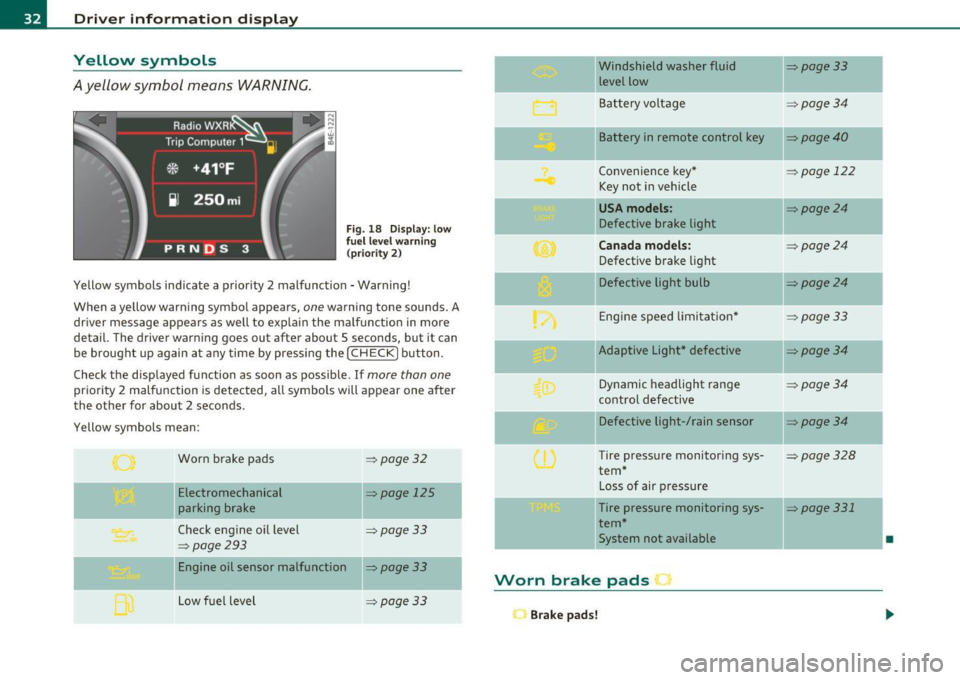
A yellow symbol means WARNING.
Fig . 18 Display: low
f ue l level warn ing
(priority 2)
Yellow symbols ind icate a prior ity 2 malfunction -Warning!
When a yellow warning symbo l appears,
one warning tone sounds. A
dr iver message appears as well to explain the ma lfunction in more
detail. The driver warning goes out after about 5 seconds, but it can
be brought up again at any time by pressing the
I CHECK] button .
Check the displayed function as soon as possible.
If more than one
priority 2 malfunction is detected, all symbols will appear one after
the other for about 2 seconds .
Yellow symbols mean:
Worn brake pads
=> page 32
Electromechanical => page 125
parking brake
Check engine oil level
=> page 33
=> page 293
Engine oil sensor malfunction => page 33
-
Low fuel level =>page33
Windshield washer fluid =>page33
level low ~
Bat tery voltage =>page34
-
II Battery in remote control key =>page40
Convenience key * =>page 122
Key not in veh icle
USA models: => page24
Defective brake light
Can ad a mod els : =>page24
Defect ive brake light
Defective light bulb
=>page24
E ng ine speed limitat ion* => page33
-
IIAdaptive Light* defective =>page34
Dynamic headlight range => page 34
contro l defective
Defective light-/rain sensor
=> page34
Tire pressure monitoring sys-=>page328
tern *
Loss of air p ressure
-Tire pressure monitoring sys-=> page331
tern*
11System not available •
Worn brake pads •
Brake pa ds!
Page 35 of 384
If the warning light illum inates, immediately contact your authorized
Audi dea ler or qu alified wor kshop to h ave all b rake pads insp ecte d.
On USA mode ls the warn ing light comes on together w it h the
warning light
BRAKE . Both sets of brake pads on an axle must a lways
be rep laced at the same time.
& WARNING
Driving w ith bad brakes can cause a collision and serious personal
injury .
• If the w arning light
ii and the warning light BRAKE1> with the
me ssage Brake pads! com es on in the in strument clu ster di splay,
immediately contact your author ized Aud i dealer or qualified
workshop t o have all brake pads che cked or replaced if
necessary. •
Checking the engine oil level ~
.... ,. Pleas e check oil level
W hen the symbol i lluminates, check the engine oi l level as soon as
poss ible=>
page 293. Add oil if necessary=> page 294. •
Engine oil sensor defective
~ Oil level ! sensor d efective
If the symbo l illuminates, contact your authorized Audi dealer and
have t he o il senso r in spec ted . U ntil yo u have this do ne, check the oil
level each time you refue l just to be on the safe side=>
page 293. •
ll BRAKE: USA mode ls on ly
Controls and equip
ment Safety first
Driver information display
A
pp lies to vehi cles : w ith engine s peed lim it a tion
Engine speed limitation
!.-• Engine speed maximum XXXX RPM
The symbol illuminates whe n there is an engine co ntrol malfunc
tion. The in dicator light in the instrument cluste r a lso i lluminates .
T he engi ne speed is limited to the speed d isp layed in the driver infor
mation system . Keep in mind that t he engine speed will not exceed
t he va lue disp layed in the d rive r in format ion sys tem, for example
when downshifting .
P lease go to an a uthor ized A udi deale r o r ot her qualifie d wo rk shop to
have the malfunction repa ired .•
Fuel supply too low w
A Please refuel
When the symbol illuminates, th is means there are about 2.4 ga llons
(9 litres) of fuel left in the fuel tank . Time to refuel.=>
page 284.
If
the symbol lig hts up, even when there is ample fue l in the tank, and
t he text
Tank sy stem m alfunction! Contact workshop appears in t he
display, there is a fa ult in the system. Con tact a qual ified workshop to
h ave the fault re ctified. •
Windshield washer fluid level too low ;>
Please top up washer fluid
If the symbo l illuminates, add windshield washe r fluid to the washer
system and a lso to the headlig ht washe r system =>
page 305. •
Vehicle care Technical data
Page 43 of 384

Battery operation in the master key is monitored by a check light . The
check light flashes when one of the buttons on the master key is
pressed. If the check light does not flash, the battery is dead and has
to be replaced .
In add ition , when the battery is dead the ..: symbol appears in the
instrument cluster display as well as the message:
Please change key battery
We recommend having the battery changed by an Audi Dealer .•
Electronic immobilizer
The immobilizer helps to prevent unauthorized use of
your vehicle.
A computer chip inside your key automatically deactivates the elec
tronic immobilizer when you insert the key in the ignition lock, or on
vehicles with Convenience key*, when the key is inside the vehicle.
When you remove the key from the ign it ion lock , or on veh icles with
Convenience key, when you remove the key from the vehicle, the elec
tronic immobilizer is automatically activated once again.
& WARNING
Always take the key with you when you leave the vehicle. The key
can disarm the electronic engine immobilizer and permit an unau
thorized person to start the engine and enable operation of the
vehicle systems such as power window or power sunroof leading
to serious personal injury .
(I) Tips
• The immobilizer prevents unauthorized use of the vehicle. The
vehicle cannot be sta rted if an unauthorized key is used. The vehicle
may not start if another radio device such as a key for another vehicle
or a transponder is located on the key ring.
Controls and equip
ment Safety first
Opening and closing
•
For Declaration of Compliance to United States FCC and Industry
Canada regulations=>
page 364. •
Power locking system
General description
The power locking system locks or unlocks all doors and
the rear lid simultaneously.
The power locking system in your vehicle incorporates the following
functions:
• Central locking function
• Selective unlock feature~
page 44
• Remote control feature ~ page 40
• Convenience key*=> page 50
• Anti -theft alarm system ~ page 52
All the doors and the rear lid are locked by the central locking system
when you lock the veh icle. You can set whether generally only the
dr iver's door or all doors and the rear lid should be unlocked when you
open the vehicle in the MMI menu
Central locking to suit your indi
vidual desires~
page 44.
Unlocking the vehicle
You can unlock the vehicle from outside either by using the remote
control
or by turning the key inside the driver's door lock. When you
unlock your vehicle:
• The anti-theft alarm system is deactivated briefly .
• The vehicle interior lights illuminate for approximately 30
seconds.
• All turn signal lights will flash twice when the car is unlocked .
• After un locking the vehicle, you have 60 seconds to open a door or
the rear lid. After 60 seconds, the vehicle automatically locks and the
anti-theft alarm system activates again. ..,
Vehicle care Technical data
Page 44 of 384

Opening and closing
The rear lid can be locked or unlocked either by using the remote
con trol
or by turning the key inside the dr ive r's door loc k. Unl ocking
the vehicle w ith the remote control will only
unlock the rear lid, to
open it, the lid handle needs to be pressed.
Lock ing the vehicle
You c an lock t he veh icle from o uts ide eithe r by using the remote
control
or by turning t he key inside the drivers's door lock . When you
lock the vehicle :
• All doors and the rear lid are locked.
• All turn signa l lights will flash once when the car is locked .
• The anti-theft alarm system is activated . The horn of the anti
t heft ala rm system w ill sound and the a nti -t heft alarm system readi
ness lig ht, located in the upper part of the dr iver's door panel, w ill
start to blink.
• The veh icle inter ior lights turn off.
Unlocking and locking the vehicle using the
Convenience key*
Th e Convenience key * feature is a keyless system wh ich all ows yo u to
unlock the vehicle via sensors in the door handle. Loc king is likewise
keyless using a lock b utton. Each door is equipped w it h a sensor and
lock button.
Power side door closer*
The ve hicle is equipped with a power side door closer. When closing a
door, yo u simp ly need to gen tly push on the door. The door wi ll the n
automatically close by itself~
page 45.
Automatic locking
The automat ic lock ing feature locks all the vehicle doors and the rear
lid when you d rive faste r than 9 mph (15 km/h). This fun ction can be
turned on and off in the MMI
Central locking Menu~ page 44.
Yo u can unlock the vehicle from the ins ide by :
• removing the key from the ignit ion sw itch (the ve hicle w ill au to
matically un lock itself) or •
pressi ng the unloc k part of the power lock sw itch @or
pulling t he door handle (once to open the door).
& WARNING
• When you lock your vehicle from outside, nobody -especially
children -should remain inside the vehicle . Remember, when you
lo ck the vehicle from the out side the windows cannot be opened
from the inside .
• When you leave the vehicle, always remove the ignition key
and tak e it with you. This will prevent passenge rs (children, for
example) from accidentally being locked in the vehicle should
they accidentally pre ss the power lo cking switch in the doors .
• Do not leave children ins ide the vehicle unsupervised . In an
emergency it would be impossible to open the doors from the
out side without the key .
[ i ] Tips
• In the event of a crash w it h ai rbag deployme nt all locked doo rs
w ill be automat ically u nlocked to give access to the vehicle occupants
from the outside.
• If the powe r lock ing system s hou ld malfunction, you ca n lock each
door indiv idually using the ve hicl e key ~
page 46.
• If the power locking system should fail, yo u can still open the fuel
t ank flap in an emergen cy ~
page 287 .
• You are well advised not to keep valuables ins ide an unattended
veh icle, v is ib le or no t. Even a prope rly loc ked vehi cle c anno t provide
the security of a safe .•
Page 45 of 384

Unlocking and locking the vehicle with the
remote control
How the remote control works.
Fig. 26 Remot e
con trol: fu ncti on
butt ons
Whether only th e driver's door or the entire vehicle is
unlocked when the opening button @ is pr essed once,
de pends on the settings in the MMI
Central locking menu
=:> page 44 .
To unlock the vehicle 0
- Press button @.
- Press button @
two times within two seconds to unlock
all doors and the rear lid .
To lock the vehicle 6
- Press button@=:> & in "Ge neral descr ipt ion" on
page 41 .
- Watch that all turn signal lights flash once .
To unlock rear lid only c:5
-Press button @for approximately one second.
Con tro ls a nd e quip
m en t Vehicle
OP-eration
Opening and closing
PANIC Button
- Push the red button @to activate the panic function. The
horn sounds and the turn signa ls flash .
- Push the button @ again to deactivate t he panic f unction.
On vehicles equipped with the Conven ience key* features, the
selector leve r must be in the P position, othe rwise the vehicle will not
lock .
& WARNING
Read and follow all WARNINGS=> & in "General de sc ription " on
page 41.
(I] Tips
• In orde r to make sure the locking func tion is wor king , you shou ld
always keep your eye on the vehicle to ma ke sure it is properly locked .
• Do not use the remote control if you are ins ide the car, otherwise
you may unintentionally lock the vehicle, and then yo u would set off
the ant i-theft alarm when you try to start the eng ine or open a door.
I n case this happens any how, push the unlock button
0.
• Use the panic function o nly if you are in an emergency situat ion. •
Vehicle care Do-it-yourselt service iTechnical data
Page 47 of 384
![AUDI S8 2010 Owners Manual (]] Tips
When locking, all doors and the trunk lid are locked automatically. •
Applies to veh icles: with power side doo r closer
Doors with power side door closer
Th e ve hicl](/img/6/57617/w960_57617-46.png "AUDI S8 2010 Owners Manual (]] Tips
When locking, all doors and the trunk lid are locked automatically. •
Applies to veh icles: with power side doo r closer
Doors with power side door closer
Th e ve hicl")
(]] Tips
When locking, all doors and the trunk lid are locked automatically. •
Applies to veh icles: with power side doo r closer
Doors with power side door closer
Th e ve hicle doors are equipped with a power door closer. When you
wa nt t o close an open door, gently push on the door. The door will
automatically close by itself.
& WARNING
When closing a door, make sure nothing can interfere with the
door. This could cause serious personal injury.
• You can stop the door from closing at any time by pulling on
the inside or outside door handle. •
Locking and unlocking the vehicle from
inside
The vehicle can be locked or unlocked from the inside
using the power locking switches.
Con tro ls a nd e quip
m en t
Fig. 29 Drive r's door:
power locking switch
Vehicle OP-eration
Opening and closing
Fig. 30 Rear power
locking switch
How to lock all doors and the rear lid
simultaneously
- Press upper part of the power locking switch t'.D ~ &.
How to unlock all doors and the rear lid
simultaneously
- P ress the lower part of the switc h@.
How to unlock each door separately using the
door handle
- Pull the handle to open the door.
You will find a power locking switch in each door. You can lock and
unlock
the vehicle using the switches in the driver's or passenger's
door=> fig. 29. You can only
lock the vehicle using the switches in the
rear doors => fig. 30. If you lock the vehicle using the
power locking
switch,
please note the following:
• You cannot open the doors or the rear lid from the
outside
(increased security, for examp le when you are stopped at a red light).
• The diodes in the power locking switch illuminate when all the
doors and the rear lid are closed and locked .
• All diodes turn dark as soon as one of the doors has been
unlocked .
Vehicle care Do-it-yourselt service iTechnical data
Page 50 of 384

Opening and closing
To unlock the rear lid
-Turn the key to the Left to the opening position @
~ page 47, fig. 34. The rear Lid opens .
To lock the rear lid
-Pull t he rear Lid dow n and slam it closed gently~&.
Turning the key co unter-clockwi se to posit io n @ will release the rear
lid and cause it to rise slightly . In this pos ition the key cannot be
pulled out of the lock cylinder .
T urning the key
clockwi se to t he ho rizon tal posit io n ® and pu lling it
out w ill cause the
lid to rema in locked when the power locking
system is act uated.
I n this state the rear lid can only be unlocked with the unlock button
,c:::j on the remote control. On vehicles equipped w ith the Conven ience
key* feature, press the hand le on the rear lid to unlock the luggage
compartment =>
page 47, fig. 33.
After you t urn the key
counter -clo ckwi se ba ck to the ver tic al pos i
tion, the rear l id will aga in respond to the power locking system.
& WARNING
Read and follow all WARNINGS => & in "Opening and closing rear
lid " on
page 46. •
Appli es to veh icles : w ith aut omat ic r ea r lid /trunk lid ope ration
Automatic rear lid /trunk lid operation
The trunk lid con be opened and closed automatically.
Opening rear lid/trunk lid
Fig . 35 Trun k lid
h andl e
Fig. 36 Locking switch
in lugg age comp art
ment
- Press the hand le on the rear Lid/trunk Lid~ fig. 35, or
- Press t he mid dle bu tton
c:J on t he remote cont rol master
key ,or
- Press the re le as e bu tto n
c:J in the d riv er 's doo r
~ page 46, fig . 3 2 .
Page 54 of 384
Opening and closing
• Agai n, to conserve battery power so t hat you can start the veh icle
a fter it has b een standin g for a long perio d, th e veh icle's e ne rgy
ma nageme nt system will switch off any convenie nce f eatures not
necessary . Yo u will not be a ble to un lock your ve hicle using the
keyless system. •
Applies to veh icles: w ith Conven ience key
Locking the vehicle
You c an l ock t he doors and rear lid wit h ou t usin g th e
rem ote cont ro l.
- Mo ve th e selec tor lev er in to P.
Fig . 40 Conven ience
key : Lo cking the
vehicle
- Press t he loc k b utton i n th e door hand le to loc k th e ve hicle
=>& .
You can lock eac h door on the vehicle. Remembe r, a n author ized key
mu st b e wi thi n 5 ft
(1. 5 me ters) o f th e door .
T he selecto r leve r must be in th e P position, othe rw is e t he vehi cle will
n ot l ock .
& WARNING
• When you lock your vehicle from outside, nobody -especially
children -should remain inside the vehicle. Remember , when you
& WARNING (co ntinued )
lock the vehicle from the outside the windows cannot be opened
from the inside.
• When you leave the vehicle, always remove the ignition key
and take it with you. This will prevent pa ssengers (children, for
example) from accidentally being locked in the vehicle should
they accidentally pre ss the power lo cking switch in the doors.
• Do not leave children inside the vehicle unsupervised . In an
emergency it would be impossible to open the doors from the
outside without the key.
[ i ] Tips
It is not poss ible to open the door immediately a fter it has been
lo cke d. T his i s int entional to allow y ou to c heck prop er lo cking o f all
vehicle doors. •
Anti-theft alarm system
The anti-t heft al arm t rig g er s an ala rm if an yone
att empts to bre ak into th e vehic le .
T he anti-theft alarm system triggers an a ud ible a larm and t urns on
th e e mergen cy fla sh er i f an u nau th oriz ed int erf eren ce wi th th e
veh icle is sensed by the system.
How is the anti-theft alarm system switched on?
T he anti-theft alarm system is switched on when you lock the veh icle.
Th e sy st em i s activ at ed app roxima te ly 30 secon ds a fter the ve hicle i s
loc ked. T he ind icator lights on top of t he dr iver's and front
pa ssenge r's door trim s ta rt fla shing rapidly fo r 30 s eco nds and t hen
blink s low ly. ._
Page 56 of 384
Opening and closing
Switches for front door windows
@ operates the window in the drive r's door.
@ operates the w indow in the fro nt p assenge r's door .
Switches for rear windows
© operates the left rear wi ndow .
@ operates the rig ht rear window .
Safety switch
® Safety switch for rear window operat io n.
& WARNING
• Do not leave children unattended in the vehicle, espe cially with
ac cess to vehicle keys. Unsupervised u se of the keys can result in
starting of the engine and use of vehicle systems such as power
window s, et c. which could result in serious injury.
• Remember -you can still open or close the power windows for
about ten minutes after the ignition is swit ched off . Only when
either of the front doors are opened are the power windows
switched off.
• Be careful when closing the windows . Check to see that no one
is in the way, or seriou s injury could re sult!
• Always remove the ignition key whenever you leave your
vehicle .
• If you lock you r vehicle from the outside, no one, e specially
children, should remain in the vehicle .
• Do not stick anything on the windows or the windshield that
may interfere with the driver 's field of vision.
[I] Tips
• In add itio n to the switches in t he driver's door there is a separate
switch in each door for the powe r window in that door=>
page 55,
fig. 43.
• The driver can lower or ra ise the power side blinds* in the side
w indows by usin g sw itches © and @.•
Switches in the driver's door
T he driver can op erat e all windo ws.
If the respective sw itch is pus hed or pulled t he w indow w ill
open or c lose . Th e power win dow switches have a
two-posi
tion function :
Opening the windows
-Pus h the switch to th e first stop and hold it there until the
wi ndow has lowered to t he desired positio n.
- Push th e switch briefly to the
second stop : th e wi ndow
wi ll automat ically o pen all the way.
Closing the windows
- Pu ll the switch up to the first stop and hold it there u nti l
the window has rise n to the desire d positio n.
- Pu ll th e sw itch q uickly to t he
second position: th e w indow
wi ll automat ically close a ll the way =:>
& in "Contro ls" o n
page 53.
Activating/deactivating rear windows
-Pus h the swit ch© =:> page 53, fig. 41 to the depr essed
p os it ion to activate the r ea r w indows -the lig ht in th e
switch will go out .
- Briefly press t he swi tch © to
deactivate the r ear win dow s
- th e sw itc h w ill re turn to t he safety posit ion and t he light
& wi ll illuminate . ..,.
Page 61 of 384

& WARNING (continued)
• Never leave children or persons requiring assistance alone in
the vehicle, especially when they could access the vehicle keys.
Unsupervised use of the keys can result in the engine being started
or use of vehicle systems such as the power windows, etc. which
could result in serious injury. The doors could be locked with the
remote key, delaying help in an emergency.
• The power sunroof will continue to operate until the ignition
key has been removed and one of the front doors has been
opened. a
Emergency closing by hand
The sunroof can be closed by hand in case of a power
failure.
Con tro ls a nd e quip
m en t
Fig. 46 Section from
headliner: Where to
place the screwdriver
Vehicle OP-eration
Removing the cover
Opening and closing
Fig. 47 Section from
headliner: Crank for
emergency operation
- Insert the flat side of the screwdriver (found in the vehicle
tool kit) at the rear edge of the lens as indicated by the
-arrows- ::::> fig. 46.
- Carefully pry the clear lens cover open and remove it.
Retrieving the crank for emergency closing
-Use the ignition key or a screwdriver to carefully pry the
cover off the left end of the instrument panel
=> page 342, fig. 276. The crank is stored next to the fuse
carrier.
Closing the roof
- Push the crank ©::::> fig. 47 into the hex socket@ until
you can feel the crank engage. Start turning, maintaining
a steady pressure on the crank to keep it from slipping off.
- After you have closed the sunroof, remove the crank and
replace the dome light lens.
[ i] Tips
If you are unable to close the roof manually, contact the nearest
authorized Audi dealer for assistance. •
Vehicle care Do-it-yourselt service iTechnical data