warning light AUDI S8 2010 Workshop Manual
[x] Cancel search | Manufacturer: AUDI, Model Year: 2010, Model line: S8, Model: AUDI S8 2010Pages: 384, PDF Size: 90.95 MB
Page 138 of 384

lffll..__A_ d_a_ p,__ t_iv _ e_ C_r _u _ i_ s _e _ C_ o_ n_t _ r_ o _ L ___________________________________________ _
• -0,11,c::::, Driving in tr affic: The warning light c:::::,11 .. -::::::, shows that a
vehicle moving in yo ur lane of travel h as been de tecte d up fron t in
your lane o f travel. Your speed is adjusted accord ing to the speed of
the vehicle up front. ACC accelerates an d brakes automat ically within
the system's capabil ities .
• -011 ,,-0 Request for driver to assume control : The re d flashing
warning light
c:::::, 11 .. c::::, means Request for driver to assume control.
Yo u as the driver must slow the vehicle with the foot brake . T he
symbo l
-::::::,11,, c::::, t el ls you that the Adapt ive Cr uise Contro l is not able
to slow the vehicle down e nough to keep a enoug h distance to the
vehicle in front of you. A wa rning to ne signa l will a lso sound w hen the
symbol appears .
& WARNING
Improper use of the Adaptive Cruise Control features and inatten
tion can lead to an crash and serious personal injury.
• Never allow the closing speed between you and other vehicles
to be so high that the Adaptive Cruise Control may not be able to
slow your vehicle safely. If closing speed is too high , you must
apply the brakes yourself to reduce th e risk of a rear-end crash.
• Always sele ct a greater following di stance to the vehicle up
ah ead on w et roads than on dry roads.
• Always read and heed the information and WARNINGS~
& in
" Description " on
page 128.
[ i J Tips
• If the Adapt ive Cruise Control in itiates braking, the hydraulic
bra ke system is under pressure . Therefore, t he b rake pedal distance
is shorter and the pedal feels "harde r" .
• If yo u use the acceler ator to go f aster th an the speed o f the
vehicle ahead of yo u, the d river intervention prompt will not be
accompanied by a warning to ne.
• If the speed you previously set is exceeded, t he indicato r light in
t he speedomete r will sw itch o ff. •
A ppli es to veh icles : w ith Adaptive Cruise Co ntrol
Display in the instrument cluster
You should hav e the supplementary information
displayed here, p articularly on your first trips .
Fig. 147 Displ ay i n
t he in strument clu ste r
Scr oll throug h the av ail able inform ation dis plays by br ie fl y t appi ng
the (RESE T) button at the end of the windshield w iper lever . You can
sele ct a nd information from the trip comp ute r, navigation sys tem or
Adaptiv e Cr uise Control.
© Vehicle sy mbol
® St atu s
© Distan ce
© Vehicle symbol
Th e veh icle symbol indicates whe ther the sy stem has de te cted a
moving veh icle up front in your lane of travel.
• When no moving ve hicle is detected up fro nt, only the
outline of
the vehicle
is d isp laye d.
• A
gray vehicle wi ll appear when a moving vehicle is de tected up
ahead .
• A
red vehicle will appea r if th e s itua tio n de te cted will s oo n l ead to
a requ est for the driver to assume contro l. .._
Page 144 of 384
lll'L_!_A~u~d~i~l!:!a~n~e '...:a~s~s:!:is~t ~--------------------------------------------
Aud i Lane assist
Lane assist
Applies to veh icles : w ith lane assist
Description
Lane assist helps you keep your vehicle in your lane.
Lane assist uses a camera to detect lane boundary lines. If the system
detects that your vehicle is about to leave a lane boundary line, the
steering wheel
vibrates to alert the driver. If lane assist detects
boundary lines on both sides o f the veh icle's lane, the system enters
act ive standby mode, which is indicated by t he gree n indicator light
/: on the instrument cluster .
If the system is in active standby mode and the turn signal is acti
vated before driving over the boundary line , the warning does not
occur sinc e th e system allows for in tention al lane changes.
The system is designed for driving on freeways and expanded high
ways and th us works only at speeds of 40 mph (65 km/h) or more.
& WARNING
• Lane assist will not keep your vehicle in your lane. The system
only warns the driver when the vehicle is leaving the lane. The
driver is always responsible for keeping the vehicle in the lane.
• The camera is not able to detect all lane boundary lines and in
some cases might also detect lane structures or objects as
boundary lines. This can lead to incorrect warnings or warnings
that fail to go off at all.
• The camera's visibility can be impaired by vehicles ahead of
you, for instance, or by rain, snow, heavy spray or light shining
into the camera lens. This can cause lane assist to fail to detect
boundary lines. •
Applies to veh icles: wit h lane assist
Activating and deactivating
Fig. 156 Turn signal
lever: Lane assist
button
Fig. 157 Windshield:
Lane assist camera
viewing window
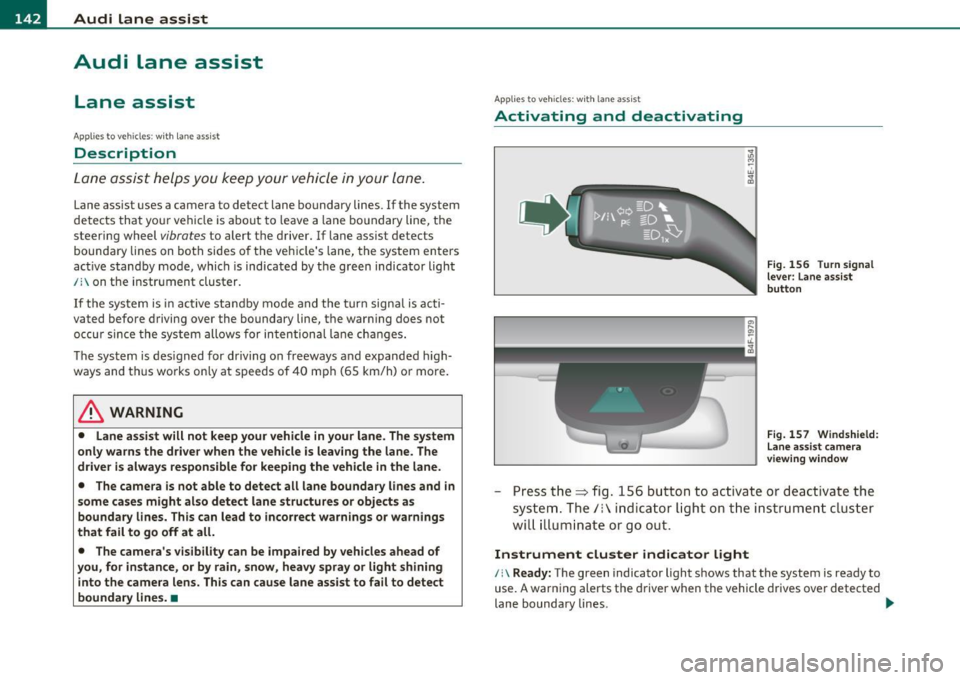
-Press the=> fig . 156 button to act ivate or deactivate the
system. The/: ind icator light o n the instrument cluster
will illumi nate or go out.
Instrument cluster indicator light
/:\Ready: The green indicator light shows that the system is ready to
use. A warning alerts the driver when the vehicle drives over detected
lane boundary lines . -.,
Page 145 of 384

_________________________________________________ A_u_ d_i_ l_ a_ n_ e_ a_s _s_ i_s _t __ _
Not read y: The yellow indicator light shows that the system is
turned on but unable to send a warning. T his can be due to the
following:
• T here are no boundary lines, or there is only one boundary line
present.
• The boundary lines are not detected (e .g . due to snow, dirt, wet
conditions or light shining into the camera lens) .
• More than two boundary lines (such as at const ruct ion sites) are
located in the vehicle's lane .
• T he veh icle's speed is below the speed needed to ac tivate it, which
is about 40 mph (65 km/h) .
• T he lane is narrowe r than about 8
ft . (2.5 m), or wider than about
16 ft. (5 m).
• Th e curve is too sharp.
Note s on the in strum ent clust er displa y
When the lane assist turns off automat ica lly, the instrument cluster
indicator goes out and one of the fo llowing messages appears on the
display :
Aud i lane ass is t not av ailable: Cur rentl y n o sens or v ision
T his message appears when the camera can no longer function
because it cannot detect the boundary lines. This may be due to the
following:
• T he exte rior side of the came ra viewing window =>
page 142,
fig. 157 is covered with dirt or ice. Clean this part of the windsh ield.
• Th e came ra viewing window is fogged up on the inside. In this
case, wait until the fog d isappears before turning lane assist on
again.
• T he system was unable to detect bo undary lines over an extended
period of time due to road co nd it ions (such as snow-cove red lanes) .
Do not turn lane assist on aga in until the lines can be more easily
detected .
Aud i lane a ssist n ot availabl e
Controls and equip
ment Safety first
A temporary malfunction is preventing lane assist from operating
.
Tr y turning on lane assist aga in at a later time.
Au di l ane a ssist: system fault
The system shou ld be checked by an authorized Audi dealer or other
qualified wo rkshop.
[ i ] Tips
• Make su re that the camera view ing window => page 142, fig. 157
is not covered by stickers or similar objects .
• Always keep the came ra v iewing w indow clean. This can us ually be
done by operating the windshie ld wipers .•
App lies to vehic les : wi th la ne ass ist
MMI settings
You can use the fv1fv1I to adjust the warning time and
steering wheel vibration .
Setting the warning time
Select: Function button I CAR]> Sy stems > Audi lane ass ist>
Warning early , adaptive or late .
Setting th e st eering wheel vibration
Select : Function button I CAR ]> Systems > Audi lane ass ist >
Steering vibration weak , medium or strong .
Setting the w arning tim e
Earl y: This setting wa rns the dr iver befo re a wheel touches the
detected lane boundary line . The warning depends on the veh icle 's
angle as it approaches the boundary line . If you app roach a bounda ry
line gradually, the warn ing will occur earlier . If you approach the
boundary line at a very sharp angle, the warning will occur just before
a whee l touches the li ne . .,._
Vehicle care Technical data
Page 148 of 384
lffll.___A_ u_ d_i_ s_ id_ e_ a_s _s_ i_ s _t _________________________________________________ _
Deactivating
- Press the button again . T he indicator light o n the b utton
goes out.
The system works at speeds faster tha n 19 mph (30 km/h) .
& WARNING
• Imp roper reliance on the side assist system can cause collisions
and seriou s per sonal injury:
- Never rely only on s ide ass ist when changing lanes.
- Alway s che ck rear view mirror s to m ake sure that it i s safe to
change lanes.
• Side a ssist cannot detect all vehicles under all condition s
danger of accident!
• Side a ssi st cannot detect vehicle s in time to alert you when
they approach from beh ind at very high speed, or fall drop back
very quickly .
• The radar sen sor's
v is ion can be reduced or entirely blocked by
rain , snow, and heavy spray . This can result in side as sis t not
adequately detecting vehicle s or , in some cases, not detecting
them at a ll. Alway s keep an eye on the dir ection you are traveling
and the rele vant area around the vehicle.
• Please note that side assist indicates there are approaching
vehicles , or vehicles in you r blind spot, only after you r vehicle has
reached a driving speed of at lea st 19 mph (30 km/h).
• Side assist signal doe s not work around t ight corners (turning
radius less than 328 feet or 100 m ).
• Side assist is no replacement for the driver 's full attention . The
driver alone is respon sible for lane change s and s imilar driving
maneuvers. Always keep an eye on the direction you are traveling
and the relevant area around the vehicle.
0 Note
• T o ensure that you do not adversely affe ct s ide as sist , do not block
the area on the rear b umper where the radar sensors are located with
fo reign objects (such as st ic kers or b icycle ra cks).
• Make s ure that the signal light on the o utside mi rror is not
bloc ked by stic ke rs or othe r items.
[I) Tips
• Side ass ist automatica lly deac tivates if it detects that the radar
sensors are blocked=>
page 152. The indicator light on the button
goes out.
• Th e area on the bumper w he re the radar sensors are located must
c ons istent ly rema in free of snow, i ce, a nd he avy soiling so that s ide
assist can function properly. Follow the add itiona l notes on
=>page 1 5 2.
• Add it iona l tinting on t he front side windows can ma ke it harder to
see and correctly u nders tand the s ig nal light on the outs ide mirro r.
• For Decla ration of Compliance to United States FCC and Industry
Canada regulations=>
page 364. •
Applies to vehicl es : w it h side ass ist
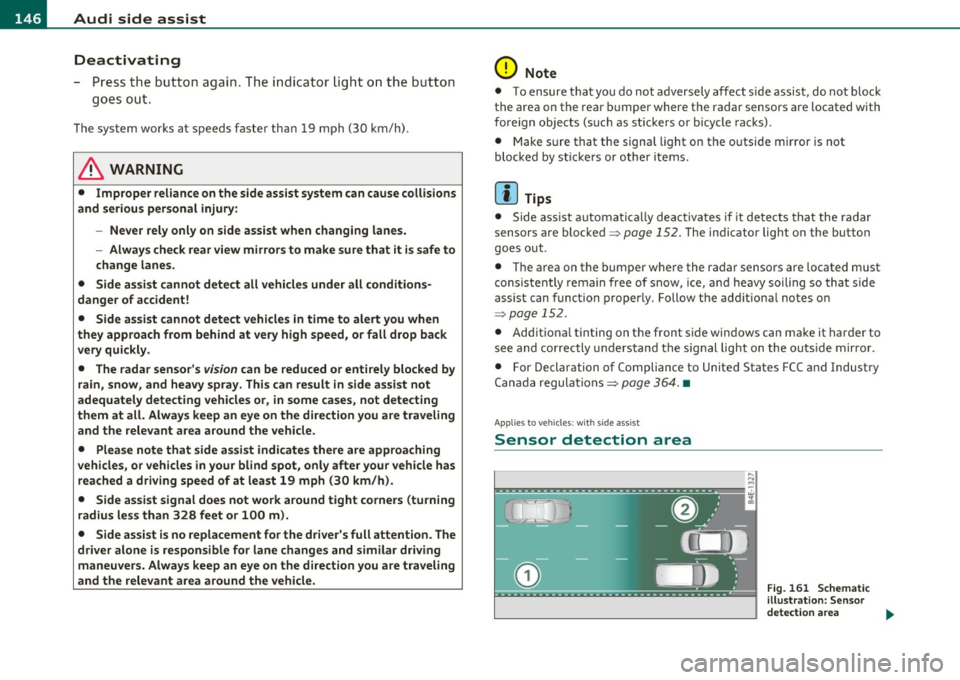
Sensor detection area
, D i
Fig. 161 S chem ati c
illustrat io n : S ensor
detection are a
~
Page 152 of 384

.,L.....:.A::::::: U:.:d::..:.. i .:::S :..:.id ::.: e:...:: a:.:S :: S:.: i:.: S :..:t :._ ______________________________________________ _
Applie s to vehi cles : w ith si de assist
Driving situation: Vehicles dropping back
quickly
Fig. 165 Side assist: Vehicles dropping back quickly
(D Signal on outside mirror does not light up
The vehicle just passed has not yet been detected by side assist. The
signal on the outside mirror does not light up~
& in "Safety tips" on
page 152.
@ Signal on outside mirror does not light up
The vehicle dropping back quickly on the right ( difference in speed of
more tha n 9 mph, or 15 km/h) has been detected by side assist, but
is not cons idered notable in the event of a lane change, because it is
dropping back so qu ickly . The signal on the outside m irror does not
light up~
& in "Safety tips" on page 152 .
@ Signal on outside mirror does not light up
If you activate your turn signal in driving situation @, the signal still
does not light up on the outside mirror~ &, in "Safety tips" o n
page 152. •
Applies to vehicles : w it h si de ass ist
MMI settings
The basic brightness setting of the signal on the outside
mirror can be adjusted via the MMI.
Select: Function button [CAR]> Systems > Audi side assist >
Warning lamp: brightness.
- Rotate the control knob to adjust the displayed brightness
of the signal light on the outside mirrors.
The brightness of the signa l light for both the informational and alert
stages is automatically adjusted to ambient light conditions. In addi
t ion, you can adjust the
basic brightness separately, via the bright
ness function.
Whi le making the adjustment, the new brightness setting is
disp layed briefly . The brightness displayed is that of the informa
tional stage signal. The alert stage signal brightness is linked to the
informationa l stage signal brightness.
The inform ational stage signa l brightness should be adjusted so that
you notice the signal illumination when you look in the outside
mirror, but not when you look forward through the windshield.
In very dark or light surroundings, the automatic brightness setting
adjusts signa l light brightness to maximum or minimum intensity, as
needed. In circumstances such as these, you may not notice any
change in the brightness on the outs ide mirror when adjust ing the
basic brightness.
You may not not ice the change until lighting conditions are normal
again.
Page 153 of 384
![AUDI S8 2010 Workshop Manual Audi side assist -_______________ ____.
(]] Tips
• Side assist is not active when the basic brightness is adjusted. The
signal light comes on br iefly to help you make the adju](/img/6/57617/w960_57617-152.png "AUDI S8 2010 Workshop Manual Audi side assist -_______________ ____.
(]] Tips
• Side assist is not active when the basic brightness is adjusted. The
signal light comes on br iefly to help you make the adju")
Audi side assist -_______________ ____.
(]] Tips
• Side assist is not active when the basic brightness is adjusted. The
signal light comes on br iefly to help you make the adjustment.
• Your settings are automat ically stored and assigned to the remote
control key being used .•
A ppli es to ve hicles : w it h s ide ass ist
General information
Side assist has limits and cannot detect vehicles under all road and
weather conditions . Please remember system limitations and n ever
re ly on the system, especially when :
• driving through curves=>
page 151,
• lanes are of different widths=> page 151. •
Ap plies to vehicles: w ith sid e assist
When driving through curves
Side assist cannot detect vehicles in curves with a turning radius of
less than 328 feet (100 m).
When driving through a curve, it is possible that side assist may
register a vehicle two lanes over, and the signal on the outside mirror
will light up.•
Con tro ls a nd e quip
m en t Vehicle
OP-eration
Applies to vehicles : with side assist
Lane width
Fig. 166 Lanes of a
n orma l width are in
detection area
Fig . 167 Narrow
lanes: Side assist may
detect vehicles two
lanes away
Side assist's detection area is designed to cover lanes of standard
w idth to the left and rig ht of your travel lane, depending on whether
you drive in the center of your lane or closer to the edge.
If you drive in narrow lanes, side assist's detectio n area may also
include other lanes -especially if you tend to drive on t he edge of your
lane => fig. 167. Under these conditions, vehicl es can also be
detected that are two lanes away, and side assist then could switch
between the informationa l and warning stage signals .
When driving in very wide lanes, vehicles in the adjacent lane may not
be detected because they are not inside the detection area .•
Vehicle care Do-it-yourselt service iTechnical data
Page 154 of 384

-Audi side assist •m ___________________ _
Notes
Applies to vehicles: w it h side ass ist
Messages in instrument cluster display
If side assist turns off automatically, the indicator light on the button
w ill go out and you w ill see a message in the instrument cluster
display:
Audi s ide ass ist not available: sensors possibly blocked
T he side ass ist senso rs a re bu ilt into the rear bumpe r on the left and
r ight (not v is ible on the outside)=>
page 145, fig. 158 . To ensu re
that yo u do not adversely affect the way side assist functions, foreign
objects (such as st ickers or bicycle racks) should not be attached to
the area on t he rear bumper whe re the sensors are located. If side
ass ist f unctions are adve rsely affec ted, you will see this mes sage in
the instrument cluster d isp lay. Remove anyth ing that may be
blo ckin g the sensors .
If no vehicle is detected for a longer period of t ime w hile driving, side
assist w ill also sw itch
off automatica lly .
Audi s ide ass ist currently not available
If the re is a tempo rary p ro blem (such as the vehicle 's ba tte ry c har ge
being low), s ide assist ca nnot be act ivated temporar ily .
Audi side a ssist: system fault
Have the system checked by an authori zed Audi dealer or qualified
work sho p.•
Ap plies to ve hicles : w it h sid e ass ist
Safety tips
The s ide assist detection may be limited when driving aro und narrow
s tr eet corners, on hilly st ree ts, an d un der poo r wea ther condit ions. It is possib
le that the radar sensors may also detect other objects,
s uch a s high or s taggere d guardrails.
Side assis t does not measure ac tual lane wid th . The system assumes
a fixed la ne w idth . Detection in the left and rig ht lanes is based on
th is assu m ed lane w id th . W hen drivi ng on nar row ro ads or w hen
driving to the left or r ight of the cente r of a t ravel lane, it is possib le
th at vehicles will be de te ct ed tha t are
no t in the la ne next to t he lane
you are us ing.
& WARNING
• Improper reliance on the side assist system can cause collisions
and serious personal injury:
-Never rely only on s ide assist when changing lanes.
- Always check rear view mirrors to make sure that it is safe to
change lanes.
• Side assist cannot detect all vehicles under all conditions
danger of accident!
• Side assist cannot detect vehicles in time to alert you when
they approach from behind at very high speed , or fall drop back
very quickly .
• The radar sensor's
vision can be reduced or entirely blocked by
rain, snow, and heavy spray. This can result in side assist not
adequately detecting vehicles or, in some cases , not detecting
them at all . Always keep an eye on the direction you are traveling
and the relevant area around the vehicle .
• Please note that side assist indicates there are approaching
vehicles , or vehicles in your blind spot , only after your vehicle has
reached a driving speed of at least 19 mph (30 km/h) .
• Side assist signal does not work around tight corners (turning
radius less than 328 feet, or 100 m) .
• Side assist is no replacement for the driver's full attention . The
driv er alone is responsible for lane changes and similar driving
maneuvers . Always keep an eye on the direction you are traveling
and the relevant area around the vehicle .
~
Page 158 of 384
1111....__A_ u_ t_o _m_ a_ t_ic _ t_ r_ a_ n_s _m_ i _s_ s_ i_ o_ n ____________________________________________ _
Select R only when the vehicle is at a full stop and the engine is
running at id le speed =>
& in "Driving the automatic transmission"
on
page 154.
Before you move the selector lever to R , press both the button in the
hand le of the selector lever
and the brake pedal at the same time.
When the ignition is on, the backup lights illuminate when the
selector lever is moved into
R .
N -Neutral
The transmission is in neutral in this position. Shift to this position
for standing with the brakes applied =>
page 156.
When the vehicle is stationary or at speeds be low 3 mph (5 km/h),
you must always apply the footbrake before and while mov ing the
lever out of
N.
D -Normal position for driving forward
Posit ion Dis fo r normal city and highway driving . It ranges from zero
to top speed and all six gears shift automatically, depending on
engine load, driving speed and automat ica lly se lected shift
programs.
When the vehicle is stationary or at speeds below 3 mph (5 km/h),
you must always apply the foot bra ke before and while moving the
lever to
D out of N .
In certa in circumstances it may be advantageous to temporarily
switch to the manual sh ift program to manually select gear ratios to
match specific driving conditions =>
page 158.
S -Sport position
Select this position for sportie r performance. In this position, the
transmission will not upshift as soon, allowing the vehicle to use the
increased power available at higher engine speeds to achieve livelier
acceleration .
When the vehicle is stationary or at speeds be low 3 mph (5 km/h),
you must always apply the foot bra ke before and while moving the
lever to
S out of N .
& WARNING
Read and follow all WARNINGS=> & in "Driving the automatic
transmi ssion" on
page 154.
0 Note
Coasting downhill with the transmission in N and the engine not
running will result in damage to the automatic transmission and
possibly the catalytic converter. •
Automatic Shift Lock (ASL)
Automatic shift lock prevents you from accidentally
shifting into a forward gear or into reverse, thus causing
the vehicle to move unintentionally.
0
Fig . 170 Shift gate
se lector lever lock posi
tions and interlock
button highlighted
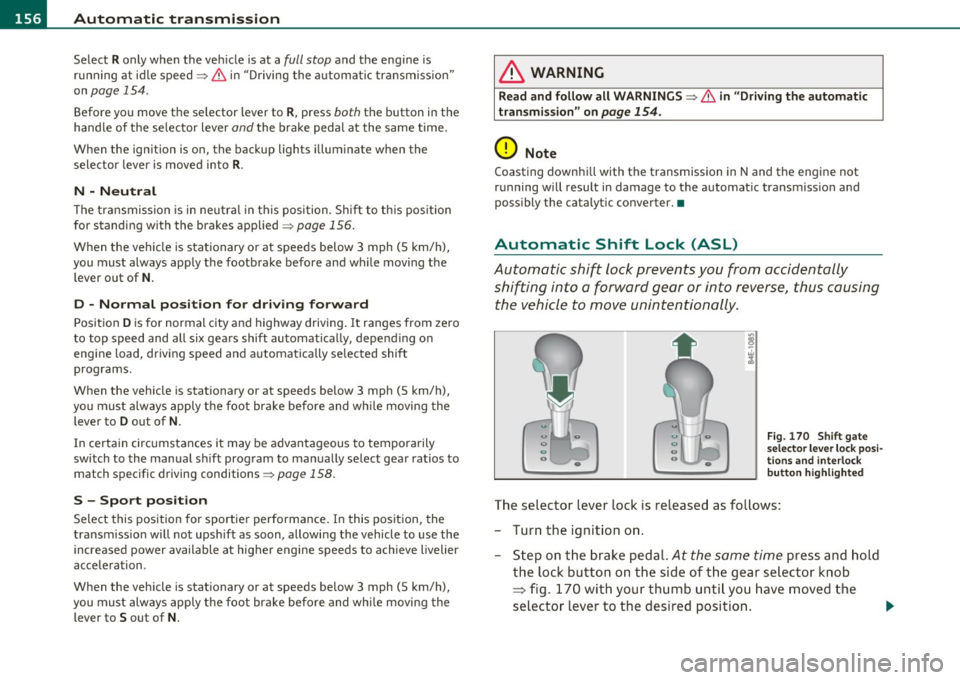
The selector lever lock is released as follows:
- Turn the ignition on .
- Step on the brake pedal.
At the same time press and hold
the lock button on the side of the gear selector knob
=:> fig. 170 with your thumb until you have moved the
selector lever to the desired position. .,_
Page 159 of 384

______________________________________________ A_ u_ t_ o _ m_ a_ t_ ic_ t_r_a _ n_ s_m_ i_ s _s_ i_ o _ n __ ffllll
Automatic selector lever lock
The se lector lever is locked in the P and N positions when the ignition
is turned on. To move the lever from these posit ions the driver must
depress the brake pedal. As a reminder to the driver, the following
warning appears in the instrument cluster display when the selector
is in
P and N:
When stationary apply foot brake while selecting gear
A time delay element prevents the selector lever from lock ing when
it is moved through the
N position (going from R to D). The locking
element will lock the selector lever if the lever is left in N (Neutra l) for
more than approximately
l second, w ithout the brake pedal being
pressed.
At speeds above about 3 mph (5 km/h) the Automat ic Shift Lock is
automatically deactivated in the
N position.
Interlock button
The lock button o n the selector lever prevents the lever from being
accidentally shifted into certain positions. Pressing this button deac
tivates the selector lever lock . Depending on the direction of the
shift, the selector lever locks at different positions . The pos itions are
highlighted in the illustration ~
page 156, fig. 170.
Ignition key safety interlock
The key cannot be removed from the ignition un less the selector lever
is in the
P park position. When the ignition key is removed, the
selector lever will be locked in the
P position.•
Kick-down
The kick-down feature allows the vehicle to generate
maximum acceleration.
When you press the accelerator pedal beyond the resistance point
that is reached at full throttle, the transmission will select a lower
gear ratio based on vehicle speed and engine RPM. The engine RPM
will be controlled to produce maximum vehicle acceleration as long
Controls and equip
ment Safety first
as you cont
inue to press the accelerator pedal beyond this resistance
point.
& WARNING
Be careful when using the kick -down feature on slippery roads.
Rapid acceleration may cause the vehicle to skid. •
Dynamic shift program (DSP)
The automatic transmission is electronically controlled.
The transmission is self adapting and will automatically select the
best sh ift p rogram su ited to the driv ing cond it ions and driving style.
The transmission will select one of the
economy programs when you
drive at a steady speed or a gradually changing speed without heavy
acceleration . This ach ieves optimum fuel efficiency, with early
upshifting and delayed downshifting.
Th e transmission will automatically select the
sporty shift programs
when you dr ive at higher speeds, or w ith heavy acceleration and
frequently changing speeds. Upshifts are delayed to make full use of
engine power . Downshifting takes place at higher engine speeds than
in the economy programs .
The select ion of the most suitable shift program is a cont inuous,
automatic p rocess. The driver can also make the transmission switch
t o a spo rty program by
quickly pressing down the gas pedal.
Th is causes the transmission to shift down to a lower gear to achieve
rap id acceleration, e.g . for quickly passing another vehicle. Yo u do
not need to press the gas pedal into the kick -down range . After the
transmission has upshifted, the original program is selected
according to your driving style.
An additional shift program allows the automatic transmission to select the proper gear for uph ill and downhill gradients.
Th is prevents the transmission from upshifting and downshifting
unnecessari ly on hills. The transmission will shift down to a lower _,.
Vehicle care Technical data
Page 164 of 384

IIII.___A_ d_v_ a_ n _ c_e _d _ P_ a_ rk_ in--= g'-S -=- y_s_t_ e_ m _________________________________________ _
- Press the switch P1JJ! in the center console=:, page 161,
fig. 177 to activate the Audi parking system manually.
Activation of the acoustic parking system is confirmed by
a brief acknowledgement sound. The indicator light in the
switch lights up.
Deactivation
- If you drive forwards faster than approx. 6 mph (10 km/h), or
- if you switch the ignition off, the entire acoustic parking
assist is automatically deactivated, or
- you can press the switch
Pw! in the center console
=:, page 161, fig. 177 to deactivate the Audi parking
system. The indicator light in the switch goes out.
You have to turn on the acoustic parking assist manually if you wish
to park the vehicle forwards or if you wish to approach an obstacle
forwards and want a distance warning.
The range at which the sensors start to measure is
about :
Front
Rear
Warning tones
side
center
side
center 3 ft (0.90 m)
4 ft (1.20 m)
2 ft (0.60 m)
5.2 ft (1.60 m)
Distance warning is given by chimes which are generated by a signal
generator . The volume and the pitch of the chimes can be adjusted in
the MMI =>
page 171.
Mute
In the case of vehicles with automatic transmission, an acoustic
distance warning is discontinued when the transmission selector lever is moved to the P position
. However, the system remains active.
As soon as the selector lever is moved from the
P position and the
vehicle approaches an obstacle, the acoustic distance warning
resumes.
Driving forward/backward
Distance warning when driving forward/backward is based on detec
tion of an obstacle in the range of the parking assist . As the distance
decreases, the time interval between the audible tones becomes
shorter.
When the distance is less than approx. 1 ft (0.30 m), the tone
becomes continuous. At this point you should stop backing up or
driving forward .
If the distance to an obstacle remains the same, the volume of the
distance warning is gradually reduced after about
4 seconds (does
not apply to the zone for the continuous tone). If you start to
approach the detected obstacle again, the distance warning will
sound at the normal volume again.
Parking
When you select another gear when parking (e.g. reverse/forward),
the warning tones are temporarily suppressed, but the visual display
remains on the MMI display. If you start approaching a detected
obstacle again, the distance warning will sound at the normal volume
again.
Visual display
The segments on the MMI display indicate a change in the distance
between the vehicle and an obstacle . The number of segments
displayed depends on the obstacles in front of or behind the vehicle.
The closer the vehicle comes to the obstacle, the closer the segments
approach the vehicle=>
page 161, fig. 178. When the segment
before last is displayed, the vehicle has reached the collision zone. At
this point you should stop backing up or driving forward=>& .
The image in the visual display can be switched off on the MMI display
=>
page 173 . The acoustic distance warning remains active. .,,