warning light AUDI S8 2010 Repair Manual
[x] Cancel search | Manufacturer: AUDI, Model Year: 2010, Model line: S8, Model: AUDI S8 2010Pages: 384, PDF Size: 90.95 MB
Page 170 of 384

ffl..__A_ d _ v_a_ n_ c_e _d _ P_ a_ r_ k_ i _n_ g:- S_,,_ y_s _t _e _m ________________________________________ _
Fig. 186 MMI Display:
Contac t of the b lue
curved line wi th the
curb
- Find a parking spot on the right side of the road, for
example.
- Switch on the Adaptive Air Suspension=>
page 18 stan
dard or automatic mode.
- Position your vehicle parallel to the edge of the road, approx imately 3
ft (1 m) away from a parked vehicle
=> page 164, fig . 180. When par king next to obstacles,
please note=>
page 169.
-Activate the Aud i parking system=> page 161. "Parking
mode 1" is displayed by default .
- Press the control button with the
mode © => page 166,
fig. 184 function. "Parking mode 2" => page 167, fig. 185
appears in the MMI Display .
- Back up in reverse gear and adjust the position of your vehicle in such a way, that the dark blue surface indicated in the MMI Display@=>
page 167 , fig. 185 borders on
the vehicle behind, or the parking spot line. If you are
not
parking next to any obstacles=> page 169, the long side
of the dark blue surface should border on the curb. The
entire dark blue surface has to fit into the park ing spot
=>
page 164, fig . 180. -
Whi le the vehicle is stationary, turn your steering wheel to
the right as far as it will go.
- Back up into the parking spot. If you are
not parking next
to any obstacles =>
page 169, the dark blue bend©
should touch the curb=> fig. 186 . Stop your vehicle .
- While the vehicle is stationary, turn your steering wheel in the opposite direction (left) as far as it wil l go .
- Continue to back up into the parking spot until the vehicle
is parked parallel to the curb. When backing up, also keep
an eye on the vehicle front=>
0.
With "parking mode 2", you can park on the left and right side of the
road. For this reason, the b lue surfaces and curved lines are displayed
in different shades of blue . The dark blue surface @and the dark blue
curved line © can be used to park on the right s ide of the road . The
light blue surface
(D and the light blue curved line® can be used to
park on the left side of the road.
When the tur n signal is sw itched on , only the necessary s urfaces and
curves are shown. To change the side that is shown , simply change
t he tu rn s ignal.
T he disp layed light blue® or dark blue © curved line identif ies the
turn-around po int when maneuvering to park. If the curved line
touches the curb, the steer ing wheel turn-around point has been
reached => fig .
186.
The d istance from the rear bumper © to the red line@ is app roxi
mately
1.3 ft (40 cm) . Here, at the latest, you should stop backing up
=>
page 170 .
& WARNING
Please note th at obje cts not tou chin g th e g ro und can app ear t o be
further away than they rea lly are (fo r exa mp le, the bumpe r of a
parked vehi cle, a traile r hit ch , or the r ear of a truck ). In thi s ca se, •
Page 176 of 384

IIII.___A_ d_v_ a_ n _ c_e _d _ P_ a_ rk_ in--= g'-S -=- y_s_t_ e_ m _________________________________________ _
switch PwA flashes when you engage the reverse gear, there is a
ma lf u nct ion in the acous tic p arking ass ist.
T hi s system error is immediately output after:
• Every manua l activat ion via the switch
P '".li => page 161,
• Reverse gear is engaged for the first time duri ng an ignition cycle,
or
• An error is detected during operation .
(I] Tips
If the system reports an error, have an Audi dealer o r an authorized
dea lership correct this system error .•
A pplies to veh icles : wit h Adva nced Park in g S ystem with rear view c amera
Rear-view camera tips
We recommend that you practice parking w ith the rear-v iew camera
in a traffic -free location, o r parking lot, to become familiar with the
system, the or ient atio n lines , and the ir fun ct ion. W hen do ing t his,
there should be good light and weather cond itions.
In the MM I Display, objec ts or vehicles appe ar close r or f urther aw ay
if:
• you are driving in reverse gear from a level surface onto an incline,
or a downwa rd slope,
• you are driv ing in reverse gear towar d prot ruding objects,
• the vehicle is carry ing too much load in the rear .
T he accuracy of the orientatio n lines and blue su rfaces diminishes if :
• t he Ad aptive Air S uspension is defective, o r th e dynamic o r lift
mode is switched on,
• the rear-v iew camera does not provide a reliable image, for
example, in poor visib ility conditions or if the lens is dirty, •
the image on the screen is not v is ib le due to sun glare and reflec
tion .
Caring for the rear-view camera lens:
• Dampen the lens with a household alcoho l-based glass cleaner,
a nd clean the lens wi th
a d ry cl oth.
• Remove snow w ith a hand br ush .
• Remove ice, preferab ly with de-icing spray=>
0 .
& WARNING
• The rea r-view camera does not replace the view to the rear and
the rear view mirror s.
• The rear-view camera -because of technical limitations -does
not show the entire area behind the vehicle=> page
165, fig. 182.
Be especially careful to check for small children and animals
before ba cking up . Small children and animals will not always be
shown in the r ear-view display.
• The Audi parking sys tem is not a sub stitute for being careful
and alert when backing up. Be especially careful during park ing
and similar maneuvers . Always watch where you are driving and
make sure that nothing is in the way.
• Do not allow your self to be distracted from traffi c by the rear
view camera pictures.
• When maneuvering or parking, do not only u se the MMI
Display for orientat ion. Certa in objects -depending on the sc reen
resolution -may not, or not entirely, be di splayed ; for example
trailer hitches , chains, na rrow posts, or fences.
• Only use the rear-view camera for aid if it shows a good, clear
picture. The image may be obscured , for e xample, by the sun
shining into the len s, dirt on the len s, or a s the re sult of a defect -
danger of accident!
• If the imag e is hazy when the MMI Display is swit ched on or the
area behind the vehicle is not vis ible (for example , as the result of .,_
Page 179 of 384
____________________________________________ A_ d_a_ p ,_ t_iv _ e_ A _ i_ r _ S_ u_s_, p __ e_n _ s_ i _o_ n __ ffllll
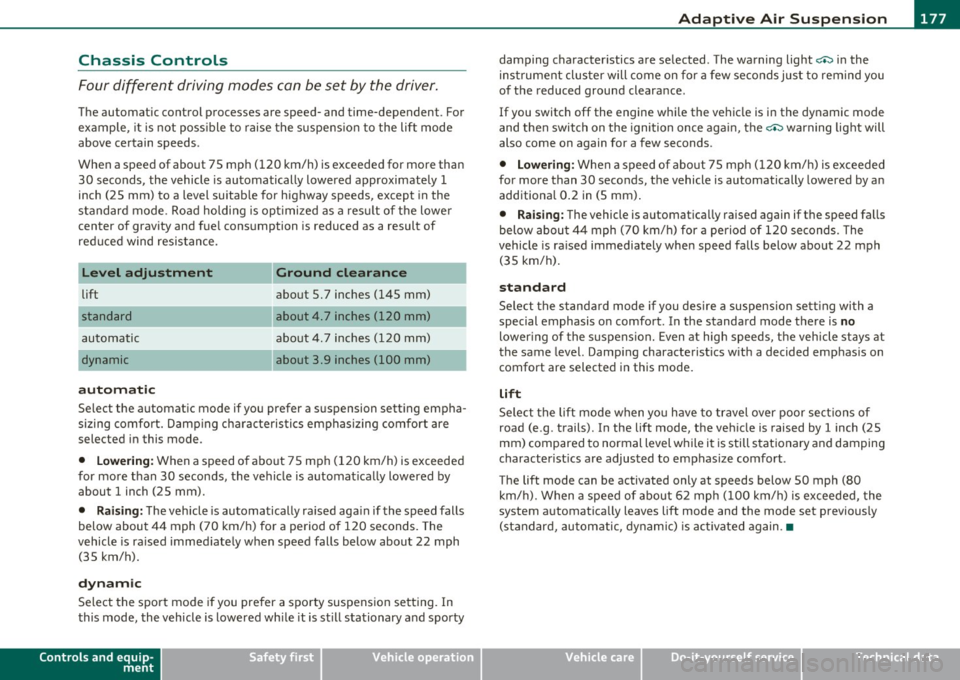
Chassis Controls
Four different driving modes can be set by the driver .
The automatic control processes are speed- and time-dependent . For
example, it is not poss ible to raise the suspension to the lift mode
above certain speeds .
When a speed of about 75 mph (120 km/h) is exceeded for more than 30 seconds, the vehicle is automatically lowered approximately 1
inch (25 mm) to a level suitable for highway speeds, except in the
standard mode . Road ho ldi ng is opt imized as a result of the lowe r
center of gravity and fue l consumption is reduced as a result of
reduced wind resistance.
Level adjustment
lift
automatic
dynamic
automatic Ground clearance
about 5. 7 inches (145 mm)
about
4. 7 inches (120 mm)
about 4. 7 inches (120 mm)
about 3.9 inches (100 mm)
Select the automatic mode if you prefer a suspension setting empha
sizing comfort. Damping characteristics emphasizing comfort are
selected in this mode .
• Lowering : When a speed of about 75 mph (120 km/h) is exceeded
for more than 30 seconds, the vehicle is automatically lowered by about 1 inch (25 mm).
• Raising: The vehicle is automatically ra ised aga in if the speed falls
below about 44 mph (70 km/h) for a period of 120 seconds. The
vehicle is ra ised immediately when speed falls below about 22 mph
(35 km/h).
dynamic
Select the sport mode if you prefer a sporty suspension setting . In
this mode, the vehicle is lowered wh ile it is st ill stationary and sporty
Controls and equip
ment Safety first
damping characteristics are selected
. The warning light c.::> in the
instrument cluster will come on for a few seconds just to remind you
of the reduced ground clearance.
If you switch off the engine whi le the vehicle is in the dynamic mode
and then switch on the ignition once aga in, the
c.::> warning light will
also come on again for a few seconds.
• Lowering : When a speed of about 75 mph (120 km/h) is exceeded
for more than 30 seconds, the vehicle is automatically lowered by an
additional 0.2 in (5 mm) .
• Raising: The vehicle is automatically raised again if the speed falls
below about 44 mph (70 km/h) for a period of 120 seconds. The
vehicle is ra ised immediately when speed falls below about 22 mph
(35 km/h).
standard
Select the standard mode if you desire a suspension sett ing with a
special emphasis on comfort . In the standard mode there is
no
lower ing of the s uspens ion. Even at high speeds, the vehicle stays at
the same level. Damping characteristics with a decided emphasis on
comfort are selected in this mode.
lift
Select the lift mode when you have to travel over poor sections of
road (e .g . trails) . In the lift mode, the vehicle is raised by 1 inch (25
mm) compared to normal level while it is still stationary and damping
characterist ics are adjusted to emphasize comfort .
The lift mode can be activated only at speeds below 50 mph (80 km/h). When a speed of about 62 mph (100 km/h) is exceeded, the
system automatica lly leaves lift mode and the mode set previously
(standard, automatic, dynamic) is activated again .•
Vehicle care Technical data
Page 181 of 384

____________________________________________ A_ d_a_ p ,_ t_iv _ e_ A _ i_ r _ S_ u_s_, p __ e_n _ s_ i _o_ n __ _
Setting the Driving Modes
The driving modes are set in MMI.
Fig. 1 94 MMI d isplay:
Se tti ngs
The ignition must be switched on to set the driving modes.
- Press the [ CAR]function button. The main menu
Adaptive
Air Suspension
appears::::> fig. 194.
- Select the desired mode with the control knob .
Please note that not every driving mode can be selected in every
driving situation . For examp le, it is not possible to switch to lift mode
at speeds above 50 mph (80 km/h). This mode is shown
greyed out in
the MMI display.
For additiona l information on the driving modes=>
page 177,
"Chass is Controls" . •
Jacking Mode When Changing a Flat Tire
This mode must be activated before raising the vehicle
with a vehicle jack .
Switching jacking mod e on and off
- Select: Function button [CAR]> Adaptive Air Suspension
> function button [SETUP].
Controls and equip
ment Safety first
-
Turn the control knob to Veh icl e jac k mode and select on
or off as desired.
The vehicle jack mode must be act ivated before changing a whee l so
that the automatic control processes for the air suspension do not
make lifting with the vehicle jack more difficult.
In the veh icle jack mode the indicator light in the instrument cluster
w v illuminates.
& WARNING
The hei ght of the parked vehi cle ca n c hange due to te mp erature
fluc tu at ions or c ha ng es in l oad .
[I) Tips
The vehicle jack mode is switched off automatically at speeds above 9
mph (15 km/h). •
Towing a Trailer
Automatic lowering is not desirable when towing a
trailer.
If you are going to tow a trailer, you must activate the tra iler
towing mode .
Switching the trail er towing mode on and off
manually
- Select: Function buttont( CAR]> function button [SETUP].
- Select Trailer towing mode on or off as desired .
Level Adjustm ent when T ow ing a Trail er
The following applies to vehicles with Adaptive Air Suspension:
Vehicle care Technical data
Page 183 of 384

_____________________________________________________ H_ o_m_ e_ L_i_n _k_ ®_ • __ _
Homelink ®
Universal remote control
Applies to veh icles: w ith Hom eli nk ® universal remote control
General information
The Homelink ® feature can learn up to three radio
frequency codes for most current transmitters used for
operating garage doors, estate gates, home or outdoor
lighting systems, and other devices.
You must first program the Homelink ® transm itter before you can
use the system=>
page 182, "Programming the Home link® trans
mitter".
I n order to program the Homelink ® transmitter for devices utilizing
rolling code, a second person on a ladder who can safe ly reach the
garage door opener motor is recommended. It is also necessary to
locate the "learn" button on your garage door opener motor. Refer to
the operating instructions for the opener, as the location and color of
this button may vary by manufacturer.
You can still use the original remote control for the device at any
time.
& WARNING
• Never use the Homelink'"' transmitter with any garage door
opener that does have not the safety stop and reverse feature as
required by federal safety standards. This includes any garage
door opener model manufactured before Aprill, 1982.
• A garage door opener which cannot detect an object, signaling
the door to stop and reverse does not meet current federal safety
standards. Using a garage door opener without these features
increases risk of serious injury or death.
Controls and equip
ment Safety first
& WARNING
(continued)
• For safety reasons never release the parking brake or start the
engine while anyone is standing in front of the vehicle.
• A garage door or an estate gate may sometimes be set in
motion when the Homelink ® remote control is being
programmed. If the device is repeatedly activated, this can over
strain motor and damage its electrical components -an over
heated motor is a fire hazard!
• To avoid possible injuries or property damage, please always
make absolutely certain that no persons or objects are located in
the range of motion of any equipment being operated.
rn Tips
• If you would like more information on Homelink ®, where to
purchase the Homelink ® compatible products, or would like to
purchase the Homelink ® Home Lighting Package, please call toll
free: 1-800-355-3515.
• For Declaration of Compliance to United States FCC and Industry
Canada regulations=>
page 364 . •
Vehicle care Technical data
Page 189 of 384

______________________________________________ D_ ri_v _ i_n _,,g ,c.._ S_a_ f_ e_ l..:: y __ __
Important things to do before driving
Safety is everybody's job! Vehicle and occupant safety always depends on the informed and careful driver.
For your safety and the safety of your passengers, before
driving always:
- Make sure that all lights and signals are operating
correctly.
- Make sure that the tire pressure is correct.
- Make sure that all windows are clean and afford good visi-
bility to the outside.
- Secure all luggage and other items carefully::::>
page 98.
-Make sure that nothing can interfere with the pedals.
- Adjust front seat, head restraint and mirrors correctly for your height .
- Instruct passengers to adjust the head restraints according to their height.
- Make sure to use the right child restraint correctly to
protect children ::::,
page 231, "Child Safety".
- Sit properly in your seat and make sure that your passen gers do the same::::,
page 76, "General recommenda
tions".
- Fasten your safety belt and wear it properly. Also instruct
your passengers to fasten their safety belts properly
=:> page 197. •
Controls and equip
ment Safety first Vehicle operation
What impairs driving safety?
Safe driving is directly related to the condition of the
vehicle, the driver as well as the driver's ability to concen
trate on the road without being distracted .
The driver is responsible for the safety of the vehicle and all
of its occupants. If your ability to drive is impaired, safety
risks for everybody in the vehicle increase and you also
become a hazard to everyone else on the road::::,,& . There
fore:
Do not let yourself be distracted by passengers or by using
a cellular telephone.
NEVER drive when your driving ability is impaired (by
medications, alcohol, drugs, etc.).
- Observe all traffic laws, rules of the road and speed limits
and plain common sense .
- ALWAYS adjust your speed to road, traffic and weather
conditions.
- Take frequent breaks on long trips. Do not drive for more than two hours at a stretch.
- Do NOT drive when you are tired, under pressure or when
you are stressed .
& WARNING
Impaired driving safety increases the risk of serious personal
injury and death whenever a vehicle is being used.•
Vehicle care Do-it-yourself service Technical data
Page 190 of 384
___ D_ r_ i_ v _i_n _.g"-- S_ a_ f_ e__. LY.__ _____________________________________________ _
Proper occupant seating positions
Proper seating position for the driver
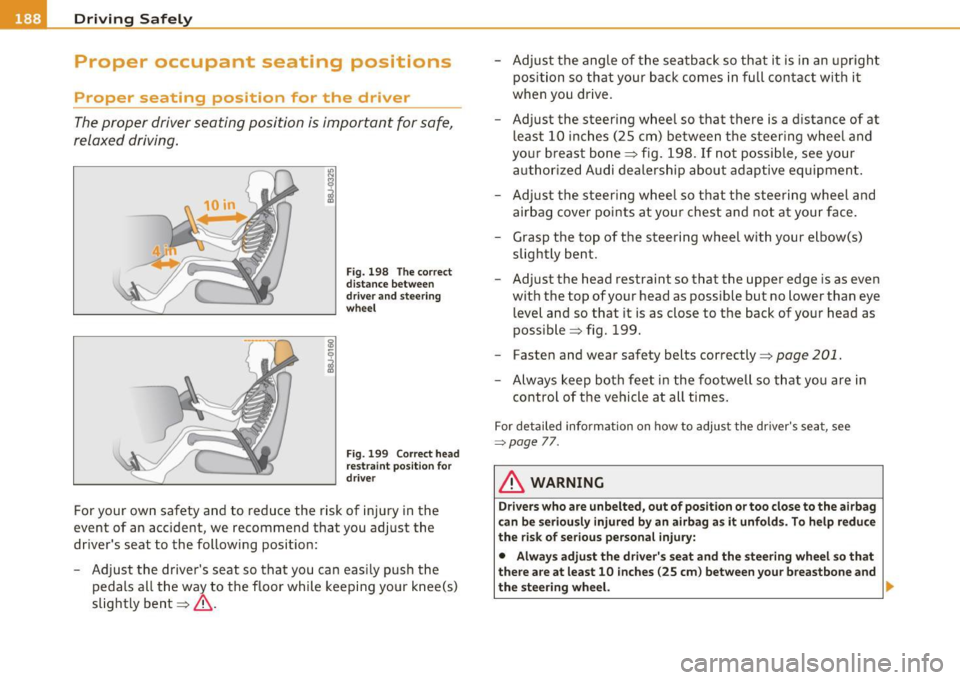
The proper driver seating position is important for safe,
relaxed driving.
1.1'1 N
;
Fig. 198 The correct
distance between
driver and steering
wheel
Fig . 199 Correct head
restraint position for
driver
For your own safety and to reduce the risk of injury in the
event of an accident, we recommend that you adjust the
driver's seat to the following position:
- Adjust the driver's seat so that you can easily push the
pedals all the way to the floor while keeping your knee(s)
slightly bent==>& . -
Adjust the angle of the seatback so that it is in an upright
position so that your back comes in full contact with it
when you drive.
- Adjust the steering wheel so that there is a distance of at least 10 inches (25 cm) between the steering wheel and
your breast bone==> fig. 198. If not possible, see your
authorized Audi dealership about adaptive equipment.
- Adjust the steering wheel so that the steering wheel and airbag cover points at your chest and not at your face.
- Grasp the top of the steering wheel with your elbow(s) slightly bent.
- Adjust the head restraint so that the upper edge is as even
with the top of your head as possible but no lower than eye
level and so that it is as close to the back of your head as
possible ==> fig. 199.
- Fasten and wear safety belts correctly=>
page 201.
-Always keep both feet in the footwell so that you are in
control of the vehicle at all times.
For detailed information on how to adjust the driver's seat, see
=:>page 7 7.
& WARNING
Drivers who are unbelted, out of position or too close to the airbag
can be seriously injured by an airbag as it unfolds. To help reduce
the risk of serious personal injury:
• Always adjust the driver's seat and the steering wheel so that
there are at least 10 inches (25 cm) between your breastbone and
the steering wheel. ..
Page 199 of 384

_____________________________________________ S_a _f _e _t _y _b_ e_lt _ s __ l!'II
Safety belts
General notes
Always wear safety belts!
Wearing safety belts correctly saves lives!
This chapter explains why safety belts are necessary, how
they work and how to adjust and wear them correctly.
- Read all the information that follows and heed all of the
instructions and WARNINGS.
& WARNING
Not wearing safety belts or wearing them improperly increases
the risk of serious personal injury and death.
• Safety belts are the single most effective means available to
reduce the risk of serious injury and death in automobile acci
dents. For your protection and that of your passengers, always
correctly wear safety belts when the vehicle is moving.
• Pregnant women, injured, or physically impaired persons must
also use safety belts. Like all vehicle occupants, they are more
likely to be seriously injured if they do not wear safety belts. The
best way to protect a fetus is to protect the mother - throughout
the entire pregnancy. •
Number of seats
Your Audi has a total of five seating positions: two in the front and
three in the rear . Vehicles with power individual rear seats* have
seating for four: two in the front and two in the rear. Each seating
position has a safety belt.
Controls and equip
ment Safety first Vehicle operation
& WARNING
Not wearing
safety belts or wearing them improperly increases
the risk of serious personal injury and death.
• Never strap more than one person, including small children,
into any belt. It is especially dangerous to place a safety belt over
a child sitting on your lap.
• Never let more people ride in the vehicle than there are safety
belts available.
• Be sure everyone riding in the vehicle is properly restrained
with a separate safety belt or child restraint. •
Safety belt warning light t
Your vehicle has a warning system for the driver and front
seat passenger to remind you about the importance of
buckling-up.
Before driving off, always:
Fig. 201 Safety belt
warning light in the
instrument cluster -
enlarged
- Fasten your safety belt and make sure you are wearing it
properly .
IJ,,
Vehicle care Do-it-yourself service Technical data
Page 200 of 384
___ S_a _f_e _t-=y '-- b_e_ l_ t _s _____________________________________________ _
-Make sure that your passengers also buckle up a nd prop
erly wear their safety belts .
- Protect c hildren with a child rest raint system appropria te
fo r the size and ag e.
The warn ing light ~ in the instrument cluster lights up when the igni
tion is sw itched on as a reminder to fasten the safety belts. In addi
tion, you will hear a warn ing to ne .
After the ignition is switched on, the warn ing light in the instrument
clu ster will alw ays come on fo r a bout 6 seconds and i f the driver has
not fastened the safety belt, a warning tone will also sound for about
6 seconds. As soon as the d rive r has fastened the safety belt, the
warning tone will stop and the war ning light w ill go out.
If the driver or front seat passenger have not buck led-up within about
1 0 se conds afte r th e war ning tone has stopped and the veh icle is
moving faster than about 15 mph, the warning tone will sound again
for a bout 6 se conds and then s to p for 24 seco nds and the n re pea t
this rem inder sequence for a max imum of 2 m inutes . At speeds
below 5 mph, the w arning tone will not sou nd.
Fa sten your safety belt and make sure that your passenger s also
properly put on their safety belts.
& WARNING
• Safety belt s are the single most effe ctiv e mean s available to
reduce the risk of serious injury and death in automobile a cci
dents . For your protection and that of your pa ssenger s, always
c orrectly wear safety belts when the vehicle is moving .
• Failure to pay attention to the warning light that come on,
could lead to person al injury .•
Why safety belts?
Frontal collisions and the law of physics
Frontal cr ashes cre ate very stron g forc es for people
riding i n vehi cles.
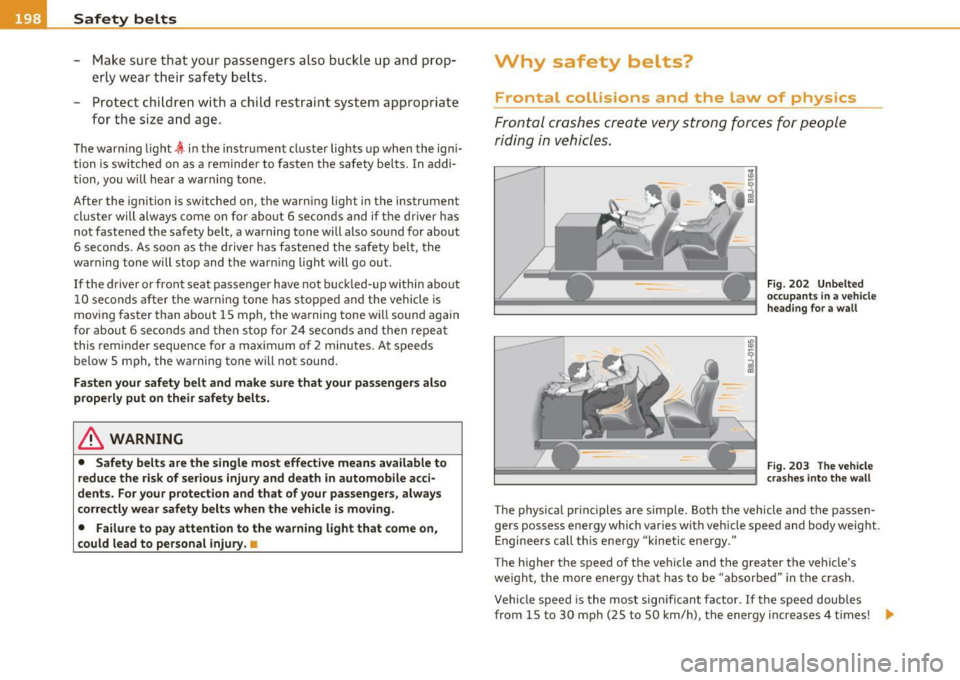
Fig . 202 Unbe lted
o ccupa nts in a vehicle
h eading f or a w all
Fig. 203 Th e vehicle
cr as hes int o t he wall
The p hys ica l pr inc iples are simple. Both the vehicle and the passen
gers possess energy which var ies wit h veh icle speed and body weight.
E nginee rs ca ll t his ene rgy "kinetic energy."
The higher the speed of the veh icle and t he greater the vehicle's
we ight, the more energy that has to be "abso rbed" in the crash .
Vehicle speed is the most sig nifican t fa ctor. If t he speed doubles
from 15 to 30 mph (25 to 50 km/h), the energy increases 4 times! .,
Page 204 of 384
-Safety belts -----=-----------------------------------------
Automatic safety belt retractors
Every sa fe ty be lt is equipped wi th an au toma tic be lt r etrac tor on the
shoulder be lt. This feat ure locks t he belt whe n the belt is pull ed out
fast, during ha rd bra king an d in an acc ident . The belt may also loc k
w hen you dr ive up or dow n a s te ep h ill or throug h a sharp curve .
Dur ing norma l driv ing the belt lets you move freely.
Safety belt pretensioners
Th e safety belts are e quipped w ith a belt p retensioner that hel ps to
t igh ten the saf ety be lt and remove slac k w he n the p re tensioner is
act ivated . The f unction of t he p retens ioner is monitore d by a warn ing
light=>
pag e 17.
Switchable locking feature
Every safety be lt except the one on the driver sea t is equipped with a
switchab le locking feature that
must b e used when the safety belt is
us ed to attach a c hild se at. B e s ure to rea d the i mporta nt info rmation
about th is feature =>
page 241.
& WARNING
Improperly positioned safety belts can cause serious injury in an
accident =>
page 202, "Safety belt position ".
• Safety belt s offer optimum protection only when the seat back
is upright and belts are properly positioned on the body.
• Never attach the safety belt to the buckle for another seat.
Attaching the belt to the wrong buckle will reduce safety belt
effe ctivene ss and can cause seriou s per sonal injury.
• A passenger who is not properly restrained can be seriously
injured by the safety belt itself when it moves from the stronger
parts of the body into critical areas like the abdomen.
• Always lock the convertible locking retractor when you are
securing a child seat in the vehicle=>
page 243. •
Safety belt position
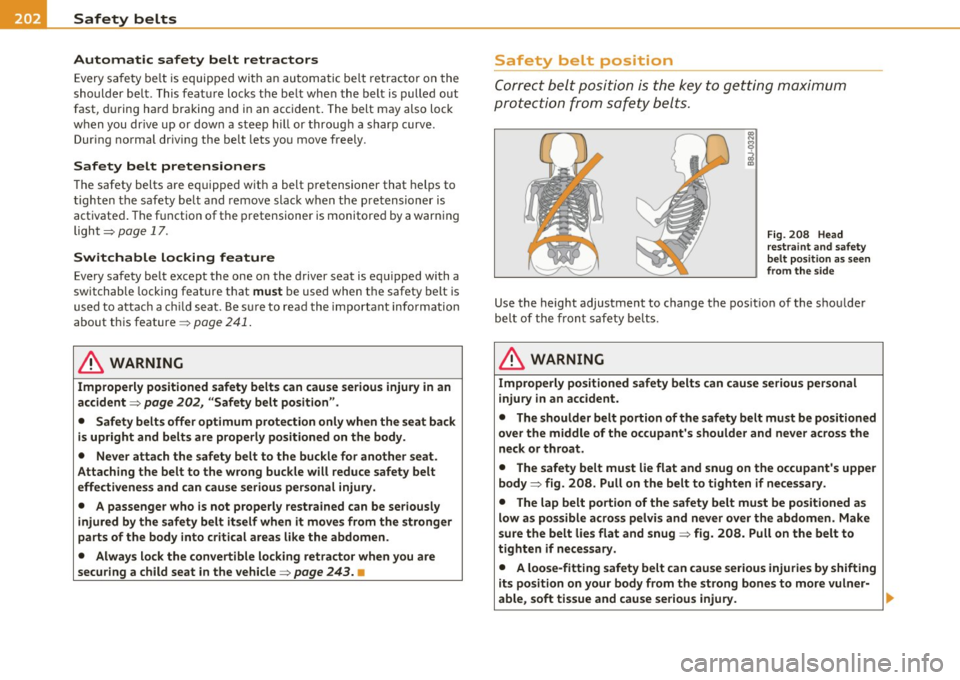
Corre ct b elt posi tion is the key t o getting maximum
p ro tec tion fro m sa fety belts .
Fig. 208 Head
restraint a nd safety
belt po sit ion as s een
from the side
Use the height adjustment to change the pos it io n of the s houl de r
be lt of the fron t sa fety be lts.
& WARNING
Improperly po sitioned safety belts can cau se serious per sonal
injury in an accident.
• The shoulder belt portion of the safety belt must be positioned
over the middle of the occupant's shoulder and never across the
neck or throat.
• The safety belt must lie flat and snug on the occupant's upper
body => fig. 208. Pull on the belt to tighten if necessary.
• The lap belt portion of the safety belt must be positioned a s
low as possible across pelvis and never over the abdomen . Make
sure the belt lies flat and snug => fig. 208. Pull on the belt to
tighten if necessary .
• A loose-fitting safety belt can cause serious injuries by shifting
its position on your body from the strong bones to more vulner-
able , soft tissue and cause serious injury .
~