key battery AUDI S8 2010 Owners Manual
[x] Cancel search | Manufacturer: AUDI, Model Year: 2010, Model line: S8, Model: AUDI S8 2010Pages: 384, PDF Size: 90.95 MB
Page 34 of 384
Driver information displ ay
Yellow symbols
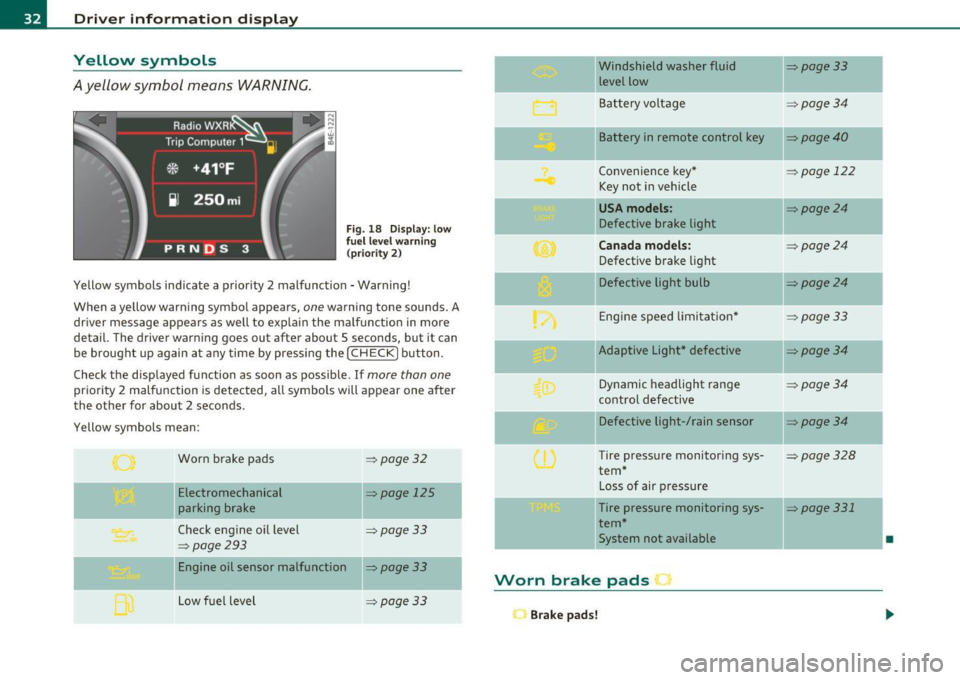
A yellow symbol means WARNING.
Fig . 18 Display: low
f ue l level warn ing
(priority 2)
Yellow symbols ind icate a prior ity 2 malfunction -Warning!
When a yellow warning symbo l appears,
one warning tone sounds. A
dr iver message appears as well to explain the ma lfunction in more
detail. The driver warning goes out after about 5 seconds, but it can
be brought up again at any time by pressing the
I CHECK] button .
Check the displayed function as soon as possible.
If more than one
priority 2 malfunction is detected, all symbols will appear one after
the other for about 2 seconds .
Yellow symbols mean:
Worn brake pads
=> page 32
Electromechanical => page 125
parking brake
Check engine oil level
=> page 33
=> page 293
Engine oil sensor malfunction => page 33
-
Low fuel level =>page33
Windshield washer fluid =>page33
level low ~
Bat tery voltage =>page34
-
II Battery in remote control key =>page40
Convenience key * =>page 122
Key not in veh icle
USA models: => page24
Defective brake light
Can ad a mod els : =>page24
Defect ive brake light
Defective light bulb
=>page24
E ng ine speed limitat ion* => page33
-
IIAdaptive Light* defective =>page34
Dynamic headlight range => page 34
contro l defective
Defective light-/rain sensor
=> page34
Tire pressure monitoring sys-=>page328
tern *
Loss of air p ressure
-Tire pressure monitoring sys-=> page331
tern*
11System not available •
Worn brake pads •
Brake pa ds!
Page 36 of 384
Driver information display
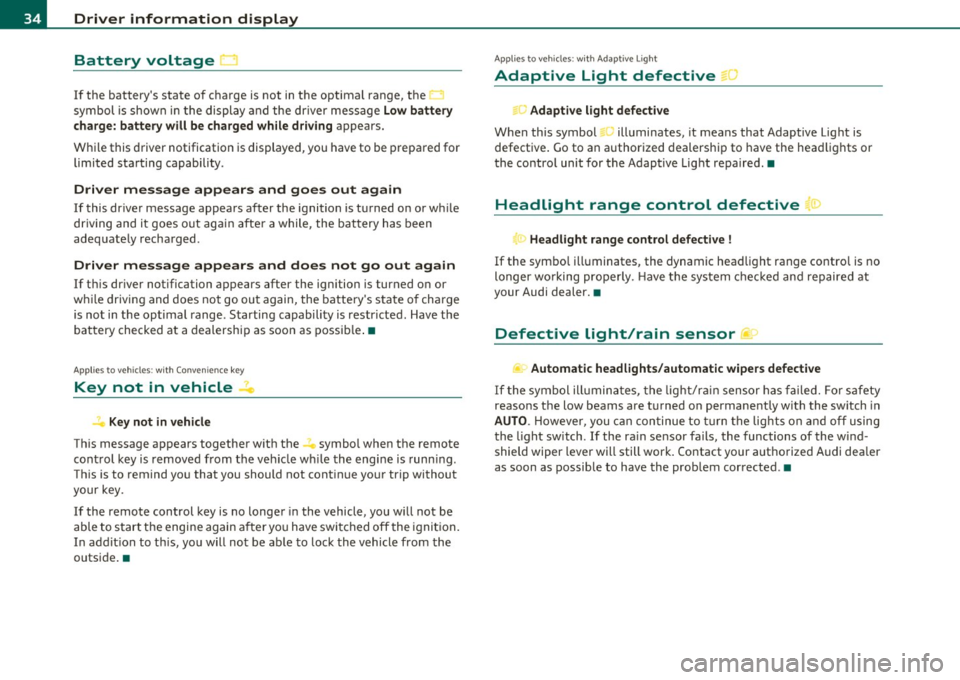
Battery voltage
1 ~
If the battery's state of charge is not in the optimal range, the <--..J
symbol is shown in the display and the dr iver message Low battery
charge: battery will be charged whil e dri ving
appears.
While this driver notification is displayed, you have to be prepared for limited starting capability .
Driver message appears and goes out again
If this driver message appears after the ignition is turned o n or wh ile
dr iving and it goes o ut aga in afte r a while , the ba ttery has been
adeq uate ly recharged .
Driver message appears and does not go out again
If this dr iver notification appears after the ignition is turned o n or
w hile driving and does no t go ou t agai n, the battery 's s ta te o f ch arge
is no t in the opt imal range . S tarting capabili ty is restr icted . Have t he
bat tery checked at a dealersh ip as soon as possib le .•
A ppli es to ve hicles : wit h Conve nie n ce k ey
Key not in vehicle
Key not in vehicle
Th is message appears together w it h the -. symbo l whe n the remote
cont rol key is remov ed from the v ehicl e wh ile the engine is runni ng.
Th is is to remind yo u that you should not cont inue you r trip without
your key.
If the remo te control key is no longer in the vehicle, you wi ll not be
able to start the engine again a fter yo u have swi tched off the igni tion .
In addit ion to t his, you will no t be a ble to lock the vehicle from the
outs ide .•
A pplie s to vehicles : with Adaptive Light
Adaptive Light defective •
.. c Adaptive light defective
When th is symbol .., illuminates, it means that Adaptive Light is
defective . Go to an authorized dealersh ip to have the head lights or
the contro l unit for the Adaptive Light repa ired .•
Headlight range control defective '">
T<. Headlight range control defective !
If the symbo l ill uminates, the dynamic head light range contro l is no
longer wo rking prope rly. Have t he sys tem check ed and repaired at
your Audi dealer. •
Defective light/rain sensor ...>
.... Automatic headlights/automatic wipers defective
If the symb ol ill umina te s, the lig ht/r ain sensor has failed. F or sa fety
reasons the low beams are t urned on permane ntly w ith the sw itch in
AUTO . Howeve r, you ca n con tinue to turn the lig hts o n and off using
the light sw itch. If the ra in se nsor fa ils , the functions of the wind
shield wiper leve r will still wor k. Contact your aut horized Audi dea ler
as soon as possible to have the prob lem cor rected .•
Page 42 of 384

Opening and closing Master key with remote control
The remote control allows you to lock or unlock the
vehicle electronically.
Fig. 24 Fold-up
master key with
remote control
- To fold the key out and back in place, press the release
button~ fig. 24.
The transmitter and battery are located in the head of the remote
control. The receiver is located inside the vehicle. The maximum
effective range depends on several things. Remember, if the battery
is weak, the effective range decreases.
If you need to replace the remote contro l, or if you need to have it
repaired, you must see you r author ized Aud i dealer. Only then can you
use the key again.
Personalizing the master key
When the ignition is turned off or when the vehicle is locked, vario us
convenience sett ings are stored automatically and assigned to the
key that was used. The sett ings assigned to the key are automatically
recalled w ith you unlock the vehicle or when you open a door or when
you switch on the ignition .
• Climate control
• Centra l locking
• Windows and rear window sun blind •
Background lighting*
• Seat memory
• Adaptive Cru ise Contro l*
• Audi lane and s ide assist*
• Adva nced Parking System*
The
Remote control key f un ction must be activated in MMI
=> page 85, so that the settings for the driver's seat (including the
sett ings for the head restraint, steering column, safety belt height
and exterior mirrors) are saved on the master key through the seat
memory when the vehicle is locked, and are set automat ica lly when
the vehicle is unlocked.
[ i ] Tips
• If the ign it ion is switched on, the remote control system is deacti
va ted .
• The remote control system can be affected by other systems oper
ating in the same frequency range close to the vehicle, such as mobile
telephones, te lev ision broadcasting stations, etc.
• For Declaration of Compliance to United States FCC and Industry
Canada regulations =>
page 364. •
Battery replacement, master key
. w ',!
Fig. 25 Check light in
the master key ..
Page 43 of 384

Battery operation in the master key is monitored by a check light . The
check light flashes when one of the buttons on the master key is
pressed. If the check light does not flash, the battery is dead and has
to be replaced .
In add ition , when the battery is dead the ..: symbol appears in the
instrument cluster display as well as the message:
Please change key battery
We recommend having the battery changed by an Audi Dealer .•
Electronic immobilizer
The immobilizer helps to prevent unauthorized use of
your vehicle.
A computer chip inside your key automatically deactivates the elec
tronic immobilizer when you insert the key in the ignition lock, or on
vehicles with Convenience key*, when the key is inside the vehicle.
When you remove the key from the ign it ion lock , or on veh icles with
Convenience key, when you remove the key from the vehicle, the elec
tronic immobilizer is automatically activated once again.
& WARNING
Always take the key with you when you leave the vehicle. The key
can disarm the electronic engine immobilizer and permit an unau
thorized person to start the engine and enable operation of the
vehicle systems such as power window or power sunroof leading
to serious personal injury .
(I) Tips
• The immobilizer prevents unauthorized use of the vehicle. The
vehicle cannot be sta rted if an unauthorized key is used. The vehicle
may not start if another radio device such as a key for another vehicle
or a transponder is located on the key ring.
Controls and equip
ment Safety first
Opening and closing
•
For Declaration of Compliance to United States FCC and Industry
Canada regulations=>
page 364. •
Power locking system
General description
The power locking system locks or unlocks all doors and
the rear lid simultaneously.
The power locking system in your vehicle incorporates the following
functions:
• Central locking function
• Selective unlock feature~
page 44
• Remote control feature ~ page 40
• Convenience key*=> page 50
• Anti -theft alarm system ~ page 52
All the doors and the rear lid are locked by the central locking system
when you lock the veh icle. You can set whether generally only the
dr iver's door or all doors and the rear lid should be unlocked when you
open the vehicle in the MMI menu
Central locking to suit your indi
vidual desires~
page 44.
Unlocking the vehicle
You can unlock the vehicle from outside either by using the remote
control
or by turning the key inside the driver's door lock. When you
unlock your vehicle:
• The anti-theft alarm system is deactivated briefly .
• The vehicle interior lights illuminate for approximately 30
seconds.
• All turn signal lights will flash twice when the car is unlocked .
• After un locking the vehicle, you have 60 seconds to open a door or
the rear lid. After 60 seconds, the vehicle automatically locks and the
anti-theft alarm system activates again. ..,
Vehicle care Technical data
Page 54 of 384
Opening and closing
• Agai n, to conserve battery power so t hat you can start the veh icle
a fter it has b een standin g for a long perio d, th e veh icle's e ne rgy
ma nageme nt system will switch off any convenie nce f eatures not
necessary . Yo u will not be a ble to un lock your ve hicle using the
keyless system. •
Applies to veh icles: w ith Conven ience key
Locking the vehicle
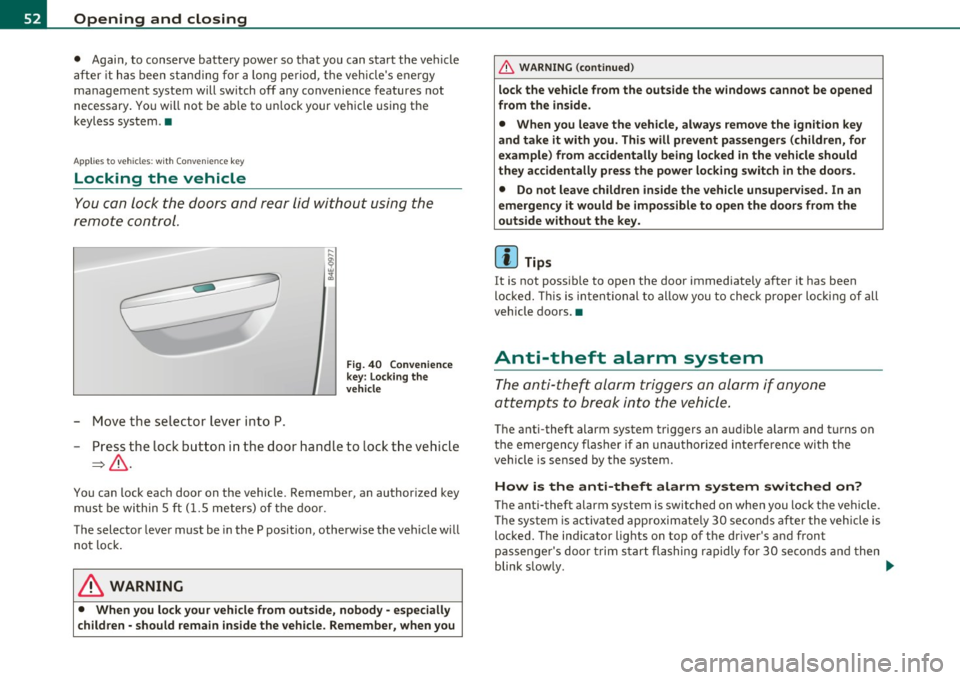
You c an l ock t he doors and rear lid wit h ou t usin g th e
rem ote cont ro l.
- Mo ve th e selec tor lev er in to P.
Fig . 40 Conven ience
key : Lo cking the
vehicle
- Press t he loc k b utton i n th e door hand le to loc k th e ve hicle
=>& .
You can lock eac h door on the vehicle. Remembe r, a n author ized key
mu st b e wi thi n 5 ft
(1. 5 me ters) o f th e door .
T he selecto r leve r must be in th e P position, othe rw is e t he vehi cle will
n ot l ock .
& WARNING
• When you lock your vehicle from outside, nobody -especially
children -should remain inside the vehicle. Remember , when you
& WARNING (co ntinued )
lock the vehicle from the outside the windows cannot be opened
from the inside.
• When you leave the vehicle, always remove the ignition key
and take it with you. This will prevent pa ssengers (children, for
example) from accidentally being locked in the vehicle should
they accidentally pre ss the power lo cking switch in the doors.
• Do not leave children inside the vehicle unsupervised . In an
emergency it would be impossible to open the doors from the
outside without the key.
[ i ] Tips
It is not poss ible to open the door immediately a fter it has been
lo cke d. T his i s int entional to allow y ou to c heck prop er lo cking o f all
vehicle doors. •
Anti-theft alarm system
The anti-t heft al arm t rig g er s an ala rm if an yone
att empts to bre ak into th e vehic le .
T he anti-theft alarm system triggers an a ud ible a larm and t urns on
th e e mergen cy fla sh er i f an u nau th oriz ed int erf eren ce wi th th e
veh icle is sensed by the system.
How is the anti-theft alarm system switched on?
T he anti-theft alarm system is switched on when you lock the veh icle.
Th e sy st em i s activ at ed app roxima te ly 30 secon ds a fter the ve hicle i s
loc ked. T he ind icator lights on top of t he dr iver's and front
pa ssenge r's door trim s ta rt fla shing rapidly fo r 30 s eco nds and t hen
blink s low ly. ._
Page 55 of 384

How is the anti-theft alarm system switched off?
The anti-theft alarm system is switched off only when you unlock your
vehicle .
If you do not open a door within 60 seconds after you have
unlocked with the remote control, the vehicle will lock itself again
automatically.
When will the anti-theft alarm system be
triggered?
When the vehicle is locked, the alarm system monitors and protects
the following parts of the veh icle:
• engine compartment
• luggage compartment
• doors
• ignition
When the system is activated, the alarm will be triggered if one of the
doors, the engine hood or the rear lid are opened, or if the ignit ion is
turned on. The anti-theft alarm system will also go off when the
battery is disconnected.
Unlocking the rear lid by inserting and turning the key inside the rear
lid locking cylinder will trigger the optical and acoustic alarm.
You can also trigger the alarm by pressing the PANIC button on your remote control. This will alert other peop le in case of emergency.
Press the PANIC button again to turn off the alarm.
How is the anti-theft alarm switched off when
tr igg ered?
The alarm system is switched off when you un lock the vehicle or when
the ignition is switched on . The alarm will also switch itself off when
it comes to the end of its cycle .
Emergency flasher and horn
The emergency flasher will blink br iefly and the horn sounds when
the doors, engine hood and rear lid are properly closed .
If the emergency flashers do not blink, or the horn does not sound,
check the doors, engine hood and rear lid to make sure they are prop-
Con tro ls a nd e quip
m en t Vehicle
OP-eration
Opening and closing
erly closed. If you close a door, the hood or the rear lid with the anti
theft alarm switched on, the emergency flashers will blink and the
horn w ill sound only after you have closed the door or lid .
(I] Tips
For the anti-theft alarm system to function properly, make sure all
vehicle doors and windows are closed before leaving the vehicle. •
Power windows
Controls
Fig. 41 Driver's door:
power window
switches
Fig.
42 Driver's door:
Switches (vehicles
with power child safety
lock) ..
Vehicle care Do-it-yourselt service iTechnical data
Page 67 of 384

0 Note
Do not use the high beam or headlight flasher if you know that these
could blind oncoming traffic. •
Interior lights
Front interior Lights
The interior lights include reading lights for both the
driver and the front passenger.
11111111
I
\ 10
1
111111111
0
Con trol s and equ ip
m ent
111 i -~ -
--
•l l i'1~
rol ,
l I
111111111
i8 M
-w
"' a,
' '
111111111
0 Fig. 54 Rooflining:
Front interior lights
Fig. 55 Rooflining:
Front reading lights:
Vehicle OP-eration
Clear vision
Interior lights
- Press the@) button to turn off the interior lights
~ fig. 54. If you press the button a second time, the inte
rior lights in the rear are also turned off.
- Press the
(ID button to turn on the door contact circuit.
Press the button a second time to turn on the door contact
circuit for the rear doors .
- Press the
(I) button to turn on the interior lights. If you
press the button a second time, the interior lights in the
rear are also turned on .
Reading lights '-<~
-Press the switch to turn the right or left reading light on
or off ~ fig. 55.
With the door contact circuit, (ID the interior lights turn on as soon as
you unlock the vehicle or open the doors. The in terior lights are also
turned on when the ignition key is removed. The light goes out about
2 minutes after the doors are closed . When the vehicle is locked or
when the ignition is turned on, the interior lights are turned off .
When a door is open, the interior lights are turned off after about 10
minutes to preven t draining the battery.
[ i] Tips
The interior lights can be dimmed by holding the(!) swit ch pressed
down. If the interior lights in the rear were turned on by pressing the
switch twice, the rear interior lights are also dimmed .•
Vehicle care Do-it-yourselt service iTechnical data
Page 68 of 384
Clear vision Rear Interior Lights
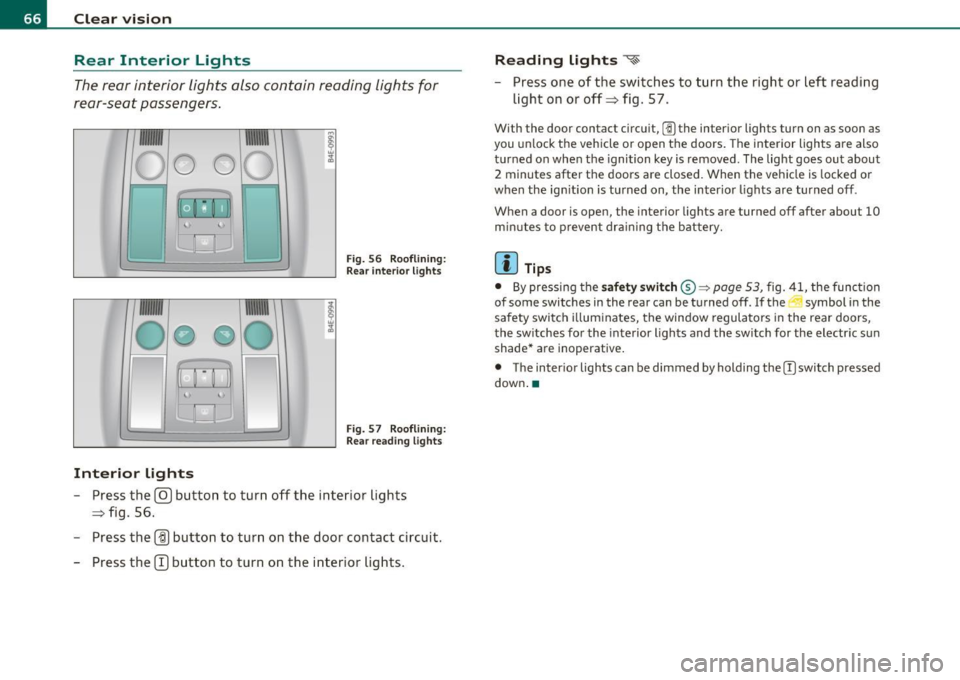
The rear interior lights also contain reading lights for
rear-seat passengers .
Fig. 56 Roo flin ing :
Rear in te rior lig hts
'
Fig . 57 Roo flining :
Re ar read ing lights
Interior lights
- Press the@ button to turn o ff the inte rior lights
=> fig . 56.
- Press the
(ID button to turn on the door contact circuit.
- Press the
CT) button to turn on the inter ior lights .
Reading lights ~
- Press one of t he switches to turn the right or left reading
light on or off=> fig. 57.
With the door contact circuit, [])the inter ior lights tu rn on as soon as
you un lock t he veh icle or open the doors . The interior lights a re also
t u rned on when the ignition key is removed . The light goes out about
2 minutes after the doors are closed. When the vehicle is locked or
when the ig nition is turned on, the inter io r li ghts are turned off.
When a door is open, the interior lights are turned off after about
10
m inu tes to p revent dra ining the battery.
(I) Tips
• By pressing the safety switch ®~ page 53, fig. 41, the func tion
of some switches in the rear can be turned off.
If the ._J symbol in the
safety swi tch i llum inates, the window regula tors in the rea r doors,
the sw itches fo r the interior lights and the sw itch for the electr ic s un
shade* are inoperative .
• The inter ior lights can be dimmed by holding the [)switch pressed
down .•
Page 99 of 384

Cigarette lighter/socket
Cigarette lighter
Using the cigarette lighter
-Push the knob in .
Fig. 103 Open ashtray
with cigarette lighter
Fig . 104 Center
console rear: Cigarette
lighter
- Wait until the cigarette lighter knob pops out.
- Remove the cigarette lighter immediately and use it.
- Reinsert cigarette lighter into the socket after use.
Connecting an appliance
-Remove cigarette lighter.
Contro ls a nd e quip
m en t Vehicle
OP-eration
Seats and storage
-Plug in app liance to be used.
The socket of the cigarette lighter may be used for 12-volt appliances
with maximum consumption of up to 100 watts, such as a flash light,
small vacuum cleaner, etc.
Before you purchase any accessories, always read and follow the
information in~
page 363 , "Additional accessories and parts
rep lacement" .
& WARNING
Improper use of the cigarette lighter can cause serious injury or
start a fire.
• Be careful when using the cigarette lighter. If you do not pay
attention to what you are doing when you are using the cigarette
lighter you can burn yourself.
• The cigarette lighter and socket remain functional even if the
ignition is switched off or the ignition key is removed . Never leave
children inside the vehicle without supervision.
0 Note
• To avoid damag ing the socket, only use plugs that fi t properly.
• Only use the cigarette lighter socket as a power source for e lec
trical accessories for short durations. Use the sockets in the vehicle
when a power source is needed for longer durations .
[ i ] Tips
Whe n the engine is off and accessories are still plugged in and are on,
the vehicle battery can still be drained.•
Vehicle care Do-it-yourselt service iTechnical data
Page 105 of 384
_________________________________________________ W_.;,. a_r _m __ a_n .;,. d:.;__ c::.. o.::..:. ld.:.:..._fflll
Warm and cold
Climate controls
Description
The air conditioner is fully automatic and is designed to
maintain a comfortable and uniform climate inside the
vehicle.
We recommend the following settings:
- Set the temperature to 75
°F (+23 °C).
- Press the
[AUTO] button.
With this setting, you attain maximum comfort in the least amount
of time. Change this setting , as desired , to meet your personal needs.
The climate controls are a combination of heating, ventilation and cooling systems, which automatically reduce humidity and cool the
air inside your vehicle .
The air temperature, air flow and air distribution are automatically regulated to achieve and maintain the desired passenger compart
ment temperature as quickly as possible.
The system automatically compensates for changes in outside
temperature and for the intensity of the sunlight entering the
vehicle. We recommend you use the
Automatic mode ~ page 106
for year-round comfort .
Please note the following:
Turn on the air conditioner to reduce humidity in the vehicle. This also
prevents the windows from fogging up.
When the outside temperature is high and the air is very humid,
condensation from the evaporator may drip under the vehicle . This is
normal and does not indicate a leak.
Controls and equip
ment Safety first
If the outside temperature is
low, the fan normally only switches to a
higher speed once the engine coolant has warmed up sufficiently .
The air conditioner temporarily switches off when you drive off from
a standstill using full throttle to save engine power.
The compressor also switches off if the coolant temperature is too
high, so that the engine can be adequately cooled under extreme
loads.
Air pollutants filter
The air pollutants filter (a combined particle filter and activated char
coal filter) reduces or prevents outside air pollution (dust, or pollen)
from entering the vehicle.
The air pollutants filter must be changed at the intervals specified in
your Warranty
& Maintenance booklet, so that the air conditioner can
properly work.
If you drive your vehicle in an area with high air pollution , the filter
may need to be changed more frequently than specified in your Audi
Warranty
& Maintenance booklet. If in doubt, ask your authorized
Audi Service Advisor for advice.
Key coded settings
The air conditioner settings selected are automatically stored and
assigned to the key being used. When the vehicle is started, the air
conditioner automatically selects the settings assigned to that key.
This way every driver will maintain his/her own personal settings and
does not have to reset them manually.
If a different driver uses your key and changes the air conditioner
settings, the latest adjustments will erase and replace the settings
you have stored.
Energy management
To prevent the battery from being discharged and to restore the
balance of energy, components which require large amounts of
Vehicle care Technical data