mirror AUDI S8 2014 User Guide
[x] Cancel search | Manufacturer: AUDI, Model Year: 2014, Model line: S8, Model: AUDI S8 2014Pages: 314, PDF Size: 78.47 MB
Page 65 of 314

@-Folding the leg support up/down
@-Leg support steeper/flatter
©-Leg support forward/back
@ -Adjusting the display
Operating the reclining rear seat
Applies to vehicles: with reclining rear seat
Fig. 59 Rear center conso le: seat adjustment buttons
Reclining position on/off
@ -Adjusting the reclining position: press
and hold the button @c>
page 62, fig. 58 un
til your seat and the front passenger's seat
reach their end positions c>
page 62, fig. 58.
Depending on the last setting, the leg support
may fold out at the same time. The front pas
senger seat's can no longer be used in the re
clining position c>
&.
@ -Adjusting the standard position: press
and hold the button@ until the front pas
senger's seat reaches its end position and its
head restraint is upright. The leg support
folds in at the same time c>
&.
You can adjust the leg support or fold the dis
play forward in the reclining position:
Adjusting the leg support
@ -Folding the leg support out/in: press and
hold the left/right button @c>
fig. 59 until
the leg support reaches the desired position .
@-Leg support steeper/flatter: Activate
front passenger's seat adjustment with the
button
(f) . To adjust the front passenger's
seat backrest and the leg support, press the
button ® forward/back.
Seats and storage 63
© -Leg support forward/back: Activate front
passenger 's seat adjustment with the button
(f) . To adjust the front passenger's seat and
leg support forward/back, press the button @
forward/back.
Adjusting the display
@-Tilting the display forward/back : press
and hold the left/right button@ until the dis
play reaches the desired position .
You can fold the display forward so that you
have a clear view of the roadway . With the
seat in the reclining position, press and hold
the right button @ unti l the display is folded
forward. Make sure the driver has a clear v iew
of the exterior mirrors. If so, confirm the quest ion in the MMI with Yes. If you answer
No or do not respond to the question, the dis
play will return to the upright position.
Adjusting the front passenger's seat
(f)-Make sure that the front passenger's seat
adjustment is switched on in the Infotain ment system
c> page 64. Activate the front
passenger's seat adjustment with the button
(f) . You can now adjust the passenger's seat
forward/back and the backrest using the but
tons @) and @. With buttons @/@ , you can
adjust the passenger's seat to the reclin ing/
upright position. If you do not adjust the pas
senger's seat, the button
(f) will deactivate
automat ica lly after about 10 seconds.
_.& WARNING
Do not use the front passenger's seat for
seating when it is in the reclining position.
This increases the risk of serious injury or
death .
- Never adjust the reclining posit ion when
the front passenger's seat is occupied.
This increases the risk of injury.
- Do not t ilt the display if the driver's view
of the right exterior mirror will be ob
structed.
- Make sure the area between the leg sup
port and the front passenger's seat back
rest is clear befo re folding the leg sup
port in so that you are not pinched .
Page 68 of 314

66 Seats and storage
Seat memory
Description
Applies to vehicles: wit h memory fu nctio n
The memory function allows you to quickly
and eas ily store and recall personal seating
p rofiles for the dr iver, front passenger and
outer rear seats*. The memory function is op
erated through the master key and the memo ry buttons in the driver's/front passenger's
doors and the rear doors*.
The driver's seating profi le is stored and as
signed to the master key each time the vehicle
is locked . The seating profile is recalled auto
matically when the vehicle is unlocked. If two
Remote control
master key
Driver
Seat X
Head restraint X
Steering wheel* X
Safety belt* X
Both exterior rear-X
view mirrors*
There are two additional buttons in the rea r
doors* that can be used to recall two stored
seating profiles
r:=;,page 67.
Remote control key
Appl ies to vehicles: with memory function
To assign the driver's seat settings to the re
mote contro l key when locking the vehicle, the
function must be switched on .
.. Se lect :
I CAR I function button > Car systems
control button > Vehicle settings > Seats >
Driver seat > Remote control key> On.
@ Tips
If you do not want another driver's set
tings to be assigned to the remote control
key, switch off the memory function using
the MMI or the
! OF F! button r:=;, page 67. people
use one vehicle, it is recommended
that each person always uses "their own"
master key.
Two seating profiles can be stored in each of
the driver's/front passenger's doors and one
seat ing profile in each of the rear doors*.
Once stored, these seat ing profiles can be re
ca lled at any time.
T he following sett ings are stored:
Memory button
Driver Front passenger Outer rear seats*
X
X X
X X
X
X
X
X
Page 78 of 314

76 Seats and stor age
Addit ional storage
There are a variety of storage compartments
and fasteners in various places in the vehicle.
- Storage compartments in the doors
- Net in the front passenger footwell
- Eyeglasses compartment in the headliner (near the rearview mirror)
- Storage compartments under the center
armrests
- Compartments* on the back of the front
seat backrests
- Garment hooks over the rear doors
- Compartment in the center console with
pass-through)* (rear)
- Compartment behind the rear center arm
rest (in vehicles without the pass-through*
or cooler*)
- Bag hooks in the luggage compartment
A WARNING
-When driving, do not leave any hard ob
jects on the rear window shelf or allow
your pet to sit on the shelf. They could
become a hazard for vehicle occupants in
the event of sudden braking or a crash .
- Always remove objects from the instru
ment panel. Any items not stored could
slide around inside the vehicle while driv
ing or when accelerating or when apply
ing the brakes or when driving around a
corner.
- When you are driving make sure that
anything you may have placed in the cen
ter console or other storage locat ions
cannot fall out into the footwells. In case
of sudden braking you would not be able
to brake or accelerate.
- Any articles of clothing that you have
hung up must not interfere with the driv
er's view. The coat hooks are designed
only for lightweight clothing. Never hang
any clothing with hard, pointed or heavy
objects in the pockets on the coat hooks.
During sudden braking or in an accident -
especially if the airbag is deployed - these objects could injure any passen
gers
inside the vehicle.
- To reduce the risk of personal injury in an
accident or sudden stop, always keep the
glove compartment closed while driving.
- Read and follow all WARNINGS
c:> page 173, Important safety instruc
tions on the side airbag system.
- Hang clothes in such a way that they do
not impair the driver's vision.
- The coat hooks must only be used for
lightweight clothing. Do not leave any
heavy or sharp edged objects in the pock
ets which may interfere with the side cur
tain airbag deployment and can cause personal injury in a crash.
- Do not use coat hangers for hanging clothing on the coat hooks as this can in
terfere with proper deployment of the
side curta in airbags in an acc ident.
- Do not hang heavy objects on the coat
hooks, as they could cause personal in
jury in a sudden stop.
@ Note
Objects located on the rear shelf that rub
against the rear window could damage the
heating wires for the rear window defog
ger .
(D Tips
-A vent slot is located between the shelf
and the rear window. Do not block the
vent with any items you may place on the
rear window she lf.
- Do not place bulky items on the rear win
dow shelf as they could restrict or block
the driver's vision in the rear view mirror.
Cooler
Introduction
App lies to vehicles: wit h coo ler
Please clean the cooler before using it for the
first time
c:> table on page 218 .
You can only switch on the cooler if ...
Page 108 of 314
106 Audi side assist
Audi side assist
Lane Change Assistant
Description
App lies to vehicles: wit h side ass ist
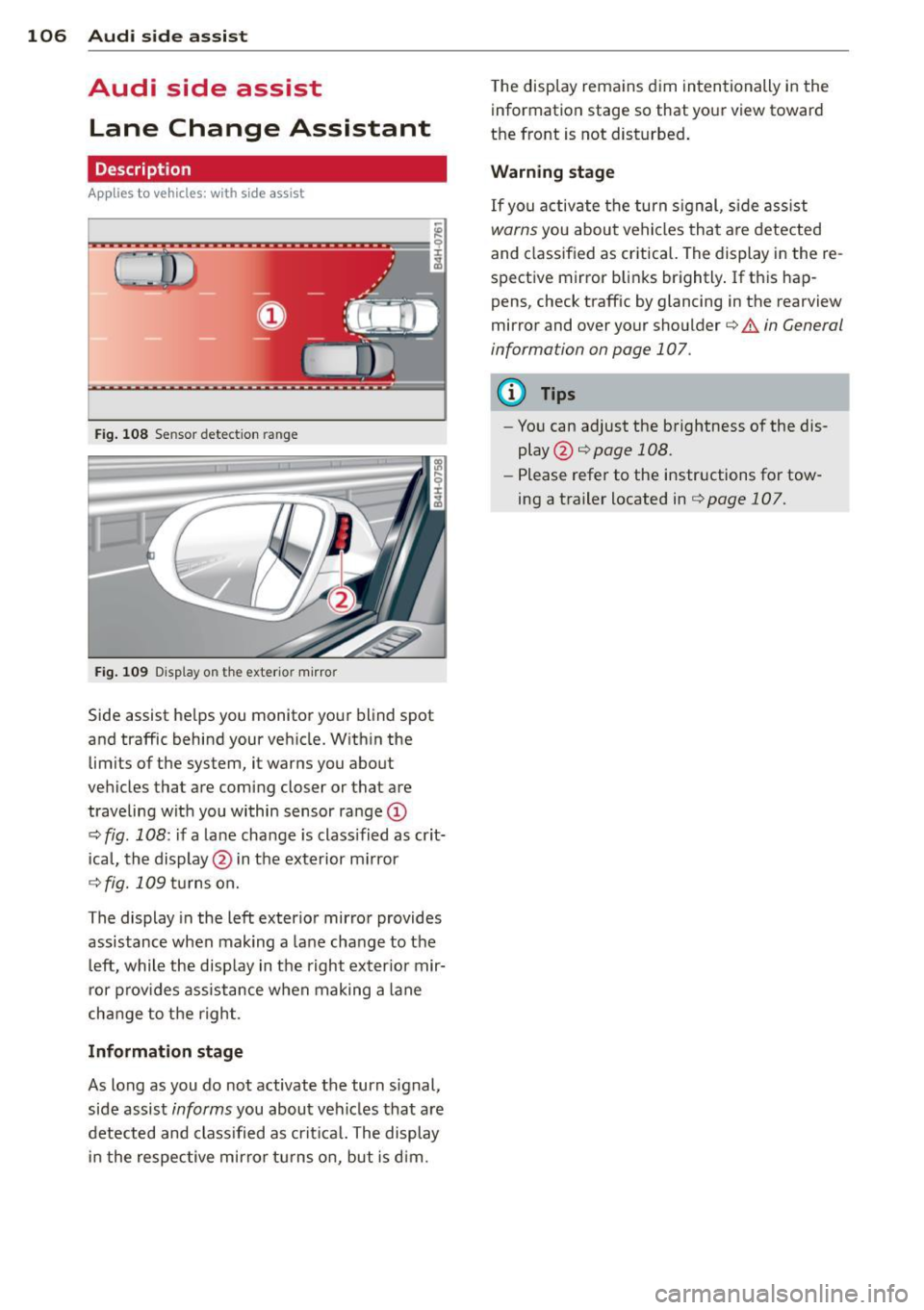
Fig . 108 Sensor detection range
Fig. 109 Display on the exterio r mirror
Side assist he lps you monitor your blind spot
and traffic behind your veh icle. Within the
limits of the system, it warns you about
vehicles that are coming closer or that are
traveling wit h you within sensor range
(D
c:> fig . 108: if a lane change is class ified as crit
ical, the display @ in the exterior mirror
¢ fig.109turnson.
The display in the left exterior mirror provides
assistance when mak ing a lane change to the
le ft, while the display in the right exter ior mir·
ror provides assistance when making a lane
cha nge to the right.
Information stage
As long as you do not activate the turn signal,
side assist
informs you about vehicles that are
detected and class ified as critical. The display
in the respective mirror turns on, but is d im. T
he display remains dim intentionally in the
information stage so that your view toward
the front is not disturbed .
Warning stage
If you activate the turn signal, s ide ass ist
warns you about vehicles that are detected
and classified as critical. The display in the re
spective mirror blinks brightly . If this hap
pens, check traffic by glancing in the rearview
mirror and over your shoulder c:>
.&. in General
information on page 107.
(D Tips
- You can adjust the brightness of the dis
play @c:>
page 108.
-Please refer to the instructions for tow·
ing a trailer located in
¢ page 107.
Page 109 of 314

General information
Applies to vehicles: with side assist
®
©
Fig . 110 Dr iving situations
AUDI
Fi g. 111 Rear of t he ve hicle: positio n of t he se nsors
Side assist functions at speeds above approx i
mately 19 mph (30 km/h).
@ Vehicl es th at ar e approaching
In certain cases, a vehicle will be classified as
cr itical for a lane change even if it is still
somewhat far away. The fas ter a vehicle ap
p roaches, the sooner the display in the exteri
or m irror will t urn on.
@ V ehicles traveling with you
Vehicles traveling w ith you are indicated in the
exterior m irror if they are classified as cr itical
for a lane change. All vehicles detec ted by
side assist are indicated by the time they en
ter your "blind spot", at the latest.
Audi side assist 10 7
© Vehicle s left behind
If you s low ly pass a vehi cle that s ide assist has
detected (the difference in speed between the
vehicle and you r vehicle is less than 9 mph or
15 km/h), the display in the exterio r mir ror
turns on as soon as the vehicle enters your blind spot.
T he disp lay will not t urn on if you quickly pass
a vehicle that side assist has detected (the dif
ference in speed between the veh icle and your
vehicle is greater than 9 mph or 15 km/h).
Functi onal limitations
The radar sensors are designed to detect the
left and right adjacent lanes when the road
lanes are the normal width. In certain situa
tions, the d isp lay in the exterior mirror may
turn on even though there is no veh icle locat
ed in the area that is cr itical for a lane change.
For example:
- if the lanes are narrow or if your are dr iving
on the edge of your lane.
If this is the case,
the system may have detected the vehicle in
another lane that is
not adjacent to your
current lane .
- if you a re driving through a curve. Side assist
may react to a vehicle that is one lane ove r
from the adjacent lane.
- if side assist reacts to other objects (such as
high or d isp laced guard rails) .
- In poor weather conditions. The side assist
functions are l imited .
Do not cover the radar sensors
c> fig. 111 with
stickers, depos its, bicycle wheels or other ob
jects, because this will affect the funct ion. Do
not use s ide ass ist when towing a trailer. For
i nformation on cleaning, refer to
c> page 216 .
_&. WARNING
-Always pay attention to traffic and to t he
area a round your ve hicl e. S ide assist can
not replace a driver's attention. T he driv
er a lone is always responsible for lane
changes and similar driving mane uvers.
Page 110 of 314

108 Audi side assist
-Improper reliance on the side assist sys
tem can cause collisions and serious
personal injury:
- Never rely only on side assist when
changing lanes.
- Always check rear view mirrors to make
sure that it is safe to change lanes.
- Side assist cannot detect all vehicles un
der all conditions- danger of accident!
- Please note that side assist indicates
there are approaching vehicles, or
vehicles in your blind spot, only after
your vehicle has reached a driving speed of at least 19 mph (30 km/h).
- In certain situations, the system may not
function or its function may be limited.
For example:
- if veh icles are approaching or being left
behind very quickly . The display may
not turn on in time.
- in poor weather conditions such as
heavy rain, snow or heavy mist .
- on very wide lanes, in tight curves or if
there is a rise in the road surface.
Vehicles in the adjacent lane may not
be detected because they are outside
of the sensor range.
(D Note
The sensors can be displaced by impacts or
damage to the bumper, wheel housing and
underbody . This can affect the system.
Have your authorized Audi dealer or au
thorized Audi Service Facility check their
function.
@ Tips
- If the window glass in the driver's door
or front passenger's door has been tint ed, the display in the exterior mirror may
be misinterpreted.
- For Declaration of Compliance to United
States FCC and Industry Canada regula
tions¢
page 295.
Activating and deactivating
Applies to vehicles: with side assist
Fig. 112 Driver 's doo r: Side ass ist butto n
.. Press the button c> A in General informa
tion on page
107to switch the system on/
off. The LED in the button turns on when
side assist is switched on.
Adjusting the display brightness
Applies to vehicles: wit h side assist
The brightness setting can be adjusted via the
MMI.
.. Select: !CAR I function button> Car systems
control button > Driver assist > Audi side
assist .
The display brightness adjusts automatically
to the brightness of the surroundings, both in
the information and in the warning stage. In
very dark or very bright surroundings, the dis
play is already set to the minimum or maxi
mum level by the automatic adjustment . In
such cases, you may notice no change when
adjusting the brightness, or the change may
only be noticeable once the surroundings
change.
Adjus t the brightness to a level where the dis
play in the informa tion stage will not disrupt
yo ur view forward. If you change the bright
ness, the display in the exterior mirror will
briefly show the brightness leve l in the infor
mation stage. The brightness of the warning
stage is linked to the brightness in the infor
mation stage and is adjusted along with the
information stage adjustment .
Page 126 of 314
124 Parking systems
If the distance to an obstacle remains con
stant, the volume of the distance warning
gradually drops after about four seconds (this
does not apply in the continuous tone range).
Rear view camera
The rear view camera is located above the rear
license plate bracket. Make sure that the lens
for the parking system¢
fig. 131 is not cov
ered by deposits or any other obstructions be
cause this can affect the function of the park
ing system. For information on cleaning, refer
to
¢ page 216.
The rear view camera coverage area includes
(D ¢ fig. 130. Only this area is shown in the
Infotainment display. Objects that are outside
of this area@are not displayed.
The accuracy of the orientation lines and the blue surfaces is reduced if the adaptive air
suspension" is faulty, if the vehicle is lifted or
if the
dynamic mode is activated¢ page 110.
A WARNING
-Always read and follow the applicable
warnings¢ .&.
in General information on
page 122.
- If the position and the installation angle
of the rear view camera was changed, for
example, after a collision, do not contin
ue to use the system for safety reasons.
Have it checked by your authorized Audi
dealership or authorized repair facility.
- Only use the rear view camera to assist
you if it shows a good, clear picture. For
example, the image may be affected by
the sun shining into the lens, dirt on the
lens or if there is a system fault.
- Use the rear view camera only if the lug
gage compartment lid is completely
closed. Make sure any objects you may
have mounted on the luggage compart
ment lid do not block the rear view cam
era .
- The camera lens enlarges and distorts
the field of vision. The object appears both altered and inaccurate on the
screen. -
In certain situations, people or objects in
the display appear closer or further
away:
- objects that do not touch the ground,
such as the bumper of a parked vehicle,
a trailer hitch or the rear of a truck. Do
not use the help lines in this case.
- If driven from a level surface onto an
incline, or a downward slope.
- If driven toward protruding objects.
-If the vehicle is carrying too much load
in the rear.
{[) Note
-Always read and follow the applicable
warnings
c::> (D in General information on
page 122.
- The orange colored orientation lines in
the Infotainment display show the vehi
cle path depending on the steering
wheel angle. The front of the vehicle
front swings out more than the rear of
the vehicle. Maintain plenty of distance
so that your outside mirror or a corner of
your vehicle does not collide with any ob stacles.
Page 129 of 314

long side of the blue surface so that there is
suff icient space from the obstacle. The sur
face must not be touch ing. You will also need
to start turning the steer ing whee l much ear
lier. The blue curve
¢ fig . 13 7 must not to uch
the obstacle and should have sufficient room .
@ Tips
The left or right orientation lines and sur
faces will be displayed, depend ing on the
turn signa l bei ng used.
Peripheral cameras
Introduction
Applies to vehicles: with top view camera system
In addit ion to the functions from the sensors
¢ page 123, Sensors,¢ page 125 , Visual dis
play,
this parking system conta ins peripheral
cameras. Depending on the ve hicle equip
ment, you are assis ted by various views such
as peripheral view, corner views at the front
and rear of the veh icle, and views d irectly in
fro nt of o r behind the vehicle.
General information
App lies to vehicles: with top view camera system
Fig. 138 Loca tion of per ipheral came ras
Depending on the vehicle equ ipment, the pe
riphera l cameras are fou nd i n the radiator
grille, in the luggage compartment lid and on both exterior mirrors ¢
fig. 138 . Make sure
that the lenses are no t covered by deposits or
any other obstructions as it may impair the
sys tem. For information on cleaning, refer to
¢ page 216.
P arking sys tems 127
In the to p view mode, b lack corners are
shown in the ve hicle silhouette . Objects in
these areas are outside of the camera 's field
of view and are not detected .
T he accuracy of the orientation lines and the
bl ue surfaces is reduced if the adaptive air
suspension * is faulty, if the vehicle is lifted or
if the
dynamic mode is activated ¢ page 110.
A WARNING
- Always read and follow the applicable
warn ings ¢
& in General information on
page 122.
- If the position or the installat io n angle
of a camera was changed , after a colli
sion for example, do not continue to use
the system fo r safety reaso ns. Have i t
checked by you r author ized Audi dealer
sh ip .
- Keep in mind tha t the image in the dis
pl ay is distorte d if the exterior mirror
housing has bee n manually a dju sted .
- Use the
rear mode and the c orner view
( rear )
mode only when the luggage com
partment lid is fu lly closed . Otherwise
the image in the disp lay will be d istort
ed .
- T he vehicle surro undings are shown us
ing the came ra images. The veh icle im
age is shown by the system. Objects and
obstacles above the camera are not d is
p layed.
- Camera lenses enlarge and distort the fie ld of vision . T he objects appear both
altered and inaccurate on the sc reen.
(D Note
- Always read and follow the ap plicable
warnings
¢(Din General information on
page 122.
- The Infotainment d isp lay shows the di
rection in which the rear of the vehicle is
traveling based on the steer ing whee l
ang le . The front of the vehicle front
swings out more than the rear of the ve
hicle . Maintain plenty of d istance so that
IJJ,,
Page 130 of 314
128 Parking systems
your outside mirror or a corner of your
vehicle does not collide with any obsta
cles.
@ Tips
If the 8/o;iJ/c:::::5 symbol appears in the
disp lay and the respectiv e display area is
grayed out, then the power exter ior mir
rors were folded in or the dr iver's door/
front passenger's door/luggage compart
ment lid was opened.
Switching on or off
App lies to vehicles: with top view camera system
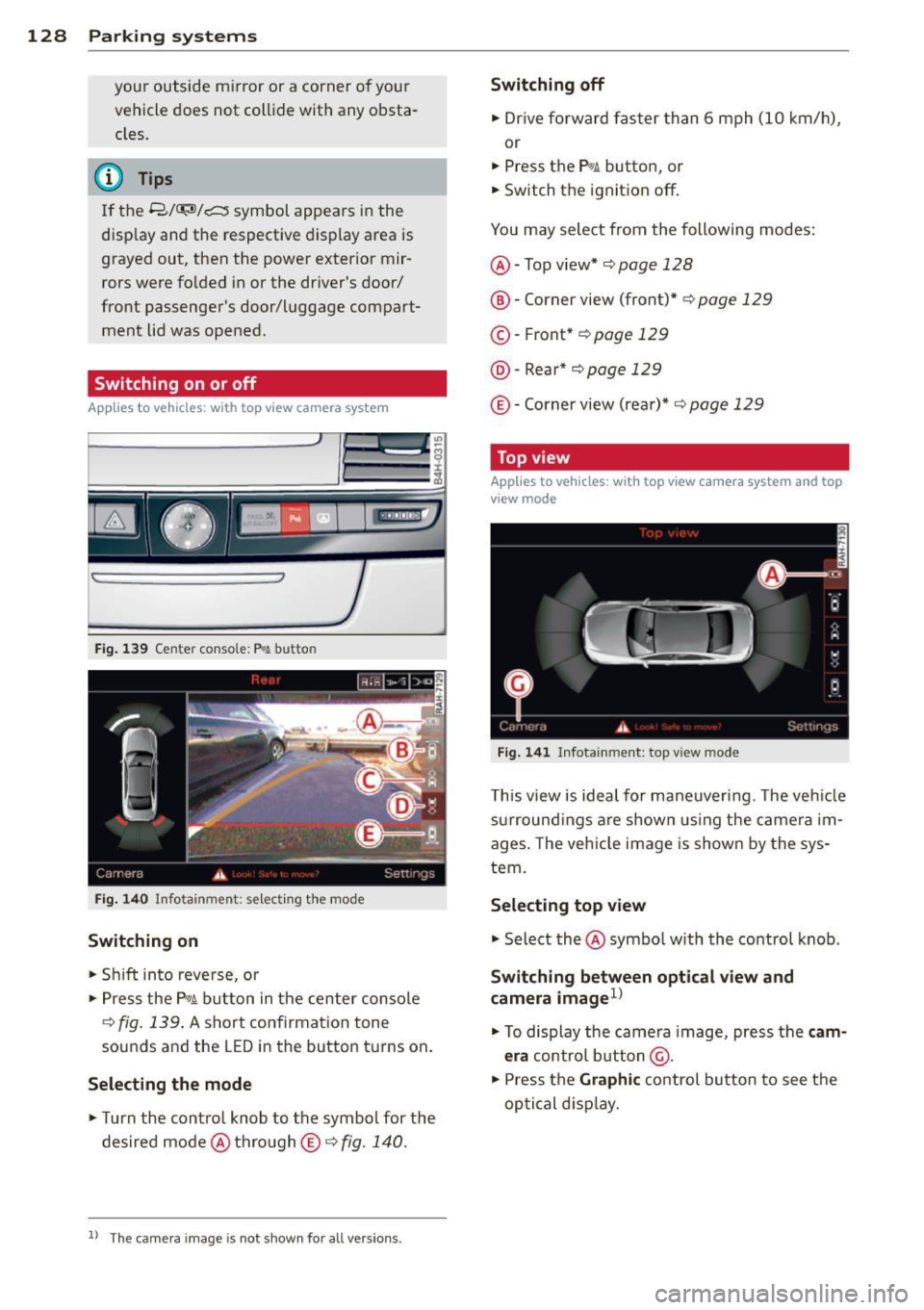
Fi g. 139 Center consol e: P
Switching on
• Shift in to reve rse, or
> Press the P, qi b utton in the center console
¢
fig . 139 . A short confirmat ion tone
sounds and the LED in the button turns on .
Selecting the mode
• Turn the contro l knob to the symbol for the
desired mode @thro ugh
© ¢fig. 140.
ll Th e c am era im age is n ot s hown fo r all ve rsi on s.
Switching off
• Dr ive fo rward faster than 6 mph (10 km/ h),
or
• Press the
P, JJi button, or
• Switch the ignition off .
You may select from the following modes:
@ -Top view* ¢
page 128
@-Corner view (front)* ¢ page 129
© -Front * ¢ page 129
@ -Rea r* ¢
page 129
© -Corner view (rear)* ¢ page 129
Top view
Applies to vehicles : w it h top v iew camera system and top
v iew mode
F ig . 14 1 In fota inm ent : top v iew m ode
This view is idea l for maneuver ing. The veh icle
surround ings a re shown us ing the camera im
ages . The vehicle image is shown by the sys
tem.
Selecting top view
"' Select the@symbo l w ith th e control knob .
Switching between optical view and
camera imagel)
"'To display the came ra image, press the c am
era
control button @.
"' Press the
Graphi c control button to see the
optical d isp lay.
Page 137 of 314
Driving Safely
General notes
Safe driving habits
Please remember -safety first!
This chapter contains important information,
tips, instructions and warnings that you need
to read and observe for your own safety, the
safety of your passengers and others . We have
summarized here what you need to know
about safety belts, airbags, ch ild restra ints as
well as child safety. You r safety is for us
priori
ty number 1.
Always observe t he information
a nd warn ings in th is se ct ion - for yo ur own
safety as well as that of your passengers .
The information in this se ction applies to all
model ve rsion s of your veh icle . Some of the
feat ures descr ibed in th is sec tions may be
standa rd equipment on some models, or may
be optional equipment on others . If you are
not sure, ask yo ur authorized Aud i dea ler.
A WARNING
- Always make sure that you follow the in
st ruct ions and heed the WARNINGS i n
this Manual. It is in your interest and in
the inte rest of you r passengers.
- Always keep the complete Owne r's Liter
at ure in your Audi when you lend or sell
yo ur vehicle so that this important info r
mation will always be ava ilable to the
dr iver and passenge rs.
- Always keep the Owner's literature handy
so that you can find i t eas ily if you have
ques tion s.
Safety equipment
The safety features are part of the occupant
restraint syst em and work togeth er to help
redu ce the risk of injury in a wide variety of
accident situations .
Your safety and the safety of your passenge rs
should not be left to chance. Advances in
t echnology have made a var iety o f fea tures
avai lable to he lp red uce the risk of i njury in an
Dr iving Safel y 135
accident . The following is a list of just a few of
the safety features in yo ur Audi :
- sophis tic ated s afety be lts fo r driver and a ll
passenger sea ting posit ions,
- s afety bel t prete nsio ners ,
- safety belt force lim ite rs fo r the front sea ts,
- safety belt he ight adjustment systems for
the front seats ,
- front airbags,
- knee airbags for the front seats - side airbags in the front seats and outer rea r
seats,
- side c urtain airbags ,
- specia l LATCH anchorages for child re-
straints,
- he ad restr aints for each sea ting pos it ion,
- adj ustab le steeri ng colum n.
These ind iv idual safety features, can work to
ge ther as a system to he lp protect you and
you r passenge rs in a wide rang e of accide nts .
T hese features canno t wo rk as a system if
they are not always cor re ct ly adjus ted and co r
re ct ly used.
Safety is everybody's responsibil ity!
Important things to do before driving
Safety is everybody 's job! Vehicle and occu
pant safety always depends on the informed and careful driver .
For yo ur safety and the safety of your passen
gers,
before d riving always:
.. Make s ure that all lig hts and signa ls are op
erating correctly .
.,. Make sure that the tire pressure is correct .
.. Make s ure that all w indows are clean and a f
ford good vis ibility to the outs ide .
.,. Se cure all luggage a nd o ther items caref ully
I::!) page 70, I::!) page 75 .
.. Ma ke s ure that no thing can inte rfere wi th
the peda ls .
.. Adj ust front seat, head restraint and mirrors
correctly for your height.
.. Instruct passengers to adjust the head re-
straints according to the ir height . .,.. •
•