wheel AUDI S8 2014 User Guide
[x] Cancel search | Manufacturer: AUDI, Model Year: 2014, Model line: S8, Model: AUDI S8 2014Pages: 314, PDF Size: 78.47 MB
Page 48 of 314
46 Clear vis ion
Clear vision
Lights
Switching the headlights on and off
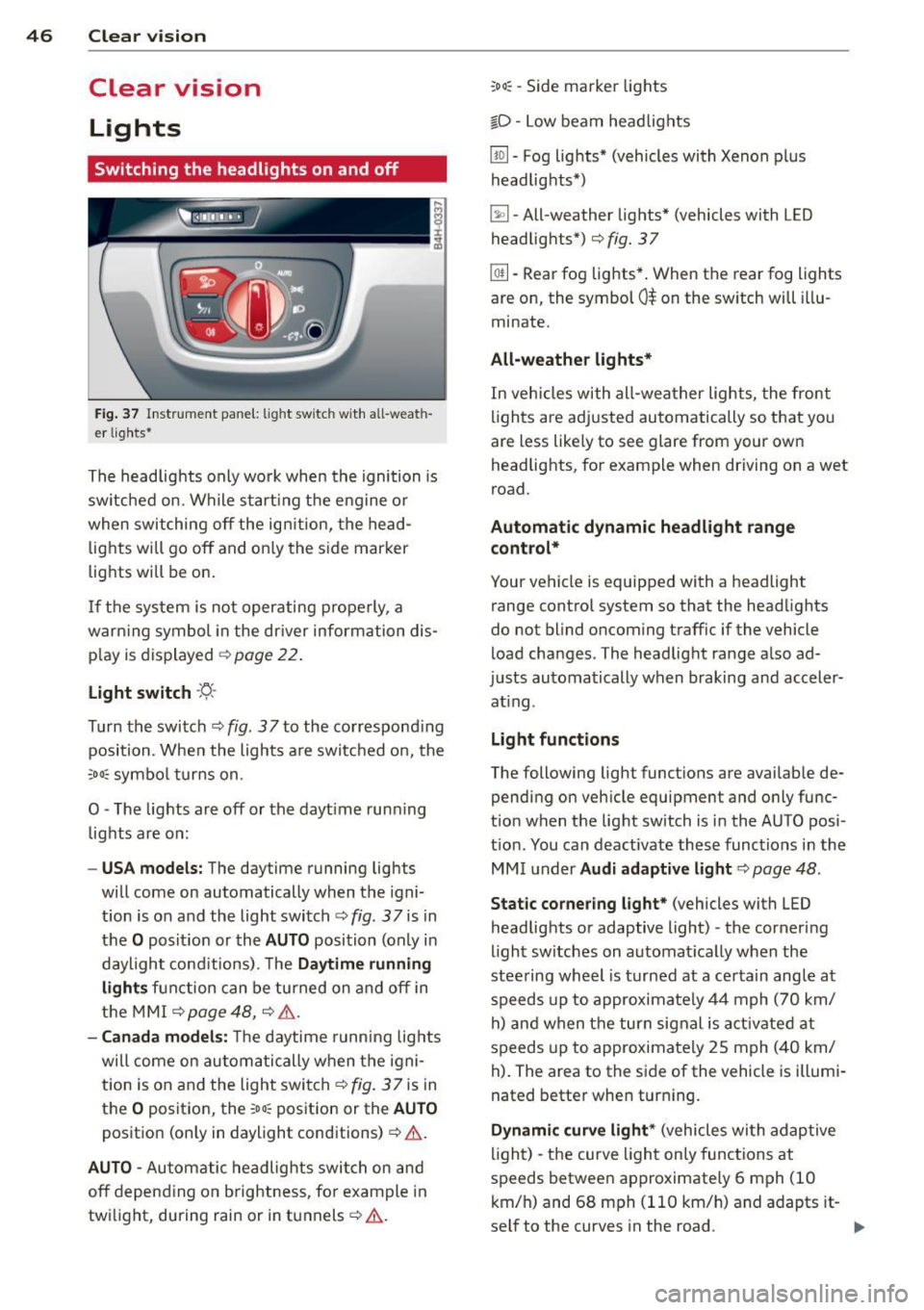
Fig . 37 Instr ument pane l: lig ht sw itc h wit h all -weath
er lig hts *
The headlights only wo rk when the ignition is
sw itched on. Wh ile start ing the eng ine or
when switching off the ig nition, the head
lights will go off and on ly the s ide marker
lights w ill be on .
I f the system is not operating properly, a
warn ing symbol in the dr iver inform ation dis
p lay is displayed <=> page
22 .
Light switch -'t/., -
Tu rn the switch <=>fig. 37to the co rrespond ing
position . When the lights a re switched o n, the
:o o; symbo l tur ns on .
0 -The lights are off or the dayt ime run ning
lights are on:
- USA models: The daytime running ligh ts
will come on automatically when the igni
t ion is on a nd the light switch <=> fig .
3 7 is in
the
O pos it ion or the AUTO position (only in
daylight cond itions) . T he Daytime running
lights function can be tu rned on and off in
the MMI <=> page
48, <=> .& .
- Canada model s: T he daytime running lig hts
will come on au toma tically when the igni
t ion is on and the light switch<=> fig . 37 is in
the
O posit io n, the :oo~ position or the AUTO
posit ion (on ly in daylight conditions)<=>.& .
AUTO -Automatic headlights swi tch on an d
off depend ing o n brightness , fo r example in
tw ilight, during rain or in tunnels<=>.& .
:oo~ -Side marker lights
io -Low beam head lights
[!QJ . Fog lights* (vehicles with Xenon p lus
headlig hts*)
~ -All-weathe r lights* (vehicles with LED
headlig hts*)<=> fig. 37
[2[1-Rear fog lights* . When the rear fog lights
are on, the symbol
0$ on the sw itch will illu
minate .
All-weathe r lights*
In veh icles with all -wea ther lights, the front
li ghts are adj usted automat ically so that you
are less like ly to see glare from your own
headlights , for example when driving on a wet
road.
Automatic dynamic headlight range
control*
Your vehicle is equipp ed with a headlight
range control system so that the head lights
do no t blind oncoming traff ic if the vehicle
load cha nges . The headlight range a lso ad
justs automa tically when braking and acceler
at ing .
Light funct ions
The following light funct ions are availab le de
pending on veh icle equipmen t and o nly func
t ion when the lig ht switch is i n the AUTO posi
t io n. You can deactivate these functions in the
MM I und er Audi adaptive light <=>page
48 .
Static cornering light * (vehicles with LED
headlights or adaptive light) -the corner ing
light sw itches on automat ical ly when the
stee ring wheel is turned at a ce rtain angle at
speeds up to approxima tely 4 4 mph ( 70 km/
h) and when the turn signal is act ivate d at
speeds up to approximately 25 m ph ( 40 km/
h) . The area to the side of the vehicle is illumi
nated bette r when turn ing.
Dynamic curve light * (vehicles with adap tive
li gh t) - the curve light on ly functions at
speeds betwee n approximate ly 6 mph (10
km/h) and 68 mph (110 km/h) and adapts it-
self to the curves in the road . .,.
Page 50 of 314
48 Clear vision
Adjusting the exterior lighting
The settings are adjusted in the MMI.
• Se lect : I CAR ! function button > Car systems
control button > Vehicle settings > Exterior
lighting .
Automatic headlights
You can adjust the following settings in the
Automatic headlights menu:
Headlights activation time -You can adjust if
the head lights switch on
Early, Med. or Late
according to the sensitivity of the light sensor .
Audi adaptive light * -You ca n sw itch adaptive
l ight
On and Off.
Automatic high beams*
You can switch the high beam ass ist on and
off .
Daytime running lights
USA models :
You can switch the dayt ime run
ning lights
on and off .
Canada models:
The function cannot be
turned off .
It is activated a utomat ica lly each
time the ign ition is switched on. This menu
item is shown "greyed out".
Coming home, Leaving home
The coming home function illuminates the
area outside the vehicle when yo u switch the
ignition off and open the driver's door. To turn
the function on, select
Lights when leaving
car > On .
The leaving home function illuminates the
area outside the vehicle when you un lock the
ve hicle. To turn the funct ion on, select
Lights
when unlocking car > On .
The coming home and leaving home functions
only operate when it is dark and the light
switch is in the
AUTO position.
Turn signal and high beam lever
The lever on the left side of the steering col
umn is used to operate the turn signals and
the high beam as well as the headlight flash
er.
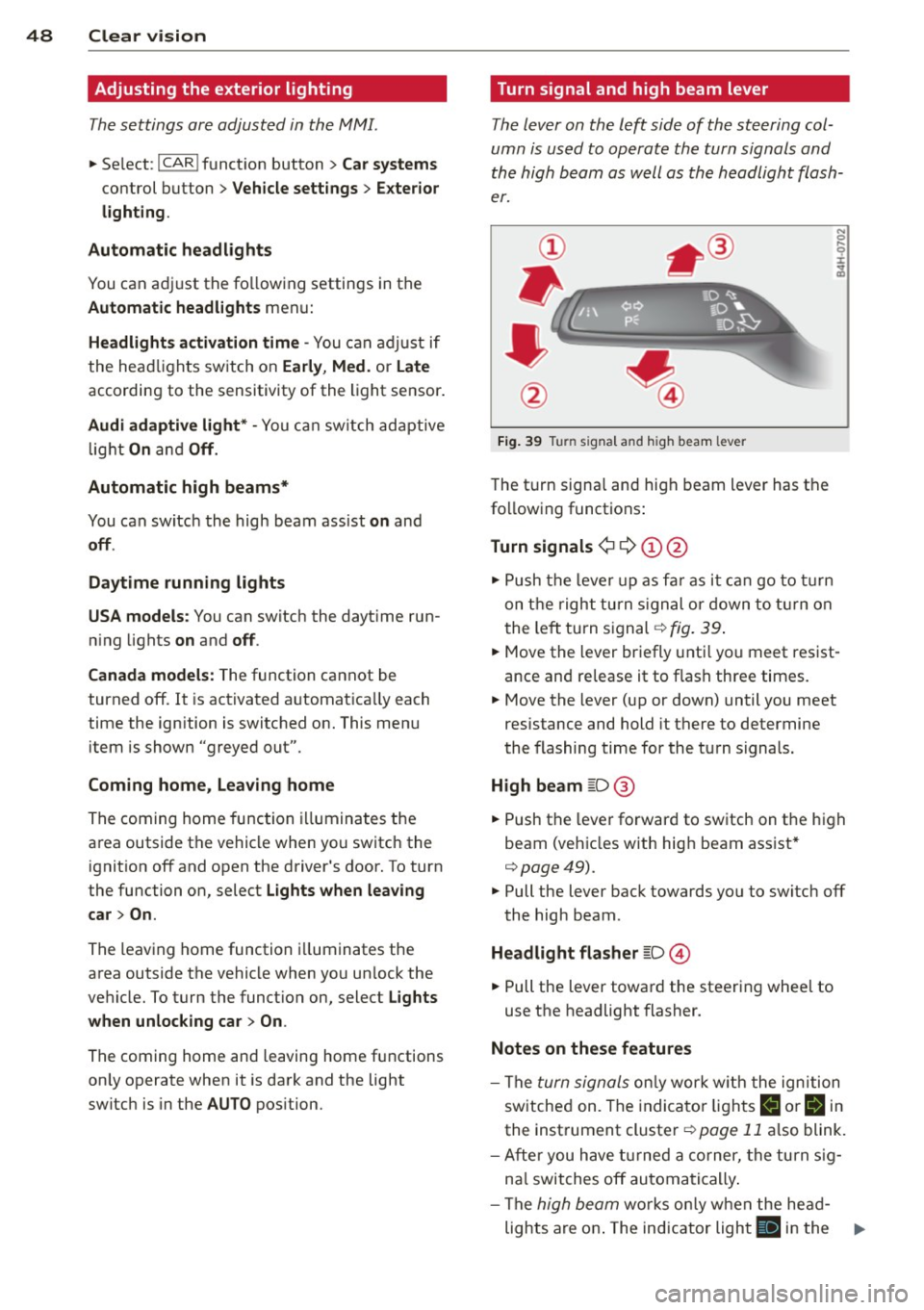
Fig. 39 Tu rn signal and high beam lever
The turn signa l and high beam lever has the
following functions:
Turn signals ¢ 9 (D@
• Push the lever up as far as it can go to turn
on the right turn signal or down to turn on
t he left turn signal¢
fig. 39.
N 0 ... 'i' :r
~
• Move the lever briefly unti l you meet res ist·
ance and re lease it to flash three times.
• Move the lever (up or down) until you meet
resistance and hold it there to determine
the flashing time for the turn signals.
High beam [D @
• Push the lever forward to switch on the high
beam (vehicles with high beam assist*
¢ page49).
• Pull the lever back towards you to switch off
the high beam .
Headlight flasher [D ©
• Pull the lever toward the steering wheel to
use the headlight flasher.
Notes on these features
- The turn signals only work w ith the ignition
switched on. The indicator lights
II or Bin
the instrument cluster¢ page 11 also blink.
- After you have turned a corner, the turn sig-
na l switches off automatically.
- The
high beam works only when the head-
lights are on . The indicator light
II in the ..,.
Page 60 of 314
58 Seat s a nd s tor ag e
Seats and storage
General recommen
dations
Why is your seat adjustment so
important?
The safety belts and the airbag system can
only provide maximum protection if the front
seats are correctly adjusted.
There are various ways of adjust ing the front
seats to provide safe and comfortable support
for the driver and the front passenger . Adjust
you r seat prope rly so that :
- you can easily and quick ly reach all the
switches and controls in the instrument
panel
-your body is prope rly supported thus reduc
ing physical stress and fatigue
- the safety be lts and a irbag system can offer
maximum protection
¢ page 153 .
In the following sec tions, you will see exactly
how you can best adjust you r seats .
There are special regulations and instructions
for insta lling a child seat on the front pas
senger's seat. Always fo llow the information
regarding ch ild safety provided in
q page 177, Child Safety.
A WARNING
Incorrect seating position of the driver and
all other passengers can result in serious
personal in jury.
- Always keep your feet on the floor when
the vehicle is in motion -never p ut your
f eet on top of the instrument panel, out
of the w indow or on top of the seat cush
ion . Th is app lies especially to the passen
gers .
If your seating position is incorrect,
yo u increase the r isk of injury in the case
of sudden braking or an acc ident.
If the
a irbag infla tes and the seating positio n
is incorrect, this could result in personal
injury o r even death.
- It is import ant for bo th the driver and
front passenger to keep a distance of at least 10 inches (25 cm) between them
selves and the steering wheel and/or in
strument panel. If you're s itting any
closer than th is, the a irbag system can
not protect you properly . In addition, the
front seats and head restraints must be
adjusted to your body height so that they
can give you max imum protect ion.
- Always try to keep as much distance as
possible between yourself and the steer
ing wheel o r inst rument pane l.
- Do not adjust the driver's o r front pas
senger's seat whi le the vehicle is moving.
Your sea t may move unexpected ly, caus
ing sudden loss of vehicle cont rol and
personal injury . If you adjust yo ur seat
while the veh icle is moving, yo u are out
of posit ion.
Driver's seat '
The correct seat position is important for safe
and relaxed driving.
We recommend tha t you adjus t the dr iver's
seat in the fo llowing manner :
.,. Adjust t he seat in fore and aft direction so
t ha t you can eas ily push the peda ls to the
floor w hile keeping your knees sl igh tly bent
q A in Why is your seat adjustment so im
portant? on page 58.
.. Adjust the backrest so that when you sit
w ith your back against t he backrest, you can
still grasp the top of the steering wheel.
.. Adjust the head restraint so the upper edge
is as even as poss ible with the top of your
head . If that is not poss ible , try to adjust
t he head restraint so that it is as close to
t his pos it ion as possib le
q page 65.
A WARNING
Neve r place any objects in the dr iver's foot
well. An object could get into the pedal
a rea and interfere with pedal function . In
case of sudden braking or an acc ident, you
would not be able to brake or accelerate .
Page 66 of 314
64 Seats and storage
@ Tips
If you cannot move the seat into the re
clining position, it may be because
- the front passenger's seat memory func
tion is switched off¢
page 67 or
- the child safety lock is switched on (the
~ button ¢ page 41 or the right t but
ton ¢
page 41 light s up in the driver's
door), or
- the front passenger seat adjustment is
switched off in the MMI ¢
page 64.
Massage function remote control
Applies to vehicles: with reclining rear seat an d massage
fu nct ion
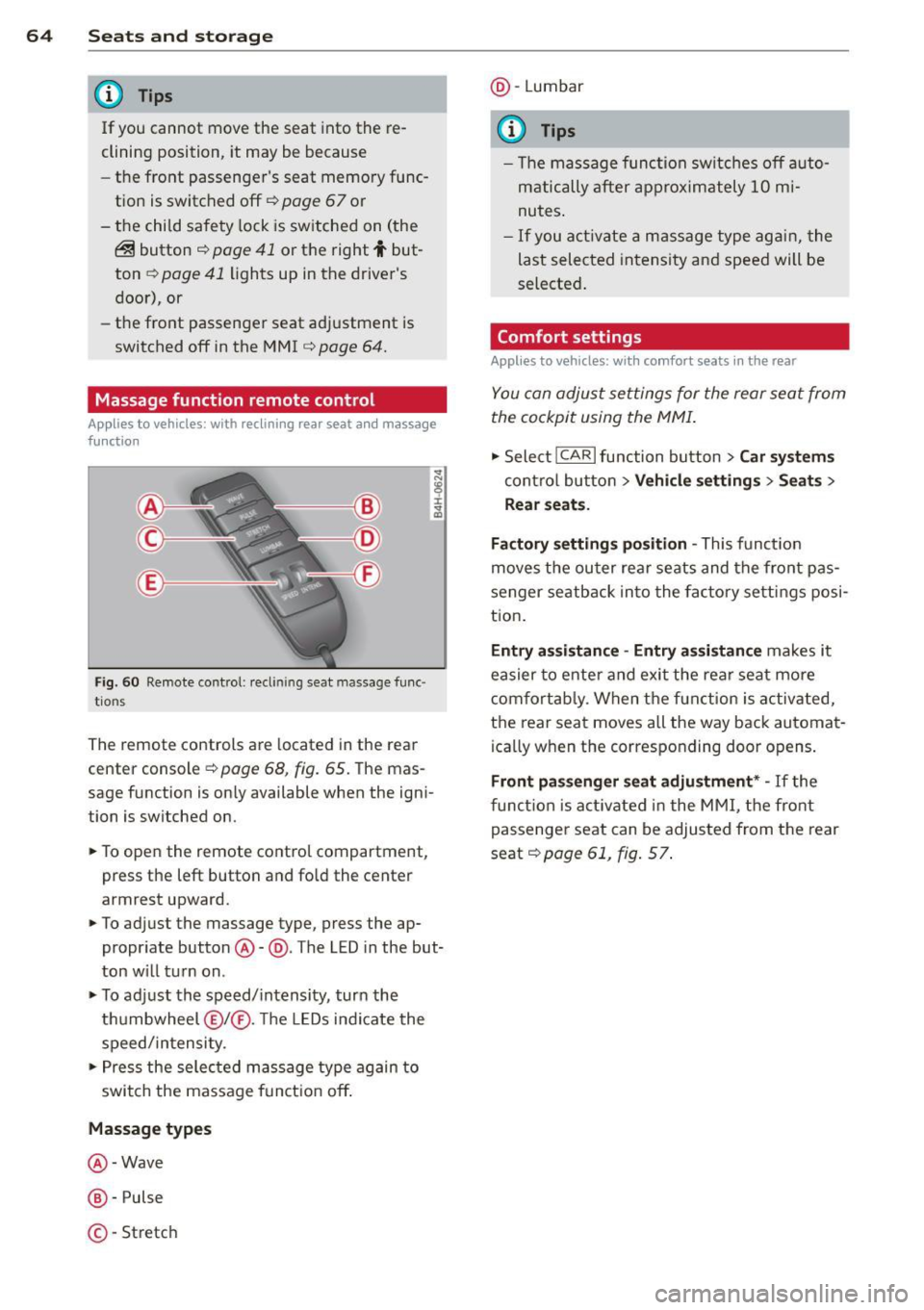
Fig . 60 Remote control: reclining seat massage func
tions
The remote controls are located in the rear
center console¢
page 68, fig. 65. The mas
sage function is on ly available when the igni
tion is switched on.
• To open the remote control compartment,
press the left button and fold the center
armrest upward.
• To adjust the massage type, press the ap
propriate button@-@ . The LED in the but
ton will turn on.
• To adjust the speed/intensity, turn the
thumbwheel @I® . Th e LEDs indicate the
speed/intensity.
• Press the selected massage type again to
switch the massage function off.
Massage types
@ -Wave
@-Pulse
©-Stretch @
-Lumbar
© Tips
- The massage function switches off auto
matically after approximately 10 mi
nutes.
- If you activate a massage type again, the
last selected intensity and speed will be
selected.
Comfort settings
Applies to vehicles: wit h comfort seats in the rear
You can adjust settings for the rear seat from
the cockpit using the MMI.
• Select !CARlfunction button> Car systems
control button > Vehicle settings > Seats >
Rear seats.
Factory settings position -
This function
moves the outer rear seats and the front pas
senger seatback into the factory settings posi
tion.
Entry assistance -Entry assistance makes it
easier to enter and exit the rear seat more
comfortably. When the function is activated,
the rear seat moves all the way back automat
ica lly when the corresponding door opens.
Front passenger seat adjustment* -If the
function is activated in the MMI, the front
passenger seat can be adjusted from the rear
seat¢
page 61, fig. 57.
Page 68 of 314

66 Seats and storage
Seat memory
Description
Applies to vehicles: wit h memory fu nctio n
The memory function allows you to quickly
and eas ily store and recall personal seating
p rofiles for the dr iver, front passenger and
outer rear seats*. The memory function is op
erated through the master key and the memo ry buttons in the driver's/front passenger's
doors and the rear doors*.
The driver's seating profi le is stored and as
signed to the master key each time the vehicle
is locked . The seating profile is recalled auto
matically when the vehicle is unlocked. If two
Remote control
master key
Driver
Seat X
Head restraint X
Steering wheel* X
Safety belt* X
Both exterior rear-X
view mirrors*
There are two additional buttons in the rea r
doors* that can be used to recall two stored
seating profiles
r:=;,page 67.
Remote control key
Appl ies to vehicles: with memory function
To assign the driver's seat settings to the re
mote contro l key when locking the vehicle, the
function must be switched on .
.. Se lect :
I CAR I function button > Car systems
control button > Vehicle settings > Seats >
Driver seat > Remote control key> On.
@ Tips
If you do not want another driver's set
tings to be assigned to the remote control
key, switch off the memory function using
the MMI or the
! OF F! button r:=;, page 67. people
use one vehicle, it is recommended
that each person always uses "their own"
master key.
Two seating profiles can be stored in each of
the driver's/front passenger's doors and one
seat ing profile in each of the rear doors*.
Once stored, these seat ing profiles can be re
ca lled at any time.
T he following sett ings are stored:
Memory button
Driver Front passenger Outer rear seats*
X
X X
X X
X
X
X
X
Page 83 of 314
airflow and air distribution are controlled au
tomatically.
Adjusting the temperature
Temperatu res between 60 °F (+16 °() and
84 °F (+28 °C) can be set. O uts ide of this
range,
lo or hi will appear in the climate con
trol system disp lay. At both of these settings,
the climate control system runs continuously
at maximum coo ling or heating power. There
is no temperature regulation.
[!] Adjusting the airflow
You can ad just the airf low manually to suit
your needs . To have the airflow regulated au
tomatically, press the
I AUTO I button.
~ Adjusting the air distribution
You can manually se lect the vents where the
air will flow. To have the air distribution regu
l ated automatically, press the
IAUTOI button.
~ I lil* Adjusting Seat heating/
ventilation*
Pressing the button switches the seat heat
ing/ventilation on at the highest setting ( level
3). The LEDs indicate the temperature leve l.
To reduce the temperature, press the button
again . To switch the seat heating/ventilation
off, press the button repeatedly until the LED
turns off.
After 10 minutes, the seat heating/ventilation
automatically switches from level 3 to level 2.
I n vehicles without the four zone automat ic
climate contro l*, buttons in the rear center
console control the seat heating for both out
er rear seats*.
~ Switch the defroster on/off
The windsh ield and sid e windows are defrost
ed or cleared o f condensation as quickly as
possible. The maximum amount of air flows
mainly from the vents be low the windshield.
Recirculation mode switches off . The tempera
ture should be set to 72 °F (22 °C) or higher.
The temperature is controlled automatically .
The
IAU TOI button switches the defroster off.
Warm and cold 81
~ Switching rear window heater on/off
The rear window heater only operates when
the engine is running. It switches off auto
matically after 10 to 20 minutes, depending
on the outside temperature.
T o p revent the rear window heater from
switching off automatically, press and hold
the ~ button for more than 2 seconds . This
remains stored until the ignition is switched
off .
I SYNC I Synchronization*
When synchronization is switched on, the set
tings for the driver's side are applied to the
front passenger's side (except for seat heat
i ng/venti lation*) . The rear seat is a lso
synchronized in vehicles with the 4-zone de
luxe automatic climate control system* . Syn
chronization switches off if the sett ings are
adjusted on the front passenger's side or in
the rear* .
You can synchronize the settings in a row by
pressing and holding a knob. For example, to
apply the settings for the front passenger's s ide to the driver's side, press and ho ld the
knob on the front passenger's s ide.
Air vents
You can open or close the center and rear
vents in the cockpit and the vents in the rear
center console and door pillars us ing the
ridged thumbwheels. The levers adjust the di
rection of the airflow from the vents.
,&. WARNING
-Do not use the recirc ulation mode for ex
tended periods of time. The windows
could fog up since no fresh air can enter
the vehicle. If the windows fog up, press
the air recircu lation button again imme
diately to switch off the air recirculation
function or select defrost .
- Individuals w ith reduced sensitivity to
pa in or temperature could deve lop burns
when using the seat heating function . To
reduce the risk of injury, these indiv idu-
als shou ld not use seat heating. ..,.
Page 84 of 314
82 Warm and cold
(D Note
To avoid damage to the heating e lements
in the seats, do not kneel on the seats or
place heavy loads on a small area of the
seat .
Setup
The climate control system setup is accessed
through the MMI.
.. Se lect : ICAR !function button> C ar sys tems
control button > A/C.
Rear c abin settings *
When this function is selected, all se tt ings fo r
the rear ca n be adjusted through the climate
contro l system in the cockpit . The climate
control system settings cannot be adjusted in
the rear seat at the same time. This function
switches off after a certain period of time or
when one of the dials in the cockp it is press
ed .
Auto re ci rculati on* Solar roof*
Pa
rking ventilation is cont ro ll ed automatically
in the
auto setting .
When the ignition is off, solar-powered park
i ng ventilat io n may sw itch on, as long as
- there is sufficient sunlight,
- the outside temperature is not too low,
- the sunroof is closed or tilted and
- auto (MMI) is selected .
Ii!] Steering wheel heating
Applies to vehicles: wit h heated s tee rin g wheel
The steering wheel rim can be heated.
Fig. 83 Steer ing col umn: steering w heel h eat ing but-
The sensitivity level of the automatic reci rcu-to n
lation mode can be set at various leve ls from
off to sensiti ve . The recirculation mode I""' ! is
controlled on automatically. You must press
the ~ button if fog forms on the w indows.
Fo otwell temperature
You can a dju st the footwell temperat ure so
that it is cooler or warmer.
Windshield heat*
When the defroster~ is swi tched on an d the
Aut o sett ing is selected, the windshie ld de
froster is controlled automatically .
Supplementary heater*
The supplementary heater warms the interio r
of vehicles with diesel engines* mo re q uic kly.
The supplementa ry heater is contro lled auto
matica lly in the
Aut o setting. ..
Press the~ button to switch steer ing whee l
heati ng on/off. The message
Steerin g wheel
h eating on! /Steering wheel heating off!
appears in the instr ument cl uster display .
T he tempera ture is main tained a t a constant
level when stee ring wheel hea ting is switc hed
on .
The steer ing wheel heating sett ings a re stor
ed automat ica lly and assigned to the remote
c ontrol key that is in use.
Page 85 of 314
On the road
Steering
Adjusting steering wheel position
The steering wheel position can be adjusted
for height and reach .
Fig. 84 Switch for steer ing w heel adjustment
First, adjust the driver's seat correctly.
• To adjust the height, press the switch up/
down . The steering column will continue
moving as long as you are pressing the
switch.
• To move the steering wheel forward or back,
press the switch forward/back . The steering
column will continue moving as long as you
are pressing the switch.
There must be at least 10 inches (25 cm) be tween your chest and the center of the steer
ing wheel. If you cannot sit more than 10 in
ches (25 cm) from the steering wheel, see if
adaptive equipment is available to help you
reach the pedals and increase the distance
from the steering wheel.
For detailed information on how to adjust the
driver's sea t, see
Q page 59 .
In vehicles with the memory function*, the
steering column settings are stored together
with the seat position .
A WARNING
Improper use of steering wheel adjust
ment and improper seating position can
cause serious personal injury.
-
On the road 83
-Adjust the steering wheel column only
when the vehicle is not moving to pre
vent loss of vehicle control.
- Adjust the driver 's seat or steering wheel
so that there is a minimum of 10 inches (25 cm) between your chest and the
steering wheel
~ page 136, fig . 153 . If
you cannot maintain th is m inimum dis
tance, the airbag system cannot protect
you properly.
- If physical limitations prevent you from
sitt ing 10 inches (25 cm) or more from
the steering wheel, check with your au
thorized Audi dealer to see if adaptive
equipment is available .
- If the steering wheel is al igned with yo ur
face, the supplementa l driver's airbag
cannot provide as much protection in an
accident. Always make sure that the
steering whee l is aligned with your
chest.
- Always hold the steering whee l with your
hands at the 9 o'clock and 3 o'clock posi
tions to reduce the risk of personal injury
if the driver's airbag deploys.
- Never hold the steering wheel at the 12
o'clock position or with your hands inside
the steering wheel rim or on the steering
wheel hub. Holding the steering wheel
the wrong way can cause serious injuries
to the hands, arms and head if the driv
er's airbag deploys.
Easy entry feature
The easy entry feature makes it easier to en
ter and exit the vehicle by automatically ad
justing the steering wheel.
• Select in the MMI: ICARI function button >
Car systems control button > Vehicle set
tings > Seats > Driver' s seat > Easy entry>
On.
When the easy entry feature is turned on , the
stee ring wheel moves up to the park position
when you swit ch off the ignition. After you en -
ter the vehicle, the steering wheel moves to ..,..
Page 88 of 314

86 On the road
switch off the ignition when you exit the vehi
cle. Otherwise the vehicle could ro ll. See a lso
c::> page90 .
Starting the engine if there is a
malfunction
It may not be possible to s tart the engine un
der certain circumstances , for example if the
battery in the vehicle key is drained , if inter
ference has affected the key or if there is a
system malfunction .
I
------ -~
Fig. 86 Center conso le /maste r key : start ing t he engi ne
if th ere is a mal funct io n
Requirement : The message K ey not recog
n ized. Hold back of key against mark ed area.
See own er' s manual.
must appear and the in
d icator light
II must switch on.
" Hold the master key vertically in the loca
t ion ind icated
f>l) c::> fig. 86.
" Press the brake peda l c::> .&. in Starting the
engine on page 84.
" Press the l ~s =T~ A~R =T~ E~N ~ c= r~ N ~E~ s=T~ O~ P~ I button . The
engine will s tart .
" Drive to your authorized Audi dealer imme
diately to have the malfunction corrected.
@ Tips
You can view the message again by press
ing the
I STAR T ENGINE STOP I button.
Electromechanical
parking brake
Operation
The electromechanical parking brake replaces
the hand brake.
F ig . 8 7 Center co nsole: Park ing b rake
" Pull on the switch(®) c::> fig . 87 ® to apply
the parking brake. The indicator light in the
sw itch ill uminates.
" Step on the brake pedal or the accelerator
pedal and p ress the switch
(®} at t he same
time to re lease the park ing brake . The ind i
cato r light in the swit ch goes out.
Your vehicle is equipped with an electrome
chanical parking brake . The parking b rake is
designed to p revent the veh icle from rolling
u nintentionally and replaces the hand b rake .
In add ition to the normal functions of a tradi
t ional hand brake, the electromechanical
parking brake provides vario us conven ience
and safe ty f unct io ns.
When starting from rest
- The integral starting ass ist helps you when
driving by automat ically releasi ng the park
ing brake
c::> page 87, Starting from rest .
-When start ing on inclines, the start ing as
sist prevents the vehicle from uni ntentional
ly ro lling back . The braking force of the
pa rk ing brake is not released unt il suff ic ient
driving force has been bui lt up at the
wheels . ..,.
Page 89 of 314

Emergency brake function
An emergency brake ensures that the vehicle
can be slowed down even if the
normal brakes
fail
c::> page 88, Emergency broking.
Ind icator light s
-If the par king b rake is closed w ith the igni
t ion
s wit ched on the indicator lights come
on - (USA models)/ . (Canada models)
in the instrument cluster and in the switch.
- If the par king brake is closed w ith the igni
tion
s witc hed off the indicator lights come
on - (USA models)/ . (Canada models)
in the instr ument cluster and in the switch
for about 20 seconds.
A WARNING
Do not press the accelerator peda l inadver
tently if the vehicle is stat ionary but the
eng ine is running and a gear is selected.
Otherw ise the vehicle will start to move
immediately and cou ld result in a crash.
(D Note
If the symbol . in the display or the ind i
cato r light
1111 (USA models) . (Cana
da models) in the instrument cluster flash
es, the re is a malfunction in the bra ke sys
tem. Please refer to t he detai led descr ip
t ion of the indicator lights¢
page 14.
- If the indicato r light - (USA mod-
els) . (Canada mode ls) or
IIJ t ur ns
on, there may be a malfunction in the
parking brake
r=> poge 15.
@ Tips
-You can apply the pa rking brake at any
time -even w ith the ignition swi tched
off. The ignition must be on and the
brake pedal must be pressed in order to
release the parking brake.
- Occasiona l noises when the parking
brake is applied and re leased are norma l
and are not a ca use for concern.
- When the vehicle is parked, the parking
brake goes through a se lf-test cycle at
On th e ro ad 87
regular inte rva ls. Any associated noises
are normal.
· Parking
.. Press the brake pedal to stop the veh icle.
.. Pull the switch(®) to set the parking brake.
.. Select the P selector lever posit io n
c::> poge 116.
.. Tu rn the engine off c::> .&_ .
.,. When on inclines o r declines, tur n the steer
ing wheel so that your veh icle w ill ro ll into
t he c urb if it beg ins to move.
A WARNING
-==
- When you leave your vehicle -even if on-
ly briefly -always take the ignition key
with you. This applies particularly when
children remain in the vehicle. Otherwise
the children cou ld start the engine, re
lease the parking brake or operate elec
trical equipment (e.g. powe r wi ndows).
T here is the r is k of an accident.
- When the veh icle is locked, no one -par
ticularly not children should rema in in
the vehicle. Locked doors ma ke i t mo re
diff icult for emergency wo rke rs to ge t in
to the veh icle -putt ing lives at risk.
Starting from rest
The starting assist function ensures that the
parking broke is released automatically upon starting.
Stopping and applying park ing brake
.. Pull the sw itch(®) to apply the parking
brake .
Starting and automatic ally releasing the
parking brake
.. When you sta rt to dr ive as usual, the park
ing brake is automatically released and your
veh icle begi ns to move.
When stopping at a traffic signal or stopping in city traff ic, the parking brake can be ap-
plied . The vehicle does not have to be he ld
IJ>-