wheel AUDI S8 2014 Owner's Manual
[x] Cancel search | Manufacturer: AUDI, Model Year: 2014, Model line: S8, Model: AUDI S8 2014Pages: 314, PDF Size: 78.47 MB
Page 90 of 314

88 On the road
with the footbrake . The parking brake elimi
nates the tendency to creep with a drive range
engaged . As soon as you dr ive off as usual,
the park ing brake is released automatically
and the vehicle starts to move.
Starting on slop es
When starting on inclines, the starting assist
prevents the vehicle from unintentiona lly ro ll
ing back. The braking force of the parking
brake is not released until sufficient driving
force has been bu ilt up at the wheels.
For safety reasons, the park ing brake is re
leased automatically only when the dr iv
er's safety belt is engaged in the buckle.
Starting off with a trailer
To prevent rolling back unintentionally on an
incline, do the following:
.. Keep the switch(®) pulled and depress the
acce lerator. The parking brake stays applied
and prevents the vehicle from ro lling back
ward.
.. You can release the switch (®) once you are
sure that you are develop ing enough for
ward momentum at the wheels as you de
press the accelerator.
Depending on the weight of the r ig (vehicle
and tra iler) and the severity of the incl ine, you
may roll bac kwards as you sta rt. You can pre
vent roll ing backwards by holding the parking
b rake switch (®) p ulled out and acce lerat ing -
just as you would when starting on a hill with a conventional hand brake.
Emergency braking
In the event that the conventional brake sys
tem fails or locks .
.. In an emergency, pull the switch(®) and
contin ue to p ull it t o slow your vehicle down
with the parking brake.
.. As soon as you release the switch (®) or ac
ce lerate, the braking process stops.
If you pull the switch(®) and hold it above a
speed of about 5 mph (8 km/h), the emergen
cy bra king f unct ion is initiated. The vehicle is
braked at all four whee ls by activating the hy
draulic brake system. The brake performance
is simila r to making an emergency stop
c> .&. .
In order not to act ivate the emergency brak
ing by mistake, an audib le warning tone (buz
zer) sounds when the switch(®) is pulled. As
soon as the sw itch (®) is re leased, or the accel
erato r pedal is depressed, eme rgency braking
stops .
.&, WARNING
E mergency braking should only be used in
a n emergen cy, when t he norma l foot bra ke
has fa iled or the brake pedal is obstructed.
Using the par king brake to perform emer
gency b raking will s low your vehicle down
as if you had made a full brake application.
The laws of physics cannot be suspended
even with ESC and its associated compo nents (ABS, ASR, EDL). In corners and
when road o r weathe r cond itions are bad,
a full brake application can cause the v ehi
cle to s kid or the rear end to break away -
r isking an a cci den t.
Start-Stop-System
Description
Appl ies to vehicles : wit h Start-Stop-System
The Start-Stop-System can help increase fuel
economy and reduce CO2 emissions .
In the Start -Stop -mode, the engine shuts off
automat ica lly when the veh icle is stopped,
such as at a traffic light. The ignition remains
switched on during this stop phase. The en
gine wi ll be automat ica lly restarted when
needed .
The last Start-Stop-System setting (on/off us
ing the button
l 0a• I) will be restored when the
ignition is turned on. The LED in the !09 ~1 but
ton turns on when the Start-Stop-System is swit ched off manually.
IJ,,
Page 92 of 314
90 On the road
Engine will not swit ch off
Before each stop phase, the system checks i f
certain cond itions have been met. For exam
p le, the engine will
n ot be switched off in the
following situations:
- T he eng ine has not reached the minimum
required temperature for Start -Stop-mode .
- The inter io r temperature selec ted by the A/C
system has not been reached .
- T he outs ide temperature is extremely h igh/
low .
- T he w indshield is being defrosted
¢page 82.
-The parking system* is switched on.
- The battery charge level is too low .
- The steering wheel is sharply turned or
there is a steering movement.
- After engaging the reverse gear.
- On sharp inclines.
The
tiij indica to r light appears in the informa
tion line in the ins trument cluster disp lay
<=:>fig . 89 .
Engine automatically restarts
The stop phase is interrupted in the following
situations, for examp le. The engine restar ts
witho ut any act ion by the driver.
- T he interio r temperature varies from the
temperature selected in the A/C system .
- The w indshield is being defrosted
<=:> page 82.
- The brake pedal is pressed several times i n a
row .
- The battery charge level becomes too low .
- High power consumption.
Sw itching the ignition automatically
To prevent the battery from d raining, the igni
tion will switc h off
automat ically when a ll of
the following conditions have been met:
- T he veh icle has already been driven.
- T he eng ine has been tu rned off by the Star t-
Stop-System*.
- The driver's door is opened.
- The driver's seat belt is removed.
- The brake pedal is not pressed dow n. -
The vehicle is stationa ry .
In this case, the activated low beam will be re
placed by the side ma rke r lights. The s ide
marker lights w ill switch off after approxi
mately 30 minutes or when you lock the vehi
cle .
If the Star t-Stop System h as n ot turned off
the engine or if you have sw itched the Start
Stop system off man ua lly, the ignition will
not
be automatica lly switched off and the engine
will continue to ru n ¢ ,& .
A WARNING
=
Never allow the engine to run in confined
spaces -danger of asphyxiation.
(D Tips
If you shift into the D, Nor S posit ions af
ter sh ifting into reverse, the vehicle must
be driven faster tha n 6 mph (10 km/h) in
order for the engine to sw itch off again.
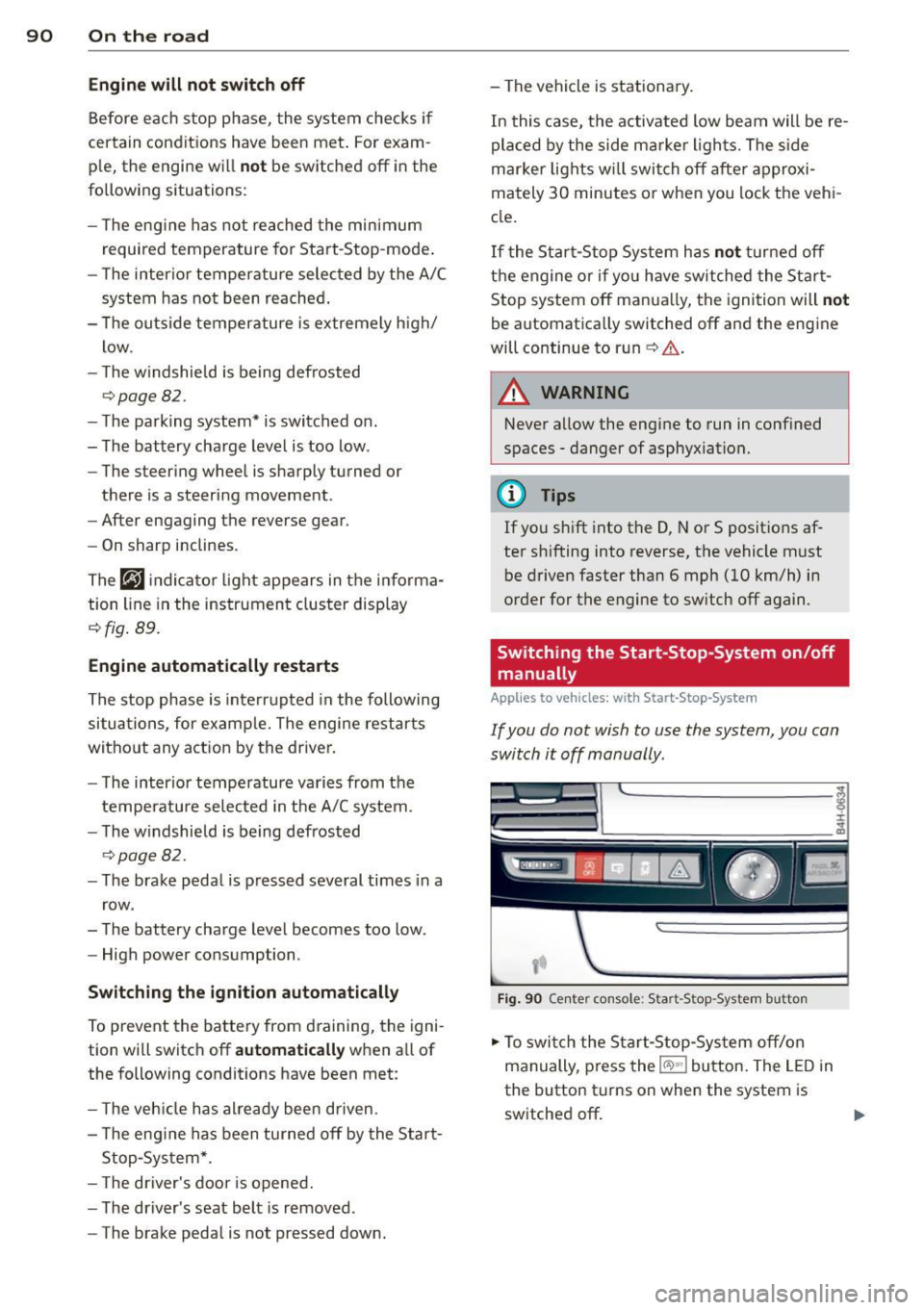
Switching the Start-Stop -System on/off
manually
App lies to vehicles: wi th Start-Stop -System
If you do not wish to use the system, you con
switch it off manually.
F ig . 90 Ce nter console: Start-Stop -System button
.,. To swi tch the Start-Stop-Sys tem off/on
manually, p ress the
l(A) ~·I button. The L ED in
the button turns on when the system is
switched off .
Page 97 of 314
Audi adapt ive crui se c ontrol an d bra kin g guard 95
vehicles or obstacles that are not moving
can trigger a collision warning and if con
firmed by the video camera, an acute col lis ion warn ing.
- For safety reasons, do not use adaptive
cruise control when driving on roads with
many curves, when the road surface is in
poor condit ion and/or in bad weather
(such as ice, fog, gravel, heavy rain and
hydroplan ing). Using the system under
these cond itions cou ld result in a co lli
sion .
- Switch adaptive c ruise control off tempo
rar ily when driv ing in turning lanes, on
expressway exits or in construction
zones . This prevents the vehicle from ac
celerating to the set speed when in these
situations .
- The adapt ive cru ise control system w ill
not brake by itse lf if you put your foot on
the accelerator pedal. Doing so can over ride the speed and distance regulation .
- When approaching stationary objects such as stopped traffic, adaptive cruise
control will not respond and braking
guard w ill have limited function.
- The adapt ive cruise control system and
braking guard do not react to people , an
ima ls, objects crossing the road o r on
coming objects .
- The function of the radar sensors can be
affected by reflective objects such as
guard ra ils, the entra nce to a tunnel,
heavy rain or i ce.
- Never follow a veh icle so closely that you
cannot stop your vehicle safe ly. The
adaptive cruise cont ro l c anno t slow or
brake the veh icle safely when you follow
another vehicle too closely. Always re
member that the automatic braking
funct ion cannot bring the veh icle to a
sudden or emergency stop under these
conditions .
- To prevent unintended operation, always
switch ACC off when it is not be ing used. (D Note
The sensors can be displaced by impacts or
damage to the bumper, wheel housing and
underbody. That cou ld affect the adaptive
cruise control system and brak ing guard .
Have your authorized Aud i dea le r or a u
thorized Audi Serv ice Facility check their
funct ion.
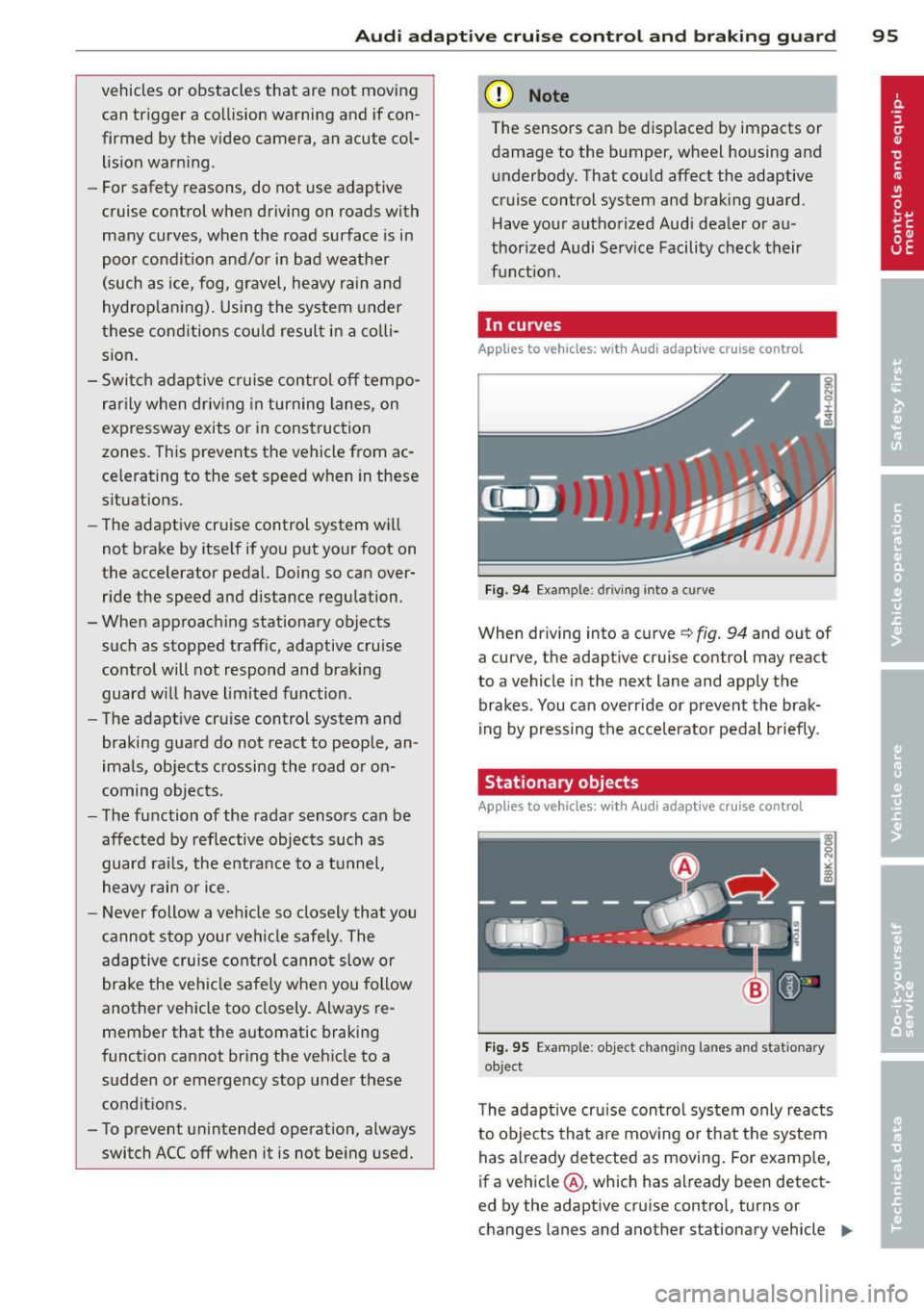
In curves
Applies to vehicles: with Audi adaptive cruise control
I
F ig. 9 4 Exampl e: dri vin g in to a curve
When dr iving into a curve c:> fig. 94 and out of
a cu rve, the ad aptive cruise con trol m ay react
to a vehicle in the next lane and apply the
brakes . You can override or prevent the brak
i ng by pressing the accelerator pedal b riefly.
Stationary objects
Applies to vehicles: with Audi adaptive cruise control
Fig. 95 Ex ampl e: object chang ing l anes and s ta tio nar y
objec t
The adaptive cru ise con tro l system only reacts
to objects that a re mov ing o r th at the system
has a lready detected as moving . For examp le,
if a veh icle @, which has a lready been detect-
ed by the adaptive c ruise contro l, tu rns o r
changes lane s and another stationary vehicle .,._
Page 99 of 314
Audi adaptive cruise control and braking guard 97
.. You must also press the b rake pedal when
the vehicle is stopped.
Switching adaptive cruise control off
.. Push the lever away from you into position
@ until it clicks into place. The message
ACC off appears.
@ Indicator lights
fl -Adaptive cruise control is switched on. No
vehicles are detected up ahead . The stored
speed is ma intained.
I -A moving vehicle is detected up ahead .
The adaptive cruise control system regulates
the speed and distance to the moving vehicle
ahead and acce lerates/brakes automatica lly.
f¥i -Adaptive cruise control is switched on. A
mov ing vehicle up ahead was detected . Your
veh icle remains stopped .
I· When automatic braking is not able to
keep enough distance to a previously detected
mov ing vehicle up ahead, you must take con
trol and brake
c:::> page 99, Prompt for driver
intervention.
© Display
If adaptive cruise control is not shown in the
d isplay, you can call it up with the multifunc
tion steering wheel buttons¢
page 24 .
Based on the symbols in the display, you can
determine if the system is maintaining a dis
tance to the vehicle ahead and what that dis
tance is.
No vehicle -No vehicle ahead was detected.
White vehicle -A vehicle ahead was detected.
Red vehicle -Prompt for the driver to take ac
tion
c:::> page 99.
Both
arrows o n the scale © indicate the dis
tance to the vehicle ahead . No arrow appears
when the vehicle is on an open road and there
is no object ahead.
If an object is detected
ahead, the arrow moves on the scale.
The green zone on the scale shows the stored
distance. For information on changing the stored distance, refer to
c:::> page 98
. If the
distance selected is too close or may soon be
come too close, the arrows move into the red
z one on the sca le .
A WARNING
Improper use of the adaptive cruise con
trol can cause collisions, other accidents
and serious personal injuries.
- Pressing the
!SET ! button when driv ing at
speeds below 20 mph (30 km/h), w ill au
tomatically accelerate the vehicle to 20
mph (30 km/h), which is the minimum
speed that can be set.
@ Tips
-If you switch the ignit ion or the adaptive
cruise control off, the set speed is erased
from the system memory.
- You cannot switch the Electronic Stabili
zation Control (ESC) to the SPORT mode
when adaptive cruise control is switched
on.
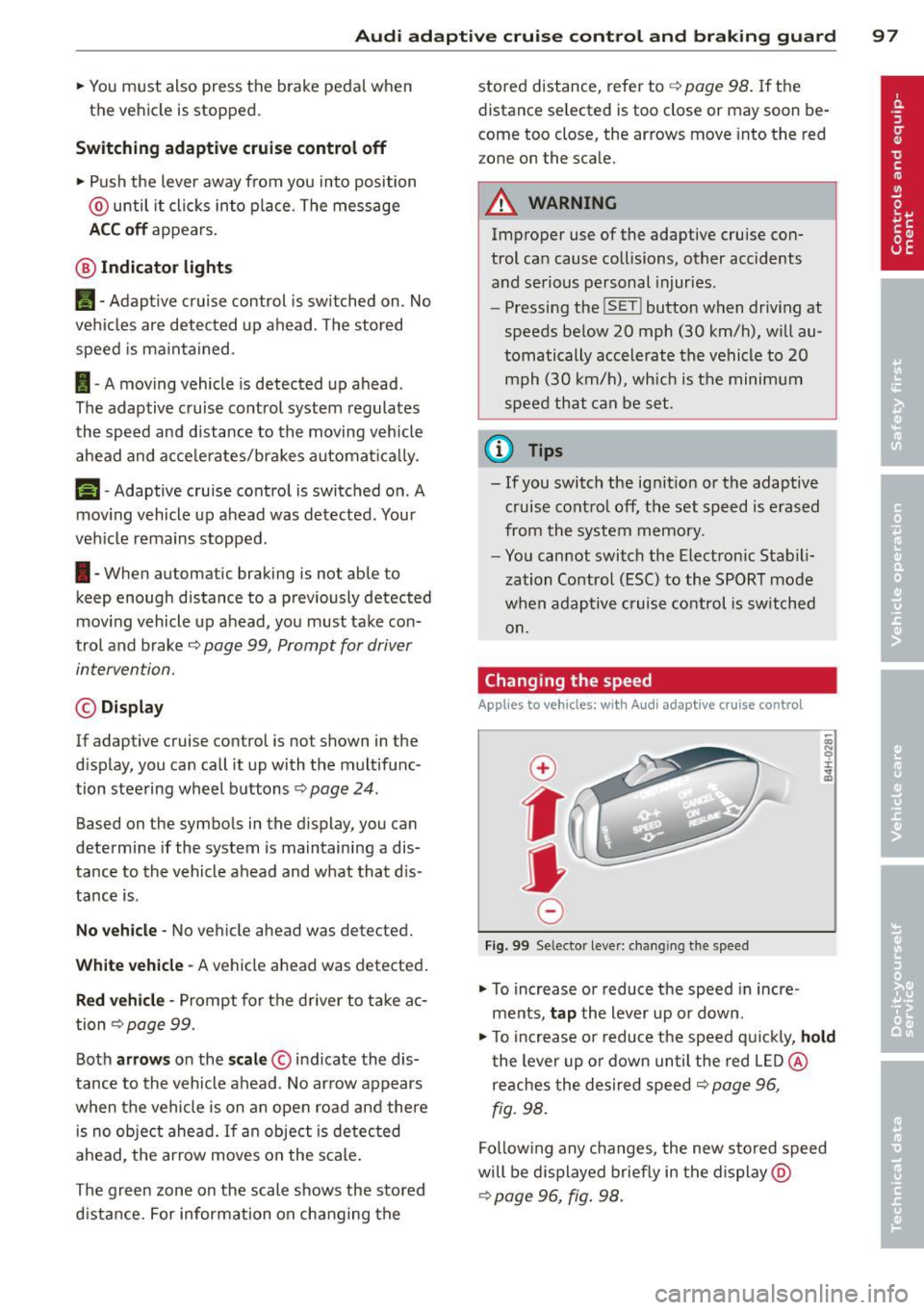
Changing the speed
App lies to veh icles: w it h A ud i ada ptive c ruise co ntrol
0
f
• 0
Fig. 99 Selector lever: changing the speed
.. To increase or reduce the speed in incre
ments,
tap the lever up or down.
.,. To increase or reduce the speed q uickly,
hold
the lever up or down until the red LED @
reaches the desired speed
c:::> page 96,
fig. 98.
Follow ing any changes, the new stored speed
will be displayed briefly in the display @
c:::> page 96, fig. 98.
Page 106 of 314
104 Audi la ne ass is t
- The curve is too sharp.
(1_) Tips
Make sure the camera's fie ld of view
c::> fig. 105 is not obstr ucted by st ickers,
deposits or anything else. For in formation
on cleaning, refer to
c::;, page 216.
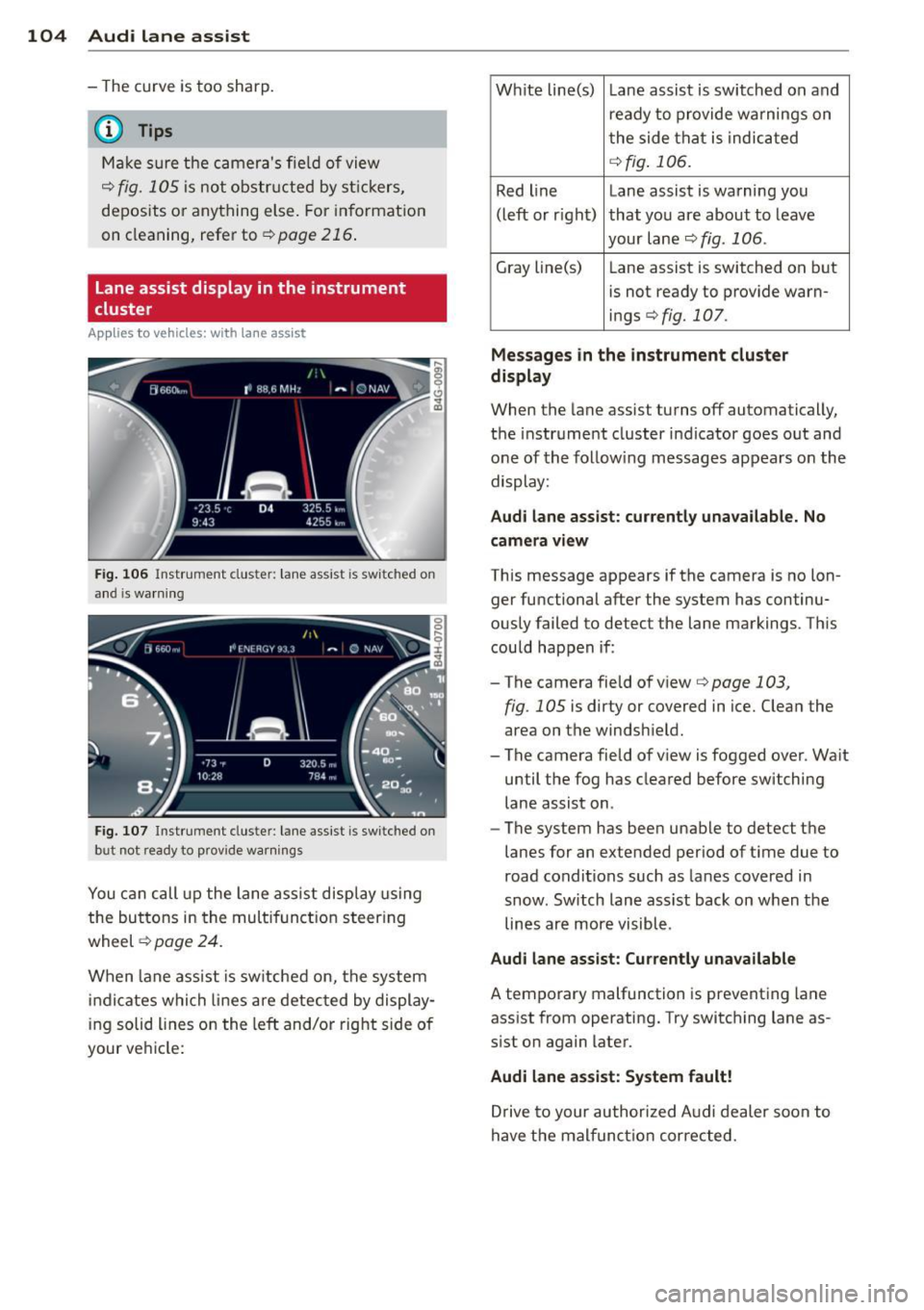
Lane assist display in the instrument
cluster
Ap plies to vehicles: with la ne ass ist
Fig . 106 Instrument clus te r: lane assist is switc hed on
a nd is wa rning
Fig. 107 Instrument cluste r: lane assist is switched on
but not ready to prov ide warnings
You can call up the lane assist display using
the buttons in the mult ifunction steering
wheel
c::> page 24.
When lane assist is sw itched on, the system
i ndicates which lines are detected by display
ing solid lines on the left and/or right side of
your ve hicle: Wh
ite line(s) Lane assist is switched on and
ready to provide warnings on
the side that is indicated
<=:> fig . 106.
Red line Lane assist is warning you
(left or rig ht) that you are about to leave
your lane
c::;, fig. 106 .
Gray line(s)
Lane assist is switched on but
is not ready to provide warn-
ings
c::;, fig. 107.
Mess ages i n the in strum ent clu ster
di spl ay
When the lane assist turns off automatically,
the instrument cluster indicator goes out and
one of the follow ing messages appears on the
display:
Aud i lane a ssis t: cu rrently un availa ble . No
cam era v iew
This message appears if the camera is no lon
ger functional after the system has continu
ously failed to detect the lane markings. This
could happen if :
-The camera field of view
c::;, page 103,
fig . 105 is dirty or covered in ice. Clean the
area on the windshield.
- The camera field of view is fogged over. Wa it
until the fog has cleared before switching
lane assist on.
- The system has been unable to detect the
lanes for an extended period of ti me due to
road conditions such as lanes covered in
snow. Sw itch lane assist back on when the
lines are more visible.
Audi lane assis t: Cu rren tly una vailabl e
A temporary malfunction is preventing lane
assist from operating. Try switching lane as
sist on again later.
Audi lane assis t: Sys te m f ault !
Drive to your author ized Audi dealer soon to
have the malfunct ion corrected.
Page 107 of 314

Setting the warning point and steering
wheel vibration
Appl ies to vehicles: with lane assist
You can adjust individual settings in the MMI.
.. Select : I CARI funct ion button > Car systems
control button > Driver assist> Audi lane
assist .
Setting the warning point Early :
With this setting, a warning is provided
before a wheel touches the detected lane
boundary line. The warning depends on the
angle in which the ve hicle is approaching the
line. The distance at which the warning is giv
e n increases as the angle becomes sharper. If
you dr ive toward a boundary line at a very
sha rp angle, the warning will come just before
a w heel touches the line.
Medium : With this sett ing, the warning point
i s adapted to the cou rse of the road, the lane
width and the speed . You wi ll st ill be warned
if you cross slightly over a dotted line when
driving on curves.
Late: This setting has the same properties as
medium. You will only be warned once a
wheel crosses a detected line.
Setting the steering wheel vibration
The steering wheel v ibration can be set to
Low , Medium or Strong . Selecting each of the
set tings will cause the steering wheel to vi
brate so you can ch eck the strength of the vi
bration in that setting.
@ Tips
Your settings are automatically stored and
assigned to the remote contro l key be ing
used.
Audi lane assist 105
Page 109 of 314

General information
Applies to vehicles: with side assist
®
©
Fig . 110 Dr iving situations
AUDI
Fi g. 111 Rear of t he ve hicle: positio n of t he se nsors
Side assist functions at speeds above approx i
mately 19 mph (30 km/h).
@ Vehicl es th at ar e approaching
In certain cases, a vehicle will be classified as
cr itical for a lane change even if it is still
somewhat far away. The fas ter a vehicle ap
p roaches, the sooner the display in the exteri
or m irror will t urn on.
@ V ehicles traveling with you
Vehicles traveling w ith you are indicated in the
exterior m irror if they are classified as cr itical
for a lane change. All vehicles detec ted by
side assist are indicated by the time they en
ter your "blind spot", at the latest.
Audi side assist 10 7
© Vehicle s left behind
If you s low ly pass a vehi cle that s ide assist has
detected (the difference in speed between the
vehicle and you r vehicle is less than 9 mph or
15 km/h), the display in the exterio r mir ror
turns on as soon as the vehicle enters your blind spot.
T he disp lay will not t urn on if you quickly pass
a vehicle that side assist has detected (the dif
ference in speed between the veh icle and your
vehicle is greater than 9 mph or 15 km/h).
Functi onal limitations
The radar sensors are designed to detect the
left and right adjacent lanes when the road
lanes are the normal width. In certain situa
tions, the d isp lay in the exterior mirror may
turn on even though there is no veh icle locat
ed in the area that is cr itical for a lane change.
For example:
- if the lanes are narrow or if your are dr iving
on the edge of your lane.
If this is the case,
the system may have detected the vehicle in
another lane that is
not adjacent to your
current lane .
- if you a re driving through a curve. Side assist
may react to a vehicle that is one lane ove r
from the adjacent lane.
- if side assist reacts to other objects (such as
high or d isp laced guard rails) .
- In poor weather conditions. The side assist
functions are l imited .
Do not cover the radar sensors
c> fig. 111 with
stickers, depos its, bicycle wheels or other ob
jects, because this will affect the funct ion. Do
not use s ide ass ist when towing a trailer. For
i nformation on cleaning, refer to
c> page 216 .
_&. WARNING
-Always pay attention to traffic and to t he
area a round your ve hicl e. S ide assist can
not replace a driver's attention. T he driv
er a lone is always responsible for lane
changes and similar driving mane uvers.
Page 110 of 314

108 Audi side assist
-Improper reliance on the side assist sys
tem can cause collisions and serious
personal injury:
- Never rely only on side assist when
changing lanes.
- Always check rear view mirrors to make
sure that it is safe to change lanes.
- Side assist cannot detect all vehicles un
der all conditions- danger of accident!
- Please note that side assist indicates
there are approaching vehicles, or
vehicles in your blind spot, only after
your vehicle has reached a driving speed of at least 19 mph (30 km/h).
- In certain situations, the system may not
function or its function may be limited.
For example:
- if veh icles are approaching or being left
behind very quickly . The display may
not turn on in time.
- in poor weather conditions such as
heavy rain, snow or heavy mist .
- on very wide lanes, in tight curves or if
there is a rise in the road surface.
Vehicles in the adjacent lane may not
be detected because they are outside
of the sensor range.
(D Note
The sensors can be displaced by impacts or
damage to the bumper, wheel housing and
underbody . This can affect the system.
Have your authorized Audi dealer or au
thorized Audi Service Facility check their
function.
@ Tips
- If the window glass in the driver's door
or front passenger's door has been tint ed, the display in the exterior mirror may
be misinterpreted.
- For Declaration of Compliance to United
States FCC and Industry Canada regula
tions¢
page 295.
Activating and deactivating
Applies to vehicles: with side assist
Fig. 112 Driver 's doo r: Side ass ist butto n
.. Press the button c> A in General informa
tion on page
107to switch the system on/
off. The LED in the button turns on when
side assist is switched on.
Adjusting the display brightness
Applies to vehicles: wit h side assist
The brightness setting can be adjusted via the
MMI.
.. Select: !CAR I function button> Car systems
control button > Driver assist > Audi side
assist .
The display brightness adjusts automatically
to the brightness of the surroundings, both in
the information and in the warning stage. In
very dark or very bright surroundings, the dis
play is already set to the minimum or maxi
mum level by the automatic adjustment . In
such cases, you may notice no change when
adjusting the brightness, or the change may
only be noticeable once the surroundings
change.
Adjus t the brightness to a level where the dis
play in the informa tion stage will not disrupt
yo ur view forward. If you change the bright
ness, the display in the exterior mirror will
briefly show the brightness leve l in the infor
mation stage. The brightness of the warning
stage is linked to the brightness in the infor
mation stage and is adjusted along with the
information stage adjustment .
Page 111 of 314

@ Tips
-Side assist is not active while you are
making the adjustment.
- Your settings are automatically stored
and assigned to the remote control key
being used.
Driver messages
Applies to vehicles: with side assist
If side assist switches off by itself, the LED in
the button turns off and a message will ap
pear in the instrument cluster display:
Audi side assist: Currently unavailable. No
sensor vision
The radar sensors' vision is affected. Do not
cover the area in front of the sensors with bike
wheels, stickers, dirt or other objects. Clean
the area in front of the sensors, if necessary
c> page 107, fig. 111 .
Audi side assist: Currently unavailable
Side assist cannot be switched on temporarily
because there is a malfunction (for example,
the battery charge level may be too low).
Audi side assist: System fault!
The system cannot guarantee that it will de
tect vehicles correctly and it is switched off .
The sensors have been displaced or are faulty.
Have the system checked by an authorized
Audi dealer or authorized Audi Service Facility
soon.
Audi side assist: Unavailable when towing.
Side assist switches off automatically when a
factory-installed trailer hitch is connected to
the electrical connector on the trailer. There is
no guarantee the system will switch off when
using a retrofitted trailer hitch. Do not use
side assist when towing a trailer.
Audi side assist 109
Page 115 of 314

Night vision assistant
Description
Appl ies to vehicles: with night v isio n ass istant
Fig. 114 Display: night v ision assistan t
"Night vis ion assistant with pedestrian detec
tion" uses an infrared camera to mon itor the
area in front of your vehicle at night . Within
the limits of the system, it can display objects
up to about 1000 feet (300 mete rs) away. The
h eat image of a pedestrian detected by the
camera is shown in the instrument cluster dis
p lay
¢ fig. 114. Warm areas appear lighter
and cold areas appear darker.
Pedestrian detection
Applies to vehicles: with night v isio n ass istant
Fig. 115 D isplay: yellow pedestrian marking
Fig. 116 Display: symbol when in frared image is not
v is ibl e
Night vision assistant 113
Night vision assistant can detect pedestrians
that are between about 50 and 300 feet (15
and 90 meters) in front of the vehicle, under
ideal conditions . If a pedestrian is detected
when it is dark outside and the vehicle head
light s are switched on, the pedestrian is high
lighted in yellow
~ fig. 115, ¢page 114,
General information .
If another display such
as navigat ion replaces the image from the
night vis ion assistant , the symbo l~,, appears
in a tab
¢fig. 116.
(D Tips
If the night v is ion assistant image does
not appear when the system is switched
on, you can access it with the buttons on
the mu ltifunction steering wheel
¢ page 25.
Pedestrian warning
Applies to vehicles: wit h night vision assistan t
Fig.117 D isp lay: pedestr ian wa rning
Fig. 118 Disp lay : pedestrian warnin g wit h anot her dis
play
If a pedestr ian is detected in an area in front
of the vehicle that the system considers criti
cal, the pedestrian is highlighted in red
¢fig . 117 and a warning tone sounds. This
area is based on the vehicle speed and