battery AUDI S8 2016 User Guide
[x] Cancel search | Manufacturer: AUDI, Model Year: 2016, Model line: S8, Model: AUDI S8 2016Pages: 302, PDF Size: 75.68 MB
Page 40 of 302
Opening and closin g
- You press/release the~ button on the remote
contro l key (vehicles with convenience key*), or
- You press the~ or
CD (vehicles with conven
ience key*) button in the luggage compartment
lid , or
- You push the hand le in the luggage compart
ment lid, or
- You push on the luggage compartment lid with
your hand opposite the direction it is moving,
or
- When something b locks the luggage compart
ment lid or makes it difficu lt for the lid to
move .
I f you press the hand le or one of the~ or
CD
(vehicles with convenience key*) buttons then,
the luggage compartment lid will either open or
close, depending on how far it was open.
A WARNING
- Read and follow all WARNINGS c> A in Gen
eral description on page 32.
- After closing the luggage compartment lid,
always pull up on it to make sure that it is
properly closed . Otherwise
it cou ld open
suddenly when the veh icle is moving .
- To help prevent poisonous exhaust gas from
being drawn into the veh icle, always keep
the luggage compartment lid closed while dr iv ing . Neve r transport objects larger than
those which fit completely into the luggage
area, because then the luggage compart
ment lid c annot be fully closed .
- Never leave yo ur vehicle unattended espe
c ially w ith the l uggage comp artment l id left
open. A child co ul d crawl into the ca r
through the luggage compartment and pull
the lid shut, becoming trapped and unable
to get out. To reduce the risk of personal in
jury, never let children p lay in or around
you r vehicle. A lways keep the luggage com
partment lid as well as the vehicle doors
closed when not in use .
- Never close the luggage compartment lid
inatten tively or without check ing first . Al
though the clos ing fo rce of the l uggage
c ompartment lid is limited, yo u can st ill se
riously injure yourse lf or others.
38
- Always ensure that no one is within range of
the luggage compartment lid when it is
mov ing, in particular close to the hinges and
the upper and lower edges - fingers or
hands can be pinched.
- Never try to interfere with the luggage com
partment lid or help it when it is be ing
opened or closed a utomat ically.
(D Tips
- The settings in the MMI determine if the
luggage compartment lid can be opened us
ing the handle
c> page 33
- If there is a mechanical problem with auto
matic closing for the l uggage compartment
lid or the re is an obs truction, it opens again
immediately . Check to see why the luggage
compartment lid could not be closed before
a ttempting to close it again.
- The following applies to vehicles equ ipped
with the Convenience key* feature: if the re
mote contro l key is left in the lugg age com
partment, luggage compartmen t will auto
matically unlock itself after you lock the ve
hicle. This prevents you from unintentiona l
ly lock ing you r key in the l uggage compart
ment.
- When the vehicle is locked, the luggage
compartment lid can be unlocked separately
by pressing the button~ on the master
key. When t he luggage compartment lid is
closed aga in, it locks automat ica lly .
- If the vehicle battery charge drops below a
certain level, you can still open or close the
luggage compa rtment lid manually, howev
er, you will need to apply mo re force to
close i t.
Page 43 of 302

-The buttons for the power sun shades * in the
side windows.
- The button for the front passenger's seat ad
justment*.
A WARNING 1=
- Always take the vehicle key with you when
leaving the vehicle, even for a short period
of time. This applies particularly when chil
dren rema in in the vehicle . Otherwise the
children could start the engine or operate
electrical equipment such as power win
dows. The power windows a re functional un
ti l the driver's door or passenge r's door has
been opened.
- Pay ca reful attention when closing the win
dows.
It could cause injury by pinching.
- When locking the veh icle from outside, the
vehicle must be unoccupied since the win dows can no longer be opened in an emer
gency.
@ Tips
- Using the switches © and @, the driver can
also operate the power sunshades* in the
side windows.
- After tu rning the ignition off you can st ill
open and close the w indows for app roxi
ma tely 10 minutes. The powe r windows are
not switched off until the driver's door or
passenger's door has been opened.
What to do after a malfunction
-
The one -touch open and close function must be
reactivated if the battery has been disconnected .
.,. Pull and hold the power w indow switch unt il
the window is fully closed.
.,. Release the switch and then pull it again for at
least one second.
Openin g an d clos ing
Valet parking
The valet parking feature protects the luggage
compartment from unauthorized access.
Fig. 36 Valet parking button
With "valet parking" act ivated, the luggage com
partment lid cannot be opened .
.,. Remove the mechanical key
c::> page 31.
.,. Open the glove compartment and activate
c::> fig. 36 the "valet parking" feature by press
ing the
!VA LE T I button. The indicator light in
the switch illumina tes.
.,. Close the glove compartment and lock it with
the mechanical key.
.,. Leave the master key with the service personnel
for parking and keep the mechanical key with
you .
When the "valet parking" feature is activated:
- the unlocking button fo r the luggage compart
ment lid~ in the driver's door is inactive
- the button~ on the master key is inactive
- the opening handle in the luggage compart-
ment lid is inactive.
The vehicle can be driven and locked and un
locked with the master key . Access to the lug
gage compartment is b locked.
When the valet parking function is switched on,
the message
V ale t p arki ng activat ed appears in
the instrument cluster d isp lay when you switch
the ignition on.
4 1
Page 74 of 302
Sea ts and stor age
@ For the sake of the environment
As a result of the increased wind resistance
created by a roof rack, your vehicle is using
fuel unnecessarily. So remove the roof rack
after using it .
12-volt sockets
Gilt fi.ir: Fahrzeuge 12-volt sockets
Electrical accessories can be connected to every
12-volt socket.
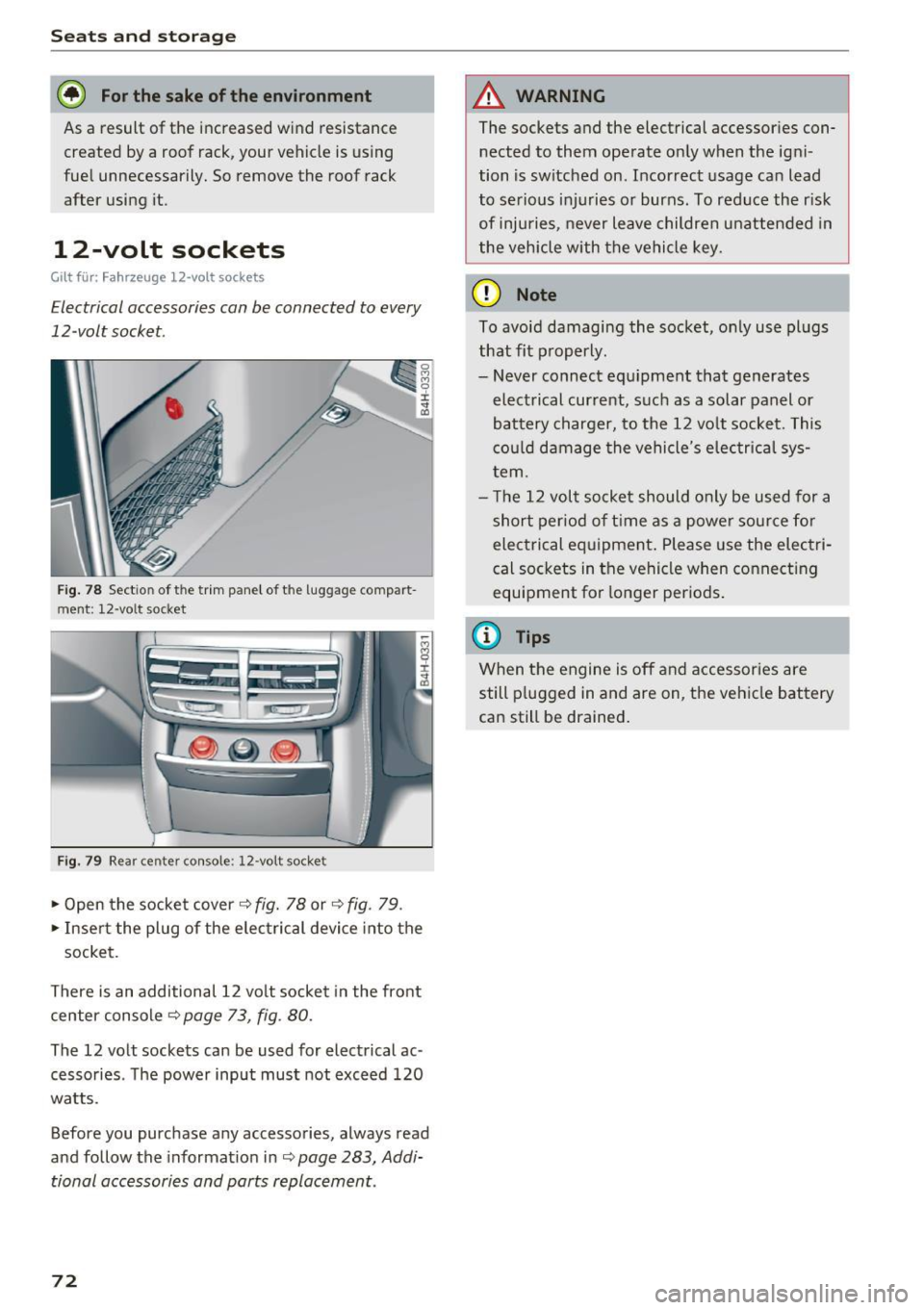
Fig. 78 Sectio n of the trim panel of the luggage compart
ment: 12-vo lt socket
Fig. 79 Rear center console: 12-volt socke t
• Open the socket cover~ fig. 78 or~ fig. 79 .
• Inser t the plug of the elec trical device into the
socket.
There is an additional 12 volt socke t in the front
center console~
page 73, fig . 80.
The 12 volt sockets can be used for electrical ac ·
cessories . T he power input must not exceed 120
watts .
Before you purchase any accessories, always read
and follow the informat ion in~
page 283, Addi·
tional accessories and parts replacement.
72
A WARNING
The sockets and the electrical accessories con·
nected to them operate only when the igni
tion is switched on . Incorrect usage can lead
to se rious injuries or burns . To reduce the risk
of injuries, never leave children unattended in
the vehicle with the vehicle key.
(D Note
To avoid damagi ng the socket, on ly use plugs
that fit p roperly.
- Never connect equipment that generates
electrical current, such as a solar panel or
battery charger, to the 12 vo lt socket. This
cou ld damage the vehicle's elec trical sys
tem.
- The 12 volt socket should o nly be used for a
short period of t ime as a powe r sour ce for
electrical equipment . Please use the electri
cal sockets in the vehicle when connect ing
equipment for longer per iods .
@ Tips
When the engine is off and accessories are
still p lugged in and are on, the veh icle battery
can still be drained .
Page 77 of 302

compartment exceeds 131 °F (55 °C) . Once the
temperat ure falls below 131 °F (55 °C) again,
the cooler switches on again automatically.
- the battery is adequately charged . The cooler
switches off automatically if the vehicle battery
voltage falls below a minimum level. This pre
vents the battery from discharging. The cooler
switches back on again automatically when the
battery voltage increases again (e.g. after start
ing the engine) .
The cooler cools to 42.8 °F
(+ 6 °C) and the freez
er cools to 21.2 °F (- 6 °C) in optimum cooling
conditions . The cooling performance is affected
by the temperature in the luggage compartment .
The temperature inside the cooler will be higher
if the luggage compartment is hot .
& WARNING
To avoid putting the occupants at any risk,
please observe the following safety rules:
- The maximum capacity is 2.5 kg (5.5 lbs.).
- Never overload the cooler. This could cause
injury in the event of a collision or sudden
braking.
- The cooler lid must always be kept closed
while you are driving. Make sure the retain
ing catch is securely engaged. The contents
of the cooler could be thrown forward into
the passenger compartment in the event of
a collision or under sudden braking -risk of
injury!
- Inflammable liquids, gas canisters, etc.
must not be stored in the cooler -risk of ex-
-
plosion! This also includes any products that
might emit volatile or inflammable gases.
- liquids will freeze at temperatures at or be
low 32 °F (0 °C) and may cause glass bottles
to burst!
(D Note
- The ventilation openings for the cooler are
located on the back panel trim in the lug
gage compartment and
must be kept clear
at all times.
- If the cooler is not functioning properly,
switch it off to prevent further damage .
Have it checked by a qualified workshop.
Seats and storage
Operation
App lies to : vehicles wit h coo ler
Fig. 83 Rear center a rmrest
The cooler is located in the rear cabin behind the
center armrest or behind the sliding cover (de
pending on the equipment fitted in your vehicle) .
The cooler and freezer only work when the igni
tion is on.
Opening / closing the cooler
• To open the cooler, pull the re lease lever CD
c:::>fig . 83.
• To close the cooler, push the lid back into its
original position. You should hear the release
lever
CD engage if the lid is properly closed.
Switching on/off
• Press button @ c:::> fig. 83 to switch the cooler
on/off . The symbol in the button is lit when this
function is activated .
• Press button @ to switch the freezer on/off.
The symbol in the button is lit when this func
tion is activated .
(D Tips
-Always try to leave the lid open for as short
a time as possible to prevent condensation
buildup.
- Do not put hot food or drinks in the cooler.
75
Page 84 of 302
Driving
more force to turn or brake if necessary. Be
cause you cannot steer and brake as you
usually would, this could lead to crashes
and serious injur ies.
- For safety reasons, you should a lways park
yo ur vehicle with the selector lever in P.
O therwise, the ve hicle co uld inadverte ntly
r oll away.
- After the engine has been sw itched off , the
rad iator fan can con tinue to ru n for up to 10
mi nutes -even with the ig nition switched
off.
It ca n also swi tc h on again after some
t ime if t he coolant te mperature ris es as th e
resul t of a he at bu ildup o r if the eng ine is
hot an d the engine compartme nt is addi
t iona lly heated by the sun's rays.
([) Note
Do not s top the e ngine immed ia te ly after
h ard o r ex tende d driving. Keep the engine
r u nning for approxima tely two m in utes to
prevent excessive heat b uild- up.
Driver message in the instrument cluster
display
Turn off ignition before leaving car
This message appears and a warn ing tone sounds
if you open the driver's door when the ignition is
sw itched on.
Press brake pedal to start engine
T his message appea rs if you press the
I START ENGI NE STOP I butt on to st art the engine
and do not depress the brake pedal. The eng ine
can only be started if the bra ke pe dal is de
pressed.
Ill Is key in the vehicle ?
If the i nd icator light t urns on and the message
appears, the remote co ntro l key was removed
from the vehicle while the eng ine was ru nning. If
the ignition key is no t in the vehicle yo u w ill not
be ab le to sw itch on the ign ition or restart the
engine after it has been switched off . You will a l
so not be able to lock the ve hicle from the out
side.
82
Shift to P, othe rwi se vehicle can roll away.
Door s do not lock if lever is not in P.
This dr ive r mess age ap pears for safety re a sons if
the tra nsmission has not been shifted to the P
p os it ion when you switch the ignition off . Move
the se lecto r lever to the P position. Otherwise the
vehicle is not p rotected from rol ling and cannot
be locked .
fl Key is not recognized. Hold back of key
against marked area. See owner 's manual.
If the indic ator ligh t turns on and this mes sage
appea rs, there is a ma lfunction
¢page 83 .
Turn off ignition before leaving car . Battery is
discharging
This message appears if the driver's door is
opened wh ile the ign ition is sw itched on. Always
swi tch off the ignition if yo u are leav ing the ve hi
cl e. See a lso
¢ page 87.
Shift to P and turn off ignition before leaving
car, otherwise vehicle can roll away
This message appears if the driver's door is
opened wh ile the ignition is switched on and the
selector lever is not in the P position . S hi ft the
selector lever i nto the P posit io n and sw itch off
t h e ign it io n when yo u exit the vehicle . Otherwise
t h e ve hicle co uld ro ll. See a lso
¢ page 87.
Page 85 of 302
Starting the engine if there is a
malfunction
It may n ot be possible to start the engine under
certain circumstances, for example if the battery
in the vehicle key is drained, if interference hos
affected the key or if there is a system malfunc
tion .
i:;
~ ___ ____ !
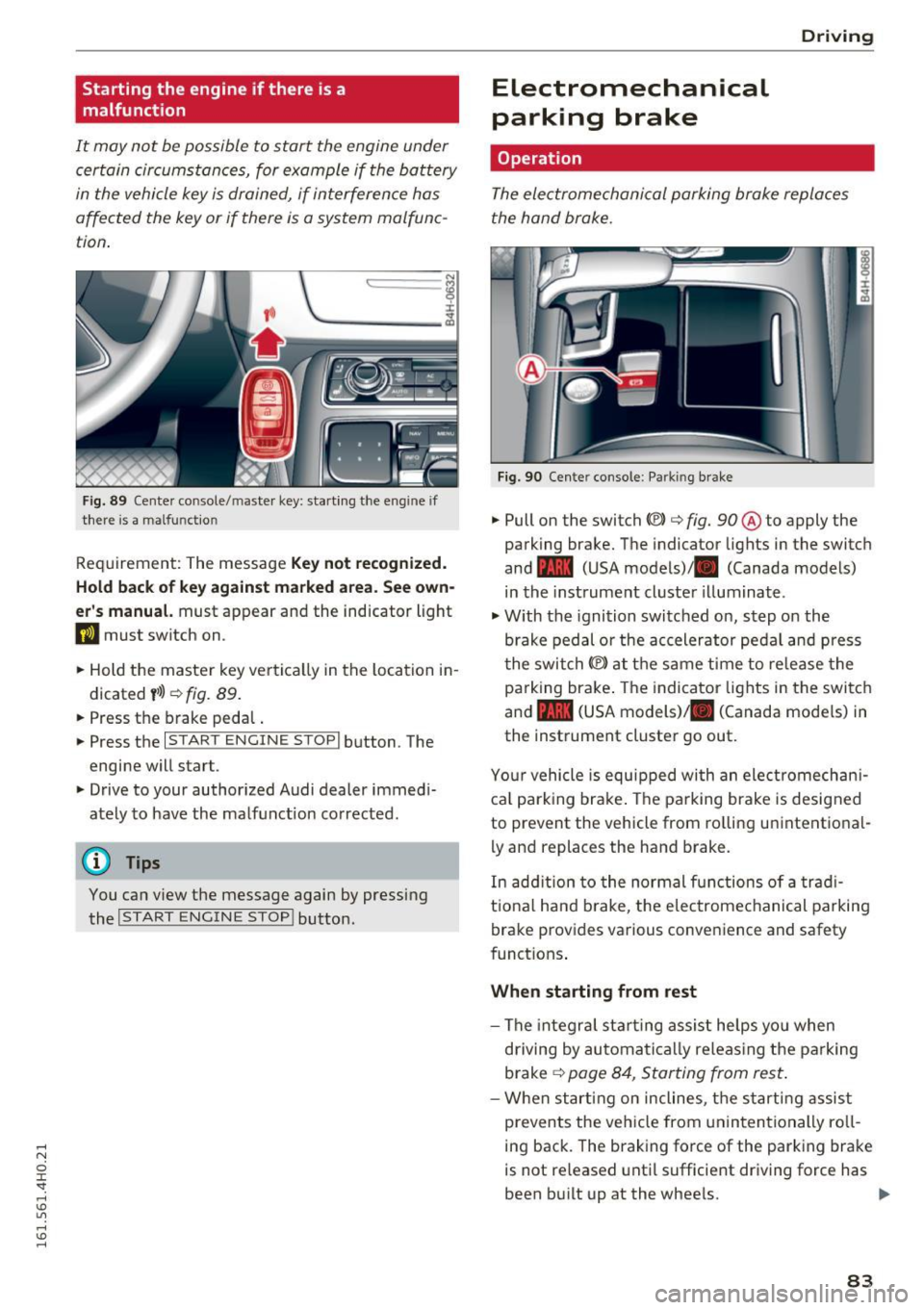
F ig . 89 Cen te r co nsole/ maste r key: start ing the e ng in e if
ther e is a malfu nct io n
Req uirement: The message Key not re cognized.
Hold back of key against marked area. See own
er' s manual.
must appear and the indicator light
DJ must switch on .
.. Hold the master key ve rtica lly in the location i n
d icated
y >l) ¢ fig. 89 .
.. Press the brake peda l.
.. Press the
I STAR T ENGINE STOP I button . The
engine will star t.
.. Drive to your author ized Audi dealer immed i
ately to have the malf unct ion corrected .
(D Tips
You can view the message again by pressing
the
I START ENGINE STOP ! button.
Electromechanical
parking brake
Operation D
rivi ng
The electromechanical parking broke replaces
t he hand broke.
Fig . 9 0 Cen te r conso le : Parkin g brake
.. Pull on the switch «vl c:> fig. 90 ® to apply the
parking brake. The indicator lights in the switch
and - (USA models)/ . (Canada models)
in the instrument cluster illuminate .
.,. With the ignition switched on, step o n the
brake pedal or the accelerator ped al and press
t he swi tch(® at the same time to re lease the
pa rking bra ke . The indicator lights in the swi tc h
and - (USA models)/ . (Canada mode ls) in
the instrument cluster go out .
Yo ur vehicle is equ ipped wi th an ele ct romechan i
ca l park ing brake . The parking brake is designed
to prevent the vehicle from ro lling unintentional
ly and replac es the hand brake.
In add ition to the normal functions of a trad i
t io na l h and brake, t he e lectrome chanical pa rking
brake provides va rious conveni ence and safety
funct ions .
When starting from rest
-The integra l st art ing assis t he lps yo u when
driving by automa tic a lly releas ing the pa rking
brake
¢ page 8 4, Star ting from res t.
-W hen start ing on incline s, t he s tarting assist
prevents the vehicle from unin ten tionally ro ll
ing back . The braking force of the parking bra ke
is not re leased unti l sufficient driv ing force has
been b uilt up at the wheels. .,.
83
Page 88 of 302

Driving
(D Note
Always switch off the Start-Stop-System
when driving through water
c::> page 87.
Starting/stopping the engine
A pp lies to: ve hicles w ith Sta rt-Sto p-System
Fig. 91 Instrument cluste r: engin e sw itched off (s top
ph ase)
.. Slow the vehicle to a stop using the brake and
keep pressing the brake pedal. The engine will
switch off . The
[I] indicator light appears in the
information line in the instrument cluster dis
play.
.. When you take your foot off the brake pedal,
the engine restarts. The indicator light turns
off.
Additional information
The engine will switch off in the P, D, N and S po
sitions as well as in manual mode. In the P posi
tion , the engine will also remain off if you take
your foot off the brake pedal. The eng ine starts
again when you select another selector lever po
sition and take your foot off the brake pedal.
If you select the R position during a Stop phase,
the engine will start again.
Shift from D to P quickly to prevent the engine
from starting unintentionally when shifting
through R.
You can determine for yourself if the engine will
stop or not by reducing or increasing the amount
of force you use to press the brake pedal. For ex
ample , if you only light ly press on the brake ped
al in stop-and and-go traffic or when turning, the
engine will not switch off when the vehicle is sta-
86
tionary. As soon as you press the brake down
harder, the engine will switch off.
General information
Applies to: vehicles wi th Start-S top-Sys te m
The standard Start-Stop-mode can be cancelled
for different system-related reasons.
Fig. 92 Instrumen t cluster: e ngin e-Stop temporarily un
ava ilable
Engine will not switch off
Before each stop phase, the system checks if cer
tain conditions have been met. For example, the
engine will
not be switched off in the following
situations :
- The engine has not reached the minimum re
quired temperature for Start-Stop-mode.
- The interior temperature selected by the A/C
system has not been reached .
- The outside temperature is extremely high/low.
- The windshield is being defrosted
c::> page 79 .
- The parking system* is switched on.
- The battery charge level is too low.
- The steering wheel is sharply turned or there is
a steering movement .
- After engaging the reverse gear .
- On sharp inclines.
The
llJ indicator light appears in the information
line in the instrument cluster display
c::>fig . 92.
Engine automatically restarts
The stop phase is interrupted in the following sit
uations, for example . The engine restarts without
any action by the driver .
- The interior temperature varies from the tem-
perature selected in the A/C system. ..,.
Page 89 of 302
-The windshield is being defrosted~ page 79.
-The brake pedal is pressed sever al t imes in a
row .
- T he battery charge level becomes too low .
- High power cons umption .
Switching the ignition off automa tic ally
To prevent the battery from dra ining, the ignition
will sw itch off
auto mati call y when all of the fol
lowing cond itions have been met:
- The vehicle has already been driven.
- The eng ine has been turned
off by the Start-
Stop -System*.
- The driver's door is opened .
- The driver's seat bel t is removed.
- The brake pedal is not p ressed down.
- The veh icle is stationary.
In this case, the activated low beam will be re
p laced by the s ide marker lights. The side marker
lights will switch
off after appro ximately 30 mi
nutes or when you lock the veh icle.
If the Start-Stop System has
not turned off the
engine or if you have sw itched the Start-Stop sys
tem
off manually , the ignition will not be auto
mat ica lly switched
off and the engine w ill contin
ue to run~& .
& WARNING
Never allow the engine to r un in confi ned
spaces - da nger o f as phyxia tio n.
(D Tips
-
If you shift in to the D, Nor S posit ions after
shifti ng into reve rse, the veh icle must be driv
en faster th an 6 mph (10 km/h) in order for
t he eng ine to swi tc h
off aga in.
D rivi ng
Switching the Start-Stop-System on/off
manually
Applies to: vehicles with Start-Stop-System
If you do not wish to use th e system, you can
switch it off manually.
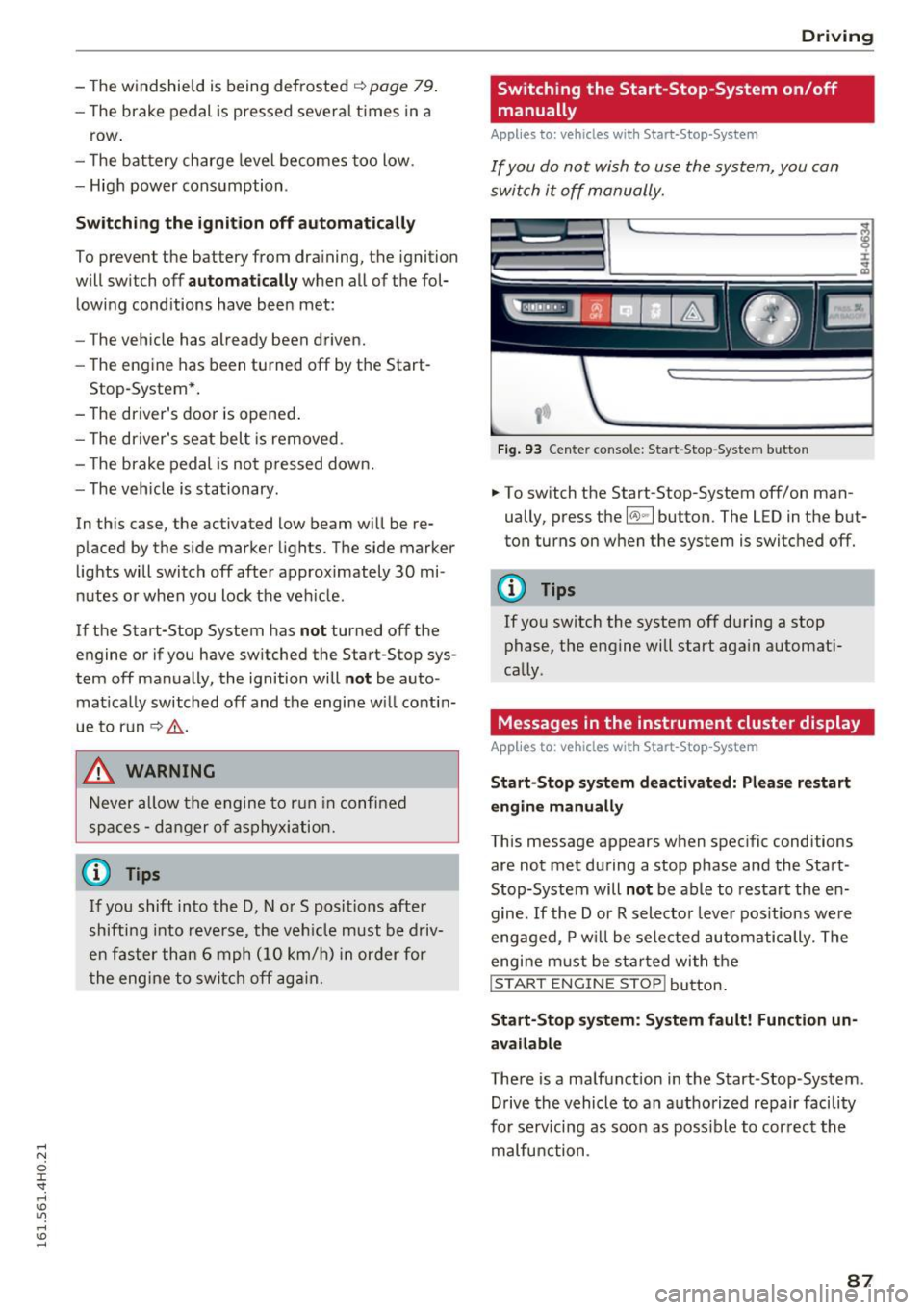
Fi g. 93 Center console: Start-Stop -System button
.. To switch the Start-Stop-System off/on man
ually, press the
l(A) ~ I button. The LED in the but
ton turns on when the system is switc hed
off.
(D Tips
If you sw itch the system off during a stop
phase, the engine will start aga in automati
cally .
Messages in the instrument cluster display
Applies to: vehicles with Start-Stop -System
Start-Stop system deactiv ated: Plea se restart
engin e manually
This message appears when spec ific conditions
are not met during a stop phase and the Start
Stop-System will
not be able to resta rt the en
gine.
If the Dor R selector leve r pos itions we re
engaged, P w ill be sele cted automatically. The
engi ne m ust be st arted wi th t he
I START ENGINE STOP! button .
Start-Stop s yst em : S y stem fault! Function un
available
There is a malfunction in the Start-Stop-System.
Drive the vehicle to an a uthorized repair facility
for serv icing as soo n as poss ible to cor rec t the
malfunction .
87
Page 107 of 302
@ Tips
-Side assist is not active whi le you are ma k
i ng the ad justment .
- Your settings are automatically stored and
ass igned to the remote control key being
u sed.
Driver messages
A ppl ies to: ve hicl es w ith si de assis t
If side ass ist switches off by itself, the LED in the
button turns off and a message will appear in the
i nstr ument cluster d isp lay :
Audi side assist: Cur rently una vailable . No sen
sor vision
The rada r senso rs' vision is affected . Do not cover
the area in front of the senso rs with b ike wheels,
stickers, dirt o r other ob jects . Clean the area in
front of the sensors, if necessary
c:> page 103,
fig . 114.
Audi side assist: Currently unavailable
Side assist c an not be swi tched o n tempo rarily be
cause there is a mal function (for exam ple, the
battery charge level may be too low) .
Audi side assist: System fault!
The system cannot guarantee that it w ill detec t
ve hicles co rrectly and it is swi tched off . The sen
s ors have bee n disp laced or are fa ulty. Have the
sy stem checked by an authorized Audi de aler or
au thor ized Au di Service Facility soon.
Audi side assist: Unavailable when towing .
Side assist sw itches off automatically when a fac
tory-installed trailer hitch is connected to the
e lectr ical connector on the trailer . Th ere is no
g ua rantee the syste m will sw itch off when usi ng
a retrofitted tra ile r hitc h. D o not use s ide assist
when towing a t railer.
Aud i side assist
105
Page 161 of 302
(D Tips
If the weight-sensing mat in the front passen
ger seat detects an empty seat, the front air
bag on the passenger side will be turned off,
and the
P ASS ENGER AI R BA G OFF light will
stay on.
Repair , care and disposal of the airbags
Parts of the a irbag system are installed at many
d ifferent p laces on your Aud i. Installing , remov
ing, servic ing or repa iring a part in an area of the
vehicle can damage a part of an airbag system
and p revent that system from working properly
in a co llision.
There are some important things you have to
know to make su re that the effectiveness of the
system w ill not be impaired and that discarded
components do not cause injury or pollute the
environm ent .
A WARNING
Improper care, serv icing and repa ir proce
dures can increase the risk of personal injury
and death by preventing an airbag from de
ploying when needed or deploying an airbag
unexpectedly:
-
- Never cover, obstruct, or change the steer
ing wheel horn pad or a irbag cover or the in
strument panel or mod ify them in any way .
- Never attach any objects such as cup holders or telephone mountings to the surfaces cov
er ing the airbag units.
- For cleaning the horn pad or instrument
pane l, use on ly a soft, dry cloth or one mois
tened with plain water. Solvents or cleaners cou ld damage the a irbag cover or change
the stiffness or strength of the material so
that the airbag cannot dep loy and protect
properly.
- Never repair, adjust, or change any parts of
the airbag system.
- All work on the steering wheel, instr ument
pane l, front seats or electrical system (in
cluding the installation of audio equipment,
cellu lar telephones and CB radios, etc.)
must be performed by a qualified technician
Airb ag sys tem
who has the training and special equ ipment
necessary.
- For any wo rk on the airbag system, we
strong ly recommend that you see your au
thorized Audi dealer or qualified workshop .
- Never modify the front bumper or parts of
the vehicle body.
- Always make sure that the side a irbag can
inflate without interference:
- Never install seat covers or replacement
upholstery ove r the front seatbacks that
have not been specifica lly approved by
Audi .
- Never use addi tional seat c ushions that
cove r the areas where the side airbags in
flate.
- Damage to the orig inal seat cove rs or to
the seam in the area of the s ide airbag
module must a lways be repaired immedi
ate ly by an authorized Aud i dealer.
- The airbag system can be activated only
once . A fter an airbag has inflated, it must
be replaced by an authorized Audi dealer or
qualified technic ian who has the technical
information, t raining and spec ial equ ipment
necessary.
- The airbag system can be deployed only
once . After an airbag has been deployed, it
must be replaced with new rep lacement
parts des igned and approved especially for
your Aud i model version. Replacement of
comp lete airbag systems or airbag compo
nents must be performed by qualified work
shops only. Ma ke sure that any airbag serv
ice act ion is en tered in your Aud i Wa rranty
& Maintenance booklet under AIRBAG RE
PLACEMENT RECORD.
- For safety reasons in severe accidents, the
alternator and starter are separated from
the vehicle battery with a pyrotechnic circ uit
interrupter.
- Wo rk on the pyrotechnic c ircuit inte rrupt
er must on ly be performed by a qua lified
dealer -risk of an acc ident!
- If the vehicle or the circuit interr upter is
scrapped, all applicable safe ty p recau tions
mus t be followed.
159