door lock AUDI S8 2016 User Guide
[x] Cancel search | Manufacturer: AUDI, Model Year: 2016, Model line: S8, Model: AUDI S8 2016Pages: 302, PDF Size: 75.68 MB
Page 40 of 302
Opening and closin g
- You press/release the~ button on the remote
contro l key (vehicles with convenience key*), or
- You press the~ or
CD (vehicles with conven
ience key*) button in the luggage compartment
lid , or
- You push the hand le in the luggage compart
ment lid, or
- You push on the luggage compartment lid with
your hand opposite the direction it is moving,
or
- When something b locks the luggage compart
ment lid or makes it difficu lt for the lid to
move .
I f you press the hand le or one of the~ or
CD
(vehicles with convenience key*) buttons then,
the luggage compartment lid will either open or
close, depending on how far it was open.
A WARNING
- Read and follow all WARNINGS c> A in Gen
eral description on page 32.
- After closing the luggage compartment lid,
always pull up on it to make sure that it is
properly closed . Otherwise
it cou ld open
suddenly when the veh icle is moving .
- To help prevent poisonous exhaust gas from
being drawn into the veh icle, always keep
the luggage compartment lid closed while dr iv ing . Neve r transport objects larger than
those which fit completely into the luggage
area, because then the luggage compart
ment lid c annot be fully closed .
- Never leave yo ur vehicle unattended espe
c ially w ith the l uggage comp artment l id left
open. A child co ul d crawl into the ca r
through the luggage compartment and pull
the lid shut, becoming trapped and unable
to get out. To reduce the risk of personal in
jury, never let children p lay in or around
you r vehicle. A lways keep the luggage com
partment lid as well as the vehicle doors
closed when not in use .
- Never close the luggage compartment lid
inatten tively or without check ing first . Al
though the clos ing fo rce of the l uggage
c ompartment lid is limited, yo u can st ill se
riously injure yourse lf or others.
38
- Always ensure that no one is within range of
the luggage compartment lid when it is
mov ing, in particular close to the hinges and
the upper and lower edges - fingers or
hands can be pinched.
- Never try to interfere with the luggage com
partment lid or help it when it is be ing
opened or closed a utomat ically.
(D Tips
- The settings in the MMI determine if the
luggage compartment lid can be opened us
ing the handle
c> page 33
- If there is a mechanical problem with auto
matic closing for the l uggage compartment
lid or the re is an obs truction, it opens again
immediately . Check to see why the luggage
compartment lid could not be closed before
a ttempting to close it again.
- The following applies to vehicles equ ipped
with the Convenience key* feature: if the re
mote contro l key is left in the lugg age com
partment, luggage compartmen t will auto
matically unlock itself after you lock the ve
hicle. This prevents you from unintentiona l
ly lock ing you r key in the l uggage compart
ment.
- When the vehicle is locked, the luggage
compartment lid can be unlocked separately
by pressing the button~ on the master
key. When t he luggage compartment lid is
closed aga in, it locks automat ica lly .
- If the vehicle battery charge drops below a
certain level, you can still open or close the
luggage compa rtment lid manually, howev
er, you will need to apply mo re force to
close i t.
Page 41 of 302

Luggage compartment with movement
activated opening
Applies to: vehicles with convenience key and sensor-control·
led luggage compartment lid
Fig. 31 Rear of vehicle: foot movement
Requirements: You must be carrying your vehicle
key with you. You must be standing at the center
behind the luggage compartment lid. The d is
tance to the rear of the vehicle must be at least
8 inches (20 cm) . The ignition must be switched
off. Make sure you have firm footing.
.. Swing your foot forth and back below the
bumper
r=) fig . 31. Do not touch the bumper.
Once the system recognizes the movement, the
luggage compartment lid will open.
The luggage compartment lid will only open if
you make the movement as described. This pre
vents the luggage compartment lid from opening
due to similar movements such as when you walk
between the rear of the vehicle and your garage
door.
General information
In some s ituations, the function is limited or
temporarily unavailable. This may happen if:
- the luggage compartment lid was just closed .
- you park close to a hedge and the branches
move back and forth under the vehicle for a
long period of time .
- you clean your vehicle, for example with a pres
s ure washer or in a car wash .
- there is heavy rain.
- the bumper is very dirty, for example after driv-
ing on salted roads.
- there is interference to the radio signal from
the vehicle key, such as from cell phones or re
mote controls.
Open ing and closing
Luggage compartment lid emergency
release
If the central locking system fails, the luggage
compartment lid can be opened at the lock cylin
der.
A U D ,.
Fig. 32 Luggage compartment lid : mechan ica l key in the
l ock cyli nder
.. Remove the mechanical key Q page 31.
.. Insert the key in the lock cylinder as p ictured.
.. Turn the key approximately 45° to the right
r=) fig. 32. The luggage compartment lid opens .
In this position the key cannot be pulled out of
the lock cylinder.
Parental control
Mechanical child safety lock in the rear
doors
The child safety lock prevents the rear doors
from being opened from the inside.
Fig. 33 Rear doors: chil d safety lock
The child safety lock is visible only when the door
is open.
.. Remove the mechanical key
Qpage 31.
.,. To switch on the child safety lock, turn the key
in the direction of the arrow.
39
Page 42 of 302
Opening and closing
• To switch off the child safety lock, turn the key
in the opposite direction to the arrow.
When the child safety locks are activated, the in
side door handles do not work and the doors can
only be opened from the outs ide.
Power child safety lock for the rear doors
A pp lies to: ve hicles w ith power c hild safe ty lock in the rea r
do ors
The power child safety lock i prevents the rear
doors from being opened from the inside.
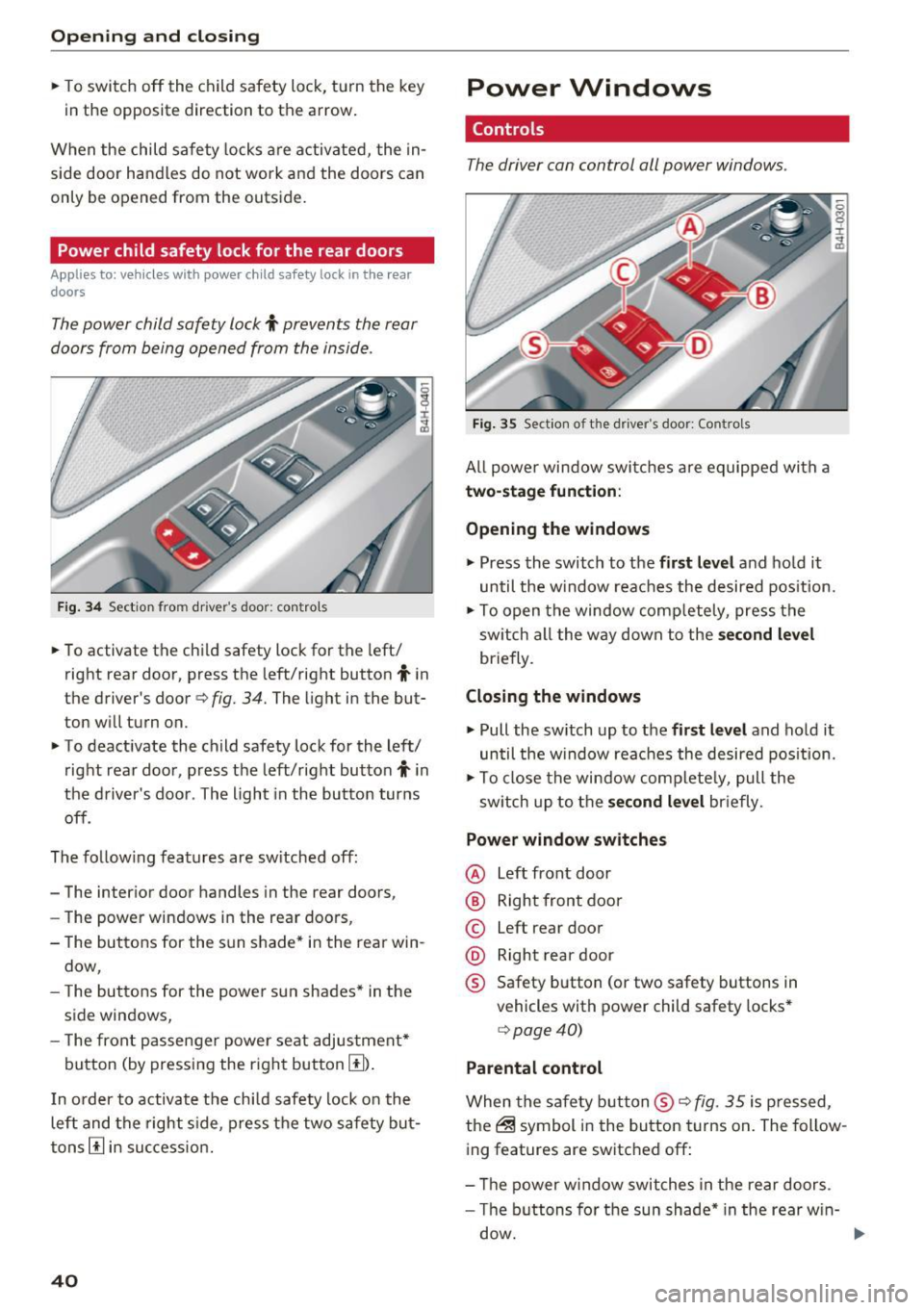
Fig . 34 Sect ion from drive r's doo r: contro ls
• To activate the child safety lock for the left/
right rear door, press the left/right button
i in
the driver's door
Q fig. 34. The light in the but
ton will turn on.
• To deactivate the child safety lock for the left/
right rear door, press the left/right button
i in
the driver's door . The light in the button turns
off.
The fo llow ing features are sw itched off:
- The interior door handles in the rear doors,
- The power windows in the rear doors,
- The buttons for the sun shade* in the rear win-
dow,
- The buttons for the power sun shades* in the
side windows,
- The front passenger powe r seat adjustment*
button (by pressing the right button
[I) .
In order to activate the ch ild safety lock on the
left and the right s ide, press the two safety but
tons
[I in success ion.
40
Power Windows
Controls
The driver can control all power windows.
Fig. 35 Section of t he driver 's doo r: Contro ls
All power window switches are equipped with a
two-stage function :
Opening the windows
• Press the switch to the first level and hold it
until the w indow reaches the desired pos ition.
• To open the window comp letely, press the
sw itch all the way down to the
second level
briefly.
Closing the windows
• Pull the sw itch up to the first level and hold it
until the window reaches the desired position.
• To close the window complete ly, pull the
sw itch up to the
second level briefly.
Power window switches
@ Left front door
@ Right front door
© Left rear door
@ Right rear door
® Safety button (or two safety buttons in
vehicles with power child safety locks*
Q page40)
Parental control
When the safety button ® Q fig. 35 is pressed,
the@ symbol in the button turns on. The follow
ing features are switched off:
- Th e power window switches in the rear doors .
- The buttons for the sun shade* in the rear w in-
dow.
Page 43 of 302

-The buttons for the power sun shades * in the
side windows.
- The button for the front passenger's seat ad
justment*.
A WARNING 1=
- Always take the vehicle key with you when
leaving the vehicle, even for a short period
of time. This applies particularly when chil
dren rema in in the vehicle . Otherwise the
children could start the engine or operate
electrical equipment such as power win
dows. The power windows a re functional un
ti l the driver's door or passenge r's door has
been opened.
- Pay ca reful attention when closing the win
dows.
It could cause injury by pinching.
- When locking the veh icle from outside, the
vehicle must be unoccupied since the win dows can no longer be opened in an emer
gency.
@ Tips
- Using the switches © and @, the driver can
also operate the power sunshades* in the
side windows.
- After tu rning the ignition off you can st ill
open and close the w indows for app roxi
ma tely 10 minutes. The powe r windows are
not switched off until the driver's door or
passenger's door has been opened.
What to do after a malfunction
-
The one -touch open and close function must be
reactivated if the battery has been disconnected .
.,. Pull and hold the power w indow switch unt il
the window is fully closed.
.,. Release the switch and then pull it again for at
least one second.
Openin g an d clos ing
Valet parking
The valet parking feature protects the luggage
compartment from unauthorized access.
Fig. 36 Valet parking button
With "valet parking" act ivated, the luggage com
partment lid cannot be opened .
.,. Remove the mechanical key
c::> page 31.
.,. Open the glove compartment and activate
c::> fig. 36 the "valet parking" feature by press
ing the
!VA LE T I button. The indicator light in
the switch illumina tes.
.,. Close the glove compartment and lock it with
the mechanical key.
.,. Leave the master key with the service personnel
for parking and keep the mechanical key with
you .
When the "valet parking" feature is activated:
- the unlocking button fo r the luggage compart
ment lid~ in the driver's door is inactive
- the button~ on the master key is inactive
- the opening handle in the luggage compart-
ment lid is inactive.
The vehicle can be driven and locked and un
locked with the master key . Access to the lug
gage compartment is b locked.
When the valet parking function is switched on,
the message
V ale t p arki ng activat ed appears in
the instrument cluster d isp lay when you switch
the ignition on.
4 1
Page 50 of 302
Lights and Vision
Autom atic headli ghts
You can adjust the follow ing settings in the Au
tomatic headlight s
menu:
Headlights activation time -You can adjust if the
headligh ts switch on
Early , M ed . or Late accord
i n g to the sensitivity of the light se nsor.
Audi adaptive light * -You can switch adaptive
light
On and Off .
Autom atic high beams *
You can switch the high beam ass ist on and off .
Daytime running lights
USA models:
You can switch the daytime r unning
lights
on and off .
Canada m odels:
The function ca nnot be tu rned
off.
It is activ ated au tomatically each time the ig
n ition is switched on . This menu item is shown
"greyed out" .
Coming home, Leaving home
The com ing home func tion illum ina tes the area
ou tside the ve hicle when yo u sw itch the igni tion
off and ope n the driver's door . To tu rn the f unc
t ion on, select
Lights when leaving car > On .
The leav ing home function illuminates the area
ou tside the ve hicl e when yo u un lock the vehicle .
T o tur n the function on, select
Lights when un
locking car > On.
The com ing home and le aving home f unctions
only operate w hen it is dark and the lig ht sw itch
is in t he
AUTO position.
48
Turn signal and high beam lever
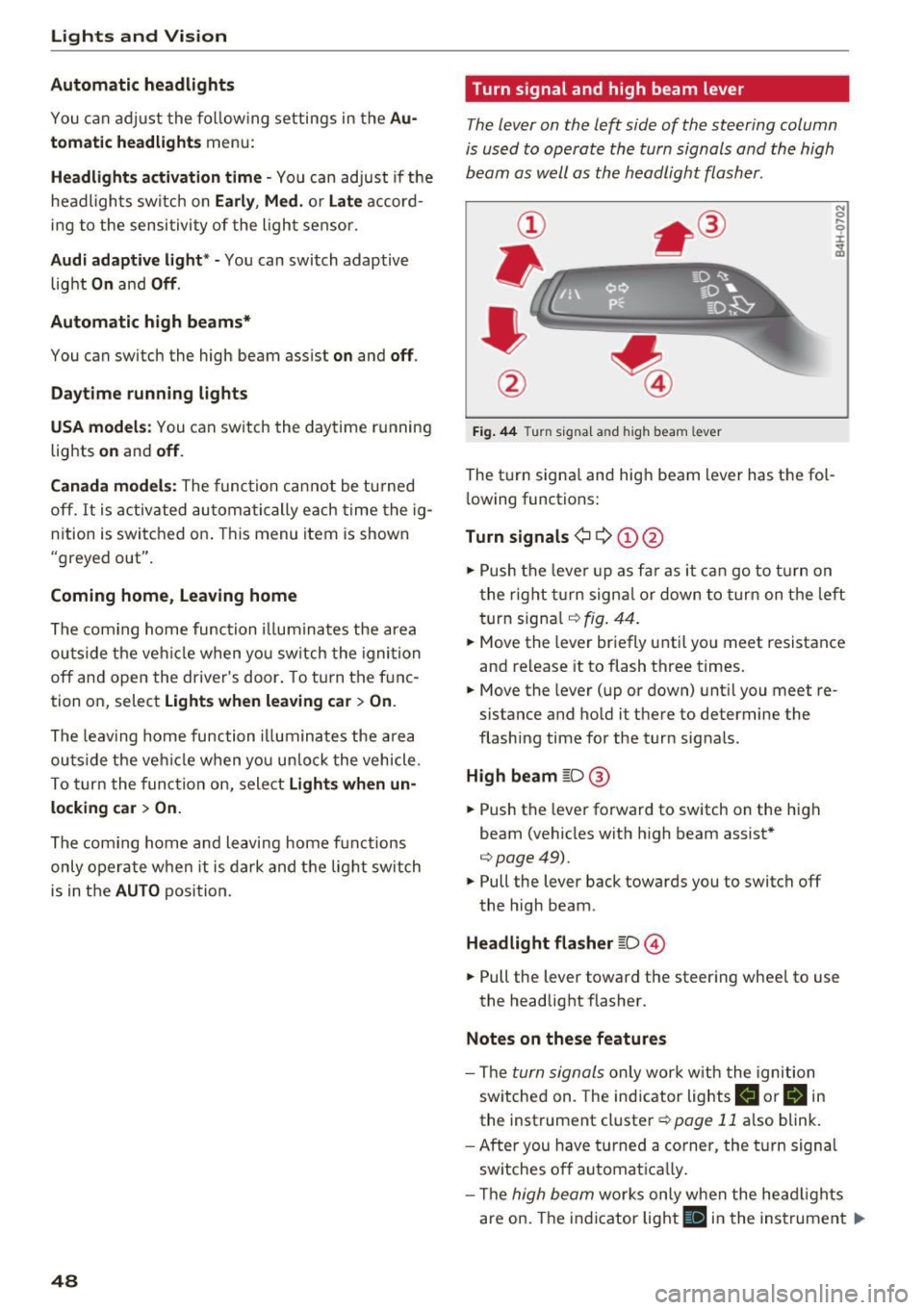
The lever on the left side of the steering column
is used to operate the turn signals and the high
beam as well as the headlight flasher .
Fig. 44 T urn signa l an d hi gh beam lev er
The turn signa l and hig h beam lever has the fol
l owing functions:
Turn signals¢ Q ©@
N 0
9 :I:
~
.,. Push the leve r up as f ar as it ca n go to t urn on
t he rig ht tu rn signa l or down to tur n on t he left
turn signa l
r:!>fig. 44 .
.,. Move th e lever br ie fly u ntil yo u meet r esistance
and release it to flash three times.
.,. Move the lever (up or down) unt il y ou meet re
sistance and ho ld it there to determine the
flashing time for the turn sig nals .
High beam gD@
.,. Push the lever fo rward to sw itch on the high
beam (vehicles wit h high beam assist*
r:!> page49).
.,. Pull the lever back towards you to switch off
the high beam .
Headlight fla sher gD ©
.,. Pull the lever toward the steering whee l to use
the headlight flasher.
Notes on these features
- The turn signals on ly wor k w it h the ignition
sw itc hed on. The ind icator lights
II or H in
the instrument cluster ¢ page 11 also blink.
- After you h ave t urned a corner, the turn signa l
sw itches o ff automat ica lly.
- Th e
high beam works only when the head ligh ts
are on. The ind icator light
Bl in the instrumen t Iii>
Page 65 of 302
-Vehicles with a pass through in the center
console have seating for four. The long cen
ter console between the two rear seats is
not a seating position . Therefore, a safety
belt is not provided .
- Applies to vehicles with reclining rear seat*:
- Do not use the front passenger's seat for
seating when it is in the reclining position.
This increases the risk of serious injury or
death .
- Never adjust the reclining position when
the front passenger 's seat is occupied .
This increases the risk of injury.
- Do not tilt the display if the driver's view
of the right exterior mirror will be ob
structed .
- Make sure the area between the leg sup
port and the front passenger's seat back
rest is clear before folding the leg support in so that you are not pinched.
(D Note
If a child seat is attached to one of the rear
seats, this seat must not be adjusted using
the power controls under any circumstances.
The easy entry function for this seat must also
be deactivated in the MMI
c:> page 64. The
child seat as well as the rear seat can be dam
aged by the adjustment process .
(!) Tips
The massage function switches off automati
cally after approximately
10 minutes .
- If you cannot move the front passenger seat
or the reclining rear seat, it may be because
- the front passenger's seat memory func
tion is switched off¢
page 66 or
- the child safety lock is switched on (the~
button ¢
page 40 or the right T button
c::> page 40 lights up in the driver's door),
or
- the front passenger seat adjustment is
switched off in the MMI
c:> page 64.
Seats and storage
Massage function remote control
Applies to: vehicles with reclining rear seat and massage
functio n
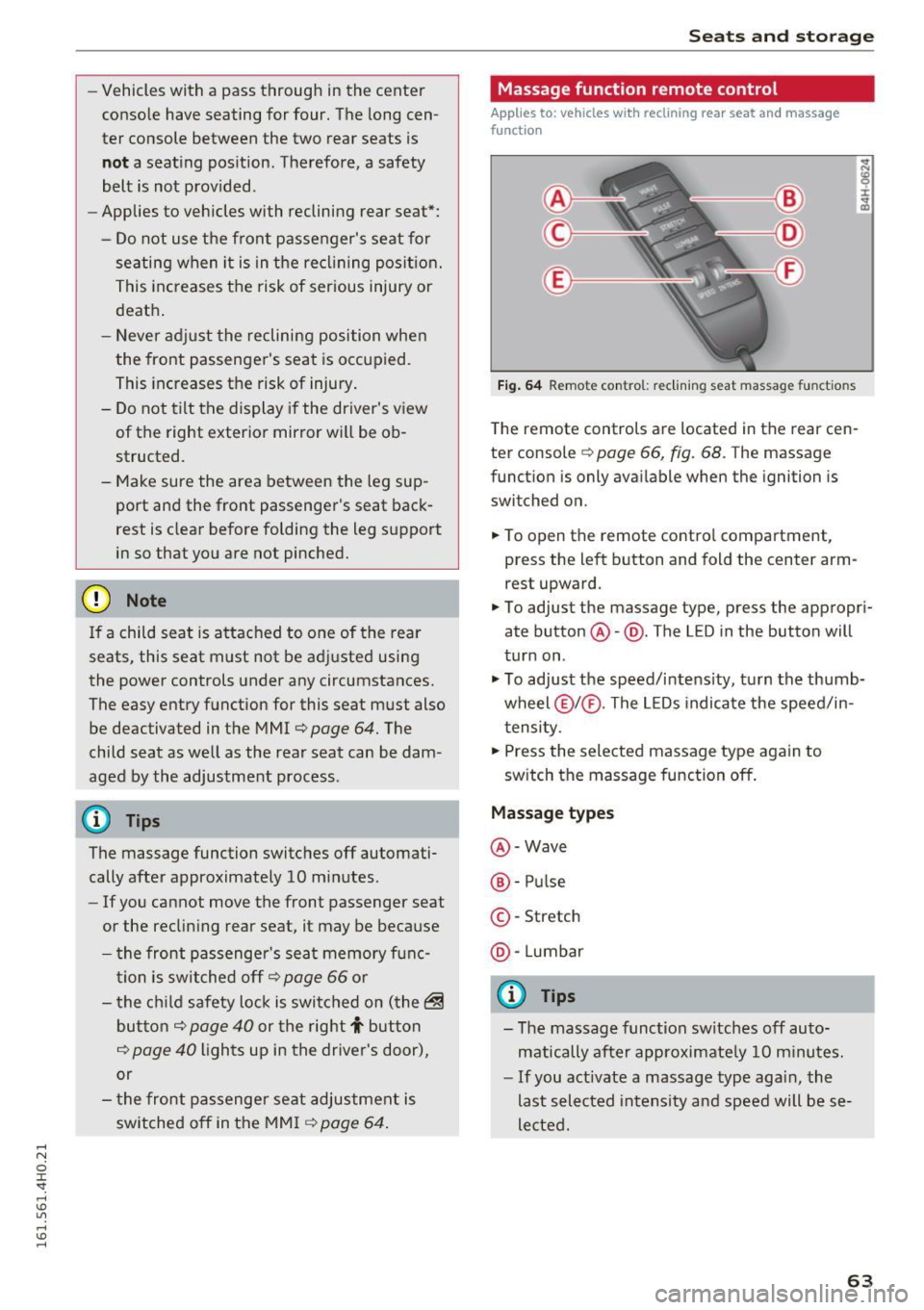
Fig. 64 Remote con trol: re clining seat massag e functions
The remote controls are located in the rear cen
ter console
c::> page 66, fig. 68. T he massage
function is only available when the ignition is
switched on.
.,. To open the remote control compartment,
press the left button and fold the center arm rest upward.
.,. To adjust the massage type, press the appropri
ate button @-@ . The L ED in the button will
turn on .
.,. To adjust the speed/intensity, turn the thumb
wheel @I® . The LEDs indicate the speed/in
tensity.
.,. Press the selected massage type again to
switch the massage function off.
Massage types
@-Wave
®-Pulse
©-Stretch
@ -Lumbar
@ Tips
- The massage function switches off auto
matically after approximate ly
10 minutes.
- If you act ivate a massage type again, the
last selected intensity and speed will be se
lected.
63
Page 67 of 302
restraints that are not properly adjusted in
creases the risk of ser ious or fatal neck in
jury dramatically.
- Read and heed all WARNINGS
¢page 132,
Proper adjustment of head restraints.
- Vehicles with a pass through in the center
console have seating for four. The long cen
ter console between the two rear seats is
Memory function
Description
Applies to: vehicles with memory function
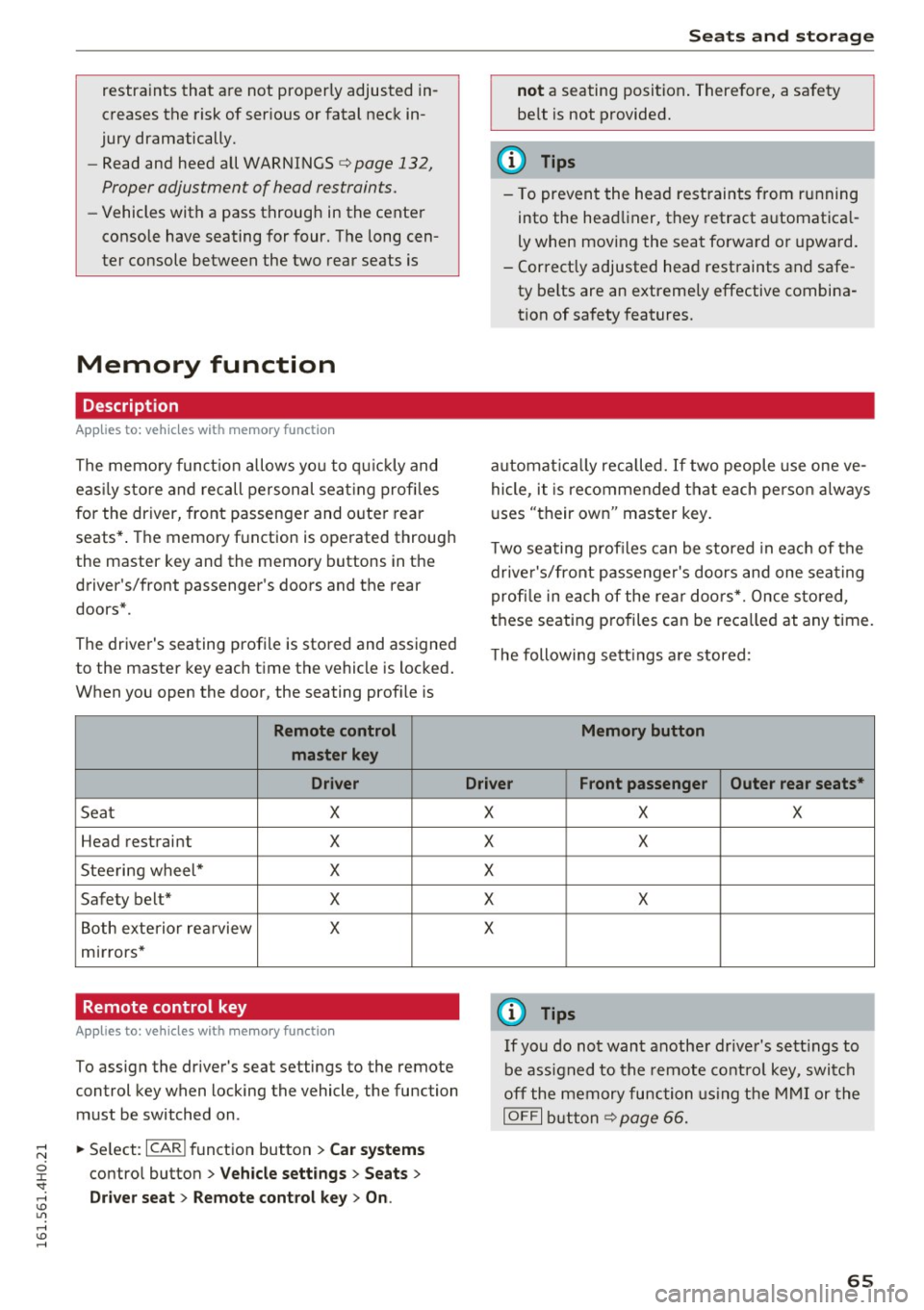
The memory functio n allows you to quickly and
eas ily store and recall personal seating profi les
for the driver, front passenger and outer rear
seats* . The memory function is operated through
the master key and the memory buttons in the
driver's/front passenger's doors and the rear
doors".
The driver's seating profi le is stored and assigned
to the master key each time the vehicle is locked.
When you open the door, the seating profile is
Remote control
master key
Driver
Seat X
Head restraint X
Steering wheel* X
Safety belt* X
Both exterior rea rview X
mirrors*
Remote control key
Applies to: veh icles with memory function
To assign the driver's seat settings to the remote
control key when locking the vehicle, the function
must be switched on .
~ Select: I CARI function button > Car systems
control button > Vehicle settings > Seats >
Driver seat > Remote control key > On .
Seats and storage
not a seating position. Therefore, a safety
be lt is not provided.
(D Tips
-To prevent the head restraints from running
into the headliner, they retract automatica l
ly when moving the seat forward or upward.
- Correctly adjusted head restraints and safe
ty be lts are an extremely effective combina
tion of safety features.
automat ically recalled. If two people use one ve
hicle, it is recommended that each person always
uses "their own" master key .
T wo seating profiles can be stored in eac h of the
drive r's/front passenger's doors and one seating
profi le in each of the rear doors*. Once stored,
these seating p rofiles can be reca lled at any time.
Th e following sett ings are stored:
Memory button
Driver Front passenger Outer rear seats*
X
X
X
X
X X
X
X
X
@ Tips
If you do not want another driver's settings to
be assigned to the remote control key, switch
off the memory function using the MMI or the
IOFF I button ¢p age 66.
65
Page 76 of 302
Seats and storage
Additional storage
There are a variety of storage compartments and
fasteners in various places in the vehicle.
- Storage compartments in the doors
- Net in the front passenger footwell
- Eyeglasses compartment in the headliner (near the rearview mirror)
- Storage compartments under the center armr
ests
- Compartments* on the back of the front seat
backrests
- Garment hooks over the rear doors
- Compartment in the center console with pass-
through)* (rear)
- Compartment behind the rear center armrest
(in vehicles without the pass-through* or cool
er*)
- Cell phone holder* in the right rear door
- Bag hooks in the luggage compartment
_& WARNING
-When driving, do not leave any hard objects
on the rear window shelf or allow your pet
to sit on the shelf. They could become a haz ard for vehicle occupants in the event of
sudden braking or a crash.
- Always remove objects from the instrument
panel. Any items not stored could slide
around inside the vehicle while driving or
when accelerating or when applying the
brakes or when driving around a corner.
- When you are driving make sure that any
thing you may have placed in the center con
sole or other storage locations cannot fall
out into the footwells. In case of sudden
braking you would not be able to brake or
accelerate.
- Any articles of clothing that you have hung
up must not interfere with the driver's view.
The coat hooks are designed only for light
weight clothing. Never hang any clothing
with hard, pointed or heavy objects in the
pockets on the coat hooks. During sudden
braking or in an accident -especially if the
airbag is deployed -these objects could in
jure any passengers inside the vehicle.
74
- To reduce the risk of personal injury in an
accident or sudden stop, always keep the
glove compartment closed while driving.
- Read and follow all WARNINGS
¢ page 164, Important safety instructions
on the side airbag system.
- Hang clothes in such a way that they do not
impair the driver's vision.
- The coat hooks must only be used for light
weight clothing. Do not leave any heavy or
sharp edged objects in the pockets which
may interfere with the side curtain airbag
deployment and can cause personal injury in
a crash.
- Do not use coat hangers for hanging cloth
ing on the coat hooks as this can interfere
with proper deployment of the side curtain
airbags in an accident.
- Do not hang heavy objects on the coat
hooks, as they could cause personal injury in
a sudden stop.
(D Note
Objects located on the rear shelf that rub
against the rear window could damage the
heating wires for the rear window defogger .
(D Tips
-A vent slot is located between the shelf and
the rear window. Do not block the vent with
any items you may place on the rear window
shelf .
'
-Do not place bulky items on the rear window
shelf as they could restrict or block the driv
er's vision in the rear view mirror.
Refrigerator
Introduction
Applies to: vehicles wit h cooler
Please clean the cooler before using it for the
first time ¢
table on page 208 .
You can only switch on the cooler if
- the temperature in the luggage compartment
is below 131 °F (5 5 °C). The cooler switches off
automatically if the temperature in the luggage .,._
Page 84 of 302
Driving
more force to turn or brake if necessary. Be
cause you cannot steer and brake as you
usually would, this could lead to crashes
and serious injur ies.
- For safety reasons, you should a lways park
yo ur vehicle with the selector lever in P.
O therwise, the ve hicle co uld inadverte ntly
r oll away.
- After the engine has been sw itched off , the
rad iator fan can con tinue to ru n for up to 10
mi nutes -even with the ig nition switched
off.
It ca n also swi tc h on again after some
t ime if t he coolant te mperature ris es as th e
resul t of a he at bu ildup o r if the eng ine is
hot an d the engine compartme nt is addi
t iona lly heated by the sun's rays.
([) Note
Do not s top the e ngine immed ia te ly after
h ard o r ex tende d driving. Keep the engine
r u nning for approxima tely two m in utes to
prevent excessive heat b uild- up.
Driver message in the instrument cluster
display
Turn off ignition before leaving car
This message appears and a warn ing tone sounds
if you open the driver's door when the ignition is
sw itched on.
Press brake pedal to start engine
T his message appea rs if you press the
I START ENGI NE STOP I butt on to st art the engine
and do not depress the brake pedal. The eng ine
can only be started if the bra ke pe dal is de
pressed.
Ill Is key in the vehicle ?
If the i nd icator light t urns on and the message
appears, the remote co ntro l key was removed
from the vehicle while the eng ine was ru nning. If
the ignition key is no t in the vehicle yo u w ill not
be ab le to sw itch on the ign ition or restart the
engine after it has been switched off . You will a l
so not be able to lock the ve hicle from the out
side.
82
Shift to P, othe rwi se vehicle can roll away.
Door s do not lock if lever is not in P.
This dr ive r mess age ap pears for safety re a sons if
the tra nsmission has not been shifted to the P
p os it ion when you switch the ignition off . Move
the se lecto r lever to the P position. Otherwise the
vehicle is not p rotected from rol ling and cannot
be locked .
fl Key is not recognized. Hold back of key
against marked area. See owner 's manual.
If the indic ator ligh t turns on and this mes sage
appea rs, there is a ma lfunction
¢page 83 .
Turn off ignition before leaving car . Battery is
discharging
This message appears if the driver's door is
opened wh ile the ign ition is sw itched on. Always
swi tch off the ignition if yo u are leav ing the ve hi
cl e. See a lso
¢ page 87.
Shift to P and turn off ignition before leaving
car, otherwise vehicle can roll away
This message appears if the driver's door is
opened wh ile the ignition is switched on and the
selector lever is not in the P position . S hi ft the
selector lever i nto the P posit io n and sw itch off
t h e ign it io n when yo u exit the vehicle . Otherwise
t h e ve hicle co uld ro ll. See a lso
¢ page 87.
Page 86 of 302
Driving
E m erg ency b ra ke function
An emergency b rake ensures that the veh icle can
be slowed down even if the
normal brakes fai l
¢ page 85, Emergency broking.
.&_ WARNING
-
Do not press the accelerator pedal inadver
tently if the vehicle is stationary but the en
gine is runn ing and a gear is selected. Other
w ise the vehicle will start to move immediate
ly and could result in a crash.
(D Tips
- If the parking brake is app lied with the igni
tion switched off, the indicator lights in the
switch and -(USA models)/ . (Cana-
da models) in the instrument cluster will go
out after a ce rtain per iod of t ime.
- Occasional noises when the parking brake is applied and released are normal and are not
a cause for conce rn.
- When the vehicle is parked, the park ing
brake goes thro ugh a self-test cycle at regu
l a r i ntervals. Any associa ted noises a re nor
mal.
Parking
" Press the brake ped al to stop the vehicle.
" Pull the switch
«el} to set the parking brake .
" Se lect the P selector lever position
c:> poge 112.
"Turn the eng ine off c> &_ .
"When on incl ines or declines, turn the steering
wheel so that your vehicle will roll into the c urb
if it beg ins to move .
.&_ WARNING
-When you leave your vehi cle -even if on ly
br iefly -always ta ke the ignition key with
yo u. This applies par ticularly when children
remain in the vehicle . Otherwise the chil
dren could start the engine, release the
parking b rake o r operate elect rical eq uip
ment (e.g . power windows). There is the r isk
of an accident.
84
-
- When the veh icle is locked, no one -pa rtic u
larly not chi ldren should rema in in the vehi
cle. Locked doors make it more d ifficult for
emergency workers to get into the vehicle -
putting lives at risk .
Starting from rest
The starting assist function ensures that the
parking broke is released automatically upon starting.
Stopping and applying park ing brake
" Pull the switch
C®l to apply the parking brake .
Starting and automatically releasing the
park ing bra ke
" When you sta rt to drive as usua l, the par king
brake is automatically released and your vehicle
beg ins to move.
When stopping at a traffic signa l or stopping in
city traffic, the parking brake can be applied. The
vehicle does not have to be held with the foot
brake . The parking brake eliminates the tendency
to creep w ith a dr ive range engaged. As soon as
you drive off as usual, the parking brake is re
leased a utomat ically and the vehicle starts to
move .
Starting on slopes
When starting on incl ines, the sta rting assist pre
vents the vehicle from un intent iona lly rolling
back. The braking force of t he parking brake is
not released u nti l sufficient dr iv ing force has
been built up at t he wheels .
(D Tips
Fo r safety reasons, the park ing brake is re
l eased automatically only when the driver's
safety be lt is e ngaged in the b uck le.