wheel AUDI S8 2016 User Guide
[x] Cancel search | Manufacturer: AUDI, Model Year: 2016, Model line: S8, Model: AUDI S8 2016Pages: 302, PDF Size: 75.68 MB
Page 81 of 302
(D Note
To avoid damage to the heating elements in
the seats, do not kneel on the seats or place
heavy loads on a small area of the seat.
Setup
The climate control system setup is accessed
through the MMI.
.. Select : I CARI function button> Car systems
control button > A/C .
Rear cabin settings*
When this function is selec ted, a ll sett ings for
t he rear can be adjusted through the climate con
trol system in the cockpit . T he climate control
system settings cannot be adjusted in the rear
seat at the same time. This function switches off
after a certain period of time or when one of the
dials in the cockpit is pressed.
Auto recirculation*
The sensit ivity level of the automatic recircula
tion mode can be set at various leve ls from
off to
sensitive . The recirculation mode l""' I is controlled
on automatically. You must press the
I~ FRONT I
button if fog forms on the w indows .
Footwell temperature
You can adjust the footwell temperature so that
it is cooler or warmer.
Windshield heat*
When the defroster I@ FRONT I is switched on and
the
Auto setting is selected, the windshield de
froster is con trolled automatically .
Supplementary heater*
The supplementary heater warms the interior of
veh icles with diese l engines* more quickly . The
supp lementary heate r is controlled automat ically
in the
Auto setting.
Solar roof*
Parking ventilation is controlled automatically in
the
auto setting .
Warm and cold
When the ignition is off, so lar-powered parking
ventilation may switch on, as long as
- t here is sufficient sunlight ,
- the outside temperature is not too low,
- the sunroof is closed or tilted and
-auto (MMI) is selected.
~ Steer ing wheel heating
Applies to: vehicles with heated steering wheel
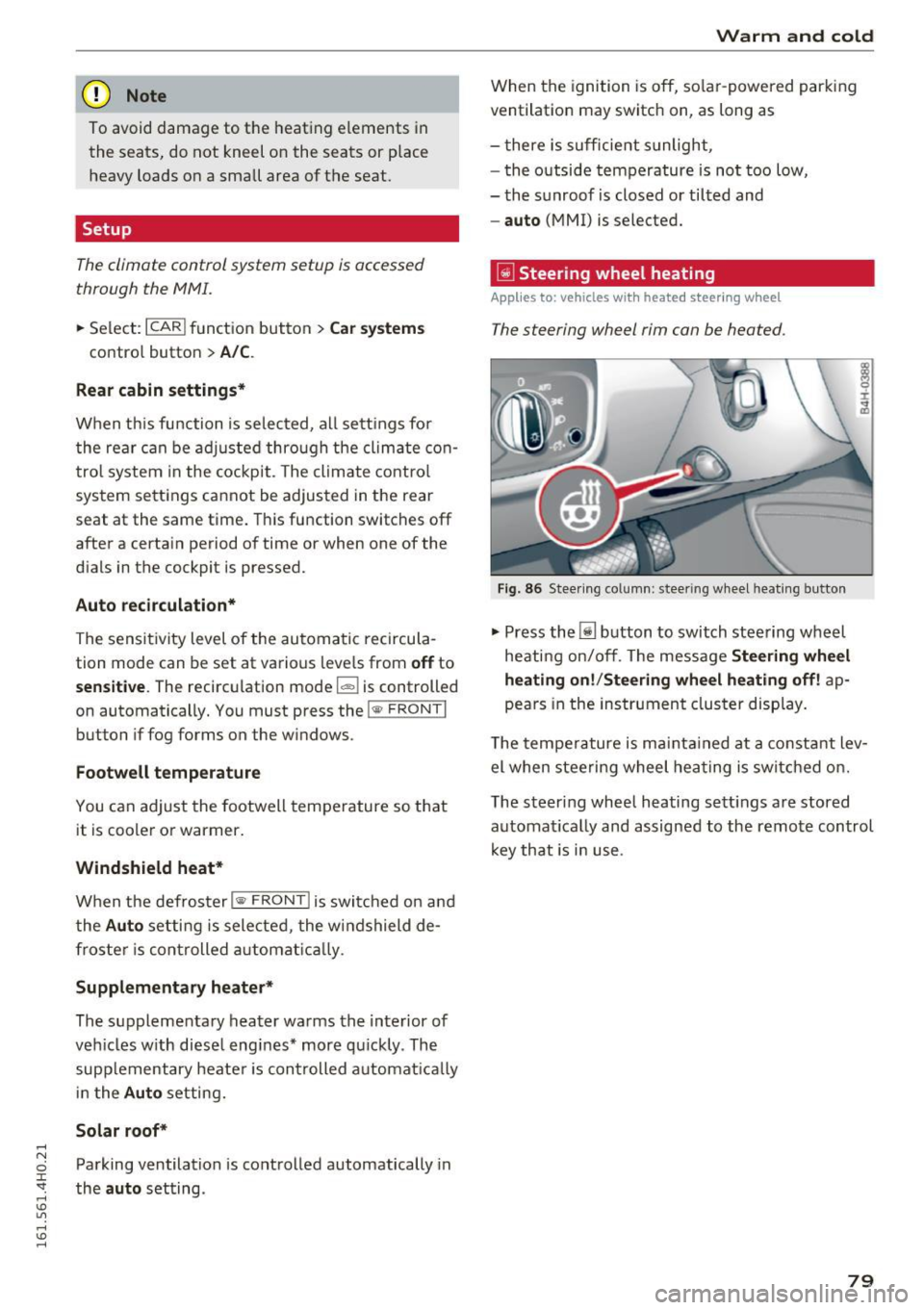
T he steering wheel rim can be heated .
Fig. 86 Stee ring co lumn: steer ing wheel heating bu tton
.,. Press the [j] button to switch steering wheel
heating on/off. The message
Steering wheel
heating on!/Steering wheel heating off!
ap
pears in the instrument cluster display.
T he temperature is maintained at a constant lev
el when steering wheel heating is switched on.
The steering wheel heating sett ings are stored
automat ically and assigned to the remote control
key that is in use .
79
Page 82 of 302
Driving
Driving
Steering
Adjusting steering wheel position
The steering wheel position can be adjusted for
height and reach .
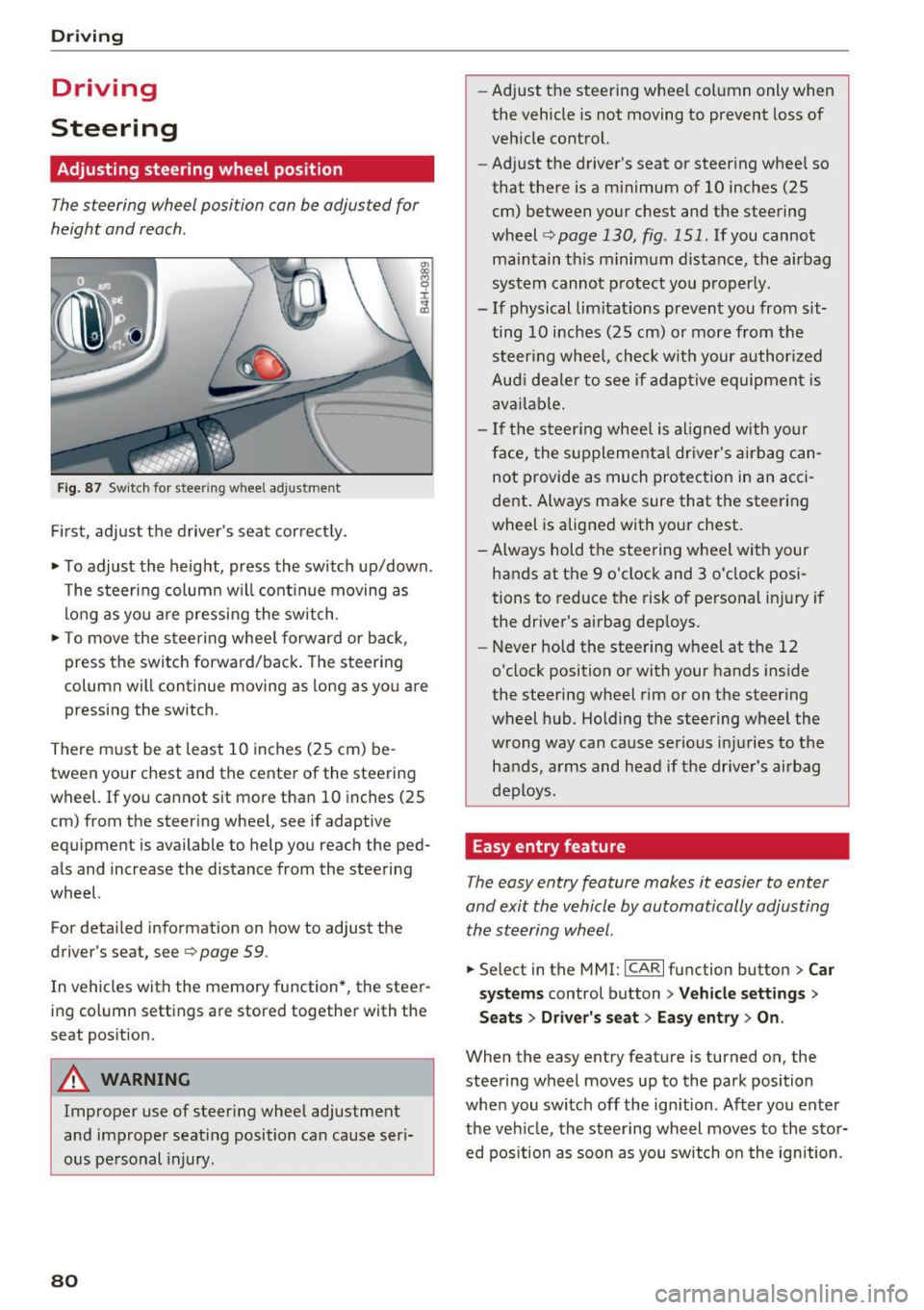
Fig. 87 Sw it ch for steering wheel adjustme nt
Fi rst, adjust t he driver 's seat cor rect ly.
• To adjust the height, press the switch up/down.
The steer ing column w ill cont inue moving as
lo ng as yo u are pressing the sw itch .
• To move the steering whee l forward or back,
press the switch forward/back. The steering
column will continue moving as long as you are pressing the switch .
There m ust be at least 10 inches (25 cm) be
tween your chest and the center of the steering
wheel. If you cannot sit more than 10 inches (25
cm) from the steering whee l, see if adaptive
equipment is available to help you reach the ped
als and increase the distance from the steering
wheel.
For detai led information on how to adjust the
driver's seat, see
9 page 59 .
In vehicles with the memory function*, the steer
ing column settings are stored together with the
seat pos ition.
A WARNING
Improper use of steer ing whee l adjustment
and improper seating position can cause seri
ous personal injury.
80
-
- Ad just the steering wheel col umn only when
the vehicle is not moving to prevent loss of
vehicle control.
- Adjust the driver's seat or steering whee l so
that there is a minimum of 10 inches (25
cm) between your chest and the steering
wheel <=>
page 130, fig . 151. If you cannot
maintain th is minimum distance, the airbag
sys tem cannot p rotect yo u properly.
- If physical limitations prevent you from sit
ting 10 inches (25 cm) o r more from the
steer ing whee l, che ck wit h your author ized
Aud i dea le r to see if adap tive equipmen t is
ava ilable.
- If the steer ing whee l is aligned w ith yo ur
face, the s upplementa l dr iver's a irbag can
not provide as much protection in an acci
dent . Always make sure that the steering
wheel is alig ned with your chest.
- Always hold the steering wheel with your
hands at the 9 o'clock and 3 o'clock posi
tions to reduce the risk of personal in jury if
the dr iver's airbag dep loys.
- Never hold the stee ring wheel at the 12
o'clock position or with your hands inside
the steering wheel rim or on the steering
wheel hub . Holding the steering wheel the
wrong way can cause serious inj uries to the
hands, a rms and head if the drive r's airbag
deploys.
Easy entry feature
The easy entry feature makes it easier to enter
and exit the vehicle by automatically adjusting the ste ering wheel.
• Select in the MMI: ICAR lfu nction button> Car
s ys tems
control button > Vehicle settings >
Seats> Driver 's seat > Easy entr y> On.
When the easy entry feature is turned on, the
steering wheel moves up to the park position
whe n you switch off the ign ition . Af ter you enter
the veh icle, the steering wheel moves to the stor
ed pos ition as soon as you switch o n the ignition .
Page 85 of 302
Starting the engine if there is a
malfunction
It may n ot be possible to start the engine under
certain circumstances, for example if the battery
in the vehicle key is drained, if interference hos
affected the key or if there is a system malfunc
tion .
i:;
~ ___ ____ !
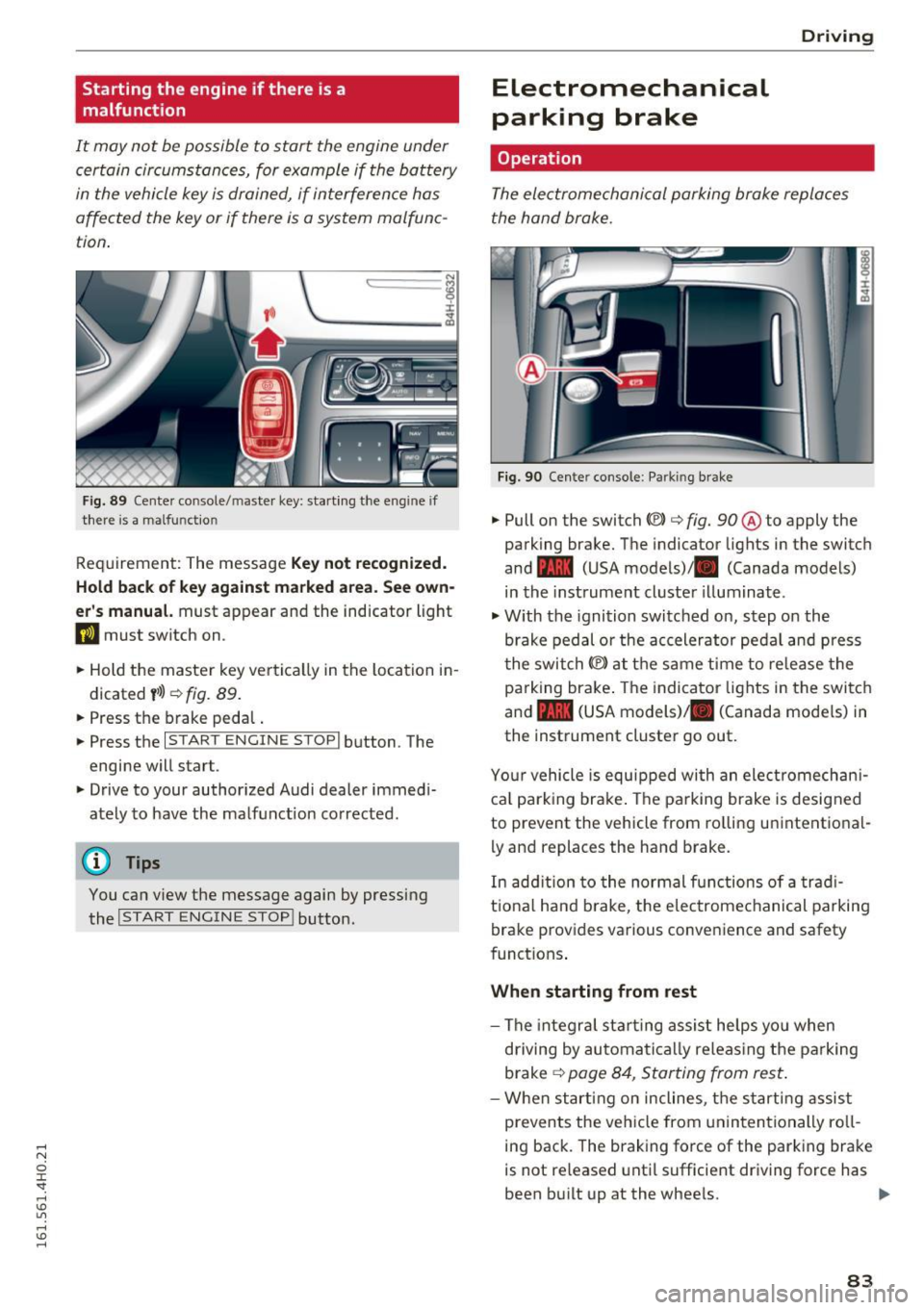
F ig . 89 Cen te r co nsole/ maste r key: start ing the e ng in e if
ther e is a malfu nct io n
Req uirement: The message Key not re cognized.
Hold back of key against marked area. See own
er' s manual.
must appear and the indicator light
DJ must switch on .
.. Hold the master key ve rtica lly in the location i n
d icated
y >l) ¢ fig. 89 .
.. Press the brake peda l.
.. Press the
I STAR T ENGINE STOP I button . The
engine will star t.
.. Drive to your author ized Audi dealer immed i
ately to have the malf unct ion corrected .
(D Tips
You can view the message again by pressing
the
I START ENGINE STOP ! button.
Electromechanical
parking brake
Operation D
rivi ng
The electromechanical parking broke replaces
t he hand broke.
Fig . 9 0 Cen te r conso le : Parkin g brake
.. Pull on the switch «vl c:> fig. 90 ® to apply the
parking brake. The indicator lights in the switch
and - (USA models)/ . (Canada models)
in the instrument cluster illuminate .
.,. With the ignition switched on, step o n the
brake pedal or the accelerator ped al and press
t he swi tch(® at the same time to re lease the
pa rking bra ke . The indicator lights in the swi tc h
and - (USA models)/ . (Canada mode ls) in
the instrument cluster go out .
Yo ur vehicle is equ ipped wi th an ele ct romechan i
ca l park ing brake . The parking brake is designed
to prevent the vehicle from ro lling unintentional
ly and replac es the hand brake.
In add ition to the normal functions of a trad i
t io na l h and brake, t he e lectrome chanical pa rking
brake provides va rious conveni ence and safety
funct ions .
When starting from rest
-The integra l st art ing assis t he lps yo u when
driving by automa tic a lly releas ing the pa rking
brake
¢ page 8 4, Star ting from res t.
-W hen start ing on incline s, t he s tarting assist
prevents the vehicle from unin ten tionally ro ll
ing back . The braking force of the parking bra ke
is not re leased unti l sufficient driv ing force has
been b uilt up at the wheels. .,.
83
Page 86 of 302
Driving
E m erg ency b ra ke function
An emergency b rake ensures that the veh icle can
be slowed down even if the
normal brakes fai l
¢ page 85, Emergency broking.
.&_ WARNING
-
Do not press the accelerator pedal inadver
tently if the vehicle is stationary but the en
gine is runn ing and a gear is selected. Other
w ise the vehicle will start to move immediate
ly and could result in a crash.
(D Tips
- If the parking brake is app lied with the igni
tion switched off, the indicator lights in the
switch and -(USA models)/ . (Cana-
da models) in the instrument cluster will go
out after a ce rtain per iod of t ime.
- Occasional noises when the parking brake is applied and released are normal and are not
a cause for conce rn.
- When the vehicle is parked, the park ing
brake goes thro ugh a self-test cycle at regu
l a r i ntervals. Any associa ted noises a re nor
mal.
Parking
" Press the brake ped al to stop the vehicle.
" Pull the switch
«el} to set the parking brake .
" Se lect the P selector lever position
c:> poge 112.
"Turn the eng ine off c> &_ .
"When on incl ines or declines, turn the steering
wheel so that your vehicle will roll into the c urb
if it beg ins to move .
.&_ WARNING
-When you leave your vehi cle -even if on ly
br iefly -always ta ke the ignition key with
yo u. This applies par ticularly when children
remain in the vehicle . Otherwise the chil
dren could start the engine, release the
parking b rake o r operate elect rical eq uip
ment (e.g . power windows). There is the r isk
of an accident.
84
-
- When the veh icle is locked, no one -pa rtic u
larly not chi ldren should rema in in the vehi
cle. Locked doors make it more d ifficult for
emergency workers to get into the vehicle -
putting lives at risk .
Starting from rest
The starting assist function ensures that the
parking broke is released automatically upon starting.
Stopping and applying park ing brake
" Pull the switch
C®l to apply the parking brake .
Starting and automatically releasing the
park ing bra ke
" When you sta rt to drive as usua l, the par king
brake is automatically released and your vehicle
beg ins to move.
When stopping at a traffic signa l or stopping in
city traffic, the parking brake can be applied. The
vehicle does not have to be held with the foot
brake . The parking brake eliminates the tendency
to creep w ith a dr ive range engaged. As soon as
you drive off as usual, the parking brake is re
leased a utomat ically and the vehicle starts to
move .
Starting on slopes
When starting on incl ines, the sta rting assist pre
vents the vehicle from un intent iona lly rolling
back. The braking force of t he parking brake is
not released u nti l sufficient dr iv ing force has
been built up at t he wheels .
(D Tips
Fo r safety reasons, the park ing brake is re
l eased automatically only when the driver's
safety be lt is e ngaged in the b uck le.
Page 87 of 302
.... N
0 J:
'SI: ....
To prevent rolling back unintentionally on an in
cline, do the following:
11-Keep the sw itch<®) pulled and depress the ac
celerator. The parking brake stays applied and
prevents the vehicle from rolling backward .
11-You can release the switch© once you are su re
that you a re deve loping enough forwa rd mo
mentum at the whee ls as you depress the ac
celerator .
Depending on the weight of the rig (vehicle and
trailer) and the seve rity of the incline, you may
roll backwards as you start. You can prevent roll
ing backwards by holding the parking brake
switch C®> pulled out and accelerating -just as
you would when starting on a hill with a conven
tional hand brake.
Emergency braking
In the event that the conventional brake system
fails or locks.
11-In an emergency, pull the sw itch<®) and contin
ue to pull it to s low your vehicle down with the
parking brake.
11-As soon as you release the switch © or acceler-
ate, the brak ing process stops.
If you pull the switch<®> and hold it above a
speed of about 5 mph (8 km/h), the emergency
braking function is in itiated. The vehicle is braked
at all four wheels by activating the hydrau lic
brake system . The brake performance is sim ilar
to making an emergency stop¢,& .
In order not to activate the emergency brak ing by
mistake, an audib le warning tone (bu zzer)
sounds when the sw itch(®) is pu lled . As soon as
the switch(®) is released, or the accelerator pedal
i s depressed, emergency braking stops .
A WARNING
Emergency braking should only be used in an
emergency, when the normal foot brake has
fai led or the brake pedal is obstructed. Using
t he parking brake to perform emergency
braking will slow your vehicle down as if you
D riving
had made a full brake applicat ion . The laws of
physics cannot be suspended even with ESC
and its associated components (ABS, ASR,
EDL). In corners and when road or weather
conditions are bad, a full brake application
can cause the vehicle to skid or the rear end to
b reak away -risking an acc ident.
Start/Stop system
Description
Applies to: vehicles with Start-Stop-System
The Start-Stop -System can help increase fuel
economy and reduce CO2 emissions.
In the Start-Stop-mode, the engine shuts off au
tomatica lly when the vehicle is stopped, such as
at a traffic light . The ign ition remains switched
on during this stop phase. The eng ine will be au
tomat ically restarted when needed.
The last Start-Stop-System setting (on/off using
the b utton
10 -I) will be restored when the igni
t ion is turned on. The LED in the
10 ~1 button turns
on when the Start-Stop-System is switched off
manually .
Basic requirements for the Start-Stop mode
-The driver's door is closed.
- The driver' seat belt is latched .
- The hood is closed.
- The vehicle must have bee n driven faster than
2.5 mph (4 km/h) since the last stop.
- A trailer is not hitched to the vehicle .
A WARNING
-
-Never let the vehicle roll with the engine
switched off. You could lose contro l over the
veh icle. Th is can lead to a collision and seri
ous injuries .
- The brake booster and the steering support
do not work while the engine is switched
off . More force is required to stop and to
steer the vehicle.
- To reduce the risk of injur ies, ma ke sure that
the Sta rt-Stop-System is turned off when
working in the engine compartment
¢page 87.
85
Page 88 of 302

Driving
(D Note
Always switch off the Start-Stop-System
when driving through water
c::> page 87.
Starting/stopping the engine
A pp lies to: ve hicles w ith Sta rt-Sto p-System
Fig. 91 Instrument cluste r: engin e sw itched off (s top
ph ase)
.. Slow the vehicle to a stop using the brake and
keep pressing the brake pedal. The engine will
switch off . The
[I] indicator light appears in the
information line in the instrument cluster dis
play.
.. When you take your foot off the brake pedal,
the engine restarts. The indicator light turns
off.
Additional information
The engine will switch off in the P, D, N and S po
sitions as well as in manual mode. In the P posi
tion , the engine will also remain off if you take
your foot off the brake pedal. The eng ine starts
again when you select another selector lever po
sition and take your foot off the brake pedal.
If you select the R position during a Stop phase,
the engine will start again.
Shift from D to P quickly to prevent the engine
from starting unintentionally when shifting
through R.
You can determine for yourself if the engine will
stop or not by reducing or increasing the amount
of force you use to press the brake pedal. For ex
ample , if you only light ly press on the brake ped
al in stop-and and-go traffic or when turning, the
engine will not switch off when the vehicle is sta-
86
tionary. As soon as you press the brake down
harder, the engine will switch off.
General information
Applies to: vehicles wi th Start-S top-Sys te m
The standard Start-Stop-mode can be cancelled
for different system-related reasons.
Fig. 92 Instrumen t cluster: e ngin e-Stop temporarily un
ava ilable
Engine will not switch off
Before each stop phase, the system checks if cer
tain conditions have been met. For example, the
engine will
not be switched off in the following
situations :
- The engine has not reached the minimum re
quired temperature for Start-Stop-mode.
- The interior temperature selected by the A/C
system has not been reached .
- The outside temperature is extremely high/low.
- The windshield is being defrosted
c::> page 79 .
- The parking system* is switched on.
- The battery charge level is too low.
- The steering wheel is sharply turned or there is
a steering movement .
- After engaging the reverse gear .
- On sharp inclines.
The
llJ indicator light appears in the information
line in the instrument cluster display
c::>fig . 92.
Engine automatically restarts
The stop phase is interrupted in the following sit
uations, for example . The engine restarts without
any action by the driver .
- The interior temperature varies from the tem-
perature selected in the A/C system. ..,.
Page 95 of 302
Audi adaptive cruise control and braking guard
.. You must also press the brake pedal when the
vehicle is stopped .
Switching adaptive cruise control off
.. Push the lever away from you into position @
until it clicks into place. The message
ACC off
appea rs.
@ Indicator lights
II-Adapt ive cru ise control is switched on . No
vehicles are detected up ahead. The stored speed
is ma inta ined .
• -A moving vehicle is detected up ahead . The
adapt ive cruise control system regulates the
speed and distance to the moving vehicle ahead
and accelerates/brakes automatically.
(-) -Adaptive cru ise control is switched on . A
mov ing vehicle up ahead was detected . Your veh i
cle remains stopped .
• -When automatic braking is not able to keep
enough d istance to a previously detected moving
veh icle up ahead, you must take control and
brake
c::> page 95, Prompt for driver interven
tion.
© Display
If adaptive cruise control is not shown in the dis
play, you can call it up with the multifunction
steer ing wheel buttons c::>
page 23.
Based on the symbols in the display, you can de
termine if the system is ma inta ining a distance to
the vehicle ahead and what that distance is.
No vehicle -No vehicle ahead was detected.
White vehicle -A vehicle ahead was detected.
Red vehicle -Prompt for the driver to take action
c::>page 95.
Both arrows on the scale © indicate the distance
to the vehicle ahead. No arrow appears when the
vehicle is on an open road and there is no object
ahead . If an object is detected ahead, the arrow
moves on the scale .
The green zone on the scale shows the stored dis
tance . For information on chang ing the stored
distance, refer to
c::> page 94. If the distance se-lected is too
close or may soon become too close,
the arrows move into the red zone on the scale .
A WARNING
Improper use of the adaptive cruise control
can cause collisions, other accidents and seri
ous personal injuries.
- Pressing the
ISETI button when driving at
speeds below 20 mph (30 km/h), will auto matically accelerate the ve hicle to 20 mph
(30 km/h), which is the minimum speed
that can be set.
(D Tips
-If you switch the ignit ion or the adaptive
cruise control off, the set speed is erased
from the system memory .
- You cannot switch the Electronic Stabiliza
tion Control (ESC) to the SPORT mode when
adaptive cruise control is switched on .
Changing the speed
Applies to: vehicles with Aud i adapt ive cru ise control
0
f
•
0
Fig. 102 Selector lever: chan gin g t he speed
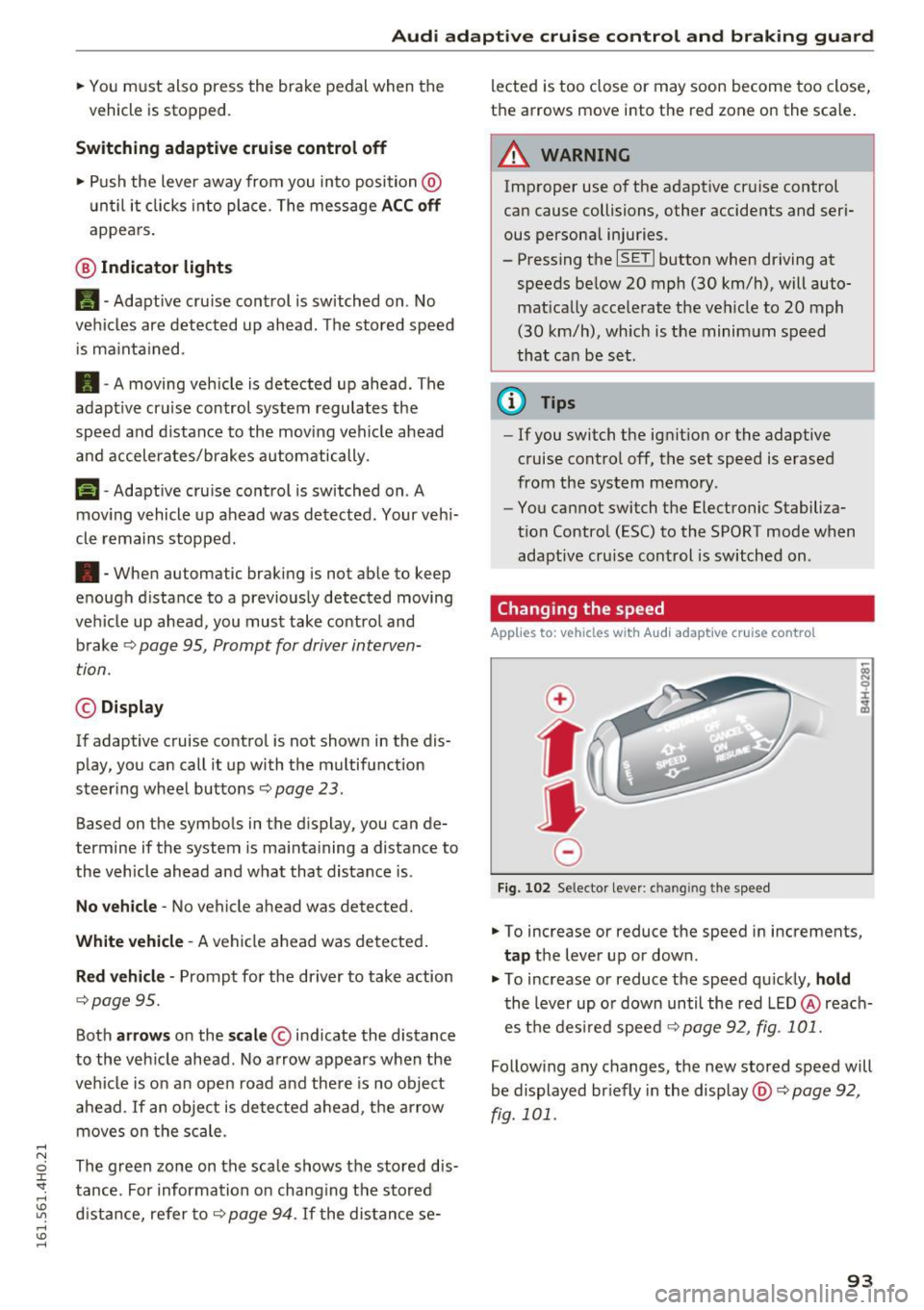
.. To increase or reduce the speed in increments,
tap the lever up or down .
.,. To increase or reduce the speed quickly,
hold
the lever up or down until the red LED@reach
es the desired speed c::>
page 92, fig. 101.
Following any changes, the new stored speed will
be displayed br iefly in the display @c::>
page 92,
fig. 101 .
93
Page 101 of 302
Audi active lane assist Lane assist
Description
Applies to: veh icles with act ive lane assist
Active lane assist helps you keep your vehicle in
your lane .
Active lane assist detects lane marker lines with
in the limits
of the system using a camera in the
windshield. If you are approaching a detected lane marker line and it appears likely that you
will leave the lane , the system will warn you by
means of correct ive steering . T he dr iver can over
ride the correct ive steering at any time. If the ve
h icle crosses a line, the drive r is also warned by a
light
vibration in the steering wheel. The vibra
tion warning must be switched on in the MMI for
this to happen. Active lane assist is operable
when the line marking the lane is detected on at
least one side of the vehicle.
The system is designed for driv ing on freeways
and expanded highways and thus works only at
speeds of 40 mph (65 km/h) or more.
Applies to vehicles with side assist* : If you acti
vate your turn signal when active lane assist is
ready and when activated side assist has class i
fied a lane change as critical because of vehicles
traveling alongside you or coming closer, there
will be noticeable corrective steering just before
you leave the lane . Th is is done to try to keep
your veh icle in the lane .
Applies to vehicles without side assist*: when the
system is ready, it does not warn you if you acti
vate your turn signal before driving across a lane marker line. In th is case, it assumes that you are
changing lanes intent ionally.
If the vehicle is also equipped with Audi adaptive
cru ise control*, the corrective steering w ill be
more spec ific in regard to the driving situation .
I n addition to the lane marker lines, the system
can also take into acco unt other objects such as
guard rai ls. If they are detected in close prox imi
ty to the vehicle, Audi active lane assist helps
prevent the vehicle from driv ing too close to
them. There is also passing assistance . The sys-
Audi act ive lane ass ist
tern does not provide any corrective steering if it
detects that you are passing another vehicle .
A WARNING
--The system warns the driver that the vehicle
is leaving the lane using correct ive steering.
The driver is always responsible for keeping
the vehicle within the lane.
- The system can assist the dr iver in keeping
the vehicle in the lane, but it does not steer
by itself . Always keep your hands on the
steer ing wheel.
- Corrective steering may not occur in certain
situations, such as during heavy braking .
- The camera does not recognize all lane
marker lines. Correct ive steering can only
take place on the side of the vehicle where
lane marker lines are detected.
- Other road structures or objects could poss i
b ly be identified un intentionally as lane
marker lines. As a result, co rrective steering
may be unexpected or may not occ ur.
- The camera view can be restricted, for ex
ample
by vehicles driving ahead or by rain,
snow, heavy spray or light shining into the
camera. This can result in active lane ass ist
not detecting the lane marker lines or de
tect ing them incorrectly .
- Unde r certain condit ions such as r uts in the
road, a banked roadway or crosswinds, the
correct ive steer ing alone may not be enough
to keep the vehicle in the lane.
- For safety reasons, active lane assist must
not be used when there are poor road and/
or weather conditions such as slippery roads, fog, gravel, heavy rain, snow and the
potential for hydrop lan ing . Using active lane
assist u nder these condit ions may i ncrease
the risk of a crash.
99
Page 102 of 302
Audi active lane assist
Activating and deactivating
Applies to: vehicles with active lane assist
Fig. 107 Turn sign al lever : Active lane assist button
Fig. 108 Windshiel d: Active lane assist came ra viewing
window
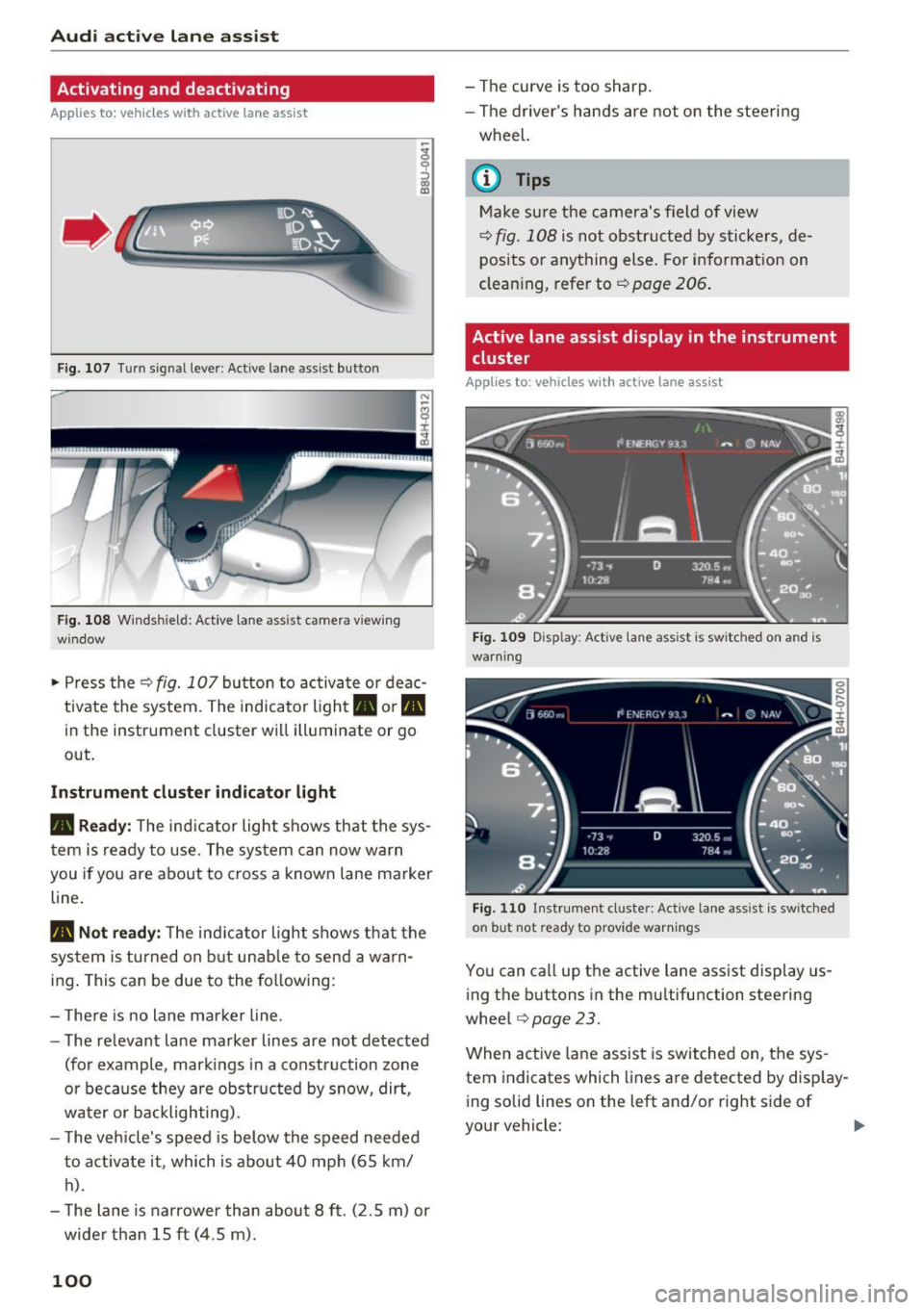
• Press the r=;, fig. 10 7 button to activate or deac
tivate the system. The indicator light. or
Pit
in the instrument cluster will illuminate or go
out.
Instrument cluster indicator light
• Ready:
The ind icator light shows that the sys
tem is ready to use. The system can now warn
you if you are about to cross a known lane marker
line.
Pit Not ready: The ind icator light shows that the
system is turned on but unable to send a warn
ing . This can be due to the following :
- There is no lane marker line.
- The relevant lane marker lines are not detected
(for example , mark ings in a construct ion zone
o r because they are obstructed by snow, dirt,
water or backlighting).
- T he vehicle's speed is below the speed needed
to activate it , which is about 40 mph (65 km/
h).
- The lane is narrower than about 8 ft. (2.5 m) or
wide r than 15 ft (4.5 m).
100
- The curve is too sharp.
- The driver's hands are not on the steering
wheel.
{i) Tips
Make sure the camera's field of view
r=;, fig. 108 is not obstructed by stickers, de
posits or anything else. For information on
cleaning, refer to¢
page 206.
Active lane assist display in the instrument
cluster
Appl ies to : vehicles with active lane assist
Fig. 109 Disp lay : Activ e lane ass ist is switc hed on a nd is
warn ing
Fig. 110 Instrument cl uste r: Active lane as sis t is sw itched
on but hot ready to provide warnings
You can call up the active lane assist display us
i ng the buttons in the multifu nction steering
wheel
r=;, page 23.
When active lane assist is switched on, the sys
tem indicates which lines are detected by display
i ng solid lines on the left and/or right side of
your vehicle:
Page 103 of 302
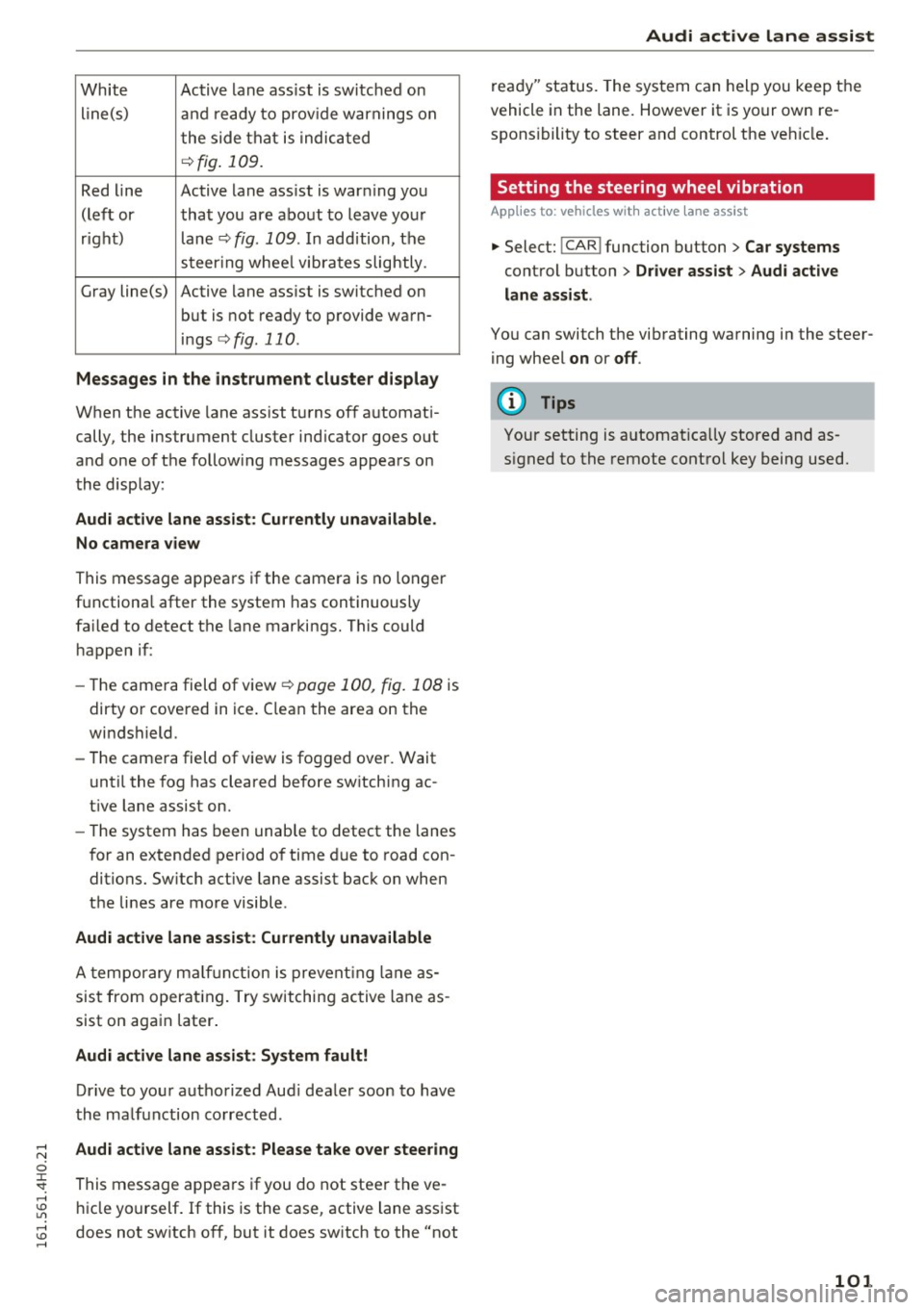
White Active lane ass ist is sw itched on
line(s) and ready to prov ide warnings on
t he side that i s indic ated
¢fig . 109.
Red line Active lane ass ist is war ning yo u
(lef t or that you are about to leave yo ur
r igh t) lane¢
fig. 109 . In add ition, the
st eer ing w hee l vib ra tes slightly .
G ray line(s) Active lane ass ist is switched on
but is not ready to p rovide wa rn-
i n gs
¢ fig. 110.
Messages in the instrument cluster display
When the active lane ass ist t urns of f automat i
cally, the instrument cluster ind icator goes out
and one of t he follow ing messages appears on
the disp lay:
Audi active lane assist : Currently unavailable .
No camera view
This message appears if the camera is no longer
f u nctiona l after the system has continuously
fa iled to detect the lane mar kings . This could
h appen if :
- Th e came ra field of view ¢
page 100, fig. 108 is
dirty o r cove red in ice . C lea n the area on the
wi ndshield.
- The came ra field of v iew is fo gged over . Wait
u nti l the fog has cleared before sw itching ac
t ive lane assist on.
- The system has been unab le to detect the lanes
f or an extended pe riod of time due to road con
ditions. Sw itch act ive lane assist bac k on when
the lines are mo re visible .
Audi active lane assist: Currently unavailable
A tempo rary m alfu nc tion is prevent ing lane as
sis t from operat ing . Try switching ac tive lane as
sist on aga in later.
Audi active lane assist: System fault!
Dr ive to yo ur autho rized Aud i dea le r soon to have
the ma lf u nction co rrected .
Audi active lane assist: Please take over steering
This message appea rs if you do not steer the ve
hi cle yo urself . If this is the case, active lane ass ist
does not sw itch off, but it does sw itch to the "not
Audi active lane assist
r e ad y" status. The system can hel p you keep the
vehicle in the lane. However it is your own re
spons ibility to steer and control the ve hicle .
Setting the steering wheel vibration
App lies to : vehicles wit h act ive lane assist
.,. Select: !C A R! function button > Car systems
control button > Driver assist > Audi active
lane assist.
Yo u can switch the vib rating wa rning in the stee r
i ng wheel
on or off .
(D Tips
Your setting is a utomat ica lly stored and as
s igned to the remote control key being used.
101