Starting AUDI TT 2021 Owner´s Manual
[x] Cancel search | Manufacturer: AUDI, Model Year: 2021, Model line: TT, Model: AUDI TT 2021Pages: 280, PDF Size: 99.18 MB
Page 157 of 280

8S1012721BE
Navigation
Alternative routes
Applies to: vehicles with navigation system
Fig. 138 Infotainment system: display of alternative routes
Requirement: a destination must be entered and
the route guidance must be started.
> Press the [NAV/MAP] button repeatedly until
the Enter destination menu is displayed
=> page 148, fig. 135.
> Select: right control button > Navigation set-
tings > Show alternative routes.
Three routes are displayed in the overview map
after you enter a destination.
> Select and confirm the desired route that you
would like to use for route guidance.
If available, the following information will appear
on the route suggestions:
— Route type (fast (, fast alternative (2), eco-
nomic route @)
— Distance to the destination and the calculated
arrival time
— Traffic congestion along the route including
time delays
The route that was calculated according to the
route criteria you selected is shown on the over-
view map . The special properties of the route
will also be displayed (4).
Additional settings
Navigation settings
Applies to: vehicles with navigation system
> Press the [NAV/MAP] button repeatedly until
the Enter destination menu is displayed
=> page 148, fig. 135.
> Select: right control button > Navigation set-
tings.
Depending on the selected function, the follow-
ing settings can be selected:
Show alternative routes
Up to three route suggestions and their proper-
ties are displayed on the overview map when the
function is switched on [M page 155.
Low fuel warning
A message is displayed if the fuel gauge goes be-
low the reserve marking when this function is
switched on M. After confirming this message, a
list of gas stations in the area is displayed. When
a gas station is selected, route guidance from the
current vehicle position is calculated.
Notification when nearby*
The notification when nearby is switched off at
the factory.
The MMI notifies you when you are approaching
selected points of interest when this function is
switched on MW. You can also have a Notification
tone.
Presentation mode
The Presentation mode helps you to effectively
plan a trip and follow the planned route without
moving the vehicle. You can use Select starting
point when you would like to calculate a route
starting from a location other than the vehicle
position, for example. Start Presentation mode
to simulate route guidance.
ol etic]
Applies to: vehicles with navigation system
10] 16
> tak) ° (|
Fig. 139 Infotainment system: possible route criteria
[RAH-8472,
155
Page 175 of 280
8S1012721BE
Media
device. The time allowed for entering the PIN is
limited to approximately 30 seconds.
The media is started and operated through the
mobile device or the MMI, depending on the de-
vice being used.
G) Tips
— Check for any connection requests on your
Bluetooth device.
— Multiple Bluetooth audio players can be
connected to the MMI, but only one mobile
device can be active.
— Bluetooth protocols AVRCP (1.0/1.3/1.4)
and A2DP are supported.
— Note the volume setting on your Bluetooth
device. Audi recommends setting your mo-
bile device to the maximum volume when
using it as a Bluetooth audio player.
— The supported media functions (such as
shuffle) depend on the Bluetooth device be-
ing used.
—Aselection of supported Bluetooth devices
can be found in the database for tested mo-
bile devices at www.audi.com/bluetooth.
Wi-Fi audio player
Applies to: vehicles with Wi-Fi audio player
Using the Wi-Fi audio player media source on the
MMI, you can connect and operate your Wi-Fi-ca-
pable media player (such as a smartphone) to
wirelessly play music from your media player Li-
brary. The media player is connected through the
vehicle's Wi-Fi hotspot. A UPnP Server app or an
integrated UPnP/DLNA server on your media
player is required to access your media player li-
brary.
Requirement: the Wi-Fi function on your media
player must be switched on. The myAudi app or a
UPnP server app is installed on your media player,
or your media player has an integrated UPnP/
DLNA server.
Connecting a media player
> Press the [MEDIA] button.
> Press the left control button until the sources
overview > page 177 is displayed.
> Select and confirm Wi-Fi audio player (7)
=> page 177, fig. 155.
> If necessary, select and confirm Wi-Fi turned
off > Turn on Wi-Fi to activate Wi-Fi in the
MMI.
> If necessary, select and confirm Wi-Fi settings.
> Select the same settings on the wireless media
player that are used for the Wi-Fi hotspot.
Starting the Wi-Fi audio player
> Start the myAudi app or an UPnP server app, or
allow media sharing on your device.
Operating a media player
The media player is operated through the MMI.
> Press the left control button repeatedly until
the Folders menu item appears.
> Select and confirm Folders.
Playing music from a media player
> Select and confirm Media center.
Internet radio: see > page 174.
ZA\ WARNING
—As the driver, do not allow usage of the Wi-
Fi hotspot to distract you from driving, as
this could increase the risk of an accident.
—To reduce the risk of an accident, only use
Audi connect services and the Wi-Fi hotspot
only if the traffic situation permits it. Read
and follow the guidelines provided in
=> page 710, Traffic safety information.
— It is only safe to use tablets, laptops, mobile
devices and other similar devices when the
vehicle is stationary because, like all loose
objects, they could be thrown around the in-
side of the vehicle in a crash and cause seri-
ous injuries. Store these types of devices se-
curely while driving. Also read the warnings
in the chapter > page 52.
@) Note
Always follow the information found in @ in
General information on page 141.
173
>
Page 176 of 280
— The Wi-Fi connection is reconfigured when
inserting or removing the mini SIM card in
the SIM card reader*. There may be a tem-
porary interruption in audio playback, de-
pending on the media player.
— Please note that a Wi-Fi connection does
not automatically make it possible to use
the Internet. For additional information, see
=> page 1417.
— To avoid interruptions during playback, de-
activate the power saving function on the
media player or connect it to a charger.
— The loading times for the audio data depend
on the media player used and the number of
files
that it contains.
—A maximum of 2,000 entries per directory
are displayed in the MMI.
— Songs downloaded for offline use using mu-
sic streaming services are stored on your
mobile device (such as a smartphone) and
may be DRM protected. The Wi-Fi audio
player will not play DRM protected files.
— Contact an authorized Audi dealer or au-
thorized Audi Service Facility for additional
information on the Wi-Fi audio player.
Online media and
Internet radio
Applies to: vehicles with Audi connect
You can playback and operate various online me-
dia services and Internet radio using the MMI.
> Press the [MEDIA] button.
> Press the left control button until the sources
overview > page 177, fig. 155 is displayed.
Applies to: using online media and Internet radio
Requirement
— The myAudi app must be installed and open on
your mobile device.
— You must be logged into your myAudi account
in the myAudi app and you must have selected
your vehicle.
— The Wi-Fi function on the mobile device and on
the MMI must be switched on.
174
—If necessary, check in the connection manager
=> page 190 if the mobile device you connected
is selected under the MMI connect app M.
—The MMI must be connected to the network.
— The symbol for the Online media source
=> page 177, fig. 155 is shown in the MMI.
Applies to: using online media
Additional requirement
— A supported online media service must be avail-
able in the country where the vehicle is being
operated.
— You must have an account with a supported on-
line media service.
— Depending on the online media service, you
may need to install and open an app on your
mobile device.
Starting Online media
— Press the [MEDIA] button.
— Press the left control button until the sources
overview > page 177 is displayed.
— Select and confirm an online media service.
Starting Internet radio
— Press the [MEDIA] button.
— Press the left control button until the sources
overview > page 177 is displayed.
— Select and confirm Internet radio. The Internet
radio browser or the last station that was play-
ing is shown.
— Selecting the station: if necessary, select and
confirm a category in the Internet radio Brows-
er > a station.
Online media and Internet radio:: additional op-
tions
— Press the right control button.
The following options may be available, depend-
ing on the information shown (such as the sta-
tion/track that is currently playing):
— Sound settings: see > page 193.
— Wi-Fi settings: see > page 146.
— Connection manager: see > page 190.
— Additional options may be available, depending
on the active online media service or Internet
radio.
Page 187 of 280
8S1012721BE
Media
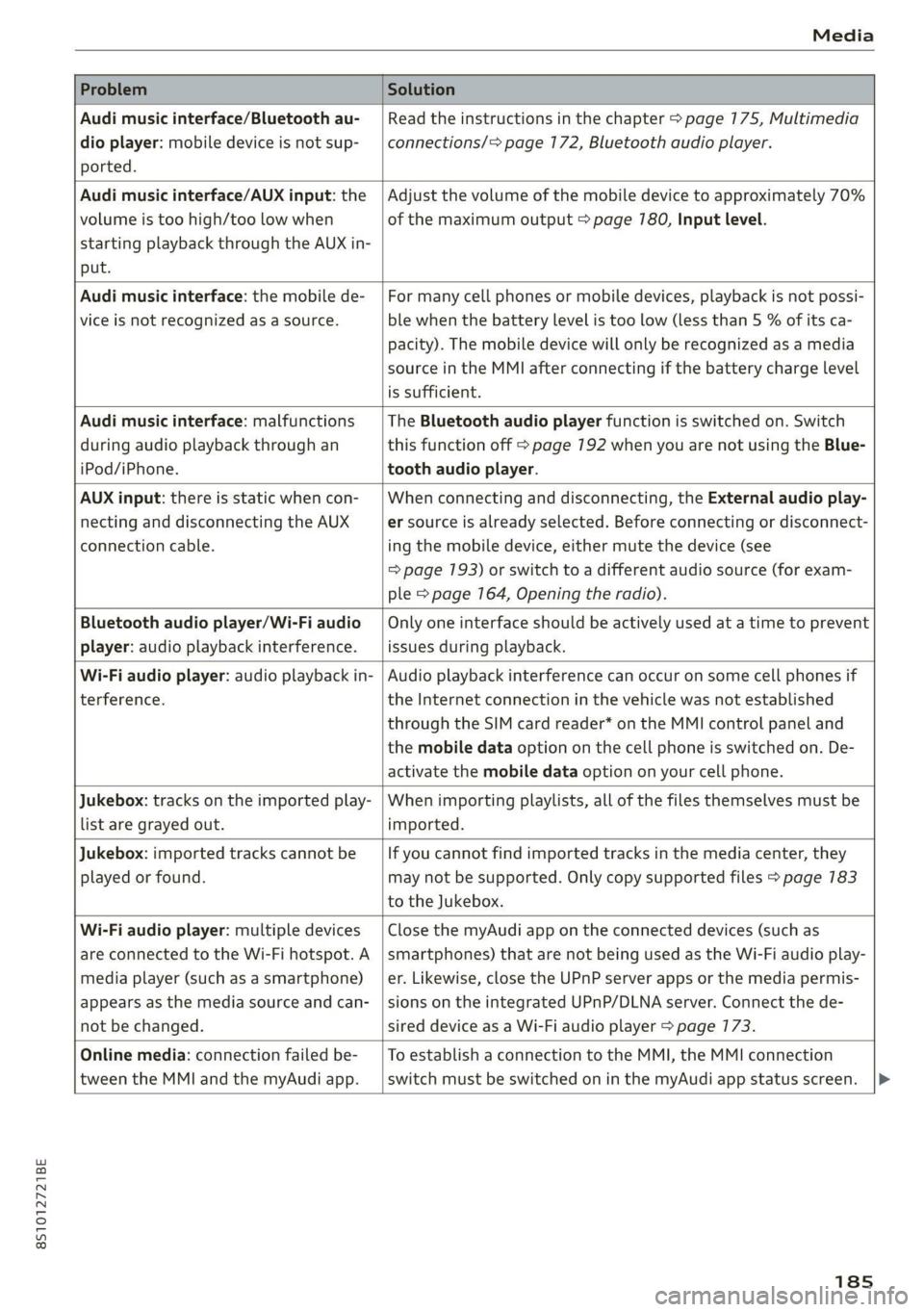
Problem Solution
Audi music interface/Bluetooth au-
dio
player: mobile device is not sup-
ported.
Read the instructions in the chapter > page 175, Multimedia
connections/=> page 172, Bluetooth audio player.
Audi music interface/AUX input: the
volume is too high/too low when
starting playback through the AUX in-
put.
Adjust the volume of the mobile device to approximately 70%
of the maximum output > page 780, Input level.
Audi music interface: the mobile de-
vice
is not recognized as a source.
For many cell phones or mobile devices, playback is not possi-
ble when the battery Level is too low (less than 5 % of its ca-
pacity). The mobile device will only be recognized as a media
source in the MMI after connecting if the battery charge level
is sufficient.
Audi music interface: malfunctions
during audio playback through an
iPod/iPhone.
The Bluetooth audio player function is switched on. Switch
this function off > page 7192 when you are not using the Blue-
tooth audio player.
AUX input: there is static when con-
necting and disconnecting the AUX
connection cable.
When connecting and disconnecting, the External audio play-
er source is already selected. Before connecting or disconnect-
ing the mobile device, either mute the device (see
=> page 193) or switch to a different audio source (for exam-
ple > page 164, Opening the radio).
Bluetooth audio player/Wi-Fi audio
player: audio playback interference.
Only one interface should be actively used at a time to prevent
issues during playback.
Wi-Fi audio player: audio playback in-
terference.
Audio playback interference can occur on some cell phones if
the Internet connection in the vehicle was not established
through the SIM card reader* on the MMI control panel and
the mobile data option on the cell phone is switched on. De-
activate the mobile data option on your cell phone.
Jukebox: tracks on the imported play-
list are grayed out.
When importing playlists, all of the files themselves must be
imported.
Jukebox: imported tracks cannot be
played or found.
If you cannot find imported tracks in the media center, they
may not be supported. Only copy supported files > page 783
to the Jukebox.
Wi-Fi audio player: multiple devices
are connected to the Wi-Fi hotspot. A
media player (such as a smartphone)
appears as the media source and can-
not be changed.
Close the myAudi app on the connected devices (such as
smartphones) that are not being used as the Wi-Fi audio play-
er. Likewise, close the UPnP server apps or the media permis-
sions on the integrated UPnP/DLNA server. Connect the de-
sired device as a Wi-Fi audio player > page 173.
Online media: connection failed be-
tween the MMI and the myAudi app.
To establish a connection to the MMI, the MMI connection
switch must be switched on in the myAudi app status screen.
185
Page 196 of 280
System settings
Voice guidance during phone call: see
=> page 156.
Voice guidance volume: you can adjust the voice
guidance volume by turning the control knob or
you can adjust it while route guidance is active by
turning the On/Off knob.
Entertainment fader: the volume of audio play-
back can be temporarily lowered when the park-
ing system or voice guidance is active.
Voice recognition system
Applies to: vehicles with voice recognition system
Short dialog: see > page 190.
Speech dialog system volume: see > page 190.
Parking aid*
You can adjust the volume of the signal tone by
turning the control knob.
— Adjusting the Front volume: select and con-
firm
High, Medium or Low.
— Adjusting the Rear volume: select and confirm
High, Medium or Low.
MMI touch*
Turn the control knob to adjust the volume of the
spoken prompts from the MMI touch*.
Audi Heartbeat
You can adjust the volume of Audi Heartbeat by
turning the control knob.
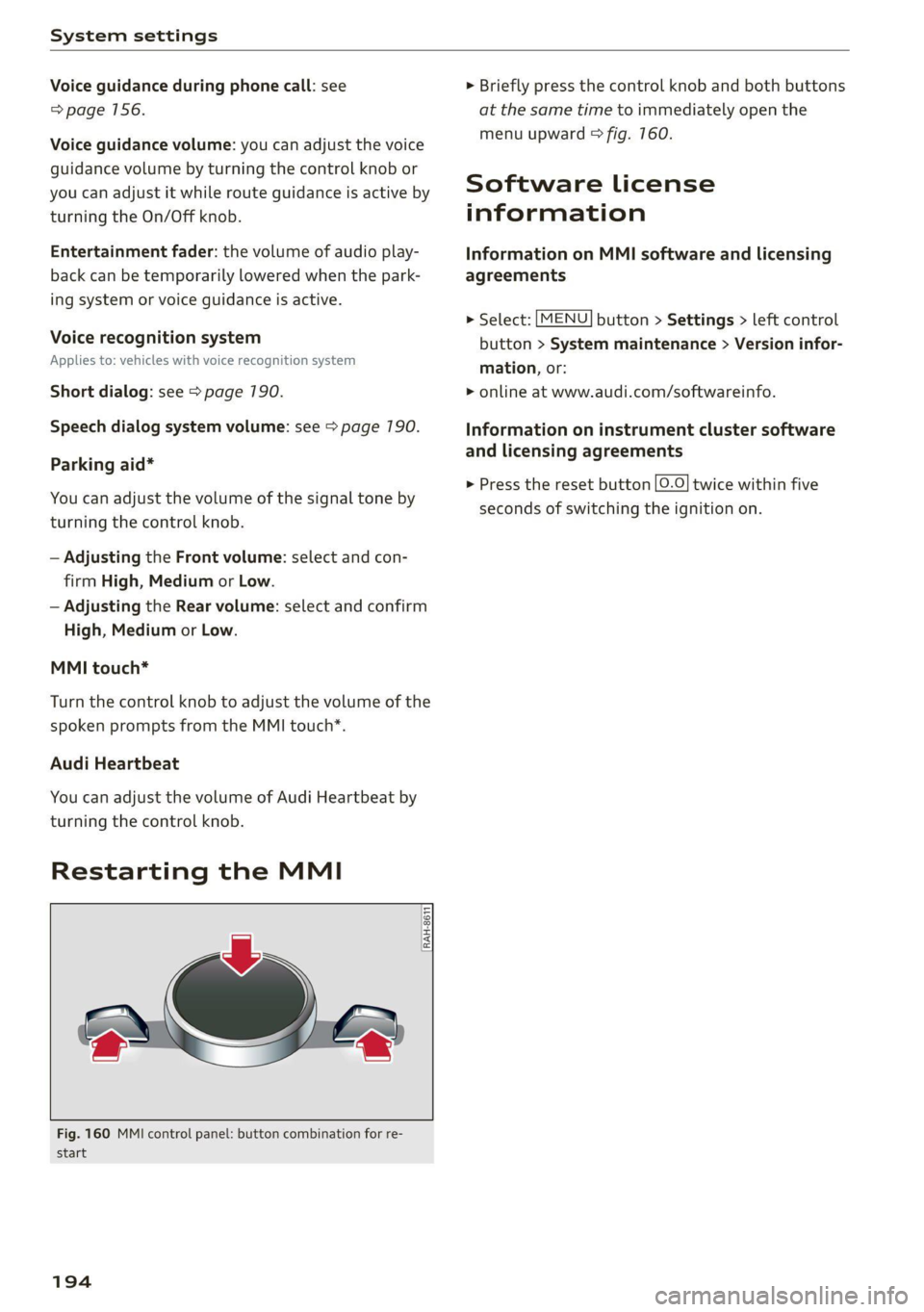
Restarting the MMI
RAH-8611
wv
= ‘=
Fig. 160 MMI control panel: button combination for re-
start
194
> Briefly press the control knob and both buttons
at the same time to immediately open the
menu upward > fig. 760.
Software License
information
Information on MMI software and licensing
agreements
> Select: [MENU] button > Settings > left control
button > System maintenance > Version infor-
mation, or:
> online at www.audi.com/softwareinfo.
Information on instrument cluster software
and licensing agreements
> Press the reset button |O.O} twice within five
seconds of switching the ignition on.
Page 203 of 280
8S1012721BE
Checking and Filling
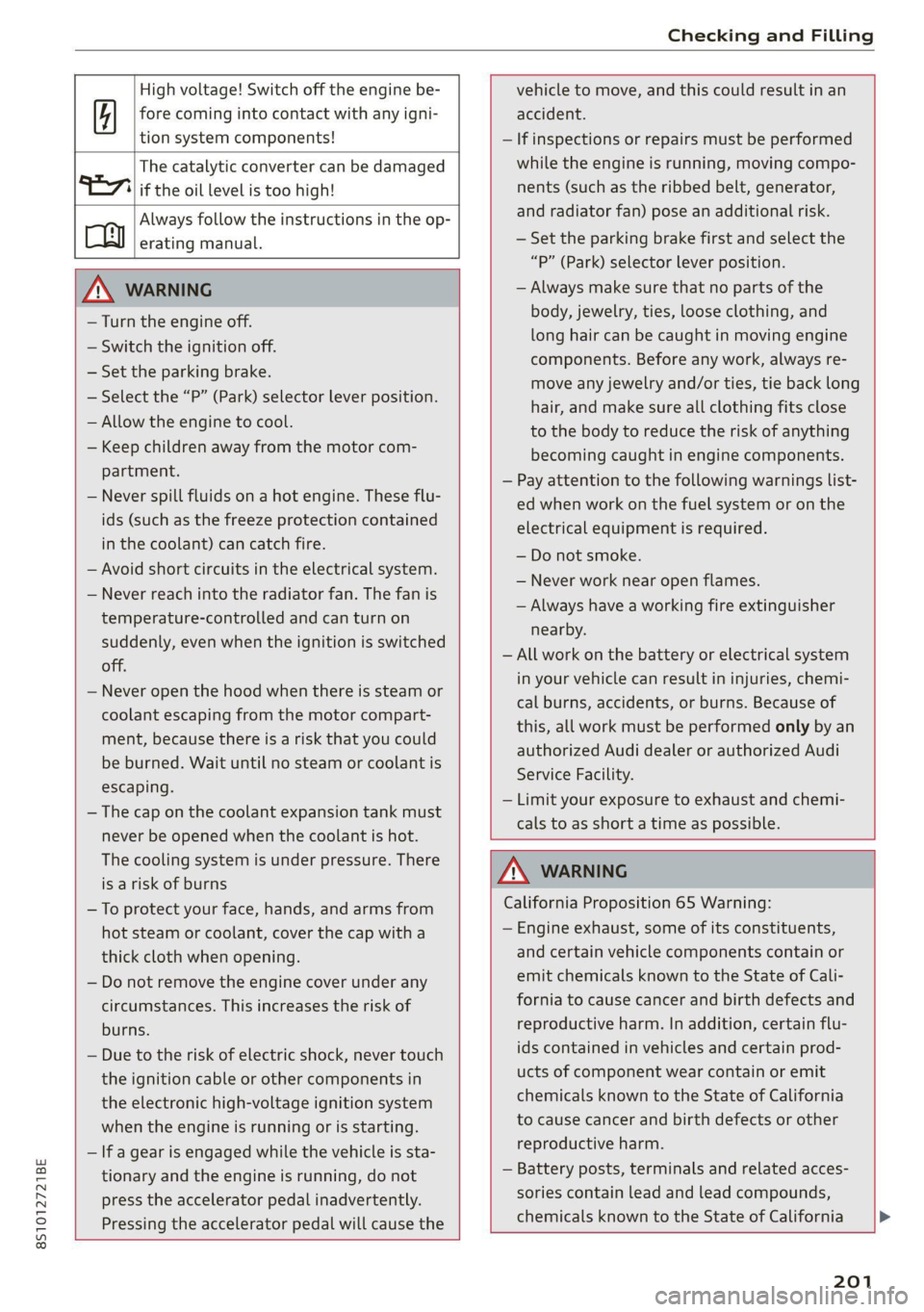
High voltage! Switch off the engine be-
fore coming into contact with any igni-
tion system components!
The catalytic converter can be damaged
"271i if the oil level is too high!
Always follow the instructions in the op-
aa erating manual.
ZA\ WARNING
— Turn the engine off.
— Switch the ignition off.
— Set the parking brake.
— Select the “P” (Park) selector lever position.
— Allow the engine to cool.
— Keep children away from the motor com-
partment.
— Never spill fluids on a hot engine. These flu-
ids (such as the freeze protection contained
in the coolant) can catch fire.
— Avoid short circuits in the electrical system.
— Never reach into the radiator fan. The fan is
temperature-controlled and can turn on
suddenly, even when the ignition is switched
off.
— Never open the hood when there is steam or
coolant escaping from the motor compart-
ment, because there is a risk that you could
be burned. Wait until no steam or coolant is
escaping.
—The cap on the coolant expansion tank must
never be opened when the coolant is hot.
The cooling system is under pressure. There
is a risk of burns
— To protect your face, hands, and arms from
hot steam or coolant, cover the cap with a
thick cloth when opening.
— Do not remove the engine cover under any
circumstances. This increases the risk of
burns.
— Due to the risk of electric shock, never touch
the ignition cable or other components in
the electronic high-voltage ignition system
when the engine is running or is starting.
— If a gear is engaged while the vehicle is sta-
tionary and the engine is running, do not
press the accelerator pedal inadvertently.
Pressing the accelerator pedal will cause the
vehicle to move, and this could result in an
accident.
— If inspections or repairs must be performed
while the engine is running, moving compo-
nents (such as the ribbed belt, generator,
and radiator fan) pose an additional risk.
— Set the parking brake first and select the
“P” (Park) selector lever position.
— Always make sure that no parts of the
body, jewelry, ties, loose clothing, and
long hair can be caught in moving engine
components. Before any work, always re-
move any jewelry and/or ties, tie back long
hair, and make sure all clothing fits close
to the body to reduce the risk of anything
becoming caught in engine components.
— Pay attention to the following warnings list-
ed when work on the fuel system or on the
electrical equipment is required.
— Do not smoke.
— Never work near open flames.
— Always have a working fire extinguisher
nearby.
— All work on the battery or electrical system
in your vehicle can result in injuries, chemi-
cal burns, accidents, or burns. Because of
this, all work must be performed only by an
authorized Audi dealer or authorized Audi
Service Facility.
— Limit your exposure to exhaust and chemi-
cals to as short a time as possible.
Z\ WARNING
California Proposition 65 Warning:
— Engine exhaust, some of its constituents,
and certain vehicle components contain or
emit chemicals known to the State of Cali-
fornia to cause cancer and birth defects and
reproductive harm. In addition, certain flu-
ids contained in vehicles and certain prod-
ucts of component wear contain or emit
chemicals known to the State of California
to cause cancer and birth defects or other
reproductive harm.
— Battery posts, terminals and related acces-
sories contain lead and lead compounds,
chemicals known to the State of California
201
Page 211 of 280

8S1012721BE
Checking and Filling
@) Note
Do not continue driving if the coolant expan-
sion tank is empty. Do not add any coolant,
because air could enter the cooling system
and damage the engine. See an authorized
Audi dealer or authorized Audi Service Facility
for assistance.
Brake fluid
BFV-0229
Fig. 172 Motor compartment: cap on brake fluid reservoir
Observe the safety precautions > page 200, Gen-
eral information.
Checking the brake fluid level
> Read the brake fluid level on the brake fluid
reservoir > page 203, fig. 168. The brake fluid
level must be between the MIN and MAX mark-
ings > A\.
The brake fluid level is monitored automatically.
Message
EG / @® Brakes: stop vehicle and check brake
fluid level
Stop the vehicle and check the brake fluid level.
See an authorized Audi dealer or authorized Audi
Service Facility for assistance.
Changing the brake fluid
Brake fluid should be changed at regular inter-
vals. Have the brake fluid changed by an author-
ized Audi dealer or authorized Audi Service Facili-
ty. The authorized Audi dealer or authorized Audi
Service Facility will inform you of the replace-
ment intervals.
ZX WARNING
— If the brake fluid level is below the MIN
marking, it can impair the braking effect and
driving safety, which increase the risk of an
accident. Do not continue driving. See an au-
thorized Audi dealer or authorized Audi
Service Facility for assistance.
— If the brake fluid is old, bubbles may form in
the brake system during heavy braking. This
could impair braking performance and driv-
ing safety, which increases the risk of an ac-
cident.
— The brake fluid in your vehicle must meet
the standard VW 501 14 and is available at
an authorized Audi dealer or authorized
Audi Service Facility. If this brake fluid is not
available, another high-grade brake fluid of
equivalent quality may be used, and it must
meet the U.S. Federal Motor Vehicle Stand-
ard (FMVSS) 116 DOT 4, Class 6.
@) Note
— If the brake fluid level is above the MAX
marking, brake fluid may leak out over the
edge of the reservoir and result in damage
to the vehicle.
— Do not allow any brake fluid to come into
contact with the vehicle paint, because it
will corrode the paint.
Electrical system
If the fz or = indicator light turns on, there is a
malfunction in the generator, the battery, or the
vehicle electrical system.
= Electrical system: malfunction! Battery is
not being charged
Drive to an authorized Audi dealer or authorized
Audi Service Facility immediately. Turn off all un-
necessary electrical equipment because it will
drain the battery. See an authorized Audi dealer
or authorized Audi Service Facility if the battery
charge level is too low.
= Electrical system: low battery charge. Bat-
tery
will be charged while driving
The starting ability may be impaired.
209
Page 212 of 280

Checking and Filling
If this message turns off after a little while, the
vehicle battery has charged enough while driving.
If the message does not turn off, drive immedi-
ately to an authorized Audi dealer or authorized
Audi Service Facility to have the malfunction re-
Paired.
Battery
laa eee)
Because of the complex power supply, all work
on batteries such as disconnecting, replacing,
etc., should only be performed by an authorized
Audi dealer or authorized Audi Service Facility
>A.
Multiple batteries with different technologies
may be installed in your vehicle:
— Vehicle battery (for example, for starting the
engine, basic power supply) > page 270, Lead
battery or > page 211, Other battery types
— Auxiliary battery (for example, for recuperation
or optional equipment) > page 271, Other bat-
tery types
Not running the vehicle for long periods of
time
The battery will gradually drain if the vehicle
does not run for long periods of time. To ensure
that the vehicle can still be started, the electrical
equipment will be limited or switched off. Some
convenience functions, such as interior lighting
or power seat adjustment, may not be available
under certain circumstances. The convenience
functions will be available again when you start
the
engine.
Even when electrical equipment is switched off,
the equipment can still drain the battery if the
vehicle is not driven for Long periods of time.
Deep draining results in a chemical reaction that
destroys the inside of the battery. The battery
must be charged every month to prevent this
= page 211. Contact an authorized Audi dealer or
authorized Audi Service Facility for more infor-
mation.
210
Winter operation
Cold weather places higher demands on the bat-
tery. This results in reduced starting ability. Have
the battery checked by an authorized Audi dealer
or authorized Audi Service Facility before cold
weather begins.
ZA\ WARNING
— All work on the battery or electrical system
in your vehicle can result in injuries, chemi-
cal burns, accidents, or burns. Because of
this, all work must be performed only by an
authorized Audi dealer or authorized Audi
Service Facility.
— Never connect the charging cable or jump
start cable directly to your vehicle battery.
Only use the connections in the engine com-
partment > page 217.
ZA\ WARNING
California Proposition 65 Warning:
— Battery posts, terminals and related acces-
sories contain lead and lead compounds,
chemicals known to the State of California
to cause cancer and reproductive harms.
Wash hands after handling.
() Note
If the vehicle will be parked for long periods
of time, protect the battery against the cold
so that it will not be destroyed by “freezing”
= page 211, Charging the battery.
Explanation of warnings:
Always wear eye protection.
Fire, sparks, open flame, and smoking are
forbidden.
A highly explosive mixture of gases can
Battery acid is highly corrosive. Always
wear protective gloves and eye protection.
form when charging batteries. >
Page 238 of 280

Care and cleaning
Care and cleaning
General information
Regular, proper care helps to maintain your vehi-
cle's value. It can also be a requirement when
submitting warranty claims for corrosion damage
and paint defects on the body.
The required cleaning and care products can be
obtained from an authorized Audi dealer or au-
thorized Service Facility. Read and follow the in-
structions for use on the packaging.
ZX WARNING
— Using cleaning and care products incorrectly
can be dangerous to your health.
— Always store cleaning and care products out
of reach of children to reduce the risk of poi-
soning.
@ For the sake of the environment
— Purchase environmentally-friendly cleaning
products if possible.
— Do not dispose of cleaning and care prod-
ucts with household trash.
Car washes
The longer that deposits such as insects, bird
droppings, tree sap or road salt remain on the ve-
hicle, the more the surface can be damaged. High
temperatures such as those caused by sunlight
increase the damaging effect.
Before washing, rinse off heavy deposits with
plenty of water.
Stubborn deposits such as bird droppings or tree
sap are best removed with plenty of water and a
microfiber cloth.
Also, wash the underside of your vehicle once
road salt stops being used for the season.
Pressure washers
When washing your vehicle with a pressure wash-
er, always follow the operating instructions pro-
vided with the pressure washer. This is especially
important in regard to the pressure and spraying
distance. Do not direct the stream of water di-
236
rectly onto seals for the side windows, doors,
luggage compartment lid, or hood, or onto the
tires, rubber hoses, insulating material, sensors”,
or camera lenses*. Keep a distance of at least 16
inches (40 cm).
Do not remove snow and ice with a pressure
washer.
Never use cone nozzles or high pressure nozzles.
The water temperature must not be above 140 °F
(60 °C).
Automatic car wash
Spray off the vehicle before washing.
Make sure that the windows and power top* are
closed and the windshield wipers are off. Make
sure that the vehicle is still able to roll during the
washing process in the car wash. Follow instruc-
tions from the car wash operator, especially if
there are accessories attached to your vehicle.
If possible, use car washes that do not have
brushes.
Washing by hand
Clean the vehicle starting from the top and work-
ing downward using a soft sponge or cleaning
brush. Use solvent-free cleaning products.
Washing vehicles with matte finish paint by
hand
To reduce the risk of damaging the paint when
washing, first remove dust and large particles
from your vehicle. Insects, grease spots, and fin-
gerprints are best removed with a special cleaner
for matte finish paint.
Apply the product using a microfiber cloth. To re-
duce the risk of damaging the paint surface, do
not use too much pressure.
Rinse the vehicle thoroughly with water. Then
clean using a neutral shampoo and a soft micro-
fiber cloth.
Rinse the vehicle thoroughly again and let it air
dry. Remove any water residue using a chamois. >
Page 250 of 280
Emergency assistance
> Reinstall the caps on the wheel bolts if neces-
sary.
> Store the vehicle tool kit in its designated
place.
> If the removed wheel does not fit in the spare
wheel well, store it securely in the luggage
compartment > page 64.
> Check the tire pressure on the installed wheel
as soon as possible.
> Check the tire pressure and store it in the Info-
tainment system.
> The wheel bolt tightening specification must be
90 ft lbs (120 Nm). Have it checked as soon as
possible with a torque wrench. Drive carefully
until then.
> Have the faulty wheel replaced as quickly as
possible.
Spare tire
General information
Applies to: vehicles with space-saving spare tire (compact
spare tire)
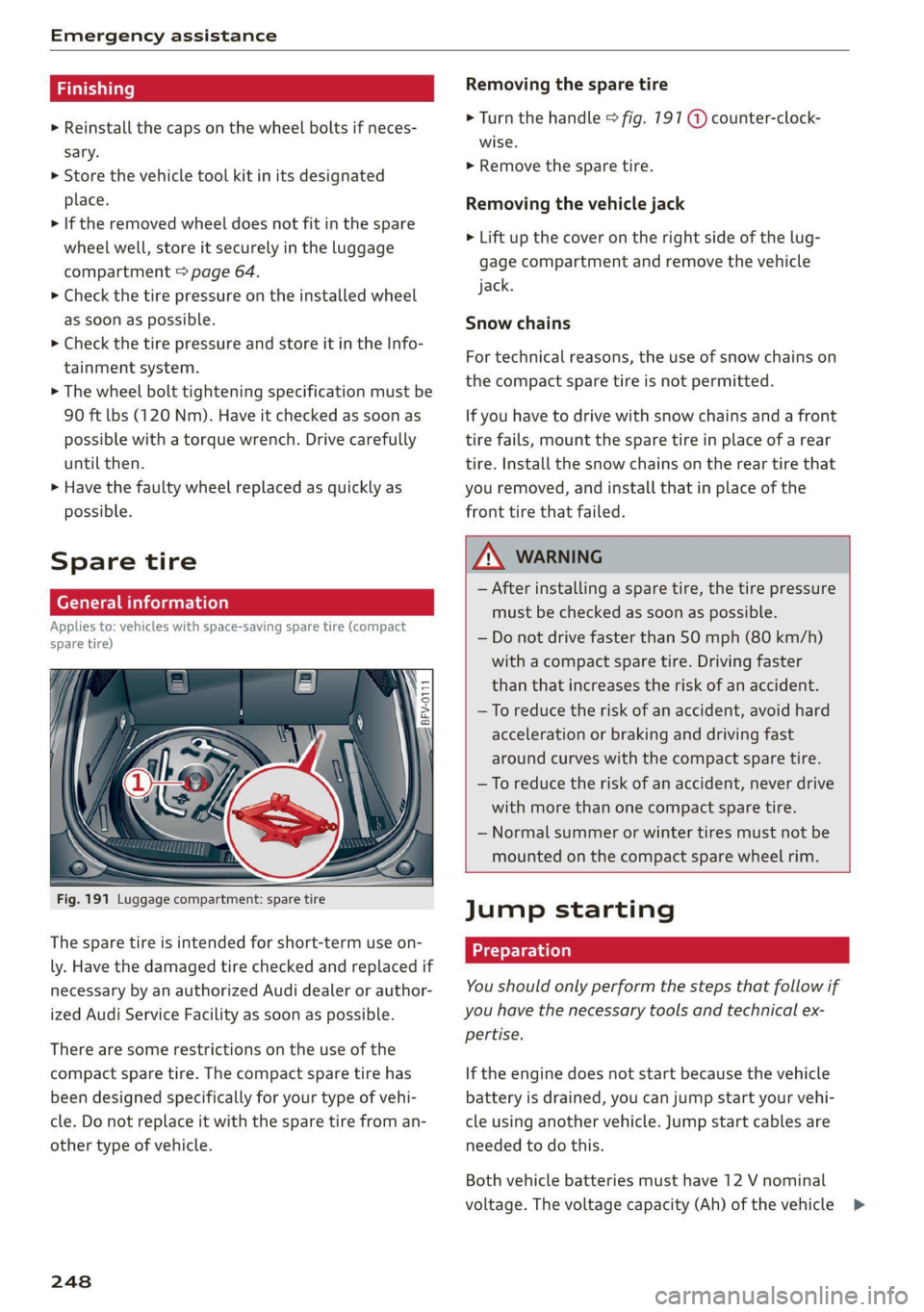
Fig. 191 Luggage compartment: spare tire
The spare tire is intended for short-term use on-
ly. Have the damaged tire checked and replaced if
necessary by an authorized Audi dealer or author-
ized Audi Service Facility as soon as possible.
There are some restrictions on the use of the
compact spare tire. The compact spare tire has
been designed specifically for your type of vehi-
cle. Do not replace it with the spare tire from an-
other type of vehicle.
248
Removing the spare tire
> Turn the handle > fig. 191 @ counter-clock-
wise.
> Remove the spare tire.
Removing the vehicle jack
> Lift up the cover on the right side of the lug-
gage compartment and remove the vehicle
jack.
Snow chains
For technical reasons, the use of snow chains on
the compact spare tire is not permitted.
If you have to drive with snow chains and a front
tire fails, mount the spare tire in place of a rear
tire. Install the snow chains on the rear tire that
you removed, and install that in place of the
front tire that failed.
ZA WARNING
— After installing a spare tire, the tire pressure
must be checked as soon as possible.
— Do not drive faster than 50 mph (80 km/h)
with a compact spare tire. Driving faster
than that increases the risk of an accident.
— To reduce the risk of an accident, avoid hard
acceleration or braking and driving fast
around curves with the compact spare tire.
— To reduce the risk of an accident, never drive
with more than one compact spare tire.
— Normal summer or winter tires must not be
mounted on the compact spare wheel rim.
Jump starting
You should only perform the steps that follow if
you have the necessary tools and technical ex-
pertise.
If the engine does not start because the vehicle
battery is drained, you can jump start your vehi-
cle using another vehicle. Jump start cables are
needed to do this.
Both vehicle batteries must have 12 V nominal
voltage. The voltage capacity (Ah) of the vehicle >