Starting AUDI TT 2021 Owner´s Manual
[x] Cancel search | Manufacturer: AUDI, Model Year: 2021, Model line: TT, Model: AUDI TT 2021Pages: 280, PDF Size: 99.18 MB
Page 4 of 280
Table of contents
About this Owner's Manual......
SUMIMAry: < = exe : eens: Seen cs sens
QutckeaeCe ssh: «i esis se ois a eaves @
Cockpit overview..............000005
Indicator lights overview...........-5.
Display and operation...........
Instrument cluster...............
Instrument cluster overview...........
Coolant temperature indicator.........
Tachometer........... 0c eee eee eee
Odometer as = s eees = games 2 geen as pews
Outside temperature display...........
Fuellevel.......... 0... eee
Multifunction steering wheel..........
Vehicle functions... cscs ve mews ve eee vs
MessageS ... 0... eee eee
Starting and driving.............
Opening and closing.............
Cental LOCKING sass = « sams 3 & eames + sees
Luggage compartment lid.............
Power windOWSio. ss seeeceewen enn
Garage door opener..................
POWEDr COPE « «cece. 6 cess so erereis + & onee
Automatic power top.................
Witid deflector ocax < x same 5s emis 5 o eee
Power top emergency operation........
Lights and Vision.................
Exterior lighting ssives « « snes 3% imams © & ware
Interior lighting..................0..
VISION s « = sas ss sees Fe eee Fo eS so eS
Windshield wipers...............0005
Digital compass...............00000.
Sitting correctly and safely......
Correct passenger seating position......
Front seats .......... 0.0 ccc eee eee ee
R@arseats case ss gece ¢ s geese seeea 2 gee
Steerimg'wheelressos «+ eau wv sons a sansvns
Safety belts...............0..00000-
Airbag SYStEM se. x & exw x © eeeeie =o veers =
Childisafety seatsicie. «6 ccs 6 cae 6 esis
NOD
OO
10
10 10
11 11 11
12 12 15
16
18
18
18
25
27 28
3]
31
33 33
36 36 39 39
41
43
45 45
45
48
48
49
52
Storage and convenience........ 63
Power SOUrceS......... 00. c ee eee eee 63
Cup Holders’s + seen ss sews + weve ¢ s eee 63
Storage areas and compartments....... 64
Luggage compartment............... 64
ROOF rack: « = wees « » yews 2 seme ty oes 68
Warm and cold................... 69
Climate control system............... 69
Deluxe automatic climate control....... 70
Adjusting the vents...............00. 71
Seat heating.................000000 71
Neck heating « eeu + eens se ree ce ees 72
Fluids in the A/C system.............. 72
DIVING): = secs & = gees < = eepes & = ows + 2 2 74
General information................. 74
Starting and stopping the engine....... 75
Start/Stop system...........--.0006- 77
Electromechanical parking brake....... 79
Starting to drive... 2.0.2... eee eee 80
Sporty CriVind sc « = wees se een cs ee ee 81
Automatic transmission.............. 81
Driver assistance................. 89
Assist systems................... 89
Speed warning system.............-.- 89
Cruise control system...........00005 89
LAP TIMER sem s » gay < cares x neem & & ROR 91
Audi Side ASSISBien: + scores ao stone om ove oo 93
Audi drive select (drive settings) ........ 96
Parkimepatied. «css sx sss 3 0 esses ov one 98
Introduction.............. 20.00.0000. 98
Rear parking system...........-..0-- 98
Parking system pluSiss «sn ¢ ¢ ces 6 om 99
Rearview camera... ... 0... cece eee eee 100
Adjusting the display and the warning
PONES ican ce nawwn 6 2 wave ov eR ow so Bo 8 102
Error messages..............2..000. 102
Intelligent Technology........... 104
Electronic Stabilization Control (ESC).... 104
Brakes... 2... eee eee 106
SU@Gring « ews 5 2 eee & x wows 5 ¢ pew so oe 107
All wheel drive (quattro).............. 108
Rear spoiler..... 0.0... 0.00 eee eee ee 108
Energy management................. 109
Page 5 of 280
8S1012721BE
Table of contents
Infotainment system............ 110
Multi Media Interface............ 110
Traffic safety information............. 110
Introduction sess x s eesia os woune ys mes vo 110
MMI On/Off knob with joystick function.. 110
MMUOpPeration ; xcsu « : wows & g eam 2 pe 111
MMIPtOUGR « sscsise oo score o oie oo mee 2 112
Control knob with joystick function..... 115
Letter/number speller................ 117
Free text search............22--0 eee 118
Menus and symbols.................. 119
Voice recognition system........ 122
Generalinformation................. 121
Operating......... 2... eee eee eae 122
Command overview information........ 123
COMAMMANES « ssssws = x csnawns » x contains © w emeoens a 123
Telephone....................-005 128
IMtrOdUCtION sevens & & ewe «8 wea oo wea oo 128
Setup... 2... eee eee eee 128
Using the Audi phone box............. 130
Using the telephone...............00- 132
Favorites 134
Messages 135
Listening to voicemail................ 137
Directory... . 0... ccc eee eee 137
Additional settings.................. 139
Troubleshooting « noas ss coos s ass as ners 140
Audi connect..................04. 141
General information................. 141
Audi connect Infotainment............ 141
Using a Wi-Fi hotspot................ 143
Audi connect Infotainment services..... 143
SOttinGSscves so seems 2 a seus wow sense oceans a 145
Troubleshooting ...............00000- 146
Navigation....................0008 148
Opening navigation.................. 148
Entering adestination................ 149
Home addressivici: < o sccna vs eecia ee ees « 154
FAVONIEES: scsane 6 9 sonics © wieneon ow eee aw otecmte 154
Directory contacts................... 154
Alternative routes). « ciss ss essa s se veess 155
Additional settings .................. 155
Map... cece cece eee eee eee 157
Satellite Map’: = « seas < s seee eee oe 160
Accessing traffic information.......... 161
Troubleshooting.............0e00ee ee 163
REGIE. wei ss tion a 2 aoe 6s maswa & & ease 164
Opening the radio................... 164
RadiGTUnctiOns ecas . wees as ewe ss ves 165
RadioiMeNy « « sess so soc & 2 sono + reve 166
Presets... 0.0... cee eee eee eee eee 166
Additional settings................0. 167
Troubleshooting seis ss news as eewa ae es 168
Media.......... 6.6.6. cece ee eee 169
IntrOduetion s sews 2 «gus + een x 2 meme as 169
INGEOS s suis wc inavins a a suncina a symrene ao atrrmns 169
Media drives........... 000 c eee eee eee 170
Bluetooth audio player............... 172
Wi-Fi audio player................... 173
Online media and Internet radio........ 174
Multimedia connections.............. 175
Playing media’. «+ sesso a x wees eo aman oo sew 177
Additional settings...............005 180
Supported media and file formats...... 183
Troubleshooting « wo sicc ss vices ss eens ov 184
Audi smartphone interface...... 187
SOtUD « saiex o & eam oo paws 2 oe REwS s Rees 187
OPerating is « a seseos « wanseee « canon « 6 were @ » 188
Troubleshooting ........--...0seeeee 188
System settings.................. 189
Setting the date andtime............. 189
MMIS@ttiNGS aes 5 ¢ seis s x saree so es 189
Connection manager...............5. 190
System update............0.--000 ee 192
Sound Settings sees < = sews sv een se eee 193
VOLUMEISEELINGS suisse & & susan 6 inane 6 3 snare 193
Restarting the MMI...............00. 194
Software license information.......... 154
Additional information.......... 195
Brands and licenses.................. 195
Maintenance and Care........... 196
Checking and Filling............. 196
Ful@lesas = 2 ewe @ anes 5 = siete ee norms Fe Ree 196
RETUCLINQ ais. ce cnciosis oo seevave wo arene © ¥ aoe 197
Emissions control system............. 200
Motor compartment..............5.. 200
Page 9 of 280
8S1012721BE
Quick access
©
©8080
QOOD®D
OOOOOOO®D
OO
O
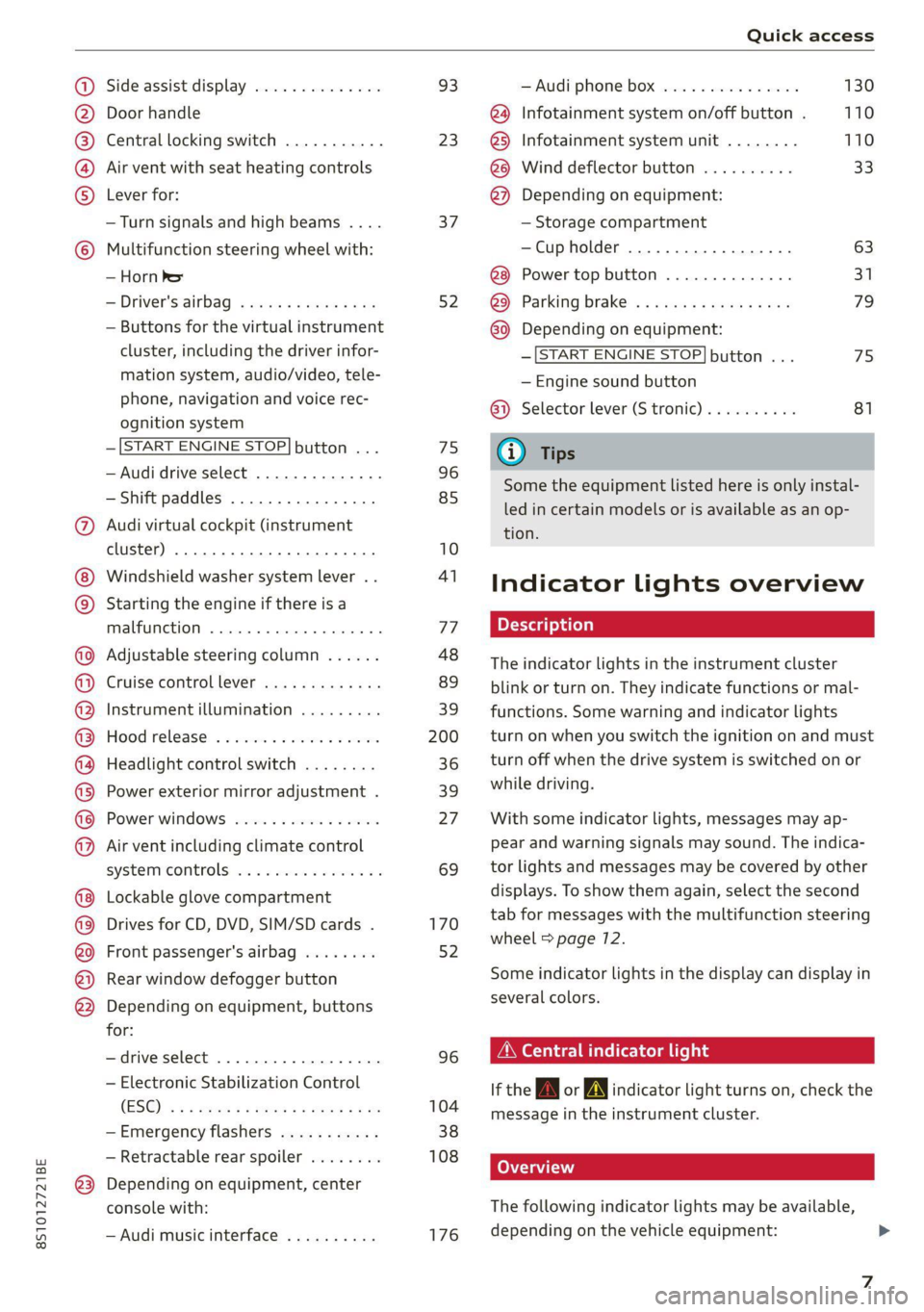
Side assist display ..............
Door handle
Central locking switch ...........
Air vent with seat heating controls
Lever for:
—Turn signals and high beams ....
Multifunction steering wheel with:
— Horn be
— Driver's@irbag . ccis ss ewan sens
— Buttons for the virtual instrument
cluster, including the driver infor-
mation system, audio/video, tele-
phone, navigation and voice rec-
ognition system
—[START ENGINE STOP] button ...
— Audi drive select ..............
— Shift paddles ................
Audi virtual cockpit (instrument
cluster) ........ 2... ee eee eee ee
Windshield washer system lever ..
Starting the engine if there is a
malfunction ..............-0005
Adjustable steering column ......
Cruise controllever .............
Instrument illumination .........
Hood release ............--.00-
Headlight control switch ........
Power exterior mirror adjustment .
Power windows ................
Air vent including climate control
system controls ..............-.
Lockable glove compartment
Drives for CD, DVD, SIM/SD cards .
Front passenger's airbag ........
Rear window defogger button
Depending on equipment, buttons
for:
—drive select ..................
— Electronic Stabilization Control
(ESO) « ss mews ¢ x news 8 x eis eo es
—Emergency flashers ...........
— Retractable rear spoiler ........
Depending on equipment, center
console with:
— Audi music interface ..........
93
23
37
52 7S
96
85
10
41
77
48
89
39
200
36 39 27 69
170
52
96
104
38
108 176
— Audi phone box ............... 130
@ Infotainment system on/off button . 110
@5) Infotainment system unit ........ 110
@8 Wind deflector button .......... 33
@ Depending on equipment:
— Storage compartment
—Cup holder ...............0.. 63
@8 Power top button .............. 31
@9 Parking brake ................. 79
G0) Depending on equipment:
—[START ENGINE STOP] button ... 75
— Engine sound button
@) Selector lever (S tronic).......... 81
@) Tips
Some the equipment listed here is only instal-
led in certain models or is available as an op-
tion.
Indicator lights overview
The indicator lights in the instrument cluster
blink or turn on. They indicate functions or mal-
functions. Some warning and indicator lights
turn on when you switch the ignition on and must
turn off when the drive system is switched on or
while driving.
With some indicator lights, messages may ap-
pear and warning signals may sound. The indica-
tor lights and messages may be covered by other
displays. To show them again, select the second
tab for messages with the multifunction steering
wheel > page 72.
Some indicator lights in the display can display in
several colors.
OMe ile Lins
If the A or A indicator light turns on, check the
message in the instrument cluster.
COAT
The following indicator lights may be available,
depending on the vehicle equipment:
Page 31 of 280
8S1012721BE
Opening and closing
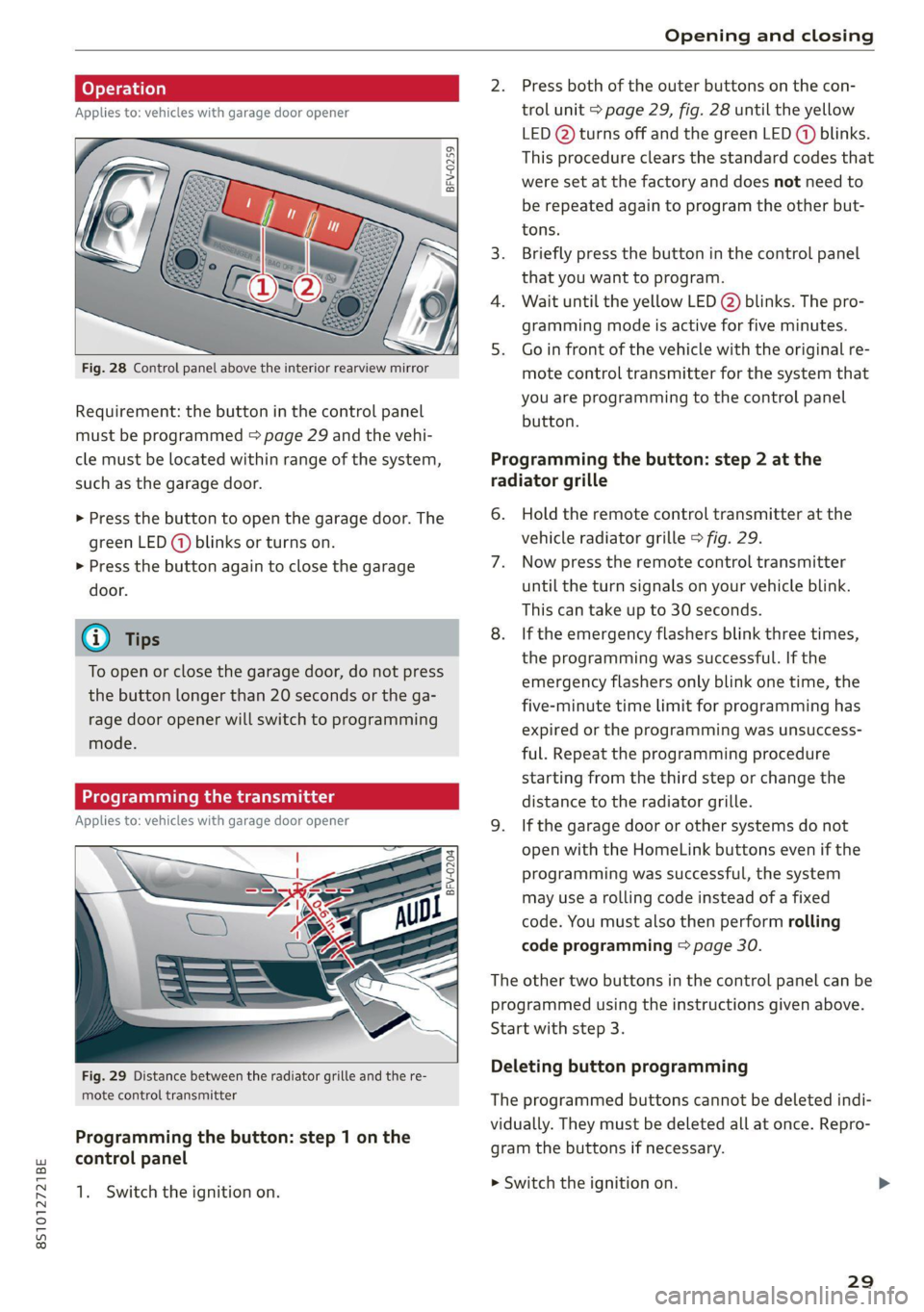
2. Press both of the outer buttons on the con-
Applies to: vehicles with garage door opener trol unit > page 29, fig. 28 until the yellow
LED (2) turns off and the green LED (4) blinks.
This procedure clears the standard codes that
were set at the factory and does not need to
be repeated again to program the other but-
a gs S
= c 3
tons.
3. Briefly press the button in the control panel
that you want to program.
4. Wait until the yellow LED @) blinks. The pro-
gramming mode is active for five minutes.
5. Go in front of the vehicle with the original re-
Fig. 28 Control panel above the interior rearview mirror mote control transmitter for the system that
| . you are programming to the control panel
Requirement: the button in the control panel batten.
must be programmed > page 29 and the vehi-
cle must be located within range of the system, Programming the button: step 2 at the
such as the garage door. radiator grille
> Press the button to open the garage door. The 6. Hold the remote control transmitter at the
green LED (@) blinks or turns on. vehicle radiator grille > fig. 29.
> Press the button again to close the garage 7. Now press the remote control transmitter
door. until the turn signals on your vehicle blink.
This can take up to 30 seconds.
G) Tips 8. If the emergency flashers blink three times,
the programming was successful. If the
emergency flashers only blink one time, the
five-minute time limit for programming has
expired or the programming was unsuccess-
ful. Repeat the programming procedure
starting from the third step or change the
distance to the radiator grille.
Applies to: vehicles with garage door opener 9. Ifthe garage door or other systems do not
open with the HomeLink buttons even if the
programming was successful, the system
may use a rolling code instead of a fixed
code. You must also then perform rolling
code programming > page 30.
To open or close the garage door, do not press
the button longer than 20 seconds or the ga-
rage door opener will switch to programming
mode.
BFV-0204
The other two buttons in the control panel can be
programmed using the instructions given above.
Start with step 3.
Deleting button programming Fig. 29 Distance between the radiator grille and the re-
mote control transmitter The programmed buttons cannot be deleted indi-
vidually. They must be deleted all at once. Repro-
gram the buttons if necessary.
Programming the button: step 1 on the
control panel
1. Switch the ignition on. mowiteh the ignition on
29
Page 44 of 280
Lights and Vision
— The windshield must not be treated with
water-repelling windshield coating agents.
Under unfavorable conditions, such as wet-
ness, darkness, and when the sun is low,
these coatings can cause increased glare,
which increases the risk of an accident. They
can also cause wiper blade chatter.
— Properly functioning windshield wiper
blades are required for a clear view and safe
driving > page 42, Replacing windshield
wiper blades.
> Place the windshield wiper arms in the service
position > page 42.
> Fold the windshield wiper arms away from the
windshield.
ZX WARNING
Dirty windshield wiper blades can impair vi-
sion, which increases the risk of an accident.
Replacing windshield wiper blades
@) Note
— If there is frost, make sure the windshield
wiper blades are not frozen to the wind-
shield. Switching on the windshield wipers
when the blades are frozen to the wind-
shield can damage the wiper blades.
— The windshield wiper system must be
switched off (lever in position 0) before us-
ing a car wash. This prevents the wipers
from switching on unintentionally and caus-
ing damage to the windshield wiper system.
@ Tips
— The windshield wipers switch off when the
ignition is switched off. You can activate the
windshield wipers after the ignition is
switched on again by moving the windshield
wiper lever to any position.
— Worn or dirty windshield wiper blades result
in streaking. This can affect the rain sensor*
function. Check your windshield wiper
blades regularly.
— The washer fluid nozzles in the windshield
washer system are heated* at low tempera-
tures when the ignition is on.
— When stopping temporarily, such as ata
traffic light, the speed of the windshield
wipers automatically reduces by one level.
Cleaning windshield wiper blades
Clean the wiper blades when you see wiper
streaks. Clean the wiper blades with a soft towel
and glass cleaner.
42
B8R-0379
A
> 2
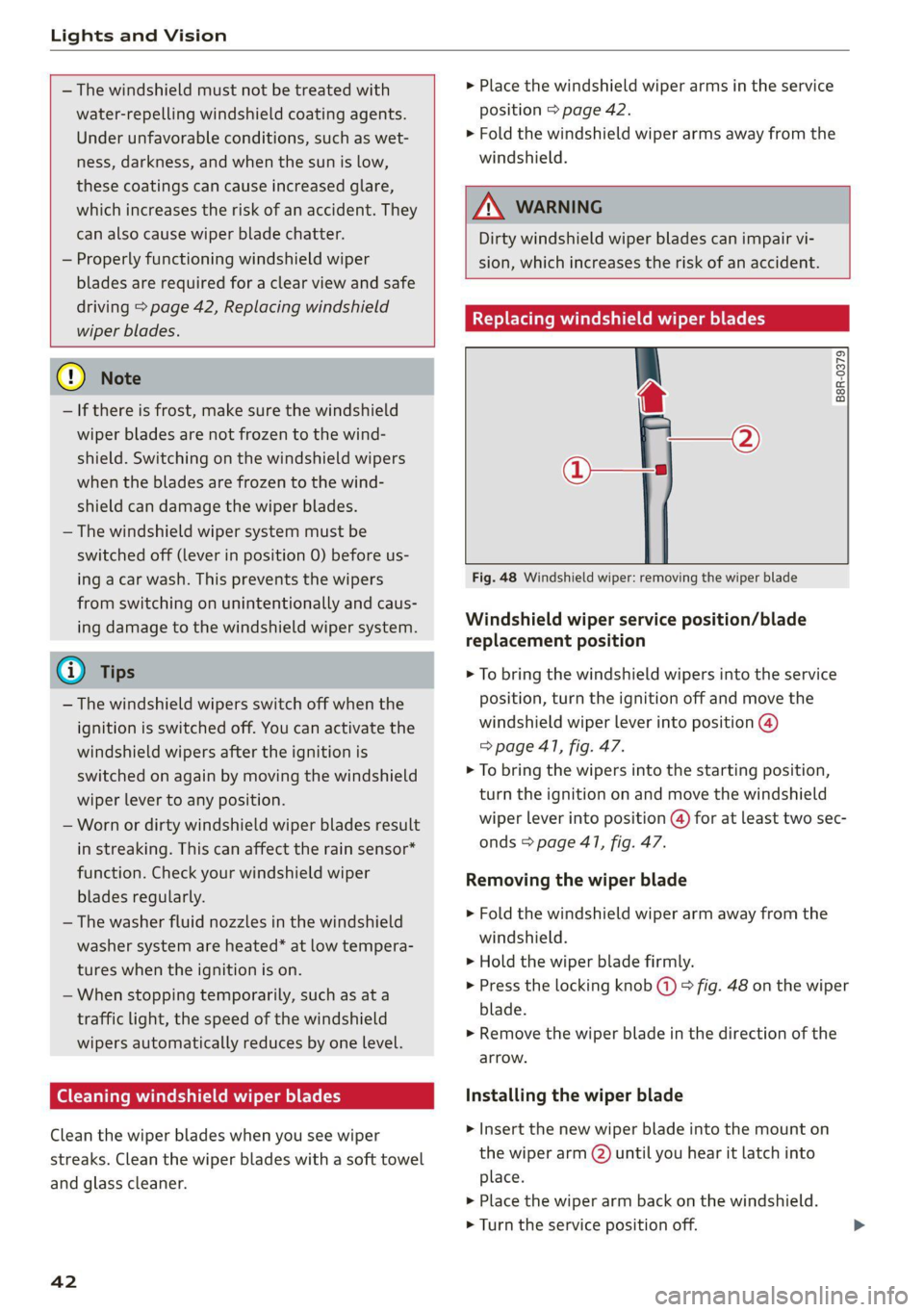
Fig. 48 Windshield wiper: removing the wiper blade
Windshield wiper service position/blade
replacement position
> To bring the windshield wipers into the service
position, turn the ignition off and move the
windshield wiper lever into position @)
=> page 41, fig. 47.
> To bring the wipers into the starting position,
turn the ignition on and move the windshield
wiper lever into position (@) for at least two sec-
onds & page 41, fig. 47.
Removing the wiper blade
> Fold the windshield wiper arm away from the
windshield.
> Hold the wiper blade firmly.
> Press the locking knob (+) > fig. 48 on the wiper
blade.
> Remove the wiper blade in the direction of the
arrow.
Installing the wiper blade
> Insert the new wiper blade into the mount on
the wiper arm () until you hear it latch into
place.
>» Place the wiper arm back on the windshield.
> Turn the service position off.
Page 77 of 280
8S1012721BE
Driving
— Do not drive with winter tires during the summ-
er.
— Utilize the engine braking effect.
— Avoid driving short distances when possible.
G) Tips
The amount of noise produced by the vehicle
can increase significantly when driving with a
sporty style. Show respect to others around
you and the environment with the way you op-
erate your vehicle, especially at night.
Starting and stopping
the engine
Starting the engine
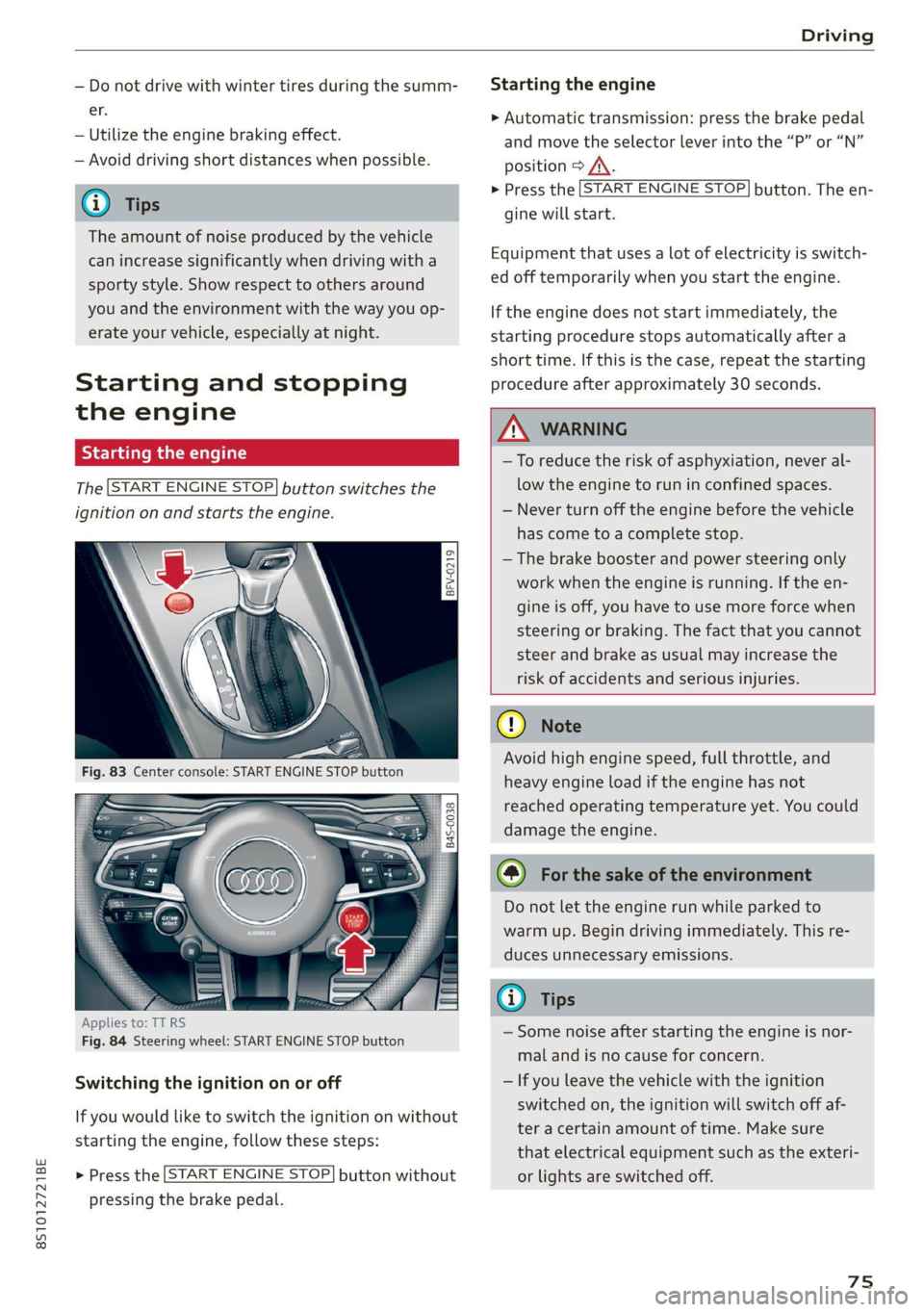
The [START ENGINE STOP] button switches the
ignition on and starts the engine.
[eFv-0219
|
8 Ss
& od = a
Applies to: TT RS
Fig. 84 Steering wheel: START ENGINE STOP button
Switching the ignition on or off
If you would like to switch the ignition on without
starting the engine, follow these steps:
> Press the [START ENGINE STOP} button without
pressing the brake pedal.
Starting the engine
> Automatic transmission: press the brake pedal
and move the selector lever into the “P” or “N”
position > /\.
> Press the [START ENGINE STOP} button. The en-
gine will start.
Equipment that uses a lot of electricity is switch-
ed off temporarily when you start the engine.
If the engine does not start immediately, the
starting procedure stops automatically after a
short time. If this is the case, repeat the starting
procedure after approximately 30 seconds.
ZA\ WARNING
—To reduce the risk of asphyxiation, never al-
low the engine to run in confined spaces.
— Never turn off the engine before the vehicle
has come to a complete stop.
— The brake booster and power steering only
work when the engine is running. If the en-
gine is off, you have to use more force when
steering or braking. The fact that you cannot
steer and brake as usual may increase the
risk of accidents and serious injuries.
() Note
Avoid high engine speed, full throttle, and
heavy engine load if the engine has not
reached operating temperature yet. You could
damage the engine.
@) For the sake of the environment
Do not let the engine run while parked to
warm up. Begin driving immediately. This re-
duces unnecessary emissions.
(i) Tips
— Some noise after starting the engine is nor-
mal and is no cause for concern.
— If you leave the vehicle with the ignition
switched on, the ignition will switch off af-
ter a certain amount of time. Make sure
that electrical equipment such as the exteri-
or lights are switched off.
75
Page 78 of 280
![AUDI TT 2021 Owner´s Manual Driving
Stopping the engine
> Bring the vehicle to a full stop.
> Press the [START ENGINE STOP] button.
Emergency off function*
If it is absolutely necessary, the engine can also
be](/img/6/40287/w960_40287-77.png "AUDI TT 2021 Owner´s Manual Driving
Stopping the engine
> Bring the vehicle to a full stop.
> Press the [START ENGINE STOP] button.
Emergency off function*
If it is absolutely necessary, the engine can also
be")
Driving
Stopping the engine
> Bring the vehicle to a full stop.
> Press the [START ENGINE STOP] button.
Emergency off function*
If it is absolutely necessary, the engine can also
be turned off while driving at speeds starting at
4 mph (7 km/h). To stop the engine, press the
START ENGINE STOP] button twice in a row or
press and hold it one time.
Z\ WARNING
— Never turn off the engine before the vehicle
has come to a complete stop. Switching it
off before the vehicle has stopped may im-
pair the function of the brake booster and
power steering. You may need to use more
force when braking or steering. Because you
cannot brake and steer as you usually would,
this could lead to accidents and serious inju-
ries.
— If you leave the vehicle, switch the ignition
off and take the vehicle key with you. If you
do not do this, the engine could be started
and electrical equipment such as the power
windows could be activated. This can lead to
serious injuries.
— For safety reasons, always park the vehicle
with the selector lever in the P position.
Otherwise, there is the risk that the vehicle
could roll unintentionally.
@) Note
If the engine has been under heavy load for an
extended period of time, heat builds up in the
engine compartment after the engine is
switched off and there is a risk of damaging
the engine. For this reason, let the engine run
at idle for approximately two minutes before
shutting it off.
@) Tips
For up to 10 minutes after stopping the en-
gine, the radiator fan may turn on again auto-
matically or it may continue to run, even if the
ignition is switched off.
76
IY ett Tel -1
Pressing the start/stop button again will switch
off the engine
This message appears when you press the
START ENGINE STOP] button while driving.
Engine start system: malfunction! Please con-
tact Service
The engine automatic start system has a mal-
function. Drive immediately to an authorized
Audi dealer or authorized Audi Service Facility to
have the malfunction repaired. To start the en-
gine, press and hold the [START ENGINE STOP
button.
Remote control key: hold back of key
against the designated area. See owner's man-
ual
This message appears if there is no convenience
key inside the vehicle or if the system does not
recognize the key. The convenience key may not
be recognized, for example, if it is covered by an
object that disrupts the signal (such as a brief-
case), or if the key battery is weak. Electronic de-
vices such as cell phones can also interfere with
the signal.
To still be able to start or stop the engine, see
= page 77, Starting the engine when there is a
malfunction.
B Remote control key: key not detected. Is the
key still in the vehicle?
The B indicator light turns on and this message
appears if the convenience key was removed from
the vehicle when the engine was running. If the
convenience key is no longer in the vehicle, you
cannot switch the ignition on or start the engine
once you stop it. You also cannot lock the vehicle
from the outside.
Please press the brake pedal
This message appears if you do not press the
brake pedal when starting the engine.
Please select N or P
Page 79 of 280
8S1012721BE
Driving
This message appears when starting or stopping
the engine if the selector lever is not in the "N" or
"P" position. The engine will not start/stop.
Starting the engine when there is a
Teles (ela)
It may not be possible to start the engine under
certain circumstances, for example, if the bat-
tery in the vehicle key is drained, if interference
is affecting the key or if there is a system mal-
function.
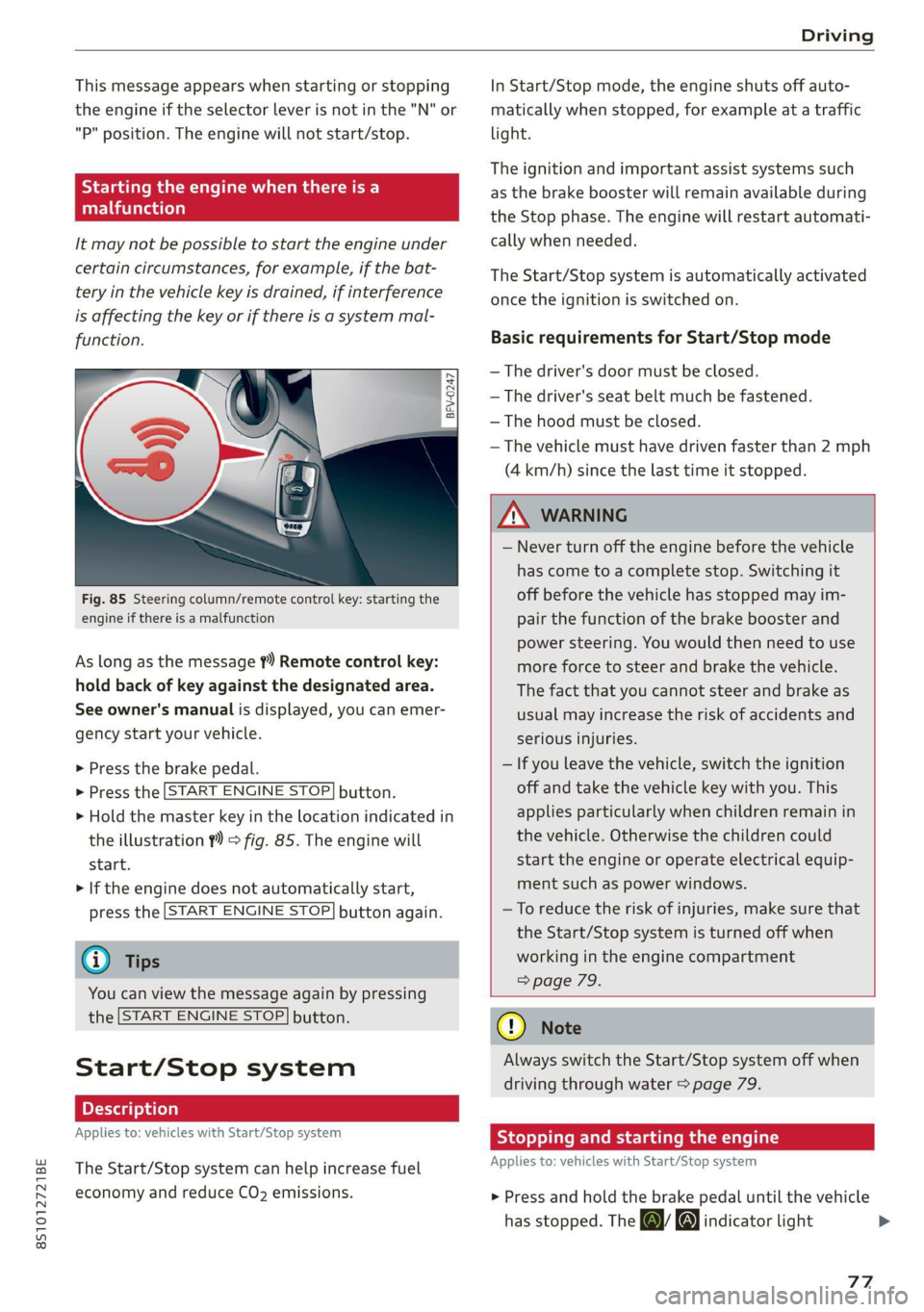
Fig. 85 Steering column/remote control key: starting the
engine if there is a malfunction
As long as the message ?) Remote control key:
hold back of key against the designated area.
See owner's manual is displayed, you can emer-
gency
start your vehicle.
» Press the brake pedal.
> Press the [START ENGINE STOP] button.
> Hold the master key in the location indicated in
the illustration ?) = fig. 85. The engine will
start.
> If the engine does not automatically start,
press the [START ENGINE STOP] button again.
@ Tips
You can view the message again by pressing
the [START ENGINE STOP] button.
Start/Stop system
Applies to: vehicles with Start/Stop system
The Start/Stop system can help increase fuel
economy and reduce CO2 emissions.
In Start/Stop mode, the engine shuts off auto-
matically when stopped, for example at a traffic
light.
The ignition and important assist systems such
as the brake booster will remain available during
the Stop phase. The engine will restart automati-
cally when needed.
The Start/Stop system is automatically activated
once the ignition is switched on.
Basic requirements for Start/Stop mode
— The driver's door must be closed.
— The driver's seat belt much be fastened.
— The hood must be closed.
— The vehicle must have driven faster than 2 mph
(4 km/h) since the last time it stopped.
Z\ WARNING
— Never turn off the engine before the vehicle
has come to a complete stop. Switching it
off before the vehicle has stopped may im-
pair the function of the brake booster and
power steering. You would then need to use
more force to steer and brake the vehicle.
The fact that you cannot steer and brake as
usual may increase the risk of accidents and
serious injuries.
— If you leave the vehicle, switch the ignition
off and take the vehicle key with you. This
applies particularly when children remain in
the vehicle. Otherwise the children could
start the engine or operate electrical equip-
ment such as power windows.
—To reduce the risk of injuries, make sure that
the Start/Stop system is turned off when
working in the engine compartment
> page 79.
@) Note
Always switch the Start/Stop system off when
driving through water > page 79.
Stopping and starting the engine
Applies to: vehicles with Start/Stop system
> Press and hold the brake pedal until the vehicle
has stopped. The a& indicator light
77
Page 80 of 280
Driving
appears in the instrument cluster once the en-
gine stops automatically.
> The engine starts again when you remove your
foot from the brake pedal. The indicator light
turns off.
Additional information for automatic
transmissions
The engine stops in the "P", "N" and "D" selector
lever positions.
If you select the “R” gear during a Stop phase
while pressing the brake pedal, the engine will
start again.
Shift to "P" quickly to prevent the engine from
starting unintentionally when shifting through
"RM.
You can control if the engine will stop or not by
reducing or increasing the amount of force you
use to press the brake pedal. For example, if you
only lightly press on the brake pedal in stop-and-
go traffic or when turning, the engine will not
switch off when the vehicle is stationary. If you
press the brake pedal harder, the engine will
switch off.
@) Tips
— Press the brake pedal during a Stop phase
to keep the vehicle from rolling.
— The ignition will turn off if you press the
START ENGINE STOP] button during a Stop
phase.
— When you stop and the Start/Stop system
turns the engine off, the ignition remains
on. Make sure the ignition is switched off
before you leave the vehicle or else the bat-
tery could drain.
General information
Applies to: vehicles with Start/Stop system
Starting and stopping the engine automat-
ically
The system checks if certain conditions are met
before and during the Stop phase, and deter-
mines if the engine stops and how long it re-
mains stopped. For example, if power usage is
high, the engine will not be stopped. Along with
78
other conditions, the following factors influence
the automatic engine start or stop:
— Environmental conditions (slopes, inclines, ele-
vation, temperature)
— Battery (charge status, temperature, power us-
age)
— Engine temperature
— Assist systems
— Driving behavior
Depending on the engine, the indicator light
may appear if the engine is not stopped.
Ignition is switched off automatically
To prevent the vehicle battery from draining, the
ignition will switch off automatically under the
following conditions:
— If the vehicle has already been driven
— If the Start/Stop system has stopped the en-
gine
— If the driver's door is opened
— If the driver's safety belt is unbuckled
— If the brake pedal is not pressed
— If the vehicle is stationary
In this case, the parking lights switch on in place
of the low beams and the message Side marker
lights will switch off automatically in 30 mi-
nutes. See owner's manual appears in the Info-
tainment system display. The side marker lights
will switch off after approximately 30 minutes or
when you lock the vehicle.
If the Start/Stop system has not turned off the
engine or if you have switched the Start/Stop sys-
tem off manually, the ignition will not be auto-
matically switched off and the engine will contin-
uetorun>A.
ZA WARNING
To reduce the risk of poisoning, never allow
the engine to run in confined spaces.
G) Tips
If you select the “D” or “N” selector lever posi-
tion after shifting into reverse, the vehicle
must be driven faster than 6 mph (10 km/h)
in order for the engine to switch off again.
Page 81 of 280
8S1012721BE
Driving
Manually switching the Start/Stop system
off ando
Applies to: vehicles with Start/Stop system
If you do not wish to use the system, you can
switch it off manually.
B8V-0645
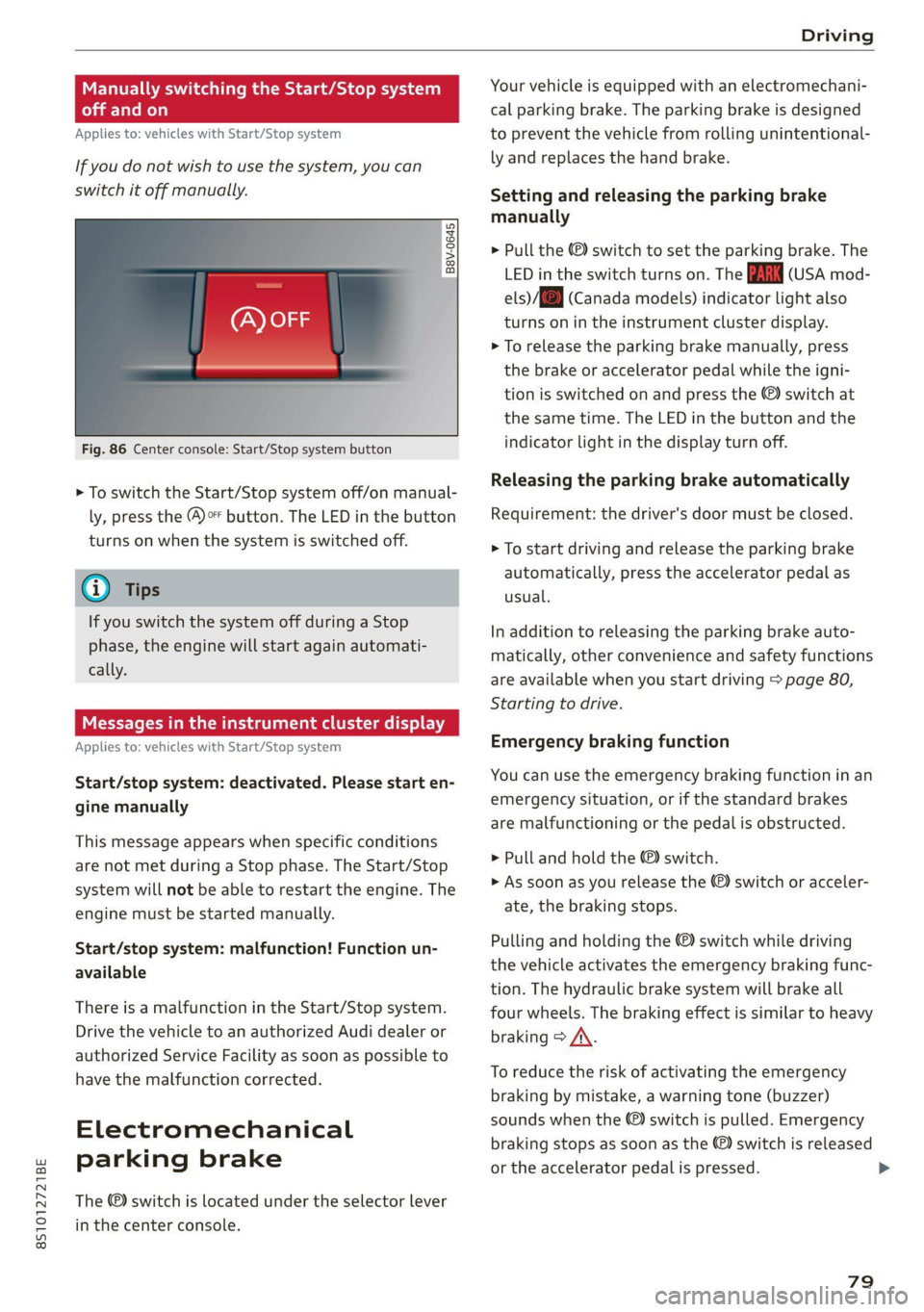
Fig. 86 Center console: Start/Stop system button
> To switch the Start/Stop system off/on manual-
ly, press the (@)o button. The LED in the button
turns on when the system is switched off.
G) Tips
If you switch the system off during a Stop
phase, the engine will start again automati-
cally.
Meee emo
Applies to: vehicles with Start/Stop system
Start/stop system: deactivated. Please start en-
gine manually
This message appears when specific conditions
are not met during a Stop phase. The Start/Stop
system will not be able to restart the engine. The
engine must be started manually.
Start/stop system: malfunction! Function un-
available
There is a malfunction in the Start/Stop system.
Drive the vehicle to an authorized Audi dealer or
authorized Service Facility as soon as possible to
have the malfunction corrected.
Electromechanical
parking brake
The ©) switch is located under the selector lever
in the center console.
Your vehicle is equipped with an electromechani-
cal parking brake. The parking brake is designed
to prevent the vehicle from rolling unintentional-
ly and replaces the hand brake.
Setting and releasing the parking brake
manually
> Pull the ©) switch to set the parking brake. The
LED in the switch turns on. The iin (USA mod-
els) /[@) (Canada models) indicator light also
turns on in the instrument cluster display.
> To release the parking brake manually, press
the brake or accelerator pedal while the igni-
tion is switched on and press the ©) switch at
the same time. The LED in the button and the
indicator light in the display turn off.
Releasing the parking brake automatically
Requirement: the driver's door must be closed.
> To start driving and release the parking brake
automatically, press the accelerator pedal as
usual.
In addition to releasing the parking brake auto-
matically, other convenience and safety functions
are available when you start driving > page 80,
Starting to drive.
Emergency braking function
You can use the emergency braking function in an
emergency situation, or if the standard brakes
are malfunctioning or the pedal is obstructed.
> Pull and hold the @®) switch.
> As soon as you release the ©) switch or acceler-
ate, the braking stops.
Pulling and holding the ©) switch while driving
the vehicle activates the emergency braking func-
tion. The hydraulic brake system will brake all
four wheels. The braking effect is similar to heavy
braking > A\.
To reduce the risk of activating the emergency
braking by mistake, a warning tone (buzzer)
sounds when the ©) switch is pulled. Emergency
braking stops as soon as the ©) switch is released
or the accelerator pedal is pressed.
79