warning lights AUDI TT COUPE 2009 User Guide
[x] Cancel search | Manufacturer: AUDI, Model Year: 2009, Model line: TT COUPE, Model: AUDI TT COUPE 2009Pages: 316, PDF Size: 71.16 MB
Page 23 of 316
steering assist. T he steering must be inspected immediately by a
qual ified workshop ~& . With the eng ine no t ru nning (e .g. when
the car is being towed) , there is also no power assist available.
& WARNING
If there is a malfunct ion , the indicator l ight for the electro-me chan
i c al power assi st illuminates . Seek profes sional as sistance. •
Controls and equip
ment
Instruments and warning /indi cator lights
I • •
Page 35 of 316
Light/rain sensor defective (auto-~ page 37
matic headlights)* defective
Ad aptiv e Li ght* def ective
~ page37
Tire pressure monitoring system*
~ page 37
When a yel low symbol appears, a warning tone wil l sound once.
Check the displayed function as soon as possible . If more than one
malfunction is detected, all symbols wil l appear one after the other
for about two seconds .•
Driver info rmation
In addition to the warning/indicator lights and the
symbols in the instrument cluster display, driver informa tion is displayed.
F ig . 21 S ectio n of
instrum en t c luster :
Set/C hec k butt on
Driver information appears in the display when a defective light
bulb is reported by the defective light bulb warning ~ page 36,
when the brake pads are worn and before you engage a gear on
vehicles with S tronic .
In addition, driver information may appear when a red symbol
flashes in the driver disp lay .
Con tro ls and eq uip
ment
Dri ver in form ati on syst em
To d is pl ay Driver inf orm ati on
As an example, the
t he display :
Switch off engine and che ck oil level
The driver message in the display goes out after about 5 seconds.
You can display the driver message again by br iefly pressing the
button. •
Brake system malfunction
BRAKE (USA models) /((D) (Canada models )
The indicator light flashes if the brake fluid level is t oo
low, if there is a malfunction in the ABS system or when the parking brake is engaged .
If the BRAKE /
s y stem. In addition to the symbol , one of two messages
appears in the display:
STOP Vehicle and check brake fluid
ABS FAULT! SEE OWNER'S MANUAL
- Pull off the ro ad an d stop the vehicle.
- Obtain professional assistance.
USA models: if there is a malfunction in the ABS system, the
warning/indicator light i llumina tes along with the BRAKE system
malfunction warning/indicator light~&.
Canada models: if there is a malfunction in the ABS system, the
warning/indicator light i llumina tes together with the CCD> brake
system malfunction warning/indicator light~& .
Vehicle care I I irechnical data
Page 36 of 316
Driver information system
Parking brake set
The parking brake warning light Brake /((D) (Canada models) illumi
nates when the parking brake is set. In addition , a warning tone will
sound after you have driven for longer than 3 seconds and faster
than 3 mph (5 km/h).
L1}. WARNING
• Always observe the warnings in => page 209, "Engine compart
ment", before opening the engine hood and checking the brake
fluid.
• Driving with low brake fluid is a safety hazard! Stop the car and
get professional assistance.
• If the brake system warning/indicator light illuminates
together with the ABS warning/indicator light, then the ABS system is malfunctioning. The rear wheels could quickly lock up
when you apply the brakes. This could lead to loss of control and
your vehicle could slide! Drive carefully to the nearest authorized
Audi dealer and have the malfunction corrected. •
Engine cooling system malfunction ¾
A malfunction in the engine cooling system must be
repaired as soon as possible.
When the _t symbol in the display flashes, then either the
engine coolant
temperature is too high, or the coolant level
is too low. In addition to the symbol, the following message
also appears in the display:
Switch off engine and check coolant level
-Pull off the road and stop the vehicle.
- Turn off the engine.
- Check coolant level
~ page 225.
-Add coolant if necessary ~ page 225.
-Continue driving only after the engine coolant
warning/indicator light goes out.
- Contact your authorized Audi dealer for assistance if
necessary .
If t he engine coolant lev el is correct, then th e radia tor fan may be
the cause of the malfunction.
If the gene rator warning/indicator light should also illuminate
=> page 18, then the fan belt may be damaged.
L1}. WARNING
• If your vehicle should break down for mechanical or other
reasons, park at a safe distance from moving traffic, turn off the
engine and turn on the hazard warning lights
=> page 57, "Emer
gency flasher A" .
• Never open the hood if you see or hear steam or coolant
escaping from the engine compartment -you risk being scalded.
Wait until you can no longer see or hear steam or coolant escaping.
• The engine compartment of any vehicle is a dangerous area.
Before you perform any work in the engine compartment, turn off
the engine and allow it to cool. Follow the warning stickers
=> page 209, "Engine compartment" .
0 Note
Do not continue driving if the-~- symbol illuminates. There is a
malfunction in the engine cooling system -you could damage your
engine .•
Page 37 of 316
Engine oil pressure malfunction 9=;r;
The red engine oil pressure warning symbol requires
immediate service or repair.
If the ~ symbol appears in the display and flashes, the oil
pressure is too low. In addition to the symbol, the following
message also appears in the display:
Switch off engine and check oil level
- Pull off the road and stop the vehicle .
- Shut the engine down.
- Check the engine oil level~
page 221.
-Contact your authorized Audi dealer for assistance if
necessary .
Engine oil level too low
If the engine oil level is too low, top off oil to the proper level
=>
page 222.
Engine oil level OK
If the ~ symbol starts flashing again ev en though the engine oil
level checks OK on the dipstick,
do not start driving again and do not
let the engine run at idle .
Instead, contact your authorized Audi
dealer for assistance .
[ i J Tips
• The engine oil pressure symbol ~ is not an indicator for a low
engine oil level. Do not rely on it. Instead, check the oil level in your
engine at regular intervals, preferably each time you refuel, and
always before going on a long trip.
• The yellow oil level warning indication _ requires oil refill or
workshop service without delay. Do not wait until the red oil pres sure warning symbol
~ starts to flash before you respond to the
Controls and equip
ment
Driver information system
low oil level warning = . By then, your engine may already have
suffered serious damage. •
Fuel supply too low Jl
When the L symbol illuminates, this means there are about 2.6
gallons
(10 liters) of fuel left in the fuel tank . Time to refuel!
=>
page 212.
If the symbol lights up , even when there is ample fuel in the tank,
and the text
Tank system malfunction! Please contact workshop
appears in the display, there is a fault in the system. Contact a qual
ified workshop to have the fault rectified. •
Checking the engine oil level .d'" ..
Please add max. 1 qt of engine oil!
If the symbol comes on, add 1 quart (1 liter) of oil at the next
opportunity=>
page 222. •
Checking the engine oil level -1.
When the _ symbol illuminates, check the engine oil level as soon
as possible =>
page 221. Top off the oil at your earliest opportunity
=>
page 222. •
Engine oil sensor defective • ...
If the symbol illuminates, contact your authorized Audi dealer
and have the oil sensor inspected. •
I • •
Page 39 of 316
There are three reasons why the defective bulb message would
appear in the display:
• The light bulb has burnt out=>
page 278.
• The fuse is "blown"=> page 274, "Replacing a fuse".
• The wire connection to the light bulb is defective.
Have the bulb replaced or the connection repaired by your autho
rized Audi Service department.
& WARNING
• Light bulbs are pressurized and could explode while they are
being changed causing serious personal injury.
• Work with due care when handling the high-voltage section of
gas discharge (xenon) lamps. Failing to do so could result in death
or serious injury! •
Brake light defective i( r (USA
models)/ (Canada models)
In case of a malfunction or component failure, the symbol
(USA models)/ (Canada models) can appear . The following elec
trical components should be checked, repaired or replaced, as
necessary:
• Brake light bulbs
• All wiring connections
• Brake light switch
Contact your authorized Audi dealer for assistance if necessary.
[ i] Tips
The brake light switch is only inspected as part of the functional
check after the engine is started .•
Controls and equip
ment
Driver information system
Ap plies to veh ic les : w it h auto matic headli ghts
Light/rain sensor defective U
The indicator light indicates a defect in the automatic
headlights/automatic wiper system.
If the symbol illuminates, the light sensor has failed. For safety
reasons , the low beams are turned on permanently with the switch
in
AUTO. However, you can continue to turn the lights on and off
using the light switch . In the case of a defect in the rain sensor, the
windshield wiper lever functions are still available. Have the
light/rain sensor checked as soon as possible at an authorized Audi
dealer. •
Applies to v ehi cle s : with Ad aptive Light
Adaptive Light defective " )
Adaptive light defective
When this symbol l-illuminates, it means that Adaptive Light is
defective. Go to a qualified workshop to have the headlights or the
control unit for the Adaptive Light repaired. •
Applies to veh ic les : wi th tir e pr essu re m on it o ring sys tem
Tire pressure monitoring system
Tire pressure that is too low must be corrected as soon as
possible.
If the O symbol flashes for about one minute after the igni
tion is switched on and then remains on, there is a malfunc
tion in the system. Consult the nearest authorized Audi
dealer as soon as possible.
Additional information about the tire pressure monitoring system
can be found:=> page 253. •
I • •
Page 43 of 316
Power locking system
General description
The power locking system l ocks or unl ocks all doors
simultane ously.
The power locking system in your vehic le incorporates the following
functions :
• Central locking function
• Remote control feature ~
page 39.
• Anti -Theft A larm System ~ page 47.
You can lock and un lock the vehicle from outside either with the
ke ys or the remote control transmitter inside the master key.
A ctiv ating the pow er locki ng system lo cks or unlo ck s a ll d oors
s imultaneou sly .
You can also open or close the windows when you lock or unlock the
driver's door using the key. For sa fety reasons, you cannot use the
remote control to open/c lose the windows.
The
selective unlock feature makes it possible to open just the
driver's door.
I f the power locking system should malfunction, you can lock and
unlock each lock in dividually using the vehicle key .
Automatic locking *
The automatic locking feature locks all the vehicle doors and the
rear lid when you drive faster than 9 mph (15 km/hl.
You can unlock the vehicle from the inside by:
• removing the key from the ignition switch (the vehicle will auto
matica lly unlock itself) or
• pressing the unlock part of the power lock switch
oc:'il or
pulling the door handle (to open the door).
Controls and equip
ment
Opening and clo sing
If you wish, you can have an authori zed Audi dea ler convert your
power d oor lock sys tem to auto matic locking .
Unlocking /lo cking the vehicl e
When you unlock your vehic le :
• The anti -theft alarm system is deactivated briefly .
• The vehicle interior lights i lluminate for approxima te ly 30
seconds .
When you
lo ck the vehicle:
• All doors are locked.
• The anti -theft ala rm system is activated .
• The vehicle interior lights turn off.
• The anti -theft alarm system is act ivated. The horn of the anti
theft alarm syst em wi ll sound and the anti -theft alarm system readi
ness l ight, located in the center of the instrument pane l be low the
windshield on the right side of the air vent, will start to blink .
& WARNING
• When you lock your vehicl e from o utside , nobod y -espe ciall y
children - should remain in side the vehic le. Remembe r, when you
lock the vehi cle from the outs ide the windo ws cannot be opened
from the inside.
• When you leave the vehi cle , alw ays remove the ignition key and
ta ke it with you. Thi s will prev ent pa ssenger s (children , for
e x ample ) from ac cident ally b eing locked in the vehi cle should they
accidentally pre ss the power locking swit ch .
• Do not le ave ch ild ren i nside the vehi cle unsupervised . In an
emergency it would be impo ssible to open the doors from the
out side w ithout the key .
I • •
Page 53 of 316
Clear vision
Lights
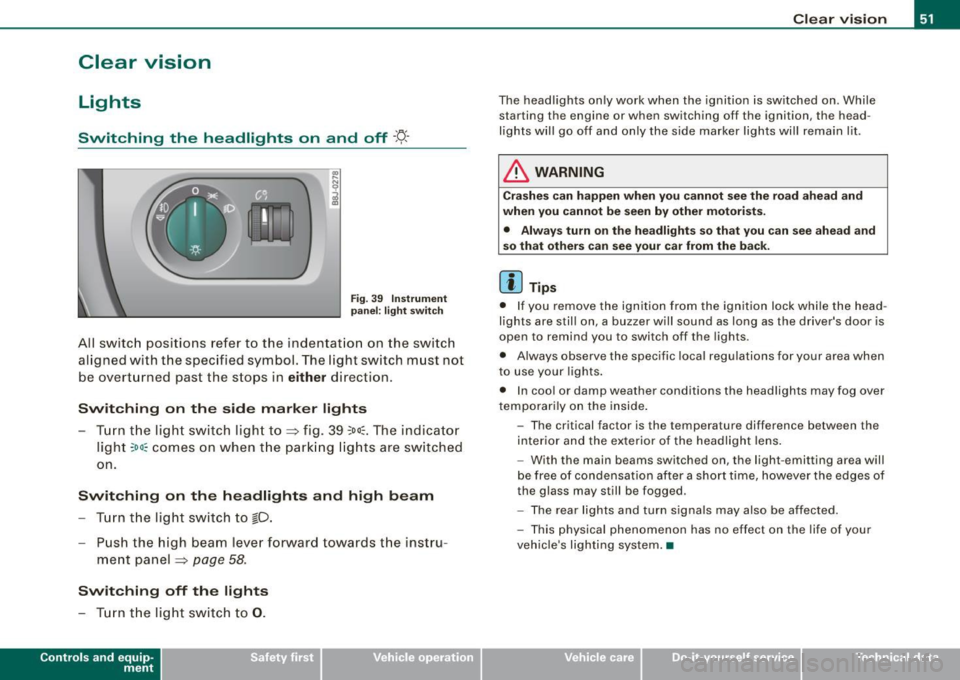
Switching the headlights on and off ·'t!-·
Fig. 3 9 I nstrum ent
p ane l: lig ht sw itch
All sw itc h positions refer to the indentat ion on the switch
aligned with the specified symbol. The light switch must not
be overturned past the stops in
either direction .
Switching on the side marker lights
-Tur n t he light switch ligh t to ==> fig. 39 ;oo; . The indi ca tor
light
; oo ~ comes o n when t he park ing lig hts are sw itched
on .
Switching on the headlights and high beam
- Turn t he light switch to lD.
- Push the high beam leve r fo rward towards t he instru -
ment panel ==> page
58.
Switching off the lights
-Tur n t he lig ht switch to 0 .
Con tro ls and eq uip
ment
Clear vision
The headlights only work when the ignition is switched on . While
starting the engine or when switching off the ignition, the head
lights will go off and only the side marker lights will remain lit .
& WARNING
Crashe s can happen when you cannot see the road ahead and
when you c annot be seen by other motori sts.
• Always tu rn on the headlight s so th at you can see ahead and
so that others can see your ca r from the ba ck.
[ i ] Tips
• I f you remove the ignition from the ignition lock wh ile the head
lights are still on, a buzzer will sound as long as the driver's doo r is
open to remind you to switch off the lights .
• Always observe the spec ific local regulations for your area when
to use your lights .
• I n coo l or damp weather conditions the headlights may fog over
tempo ra rily on the inside .
- The critical factor is the t emperature diff erence between the
interior and the ex te rior of the headlight lens .
- With the main beams switched on, the light -emitting area will
be free o f condensation after a short time, however the edges of
the glass may still be fogged .
- The rear lights and turn signa ls may also be affected.
- This physical phenomenon has no effect on the life of your
vehicle 's lighting system. •
Vehicle care I I irechnical data
Page 54 of 316

Clear vision
Ap plies to vehicles: with light senso r package
Sensor activated head and tail light control
In the "AU TO" position light sensors swit ch the he ad and
t a il lights on and off.
F ig . 40 Instru ment
pan el: light switch in
AUTO po siti on
T he se nsor-activated low beams have the same c haracteris
t ics as the headlig hts=>
page 51.
Activating
- Tur n th e lig ht s witch => fig. 40 t o positi on AUTO.
Deactivating
- Turn t he light swi tch to position 0 .
In the switch position AUTO the automatic head -and taillight
control
i s activated . The correspo nding symbol on the light swi tch
is lit .
With automatic head lights, the high -beam function is also avai lab le,
bu t with one restrict io n: If you have not switched the h ig h beams
back to low beams during automatic headlight operation (for
example, afte r driving through a tun nel), on ly the low beams come
on the next time automatic headlights are switched on. To use the
h igh beams, you first have to pull the high beam lever back and then
push the lever forward again. Parking
lights, headlights, fog lights and the rear fog light can be
swi tch ed on manually using the ligh t switch ~
page 51.
Light sensors located in the inside mirror housing and stem
constantly check the light conditions surrounding the vehicle. If
am bie nt brightness falls below a facto ry set value (e.g. wh en driv ing
into a tunnel), the head -and tai llights inc luding the license p late
ill um inat ion are automatica lly t urn ed on. When ambient br ightness
increases again, the external lights are turned off again~&.
Light sens or malfunction
If there is a light sensor malfunct ion, the symbol comes on in the
display . For sa fety reasons, the low beams are turned on perma
nent ly with the switch in
AUTO . However, you can continue to turn
the lights on and o ff using the light swi tch . Have the light sensor
checked as soon as possible at a dealership .
& WARNING
• Automatic head- and taillight control is only intended to ass ist
the driver . This feature doe s not relieve the dr iver of hi s re spon si
bil ity to check the headlights and to turn them on manually
ac cording to the current light and vi sibility conditions. For
e x ample , fog and rain cannot be detected by the light sensors .
Con sequently , always switch the headlights
io on under thes e
weather conditions and when driving
in the dark .
• Crashe s can happen when you cannot see the road ahead and
when you cannot be seen by other motor ists .
• Alway s turn on the headlights so that you can see ahead and
so that others can see your car from the ba ck .
[ i ] Tips
• I n the AUTO mode, the low beams are turned off when the igni
t ion is turned o ff. The remaining lights are turned o ff when the key
is taken out of the ignition lock. _.,
Page 55 of 316

• Do not attach stickers to the windshie ld in front of the sensors as
this can disable the automatic head -and tail light control and the
automatic glare -dimming of the rearview mirror(s) .
• Always o bserve the spec ific loca l regu la tions f or your area when
to use your lights .
• I n the event of a light sensor mal function, the d river informa tion
display will show the symbol . If a light sensor malfunct ion is indi
ca te d , you must use the ligh t switch to turn the low beams on and
off .•
Daytime running lights (DRL ) (USA models )
The daytime running ligh ts are tu rne d o n auto maticall y
w hen t he ignit ion is s witche d on.
Activating functions
Fig . 41 Sw itch for
daytime running lights
- Move the right thumbwhee l@ "DR L" ~ fig. 41 to posi
t io n
(D .
Deactivating functions
- Mov e th e rig ht thum bwh eel "DR L" to posi tion @ .
Con tro ls and eq uip
ment
Clear vision
T he daytime running lights can be turned on or off using this func
t ion. If the f unc tion is active, the dayti me r unning ligh ts are turn ed
on automatically when the ignition is switched on .
The daytime running lights are activated
only when the light switch
=> fig . 4 1 @ is at the O or AUTO* position .
& WARNING
Never use daytime running lights to see where you are going . They
are not bright enough and will not let you see far enough ahead for
s afety , e speci ally at dusk o r when it is dark . Be aware of changes
in outside light conditions when you are driving and respond by
sw itching on your low beams
io.
0 Note
Alway s be aware of change s in outside light conditions while you
a re dr iving. Respond in time to fading daylight by turning the light
s witch to position
io (or "AUTO" if your car is equipped with this
feature)
to turn on your headlights .•
Daytime running lights (Canada models only)
W hen you turn on the ig nit io n the daytime running lights
will come on automatically.
The daytime running lights are activated only when the light switch
@ =>fig. 41 is e ither at the
O o r the :oo: position . When the ignition
is switched on, there is a difference between vehicles with bi -xenon
lig hts and ha logen lamps :
• On vehicles with bi -xenon lights only the daytime running lamps
in the headlights will c ome on.
• On vehicles with halogen lights the front fog lights, side marker
lights and tail ligh ts come on automatica lly
~
Vehicle care I I irechnical data
Page 56 of 316
Clear vision
& WARNING
Never use daytime running lights to see where you are going. They
are not bright enough and will not let you see far enough ahead for
safety , especially at dusk or when it is dark . Be aware of changes
in outside light conditions when you are driving and respond by
switching on your low beams
fD.
0 Note
• With the light switch at the O or ;:oo: position , only your front fog
lights remain turned on when it turns dark outside . Even though
your instruments appear well lit, the road ahead of you is not. The
light pattern provided by fog lights alone is not suffic ient for safe
driving in poor light or darknes s. Therefore:
• Always be aware of changes in outside light conditions while
you are driving. Respond in time to fading daylight by turning the
light swit ch to position @:D (or "AUTO" if your car is equipped with
th is feature) to turn on your headlights.
[ i ] Tips
The day tim e run ning lig ht s fu nct io n c annot b e tur ned off. •
Applies to vehicles: with Adap tive ligh t
Adaptive light
W he n dri vin g around be nds , the r eleva nt area of the road
is b ette r illumin ated.
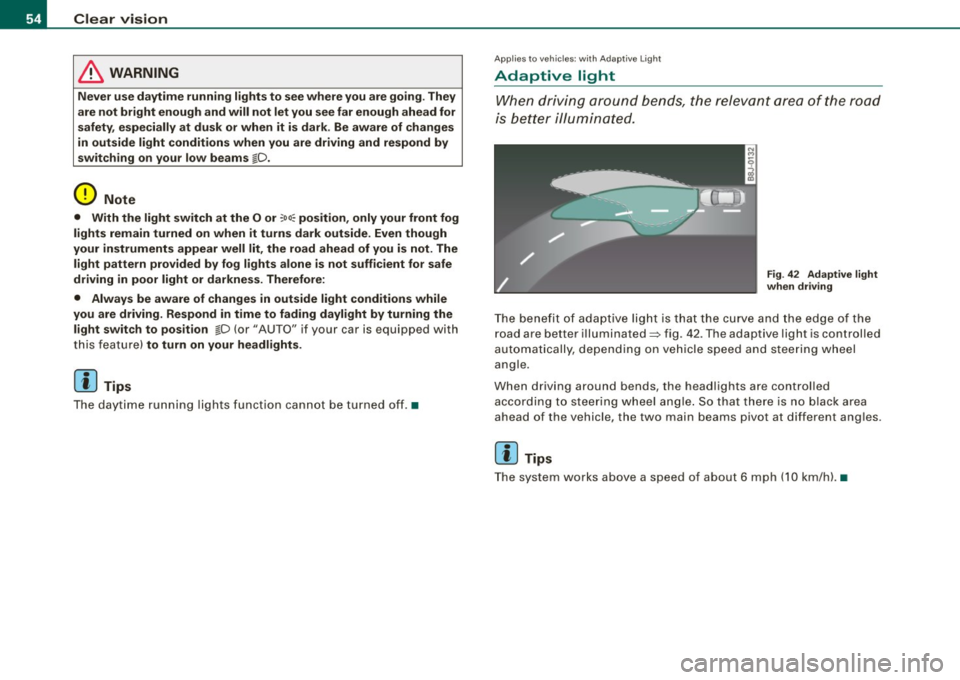
Fig . 42 Adapt ive light
when driving
T he bene fit of ada ptive lig ht is th at t he cu rve a nd the e dge of the
road are b etter illuminated=> fig. 42 . The adaptive light is controlled
a uto ma tically, de pendin g on ve hicle speed a nd s tee rin g w heel
angle.
When d riving around bends , the headlights are controlled
according t o steeri ng w heel angle. S o that ther e is no blac k ar ea
ahead of the veh icle, the two main beams pivot at different angles.
[ i ] Tips
T he system wor ks above a speed of about 6 mp h (10 km/ h). •