brake AUDI TT COUPE 2009 Owner's Manual
[x] Cancel search | Manufacturer: AUDI, Model Year: 2009, Model line: TT COUPE, Model: AUDI TT COUPE 2009Pages: 316, PDF Size: 71.16 MB
Page 104 of 316
• ..__T_ ra_ n_s_ m_ i_ s _s_ i_ o _ n ___________________________________________________ _
Applies t o vehi cles: with S tr oni c®
Driving Notes
The forward gears are shifted up or down automatically.
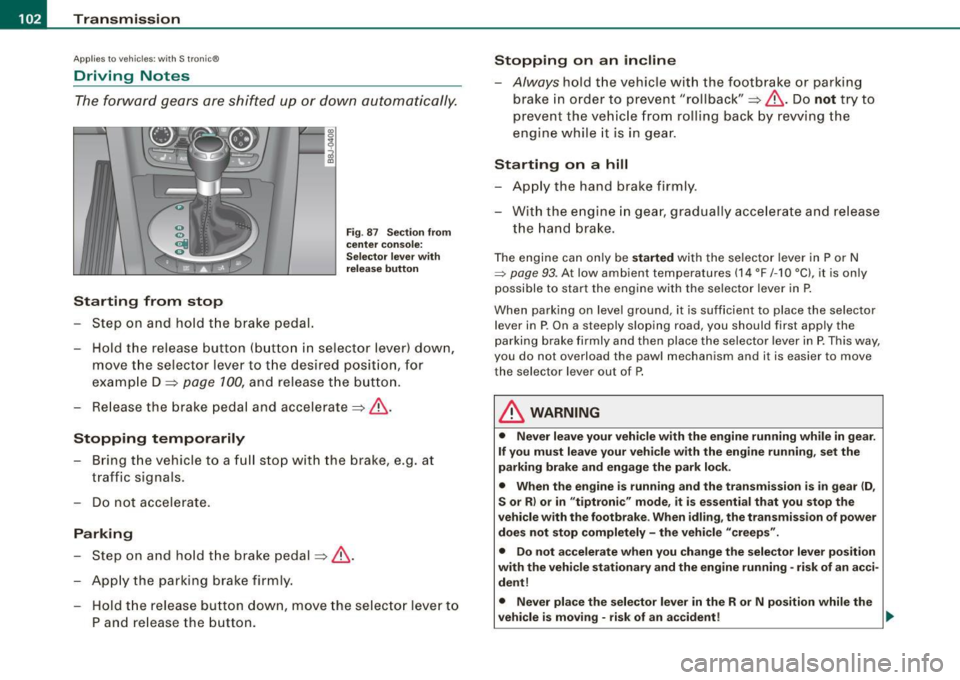
Starting from stop
-Step on and hold the brake pedal.
Fig. 87 Section from
center console:
Selector lever with
release button
- Hold the release button (button in selector lever) down,
move the selector lever to the desired position, for
example D =:>
page 100, and release the button.
- Release the brake pedal and accelerate =:>& .
Stopping temporarily
Bring the vehicle to a full stop with the brake, e.g. at
traffic signals.
Do not accelerate.
Parking
-Step on and hold the brake pedal =:> & .
Apply the parking brake firmly.
- Hold the release button down, move the selector lever to
P and release the button.
Stopping on an incline
-Always hold the vehicle with the footbrake or parking
brake in order to prevent "rollback"=:>& . Do
not try to
prevent the vehicle from rolling back by rewing the
engine while it is in gear.
Starting on a hill
- Apply the hand brake firmly.
- With the engine in gear, gradually accelerate and release
the hand brake.
The engine can only be started with the selector lever in P or N
=> page 93. At low ambient temperatures (14 °F /-1 O °C), it is only
possible to start the engine with the selector lever in P.
When parking on level ground, it is sufficient to place the selector
lever in P. On a steeply sloping road , you should first apply the
parking brake firmly and then place the selector lever in P. This way,
you do not overload the pawl mechanism and it is easier to move
the selector lever out of P.
& WARNING
• Never leave your vehicle with the engine running while in gear.
If you must leave your vehicle with the engine running, set the
parking brake and engage the park lock.
• When the engine is running and the transmission is in gear (D,
S or R) or in "tiptronic" mode, it is essential that you stop the
vehicle with the footbrake. When idling, the transmission of power
does not stop completely -the vehicle "creeps".
• Do not accelerate when you change the selector lever position
with the vehicle stationary and the engine running -risk of an acci
dent!
• Never place the selector lever in the R or N position while the
vehicle is moving -risk of an accident!
~
Page 105 of 316
_______________________________________________________ T_ r _a_ n_s_ m __ is_s_ io_ n_--JIIIII
& W ARNING !continued )
• If you have to bring your vehi cle to a stop while on an incline ,
keep the foot bra ke depressed all the way down so that the vehicle
does not start to roll backward . You should never hold the vehicle
using the clutch pedal if you are going to be stopped on an incline.
If you do, the clutch will start to slip when it overheats caused by
the constant overload. This is dangerous because if the vehicle starts to roll backward , you could cause an accident. If the clutch
should start to slip , you will feel the vehicle "jerk" and the selector
lever display will start blinking .
• Before driving down a steep slope , reduce your speed and shift
into a lower gear w ith utiptroni c".
• Do not ride the brakes or apply the brake pedal too often or too
long . Constant braking causes the brakes to overheat and
substantially reduces braking performance , increases braking
distance or causes complete failure of the brake system . •
Appl ies to vehicles: with S tronic transmission and Hill Descent Assist
Hill Descent Assist
Hill Des cent A ssist help s the driv er w hen d riving d own
i n clin es.
Hill Desc ent Ass ist is activated by pressin g the brake wh ile
descending when the selector lever is in
D/S . The S tronic transmis
sio n autom aticall y shi fts d ow n to a gear su ita ble for th e incl ine. H ill
D escent Assist attempts to maintain the current vehicle speed when
th e bra king occurs, as far as physi cal a nd tec hnic al lim its a llow. It
may be necessary to adjust the speed usin g the brakes.
H ill Desce nt As sis t switches off when the inc line level s out or when
the gas pedal is pressed.
O n vehicles with cruise control*=> page 96, Hill Descent Assist is
a lso a ctivat ed when the sp eed is s et.
Con tro ls and eq uip
ment
& WARNING
Hill Descent Assist cannot overcome physical limitations , so it
may not be possible to maintain a constant vehicle speed under all
circumstances . Always be ready to apply the brakes . •
App lies to vehicles: with S t ronic®
tiptronic operation
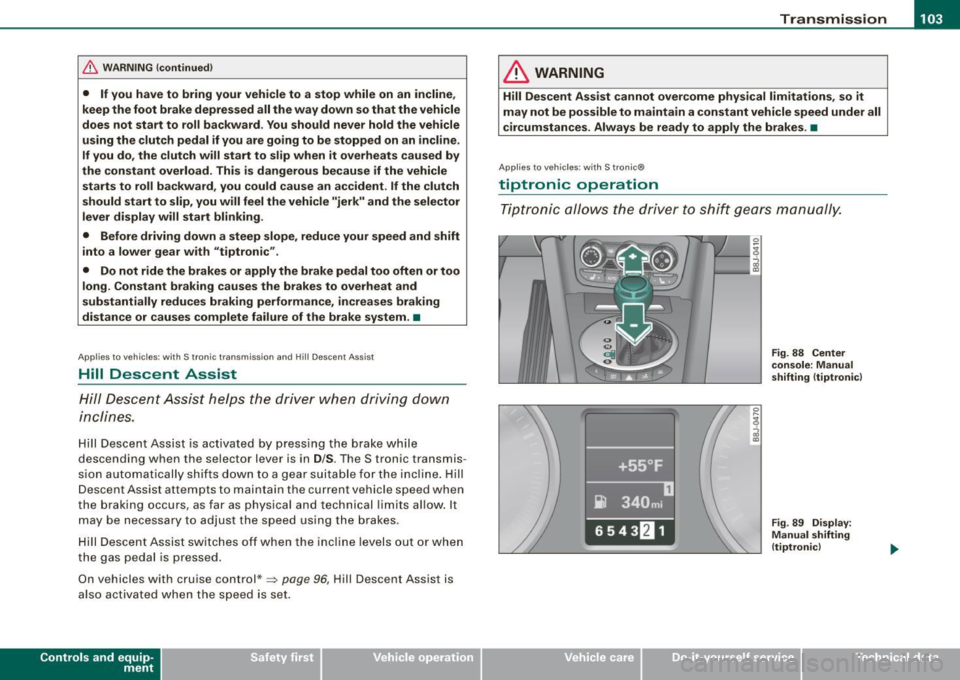
T ip tron ic allo ws t he drive r to shi ft ge ars manu ally.
Vehicle care I I
Fig . 88 Center
c on sole : Manua l
shifting (t iptronic )
Fig. 89 Disp lay:
Manual shifting
(tiptronic )
irechnical data
Page 107 of 316
____________________________________________________ T_ r_a _n _ s_ m __ is_s_ i _o _ n __ llll
Ap plies to vehicles : wit h S tro ni c®
Kick -dovvn feature
The kick-down feature allows maximum acceleration.
If you depress the accelerator pedal fully beyond the full-throttle
position, the transmission automatically downshifts one gear,
depending on vehicle speed and engine rpm. The upshift into the
next higher gear takes place as soon as the maximum specified
engine speed is reached.
& WARNING
Please note that the drive wheels can spin if the kick-down is used
on a smooth slippery road -risk of skidding! •
Applies to vehicles : withs t ro ni c®
Launch Control Program
The Launch Control Program permits maximum accelera
tion .
In order to use Launch Control, the ASR (Anti-Slip Regula
tion) must be disabled. When ASR is disabled, the ESP
warning/indicator light 9 in the instrument cluster illumi
nates . So that Launch Control can be used, the engine must
be at operating temperature and the steering wheel must
not be turned .
- With the engine running, briefly press the ESP button.
The message "ASR off" appears in the instrument cluster
d isplay.
- Shift the gear lever to "S" or the tiptronic® position.
- Step on the brake pedal with your left foot and keep the
brake pedal fully depressed for at least one second.
Controls and equip
ment
- With your right foot, step on the accelerator to the wide
open throttle position or Kickdown. The engine speed
settles at about 3,200 rpm.
- Take your left foot off the brake.
The S tronic® in your vehicle is electronically controlled. A special
Launch Control Program provides the best acceleration from a
standing start .
& WARNING
• Always adapt your driving to the traffic flow.
• Only use Launch Control when road and traffic conditions allow
it and other drivers will not be endangered or annoyed by your
driving and the acceleration of the vehicle.
• Make sure that ESP remains enabled. With the ESP disabled,
the vehicle could brake away, particularly on a slick and slippery road -risk of skidding!
• Once acceleration is finished, switch ASR on again by briefly
pushing the ESP button. •
Applies to vehicles: with S tronic®
Back-up program
In the event of a system malfunction, there is an back-up
program.
In the event of system malfunctions, the automatic transmission
switches to the fail- safe mode. This is signalled by one segment or
all the segments in the display illuminating or going out .
Th e effect of a system malfunction can be one of the following:
• The program shifts only into certain gears.
• Reverse gear can no longer be engaged.
I • •
Page 108 of 316
• ..__T_ ra_ n_s_ m_ i_ s _s_ i_ o _n ___________________________________________________ _
• The manual shift program (tiptronic) is switched off in the fail
safe mode.
If the transmission switches to fail-safe mode, you should take the
vehicle to an authorized Audi dealership as soon as possible to have
the condition corrected .•
A pp lies to vehi cles: wit h S tronic ®
Emergency release for selector lever
If the vehicle's power supply fails, the selector lever can
be released in an emergency.
rr- ~v r::.~=::::::= ::;~~,:,:J ::: __ -tg
i
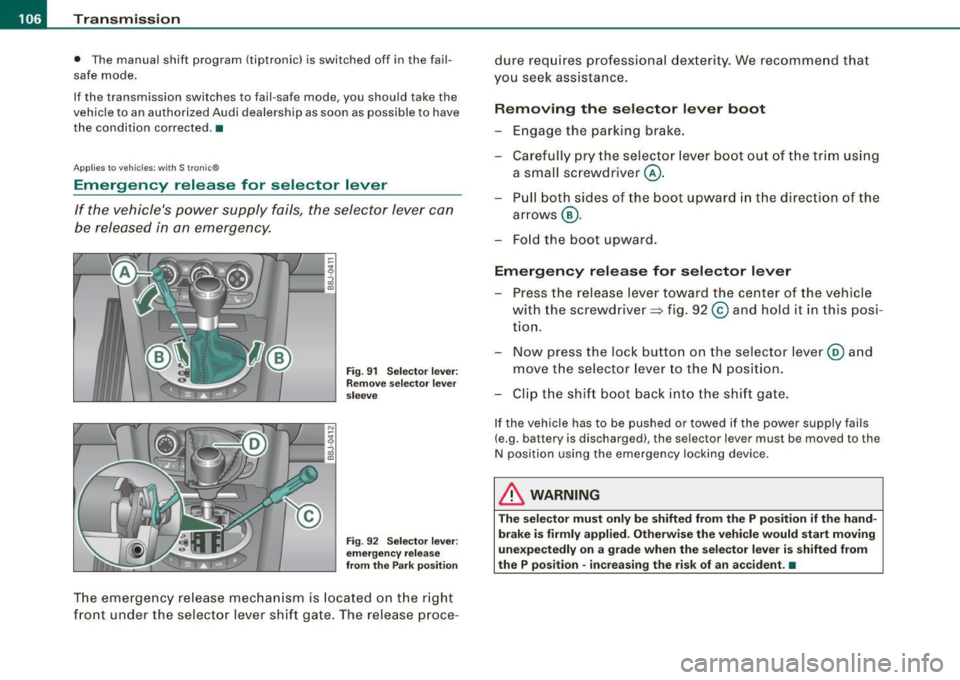
Fig. 91 Selector lever:
Remove selector lever
sleeve
Fig . 92 Selector lever:
emergency release
from the Park position
The emergency release mechanism is located on the right
front under the selector lever shift gate. The release proce- dure
requires professional dexterity. We recommend that
you seek assistance.
Removing the selector lever boot
-Engage the parking brake.
- Carefully pry the selector lever boot out of the trim using
a small screwdriver @.
- Pull both sides of the boot upward in the direction of the
arrows @.
- Fold the boot upward.
Emergency release for selector lever
-Press the release lever toward the center of the vehicle
with the screwdriver ~ fig. 92
© and hold it in this posi
tion.
- Now press the lock button on the selector lever@ and
move the selector lever to the N position.
- Clip the shift boot back into the shift gate.
If the vehicle has to be pushed or towed if the power supply fails
(e.g . battery is discharged), the selector lever mus t be moved to the
N position using the emergency locking device.
& WARNING
The selector must only be shifted from the P position if the hand
brake is firmly applied. Otherwise the vehicle would start moving
unexpectedly on a grade when the selector lever is shifted from
the P position -increasing the risk of an accident. •
Page 109 of 316
___________________________________________________ H_ o_m_ e_ L_ i_ n _ k_ ® __ ,n
Homelink®
Universal remote control
A pplies to vehi cles: w ith Home link® unive rsa l re mo te cont ro l
General information
The Homelink® fea ture c an learn up to three radio
frequency codes for m ost current transmitters used for
operating garage doors, estate gates, home or outdoor
lighting systems, and other devices.
You must first pr ogram the Homelink® transmitter before you can
use the system=> page 108, "Programming the Homelink® trans
mitter".
In order to program the Homelink® transmitter for devices uti lizing
rolling code, a second person on a ladder who can safe ly reach the
garage door opener motor is recommended. It is also necessary to
locate the "learn" button on your garage door opener motor . Refer
t o the operating instructions for the opener, as the location a nd
color of this but ton may vary by manufacturer.
You can still use the origina l remote control for the device at any
time.
& WARNING
• Never use the Homelink"" transmitte r with any garage door
opener that does have not the safety stop and rever se feature as
required by federal safety standards . This includes any garage
door opener model manufactured before April 1 , 1982 .
• A garage door opener whi ch cannot detect an obje ct, signaling
the door to stop and rever se does not meet current federal safety
standard s. U sing a ga rage door opener without these features
increases risk of serious injury or death .
Controls and equip
ment
& W ARNIN G (continu ed )
• For safety re asons never relea se the p ark ing brake or st art the
engine while anyone i s standing in front of the vehi cle .
• A garage door or an estate gate may sometimes be set
in
motion when the Homelink ® remote control is being
programmed . If the d evice is repeated ly act ivated , this can over
strain motor and damage it s elec trical component s -an over
heated motor is a fire hazard !
• To avoid po ssible in juries or property damage, please alway s
make ab solutely certain that no persons or obje cts are located in
the range of motion of any equipment being operated.
[ i ] Tips
• If you wou ld like more in forma tion on Hom elink ®, where to
purchase the Homelink ® compatible products, or wou ld like to
p urchase the Homelink ® Home Light ing Package , please ca ll toll
free : 1-8 0 0-355 -3515.
• Fo r Declaratio n of Co mpliance to United S ta tes FCC a nd In dus try
Canada regulations=> page
296. •
I • •
Page 110 of 316
• ..__H_ o_m_ e_ L_ i_ n _k_ @_R __________________________________________________ _
Applies to vehicles: with Home li nk® universal remote control
Programming the Homelink ® transmitt er
The transmitter is programmed in two phases. For rolling
code transmitters, a third phase is also necessary.
1----------------.....:!i:l
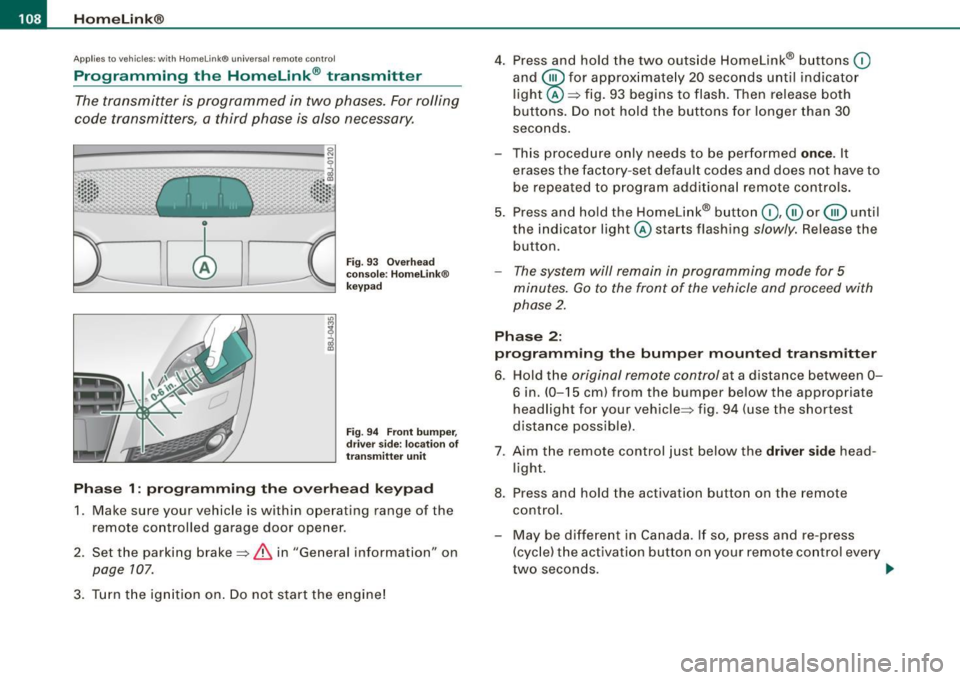
Fig . 93 Overhead
console : Homelink®
keypad
Fig. 94 Front bumper,
driver side: location of
transmitter unit
Phase 1: programming the overhead keypad
1. Make sure your vehicle is within operating range of the
remote controlled garage door opener .
2. Set the parking brake~
& in "General information" on
page 107.
3. Turn the ignition on. Do not start the engine! 4. Press and hold the two outside Homelink® buttons
(D
and
@for approximately 20 seconds until indicator
light @::::::, fig. 93 begins to flash. Then release both
buttons. Do not hold the buttons for longer than 30
seconds.
This procedure only needs to be performed
once . It
erases the factory-set default codes and does not have to
be repeated to program additional remote controls.
5. Press and hold the Homelink® button
(D , ® or @ until
the indicator light @starts flashing
slowly. Release the
button.
- The system will remain in programming mode for 5
minutes.
Go to the front of the vehicle and proceed with
phase 2.
Phase 2:
programming the bumper mounted transmitter
6. Hold the original remote control at a distance between 0-
6 in. (0-15 cm) from the bumper below the appropriate
headlight for your vehicle~ fig . 94 (use the shortest
distance possible) .
7. Aim the remote control just below the
driver side head
light.
8. Press and hold the activation button on the remote control.
- May be different in Canada. If so, press and re-press
(cycle) the activation button on your remote control every
two seconds. .-,,
Page 122 of 316
........ _o_ r_iv _i_ n""' g::;._ S_ a_f _e _ly =---------------------------------------------------
examp les w ill make you mo re aware of seating positions that ar e
d an gerous .
Therefore, whenever the vehicle is moving:
• ne ver stan d up i n the vehicle
• never stand on the seats
• never knee l on th e seats
• n ever ride with th e seatba ck re cl in ed
• never lie down on the rear seat
• nev er lea n up aga inst t he instrument pa ne l
• n ever sit on the e dge of the seat
• never sit sideways
• ne ve r le an ou t th e w indo w
• never put your feet out the window
• never put your feet on t he instrument p ane l
• n ever re st yo ur f ee t on t he seat cus hion or back of the sea t
• never ride in the footwell
• n ever ride i n the car go area
& WARNING
Improper seating positions increase the risk of serious personal
injury and death whenever a vehicle is being used.
• Always make sure that all vehi cle occupants stay in a proper
seating position and are properly restrained whenever the vehicle
is being used . •
Driver and passenger side footwell
Important safety instructions
& WARNING
Always make sure that the knee airbag can inflate without inter
ference . Objects between yourself and the airbag can increase the
risk of injury in an a ccident by interfering with the way the airbag
deploys or by being pushed into you as the airbag deploys .
• No persons (children) or animals should ride in the footwell
in
front of the passenger seat . If the airbag deploys , this can result in
serious or fatal injuries .
• No objects of any kind should be carried in the footwell area in
front of the driver's or passenger 's seat . Bulky objects (shopping
bags , for example) can hamper or prevent proper deployment of
the airbag. Small objects can be thrown through the vehicle if the
airbag deploys and injure you or your passengers. •
Pedal area
Pedals
The pedal s must a lways be fre e to move a nd mus t never
b e in terfe red with by a flo or mat or a ny othe r objec t.
Make sure that all pedals move freely w ithout interfe rence and that
n oth ing preve nts t hem fr om retu rni ng to t heir or igin a l pos itions.
On ly use floor mats that leave the pedal a rea free and can be
se cured w ith flo or mat fa stene rs.
If a bra ke circu it fai ls, i ncr eased brake pedal travel is r equ ired to
bring the veh icle to a full stop.
Page 123 of 316
---------------------------------------------------=D..:.r..:..iv .:....:..: in..:. 9 ::!-- S .=..::a:..:f...:e :..: l~y ---
& WARNING
Pedals that cannot move freely can cause loss of vehicle control
and increase the risk of serious injury.
• Never place any objects in the driver's footwell . An object could
get into the pedal area and interfere with pedal function. In case
of sudden braking or an accident, you would not be able to brake
or accelerate!
• Always make sure that nothing can fall or move into the
driver's footwell. •
Floor mats on the driver side
Always use floor mats that can be securely attached to
the floor mat fasteners and do not interfere with the free
movement of the pedals.
- Make sure that the floor mats are properly secured and
cannot move and interfere with the pedals =>& .
Use only floor mats that leave the pedal area unobstructed and that
are firmly secured so that they cannot slip out of position . You can
obtain suitable floor mats from your authorized Audi Dealer.
Floor mat fasteners are installed in your Audi.
Floor mats used in your vehicle must be attached to these fasteners .
Properly securing the floor mats will prevent them from sliding into
positions that could interfere with the pedals or impair safe opera
tion of your vehicle in other ways.
& WARNING
Pedals that cannot move freely can result in a loss of vehicle
control and increase the risk of serious personal injury.
• Always make sure that floor mats are properly secured.
Controls and equip ment Safety first
Vehicle operation
& WARNING (continued)
• Never place or install floor mats or other floor coverings in the
vehicle that cannot be properly secured in place to prevent them
from slipping and interfering with the pedals or the ability to
control the vehicle.
• Never place or install floor mats or other floor coverings on top
of already installed floor mats. Additional floor mats and other
coverings will reduce the size of the pedal area and interfere with
the pedals.
• Always properly reinstall and secure floor mats that have been
taken out for cleaning.
• Always make sure that objects cannot fall into the driver foot
well while the vehicle is moving. Objects can become trapped
under the brake pedal and accelerator pedal causing a loss of
vehicle control. •
Stowing luggage
Loading the luggage compartment
All luggage and other objects must be properly stowed
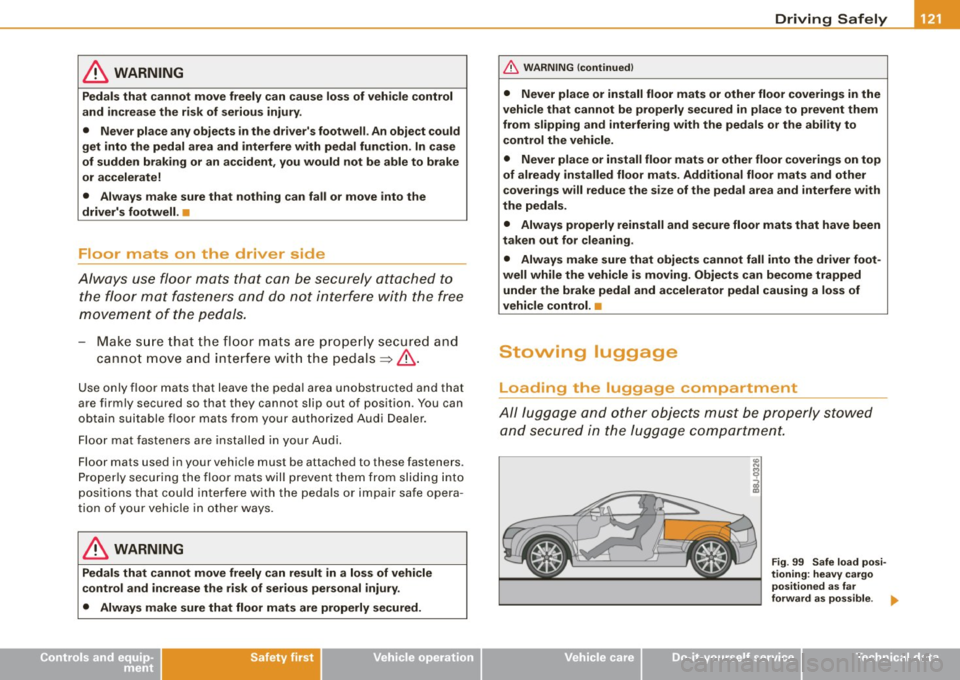
and secured in the luggage compartment.
Vehicle care
co N
9
g!
Fig. 99 Safe load posi
tioning: heavy cargo
positioned as far
forward as possible. ..
Do-it-yourself service Technical data
Page 184 of 316

___ ln_ t _e_ ll_,ig ..,_ e_ n_t _t_ e_ c_ h_ n_o _ l_o ..:-g"'-' y'- -------------------------------------------
Intelligent technology
Notice about data recorded by
vehicle control modules
Your vehicle is not equipped with an Event Data Recorder (EDR),
installed by some manufacturers for the express purpose of
capturing data for retrieval after an accident or crash event . EDR's
are sometimes called "crash recorders".
Some state laws restrict the retrieval or downloading of data stored
by EDR's that were installed in a vehicle for the express purpose of
retrieving data after an accident or crash event w ithout the owner's
consent.
Although your vehicle is not equipped with an EDR, it is equipped
with a number of electronic control modules for various vehicle systems such as, for example, engine function, emission control, as
well as for the airbags and safety belts.
These electronic control modules also record vehic le-related data
during norma l vehicle opera tion for diagnostic and repair purposes .
The recording capacity of the electronic control modules is limited
to data (no sound is recorded) and only a small amount of data is
actually recorded over a very limited period of time and stored when
a system fault or other condition is sensed by a control unit. Some
of the data then stored may relate to vehic le speed, direction,
braking as well as restraint system use and performance in the
even t of a crash or other condition . Stored data can only be read and
downloaded with special equipment.
Electronic Stabilization Program (ESP)
Genel'61
The Electronic Stability Program increases driving
sta bility.
Fig . 13 0 Cente r
cons ole with ESP
sw itch
With ESP, control over the veh icle is increased in situations when
the vehicle is close to the limits of grip, such as during acce leration
and in curves. ESP reduces the risk of skidding a nd improves vehicle
stability under all road conditions . It operates at all speeds .
The Anti-Lock Brake System (ABS), E lec tronic Differentia l Lock (EDS)
and Anti-Slip Regulation System (ASR) are integrated in the Elec
tronic Stability Program .
H ow ESP work s
The ESP control unit processes the following data from high-sensi
tive sensors: the rotational speed of the vehicle about its vertica l
axis, fore -and -aft and lateral acceleration forces, brake pressure and
steering angle.
Using steering ang le and vehicle speed, the direction the driver
wishes to travel is determined and continuously compared with
actual vehicle behavior . If the two do not match, for example when
Page 185 of 316
the vehicle begins to skid, ESP brakes the appropriate wheel automatical ly .
The vehicle is stabilized again by the forces acting on the wheel during braking. With an oversteering vehicle (tendency for the rear
end to skid out of the curve), the brake application is mainly at the
front wheel on the outside of the curve, with an understeering
vehicle (tendency to run wide in the curve) at the rear wheel on the
inside of the curve or additionally at the other wheels as needed .
This brake application is accompanied by noises.
ESP works in conjunction with ABS=:>
page 187. If there is ma lfunc
tion in the ABS, ESP is also inoperative .
Activa ting
The ESP is automatica lly activated when the engine is started, and
it performs a self-test. As soon as the test is completed, the system
is in normal operating mode . With ASR deactivated, or with ESP/ASR
deactivated, pressing the button=>
page 182, fig. 130 returns the
system to normal operation.
D eac tiva ting
ESP should norma lly be activated at all times because this ensures
optimum vehicle stability . Only in certain exceptional cases it does
make sense to deactivate Anti -Slip Regulation (ASR) or the Elec
tronic Stability Program !ESP) by pressing the button =:>
page 182,
fig. 130. Both deactivation stages can only be activated from normal
mode.
Dea cti vat ing ASR
Tap the switch . Deactivation is indicated by slow flashing of the ESP
lamp in the instrument c luster. In certain situations (e.g. driving
with snow chains, in deep snow or on loose ground, or when rocking the car free), it may be necessary to deactivate ASR. Deacti
vation is effective only up to a speed of about 45 mph (70 km/h). At higher speeds, ASR is switched on again automatical ly in front
whee l drive vehicles, deactivation is possible only up to about 30
mph (50 km/h). With all -whee l drive vehicles, ASR is active above
Controls and equip
ment Safety first Vehicle operation
In
te llig ent tec hn olo gy
about 45 mph (70 km/h) and deactivated automatical ly below this
speed.
D eac tiva tin g ES P/ASR
Press the button for more than 3 seconds . Deactivation is indicated
by the ESP lamp in the instrument c luster staying on permanently .
This deactivates the E lectronic Stabi lity Program (ESP) in addition to
ASR . No Electronic Stability System operation and no Anti-Slip
Regu lation is availab le across the entire speed range; ASR and ESP
are activated only when the brakes are used for the duration of the
braking action and remain active until a stab le vehicle condition has
been reached. There is no driving situation which requires ESP to be
deactivated, so this should only be done if the driver's skill and the
traff ic situation permit .
& WARNING
• The limi ts of ph ysics ca nnot be suspe nd ed by E SP. E ven in vehi
cles w ith ESP, you should always adapt your dr iving to road and
tr affi c co ndition s. Thi s is part icul ar ly tr ue on a s lippe ry and wet
road . Do not be te mpt ed b y th e incre as ed safet y prov ided t o ta ke
ri sks - dang er of an acc ide nt!
• Plea se not e that when ASR or ESP /ASR i s de activ ated , the drive
w heel s ca n spin on icy and slipper y ro ad s an d the vehi cle can
break away - da nger of skiddin g!
Ii ] Tip s
In the event of a defect in the rear spoiler system or in Audi
magnetic ride, it can happen that ASR and ASR/ESP cannot be deac
tivated, or they are activated automatica lly in the deactivated
state. •
Vehicle care Do-it-yourself service Technical data