ESP AUDI TT COUPE 2014 User Guide
[x] Cancel search | Manufacturer: AUDI, Model Year: 2014, Model line: TT COUPE, Model: AUDI TT COUPE 2014Pages: 284, PDF Size: 34.42 MB
Page 44 of 284
Downloaded from www.Manualslib.com manuals search engine Lights
and vision
Anti-dazzle setting
Your vehicle is equipped with a manual or auto
matic* anti-dazzle interior mirror.
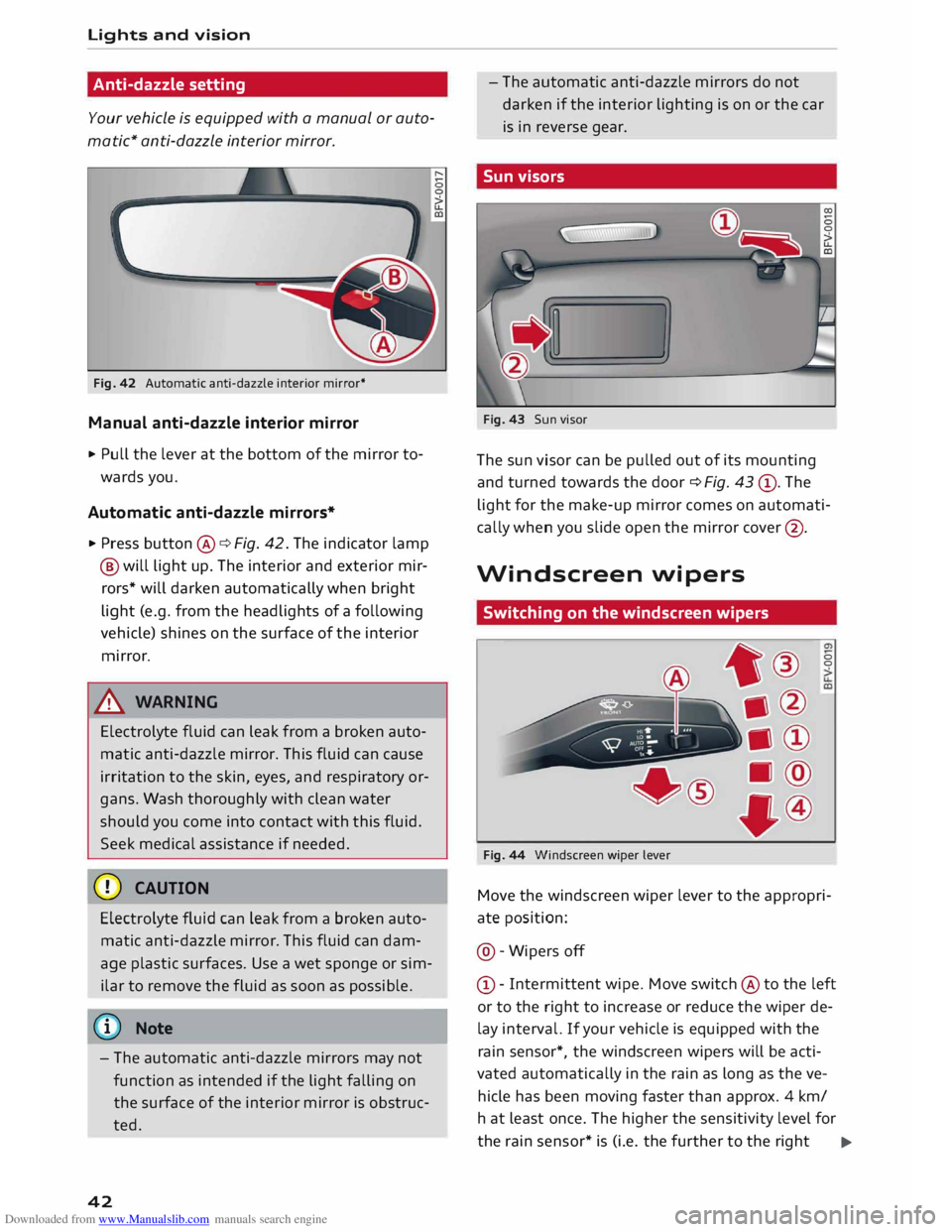
Fig. 42 Automatic anti-dazzle interior mirror*
Manual anti-dazzle interior mirror
.,. Pull the lever at the bottom of the mirror to
wards you.
Automatic anti-dazzle mirrors*
.,. Press button @¢ Fig. 42. The indicator lamp
@ will light up. The interior and exterior mir
rors* will darken automatically when bright
light (e.g. from the headlights of a following
vehicle) shines on the surface of the interior
mirror.
& WARNING
Electrolyte fluid can leak from a broken auto
matic anti-dazzle mirror. This fluid can cause
irritation to the skin, eyes, and respiratory or
gans. Wash thoroughly with clean water
should you come into contact with this fluid.
Seek medical assistance if needed.
CD CAUTION
Electrolyte fluid can Leak from a broken auto
matic anti-dazzle mirror. This fluid can dam
age plastic surfaces. Use a wet sponge or sim
ilar to remove the fluid as soon as possible.
(©) Note
- The automatic anti-dazzle mirrors may not
function as intended if the light falling on
the surface of the interior mirror is obstruc
ted.
42 -
The automatic anti-dazzle mirrors do not
darken if the interior lighting is on or the car
is in reverse gear.
Sun visors
Fig. 43 Sun visor
The sun visor can be pulled out of its mounting
and turned towards the door ¢ Fig. 43 ®· The
light for the make-up mirror comes on automati
cally when you slide open the mirror cover@ .
Windscreen wipers
Switching on the windscreen wipers
Fig. 44 Windscreen wiper Lever 0
0
Move the windscreen wiper lever to the appropri
ate position:
@ -Wipers off
© -Intermittent wipe. Move switch @ to the left
or to the right to increase or reduce the wiper de
lay interval. If your vehicle is equipped with the
rain sensor*, the windscreen wipers will be acti
vated automatically in the rain as long as the ve
hicle has been moving faster than approx. 4 km/
ha t least once. The higher the sensitivity level for
the rain sensor* is (i.e. the further to the right ..,.
Page 55 of 284
Downloaded from www.Manualslib.com manuals search engine 0
N
co
....
\D Lfl
N
Lfl
.... Heating
and cooling
Air conditioner
Description
The air conditioner heats, cools and dehumidifies
the air inside the vehicle. It operates most effec
tively with the windows closed. If the vehicle has
been standing in the sun, it may cool down faster
if you open the windows briefly to let the hot air
escape.
The pollution filter removes impurities, such as
dust and pollen, from the air.
@ For the sake of the environment
If you wish to save fuel, switch off the cooling
mode on the air conditioner by pressing the
Controls for manual air conditioner
Applies to vehicles: with manual air conditioner
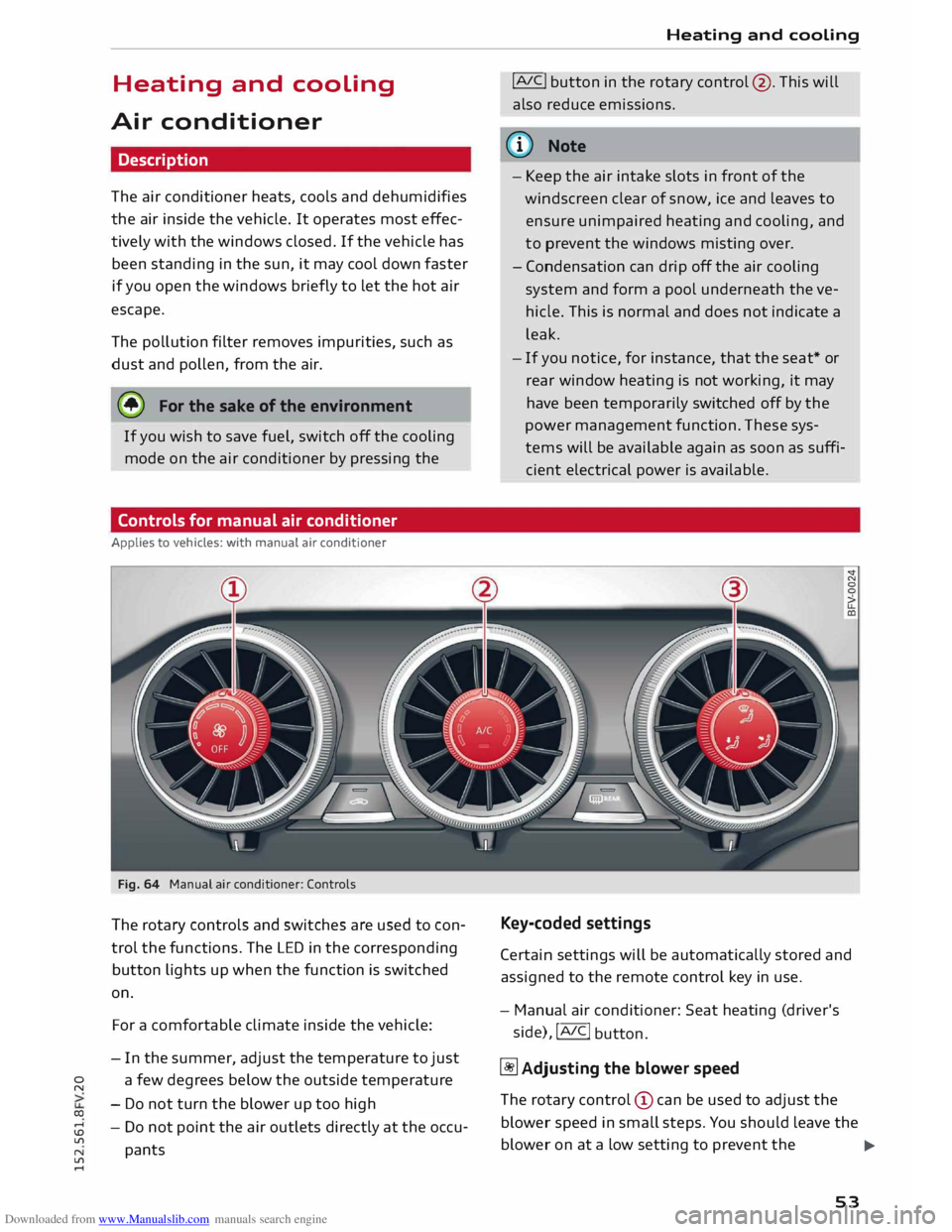
Fig. 64 Manual air conditioner: Controls
The rotary controls and switches are used to con
trol the functions. The LED in the corresponding
button lights up when the function is switched
on.
For a comfortable climate inside the vehicle:
- In the summer, adjust the temperature to just
a few degrees below the outside temperature
- Do not turn the blower up too high
- Do not point the air outlets directly at the occu-
pants Heating
and cooling
!AJC! button in the rotary control @. This will
also reduce emissions.
ijJ} Note
- Keep the air intake slots in front of the
windscreen clear of snow, ice and leaves to
ensure unimpaired heating and cooling, and
to prevent the windows misting over.
- Condensation can drip off the air cooling
system and form a pool underneath the ve
hicle. This is normal and does not indicate a
leak.
- If you notice, for instance, that the seat* or
rear window heating is not working, it may
have been temporarily switched off by the
power management function. These sys
tems will be available again as soon as suffi
cient electrical power is available.
Key-coded settings
Certain settings will be automatically stored and
assigned to the remote control key in use.
- Manual air conditioner: Seat heating (driver's
side), !AIC!
button.
� Adjusting the blower speed
The rotary control (!) can be used to adjust the
blower speed in small steps. You should Leave the
blower on at a Low setting to prevent the
...,
53
Page 61 of 284
Downloaded from www.Manualslib.com manuals search engine 0
N
co
....
\D L/'l
N
L/'l
.... Avoid
driving at high speed
Avoid travelling at top speed. Fuel consumption,
exhaust emissions and noise Levels all increase
very rapidly at higher speeds. Driving at moder
ate speeds will help to save fuel.
Do not let the engine idle for longer than
necessary
Engine idling periods are automatically reduced
on vehicles with start/stop system*. On vehicles
without start/stop system*, it is worthwhile
switching off the engine at Level crossings, for in
stance, or at traffic lights with a Long red phase.
The fuel saved after only 30 -40 seconds is great
er than the amount of fuel needed to restart the
engine.
The engine takes a very Long time to warm up
when it is running at idling speed. Mechanical
wear and pollutant emissions are also especially
high during this initial warm-up phase. It is
therefore best to drive off immediately after
starting the engine. Avoid running the engine at
high speed.
Regular ser vicing
Regular servicing can establish a basis for good
fuel economy before you start driving. A well
serviced engine gives you the benefit of im
proved fuel efficiency as well as maximum relia
bility and an enhanced resale value.
A poorly maintained engine can consume up to
ten percent more fuel than necessary.
Check the oil level when filling the tank. Oil con
su mption depends to a great extent on the en
gine load and engine speed. It is quite normal
that the oil consumption of a new engine only
reaches its lowest level after a certain mileage.
This means that the oil consumption can only be
properly assessed after about 5,000 km. Depend
ing on your personal driving style, oil consump
tion can be up to 0.5 Ltr./1,000 km.
Avoid short trips
The engine and emission control system need to
reach their proper working temperature in order
to minimise fuel consumption and emissions . Driving
A cold engine uses disproportionately more fuel.
The engine only reaches its working temperature
after about four kilometres, when fuel consump
tion will return to a normal level.
Check tyre pressures
Always make sure the tyres are inflated to the
correct tyre pressures to save fuel. If the tyre
pressures are just 0.5 bar too Low, this can in
crease the fuel consumption by as much as 5 %.
Due to the greater rolling resistance, under-infla
tion also increases tyre wear and impairs han
dling.
The tyre pressures should always be checked
when the tyres are cold.
Do not use winter tyres all through the year; they
will increase fuel consumption by up to 10 %.
Avoid carrying unnecessary loads
Every kilo of extra weight will increase the fuel
consumption, so it is worth checking the Luggage
compartment occasionally to make sure that no
unnecessary Loads are being transported.
Save electrical energy
The engine drives the alternator to generate elec
tricity. This means that fuel consumption rises
when more power is required for electrical equip
ment. Switch off electrical equipment when it is
not needed. Electrical equipment which uses a
Lot of electricity includes the blower (at a high
setting), the rear window heating and the seat
heating*.
59
Page 65 of 284
Downloaded from www.Manualslib.com manuals search engine 0
N
co
....
\D Lfl
N
Lfl
.... Starting
the engine after a malfunction
If the remote control key battery is exhausted or
if radio interference or a system malfunction oc
curs, extra steps may be necessary in order to
start the engine.
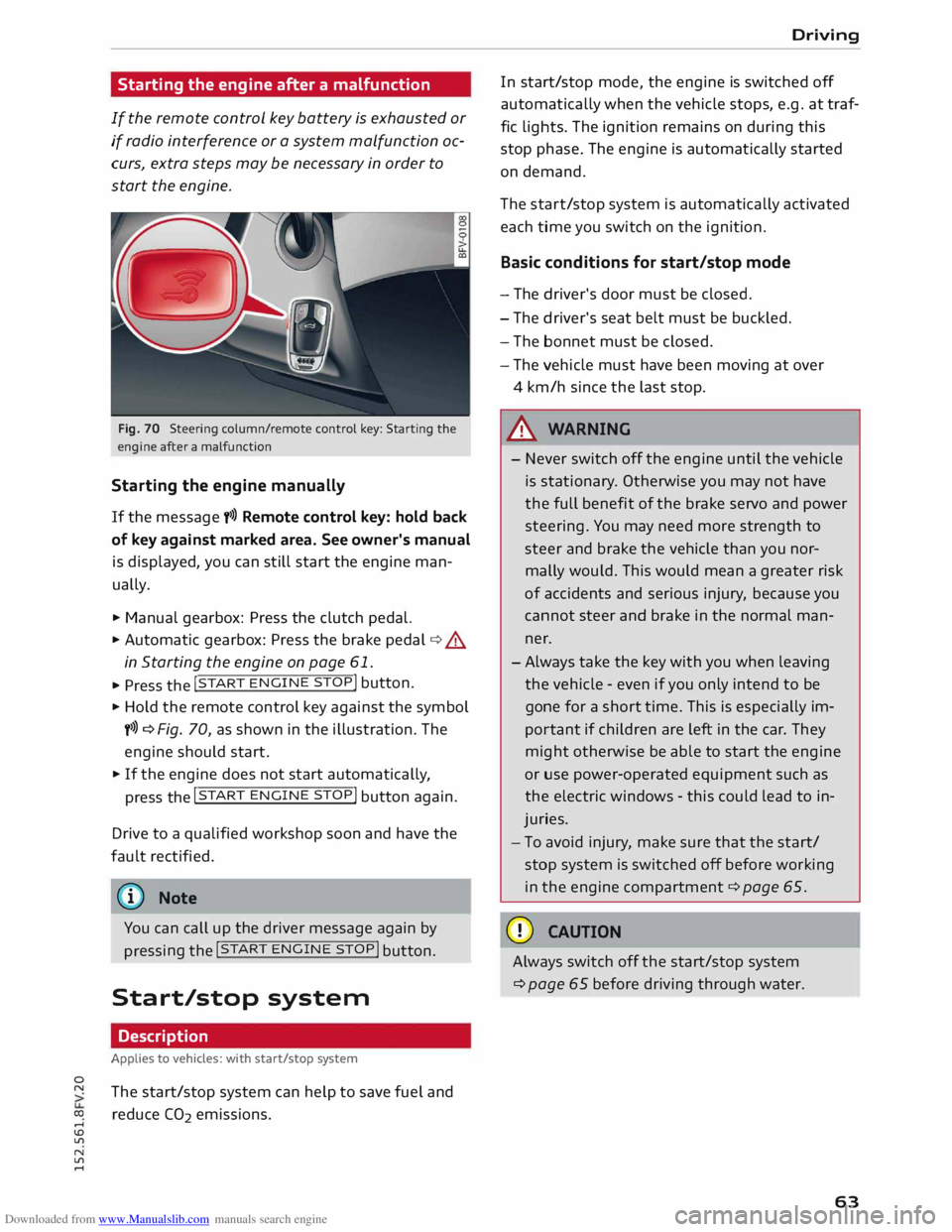
Fig. 70 Steering column/rem ote control key: Starting the
engine after a malfunction
Starting the engine manually
If the message y>>) Remote control key: hold back
of key against marked area. See owner's manual
is displayed, you can still start the engine man
ually.
.,.. Manual gearbox: Press the clutch pedal.
.,.. Automatic gearbox:
Press the brake pedal¢.&
in Starting the engine on page 61 .
... Press the !
START ENGINE
STOP!
button.
.,.. Hold the remote control key against the symbol
y>>) ¢ Fig. 70, as shown in the illustration. The
engine should start .
.,.. If the engine does not start automatically,
press the !START
ENGINE
STOP!
button again.
Drive to a qualified workshop soon and have the
fault rectified.
{D Note
You can call up the driver message again by pressing
the !START
ENG
INE
STOP! button.
Start/stop system
Description
Applies to vehicles: with start/stop system
The start/stop system can help to save fuel and
reduce CO2 emissions. Driving
In start/stop mode, the engine is switched off
automatically when the vehicle stops, e.g. at traf
fic lights. The ignition remains on during this
stop phase. The engine is automatically started
on demand.
The start/stop system is automatically activated
each time you switch on the ignition.
Basic conditions for start/stop mode
- The driver's door must be closed.
- The driver's seat belt must be buckled.
- The bonnet must be closed.
- The vehicle must have been moving at over
4 km/h since the last stop .
.&, WARNING
- Never switch off the engine until the vehicle
is stationary . Otherwise you may not have
the full benefit of the brake servo and power
steering. You may need more strength to
steer and brake the vehicle than you nor
mally would. This would mean a greater risk
of accidents and serious injury, because you
cannot steer and brake in the normal man
ner.
-Always take the key with you when leaving
the vehicle -even if you only intend to be
gone for a short time. This is especially im
portant if children are left in the car. They
might otherwise be able to start the engine
or use power-operated equipment such as
the electric windows -this could lead to in
juries.
- To avoid injury, make sure that the start/
stop system is switched off before working
in the engine compartment ¢ page 65.
CD CAUTION
Always switch off the start/stop system
¢page 65 before driving through water.
63
Page 69 of 284
Downloaded from www.Manualslib.com manuals search engine 0
N
co
....
\D L/'l
N
L/'l
.... �
Note
- The parking brake can be applied at any
time -even when the ignition is switched
off. However, the ignition must be switched
on and the brake pedal pressed before the
parking brake can be released.
- The parking brake is applied automatically if
the driver's door is opened while the igni
tion is on. This is to prevent the vehicle from
accidentally rolling away.
-Any slight noise which may be heard when
the parking brake is applied or released is
quite normal and no cause for concern.
- The parking brake runs an automatic test cy
cle at regular intervals when the vehicle is
parked. This may cause a slight noise, which
is normal.
- If the warning lamp. appears, there may
be a parking brake malfunction ¢ page 11.
- If the electrical power supply fails, it is not
possible to release the parking brake (if it
was applied) or to apply the parking brake
(if it was released) ¢ .&.. Obtain professional
assistance.
Parking the car
.,. Press the brake pedal to bring the vehicle to a
stop.
.,. To apply the parking brake, pull the switch
¢ page 66, Fig. 74.
.,. Vehicles with automatic gearbox: Move these-
lector lever to position P.
.,. Switch off the engine ¢_&. .
.,. Manual gearbox: Engage first gear.
.,. When parking on a hill or gradient, turn the
steering wheel so that the vehicle would roll in
to the kerb if it did start to move accidentally.
A WARNING
- Always take the key with you when leaving
your vehicle -even if you only intend to be
gone for a short time. This is especially im
portant if children are left in the car. They
might otherwise be able to start the engine,
release the parking brake or use power-op- Driving
erated equipment such as the electric win
dows -this could lead to injuries.
- Do not leave anyone (especially children) in
the vehicle when it is locked. Locked doors
could delay assistance in an emergency, po
tentially putting lives at risk.
Driving away from a standstill
The parking brake auto release function releases
the parking brake automatically when you wish
to start moving.
Applying the parking brake when stopping
.,. To apply the parking brake, pull the switch
¢page 66, Fig. 74.
Releasing the parking brake when driving
away
Important: The driver's door must be closed and
the driver's seat belt must be buckled.
.,. Press the accelerator in the normal way: the
parking brake will be released automatically
and the vehicle will start moving.
You can apply the parking brake when stopping at
traffic lights, etc. You do not then have to hold
the car with the brake pedal, as the parking brake
will stop it creeping forward while a gear is en
gaged in the automatic transmission. When you
drive off in the normal way, the parking brake will
be released automatically and the vehicle will
start moving.
Driving away on a slope
When driving away on a gradient, the parking
brake auto release function prevents the vehicle
from rolling back unintentionally. The braking
force of the parking brake is only released when
there is enough power at the wheels to make the
vehicle move in the desired direction.
@ Note
For safety reasons the parking brake will only
release automatically if the driver's seat belt
is engaged in its buckle and the driver's door
is closed .
67
Page 84 of 284
Downloaded from www.Manualslib.com manuals search engine Driver
assist systems
.. Switch off the ignition.
The speed setting will remain stored after the
system is temporarily deactivated. To resume the
programmed cruising speed, release the clutch or
brake pedal and pull the lever to position (!).
The stored speed will be deleted once the igni
tion is switched off.
_& WARNING
Do not resume the programmed cruising
speed if this is too high for the traffic condi
tions -this can cause accidents.
Speed limiter
Description
Applies to vehicles: with speed limiter
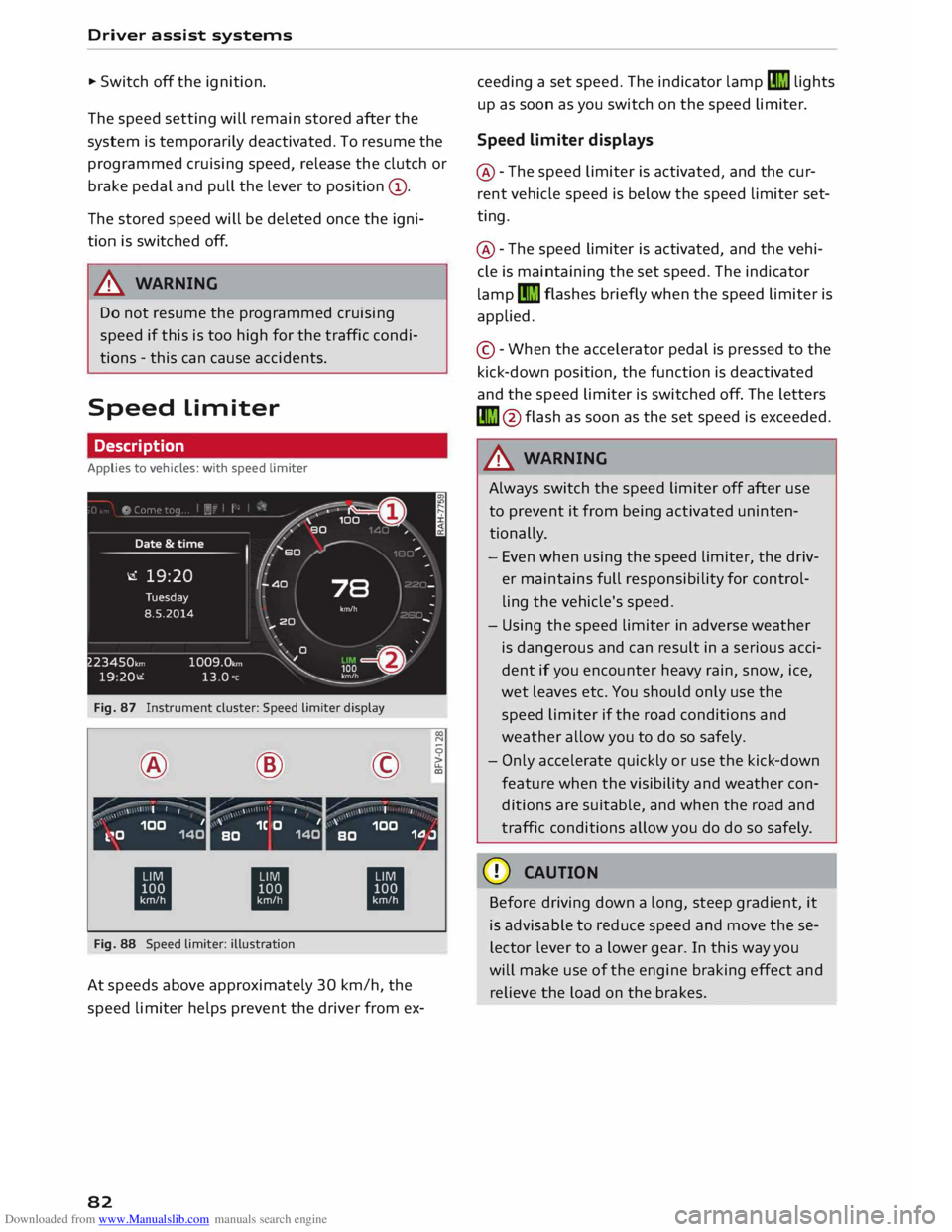
Fig. 87 Instrument cluster: Speed limiter display
® ·-
' I I @
,.,...---:-;- ·-
/ \ \ •
I I ©
·-
, ' I
' 00
N
0
>
LL
a,
,, _ ,\ 100 1
k.�0 140 '
1C O 1
BO 140 '
100
BO 1.0.J
ti ti
ti
Fig. 88 Speed limiter: illustration
At speeds above approximately 30 km/h, the
speed limiter helps prevent the driver from ex-
82 ceeding
a set speed. The indicator lamp�
lights
up as soon as you switch on the speed limiter.
Speed limiter displays
@ -The speed limiter is activated, and the cur
rent vehicle speed is below the speed limiter set
ting.
@ -The speed limiter is activated, and the vehi
cle is maintaining the set speed. The indicator
lamp �
flashes briefly when the speed limiter is
applied.
© -When the accelerator pedal is pressed to the
kick-down position, the function is deactivated
and the speed limiter is switched off. The letters
� @flash as soon as the set speed is exceeded.
_& WARNING
Always switch the speed limiter off after use
to prevent it from being activated uninten
tionally.
- Even when using the speed limiter, the driv
er maintains full responsibility for control
ling the vehicle's speed.
- Using the speed limiter in adverse weather
is dangerous and can result in a serious acci
dent if you encounter heavy rain, snow, ice,
wet leaves etc. You should only use the
speed limiter if the road conditions and
weather allow you to do so safely.
- Only accelerate quickly or use the kick-down
feature when the visibility and weather con
ditions are suitable, and when the road and
traffic conditions allow you do do so safely.
CD CAUTION
Before driving down a long, steep gradient, it
is advisable to reduce speed and move these
lector lever to a lower gear. In this way you
will make use of the engine braking effect and
relieve the load on the brakes.
Page 87 of 284
Downloaded from www.Manualslib.com manuals search engine 0
N
co
....
\D Lfl
N
Lfl
.... As
the system is designed for driving on motor
ways and other major roads, it is only active
above a speed of about 65 km/h (may vary in dif
ferent export markets).
Applies to vehicles with side assist*: If you oper
ate the turn signals while the active lane assist
and side assist are active, the steering will be cor
rected just before you cross the lane demarcation
if the side assist detects vehicles approaching
quickly or travelling at about the same speed as
your own vehicle and judges the situation to be
critical. This intervention is intended to keep the
vehicle in the lane.
Applies to vehicles without side assist*: The sys
tem does not warn you if you operate the turn
signal before crossing a lane demarcation. In this
case, it assumes that you intend to change lanes.
_&. WARNING
- The system initiates a corrective steering in
put to warn the driver that the vehicle is
about to leave the lane. As the driver you are
always responsible for staying in your own
lane.
- The system can assist you to keep the vehi
cle in the lane, however it is not capable of
driving on its own. Never take your hands off
the steering wheel.
- In certain situations, e.g. during heavy brak
ing, the system may not correct the steer
ing.
- In certain circumstances, not all of the lane
markings may be detected by the camera. A
corrective steering input can only be initi
ated if the system detects a lane marking on
the side in question.
- Variations in the road surface or objects on
the road may be misinterpreted as lane
markings. In this case, the steering may be
corrected unexpectedly or not at all.
- The camera's view might be obstructed, for
example by vehicles travelling in front, rain,
snow, a lot of water on the road, adverse
light or dirt on the windscreen. If this hap-
l l
The steering input function is not available on all export
versions Driver
assist systems
pens, the active lane assist may not detect
the lane markings or may respond incorrect
ly.
- In certain circumstances, for instance if visi
bility is poor, the setting for the steering in
put may be switched from "early" to "late"
1)
- In certain driving conditions, such as ruts in
the road surface, adverse cambers or side
winds, the assistance provided by the steer
ing correction may be insufficient to keep
the vehicle in the middle of the lane.
- For safety reasons, the active lane assist
must not be used in poor weather or in diffi
cult or slippery road conditions (such as ice,
fog, loose grit or gravel, heavy rain, snow,
etc.) -risk of accident!
Switching on/off
Applies to vehicles: with Audi active lane assist
Fig. 91 Turn signal lever: Button for active lane assist N
0
0
>
Fig. 92 Windscreen: Camera window for active lane assist
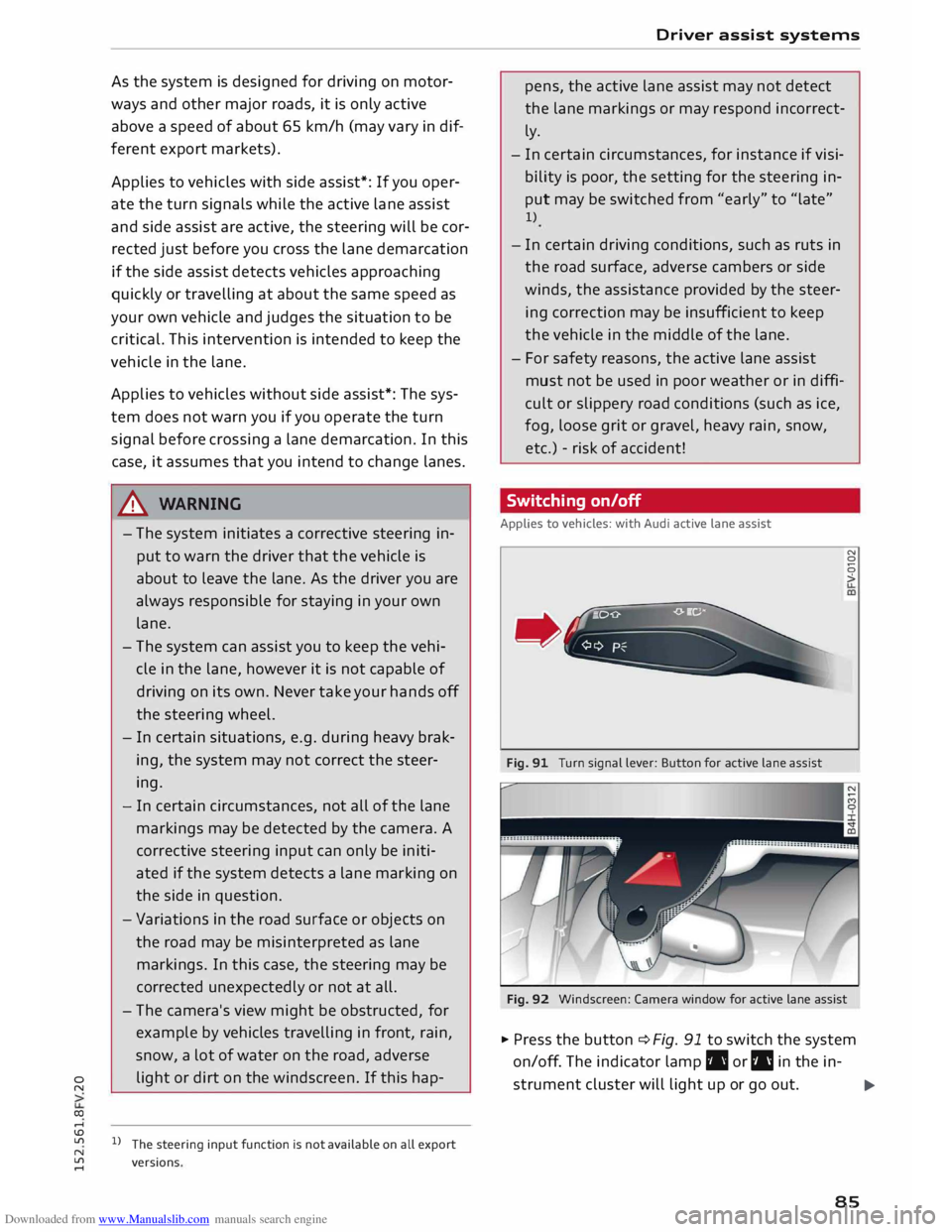
� Press the button ¢ Fig. 91 to switch the system
on/off. The indicator lamp. or IIJ in the in-
strument cluster will light up or go out.
.,..
85
Page 89 of 284
Downloaded from www.Manualslib.com manuals search engine 0
N
co
....
\D U'l
N
U'l
.... long
period. Do not switch the active lane assist
system on again before the lane markings are
discernible.
Audi active lane assist: currently unavailable.
See owner's manual
A temporary fault is preventing the active lane
assist system from functioning. Try switching on
the active lane assist system again later.
Audi active lane assist: fault. See owner's man
ual
Drive to a qualified workshop soon and have the
fault rectified.
Audi active lane assist: please take over steering
This message will appear if you do not steer the
vehicle yourself. In this case, the active lane as
sist will switch to "not ready for warning" but will
not be deactivated completely. The system can
assist you to keep the vehicle in the lane. Howev
er it is your own responsibility to steer and con
trol the vehicle.
Setting the steering input time and
vibration warning
Applies to vehicles: with Audi active lane assist
You can change the active lane assist settings on
the infotainment system to suit your individual
preferences.
Select the following on the infotainment system:
I MENU!
button> Car> left control button> Driv
er assist > Audi active lane assist.
Steering input1
>
early: If this setting is selected, a continuous
steering input assists the driver to keep the vehi
cle in the middle of the lane.
late: If this setting is selected, the steering is not
corrected until just before a wheel touches a de
tected lane marking.
l l
The steering input function is not available on all export
versions Driver
assist systems
Vibration warning
You can switch the additional steering wheel vi
bration warning on/off.
(!} Note
Your personal settings are stored automati
cally and assigned to the remote control key
which is being used (only applies to some
countries).
Audi side assist (Lane
change assist feature)
Description
Applies to vehicles: with Audi side assist
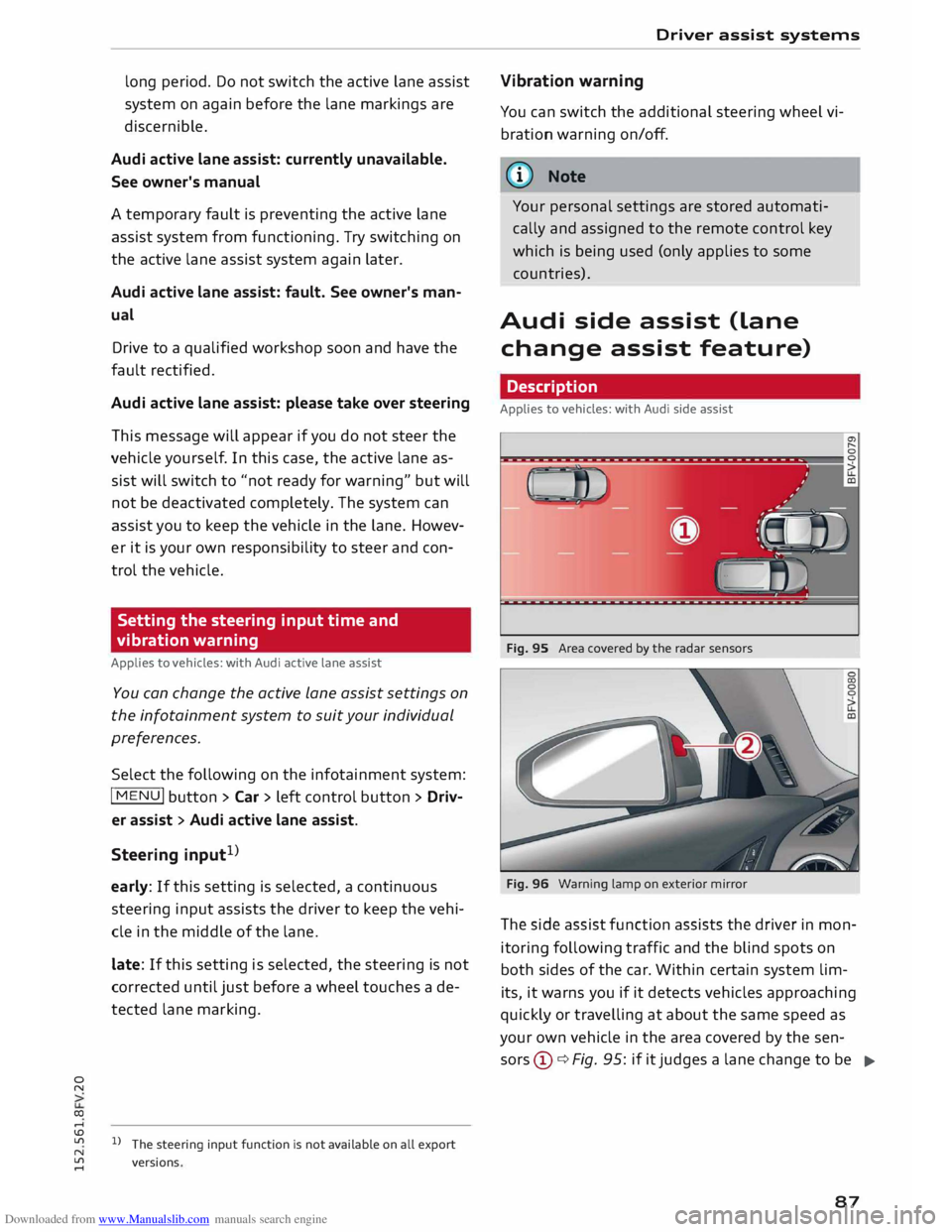
Fig. 95 Area covered by the radar sensors
Fig. 96 Warning lamp on exterior mirror
The side assist function assists the driver in mon
itoring following traffic and the blind spots on
both sides of the car. Within certain system lim-
its, it warns you if it detects vehicles approaching
quickly or travelling at about the same speed as
your own vehicle in the area covered by the sen
sors ©¢ Fig. 95: if it judges a lane change to be
..,.
87
Page 91 of 284
Downloaded from www.Manualslib.com manuals search engine 0
N
co
....
\D Lfl
N
Lfl
.... lane
change. In all cases, the side assist will give
a warning for the vehicles it has detected at the
latest when they enter the "blind spot".
© Other vehicles being overtaken
When you are overtaking another vehicle slowly,
with a speed differential of less than 15 km/h,
the warning lamp in the exterior mirror will light
up as soon as the other vehicle enters your blind
spot.
If you are overtaking another vehicle quickly, with
a speed differential of more than 15 km/h, the
warning lamp will not light up.
System limitations
The radar sensors are designed for normal lane
widths and monitor the lanes immediately to the
left and right of your vehicle. In certain situations
the warning lamp on one of the exterior mirrors
may light up even if no vehicle is travelling in an
area that could be critical in the event of a lane
change. For example:
- When you are travelling in a narrow lane or
when you are not travelling in the centre of the
lane. In this case the system may monitor an
other lane and register a vehicle that is not in
fact travelling in an adjacent lane.
- When you are driving into a bend. The side as
sist may react to a vehicle two lanes away.
- If the system detects other objects (such as
crash barriers, etc).
- In poor weather conditions. The functionality of
the side assist is then restricted.
The radar sensors ¢ Fig. 98 must not be obstruc
ted by stickers, bicycle racks, deposits or any oth
er substances which could impair the function of
the system. For notes on cleaning, please refer to
¢page 236.
.&_ WARNING
-Always watch the road and the area sur
rounding the vehicle. The side assist feature
is not a substitute for the full concentration
of the driver. The driver is always responsi
ble for the safety of lane changes and other
manoeuvres. Driver
assist systems
- In certain situations, the system may not
function properly, or the functionality of the
system may be restricted. For example:
- If other vehicles are approaching very
qui ckly, or if you are overtaking other
vehicles quickly. The warning lamp may
not light up in time.
- In poor weather conditions, such as heavy
rain, snow or road spray.
- If you are travelling in very wide lanes, in
tight bends or over crests. The system may
not detect vehicles in the adjacent lane
because they are outside the area covered
by the sensors.
CD CAUTION
Impacts or damage to the bumper, wheel
arches or underbody can cause misalignment
of the sensors. This can impair the functional
ity of the system. Have the systems checked
by a qualified workshop.
� Note
The warning lamps on the exterior mirrors
may not be properly visible if tinted foil is af
fixed to the side windows on the driver's or
passenger's side.
Switching on and off
Applies to vehicles: with Audi side assist
The system can be switched on and off on the in
fotainment system.
... Select the following on the infotainment sys
tem: I MENU I button >Car> left control button
> Driver assist> Audi side assist.
The warning lamps in the exterior mirrors light
up briefly each time the ignition is switched on to
indicate that the system is activated .
89
Page 92 of 284

Downloaded from www.Manualslib.com manuals search engine Driver
assist systems
Adjusting brightness of warning lamp
Applies to vehicles: with Audi side assist
The brightness of the warning Lamp can be ad
justed on the infotainment system.
.. Select the following on the infotainment sys
tem: IM E
N u I
button > Car > left control button
> Driver assist> Audi side assist.
The brightness of the warning lamp in both the
information and warning modes is regulated au
tomatically according to the ambient light level.
If you are in very dark or very light surroundings
when you adjust the brightness of the warning
lamp, the automatic brightness control may al
ready have reached the lowest or the brightest
setting. In such a case it is possible that you
won't notice a difference while you are adjusting
the brightness or that you will only notice it once
the light surroundings have changed.
Please adjust the brightness of the warning lamp
for the information mode so that it does not dis
tract you while you are looking at the road in
front. When you change the brightness, the
warning lamp on the exterior mirror will light up
briefly with the intensity set for the information
mode. The intensity of the lamp in the warning
mode is linked to the intensity in the information
mode and is adjusted automatically.
(CO} Note
- The side assist is not active while the set
tings are being adjusted.
- Your personal settings are stored automati
cally and assigned to the remote control key
which is being used.
Driver messages
Applies to vehicles: with Audi side assist
Should the side assist be deactivated automati
cally, a driver message will appear on the info
tainment display.
@j Audi side
assist: currently unavailable.
Sensor view restricted due to surroundings.
See owner's manual
The radar sensors are blocked. The area in front
of the sensors must not be obstructed by bicycle
90 racks,
stickers, deposits or any other substances.
If necessary, clean the area in front of the sen
sors ¢ page 88, Fig. 98.
@j Audi
side assist: currently unavailable.
See owner's manual
The side assist is temporarily inoperative and
cannot be switched on (for instance if the battery
is not sufficiently charged).
@j Audi
side assist: fault. Please contact
workshop
The system cannot detect vehicles reliably and
will be deacti vated. The sensors are out of align
ment or defective. Have the system checked by a
qualified workshop soon.
Audi drive select (vehicle
set-up functions)
Introduction
Applies to vehicles: with Audi drive select
Drive select allows you to use different set-ups on
your vehicle. The four modes efficiency*, com
fort, auto and dynamic allow the driver, for ex
ample, to change from a sporty mode to a more
comfortable one via the �:11
� button in the centre
console or via the infotainment system. In addi
tion, the individual mode allows you to adapt the
vehicle set-up to suit your personal driving style.
For example, you might choose to combine a
more dynamic engine set-up with a lighter steer
ing response.
Description
Applies to vehicles: with Audi drive select
The possible vehicle set-up in each mode de
pends on which equipment is installed on your
vehicle. The engine and steering are basic parts
of your vehicle which are always included in the
set-up.
Engine and automatic gearbox*
The response of the engine and automatic gear
box* to accelerator pedal movements will be
more spontaneous or balanced, depending on
which mode you select. In efficiency* mode the
automatic gearbox* selects the next gear at
..,.