airbag AUDI TT COUPE 2014 User Guide
[x] Cancel search | Manufacturer: AUDI, Model Year: 2014, Model line: TT COUPE, Model: AUDI TT COUPE 2014Pages: 284, PDF Size: 34.42 MB
Page 146 of 284
Downloaded from www.Manualslib.com manuals search engine Audi
connect
-Access point (SSID): Name of the Wi-Fi net
work.
- Password: A random MMI password is set at
the factory. This password can be changed. The
encr yption type WPA2 requires the password to
be at Least 8 characters long. Please select a se
cure password.
- Discoverability: To switch the discoverability of
your Wi-Fi network on or off.
Network search
A list of the Wi-Fi networks available near you is
d isplayed .
.&_ WARNING
- Do not allow the features of the Wi-Fi hot
spot to distract you from watching the traf
fic -this can cause an accident.
- Laptop computers and similar devices can
only be operated safely when the vehicle is
stationar y because of their weight; any
loose objects can be catapulted through the
vehicle in an accident and cause serious inju
ries. Always make sure that such devices are
securely stowed while you are driving.
- No Wi-Fi devices may be used from the front
seats in the areas around the airbags while
the vehicle is being driven. Please also ob
serve the safety warnings in the "Airbag sys
tem" chapter under "Important safety notes
on the front airbag system" � page 210,
Front airbags.
CD CAUTION
Please note that it is your responsibility to
take precautions regarding data protection,
anti-virus protection and protection against
Loss of data on mobile devices used to con
nect to the Internet via the Wi-Fi hotspot.
Note
- You might require a separate mobile phone
contract with extra costs before you can use
the Wi-Fi hotspot. For more information,
contact your service provider.
- Depending on your mobile phone tariff, you
may be charged for receiving data packets
on line via the Wi-Fi hotspot, especially if
144 you
are using the system abroad: We
strongly recommend that you use a data flat
rate. For more information, contact your
service provider.
- For more information on Audi connect serv
ices, visit www.audi.com/connect.
Configuring the data
connection
Applies to vehicles: with Audi connect
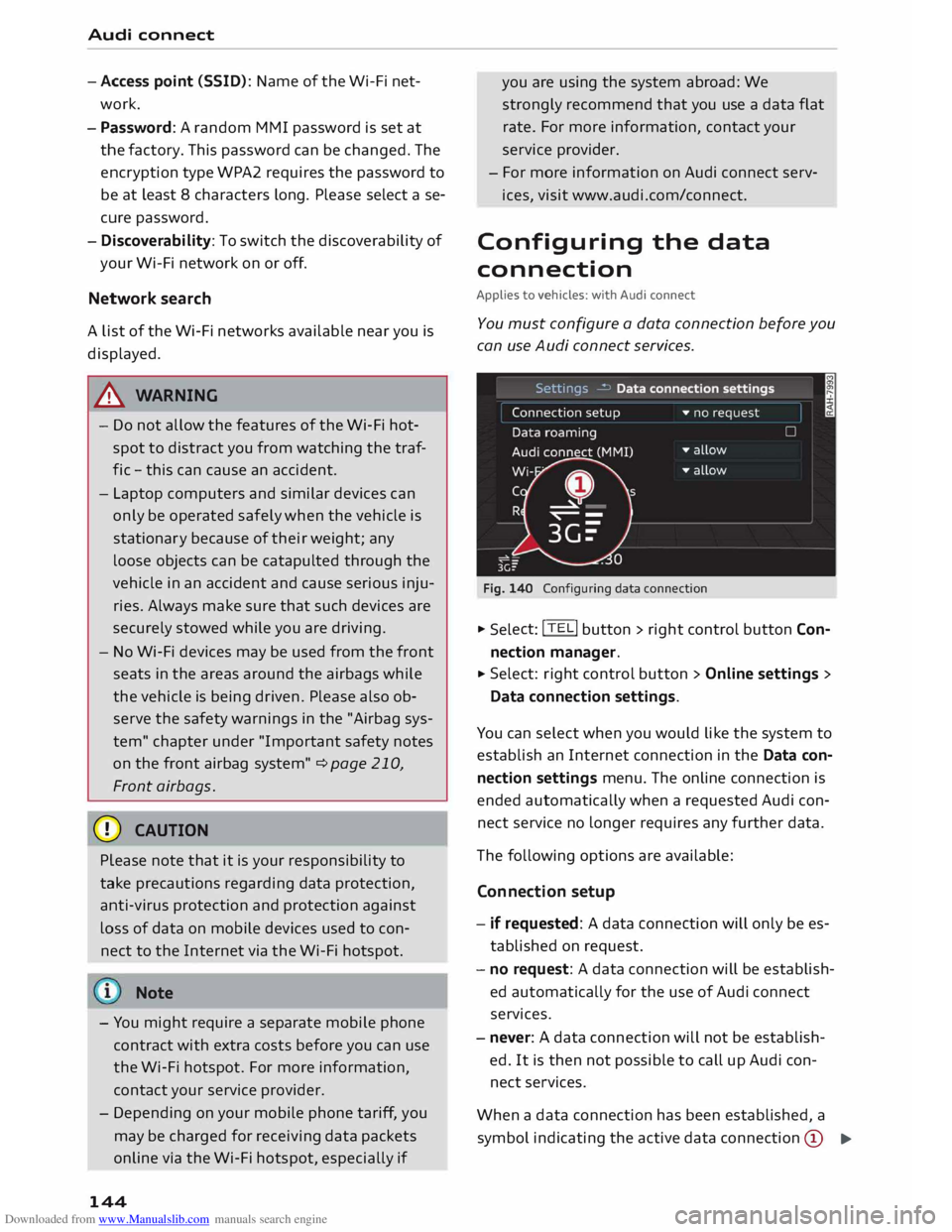
You must configure a data connection before you
can use Audi connect services.
Fig. 140 Configuring data connection .,.
Selec t: !TEL! button > right control button Con
nection manager .
.,. Select:
right control button > Online settings >
Data connection settings.
You can select when you would like the system to
establish an Internet connection in the Data con
nection settings menu. The online connection is
ended automatically when a requested Audi con
nect service no Longer requires any further data.
The following options are available:
Connection setup
- if requested: A data connection will only be es
tablished on request.
- no request: A data connection will be establish
ed automatically for the use of Audi connect
services.
- never: A data connection will not be establish
ed. It is then not possible to call up Audi con
nect services.
When a data connection has been established, a
symbol indicating the active data connection @
..,.
Page 174 of 284
Downloaded from www.Manualslib.com manuals search engine Media
@ Note
- Pay attention to any connection queries on
your Bluetooth device.
- Bluetooth devices only have to be bonded
once. Any Bluetooth devices that have al
ready been bonded to the M MI system once
are connected automatically when they are
within range.
- You can bond several Bluetooth audio play
ers to the MMI system; however only one
connection can be active at a time.
- The system supports the Bluetooth proto
cols AVRCP (1.0/1.3) and A2DP .
- Please consider the volume control on your
Bluetooth device. Audi recommends setting
the volume of mobile devices to maximum
when they are being used as Bluetooth au
dio players.
- Which media functions (e.g. random play
back) are supported depends on the Blue
tooth device you are using.
- For more information on which
devices
are
supported, please go to www.audi.c om/
bluetooth or contact an Audi dealer.
Wi-Fi audio players
Applies to vehicles: with Audi connect
Wi-Fi enabled media players (e.g. smartphones)
can be connected using the Wi-Fi hotspot and
operated via the MMI. You can access your play
er's media centre using a UPnP server app or a
UPnPIDLNA server integrated in the media play
er. In addition, you can use the Audi MMI con
nect app to access Internet radio programmes*.
Important: The Wi-Fi function of the media play
er must be switched on. The Audi MMI connect
app or a UPnP server app must be installed on
your media player, or you must be using a UPnP/
DLNA server integrated in the media player.
- To connect a media player: Select the I
MEDIA!
button. Press the Left control button repeatedly
until the source overview ¢ page 179 is dis
played. Select and confirm Wi-Fi audio player
@ ¢page 179, Fig. 165.
l l
Only available with the Audi MMI connect app
172 -
You may need to select and confirm Wi-Fi off>
Activate Wi-Fi to switch Wi-Fi on in the MMI.
Select Wi-Fi settings if necessary and use the
Wi-Fi hotspot's settings for the media player
you are currently using.
- To start the Wi-Fi audio player: Start the Audi
MMI connect app or a UPnP server app, or ena
ble media sharing on your media player. The
first song from your device's media centre will
be played.
- To use the media player: The media player is
operated using the MMI.
- To start Internet radio 1
>: Press the Left control
button repeatedly until the menu item Folders
appears. Select and confirm Folders> Internet
radio. Select the desired station from one of
the folders displayed.
.&_ WARNING
- Do not allow the features of the Wi-Fi hot
spot to distract you from watching the traf
fic -this can cause an accident.
- Laptop computers and similar devices can
only be operated safely when the vehicle is
stationary because of their weight; any
loose objects can be catapulted through the
vehicle in an accident and cause serious inju
ries. Always make sure that such devices are
securely stowed while you are driving.
- No Wi-Fi devices may be used from the front
seats in the areas around the airbags while
the vehicle is being driven. Please also ob
serve the safety warnings on¢ page 210,
Front airbags.
CD CAUTION
Please note that it is your responsibility to
take precautions regarding data protection,
anti-virus protection and protection against
Loss of data on mobile devices used to con
nect to the Internet via the Wi-Fi hotspot.
- The Wi-Fi audio player only needs to be con-
nected to the MMI via the Wi-Fi hotspot
.,.
Page 175 of 284
Downloaded from www.Manualslib.com manuals search engine once.
Depending on the device, a media
player that has already been bonded will au
tomatically be reconnected to the Wi-Fi hot
spot of the MMI when it is within range.
- Inserting or removing a SIM card from the
SIM card reader* causes the Wi-Fi connec
tion to be reconfigured. This may cause a
short interruption in the audio playback of
some media players.
- Please observe the notes in the chapter
Notes on Audi connect ¢ page 145.
- Please note that the Wi-Fi connection does
not automatically enable you to use the In
ternet. Further information can be found
from ¢page 137onwards.
- To avoid interruptions in audio playback, de
activate the energy saving function on your
media player, or connect the player to a
charger.
- The time it takes to load audio files depends
on the media player in use and on the num
ber of fi Les stored.
-A maximum of 2,000 entries per directory
are shown on the MMI.
- Audi dealerships will be able to provide you
with further information on Wi-Fi audio
players.
Online media
Applies to vehicles: with Audi connect
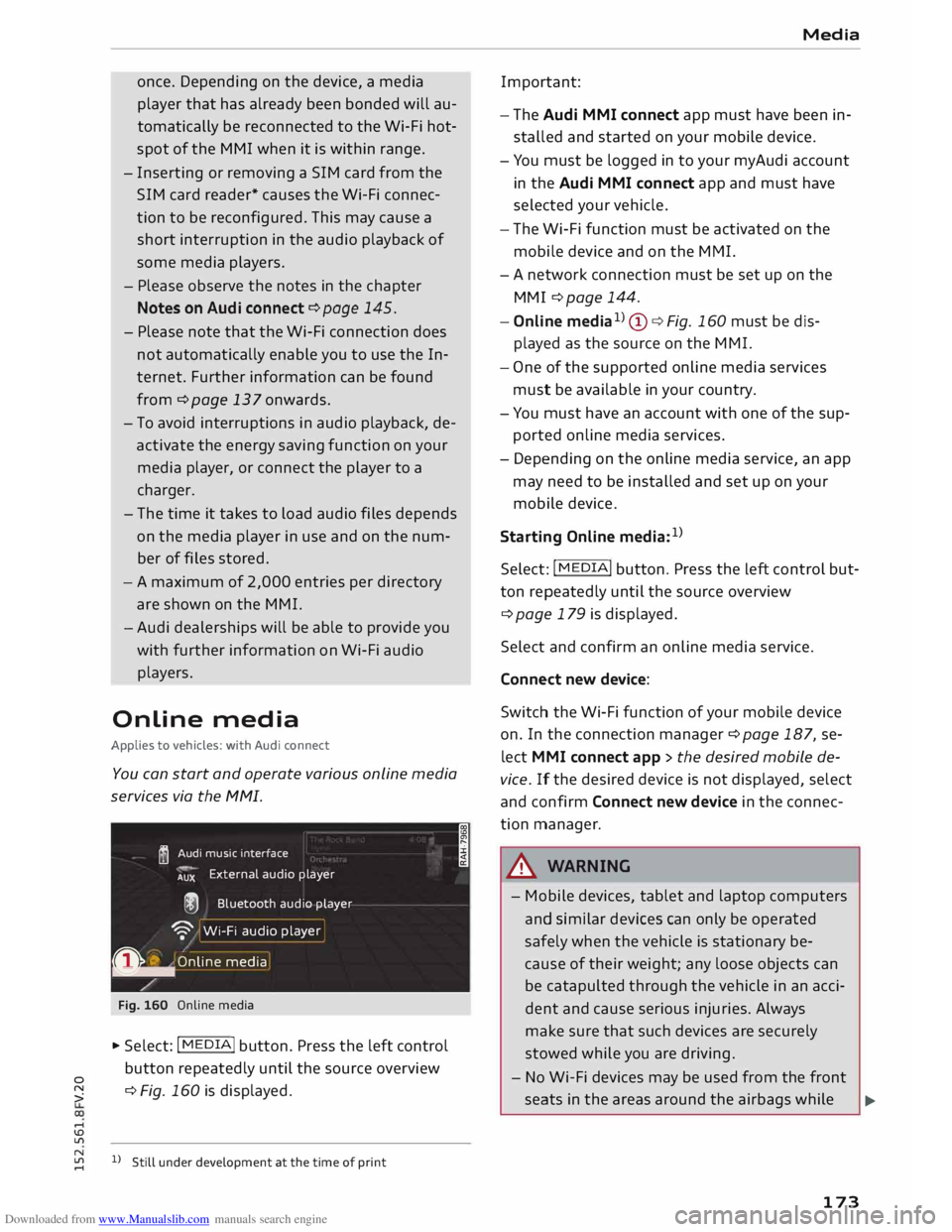
You can start and operate various online media
services via the MMI.
� Audi
music interface
AUX External
audio player
@ Bluetooth audio player
'9' Wi-Fi audio player
0 �
.
O nlin e media
Fig. 160 Online media
... Select: I MEDIA
!
button. Press the left control
button repeatedly until the source overview
� ¢
Fig. 160 is displayed.
....
\D L/'l
� 1)Still under development at the time of print
.... I Media
Important:
- The Audi MMI connect app must have been in
stalled and started on your mobile device.
- You must be logged in to your myAudi account
in the Audi MMI connect app and must have
selected your vehicle.
- The Wi-Fi function must be activated on the
mobile device and on the MMI.
- A network connection must be set up on the
MMI ¢ page 144.
- Online media1
)
(!) ¢Fig. 160 must be dis
played as the source on the MMI.
- One of the supported on line media services
must be available in your country.
- You must have an account with one of the sup
ported online media services.
- Depending on the online media service, an app
may need to be installed and set up on your
mobile device.
Starting Online media:1
)
Select: I MEDIA
! button. Press the Left control but
ton repeatedly until the source overview
¢page 179 is displayed.
Select and confirm an online media service.
Connect new device:
Switch the Wi-Fi function of your mobile device
on. In the connection manager¢ page 187, se
lect MMI connect app > the desired mobile de
vice. If the desired device is not displayed, select
and confirm Connect new device in the connec
tion manager .
.&_ WARNING
- Mobile devices, tablet and laptop computers
and similar devices can only be operated
safely when the vehicle is stationary be
cause of their weight; any loose objects can
be catapulted through the vehicle in an acci
dent and cause serious injuries. Always
make sure that such devices are securely
stowed while you are driving.
- No Wi-Fi devices may be used from the front
seats in the areas around the airbags while .,..
173
Page 176 of 284
Downloaded from www.Manualslib.com manuals search engine Media
the vehicle is being driven. Please also ob
serve the safety warnings on ¢ page 210,
Front airbags.
CD CAUTION
In order to use on line media, you generally
have to set up an account with an on line me
dia service, which may lead to additional
costs, especially if you are using the service
abroad.
@ Note
- Mobile devices only need to be connected to
the MMI via the Wi-Fi hotspot once. De
pending on the device, a device that has al
ready been bonded will automatically be re
connected to the Wi-Fi hotspot of the MMI
when it is within range.
- Depending on the Internet connection, play
back of the on line media services may be in
terrupted.
- Whether online media can be used depends
on the availability of services provided by
third parties.
- AUDI AG only enables you to access online
media services via the MMI system and ac
cepts no responsibility for the content of
online media services.
- Please observe the notes in the chapter
Notes on Audi connect ¢ page 145.
- Depending on the mobile device you are us
ing, media playback may be interrupted. To
avoid interruptions, keep the Audi MMI con
nect app running in the foreground and do
not lock the screen on your mobile device.
- Audi dealerships will be able to provide you
with further information on online media.
174 Multimedia
connections
USB adapters for Audi music interface or
USB charging socket
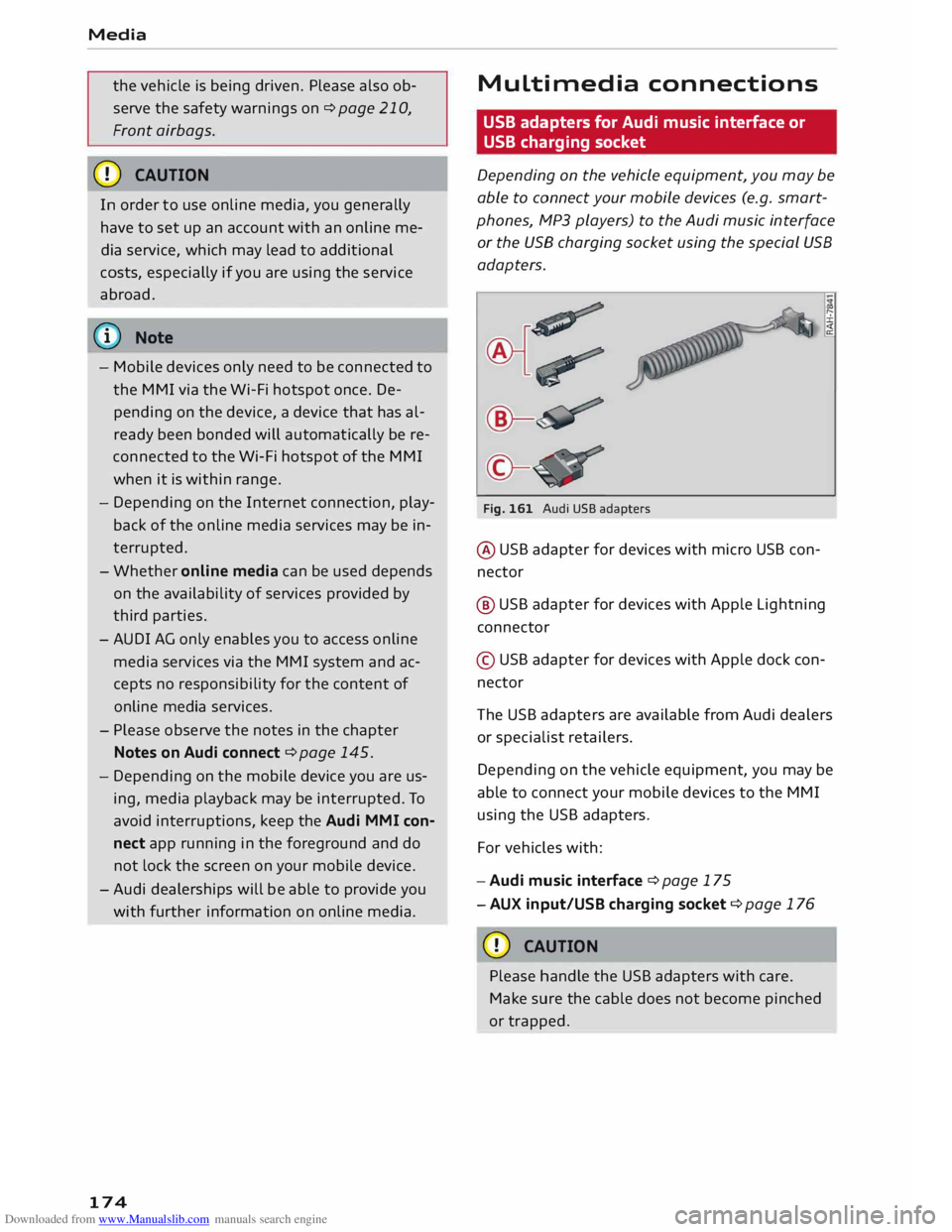
Depending on the vehicle equipment, you may be
able to connect your mobile devices (e.g. smart
phones, MP3 players) to the Audi music interface
or the USB charging socket using the special USB
adapters.
Fig. 161 Audi USB adapters
@ USB adapter for devices with micro USB con
nector
@ USB adapter for devices with Apple Lightning
connector
© USB adapter for devices with Apple dock con
nector
Th e USB adapters are available from Audi dealers
or specialist retailers.
Depending on the vehicle equipment, you may be
able to connect your mobile devices to the MMI
using the USB adapters.
For vehicles with:
- Audi music interface ¢ page 175
- AUX input/USB charging socket¢ page 176
CD CAUTION
Please handle the USB adapters with care.
Make sure the cable does not become pinched
or trapped.
Page 194 of 284
Downloaded from www.Manualslib.com manuals search engine Safe
driving
Safe driving
General notes
Safety is the first priority
Your safety is our first priority.
This chapter contains important information,
tips, suggestions and warnings that you should
read and observe for your own safety and the
safety of your passengers.
_&. WARNING
- The information in this chapter is important
for the driver of the vehicle and all passen
gers. The other chapters in this manual
(and, where applicable, in the other litera
ture supplied with the vehicle) contain fur
ther important notes which you should read
and observe for your own safety and that of
your passengers.
- Ensure that the complete vehicle wallet is
always in the vehicle. This is especially im
portant when you lend or sell the vehicle to
others.
Notes on traffic safety
You should only use certain infotainment system
functions, e.g. enter a navigation destination,
while the vehicle is stationary. Always be pre
pared to stop operating the infotainment system
in the interest of your own safety and that of oth
er road users.
_&. WARNING
- To day's driving conditions require your full
attention. As the driver, you have full re
sponsibility for the safety of the vehicle and
other road users. For this reason, only oper
ate the infotainment system when the traf
fic conditions allow you to do so safely and
when you can maintain proper control of
your vehicle - risk of accident!
- The volume of the audio sources (radio, CD
player, etc.) should only be set at a level
which enables you to hear distant police and
192 emergency
vehicles clearly-failure to do so
could result in an accident.
- Please observe the laws regulating the use
of telephones in vehicles.
Safety features
The safety features Listed here are part of the ve
hicle's occupant restraint system. They work to
gether to help reduce the risk of injury in a wide
variety of accident situations.
Your safety and the safety of your passengers
should not be left to chance. In the event of an
accident, the safety features incorporated in your
vehicle are capable of reducing the risk of injury.
These are just a few of the safety features in your
Audi:
- Seat belts for all seats
- Belt force limiters for all seats
- Belt tensioners for the front seats
- Front airbags
- Side airbags in the front seat backrests
- Head-protection airbags
- "ISO FIX" anchorages* for "ISO FIX" child seats
on the rear seats
-Adjustable steering column
These individual safety features are harmonised
to provide you and your passengers with the best
possible protection in accident situations. How
ever, they can only be effective if you and your
passengers sit in the correct position and adjust
and use the safety equipment properly.
For these reasons, this chapter explains why
these safety features are so important, how they
can protect you, what you need to remember
when using them, and how you and your passen
gers can gain the most benefit from them. There
are also a number of important safety warnings
which you and your passengers should always ob
serve in order to minimise the risk of injury.
Safety is everyone's responsibility!
Page 196 of 284
Downloaded from www.Manualslib.com manuals search engine Safe
driving
.. Adjust the longitudinal position of the steering
wheel so that your arms are slightly bent and
you can read the dials and instruments easily.
.. Make sure that you can comfortably reach the
top of the steering wheel.
.. Fasten
your seat belt correctly ¢ page 204 .
.. Keep both feet in the footwell so that you are in
full control of the vehicle at all times.
For detailed information on how to adjust the
driver's seat, see¢ page 46, Seats and storage.
A WARNING
A driver who is not sitting in the correct posi
tion or who is not wearing a seat belt can be
fatally injured if the airbag is triggered.
- Adjust the driver's seat and steering wheel
so there is a distance of at least 25 cm be
tween your breastbone and the centre of the
steering wheel¢ Fig. 172.
- While driving, always hold the steering
wheel with both hands on the outside of the
rim at about the 9 o'clock and 3 o'clock posi
tion. This reduces the risk of injury if the
driver's airbag inflates.
- Never hold the steering wheel at the 12
o'clock position, or with your hands inside
the rim or on the steering wheel hub. This
could result in serious injuries to the arms,
hands and head if the driver's airbag in
flates.
- To reduce any risk of injury to the driver dur
ing a sudden brake application or in an acci
dent, never drive with the backrest tilted
too far back. The airbag system and seat
belts can only provide proper protection
when the backrest is in an upright position
and the driver is wearing the seat belt in the
correct position. The further the backrest is
tilted back, the greater the risk of injury due
to incorrect positioning of the belt webbing
or an incorrect sitting position.
194 Correct
position for the front passenger
The front seat passenger must sit at least 25 cm
away from the dash panel so that the airbag has
enough room to inflate and give maximum pro
tection in an accident.
For your own safety and to reduce the risk of in
jury in the event of an accident, we recommend
adjusting the front passenger's seat as follows:
.. Adjust the backrest to an upright position so
that your back remains in contact with the up
holstery .
.. Keep both feet in the footwell in front of the
seat.
.. Fasten your seat belt correctly ¢ page 206.
In exceptional cases you can disable the front
passenger's airbag via the key-operated switch*
¢page 211.
For detailed information on how to adjust the
front passenger's seat, see ¢ page 46, Seats and
storage.
A WARNING
A passenger who is not sitting in the correct
position or who is not wearing a seat belt can
be fatally injured if the airbag is triggered.
- Adjust the front passenger's seat so there is
a distance of at least 25 cm between your
breastbone and the dash panel.
- Always keep your feet on the floor when the
vehicle is moving; never rest them on the in
strument panel, out of the window or on the
seat. If you sit in an incorrect position, you
increase your risk of injury in the event of
sudden braking or an accident. If the airbag
is triggered, you could sustain potentially
fatal injuries by sitting out of position.
- To reduce the risk of injury to the front pas
senger in the case of sudden braking or an
accident, the passenger should never travel
in a moving vehicle with the backrest re
clined. The airbag system and seat belt can
only provide proper protection when the
backrest is in an upright position and the
passenger is wearing the seat belt in the
correct position. The further the backrest is
�
Page 198 of 284
Downloaded from www.Manualslib.com manuals search engine Safe
driving
the manufacturer's instructions and observe any
statutory requirements.
For safety reasons, we recommend that child
seats be installed on the rear seats. You should
only use a child seat on the front passenger seat
in exceptional circumstances.
A WARNING
To avoid serious or fatal injury, children travel
ling in the vehicle must always be protected
with child restraint systems appropriate to
their height, weight and age.
- Children under 1.45 m tall or younger than
12 must not travel in the vehicle if there are
no suitable child seats. Please observe any
other applicable regulations in the country
in which you are travelling.
- Babies and children must never travel on an
other occupant's lap.
- Never allow more than one child to occupy
one child seat.
- Never leave a child without supervision in a
child seat.
- Never allow a child to travel unrestrained or
to stand up or kneel on a seat while the car
is moving. In an accident, the child could be
catapulted through the car, causing possibly
fatal injuries to itself and other occupants.
- To ensure proper protection by the child re
straint, it is important to wear the seat belts
in the correct position ¢ page 206. Always
check that the belt is properly positioned ac
cording to the instructions provided by the
manufacturer of the child seat. Incorrectly
worn seat belts can give rise to injuries even
in a minor collision.
- If children are out of position when the car
is moving, they are at greater risk of injury
during a sudden braking manoeuvre or in an
accident. This is particularly the case if the
child is travelling on the front passenger's
seat and the airbag system is triggered in an
accident. This incorrect sitting position can
result in serious or even fatal injury.
- If you are using a child seat on the front
passenger seat in which the child faces the
196 direction
of travel, you should move the
front passenger seat as far back as possible.
- Child seats in which the child faces the rear
of the car are located directly in the path of
the front passenger's airbag if it inflates. In
this case, the child could sustain serious or
fatal injuries if the airbag were to be de
ployed.
- Applies to vehicles on which the front pas
senger's airbag cannot be deactivated: Do
NOT use a rearward-facing child seat on
the front passenger's seat.
- Applies to vehicles with key-operated
switch for deactivating the front passeng
er's airbag: Do NOT use a rearward-facing
child seat on the front passenger's seat
while the front passenger's airbag is ac
tive. If you have no alternative but to use a
rearward-facing child seat on the front
passenger's seat, the front passenger's
airbag must be deactivated beforehand via
the key-operated switch* ¢ page 211.
Make sure that the front passenger's air
bag is reactivated by means of the key-op
erated switch* as soon as the child seat is
no longer needed on the front passenger's
seat.
- Always replace the child seat with a new one
after an accident as damage not externally
visible may have occurred.
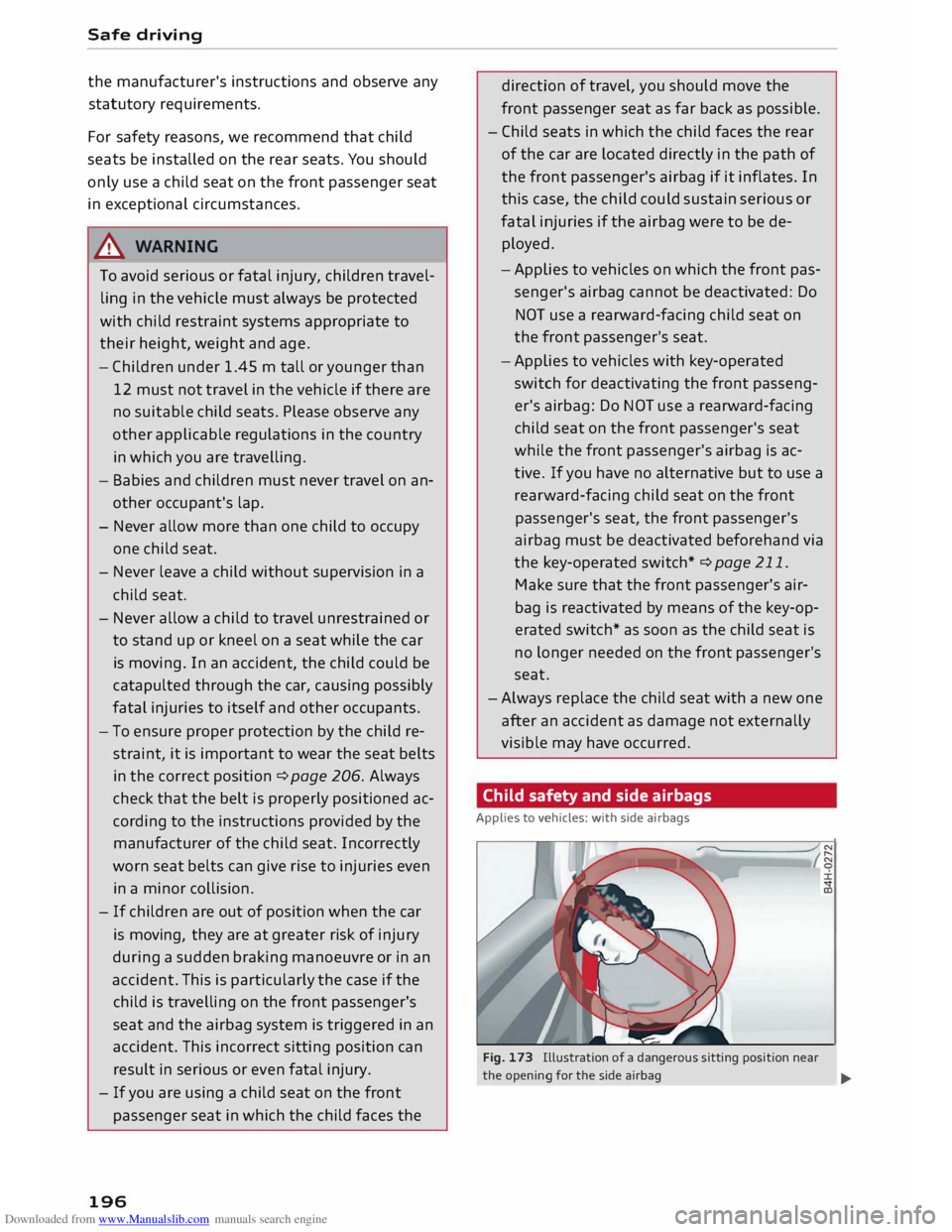
Child safety and side airbags
Applies to vehicles: with side airbags
Fig. 173 Illustration of a dangerous sitting position near
the opening for the side airbag
...
Page 199 of 284
Downloaded from www.Manualslib.com manuals search engine 0
N
co
,-j
\D U'l
N
U'l
,-j Make
sure that children do not lean out of the
child seat towards the door trim. If the side air
bag were to inflate in an accident, it could strike
the child on the head and cause serious injury.
A WARNING
- To avoid injury, the child's head must always
be well away from the opening for the side
airbag.
- Do not leave or place any objects in the area
of inflation for the side airbag -risk of in
jury!
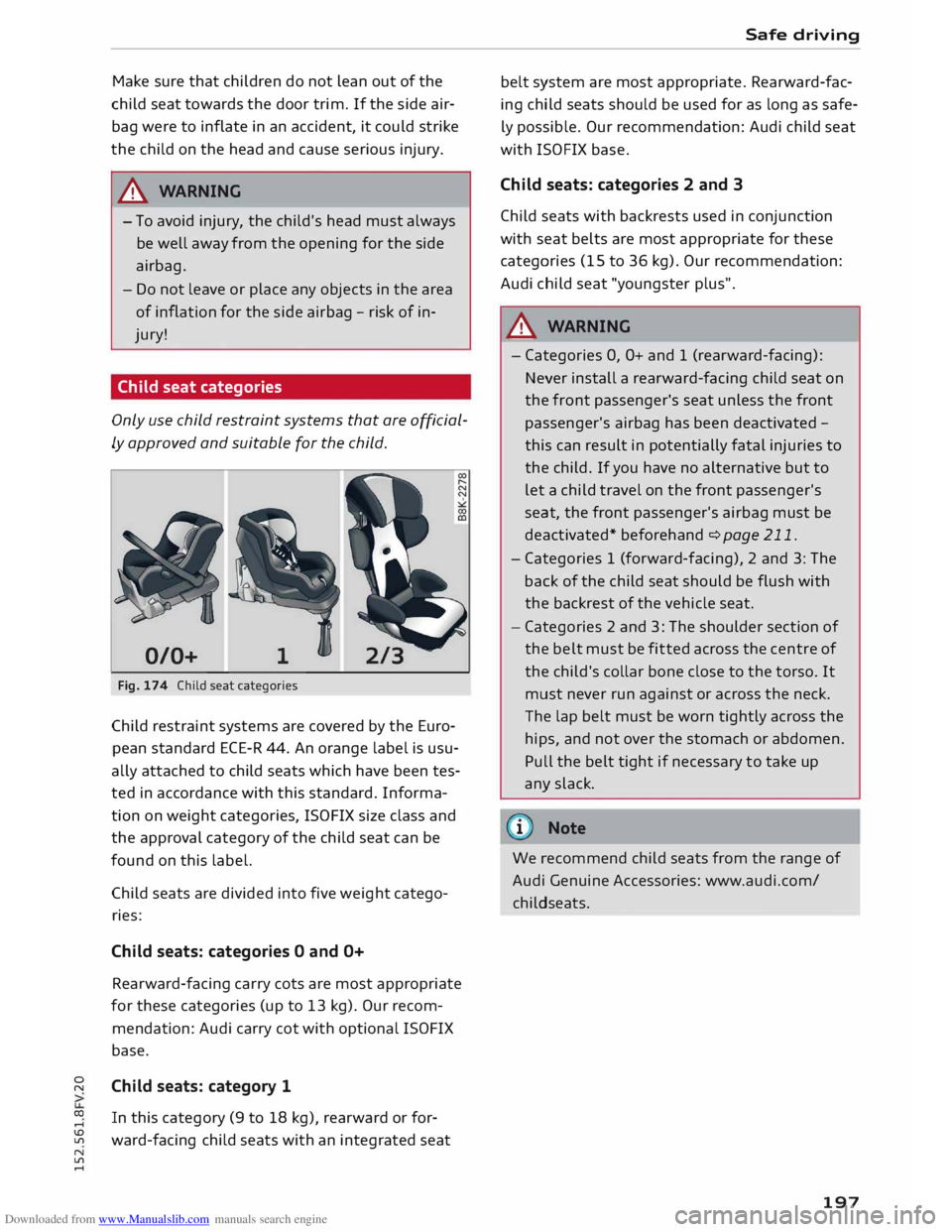
Child seat categories
Only use child restraint systems that are official
ly approved and suitable for the child.
0/0+ 1
Fig. 174 Child seat categories
Child restraint systems are covered by the Euro
pean standard ECE-R 44. An orange label is usu
ally attached to child seats which have been tes
ted in accordance with this standard. Informa
tion on weight categories, ISOFIX size class and
the approval category of the child seat can be
found on this label.
Child seats are divided into five weight catego
ries:
Child seats: categories O and O+
Rearward-facing carry cots are most appropriate
for these categories (up to 13 kg). Our recom
mendation: Audi carry cot with optional ISOFIX
base.
Child seats: category 1
In this category (9 to 18 kg), rearward or for
ward-facing child seats with an integrated seat Safe
driving
belt system are most appropriate. Rearward-fac
ing child seats should be used for as long as safe
ly possible. Our recommendation: Audi child seat
with ISOFIX base.
Child seats: categories 2 and 3
Child seats with backrests used in conjunction
with seat belts are most appropriate for these
categories (15 to 36 kg). Our recommendation:
Audi child seat "youngster plus".
A WARNING
- Categories 0, O+ and 1 (rearward-facing):
Never install a rearward-facing child seat on
the front passenger's seat unless the front
passenger's airbag has been deactivated -
this can result in potentially fatal injuries to
the child. If you have no alternative but to
let a child travel on the front passenger's
seat, the front passenger's airbag must be
deactivated* beforehand c:> page 211.
- Categories 1 (forward-facing), 2 and 3: The
back of the child seat should be flush with
the backrest of the vehicle seat.
- Categories 2 and 3: The shoulder section of
the belt must be fitted across the centre of
the child's collar bone close to the torso. It
must never run against or across the neck.
The lap belt must be worn tightly across the
hips, and not over the stomach or abdomen.
Pull the belt tight if necessary to take up
any slack.
1 Note
We recommend child seats from the range of
Audi Genuine Accessories: www.audi.com/
childseats.
197
Page 201 of 284
Downloaded from www.Manualslib.com manuals search engine 0
N
co
....
\D Lfl An
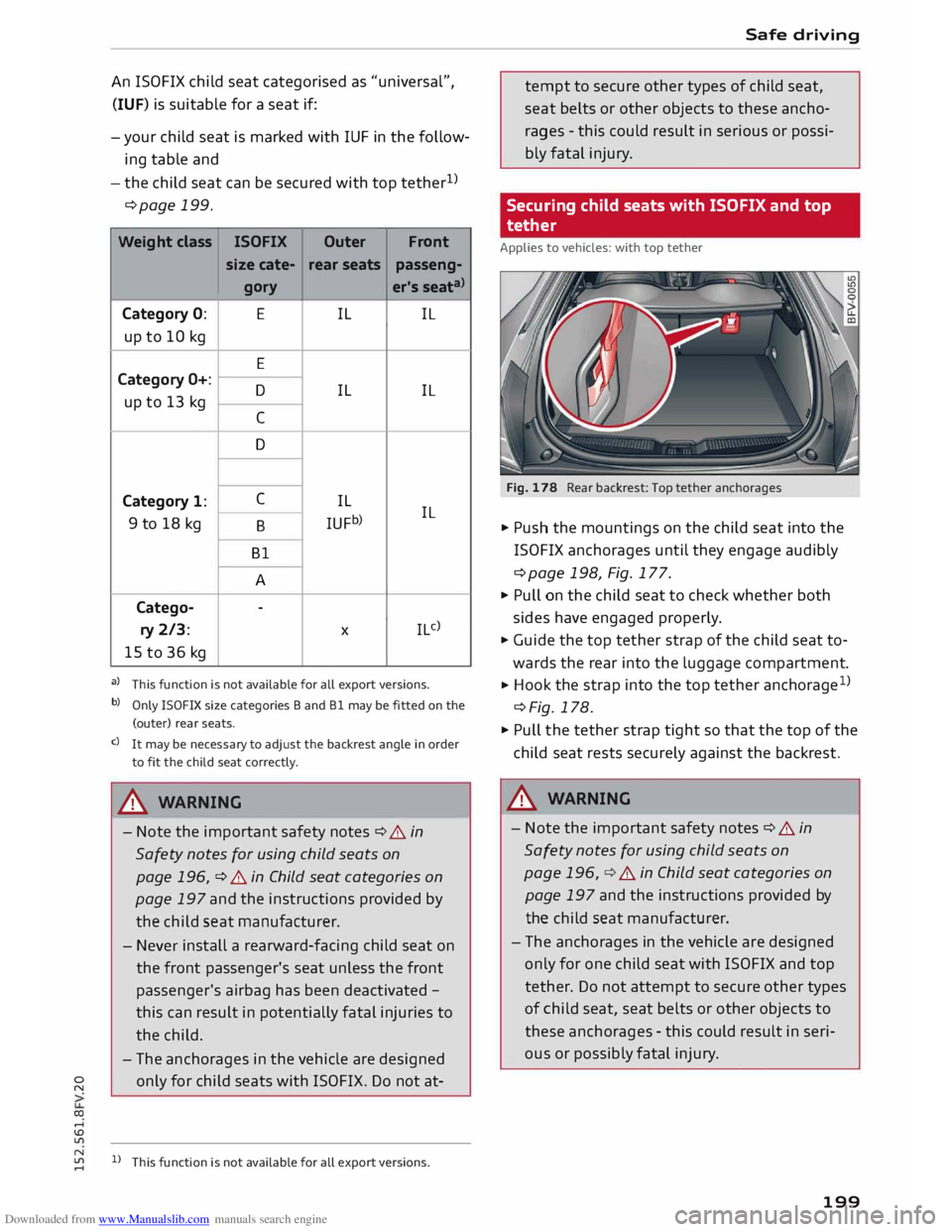
ISOFIX child seat categorised as "universal",
(IUF) is suitable for a seat if:
-your child seat is marked with IUF in the follow
ing table and
- the child seat can be secured with top tether 1
>
¢page 199.
Weight class
ISOFIX
Outer Front
size cate- rear
seats
passeng-
gor y er's
seat"'>
Category 0: E
IL IL
up to 10 kg
E
Category O+:
D IL IL
up to 13 kg
C
D
Category 1: C
IL
9 to 18 kg ILJFb) IL
B
Bl A
Catego- -
ry 2/3: X
IL c)
15 to 36 kg
a) This function is not available for all export versions.
b) Only ISO FIX size categories Band Bl may be fitted on the
(outer) rear seats.
c) It may be necessary to adjust the backrest angle in order
to fit the child seat correctly.
A WARNING
- Note the important safety notes¢ A in
Safety notes for using child seats on
page 196, ¢ A in Child seat categories on
page 197 and the instructions provided by
the child seat manufacturer.
- Never install a rearward-facing child seat on
the front passenger's seat unless the front
passenger's airbag has been deactivated -
this can result in potentially fatal injuries to
the child.
- The anchorages in the vehicle are designed
only for child seats with ISOFIX. Do not at-
N
� l)
This function is not available for all export versions. Safe
driving
tempt to secure other types of child seat,
seat belts or other objects to these ancho
rages -this could result in serious or possi
bly fatal injury.
Securing child seats with ISOFIX and top
tether
Applies to vehicles: with top tether
Fig. 178 Rear backrest: Top tether anchorages
.. Push the mountings on the child seat into the
ISOFIX anchorages until they engage audibly
¢page 198, Fig. 177.
.. Pull on the child seat to check whether both
sides have engaged properly.
.. Guide the top tether strap of the child seat to
wards the rear into the luggage compartment.
.. Hook
the strap into the top tether anchorage 1
>
¢Fig. 178.
.. Pull the tether strap tight so that the top of the
child seat rests securely against the backrest.
A WARNING
- Note the important safety notes¢ A in
Safety notes for using child seats on
page 196, ¢ A in Child seat categories on
page 197 and the instructions provided by
the child seat manufacturer.
- The anchorages in the vehicle are designed
only for one child seat with ISOFIX and top
tether. Do not attempt to secure other types
of child seat, seat belts or other objects to
these anchorages -this could result in seri
ous or possibly fatal injury.
199
Page 202 of 284
Downloaded from www.Manualslib.com manuals search engine Safe
driving
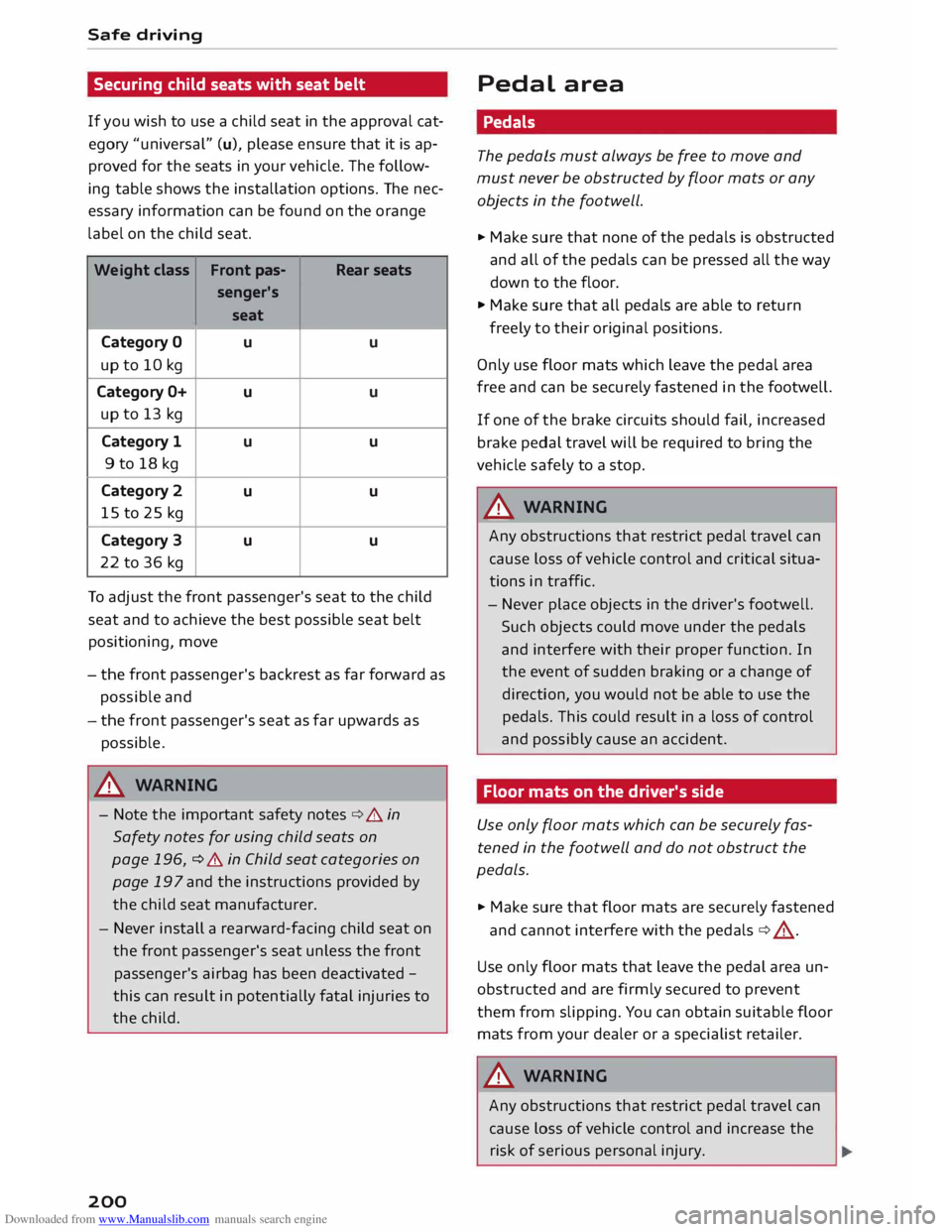
Securing child seats with seat belt
If you wish to use a child seat in the approval cat
egory "universal" (u), please ensure that it is ap
proved for the seats in your vehicle. The follow
ing table shows the installation options. The nec
essary information can be found on the orange
label on the child seat.
Weight class Front
pas-
Rear seats
senger's
seat
Category 0 u u
up to 10 kg
Category O+ u u
up to 13 kg
Category 1
u u
9 to 18 kg
Category 2 u u
15 to 25 kg
Category 3
u u
22 to 36 kg
To adjust the front passenger's seat to the child
seat and to achieve the best possible seat belt
positioning, move
- the front passenger's backrest as far forward as
possible and
- the front passenger's seat as far upwards as
possible.
_& WARNING
- Note the important safety notes¢.&. in
Safety notes for using child seats on
page 196, ¢ .&. in Child seat categories on
page 197 and the instructions provided by
the child seat manufacturer.
- Never install a rearward-facing child seat on
the front passenger's seat unless the front
passenger's airbag has been deactivated -
this can result in potentially fatal injuries to
the child.
200 Pedal
area
Pedals
The pedals must always be free to move and
must never be obstructed by floor mats or any
objects in the footwell.
... Make sure that none of the pedals is obstructed
and all of the pedals can be pressed all the way
down to the floor.
... Make sure that all pedals are able to return
freely to their original positions.
Only use floor mats which leave the pedal area
free and can be securely fastened in the footwell.
If one of the brake circuits should fail, increased
brake pedal travel will be required to bring the
vehicle safely to a stop.
_& WARNING
Any obstructions that restrict pedal travel can
cause loss of vehicle control and critical situa
tions in traffic.
- Never place objects in the driver's footwell.
Such objects could move under the pedals
and interfere with their proper function. In
the event of sudden braking or a change of
direction, you would not be able to use the
pedals. This could result in a loss of control
and possibly cause an accident.
Floor mats on the driver's side
Use only floor mats which can be securely fas
tened in the footwell and do not obstruct the
pedals.
... Make sure that floor mats are securely fastened
and cannot interfere with the pedals ¢.&_ .
Use only floor mats that leave the pedal area un
obstructed and are firmly secured to prevent
them from slipping. You can obtain suitable floor
mats from your dealer or a specialist retailer.
_& WARNING
Any obstructions that restrict pedal travel can
cause loss of vehicle control and increase the
risk of serious personal injury.