back door AUDI TT COUPE 2014 User Guide
[x] Cancel search | Manufacturer: AUDI, Model Year: 2014, Model line: TT COUPE, Model: AUDI TT COUPE 2014Pages: 284, PDF Size: 34.42 MB
Page 118 of 284
Downloaded from www.Manualslib.com manuals search engine Speech
dialogue system
Speech dialogue system
How to use the system
Applies to vehicles: with speech dialogue system
You can operate many infotainment functions
conveniently by voice.
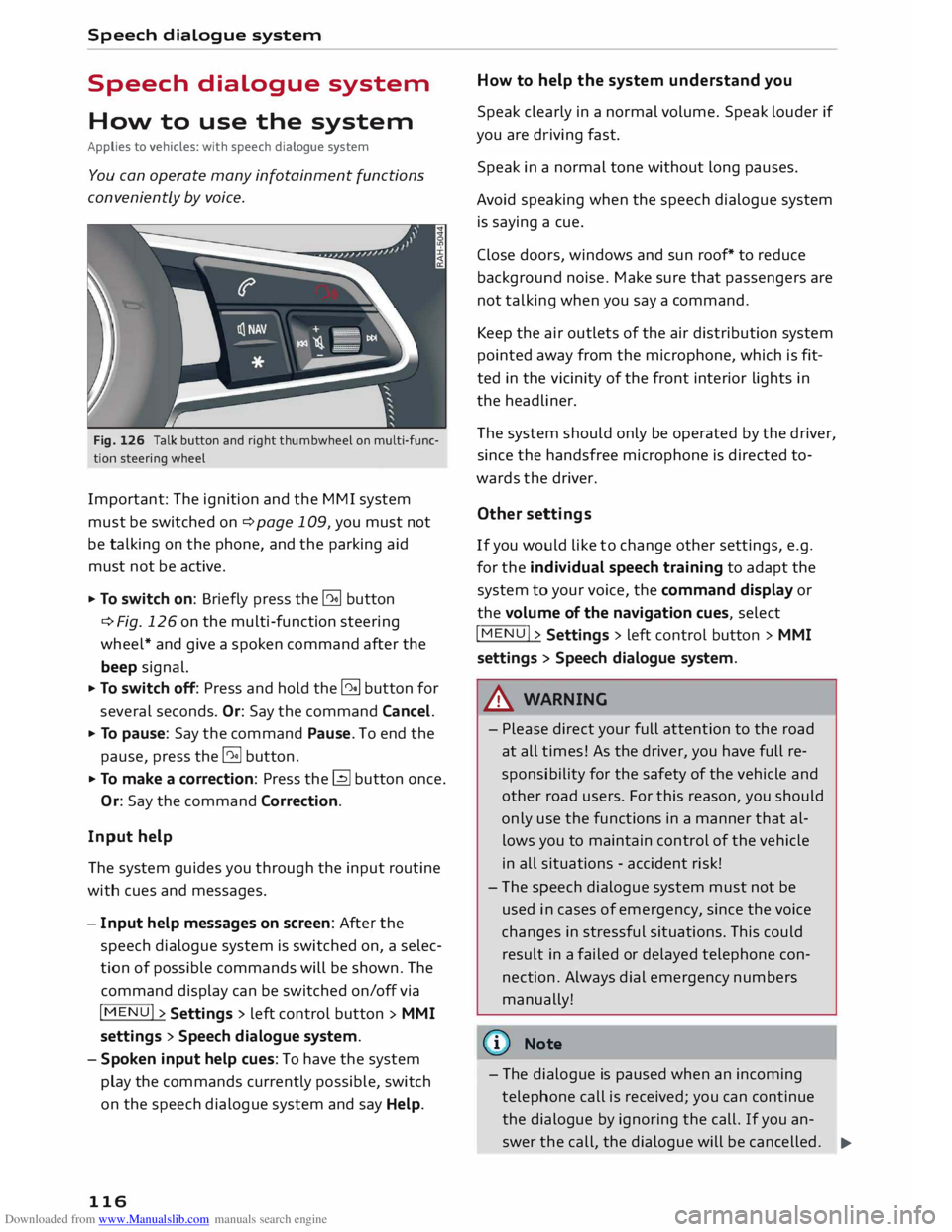
Fig. 126 Talk button and right thumbwheel on multi-func
tion steering wheel
Important: The ignition and the MMI system
must be switched on ¢page 109, you must not
be talking on the phone, and the parking aid
must not be active.
... To switch on: Briefly press the [2!] button
c:::> Fig. 126 on the multi-function steering
wheel* and give a spoken command after the
beep signal.
... To switch off: Press and hold the [2!] button for
several seconds. Or: Say the command Cancel.
... To pause: Say the command Pause. To end the
pause, press the l2!l button.
... To make a correction: Press the� button once.
Or: Say the command Correction.
Input help
The system guides you through the input routine
with cues and messages.
- Input help messages on screen: After the
speech dialogue system is switched on, a selec
tion of possible commands will be shown. The
command display can be switched on/off via
I MENU I>
Settings > left control button >
MMI
settings > Speech dialogue system.
- Spoken input help cues: To have the system
play the commands currently possible, switch
on the speech dialogue system and say Help.
116 How
to help the system understand you
Speak clearly in a normal volume. Speak louder if
you are driving fast.
Speak in a normal tone without long pauses.
Avoid speaking when the speech dialogue system
is saying a cue.
Close doors, windows and sun roof* to reduce
background noise. Make sure that passengers are
not talking when you say a command.
Keep the air outlets of the air distribution system
pointed away from the microphone, which is fit
ted in the vicinity of the front interior lights in
the headliner.
The system should only be operated by the driver,
since the handsfree microphone is directed to
wards the driver.
Other settings
If you would like to change other settings, e.g.
for the individual speech training to adapt the
system to your voice, the command display or
the volume of the navigation cues, select
I MENU I>
Settings > left control button >
MMI
settings > Speech dialogue system.
A WARNING
- Please direct your full attention to the road
at all times! As the driver, you have full re
sponsibility for the safety of the vehicle and
other road users. For this reason, you should
only use the functions in a manner that al
lows you to maintain control of the vehicle
in all situations -accident risk!
- The speech dialogue system must not be
used in cases of emergency, since the voice
changes in stressful situations. This could
result in a failed or delayed telephone con
nection. Always dial emergency numbers
manually!
{tI)) Note
- The dialogue is paused when an incoming
telephone call is received; you can continue
the dialogue by ignoring the call. If you an-
swer the call, the dialogue will be cancelled.
..,.
Page 199 of 284
Downloaded from www.Manualslib.com manuals search engine 0
N
co
,-j
\D U'l
N
U'l
,-j Make
sure that children do not lean out of the
child seat towards the door trim. If the side air
bag were to inflate in an accident, it could strike
the child on the head and cause serious injury.
A WARNING
- To avoid injury, the child's head must always
be well away from the opening for the side
airbag.
- Do not leave or place any objects in the area
of inflation for the side airbag -risk of in
jury!
Child seat categories
Only use child restraint systems that are official
ly approved and suitable for the child.
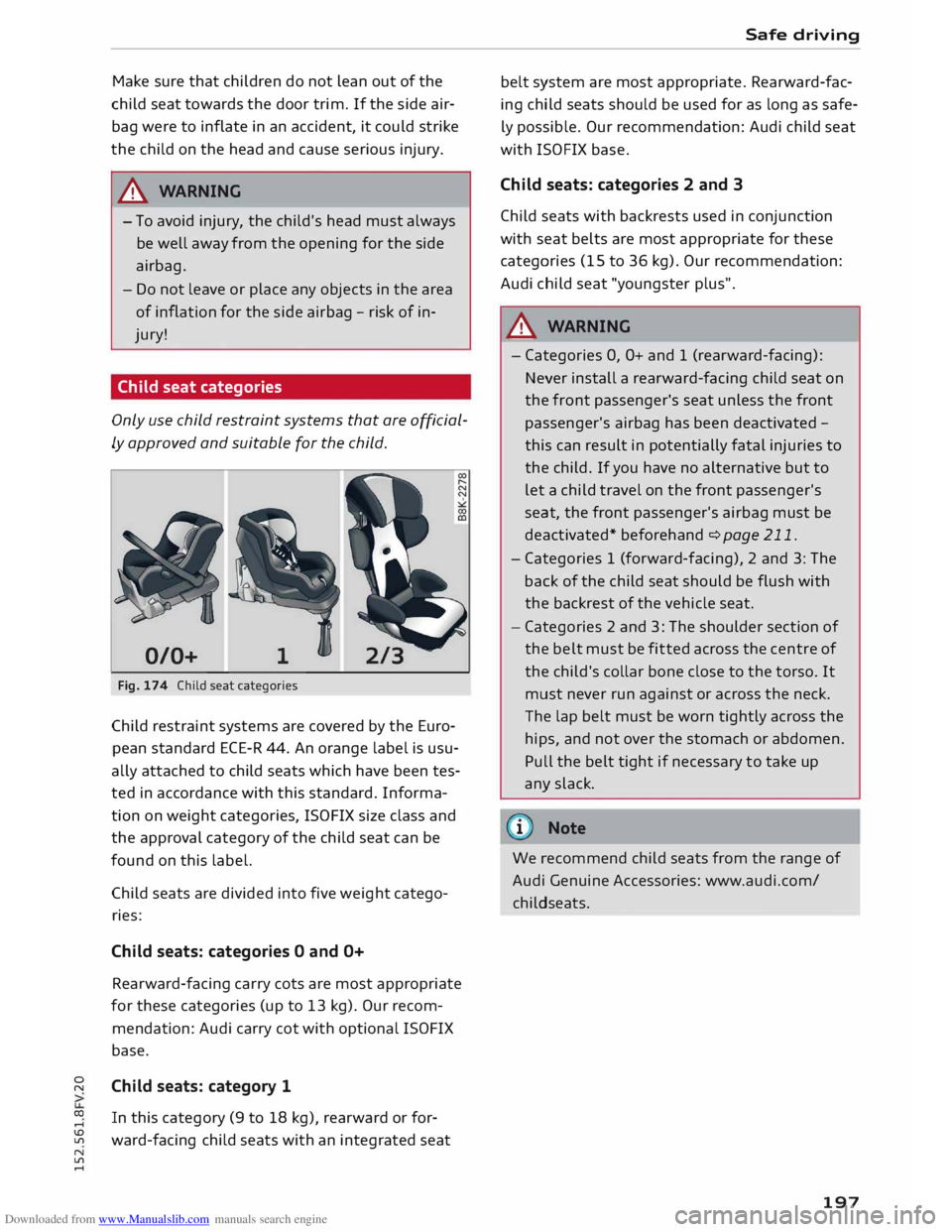
0/0+ 1
Fig. 174 Child seat categories
Child restraint systems are covered by the Euro
pean standard ECE-R 44. An orange label is usu
ally attached to child seats which have been tes
ted in accordance with this standard. Informa
tion on weight categories, ISOFIX size class and
the approval category of the child seat can be
found on this label.
Child seats are divided into five weight catego
ries:
Child seats: categories O and O+
Rearward-facing carry cots are most appropriate
for these categories (up to 13 kg). Our recom
mendation: Audi carry cot with optional ISOFIX
base.
Child seats: category 1
In this category (9 to 18 kg), rearward or for
ward-facing child seats with an integrated seat Safe
driving
belt system are most appropriate. Rearward-fac
ing child seats should be used for as long as safe
ly possible. Our recommendation: Audi child seat
with ISOFIX base.
Child seats: categories 2 and 3
Child seats with backrests used in conjunction
with seat belts are most appropriate for these
categories (15 to 36 kg). Our recommendation:
Audi child seat "youngster plus".
A WARNING
- Categories 0, O+ and 1 (rearward-facing):
Never install a rearward-facing child seat on
the front passenger's seat unless the front
passenger's airbag has been deactivated -
this can result in potentially fatal injuries to
the child. If you have no alternative but to
let a child travel on the front passenger's
seat, the front passenger's airbag must be
deactivated* beforehand c:> page 211.
- Categories 1 (forward-facing), 2 and 3: The
back of the child seat should be flush with
the backrest of the vehicle seat.
- Categories 2 and 3: The shoulder section of
the belt must be fitted across the centre of
the child's collar bone close to the torso. It
must never run against or across the neck.
The lap belt must be worn tightly across the
hips, and not over the stomach or abdomen.
Pull the belt tight if necessary to take up
any slack.
1 Note
We recommend child seats from the range of
Audi Genuine Accessories: www.audi.com/
childseats.
197
Page 216 of 284
Downloaded from www.Manualslib.com manuals search engine Airbag
system
Side airbags
Description of side airbags
Applies to vehicles: with side airbags
The airbag system is not a substitute for the seat
belts.
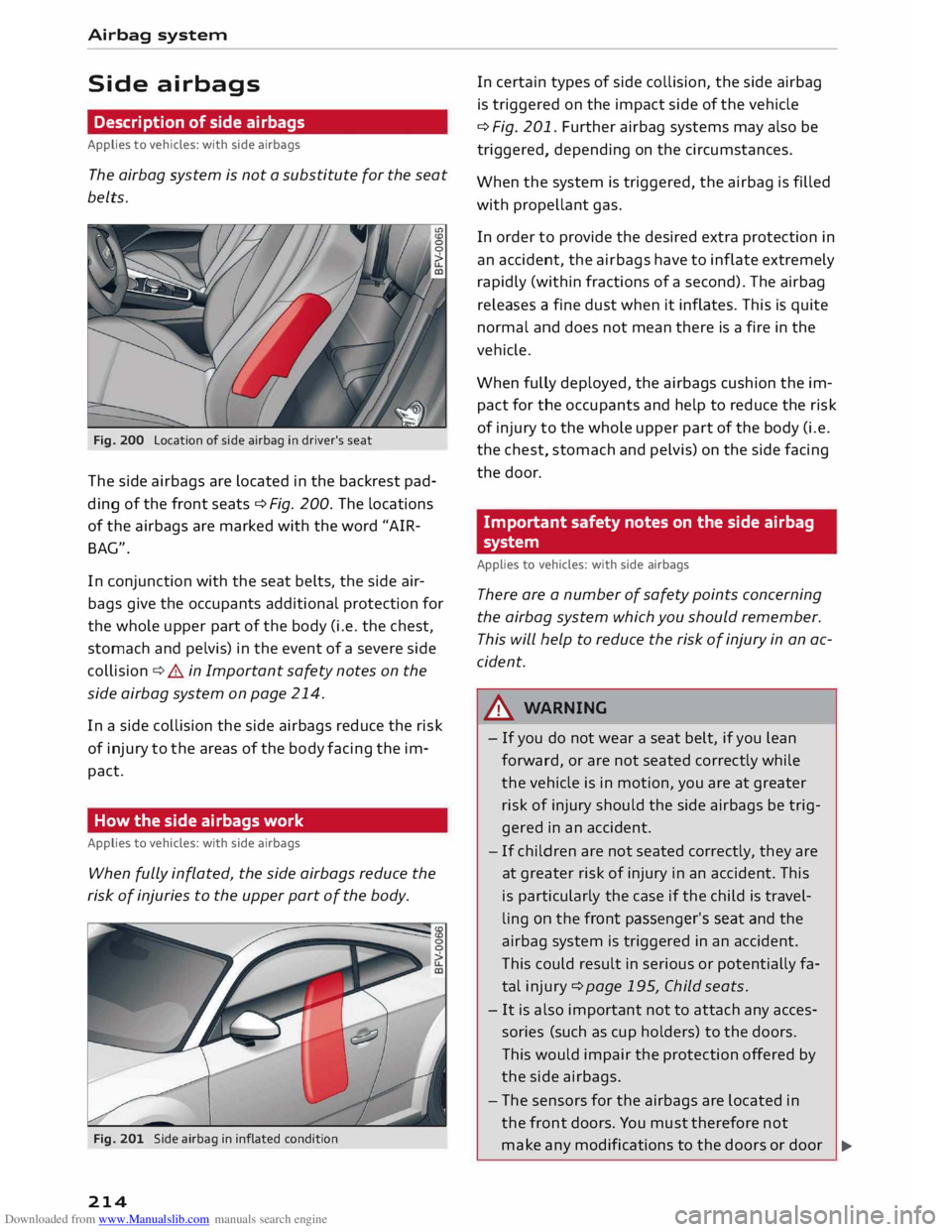
Fig. 200 Location of side airbag in driver's seat
The side airbags are located in the backrest pad
ding of the front seats¢ Fig. 200. The locations
of the airbags are marked with the word "AIR
BAG".
In conjunction with the seat belts, the side air
bags give the occupants additional protection for
the whole upper part of the body (i.e. the chest,
stomach and pelvis) in the event of a severe side
collision ¢&. in Important safety notes on the
side airbag system on page 214.
In a side collision the side airbags reduce the risk
of injury to the areas of the body facing the im
pact.
How the side airbags work
Applies to vehicles: with side airbags
When fully inflated, the side airbags reduce the
risk of injuries to the upper part of the body.
Fig. 201 Side airbag in inflated condition
214 In
certain types of side collision, the side airbag
is triggered on the impact side of the vehicle
¢ Fig. 201. Further airbag systems may also be
triggered, depending on the circumstances.
When the system is triggered, the airbag is filled
with propellant gas.
In order to provide the desired extra protection in
an accident, the airbags have to inflate extremely
rapidly (within fractions of a second). The airbag
releases a fine dust when it inflates. This is quite
normal and does not mean there is a fire in the
vehicle.
When fully deployed, the airbags cushion the im
pact for the occupants and help to reduce the risk
of injury to the whole upper part of the body (i.e.
the chest, stomach and pelvis) on the side facing
the door.
Important safety notes on the side airbag
system
Applies to vehicles: with side airbags
There are a number of safety points concerning
the airbag system which you should remember.
This will help to reduce the risk of injury in an ac
cident.
A WARNING
- If you do not wear a seat belt, if you lean
forward, or are not seated correctly while
the vehicle is in motion, you are at greater
risk of injury should the side airbags be trig
gered in an accident.
- If children are not seated correctly, they are
at greater risk of injury in an accident. This
is particularly the case if the child is travel
ling on the front passenger's seat and the
airbag system is triggered in an accident.
This could result in serious or potentially fa
tal injury ¢page 195, Child seats.
- It is also important not to attach any acces
sories (such as cup holders) to the doors.
This would impair the protection offered by
the side airbags.
- The sensors for the airbags are located in
the front doors. You must therefore not
make any modifications to the doors or door
�
Page 217 of 284
Downloaded from www.Manualslib.com manuals search engine 0
N
co
....
\D Lfl
N
Lfl
.... trim
(e.g. retrofitting loudspeakers), as this
could impair the function of the side air
bags. Any damage to the front doors could
lead to faults in the system. Repairs or any
other work on the front doors must there
fore always be carried out by a qualified
workshop.
- Do not apply excessive force to the sides of
the backrests (such as hard knocks or kicks),
as this could damage parts of the system.
The side airbags could then fail to operate
when required.
- If you intend to fit protective covers over the
seats, these must be of the specific type ap
proved for use on Audi seats with side air
bags. Conventional seat covers would ob
struct the side airbag when it inflates out of
the backrest, and seriously reduce the air
bag's effectiveness.
- Any damage to the original seat upholstery
or around the seams of the side airbag units
must be repaired immediately by a qualified
workshop.
- Any work involving the
side
airbag system or
removal and installation of the airbag com
ponents for other repairs (such as repairs to
the seats) must always be performed by a
qualified workshop. Otherwise the airbag
system may fail to work properly.
Head-protection airbags
Description of head-protection airbags
Applies to vehicles: with head-protection airbags
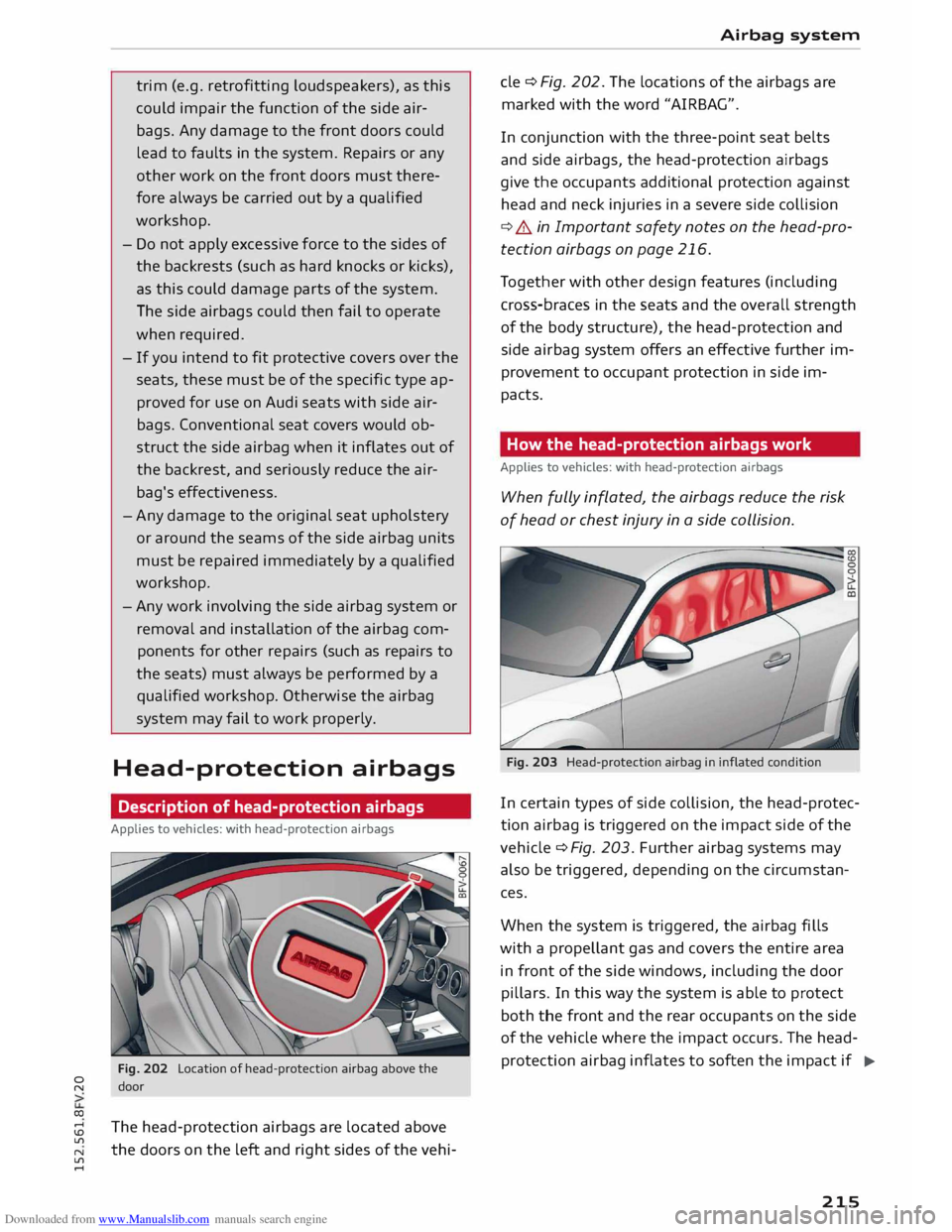
Fig. 202 Location of head-protection airbag above the
door
The head-protection airbags are located above
the doors on the left and right sides of the vehi- Airbag
system
de ¢Fig. 202. The locations of the airbags are
marked with the word "AIRBAG".
In conjunction with the three-point seat belts
and side airbags, the head-protection airbags
give the occupants additional protection against
head and neck injuries in a severe side collision
¢.&. in Important safety notes on the head-pro
tection airbags on page 216.
Together with other design features (including
cross-braces in the seats and the overall strength
of the body structure), the head-protection and
side airbag system offers an effective further im
provement to occupant protection in side im
pacts.
How the head-protection airbags work
Applies to vehicles: with head-protection airbags
When fully inflated, the airbags reduce the risk
of head or chest injury in a side collision.
Fig. 203 Head-protection airbag in inflated condition
In certain types of side collision, the head-protec
tion airbag is triggered on the impact side of the
vehicle ¢ Fig. 203. Further airbag systems may
also be triggered, depending on the circumstan
ces.
When the system is triggered, the airbag fills
with a propellant gas and covers the entire area
in front of the side windows, including the door
pillars. In this way the system is able to protect
both the front and the rear occupants on the side
of the vehicle where the impact occurs. The head
protection airbag inflates to soften the impact if
..,.
215
Page 276 of 284
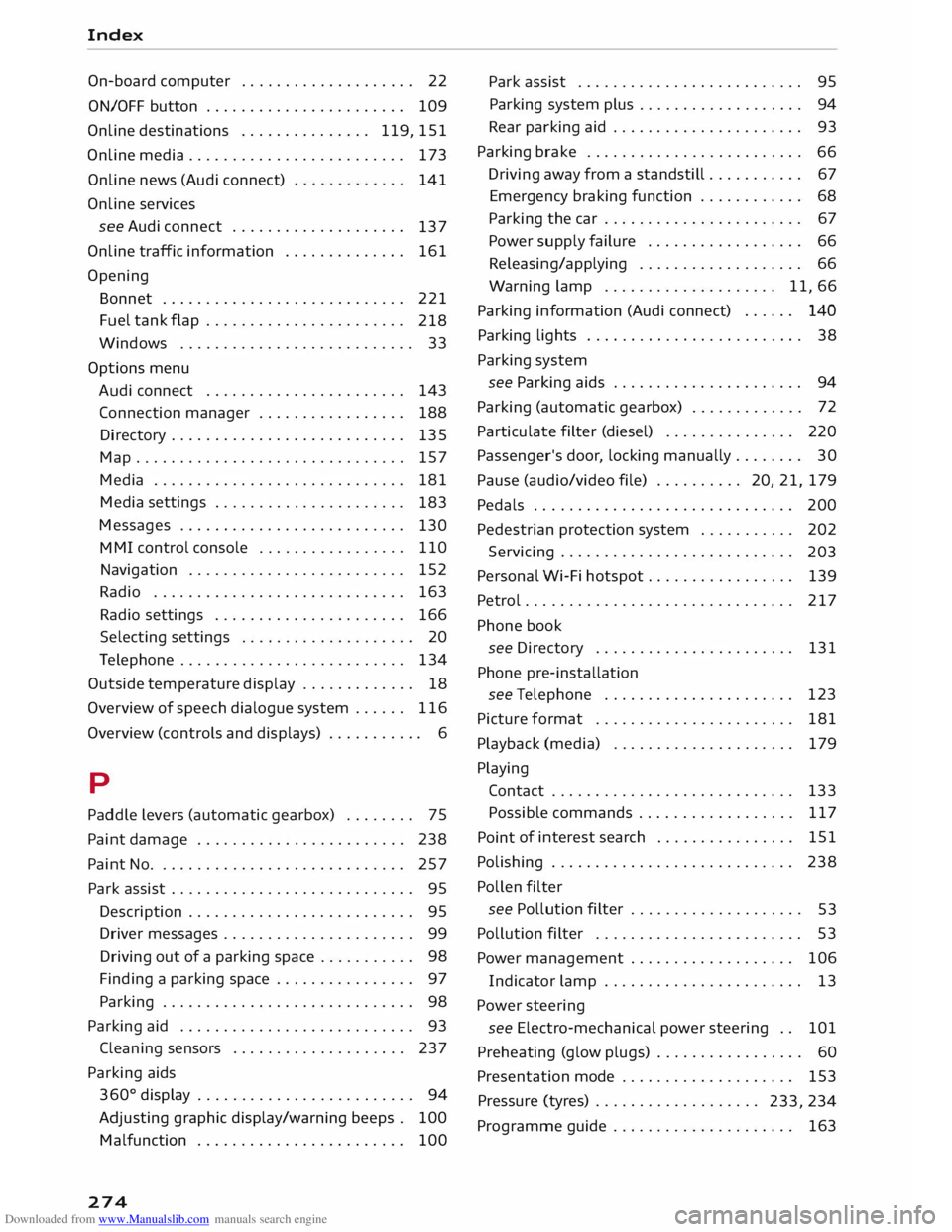
Downloaded from www.Manualslib.com manuals search engine Index
On-board computer . . . . . . . . . . . . . . . . . . . . 22
ON/OFF button . . . . . . . . . . . . . . . . . . . . . . .
109
Online destinations . . . . . . . . . . . . . . . 119, 151
Online media . . . . . . . . . . . . . . . . . . . . . . . . .
173
Online news (Audi connect)
Online services 141
see Audi connect . . . . . . . . . . . . . . . . . . . .
137
Online traffic information . . . . . . . . . . . . . .
161
Opening Bonnet . . . . . . . . . . . . . . . . . . . . . . . . . . . .
221
Fuel tank flap . . . . . . . . . . . . . . . . . . . . . . .
218
Wi ndows ........................... 33
Options menu
Audi connect . . . . . . . . . . . . . . . . . . . . . . .
143
Connection manager . . . . . . . . . . . . . . . . . 188
Directory . . . . . . . . . . . . . . . . . . . . . . . . . . .
135
Map ............................... 157
Media . . . . . . . . . . . . . . . . . . . . . . . . . . . . . 181
Media settings . . . . . . . . . . . . . . . . . . . . . .
183
Messages . . . . . . . . . . . . . . . . . . . . . . . . . .
130
M MI
control console . . . . . . . . . . . . . . . . .
110
Navigation . . . . . . . . . . . . . . . . . . . . . . . . . 152
Radio . . . . . . . . . . . . . . . . . . . . . . . . . . . . . 163
Radio settings . . . . . . . . . . . . . . . . . . . . . . 166
Selecting settings . . . . . . . . . . . . . . . . . . . . 20
Telephone . . . . . . . . . . . . . . . . . . . . . . . . . . 134
Outside temperature display . . . . . . . . . . . . . 18
Over view of speech dialogue system . . . . . . 116
Over view (controls and displays) . . . . . . . . . . . 6
p
Paddle levers (automatic gearbox) . . . . . . . . 75
Paint damage . . . . . . . . . . . . . . . . . . . . . . . .
238
Paint No. . . . . . . . . . . . . . . . . . . . . . . . . . . . .
257
Park assist . . . . . . . . . . . . . . . . . . . . . . . . . . . . 95
Description . . . . . . . . . . . . . . . . . . . . . . . . . . 95
Driver messages . . . . . . . . . . . . . . . . . . . . . . 99
Driving out of a parking space . . . . . . . . . . . 98
Finding a parking space . . . . . . . . . . . . . . . . 97
Parking . . . . . . . . . . . . . . . . . . . . . . . . . . . . . 98
Parking aid . . . . . . . . . . . . . . . . . . . . . . . . . . .
93
Cleaning sensors . . . . . . . . . . . . . . . . . . . . 237
Parking aids
360 °
display . . . . . . . . . . . . . . . . . . . . . . . . . 94
Adjusting graphic display/warning beeps . 100
Malfunction . . . . . . . . . . . . . . . . . . . . . . . . 100
274 Park
assist . . . . . . . . . . . . . . . . . . . . . . . . . .
95
Parking system plus . . . . . . . . . . . . . . . . . . .
94
Rear parking aid . . . . . . . . . . . . . . . . . . . . . . 93
Parking brake . . . . . . . . . . . . . . . . . . . . . . . . .
66
Driving away from a standstill . . . . . . . . . . . 67
Emergency braking function . . . . . . . . . . . .
68
Parking the car . . . . . . . . . . . . . . . . . . . . . . .
67
Power supply failure . . . . . . . . . . . . . . . . . . 66
Releasing/applying . . . . . . . . . . . . . . . . . . .
66
Warning lamp . . . . . . . . . . . . . . . . . . . . 11, 66
Parking information (Audi connect) . . . . . . 140
Parking lights . . . . . . . . . . . . . . . . . . . . . . . . . 38
Parking system
see Parking aids . . . . . . . . . . . . . . . . . . . . . . 94
Parking (automatic gearbox) . . . . . . . . . . . . . 72
Particulate filter (diesel) . . . . . . . . . . . . . . . 220
Passenger's door, locking manually . . . . . . . . 30
Pause (audio/video file) .......... 20, 21, 179
Pedals . . . . . . . . . . . . . . . . . . . . . . . . . . . . . . 200
Pedestrian protection system . . . . . . . . . . . 202
Servicing . . . . . . . . . . . . . . . . . . . . . . . . . . .
203
Personal Wi-Fi hotspot . . . . . . . . . . . . . . . . . 139
Petrol ............................... 217
Phone book
see Directory . . . . . . . . . . . . . . . . . . . . . . . 131
Phone pre-installation
see Telephone . . . . . . . . . . . . . . . . . . . . . .
123
Picture format . . . . . . . . . . . . . . . . . . . . . . .
181
Playback (media) . . . . . . . . . . . . . . . . . . . . .
179
Playing Contact . . . . . . . . . . . . . . . . . . . . . . . . . . . .
133
Possible commands .................. 117
Point of
interest search . . . . . . . . . . . . . . . . 151
Polishing . . . . . . . . . . . . . . . . . . . . . . . . . . . . 238
Pollen filter
see Pollution filter . . . . . . . . . . . . . . . . . . . .
53
Pollution filter . . . . . . . . . . . . . . . . . . . . . . . .
53
Power management . . . . . . . . . . . . . . . . . . . 106
Indicator lamp . . . . . . . . . . . . . . . . . . . . . . . 13
Power steering
see Electro-mechanical power steering . . 101
Preheating (glow plugs) . . . . . . . . . . . . . . . . . 60
Presentation mode . . . . . . . . . . . . . . . . . . . .
153
Pressure (tyres) . . . . . . . . . . . . . . . . . . .
233, 234
Programme guide . . . . . . . . . . . . . . . . . . . . . 163