door lock AUDI TT COUPE 2014 Owner's Manual
[x] Cancel search | Manufacturer: AUDI, Model Year: 2014, Model line: TT COUPE, Model: AUDI TT COUPE 2014Pages: 284, PDF Size: 34.42 MB
Page 75 of 284
Downloaded from www.Manualslib.com manuals search engine 0
N
co
....
\D U'l
N
U'l
.... can
roll away. Doors do not lock if lever is not in
P appears on vehicles with convenience key*. A
buzzer will also sound.
,. Pr ess and hold the brake pedal¢ A_ .
,. Apply the parking brake.
,. Move the selector lever to P.
Stopping on a slope
,. Always keep your foot on the brake pedal to
hold the vehicle and prevent it from rolling
back down the slope ¢ A_ . Do not try to stop
the vehicle "rolling back" by increasing the en
gine speed when a gear is engaged ¢(D.
Driving away on a slope (vehicles without hill
hold assist* / Audi hold assist*)
,. Apply the parking brake.
,. Once you have engaged a gear press the accel
erator carefully. The parking brake will be re
leased automatically if you are wearing your
seat belt.
Driving away on a slope (vehicles with hill
hold assist*)
,. Once you have engaged a gear, release the foot
brake and press the accelerator ¢ page 69, Hill
hold assist.
Driving away on a slope (vehicles with hold
assist*)
,. Once you have engaged a gear, release the foot
brake and press the accelerator ¢ page 68,
Hold assist.
In some situations (such as when driving on
mountain roads) it can be advantageous to
switch temporarily to the manual shift pro
gramme so that the gear ratios can be selected
manually to suit the driving conditions
¢page 75.
On level ground it is sufficient to move the selec
tor lever to P. On a gradient the parking brake
should be applied first and the selector lever
should be moved to P ¢ page 66. This reduces
the load on the locking mechanism and makes it
easier to move the selector lever out of position
P Automatic
gearbox
_&. WARNING
- The driver should never get out of the vehi
cle when the engine is running and a gear is
engaged. If you have to leave your vehicle
while the engine is running, you must apply
the parking brake and engage the parking
lock P.
- If the engine is running and a gear is engag
ed {D/S or R) or the vehicle is in "tiptronic"
mode, you will need to hold the car with the
footbrake. Otherwise, the car will "creep"
forwards as the power transmission is not
fully interrupted even when the engine is
idling.
- The accelerator pedal must on no account
be pressed inadvertently when the vehicle is
stationary . The vehicle could otherwise start
moving immediately (in some cases even if
the parking brake is engaged) and possibly
cause an accident.
- Do not press the accelerator while selecting
a gear with the vehicle stationary and the
engine running, as this could cause an acci
dent.
- Never move the selector lever to R or P
when driving at normal speeds, as this could
cause an accident.
- Before you drive down a steep gradient, re
duce the speed and use "tiptronic" to select
a low gear.
- Never allow the brake to drag when driving
downhill and do not use the brake pedal too
often or for long periods. Constant braking
will cause the brakes to overheat and will
considerably reduce the effectiveness of the
brakes. It will increase the braking distance
and could cause the brake system to fail.
- To avoid rolling back on gradients always
hold the vehicle with the footbrake or park
ing brake if you have to stop.
- Never attempt to hold the vehicle with the
clutch when stopping on a gradient. The
clutch is disengaged automatically if it is
overloaded and becomes too hot -accident
risk! If the clutch is overloaded, the indica
tor lamp [!l will light up and a message will
appear¢ page 77.
�
73
Page 110 of 284
Downloaded from www.Manualslib.com manuals search engine Intelligent
technology
event of faults or anomalies in the vehicle data,
only these data are saved. As a rule, faults are
shown by the warning lamps in the instrument
cluster.
Data saved in the control units can only be read
and analysed with special equipment.
A qualified workshop is only able to recognise
and deal with faults by using the relevant saved
data. Among other things, the saved data may
contain the following information:
- Data relating to the engine and the gearbox
-Speed
- Dire ction of travel
- Braking force
- Seat belt warning system data
The control
units
installed will not under any cir
cumstances record conversations in the vehicle.
On vehicles with an automatic SOS dial system
via a mobile phone or another connected device,
the current location of the vehicle can be trans
mitted. In accidents where the control units reg
ister that airbags have been triggered, a signal
can automatically be sent by the system. This de
pends on the service provider. The signal can only
be sent in areas with sufficient mobile phone cov
erage.
Event data recorder
Your vehicle is not equipped with an event data
recorder.
In an event data recorder, information about the
vehicle is temporarily saved. In the event of an
accident, you can therefore obtain detailed infor
mation about the course of events. On vehicles
with an airbag system, accident-related data such
as impact speed, seat belt status, seat positions
and trigger times can be saved. The exact infor
mation saved depends on the manufacturer.
The installation of an event data recorder is sub
ject to the agreement of the vehicle's owner. This
process is governed by legislation in some coun
tries.
108 Reprogram
ming control units
All data for controlling components are saved in
the control units. Some convenience features,
such as one-touch signalling, single door unlock
ing and display messages can be reprogrammed
using special workshop equipment. If any con
venience features are reprogrammed, the infor
mation in this Owner's Manual will no longer be
accurate for the features that have been
changed. We recommend having the reprogram
ming confirmed by an Audi workshop in the
"Workshop remarks" section of your Service
Schedule.
Your Audi dealer will be able to provide you with
information about possible reprogramming op
tions.
Event memory
There is a diagnostic connection for reading out
the event memory located in the footwell on the
driver's side of the vehicle. Information regarding
the operation and status of the vehicle's elec
tronic control units is stored in the event memo
ry. The event memory should only be read out
and erased by a qualified workshop.
A WARNING
The diagnostic connection must not be used
for other purposes. Incorrect use can cause
malfunctions -risk of accident!
Page 203 of 284
Downloaded from www.Manualslib.com manuals search engine 0
N
co
....
\D Lfl
N
Lfl
.... -Always
make sure that floor mats are prop
erly secured.
- Never lay or install additional floor mats or
other floor coverings over the existing floor
mats; this would restrict the pedal area and
possibly obstruct the pedals, which could
cause an accident.
Stowing luggage safely
Luggage compartment
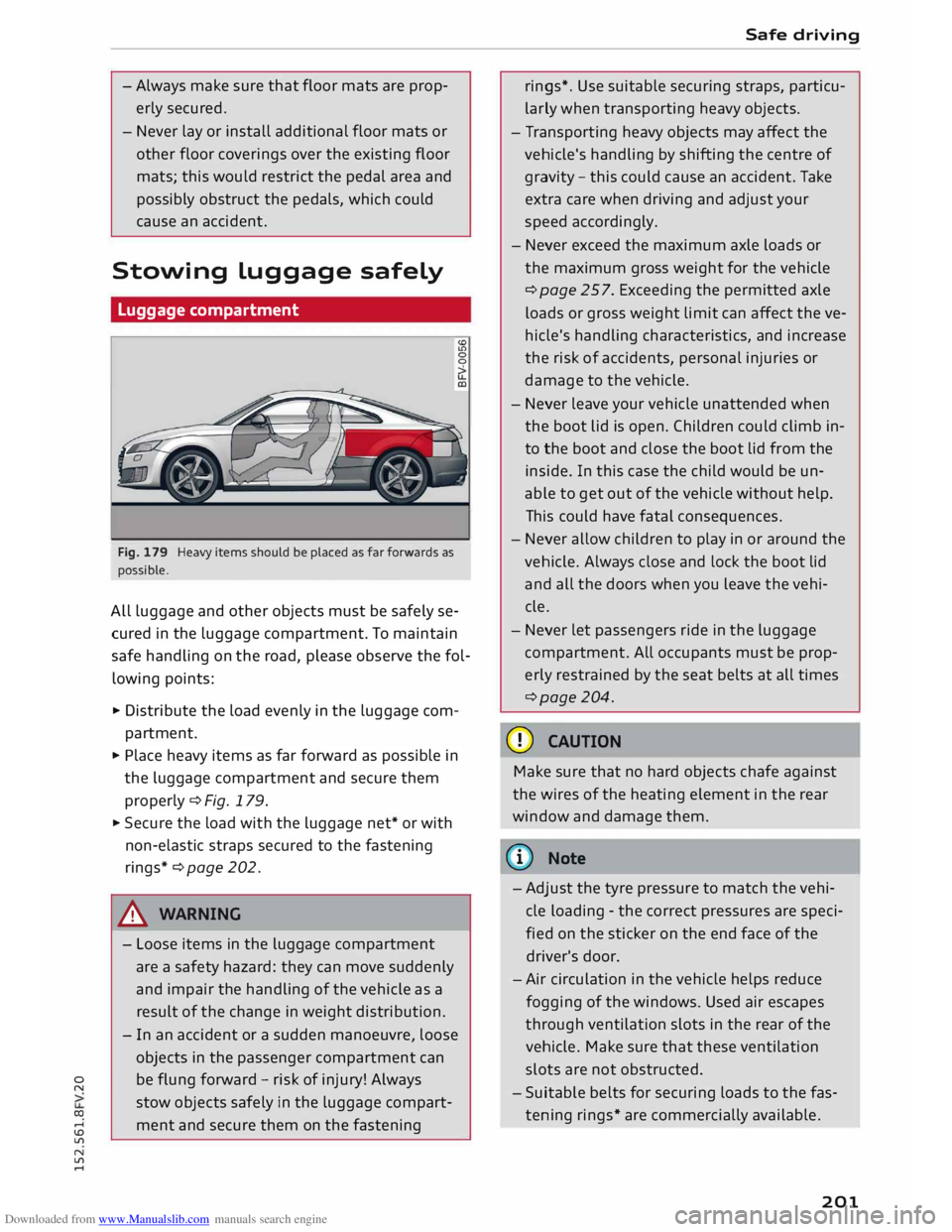
Fig. 179 Heavy items should be placed as far forwards as
possible.
All luggage and other objects must be safely se
cured in the luggage compartment. To maintain
safe handling on the road, please observe the fol
lowing points:
� Distribute the load evenly in the luggage com
partment.
� Place heavy items as far forward as possible in
the luggage compartment and secure them
properly ¢Fig. 179.
� Secure the load with the luggage net* or with
non-elastic straps secured to the fastening
rings*¢ page 202.
A WARNING
- Loose items in the luggage compartment
are a safety hazard: they can move suddenly
and impair the handling of the vehicle as a
result of the change in weight distribution.
- In an accident or a sudden manoeuvre, loose
objects in the passenger compartment can
be flung forward -risk of injury! Always
stow objects safely in the luggage compart
ment and secure them on the fastening Safe
driving
rings*. Use suitable securing straps, particu
larly when transporting heavy objects.
- Transporting heavy objects may affect the
vehicle's handling by shifting the centre of
gravity -this could cause an accident. Take
extra care when driving and adjust your
speed accordingly.
- Never exceed the maximum axle loads or
the maximum gross weight for the vehicle
¢ page 257. Exceeding the permitted axle
loads or gross weight limit can affect the ve
hicle's handling characteristics, and increase
the risk of accidents, personal injuries or
damage to the vehicle.
- Never leave your vehicle unattended when
the boot lid is open. Children could climb in
to the boot and close the boot lid from the
inside. In this case the child would be un
able to get out of the vehicle without help.
This could have fatal consequences.
- Never allow children to play in or around the
vehicle. Always close and lock the boot lid
and all the doors when you leave the vehi
cle.
- Never let passengers ride in the luggage
compartment. All occupants must be prop
erly restrained by the seat belts at all times
¢page 204.
CD CAUTION
Make sure that no hard objects chafe against
the wires of the heating element in the rear
window and damage them.
(D} Note
- Adjust the tyre pressure to match the vehi
cle loading -the correct pressures are speci
fied on the sticker on the end face of the
driver's door.
- Air circulation in the vehicle helps reduce
fogging of the windows. Used air escapes
through ventilation slots in the rear of the
vehicle. Make sure that these ventilation
slots are not obstructed.
- Suitable belts for securing loads to the fas
tening rings* are commercially available.
201
Page 223 of 284
Downloaded from www.Manualslib.com manuals search engine 0
N
co
....
\D L/'l
N
L/'l
.... -
Never spill fluids on a hot engine. These flu
ids can cause a fire (e.g. radiator anti
freeze).
- Take care not to cause short circuits in the
electrical system, especially when working
on the battery.
- When working in the engine compartment
be aware that the radiator fan may start
running suddenly, even if the ignition is
switched off-risk of injury!
- Do not unscrew the cap on the expansion
tank when the engine is hot. The cooling
system is under pressure.
- Protect face, hands and arms by covering
the cap with a large, thick rag to protect
against escaping coolant and steam.
- Never remove the engine cover panel -risk
of burns!
- If any tests have to be performed with the
engine running, there is an extra safety risk
from the rotating parts, such as the drive
belts, alternator and radiator fan, etc., and
from the high-voltage ignition system.
- Vehicles with automatic gearbox: Never
open the throttle inadvertently (for instance
by hand from the engine compartment) if a
gear is engaged while the vehicle is station
ary with the engine running. The vehicle
could otherwise start moving immediately
and possibly cause an accident.
- Observe the following additional warnings if
work on the fuel system or the electrical
system is necessary:
- Always disconnect the battery.
- Do not smoke.
- Never work near naked flames.
- Always keep an approved fire extinguisher
immediately available.
CD CAUTION
When topping up fluids make sure the correct
fluid is put into the correct filler opening. This
can otherwise cause serious malfunctions or
engine damage. Checking
and topping up fluids
® For the sake of the environment
Inspect the ground underneath your vehicle
regularly so that any leaks are detected at an
early stage. If you find spots of oil or other
fluids, have your vehicle inspected in the
workshop.
{D) Note
On right-hand drive vehicles* some of the
containers/ reservoirs mentioned below are
located on the other side of the engine com
partment.
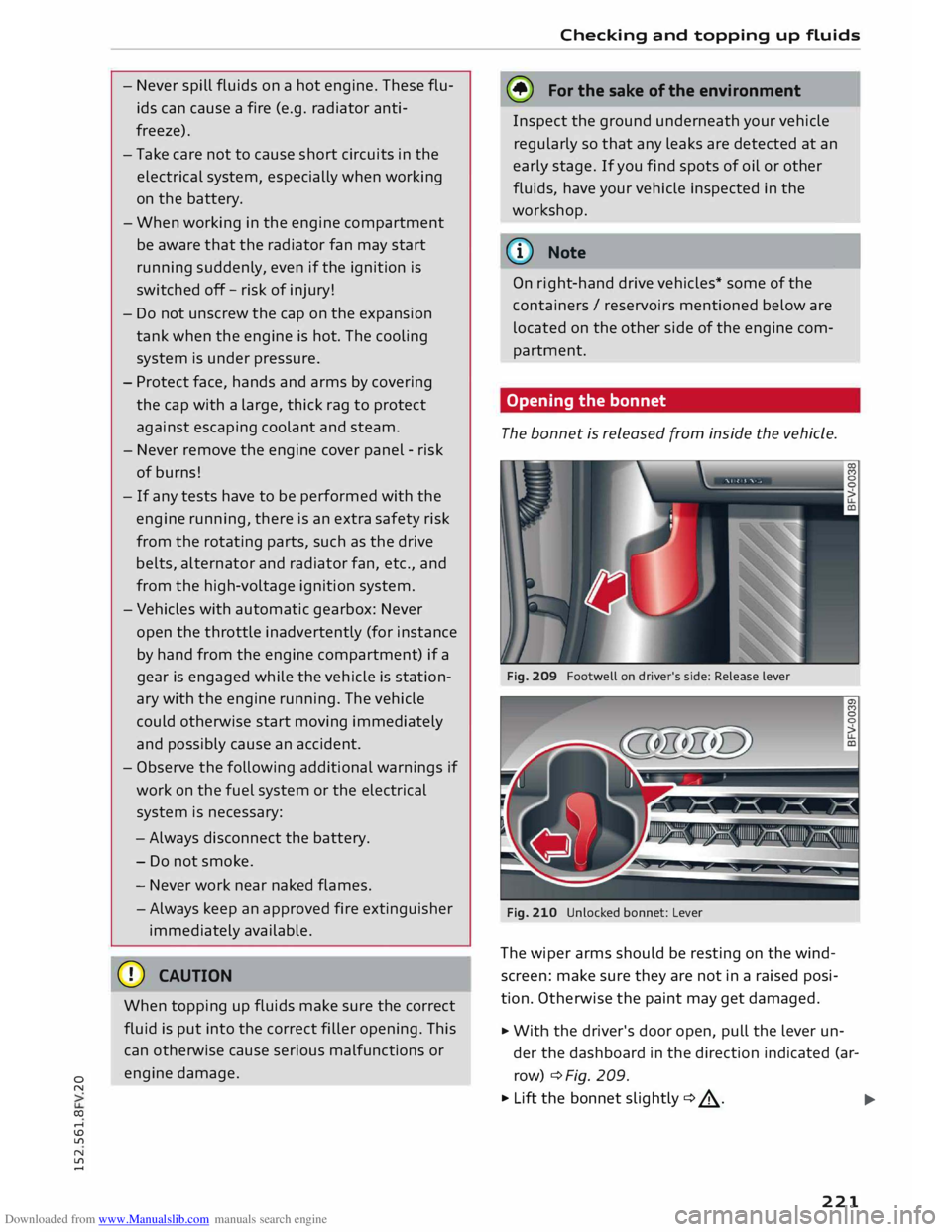
Opening the bonnet
The bonnet is released from inside the vehicle.
Fig. 209 Footwell on driver's side: Release lever
Fig. 210 Unlocked bonnet: Lever
The wiper arms should be resting on the wind
screen: make sure they are not in a raised posi
tion. Otherwise the paint may get damaged.
� With the driver's door open, pull the lever un
der the dashboard in the direction indicated (ar
row) ¢ Fig. 209.
� Lift the bonnet slightly¢.&_.
11111>
221
Page 247 of 284
Downloaded from www.Manualslib.com manuals search engine 0
N
co
,-j
\D L/'l
N
L/'l
,-j �
Note
Note the code number of the anti-theft wheel
bolt and keep it in a safe place -not in your
vehicle. If you need a replacement adapter,
give the code number to your Audi dealer.
Loosening the wheel bolts
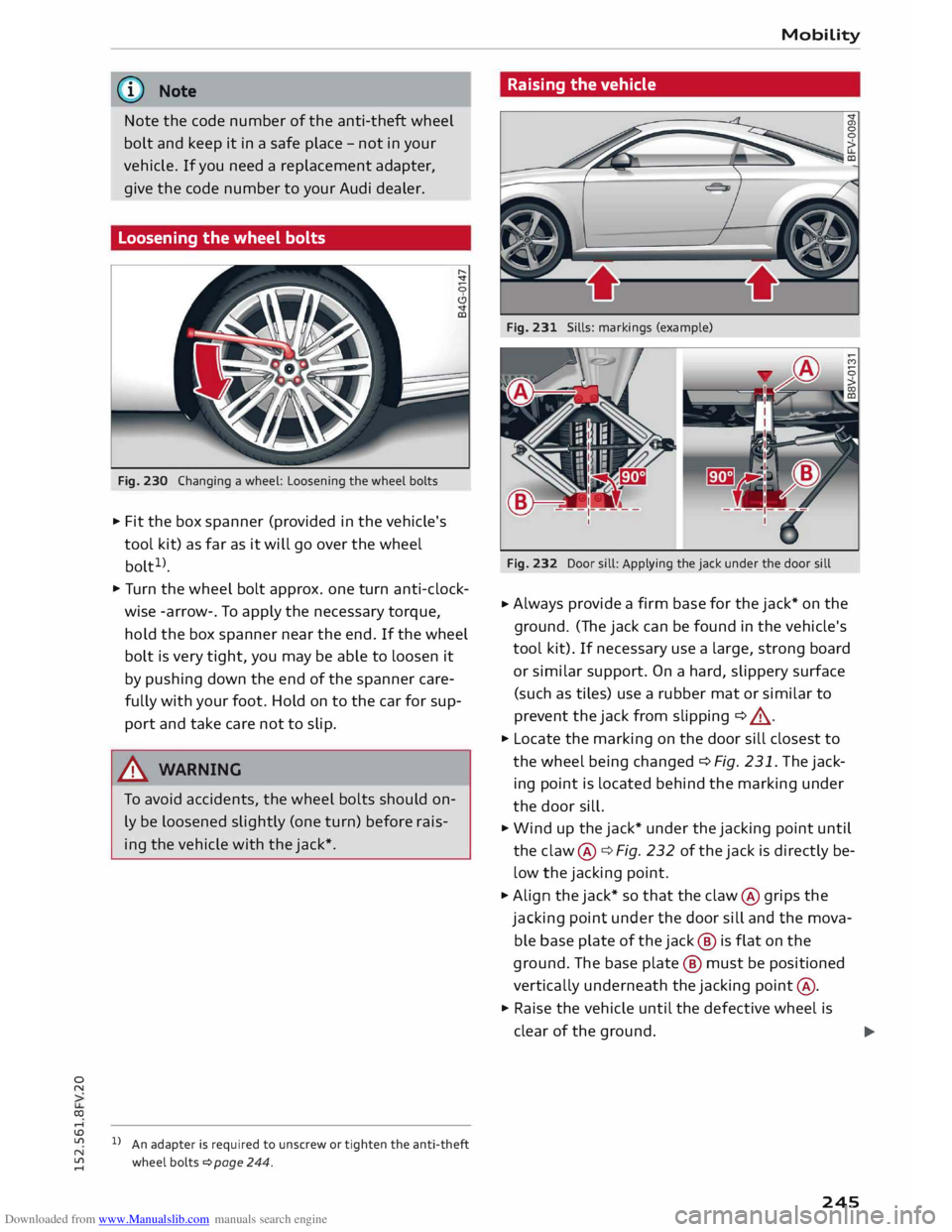
Fig. 230 Changing a wheel: Loosening the wheel bolts
.,. Fit the box spanner (provided in the vehicle's
tool kit) as far as it will go over the wheel
bolt 1
>.
.,. Turn the wheel bolt approx. one turn anti-clock
wise -arrow-. To apply the necessary torque,
hold the box spanner near the end. If the wheel
bolt is very tight, you may be able to loosen it
by pushing down the end of the spanner care
fully with your foot. Hold on to the car for sup
port and take care not to slip.
.&_ WARNING
To avoid accidents, the wheel bolts should on
ly be loosened slightly (one turn) before rais
ing the vehicle with the jack*.
l l
An adapter is required to unscrew or tighten the anti-theft
wheel bolts � page 244. Mobility
Raising the vehicle
Fig. 231 Sills: markings (example)
Fig. 232 Door sill: Applying the jack under the door sill
.,. Always
provide a firm base for the jack* on the
ground. (The jack can be found in the vehicle's
tool kit). If necessary use a large, strong board
or similar support. On a hard, slippery surface
(such as tiles) use a rubber mat or similar to
prevent the jack from slipping ¢ ,,&.
.,. Locate the marking on the door sill closest to
the wheel being changed ¢ Fig. 231. The jack
ing point is located behind the marking under
the door sill.
.,. Wind up the jack* under the jacking point until
the claw @¢ Fig. 232 of the jack is directly be
low the jacking point .
.,. Align the jack* so that the claw @ grips the
jacking point under the door sill and the mova
ble base plate of the jack @ is flat on the
ground. The base plate @ must be positioned
vertically underneath the jacking point@ .
.,. Raise the vehicle until the defective wheel is
clear of the ground.
.,.
245
Page 257 of 284
Downloaded from www.Manualslib.com manuals search engine 0
N
co
....
\D L/'l
N
L/'l
.... ,&.
WARNING
Never attempt to repair a fuse or replace a
blown fuse by fitting a fuse with a higher am
pere rating. This could damage the electrical
system -risk of fire!
CD CAUTION
If a newly replaced fuse blows again after a
short time, the electrical system must be
checked by a qualified workshop as soon as
possible.
@ Note
- Unassigned fuse locations are not shown in
the tables below.
- Some of the items of equipment listed in
the tables below are only fitted on certain
models or are optional extras.
Fuses in vehicle interior
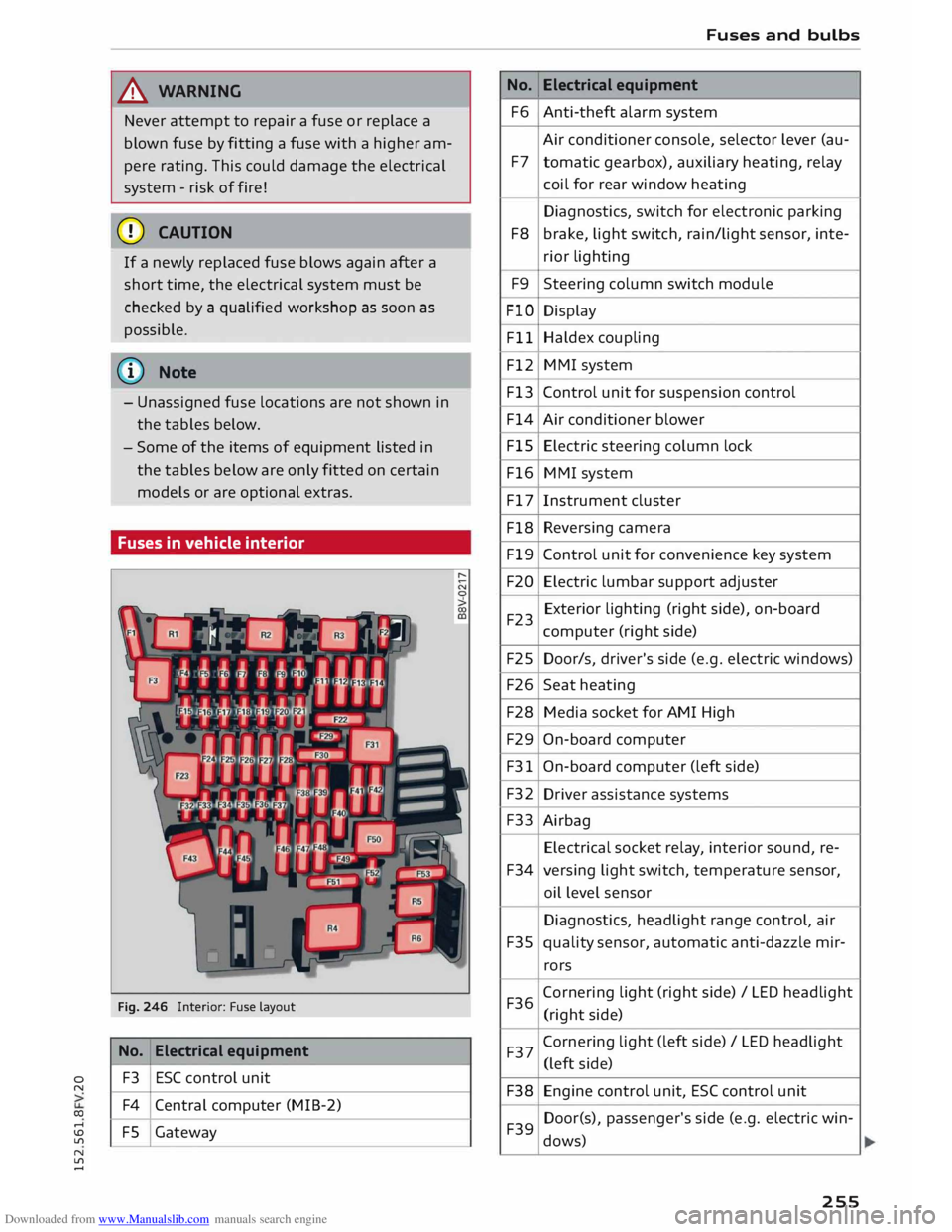
Fig. 246 Interior: Fuse layout
No. Electrical
equipment
F3 ESC
control unit
F4 Central computer (MIB-2)
FS Gateway No.
F6
F7
F8 F9
FlO Fll
F12
F13
F14
FlS
F16
F17
F18
Fl9
F20
F23
F25
F26
F28
F29
F31
F32 F33
F34
F35
F36 F37
F38 F39 Fuses
and bulbs
Electrical equipment
Anti-theft alarm system
Air conditioner console, selector lever (au-
tomatic gearbox), auxiliary heating, relay
coil for rear window heating
Diagnostics, switch for electronic parking
brake, light switch, rain/light sensor, inte-
rior lighting
Steering column switch module
Display
Haldex coupling
MMI system
Control unit for suspension control
Air conditioner blower
Electric steering column lock
MMI system
Instrument cluster
Reversing camera
Control unit for convenience key system
Electric lumbar support adjuster
Exterior lighting (right side), on-board
computer (right side)
Door/s, driver's side (e.g. electric windows)
Seat heating
Media socket for AMI High
On-board computer
On-board computer (left side)
Driver assistance systems
Airbag Electrical socket relay, interior sound, re-
versing light switch, temperature sensor,
oil level sensor
Diagnostics, headlight range control, air
quality sensor, automatic anti-dazzle mir-
rors
Corn ering light (right side)/ LED headlight
(right side)
Cornering light (left side) / LED headlight
(left side)
Engine control unit, ESC control unit
Door(s), passenger's side (e.g. electric win-
dows)
255
Page 267 of 284
Downloaded from www.Manualslib.com manuals search engine 0
N
co
....
\D L/'l
N
L/'l
.... Bluetooth
Audio player ........................ 171
Connecting a mobile phone . . . . . . . . . . . .
124
Device search . . . . . . . . . . . . . . . . . . . . . . .
134
Handsfree Profile . . . . . . . . . . . . . . . . . . . .
123
Remote SIM Access Profile (rSAP) . . . . . . .
123
Secure simple pairing . . . . . . . . . . . . 124, 137
Settings . . . . . . . . . . . . . . . . . . . . . . . . . . . 134
Boot see Luggage compartment . . . . . . . . . . . . 201
Boot lid
Manual release . . . . . . . . . . . . . . . . . . . . . . .
33
Opening/closing . . . . . . . . . . . . . . . . . . . . . .
32
Brakes . . . . . . . . . . . . . . . . . . . . . . . . . . . . . .
101
Brake assist system . . . . . . . . . . . . . . . . . .
102
Brake fluid . . . . . . . . . . . . . . . . . . . . . . . . .
226
Brake pads worn . . . . . . . . . . . . . . . . . . . . . . 14
Brake pedal . . . . . . . . . . . . . . . . . . . . . . . .
200
Brake servo . . . . . . . . . . . . . . . . . . . . . . . . .
101
Driving away on a slope . . . . . . . . . . . . . . . . 69
Emergency braking aid . . . . . . . . . . . . . . . 102
Emergency braking function . . . . . . . . . . . .
68
Indicator lamp . . . . . . . . . . . . . . . . . . . . . . .
14
New brake pads . . . . . . . . . . . . . . . . . . . . . 101
Parking brake . . . . . . . . . . . . . . . . . . . . . . . . 66
Warning lamp . . . . . . . . . . . . . . . . . . . . . . . 11
Bulbs, changing . . . . . . . . . . . . . . . . . . . . . . 256
Buttons MMI control console . . . . . . . . . . . . . . . . . 109
Multi-function steering wheel.. . . . . . . 19, 21
C
Cables AUX adapter . . . . . . . . . . . . . . . . . . . . . . . .
174
USB adapter . . . . . . . . . . . . . . . . . . . . . . . .
174
Calling up a menu . . . . . . . . . . . . . . . . . . . . .
109
Calling up media . . . . . . . . . . . . . . . . . . . . . . 179
Call list
MMI control console . . . . . . . . . . . . . . . . .
128
Speech dialogue system . . . . . . . . . . . . . .
118
Call options . . . . . . . . . . . . . . . . . . . . . . . . . .
134
Calls Answering/ignoring . . . . . . . . . . . . . . . . . . 128
Hold/resume . . . . . . . . . . . . . . . . . . . . . . . 129
see also Telephone . . . . . . . . . . . . . . . . . .
123
Call waiting . . . . . . . . . . . . . . . . . . . . . . . . . .
134
Camera-based traffic sign recognition . . . . . 23 Index
Capacities Fuel tank .......................... .
258
Washer fluid reservoir . . . . . . . . . . . . . . . .
258
Caps for wheel bolts, removing . . . . . . . . . .
244
Car care
Washing/cleaning . . . . . . . . . . . . . . . . . . .
236
Car keys . . . . . . . . . . . . . . . . . . . . . . . . . . . . . . 25
Car telephone kit
see Telephone . . . . . . . . . . . . . . . . . . . . . .
123
Catalytic converter . . . . . . . . . . . . . . . . . . . .
220
CD ............................. 169, 170
Central locking system . . . . . . . . . . . . . . . . . .
25
Boot lid . . . . . . . . . . . . . . . . . . . . . . . . . . . . .
32
Central locking switch . . . . . . . . . . . . . . . . .
29
Convenience key . . . . . . . . . . . . . . . . . . . . . .
28
Electric windows . . . . . . . . . . . . . . . . . . . . .
34
Locking doors manually . . . . . . . . . . . . . . . .
30
Remote control key . . . . . . . . . . . . . . . . . . .
28
Settings . . . . . . . . . . . . . . . . . . . . . . . . . . . .
30
Centre console lighting, adjusting brightness
.41
Cetane number (diesel) . . . . . . . . . . . . . . . .
217
Changing bulbs . . . . . . . . . . . . . . . . . . . . . . .
256
Charging battery... . . . . . . . . . . . . . . . 175, 176
Child lock (DVD) . . . . . . . . . . . . . . . . . . . . . .
183
Child seats 195
Categories . . . . . . . . . . . . . . . . . . . . . . . . .
197
ISOFIX . . . . . . . . . . . . . . . . . . . . . . . . . . . . 198
ISOFIX and top tether . . . . . . . . . . . . . . . . 199
Side airbags . . . . . . . . . . . . . . . . . . . . . . . . 196
Cigarette lighter . . . . . . . . . . . . . . . . . . . . . . . 48
City events (Audi connect) . . . . . . . . . . . . . . 141
Cleaning . . . . . . . . . . . . . . . . . . . . . . . . . . . .
236
Cleaning/de-icing windows . . . . . . . . . . . . .
238
Cleaning/ treating natural leather . . . . . . . .
239
Cleaning Alcantara
239
Cleaning Audi virtual cockpit . . . . . . . . . . . . 238
Cleaning carbon parts . . . . . . . . . . . . . 238, 239
Cleaning controls and displays . . . . . . . . . .
238
Cleaning displays . . . . . . . . . . . . . . . . . . . . .
238
Cleaning fabrics
239
Cleaning instrument cluster . . . . . . . . . . . .
238
Cleaning leatherette . . . . . . . . . . . . . . . . . . .
239
Cleaning plastic parts . . . . . . . . . . . . . . . . . .
238
Cleaning seat upholstery . . . . . . . . . . . . . . . 239
Closed roads
154
265
Page 269 of 284
Downloaded from www.Manualslib.com manuals search engine Deleting
Bluetooth device . . . . . . . . . . . . . . . . . . . .
134
Call list . . . . . . . . . . . . . . . . . . . . . . . . . . . .
134
Contact . . . . . . . . . . . . . . . . . . . . . . . .
133, 135
Entry .......................... 111, 113
Favourites . . . . . . . . . . . . . . . . . . . . . .
129, 153
Home address . . . . . . . . . . . . . . . . . . . . . .
153
myAudi special destinations . . . . . . . . . . . 153
Text messages . . . . . . . . . . . . . . . . . . . . . . 130
Deluxe automatic air conditioner
see Air conditioner (automatic) . . . . . . . . . . 55
Demo mode
see Presentation mode . . . . . . . . . . . . . . . 153
Destination from map . . . . . . . . . . . . . . . . .
149
Destination, entering . . . . . . . . . . . . . . 147, 148
Address . . . . . . . . . . . . . . . . . . . . . . . . . . . . 148
Coordinates . . . . . . . . . . . . . . . . . . . . . . . . 151
Favourites . . . . . . . . . . . . . . . . . . . . . . . . . .
149
From directory . . . . . . . . . . . . . . . . . . . . . .
149
Home address . . . . . . . . . . . . . . . . . . . . . .
149
Last destination . . . . . . . . . . . . . . . . . . . . .
148
myAudi . . . . . . . . . . . . . . . . . . . . . . . . . . . . 151
Online search . . . . . . . . . . . . . . . . . . . . . . . 151
Search function . . . . . . . . . . . . . . . . . . . . .
148
Special destination . . . . . . . . . . . . . . . . . . 150
Speech dialogue system . . . . . . . . . . . . . . 119
Stopover . . . . . . . . . . . . . . . . . . . . . . . . . . . 152
Diagnostic connection . . . . . . . . . . . . . . . . . 107
Diesel Diesel particulate filter . . . . . . . . . . . . . . . 220
Draining fuel filter . . . . . . . . . . . . . . . . . . . . 16
Engine oil . . . . . . . . . . . . . . . . . . . . . . . . . . 223
Fuel ............................... 217
Indicator lamp . . . . . . . . . . . . . . . . . . . . . . . 15
Preheating (glow plugs) . . . . . . . . . . . . . . .
60
Digital compass . . . . . . . . . . . . . . . . . . . . . . . 44
Dimensions Vehicle dimensions . . . . . . . . . . . . . . . . . .
257
Dipped headlights . . . . . . . . . . . . . . . . . . . . . 37
Directional tread
(tyres) . . . . . . . . . . . . . . . . 247
Directory . . . . . . . . . . . . . . . . . . . . . . . . . . . . 131
Connection settings . . . . . . . . . . . . . . . . . . 188
Memor y capacity . . . . . . . . . . . . . . . . . . . . 135
MMitouch ......................... 111
� Navigation
destination . . . . . . . . . . . . . . . 149
co Postal address . . . . . . . . . . . . . . . . . . . . . . 149
� Search
function ................. 131, 132
N
ll'l
.... Index
Settings . . . . . . . . . . . . . . . . . . . . . . . . . . .
135
Sort order . . . . . . . . . . . . . . . . . . . . . . . . . .
135
Storage locations . . . . . . . . . . . . . . . . . . . .
131
Storing a destination . . . . . . . . . . . . . . . . .
153
Symbols . . . . . . . . . . . . . . . . . . . . . . . . . . . 149
Directory entry
see Contact . . . . . . . . . . . . . . . . . . . . . . . . .
133
Display Brightness . . . . . . . . . . . . . . . . . . . . . . . . . 186
Multi-function steering wheel. . . . . . . . 19, 21
Navigation map . . . . . . . . . . . . . . . . . . . . .
156
Settings . . . . . . . . . . . . . . . . . . . . . . . . . . .
186
Traffic information . . . . . . . . . . . . . . . . . . .
160
see also Infotainment display . . . . . . . . . .
186
Distance covered . . . . . . . . . . . . . . . . . . . . . . .
22
Door catches, bonnet and boot lid warning .
18
Doors Locking doors manually . . . . . . . . . . . . . . . .
30
Door safelock . . . . . . . . . . . . . . . . . . . . . . . . .
31
Downhill speed control . . . . . . . . . . . . . . . . . 74
Draining fuel
filter (diesel) . . . . . . . . . . . . . . . 16
Driver information system . . . . . . . . . . . . . . . 21
CD/radio display . . . . . . . . . . . . . . . . . . . . . . 18
Door catches, bonnet and boot lid warning
18
Driver messages . . . . . . . . . . . . . . . . . . . . . . . 9
On-board computer . . . . . . . . . . . . . . . . . . .
22
Outside temperature display . . . . . . . . . . . . 18
Service interval display . . . . . . . . . . . . . . . 229
Switching between displays . . . . . . . . . 19, 21
Warning and
indicator lamps . . . . . . . . . . . . 9
Drives see Media drives . . . . . . . . . . . . . . . . . . . . .
168
Drive select . . . . . . . . . . . . . . . . . . . . . . . . . . .
90
Indicator lamp . . . . . . . . . . . . . . . . . . . . . . . 17
Driving away from a standstill
Hill hold assist . . . . . . . . . . . . . . . . . . . . . . .
69
Hold assist . . . . . . . . . . . . . . . . . . . . . . . . . .
68
Parking brake auto release . . . . . . . . . . . . . 67
Driving on left . . . . . . . . . . . . . . . . . . . . . . . . .
40
Driving on right . . . . . . . . . . . . . . . . . . . . . . . .
40
Driving through water . . . . . . . . . . . . . . . . . .
58
Driving time . . . . . . . . . . . . . . . . . . . . . . . . . . 22
Dust filter
see Pollution filter . . . . . . . . . . . . . . . . . . . . 53
DVD ..... ........................... 169
Child lock . . . . . . . . . . . . . . . . . . . . . . . . . . 183
Drive . . . . . . . . . . . . . . . . . . . . . . . . . . . . . . 169
267
Page 273 of 284
Downloaded from www.Manualslib.com manuals search engine 0
N
co
....
\D L/'l
N
L/'l
.... Keys
. . . . . . . . . . . . . . . . . . . . . . . . . . . . . . . . .
25
Driver messages (for convenience key) . . . . 62
Driver messages (for mechanical ignition
lock) . . . . . . . . . . . . . . . . . . . . . . . . . . . . . . .
62
Emergency key . . . . . . . . . . . . . . . . . . . .
25, 27
Locking and unlocking the vehicle . . . .
28, 30
No key identified . . . . . . . . . . . . . . . . . . . . .
63
Replacement keys . . . . . . . . . . . . . . . . . . . .
25
Replacing the battery . . . . . . . . . . . . . . . . .
27
Kick-down Automatic gearbox . . . . . . . . . . . . . . . . . . . 75
Manual gearbox . . . . . . . . . . . . . . . . . . . . . .
69
L
Lamp failure
Indicator lamp . . . . . . . . . . . . . . . . . . . . . . . 16
Lane assist
see Active lane assist . . . . . . . . . . . . . . . . . .
84
Lane change assist feature
see Side assist . . . . . . . . . . . . . . . . . . . . . . .
87
Lane departure warning feature
see Active lane assist . . . . . . . . . . . . . . . . . . 84
Language, setting . . . . . . . . . . . . . . . . . . . . .
186
Launch control programme (automatic gear-
box) . . . . . . . . . . . . . . . . . . . . . . . . . . . . . . . . . 76
L band (DAB) . . . . . . . . . . . . . . . . . . . . . . . . . 166
Leaving home . . . . . . . . . . . . . . . . . . . . . . . . . 40
Left control button . . . . . . . . . . . . . . . . . 20, llO
Letters, entering (using the speller) . . . . . .
113
Licence conditions . . . . . . . . . . . . . . . . . . . . 191
Lights Coming/lea ving home . . . . . . . . . . . . . . . . .
40
Daytime running lights . . . . . . . . . . . . . . . .
37
Dipped headlights . . . . . . . . . . . . . . . . . . . .
37
Exterior lights . . . . . . . . . . . . . . . . . . . . . . .
37
Front/rear fog lights . . . . . . . . . . . . . . . . . .
37
Headlight flasher . . . . . . . . . . . . . . . . . . . . .
38
Headlight range control . . . . . . . . . . . . . . .
37
Interior/reading lights . . . . . . . . . . . . . . . . .
40
Main beam assist . . . . . . . . . . . . . . . . . . . . .
38
Main beam headlights . . . . . . . . . . . . . . . . .
38
Parking lights . . . . . . . . . . . . . . . . . . . . . . . . 38
Side lights . . . . . . . . . . . . . . . . . . . . . . . . . .
37
Light sensor/rain sensor
Headlights . . . . . . . . . . . . . . . . . . . . . . . . . .
37
Indicator lamp . . . . . . . . . . . . . . . . . . . . . . . 17
Intermittent wipe (windscreen wipers) . . .
42 Index
Locki n g/u n locki ng
By remote control . . . . . . . . . . . . . . . . . . . .
28
With the central locking switch . . . . . . . . .
29
With the convenience key . . . . . . . . . . . . . . 28
With the key . . . . . . . . . . . . . . . . . . . . . . . . .
30
Luggage compartment
Cover. . . . . . . . . . . . . . . . . . . . . . . . . . . . . . .
50
Extending . . . . . . . . . . . . . . . . . . . . . . . . . . .
51
Fastening rings . . . . . . . . . . . . . . . . . . . . . 202
Loading............................ 201
Stowing luggage safely . . . . . . . . . . . . . . . 201
Lumbar support . . . . . . . . . . . . . . . . . . . . . . . 46
M
Mailbox . . . . . . . . . . . . . . . . . . . . . . . . . . . . .
131
Main beam headlights . . . . . . . . . . . . . . . . . .
38
Main beam assist . . . . . . . . . . . . . . . . . . . . . 38
Main menu, calling up . . . . . . . . . . . . . . . . . 109
Maintenance intervals . . . . . . . . . . . . . . . . .
229
Make-up mirrors . . . . . . . . . . . . . . . . . . . . . . . 42
Manual gearbox
Kick-down . . . . . . . . . . . . . . . . . . . . . . . . . . .
69
Manual operation
Boot lid . . . . . . . . . . . . . . . . . . . . . . . . . . . . .
33
Doors . . . . . . . . . . . . . . . . . . . . . . . . . . . . . .
30
Emergency braking function . . . . . . . . . . . . 68
Manual release
Fuel tank flap . . . . . . . . . . . . . . . . . . . . . . . 220
Selector lever (left-hand drive) . . . . . . . . . . 78
Selector lever (right-hand drive) . . . . . . . . .
79
Map Audi connect . . . . . . . . . . . . . . . . . . . . . . .
157
Automatic zoom... . . . . . . . . . . . . . . . . . .
158
Calling up . . . . . . . . . . . . . . . . . . . . . . . . . .
149
Changing map scale . . . . . . . . . . . . . . . . . .
149
Colours . . . . . . . . . . . . . . . . . . . . . . . . . . . . 158
Display . . . . . . . . . . . . . . . . . . . . . . . . 156, 158
Displaying traffic information . . . . . . . . . . 160
Google Earth . . . . . . . . . . . . . . . . . . . . . . .
159
How to use . . . . . . . . . . . . . . . . . . . . . . . . . 156
Options menu. . . . . . . . . . . . . . . . . . . . . . .
157
Orientation . . . . . . . . . . . . . . . . . . . . . . . . . 158
Parking facility . . . . . . . . . . . . . . . . . . . . . . 157
Preview . . . . . . . . . . . . . . . . . . . . . . . . . . . .
147
Settings . . . . . . . . . . . . . . . . . . . . . . . . . . . 158
Special destinations along the route . . . .
157
Speech dialogue system . . . . . . . . . . . . . .
119
271
Page 276 of 284
Downloaded from www.Manualslib.com manuals search engine Index
On-board computer . . . . . . . . . . . . . . . . . . . . 22
ON/OFF button . . . . . . . . . . . . . . . . . . . . . . .
109
Online destinations . . . . . . . . . . . . . . . 119, 151
Online media . . . . . . . . . . . . . . . . . . . . . . . . .
173
Online news (Audi connect)
Online services 141
see Audi connect . . . . . . . . . . . . . . . . . . . .
137
Online traffic information . . . . . . . . . . . . . .
161
Opening Bonnet . . . . . . . . . . . . . . . . . . . . . . . . . . . .
221
Fuel tank flap . . . . . . . . . . . . . . . . . . . . . . .
218
Wi ndows ........................... 33
Options menu
Audi connect . . . . . . . . . . . . . . . . . . . . . . .
143
Connection manager . . . . . . . . . . . . . . . . . 188
Directory . . . . . . . . . . . . . . . . . . . . . . . . . . .
135
Map ............................... 157
Media . . . . . . . . . . . . . . . . . . . . . . . . . . . . . 181
Media settings . . . . . . . . . . . . . . . . . . . . . .
183
Messages . . . . . . . . . . . . . . . . . . . . . . . . . .
130
M MI
control console . . . . . . . . . . . . . . . . .
110
Navigation . . . . . . . . . . . . . . . . . . . . . . . . . 152
Radio . . . . . . . . . . . . . . . . . . . . . . . . . . . . . 163
Radio settings . . . . . . . . . . . . . . . . . . . . . . 166
Selecting settings . . . . . . . . . . . . . . . . . . . . 20
Telephone . . . . . . . . . . . . . . . . . . . . . . . . . . 134
Outside temperature display . . . . . . . . . . . . . 18
Over view of speech dialogue system . . . . . . 116
Over view (controls and displays) . . . . . . . . . . . 6
p
Paddle levers (automatic gearbox) . . . . . . . . 75
Paint damage . . . . . . . . . . . . . . . . . . . . . . . .
238
Paint No. . . . . . . . . . . . . . . . . . . . . . . . . . . . .
257
Park assist . . . . . . . . . . . . . . . . . . . . . . . . . . . . 95
Description . . . . . . . . . . . . . . . . . . . . . . . . . . 95
Driver messages . . . . . . . . . . . . . . . . . . . . . . 99
Driving out of a parking space . . . . . . . . . . . 98
Finding a parking space . . . . . . . . . . . . . . . . 97
Parking . . . . . . . . . . . . . . . . . . . . . . . . . . . . . 98
Parking aid . . . . . . . . . . . . . . . . . . . . . . . . . . .
93
Cleaning sensors . . . . . . . . . . . . . . . . . . . . 237
Parking aids
360 °
display . . . . . . . . . . . . . . . . . . . . . . . . . 94
Adjusting graphic display/warning beeps . 100
Malfunction . . . . . . . . . . . . . . . . . . . . . . . . 100
274 Park
assist . . . . . . . . . . . . . . . . . . . . . . . . . .
95
Parking system plus . . . . . . . . . . . . . . . . . . .
94
Rear parking aid . . . . . . . . . . . . . . . . . . . . . . 93
Parking brake . . . . . . . . . . . . . . . . . . . . . . . . .
66
Driving away from a standstill . . . . . . . . . . . 67
Emergency braking function . . . . . . . . . . . .
68
Parking the car . . . . . . . . . . . . . . . . . . . . . . .
67
Power supply failure . . . . . . . . . . . . . . . . . . 66
Releasing/applying . . . . . . . . . . . . . . . . . . .
66
Warning lamp . . . . . . . . . . . . . . . . . . . . 11, 66
Parking information (Audi connect) . . . . . . 140
Parking lights . . . . . . . . . . . . . . . . . . . . . . . . . 38
Parking system
see Parking aids . . . . . . . . . . . . . . . . . . . . . . 94
Parking (automatic gearbox) . . . . . . . . . . . . . 72
Particulate filter (diesel) . . . . . . . . . . . . . . . 220
Passenger's door, locking manually . . . . . . . . 30
Pause (audio/video file) .......... 20, 21, 179
Pedals . . . . . . . . . . . . . . . . . . . . . . . . . . . . . . 200
Pedestrian protection system . . . . . . . . . . . 202
Servicing . . . . . . . . . . . . . . . . . . . . . . . . . . .
203
Personal Wi-Fi hotspot . . . . . . . . . . . . . . . . . 139
Petrol ............................... 217
Phone book
see Directory . . . . . . . . . . . . . . . . . . . . . . . 131
Phone pre-installation
see Telephone . . . . . . . . . . . . . . . . . . . . . .
123
Picture format . . . . . . . . . . . . . . . . . . . . . . .
181
Playback (media) . . . . . . . . . . . . . . . . . . . . .
179
Playing Contact . . . . . . . . . . . . . . . . . . . . . . . . . . . .
133
Possible commands .................. 117
Point of
interest search . . . . . . . . . . . . . . . . 151
Polishing . . . . . . . . . . . . . . . . . . . . . . . . . . . . 238
Pollen filter
see Pollution filter . . . . . . . . . . . . . . . . . . . .
53
Pollution filter . . . . . . . . . . . . . . . . . . . . . . . .
53
Power management . . . . . . . . . . . . . . . . . . . 106
Indicator lamp . . . . . . . . . . . . . . . . . . . . . . . 13
Power steering
see Electro-mechanical power steering . . 101
Preheating (glow plugs) . . . . . . . . . . . . . . . . . 60
Presentation mode . . . . . . . . . . . . . . . . . . . .
153
Pressure (tyres) . . . . . . . . . . . . . . . . . . .
233, 234
Programme guide . . . . . . . . . . . . . . . . . . . . . 163