change wheel AUDI TT COUPE 2016 User Guide
[x] Cancel search | Manufacturer: AUDI, Model Year: 2016, Model line: TT COUPE, Model: AUDI TT COUPE 2016Pages: 322, PDF Size: 52.86 MB
Page 106 of 322
Downloaded from www.Manualslib.com manuals search engine Voice recognition system
Voice recognition system
Operating
Applies to: vehicles with voice recogn ition system
You con operate many Infotainment functions
conveniently by speaking .
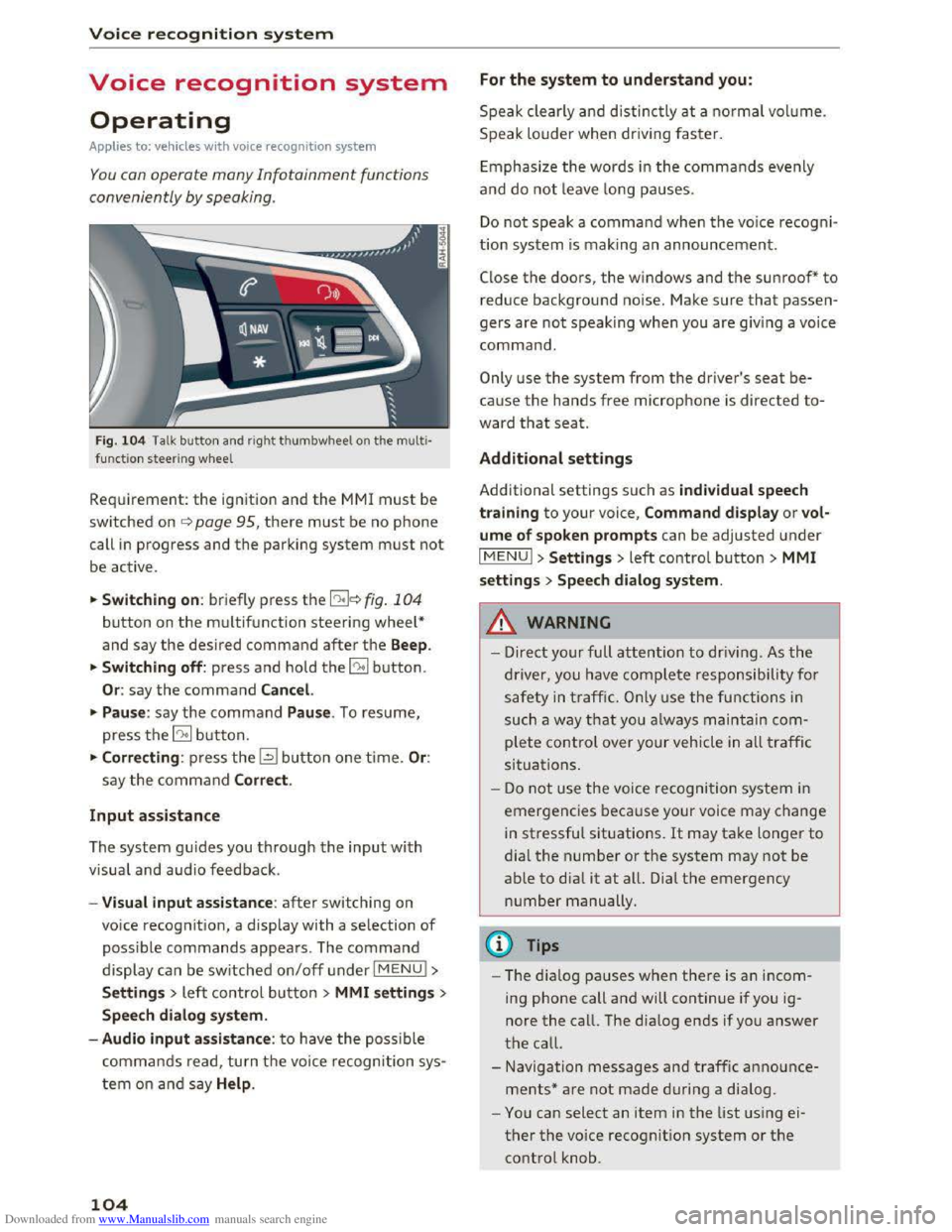
Fig. 10 4 Talk button and right thumbwheel on th e multi·
functi o n steer ing whee l
Requirement: the ignition and the MM! must be
switched on i::> page 95, there must be no phone
call in progress and the parking system must not
be active .
.. S
witching on: briefly press the 12!]c:> fig . 104
button on the multifunction steering wheel*
and say the desired command after the Beep.
..
Switching off: press and hold the 5:1 b utton.
Or : say the command Cancel.
.. Pause: say the command Pause . To resume,
press the 10°1 b utton.
.. Corre cting: press the~ button one time. Or:
say the command Correct.
Input assistance
The system gu ides you through the input with
visual
and audio feedback.
- Visual
input assistance: after switching on
voice
recognition, a display with a selection of
possible commands appears. The command
display can be switched on/off under I MENU!>
S ettings> left control bu tton > MMI settings>
Speech dialog system.
- Audio
input assistance: to have the possible
commands read, turn t h e voice recognition sys
tem on a nd say Help .
104
For the system to understand you:
Speak clearly and distinc tly at a normal vol ume.
Speak louder when driving faster.
E
mphasiz e the words in the commands evenly
and do not leave long pauses.
Do not speak a command when the voice recogni ·
tion system is making an announcement.
Close the doors, the windows and the sunroof* to
reduce background noise. Make sure that passen
gers are not speaking when you are giving a voice
command.
Only use the system from the driver's seat be
cause the hands free microphone is directed to·
ward that seat.
Additional settings
Additional settings such as individual speech
tra ining to your voice, Command display or v ol
ume of spoken prompts can be adjusted under
IMENUI >Settings> left control button> MMI
settings > Speech dialog system .
.&. WARNING
- Direct your full attention to driv ing . As the
driver, you have complete responsibility for
safety in traffic. O nly use the functions in
such a way th
at yo u always maintain com
plete control over your vehicle in all traffic
situations.
-
Do not use the voice recognition system in
emergencies beca use your voice may change
in stressful situations. It may take longer to
dial the number or the system may not be
able to dia l it at all. Dial th e emergency
number manually.
@Tips
- The dia log pauses when ther e is an incom
ing phone call and will continue if you ig
nore the call. The dialog ends if you answer
the call.
- Navigation messages and traffic announce·
ments* are not made during a dialog.
-
You can select an item in the list using ei
ther the voice recognition system or the
control knob.
Page 205 of 322
Downloaded from www.Manualslib.com manuals search engine system will not be impaired and that discarded
components do not cause injury or pollute the
environment.
A WARNING
Improper care, servicing and repair proce
dures can increase the risk of personal injury
and death by preventing an airbag from de
ploying when needed or deploying an airbag
unexpectedly:
- 1
-Never cover, obstruct, or change the steer
ing wheel horn pad or airbag cover or the in
strument panel or modify them in any way.
- Never
attach any objects such as cup holders
or telephone mountings to the surfaces cov
ering
the airbag units.
- For cleaning
the horn pad or instrument
panel, use only a soft, dry cloth or one mois
tened with plain water. Solvents or cleaners
could damage the airbag cover or change
the stiffness or strength of the material so
that the airbag cannot deploy and protect
properly.
- Never repair,
adjust, or change any parts of
the airbag system.
-All work on the steering wheel, instrument
panel, front seats or electrical system (in
cluding
the installation of audio equipment,
cellular telephones and CB radios, etc.)
must be performed by a qualified technician
who has the training and special equipment
necessary.
- For any work on
the airbag system, we
strongly recommend that you see your au
thorized Audi dealer or qualified workshop.
- Never modify
the front bumper or parts of
the vehicle body.
- Always
make sure that the side airbag can
inflate without interference:
- Never install
seat covers or replacement
upholstery over the front seatbacks that
have not been specifically approved by
Audi.
- Never
use additional seat cushions that
cover the areas where the side airbags in
flate.
Airbag system
-Damage to the original seat covers or to
the seam in the area of the side airbag
module must always be repaired immedi
ately by an authorized Audi dealer.
-The airbag system can deploy only once. Af
ter an airbag has been deployed, it must be
replaced with new replacement parts de
signed and approved especially for your
Audi
model version. Replacement of com
plete airbag systems or airbag components
must be performed by qualified workshops
only. Make sure that any airbag service ac
tion is
entered in your Audi Warranty &
Maintenance booklet under AIRBAG RE
PLACEMENT RECORD.
-For safety reasons in severe accidents, the
alternator and starter are separated from
the vehicle battery with a pyrotechnic circuit
interrupter.
-Work on the pyrotechnic circuit interrupt
er must only be performed by a qualified
technicians who have
the experience, in
formation and special tools necessary to
perform the work safely.
-
If the vehicle or the circuit interrupter is
scrapped, all applicable safety precautions
must be followed.
@ For the sake of the environment
Undeployed airbag modules and pretension
ers might be classified as Perchlorate Materi
al -special handling may apply, see
www.dtsc.ca.gov/hazardouswaste/perchlo
rate. When the vehicle or parts of the re
straint system including airbag modules and
safety belts with pretensioners are scrapped,
all applicable laws and regulations must be
observed. Your authorized Audi dealer is fa
miliar
with these requirements and we recom
mend that you have your dealer perform this
service for you.
Other things that can affect Advanced
Airbag performance
Changing the vehicle's suspension system can
change the way that the Advanced Airbag System
performs in a crash. For example, using tire-rim ..,.
203
Page 206 of 322
Downloaded from www.Manualslib.com manuals search engine Airbag system
combinations not approved by Audi, lowering the
vehicle, changing the stiffness of the suspension,
including the springs, suspension struts, shock
absorbers etc. can change the forces that are
measured by the airbag sensors and sent to the
electronic control unit. Some suspension changes
can, for example, increase the force levels meas
ured by the sensors and make the airbag system
deploy in crashes in which it would not deploy if
the changes had not been made. Other kinds of
changes may reduce the force levels measured by
the sensors and prevent the airbag from deploy
ing when it should.
_&. WARNING
Changing the vehicle's suspension including
use
of unapproved tire-rim combinations can
change Advanced Airbag performance and in
crease the risk of serious personal injury in a
crash.
-Never install suspension components that
do not have the same performance charac
teristics as the components originally instal
led on your vehicle.
- Never use tire-rim
combinations that have
not been approved by Audi.
Knee airbags
Description of knee airbags
The knee airbag system can provide supplemen
tal protection to properly restrained front
seat
occupants.
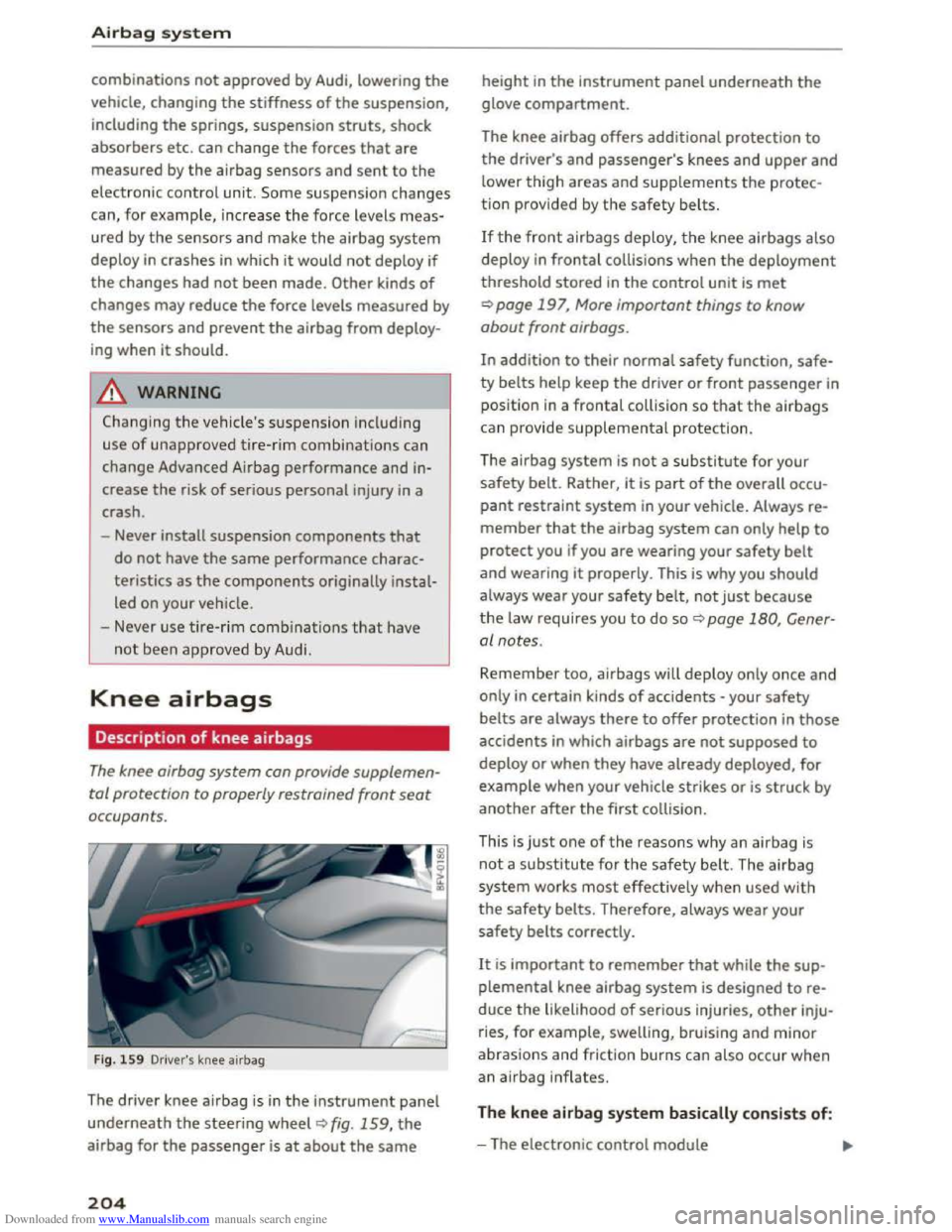
Fig. 159 Driver's knee airbag
The driver knee airbag is in the instrument panel
underneath the steering wheel Q fig. 159, the
airbag for the passenger is at about the same
204
height in the instrument panel underneath the
glove compartment.
The knee airbag offers additional protection to
the driver's and passenger's knees and upper and
lower thigh areas and supplements the protec
tion provided by the safety belts.
If the front airbags deploy, the knee airbags also
deploy
in frontal collisions when the deployment
threshold stored in the control unit is met
Qpage 197, More important things to know
about front airbags.
In addition to their normal safety function, safe
ty belts help keep the driver or front passenger in
position in a frontal collision so that the airbags
can provide
supplemental protection.
The airbag system is not a substitute for your
safety belt. Rather, it is part of the overall occu
pant restraint system in your vehicle. Always re
member that the airbag system can only help to
protect you if you are wearing your safety belt
and wearing it properly. This is why you should
always wear your safety belt, not just be ca use
t h e law requires you
to do so~ page 180, Gener
al notes .
Remember too, airbags will deploy only once and
only in certain kinds of accidents -your safety
belts are always there to offer protection in those
accidents in which airbags are not supposed to
deploy or when they have already deployed, for
example when your vehicle strikes or is struck by
another after the first collision.
This
is just one of the reasons why an airbag is
not a substitute for the safety belt. The airbag
system works most effectively when used with
the safety belts. Therefore, always wear your
safety belts correctly.
It is important to remember that while the sup
plemental knee airbag system is designed to re
duce the likelihood of serious injuries, other inju
ries, for example, swelling, bruising and minor
abrasions and friction burns can also occur when
an airbag inflates.
The knee airbag system basically consists of:
-The electronic control module .,.
Page 216 of 322
Downloaded from www.Manualslib.com manuals search engine Child safety
208 as applicable at the time your vehicle was
manufactured.
The Advanced Airbag system in your vehicle has
been certified to meet the "low-risk" require
ments for 3-and 6-year old children on the pas
senger side and small adults on the driver side.
The low risk deployment criteria are intended to
reduce the risk of injury through interaction with
the airbag that can occur, for example, by being
too close to the steering wheel and instrument
panel when the airbag inflates. In addition, the
system has been certified to comply with the
"suppression" requirements of the Safety Stand
ard, to turn off the front airbag for infants up to
12 months who are restrained on the front pas
senger seat in child restraints that are listed in
the Standard.
Even though your vehicle is equipped with an Ad
vanced Airbag
system, all children, especially
those 12 years and younger, should always ride
in the back seat properly restrained for their age
and size. The airbag on the passenger side makes
the front seat a potentially dangerous place for a
child
to ride. The front seat is not the safest place
for a child
in a forward-facing child safety seat. It
can be a very dangerous place for an infant or a
larger child in a rearward-facing seat.
The vehicle's Advanced Airbag System has a ca
pacitive
passenger detection system in the front
passenger seat cushion that can detect the pres
ence of a baby or a child in a ch ild restraint sys
tem on this seat.
The capacitiv e passenger detection system regis
ters the changes that resul t in an electrical field
when a ch ild , a child restraint, and a baby blanket
are on the front passenger seat. The change in
the measured capacitance due to the presence of
a child, a child restraint, and a baby blanket on
the front passenger seat is related to the child
restraint system resting on the seat. The meas
ured capacitance of a child restraint system var
ies
depending on the type of system and specific
make and model.
The electrical capacitance of the various types,
makes, and models of child restraints specified
by
the U.S.National Highway Traffic Safety Ad-
214
ministration (NHTSA) in the relevant safety
standard are stored in the Advanced Airbag Sys
tem control unit together with the capacitances
typical of infants and a 1-year old child. When a
child
restraint is used on the front passenger
seat with a typical 1 year-old infant, the Ad
vanced Airbag
System compares the capacitance
measured by the capacitive passenger detection
system with the data stored in the electronic con
trol unit.
Child restraints and Advanced front airbag
system
Regardless of the child restraint that you use,
make sure that it has been certified to meet Unit
ed States Federal Motor Vehicle Safety Standards
and ha s been certified by its manufacture r for
use with a n airbag. Always be sur e that the child
restraint is properly installed at one of the rear
seating positions. If in exceptional circumstances
you must use it on the front passenger seat, care
fully
read all of the information on child safety
and Advanced Airbags and heed all of the appli
cable WARNINGS. Make certain that the child
and child restraint are correctly recognized by the
capacitive passenger detection system in the
front passenger seat, that the front passenger
airbag is turned off, and that the airbag status is
always correctly si
gnaled by the PASSENGER AI R
BAG OFF light.
Many types and models of child restraints have
been available over the years, new models are in
troduced regularly incorporating new and im
proved
designs a nd older models are taken out of
production. Child restraints are not standardized .
Child
restraints of the same type typically have
different weights and sizes and different "foot
pr ints", the size and shape of the bottom of the
child restraint that sits on the seat, when they
are installed on a vehicle seat. These differences
make it virtually impossible to certify compliance
with the requirements for advanced airbags with
each
and every child restraint that has ever been
sold in the past or will be sold over the course of
the useful life of your vehicle.
For
this reason, the United States Nat ional High
way Traffic
Safety Administration has published a ..,_
Page 257 of 322
Downloaded from www.Manualslib.com manuals search engine Rim
means a metal support for a tire
or a tire and tube assembly upon
which the tire beads are seated.
Rim diameter
means nominal diameter of the
bead seat. If you change your
wheel size, you will have to pur
chase new tires to match the new
rim diameter.
Rim size designation
means rim diameter and width.
Rim width
means nominal distance between
rim flanges.
Sidewall
means that portion of a tire be
tween the tread and bead.
Speed rating (letter code)
means the speed at which a tire is
designed to be driven for extend
ed periods of time. The ratings
range from 93 mph (150 km/h)
to 186 mph (298 km/h) 9 table
on page 251. You may not find
this information on all tires be
cause it is not required by law.
The
speed rating letter code,
where applicable, i s molded on
the tire sidewall and indicates the
Wheels
maximum permissible road
speeds 9 .&. in Winter tires on
page 265.
T ire pressure monitoring
system *
means a system that detects
when one or more of a vehicle's
tires are underinflated and illumi
nates a low tire pressure warning
telltale.
Tread
means that portion of a tire that
comes into contact with the road.
Tr ead separation
means pulling away of the tread
from the tire carcass.
Treadwear indicators (TWI)
means the projections within the
principal grooves designed to give
a visual indication
of the degrees
of wear of the tread. See
9 page 259, Treadwear indicator
for more information on measur
ing tire wear.
Uniform Tire Quality Grading
is a tire information system devel
oped by the United States Nation
a l Highway Traffic
Safety Admin
istration (NHTSA) that is designed
to help buyers make relative
255
..
Page 263 of 322
Downloaded from www.Manualslib.com manuals search engine the risk of an accident. Read
and follow
the important safe
ty precautions
inc:::> page 262,
Tires and vehicle Load Limits.
-The tire must flex more if the
tire pressure is too Low or if
the vehicle speed or Load are
too high. This heats the tire up
too much . This increases
the
risk of an accident because it
can cause the tire to burst and
result
in Loss of vehicle con
trol.
- Incorrect tire pressure
in
creases tire wear and has a
negative effect on driving and
Tire pressure table
Please note that the information
contained
in the following table
was correct at the time of print
ing , and
the information is sub
ject to change. If there are differ
ences between this information
and
the tire pressures specified
on
the Label on the driver's side B
pillar, always follow the specifica
tion on
the B-pillar Label
~page 260, fig. 194.
Wheels
braking behavior, which in
creases the risk of an accident.
CD Note
Replace Lost valve caps to re
duce
the risk of damage to the
tire valves.
Tire pressure
that is too Low in
creases fuel consumption.
(0 Tips
Audi recommends using the
tire pressure specified for a
normal
Load c:::> table on
page
262 or for a full Load
when the vehicle is partially
loaded.
Make sure
that the tire designa
tion on your tire matches
the des
ignation on
the tire pressure Label
and the tire pressure table.
The following
table Lists recom
mended tire pressures
in cold
tires according
to the Load and
the size of the tires installed . ...
261
Page 270 of 322
Downloaded from www.Manualslib.com manuals search engine Wheels
installation of replacement or alternate tires or
wheels on the vehicle that prevent the TPM S
from functioning properly. Always check the
TPMS malfunction telltale after replacing one or
more ti
res or whee ls on your veh icle to ensure
that the replacement or alternate tires and
wheels
allow the TPMS to conti nue to functi on
p roper ly .
If the Tire Pressure Monitoring System
indicator appears
The tire pressure indicator in the instrument
cluster informs you if the tire pressure is too low
or
if there is a system malfunction.
Using the ABS sensors, th e tire p ressure monitor
i n g
system compares the tire tread circumfer
ence and vibra tion char
acteristi cs of the individ u
al tires.
If the pressure changes in one or more
tires,
this i s indicated in the Infotainment system
d isp lay
with an ind icator light RI and a message .
If only one tire is affected , the location of that
tire will be ind icated.
The tire pressures must be stored in the Infotain
ment system again each time the pressu res
change (switching between partial and full load
pressure) or
after changing or replacing a tire on
your veh icle ¢ page 269. The tire pressure moni
toring system only monitors the tire pressure you
have stored. Refe r
to the tire pressure label for
the recommended tire pressure for your veh icl e
¢page260, fig.195.
Tire tread circumference and vibration character
istics
can change and cause a tire pressure warn
i n g if:
-
the tire p ressure in one or more tires is too low.
-
the tire has structural damage .
-
the tire was replaced or the tire pressure was
changed and
it was not stored¢ page 269.
-the spare tire* is installed .
Indicator lights
RI-Loss of pressure in at l east one tire ¢,&.
Check
t h e tires and rep lace or r epair if necessary.
Check/correct
the p ressures of all four tires and
store
the pressure again in the Infotainment sys
tem ¢ page 269.
268
ffim (T ire Pressure Mon itoring System) Tire
pressure: malfunction!
See owner's manual -if
m appears after switching on the ignition or
while driving and then the RI indicator light in
the instrument cluster also starts to blink for
about one minute and then stays on permanent
ly, there
is a system malfunction . T ry to store the
cor rect tire p ressures ¢ page 269. If the indica
tor light does turn off or turns on again after a
sho
rt per iod of time, d rive to an authori zed Aud i
dealer or
authorized Audi Servi ce Facility immedi
ate ly
to have the ma lfunction corrected .
.&. WARNING
-If the tire pressure indicator appears in the
display, reduce your speed immediately and
avoid any hard steering or brak ing maneu
vers.
Stop as soon as poss ible and check the
tires and
their pressure .
- The driver is responsible
for maintain ing the
correct tire pressures . You must check the
tire pressures regularly .
-
Under certain condit ions (such as a sporty
driving style, wi
nter condit ions or unpaved
roads), the pressure
monitor indica tor may
be delayed.
-
Do not use run-flat tires on your vehicle . Us
ing them when not perm itted can lead to
veh icle damage or accidents.
(D Tips
- The tire pressure monitoring system can al
so stop working when there
is an ESC mal
func tion.
-
Usi ng snow chains may result in a system
ma lfunction .
- The
tires wit h the identification "AO" or
"RO" ¢ page 2 5 7 have been matched with
your Audi tire pressu re monitor ing system .
We rec om mend that you use these tires.
Page 271 of 322
Downloaded from www.Manualslib.com manuals search engine Storing tire pressures
If the tire pressure changes or a tire is replaced,
it must be confirmed in the Infotainment sys
tem .
.,. Make sure before storing that the tire pressures
of all four tires meet the specified values and
are adapted to the load~ page 258 .
.,. Switch on the ignition .
.,. Select in the I nfo tainment system: the I MENU I
button > Vehicle > left control bu tton > Service
& checks > Tire pressure monitor.
(D Tips
Do not store the tire pressures if snow chains
are installed .
Wheels
269
Page 280 of 322
Downloaded from www.Manualslib.com manuals search engine Emergency assista nce
-If you have a flat tire, move a safe distance
off the road. Turn off the engine, turn the
emergency flashers on and use other warn
ing devices to alert other motorists.
-Make sure that passengers wait in a safe
place away from the vehicle and well away
from the road and traffic.
-
To help prevent the vehicle from moving
suddenly and possibly slipping off the jack,
always fully
set the parking brake and block
the wheel diagonally opposite the wheel be
ing changed. When one front wheel is lifted
off the ground, placing the Automatic
Transmission in P (Park) will not prevent the
vehicle from moving.
- Before you
change a wheel, be sure the
ground is level and firm. If necessary, use a
sturdy board under the jack.
- Always
store the veh icle tool k it, the jack
and the replaced tire in the luggage com
partment¢ page 176.
Changing a wheel
When you change a wheel, follow the sequence
described
below step-by-step and in exactly that
order .
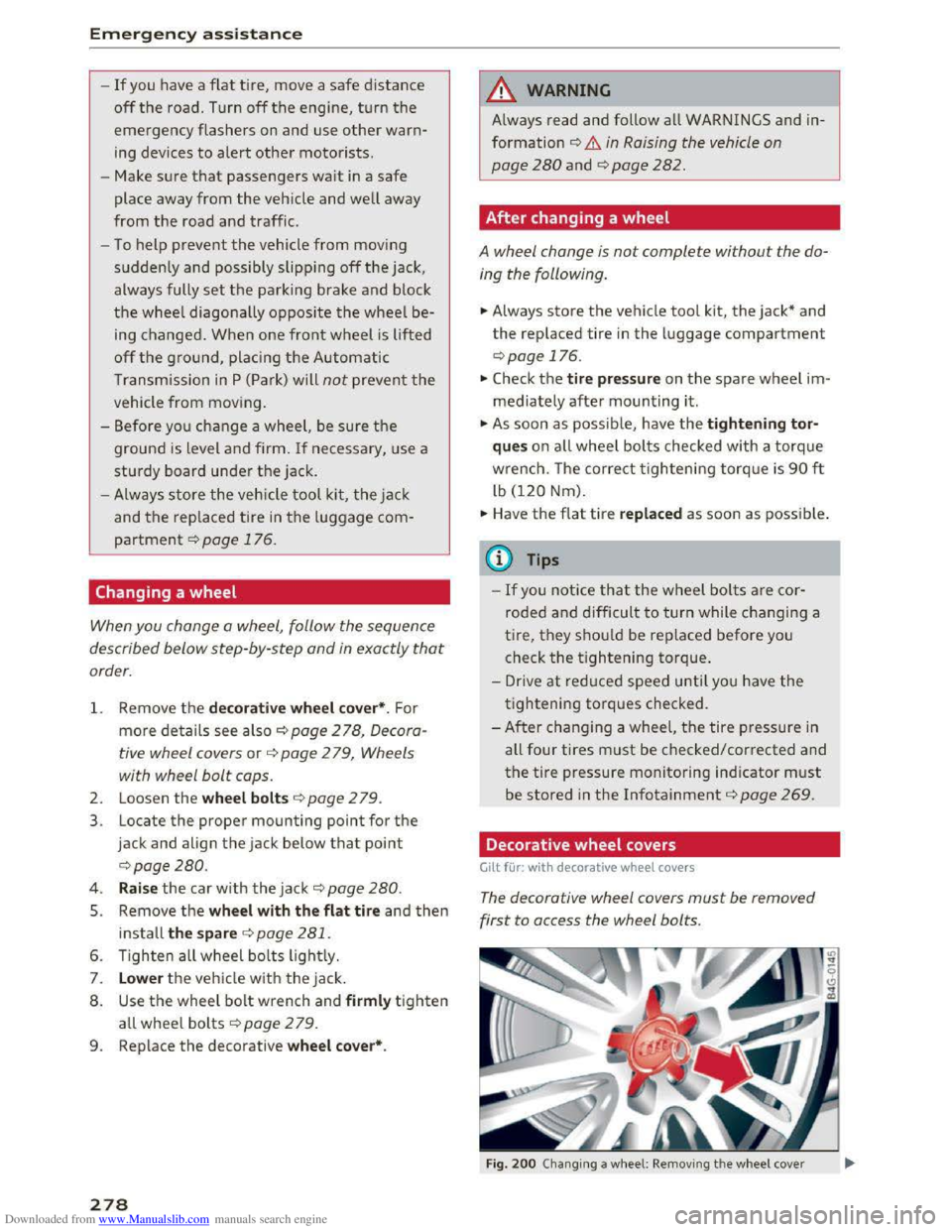
1. Remove the decorative wheel co ver*. For
more de tails see also¢ page 2 78, Decora
tive wheel covers or c::> page 2 79, Wheels
with wheel bolt caps.
2. Loosen the wheel bolts ¢page 2 79.
3. Locate the proper mounting point for the
jack and align the jack below that point
c::>page280.
4. Raise the car with the jack c::> page 280.
5. Remove the wheel with the flat tire and then
install the s pare ¢ page 281.
6. Tighten all wheel bolts lightly.
7.
Lower the veh icle with the jack .
8. Use the wheel bolt wrench and firml y tighten
all wheel bolts ¢page 279.
9. Replace the decorative wheel cover*.
278
A WARNING
Always read and follow all WARNINGS and in
formation c::> .& in Raising the vehicle on
page
280 and c::>page 282.
After changing a wheel
A wheel change is not complete without the do
ing the following.
.. Always store the vehicle tool kit, the jack* and
the replaced tire in the luggage compartment
c::>page 176.
.. Check the tire pressu re on the spare wheel im
mediately after mounting it.
.,. As soon as possib le, have the tightening tor
que s on all wheel bolts checked with a torque
wrench. The correct tightening torque is 90 ft
lb (120 Nm).
.. Have the flat t ire replac ed as soon as possible .
(0 Tips
-If you notice tha t the wheel bolts are cor
roded and difficult to turn while changing a
t ire,
they s hou ld be replaced before you
check
the tightening torque.
- Drive
at reduced speed unti l yo u have the
tightening torques checked.
-
After changing a wheel, the tire pressure in
all four tires must be checked/corrected and
the tire pressure monitoring indicator must
be stored in the Infotainment c::> page 269.
Decorative wheel covers
Gilt for: with decorative wheel covers
The decorative wheel covers must be removed
first to access the wheel bolts.
Fig. 200 Changing a w heel: Removing th e w heel cover
Page 282 of 322
Downloaded from www.Manualslib.com manuals search engine Emergency assistance
car to keep your balance and take care not
to slip.
Raising the vehicle
The vehicle must be li~ed w ith the jock first be
fore the wheel can be removed.
-fi·--
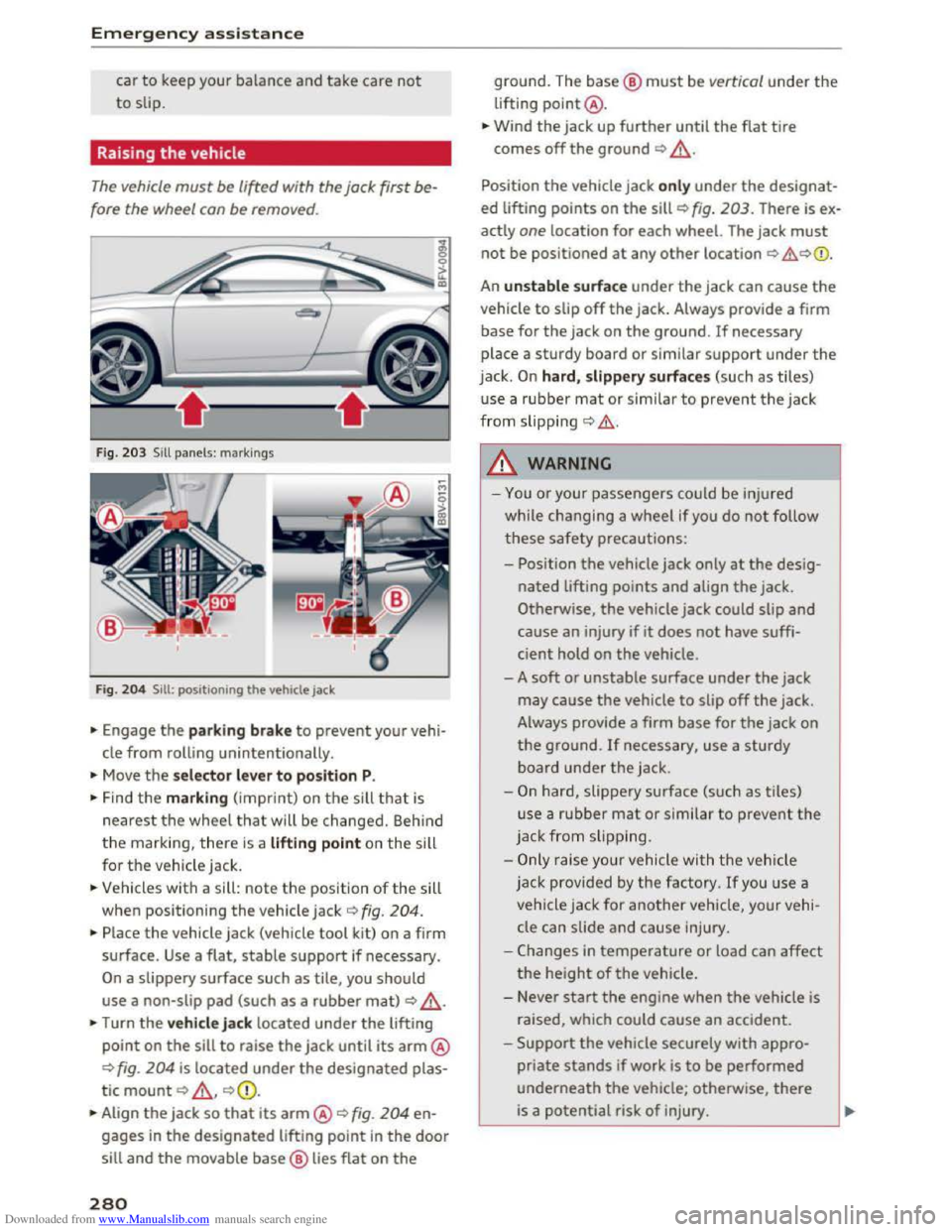
Fig. 203 Sill panels: markings
Fig.
204 Sill : po sitioning th e ve hicl e jack
... Engage the parking brake to prevent your vehi
cle from rolling unintentionally.
... Move the selector lever to position P.
... Find the marking (imprint) on the sill that is
nearest the wheel that will be changed. Behind
the marking, there is a lifting point on the sill
for
the vehicle jack.
... Vehicles with a sill: note the position of the sill
when positioning
the vehicle jack o fig. 204.
... Place the vehicle jack (vehicle tool kit) on a firm
surface.
Use a flat, stable support if necessary.
On a slippery surface such as tile, you should
use a non-slip pad (such as a rubber mat) o _&.
... Turn the vehicle jack located under the lifting
point on the sill to raise the jack until its arm@
c:> fig. 204 is located under the designated plas
tic
mount c:> _&, c:>Q).
... Align the jack so that its arm@o fig. 204 en
gages in the designated lifting point in the door
sill and the movable base@ lies flat on the
280
ground. The base@ must be vertical under the
lifting point@ .
... Wind the jack up further until the flat tire
comes off the ground c:> _&.
Position the vehicle jack only under the designat
ed lifting points on the sill c:> fig. 203. There is ex
actly
one location for each wheel. The jack must
not be positioned at any other location c:> .&,c:>Q).
An unstable surface under the jack can cause the
vehicle to slip off the jack. Always provide a firm
base for the jack on the ground. If necessary
place a
sturdy board or similar support under the
jack. On hard, slippery surfaces (such as tiles)
u
se a rubber mat or similar to prevent the jack
from slipping c:> .&..
A WARNING
- I
-You or your passengers could be injured
while changing a
wheel if you do not follow
these safety precautions:
- Position
the vehicle jack only at the desig
nated lifting points and align the jack.
Otherwise,
the vehicle jack could slip and
cause an injury if it does not have suffi
cient hold on the vehicle.
- A
soft or unstable surface under the jack
may cause the vehicle to slip off the jack .
Always provide a firm
base for the jack on
the ground. If necessary, use a sturdy
board under the jack .
-
On hard, slippery surface (such as tiles)
use a
rubber mat or similar to prevent the
jack
from s lipp ing.
-
Only rais e your vehicle with the vehicle
jack provided by
the factory. If you use a
vehicle jack for
another vehicle, your vehi
cle can slide
and cause injury .
- Changes
in temperature or load can affect
the height of the vehicle.
- Never
start the engine when the vehicle is
raised, which could
cause an accident .
-
Support the vehicle securely with appro
priate stands if work is to be performed
underneath the vehicle; otherwise, there
is a potential risk of injury.