change wheel AUDI TT COUPE 2016 Owner's Manual
[x] Cancel search | Manufacturer: AUDI, Model Year: 2016, Model line: TT COUPE, Model: AUDI TT COUPE 2016Pages: 322, PDF Size: 52.86 MB
Page 283 of 322
Downloaded from www.Manualslib.com manuals search engine ..... N
G: CX)
.....
"' U"I
.....
"' .....
-To help prevent injury to yourself and your
passengers:
-Do not raise the vehicle until you are sure
the jack is securely engaged.
-Passengers must not remain in the vehicle
when it is jacked up.
- Make
sure that passengers wait in a safe
place away from the vehicle and well away
from
the road and traffic.
- Make
sure jack position is correct, adjust
as necessary and then continue to raise
the jack.
- Changes
in temperature or load can affect
the height of the vehicle.
CD Note
Do not lift the vehicle by the sill. Position the
vehicle jack only at the designated lifting
points on the sill. Otherwise, your vehicle will
be damaged.
Taking the wheel off/installing the spare
Follow these instructions step-by-step for chang
ing the wheel.
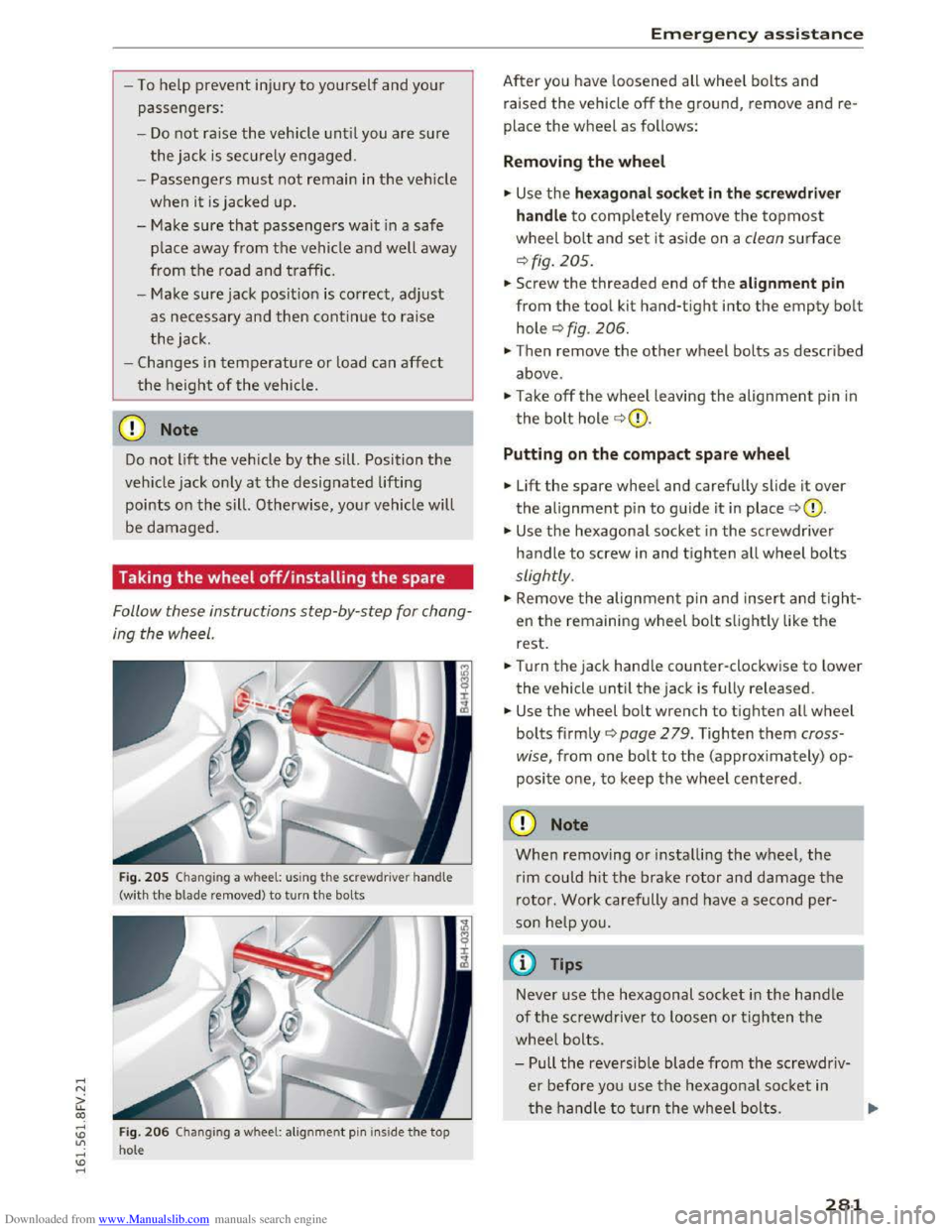
Fig. 205 Chang ing a wheel: using the screwdr ive r handle
(with
the b lade remo ved) to turn the bolts
Fig. 206 Changing a wheel: alignme nt pin inside the top
hole
Emergency assistance
After you have loosened all wheel bolts and
raised
the vehicle off the ground, remove and re
place
the wheel as follows:
Removing the wheel
.... Use the hexagonal socket in the screwdriver
handle
to completely remove the topmost
wheel bolt and set it aside on a clean surface
¢fig. 205.
.... Screw the threaded end of the alignment pin
from the tool kit hand-tight into the empty bolt
hole ¢fig. 206.
.,. Then remove the other wheel bolts as described
above .
.,. Take off the wheel leaving the alignment pin in
the bolt hole ~CD.
Putting on the compact spare wheel
... Lift the spare wheel and carefully slide it over
the alignment pin to guide it in place ¢(0.
... Use the hexagonal socket in the screwdriver
handle to screw in and tighten all wheel bolts
slightly .
.,. Remove the alignment pin and insert and tight
en the remaining wheel bolt slightly like the
rest .
.... Turn the jack handle counter-clockwise to lower
the vehicle until the jack is fully released .
.... Use the wheel bolt wrench to tighten all wheel
bolts firmly ¢ page 2 79. Tighten them cross
wise,
from one bolt to the (approximately) op
posite one, to keep the wheel centered.
CD Note
When removing or installing the wheel, the
rim could hit the brake rotor and damage the
rotor. Work carefully and have a second per
son help you.
@ Tips
Never use the hexagonal socket in the handle
of the screwdriver to loosen or tighten the
wheel bolts.
-Pull the reversible blade from the screwdriv
er before you use the hexagonal socket in
the handle to turn the wheel bolts.
281
Page 284 of 322
Downloaded from www.Manualslib.com manuals search engine Emergency assistance
-When mounting tires with unidirectional
tread design
make su re the tread pattern is
pointed the r ight way¢ page 282.
- The wheel bolts should be clean and easy to
turn .
Check for dirt and corros ion on th e
mating surfaces of both
the wheel and the
hub. Remove all dirt from these surfaces be
fore remounting t h e wheel.
Tires with unidirectional tread design
Tires with unidirectional tread design must be
mounted with their tread pattern pointed in the
right direction.
Using a spare tire with a tread pattern
intended for use in a specific direction
When using a spare tire with a tread pattern in
tended for use in a spec ific direction, please note
the following:
- The direct ion of
rotation is marked by an arrow
o n
the side of the tire.
-If the spare tire has to be installed in the incor
rect direction, use the spare tire only tempora
rily since the tire will not be able to achieve its
optimum performance charact
eristics wit h re
gard to aqu aplaning, noise and wear.
-
We r ecommend that you pay particular atten
tion to this fact during wet weathe r and that
you ad just your speed to match road condi
tions.
- Replace
the flat tire with a new one and have it
i ns talle d on
your ve hicl e as soon as possibl e to
resto re the han dling adv antages of a unidire c
tio nal tire.
Notes on wheel changing
Please read the info rmation ¢ page 257 if you
are goi
ng to use a spare tire which is different
from
the tires on your vehicle.
Afte r you change a tire:
-Check the tire pressure on the spare immedi
ately after installation.
-
Have the wheel bolt tightening torque
checked with a torque wrench as
soon as pos-
282
sible by your authorized Audi dealer or a
qualified service station.
- With
steel and alloy wheel rims, the wheel
bolts are correctly tightened at a torque of
90 ft lb (120 Nm).
- If you notice
that the wheel bolts are corroded
and difficult
to turn while changing a tire,
they should be replaced before you check the
tightening torque.
- Replace
the flat tire with a new one and have
it installed on your vehicle as soon as
possi
ble. Remount the wheel cover .
Until then, drive with extra care and at reduced
speeds.
8_ WARNING
- I f you are going to equip your vehicle with
tires or rims which differ from those which
were factory insta
lled, then be sure to read
t he informa tion
¢ page 257.
-Always make sure the damaged wheel or
eve n a flat tire and
the jack and tool kit are
pro per ly sec ure d
in the lu ggage compart
men t and are not loose in the passeng er
com partme nt.
- In an accident or sudde n maneuver they
could fly forw ard, in juri ng anyo ne in the v e
hicle.
-
Always s to re damaged whe el, jack and tools
s ecure ly i n t he luggage co m part ment.
Oth
erwi se, in an accid ent or sudde n m aneu ve r
t hey co
uld fly f orw ard , cau sing inju ry to pa s
sengers in the vehicle.
-
Page 312 of 322
Downloaded from www.Manualslib.com manuals search engine Index
MMI search
refer to Free text search . . . . . . . . . . 102, 161
Monitoring the Advanced Airbag System 199
Multifunction steering wheel
Button . . . . . . . . . . . . . . . . . . . . . . . . . . . . . 21
Map zoom........................... 20
Operating . . . . . . . . . . . . . . . . . . . . . . . . 20, 22
Pause . . . . . . . . . . . . . . . . . . . . . . . . . . . 21, 22
Switching displays . . . . . . . . . . . . . . . . . 20, 22
Sw itch ing tabs . . . . . . . . . . . . . . . . . . . . 20, 22
Voice guidance . . . . . . . . . . . . . . . . . . . . . . . 21
Voice recognition system . . . . . . . . . . . . . . 21
Multi Media Interface (MMI) . . . . . . . . . . . . . 95
Music collection
refer to Jukebox ..................... 151
Mute (muting) ................. 21, 22, 169
Muting (mute) ................. 21, 22, 169
myAudi . . . . . . . . . . . . . . . . . . . . . . . . . . . . . 121
Configuring Audi connect services . . . . . . 122
Finding a destination . . . . . . . . . . . . . . . . . 135
Logging in in the vehicle . . . . . . . . . . . . . . 122
PIN . . . . . . . . . . . . . . . . . . . . . . . . . . . . . . . 122
N
Natural leather care/cleaning 273
Navigation . . . . . . . . . . . . . . . . . . . . . . . . . . . 131
Audi connect . . . . . . . . . . . . . . . . . . . . . . . 136
Canceling route guidance . . . . . . . . . . . . . 136
Deleting a destination . . . . . . . . . . . . . . . . 136
Entering an address . . . . . . . . . . . . . . . . . . 132
Last destination . . . . . . . . . . . . . . . . . . . . . 132
Map . . . . . . . . . . . . . . . . . . . . . . . . 139, 141, 0
Map preview . . . . . . . . . . . . . . . . . . . . . . . . 131
MMI control panel . . . . . . . . . . . . . . . . . . . 131
MMI touc h . . . . . . . . . . . . . . . . . . . . . . . . . 131
Point of interest . . . . . . . . . . . . . . . . . . . . . 134
Search area ........................ .
Troubleshooting
.................... .
Voice recognition system
............ .
also refer to Map ................... .
Network connection (Wi-Fi)
............ .
Network selection (telephone mode)
.... .
Network settings
NHTSA
134
144
107
139
126
119
119
Contacting . . . . . . . . . . . . . . . . . . . . . . . . . 178
Notes
Audi connect
................... 121, 128
310
CD/DVD
Data protection (media drives) ........ .
Media drives
. . . . . . . . . . . . . . . . . . . . . . . .
149
149
149
Software licenses . . . . . . . . . . . . . . . . . . . . 170
Number of seats . . . . . . . . . . . . . . . . . . . . . . 180
0
Occupant seating positions . . . . . . . . . . . . . 172
Octane rating (gasoline) . . . . . . . . . . . . . . . . 231
Odometer . . . . . . . . . . . . . . . . . . . . . . . . . . . . 23
Oil
Indicator light . . . . . . . . . . . . . . . . . . . . 15, 16
also refer to Engine oil . . . . . . . . . . . 239, 240
Oil change interval . . . . . . . . . . . . . . . . . . . . 249
Oil d ipstick . . . . . . . . . . . . . . . . . . . . . . . . . . 240
On-Board-Diagnostic System (OBD)
System indicator light (MIL) . . . . . . . . . . . . 17
On-board computer . . . . . . . . . . . . . . . . . . . . 23
On-Board Diagnostic System (OBD)
Data Link Connector (DLC) . . . . . . . . . . . . . . 18
Electronic speed limiter. . . . . . . . . . . . . . . . 72
Online map . . . . . . . . . . . . . . . . . . . . . . . . . . 142
Online media . . . . . . . . . . . . . . . . . . . . . . . . . 154
Online news (Audi connect) . . . . . . . . . . . . . 123
Online services
refer to Audi connect . . . . . . . . . . . . . . . . . 121
Online traffic information (Audi connect) 143
Opening
Fuel
filler door . . . . . . . . . . . . . . . . . . . . . . 233
Hood . . . . . . . . . . . . . . . . . . . . . . . . . . . . . . 237
Windows ........................... 32
Opening/closing
with t h e central lock ing switch . . . . . . . . . . 29
with th e conven ience key. . . . . . . . . . . . . . . 28
Opening and closing
On the door lock . . . . . . . . . . . . . . . . . . . . . . 30
Opening the menu (operating) 95
Operating
Multifunction steering wheel . . . . . . . . 20, 22
Operating the MMI
Control knob . . . . . . . . . . . . . . . . . . . . . . . . 96
Control panel . . . . . . . . . . . . . . . . . . . . . . . . 95
Free text search . . . . . . . . . . . . . . . . . . . . . 102
Letter and number speller . . . . . . . . . . . . . . 99
Menus/symbols . . . . . . . . . . . . . . . . . . . . . 101
MMI touch . . . . . . . . . . . . . . . . . . . . . . . . . . 97